




Abstract
With the increasing elderly population, catering to the digital news needs of the elderly has become increasingly crucial. This study employs factor analysis to explore the requirements and challenges of elderly individuals when using mobile news applications, aiming to provide strategies and directions for age-friendly design of mobile news applications. The research first summarizes a series of key factors that influence elderly users when using mobile news applications, categorizing them into three primary factors: usability and navigation, visual presentation and readability, and interaction and touch controls. Further entropy weight analysis reveals that the usability and navigation factor holds the highest priority for improvement, followed by visual presentation and readability, and lastly, interaction and touch controls. Based on these findings, we propose a series of age-friendly design strategies, including rational interface layout, clear text and images, and user-friendly interaction controls. These strategies not only enhance the digital news experience for elderly users but also offer valuable guidance and innovation for the field of mobile application design.
Introduction
Aging has become an undeniable global challenge in today’s world. Regarding the aging population, the global percentage of individuals aged 60 and over has risen from 200 million, constituting 8% of the world’s population in the mid-20th century, to nearly 1 billion, accounting for 12%. It is projected that by 2050, this proportion will reach approximately 21%, involving around 2.1 billion individuals (Leeson, 2018). With the increasing aging population, the elderly face inevitable limitations in various aspects of life, including physical, sensory, and cognitive abilities. Furthermore, due to the significant technological advancements in the digital age, the elderly often need to overcome the challenges of the digital divide (Autry & Berge, 2011; Mitchell et al., 2019). This makes it more challenging for the elderly to adapt to and use emerging digital technologies (Hülür & Macdonald, 2020; Vasconcelos et al., 2012).
However, in the digital age, the use of new technologies is almost unavoidable, especially with smartphones becoming an indispensable tool in people’s lives (Balli et al., 2019; Jiménez-Marín & Ramos-Serrano, 2007). Many smartphone applications have become part of the daily lives of elderly individuals. There is a wealth of evidence suggesting that the use of emerging technologies is generally beneficial for the elderly, with the potential to improve their health, social interactions, and overall quality of life (Mitzner et al., 2019; Quinn et al., 2019; Schulz et al., 2015). However, the percentage of the elderly using new technology remains significantly lower than other age groups (Anderson & Perrin, 2017; Hülür & Macdonald, 2020; Mitchell et al., 2019). Those who cannot master new technology and the internet may miss out on numerous potential benefits and may feel socially marginalized (Castilla et al., 2013; Mitzner et al., 2019; Sen et al., 2022).
Therefore, it has become critically important to find out how to integrate technology into the daily lives of the elderly (Dupuy et al., 2016; Iancu & Iancu, 2020). Many products derived from information technology require age-friendly improvements, with a special focus on online news applications. Research indicates that many elderly individuals have a strong interest in digital news and mobile news applications (Census and Statistics Department, 2020; Watson, 2022). However, due to degraded physical capabilities, lack of digital skills, and negative experiences while using mobile news applications, many elderly individuals refuse to adopt them in their everyday lives. Aging is often associated with a depression in perceptual abilities (Leonard et al., 2006; Owsley et al., 2018), leading to narrowed vision, decreased visual sensitivity, and difficulties in discerning operational buttons and labels on media pages. Many news applications use small fonts and complex layouts, which can be challenging for elderly users to read. Furthermore, many news applications lack age-friendly design and accessibility features, such as screen reader support, voice-guided navigation, and text enlargement, which are essential for elderly users with vision or hearing impairments. Additionally, some news application user interfaces may be overly complex, with too many functions and options on the same interface, and key information may be scattered across multiple pages or pop-up windows, making it difficult for elderly users who are not tech-savvy or have physical disabilities to operate and find the information they need. Furthermore, mobile news applications undergo rapid version and content updates, which is a characteristic of modern multimedia. This explosion of information content and dynamic browsing can lead to news fatigue, cognitive burdens, and information overload for elderly individuals (Lindell & Mikkelsen Båge, 2023).
This tension underscores the significant demand for online news reading among the elderly, while the digital technology gap and complex interface design present obstacles to their acceptance and use. Therefore, there is an urgent need to improve mobile news application interfaces through age-friendly design to meet the needs of elderly users. While many studies have focused on the user interface experience of elderly users (S.-W. Hsiao et al., 2017) and proposed various design principles (De Carvalho et al., 2012; Ho & Tzeng, 2021; Xu, 2020; Yang & Lin, 2019; C. Zhou et al., 2022), few have comprehensively discussed the importance of these factors in the actual operation of mobile interfaces by elderly individuals. Therefore, the objective of this study is to provide improvement directions and reliable basis for age-friendly design of mobile news applications by deeply analyzing the experiential needs and interface barriers faced by elderly users in mobile news applications.
The elderly are important audiences for digital news but are also relatively vulnerable user groups. They may face physical health issues such as degraded vision and hearing, cognitive decline, and limited mobility. Therefore, any mobile application design involving elderly users must be user-centered, taking their needs and capabilities into full consideration. The underlying concept of this research is based on the theoretical framework of “User-Centered Design” (UCD), which emphasizes placing the needs and expectations of the end-users at the core of the design and development to ensure the product meets their actual requirements, delivering an outstanding user experience.
The value of this study lies in the deep analysis of the experiential needs of elderly users in mobile news applications, clearly defining the importance of different factors for the user experience of the elderly. Through factor analysis and entropy weight method, we establish weights for these factors to help designers identify priorities when improving mobile news applications. This will assist in designing more user-friendly application interfaces for the elderly, enhancing their usability, accessibility, and satisfaction, thus encouraging more elderly users to actively engage in digital news reading and mitigating the impact of the digital divide. We hope this study will provide valuable references for improving the digital literacy of elderly individuals and promoting their wider participation in the digital era of news reading, ultimately achieving a more inclusive and sustainable digital news ecosystem.
Literature Review
In the backdrop of the continuous development of aging population, the interaction interface for the elderly has become a well-researched and important area of study. Research in this field encompasses various domains, including health applications (Quinn et al., 2019), mobile games (Bonnechère et al., 2020; Cota et al., 2015), mobile social applications (Yang & Lin, 2019), e-readings (Ho & Tzeng, 2021), and more, reflecting the extensive presence and involvement of the elderly in the digital age. Studies suggest that the elderly often feel apprehensive and reluctant to use unfamiliar software (Kuerbis et al., 2017). This phenomenon is partly due to their stereotypes and lack of experience with new technology. The diversity and rapid updates of mobile news applications contribute to the long-term unfamiliarity experienced by elderly users, leading to more resistance. Additionally, elderly users may feel further helpless and fearful due to the frustrations and failures experienced during use (Iancu & Iancu, 2020; Minge et al., 2014). These issues also exist in mobile news applications usage, as many elderly users struggle to operate them and meet their reading needs, forcing them to give up using them. Therefore, special design and interface interactions should be developed to cater to the unique requirements of elderly users, rather than relying on generic designs (Chiu et al., 2016).
In the digital and mobile age, age-friendly design of mobile news applications can benefit from the experiences of age-friendly design in other digital products. Consequently, researchers have extensively explored age-friendly design for digital products and mobile applications (Tajudeen et al., 2022), providing a theoretical foundation for age-friendly design of mobile news applications.
From a macro perspective, Kuerbis et al. (2017) identified the most important factors influencing the elderly’s use of digital technology as personal factors, technological factors, and environmental factors. Another study found that key factors in the elderly’s use of mobile applications include social motivation, enjoyment motivation, fashion motivation, cognitive motivation, self-efficacy, and inertia (Yang & Lin, 2019). Moreover, Zhang et al. (2016) emphasize that age-friendly interface design should consider three dimensions: symbol familiarity, cultural familiarity, and interaction familiarity. There is also a capability model for the elderly in dealing with interactive interfaces, including perceptual ability, cognitive ability, psychomotor ability, and motor ability, primarily used for analyzing the interaction of elderly users with touchscreens (Nurgalieva et al., 2019).
In terms of specific mobile interface design, many age-related design standards and recommendations have been proposed. For example, Lin and Ho (2020) developed the Elderly Mobile User Interface Ability Assessment System (EMUIAES) based on the Elderly Mobile User Interface Ability (EMUIA) field structure, providing guidance for age-friendly interface design. Nielsen (1994) found that clear and simple graphics are more visually appealing to the elderly compared to text. Additionally, reducing touch errors and improving efficiency among the elderly can be achieved through simplifying the page-turning function, shortening mobile gestures, providing greater fault tolerance, and design aligned with user experience (Zhao, 2018). A study on the interface for smart homes for the elderly demonstrated that layouts involving vertical scrolling, simple buttons with lines, and specific-sized function keys are most suitable for elderly users (C. Zhou et al., 2022). On the other hand, designs with excessive hierarchy and complex menu switching may increase cognitive load for the elderly (Zimbardo & Ruch, 1975). Some studies also suggest that assisted designs for guiding users in page-turning gestures can reduce negative experiences for first-time users (Barnard et al., 2013; Wong et al., 2009). Methods to enhance application usability and willingness of the elderly to use applications include using easily recognizable icon menus and functions (De Barros et al., 2014; Hasegawa et al., 2005). Regarding touchscreen operation, Gao and Sun (2015) has found that elderly users tend to prefer single-finger operation over multi-finger operation. Another study indicates that in touchscreen operation, elderly users find it easier to learn dragging gestures than rotating gestures, which helps apply skills to similar gesture tasks (Mihajlov et al., 2015). Font size selection has also been a subject of study, with research suggesting that font sizes between 12 and 14 points provide the most comfortable reading experience for the elderly while maintaining static menus and minimal gesture functions (Lewis & Neider, 2017). When it comes to interface interaction, providing appropriate screen lighting and increasing the contrast between background and text are essential for the elderly’s experience (Campbell, 2015). Some research also emphasizes multimodal interfaces, incorporating hand tracking and voice interaction to assist the elderly in easier interface interactions. These methods have been applied in multimodal interfaces in Ambient Assisted Living environments (Gavril et al., 2017). These standards, principles, and recommendations hold significant value and insight for mobile news applications.
Despite the valuable insights these research findings provide into key elements of interface interaction design for the elderly, few studies have specifically focused on age-friendly design of interfaces for mobile news applications. While design elements have a degree of universality, their importance may vary significantly when applied to different types of mobile applications targeting different audience groups. Therefore, a key question arises: Are the elements of interface design for the elderly adequately considered in the context of mobile news applications, and how is the importance of these elements distributed? To address this question, this study first conducts a literature review, summarizing the key factors influencing the elderly’s use of interface interactions, as shown in Table 1. Subsequently, we consolidate and categorize the importance of these key elements in light of the characteristics of mobile news applications and the unique needs and behavioral characteristics of the elderly during their use. This approach aims to provide more targeted and specialized guidance, fostering age-friendly design for mobile news applications.
Factors Influencing the Elderly’s Use of Interface Interactions.

Research Methodology
The User-Centered Design (UCD) theory emphasizes the integration of the end-users’ requirements, expectations, and specific backgrounds into the design process of products or services. The core principles of UCD revolve around ensuring that the designed product or service effectively meets the needs of the target users, thus providing a superior user experience. In the context of designing mobile news applications, the UCD theory is particularly vital, especially when considering the usage requirements of elderly users. Elderly users may face various unique challenges, including a sense of unfamiliarity with technology, physical functional decline, and cognitive differences. Therefore, it is essential to gain an in-depth understanding of the needs of elderly users and design solutions tailored to their specific requirements to ensure the usability, comprehensibility, and user-friendliness of mobile news applications. In line with the demands of UCD theory, this study will conduct in-depth research using a combination of qualitative and quantitative research methods.
Research Framework
The overall research framework of this study, as shown in Figure 1, consists of three main stages: semi-structured interviews, questionnaire surveys, and data analysis.

The overall research framework of this study.
In the first stage, semi-structured interviews were conducted to gather qualitative data from elderly participants. These interviews aimed at understanding their opinions and requirements related to the operation of mobile news application interfaces. Subsequently, the collected data underwent a process of question extraction and consolidation, merging similar themes and issues to form a more concise and focused set of questions.
The second stage involved a questionnaire survey. This questionnaire was designed based on the questions extracted and consolidated from the interviews. It included basic demographic information, such as gender and age, as well as measurement items related to the usability of mobile news applications. Participants were required to use a Likert scale to provide quantitative ratings for these items. This stage also included data collection and data cleaning.
The final stage was the data analysis phase. This stage involved the application of statistical techniques. Factor analysis was used to explore the latent factors influencing the preferences and requirements of the elderly when using mobile news applications. Additionally, the entropy method was employed to determine the relative importance of these factors. The results of data analysis was subsequently interpretated and used as the basis for the conclusions and recommendations of this study.
Semi-Structured Interviews
Semi-structured interviews were one of the key data collection methods in this research, aimed at gaining an in-depth understanding of the needs, experiences, and opinions of the elderly when using mobile news applications. This section helped provide a detailed overview of the design, implementation, and analysis of semi-structured interviews.
Interview Design
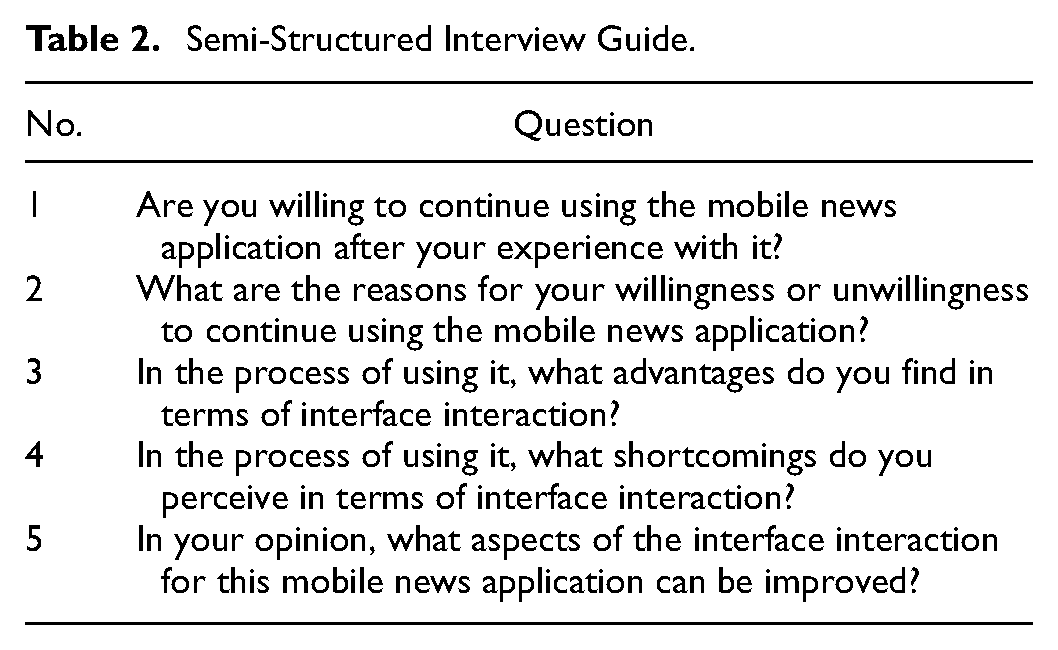
In the design of semi-structured interviews, we first clarified the research objectives, which involve understanding the challenges and requirements of the elderly when navigating mobile news application interfaces. Key steps in the design phase include the selection of target interviewees and the development of interview guide. To ensure that the interviews reflect the authentic experiences of the elderly, we purposefully selected individuals aged 60 and elder, including 5 males and 5 females, as they constitute the primary respondents for our study. We also ensured that the interviewees had a certain level of experience using mobile news applications. Even if they claimed to have some experience, we invited them to download and use several high-market-share mobile news applications to provide valuable insights into their challenges and requirements. Additionally, we designed an interview guide containing a series of open-ended questions, which were crafted to guide interviewees in expressing their viewpoints and experiences. The semi-structured interview guide is presented in Table 2 below.
Semi-Structured Interview Guide.
Interview Implementation
The implementation of semi-structured interviews involves engaging in in-depth conversations with the participants. The implementation phase comprises the following steps:
Face-to-face interviews: We conducted interviews with the participants either in person or through remote communication tools such as video calls. The choice between these methods depended on the participants’ geographic location and convenience. Face-to-face interviews provide more non-verbal information, while remote interviews allow us to interact with participants from different regions.
Guiding with open-ended questions: At the beginning of the interviews, we initiated the conversation with open-ended questions. These questions encouraged participants to freely express their opinions and share their experiences, for example: “Are you willing to continue using the mobile news application after your experience with it?” or “What are the reasons for your willingness or unwillingness to continue using this mobile news application?”
Probing and in-depth exploration: Based on the participants’ responses, we used probing questions or delved into specific topics to obtain more detailed information. This helped clarify viewpoints, uncover deeper insights, and ensure the comprehensiveness of the interviews.
Interview Analysis
After collecting interview data, we transcribed the interview recordings and analyzed the data using content analysis. The detailed steps are as follows:
Coding and categorization: We coded the verbatim transcription to categorize different themes and viewpoints. These codes and categories were based on the participants’ responses, reflecting their needs and experiences in using mobile news applications.
Pattern recognition: We invited two postgraduate students who were not involved in the study to identify recurring patterns and viewpoints, aiming to recognize commonalities and differences among different participants. This assisted in forming key findings and trends.
Data interpretation: Finally, we interpreted the results of the analysis to understand the participants’ feedback, identify their primary needs, and provide guidance for the subsequent questionnaire design and data analysis.
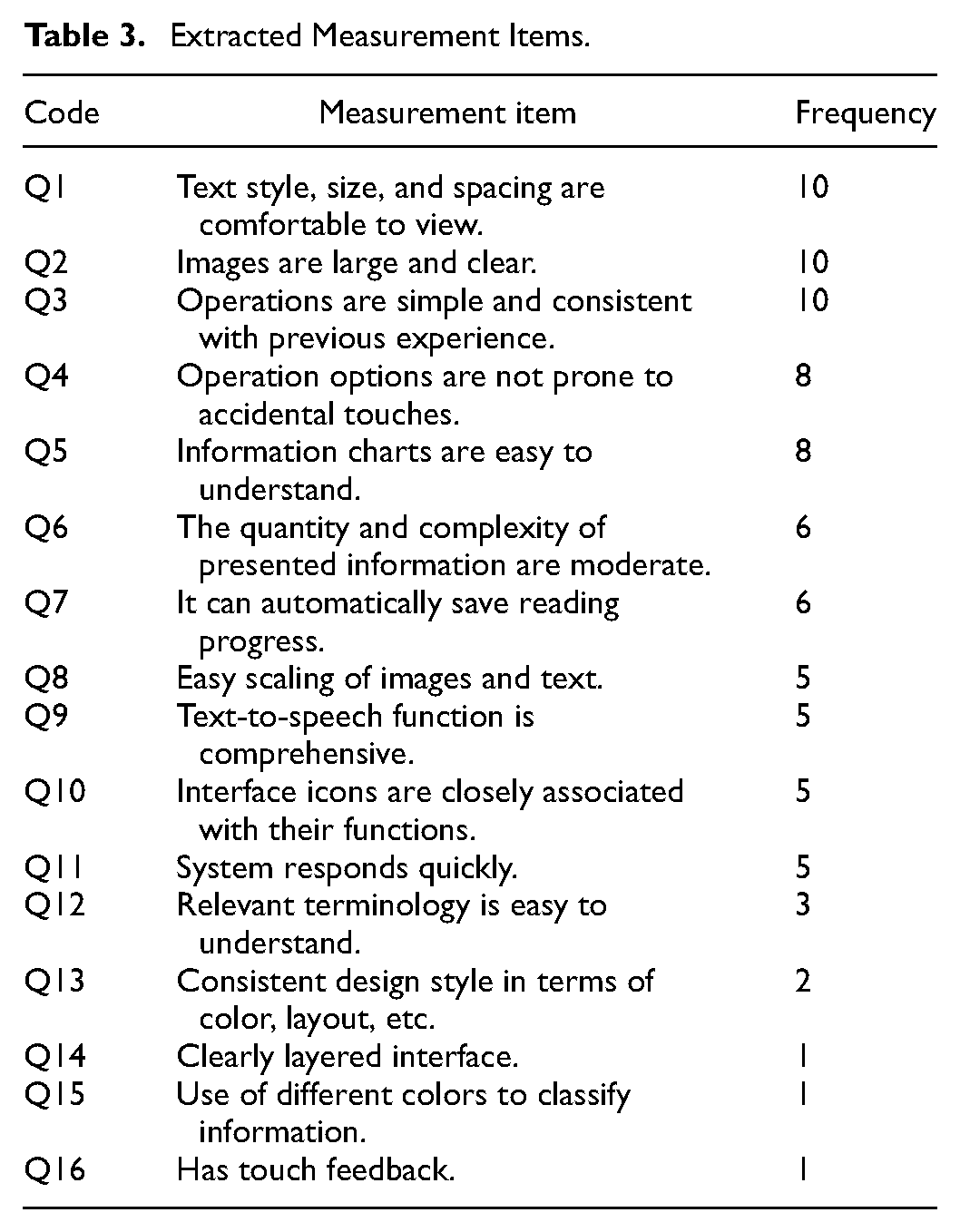
As shown in Table 3, we derived 16 key measurement items from the results and concept extraction of the semi-structured interviews. These items represent the concerns and expectations of older adults regarding the user interface of mobile news applications.
Extracted Measurement Items.
Semi-structured interviews, as one of the key methods in this study, have provided valuable insights into the needs and challenges of elderly individuals. This method has laid a solid foundation for the subsequent questionnaire design and data analysis. Its application in this study has been carried out with careful consideration of research ethics, ensuring the privacy of the participants. Moreover, all the respondents submitted the informed consent form.
Questionnaire Survey
The questionnaire survey is one of the key data collection methods in this study, aimed at obtaining quantitative data from the elderly about their use of mobile news applications. Based on the measurement items presented in Table 3, we developed the final questionnaire. The questionnaire consists of two parts: the first part includes basic demographic information about the participants (gender and age), and the second part encompasses 16 measurement items (corresponding to the items in Table 3). For instance, Table 3, Item Q1, “Text style, size, and spacing are comfortable for viewing,” corresponds to the questionnaire item Q1: “For the optimization of mobile news applications for the elderly, attention should be given to text style, size, and spacing to ensure comfortable viewing.” Each measurement item is assessed using a Likert’s 7-point scale, ranging from 1 (strongly disagree) to 7 (strongly agree).
The questionnaire was administered to elderly participants aged 60 and older using an offline survey method. Recruiting a large-scale, randomly selected sample of elderly individuals of a specific age group (60 and older) is challenging. In this study, we utilized a convenience sampling method. Convenience sampling is useful when the research aims at preliminary or exploratory studies, without the need for large-scale and complex samples, while still providing initial insights. Prior to the questionnaire survey, participants were provided with detailed information, including the study’s objectives, privacy protection, data usage, and other relevant details, to obtain informed consent. Participants were required to sign informed consent forms to ensure that they understood and agreed to participate in the study. The questionnaire was completed by 139 elderly individuals from Wuxi, China, who had experience using mobile news applications. Ineffective questionnaires, including those with repeated or missing answers, were excluded, resulting in a valid recovering rate of 89.2%. The sample size met the requirements for factor analysis (Comrey & Lee, 1992; Price, 1993). Demographic information about the participants is presented in Table 4.
Demographic Information of Respondents.

This questionnaire survey has been a critical component of the research, providing essential quantitative data to complement the qualitative insights gained from semi-structured interviews. It has enriched the understanding of the elderly population’s preferences and needs regarding mobile news applications. The collected data will be used in the subsequent data analysis phase of the study.
Data Analysis
Exploratory Factor Analysis
This study employed exploratory factor analysis to identify the underlying structure among measurement items, aiming to gain a better understanding of the preferences and opinions of the elderly regarding mobile news applications. A total of 124 valid samples were involved in the factor analysis, meeting the recommended sample size for factor analysis (Arrindell & Van der Ende, 1985; MacCallum et al., 1999).
Firstly, we conducted the Kaiser-Meyer-Olkin (KMO) test, which yielded a KMO value of 0.882, and the Bartlett’s sphericity test approximation chi-square was 1913.662, with 120 degrees of freedom (df), and a significance level of .000. These results suggest that the sample’s correlation matrix is suitable for factor analysis and support the exploration of the research questions.
In the process of factor analysis, we extracted three factors with eigenvalues of 8.796, 2.142, and 1.265, respectively. The rotated factor variances of these factors were 28.437%, 25.701%, and 22.133%, with a cumulative variance explained of 76.271%. However, we observed some item cross loading between factors when using the varimax rotation method, so we decided to optimize the results of the factor analysis by removing items Q11, Q13, and Q14 (Hair et al., 2011). The optimized KMO value was 0.857, and the Bartlett’s sphericity test approximation chi-square was 1304.127, with 78 degrees of freedom (df) and a significance level of .000. The detailed results are presented in Tables 5 and 6.
Total Variance Explained.

Table of Factor Loading After Rotation.

Additionally, we assessed the overall scale’s internal consistency through reliability test. The results indicated an excellent internal consistency among the measurement items, with a Cronbach’s α coefficient of .917 (Nunnally, 1994).
This factor analysis result has provided insights into the underlying structure of the measurement items, revealing key dimensions that influence the preferences and requirements of the elderly when using mobile news applications. The subsequent stages of data analysis were further carried out upon these findings.
Confirmatory Factor Analysis
In this study, confirmatory factor analysis was employed as a tool to assess the measurement model, ensuring the validity and discriminant validity of the measurements. The primary aim of confirmatory factor analysis was to evaluate the relationships between factors and measurement items to ensure satisfactory associations between each item and its corresponding factor. Subsequently, we calculated the Average Variance Extracted (AVE) to measure the discriminant validity of each factor. Additionally, to further assess the model’s fit, we examined the Composite Reliability (CR) values.
Table 7 summarizes the results of factor loading coefficients, indicating the strength of associations between measurement items and the respective factors. It was observed that all standardized loading coefficients exceeded 0.6 (Muilenburg & Berge, 2005; Shevlin & Miles, 1998), suggesting significant associations between measurement items and their corresponding factors. Simultaneously, AVE values exceeded 0.5 (Fornell & Larcker, 1981), and the CR values exceeded 0.8, further confirming the internal consistency of measurement items within each factor (Ahmad et al., 2016). Thus, our research findings indicate that the measurement model exhibits satisfactory convergent validity.
Analysis Results of Convergent Validity.

To assess the discriminant validity between factors, we calculated the square root of the AVE, as shown in Table 8. The values on the diagonal represent the square root of the AVE, while the other entries denote correlation coefficients. These data demonstrate that the correlation coefficients between factors are significantly lower than the square root of the AVE, signifying substantial discriminant validity between factors (Fornell & Larcker, 1981). The results of the confirmatory factor analysis reinforce the robustness of our measurement model, verifying the effectiveness and discriminant validity of the measurement items within the factors.
Analysis Results of Discriminant Validity.

Entropy Method
To determine the weights of the secondary indicators in different dimensions, this study initially calculated the weight coefficients for each dimension. These weight coefficients were normalized through the rotated variance explained ratios. Specifically, we calculated the weight coefficients for Factor 1, Factor 2, and Factor 3, which were 0.405, 0.353, and 0.242, respectively. These weight coefficients played a crucial role in the entropy method calculations.
Subsequently, we employed the entropy method to analyze the weights of the final 13 secondary indicators within each dimension.
Finally, the product of the weight coefficients for each dimension and the corresponding weight coefficients for each secondary indicator resulted in the ultimate weights for each indicator. Detailed information can be found in Tables 9 and 10.





Summary of Entropy Method Weighting Results.

Final Weighting Results.

Results and Discussion
This study confirmed three primary factors for the age-friendly improvement of news reading mobile applications through factor analysis and confirmatory factor analysis. These factors represent key experiential areas for elderly users when using mobile news applications.
Usability and Navigation
Factor 1, labeled “Usability and Navigation,” includes a set of items such as Q3 (Operations are simple and consistent with previous experience), Q5 (Information charts are easy to understand), Q6 (The quantity and complexity of presented information are moderate), Q7 (It can automatically save reading progress), Q10 (Interface icons are closely associated with their functions), and Q12 (Relevant terminology is easy to understand). This factor may be related to the cognitive decline in older adults, as cognitive abilities tend to decline with age, a phenomenon confirmed in numerous studies (Amarya et al., 2018; P. A. Boyle et al., 2017; Craik & Salthouse, 2011). Age-related cognitive decline is often observed in various aspects, including memory, learning ability, language expression, visual-spatial function, attention, and processing speed. Studies have shown that older adults with cognitive impairments face more difficulties when using smart devices (Haesner et al., 2018). Older adults typically struggle to understand the functional meaning of interface icons, leading to confusion and frustration during operations (Hara et al., 2009). Moreover, due to the decline in cognitive function, older adults perform less effectively than younger individuals in tasks requiring divided attention, as their attention capacity decreases (Akatsu et al., 2007; Braver & West, 2008; Capitani et al., 1988; Thomson et al., 2020). This cognitive function decline results in older adults performing poorly in tasks like learning and recognition. Age-related cognitive decline leads to changes in thinking patterns, which might affect the ability of older adults to navigate the interfaces of various products. Thus, cognitive function is a significant factor influencing the ability of older adults to interact with product interfaces (Freese et al., 2006; Kuerbis et al., 2017; Nembhard & Uzumeri, 2000; Westerman et al., 1995). For example, the correspondence between function keys and menus on the interface may involve spatial cognitive abilities. Users must remember combinations of hardware keys representing specific functions; when dealing with directories, they must navigate through subdirectory functions hidden within parent directories for correct operation. Older users tend to make mistakes and get stuck in complex menu items when performing tasks involving multi-level and deep-level menus (D. Freudenthal, 2001; Gerrig & Zimbardo, 2010).
For the “Usability and Navigation” factor, design strategies should focus on how to enhance the user interface and interactions of mobile news applications to make them more suitable for older users, especially those who may face challenges related to cognitive function decline. First, a simplified and consistent interface design is crucial for older users. Consistent design elements such as buttons, icons, and menu structures help reduce the learning curve and enhance user understanding of the interface. Simplicity in design reduces cognitive burden, making it easier for users to accomplish tasks. Second, information graphics should be presented in ways that are easy for older users to understand. Clear graphics and images, concise labels, and legends can reduce the complexity of information presentation and improve its comprehensibility. Moreover, applications should offer a moderate amount of information to prevent older users from feeling overwhelmed by excessive and complex information. Additionally, the function of automatically saving reading progress can reduce user anxiety, allowing them to exit the application at any time without worrying about losing their reading progress. Clear interface icons and labels are also part of the design strategy to reduce user confusion. User actions on the interface should align with their expectations, requiring clear icons and labels. Lastly, avoid using obscure terminology, provide explanatory text or hints can also help older users better understand the application’s functionality and content. It is also useful to provide training and support resources for older users to address any issues they may encounter. In summary, by considering the factors mentioned above, the goal of design strategies is to ensure that older users can easily and enjoyably use news applications, even if they may face cognitive decline.
Visual Presentation and Readability
Factor 2, labeled “Visual Presentation and Readability,” comprises items such as Q1 (Text style, size, and spacing are comfortable to view), Q2 (Images are large and clear), Q9 (Text-to-speech function is comprehensive), and Q15 (Use of different colors to classify information). The presence of this factor likely relates to the diminished visual perceptual abilities in older individuals. In older adults, visual perceptual abilities cover changes in vision, hearing, touch, and more. The four items under “Visual Presentation and Readability” mainly pertain to visual perception. Visual perception is pivotal for information acquisition (Smith, 2019). With age, the visual system experiences changes leading to potential visual decline. This decline encompasses reduced light adaptability, presbyopia onset, and potential conditions like cataracts (Leonard et al., 2006; Owsley et al., 2018). Aging causes pupils to shrink, narrowing the field of vision and diminishing incoming light. Elderly individuals need more light for normal vision, particularly in dim settings (Cota et al., 2015). Older adults’ visual systems exhibit increased glare sensitivity (A. Freudenthal, 1999). Interface designs must account for this to prevent discomfort. Moreover, older adults’ visual perception extends to color discernment. As they age, older adults might find certain color ranges less vibrant, impacting their comprehension of color coding in interfaces. Older adults can exhibit slower visual information processing (Ebaid & Crewther, 2019; Kosnik et al., 1988), diminished shape recognition, and a tendency to perceive objects as fragmented (Kline & Scialfa, 1997). Interface design should account for these factors to ensure accessibility and ease for older users.
When considering design strategies for the “Visual Presentation and Readability” factor, it’s essential to delve into the specific visual needs and challenges of older users to formulate more detailed age-friendly design strategies. Older users have unique visual experiences when using digital applications. Firstly, older users are more sensitive to text font, size, and style. Therefore, providing options for adjustable font size and style in the application is crucial. This helps older users achieve a better reading experience, especially for those dealing with vision problems like presbyopia. Additionally, using clear and legible fonts and avoiding overly elaborate text effects are essential for improving readability. To reduce visual fatigue among older users, spacing between text should be moderate, ensuring clear text layout and preventing confusion or overlap. Secondly, older users have different requirements for images and graphics. They tend to prefer large and clear images. This can be achieved by ensuring images in the application are as large and clear as possible, with adequate contrast. Providing high-contrast images can help older users differentiate elements more easily. Furthermore, complex graphics or images should be avoided as older users may have difficulty recognizing or may feel overwhelmed. Simple graphical interface elements and clear visual cues can help reduce cognitive load. In application interface design, appropriate colors is crucial to ensure sufficient contrast. Additionally, when using different colors to categorize information in the application, the brightness and saturation of colors should be high to provide clear visual cues. Providing options for adjusting background and text colors allows users to customize the application to their personal needs. Lastly, multimodal interfaces are beneficial for older users. This includes text-to-speech conversion, which can assist users who may have difficulty reading, enabling them to access information through auditory means. By comprehensively considering the factors mentioned above, design strategies aim to provide older users with a more user-friendly, readable interface for mobile news applications, even if they may experience declining visual perceptual abilities.
Interaction and Touch Control
Factor 3, named “Interaction and Touch Control,” encompasses a set of items, including Q4 (Operation options are not prone to accidental touches), Q8 (Easy scaling of images and text), and Q16 (Has touch feedback). The presence of this factor may be linked to the age-related decline in motor function among older individuals. Hand motor function plays a critical role during the interaction with product interfaces. Changes in motor function due to aging can impact the ability of older users to touch and manipulate interfaces. Age-related degradation in motor function includes muscle strength, agility, precision, coordination, joint mobility, and sensitivity. The reduction in muscle strength in older adults is associated with decreased finger sensitivity and lower control and operational accuracy (Czaja et al., 2019; Seidler & Stelmach, 1996), making it challenging to operate small buttons (Wood et al., 2005). Additionally, aging-related muscle tissue changes result in reduced strength for everyday tasks, reduced speed, and patience, along with declining sensitivity that comes with age (Hermann et al., 2012; Kawakami, 1999).
Addressing “Interaction and Touch Control” requires understanding older users’ specific motor function challenges to devise age-friendly design strategies. Older users interact differently with digital applications due to unique touch experiences. Aging typically leads to a decline in older users’ hand motor functions. Thus, application designs should incorporate larger buttons and touch areas to minimize accidental inputs. It’s recommended to prioritize single-tap or simple swipe gestures over complex multi-touch operations. Clear tactile feedback, like vibrations or sound cues, can reinforce user actions. Customizable touch sensitivity and response speed are crucial to align with users’ preferences. The application should also allow image and text resizing to accommodate older users’ potential visual challenges and enhance recognizability. By considering these factors, designers can cater to the varied touch and interaction needs of older users in mobile news apps, enhancing user experience.
Revised Priorities
Based on the analysis results from the entropy value method, the weights of the three latent factors among the primary indicators are 0.405 (Usability and Navigation), 0.353 (Visual Presentation and Readability), and 0.242 (Interaction and Touch Control). Therefore, when carrying out the age-friendly improvements for mobile news applications, the foremost focus should be on “Usability and Navigation,” followed by “Visual Presentation and Readability,” and lastly “Interaction and Touch Control.” These three latent factors are associated with the cognitive function decline, visual perception function decline, and motor function decline in older adults, respectively. User research should be conducted in the order of priority, and corresponding age-friendly designs should be implemented based on these research findings.
Moreover, the ultimate weight results for each indicator provide valuable insights. The indicator with the highest weight is Q6, with a weight of 0.1033. Next are Q2, Q5, Q15, and Q9, with weights of 0.0932, 0.0908, 0.0906, and 0.0900, respectively. Following those are Q8 and Q4, with weights of 0.0863 and 0.0843. Q1, Q3, and Q16 all have ultimate weights above 0.07 but below 0.08, while the remaining indicators have weights below 0.07.
Based on these results, designers can determine the priorities for improving the design of age-friendly mobile news applications according to the ultimate weights of each indicator. Give the highest priority to Q6, followed by Q2, Q5, Q15, and Q9. Then consider Q8 and Q4, and subsequently address Q1, Q3, and Q16. This approach will help ensure that improvement strategies more accurately meet the needs of older users, enhancing the usability and user satisfaction of the application.
Conclusion
This study employed factor analysis and the entropy value method to analyze the older adults’ usage of mobile news applications. The aim was to provide corresponding strategies and guidance for designing age-friendly mobile news applications, thereby meeting the information consumption needs of older adults in the digital age and enhancing their user experience. Through literature review and semi-structured interviews, key indicators that older adults care about when using mobile interfaces were identified. Factor analysis was used to summarize the dimensions of age-friendly improvements for mobile news applications, and the entropy value method was calculated to determine the weight of each improvement indicator for older adults. Based on the data analysis results, age-friendly design strategies were proposed, leading to the following conclusions:
•This study summarized and categorized three factors through factor analysis, which were named “Usability and Navigation,”“Visual Presentation and Readability,” and “Interaction and Touch Control.”
•When prioritizing strategies for age-friendly improvements in mobile news applications, “Usability and Navigation” should be the top focus, followed by “Visual Presentation and Readability,” and “Interaction and Touch Control.” This means that enhancing navigation is the primary task in improving user-friendliness and usability for older adults.
•Within the “Usability and Navigation” factor, “The quantity and complexity of presented information are moderate” was identified as the most important, followed by “Information charts are easy to understand.” In the “Visual Presentation and Readability” factor, “Images are large and clear” held the most significant weight, followed by “Use of different colors to classify information” and “Text-to-speech function is comprehensive.” In the “Interaction and Touch Control” factor, “Easy scaling of images and text” and “Operation options are not prone to accidental touches” had relatively high weights. Therefore, based on these ultimate weights, priority areas for age-friendly design improvements can be determined.
In conclusion, to satisfy the needs of older users, design strategies for mobile news applications should include, but not be limited to: optimizing interface layouts, simplifying navigation structures, providing clear images and text, supporting font size and style adjustments, using high contrast and clear colors, avoiding complex graphics and images, offering user-friendly touchscreen elements, reducing the probability of accidental touches, supporting gestures and voice interactions, and providing various customization options for older users.
Theoretical Contributions
This study makes multiple theoretical contributions in the field of age-friendly design, providing in-depth insights for understanding and applying the theoretical framework and practices of age-friendly design. The following are the key theoretical contributions of this study:
•Enhanced factor analysis model for age-friendly design: This study successfully identified critical factors in older adults’ use of mobile news applications, including “Usability and Navigation,”“Visual Presentation and Readability,” and “Interaction and Touch Control.” This factor analysis model provides a more specific and detailed dimension for age-friendly design, which can be used to assess and improve the older adult-friendliness of different applications.
•Emphasis on the importance of cognitive processes in older adults: Placing the “Usability and Navigation” factor at the forefront highlights the crucial role of cognitive abilities in older adults’ use of mobile news applications. This finding provides a deeper understanding for both age-friendly design theory and practice, incorporating the unique cognitive characteristics of older adults as a core consideration in the design process.
•Detailed refinement of older adult user needs: This study refines the needs of older adult users in mobile news applications, covering aspects such as interface layout, fonts, colors, interactive elements, and more. These detailed requirements help designers better meet the expectations of older users and provide a more user-friendly experience.
In summary, the theoretical contributions of this study not only expand the knowledge in the field of age-friendly design but also offer researchers and designers more information about older adults’ cognitive processes and user needs, further advancing the theory and practice of age-friendly design. This study provides better support and guidance for the user experience of older adults in the digital information age.
Practical Implications
This study holds significant practical implications in the field of age-friendly design, benefiting mobile news application developers, designers, older adult users, and society as a whole. The following are the key practical implications of this study:
•Providing more user-friendly mobile news applications for older adults: This research offers a series of age-friendly design strategies that directly benefit older adult users by providing them with more user-friendly and accessible mobile news applications, thus improving their digital experience.
•Expanding the digital product market: Age-friendly design strategies targeted at older adults help expand the digital product market. Older adults constitute a vast user population share, and their engagement in the digital realm is increasing. By addressing their needs, developers can attract more older users, expand the user base, and gain a competitive edge in the market.
•Enhancing social inclusion and quality of life: Mobile news applications are essential tools for older adults to access information and interact with society. By offering age-friendly applications, social engagement is enhanced, making it easier for older adults to participate in the digital age, ultimately improving their quality of life.
•Boosting the competitiveness of digital products: Design strategies that consider the needs of older users not only help increase market share but also enhance the competitiveness of digital products. Companies can consolidate their position in the increasingly competitive digital market through age-friendly design.
•Promoting social sustainability: By focusing on the digital experiences of older adults, this research promotes social sustainability. With the growing population of older adults, meeting their needs becomes a part of societal responsibility. Age-friendly design aids in better integrating older adults into society, thereby enhancing social sustainability.
Research Limitations and Future Research
While this study provides valuable insights and strategies for age-friendly design of mobile news applications, there are several research limitations that suggest areas for improvement and further exploration in future research. The study’s participants were primarily from specific regions, which may introduce regional biases. Future research can expand the sample variety to include a wider range of geographical and cultural backgrounds to obtain more comprehensive data. Additionally, this research mainly focused on older adult users, and future research could compare users across different age groups to better understand the impact of age-friendly design on intergenerational differences.
Furthermore, while this study proposed a series of age-friendly design strategies, it did not validate the practical effectiveness of these strategies. Future research can conduct user interface testing and evaluation to confirm the real-world effects of these strategies.
In terms of future research recommendations, this study suggests that future research could adopt interdisciplinary approaches, including cognitive psychology, human-computer interaction, sociology, and more, to gain a more comprehensive understanding of older adults’ digital experiences and needs. Digital experiences for older adults are dynamic, and future research could engage in longer-term observation and tracking to understand changes in needs across different age groups and usage habits. Attention to the diversity within the older adult population, including gender, culture, abilities, and other differences, is essential to ensure that age-friendly design is inclusive of various older users.
To sum up, despite the limitations of this study, it provides a valuable foundation for future research. It is hoped that future research will delve deeper into the digital experiences and needs of older adults, providing further insights and guidance for the field of age-friendly design.
Footnotes
Acknowledgements
Thanks to School of Design at Jiangnan University for providing related support.
Jie Zhang is also affiliated to Faculty of Applied Sciences, Macao Polytechnic University, Macao SAR, China.
Declaration of Conflicting Interests
The author(s) declared no potential conflicts of interest with respect to the research, authorship, and/or publication of this article.
Funding
The author(s) received no financial support for the research, authorship, and/or publication of this article.
Ethics Statement for Animal and Human Studies
This article does not apply to the ethics statement for animal and human studies

Data Availability Statement
The datasets generated during and/or analyzed during the current study are available from the corresponding author on reasonable request.