




Abstract
Sharing a medical image visually annotated by a region of interest with a remotely located specialist for consultation is a good practice. It may, however, require a special-purpose (and most likely expensive) system to send and view them, which is an unfeasible solution in developing countries such as Vietnam. In this study, we design and implement interoperable methods based on the HL7 Clinical Document Architecture and the eXtensible Markup Language Stylesheet Language for Transformation standards to seamlessly exchange and visually present the shapes of regions of interest using web browsers. We also propose a new integration architecture for a Clinical Document Architecture generator that enables embedding of regions of interest and simultaneous auto-generation of corresponding style sheets. Using the Clinical Document Architecture document and style sheet, a sender can transmit clinical documents and medical images together with coordinate values of regions of interest to recipients. Recipients can easily view the documents and display embedded regions of interest by rendering them in their web browser of choice.
Introduction
In the field of exchanging clinical information and medical images, the Picture Archiving and Communication System (PACS) is a well-known professional program. It is a medical imaging technology that has many benefits such as no lost images, previous image availability and comparison, and reports available with images. 1 PACS uses Digital Imaging and Communications in Medicine (DICOM) to store and transfer images, which is a standard for handling, storing, printing, and transmitting information in medical imaging, including file format definitions and network communications protocol. 2 DICOM enables integration into PACS of scanners, servers, workstations, printers, and network hardware from multiple manufacturers. 2 Using PACS, a sender can easily transmit any digital reports and images, and it has been widely deployed by hospitals nowadays.
Despite the undeniable benefits, due to financial and infrastructural constraints, not all health-care facilities can deploy the system, including community health centers in rural areas or hospitals in developing countries. For example, although there are more than 1000 hospitals in Vietnam, only three of them (Huu Nghi Hospital, National Hospital of Pediatrics, and Cho Ray Hospital) have deployed PACS as of November 2010. 3
This research focuses on how to support health-care providers who do not have professional software so that they can exchange and render clinical documents and regions of interest (ROIs), using only web browsers of choice. More specifically, objectives of this research are as follows:
- Embedding the related information of ROIs into a Clinical Document Architecture (CDA) document via the improved CDA generator.
- Rendering both CDA contents and the shapes of ROIs to a recipient by using a preferred web browser.
Therefore, we propose a method that allows a physician to point out ROIs on a medical image and then embed the related information concerning the ROIs into a CDA document. We also implement an eXtensible Markup Language Stylesheet Language for Transformation (XSLT) style sheet that supports rendering CDA contents and the embedded shapes when the CDA document is browsed. Therefore, the CDA contents and associated shapes can be shown to a recipient via an Internet browser without requiring a special viewer.
The advantages of our approach are demonstrated in the following scenario. A physician working at a small and poorly equipped hospital has to examine a medical image of a patient. He finds an abnormal area on the image but is not able to determine what it is. He wonders if it is a malignant tumor. Therefore, the physician wants to arrange a consultation with other experts and wants to show them both the clinical document of the patient and the exact areas of concern (the ROIs) in the image. In this circumstance, a linguistic description is not the most effective method to explain the shapes and locations of the ROIs, thus cannot ensure a high level of understanding of the image at the other end, not allowing the expert to make a confident determination. By taking our approach, the physician can send the related information to an expert, and the expert can visualize the information within any web browser.
Materials and methods
In this section, we present the necessary techniques for the design in detail and explain the implementation of CDA with ROI shapes.
Medical imaging
Medical imaging is the technique used to create images of the human body for clinical purposes such as diagnosis and research. Nowadays, medical image processing has a very important role in helping physicians detect abnormal tissues in the human body and then supporting physicians in making a diagnosis. Furthermore, medical imaging is necessary for physicians in medical research and education. There are several types of medical image (modalities), such as computerized tomography (CT), radiography, magnetic resonance imaging (MRI), and nuclear medicine and ultrasound. 4
Contour extraction in medical images
Medical images are very important for radiological analysis and diagnosis. Therefore, contour extraction is a very important procedure because the output results are necessary for physicians to measure anatomical structures, recognize abnormal areas on images, and figure out the shape of a tumor.5,6 Many studies on contour extraction have been conducted and many algorithms have been implemented. For instance, using Google search with keywords “contour algorithm” + “medical image,” we obtained about 10,500 results, as on 1 June 2013.
The Clinical Document Architecture Release 2
The HL7 Clinical Document Architecture Release 2 (CDA R2) became an American National Standards Institute (ANSI)-approved standard in May 2005. 7 It is an eXtensible Markup Language (XML)-based document markup standard that specifies the structure and semantics of clinical documents, and its primary purpose is exchanging clinical documents among heterogeneous software systems. CDA R2 is also defined as a complete information object that can include text, images, sounds, and other multimedia contents. 7
A CDA document is wrapped in
The ROI
The
An integration system
The current integration system with respect to integrating some techniques in image processing with CDA Generator to embed the shapes of ROI into CDA documents can be described in brief as shown in Figure 1.
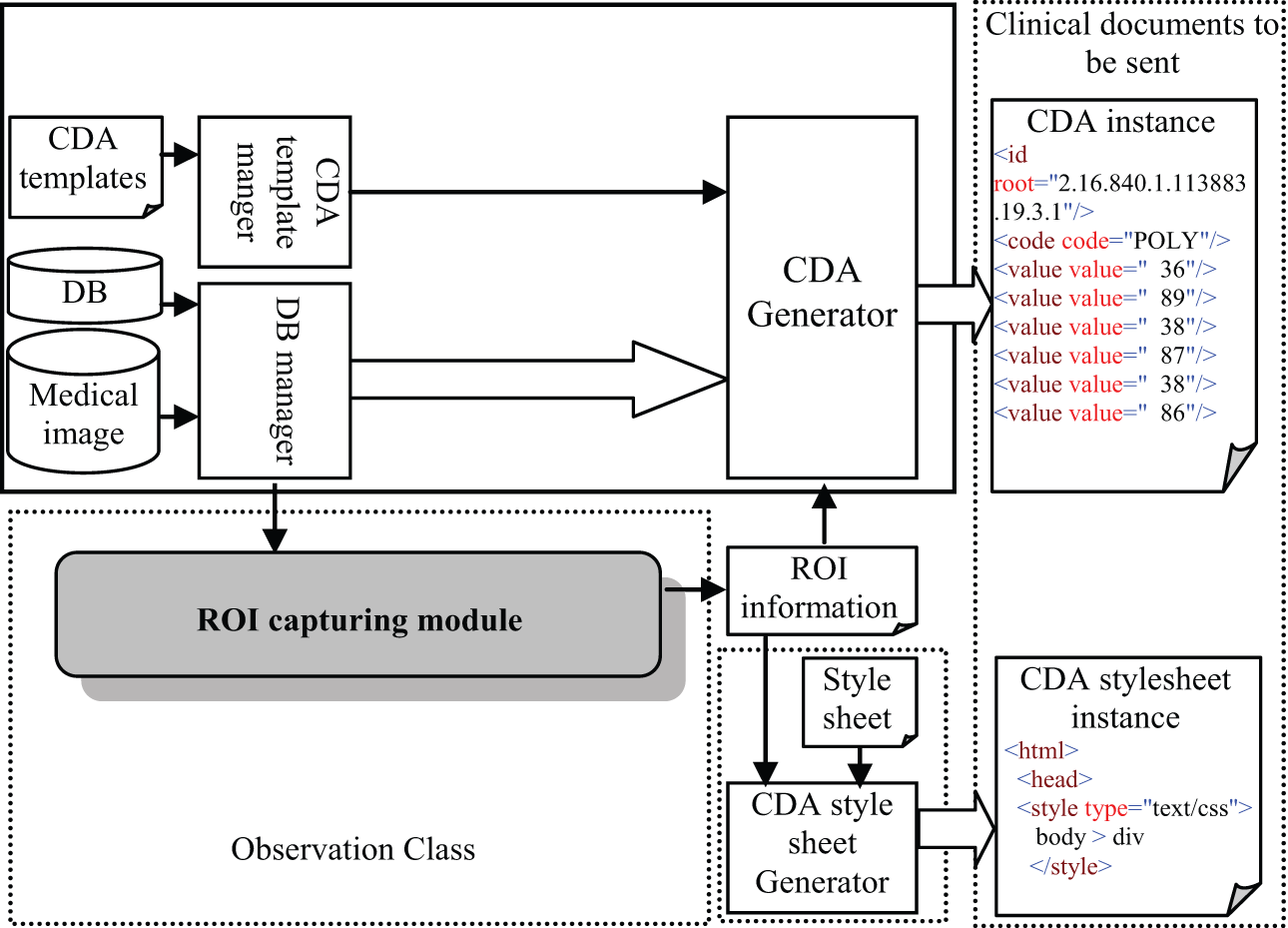
Integration system architecture.
The figure shows that there are three necessary steps to be performed in order to embed the related information concerning the shapes of ROIs into a CDA document; those steps include the following:
s1: Using a functionality of the ROI capturing module to select the ROIs and extract their shape information;
s2: Ordering the output information concerning the shapes as a logical list of integers and then saving the final result into a text file;
s3: Using the CDA Generator to create the CDA document, and then the CDA style sheet Generator will automatically create a corresponding style sheet by utilizing information from the text file.
After completing those steps, the sender will have a pair of files (the CDA document and the corresponding XSLT style sheet). Files can be sent to a recipient using any available digital communication method.
Note that the functionality of the ROI capturing module is supported by most PACS software or other professional medical image-processing software, otherwise, ROI capture could be implemented by using an available contour algorithm such as Contour-based algorithm. 8
XSLT style sheet design
As mentioned in the previous section, the XSLT style sheet is used to support the rendering of the CDA contents and the embedded shapes of ROIs. In this section, we will describe the design that satisfies the above considerations.
First, the design completely follows the syntax of eXtensible stylesheet language (XSL) and its specifications satisfy the requirements of XSL. 9 Normally, designing an XSLT style sheet can be divided into three declarative sections: file header, template section, and a template for the HyperText Markup Language (HTML) section. Therefore, our design also includes these sections, but there are five key points to be considered in the design phase with respect to rendering both CDA contents and shapes of ROIs. Those key points are depicted in Figure 2, and the role for each can be presented as follows:
An <
A block elements style for rendering the shapes must be defined by a <style> tag and must be placed within the <
An initial function that is executed after the CDA document has been loaded must be specified by the JavaScript function
The sub-function is written in JavaScript and is placed between the
A
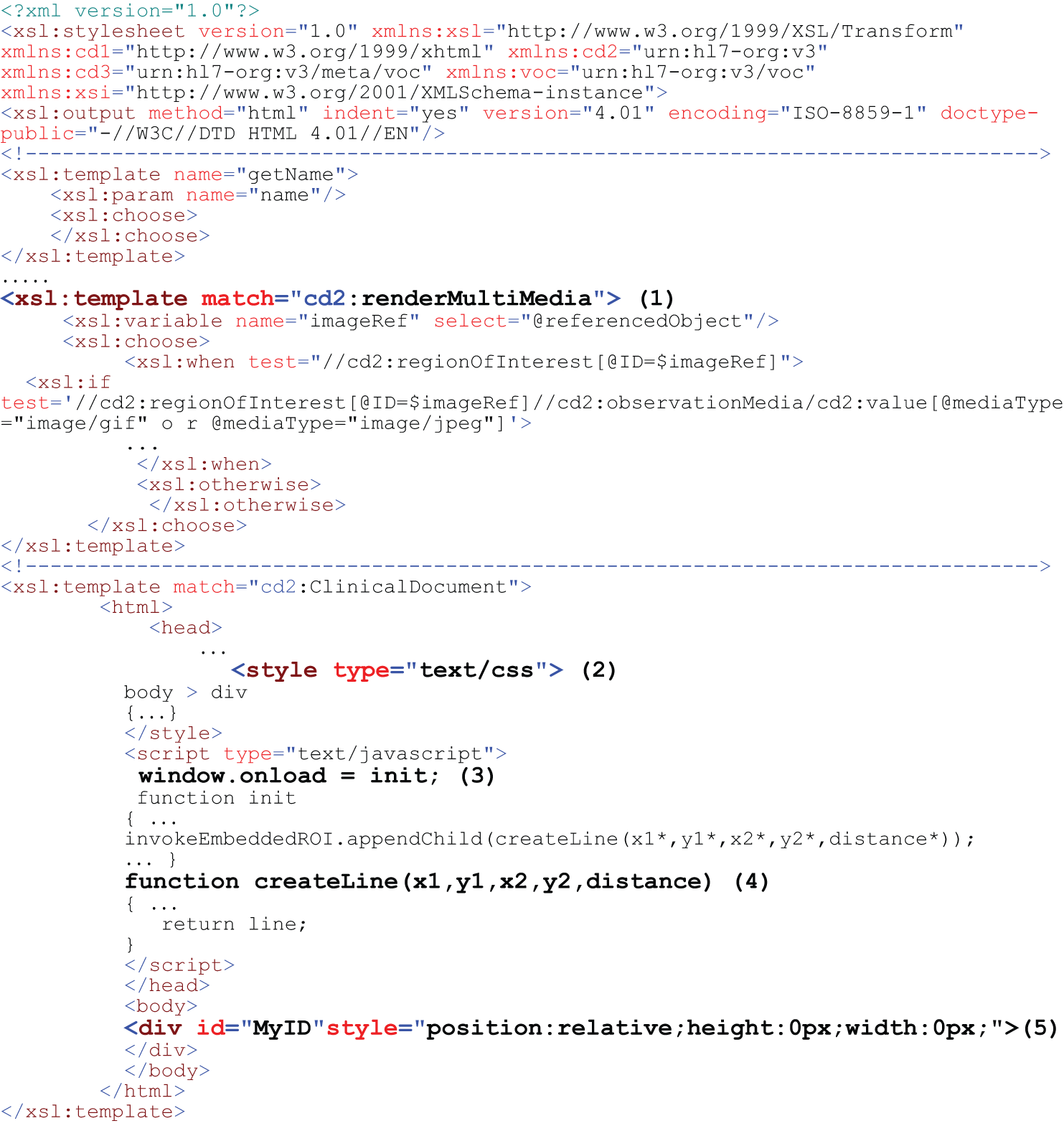
The style sheet template for rendering CDA documents with embedded ROIs and medical images.
The workflow in exchange
Figure 3 presents the workflow to exchange the clinical documents and embedded ROIs between sender and recipient when applying the integration method. Four steps are needed for the sender and two steps for the recipient.
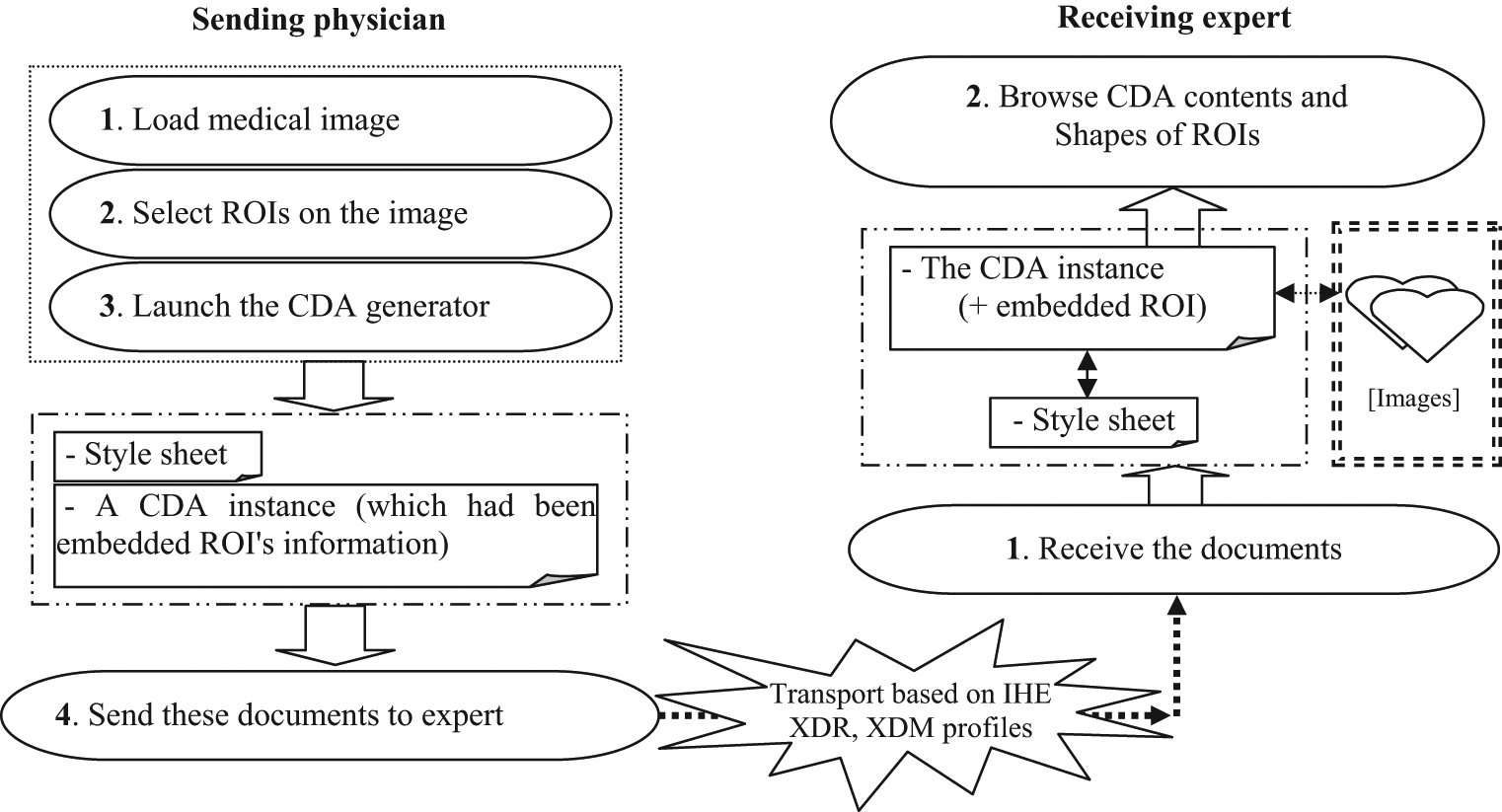
The workflow in sending and rendering clinical document.
On the sending side, when the doctor has finished performing the first three steps by using the image-processing tool and launching CDA Generator, the doctor will take the CDA document and the corresponding XSLT style sheet and will send these documents to the receiving doctor by any standard transport scheme, such as IHE XDR or XDM profiles. 10
On the receiving end, when the doctor receives the documents via, say, secure email, he or she only needs to download them into the same folder and then can browse the CDA document by using a preferred web browser.
Results
The method was used to develop an application by IHIS Lab (http://giant.knu.ac.kr) in August 2011 and is combined with CDA Generator11–14 to generate CDA documents. In this section, we report the results concerning the implementation as of December 2012.
Retrieving the related ROI information
We developed an image-processing tool to enable users to perform some image processing, such as selecting, loading, viewing, and specifying an ROI in a medical image. This tool also allows a user to control the contrast and brightness of the image, and it supports converting the image into a binary image.
Figure 4 shows the result of loading the original medical image of a lung, and Figure 5 shows the final results from the image-processing tasks. In the background of Figure 5, a duplicate binary image is displayed in a new window, and the detected contours are displayed in green, while the shapes of the ROIs are displayed by two red polygons.
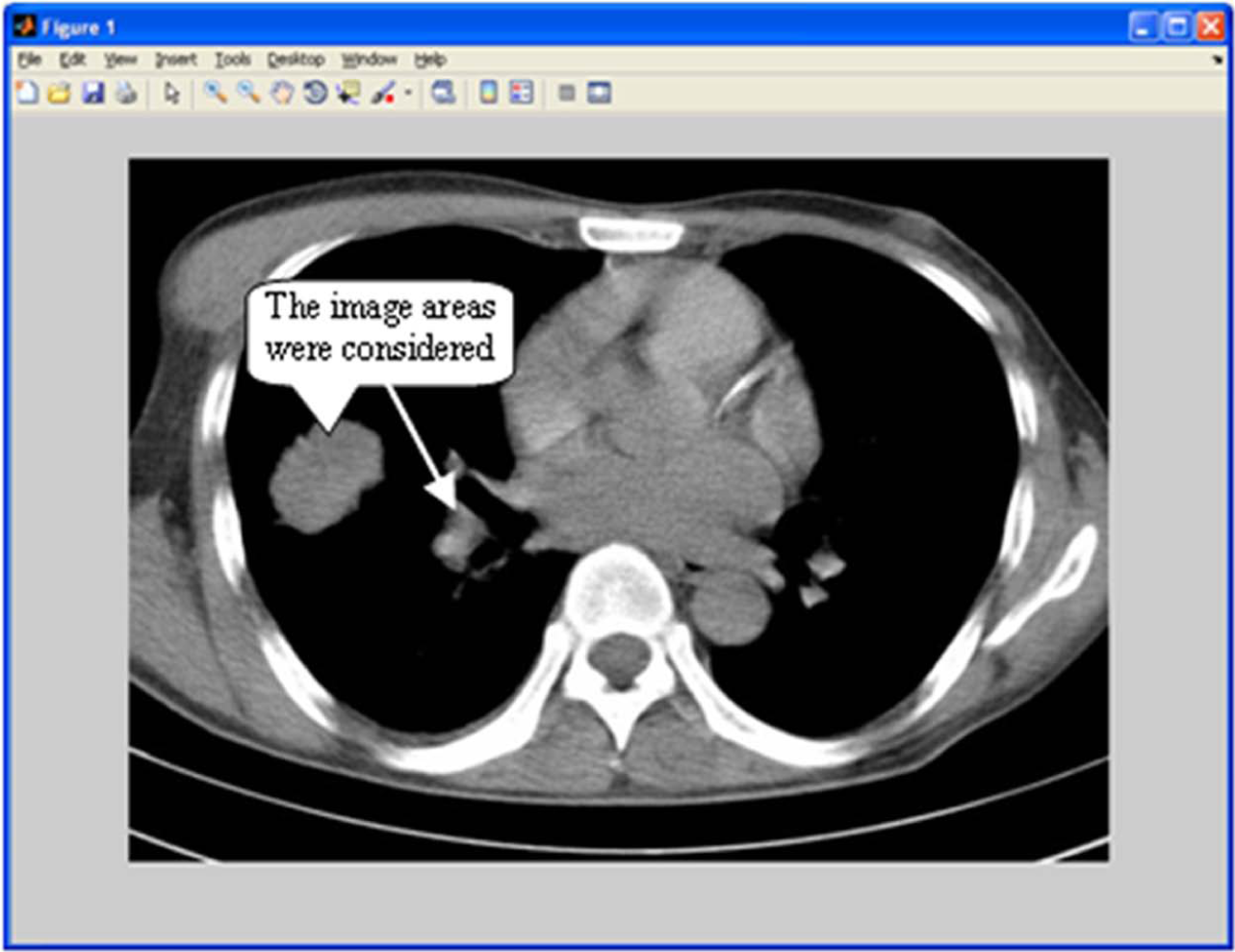
Viewing medical image.
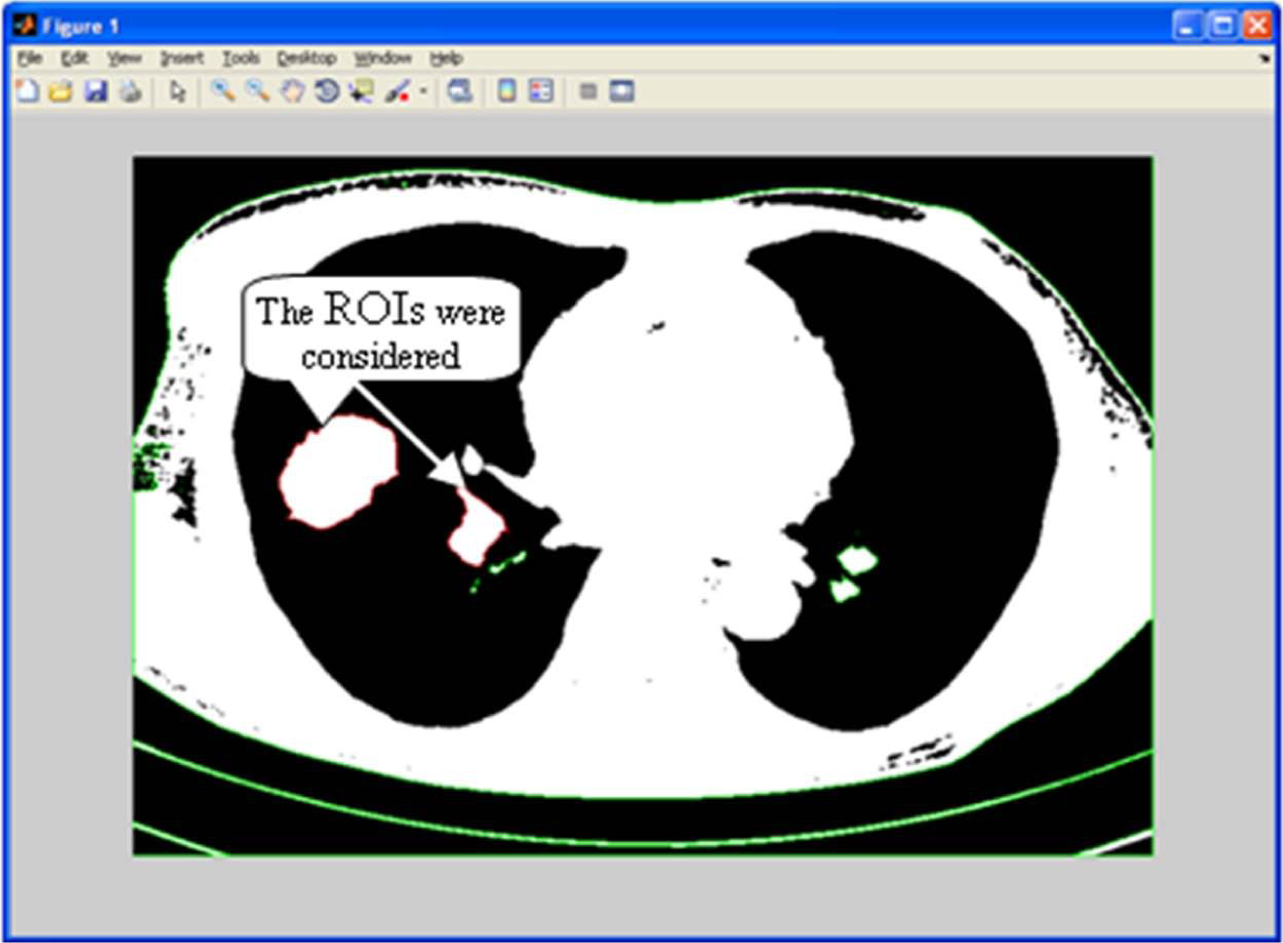
Showing the shapes of ROIs.
Note here the polygon was generated based on information of the selected contour, which had been specified by the user. Furthermore, information of the polygon is stored as a two-dimensional (2D) integer array; those operations do not change the original image; all operations are performed on a duplicate image.
Output results in XML format
As we mentioned earlier, the pixel is the unit for coordinates used to represent the shape of an ROI in CDA documents, and it is expressed as a logical list of integers. Therefore, we developed a function that supports ordering the 2D integer array following these rules, and it supports transforming the ordered array into text in XML format and then saves it to a text file. Figure 6 shows the processing result in detail.
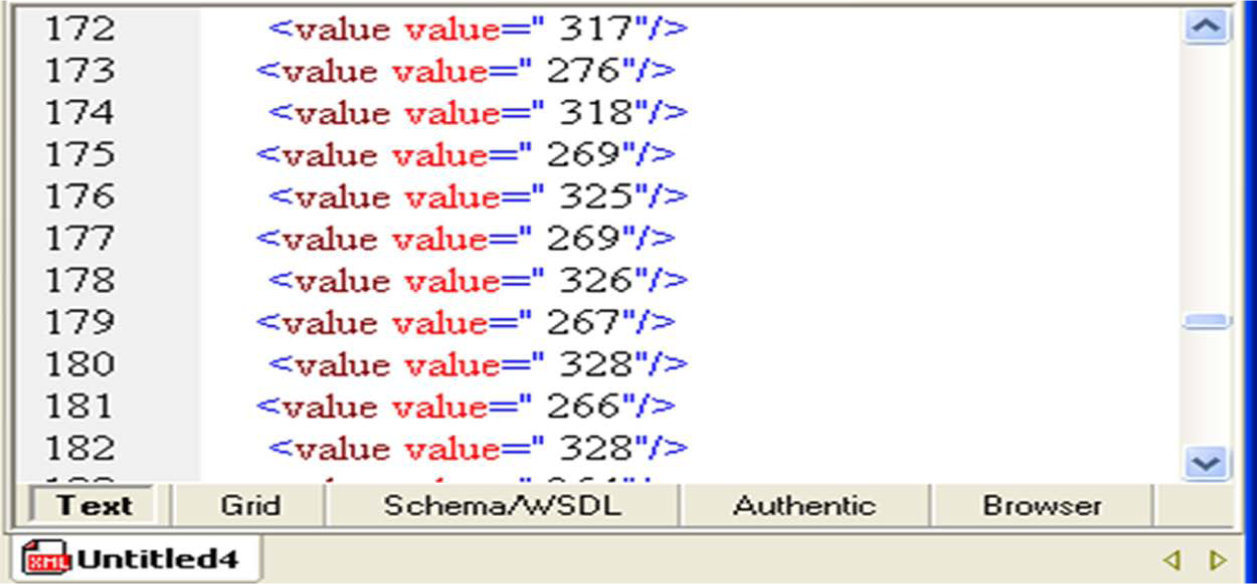
The text file contents.
Checking validation of CDA document and XSLT style sheet after embedding
In the CDA document processing cycle, the CDA Generator will utilize the text file information to embed the information based on the value of the
Then, the CDA style sheet generator extracts necessary information from the file to generate an XSLT style sheet that corresponds with the CDA document. Finally, we have a CDA document and a corresponding XSLT style sheet.
In order to check the validity of both (document and style sheet), we used a commercially available validation tool. Figure 7 shows the results of validation.
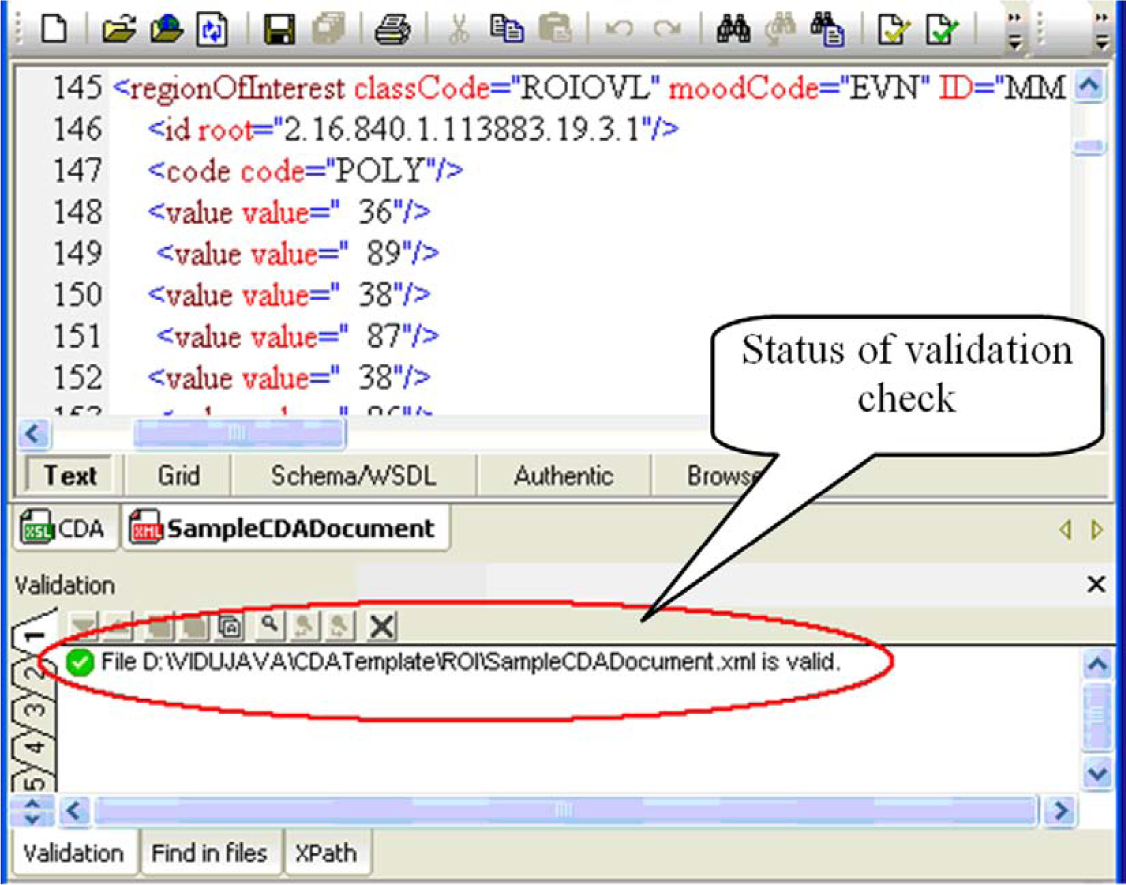
Validating a CDA document and a corresponding XSLT style sheet.
Rendering CDA contents and shapes
As mentioned in the introduction, this research aims to support the exchange of clinical documents and assist a sender in explaining to a recipient the exact ROI in a medical image. Furthermore, we also aim to devise a way to enable a recipient to easily view clinical information and to better understand the patient’s condition. We emphasize that the proposed method is as simple as possible so that it does not require the recipient to go through any extra work. Ideally, the recipient only needs to take two steps to view the CDA contents, as shown in Figure 3: (a) receiving the CDA document and corresponding style sheet via any standard transport schemes and (b) browsing the received CDA document using a web browser.
For the test, we created a fictitious CDA document that includes the patient’s personal information section, image exam section, history of present illness section, and so on. The patient provided a written consent.
We tested three browsers to see how they can render the CDA document containing ROIs: Microsoft Internet Explorer, Mozilla Firefox, and Google Chrome because they were the three most popular browsers as of December 2012. 15
Figures 8 to 10 show the rendering results of the test CDA document on Mozilla FireFox (version 3.6.3), Internet Explorer (version 8.0), and Google Chrome (build 21.0.1180.75), respectively. The original medical image and the shapes of ROIs are visually shown to recipients in the image exam section. Note that the shapes of ROIs are represented by white polygons overlaid on the original image which is kept intact so that the recipient can further process it using any other preferred software tool, if necessary.
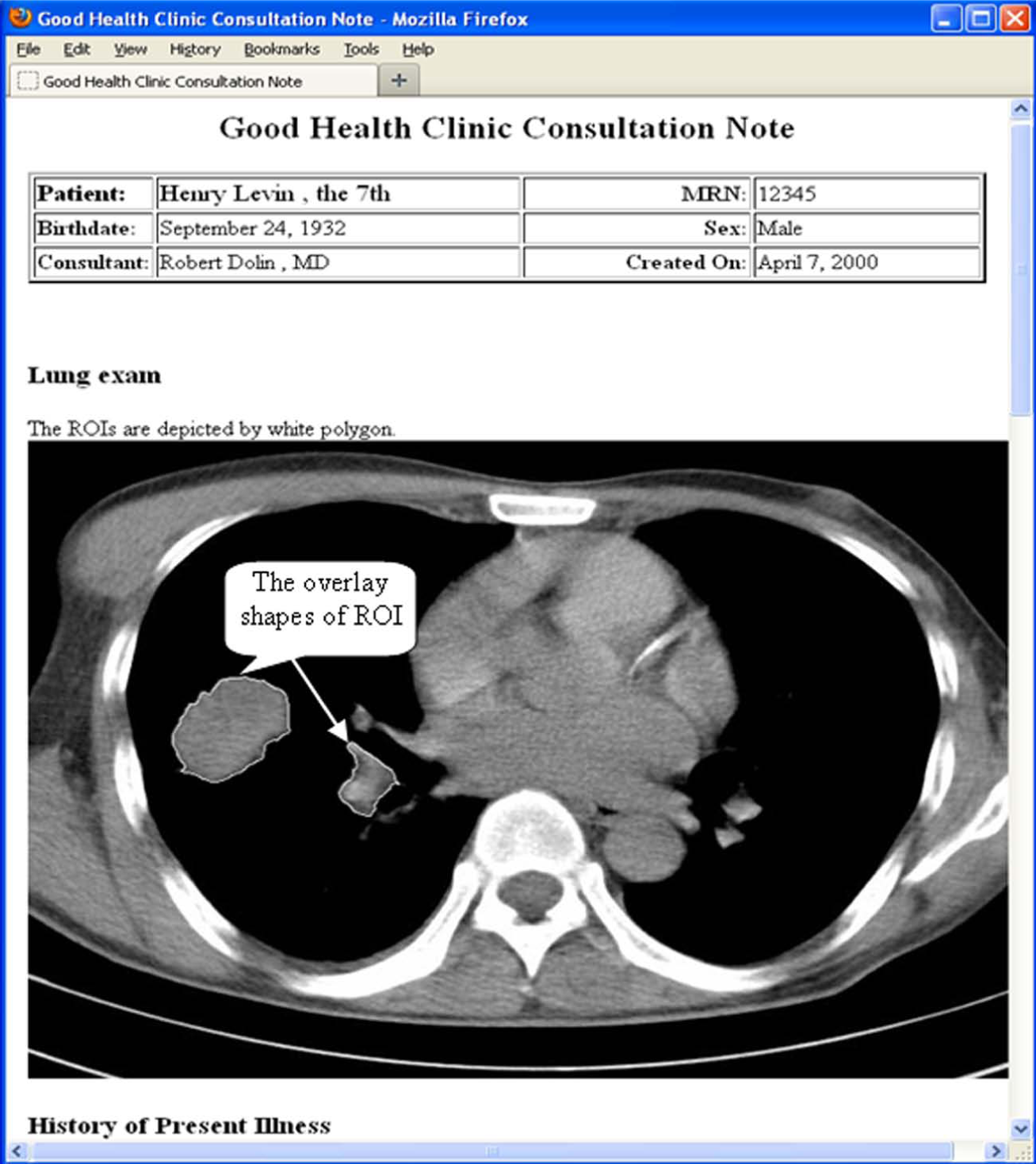
Rendering CDA document by Mozilla FireFox 3.6.3.
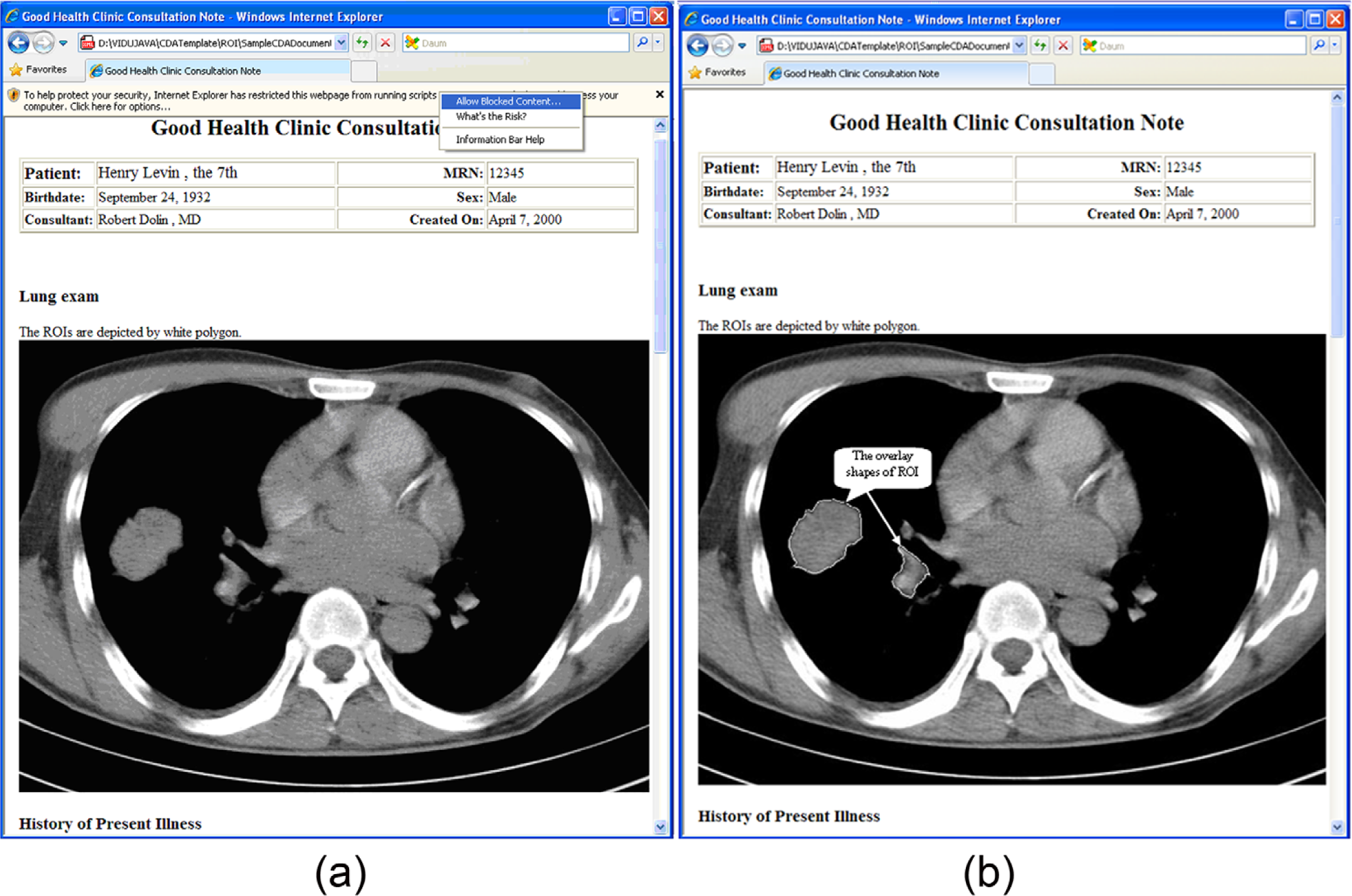
Rendering CDA document by Internet Explorer 8.0. (a) The browser prompts the user whether to block the content or not. (b) The content is correctly rendered.
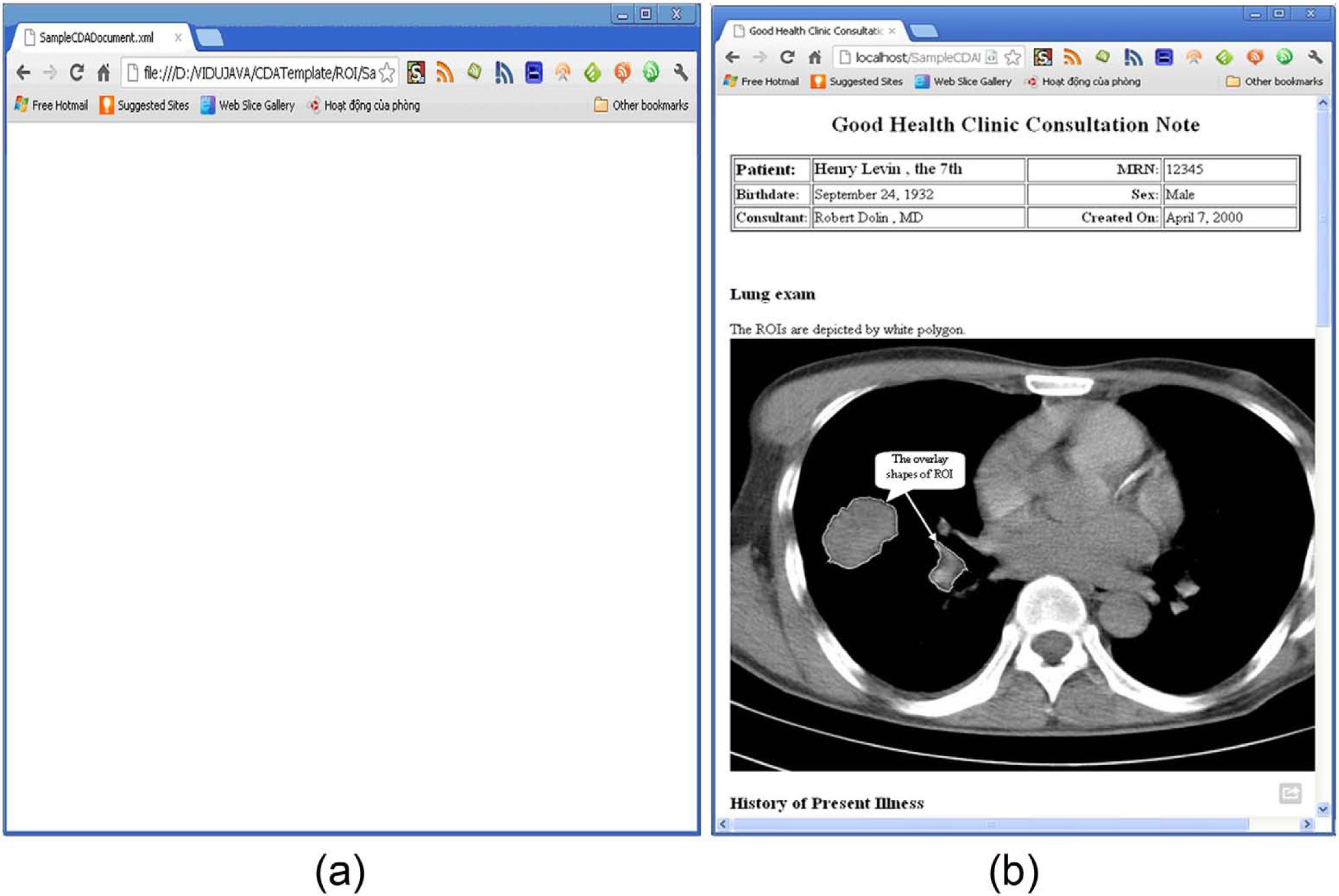
Rendering CDA document by Google Chrome. (a) The browser does not support rendering CDA content when CDA is located in a local folder and returns an empty screen. (b) The CDA is rendered via a local web server.
The test results indicate that Mozilla Firefox is the best browser for rendering the proposed CDA contents and the embedded shapes of ROIs. Internet Explorer comes next; while rendering quality is good, due to security concerns, it asks whether the user wants to block the imported content (CDA and style sheet) or not, which causes a little inconvenience to the user. Finally, Google Chrome does not support rendering XML content by default when the XML file and the style sheet are stored locally. One way to get around this problem is to install a web server on the recipient’s personal computer (PC), store the CDA document and style sheet in a location that is recognized by the server, and view them via the local web server, as shown in Figure 10(b). This, however, imposes a considerable amount of work on the recipient. The problem will be solved if Google Chrome supports direct rendering of locally stored XML content.
Discussion
In this article, we described the architecture of an integration model for augmenting the current stage of CDA Generator. Furthermore, we showed the five key points in designing an XSLT style sheet with regard to rendering the shapes of ROIs via a web browser.
Following the informational task flow of the architecture (Figure 1), the CDA Generator will interact with the database manager to automatically extract the clinical data from a database and then generate the CDA document. The CDA Generator also interacts with an image-processing module to retrieve information concerning the selected ROIs, and it then embeds the information into the
Finally, the sender will retrieve a pair of documents: the CDA document and its corresponding XSLT style sheet. Using those documents, the sender can send them to a recipient via any available communication method such as email, file transfer protocol, and IHE profiles. To view the clinical document in detail, the recipient just browses the CDA document via the web browser of choice.
In contrast, most other available systems11,16–23 worldwide focus more on how to generate, register, and manage a CDA document for exchange. Furthermore, such systems may focus on CDA compatibility with an existing local standard for a country with less emphasis on the implementation of CDA across a wide spectrum of systems in order to improve the effects of CDA. The integration system combines an image-processing module with the CDA Generator to automatically extract related ROI information and then place them into the
The comparison between our approach and other systems in terms of the main objectives and the support for rendering medical images and ROIs is summarized in Table 1. Our approach has several advantages over existing methods: (a) Clinical data are encoded by using an international standard—CDA R2. Therefore, clinical documents are compatible with any existing application that supports CDA so the recipient does not need to upgrade the application. (b) Minimal change in existing CDA generators is required, in that only the function for generating the
Comparison of existing projects that support CDA.
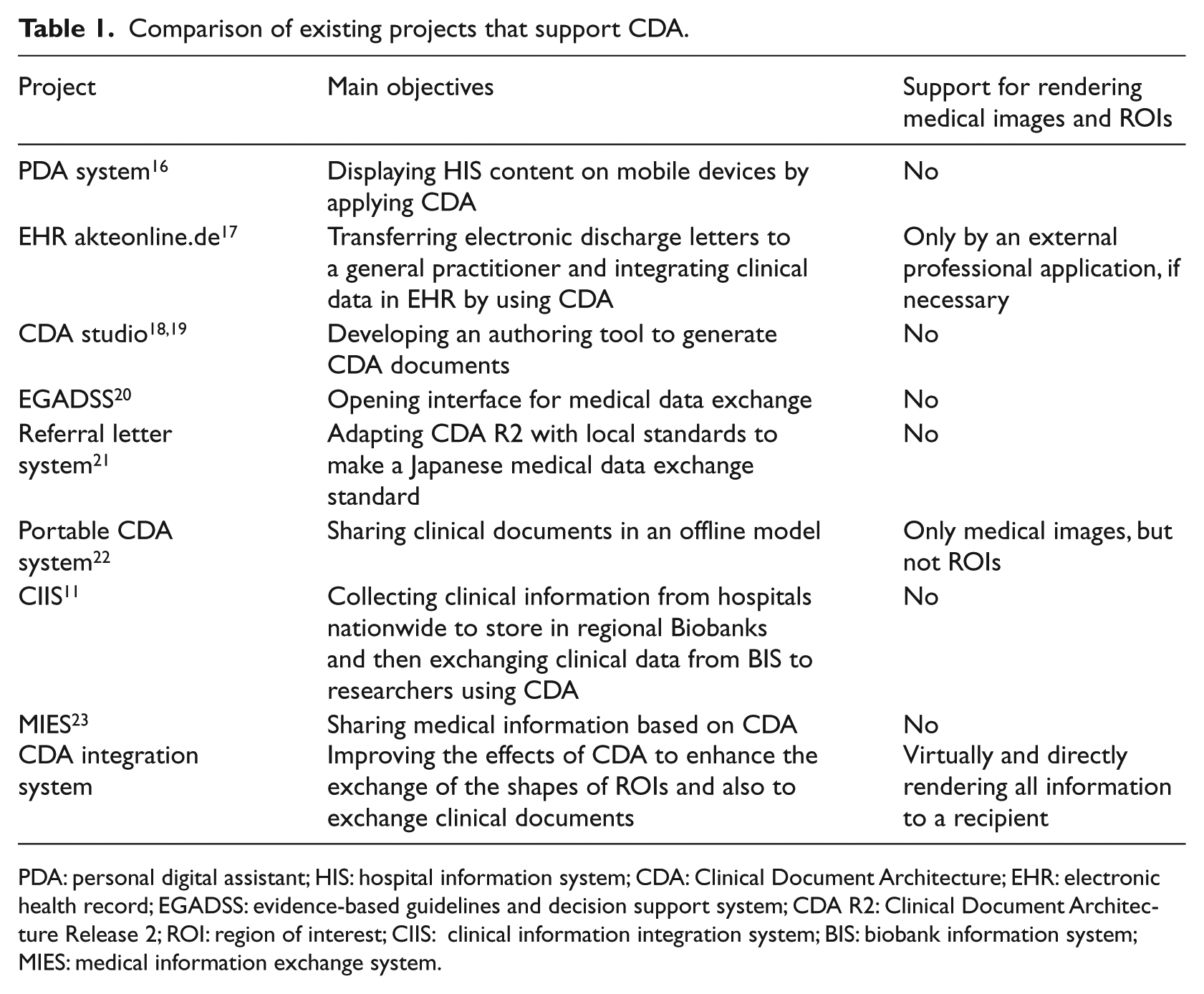
PDA: personal digital assistant; HIS: hospital information system; CDA: Clinical Document Architecture; EHR: electronic health record; EGADSS: evidence-based guidelines and decision support system; CDA R2: Clinical Document Architecture Release 2; ROI: region of interest; CIIS: clinical information integration system; BIS: biobank information system; MIES: medical information exchange system.
In order to further enable users, we plan to upgrade CDA Generator by providing more options when the CDA document and corresponding style sheet are generated, such as an option for the value of the href attribute to specify an XSLT style sheet in <?xml-stylesheet> and the value attribute of a
Conclusion
Consultation between physicians requires sharing of clinical information including medical images. The ability to impose ROIs onto images can enhance the efficiency of consultation by providing proper context and focus for the communication. In this research, we designed and implemented methods to embed medical images and ROIs in clinical documents in the CDA format, which is a widely accepted international standard for clinical information sharing.
One of the key features of the proposed methods is that they are based on standards such as CDA and XSLT so that users only need their web browser of choice to view the document, images, and ROIs, without the need for a special viewer. The feature could be particularly useful in low- and middle-income countries (LMICs) where expensive special software packages are not affordable.
The proposed methods have been implemented as a single application written in the Java programming language. Test results with the three most popular web browsers are promising and prove that the proposed methods can be widely deployed and used, especially in LMICs.
Footnotes
Acknowledgements
The authors would like to give special thanks to their professors and colleagues for their invaluable feedback and insightful requests while they worked on the design and implementation.
Declaration of conflicting interests
The authors declare that there is no conflict of interest.
Funding
This research was supported by the IT R&D program of MKE/KEIT [10041145, Self-Organized Software-platform (SOS) for welfare devices] and the Korea Healthcare Technology R&D project (A112067), Ministry for Health, Welfare & Family Affairs, Republic of Korea.