



Abstract
High throughput drug discovery is currently undergoing a change, moving away from the traditional chemistry laboratory toward a ‘factory’ environment. Analytical disciplines are changing to fit this environment. PDAs combined with wireless LAN interfaces offer a way to enter, search and retrieve data in a way that is not limited to fixed network connections. Both submission of samples for analysis and monitoring of instruments, can be accomplished via a wireless network, this allows analysts and clients to access data whilst roaming in a large laboratory or suite of laboratories. Html and Java applications have been developed to enable analysts and chemists a greater degree of flexibility to control and monitor automated equipment.
INTRODUCTION
The pharmaceutical industry is striving to produce drugs in the shortest time possible, with the potential of extending the lifetime of the drug in the market place. All stages of research and development are being tasked with achieving shorter cycle times. Mapping the human genome offers a tool, in genomics, that can be utilised to aid the creation of suitable drug targets. The increase in biological targets produced by genomics has lead to an explosion in the potential number of lead compounds. The more compounds that can be synthesised and screened the greater the number of quality leads generated. To achieve a greater number of samples synthesised, modern drug discovery units are turning to entirely automated facilities, mimicking ‘factory’ environments to produce diverse compounds in large numbers. 1 The introduction of highly automated laboratories means that fewer staff are needed to run the drug discovery process. These highly automated facilities are generally larger than traditional laboratories, which means that the fewer staff are spread over a large area, whilst being responsible for monitoring and maintaining automated instruments. Combinatorial synthesis is being replaced by more focused array synthesis that requires a very high level of automation to produce compound sets in excess of 103 to 104 members. These compound arrays have brought with them a revolution in the equipment and instruments needed to process the compounds post synthesis. In analytical terms the complexity of the analysis has decreased, as there is no longer a need to deconvolute the combinatorial solid phase beads, 2 but the need to analyse more samples has increased. These needs have lead to the development of high throughput synthetic and analytical systems 3 that provide automated solutions which may require monitoring. The robustness of current automation means it is possible for one skilled user to monitor multiple systems. At this point the scale of the factory environment presents a problem. This issue has been the main driver for developing the use of a PDA (Personal Digital Assistant) in the laboratory.
DISCUSSION
Initial thoughts, on how information and suitable tools could be supplied in wireless form for the analyst, involved the use of wireless technologies and mobile phones. This option was discarded due to the limited graphical information that could be displayed on a mobile phone and the need for the user to have a secure route through the company firewall. The decision not to use a mobile phone solution meant that we now needed to find a hand-held device with which it was possible to interface with a wireless network. The new generation of expandable PDAs offered a hand-held device that could be adapted to interface with a network.
The PDA that was used for this work was the Compaq iPAQ Pocket PC (initially the 3660 model). The 3660 model has a 206MHz Strong ARM processor with 64 Mb of RAM. The iPAQ pocket PC was amongst the most powerful at the time of starting the project (mid 2001) and Compaq were prepared to work with our pilot study to ensure satisfactory integration of the pocket PCs.
Using a PDA in a laboratory has immediate benefits in that normal functions, associated with synchronisation of a PDA with a desktop PC, are available in the laboratory. These functions include the ability to edit documents and 'surf the net’ using several applications supplied with Windows CE. For example the user of a PDA can read emails, enter data into spreadsheets, and create memos and reminders.
To gain full advantage of these capabilities, the PDA needs to be linked to a company network in a way that does not detract from the mobility of the pocket PC. This precludes the use of a physical connection but suggests the use of a wireless solution. There are several ways to access information in a wireless form, the best known of which is probably the Bluetooth™ (Bluetooth SIG, Inc.), technology, using WPAN (Wireless Personal Area Networking). The Bluetooth™ solution was not suitable for our use because it provided a network for localised devices to communicate. The ideal communication range for our purposes was site or building wide.
The wireless protocol decided upon was to set up a WLAN (Wireless Local Area Network) which covered a large part of the building. The WLAN consisted of an expansion pack that fits around the iPAQ, which provided a PCMCIA slot. The ‘wireless’ Compaq WL 110 PC card, fitted into the expansion card slot, then communicated with a Compaq WL 410 SMB Access point. The access point provided a 10 base T Ethernet connection with the company network. The access point was plugged directly into the network.
Once the network was in place it was important to test the viability and utility of the WLAN by developing applications to exploit the technology. The following examples are of applications developed:
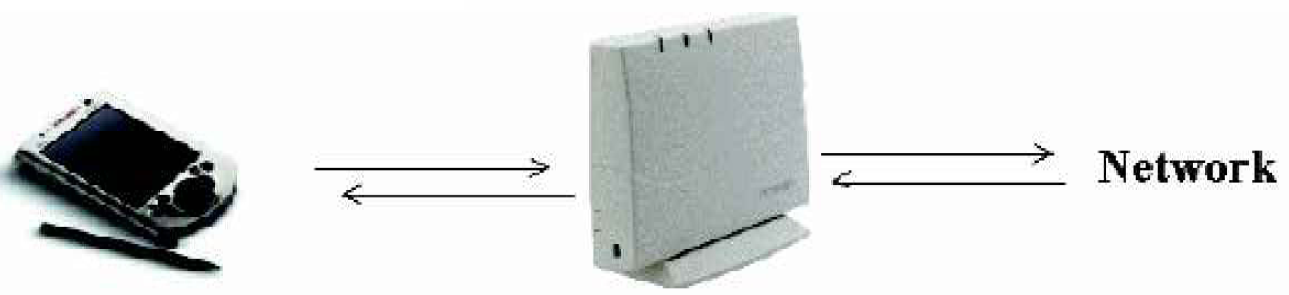
The iPAQ (with Wireless expansion pack) interacts with the wall mounted access point, which is plugged into the network.
EXAMPLE 1. REMOTE CONTROL OF INSTRUMENTATION
The WLAN offers 128 bit WEP (Wireless Equivalent Privacy) which should be further secured with the use of other devices.
The WLAN was tested and shown not to interfere with any other instrumentation in the building, which meant that applications could now be developed to aid the chemist/analyst in their role in a highly automated laboratory. The easiest applications to use were those that have already been developed to work with the iPAQ Pocket PC (Strong ARM processor). The most useful existing application was VNC™ (Virtual Network Computing) produced by AT&T™ (AT&T laboratories, UK). This VNC™ client/server software 4 allows the PDA user to view and control other PCs from the handheld device. The application also enforces security to stop unauthorised users from accessing protected PCs. This software has many uses; from monitoring unstable systems to solving routine problems with instruments that don't require the user to be at the same location. The software had an impact immediately enabling analysts and chemists to monitor an experimental purification system whilst working in a different location.
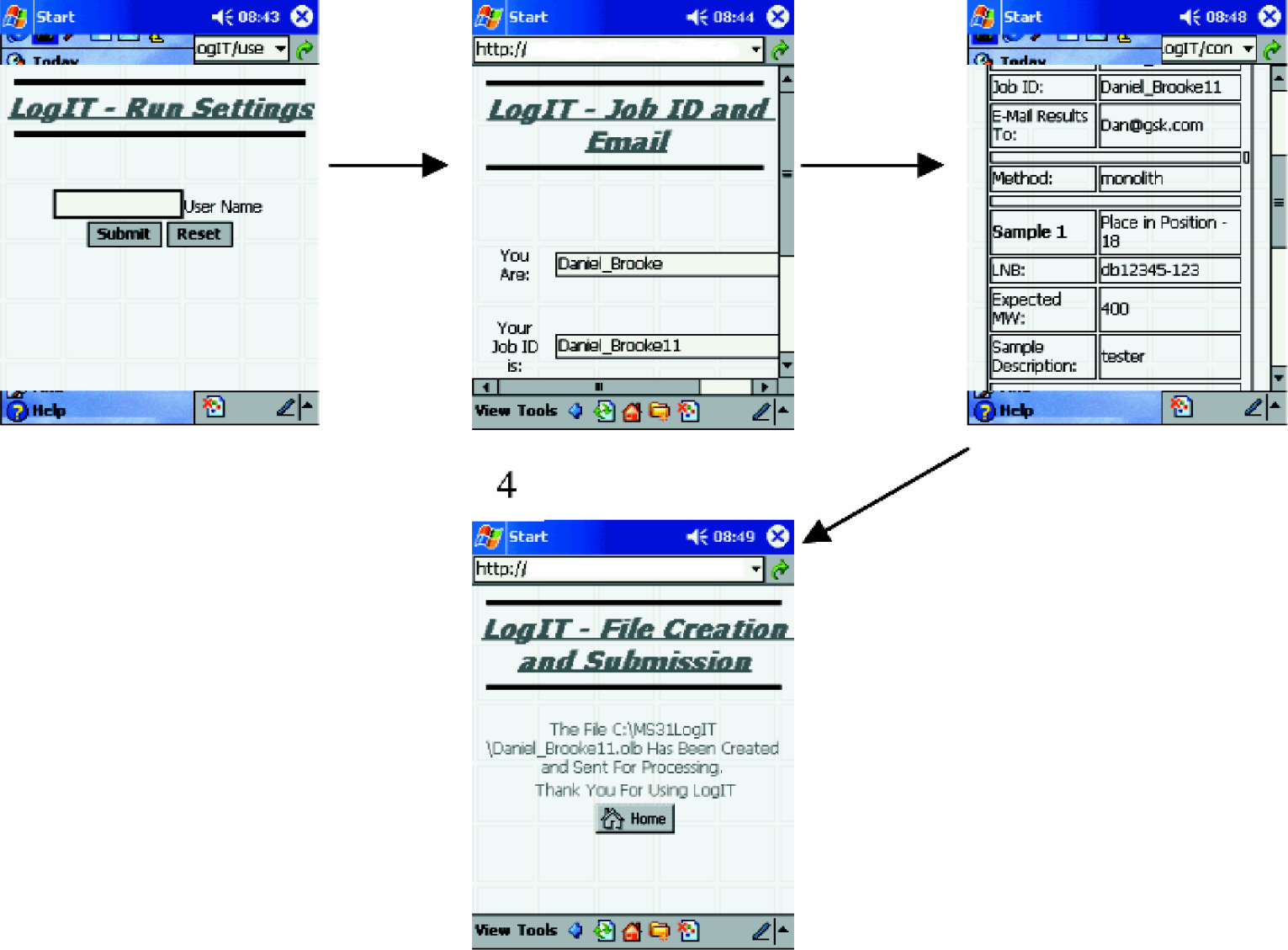
Remote Login to OA LC/MS:
EXAMPLE 2. SAMPLE LOGIN FOR OPEN ACCESS LC/MS
The next challenge was to be able to submit a sample for OA (Open Access) LC/MS (liquid chromatography — mass spectrometry) and to view the acquired data. Instead of developing client/server software to run on the PDA it was decided to develop web applications to manage our requests. Together with in-house developers a piece of software called LogIT was designed and developed. This web-based application was designed to submit samples for OA LC/MS analysis. The OA LC/MS instrumentation was controlled by MassLynx™ software, created by Micromass (Manchester, UK), to which a new feature had been added called AutoLynx. This software allows the LC/MS instrument to interpret information stored in delimited text files, which is then used to run the instrument. To exploit this software the web application needed to create a delimited text file and deliver it to the correct location. The LogIT application takes the user through several pages prompting the user to submit details relating to the analysis that is required. On final submission the software generates a *.olb file (a MassLynx delimited batch file), in the folder that AutoLynx has been setup to monitor.
EXAMPLE 3. MONITOR STATUS OF OA INSTRUMENT
Whilst the samples are being analysed the progress of an OA instrument can be monitored via a website designed for use with PDAs. The initial page of the website informs the user whether the instrument is available, via the ‘Instrument Status Page'. This page would be checked before the submission process detailed in Example 2. The instrument status page is a Perl program that reads a string from a file populated by the analyst. This string determines whether a red or green light status is associated with an instrument. Once an analysis has been submitted the exact operational and queue status can be gained by clicking the link on each instrument. The MassLynx™ software creates a *.ini file that can be renamed, to avoid multiple OA instruments overwriting the same *.ini file, and written to a network server. A Perl program, on the network server, searches one of the *.ini files extracting useful information which it then displays in html format.
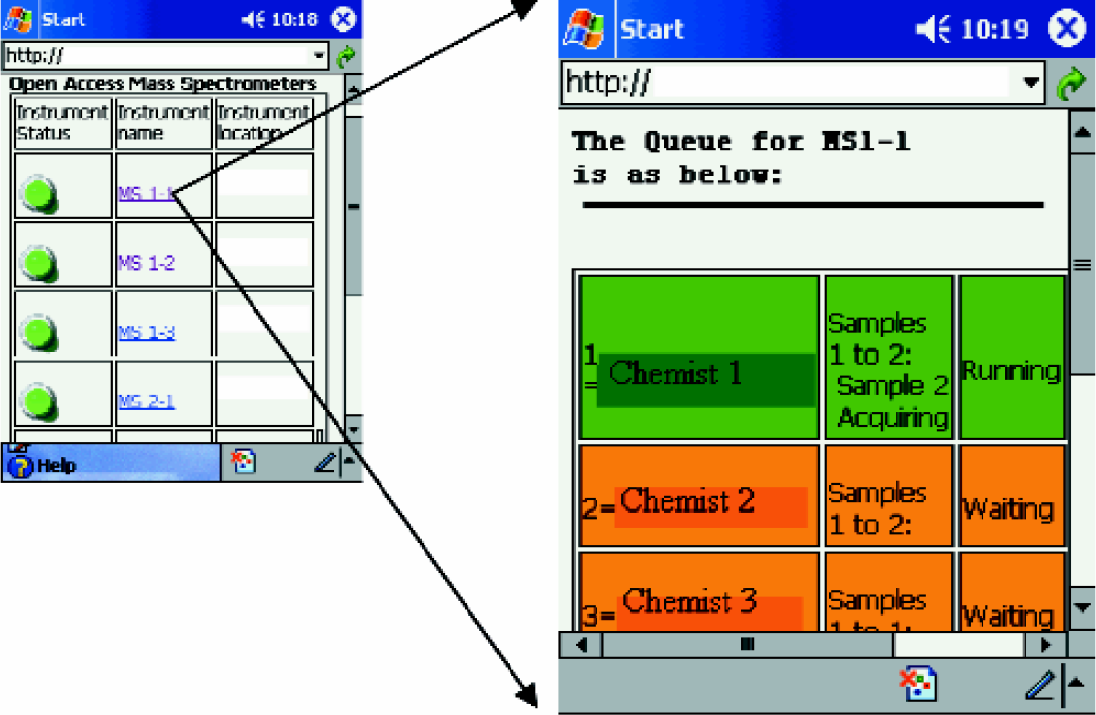
Using the wireless PDA it is possible to obtain information relating to OA LC/MS queue.
EXAMPLE 4. VIEWING OA LC/MS DATA
The next step would be to review the data without having to return to the OA LC/MS instrument. The data can be viewed via the web in two separate ways, using OpenLynx™ Global Server (OLGS) or a raw data viewer developed in-house. OLGS provides a tool for data mining and visualisation. However, due to its reliance on frames for construction and Java plugins that are not standard with the version of IE (Internet Explorer) that comes with pocket PC 2002 it is not ideally suited, as yet, for use with the wireless PDA.
To resolve this issue another web application (‘Results Finder’) was written, that allows the user to select the raw data that they would like to visualise from a particular instrument. The raw data consists of a unique folder for each sample analysed, each folder contains several files, one of which is a file entitled _header.txt. A Perl program uses the details, supplied by the user on the front page of the application, to search all the raw data files for a matching string. The perl program then reports all those files with a matching string allowing the user to pick the appropriate file.
Once the appropriate file is selected a separate Perl program strips out the relevant XY data, which is then displayed using a Jeode Java Plugin on the iPAQ and a specially written Java Applet situated on the network server. The chromatograms of the MS and LC data are displayed (Figure 4); two buttons below the MS TIC (total ion chromatogram) allow the user to navigate between spectra.
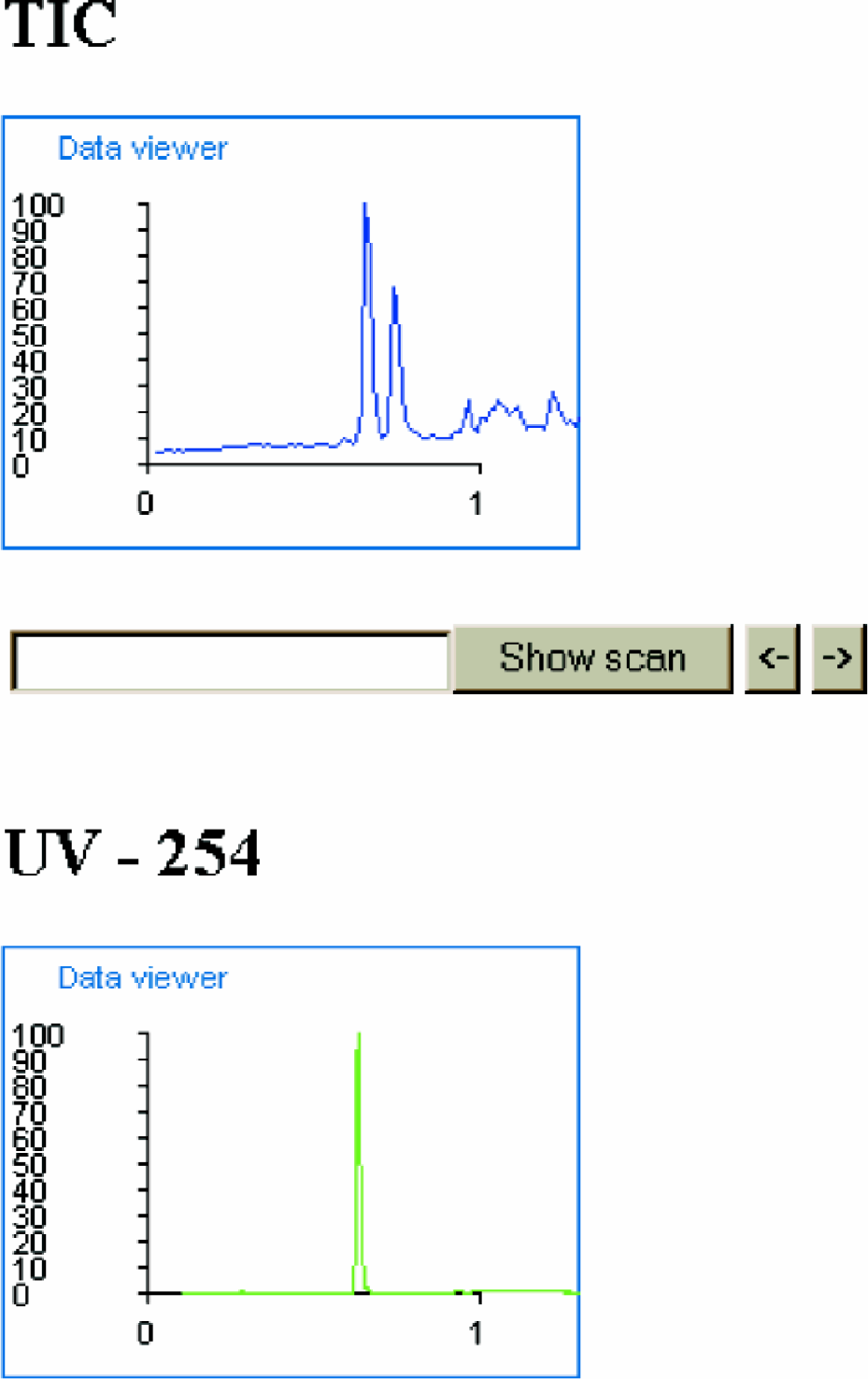
The Raw Data Viewer allows the user to view UV and MS chromatograms. Using the 'Show Scan’ and other buttons it is possible to show the spectra for any scan associated with the TIC.
EXAMPLE 5. TOWARD AN ELECTRONIC NOTEBOOK
Many laboratories are implementing or considering implementation of Electronic Notebooks. The Food and Drug Agency (FDA) have imposed stricter guides and rules for the submission of new compounds for registration, part of which includes the introduction of 21CFR11 (Code of Federal regulations, Title 21, Part 11). The law associated with 21CFR11 requires companies to adhere to the FDA's standards for record keeping and signatures (handwritten/electronic). Some companies have been implementing entirely electronic recording systems with electronic signatures. This has lead to a shift in all business areas, not only those regulated by GMP, GLP, GCP etc., regulatory guidelines. The Electronic Notebook used currently in our group for routine analytical work, is a Lotus Notes database. Using this database the chemist can request analysis and the analyst can track analysis and report results with a complete audit trail. The introduction of Lotus Notes R5 (Lotus Development Corporation, USA) has made the task of publishing the same database on a Domino server easier. Now it is possible for the user of an iPAQ with a wireless connection to get almost all the Lotus Notes database functionality via the web, while all potentially sensitive information is stored in the database which is not accessible without a secure connection to the company network. The analyst can receive the requests; view sample details (for example the attached structure) and edit the details when the results are returned (Figure 5).
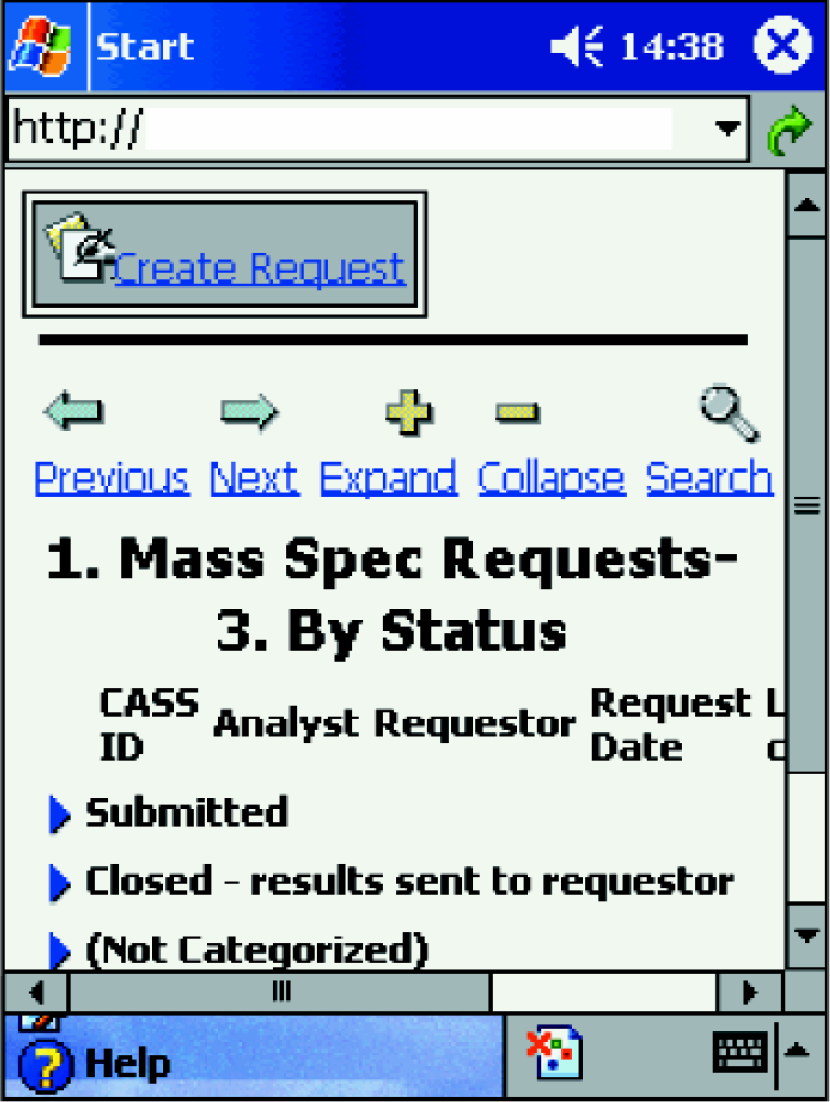
Lotus Notes database being served via a Domino server.
CONCLUSION
The wireless PDA offers analysts access to information and tools in an automated environment. The user can monitor and make decisions about many different analyses and instruments without leaving the task that is currently being performed. The industry can continue the trend of employing minimal personnel to run highly automated instrumentation in factory environments. The introduction of the wireless PDA into some areas has already had an impact on the level of automation achievable, for example the monitoring of an experimental preparative chromatography system. In the future, we believe that the pocket PC will be an integral part of Drug Discovery automation at GlaxoSmithKline (GSK).
ACKNOWLEDGEMENT
The Authors would like to thank all those involved with the project at GSK (CASS, CIX, and DIT), Compaq and Micromass.