




Abstract
Previous works have established that effective team presentations require teams to select a structural format and question-and-answer (Q&A) strategy. While these are critical, effective team presentations also require strategic spatial planning and movement among the team members while they are on stage, known as blocking. Building on Usera and Fuller’s previous works on team presentation formats and Q&A strategies, I introduce a systematic approach to analyzing rooms and selecting a blocking strategy for team presentations. I identify three key elements of room analysis that teams must consider: stage shape, screen placements, and slide advancement method. Additionally, I present five team formations and five motion strategies, collectively termed “packages,” that teams can implement to optimize their stage presence. This framework offers a structured method for teams to enhance cohesion, engagement, and professionalism in their presentations. I also offer implications for educators, competition coaches, and business professionals with directions for future research.
Team presentations are widely used as classroom assignments (National Communication Association, 2023), in the business world (M. Zebrowski, personal communication, October 13, 2023), and in competitive contexts (Cosentino et al., 2021). Usera and Fuller (2024a, 2024b) offered a systematic overview of team presentation theory by identifying five presentation formats and their strategic implications, two Q&A formats, and strategies for fielding questions. While these overviews cover many aspects of team presentation theory from a format and oral delivery standpoint, one element of team presentations still has received even less attention in the academic literature: blocking.
In a theatre context, blocking is how the characters stand and move on the stage to establish a nonverbal connection between the actors and audience (Hirvela, 1990). Theatre directors recognize the importance of stage blocking for their performances. Many books and articles in the theatre field suggest how directors can place their characters on the stage, utilize focal points, manage sight lines, and create a stage picture to maximize the scene’s impact (Cohn, 2021; Hirvela, 1990; Hodge & McLain, 2015; Mark, 2023; Patterson, 2023). Similarly, a team of five presenters must effectively utilize their space and create a stage picture that makes them look professional and united. Unlike solo presentations, where one presenter occupies the stage, teams must coordinate how they will stand and move throughout their presentation since they share the space. One article suggests that teams should “stand in an orderly fashion” (Haugen & Lucas, 2019), yet what this means is not clearly addressed in the article nor in the literature on team presentations.
Thus, I will add to Usera and Fuller’s (2024a, 2024b) framework by providing a systematic approach to how teams can block their presentations in an orderly way that conveys a united front. I will first provide three key elements of room analysis that teams must conduct when deciding their blocking strategy. Then, I will identify five formations and four motions (known together as “packages”) that teams can execute. The framework I propose here operates on three assumptions: (1) the presentation is delivered in person, (2) the team uses slideware such as PowerPoint, and (3) each team member on stage has a speaking role. All directions will be from the audience’s perspective (house left, house right).
Room Analysis
Physical space is an a priori requirement for an in-person team presentation, and all blocking and motion decisions must adapt to it. Teams must consider three elements of the room before deciding their package: the stage shape, screen placements, and slide advancement method.
Stage Shape
Teams must first recognize the physical shape of the stage or space from which they will speak. In an auditorium, the stage is often a constructed physical platform. In a classroom, the stage is usually the front of the room. In a conference room, it could be at the end of the long table or on the side. The key element of the stage is the placement of the main screen: the shared focal point that audience members and speakers will glimpse during the presentation. Based on its location and the length of the walls on both sides of the main screen, teams must adapt their blocking accordingly.
Some stages have equally long walls on both sides of the screen. I call this a balanced wall. Other stages might have a shorter wall on one side of the screen, which I call a short wall left or right, depending on which side is short. The shapes are displayed in Figures 1 and 2.
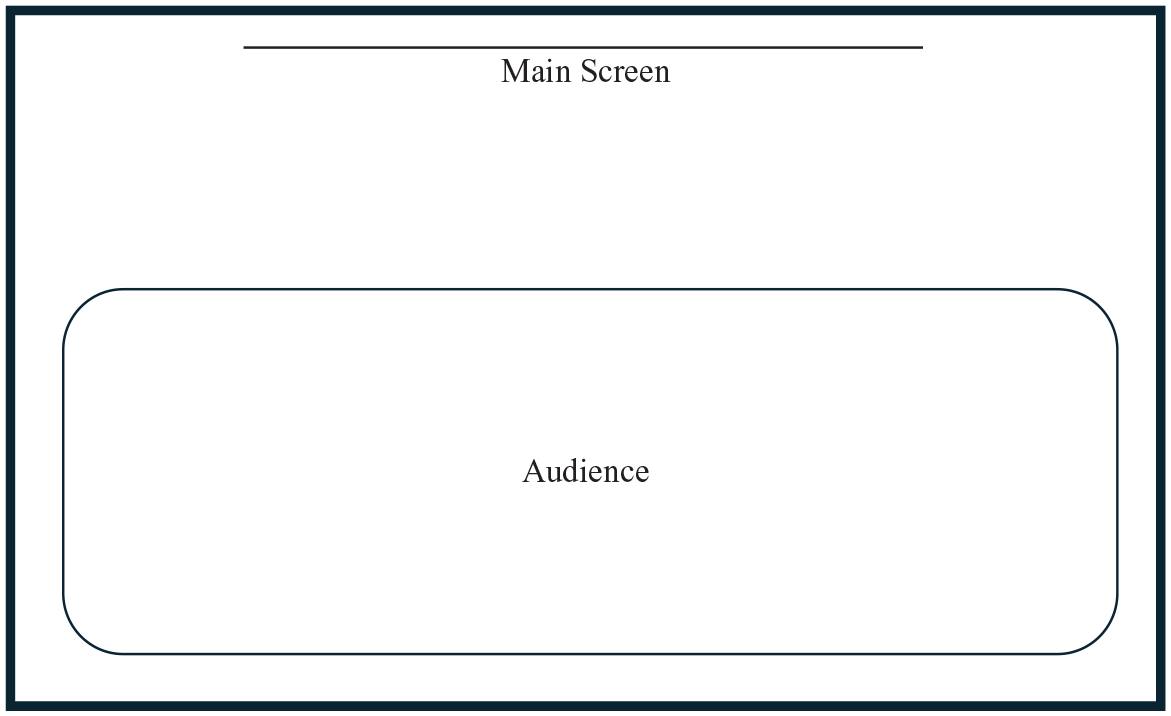
Balanced wall stage.
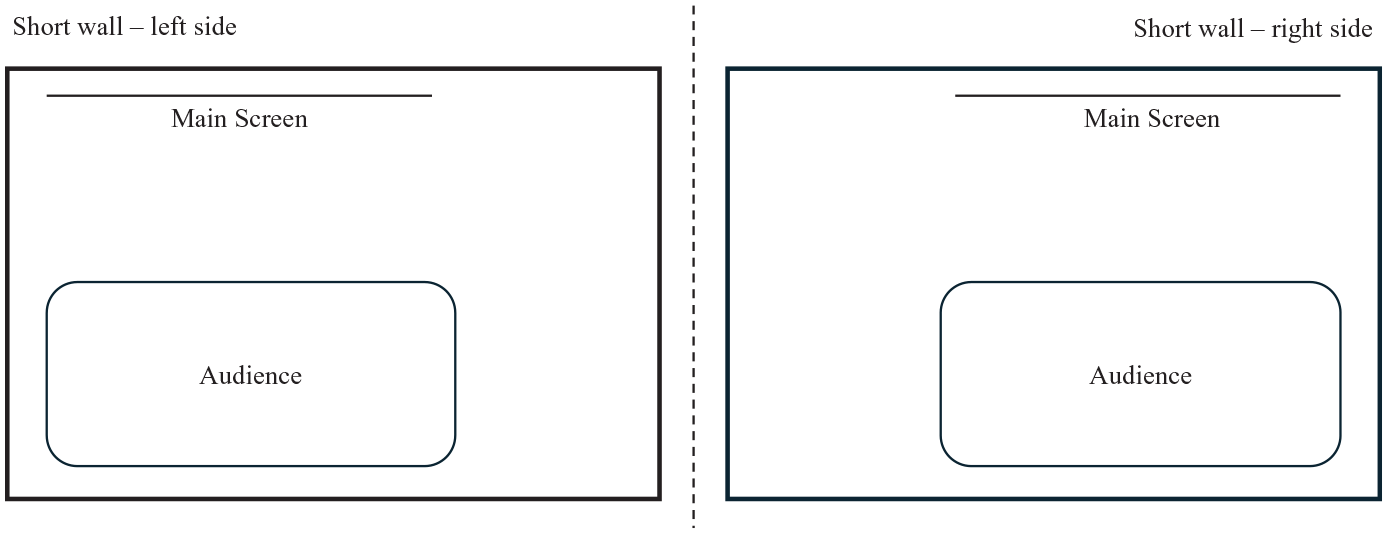
Short wall stage.
For example, a stage with a short wall on the left will limit the team’s ability to stand and use that side. If a stage is balanced, then the team can use either side. The definition of a “short wall” is not an objective length, but teams can test whether two or more people can stand in a line comfortably on that side. They can consider it a short wall if two or more people cannot fit. The size and placement of the presentation screen are also significant for assessing the space given the stage shape.
Screen Placement
All team presentations that use electronic slideware require a visible screen for the audience and themselves to reference, known as the main screen. First and foremost, teams should orient their blocking according to the main screen’s placement. They must never block the main screen when speaking or standing. Occluding the main screen can frustrate audiences since they cannot see the slides or read pertinent information.
There are generally two screen heights: a high screen and a low screen. A high screen is distant enough from the ground that a speaker can stand below it without blocking key information on the slide. Some lecture halls or large stage venues at conferences use high screens. A low screen lacks enough distance from the ground to where team members cannot stand below it and, therefore, must stand beside it. The measurement is not objective, it is relative to the team members’ heights. Figures 3 shows the difference between these two screen heights.
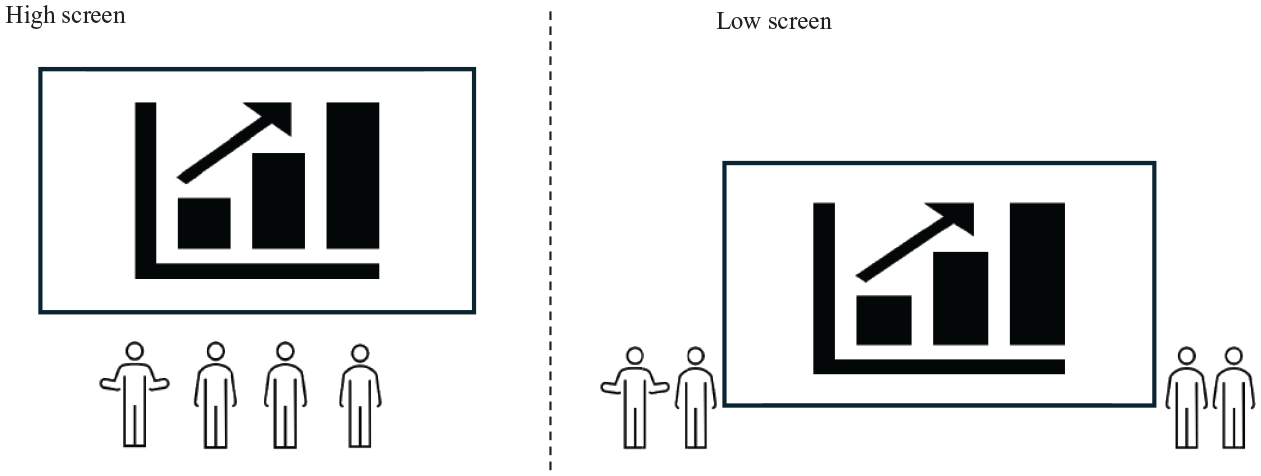
High screen and low screen.
In addition to screen height, teams must consider the main screen’s placement. When a speaker delivers their part, they should not have the screen directly behind them as that would force them to turn their backs to stay synchronized with their slides. Speakers should speak from the side of the screen so that referencing the main screen can require a quick side glance rather than requiring their body to turn almost 180 degrees. A major principle in theatre stage blocking is for the players to never to put their back to the audience (Hirvela, 1990).
Putting screen height and placement together, we can imagine several combinations that force specific blocking decisions if teams seek to uphold the two major principles of not blocking the screen and never turning one’s back to the audience. For example, if a stage has a low screen in the center with balanced walls, then the team must stand on either side of the low screen to avoid obstructing it. If a stage has a low screen with a short wall to the right side, they must stand to the left. If a stage has a high screen in the center, then the team could stand below the screen, but they should be sure to have each presenter step sideways before speaking so the screen is not directly behind them unless there are additional screens elsewhere.
This setup so far assumes that there is only one screen in the room. However, the analysis changes when the room has multiple screens. For example, some rooms offer a main screen visible to the audience in the front and a screen in the back of the room that is visible to the members. Some larger rooms also have screens on the side of each room that are visible to the speaker and audience should they turn their heads. These possible setups are displayed in Figure 4.
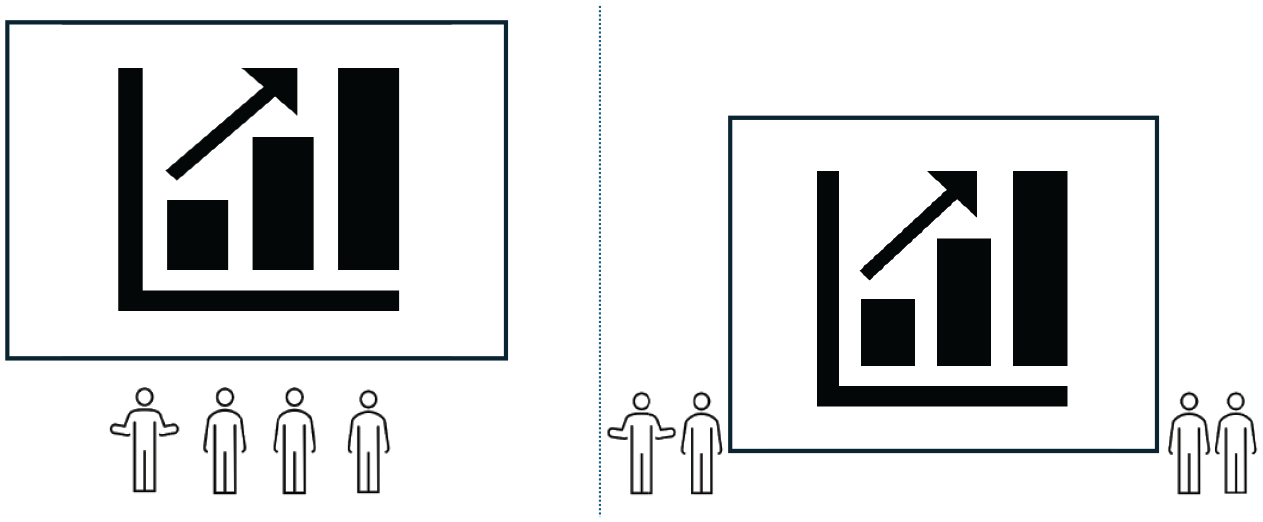
Additional screen placements.
Suppose a room has a main screen and a back screen visible to the speakers. In that case, in a centered high-screen environment, speakers could stand and speak from directly below the screen because they have the back screen as a reference for staying in sync with their slides. If the computer monitor running the PowerPoint is on the stage and has a movable monitor, a team could swivel the monitor to face them while presenting, providing an impromptu side screen. In that case, teams can look at the swiveled monitor instead of the main screen to stay in sync. Executing this impromptu setup also depends on their slide advancement method.
Slide Advancement Method
Slideware delivery requires speakers to advance or “click” their slides. There are three types of slide advancement: remote, local, and assisted. When a speaker uses a remote, known as a “clicker,” while they present, that is known as “remote clicking.” One major benefit to using a clicker is that it lets the speaker deliver their part from anywhere on the stage. On the other hand, a clicker also requires a formal “hand-off” during speaker transitions that teams will need to practice (Usera & Fuller, 2024b). Some rooms offer a clicker with the computer, while others require speakers to provide their own.
Local clicking happens when speakers must advance their slides using the computer’s keyboard or mouse. In that case, then, the speaker will have to speak from either behind or next to the computer during their part. This setup limits the speaker’s ability to move throughout the stage. When it is the next speaker’s turn, the team must plan their blocking motion to ensure speakers can seamlessly change spaces without running into each other.
Suppose a team does not have a clicker or wants to avoid executing hand-offs, but they still want to maximize speaker movement. In that case, they could do assisted clicking. This approach requires one team member to advance the slides from the computer or remote on behalf of the speaking team member. The speaking team member can speak from anywhere, and the clicking team member will ensure the slides are synchronized with the speaker. The risk to this approach is that the clicking team member must know when to advance to the next slide without getting ahead or falling behind the speaker. Speakers could explicitly tell their team member when to advance by saying “next slide,” or “next,” but that phrase will get repetitive after multiple slide advances. When a remote clicker is not available and teams want to maximize their stage movement freedom, then assisted clicking is the only option.
Using a clicker gives teams the most options and advantages to blocking. For one, each speaker can speak from anywhere on the stage without being forced to be next to the computer. Second, each speaker can advance their slides, ensuring synchronization and minimizing mishaps with getting ahead or falling behind. Thus, they should be ready to provide their own if they are presenting in an unfamiliar environment. However, technical barriers can arise where using a clicker is not an option. Competitive teams must have a backup plan for blocking their presentation should this happen.
Formations
Once teams analyze the room’s shape, screen placements, and slide advancement method, they should determine their formation. Formations are ways that presenters align themselves toward each other and the audience. One key formation principle is that teams should stand in a straight line without team members bunching in front of each other when they are not speaking. All team members should always be equally visible throughout the presentation. There are five basic formations: left, right, center, split, and single-wide.
Left, right, and center formations put all team members on one side of the stage according to the room’s screen placement and stage shape shown in Figure 5.
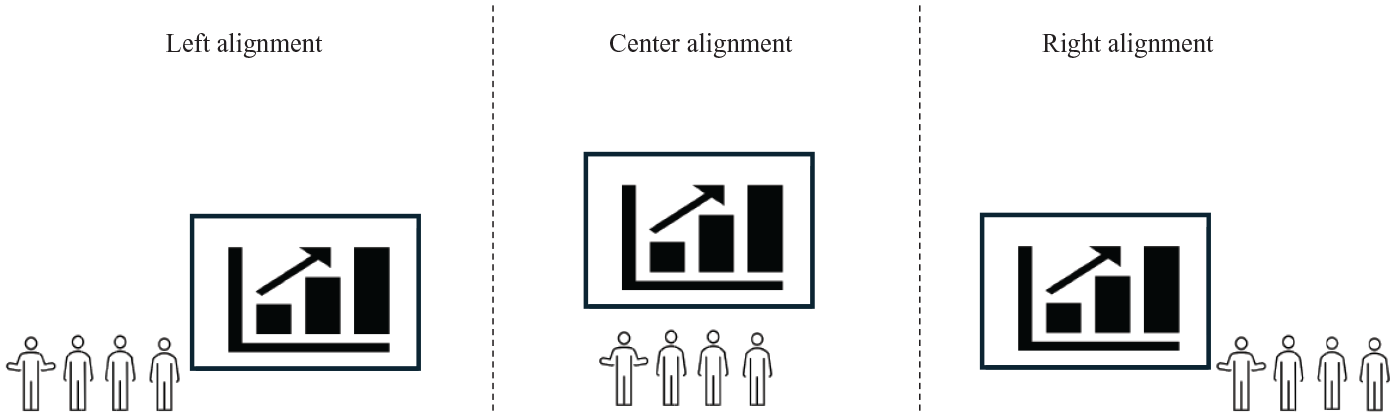
Left, center, and right formations.
For example, in a stage with a short wall on the right side, low screen placement in the center, and remote clicking options, the team might pick the left alignment to avoid blocking the screen.
Another option is split formation, where some members stand on the left side of the screen while others stand on the right, as pictured in Figure 6. This formation is best for stages with low screens in the center with balanced walls on both sides. There can be a range of split formations, such as a 2-3 (two on the left side of the screen, three on the right) or 3-3 (three on the left, three on the right). Another use case is for strategic duos. If a team of five decides to have a duo deliver a main point, they could have the duo stand on the left side and the remaining three members on the right side in a 2-3 split.
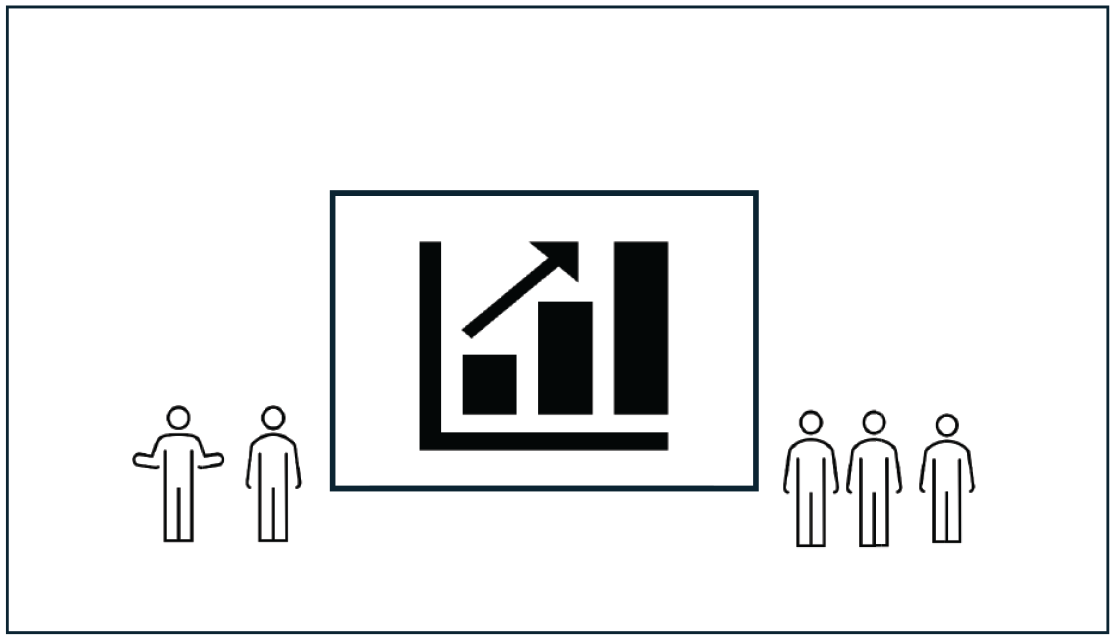
Split formation (2-3 split).
Lastly, there is the single-wide formation, where one speaker stands on one side of the screen with the remaining speakers on the other side, as pictured in Figure 7.
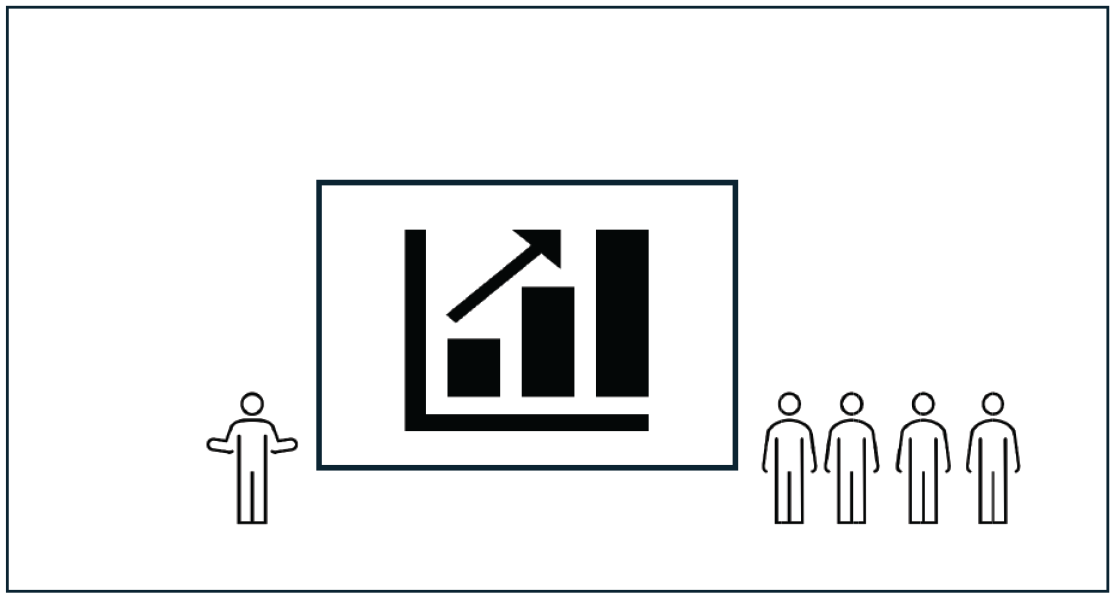
Single-wide formation.
A single-wide formation could be used in cases where there is a short wall on one side and enough space for just one speaker to stand there. Another use case could be for assisted clicking, where one member stands behind the computer to click for their speaking members as they present on the other side of the screen. Single-wide formation exists as a category because the single speaker usually serves a special alone on their side of the screen, such as being the host of a hosted presentation (Usera & Fuller, 2024a). The side the special team member stands on is the “single side,” which can be house left or house right.
These formations are all starting points, as they can remain or shift throughout the presentation. For example, formations can change between the main presentation and an isolated Q&A segment (Usera & Fuller, 2024b). As an illustration, a team could be right-aligned in the main presentation and then shift to single-wide for a hosted Q&A. The initial spot is where speakers stand at the beginning of the presentation. Overall, the formations establish the alignment and arrangement of each member when they are speaking and listening to other members speak.
Stance
While teams need to know where they will stand when presenting, they should also know how to stand. One of the key principles of stance and for team presentations overall is for teams to look unified. The unified front is essential to displaying professionalism and preparation for a business presentation. When one team member is speaking, it is important for other members to not draw attention to themselves through excessive motion or other distractions. Teams can display uniformity through their stance in attire, gaze, and gestures.
Regardless of formation, teams should show uniformity in their attire. On a categorical level, team members should match each other in formality, whether formal, business casual, or casual. If one member is wearing a suit with a tie but another is wearing jeans and a polo, there is a mismatch within the team that counters their uniformity. Moreover, teams could match each other through common fashion choices. For example, a team could all agree to wear blue suits or wear a blue tie to match each other. This fashion decision shows uniformity to the audience upon sight.
A second element of stance is the placement of hands when not speaking. Additionally, teams can display uniformity by agreeing where their hands should be when standing. There are three choices: hands in the front, hands in the back, or hands to the side. Until studies confirm a superior hand placement, what is more important is that teams are uniform about their hand placements.
Lastly, team members should strategically use their gaze throughout the presentation. Team members should focus their gaze on the active speaker when not speaking. There is one exception, however. Whoever is next to speak should occasionally glance at the audience to gauge their engagement and reactions to the current speaker. If this upcoming speaker notices that an audience member or a section of the room is getting disengaged, then that member can immediately address that part of the room when it is their turn to speak.
Thus, teams can display a unified front by leveraging their attire, gestures, and gaze. Now that they know where and how to stand, they can find ways to incorporate motion into their blocking.
Motion
Teams may opt to speak from their initial stance or incorporate motion into their blocking for a more dynamic presentation or one that better adapts to the room arrangement. There are four motion concepts that teams can incorporate: zero, forward step, rotating, and abacus.
Teams may choose to be still, known as zero motion. For example, a right-aligned team might have each member speak from their initial spot without moving. Assuming remote clicking, the team would pass the clicker to each other in a line with the first speaker standing on the furthest left side and the final speaker speaking on the furthest right side. Figure 8 exemplifies the concept.
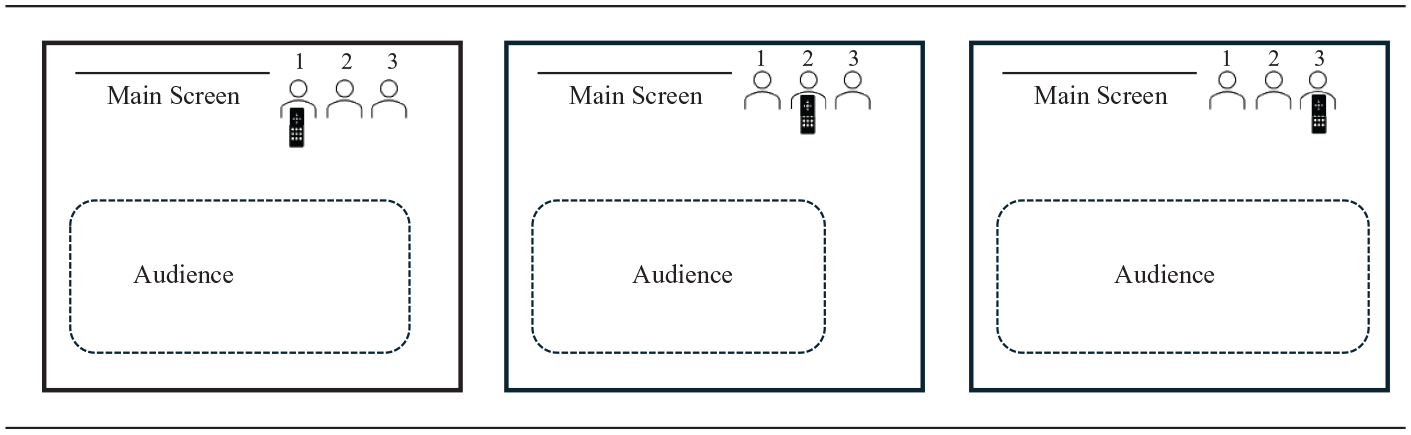
Zero motion.
Zero motion might be the simplest to execute, but there are two reasons why teams might not use it. First, it lacks the dynamism of the other motion concepts. Teams will be standing still for the entire presentation and will need to rely heavily on their voices and use of audience engagement techniques to create a connection with the audience (Usera, 2023). Second, there might be situations where teams will have to move due to necessity. For example, if a team must use local clicking, then some motion will be necessary to allow each speaker to access the device.
Thus, the second motion is the step-forward, where the speaking member steps forward when it is their turn to speak, consequently upstaging the team members and drawing the audience’s focus. Figure 9 shows this concept.
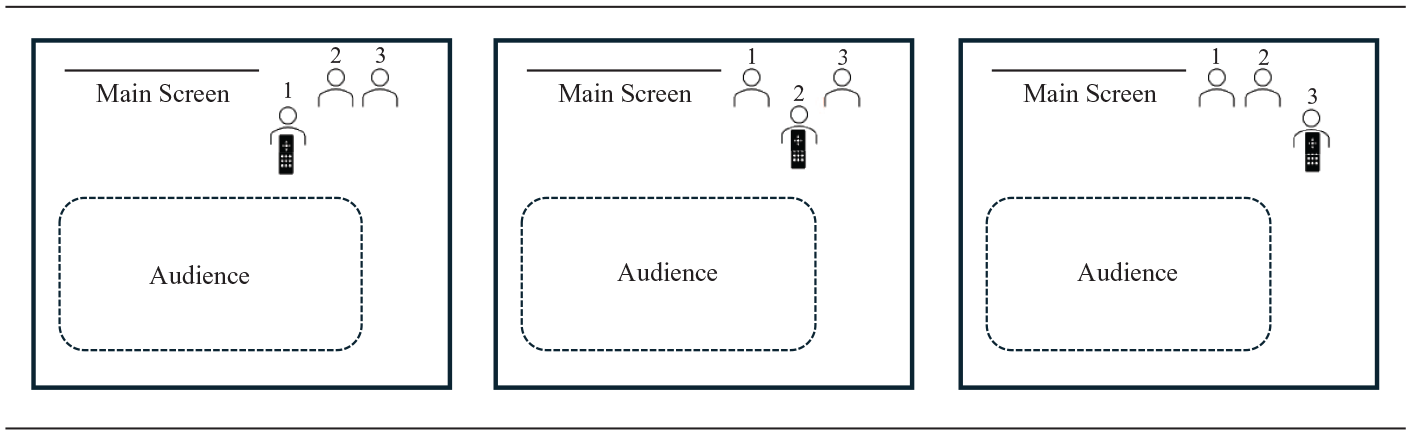
Step forward.
The step-forward motion can be one or multiple steps forward from the team and toward the audience. The common area where speakers step forward becomes the speaking area from which hand-offs occur. Once the speaker finishes their part, they step backward to their initial spot. An advantage to the step-forward concept is that each member establishes their own speaking area where they become the foreground while other members become the background. It allows the speaker to make a more explicit connection with the audience through establishing closer proximity with the audience. The step-forward motion works best with remote or assisted clicking and if there is an additional side or back screen. If there are no additional screens, then the step forward concept risks putting the slides directly behind the speaker forcing them to turn around to see the slides.
The third motion is a rotation concept, where team members rotate to a speaking area when it is their turn to speak and change standing spots accordingly. Teams could rotate sideways or forward. Both concepts are shown in Figures 10 and 11.
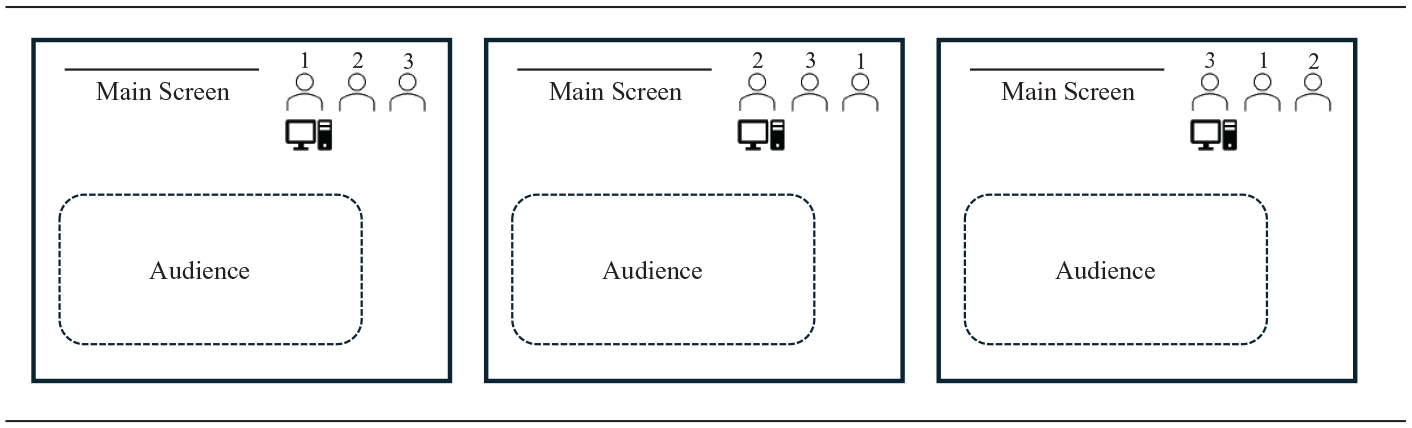
Sideways rotating concept.
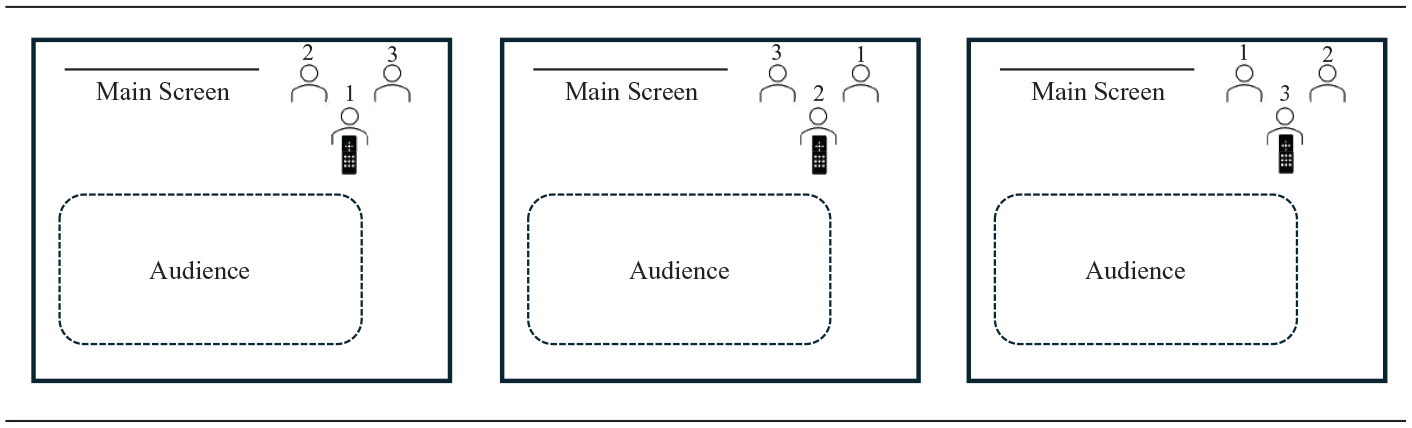
Forward rotating concept.
For example, a team might be right aligned using local clicking and would line up according to their speaking order. The lead speaker would rotate sideways to the computer and then move to the back of the line after their turn, with the following speaker taking over the speaking area. After each team member delivers their part, the lead speaker will finish at the front of the line. In the case of remote clicking, the team would establish a common speaking area that everyone will speak from. When it is the speaker’s turn, they will rotate to the same speaking spot that the previous speaker was speaking from. This is unlike the step-forward concept, where each speaker has their own speaking spot. The team will then shift so that the next speaker is “on deck” ready for their turn to step into the common area.
An advantage to the rotating concept is that it can work with all clicking forms. The sideways concept ensures that speakers can use the front screen for slide referencing by speaking from the side of it, especially in cases where there are no additional side or back screens. The forward rotating concept can also be equally advantageous if the teams select a common speaking area that is strategic. The risk to the rotating concept is the possible miscues in the motion and hand-off. Teams will need to practice executing the rotation without running into each other. They also need to ensure that they select a common speaking area that enables them to see their slides without turning fully around.
The last motion concept is called “abacus.” Like the counting tool, the team starts on one side of the stage in either left, right, or single-wide formation. They end on the opposite side of the stage. For this example, suppose that the team starts in right alignment. When the presentation begins, the first speaker moves to the left side of the screen and establishes the speaking area there. When the second speaker goes, the first speaker creates space on the left side while the second speaker moves to the left side’s established speaking area. By the end of the presentation, the initially right-aligned team will be left-aligned. The concept is illustrated in Figure 12.
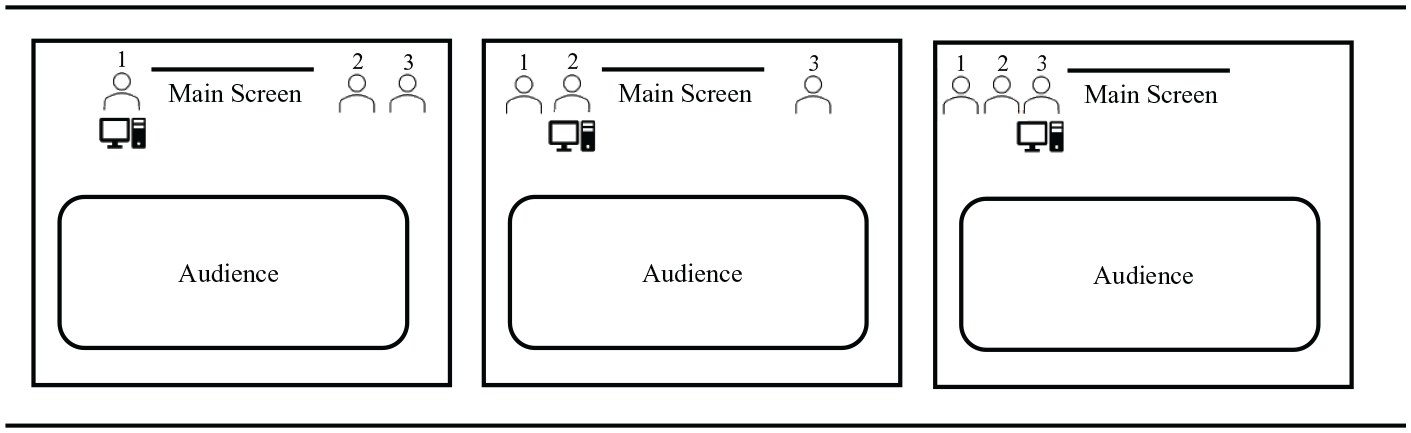
Abacus motion concept.
The abacus motion allows for team members to speak from the side of the screen while still allowing each speaker to draw focus to themselves by physically separating from the rest of the team. This motion especially benefits the speaker in rooms with only a front screen. Moreover, if a team must use local clicking, they can avoid being blocked by the computer for the whole presentation. For example, if local clicking happens on the left side of the screen, left aligning would create an obstacle between the team and the audience. Instead, teams could run abacus by having an initial spot on the right side of the screen and then moving over to the left side when it is their turn to speak. For the abacus motion to work, there must be no short walls on either side of the screen since the whole team will eventually occupy both sides.
Overall, the motion concepts offer two advantages. First, they establish a speaking area by which speakers can upstage their team members and draw focus to themselves. This focus allows the speaker to physically connect with the audience through closer proximity. Second, they enable teams to adjust to local clicking by creating an orderly way to approach, use, and exit the speaking and clicking area.
Packages
So far, I have identified five different formations and five motion concepts. Every team implements at least one formation and one motion concept in a presentation. Each formation and motion combination composes a package. In total, there are 25 possible packages. If one includes the 5 team presentation formats with the packages, then there are 125 possible team presentation strategies (not including the variations that come with the two types of transitions and two Q&A strategies). While space limitations prohibit a deep exploration of each one, I will discuss four.
Suppose a team runs a hosted presentation format in a room with balanced walls, a low front screen, and a back screen using assisted clicking. The hosted format deploys a host at the introduction, transitions, and conclusion (Usera & Fuller, 2024a), leading to one speaker’s recurring role throughout the presentation. The single-wide step-forward package might be an optimal blocking strategy. The host could stand on the left side of the screen while the rest of the team is right aligned. When the host opens the presentation, they step forward to establish their own speaking area. Once the host transitions to the first speaker, the host steps backward, and the speaker steps forward. Once the first speaker finishes their turn, they step backward while the host steps forward to deliver the transition. Once the host delivers the transition, the second speaker steps forward to deliver their part, and so forth.
As a second scenario, suppose a team is running relay format in a room with a front screen only, a right-side short wall, and remote clicking. This team’s ideal package might be left alignment using sideways rotation. In that scenario, the first speaker would stand closest to the screen since it will be the speaking area for referencing the slides. Once the first speaker completes their part, they will move to the end of the line while completing the hand-off to the next speaker. By end of the main presentation, the first speaker should be back in their initial spot.
As a third scenario, suppose a team is running hybrid format in a room with a short wall on the left side, a low main screen only, and no clicker with the computer monitor on the short side. The team could use two different approaches. First, they might consider running a single-wide on the left-side with zero motion using assisted clicking. In a hybrid format, their opener/closer could execute the clicking. Another option is running a single-wide formation but with a sideways rotation using local clicking. Each speaker would rotate with the short side when their turn comes and advance their own slides from the computer. Either approach could work depending on the team’s comfort with assisted versus local clicking.
As a final example, suppose a team is running duo format in a room with a high front screen, viewable backscreen, remote clicking, and balanced walls. To occupy the center of the stage, the duo might center align below the high screen. Instead of stepping forward when they speak, they will use zero motion since they will need to talk off each other frequently, and there will be no hand-offs throughout their presentation since they are a duo.
In each of these examples, I provided key room context indicators, a planned presentation format, and a suggested package for the context. While the suggested packages are not necessarily the only possibilities, they demonstrate how teams can best analyze the room and select a package that would increase their presentation’s impact.
Implications
Team presentations require more strategizing and forethought than simply standing in a line and taking turns speaking. To properly display a united front, teams need to plan where they will stand, how they will look, how they will move, and where they will speak from. To make these decisions, teams must consider three elements of the room: the stage shape, placement of the screens, and their slide advancement method. Teams can then choose between five formations and five motion concepts to develop a responsive blocking strategy. Just as teams adapt their speech content to a particular audience, so should they adapt their formations and motions to a particular room. Teachers who assign team presentations should analyze the room with their students before presentation day and discuss possible packages. Case competition teams should seek a preview of their room before their rounds. If previewing is impossible, coaches should prepare their teams to deliver their presentations using different packages.
Combining this exposition of room analysis and blocking with Usera and Fuller’s (2024a, 2024b) articles on team presentation formats and Q&A management, we end with a systematic approach to strategizing team presentations with its terminology. Here is an example of a complete team presentation strategy under this system:
A relay presentation using un-hosted overhand transitions while standing in a 2-3 split and executing a sideways rotation with assisted clicking followed by a hosted Q&A format.
All this terminology is now comprehensible upon reading this article and Usera and Fuller’s (2024a, 2024b) works. We often used theatre and American football as mental models in developing this system. Theatre is arguably the most comparable of mental models since it involves the strategic display of actors on a stage and effectively using their space and proximity toward the audience for dramatic effect. We also found American football applicable in its systematic approach to play design and the terminology that it creates to discuss it. How players line up and run certain motions before a play begins both have some resemblance to team presentations incorporated into this system. Scholars, educators, and coaches seeking to build on this system or to create their own should look for analogies that resemble the execution of team presentations. Through creative application and comparison, new insights and systems can arise that further exude the creativity involved in effective team presenting.
Some empirical studies are also greatly needed. Team presentations still need further study in the academic literature, given their ubiquity in the classroom, competitions, and business world. While this system provides different possibilities of what teams can do in a presentation, we could use more studies about what teams ought to do to maximize their effectiveness. There may also be other factors in room analysis that I overlooked or could use more explanation. Rooms can vary in their size, arrangements, and technological capabilities, so future explorations should continue to refine the analysis of a room. Moreover, studies investigating how professionals conduct team presentations in corporate contexts can provide new insights to improve this system and its generalizability.
As team presentations remain a staple in education, competitions, and professional settings, we must continue to develop a nuanced understanding of their execution. Our team presentation theory lays the groundwork for a more systematic and strategic approach to transform team presentations from a route turn-taking endeavor into a polished and powerful communication event.
Footnotes
Declaration of Conflicting Interests
The author declared no potential conflicts of interest with respect to the research, authorship, and/or publication of this article.
Funding
The author received no financial support for the research, authorship, and/or publication of this article.
