



Abstract
Background:
The t:connect mobile app from Tandem Diabetes Care recently added a feature to allow t:slim X2 insulin pump users to initiate an insulin bolus from their personal smartphone. User experience and user interface considerations prioritized safety and ease of use, and we examined whether the smartphone bolus feature changed bolus behavior in individuals who bolused less than three times/day.
Methods:
We performed a retrospective analysis of t:slim X2 insulin pump users in the United States who had remotely updated their insulin pump software to be compatible with the smartphone bolus version of the app and who gave less than three boluses per day prior to the smartphone bolus update.
Results:
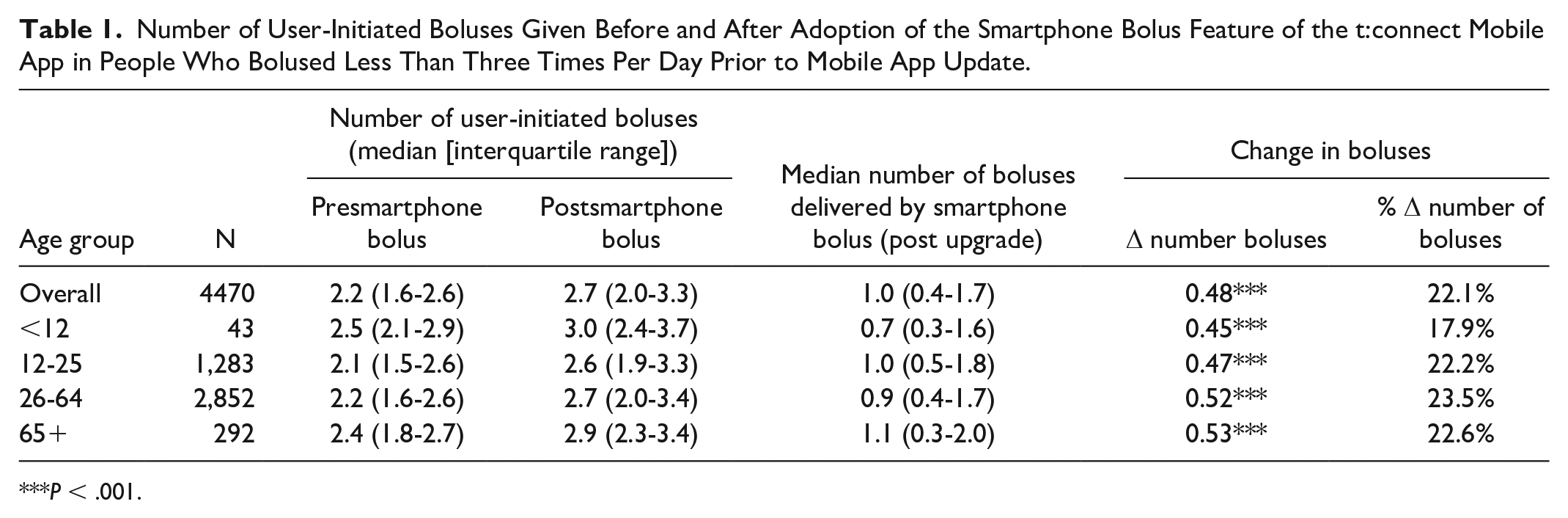
Of the 4470 early adopters who met these criteria, the median number of boluses was 2.2 per day (prior to smartphone bolus update) versus 2.7 per day (after smartphone bolus update), equating to approximately half a bolus more delivered per day (P < .001). Overall, a median of one bolus per day was administered by smartphone app as opposed to being initiated from the screen on the insulin pump.
Conclusion:
This analysis found a significant increase in bolusing behavior among early adopters of the smartphone bolus feature of the t:connect mobile app.
Keywords
Introduction
People living with intensive insulin-requiring diabetes must make dozens of diabetes-related decisions each day (e.g., deliver a bolus of insulin, treat hypoglycemia, monitor glucose levels) and navigate these decisions amidst daily life tasks and environments. Thoughtful human-centered design can help facilitate desired behaviors by considering the context in which behaviors occur. To increase the likelihood that an individual will make optimal diabetes management decisions such as delivering a bolus of insulin when needed, it is necessary to make the desired behaviors as simple to do as possible.
Here, we explore human-centered, behavioral design (BD) strategies aimed at reducing the burden for individuals who use an advanced hybrid closed-loop (AHCL) system, the t:slim X2 insulin pump with Control-IQ technology. Recently, a smartphone bolus feature was added to the system’s mobile app, allowing users to bolus directly from their personal smartphone. In this article, we first describe how BD, user experience (UX), and user interface (UI) design were used to create the smartphone bolus feature with the aim of making daily bolusing behavior easier. Secondly, we report on changes in bolus behavior before and after the smartphone bolus update for AHCL users who bolus less than three times per day.
The t:slim X2 Insulin Pump With Control-IQ Technology
The t:slim X2 system is an AHCL that consists of the t:slim X2 insulin pump, a continuous glucose monitor (CGM), and the Control-IQ technology algorithm embedded in the pump. The system automates basal insulin delivery to target glucose levels 30 minutes into the future and gives automated correction boluses up to once per hour, 1 improving glycemic control in individuals across the lifespan. 2 Users of these systems must continuously wear the CGM and deliver user-initiated meal and correction boluses. The system also has a personal smartphone app, the t:connect mobile app (Figure 1), that users can choose to use as a secondary display. The app also automatically uploads pump data to the t:connect web application. The app is available on more than 40 phone models across both iOS and Android.
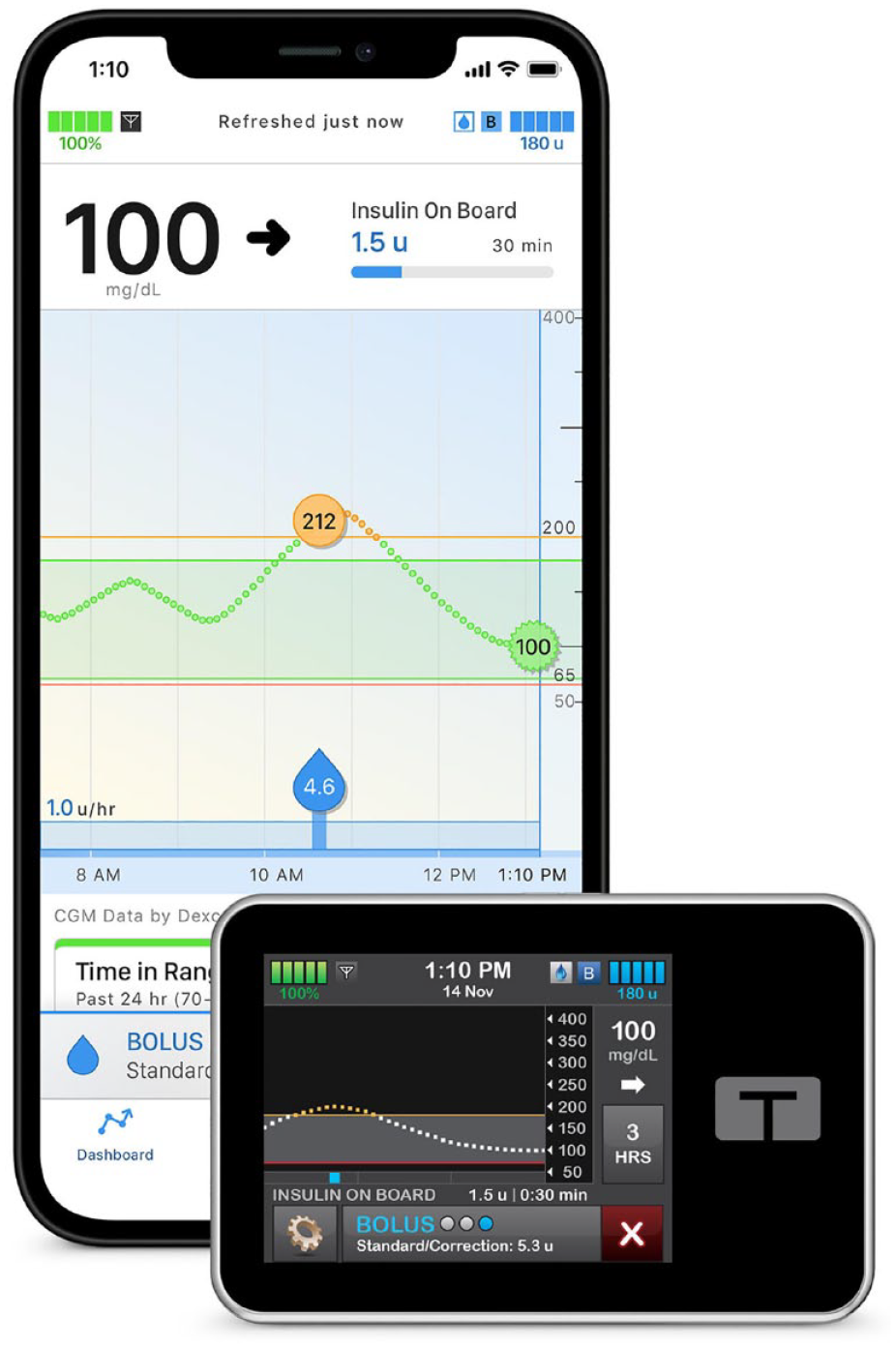
The Tandem t:slim X2 insulin pump with smartphone app that runs on the user’s personal phone.
In mid-2022, an app feature was added to allow users the option to deliver a mealtime or correction bolus directly from their personal smartphone. The design of this feature included behavioral strategies aimed at increasing the ease at which someone could deliver a bolus, ideally encouraging more frequent bolus behaviors from the user. This is important as both clinical trials and real-world studies indicate significant variability in how often users deliver boluses for meals and hyperglycemia.3-5 While AHCL is able to improve glycemia regardless of bolus frequency,3-5 higher time in range 70 to 180 mg/dL is associated with more user-initiated boluses per day.4,5
Using BD, UX, and UI Principles in the Smartphone Bolus Design
Insulin bolusing on the AHCL system requires users to enter information about glucose level and carbohydrate consumption (if any) into a bolus calculator, which the system then uses to calculate the amount of insulin to be delivered based on pump settings. Bolusing behavior is challenging in that it occurs frequently for many/most users and is interspersed throughout the day, some of which may be mostly stable over time (e.g., lunch around noon every day), and some of which may be highly variable (e.g., correction boluses while sick, stressed, etc.). To understand the various patterns of users’ bolusing behavior and how to design to meet these needs, we conducted extensive user research with people using the AHCL system (e.g., interviews, focus groups). As our teams sought to design the optimal UX for the smartphone bolus, we also completed multiple rounds of usability testing, and leveraged an iterative design process, with the aim of reducing user burden and establishing trust in the system. The design evolved over time and testing with the final design being a significant departure from initial engineering concepts (Figure 2).
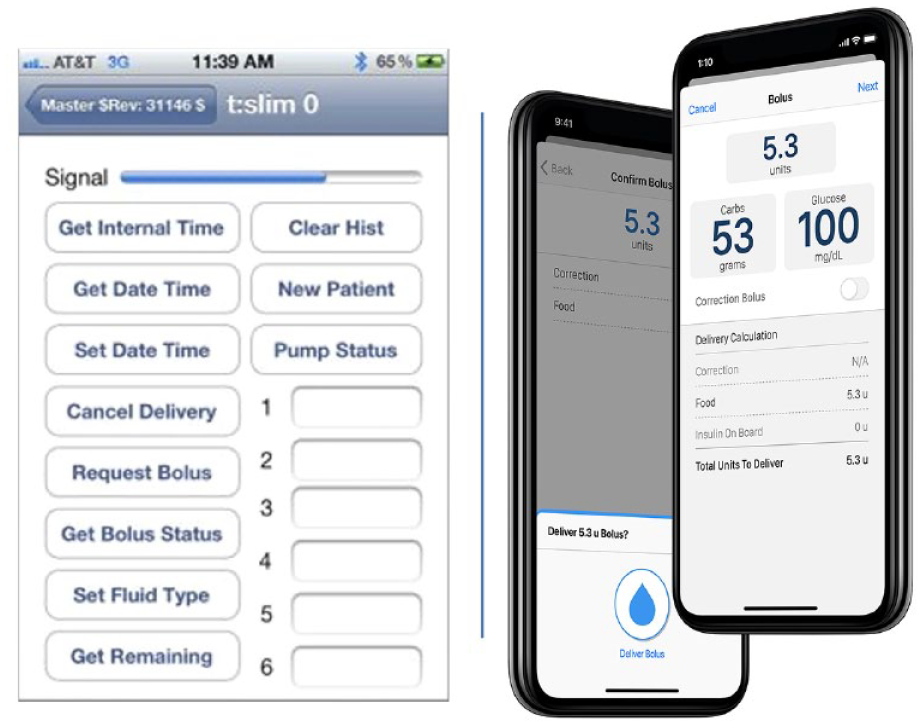
Prototype smartphone bolus app concept and final design incorporating behavioral design considerations.
Designing a simple bolus calculator presented a unique interaction design challenge, and much time and attention was dedicated to how the introduction of a new bolus workflow would impact user burden, trust, and engagement with the system. Our first decision was to implement a workflow similar to the insulin pump’s workflow which had been validated in over a dozen usability studies. This minimized risk of confusion and tapping into a degree of automaticity to program a bolus of insulin for users already familiar with the workflow. 6 Implementing the bolus calculator on a smartphone further required thinking about broader context of smartphone app design, as well as ways to prioritize safety. The initial design used native iPhone entry fields, which assumed the user understood that they could edit existing values. Usability testing discovered some end-user confusion with how to engage with modifiable fields. The final design, therefore, incorporated subtle background color changes on editable fields to promote users to interact with the field. This yielded more engagement with the appropriate fields in the app (Figure 2). The initial bolus calculator design also included an automatic toggle “on” for a correction bolus when glucose was above the target of 110 mg/dL. Through a hazard analysis with the Quality team, it was decided that the correction bolus must be a choice initiated by the user to ensure a complete understanding of the requested extra insulin. Therefore, a new popup notification stating, “Add correction bolus?” Yes/No was added.
Assessing impact of the smartphone bolus feature on bolus frequency for people who bolus less than three times per day
To assess the impact of the smartphone feature on behavior, we performed an analysis of AHCL system users who upgraded to the smartphone bolus feature and who performed less than three boluses per day on average. Three boluses per day are a clinically accepted threshold of appropriate bolusing to cover the average number of meals consumed each day, with more than three boluses often indicated. Thus, assessing the change in bolus frequency in this group was highest priority.
Methods
Study design
This retrospective analysis included AHCL users in the United States who had upgraded their smartphone app software to the smartphone bolus version of the app and who had at least 21 days of data with at least 70% CGM use prior to and after the update to the smartphone bolus version of the t:connect mobile app, from July through November 2022. Data were selected for analysis for individuals who had a median less than three boluses per day prior to the smartphone bolus update. The participant’s anonymous data were extracted from the Tandem t:connect web application.
Data were reviewed for outliers and patterns of missing data. Bolusing behavior was assessed by the median number of user-initiated boluses given per day, and for the time period after the smartphone bolus update, the percent of user-initiated boluses that were initiated on the smartphone app software compared to the insulin pump hardware.
Results
A total of 4470 users met inclusion criteria and were analyzed. Average age was 37.4 ± 16.3 years, 57% female, 90% type 1 diabetes, 10% type 2 diabetes. Prior to the smartphone bolus update, the median number of boluses was 2.2 per day (Table 1). After smartphone bolus update, the median number of boluses delivered in total was 2.7 per day, an increase of 22% (P < .001). Overall, a median of one bolus per day was administered by smartphone bolus feature of the app as opposed to being initiated from the screen on the insulin pump.
Number of User-Initiated Boluses Given Before and After Adoption of the Smartphone Bolus Feature of the t:connect Mobile App in People Who Bolused Less Than Three Times Per Day Prior to Mobile App Update.
P < .001.
Conclusions
The smartphone bolus feature of the t:connect mobile app for the t:slim X2 system has the potential to lower the burden of bolusing for people with diabetes, with specific behavioral, UX, and UI design choices aimed to “nudge” the user toward bolusing more frequently. By using familiar workflows and maximizing information on each screen perception of time and effort required to perform the action was reduced, creating an optimal choice environment conducive to consistent bolusing behavior.
This analysis of users who bolused less than three times per day shows an increase in bolusing behavior after adopting the smartphone bolus feature of the t:connect mobile app. This is encouraging, considering increased bolusing is associated with better glycemic outcomes in people using automated insulin delivery devices.4,7,8 A recent real-world analysis reported that individuals using this AHCL system who had the lowest glucose management indicator had the highest number of user-given boluses, which comprised both meal and correction boluses. 3 Therefore, finding strategies to lessen the burden of bolusing are paramount to improving bolusing behavior. Future studies may include bolusing from a smart watch, or other novel interactions with currently existing technologies.
Strengths of this study include the ability to directly measure the behavioral impact of the smartphone bolus in early adopters of the new feature. Limitations include that absence of HbA1c data or glycemic impact, which should be the target of future studies related to behavior change. Overall, BD, UX, and UI strategies can contribute to better use of diabetes technologies for people with diabetes, and should be employed to reduce burden for people living with diabetes.
Footnotes
Abbreviations
AHCL, advanced hybrid closed-loop; BD, behavioral design; CGM, continuous glucose monitor; UI, user interface; UX, user experience.
Author Note
These data were presented in abstract form at the 2023 American Diabetes Association 83rd Scientific Sessions, June 2023.
Declaration of Conflicting Interest
The author(s) declared the following potential conflicts of interest with respect to the research, authorship, and/or publication of this article: All authors are employees and shareholders of Tandem Diabetes Care.
Funding
The author(s) disclosed receipt of the following financial support for the research, authorship, and/or publication of this article: Tandem Diabetes Care.
