




Abstract
Effective delivery of post-insertion instructions is essential for denture care and oral health. This study aimed to develop a progressive web application (PWA) to educate patients’ chairside and serve as a reference material. A need analysis was conducted before prototype development. Subsequently, the prototype was subjected to content verification, design appraisal and usability testing. The results of usability testing revealed a user task success rate of 94.4%, with an adjusted Wald 95% confidence interval of 83–100%. User satisfaction assessed using the Single Ease Questionnaire and System Usability Score reported a mean score of 6.13 (95% CI: 5.69–6.55) and 85.9 (95% CI: 82.2–89.6), respectively, indicating good usability. This study highlights the systematic approach of developing an evidence-based educational PWA to meet the usability standards for mobile applications. This PWA is useful in clinical studies to explore mobile technologies’ potential in educating denture wearers, especially in the older population.
Introduction
Removable partial denture (RPD) wearers have a high risk of developing dental caries and periodontal diseases. 1 Hence, post-insertion instructions are important to educate patients about RPD hygiene. The conventional method of verbal chairside instructions has some disadvantages as it is dependent on the practitioner’s knowledge, attitude and practice. 2 Regrettably, a substantial number of patients are not well informed about RPD care.3,4 They exhibit poor RPD cleanliness and insufficient knowledge about RPD hygiene. 5 Supplementing verbal instructions with leaflets for reference is beneficial, 6 but printed materials have limitations such as the need for physical delivery to the target audience 7 and are easily misplaced or lost. 8
Following advancements in technology, mobile applications can be an attractive and engaging alternative compared with the conventional educational approach. Mobile applications are mainly categorised as native, web and hybrid applications. Most applications are of the native type. As they do not have a single code base supported by multiple mobile platforms and operating systems, specialised mobile developers need to be employed to develop a separate code base for each targeted platform. 9 Progressive web application (PWA) is an advancement in mobile application construction introduced in 2015. It is free from application store restrictions and looks similar to native applications in terms of user interface design and ability to function offline and receive push notifications. Case studies on PWA reported excellent user experience across platforms. PWA offers desirable features previously only seen in native and hybrid applications at a lower development and distribution cost. 10 Thus, it is gaining acceptance for mobile application development, even in the healthcare sector. 11
Mobile health or mHealth which encompassed the application of mobile technologies in healthcare ranges from self-health monitoring, management of health records and public health education. 12 In a survey done in Malaysia, about 20% of the respondents reported using health related applications for medication reminder, telemonitoring and teleconsultation services. Although there is some resistance to adoption of mHealth, generally Malaysians were receptive of this technology to acquire health related information. Thus, there is potential for mHealth applications in enhancing healthcare delivery. 13 The use of mHealth in dentistry as a supplementary material in improving self-performed oral hygiene revealed positive results amongst patients in orthodontics and paediatric dentistry. 14 Hence, an educational mobile application can be used to improve knowledge and denture hygiene amongst partial denture wearers. However, many oral health-focused applications are of poor quality in terms of their usability 15 and widespread misinformation. 16 Thus, a dental mobile application that is evidence-based, is empirically validated and adheres to sound usability design principles needs to be developed.
This study aimed to develop a PWA that can function as a chairside educational tool and as a reference material for home RPD care. The prototype was systematically developed and improvised during the validation process to meet experts’ and end-user requirements.
Materials and methods
Ethical approval for this study was obtained from the Ethics Committee. All the participants in this study gave their written consent. The development and validation processes of the PWA are displayed in Figure 1. PWA's development and validation process. HONcode: Health on the Net Foundation Code of Conduct. SEQ: Single Ease Questionnaire. SUS: System Usability Score.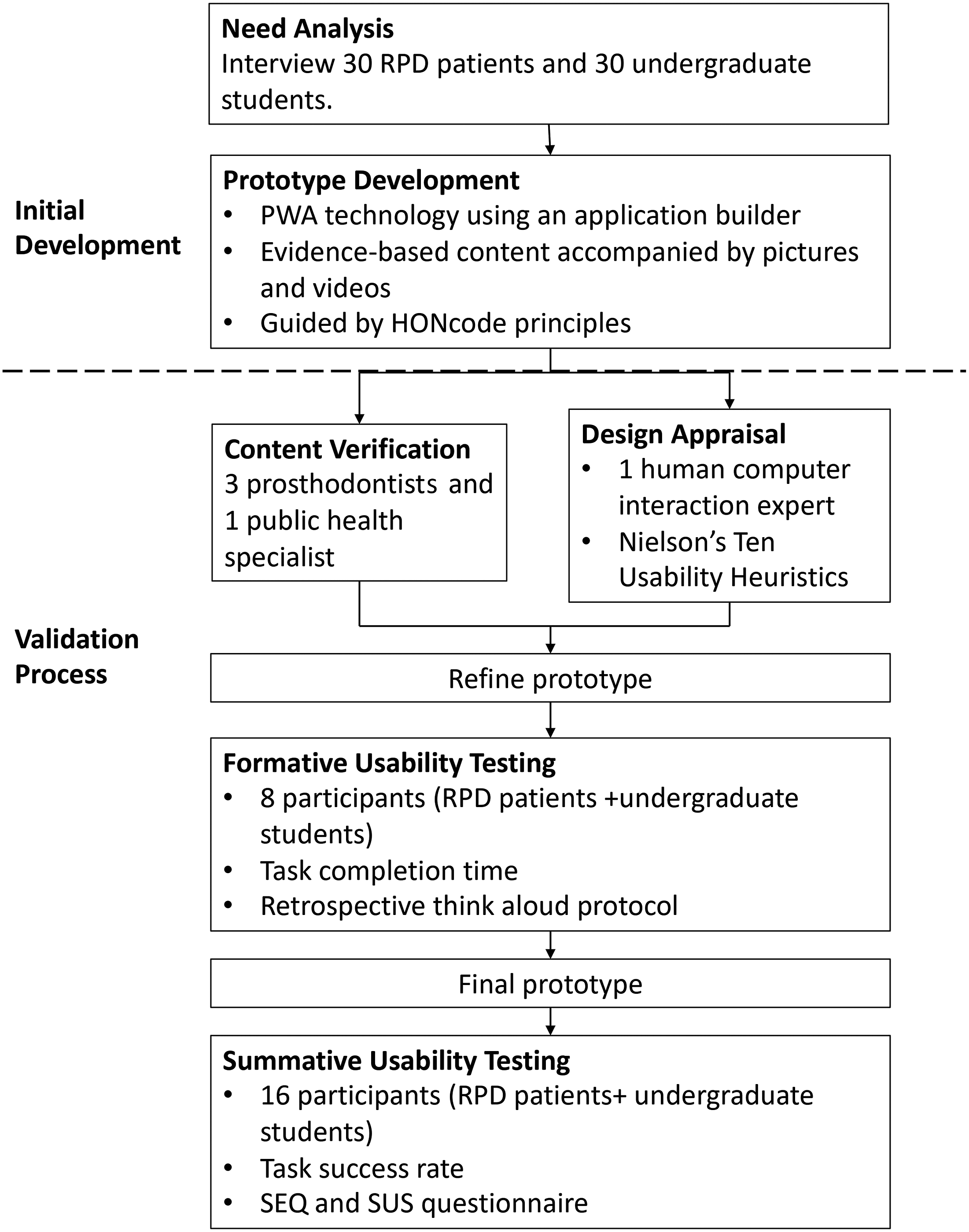
Initial development
Before constructing the application, we identified user requirements by performing a need analysis. 17 We interviewed final year undergraduate students from the dental school and patients who had received RPD to investigate the method of conveying post-denture insertion instructions. The results revealed inconsistencies in the delivery of post-denture insertion instructions. Out of 30 patients interviewed, only one patient alleged receiving written material to supplement verbal instructions. Eight of them did not recall receiving any form of information. The remaining patients affirmed receipt of verbal explanations with the demonstration of hygiene procedures. The students confirmed giving verbal instructions during their patient’s denture insertion appointment, but the students’ amount of information varied. They also commented that educational materials for RPD wearers in the clinics were lacking. Thus, the PWA was developed to deliver accurate and consistent information chairside and as a take-home reference material.
The PWA was created through an application builder named GoodBarber utilising the Angular JavaScript 4.0 technology. 18 Health on the Net Foundation Code of Conduct (HONcode) principles were used to guide prototype development. 19 Users had the option of viewing the contents in English or Malay as the prototype had a bilingual homepage. Most of the information provided focused on denture care and oral hygiene. Pictures and videos were included in the PWA to improve understanding and visualisation of the written content.
Validation process
The PWA was validated through a mixed-methods approach, consisting of expert assessment of content and design followed by users’ usability testing 20 The content was verified simultaneously in English and Malay by the bilingual team members following the dual focus approach, 21 consisting of three prosthodontists and a public health specialist. They accessed the PWA prototype through the uniform resource locator (URL) and filled up a form containing a comment segment for each section in the PWA. The revision of the content was done on the basis of their feedback.
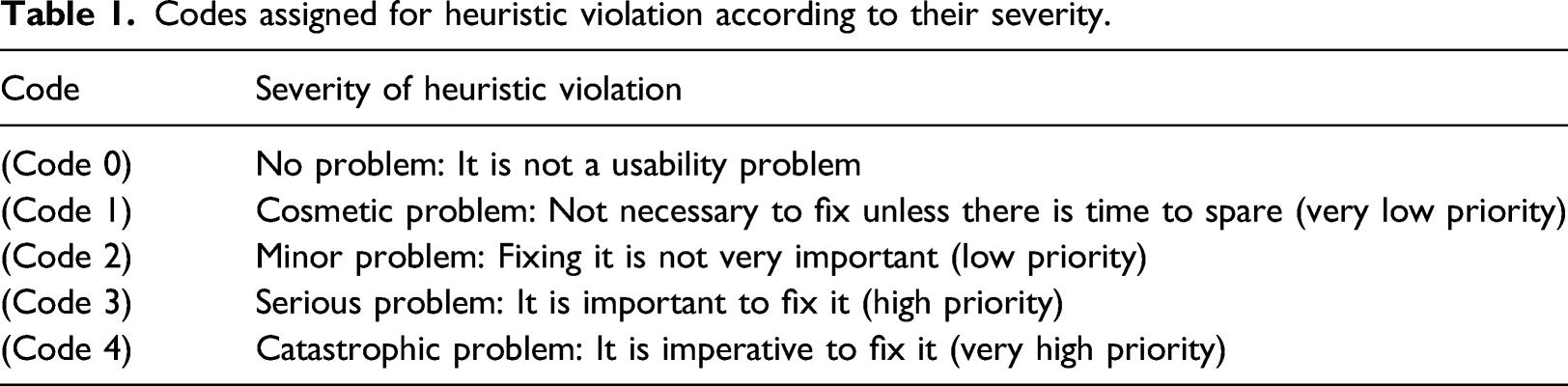
Codes assigned for heuristic violation according to their severity.
A convenience sample of eight participants consisting of undergraduate students and patients wearing RPDs in UKM was enrolled for the prototype’s formative usability testing using the retrospective think-aloud protocol. 23 The cumulative binomial probability formula 1 − (1 − p) n is n = ln (1 – discovery Goal)/ln (1 – p) was used to calculate the sample size. Thus, a sample size of eight was required to discover at least 83% of the problems with a likelihood of occurrence of 0.20. 24 The participants were shown the PWA homepage and given the task to first access the page containing information on steps to clean the denture, followed by a video on flossing technique. A single researcher observed each participant and recorded the time taken for task completion. Subsequently, the participants revisited the PWA with the same researcher and were encouraged to share their experience using the prototype and provide suggestions for improvement. The researcher noted feedback from the participants.
Summative usability testing on the revised prototype measured the task success rate and user satisfaction. A sample size of 16 was calculated on the basis of an estimated success rate of 0.75 derived from the formative testing, critical difference of 0.20 and desired level of confidence of 95% using the adjusted Wald formula. 25 The participants consisted of eight patients wearing RPDs and eight undergraduate students in UKM. They were literate in English or Malay and had used a smartphone in the past 6 months. Participants were given the same task in the formative usability test and must complete it within 46 s to succeed. After completing the task, the participants were administered the Single Ease Questionnaire (SEQ) and System Usability Score (SUS) to measure user satisfaction. SEQ had a seven-point Likert scale with regard to the ease in using the PWA. The score ranged from 1 (very difficult) to 7 (very easy). SUS contained 10 items on a five-point Likert scale reflecting the degree of agreement or disagreement with each statement. For positively worded items (odd numbers), the score contribution is the scale position minus one. For negatively worded items (even numbers), the score contribution is five minus the scale position. The overall SUS score was calculated by multiplying the sum of the item score contributions by 2.5. Hence, the SUS score can range from 0 to 100, with higher scores indicating better usability. 26
Results
Design appraisal
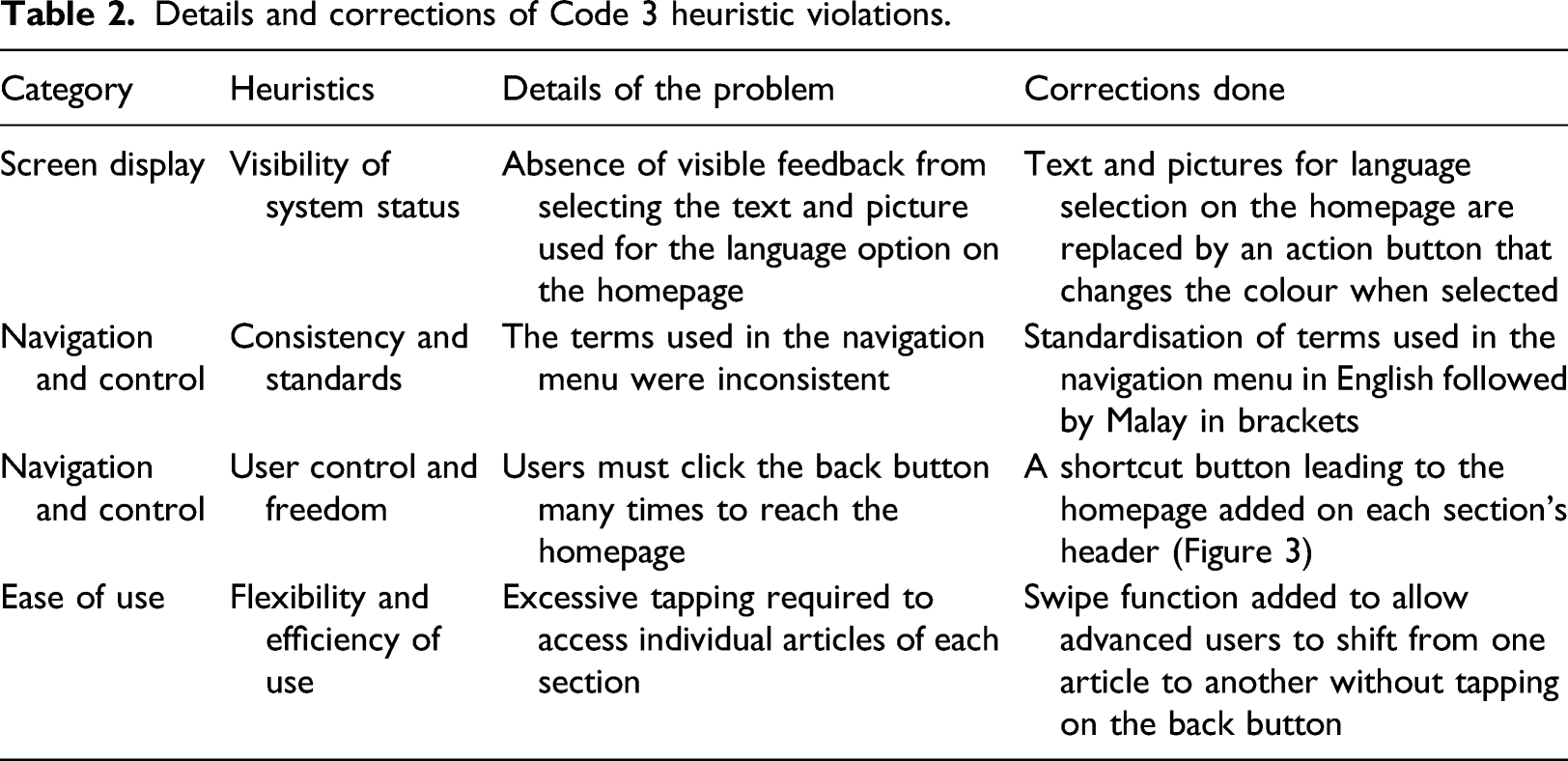
Details and corrections of Code 3 heuristic violations.
Formative usability testing
From the formative testing, the geometric mean for task completion time was 37.37 s (95% CI: 30.5–45.8). The geometric mean has less error and bias than the median or mean for small sample size usability data. 25 All the participants completed the task, but the patients tended to tap on the main heading, ‘Caring for your denture’ instead of ‘Oral hygiene instructions’, which led to a delay in reaching the target page. Students gave positive feedback for the options of video- or picture-guided steps for hygiene procedures. They felt that the picture-guided procedure allows faster explanation during chairside education, and patients can refer to the video later. Patients agreed that they have a better visualisation of a procedure with illustrations but commented that the clustered pictures were a bit small. Overall, the participants found the PWA simple to use and commended the bookmark function for quick access, but felt that there was excessive scrolling due to the lengthy content on a single page. Some participants also suggested adding a shortcut button to return to the page containing the main headings.
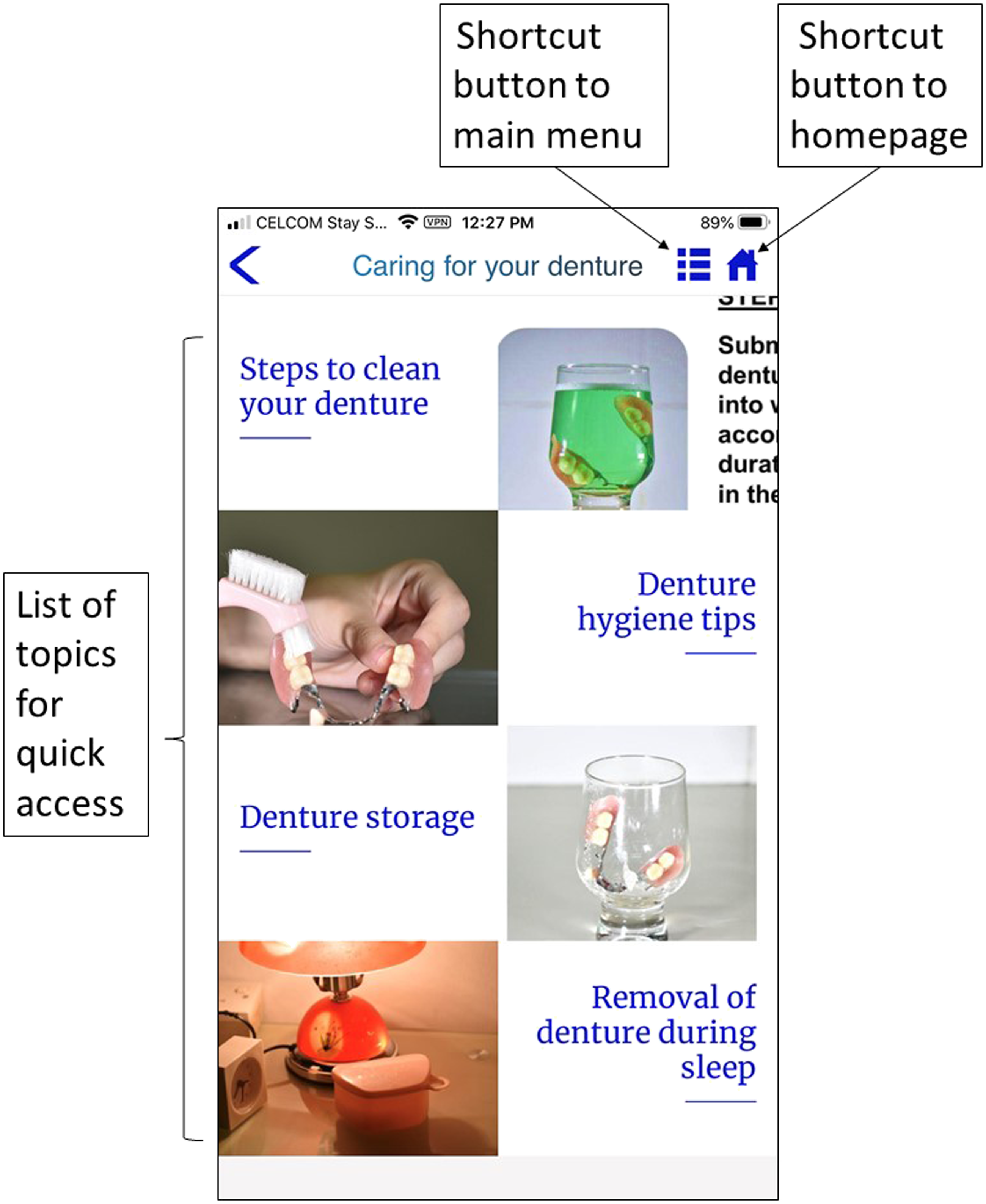
On the basis of their feedback, adjustments were made to improve the usability of the PWA. The six main headings were changed to five, which consisted of common problems related to wearing partial dentures, cleaning aids and materials, denture and mouth care, videos on steps to perform oral hygiene procedures and indications for denture replacement. The clustered pictures were rearranged as single pictures in sequence for the picture-guided hygiene procedures (Figure 2). The contents in the article page were listed into topics in a submenu page for quick access to a specific topic to reduce scrolling. A shortcut menu button was added at the upper right side of the page’s header (Figure 3). Clustered pictures rearranged in sequence for picture-guided procedures. Submenu page layout based on feedback from design appraisal and formative usability testing.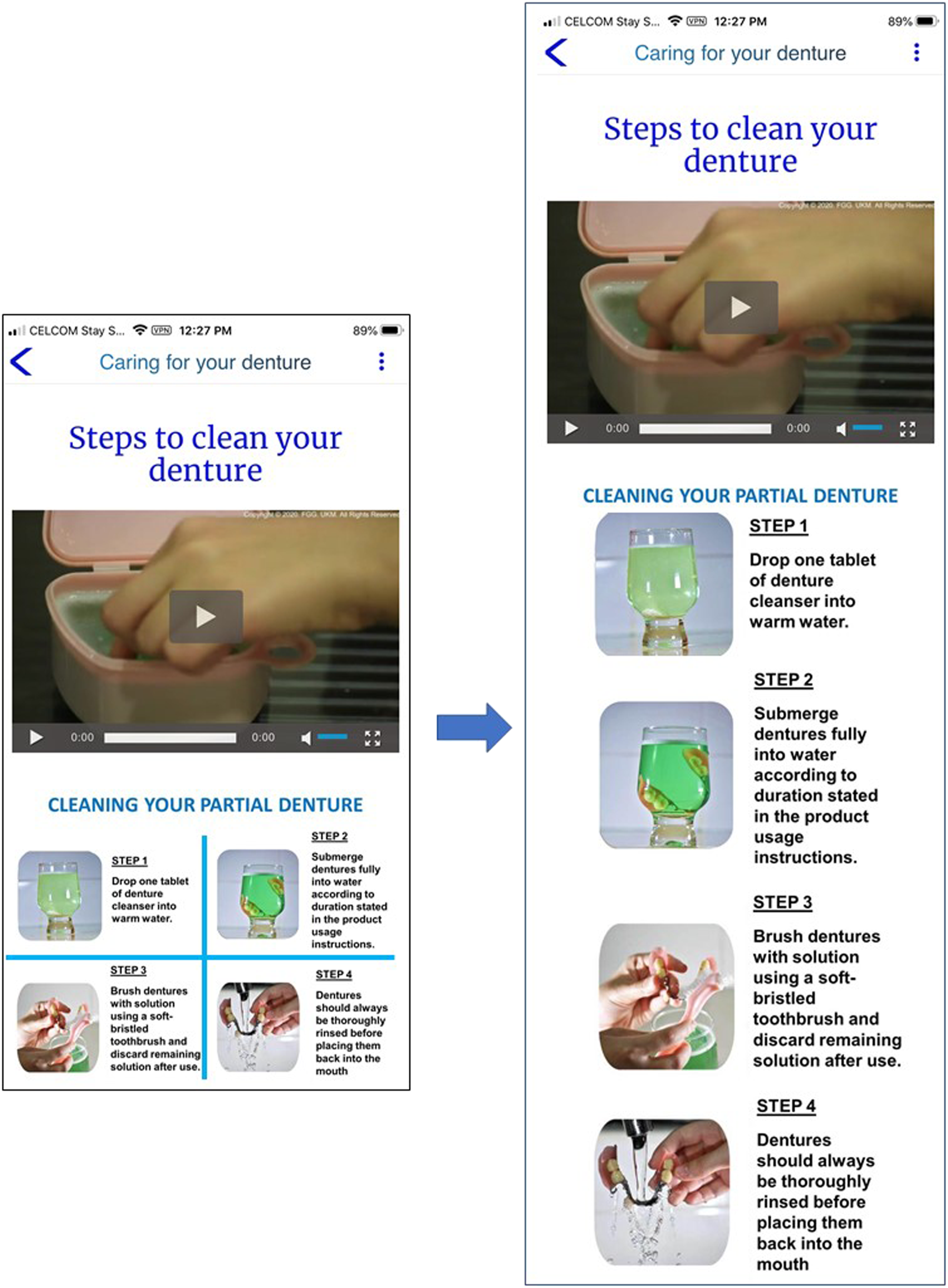
Summative usability testing
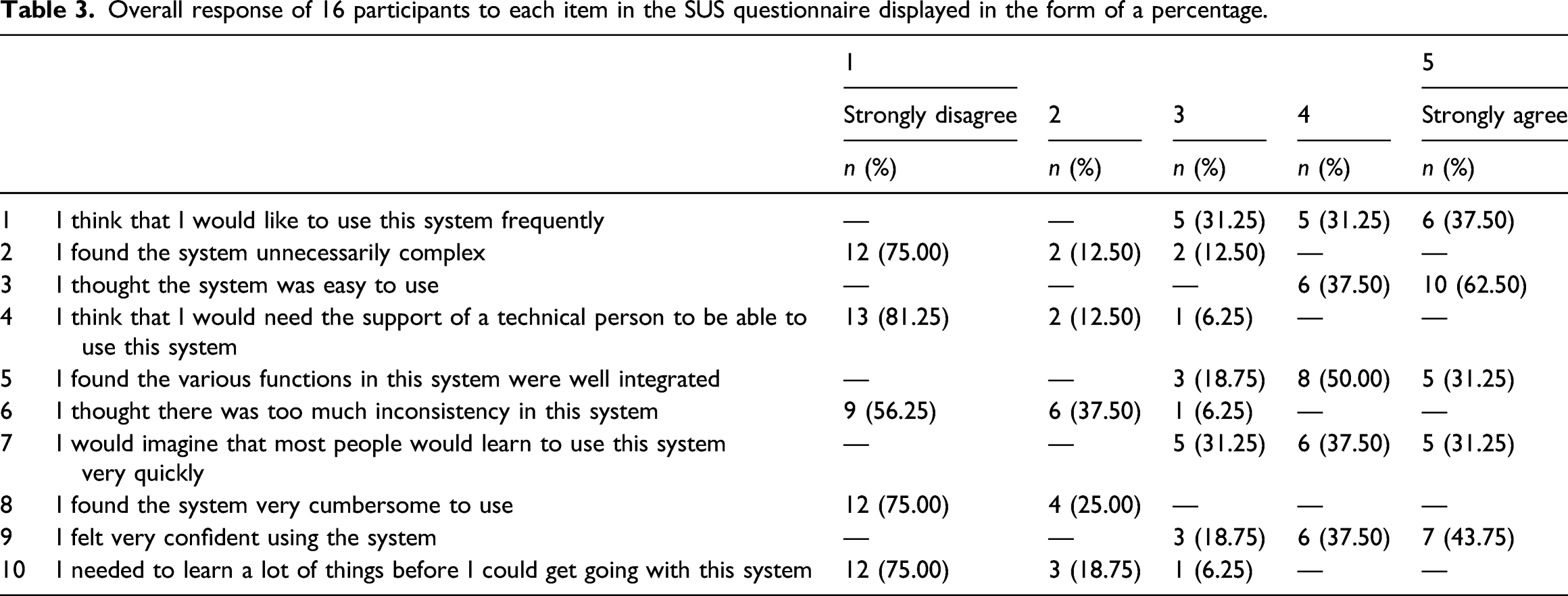
Overall response of 16 participants to each item in the SUS questionnaire displayed in the form of a percentage.
Discussion
This study successfully developed a PWA with good usability scores using a systematic approach. The development methodology was based on user-centred design principles following previous studies.17,27–29 This approach first establishes user needs, followed by expert inspections and usability testing with end-users to ensure that the context and design of the mobile application meet end-user requirements, therefore improving usability and user experience. 30
Need analysis in the present study revealed inconsistencies in the delivery of information and a lack of supplemental material to verbal instructions. There is considerable evidence of positive outcomes in denture wearers who received education through verbal instructions and written information. Moreover, the addition of illustrations into the written content improves patient’s denture hygiene.5,31 Hence, the PWA content was drafted on the basis of the recommendations of essential information 31 that must be given to patients after denture delivery. Videos and pictures were included, considering the benefits of illustrations. The PWA is more economical over traditional leaflets as there is no printing or storage cost. 32
As most of the oral hygiene applications marketed in application stores were found to contain inaccurate information, ensuring evidence-based content for the PWA was crucial. 16 All the health information given in the PWA were supported by references, complying with the HONcode principles. HONcode is a code of ethics that guides site managers in providing reliable and credible health information. 19 The content was further reviewed by experts in the field for validation.
Progressive web application was chosen in the present study instead of a native application because it has a multi-platform advantage. It does not require separate development for different phone operating systems and constant updates to keep up with the current operating systems. Adjustments to the content in the PWA are relatively easy without depending on a highly skilled development team. Thus, it is more cost-effective to develop as improvisations to the prototype can be done swiftly during the validation process without waiting for approval from application stores. It can be installed by both Android and iPhone Operating System users directly from the URL or by scanning the quick response code. Installation is simple by adding to the home screen without application store distribution fees. 10 Moreover, it takes up less storage space. Although it has a limited capacity for advanced functionality and is unable to access features such as Bluetooth and contacts in the phone compared with native applications, 11 these additional functions were unnecessary for the construction of the educational PWA.
Usability is defined as ‘the extent to which a user can use a product to achieve specific goals with effectiveness, efficiency and satisfaction in a specified context’. 33 By contrast, user experience is defined as the perceptions and responses of users that result from their experience of using a product or service. 33 Hence, these aspects are crucial as a mobile application with poor usability would likely lead to poor user experience. One of the important aspects that may influence usage is the prototypicality of a mobile application. User’s design expectation of a mHealth mobile application may be complex but there are shared mental models of mobile application design elements. Thus, the design interface of the PWA follows the common start page, menu and subsequent pages according to the topics. 34 A human–computer interaction expert was consulted to detect design interface issues which require fixing. Further improvisation was done based on user’s feedback during the formative stage to ease usage as users were more willing to use a mobile health device if it is simple to use. 13
The majority of existing oral health applications were developed for children or adolescents. 14 To the authors’ knowledge, this is the first mobile application developed to convey post-denture insertion instructions. The general perception that older people would be unwilling to accept new technologies may have hindered the development of educational dental mobile applications targeting older users. However, age should not be a barrier as old adults in the age group of 60–74 years have a high potential of adopting new mobile applications. 35 Clear and well-designed user interface is a factor influencing the use of an application amongst the elderly. 36 Thus, during PWA development, Sans serif and serif types of fonts were used with a plain white background to enhance readability. A list of topics accompanied by its respective picture icon both triggered the same action when tapped, and there was enough space between actionable items to facilitate tapping. The back button, a critical navigation feature for older adults, was visible on every page. 37
In usability studies, formative usability testing evaluates an application qualitatively to improvise the prototype. Subsequently, a quantitative assessment of the final prototype based on effectiveness, efficiency and user satisfaction was conducted in a summative usability test. 25 In the present study, the effectiveness and efficiency were measured through task success rate, expressed as the percentage of users completing the task within the given time frame. It differed from previous studies17,20 that measured efficiency through task-time completion because time is not as crucial for this application developed to convey educational information compared with those applications for reporting dental traumas. However, the authors set the completion of tasks within 46 s on the basis of the upper limit of the 95% confidence interval in the formative study as the criterion for success. This criterion is to assess whether the changes made on the basis of feedback from the formative study have addressed the usability issue in navigation and user interface. The result revealed a success rate of 100%, which is common in small sample size usability studies. Thus, the reported values were adjusted to 94.4% to present a more realistic estimation of the population success rate. 25
Standardised usability questionnaires were used to measure user satisfaction to allow an objective evaluation and comparison of scores to other studies. None of the participants scored below 5 in the SEQ. The raw mean SUS score of 85.9 converted to percentile rank is interpreted as the PWA being more usable than 97% of the products in the Sauro 38 database. The excellent SEQ and SUS scores without a significant difference between patients and students substantiate the ease of use amongst dental practitioners and laypeople of different age groups. The participants’ high task success rates and user satisfaction scores imply the importance of a systematic approach in developing an application with the end-user requirement in mind from the initial phase of development, which agrees with findings from previous studies.17,39
There are some limitations to the present study. All the participants in the summative usability testing had at least a secondary education level, and the PWA had only the option of two languages. Thus, this result cannot be generalised to the general population as usability may be hindered due to language and literacy. The participants’ age range was also wide, but only 18.75% of the participants in the summative usability test were aged above 60 years. Hence, there may be usability issues in the elderly, which were not detected due to the small sample size. Nevertheless, there is a ‘Contact Us’ segment in the PWA which allowed users to contact the authors for any enquiries and to provide feedback.
Future research may improvise mobile applications to overcome language barriers and literacy in delivering information to patients, for example, using comprehensible animations without text. Mobile application developers should also consider the elderly as their target users and incorporate design features that are user-friendly for older people. From the participants’ responses in the SUS questionnaire, 62.5% strongly agree that the PWA is easy to use, but only 37.5% strongly agree that they would like to use the PWA frequently. This discrepancy may be due to barriers to adopting mHealth in developing countries such as the perception of an appropriate medium for delivering health information and infrastructure or literacy problems. 12 Thus, further studies on the acceptance and effectiveness of PWA in improving denture hygiene in comparison to the conventional method may be conducted.
Conclusion
This study provided insights into the systematic approach of using the PWA for the development and validation of an educational mobile application of satisfactory quality, in terms of evidence-based content and adherence to usability design principles. The PWA is an affordable alternative to a native application that may be considered for future studies. The potential of an educational mobile application in improving oral health knowledge and hygiene amongst the older population can be explored by ensuing clinical research using the present PWA.
Footnotes
Acknowledgements
The authors gratefully acknowledge Dr Haslina Rani, a public health specialist, for her professional input in the content validation of the PWA. They also acknowledge Miss Zaihosnita Hood, a human–computer interaction expert, for evaluating the design interface of the PWA.
Declaration of conflicting interests
The authors declared no potential conflicts of interest with respect to the research, authorship, and/or publication of this article.
Funding
The authors disclosed receipt of the following financial support for the research, authorship, and/or publication of this article: This work was supported by the Young Researcher Incentive Grant by University Kebangsaan Malaysia grant numbers GGPM-2017-108.
