






Abstract
The Python programming language is reviewed, with an emphasis on features and add-on modules useful for solving problems in the field of laboratory automation. Complexities of multi-instrument automated system control and coordination are discussed, along with the difficulties that arise when multitasking is used to implement system controllers. We introduce Python's generators, a feature not found in other popular languages, and demonstrate how to use them to simplify the development of multi-instrument laboratory automation system controllers.
Introduction
Python is an object-oriented, interpreted programming language with dynamic typing. When systematically compared with similar programming languages it has been demonstrated to have among the fastest execution speeds, an ability to solve problems with the fewest lines of code, and to be among the most productive in terms of time to realize a working program. 1 Moreover, in a testament to its clear syntax and clean design, Python has been used widely to teach computer programming. 2,3 At the same time, Python offers many features useful to more experienced programmers. In this article, we will introduce the language and discuss some of its advanced features. We will also present an implementation of a concurrent multitasking application that makes use of Python's generator functions.
Python is widely used, www.python.org. quotes Google and NASA on their use of Python, and the “Success Stories” link includes project descriptions from Industrial Light & Magic, the United Space Alliance, AstraZeneca, and many others. 4 At Bristol-Myers Squibb we have used Python for a number of automation projects, including an automated system for the inspection of protein crystallization trials. 5
You can download Python free of charge at www.python.org, www.activestate.com, or www.enthought.com. Python runs on a variety of platforms, including Windows, Mac OS X, and various Linux/Unix flavors. If you are programming under Windows, you may find the Win32All extensions useful. 6 These are included in the ActiveState distribution. Many tutorials and books on Python are available. See www.python.org, “Getting Started”. The manuals are available online there as well. The Python community is very active. The comp.lang.python newsgroup is a good place to ask questions if you can't find the answers elsewhere.
Language overview
Python is an interpreted language. The code is byte-compiled into an intermediate file. You don't need to do the compilation step yourself, however-this happens automatically the first time you run your code. One advantage of an interpreted language is that you can write or modify your code and immediately run it without performing a build step. Another is that you can type code into the Python interpreter, either to experiment with the language, or to try out snippets of code that you then cut and paste into your program once you've seen them work.
Python syntax is concise yet elegant. Python looks like pseudocode—the code you might jot down to work out your program logic. Another feature is that indentation is significant. Blocks of code are not identified by curly braces but by indentation. That means the appearance and behavior of your code are guaranteed to be the same. You cannot indent your code correctly, but accidentally put in braces that make it work incorrectly.
Correct indentation works in the obvious way:
The output of this short program is as follows.
Note that Python's comment character is the hash symbol (#). Anything that follows the hash character on a single line is treated as a comment.
Incorrect indentation raises an IndentationError:
The concise but clear syntax and interpreted nature of the language encourage rapid prototyping and recoding. You can arrive at a working prototype more quickly than in other languages, 1 and discard and replace parts of your program more easily.
Higher-Level Types
In addition to string, integer, floating point, and complex number types, Python features several higher-level data types: lists, dictionaries, and sets. A list is an ordered sequence of values indexed by integers. The values may be of any type, and need not all be of the same type. For example:
Another high-level type is the dictionary—an unordered collection of values, again of any type, and indexed by keys of almost any type:
Dictionaries are powerful tools for fast random access of data. They are highly optimized, both for general use and because they are used internally for managing Python's module and object name spaces. 7
A set is an unordered collection of unique values, and comes with methods such as intersection and union. Using a set is a quick way of eliminating duplicates from a list:
Object-Oriented
Python is a fully object-oriented language. 8 If this is an unfamiliar concept, one component of an object-oriented language is the ability to define classes. Classes are programming constructs that include both data and functions (or “methods”), which operate on that data. Following is a simple class that describes a 96-well sample plate. It has a width and height (hard-coded here for simplicity), and a function for printing the name of a well given a well number:
You can define a higher-level class (“base class”) that incorporates behaviors common to some real-life objects. Then you can define more specific classes (“subclasses”), which will acquire those common behaviors from their base class, and also include more specific behaviors appropriate to a particular subset of objects.
In the following example, we define a base class called “Container” that has some characteristics common to both plates and racks. Then we define two subclasses, one for plates, which adds a barCode attribute, and another for racks, which adds both an overall barCode for the rack and a list of bar codes for the tubes in the rack.
Both the Plate and Rack classes inherit the width and height attributes and the wellName method from the Container base class. A Python class can inherit from more than one base class, that is, Python supports multiple inheritance.
Dynamic
Python is a dynamic language. You do not have to declare the types of your variables; their types are determined when you assign values to them. For example, the statement “i = 1” makes i an integer, whereas “i = 1.23” makes i a floating point number. The advantage of this is that you can create code that works on any type of variable, as long as that variable has the expected behavior, as opposed to its having a particular type. For example, a function that performs some arithmetic on its arguments, presented below, does not need to care about the type of x, y, and z, as long as they support addition. This applies not just to integers and floating point numbers, but (in this trivial example) any data object for which “+” can be applied. Since “+” is the string concatenation operator, addThem could just as well be given three strings as arguments. It would return a new string, which is the concatenation of its arguments. The x, y, and z could be lists as well—a new concatenated list would be returned. In object-oriented programming, this ability of objects to make use of the same operators, but in a way appropriate to their types, is called “polymorphism”. 9 In Python, this is referred to as “Duck Typing”. That is, “If it looks like a duck and quacks like a duck, it must be a duck”. 10
A more realistic example of the use of duck typing involves the file object and the corresponding StringIO class. A file object is simply an open file. The StringIO class on the other hand creates an object that behaves like an open file but is actually a string with file-object-like behavior, sometimes called an in-memory file. 11 So, for example, say you want to create an image using the Python Imaging Library's “Image.open” method, 12 which expects to be given an open file (it also accepts a file name). The customary approach is to read the image from an open file:
But what if for some reason the image data were already in memory? For example, you might have read the image data from a database so there was no file to open. Using StringIO, you can create a file-like object containing the data, and then supply that object to the Image.open method:
Like our earlier addThem function, the Image.open method does not care about the type of its argument, as long as that argument presents the same programming interface as a file object, such as having read, write, and close methods. Dynamic typing often eliminates the need to use different logic to handle different types. Rather, dynamic typing allows code to handle a family of types, such as sequence types (which include lists, tuples, and strings) and more generally types that share a common interface.
Further, your objects can take advantage of existing built-in operators using Python's special methods. For example, if you give your object an “_add_” method, then your object can appear in front of a “+” sign (and after a “+” if you implement “_radd_”). 13 Defining what it means to add your object is up to you. Often you can get certain behaviors with little or no effort by making your object a subclass of one of the existing built-in objects that already has the features you want, such as a list or dictionary.
Concise
Another handy (though somewhat cryptic-looking) feature is the list comprehension. A list comprehension is simply a concise way of coding a loop that examines each item in a sequence, producing a new list. 14 This example takes a list of integers and makes a new list of only the odd ones:
This can be written much more concisely as a list comprehension, and will run faster as a result of a more efficient internal implementation:
Included and add-on modules
The standard Python download comes with a wide variety of modules (libraries) for all sorts of programming tasks. This is what is referred to in the Python community as a “batteries included” philosophy. Many additional modules are also available for download. For a list of modules included in the basic download, see The Global Module Index: docs.python.org/modindex.html, or see the ActivePython Documentation in your Start menu if you download Python from ActiveState for use under Windows.
Automation applications often require a mechanism for recording periodic status messages and error conditions. The logging module provides a powerful mechanism for this. It allows you to record messages to a variety of destinations: the screen, a file or rotating series of files, the Windows NT event logger, the Unix syslogger, and e-mail. Messages can be divided among levels such as debug, info, warning, and error. 15 Our automated crystallization inspection system logs a large amount of status information to files. It also e-mails us about conditions that need attention, such as disks that are full, network outages, and temperature, humidity, and instrument control problems.
The threading module provides a mechanism for a single program to run multiple threads of control at once. It provides locking to prevent threads from interfering with one another, and a timer for executing threads periodically. We have used the threads module for simultaneous control of multiple instruments, and for loading images from a database in the background while the user is viewing and manipulating them. 18
For a list of modules that are not included in the base distributions, see The Python Cheese Shop: cheeseshop.python.org. and the older list The Vaults of Parnassus: www.vex.net/parnassus.
It is beyond the scope of this article to describe Python's modules in detail, and the authors are not able to personally vouch for most of the add-on modules. Nevertheless, we briefly mention some that may be useful for automation projects.
Several modules that are specific to instrument control are as follows:
PyVISA is for controlling GPIB, RS232, and USB instruments, available at pyvisa.sourceforge.net. pySerial is for encapsulating access to serial ports: pyserial.sourceforge.net. pyParallel is for encapsulating access to parallel ports: pyserial.sourceforge.net/pyparallel.html. USPP (Universal Serial Port Python Library): ibarona.googlepages.com/uspp.
The ctypes module is included in the latest release of Python. It is available for older version of Python at starship.python.net/crew/theller/ctypes. It allows Python code to call dynamic link libraries (DLLs) under Windows, or .so (shared object) libraries under Unix/Linux. This is useful if you have a library that does not provide any native support for Python. Such a library is sometimes provided by vendors for controlling or communicating with laboratory instrumentation.
For building graphical user interfaces (GUIs) there is a choice of several packages:
wxPython is a cross-platform GUI toolkit, which wraps wxWidgets (www.wxwidgets.org). Like Python it supports Windows, Mac OS X, and various Linux/Unix flavors. wxPython is richly featured. It offers many different user interface widgets, as well as clipboard handling, drag-and-drop, and event (e.g., keyboard and mouse) handling. See wxpython.org. 16 Tkinter (“Tk interface”), which wraps the Tk GUI toolkit (www.tcl.tk), is available from www.pythonware.com. It runs on a similar set of platforms to wxPython, and offers similar features, but with a narrower choice of widgets. 17 The win32ui 6 module included in the ActiveState distribution encapsulates the Microsoft Foundation Classes.
Python supports most widely used relational databases, including MySQL (www.mysql.com), PostgreSQL (www.postgresql.org), Oracle (www.oracle.com), and Sybase (www.sybase.com). The database topic guide on www.python.org. under the database special-interest group (www.python.org/community/sigs/current/db-sig/status) gives a complete list of modules and where to get them.
Automated laboratory system control
Small automated laboratory systems are generally composed of two or three integrated instruments. As the number of instruments grows, so does the difficulty of precisely controlling and coordinating the system. Nevertheless, this level of control is necessary to ensure that the automated method is performed within required specifications.
Of particular importance is the coordination of instruments when physical objects are being transported from one instrument to another. The automated handling of physical objects—such as plates, tubes, or other labware—demands careful consideration and planning. Two instruments involved in a hand-off must be perfectly coordinated to prevent costly mistakes, such as dropped containers or spilled samples.
To achieve the performance goals of an automated system, the laboratory automation programmer must have very tight control over the interweaving of simultaneously executing tasks. For example, to make good use of time a plate reader shuttle may be moved to its loading position at the same time that a robot is transporting a plate from a hotel to the reader. For a proper hand-off of the plate to the reader there must be no doubt that the shuttle has reached its destination before the robot begins to set the plate down into the shuttle's nest. Similarly, there must be no doubt that the robot has released the plate before the shuttle starts to move the plate into the reader.
Multi-instrument automated systems are inherently parallel in nature. Instruments operate simultaneously under the direction of a system controller, which coordinates the behavior of the entire system. The system controller must be capable of managing multiple simultaneous tasks—one for each instrument. Each task is responsible for sending instrument commands, waiting for responses, and taking appropriate actions. The act of managing multiple simultaneous tasks using a single computer processor is called multitasking. 19
Multitasking
At any instant in time, a single computer processor can execute at most only one instruction from one task. To create the illusion of multiple simultaneously executing tasks, a processor must rapidly switch from one task to another, executing one or more instructions from each task before suspending it and switching to another. To an observer, rapid task switches result in the illusion that all tasks are running simultaneously.
The most common way of executing multiple tasks on a computer is to run each as a separate process, which is an operating instance of a program. 20 When a word processor and a spreadsheet program are running at the same time, each is executing as a separate process that is managed by the operating system. Processes are largely autonomous; each has its own allocated memory.
Depending upon available facilities it may even be possible to execute multiple tasks within a single program. In this case, each task is thought of as a separate thread of execution, or thread for short. 21 A program that executes multiple threads is called a multithreaded program. One way that threads differ from processes is that they share their memory with other threads executing within the same process. Processes do not share memory. Nearly all modern programming languages provide the ability to implement multithreaded programs, including Python.
The most common way of implementing multitasking is to use a technique called preemptive multitasking. 19 This approach gets its name from the way in which tasks are switched. With preemptive multitasking the operating system is in charge of scheduling exactly when each task will execute on the processor and for how long. When it is time to switch tasks the operating system automatically preempts the execution of one task, saves its state, and switches to another. With a preemptive style of multitasking, the programmer is freed from the need to worry about how best to manage computer resources. Instead, a programmer writes a program as if it will have the undivided attention of the processor and other resources. In most cases, this is a significant simplification for the programmer because other simultaneously executing tasks can be safely ignored.
Task switching in the preemptive multitasking model is essentially unpredictable from the perspective of the programmer. Typically, there is no provision to cause a task to suspend and switch to another one at a specific point within the code. As we'll see, this is something that may be required by an automation system programmer to guarantee robust system operation.
To at least gain some control over the way in which multiple simultaneous interacting tasks execute, multithreading libraries frequently allow the programmer to mark off sections of code that are forbidden from being preempted by other threads. These libraries also offer other powerful tools including cross-thread signaling mechanisms. It is the job of the programmer to use these tools to influence task preemption when necessary.
The preemptive model is a powerful tool for general-purpose multitasking programs that minimally interact. But it is not a particularly good option for automated system control due to the high degree of task interaction that is required for coordinated system operation. A more convenient model would continue to execute the current task without interruption. The programmer would determine exactly when task switches can and must take place. Fortunately, there is another multitasking model that provides exactly this capability.
With cooperative multitasking each simultaneous task must explicitly yield to allow others to run. 19 The responsibility of switching tasks is put squarely on the shoulders of the programmer, rather than leaving it to the operating system's task scheduler to make the decision. The currently executing task continues to run until the programmer has issued a special command that allows the task to suspend and yield the processor to another task.
Although a poor option for general-purpose multitasking, cooperative multitasking is an excellent option for instrument control and coordination. It is interesting to note that early versions of Microsoft Windows and the Macintosh operating systems used a cooperative multitasking model.
A third multitasking model ideal for instrument control is the one implemented by a real-time operating system (RTOS). 22 What makes an RTOS different is that the time it takes to initiate a task as well as the task's execution duration is guaranteed to be bounded. Specialized scheduling algorithms are used by an RTOS to ensure that task-timing constraints are met. In addition, specialized programming tools are used to implement programs that run on real-time systems. Although well suited for strict instrument control applications, the specialized skills, programming tools, and operating system requirements make the use of an RTOS for lab automation less convenient and frequently impractical.
Race Conditions in Laboratory Automation
A common problem encountered when using preemptive multitasking to run programs that interact through the sharing of resources is something referred to as a race condition. 23 To illustrate the problem, imagine that you would like to count the number of times a particular event occurs. The event may be detected by any of several simultaneously executing tasks. To maintain the count, each time the event occurs your program increments a number stored in a file. Any task may open the file, read the number, increment it, and write the incremented number back to the file. In Python, you can accomplish this with the following six lines of code.
Imagine now that two tasks are attempting to increment the count simultaneously. Assume that the processor interweaves the two tasks by executing one program statement in each task before switching to the other task. The sequence of statements executed by the processor follows that illustrated in Table 1. The overall instruction sequence executed by the processor is given in the first column of the table. In the second column the instructions for Task 1, in the third column the instructions for Task 2, and in the last column the current content of the file after the statement completes execution are shown.
Racing to simultaneously increment the count in a file twice
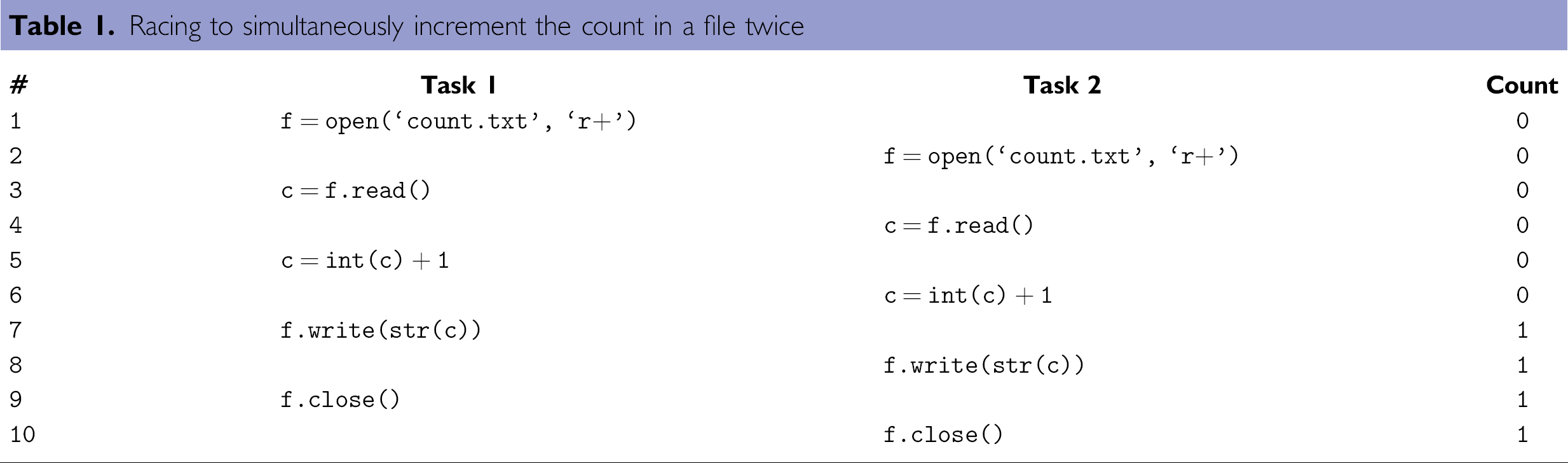
The event occurs twice and therefore we expect the file to contain a “2” after the two tasks finish executing. Unfortunately, because of the way in which the instructions of the two tasks are preempted, the final file content is incorrectly set to “1.” The problem occurs in lines 3 and 4 when the current count value is read by both tasks prior to the other having an opportunity to increment and save the new count. Race conditions such as this are so named because of the apparent race to access a shared resource that takes place between the two tasks.
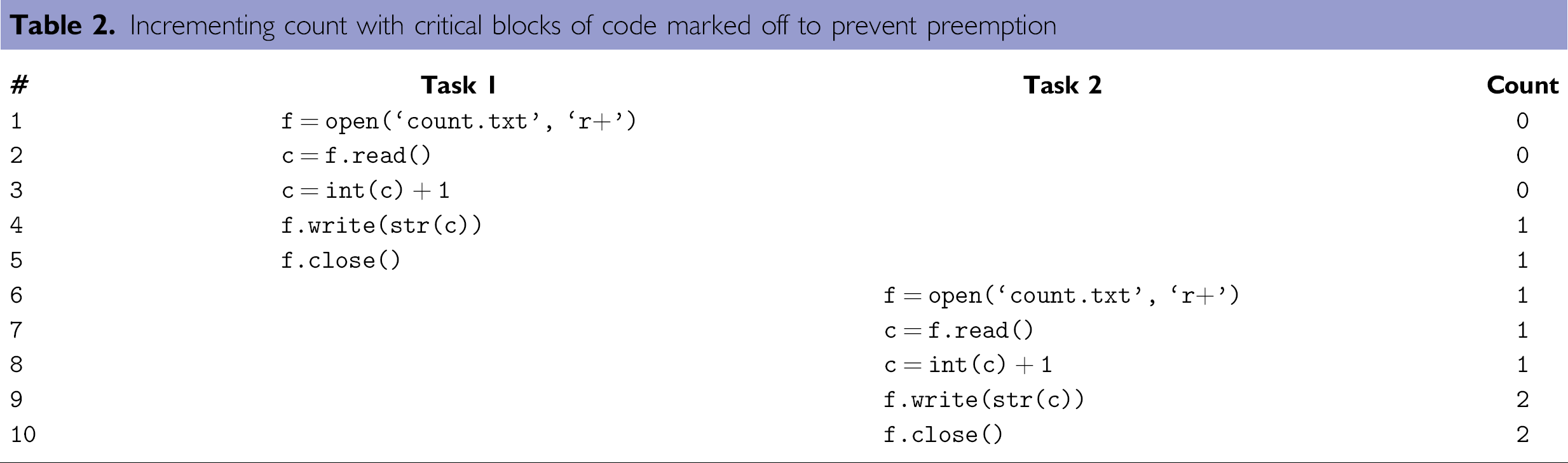
When using preemptive multitasking, a way to remedy the problem is to mark off a critical region during which time the processor is forbidden from switching away from the current task. If we mark all five statements in each task as being in the critical region, the statements in one task would finish before the next began to execute. This is illustrated in Table 2. The ending count now has the proper value of “2.”
Incrementing count with critical blocks of code marked off to prevent preemption
With multitasking control programs in laboratory automation the shared resources are the instruments. Race conditions can occur when a single instrument is being shared by multiple tasks.
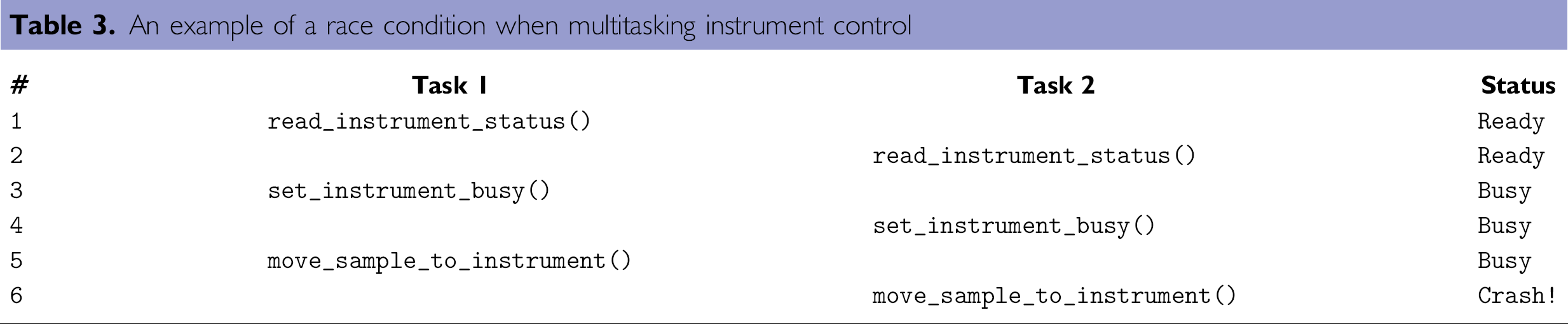
Imagine a scenario in which two sample containers are ready to be analyzed by an instrument. One hypothetical instruction sequence is illustrated in Table 3. Two transport devices under the control of separate tasks are available to move different containers to the instrument, provided the instrument is ready. Each task reads the status of the instrument in turn. Because both find the instrument in a Ready state, both mark the instrument as Busy and begin to move their sample containers to the instrument. The result could be catastrophic. By marking the section of code that reads and updates the instrument status as being critical, the process will behave in a more orderly manner; the second task will not find the instrument in a Ready state when it should be considered Busy.
An example of a race condition when multitasking instrument control
The preemptive multitasking model tends to introduce race conditions and other problems when many shared resources are in play. As mentioned, in this case it is the responsibility of the automation programmer to ensure that all sections of controller code that should not be interrupted are marked off to prevent undesirable behavior. Overuse of this tool may result in constraints that prevent the parallel execution of tasks, which otherwise might improve performance. Underuse can result in flaws of execution or system crashes. Finally, with preemptive multitasking there is no way to force a task to switch when necessary; it is left to the operating system scheduling algorithm to determine when switches are appropriate.
Without the availability of an RTOS and the knowledge required to use it, cooperative multitasking remains the best option for laboratory automation. But how can we program and run an instrument controller using cooperative multitasking when all major operating systems and programming language toolkits use a preemptive multitasking model? Fortunately, the Python language provides an uncommon capability that solves this problem very nicely. The generator, introduced in version 2.2 of the Python language, is the answer.
Python Generators and Iterators
The concept of a function is familiar to all programmers. A function defines a block of code that is named and packaged for reuse. Functions may accept parameters and return values when their execution has completed.
Generators are like functions with one special feature—rather than waiting for the function to complete execution, an instance of a generator can suspend execution part way through and return an intermediate value. At some later time execution of the same generator instance can pick up right where it left off, with all temporary variable definitions and their assigned values preserved. The generator instance may run to completion or suspend once again, depending on how it is defined. In fact, a generator instance may be defined to run as an infinite loop, yielding a newly generated value each time through the loop, but never terminating its own execution. Generators are so-named because they are sometimes used to generate a series of values. They are sometimes referred to as “resumable functions”.
In the Python language, a generator looks exactly like a function, with one difference—there will be at least one yield statement somewhere in the body of the generator, yield is used to tell the generator instance to suspend, and may optionally return a value to the calling statement.
As an example, consider the following code listing. The def statement starts the definition of the generator named steps. It takes one argument called count. When initiated, the generator instance executes all statements prior to the first yield statement. In this example, the count variable is incremented by one. Upon reaching the yield statement, the generator instance suspends execution and returns a string that indicates the current value of the count variable. The generator instance will not continue until instructed to do so. When it does continue it will run the following set of statements—another increment of the count variable—and then suspend a second time. The third step is identical. Execution terminates permanently when a return statement is encountered or when the generator runs out of lines of code to execute.
Generators are invoked differently than functions. Before running a generator it must be instantiated. Toward the bottom of the previous listing you will see that the steps generator is instantiated by calling it with an initial count parameter value of 0. A generator instance is returned and assigned to the variable named iter. Instances of generators are called iterators. It is important to note that at this point the iterator (generator instance) has not yet executed. To initiate execution the iterator's next() method is called. It will execute until it encounters the yield statement. Arguments of yield will be returned to the calling statement.
At the bottom of the previous listing we call iter.next() and print the returned value. Invoking iter.next() a second time will cause execution to pick up where it left off. This code was entered into a file named steps.py and executed. The following shows the result, which includes the output of three consecutive calls to iter.next().
One situation in which generators truly shine is when the state of execution must be maintained between invocations. Because generators retain all local variables as well as their values when resumed, there is no need to rebuild state. Those familiar with state machine programming will recognize this as a huge advantage.
Generators and Cooperative Multitasking
The execution behavior of a generator is exactly what is necessary for cooperative multitasking—to continue execution until explicitly instructed to yield. With generators, it is possible to have strict control over the multiple tasks of an automation controller, including the time that each is initiated, as well as the point during execution that each yields control to another task. The following listing illustrates a simple example of this idea.
The increment_count() function increments a counter value stored in a file, as demonstrated previously. This function takes as its only argument the name of the file that stores the count value. do_task() is the definition of the generator that will be instantiated and multitasked. do_task() invokes yield twice. As its arguments it takes a unique task name and an integer that indicates the number of times an internal loop should be executed. The do_task() loop begins with a step that sleeps for a random amount of time (less than a second) followed by a yield. When resumed, do_task() increments the count in a file named count.txt and yields a second time. do_loop() exits when all iterations of the loop are complete.
The third function is the implementation of a very simple cooperative multitasking engine that runs as a round robin scheduler. 24 The name of the function is simple_round_robin(). It takes a list of iterators (generator instances) as its sole argument and loops over the list in reverse order calling each iterator's next() method. When an iterator terminates execution, it raises a StopIteration exception. We trap this exception and remove the iterator from the list. The simple_round_robin() function continues to loop until there are no more iterators on the list.
At the end of listing we use the standard Python idiom that indicates what to do if the file is executed directly. We check that the current module is the main module, and if so, we create three do_task() iterators and pass them to simple_round_robin() as a list. The output from an execution of this code follows the listing. Because we call yield twice and neither occurs within the increment_count() function, there is no chance of running into counter increment problems that result from a race condition.
Starting with the ideas presented here we have developed a full-featured cooperative multitasking engine for use in laboratory automation. Among other things, the complete cooperative multitasking engine includes the following features:
All behavior is encapsulated as a custom Python object called c_thread. Each c_thread object can be assigned an execution priority, which causes them to be executed more or less frequently, as indicated by the value of the priority. c_thread objects manage a stack of iterators, not just one. An iterator itself can create a child iterator and push it onto any c_thread stack. Only the iterator on the top of the stack will get processor time (its next() method will be called). When an iterator terminates, it is automatically removed from the stack so that the calling iterator can continue to execute. Our Python generator-based cooperative multitasking engine has been used successfully to control several production laboratory automation systems. These system controllers have proven to be very robust. We have achieved months of continuous operation with no stability problems whatsoever. By contrast, none of the commercial vendors of popular laboratory automation control software that we spoke with were willing to guarantee continuous operation for a duration of more than a few days.
Conclusion
Python is well suited to solving multiple problems that arise in the field of laboratory automation. We have demonstrated in detail how a feature of Python called generators can be used to simplify the task of creating multi-instrument laboratory automation system controllers. Python's clear syntax and clean design have been shown to shorten the time and the number of lines of code required to implement workable solutions to common problems. Its “batteries included” philosophy has resulted in a rich set of diverse libraries, including everything from interacting with the most popular relational databases to communicating over RS232, USB, and GPIB ports. Libraries called win32all and ctypes make it possible to call nearly any external function in a Windows ActiveX component or DLL. Access to popular GUI libraries such as wxWidgets round out the language as a full-featured software development tool. Moreover, as a freely available open source tool, Python is readily available to all.