






Abstract
We present a Web-based system developed at Bristol-Myers Squibb that provides status and queue information for a dispersed group of analytical instruments. Status and queue files maintained by the analytical software on individual instrument computers are copied to a central server, where they are parsed by a custom software application written in Microsoft Visual Basic 6. The parsed information is stored in a database, where it is accessible to custom web server scripts that search, filter, and format the data for display in a Web browser.
Introduction
Businesses engaged in high-volume sample analysis strive to reach the full potential of their investment in analytical instrumentation. To maximize analytical throughput while minimizing instrumentation costs, the analytical capacity must be used in a highly efficient manner. In a research environment in which equipment is not dedicated to a single type of analysis and in which manually scheduling access to instruments is not always feasible, efficiency can be quite challenging to achieve. In large pharmaceutical companies in particular, that difficulty is amplified by the often-broad geographic distribution of equipment over large campuses and across multiple research sites. Significant scientific resource can be wasted by transporting a sample to an instrument, perhaps in a different building, only to find that the instrument is out of service for repairs or that it is currently in heavy use. Additionally, when an instrument breaks down, there may be a significant time lag between the failure and the notification of support personnel, reducing the analytical capacity available over that time period.
In an effort to address these issues, we have developed a Web-based system capable of displaying the current operational state of a diverse set of analytical instruments as well as the state of the sample queues currently running on those instruments. 1 The Web-based nature of the user interface ensures that both analysts and support personnel can access information about instruments of interest from any standard computer workstation in the company. Analysts can use the information to determine which walk-up instrument has the shortest sample queue or to see whether their sample analyses are complete; support personnel can quickly scan a relevant group of instruments to determine where to focus their maintenance efforts. We have named this system OmniQueue, because the design allows for a broad number of instrument types to share the same queue data repository and sample queue viewing system.
System Overview
As shown in Fig. 1, the general flow of information in the OmniQueue system runs from instrument computers to a central server, where status and queue data for each instrument are stored in a database, and then sent through a Web server to any number of Web browsers running on desktop or laboratory computers. A number of custom applications facilitate this data flow, copying files from instrument computers to the OmniQueue inbox, parsing data files and pushing data into the database, and analyzing the database to assess status qualifiers for each instrument. Finally, custom scripts run on the Web server for display of the data to the client in customizable formats. In this article, we describe in detail each of the system components shown in Fig. 1.
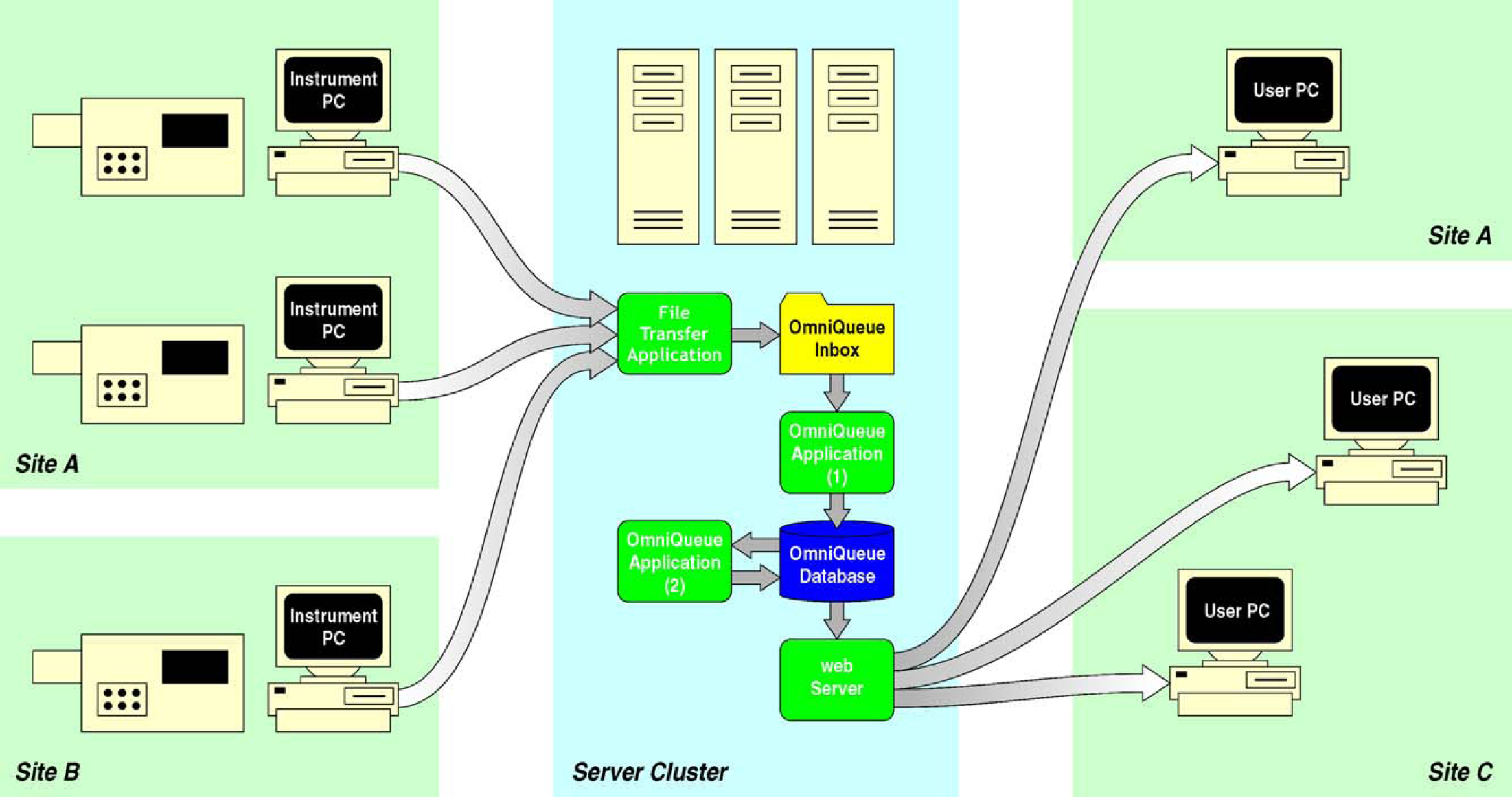
Schematic of the overall flow of data through the OmniQueue system.
The decision to base the information flow from the instrument computer to the OmniQueue server on file transfer alone may at first appear surprising; indeed, new technologies including Web services built upon the XML-RPC 2 or SOAP 3 frameworks are well suited to this task and can provide significant flexibility in the long run. In practice, however, a Web service is not necessarily a broad solution, because most analytical instrumentation is controlled by vendors' proprietary software, limiting the possibility of building custom features directly into the control software. Fortunately, most instrument control applications write status and queue information into files on the local drive, essentially providing a clean external interface via those files to the exact information we require.
A second argument in favor of file transfer as the status and queue data transport mechanism is the fact that standard analytical instrumentation can generate hundreds of raw data files comprising several gigabytes in combined size over a relatively short time period, files that at some point must either be moved to a facility such as permanent archiving or backup, parsed and pushed into a central database, or simply deleted altogether without archiving. Because in general we choose to send all data via file transfer to a centralized data archival facility, the need for a file-transfer agent for archiving overlaps nicely with the file transfer requirements for OmniQueue. The status and queue files are typically only a few kilobytes in size, compared with several hundred kilobytes for typical data files, so OmniQueue theoretically causes relatively little impact on bandwidth overhead during the overall file transfer process.
Fundamental to the success of OmniQueue is reliable and timely access to instrument status information—when the flow of data is interrupted, delayed, or lost, the accuracy of the overall system is compromised, and the confidence and interest of the intended users drops. Laboratory data transport remains an ongoing challenge for organizations trying to maximize the flexibility of data transport while still keeping the data transport process simple. We have evaluated several commercial data transport software products 4 –6 as well as internally developed software in an attempt to find an acceptable balance between functionality, reliability, support requirements, and cost. In some cases, the evaluated products required a client application to be installed on every instrument computer, an arrangement that can be challenging to administer over a large instrument base. In other cases, the product cost was too significant to balance the expected return in functionality. In the end, we chose to develop a new data transport application 7 that, rather than push status files from instrument computer to server, runs on the server and pulls files from the instrument computers. This data transport architecture has proven to be very reliable and straightforward to administer.
OmniQueue Back End
The focus of the OmniQueue system is to store and display current information about instruments, not to retain, archive, or trend that information. As such, there are only minor storage requirements involved. A networked data-base 8 serves as the system's short-term memory. The stored data are naturally dynamic because either the state of the instruments or the state of the samples in the instruments change over relatively short time periods. The database serves as the heart of the application, storing parsed data from the instruments and acting as a point of access for displaying the data. Although the OmniQueue system could have been designed in such a manner to avoid the use of a database, particularly because the data are only temporarily meaningful, we feel that the centralized-database model imparts particular advantages with respect to both design and implementation. From a modular design standpoint, the display of the data (user interface) is completely separate from the storage of the data. From a development standpoint, different developers can work on the front or back end of the application, necessitating only an agreement on the database schema.
The instruments that we have chosen to track in OmniQueue all are analytical instruments that operate on a sample queue basis, and accordingly, the database schema we implemented is relatively simple, composed of only five tables (Fig. 2). All of the raw data are actually stored in two tables—the Instruments table, storing one instrument per record, and the Queue table, storing one sample per record. There is a one-to-many relationship between instruments and samples in the queue. The tables Instrument_Sites and Instrument_Types provide enumerations that are used only for data display and sorting—enumeration tables of this type can be easily added to or removed from the database schema to provide customized data sorting capabilities. Because the data stored in the Queue table are constantly changing, we simplify the updating procedure by first deleting all of the previous data from any given queue before inserting the new data, although other strategies are certainly just as viable.
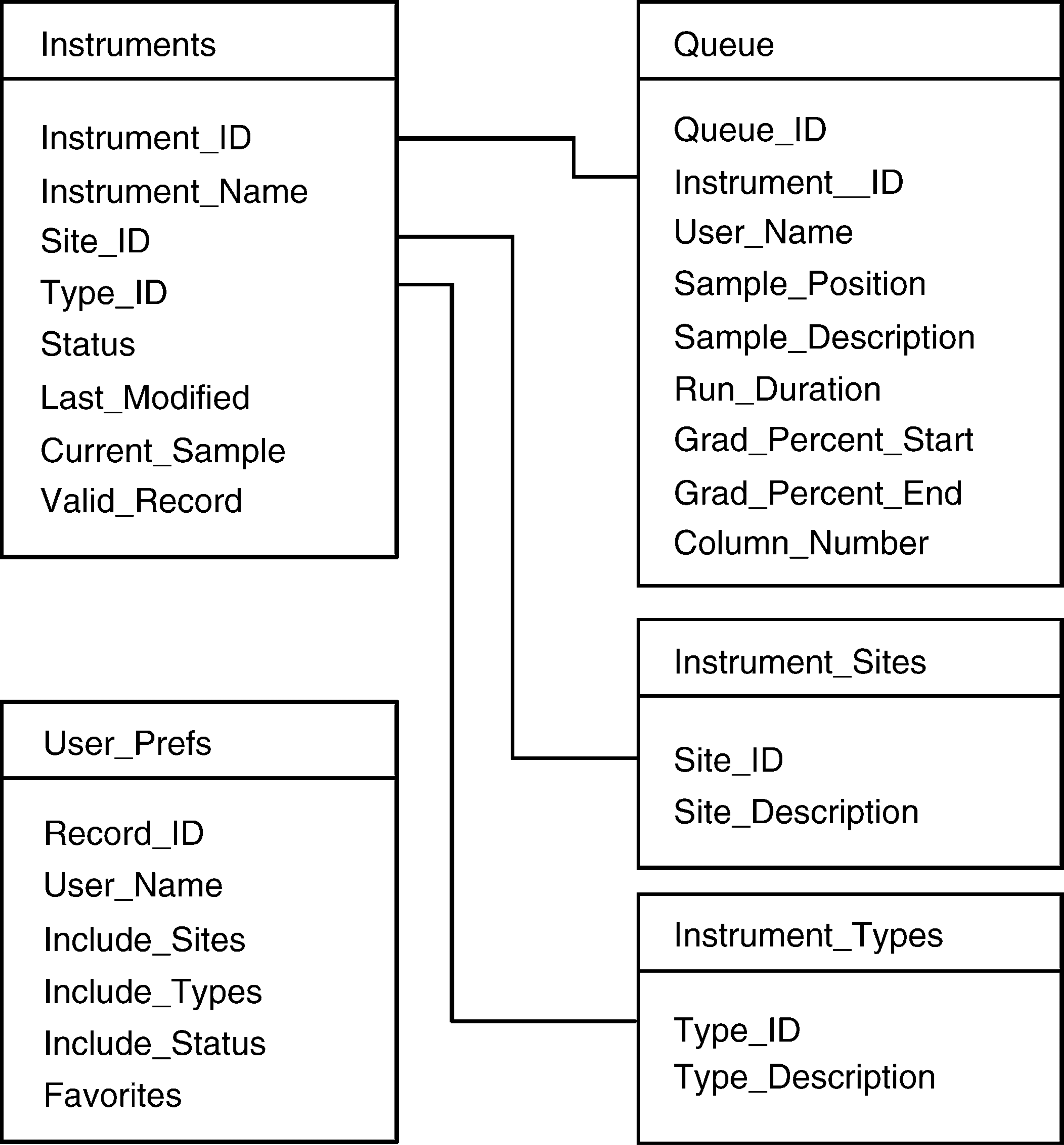
Database schema used to store instrument status and queue information. Additional tables are used for sorting and user preferences.
The logic and parsing functions of the back end are separated into two applications, OmniQueue1 and OmniQueue2, each written in Microsoft Visual Basic 6. To ensure that these applications are constantly running, they are each compiled into a standard Windows executable and configured to run as a service, which eliminates the need for a user to log in to the server and launch the application. Both of these applications have been running on our server for many months without user intervention.
The process actually begins with the file transfer application, which connects to an instrument computer and locates the queue files that will be copied to a specific directory (the OmniQueue “inbox”) on the server for processing. Because there may be tens or hundreds of instruments, however, and because each instrument may need to have the exact same file transferred (e.g., “queue.txt”), the file transfer application must somehow differentiate the files once the copy is made to avoid filename collisions. We differentiate the files by appending the name of the instrument to the filename of the copied file, resulting in a filename such as “queue_instrument01.txt” (we follow a rigorous instrument naming scheme that provides the site, room number, and instrument type).
OmniQueue1 continually monitors the inbox folder in search of new instrument queue files. When a file appears, the type of file is identified either by the file name or file content, and an appropriate parser is invoked to process that file. Each parser is customized for a particular file type, extracting specific data from known locations within the file. Once the parsed queue data are available, a number of checks and calculations are applied to determine the state of the instrument. The first check is to determine whether the instrument is already in the database; if not, a record is created in the Instruments table and populated with the appropriate data. Second, the boolean flag Valid_Record in the Instruments table is set to “true”, ensuring that the user interface will include the instrument in its display, and the Last_Modified date field is set to the current time. Finally, the instrument status is determined through a series of logic conditions applied to the parsed file data. (Depending on the particular type of instrument and the file being parsed, the instrument status may be obvious or may require some level of deduction.) We have identified six possible unique instrument statuses—Ready, Running, Sleeping, Down, Unknown, and Unused. Because OmniQueue1 is always parsing recent instrument data files, only the first four of those statuses are reasonable outcomes. Finally, if new queue information is available, all previous queue information is deleted from the appropriate table before insertion of the new data.
Because OmniQueue1 only acts upon new instrument queue files, by definition it never encounters instruments that are no longer providing queue files. This situation could occur, for example, if the instrument is decommissioned, if the instrument is moved to another location and renamed in the process, or if the file transfer application is not able to connect to the instrument because of incorrect networking configuration or other related issues. If any instrument does not provide queue files for a nominal time period, say 1 hour, the instrument status Unknown is appropriate; this status indicates to both users and administrators that there is an issue that requires attention. After an additional time period, 1 month or so, it is reasonable to assume that the instrument no longer exists and should acquire the status Unused. A second application, OmniQueue2, periodically searches the database for Unknown and Unused instruments by checking the Last_Modified field in the Instruments table and has the capability to change instrument statuses as appropriate. Eventually, OmniQueue2 sets the field Valid_Record to “False” so that the instrument is no longer displayed by the user interface.
OmniQueue Front End
The OmniQueue user interface supports three distinct client groups: scientists who use walkup or dedicated analytical instruments to analyze samples, site-specific support personnel who ensure that instruments are performing properly, and non-site-specific data administrators who confirm that analytical data are being properly archived. We have approximately 140 instruments reporting in to the OmniQueue system from four research sites in the United States and Canada, so clear organization and a clean presentation were considered vital for the user interface. On the basis of the relatively diverse nature of the client groups, a user interface based on Web technology was considered ideal, particularly because of the potential of accessing the system from any standard computer within the company through a Web interface.
The user interface Web pages were coded using Visual Basic Scripting Edition (VBScript) 9 and Active Server Pages (ASP). 10 The Web server application was Internet Information Server (IIS). 11 The VBScript code was used only in a server-side fashion, allowing any standard Web browser to render the Web pages. The VBScript code was able to query the OmniQueue database by using an Open Database Connectivity (ODBC) driver.
As shown in Fig. 3, the user interface display is divided into two panes. The left pane provides a list of instruments organized into a collapsible hierarchical list organized by site and instrument type, along with a color-coded bullet designed to quickly convey instrument status. Red- and green-colored bullets are ubiquitous for conveying analytical instrument status, both in hardware and software, and this concept has been used elsewhere 1 for conveying the state of open-access instrumentation remotely. We have extended the colored-bullet concept to include colors for each of the six instrument statuses described above; to avoid confusion over the meaning of particular colors, each bullet provides a descriptive text popup that displays the instrument status as a word or short phrase. The display pane to the right is populated with detailed queue information pertinent to a single instrument selected by the user, including a highlighted portion indicating the current sample in the queue.
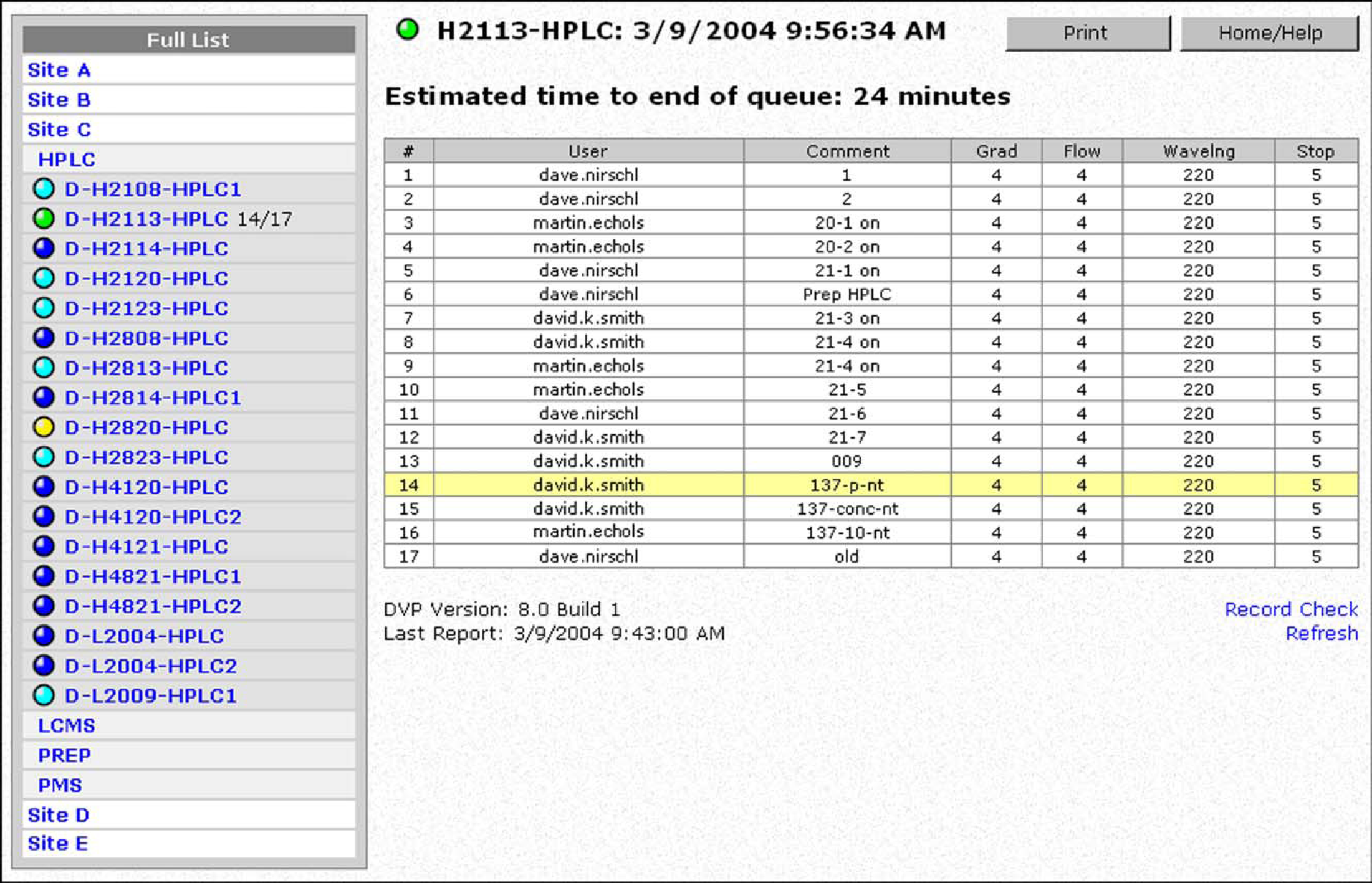
Screen capture of a Web browser viewing the OmniQueue information. To the left is a hierarchical list of instruments; to the right is a detailed view for one particular instrument, with the current sample highlighted in yellow.
To provide flexibility for the different client groups, the list of instruments can be customized by each individual user depending on the manner in which the information will be used. For example, the operator of a small group of instruments can create a “favorites list, and only those chosen instruments will be displayed in the left pane. Alternatively, a scientist at one particular site can filter out instruments from distant sites that would be irrelevant from an open-access standpoint. Filters and favorites are stored in the OmniQueue database in the User_Prefs table. For these features to work, however, users must log in to the application.
Discussion
Before the OmniQueue system was deployed throughout the company, we were unsure of how many instruments the system could handle, particularly because we had optimized neither the Visual Basic code used for parsing the text files nor the code that populates the database with new data. During the rollout of the application, at the point at which 80 instruments were sending queue files every 2 minutes, we noted a slight delay in processing for some of those files. Fortunately, it is quite straightforward to separate the processing needs of the back-end application, and as such we reconfigured the back end so that the data-parsing application, the database server, and the web server were separated onto different computers. In this manner, we now comfortably handle 140 instruments, each providing queue files averaging 10 kB in size every 4 minutes, which translates to an overall data throughput of approximately 500 MB per day. The choice of instrument updating frequency, 2 or 4 minutes in the above examples, should be a balance between providing the end users with timely, valuable information while minimizing the computer and network resources needed to run the system. For our typical analytical systems, which require 3–5 minutes of analysis time per sample, an update frequency of 4 minutes is quite sufficient. If additional capacity were required for our installation—either an increase in the number of total instruments or an increase in the updating frequency for each instrument—we would choose to optimize the parsing code as well as the code that populates the database; with these modifications, we believe that the system could accommodate several hundred analytical systems.
OmniQueue differs fundamentally from commercial products such as Scientific Software's CyberLab 12 and the NuGenesis Scientific Data Management System. 6 Although those commercial systems could indeed be configured to store queue data, those data would be stored in the raw format. If a user wanted to view the current operational status of every analytical instrument in the database, each one of the raw queue files would need to be parsed upon request, leading to a slow display response to the user; notably, if the system had several concurrent users, the raw queue files would need to be parsed separately for each user. Additionally, using the same estimated queue file size as above, more than 1.3 GB of queue information would be accumulated in the commercial database systems per instrument per year. By storing the queue data in a parsed format that is ready for presentation, and by storing only the most recent queue information, OmniQueue has a very quick display time for the user and is very efficient in database storage, generally requiring less than 25 kB per instrument. Further, we do not believe that storing copies of instrument queue files provides any long-term scientific value.
On the basis of the conclusion that commercially available products did not provide a good infrastructure for the type of functionality desired for OmniQueue, the decision to build the system in house was relatively straightforward. Excluding the development of the file transfer application, the OmniQueue back end was developed, tested, and refined by using roughly 0.2 full-time equivalents (FTE), whereas the front end was developed by a Web designer, requiring approximately 0.05 FTE.
The OmniQueue system is currently operated in a non-regulated scientific environment, and consequently we have not implemented features to provide compliance with regulations such as Title 21 Code of Federal Regulations (21 CFR Part 11). 13 However, because OmniQueue deals with instrument operational statuses and queue information rather than actual analytical data derived from samples, we believe that the only component of the system that is potentially in need of compliance assurance is the data transport application, which must connect to the instrument computer and make a copy of the queue files to a remote location. Additionally, because the information contained in the queue files themselves is not considered to be proprietary, we do not encrypt the queue files for transport to the server for processing.
Finally, we have attempted to maximize the value provided to the users of the OmniQueue system while at the same time minimizing the support required for maintaining the system on an ongoing basis. A previous deployment of a system similar in scope to OmniQueue (Russo, M. F.; Weller, H. N.; Bristol-Myers Squibb Company. private communication, 2003) eventually fell out of use because of the relatively high support burden of constantly adding and removing instruments from a hard-coded list. The most important feature of OmniQueue from a support standpoint therefore is the ability to maintain the contents of the database without human intervention—new instruments are automatically added to the system, and instruments that are no longer reporting to the system for any reason are automatically purged. Only the file transfer application must be kept up-to-date with instrument information, and fortunately that information can be queried from a database that is maintained by our laboratory computing support personnel.
Conclusion
We have demonstrated a custom software system that monitors the statuses of more than a hundred analytical instruments and provides users with a convenient front end for displaying that information. The flow of information from the dispersed instruments to a centralized server is based on a simple yet effective file transfer mechanism, which provides flexibility in the types of instruments that can be monitored. Though the data are not permanently archived, they are stored in a database that provides convenient access for the user interface. The user interface was developed for display in a Web browser and can be customized depending on the needs of the particular user. The major benefits of this application include quicker response times from service engineers when instruments go down and a more efficient sample distribution across open-access instruments. Finally, the application support burden is minimized by the system's ability to automatically add or delete instruments from the database as needed.