






Abstract
There are strong pedagogical arguments in favor of adopting computer-based assessment. The risks of technical failure can be managed and are offset by improvements in cost-effectiveness and quality assurance capability. Academic, administrative, and technical leads at an appropriately senior level within an institution need to be identified, so that they can act as effective advocates. All stakeholder groups need to be represented in undertaking a detailed appraisal of requirements and shortlisting software based on core functionality, summative assessment life cycle needs, external compatibility, security, and usability. Any software that is a candidate for adoption should be trialed under simulated summative conditions, with all stakeholders having a voice in agreeing the optimum solution. Transfer to a new system should be carefully planned and communicated, with a programme of training established to maximize the success of adoption.
Background: Evolution of Single Electronic Management Systems
Increasingly assessments are being migrated to paperless delivery. 1 This introduces the possibility of technical failure, generating anxiety and requiring both supplementary invigilation procedures and contingencies. 2 However, e-assessment enables a multimedia approach, increasing the breadth of learning outcomes that can be assessed 1 and thus enabling closer pedagogic alignment. Moreover, transposition errors are minimized, while increasing assessment security, increasing the efficiency of both archiving and audit, ensuring the feed-forward of information, and facilitating an integrated multidirectionally searchable electronic paper trail. Nevertheless, the adoption of e-assessment is limited by the availability of appropriately trained technical support staff, adequate computer laboratory capacity, and robust server architectures, each of which is also a potential single point of failure if there is no equivalent contingency. 3 Thus, maximizing the success of implementation requires involvement of all potential stakeholders at an institution and adoption by central technical support services. 4 Furthermore, differing practice and policy issues between institutions can reduce the ability for sharing assessment content and good practice.
E-assessment is defined as the use of technology to mediate any part of the assessment process, 5 including both computer-based assessment (CBA) and computer-assisted assessment (CAA). The focus of this study is primarily the use of e-assessment for testing performance (ie, CBA), and not the use of e-assessment to support coursework submission (ie, CAA). Our aim is to convey the lessons that we have learnt from implementing CBAs in our respective medical schools, in order to help others who may be considering adopting CBAs.
State-of-the-art systems are moving toward the holistic e-management of all assessment processes, although progress has been slow. 6 All the stages of the summative assessment life cycle (Fig. 1) can now be electronically facilitated and linked. Thus, the whole summative assessment life cycle (Fig. 1) evolves into a single completely integrated computer-based management system. 7 For example, Rogō was bespoke for a medical course, continuously developed since 2002, used summatively from 2005, 8 and expanded in 2010 to accommodate other courses as an institution-wide platform. 9 This system has grown in popularity and demonstrated to be scalable, with typically 350 examinations and 21,000 individual candidate sittings per year at the University of Nottingham where it was first developed. This is an example of an open-source software system, freely shared internationally, and now adapted and further developed according to local needs.
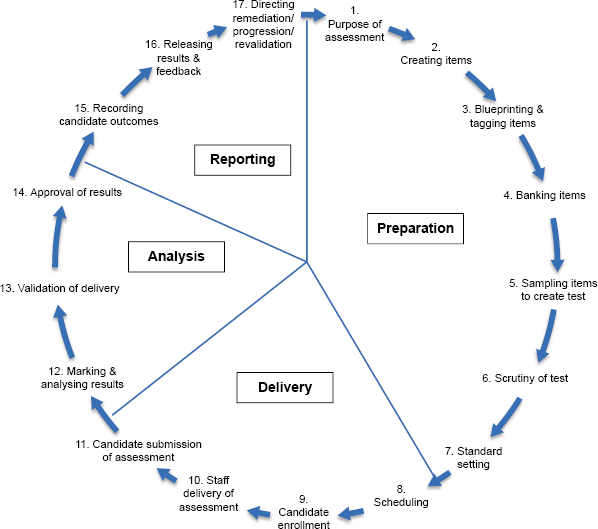
Summative assessment life cycle.
Recreating some forms of assessment electronically, such as those that involve drawing or capturing behavior, is possible but currently beyond the capability and budget of many institutions to carry out on a large scale. Other forms, such as image hotspot questions, 2 can provide enhanced feedback to staff and candidates by mapping all responses onto a single image and identifying any misconceptions. Typed answers can remove the difficulties and biases associated with reading and handwriting, ensure candidate anonymity, enable keyword answers from all candidates to be listed in the order of frequency for acceptance and subsequent automated marking (also enabling identification of misconceptions), and reduce marking time and marks processing time. Another feature of electronic assessment is the ability to lock answers or have unidirectional navigation to prevent responses from being changed once they have been submitted if it is necessary to have information in the subsequent items that would have cued an earlier answer. With appropriate psychometric support, CBA also provides a platform for adaptive testing, 10 whereby the difficulty of subsequent questions is determined by the success of previous answers, thus tailoring a set of items to the individual candidate to gain an equally precise measure of their performance but in less time (or a more precise measure in the same time). Furthermore, randomization of questions is cited as a method of mitigating against plagiarism in examinations. 11 Two main types exist: (1) generating unique papers from a random selection of questions in an item bank and (2) random presentation of the same set of questions in an examination. Randomization of the available options is a form of subquestion randomization that several assessment systems support. Where an assessment is adequately blueprinted to align programme sessional-level learning objectives to assessment items, coverage of the curriculum can be mapped with ease so that areas of overlap and omission can be seen within and between individuals and cohorts, even if using adaptive testing. CBA can also subsequently facilitate the provision of automated personalized objective-linked feedback to candidates who protect the item bank, excludes extraneous item context, and can be linked to study resources.12,13 It is already possible to provide summative assessments remotely, although this may require prior knowledge of the Internet Protocol (IP) address to ensure secure delivery, and local invigilation (eg, by partner institutions or consulates) to confirm both candidate identity and examination conditions. The advent of massive open online courses 14 has increased the need to develop remote verification of identity and conditions. This will then enable candidate ability to be electronically assessed independent of a formal physical location for increasing proportions of future programmes.
Most CBA softwares only have the functionality for delivery and instantaneous marking. Only open-source solutions have the flexibility to match management processes to local curricular needs and make significant efficiency savings. There is also a reduction in institutional reputational risk associated with having an automated integrated auditable archive of all assessment processes, but this additional benefit is difficult to quantify. Increasing quality assurance reduces the probability that candidate progression/award/national ranking decisions are publically demonstrated to be in error. Fewer errors should be made and more of those errors that are made should be detected earlier, enabling remedial action before consequences magnify. Similarly, it is not possible to quantify the potential future benefits of research. The enterprise advantages of an open-source software solution, where there is the ability to catalyze research around learning analytics and control future developments, cannot be predicted as these are likely to be unique to each institution. Nevertheless, it is essential to ensure that pedagogy (and not limited software functionality) drives assessment strategy.
Appraisal of Requirements
With any assessment, the choice of mode should follow an appraisal of how well the available options can achieve the learning outcomes of the programme in a valid and reliable way. For CBA to be an option, there should be consideration of its core functionality, summative assessment life cycle (Fig. 1), external compatibility, security, and usability.
Core functionality
One of the biggest challenges in implementing CBA is the wide range of technology that may be required, with each piece potentially requiring technical support or in-house expertise. Assessments can be delivered on a range of devices to allow test takers to use their own hardware, but this also complicates support needs for both hardware and software compared to tying the assessment with a single common device. Using a single device also improves fairness and equitability of an assessment, as it can be challenging to provide the same assessment experience to candidates using their own choice of device (eg, smartwatch, smartphone, tablet, desktop computer, wearable technology, or virtual reality headset and controller).
All multimedia formats used in the assessment must be supported on all of the devices it may be run on; so wherever possible, audio, video, and interactive multimedia should be platform independent. If the assessment is delivered via a browser, then the type and version must be supported. An app or executable file might provide a useful alternative to browser-based examinations and can be more secure if the assessment is web based, but requires similar support for the operating system on which it is run. The type of assessment and its content may also influence the choice of device and delivery method. Accessibility also needs to be considered, both in terms of appropriate reasonable adjustments and equality of access to technology, for both formative and summative experiences.
The typical life cycle of a summative assessment including all aspects of preparation, delivery, analysis, and reporting (Fig. 1) can be facilitated using an appropriate CBA system. Pretest preparation includes the planning, creation, tagging, and banking of items, using a sample of those items to create a test, scrutiny of the test and its items, and standard setting. Test delivery includes scheduling and candidate enrollment, delivery of the assessment by staff, and its submission by candidates. Posttest analysis includes marking and analyzing the results, providing evidence for quality assurance of the delivery of the assessment, and validation of results prior to their final approval. Posttest reporting includes recording candidate outcomes, releasing results along with feedback to candidates (eg, on performance with respect to learning outcomes, which have been tagged to questions), which will inform reflection (eg, on both learning and assessment strategy), and directing staff to ensure candidates receive remediation, a progression decision, or (following an award) revalidation of a license to practice. Feedback to staff can include analytical feedback on candidates, items, the assessment, and blueprinted objectives. 15 It is also worth asking candidates for feedback on the assessment in order to improve the process. 13 The life cycle is completed by the direction provided, which informs the plan for the next assessment.
Summative assessment life cycle needs
There are clear advantages to providing an electronic system for part or all of the assessment process in comparison to paper-based approaches, such as the ability to automatically record a log of any changes for audit and quality assurance. Reasonable adjustments for candidates to time, color scheme, font, and font size can be upper-programmed in advance and saved for all future assessments. Invigilators can add notes to individual candidate records (eg, technical problems, academic offenses) or the whole cohort (eg, examination started late). Clarification messages can be circulated during the assessment (eg, “In question 12, it should read 120 mL instead of 12.0 mL”) so that candidates receive uniform instructions across different locations. Several methods of marking can also be facilitated (eg, blind double-marking and moderation for text requiring academic judgments). Many of these processes can be controlled globally from a central administrative hub.
External compatibility
Synchronizing the CBA system with other external systems and software can also have advantages. A system with an open application programming interface can thus be integrated with other systems to facilitate authentication, timetabling, student records, statistical analysis, learning platform interoperability (to ensure compatibility between different softwares and devices), data import/export (eg, of assessment questions, feedback tags, standard setting values, points of past use, and performance information), and other aspects of programmatic assessment management.
Security
No system is ever completely secure, but risks can be minimized by using and correctly setting up hardware firewalls, security suites that tackle viruses and malicious software, and keeping installed software up-to-date. A number of people will require access to the CBA system, so permissions need to be set appropriately for each group of users. Security surrounding assessment delivery is increased by only allowing access to the assessment at a set time and date, for identifiable individuals using a secure login or a specific group (eg, an academic year or those taking a specific module). Verifying the identity of each candidate can be confirmed by automated retrieval of their previously corroborated id photograph at the point of login and its display on the holding screen for invigilators to view before permitting candidates to start the assessment. Recording details such as a device, machine access control address, its IP address, hostname, and other similar practical information are also advisable.
Usability
The usability of any assessment depends on its combined reliability, validity, educational impact, acceptability, and cost. Usability is time consuming to measure accurately but is an important aspect of an assessment system to get both staff and candidate experience right. Performance on an examination must correlate with the candidate's expertise in the knowledge domain, not expertise in how the software works. However, there are some core aspects of usability that should be included in a requirements checklist, as follows:
System is responsive (could be measured in average page load time in seconds).
Clear interface–-candidates are aware of how to save their answers and how to navigate between screens.
Guest accounts (or ability to reset account details quickly) available in case a candidate forgets his/her password at the time of delivery.
There are additional aspects that are highly desirable:
The ability to strikeout distractor options in multiple choice, extended matching, or similar assessment formats, to aid the candidates’ cognitive processes.
The ability for candidates to flag items to go back to later (if appropriate). This could be the candidate setting a manual flag or the system automatically highlighting unanswered options.
Should requirements be rated (eg, as met/partial/unmet/unknown) in order to make an informed choice of system, then it should be borne in mind that requirements are not of equal importance, and different requirements would need to be weighted accordingly.
Options for Delivery
It is at the point of delivery that CBA is most vulnerable and costly in terms of providing intensive technical support, access to hardware, stress on infrastructure, and potential institutional reputational risk. There are a number of options for provision:
Facilitating candidates taking assessments on their own devices. It is challenging to provide power and Internet access, lock candidates out of the desktop, ensure software compatibility, provide support for the various devices that candidates may bring, and ensure that candidates are not discriminated on the grounds of what device they can afford.
Ensuring sufficient capacity in open-access computer rooms and facilitating priority bookings for assessment scheduling. As contingency measures, there should be surplus workstations available (+5% of cohort based on our experience of over 1000 summative CBAs at the University of Nottingham) and the ability to reschedule at short notice.
The institution provides a suitable device with standard software installation to each candidate as part of the programme. As a contingency, there should be surplus devices available (+5% of cohort) at each assessment.
Leasing workstations to create a temporary computer barn on demand in an alternative space. There are reoccurring costs for leasing, setup, and testing requirements, along with challenging Internet and power logistics.
Print from system to paper. This is a retrograde step that restricts the media and format of items, while significantly increasing administrative workload and the scope for transposition errors. However, it can be a robust contingency in the event of longstanding failure in computer provision.
Permit remote access to assessments. There are currently no known robust methods of verifying candidate identity, providing support, or ensuring closed-book conditions.
Use of commercially available keypad response systems within an invigilated venue (eg, lecture theater) to return answers. The nature of single-button responses means that this is only possible for multiple choice question (MCQ) formats. There are problems with maintaining physical access to all candidates for individual troubleshooting. Each item must be viewed simultaneously by all, for an equal and fixed duration. This can make troubleshooting for individual candidates impractical without pausing the whole cohort.
In situations where limited workstations are available: test equating is possible, although this increases both the cost and time taken to prepare multiple assessment forms. Alternatively, corralling can be used, whereby candidates are split into two groups, and one half takes the assessment first. The other half is kept under supervised conditions (without Internet or phone access) and takes the assessment immediately afterward. This is fraught with the risk of unequal treatment (eg, in the opportunity for candidates in different groups to prepare, or if there is a problem with delivery to a later group).
Risks
Contingency plans should be in place for situations where assessment delivery fails. Responses may be stored on the client or server, with the frequency of save dictating whether any responses are lost. Server-based answer storage using client AJAX technology to confirm success is a robust mechanism that can mitigate against failure on a client computer.
There are additional risks associated with the delivery by a software system that requires assessment in terms of severity and likelihood, followed by appropriate management. These include the following: technical support staff fail to attend; development staff not available remotely; insufficient operational computer workstations available; security settings (eg, time, location) incorrect; software bug fails to present test or question(s) correctly; authentication settings incorrect; guest user incorrectly assigned; computer hardware failure; computer software failure; software upgrade disruption, server maintenance disruption; server software failure; server hardware failure; insufficient server performance; network failure; power failure; and security breach (ie, denial of service attack, LAMP stack hack, or account compromise). It should be remembered that paper-based tests can also be compromised in a number of ways. There are also substantial benefits that can be realized, in addition to cost savings (below), in return for using a software-based system. An electronic system improves quality assurance by facilitating secure remote auditing and automatic archiving of: changes to items and tests; scheduling; internal and external review; standard setting; reasonable adjustments; invigilator notes; marking; item analyses; and ratification of results, coupled with a minimized risk of transposition errors. Thus, the increased risk at the point of delivery is tempered by the substantial benefits that can be realized and considerably reduced risks to quality assurance in the pre- and posttest phases.
Cost-effectiveness
There are a number of factors that influence the costs of a CBA, and there are two primary ways of improving the overall cost-effectiveness of a system. The first is through the number of assessments. With large investments in computer laboratories, servers, and workstations, the fixed costs can be high; so, the more the examinations that can be assessed online, the lower the unit price is. The second is the closeness of the fit between the processes the software facilitates and the actual processes the institution employs. Lean management is a process by which systems can be analyzed, waste identified, and subsequently redesigned. For example, the University of Nottingham has employed lean management techniques in the development of its Rogō platform to ensure that there is little waste in the system. 16 There are four distinct types of CBA system: commercial Optical Mark Reader (OMR), commercial online/offline, open source, and in-house (Table 1). Which type of CBA is most suitable for an institution requires careful analysis of the advantages and disadvantages. In general, costs are more predictable with OMR and commercial software, but open-source and in-house developments have the advantage of being flexible and responsive to change.
Advantages and disadvantages for different types of CBA.

There are a number of costs associated with setting up a CBA:
Licensing (only for commercial options).
Installation: what is the in-house experience with soft ware and server compatibility? How difficult will integrating with authentication systems and candidate management systems be?
Support: training, troubleshooting for both staff use and delivery to candidates.
Hardware:
OMR scanner;
client computers–-adequate numbers of computers; and
server (manage 99% uptime in-house, or subscribe to a hosted service).
Examination room setup: are physical barriers used between workstations to stop plagiarism? How many workstations need to be setup and how long will it take?
Development: revision of regulations, customization, innovation, and rollout of updates with noncommercial options.
In our experience, printing paper tests, providing specialized answer sheets, and managing their distribution for each test have a cost in administrative time equivalent to ensuring provision of adequately maintained hardware (which can be used for other purposes). Paper will be saved, but electricity will be used, and certain software functions enable considerable cost savings for the institution. We have found that the additional administrative time (and security risk) associated with the coordination of correspondence concerning internal and external review can be replaced with an integrated allocation process (eg, saving 30 minutes of administrative time per reviewer per test). Standard setting is similarly improved by centralizing the process and providing automatic calculations that can save several hours of time for each standard setter depending upon the nature of the test and the method used. Reasonable adjustments can be integrated into the candidate's profile, so that the task of ensuring provision is automated and does not require manual repetition for subsequent tests (eg, saving five minutes of administrative time per candidate per additional test). The instantaneous marking of objective items has repeatedly been found by ourselves to save one minute of optical mark recognition scanning time for up to 100 items per candidate. The marking of subjective items requires half the time due to a reduction in the time spent handling each paper, reading handwriting, and allocating marks. Furthermore, marks processing time is eliminated (along with the risk of errors), as the requirement for cross-checking following transpositions is no longer needed. For example, one short-answer question (SAQ) for 260 candidates requires half the 12 hours marking time and none of the 3 hours marks processing time. 17 Following posttest item analyses, incorrectly coded item answers can be corrected, or individual items completely removed, and all of the candidate marks, standard setting calculations, and cohort statistics automatically and instantly updated. Where such changes are needed, this can save three hours per test. Therefore, for example, each test of 100 objective items for 90 candidates (where 6 have reoccurring reasonable adjustments), reviewed by two internal staff and two external examiners, standard set by 8 staff, and reanalyzed once following posttest analyses, results in a total time saved of 10 hours (1.5 + 0.5 + 2 + 3 + 3) in staff time. The inclusion of two SAQs would result in an additional saving of six hours (2 x 2 + 1). The use of software clearly makes reoccurring savings in staff time compared with a paper-based delivery system when matched for the same outcomes. Software can thus be said to be more cost-effective. 18 The risks of technical failure can be managed and are offset by improvements in cost-effectiveness and quality assurance capability. Paper will increasingly become redundant as the current millennial students move into the workplace and progress. 19 A commercial off the shelf software package with annual updates and a service agreement will only enable a programme to follow others. A locally developed platform is possibly the best way to tailor provision to programme requirements in a timely and useable way that can evolve with changing assessment requirements and facilitate innovative interventions. Technology enhanced learning is undergoing a significant shift in paradigm toward more data-driven systems that will make educational systems more transparent and predictable. Recent advances in technology, semantic web, data mining, and open data form a foundation for new models of knowledge development and analysis. Proprietary systems, along with central organizational processes, will always take significant time to embed potential innovative approaches. In short, an open-source platform optimizes the potential for innovation and dissemination of good practice, while spreading the cost of development within the community.
Pedagogical Considerations
The literature strongly suggests a link between CBA and increased intrinsic motivation and self-efficacy,20–22 but at the same time increased anxiety too. 23 Others have also demonstrated a link between CBA and improved candidates achievement. 24 Utilizing CBAs opens up additional opportunities toward multimodal approaches, in terms of using interactive images, audio/video, and the ability to provide instant, rich, and targeted feedback for candidates and staff. 25 An integrated CBA system, with item-level reporting, also allows the purpose of a given assessment and the construct of interests within that assessment to be clearly facilitated.
MCQ assessments allow for coverage of a wide breadth of knowledge in a short period of time, 26 while testing a candidate's critical thinking. However, such an assessment does restrict the possibility of exploring the development of coherent argument and may shield a candidate's true depth of knowledge. 27
Accordingly, it is important to review current assessment and feedback practice within an organizational setting before investing in a CBA system. The breadth and depth of knowledge covered the needs to be balanced to align with the purpose of the assessment. Nevertheless, it is evident to the authors that paper-based assessments offer far fewer pedagogical advantages and have limited flexibility in comparison with CBAs.
Concluding Remarks
Why should e-assessment be adopted? It is often said that there is no substitute for presenting a candidate with a blank sheet of paper and asking them to write or draw what they know. Paper does not succumb to software, hardware, or power failures.
Electronic delivery enables multimedia assessments (eg, listening to heart murmurs, viewing radiographs, and angiograms) that are closer to real practice and the increasing computerization in the modern world. Furthermore, electronic management of the complete summative assessment life cycle (Fig. 1) reduces human error (eg, transpositions) by replacing manual processes, increases security (eg, eliminates losing papers), increases efficiency (eg, reducing marking time and marks processing time), facilitates dynamic curriculum mapping, and streamlines searching, archiving, and audit.
Migrating from a paper to an e-assessment system involves surveying requirements and appraising options to identify which solution is the best fit to adopt. There are risks to manage, but these are overshadowed by improvements in quality assurance. Considering the whole summative assessment life cycle, e-assessment is more cost-effective than paper.
Author Contributions
Wrote the first draft of the manuscript: SAB. Contributed to the writing of the manuscript: SAB, AC, SG, LC, SW. Agree with manuscript results and conclusions: SAB, AC, SG, LC, SW. Jointly developed the structure and arguments for the paper: SAB, AC, SW. Made critical revisions and approved final version: SAB, AC, SG, LC, SW. All authors reviewed and approved of the final manuscript.
Footnotes
Acknowledgments
The authors are grateful to Rachel Isba and Andrea Owen (both of Lancaster Medical School, UK) for their useful comments on an early version of the manuscript.