






Abstract
Pharmacokinetics and pharmacodynamics are essential topics contained within the medical curriculum and are highly amenable to active-learning approaches. In this pilot study, we incorporated Lecture Tools, a cloud-based audience response system, into a lecture-based graduate course. Lecture Tools was used by both the instructors and the students during peer presentations. Advantages noted by the instructors include the versatility of the questions that can be presented and the ease with which student assessment can be conducted. Student surveys revealed that, overall, the use of Lecture Tools enhanced student attentiveness and engagement and facilitated student participation in questions and answers. Some disadvantages were observed and include the increased time required for lecture presentations. In summary, our results indicate that Lecture Tools can be effectively used in a medical education setting.
Keywords
Introduction
Pharmacokinetics and pharmacodynamics form the essential foundation of the pharmacological principles of drugs and drug action. Information contained within this subject matter has applicability that spans the basics of drug mechanisms to the therapeutic application of drugs. This knowledge base is also vital for understanding drug toxicities and adverse reactions to drugs. Pharmacokinetic and pharmacodynamic knowledge have wide applicability to diverse student populations, including graduate, allied health-related sciences, dental, and medical students.
Student comprehension of pharmacokinetics and pharmacodynamics is significantly enhanced by the use of graphical representations, mathematical calculations, and problem sets, and as such is highly amenable to active-learning exercises.1,2 Therefore, with the ultimate goal of using it in medical education, we piloted the use of Lecture Tools in a graduate-level course, PHA 621. PHA 621, Principles of Drug Action, is an advanced course designed to teach the fundamental principles of drug action. The processes of drug absorption, distribution, metabolism, and excretion are described in the pharmacokinetics section. Concepts such as drug structure, receptor binding, affinity, the equilibrium dissociation constant, and efficacy comprise the pharmacodynamics component. Lecture Tools is a cloud-based audience response system that allows for a variety of question formats, student interactions, and in-class assessments. 3 It does not require dedicated hardware. The students are able to use laptops, computers, tablets, and mobile phones as their response devices. In addition, Lecture Tools offers students the ability to take notes within the same field as the teaching presentation. Lecture Tools offers a unique way to transform the flow of lecture presentation and facilitates real-time interactions between the students and the instructor.
In this pilot study, we used Lecture Tools to optimize presentation of the principles of pharmacokinetics and pharmacodynamics in an active-learning format. Because graphical representations and mathematical formulations are so critical to these subjects, Lecture Tools is a particularly useful platform. Using this software package, the classroom instructor is able to assess the student's level of comprehension in several ways. First, Lecture Tools allows the students to work through problems or problem sets designed to reinforce pharmacodynamic or pharmacokinetic principles. Second, Lecture Tools allows instructors to quickly assess student comprehension with assessment questions embedded within the lecture. Third, Lecture Tools allows students to ask questions and request clarification of vital points as the lecture progresses. Finally, the Lecture Tools platform allows the instructors to conduct graded assessments of student progress. A unique feature of our use of Lecture Tools in PHA 621 was that each student was responsible for developing and delivering a formal presentation on a given receptor or signaling system, and the interaction of drugs with these systems using Lecture Tools. The other students were expected to use Lecture Tools to actively participate by evaluating each presentation and offering constructive criticisms.
The results of this pilot study indicate that Lecture Tools may be an effective pedagogical tool for the presentation of pharmacokinetic and pharmacodynamic information to medical students.
Methods
Participants
The student population was the 2013 cohort of PHA 621, which was composed of three master's and six doctoral students who were enrolled in the medical sciences, pharmaceutical sciences, and pharmacology graduate programs. The instructors who participated in the Lecture Tools pilot are faculty members of the Pharmacology and Nutritional Sciences Department. This research complied with the principles of the Declaration of Helsinki. The research was exempted from IRB review under Federal Exemption Category 1.
Lecture Tools–-general
Lecture Tools is a product of ECHO 360 (lecturetools.com). A site license is required for this software. The course instructors received extensive training in the use of Lecture Tools from the University of Kentucky Academic Planning, Analytics and Technologies Unit and the IT staff from the College of Medicine. Prior to use in an actual class, students received a tutorial on Lecture Tools from both the College of Medicine IT staff and the course instructors. Students are able to access Lecture Tools via an Internet connection without the need to download any additional software. Therefore, any Internet-enabled device, including mobile phones, can be used by the students to participate in the presentation. The versatility of the question formats available to instructors in Lecture Tools includes:
standard multiple choice questions with a variable number of distracters;
ordered lists–-eg, highest to lowest, fastest to slowest;
open-ended responses; and
image identification.
Examples of the questions used in the 2013 cohort of PHA 621 by the instructors and students are shown in Table 1.
Examples of questions used by instructors and students during lecture presentations.

Preparation of a classroom presentation–-instructor and student aspects
As in all presentations, good planning is critical. To develop a presentation ultimately to be given in Lecture Tools, it is first prepared in PowerPoint and is then imported into Lecture Tools. During the preparation phase, the nature of and location of the interactive slides are determined (see above for the types of questions). These are created and inserted once the presentation is imported into Lecture Tools. Because slides inserted in Lecture Tools cannot be modified, good preparation and logistics are imperative. Once completed, the presentation can be made available to the students for class preparation. Interactive slides can be hidden at this point and only revealed during the actual presentation. In our presentations, a total of three to five interactive slides were incorporated within each lecture. An interactive slide was placed after a specific key point or learning objective was covered, and was typically designed to encourage higher levels of critical thinking (ie, analysis, synthesis, or evaluation). Classroom presentations using Lecture Tools consisted of 24 of the 39 total classroom presentations that were delivered during the semester-long course. Given that the majority of lectures currently used by the instructors have already been prepared in PowerPoint, faculty preparedness was limited to the import of these slides into Lecture Tools and the development of a few interactive slides.
In Lecture Tools, the faculty control panel allows the instructor to view the slide presentation and student responses to interactive questions, as well as student questions (Fig. 1A). Because of the nature of the information on the instructor control panel, it is highly recommended that the control panel be viewed on one computer with the actual presentation displaced to the entire class on a separate display. Student responses to assessments can be downloaded for grading purposes after the class period.
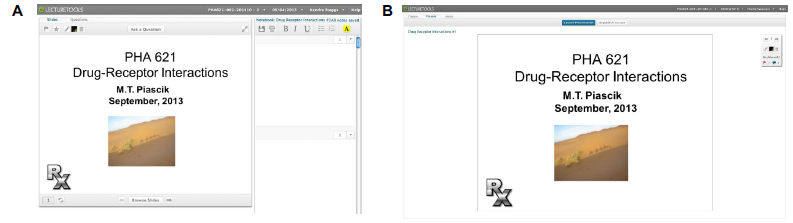
Screenshots of the (A) student and (B) instructor interface of lecture tools. (A) the PowerPoint slide with the interactive options is on the left, and the area for note-taking is on the right. (B) the options for displaying the lecture presentation are at the top, and access to the assessment tab with the dashboard is on the right. the student responses are in the middle, and a preview of the upcoming slides is at the bottom.
The display on the students' personal devices is different from that on the instructor control panel (Fig. 1B). It contains the slide presentation, a section to take notes, and a section to address questions to the instructor. The slide presentation can be made available to the students prior to class to allow for class preparation.
Assessment
To assess student perceptions of Lecture Tools, an online survey was administered at the end of the semester. In addition, one-on-one interviews were conducted. These semi-structured interviews consisted of three key questions. 1. Did you like or dislike Lecture Tools? 2. What were some of the disadvantages associated with the use of Lecture Tools? 3. What were some of the advantages associated with the use of Lecture Tools? The response rate to both survey instruments was 100% (9/9).
Results
All participants indicated that they owned a laptop and/or a mobile phone, and the majority (7/9) brought them to class. The majority of students (7/9) either strongly agreed or agreed that their engagement in this class was increased because of their use of a digital device. The results from the survey indicated that the majority (95–100%) of the student's in-class use of digital devices was spent on class-related activities. The students (9/9) indicated that they followed along with their instructor's slides using Lecture Tools either most of the time or during every class. As shown in Figure 2A, both student attentiveness and engagement were increased because of Lecture Tools. The student responses also indicated that they were more likely to ask questions using Lecture Tools than by raising their hands and that use of Lecture Tools allowed them to interact more with their professor. Finally, the majority (7/9) either strongly agreed or agreed that they would like to take more classes that used Lecture Tools.
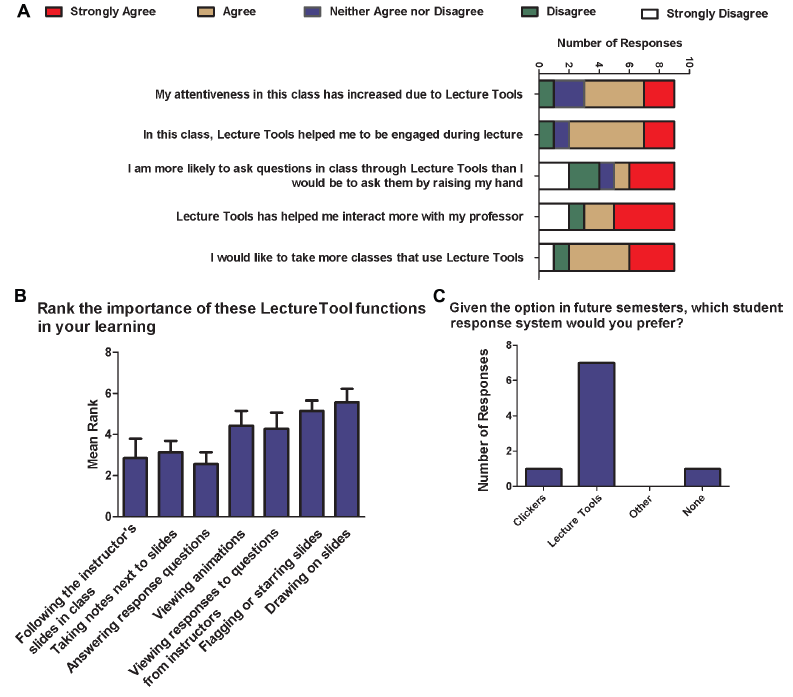
Student responses to the online survey (n = 9). (A) Responses pertaining to engagement and attentiveness. (B) Student's ranking of the importance of Lecture Tools function. (C) Student preferences of clickers versus Lecture Tools.
The students were also asked to rank the importance of Lecture Tools functions for their learning (Fig. 2B). The student responses indicated that the most important functions were following the instructor's slides in class, taking notes next to slides, and answering response questions. The least important functions were flagging or starring the slides and drawing on the slides. The majority of the students (7/9) indicated that they would prefer the use of Lecture Tools over that of clickers in future semesters (Fig. 2C).
In the open-response section, the students indicated that the question and answer function was a helpful feedback system and that they liked the ability to flag a slide when they were confused. Negative comments included the inability to incorporate animations, difficulties in drawing lines or pictures on the slides, the small size of the slides, the lack of editing in Lecture Tools, and the large amount of class time taken by Lecture Tools.
One-on-one interviews with the students elicited positive comments, such as “it gave those of us who do not like to ask or answer questions an opportunity to participate,” “I liked it better than clickers,” and “it was a way to keep everybody on the same page.” Negative comments included “animation is needed,” “it wasted too much time,” and “it required everything to be typed.”
Discussion
High student engagement is closely correlated with student success. 4 This is often not optimized in the medical curriculum, which relies primarily on the traditional classroom and lecture-based delivery method. A proposed first step toward transforming the passive, instructor-based lecture to more active, student-focused activities is to incorporate questions during the lectures. 5 In this pilot study, we questioned whether the use of “engaged/active” lectures facilitated by Lecture Tools would enhance student engagement in a class dedicated to the teaching and learning of pharmacokinetic and pharmacodynamic principles.
Active learning has been defined as “any instructional method that engages the student in the learning process.” 6 In our PHA 621 class, we used two methods to enhance active learning in our classroom, the presentation of “engaged” or “active” lectures via Lecture Tools and peer-to-peer student presentations, which incorporated peer grading. Active versus passive learning is associated with a number of advantages. For example, a recent meta-analysis of 225 studies found that students enrolled in science, technology, engineering and mathematics courses, which had incorporated active-learning approaches, resulted in half a letter grade higher than those enrolled in courses where only passive learning approaches were used. 7 In addition, the failure rates of students in the active-learning courses were substantially lower. Similarly, physiology courses using engaged lectures had higher averages on examination scores and improved long-term retention as compared to those that used traditional didactic lectures. 8 Engaged lectures are also associated with higher student motivation 9 and enhanced student retention of core content. 10 Interestingly, a comparison of three forms of active-learning approaches; active lectures, cooperative groups, and collaborative groups; revealed that exam results were highest in the active lecture groups. 11 However, these advantages of active-learning approaches may not always be fully realized. For example, Andrews et al did not find a correlation between student learning and active learning in a randomized analysis of introductory biology courses and proposed that this disconnect may be because of a lack of instructor science education expertise. 12 In addition, incorporation of active-learning approaches within a medical school curriculum revealed a reluctance among medical students to fully engage in class activities. 13 Thus, while incorporation of active-learning approaches can enhance student performance and motivation, its success will likely depend on supportive learning environments and the pedagogical expertise of the instructors.
Our incorporation of Lecture Tools into student peer-to-peer presentations provided opportunities for a classroom discussion on effective pedagogical approaches. Perhaps, the most important topic that was discussed was how to develop effective questions during lecture presentations. Questions can be used to develop a rapport between the participants, focus the attention of the group to a particular topic, access subject mastery using pre- and post-tests, and query for perceptions and misunderstandings among the students. Questions should also be used to generate interest and thoughtful responses, and to stimulate engaging discussions. 14 Our classroom discussion also included a brief review of Bloom's taxonomy and its use in enhancing the design of challenging questions. 15
A barrier to engaged question and answer sessions during lectures is the reluctance of some students to participate in classroom discussions, which can be overcome in part by the use of technology in the classroom. This is indicated by the response of the students (Fig. 2A) that they were more likely to ask questions using Lecture Tools versus raising their hands. Question and answer sessions may also be facilitated by the use of audience response systems (ie, clickers), for example, which has been found to encourage student participation, provide immediate feedback, and form the basis for further discussions. 16 The increasing presence of laptops and other mobile devices in the classroom presents additional opportunities for engaging students, particularly when they are interfaced with interactive polling software. Similar to that of others, the results from this study indicate that the use of audience response systems, such as clickers 17 and Lecture Tools,3,18 enhances student engagement with the lecture topics and student attentiveness. However, it should also be noted that while use of classroom technologies may be helpful in initiating discussions, additional steps should be taken to ensure that students gain appropriate expertise in leading and engaging in thought-provoking discussions.
In this study, we examined the feasibility of Lecture Tools to facilitate the learning of pharmacokinetics and pharmacodynamics. These topics are vital to basic science as well as medical students because they provide the structure to understand drug action and therapeutic usefulness, as well as toxicity. Furthermore, the comprehension of these fundamental principles is greatly facilitated by the use of graphical representations, equations and calculations, and the very types of material that students find most daunting. We were able to access student comprehension in an engaging manner while at the same time permitting the students to easily ask questions without interrupting the flow of classroom information. This is vital considering students' apparent reluctance to ask questions. The versatility of Lecture Tools allowed us to create the types of assessments that promoted a high level of student engagement. In our opinion, this was an advantage as compared to that of the standard multiple choice format seen in Turning Point. For a typical presentation, the students were expected to prepare for lecture by studying and reading. Their level of comprehension was assessed by asking open-ended response questions regarding receptor theory and identifying different types of agonist and antagonist dose–response curves, as well as performing pharmacokinetic and pharmacodynamic calculations. These responses could be downloaded and graded for an enhanced level of student feedback. As our results indicate, the students were more attentive and engaged in lectures presented with Lecture Tools. They liked the ability to easily participate in the lectures, the ease of asking questions, and the ability to take notes within the Lecture Tools student work area.
Limitations of this study include the small sample size (n = 9) and lack of consideration of the student's experiences with other classroom technologies such as Turning Point. Further, comparison of the assessment outcomes of this class using Lecture Tools with that of previous classes that did not use Lecture Tools indicated that the outcomes were similar (data not shown). Future work will focus on employing these types of comparisons to determine whether use of Lecture Tools can significantly enhance student comprehension in this type of classroom setting.
While Lecture Tools does offer many advantages, like any educational software, it does have its drawbacks. The ability of the instructor to receive student responses and answers to questions is critical in maintaining the timing and flow of the presentation. This is dependent on the speed of the Internet connection as well as the time it takes for the students to respond. A slow Internet connection will result in the instructor having to wait to acquire information and then adjust the presentation to these responses. Written responses or calculations can take even longer to receive. Therefore, the instructor must be aware of this and be prepared to pace the class accordingly. Despite advertising to the contrary, none of our students were able to use a mobile phone to respond. Slides uploaded onto Lecture Tools cannot be edited in this platform. All editing must be done in PowerPoint and that single slide is re-imported. Also, all animations created in PowerPoint are lost and the uploaded slide is static.
Conclusion
Our goal was to use Lecture Tools in a graduate course to assess the feasibility of using this instructional, cloud-based software, in medical education. We found many positive aspects to Lecture Tools along with several negative aspects. These have been outlined above. Based on our experience, Lecture Tools can be used in medical education. It offers versatility in the types of questions that can be asked and gives the students the opportunity to overcome their dislike for asking questions in class by allowing them to submit questions during the lecture. Unlike Turning Point, no special response units are needed. In its most recent version, Turning Point can now be used with Internet-enabled personal devices. However, special software must still be downloaded, and a receiver is required on the instructor slide to receive this input. The versatility in Lecture Tools assessment types is offset by the response time. Considering the time constraints for a given medical school class, instructors would be waiting for an impractical amount of time to receive and act upon written questions in real time. Thus, Lecture Tools would be much like using Turning Point but without clickers, a special software of receiver units.
In summary, with the points made above taken into consideration, Lecture Tools can be effectively used in a medical education setting.
Author Contributions
Conceived and designed the experiments: HIS and MTP. Analyzed the data: HIS. Wrote the first draft of the manuscript: HIS and MTP. Contributed to the writing of the manuscript: HIS and MTP. Agree with manuscript results and conclusions: HIS and MTP. Jointly developed the structure and arguments for the paper: HIS and MTP. Made critical revisions and approved the final version: HIS and MTP. All authors reviewed and approved the final manuscript.