




Abstract
BACKGROUND:
Aphasia is an impaired ability to use language for communication after a brain damage. The primary means of intervention for aphasia – Speech-Language therapy (SLT) – usually involves didactic interaction between the Speech-Language therapist and the client, often without regard to the real-life environments in which the communication occurs. The provision of SLT in natural environments is beyond the scope of the conventional, clinic-based intervention setups. Using the technological advances, the Mixed Reality in Aphasia Rehabilitation (MiRAR) aims to make persons with aphasia (PwA) use their language in an ecologically valid and meaningful manner in natural communication contexts.
AIM:
This report aims to delineate the design and development of a Mixed Reality environment (MR: i.e., augmented
METHODS:
We describe the concept and provide the details of the development and deployment of a communication-based mixed reality application for PwA in the Indian context. For this purpose, we generated 20 distinct communication scenarios and their scripts. These scenarios were implemented into the Mixed Reality environment with the help of a hired technical team.
RESULTS:
The 20 scenarios were successfully developed and deployed into the Mixed Reality environment for the purpose of communication intervention for PwA. The program consists of a web-based admin panel (for SLPs) and a Mixed Reality application (for the PwA).
CONCLUSIONS:
The MiRAR program is expected to foster the delivery of speech-language therapy in a meaningful, controlled and simulated environments by the SLPs, thus alleviating the practical restraints of conventional clinical setups. The clinical trial of this intervention program is planned in the next phase of this ongoing project.
Introduction
Language, an integral component of human communication and that fosters socialization, can get severely compromised due to brain damage, leading to a condition known as ‘aphasia’. Aphasia impairs various verbal skills such as speaking, understanding, reading and writing. Recent epidemiological investigations indicate that the disability due to stroke around the world is estimated to be 77 million by 2030 [1]. Thus, the quantum of stroke population living with aphasia is expected to rise steeply by the end of this decade. The primary intervention for persons with aphasia (PwA) is speech-language therapy (SLT) and its efficacy is steadily growing [2, 3].
The approaches to aphasia rehabilitation could be broadly grouped into ‘traditional’, ‘cognitive-linguistic’, or ‘functional approaches’ [4]. The traditional (primarily, impairment-based) approaches aim to improve specific language functions such word retrieval, syntactic processing etc. On the other hand the cognitive-linguistic approaches aim to improve the cognitive subcomponents that are essential for language processing. Finally, the functional approaches focus on improving the activity and participation in the reallife contexts. From a broader perspective, the cognitive-linguistic approaches may be considered as an impairment-based approach as they aim to improve linguistic functions through cognitive training, without regard to the utilization of the trained skills in real-life contexts. While the impairment-based approaches are specific to the restoration of lost function (here, language), a major drawback of these approaches is their poor generalizability to the real-life communicative contexts.
The functional approaches attempt to focus on the performance of the PwA in their real-life communicative contexts. However, these are not without limitations. The ‘Life Participation Approaches to Aphasia’ (LPAA Group) [5] is one such approach. A primary challenge in functional communication approaches is setting up the real-life or real-life-like communicative contexts in clinical settings. The traditional approaches to aphasia intervention involve didactic interaction between the clinician and client, often without regard to the natural environments in which real-life communication occurs. Further, the transfer of treatment effects to the natural environment is less emphasized in such approaches [6]. The provision of rehabilitative interventions in natural environments is beyond the scope of conventional training provided in the clinical settings. In the real-life environment, the PwA would be purposefully communicating (or intending to communicate) with his/her communication partner(s) in a meaningful context. Setting up such a context in clinical settings is seldom practical. Even if attempted, the clinician will have to set up several such contexts with the participation of significant others (SO) or communication partners, as such contexts are individual-specific. This is a potential limitation that could be addressed with recent advances in technology.
Extended realities (XR) refer to the interaction between humans and machines in a combined real and virtual environment generated by the computer technology and wearables. They are of three types: augmented reality (AR), virtual reality (VR), and mixed reality (MR) [7].
In AR, the user will enhance the perception of reality by providing additional computer-generated information within the data collected from real life [8]. AR has three essential functions: it combines real and virtual environments, real-time interaction, and constructs appropriate 3D outlines of real and virtual objects [8]. For example, AR can be used to portray a building’s structure which will be a mirror image of a real-life view. Likewise, VR is a computer-generated 3D environment that consists of digitalized experiences that can simulate or differ completely from the real world [9]. The VR is of three types of VR. First, the Non-immersive VR provides a simulated environment with a less immersive experience. Due to this less immersion in the virtual world, it is seldom considered as virtual reality (e.g., a video game is a great example of a non-immersive VR experience). Second, the Semi-immersive VR provides partial virtual environment experiences and creates a different reality perception in users when they focus on the digital image. However, there is no complete immersion, which makes the physical environment to be involved in the virtual environment [9, 10]. This type of VR is commonly used for education or training purposes and relies on high-resolution displays and computers that form a functional image of the real world. For example, the EVA-Park is a successful VR interface in aphasia rehabilitation [11, 12]. Thirdly, fully immersive virtual reality provides the user with a more realistic simulation experience in a completely simulated environment with the help of VR glasses or a head mount displays (HMD). Complete immersion sets this technology apart from others [9].
Mixed reality (MR) is the most advanced immersive technology that merges the real and virtual worlds to create a new environment and visualization, wherein the objects in physical and digital environments co-exist and interact in real-time [13]. Visual coherence is the primary component that differentiate mixed reality from the other extended realities [14]. In mixed reality, virtual items can interact in the real environment and the real items can change the virtual components, regardless of the location of the event [15]. For example, users of MR would not be able to visualize a ball under a table until they lean over to look at it but it would not be necessary to lean down in an AR as the ball would be overlaid in the display. At the moment, only two commercial devices (Microsoft HoloLens & the Magic holographic devices – to be released) can produce true mixed realities. These devices combine virtual and real items in a real-time display [15]. To sum up, different types of extended realities exist. The Virtual Environment is entirely computer-generated and allows users to engage in real-time only with virtual items. The Real Environment is an actual setting where users interact exclusively with parts of the real world. In the interim, there exist technology-driven realities that exhibit varying degrees of integration between the virtual and physical worlds. The digital content is superimposed on the user’s actual surroundings in AR. Lastly, in Mixed Reality (MR), the users can engage with both digital and real content, where they are immersed in the actual world and the digital content is fully integrated into their environment.
In the recent times, the application of extended reality (e.g. Virtual and Augmented realities) has shown significant improvements in the mental health rehabilitation, and is being increasingly applied to larger therapeutic domains. In stroke rehabilitation, the ER is being applied to the rehabilitation of i) motor, ii) cognitive, and iii) activities of daily living (ADL) skills. In the cognitive domain, activities like crossing the street [16], visiting the supermarket [17], or going for a city tour [18] are all addressed.
Although evidence is growing on the successful implementation of extended reality in stroke rehabilitation, the application of these techniques in aphasia is rather meager [19]. However, there exists some evidence for the beneficial effects of extended reality (language as well as communication activity/participation) in PwA (see [20], for a review). For example, EVA-Park (a virtual park where various 3D avatars interact) developed in the UK, uses a VR platform for training goal-oriented communication in PwA [11, 12]. Another program, the Aphasia Script [21] uses a virtual therapist (Avatar) to deliver script training (without any virtual environment) This program has shown to improve changes in communication participation using the script-related words in PwA [22, 23].
The potential of non-immersive VR has been highlighted in recent studies such as increased therapy dosage, optimized sensory stimulation, and overall improvement in functional communication and psychosocial aspects as well as enhanced ecological validity of aphasia treatment [12, 24, 25, 26, 27]. While both EVA-Park and Aphasia Scripts have clear benefits as mentioned above, they are primarily non-immersive in nature. Fully immersive VR technology provides a ‘feeling of presence’ and induces real-world-like situations. Though fully immersive experience can be provided through VR technology, it requires the use of head-mount devices (HMD). However, the conventional HMD can induce simulation sickness in the users (e.gs. nausea, and fatigue; see [44] for a review). Further, it does not allow the real-time interaction with the surroundings [15]. Although such disengagement from the real-world is essential for certain purposes like gaming, we believe it limits the usage in certain clinical population (e.g., PwA) that requires simultaneous participation of the rehabilitation professional (SLP, Psychologist, etc.). The recent developments in the ‘Extended Reality’ (XR) technology permit the users to interact with the virtual and real worlds, simultaneously.
Non-immersive VR worlds such as EVA-Park [11] depend on a point-and-click interface to participate in a virtual environment that lacks complete immersion in the virtual environment [7]. In general, the clinical population (e.g. people with stroke) experience concomitant issues during complete immersion such as nausea [28]. This poses a serious problem in using such devices for intensive practice. This could be one reason why non-immersive (VR, e.g. EVA-Park or Aphasia Scripts) are clinically favourable and reduce the risk of concomitant issues. Among the extended realities, the recent technology (i.e. Mixed reality, (MR: i.e., a combination of virtual (VR) and augmented (AR) realities)) could be advantageous over complete immersion (i.e. VR in immersion). Preliminary attempts (Aphasia House, Florida, USA) in this direction have shown some promising results [29].
In light of these recent technological advances in aphasia rehabilitation, this report delineates the development and validation of a mixed reality (MR) application in aphasia rehabilitation (MiRAR) in the Indian context. We present the concept, workflow of the process, development, and deployment of a communication-based MR application for PwA (i.e., The MiRAR Project).
MiRAR scenarios
MiRAR scenarios
Ethical approval
This study was initiated after obtaining the approval from Institutional Ethics Committee was received (Kasturba Medical College and Kasturba Hospital, IEC:177/2019). Subsequently, we registered this study in the Clinical Trial Registry of India (CTRI/2020/06/ 025933).
Step 1: Identification of relevant communication scenarios for PwA
Though we planned to identify the relevant communication scenarios through a focussed group discussion (FGD) with all the stakeholders (including PwA), the outbreak of COVID pandemic and subsequent lockdowns hindered it. Thence, we searched the pertinent literature and identified 82 possible communication scenarios [30, 31, 32, 33, 34, 35, 36, 37, 38, 39, 40, 41, 42, 43]. Additionally, we included a few culturally appropriate scenarios based on our clinical expertise. These scenarios were divided into the following major categories: home environment, health-related, essential needs, general communicative scenarios, telephonic conversation, social activities, travel and weather, farming, as well as emergency-situationspecific training (see Table 1).
Validation of the scenarios
To identify the socio-culturally valid communication scenarios for PwA in the Indian context, we identified 10 SLPs with a minimum of 3 years of experience in aphasia rehabilitation within India. They were identified from the directory of the Indian Speech and Hearing Association (
Diagrammatic representation of the mixed reality application. Notes: This Figure illustrates the design before development. In this,the SLP is conducting a therapy session while the participant is interacting on a 3D immersive technology.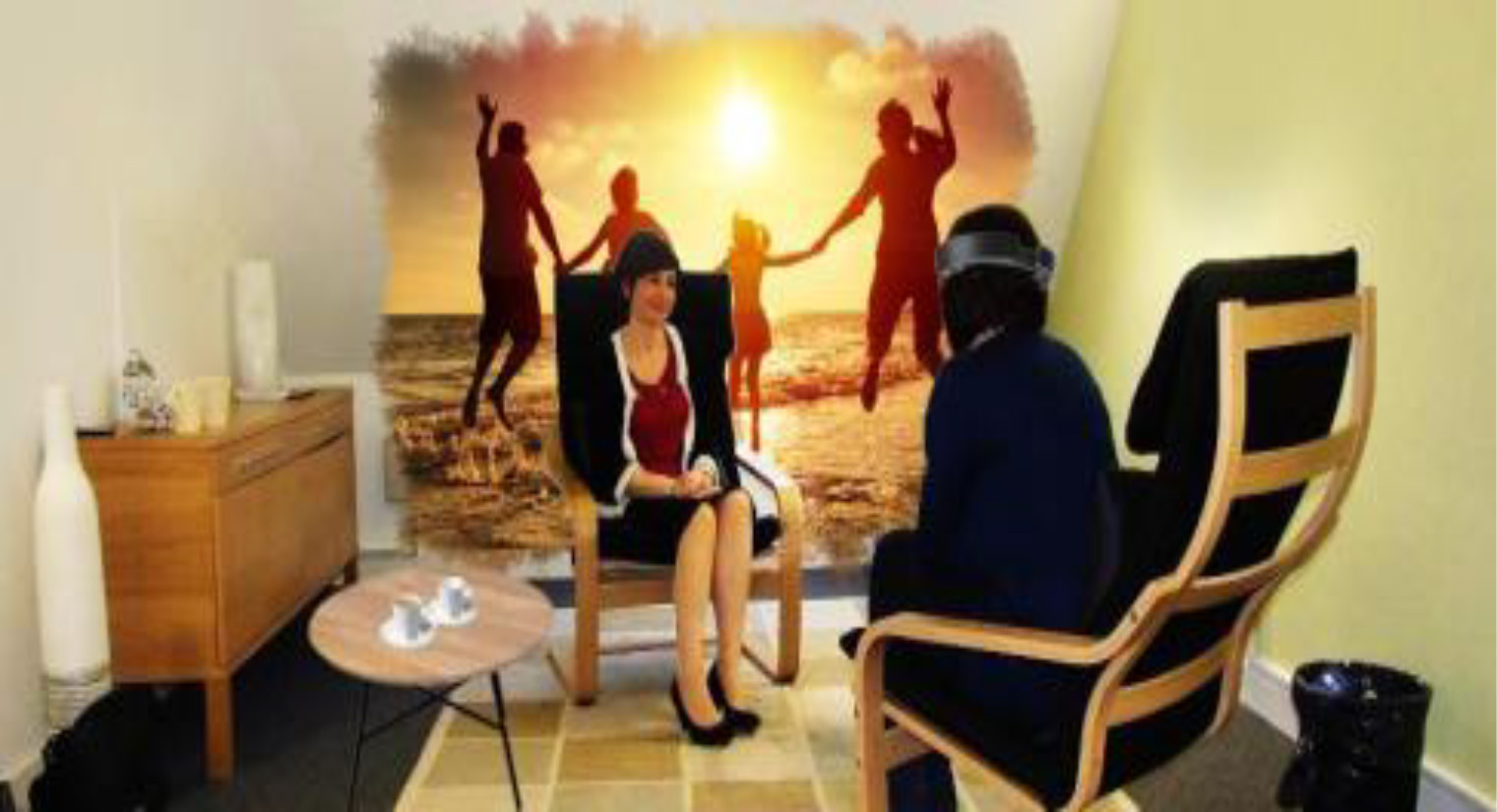
Script generation
Script training aims to improve communication in daily activities and it consists of repeating words, phrases, and sentences that are used in a conversation or monologue that is specially created for PwA [30, 36]. Script training can be carried out in several ways such as: reading aloud, reproducing the target utterances from memory, repeating the utterances, listening to the script, or a combination of all these. This training is based on the idea that words or phrases in a script can be effectively learned by repeated, cue-based massdrilling. In aphasia rehabilitation script training is implemented in many ways. These include the traditional penandpaper method [30, 36], Aphasia Scripts [21, 22, 23] (a software using 2-D virtual animated therapist), Telephone-based script training [41], video-assisted script training [42], or web-based script training [43]. The script training is conventionally used either in the dyadic conversation or in the roleplay conversation (that is, without any environment). And, such training uses sentences or words with choral reading and massed practices. Considering the current intention to implement traditional therapy in the MR environment, we divided the whole conversational environment into various subsections. For example, a scenario of consultation with a physician was divided into multiple sub-scenarios: a) with the receptionist, b) with the physician during the clinical examination, and c) counselling.
Scenarios and the storyboard (scripts)
Twenty scenarios were selected based on the social, cultural, and dialectic variations of the Indian languages (Hindi, Kannada, & Malayalam). For each of these 20 scenarios, conversation scripts that included up to 20-turns of relevant dialogues were prepared (like a storyboard). The conversation scripts were divided into segments based on their respective sub-scenarios. The average time for each segment in every sub-scenario is 3 minutes. All conversation scripts were first written in Indian English and appropriate translations were made into the three languages mentioned above. The SLP team (who were multilingual speakers and are fluent readers of the mentioned languages) conducted all the translations. This was carried out in three steps (forward translation and review by native speaker). In the first step, the first author (RS) translated the scrips from English to Hindi and Kannada and the second author (I) translated them to Malayalam (from English). All translations were reviewed by the third (ST) and last author (GK). In the second step, two native speakers of each language were asked to review the appropriateness of the contents. Necessary changes were made through frequent discussions with the two native speakers of the language. After the conversation scripts were finalized, the technical team reviewed them for deploying them in the 3D environment (see the supplementary material for an example scenario).
Team-building and planning
As the current work required technical expertise, the Speech-Language Pathology (SLP) team hired a technical (interdisciplinary) team that consisted of experts in developing software programs, 3D, immersive technology applications, as well as graphic designers.
Framework of the MiRAR
To facilitate ‘clinician-directed’ functional intervention approach to PwA, we developed two applications (a web application through which the clinician could deploy the intervention program and monitor the progress and a Mixed Reality application to be used with the Microsoft HoloLens by the PwA). A graphical prototype of the framework of the MiRAR is provided in Fig. 1. In this Figure, the PwA wears the Microsoft HoloLens and visualizes the 3D simulated scenarios (Virtual mode). The SLP provides functional speech language therapy and feedback as well as monitors the overall therapy progress. The Microsoft HoloLens could also be cast onto an external screen so that the clinician can simultaneously watch the scenarios that the PwA is visualizing.
We chose the Microsoft HoloLens for the delivery of conventional script training with the MR environment for PwA. This device is comfortable and portable with a reduced risk of fatigue (arising from immersion). Further, it can be used with the client’s spectacles and it does not require a green-screen background. More importantly, being a commercial program, Microsoft HoloLens has the scope for future updates and advancements. It may also be noted that such programs are increasingly used in stroke rehabilitation.
Step 3: Development of the MiRAR
Design and implementation
The MiRAR has two main interfaces: a web interface (for SLPs) and a user interface (for PwAs). The development of the program was completed in two phases. Phase 1 (prototype version) included the design and development of the MiRAR web application and Microsoft HoloLens application with 5 scenarios in Indian English. In Phase 2 we added 15 more scenarios in Indian English and adapted all the 20 scenarios in to three Indian languages (Kannada, Hindi & Malayalam).
The MiRAR web application includes options to manage end-users’ (PwA) accounts and information that can be accessed for further use. The web interface will allow the SLPs to deploy scenarios to the accounts of individual PwAs. The SLP can select suitable scenarios from the list of 20 based on the PwA’s preference and enjoys the authority to control the scripts (editor), sound, text, and display of written instructions. At the end of every training session, the web application stores the video of the same for feedback and review purposes by the SLP.
The SLP shall guide the PwA in using the MiRAR program with the Microsoft HoloLens. The PwA (wearing the Microsoft HoloLens) can visualize the virtual content overlaid in the real environment. The PwA can practice by interacting with virtual communicative scenarios (implementing the life participation approach [6] and script training for aphasia [30, 36]). The SLP can simultaneously facilitate the functional communication skills of PwA while the latter is interacting with the virtual environment As mentioned above, these communicative interactions can be recorded onto the webpage application (SLP panel) for later feedback and review purposes.
The development
The web application of MiRAR was developed using Laravel, PHP, HTML, and MySQL The HoloLens application was developed using Unity, MAYA, and MAX. The hired technical team developed these two programs under the monitoring of the SLP team.
MiRAR web application
This application has several features including the user registration module instructor’s module, module to manage different scenarios for therapy, an analytical module (used for tracking the therapy progress), search function (for scenarios and sessions) and an export function (to excel lists).
MiRAR HoloLens application
3D avatars and environment: The 3D avatars and environments were created based on the scenarios. To make the scenarios more realistic, we decided to provide culturally suitable backgrounds (style, clothes, colour) to the 3D characters as well as the environment. The SLP team reviewed each scenario and character before they were animated. Animation: Once the 3D environment and characters were finalized, they were animated based on the storyboard of the scenario. Each scenario was animated in a way that could provide virtual immersive nature. Voiceovers for the 3D characters: Voiceovers for the 3D characters were provided by native Indian speakers (both female and male based on 3D characters). The voiceovers were inspected for their naturalness, clarity and speed of delivery by the members of both teams. The Scenarios: Whole scenarios and their subscenarios were developed and implemented in the Microsoft HoloLens device Completion of Phase 1: The SLPs involved in this work were trained by the technical team on the use of scenarios in HoloLens as well as quick troubleshooting tips, and that completed Phase 1 of this project.
Phase 2: As mentioned earlier, we added 15 more scenarios in Indian English as well as translated all 20 scenarios from English to three Indian languages (Hindi, Kannada, & Malayalam). For the translation purpose, the authors sought the help of two native speakers in each language.
Scheduling of a session by the Clinician. Notes: This figure illustrates the selection of a scenario from the scenario list using the MiRAR Web application panel.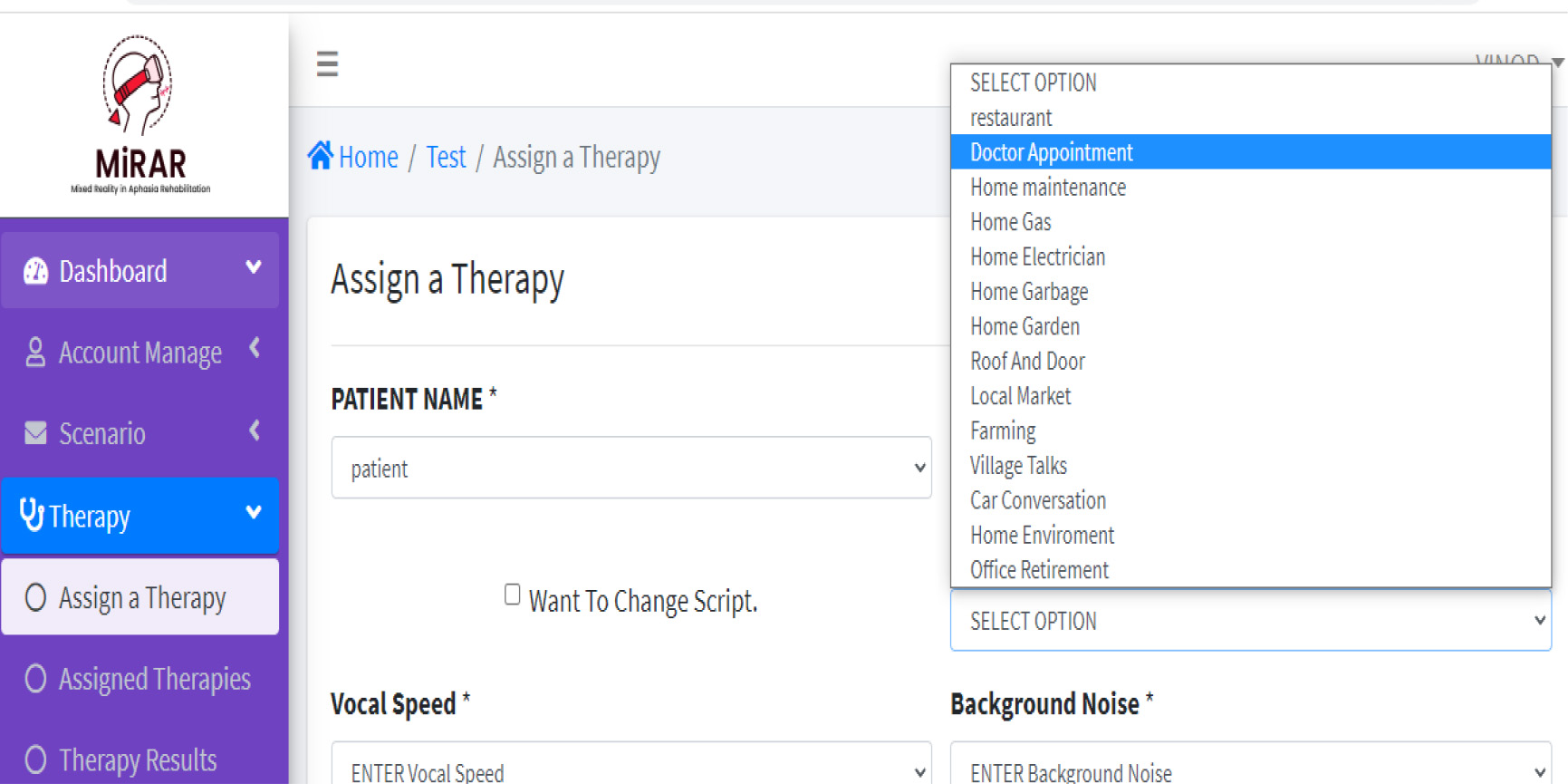
In Phase 1 of this study, we developed the MiRAR web application and MiRAR Microsoft HoloLens application with 5 scenarios in Indian English. Below, we present the major features of each of these applications.
MiRAR web application
MiRAR web application: Creating user accounts
To use the MiRAR program, initially the SLP is required to create his/her user account. Once the SLP is authenticated by the MiRAR team, s/he obtains the right to register their clients into the system. The option to self-register in the system by the PwA is not provided as MiRAR requires simultaneous assistance from the SLPs and under no circumstances, the PwA can initiate the training himself/herself, unlike the Aphasia Scripts [21] and EVA-Park [11]. That is only after the SLP registers the PwA, the latter can use the MiRAR program.
Selection of scenarios for training
The SLPs are encouraged to provide the full list of available communicative scenarios to their PwA. Depending on the preference of the PwA (or their significant others), a suitable scenario could be selected. As the MiRAR web and HoloLens applications are synced with user details, the preferred scenarios of the clients can be deployed in the MiRAR HoloLens app though their accounts Initially, the SLP can train the PWA with traditional methods (Script training) and introduce the scenarios in the MiRAR. The SLPs have options to either select the whole scenario or select subscenario Fig. 2 depicts the steps involved in scheduling a session and selecting a specific scenario for a PwA by the SLP.
Management of conversational dialogues for PwA by the SLP
Script editor for individualized conversation dialogues.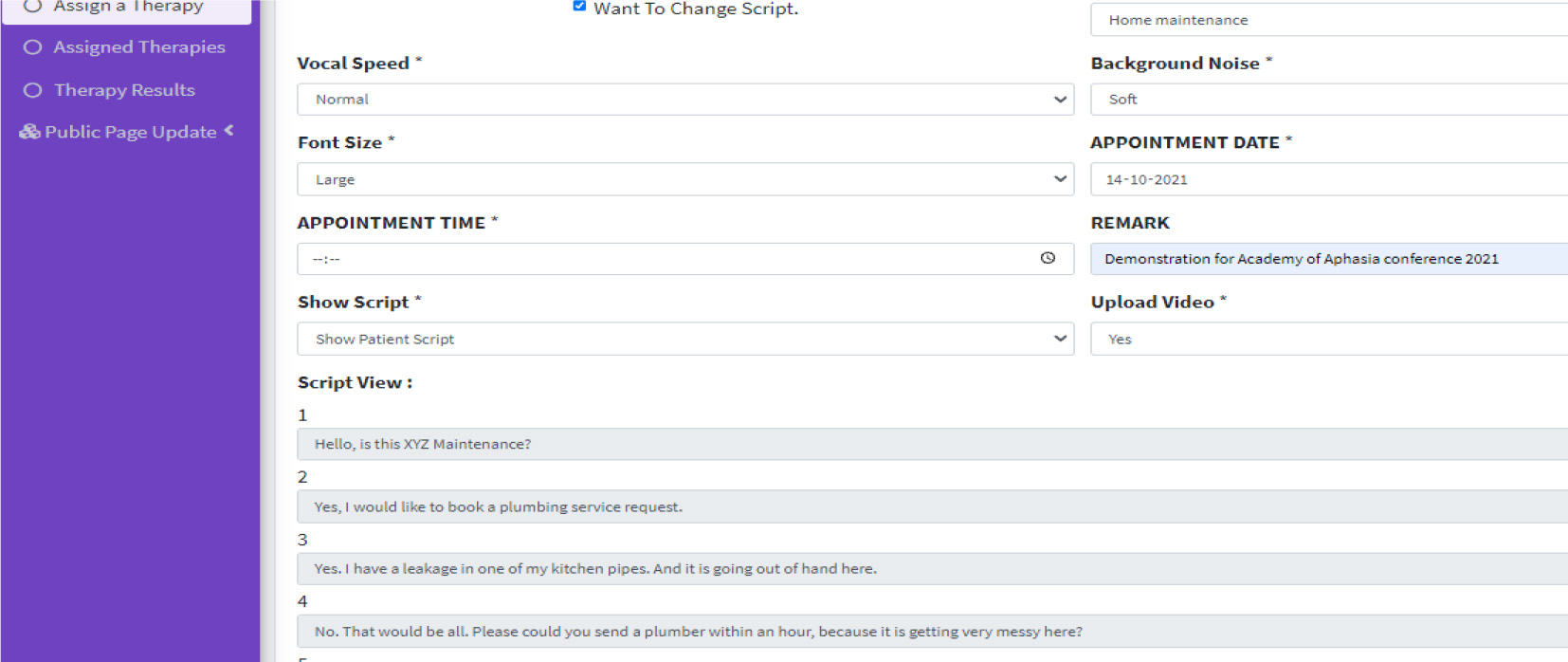
Conversation dialogues: The uniqueness of the MiRAR application is that the script (sentences, words, conversation) can be individualized in the scenarios based on PwA needs. For instance, in the ‘Home maintenance’ scenario, the storyboard requires an individual (here, a PwA) to make phone calls to various maintenance service providers (electrician, plumber, & gas agency). One of the conversation examples (a phone call by PwA to a plumbing service) is given below (the customizable segments are highlighted in Bold and Italics). From the web application, the SLP can modify the dialogue of the PwA (in the script editor, see Fig. 3). The SLP can replace the dialogue based on the impairment profile of their clients (e.gs. mean length of utterance, personalized words, grammatical complexity, etc.) or based on a request by the PwA (or their caregivers). Any change in the Script will be a collaborative decision between the SLP and PwA/caregivers. The MiRAR incorporates the speech recognition algorithm provided in the Microsoft HoloLens (with SLP-edited scripts) which allows the interaction of individualized dialogues for scenario practice. Further, SLPs can increase or decrease the task difficulty. For instance, the SLP can select the option of written cues during scenario practice. These cues could be faded out as the therapy progresses. Similarly, the background noise (e.g., real-world noise such as the noise from the local market) can be set to any desired level (mute, soft, normal, or high) during scenario practice (see Fig. 2 for the GUI of these two options).
Conversation 1:
Plumbing service (a 3D Avatar): Yes, this is MiRAR plumbing services, how may I help you? PwA (interaction with 3D): Yes, I have a leakage in one of my Kitchen pipes. “Will you be able to come by evening?”
[OR] PwA (interaction with 3D): Yes, I have a leakage in one of my Kitchen pipes. “It’s urgent, can you come now?”
In Phase 1, we developed the following scenarios: i) Restaurant, ii) Doctors appointment, iii) Bank iv) Supermarket and v) Family discussion. Figure 5 depicts the 3D characters of the Restaurant scenario (3D: a person who welcomes to the hotel & the Manager) and the appointment with the doctor (3D: Doctor and receptionist) and Fig. 6 shows the scenarios of the supermarket and bank.
Log in for the User in the Microsoft HoloLens (Panel A) and Homepage for PwA in the Microsoft HoloLens (Panel B).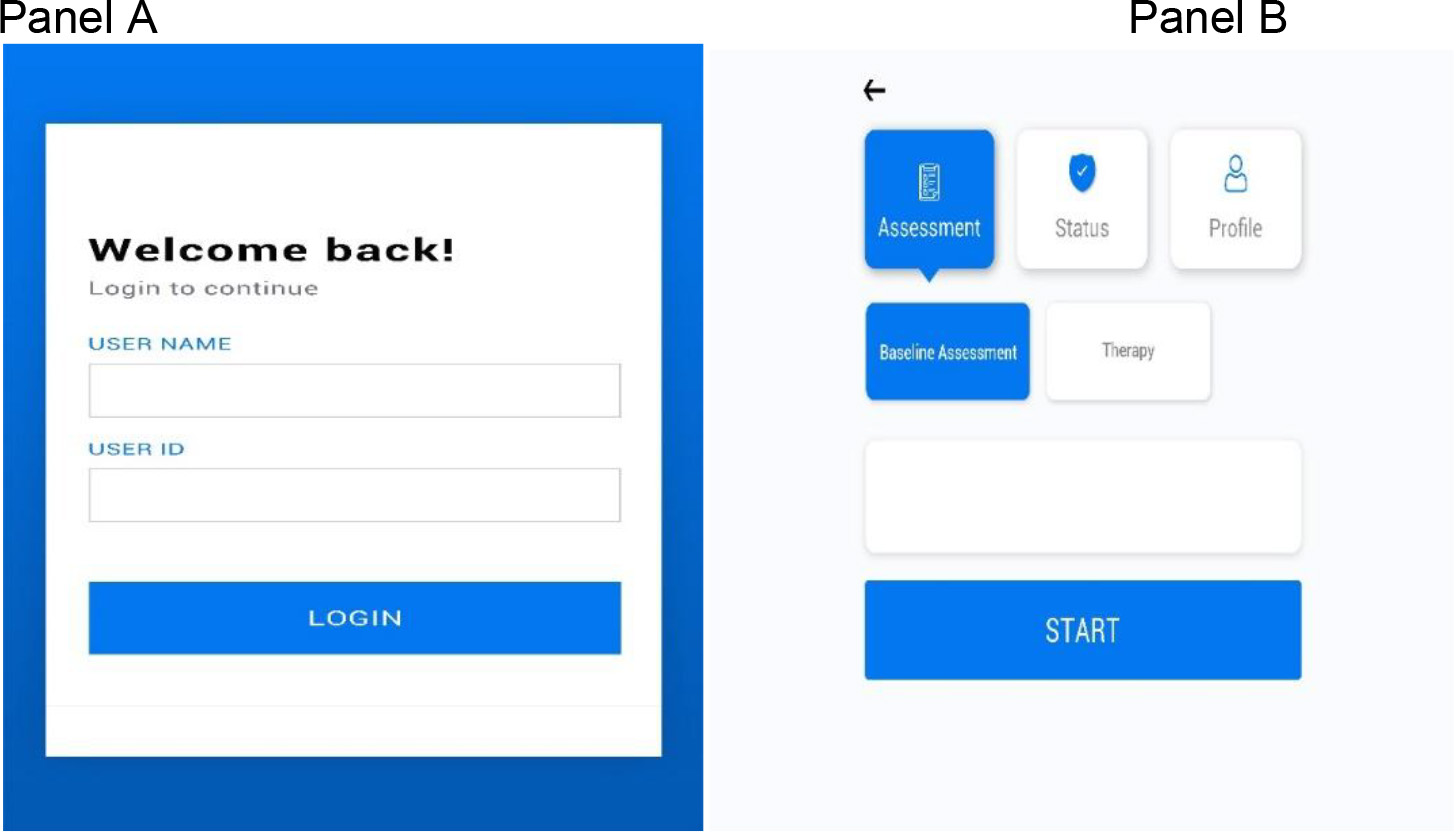
Panel A: 3D characters of restaurant scenario (manager and gatekeeper); Panel B: 3D character of doctor’s appointment scenario (doctor and receptionist).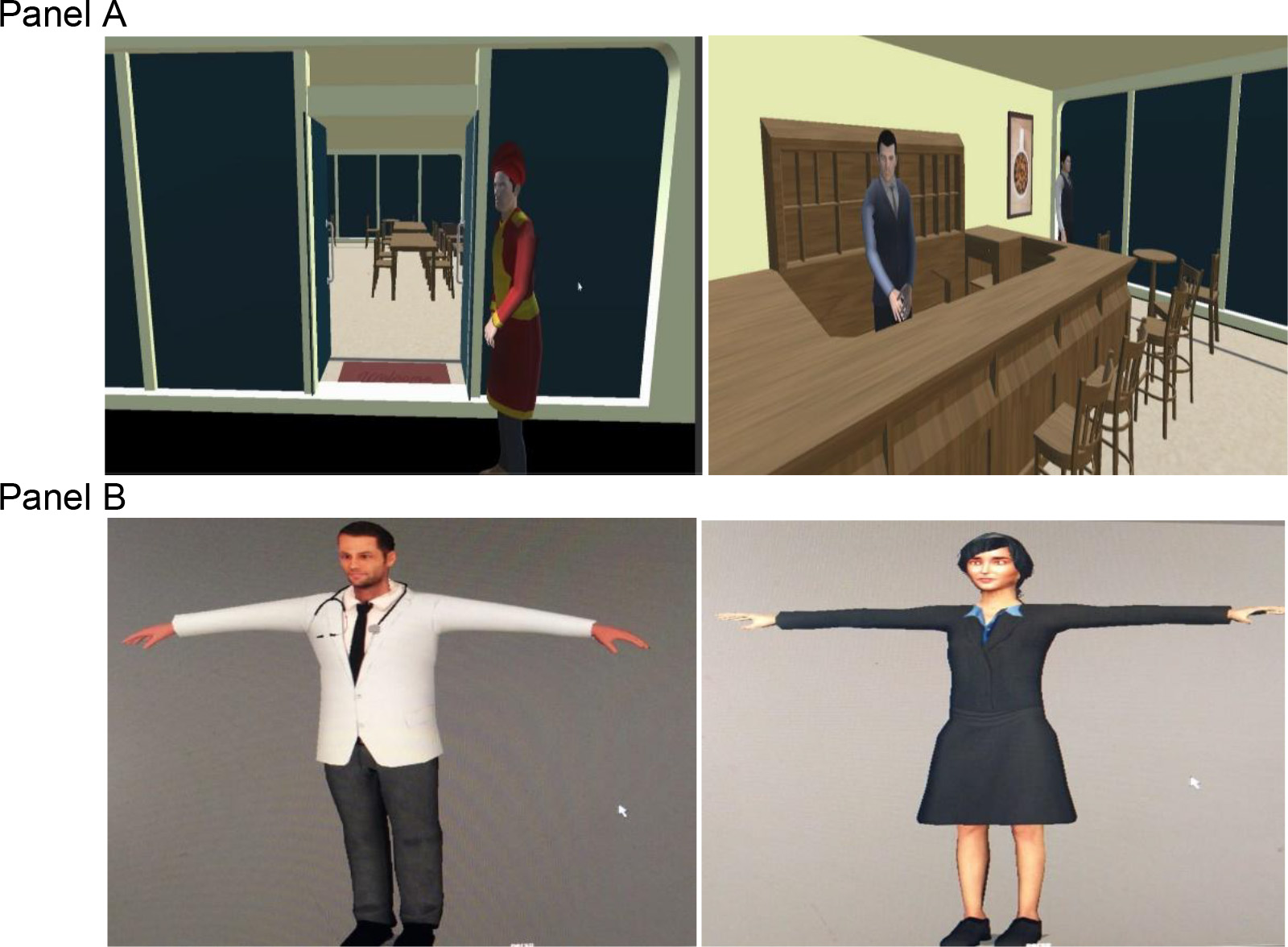
Panel A: supermarket scenario; Panel B: bank scenario.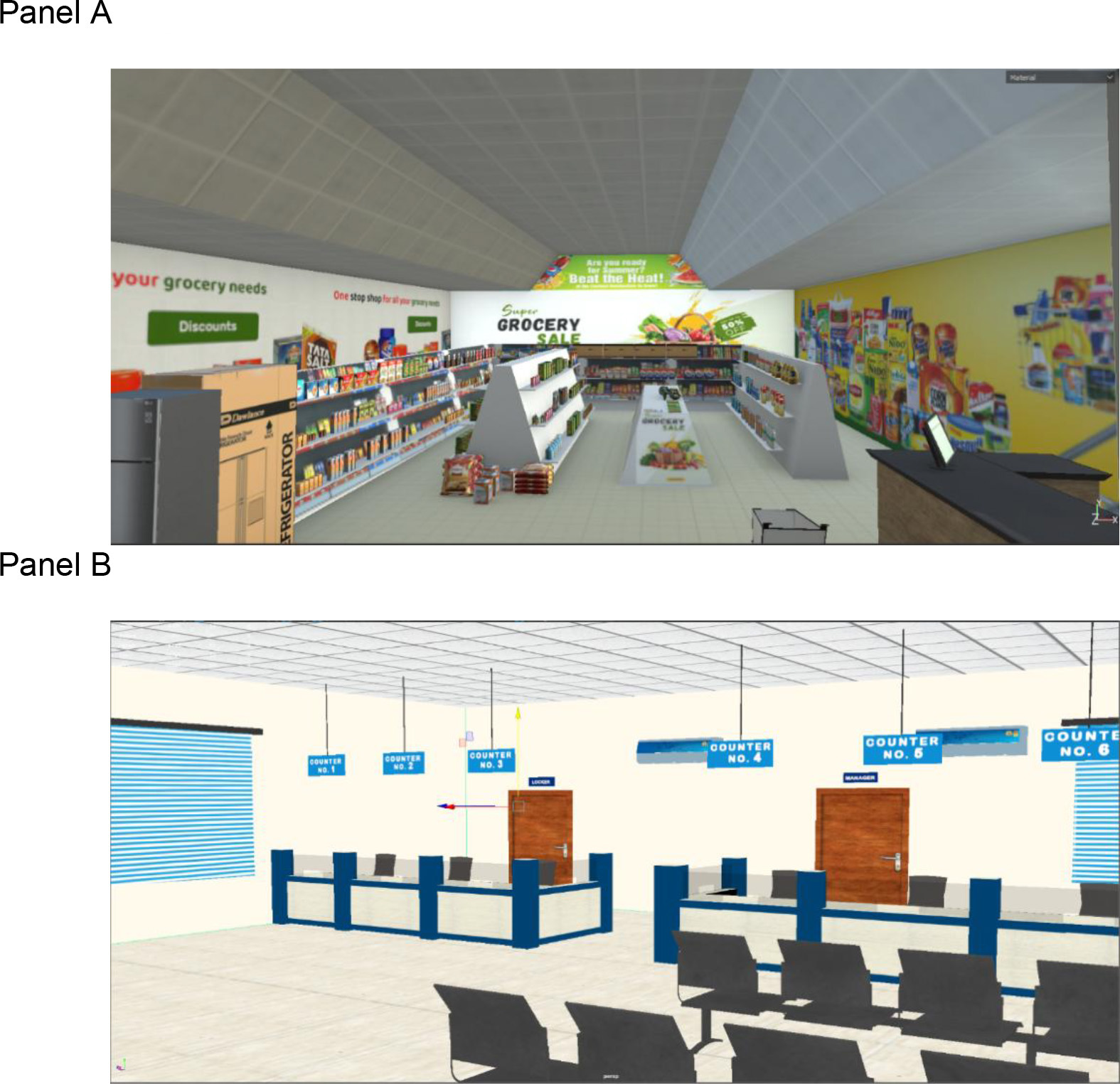
Use of MiRAR HoloLens application by the PwA
Once the SLP schedules and deploys the scenarios the PwA can log into the Microsoft HoloLens device to access them. The SLP will be able to guide the PwA with Microsoft HoloLens device. The PwA can select the appropriate buttons with the standard gesture implemented by the Microsoft HoloLens. Figure 4 provides the graphical user interface (GUI) of the login page in the HoloLens application. Note that if the PwA is unable to log in, the SLP can log the PwA in either through manual gesture buttons or by using voice command function while the PwA is wearing the device.
Example on how practices are conducted. Notes: In this photograph, we demonstrate the MiRAR in the clinical environment. Here, the person who is wearing the Microsoft HoloLens device is practicing the script and interacting with the 3D characters in a village scenario. The SLP is facilitating the user to verbally produce appropriate dialogues and is implementing script training. The SLP views the users’ interactions over the projector.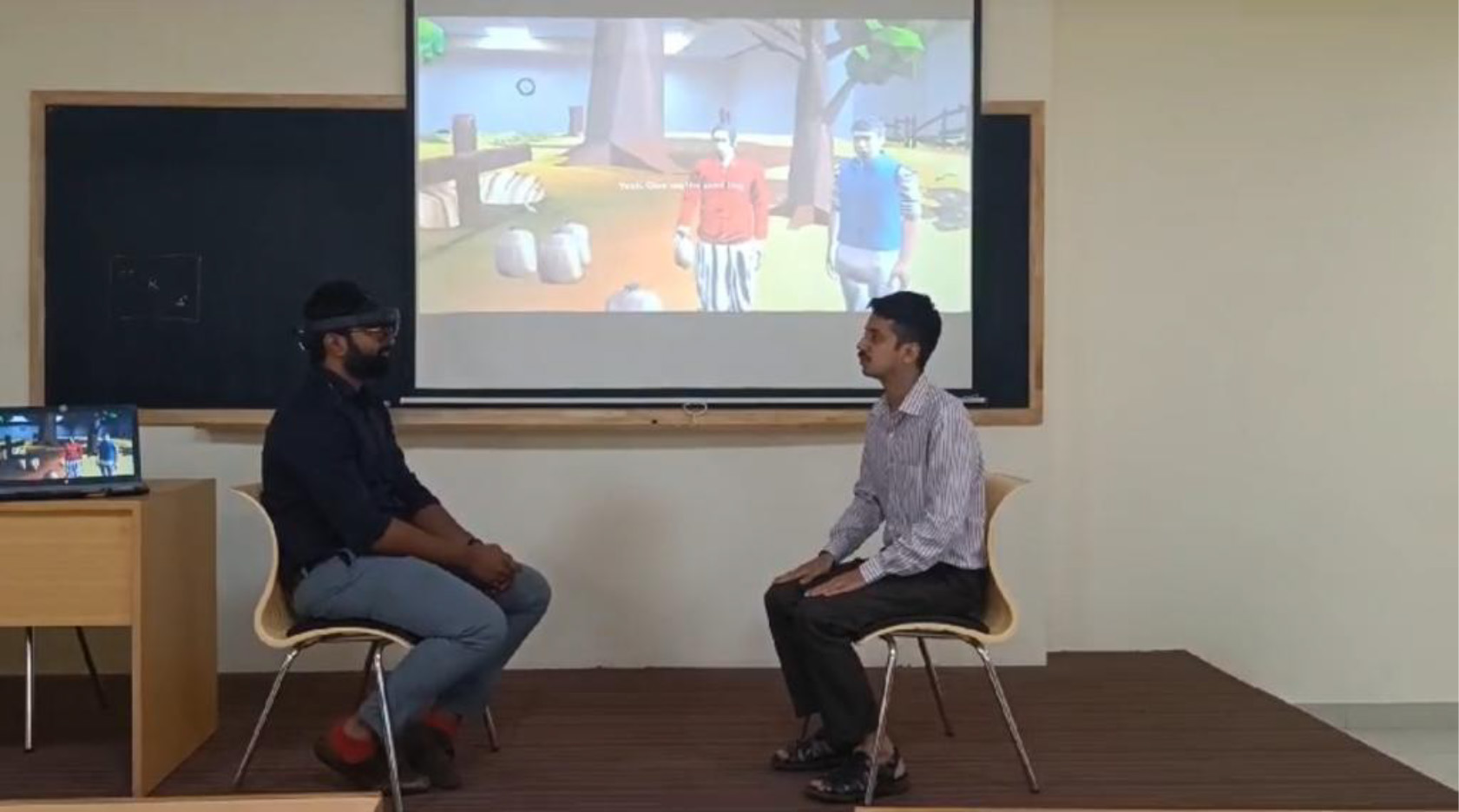
With a mock example (see Fig. 7), we illustrate the MiRAR program and showcase how an SLP provides therapy for a PwA in the clinical environment. In this figure, a user is wearing the Microsoft HoloLens and is interacting with the 3D avatars in a village scenario. While interacting with the 3D avatars, the user is also seeking support from the SLP (who is in the real world). Note that the SLP is receiving real time feedback of user interaction with 3D scenarios through the projector (i.e. this is screen casted using general Microsoft HoloLens function). Through script training principles, the SLP is facilitating the user to practices and deliver appropriate dialogues. During the course of therapy, the user is also supported with written cues (display in the MiRAR program) to deliver appropriate verbal production (see [45] for the importance of written cues). These written cues can be faded off as the therapy progresses.
Handling of audio inputs by Microsoft HoloLens
While the PwA practices with the 3D scenarios, there could be instances where the MiRAR HoloLens application fails to recognize the verbal utterances (e.gs. due to concomitant dysarthria, and sub-optimal speech recognition in non-English languages). Anticipating this potential bug, a manual button is included in the Microsoft HoloLens (can be operated with either a gesture or pointer provided by the Microsoft). This button is a default system word in Microsoft HoloLens and is equivalent to the command ‘Next’. The SLP can activate the usage of this default system word in the Microsoft HoloLens to progress with the training program.
Comparing and critically reviewing developed application (MiRAR) with existing applications
Comparing and critically reviewing developed application (MiRAR) with existing applications
In this report, we outlined the concept, workflow, and development of a Mixed Reality-based rehabilitation program for persons with aphasia. The MiRAR implements the life participation approach to aphasia (LPAA) therapy in a combined virtual and augmented (hence, Mixed) realities with additional training using scripts. This study was planned to include PwA in identifying scenarios for training. However, the unexpected outbreak of COVID-19 and subsequent lockdowns limited the access to PwA. To overcome this lacuna, we searched the pertinent literature and identified 82 possible communication scenarios [30, 31, 32, 33, 34, 35, 36, 37, 38, 39, 40, 41, 42, 43]. Further, we included a few scenarios based on our clinical experience and expertise. These scenarios were divided into the following major categories: home environment, health-related, essential needs, general communicative scenarios, telephonic conversation, social activities, travel and weather, farming, and emergency-situation-specific training (see Table 1). The 20 communicative scenarios included in the MiRAR were identified based on the inputs from 10 practicing SLPs through a survey. Subsequently, conversational scripts (up to 20-turns) were generated for each scenario. Currently, the MiRAR is available with 20 scenarios in four languages (Hindi, Kannada, Malayalam, and Indian-English).
The MiRAR consists of two applications synchronised with each other. First, the MiRAR web application (for SLPs) includes options to manage users’ accounts and information that are to be accessed for further use. The web interface will allow the SLPs to deploy scenarios to their individual PwAs. The SLPs can both view the live immersion (through a projecter) and review the entire training session(s) later to monitor the progress of the intervention. Second is the MiRAR-HoloLense application. We chose the Microsoft HoloLens device for the delivery of conventional script training with the MR environment for PwA. Additionally, this device is comfortable and portable with a reduced risk of fatigue (due to immersion) and it can be used with the client’s spectacles and does not require a green-screen background. More importantly, being a commercial program, Microsoft HoloLens has the scope for future updates and advancements thus having a high potential for future use in rehabilitation.
This device is advisable for mild to moderate non-fluent Aphasia with minimal reading abilities (severe aphasia shall be excluded). The Microsoft HoloLense may be maneured with the left hand, thus making this application suitable even for those with right-sided hemiplegia. People with visual neglect or hemianopia may not be able to use this device effectively. Further, usage of this program is purely based on the clinicians’ judgment on the suitability of their participants. It may be noted that the role of SLP is to guide the PwA undergoing the MiRAR program with Microsoft HoloLens and to facilitate the communication using script training while the PwA interacts with the virtual environment. The program permits personalization of scripts although the 3D characters cannot be changed or modified in the program.
During the development of this MiRAR program, the SLP team faced a few challenges. First, the technical team was very novice to understand the intended clinical population (people with aphasia due to stroke or TBI and who will have various degrees of impairment). While communicating the need and design features of this program with the technical team, they were unable to decipher the essence of the requirements of PwA. The development was largely carried out during the COVID-19 lockdown which enforced online mode of discussion between the teams (SLP & Technical). This escalated the communication barriers and effects of the same were reflected in the initial prototype. Multiple subsequent meetings on the modifications resolved those issues and established the finer and final version. The second challenge was developing this program in different languages, where the voice-overs were not properly synced with the 3D animation. Third, as the Microsoft Hololesne was not available in India, it had be procured from the USA amid of the COVID Lockdown, thus incurring additional delays. Due to the pandemic, all the changes and modifications (e.g., 3D animations, voice-overs etc.) were monitored online through video conference. Essentially, the investigating team had limited access to the HoloLense during the scenario development phase, which in turn led to some additional modifications once it was handed over to them by the technical team.
MiRAR vs. similar training systems
The details of a technical comparison of MiRAR with some of the available similar training programs for PwA is provided in Table 2. Though a fully comprehensive comparison of this program is possible only after its validation, we attemtped to the compare the design features the MiRAR with other (comparable) programs. The future extension of the MiRAR would include: a) adaptation of the scripts into various languages, b) preparation of voice-overs in additional languages, and c) integration of voice-overs to the respective scenarios. Adapting the MiRAR program to other languages may not incur huge cost. As this is a novel attempt to club the virtual and augmented realities in aphasia rehabilitation and is highly resource-demanding, we welcome the inputs from researchers and clinicians working with PwA to improve and fine-tune this application, before we commence with the next phase of the work – the clinical trials on PwA.
Conclusion
In this report, we have provided an overview of the concept, design, and implementation of Mixed Reality (i.e., Virtual
Author contributions
CONCEPTION: RS, GK.
PERFORMANCE OF WORK: RS, I.
INTERPRETATION OR ANALYSIS OF DATA: GK, ST.
PREPARATION OF THE MANUSCRIPT: RS, I, GK.
REVISION FOR IMPORTANT INTELLECTUAL CONTENT: GK, ST.
SUPERVISION: GK, ST.
Ethical considerations
This study is part of an ongoing project (Mixed Reality in Aphasia Rehabilitation (MiRAR) which was initiated after approval Institutional Ethics Committee (Kasturba Medical College and Kasturba Hospital, IEC:177/2019). This study is also registered in the Clinical Trial Registry of India (CTRI/2020/06/025933).
Supplementary data
The supplementary files are available to download from
Footnotes
Acknowledgments
This work has been supported by a grant from the Indian Council of Medical Research (ICMR-ITR Division 5/3/8/6/2019-ITR), Govt. of India.
Part of this work has been presented at Academy of Aphasia, 2021 and its proceedings can be cross-referenced to Shenoy R, Tiwari S, Krishnan G. MiRAR-Mixed Reality in Aphasia Rehabilitation: Concept and Development. EasyChair; 2021 Sep 13.
Conflict of interest
The authors have no conflicts of interest to report.