




Abstract
The ubiquitous use of the Internet in daily life means that there are now large reservoirs of data that can provide fresh insights into human behavior. One of the key barriers preventing more researchers from utilizing online data is that they do not have the skills to access the data. This Tutorial addresses this gap by providing a practical guide to scraping online data using the popular statistical language R. Web scraping is the process of automatically collecting information from websites. Such information can take the form of numbers, text, images, or videos. This Tutorial shows readers how to download web pages, extract information from those pages, store the extracted information, and do so across multiple pages of a website. A website has been created to assist readers in learning how to web-scrape. This website contains a series of examples that illustrate how to scrape a single web page and how to scrape multiple web pages. The examples are accompanied by videos describing the processes involved and by exercises to help readers increase their knowledge and practice their skills. Example R scripts have been made available at the Open Science Framework.
The vast array of behaviors and interactions that occur and are stored online presents researchers with a wealth of data to help improve understanding of human behavior. For example, these data can be used to predict people’s political preferences (Ceron, Curini, Iacus, & Porro, 2014; Malouf & Mullen, 2015), shed light on the motivations behind charitable donations to crowd fund-raising campaigns (Agrawal, Catalini, & Goldfarb, 2015; Kuppuswamy & Bayus, 2018), or even determine which products people tend to compare before buying (Feldman, Fresko, Goldenberg, Netzer, & Ungar, 2007). Yet psychology has been slow to utilize online data. One of the main barriers preventing psychologists from using these data is a skills gap (Adjerid & Kelley, 2018; Paxton & Griffiths, 2017). The underlying issue is that new data methods, such as web scraping, require a knowledge of programming that most psychologists do not have (Adjerid & Kelley, 2018). The aim of this Tutorial is to address this skills gap by providing a practical hands-on guide to web scraping using R.
Web scraping allows the rapid collection and processing of a large amount of data from online sources. These data can be numbers, text, or a collection of images or videos (Marres & Weltevrede, 2013). Web scraping is time efficient, allowing thousands of data points to be automatically collected, whereas previously this would have involved painstaking manual effort. Web scraping is, therefore, less labor intensive, faster, and less open to human error than the traditional copy-and-paste method (Nylen & Wallisch, 2017, Chap. 10). Web scraping also has the advantage of allowing researchers to acquire novel, untouched data sets without the need for research grants to fund the purchase of expensive equipment or the costs of compensating participants. In this Tutorial, we cover how to download a web page, how to extract information from the downloaded page, how to store the extracted information, and, finally, how to move across pages on a website.
Disclosures
A website containing the examples and accompanying exercises and videos for this Tutorial can be found at https://practicewebscrapingsite.wordpress.com/. All the R scripts for the examples and the PowerPoint slides used in the videos can be accessed or downloaded from the Open Science Framework, at https://osf.io/6ymqg/. The website was specifically designed to help readers learn about the process of web scraping and to provide a safe environment for practicing web scraping. The introductory video provides an overview of web scraping, the web-scraping tools that we use in this Tutorial, and good web-scraping practices. Example 1 shows readers how to download, extract, and store information from a single web page. Examples 2 and 3 explain how to download, extract, and store information while using links built into a website to move across multiple web pages. Example 4 shows how to download, extract, and store information while moving across web pages by manipulating URLs. We encourage readers to watch each example video while following along with the example R script and then to take the time to complete the accompanying exercise before moving on to the next example.
Learning Objective and Assumed Knowledge
The learning objective of this Tutorial is to teach readers how to automatically collect information from a website. In particular, after completing this Tutorial, readers should be able to download a web page, should know how to extract information from a downloaded web page, should be able to store extracted information, and should understand different methods of moving from page to page while web scraping. An understanding of R and RStudio is helpful but not required. The Tutorial has been designed so that novices to web scraping and readers with little to no programming experience will find the material accessible and can begin to develop their own scraping skills. Readers who already have R and RStudio installed and have a basic understanding of the R language may wish to skip the next three sections and proceed directly to the discussion of the four steps involved in web scraping.
Installation of R, RStudio, and SelectorGadget
All the programs you will need to web-scrape are free to download and use. First, you will need to download R (R Core Team, 2019) from https://cran.rstudio.com/ and install it on your computer. Second, we recommend downloading and installing RStudio (https://www.rstudio.com/). All the code for this Tutorial will be run in the script window of RStudio. You can create new scripts in RStudio by clicking on “File,” then “New File,” and then “R Script.” Finally, you will need SelectorGadget (Cantino & Maxwell, n.d.), which can be downloaded at https://selectorgadget.com/. If you do not use Chrome as your Web browser, you will need to download it (https://www.google.com/chrome/) before downloading SelectorGadget. For more information about how to download these programs, see the introductory video on the website accompanying this Tutorial (https://practicewebscrapingsite.wordpress.com/).
Packages and Functions in R
R is an incredibly versatile programming language capable of performing many different tasks, including web scraping, statistical analysis, and data visualization. The reason for its versatility is that it has a large community of users who create software, in the form of packages, that other users can use. A package is a collection of functions designed to perform a task. For example, in this Tutorial, we use the rvest package (Wickham, 2019), which contains a variety of functions that can be used to web-scrape. A function is code that modifies or manipulates some input to produce a desired output. For example, to calculate a mean, one can use the
Installing and Loading R packages
Downloading and installing packages for use in R is a two-step process. First, one needs to download the package by using the function
Note that once you have installed a package, you will never need to download it again. However, every time you start a new session of RStudio, you will need to run the
Four Key Steps Involved in Web Scraping
Downloading a web page
To download a web page, use the
The
Extracting information from a web page
Writing the code to extract information from a web page involves two steps: specifying the location of the information to be collected and then specifying what information at that location should be extracted. A good analogy is using a textbook to obtain a famous quote by an author. First, you turn to the chapter and page where that author is mentioned, and then you find the quote so that you can copy the famous words by the author.
Step 1, involves the  . While viewing the web page you are interested in, click on this icon to open SelectorGadget and then select the information that you wish to extract. For example, to get the address to the article titles in Example 1, click on the icon for SelectorGadget and then select the titles (see Fig. 1). Look down the page and make sure that only the information you wish to extract is highlighted green or yellow. If additional information that is not required is highlighted, click on that to unselect it. When only the right information is highlighted, copy and paste the address SelectorGadget generates into the
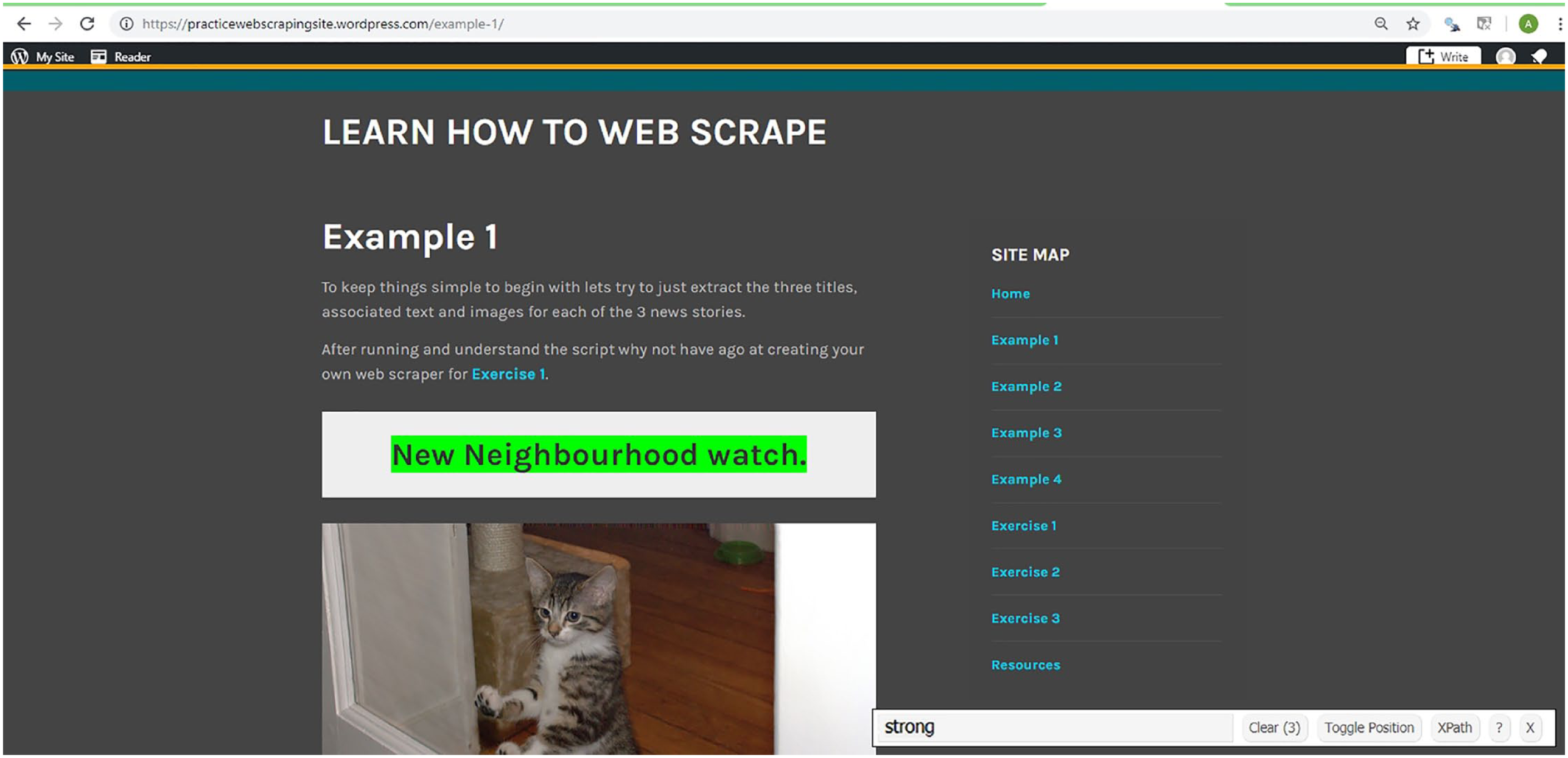
Screenshot illustrating the use of SelectorGadget to extract the titles on the web page in Example 1 (only the first title is shown here). SelectorGadget has identified “strong” as their address, and this address can then be used to extract the titles.
Step 2 involves the pipe operator (
Storing information collected while web scraping
There are several ways to store extracted information. The best approach will depend on the type and amount of data you are extracting. For simplicity, in this Tutorial, we describe how to store information in vectors. This process changes depending on whether you are scraping a single page or multiple pages.
We begin by explaining how to store the information from a single page. To store the information extracted by the Example 1 code just presented, assign (
A video demonstration of how to extract and store information from a single page is available at our website (see “Example 1: Scraping a Single Webpage”).
Storing information when scraping over multiple pages is a little more complicated because as one moves over each web page, extracting information and storing it to a vector, the information captured from the previous page will be overwritten. To avoid this problem, use the following three-step process: First initialize an empty vector. Second, extract the information from a web page using the
As the web scraper goes over each new page, the information in the Heading vector will be overwritten with new information and added to all the previously extracted titles stored in the Title vector. Our website has a video demonstration of this technique (see “Example 2: Scraping Multiple Web Pages”).
Scraping across multiple pages
There are a variety of methods for scraping across a website, and often the way the website is designed will determine the approach to use. To keep things simple, we outline two common approaches used by web scrapers to move across webpages: following links in a webpage to other pages and manipulating the Web address.
To follow links, you need to download a webpage containing links to all the other pages to be visited and then extract and store those links. The following code from Example 2 shows how to store the titles from multiple pages of a website using the links stored on a web page:
The
To scrape webpages by manipulating URLs, you need to identify a part of the URLs that systematically changes over the web pages. You then need to artificially manipulate the URL in your code to move over the different pages. Example 4 illustrates this process for a case in which the URL changes by the page number specified (i.e., https://practicewebscrapingsite.wordpress.com/example-4-page-0/, https://practicewebscrapingsite.wordpress.com/example-4-page-1/). This example requires that you generate a sequence of numbers to represent the different page numbers. Use the
Next, use a
The
Good Practices and the Ethics of Web Scraping
Before scraping a website, it is a good idea to check if it offers an application program interface (API) that allows users to quickly collect data directly from the database behind the website. If it does offer an API that contains the information you need, it would be easier to use the API. Also, although the methods presented here should help you scrape many websites, some sites may display information in unusual formats that make them more difficult to scrape. It is worth checking whether you can download and extract information from a single page before building a complete web scraper for a website.
When web scraping, it is a good idea to insert pauses between downloading web pages, as this helps spread out the traffic to the website. Web scrapers may be banned from a website if they put undue stress on it. In Example 4, we used the
Summary
In this Tutorial, we have introduced readers to what web scraping is and why it is a useful data-collection tool for psychologists. We have provided a basic explanation of the R environment and how to download and install R packages. Readers should feel confident in their ability to conduct the four key steps of web scraping: downloading web pages, extracting information from downloaded pages, storing that extracted information, and using Web links or manipulating URLs to navigate across multiple web pages. We strongly recommend that readers work through the examples and exercises provided on the accompanying website to further build their knowledge of web scraping and gain more experience with this method.
Supplemental Material
Bradley_AMPPSOpenPracticesDisclosure-v1-0 – Supplemental material for Web Scraping Using R
Supplemental material, Bradley_AMPPSOpenPracticesDisclosure-v1-0 for Web Scraping Using R by Alex Bradley and Richard J. E. James in Advances in Methods and Practices in Psychological Science
Footnotes
Action Editor
Alex O. Holcombe served as action editor for this article.
Author Contributions
A. Bradley is the guarantor. A. Bradley created the website and videos. Both authors drafted the manuscript, provided feedback to each other, and approved the final version of the manuscript.
Declaration of Conflicting Interests
The author(s) declared that there were no conflicts of interest with respect to the authorship or the publication of this article.
Open Practices
Open Data: not applicable
Preregistration: not applicable
All materials have been made publicly available via the Open Science Framework and can be accessed at https://osf.io/6ymqg/. The complete Open Practices Disclosure for this ar-ticle can be found at http://journals.sagepub.com/doi/suppl/10.1177/2515245919859535. This article has received the badge for Open Materials. More information about the Open Practices badges can be found at  .
.
References
Supplementary Material
Please find the following supplemental material available below.
For Open Access articles published under a Creative Commons License, all supplemental material carries the same license as the article it is associated with.
For non-Open Access articles published, all supplemental material carries a non-exclusive license, and permission requests for re-use of supplemental material or any part of supplemental material shall be sent directly to the copyright owner as specified in the copyright notice associated with the article.
