




Abstract
Objective
This study aimed to design, develop, assess and refine the EMPOWER-SUSTAIN Self-Management Mobile App© among primary care physicians (PCP) and patients with metabolic syndrome (MetS) in primary care.
Methodology
Using the software-development-life-cycle (SDLC) iterative model, storyboard and wireframe were drafted; and a mock prototype was designed to illustrate the content and function graphically. Subsequently, a working prototype was developed. Qualitative studies using the ‘think-aloud’ and cognitive-task-analysis methods were conducted for the utility and usability testing. Topic guide was based on the 10-Nielsen's-Heuristic-Principles. Utility testing was conducted among PCP in which they ‘thought-aloud’ while performing tasks using the mobile app. Usability testing was conducted among MetS patients after they were given the app for 3 weeks. They ‘thought-aloud’ while performing tasks using the app. Interviews were audio- and video-recorded, and transcribed verbatim. Thematic content analysis was performed.
Result
Seven PCP and nine patients participated in the utility and usability testing, respectively. Six themes (efficiency of use, user control and freedom, appearance and aesthetic features, clinical content, error prevention, and help and documentation) emerged. PCP found the mobile app attractive and relevant sections were easy to find. They suggested adding ‘zoom/swipe’ functions and some parts needed bigger fonts. Patients commented that the app was user-friendly, has nice interface, and straightforward language. It helped them understand their health better. Based on these findings, the mobile app was refined.
Conclusion
This app was produced using a robust SDLC method to increase users’ satisfaction and sustainability of its use. It could potentially improve self-management behaviour among MetS patients in primary care.
Keywords
Introduction
Background
Metabolic syndrome (MetS) is defined as the co-existence of several cardiovascular (CV) risk factors comprising of hypertension, type 2 diabetes mellitus (T2DM) or impaired fasting glucose, dyslipidaemia and obesity in an individual.1–3 MetS has become a global health epidemic among the Asian populations.4–6 Individuals with MetS have a higher risk of cardiovascular disease (CVD)7–9 in which they were found to have a five-fold increased risk of T2DM 10 and twice the odds of having a heart attack or stroke. 7 A meta-analysis of 21 studies showed that individuals with MetS had an increased all-cause mortality (RR: 1.35, 95%CI: 1.17–1.59). 11 A systematic review and meta-analysis of 87 studies showed that MetS was associated with increased risk of CVD mortality (RR: 2.40, 95%CI: 1.87–3.08). 12
In Malaysia, the prevalence of MetS was 42.5% among adults aged ≥30 years old. 13 With regards to the clustering of CVD risk factors among Malaysian adults aged ≥18 years old, approximately 1.7 million people have three major risk factors, while 3.4 million people have two major risk factors. 14 The escalating prevalence of MetS and its associated CV risk factors has resulted in an increased CVD morbidity and deaths among the Malaysian population. 15 CVD has emerged as the leading cause of death in Malaysia over the past three decades 16 and 18% of the CVD mortality were premature, occurring in the age group of 41 to 59 years old. 17
Majority of individuals with MetS and the associated CV risk factors are managed in primary care in Malaysia. 18 In primary care, the cornerstone of CVD prevention and risk factors management is based on interventions to motivate lifestyle modification, sustain self-management behaviours and improve adherence to pharmacotherapy.19,20 Strategies to reach people with scalable and innovative ways to promote physical activity, eating healthy diet, smoking cessation and medication adherence could address social, practical and financial challenges in delivering comprehensive CV risk factors management in diverse population. 21 Without sustainable intervention to manage CV risk factors in the Malaysian primary care setting, this phenomenon would translate into a higher number of individuals with CVD in the future, an increase in the utilisation of health care services, an escalation in health care costs, an increase in premature deaths, a reduction in productivity, and an increase in economic burden.14,22–24 Clinical practice guidelines (CPG) emphasise that self-management programmes be included in the management of MetS and its associated CV risk factors, and such programmes have been linked to better health outcomes.19,20
To date, self-management tools for changing behaviour among patients with MetS in the Malaysian primary care setting is still paper-based, for example, self-management booklet. 25 Of note is the EMPOWER-PAR project, where the EMPOWER-PAR Global Cardiovascular Risks Self-Management Booklet© was designed and developed as part of a multifaceted intervention programme based on the Chronic Care Model (CCM). 25 The effectiveness of the EMPOWER-PAR intervention in improving glycaemic control for T2DM patients in primary care has already been proven. 26 The EMPOWER-PAR intervention has also been proven to improve adherence to CPG among primary care providers. 27 Recently, the EMPOWER-PAR Global Cardiovascular Risks Self-Management Booklet© has been revised into the EMPOWER-SUSTAIN Global Cardiovascular Risks Self-Management Booklet©.28,29 The treatment targets were updated in accordance to the Malaysian CPG on Primary and Secondary Prevention of Cardiovascular Disease 2017. 30 Additional content such as weight management, advice on diet and exercise as well as advice on smoking cessation were also included in the booklet.
Exponential use of mobile phones in middle-income countries such as Malaysia unlocks the potential to transform paper-based self-management booklet into an application (app) using mobile health (m-health) technology. 31 Paper-based self-management booklets are less appealing to the younger generations as they prefer to browse the World Wide Web and social media as the primary source of health information.32–34 The use of m-health devices to support lifestyle interventions for patients is gaining popularity in the healthcare sector.35,36 Recent development in screen responsive mobile technologies could aid in developing web-based m-health intervention, which is adaptive, low-cost, readily available and sustainable.37–42 An m-health app can educate patients through interactive visual information, as well as monitor and manage health conditions through in-built diaries, gamification and automatic reminders. 21
Various web-based and mobile phone-based self-management apps for cardiovascular care have been developed over the past decades to meet the growing demands of the younger generations.43–50 However, most of the self-management systems available in the market were developed in the Western and higher income Asian countries, such as Japan and South Korea.51–54 Therefore, these systems might not suit the needs of the local population in Malaysia due to differences in language, culture and health behaviour. 55 Furthermore, there is a need to design and develop a mobile app that empowers and engages patients in managing their health at home. To our knowledge to this date, there is no self-management mobile app with these functions which is available to cater the needs of the Malaysian population especially for individuals with MetS. 56
Objectives
Therefore, the objectives of this study were to design, develop, assess and refine the EMPOWER-SUSTAIN Self-Management Mobile App© among primary care physicians (PCP) and patients with MetS in primary care.
Methods
To achieve the objectives, this study was conducted in three phases. Phase 1 was to design and develop the EMPOWER-SUSTAIN Self-Management Mobile App©. Phase 2 was the utility testing among PCP and usability testing among patients with MetS. Phase 3 was the refinement of the mobile app. The study was conducted from January 2019 to December 2021. Figure 1 summarises the methodology of this study.

Methodology of the EMPOWER-SUSTAIN study.
Phase 1: design and development of the EMPOWER-SUSTAIN Self-Management Mobile App
©
Study design
The iterative model of the software development life cycle (SDLC) was used to design and develop the EMPOWER-SUSTAIN Self-Management Mobile App. 57
Identifying the content and designing the storyboard
A group of PCP with expertise in MetS and CV risk factors management evaluated the content of the newly revised EMPOWER-SUSTAIN Global Cardiovascular Risks Self-Management Booklet© for its suitability to be included in the EMPOWER-SUSTAIN Self-Management Mobile App©. Discussions were made with the software programmer on whether the content was suitable to be digitised using the concept of Database Normalisation to achieve the Atomicity, Consistency, Isolation and Durability (ACID) properties. 58 Following a thorough deliberation, sections of the booklet were identified and arranged into eight sections in the EMPOWER-SUSTAIN Self-Management Mobile App©. The eight sections include: My Profile, My Cardiovascular Risks, My Treatment Targets, My Check-Up, My Weight Management, My Smoking Habit, My Self-Management and My Medication.
A storyboard was designed to visualise the storyline of the EMPOWER-SUSTAIN Self-Management Mobile App© usage prior to the development of the app.59,60 Figure 2 shows the storyboard that was designed to create the flow of the app usage by PCP and patients with MetS during follow-up clinic and at home. The underpinning conceptual framework used to depict the storyline was based on the CCM.28,61,62 This storyboard also includes complementary usage of the EMPOWER-SUSTAIN Self-Management Desktop App© whereby the information entered by healthcare providers into the desktop app will sync with the mobile app. However, the design, development and testing of the complementary desktop app is beyond the scope of this paper and will be published elsewhere.

Storyboard for the EMPOWER-SUSTAIN Self-Management Mobile App©.
Description of content and function of the EMPOWER-SUSTAIN Self-Management Mobile App©
The EMPOWER-SUSTAIN Self-Management Mobile App© is divided into eight sections as shown in Figure 3.
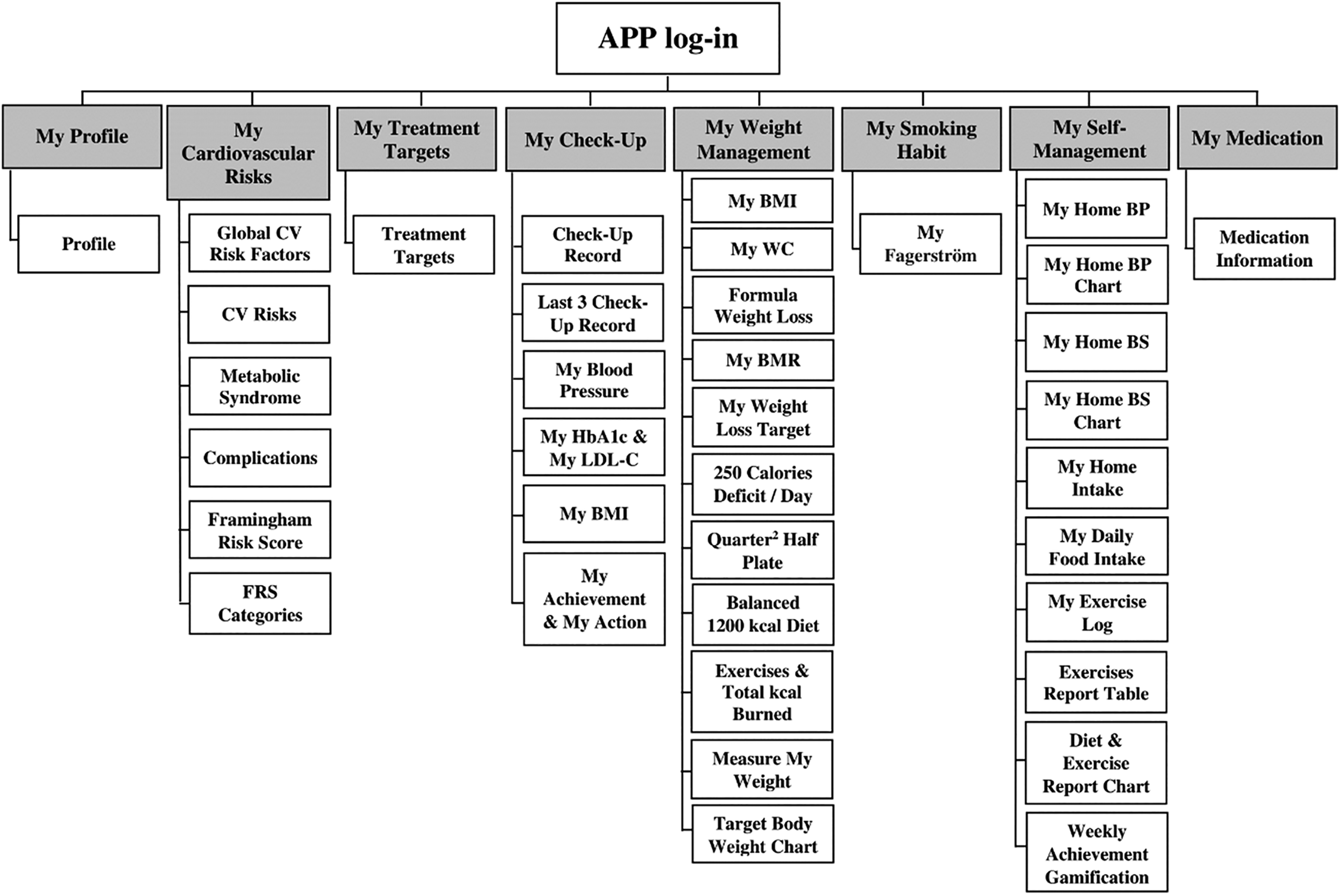
Sections and subsections of the EMPOWER-SUSTAIN Self-Management Mobile App©.
Table 1 shows the description of the content and function of the EMPOWER-SUSTAIN Self-Management Mobile App©.
Description of the content and function of the EMPOWER-SUSTAIN Self-Management Mobile App©

Designing the mock prototype
In the pre-alpha stage, wireframe was designed to describe and visualise the user interface in static draft layouts of the content, structure, function and flow of information.65,66 The wireframe was developed in two stages. The first stage involved hand-sketching the draft layout of the EMPOWER-SUSTAIN Self-Management Mobile App© which contains eight sections, that is, My Profile, My Cardiovascular Risks, My Treatment Targets, My Check-Up, My Weight Management, My Smoking Habit, My Self-Management and My Medication. The second stage involved converting the sketch into a static graphic design of the wireframe by the graphic designer, which illustrated the user interface and the flow of the user interaction for the mobile app.
Based on the wireframe, the mock prototype, which is a high-fidelity detailed static graphic diagrammes demonstrating the content and functions of the EMPOWER-SUSTAIN Self-Management Mobile App© was developed. The mock prototype is portrayed as a finished prototype; however, it is not clickable and hence, not interactive.
Development of the working prototype
Based on the mock prototype, the working prototype of the EMPOWER-SUSTAIN Self-Management Mobile App© was developed by the software programmer using the Ionic 4.0 with TypeScript, Hypertext Markup Language (HTML5), JavaScript, and Cascading Style Sheet (CSS) as coding languages. Angular Java Script (AngularJS) 7.0 was deployed in TypeScript for the mobile app specific modules. The HTML5, JavaScript and CSS were deployed for the layout as well as for the data and event handling that required these languages. In terms of the layout design, assets of images were created for user interface using Adobe Illustrator. Coding, editing, and debugging were conducted using Visual Studio Code Integrated Development Environment (IDE). XAMPP's Apache Web Server was used as the server of choice together with the My Structured Query Language (MySQL) database being used as the system for managing relational databases. JavaScript Object Notation (JSON) format was utilised to transfer the data from one module to another as this format is compatible throughout various platforms including TypeScript, HTML5, CSS and AngularJS. The EMPOWER-SUSTAIN Self-Management Mobile App© is a hybrid app, which is essentially a web-based app that has a native app shell. Users need to download the app from a link provided by the app developer and install it locally in the mobile phone. The shell then connects to the mobile platform through a browser that is embedded in the app. This app is screen-responsive to cater towards various types and sizes of Android mobile phones. The application programming interface (API) is also sensor ready for future integration with sensor-based technology.
Reward gamification system using persuasive technology theory
Reward gamification system was incorporated into two sections of the EMPOWER-SUSTAIN Self-Management Mobile App©, that is, My Check-Up and My Self-Management. This is based on the persuasive technology theory 67 to achieve desirable change by reinforcing behaviour and attitude of health and wellness. 68 This theory is able to affect users’ emotions and build trust in the technology so that they will integrate technology into their daily lives and continue to use it for a long period. 69
Using the My Check-Up section, patient is able to refer to their anthropometric and investigation results at home. If the patient achieves treatment targets for BP, HbA1c, LDL-c and BMI, he/she is rewarded with a virtual star for each target achieved. This reward gamification system would be able to empower and motivate the patient to achieve his/her treatment targets in line with the persuasive technology theory. 70
Using the My Self-Management section, patient is able to record and monitor his/her BP, blood sugar, daily food intake and exercise at home. These readings are then generated into weekly bar charts of daily calorie intake and physical activity level. If the patient achieves calorie deficit of 250 calorie content per day, he/she is rewarded with a virtual trophy. This reward gamification system should be able to empower the patient to self-manage their conditions in line with the persuasive technology theory. 71
Final unrefined version of the working prototype
Based on the iterative model of the SDLC, four versions of the working prototype were produced before the utility and usability testing.
Phase 2: utility and usability testing of the EMPOWER-SUSTAIN Self-Management Mobile App©
Phase 2 of this study involved the utility and usability testing of the mobile app. Utility testing, which is known as the alpha testing, is the first step to software testing. The primary purpose of alpha testing in software and intervention resource development is to obtain direct input from a team of highly skilled experts regarding the design, content, and functionality at the development site.72,73 Usability testing which is also known as the beta testing, is carried out once the app features are complete. It is conducted in real time environment by customers or end users at their own site. Usability testing checks usability or acceptability of the apps while evaluating real-life performance with multiple users.72,73
Study design
A qualitative methodology using the ‘think-aloud’ 74 and cognitive task analysis 75 methods were used for the utility and usability testing of the EMPOWER-SUSTAIN Self-Management Mobile App© to obtain an in-depth understanding of end users’ experiences when using the mobile app.
Alpha testing: utility testing by medical experts review
Study setting and population
This study involved PCP who had been practising at a university primary care clinic for 1 year or more. PCP is defined as medical doctors with specialist qualification in primary care or medical officers who were undergoing specialist training in primary care.
Primary care physicians recruitment
All PCP who were eligible to participate in the study were invited and given the study information sheet. Written informed consent was obtained from the PCP who agreed to participate in the study.
Data collection and conduct of the study
In-depth interviews were conducted to assess the utility of the EMPOWER-SUSTAIN Self-Management Mobile App©. Prior to the interviews, PCP were given 30 minutes to familiarise themselves with the mobile app. Verbal instructions regarding the conduct of the study were delivered to the PCP. They were also given the task scenarios (Appendix 1) and user manual for the mobile app (Appendix 2). PCP were requested to practise using the mobile app with the task scenarios before the interview session took place. During the interview, five utility domains of the mobile app (learnability, efficiency, memorability, errors and satisfaction) were explored among the PCP using the topic guide (Appendix 3). PCP were prompted with questions from the topic guide followed by prompts using the task scenarios. There were seven tasks regarding the mobile app which include consulting patients using FRS in the My Cardiovascular Risks section, investigation results in the My Check-Up section and basal metabolic rate (BMR) in the My Weight Management section. The tasks also include PCP entering home blood pressure and home blood glucose readings into the My Self-Management section. PCP were requested to ‘concurrently think-aloud’ while performing the tasks on the mobile app. The interviews were audio and video recorded using a camcorder. PCP were also observed during the interview by direct observation and using a document camera to capture user actions on the mobile phone screen in response to the prompted tasks. Their performance, behaviours and non-verbal body language were documented as field notes. 76
Sample size determination
Sample size for the utility testing was determined by the concept of saturation and this occurs when the accumulation of fresh data could no longer yield new theoretical insight into the phenomenon being examined. 77 Data saturation is usually determined when at least three further individuals being interviewed offered opinions which had already been expressed by previous participants. 78
In this study, the interview data set retrieved from PCP 5, PCP 6 and PCP 7 yielded similar responses with the previous four PCP, that is, PCP 1, PCP 2, PCP 3 and PCP 4. The additional data yielded did not change the perspective of the data but supported the existing findings from the previous four PCP. Therefore, the point of saturation was reached at the 7th interview of the PCP for utility testing of the EMPOWER-SUSTAIN Self-Management Mobile App©.
Data analysis
Data were generated using the audio and video recordings of the in-depth interview sessions. Qualitative data were analysed using thematic content analysis by MHD, SAR and ASR. The recordings of each interview were transcribed verbatim (word for word) according to a standardised format 79 by MHD. The transcripts were read repeatedly and thoroughly in order for the researchers to be familiar with the data. Then, any relevant and meaningful words, phrases, sentences, or sections were labelled and coded. The accuracy of the transcripts was checked thoroughly with the original recordings and the transcriptions were revised and any unclear points were clarified with the PCP. Subsequently, categories were created by grouping together important codes.79,80 Themes were developed when several categories were merged together. A theme ‘represents some level of structured response or meaning within the data set’ and ‘captures something noteworthy about the data in relation to the research question’. 81 The thematic content analysis was done and reviewed independently by the researchers (MHD, SAR and ASR). Consensus on the coding framework was achieved through comparison, discussion, and agreement among the researchers. 79 This process was repeated several times until saturation point was reached when no new insights, codes, categories or themes were produced. In this study, the point of saturation was reached at the 7th interview. NVivo software (version 12) was used to assist with data management. Field notes were incorporated into the analysis as additional data or to address missing data.82,83 The flowchart of conduct of the utility testing is shown in Figure 4.

Flowchart of conduct of the utility testing.
Beta testing: usability testing by patients with MetS
Study setting and population
This study was conducted among patients with MetS who attended a university primary care clinic in Selangor, Malaysia.
Inclusion and exclusion criteria
This study included patients aged 18 to 70 years who fulfilled the following criteria:
diagnosed with MetS according to the Joint Interim Statement definition
1
with the presence of at least three out of five of the following risk factors:
waist circumference (WC): Male ≥90 cm, Female ≥80 cm (South Asian cut-points) blood pressure (BP): Systolic BP ≥130 and/or diastolic BP ≥85 mmHg or on treatment for hypertension fasting blood glucose (FBG): ≥5.6 mmol/L or on treatment for elevated glucose triglyceride (TG): ≥1.7 mmol/L or on treatment for TG high density level cholesterol (HDL-c): Male <1.0 mmol/L, Female <1.3 mmol/L; or on cholesterol-lowering treatment received follow-up care at the university primary care clinic for at least 1 year were using smart mobile phones with Android operating system were using the EMPOWER-PAR or EMPOWER-SUSTAIN Global Cardiovascular Risk Self-Management Booklet© did not have basic skills to use smart mobile phone did not have access to the internet were unable to read or understand Malay or English language were iPhone Operating System (iOS) mobile phone users
This study excluded patients who:
Sampling method
This study used purposive sampling method based on the patients’ educational level, occupation, experience of using a smart phone and experience of using the EMPOWER-PAR or EMPOWER-SUSTAIN Global Cardiovascular Risk Self-Management Booklet©, as this sampling method offers rich-textured and relevant data. 84
Patient recruitment
Patients who came to the clinic for their follow-up appointments were approached and invited to participate in the nurse's assessment room. They were given the study information sheet. Those who verbally agreed to participate were then screened for eligibility according to the inclusion and exclusion criteria. Patients who were eligible and agreed to participate were recruited. Written informed consent was obtained. Patients were requested to fill in the data collection form for their demographic characteristics. The mobile app was then downloaded into the patients’ mobile phone, and they were requested to use the app for three weeks at home before the usability testing was carried out. The user manual for the mobile app was also given to help patients navigate the mobile app at home. The flowchart of conduct of the usability testing is shown in Figure 5. Out of 36 patients who were invited, 10 declined to participate, citing reasons which include their inability to commit in using the mobile app at home for at least three weeks. They also declined to participate because they need to return to the clinic for the in-depth interview for the usability testing. Therefore, it reflects a logistic reason regarding the conduct of the study, rather than acceptability of use for the mobile app.

Flowchart of conduct of the usability testing.
Data collection and conduct of the study
Patients were given an appointment to be interviewed at the university primary care clinic after they have used the app for three weeks. The 3-week period of exposure to the app was chosen as it was deemed to be sufficient for a usability study. 85 Prior to the interview, verbal instructions regarding the conduct of the study were delivered to the patients. They were also given the task scenarios (Appendix 4) and user manual for the mobile app (Appendix 2). Patients were given 15 minutes to practice using the mobile app with the task scenarios before the interview session took place. During the interview, five usability domains of the mobile app (learnability, efficiency, memorability, errors, and satisfaction) were explored among the patients using the topic guide (Appendix 5). Patients were prompted with questions from the topic guide followed by prompts using the task scenarios. There were 12 tasks regarding the mobile app which include entering CV risks, MetS components, CV complications and FRS in the My Cardiovascular Risks section, BMR, weight loss target and weight value in the My Weight Management section, home blood pressure reading and home blood glucose reading, daily physical activity level and calorie intake in the My Self-Management section. Patients were requested to ‘concurrently think-aloud’ while performing the tasks on the mobile app. The interviews were audio and video recorded using a camcorder. Patients were also observed during the interview using direct observation and a document camera to capture user actions on the mobile phone screen in response to the prompted tasks. Field notes were used to document their performance, behaviours and non-verbal body language.
Sample size determination
Sample size for the usability testing was also determined by the concept of saturation. In this study, the interview data set retrieved from P7, P8 and P9 offered opinions which had already been expressed by the previous six participants, that is, P1, P2, P3, P4, P5 and P6. Therefore, the point of saturation was reached at the 9th interview of patients with MetS for the usability testing of the EMPOWER-SUSTAIN Self-Management Mobile App©.
Data analysis
Data analysis for the usability testing was conducted in the same manner as the utility testing.
Phase 3: refinements of the EMPOWER-SUSTAIN Self-Management Mobile App©
Based on the data from the utility and usability testing, continuous refinements were made to the EMPOWER-SUSTAIN Self-Management Mobile App© via iterative model of the SDLC. Most of the comments made by the PCP and patients were used to refine the app, in order to improve the quality of its content and functionality. At the end of this phase, the refined EMPOWER-SUSTAIN Self-Management Mobile App© was produced.
Results
Overall, seven PCP participated in the utility testing. There were one male (14.3%) and six females (85.7%). The mean (SD) age of the participants was 35.1 (±2.0) years old. Table 2 shows the demographic characteristics of the PCP.
Demographic characteristics of the PCP involved in the utility testing of the EMPOWER-SUSTAIN Self-Management Mobile App©.

Findings of the qualitative study
Thematic content analysis of the utility testing of the mobile app among the PCP captured six themes which include ‘appearance and aesthetic features’, ‘clinical content’, ‘efficiency of use’, ‘error prevention’, ‘help and documentation’ and ‘user control and freedom’. Table 3 summarises the themes and categories for the utility testing.
Themes and categories for utility testing of the EMPOWER-SUSTAIN Self-Management Mobile App© by PCP.

Appearance and aesthetic features
Four categories emerged under the theme of ‘Appearance and Aesthetic Features’ as shown in Table 3. Six PCP commented that the mobile app has attractive colours. However, all of them suggested that bigger font was required for the mobile app to improve its readability especially for the elderly patients. They also suggested replacing the dots with numbers or symbols at the top of each page as they did not understand the function of the dots. The dots represent the number of pages in each section of the app. Participants also suggested relocating the reference values and changing the colours of the My Home Blood Sugar graph in the My Self-Management section to avoid confusion. Some of the excerpts by the PCP are shown below:
Clinical content
Five categories emerged under the theme of ‘Clinical Content’ as shown in Table 3. All PCP commented that the content of the app were relevant to clinical practice and the information in the app followed the flow of a clinical consultation. In the My Cardiovascular Risks section, all PCP found the FRS calculator useful to help them explain CV risks to patients. In the My Weight Management section, all PCP commented that the BMR calculator was useful to assist them in setting the weight loss goal for patients. However, six PCP commented that the list of the actual BP and blood sugar readings entered by the patients at home was not available in the My Self-Management section. The readings were generated into graphs while the actual readings were not displayed in the app. Some of the excerpts by the PCP are shown below:
Efficiency of use
Nine categories emerged under the theme of ‘Efficiency of Use’ as shown in Table 3. All PCP commented that the mobile app was useful for patients, easy to use and straightforward and has consistent information. All of the PCP also commented that it was easy to find relevant sections in the mobile app. The FRS and BMR calculators helped to speed up consultation. Six PCP commented that the language in the mobile app was easy to understand. However, six PCP commented that swipe function was not available and the ‘Next’ and ‘Previous’ buttons were not user friendly. They also suggested retaining the ‘Home’ button only on each page of the mobile app as it looked crowded with having four other short-cut buttons to go to the other sections. Six PCP suggested adding ‘time taken’ for home BP and home blood sugar in the My Self-Management section. Some of the excerpts by the PCP are shown below:
Error prevention
One category emerged under the theme of ‘Error Prevention’ as shown in Table 3. All PCP commented that there was no error message provided in the My Self-Management section of the mobile app. One of the excerpts by the PCP is shown below: Eh…no error message here (pointed to the My-Self-Management section) … yea … so far, I did not see any message popping-up… yes… when wrong values are entered [34 years old/female/PCP 7]
Help and documentation
One category emerged under the theme of ‘Help and Documentation’ as shown in Table 3. This theme describes that having user manual is helpful in which all PCP commented that the user manual (Appendix 2) was useful in helping them to navigate the mobile app. One of the excerpts by the PCP is shown below: Yes (nodding) … I think this manual is good and useful to help me navigate the mobile app (pointed at the user manual of the mobile app) [35 years old/female/PCP 2]
User control and freedom
Three categories emerged under the theme of ‘User Control and Freedom’ as shown in Table 3. This theme describes how user friendly is the app in order to help our users navigate the app better. For example, all PCP commented that the app did not have a zoom function for them to use. There were also unable to edit or delete data in ‘My Self-Management’ section. They also suggested adding swipe function in all sections of the mobile app. Some of the excerpts by the PCP are shown below:
Usability testing (Beta) of the EMPOWER-SUSTAIN Self-Management Mobile App©
Overall, nine patients with MetS participated in the usability testing of the mobile app. There were four males (44.4%) and five females (55.6%). The mean (SD) age of the participants was 61.1 (±6.1) years old. Majority (77.8%) of the patients has tertiary education level. Table 4 shows demographic characteristics of the participants.
Demographic characteristics of patients with MetS involved in the usability testing of the EMPOWER-SUSTAIN Self-Management Mobile App©.

Findings of the qualitative study
Thematic content analysis of the usability testing of the mobile app among patients with MetS also captured six themes which include ‘appearance and aesthetic features’, ‘clinical content’, ‘efficiency of use’, ‘error prevention’, ‘help and documentation’ and ‘user control and freedom’. The themes and categories are summarised in Table 5.
Themes and categories for usability testing of the EMPOWER-SUSTAIN Self-Management Mobile App© among patients with MetS.

Appearance and aesthetic features
Five categories emerged under the theme of ‘Appearance and Aesthetic Features’ as shown in Table 5. Seven patients commented that the mobile app has nice and simple interface. All patients commented that bigger font was required for the mobile app. Eight patients suggested a different colour for each FRS classification and also for the waist circumference reference values. Seven patients suggested changing the colours of the bar charts in the My Self-Management section to brighter colours. Some of the excerpts by the patients are shown below:
Clinical content
Three categories emerged under the theme of ‘Clinical Content’ as shown in Table 5. Seven patients commented that they had difficulty understanding the FRS classification in the My Cardiovascular Risks section. Eight patients commented that treatment targets were useful as reference. They suggested adding a list of common Malaysian food with calorie content as reference in the My Self-Management section to help them enter their calorie intake in the app. Some of the excerpts by the patients are shown below:
Efficiency of use
Six categories emerged under the theme of ‘Efficiency of Use’ as shown in Table 5. Seven patients commented that the mobile app has straightforward language and eight patients commented that the instruction was clear and simple. All patients commented that the mobile app was user friendly, easy to access, easy to find relevant section and able to help them to have better understanding regarding their own health. Some of the excerpts by the patients are shown below:
Error prevention
One category emerged under the theme of ‘Error Prevention’ as shown in Table 5. All patients commented that there was no error message provided in the My Self-Management section of the mobile app. One of the excerpts by the patient is shown below: No error message… or reminder was provided in this app … to show something is wrong … or if any value I entered is wrong [62 years old/female/retired IT programmer/diploma/good experience in using smartphone/P4]
Help and documentation
One category emerged under the theme of ‘Help and Documentation’ as shown in Table 5. All patients commented that the user manual (Appendix 2) was useful in helping them to navigate the mobile app. One of the excerpts by the patient is shown below: Yes… this manual is helpful … last time, I don’t know how to use the mobile app … got stuck while using it at home … so I just referred to this manual … I can understand (pointed at the user manual of the mobile app) [63 years old/female/retired teacher/diploma/moderate experience in using smartphone/P5]
User control and freedom
Five categories emerged under the theme of ‘User Control and Freedom’ as shown in Table 5. All patients commented that they have difficulty understanding the graphs due to the absence of legend in the My Self-Management section. All of them were unable to delete or edit data in the My Self-Management section and unable to zoom for information in the mobile app. They also commented that the four buttons at the bottom of the page interfere with ticking and entering values. All patients suggested adding swipe function to all sections of the mobile app. Some of the excerpts by the patients are shown below:
a)
How to edit this BP reading (participant was confused) … 138 … 78 (entered values to the My Home Blood Pressure subsection of the My-Self-Management section) … Oh! there are double entries (pointed at the My Home Blood Pressure graphs in the My-Self-Management section) … meaning it does not delete the first value … it just adds on [67 years old/female/retired principal/diploma/moderate experience in using smartphone/P1] b) c) d)
The refined version of the EMPOWER-SUSTAIN Self-Management Mobile App©
Based on the feedback from the PCP and patients, four versions of the mobile app were produced throughout the refinement process. Each version was tested among the PCP and patients to ensure that the final refined version was of high quality and free from functional defects. Herein we present the changes made in each section of the final refined version of the mobile app. The theme which corresponds to the changes made in each section is mentioned in the text.
The login and homepage
The background colour of the Login page was changed from pink to purple and the size of the font of the Homepage was increased to improve the ‘Aesthetic Features and Appearance’, as shown in Figure 6(a).

(a) Refined version of the Login and Homepage. (b) Refined version of My Profile. (c) Refined version of My Cardiovascular Risks. (d) Refined version of My Treatment Targets. (e) Refined version of My Check-Up. (f) Refined version of My Weight Management. (g) Refined version of My Smoking Habit. (h) Refined Version of My Self-Management. (i) Refined Version of My Medication.
My profile
In this section, a function to upload a profile picture was added to improve the ‘Aesthetic Features and Appearance’. The ‘Home’ button was retained to improve the ‘Efficiency of Use’. This is shown in Figure 6(b).
My cardiovascular risks
Several changes were made in this section as shown in Figure 6(c). The size of the font was increased and the colour for ‘High Risk’ category was changed to light orange in the FRS classification page to improve the ‘Aesthetic Features and Appearance’. The ‘Home’ button was retained to improve the ‘Efficiency of Use’. The zoom and swipe functions were added to improve ‘User Control and Freedom’.
My treatment targets
Similar changes were made in this section as shown in Figure 6(d). The size of the font was increased to improve the ‘Aesthetic Features and Appearance’ while the ‘Home’ button was retained to improve the ‘Efficiency of Use’. The zoom and swipe functions were added to improve ‘User Control and Freedom’.
My check up
Several changes were made in this section as shown in Figure 6(e). The font size was increased to improve the ‘Aesthetic Features and Appearance’. Apart from the ‘Home’ button being retained, a reward gamification system was added to help patients understand their own health better and improved the ‘Efficiency of Use’. On top of the addition of zoom and swipe functions in the app, legends for the graphs were also added in the user manual (Appendix 2) to improve ‘User Control and Freedom’. The black line represents patient's results and the red line represents treatment target values.
My weight management
Various changes were made in this section as shown in Figure 6(f). The colour of the reference values for waist circumference was changed from black to red and the size of the font was increased to improve the ‘Aesthetic Features and Appearance’. A list of actual readings of the body weight was added to improve the ‘Clinical Content’. An error message was added to improve ‘Error Prevention’. To improve ‘User Control and Freedom’, a legend for the graph was added in the user manual of the mobile app (Appendix 2), whereby the black line represents patient's results and the red line represents treatment target values. The zoom and swipe functions, and a ‘delete’ button were also added to improve ‘User Control and Freedom’.
My smoking habit
In this section, the font size was increased to improve the ‘Aesthetic Features and Appearance’ while the zoom and swipe functions were added to improve ‘User Control and Freedom’. This is shown in Figure 6(g).
My self-management
Several important changes were made in this section as shown in Figure 6(h).
Reference values for the My Home Blood Sugar graphs were relocated to the top of the page and the colours of the graphs were changed from black to blue for pre-prandial readings and red to green for post prandial readings to improve the ‘Aesthetic Features and Appearance’. Colours of the bar charts for the diet and exercise report were also changed to brighter colours to improve the ‘Aesthetic Features and Appearance’. A reward gamification system was added to help patients understand their own health better and improved the ‘Efficiency of Use’. To improve the ‘Clinical Content’, lists of actual readings of home BP, home blood sugar, daily food intake and physical activities were added. Patients were also given a link for the database of Malaysian food with calorie content 86 as a reference for the My Food Intake subsection. A space to enter the ‘time taken’ for BP and blood sugar was added in the My Home Blood Pressure and My Home Blood Sugar subsections to improve the ‘Efficiency of Use’. Several error messages were added to improve ‘Error Prevention’. A legend for My Home Blood Pressure graphs was added in the user manual of the mobile app (Appendix 2) to improve ‘User Control and Freedom’, whereby the black line represents patient's results and the red line represents treatment target values. Several ‘delete’ buttons were also added to improve ‘User Control and Freedom’.
My medication
In this section, the font size was increased to improve the ‘Aesthetic Features and Appearance’. The zoom and swipe function were also added to improve ‘User Control and Freedom’. This is shown in Figure 6(i).
Discussion
Principle findings and comparison with other apps
Novelty of the EMPOWER-SUSTAIN Self-Management Mobile App©
The novelty of the EMPOWER-SUSTAIN Self-Management Mobile App© lies in the comprehensiveness of its content and function which is intended for individuals with multiple CV risks, that is, MetS and its various components. The content of the EMPOWER-SUSTAIN Self-Management Mobile App© covers various domains which include knowledge and skill to empower and prepare patients to manage their own health to prevent CV complications such as heart attack and stroke. The mobile app contains educational materials regarding CV risks, MetS components, complications, FRS classification, treatment targets, the concept of BMR, formula to lose weight, example of balanced diet and exercise to perform. The mobile app also contains anthropometric measurements and investigation results which are generated into graphs with a line indicating the treatment targets. Using the My Self-Management section, patients are able to record and monitor their weight, BP, blood sugar, daily food intake and exercise at home. These readings are then generated into graphs and bar charts for easy interpretation to support the sustainability of its use and empower patients to improve their self-management behaviours.
In contrast, most of the self-management mobile apps described in the literature were developed for a single component of MetS e.g., T2DM or hypertension or dyslipidaemia or obesity.87–91 These disease-specific apps only cover specific element for example either diet92,93 or exercise.47,94 A comprehensive self-management mobile app for individuals with MetS should incorporate important elements such as CV risks, treatment targets, diet, exercise, managing medication intake and consultation with a doctor in order to improve self-management behaviours and promote a sustainable healthy lifestyle.
The content of the EMPOWER-SUSTAIN Self-Management Mobile App© are evidence-based as they were developed by healthcare professionals based on the CPG 30 to support practitioners and patients in making management decisions based on research evidence. 95 Studies have shown that mobile health apps which were based on CPG improved clinical outcomes and self-management among users.96,97 With regards to the function, the EMPOWER-SUSTAIN Self-Management Mobile App© should be used during consultation and long-term follow up with a doctor and the Self-Management section should be continuously used by patients at home. Utilisation of this app in clinical practice emphasises the pivotal concepts of building an effective doctor–patient relationship based on the CCM 98 and also the hallmark of primary care in providing comprehensive, continuous, coordinated, preventive, patient-centred and personalised care to the patients. 99
Robust development method
The four phases of SDLC (requirement, design, development and testing) were applied in the development and assessment process of the EMPOWER-SUSTAIN Self-Management Mobile App©. SDLC was used to develop the app because it is an established framework to improve software quality and the overall development process. 57 Studies have shown that iterative model of SDLC is one of the most popular models as it is intended to improve the quality and functionality of the prototype by building and improving the product step by step throughout the process.100–102 Using the iterative model, the EMPOWER-SUSTAIN Self-Management Mobile App© completed one cycle of the SDLC from identifying the requirement, designing the mock prototype, developing the working prototype, utility and usability testing and refining the final version.
In the requirement phase, the CCM and persuasive technology theory were identified as the conceptual frameworks to develop the mobile app. The content of the mobile app was retrieved from the newly revised EMPOWER-SUSTAIN Global Cardiovascular Risks Self-Management Booklet© which was comprehensively designed by healthcare professionals for individuals with MetS. In the design phase, the designer produced high fidelity mock prototype of the mobile app based on the storyboard and wireframe of the app. The app was designed using a modern contemporary theme, which is suitable for heavy informative app. The white-grey background was chosen to give a sense of space for users. The top and bottom layout was designed to emphasise space and information. The eight sections of the mobile app were designed in different colours so that users can differentiate each section.
In the development phase, a programmer developed the hybrid app using the Ionic 4.0 with TypeScript, HTML5, JavaScript, and CSS as coding languages. The ionic framework web-based app development platform was chosen as the cross-platform between mobile and desktop apps to allow sharing of codes. 103 JSON format was used to transfer the data from one module to another. This web-based app has a native app shell which connects to the mobile platform through a browser that is embedded in the app. This platform produced a screen-responsive mobile app and the API are sensor ready for future integration with sensor-based technology.
In the testing phase, the mobile app underwent utility and usability testing by PCP and patients with MetS using the ‘Think-Aloud’ and CTA methods in order to explore and obtain an in-depth insight as well as to uncover new thoughts, points of view and perceptions on the usefulness of the mobile app.104,105
As the software evolved through successive cycles, tests were repeated and extended to verify each software version.57,106 Hence, defects were tracked at early stages, which was crucial to avoid the downward flow of the defects in the development process of the app. The quality and functionality of the EMPOWER-SUSTAIN Self-Management Mobile App© was improved by building and improving the app step by step throughout the development process.102,107
Persuasive technology features
Reward gamification system is incorporated into the EMPOWER-SUSTAIN Self-Management Mobile App© in line with the persuasive technology theory. 28 The reward system is incorporated in the My Check-Up section and My Self-Management section of the mobile app. Patients are rewarded with virtual stars for each target achieved in the My Check-Up section (BP, HbA1c, LDL-c and BMI). Additionally, patients are rewarded with a virtual trophy if they achieve calorie deficit of 250 kcal per day in the My Self-Management section. Studies have shown that mobile health apps containing persuasive technology features were able to influence behaviour change.70,71 A weight management mobile app which contains motivational approach features such as the ability to upload an image (daily progress or a selfie) on Instagram, has been shown to induce changes in daily habit, specifically in exercising and adopting a healthier diet. 70 Another mobile health app for chronic disease management which incorporated behavioural trigger messages was proven to improve self-efficacy and health-related behaviours among patients with diabetes. 71
Refinement of EMPOWER-SUSTAIN Self-Management Mobile App©
Refinements were made to the EMPOWER-SUSTAIN Self-Management Mobile App© based on the data from the utility and usability testing. During the refinement process, four versions of the mobile app were produced to ensure that the final refined version was of high quality and free from functional defects. Based on the feedback from the PCP and patients, the ‘appearance and aesthetic features’, ‘clinical content’, ‘efficiency of use’, ‘error prevention’, ‘help and documentation’ and ‘user control and freedom’ were enhanced to produce the final version of the mobile app. Refinement of a mobile app based on users’ feedback is crucial to improve and upgrade its quality by modifying present features as well as addressing and repairing existing operational difficulties. 108 As a result, the refinement process improved users’ experiences and led to higher users’ satisfaction. 109
Strengths and limitations
The strengths of the EMPOWER-SUSTAIN Self-Management Mobile App© include its comprehensive and evidence-based content, robust development and evaluation methods, attractive interface and user-friendly function with reward gamification system. The underpinning conceptual frameworks used to develop the mobile app was the CCM and persuasive technology theory in order to maximise its utilisation 110 by rewarding them with positive feedback.111,112 A hybrid web-based technology was used as it has the flexibility to accommodate multiple platforms using an internet browser. 113 It was developed in dual languages, that is, Malay and English to suit the need of local Malaysian population. Compared to other m-health apps, 56 this mobile app encourages patient empowerment and participation to manage their health at home as well as with their doctors during consultation in line with the CCM.
The mobile app has several limitations. At present, it can only be accessed on mobile smart phones with Android operating system. Plans are in place to develop the app for iOS users. Entering data into the Self-Management section of the app can also be time consuming as users have to manually enter the readings for HBPM, SMBG and daily physical activities. They also have to manually enter the type of food and calories in the diet section of the mobile app. To improve sustainability of its use, enhancement of this section of the app with sensor-based technology and artificial intelligent features is currently being planned. Although the app is available in both Malay and English languages, all of the patients who participated in the usability testing were Malays. This is because, demographically, the majority of the patients who attended our university primary care clinic are Malays.
Implications for clinical practice and future research
The refined version of the mobile app is currently being utilised in the EMPOWER-SUSTAIN Clinic. Patients with MetS or any of its components (hypertension, T2DM, dyslipidemia, and/or obesity) are being invited to use the mobile app and attend the EMPOWER-SUSTAIN Clinic for long-term follow-up. The PCP then uses the mobile app to empower patients with knowledge and skills to manage their own health at home. The age of the PCP who participated in the utility testing ranged from 32 to 38 years old, which is a fairly young age group, compared to the general demographics of the PCP at the university primary care clinic which ranged from 30 to 55 years old. Younger PCP were more inclined to use digital health app in their day-to-day clinical practice compared to their older colleagues, and this finding is supported by a study which assessed the use of health apps in primary care among PCP in Germany. 114 Future research is needed to explore the factors and barriers of health app utilisation among PCP in Malaysia.
In the usability testing, the mean age of patients who participated was 61.1 years (ranged from 53 to 70 years old). However, this is in contrast with finding from other large studies which found that users of health app were usually younger.115,116 Our finding is encouraging given that MetS is highly prevalent in the older age group. This could be explained by the fact that the majority of the patients in our study received tertiary education. Other studies have shown that the main users of health apps were individuals who were more educated and had a higher income.115,116
This study has several implications for future research. A cross-sectional study to evaluate the factors associated with usability of the EMPOWER-SUSTAIN Self-Management Mobile App© among patients with MetS is currently being conducted in our clinic. Qualitative studies to explore the PCP's and patients’ experience, acceptability, opinion, barriers, and facilitators in using the apps will also be conducted to ensure sustainability of its use. Future research should also include a pilot randomised controlled trial (RCT) to evaluate the potential effectiveness of the intervention and provide valuable information on users’ engagement, acceptability, and preliminary effectiveness as to ensure that the intervention can be delivered as intended. A cluster RCT should also be conducted to evaluate the effectiveness of the EMPOWER-SUSTAIN Self-Management Mobile App© in improving outcomes.
Conclusion
The EMPOWER-SUSTAIN Self-Management Mobile App© was designed, developed, assessed and refined for patients with MetS or its components, using the iterative model of SDLC, a robust software development method. The novelty of the mobile app lies in the comprehensiveness of its evidence-based content. The refined version of the app is currently being used in the EMPOWER-SUSTAIN Clinic. A cross-sectional study to evaluate the factors associated with its usability is currently being conducted. This app offers a potential solution to improve self-management behaviour among patients with MetS in primary care. Future research includes conducting a cluster RCT to evaluate its effectiveness in improving patients’ self-management behaviours and clinical outcomes. 28 Once empowered, patients will lead a healthier lifestyle, achieve better control of their conditions and ultimately prevent CVD complications such as heart attack and stroke.
Supplemental Material
sj-pdf-1-dhj-10.1177_20552076231176645 - Supplemental material for Design, development, utility and usability testing of the EMPOWER-SUSTAIN Self-Management Mobile App© among primary care physicians and patients with metabolic syndrome
Supplemental material, sj-pdf-1-dhj-10.1177_20552076231176645 for Design, development, utility and usability testing of the EMPOWER-SUSTAIN Self-Management Mobile App© among primary care physicians and patients with metabolic syndrome by Maryam Hannah Daud, Fakhrul Hazman Yusoff, Suraya Abdul-Razak, Noorhida Baharudin, Mohamed-Syarif Mohamed-Yassin, Siti Fatimah Badlishah-Sham, Azlina Wati Nikmat, Mohamad Rodi Isa, Nursuriati Jamil, Hapizah Nawawi and Anis Safura Ramli in DIGITAL HEALTH
Supplemental Material
sj-pdf=-2-dhj-10.1177_20552076231176645 - Supplemental material for Design, development, utility and usability testing of the EMPOWER-SUSTAIN Self-Management Mobile App© among primary care physicians and patients with metabolic syndrome
Supplemental material, sj-pdf=-2-dhj-10.1177_20552076231176645 for Design, development, utility and usability testing of the EMPOWER-SUSTAIN Self-Management Mobile App© among primary care physicians and patients with metabolic syndrome by Maryam Hannah Daud, Fakhrul Hazman Yusoff, Suraya Abdul-Razak, Noorhida Baharudin, Mohamed-Syarif Mohamed-Yassin, Siti Fatimah Badlishah-Sham, Azlina Wati Nikmat, Mohamad Rodi Isa, Nursuriati Jamil, Hapizah Nawawi and Anis Safura Ramli in DIGITAL HEALTH
Supplemental Material
sj-pdf-3-dhj-10.1177_20552076231176645 - Supplemental material for Design, development, utility and usability testing of the EMPOWER-SUSTAIN Self-Management Mobile App© among primary care physicians and patients with metabolic syndrome
Supplemental material, sj-pdf-3-dhj-10.1177_20552076231176645 for Design, development, utility and usability testing of the EMPOWER-SUSTAIN Self-Management Mobile App© among primary care physicians and patients with metabolic syndrome by Maryam Hannah Daud, Fakhrul Hazman Yusoff, Suraya Abdul-Razak, Noorhida Baharudin, Mohamed-Syarif Mohamed-Yassin, Siti Fatimah Badlishah-Sham, Azlina Wati Nikmat, Mohamad Rodi Isa, Nursuriati Jamil, Hapizah Nawawi and Anis Safura Ramli in DIGITAL HEALTH
Supplemental Material
sj-pdf-4-dhj-10.1177_20552076231176645 - Supplemental material for Design, development, utility and usability testing of the EMPOWER-SUSTAIN Self-Management Mobile App© among primary care physicians and patients with metabolic syndrome
Supplemental material, sj-pdf-4-dhj-10.1177_20552076231176645 for Design, development, utility and usability testing of the EMPOWER-SUSTAIN Self-Management Mobile App© among primary care physicians and patients with metabolic syndrome by Maryam Hannah Daud, Fakhrul Hazman Yusoff, Suraya Abdul-Razak, Noorhida Baharudin, Mohamed-Syarif Mohamed-Yassin, Siti Fatimah Badlishah-Sham, Azlina Wati Nikmat, Mohamad Rodi Isa, Nursuriati Jamil, Hapizah Nawawi and Anis Safura Ramli in DIGITAL HEALTH
Supplemental Material
sj-pdf-5-dhj-10.1177_20552076231176645 - Supplemental material for Design, development, utility and usability testing of the EMPOWER-SUSTAIN Self-Management Mobile App© among primary care physicians and patients with metabolic syndrome
Supplemental material, sj-pdf-5-dhj-10.1177_20552076231176645 for Design, development, utility and usability testing of the EMPOWER-SUSTAIN Self-Management Mobile App© among primary care physicians and patients with metabolic syndrome by Maryam Hannah Daud, Fakhrul Hazman Yusoff, Suraya Abdul-Razak, Noorhida Baharudin, Mohamed-Syarif Mohamed-Yassin, Siti Fatimah Badlishah-Sham, Azlina Wati Nikmat, Mohamad Rodi Isa, Nursuriati Jamil, Hapizah Nawawi and Anis Safura Ramli in DIGITAL HEALTH
Footnotes
Acknowledgements
The authors would like to thank the research assistants, graphic designers and also computer programmers who have contributed towards the EMPOWER-SUSTAIN project.
Contributorship
MHD and ASR conceptualised and designed the study. ASR acquired the funding and coordinated the study. MHD and FHY designed and developed the mobile app. MHD, ASR, FHY and SAR drafted the manuscript and revised it critically for important intellectual content. NB, MSMY, SFBS, AWN, RMI, NJ and HN made substantial contributions to the development of the mobile app and provided critical revision of the manuscript. All authors have read and given approval of the final version of this manuscript.
Declaration of conflicting interests
The authors declared no potential conflicts of interest with respect to the research, authorship and/or publication of this article.
Ethical approval
This study has been approved by the Research Ethics Committee (REC) of Universiti Teknologi MARA [600-IRMI (5/1/6)/REC/134/19]. This study was conducted in accordance with the Declaration of Helsinki and Good Clinical Practice requirements (Ministry of Health, 2011).
Funding
The authors disclosed receipt of the following financial support for the research, authorship and/or publication of this article: This study was funded by the Ministry of Higher Education (MOHE), Malaysia: Prototype Research Grant Scheme (PRGS) no: PRGS/1/2018/SKK05/UiTM/01/2 or 600-IRMI/PRGS 5/3 (003/2019).
Guarantor
Anis Safura Ramli (ASR).

Supplemental materials
Supplemental materials for this article are available online.
References
Supplementary Material
Please find the following supplemental material available below.
For Open Access articles published under a Creative Commons License, all supplemental material carries the same license as the article it is associated with.
For non-Open Access articles published, all supplemental material carries a non-exclusive license, and permission requests for re-use of supplemental material or any part of supplemental material shall be sent directly to the copyright owner as specified in the copyright notice associated with the article.
