



Abstract
Current e-Health portal platforms provide support for patients only if they have previously registered and received service from a healthcare facility (e.g., hospital, healthcare clinic, etc.). These portals are usually connected to a central EMR/EHR system linked to a central system. Furthermore, these portals are restrictive in that they are only accessible by these patients at the exclusion of parents, relatives and others that participate in providing care to the patient. Further complications include the increasing demand from our healthcare systems for patients to receive more off-site, non-primary, in-homecare, and/or specialized healthcare services at home (e.g., therapy, nursing, personal support, etc.). Lastly, an increasing number of people would like to have more autonomy over their health in terms of increased access to their own medical records and the services they receive. In this work, we addressed these limitations by creating MyHealthPortal – a patient portal aimed at non-primary care, in-homecare, and/or special healthcare for patients. MyHealthPortal can assist homecare and clinic-based healthcare services along with the benefits of existing portals (e.g., online appointment scheduling, monitoring, and information sharing). MyHealthPortal is secure, robust, flexible and user-friendly. We developed it in partnership with our industry partner, Closing the Gap Healthcare. Closing the Gap is a prominent homecare and clinic-based healthcare service provider that became the first homecare agency to score 100% on standards from accreditation Canada and was awarded the exemplary standing. In this paper we present MyHealthPortal, the architectural framework that we designed and developed to support the system, and the results of a usability study conducted from real field studies. Our system was tested in a variety of conditions and achieved SUS usability scores of 92.5% (high).
Keywords
Introduction
There is an increased interest in the adoption of e-healthcare solutions and the fundamental change on how patient records, service provider communications, and appointment scheduling can be delivered. An e-Health portal is a secure online web portal that gives patients convenient, 24-hour access to personal health information from anywhere via an Internet connection, often “tethered” to their integrated electronic health records. 1 e-Health portals save the patient time, also keep them organized, up to date, and deliver a higher overall level of convenience—e.g., no longer needing to return to their healthcare provider to gather results or make calls to book a follow-up appointment. e-Health portals offer benefits for not only the patients, but to service providers and staff as well. For example, when patients have to call to schedule appointments and office lines are busy, it interrupts the overall flow of patient care and can have a negative impact on clinic productivity and revenue. 2 From the service providers’ point of view, hence, the electronic appointment booking system through e-Health portals has clear potential for benefits including reduced appointment no-show rates, increased staff satisfaction, reduced staff time spent on booking patient appointments, and increased patient satisfaction and convenience. 2
The overall adoption of e-Health portals when implemented successfully has been significant.1–3 This is clear through publicly available data on the early adoption of Kaiser Permanente (KP, kp.org), a publicly accessible health portal to manage one’s care, established in 2003, which in 2018 had 12.2 M members.2,a KP has been using a patient portal for over 15 years. Over this period of time, the main lessons learned are: 1) Secure email can enhance clinical outcomes and patient-centered care; one study found 90% of patients with chronic conditions claim that the patient portal enabled them to manage their conditions better than phone and other in-person communications. 4 2) Portals affect patient loyalty; KP members are more likely to stay with the healthcare organization than non-users. 3) Face-to-face visits per member per year are decreasing, while secure email visits per member have substantially increased. This suggests that primary care access has improved because technology allows more contact with patients. 4) Impacts of access to technology; the success, adoption and end user benefits of patient portals are predicated on the premise that users have the tools at their disposal (i.e., computer, tablet or phone).
With the increased attention of using of online e-Health portals in various countries across the world, it has become highly challenging to find one such online system or portal that “fits all.” In fact, this is one of the reasons why we set out to create one—we needed to create one that could “fit” the needs of a specific population group e.g., the off-site patients who require non-primary, in-homecare, and/or specialized healthcare services at home. Demands for custom country-, system- or context- specific e-Health portals is, therefore, growing. Inspired by the advanced features of e-Health portals and driven by above demands, several countries have already adopted custom-built online healthcare systems.5,6 This has been the motivation for several healthcare service providers and vendors in Canada to offer online patient care solutions in various forms such as online appointment booking and health record management systems,7,8 and online healthcare platforms for lowering administrative burden. 9 Some prominent examples are myUHN.ca by the University Health Network (UHN) of Canada, MyChart 8 by Sunnybrook Health Sciences Centre, Toronto, Ontario, eHealthOntario, 10 and the Health Myself Patient Portal. 10
The services these portals offer include (i) helping patients keep track of their appointments, get test results, and share information with others, 11 (ii) connecting patients and practitioners with personal health information through keeping patient records in an accessible and sharable manner, (iii) offering accesses by thousands of healthcare providers in order to obtain patient information such as lab test result and imaging exam reports, and (iv) extending the functionality of EMR systems for patients and healthcare providers through an online appointment booking interface.
Most of the above e-Health portals (e.g., MyChart and myUHN.ca) offer supports solely for patients who are already registered to one or more of their associated partners offering healthcare services (e.g., hospitals, healthcare centres, and clinics). This has been a limitation for the patients who are not registered to such associated partners to get effective and efficient e-Health portal services. The services offered by Health Myself Patient Portal seem to shed some light to address this issue by offering a customizable portal to help support public clinic workflows, however, only to primary care practices.
Again, many of these portals deliver supports for on-site patients only – i.e., they can be used only by the patients visiting the healthcare providing locations (i.e., hospitals or healthcare centres).7,8,11–14 These have been limitations for these portals in assisting patients who receive off-site non-primary care, in-homecare, and/or special healthcare (e.g., therapy, home nursing, personal support) in easing the process of receiving care and contributing to increasing revenue for service providers.
Another important challenge is the “no-show” issue. Patients not showing up for their appointments is a problem for many healthcare systems. This problem results in substantial costs incurred by the healthcare system overall.13–16 For example, in the US alone, missed appointments cost the US healthcare system $150B per year. 17
These gap areas are what we aimed to address in this research. While these settings are unique in a publicly funded healthcare system such as Canada, we believe our research has value beyond Canada.
Motivated by the above limitations of existing patient care portals in Canada, we developed a new e-Health patient portal, called MyHealthPortal for homecare patients. Our portal also provides clinic-based healthcare services such as online appointment booking and monitoring, and information sharing.
On account of the above findings, we set out to design and implement a unique web portal that works in unison with the operations of Closing the Gap’s (our industry partner) EHR system. The main contributions of our MyHealthPortal are:
promoting off-site services for specific patient populations (i.e., elderly, disabled, and children with support from a parent/guardian); helping homecare and clinic-based appointment management through a lightweight responsive user-friendly interface; efficiently handling the entire care program for each client (e.g., multiple services), presenting service providers’ information in an organized fashion (e.g., personal support worker’s picture, brief bio, contact information, etc.); addressing the “no show” issue by providing an easy way for patients to see their upcoming appointments, schedule and supporting reminders; and allowing patients to (re)schedule and manage their appointments.
On top of the above unique contributions, MyHealthPortal offers the functionalities desirable from most e-Health portals, such as:
supporting the healthcare service center (e.g., Closing the Gap) with a tool to effectively intersect service providers’ and patients’ schedules, supporting multi-platform and device agnostic use (e.g., any desktop, tablet, or smartphone), and offering a robust, scalable, and easy to maintain architecture for online e-healthcare.
The design of MyHealthPortal includes a client-server multi-layered architecture where the patients, service providers and administrators interact through the client interface, and the server side takes care of the workflow processing, databases, and service implementations. To evaluate the usability of our portal, a qualitative analysis was performed in real-world environments. We also conducted a System Usability Scale (SUS) b survey on the portal. To the best of our knowledge, MyHealthPortal is the first e-Health portal in Canada that offers a homecare-based appointment management solution and houses the above-mentioned features at the same time.
In the following section, we present a general overview of literature on existing e-Health portals primarily in Canada. The design, architecture, workflow, methodology, and functionalities of MyHealthPortal are presented in the Design, implementation and deployment section. This section also discusses the advantages and limitations of our portal. The Evaluation of MyHealthPortal section presents the survey and experimental results. Finally, in the Conclusions and future work section, we conclude with a view of the usability of our portal and provide recommendations on future research and extensions of the portal.
Literature review
With the advancements of online presence of the modern community and increasing demands for e-Health services, various architectures have been proposed for e-Health across the world such as the European pre-standard Healthcare Information System Architecture (HISA), 18 the Telemedicine System Interoperability Architecture, 19 and the SOA-based e-Health services architecture. 20 Instead of pursuing such special-purpose architectures for primary healthcare services served at the physician’s location, we focused on the integration of various secondary healthcare services served at the patient’s location and an appointment scheduling system appropriate in the context of Canadian healthcare. In this section, first we discuss the background of online appointment booking system (an important component of an online e-Health portal), their security features, and then we review the evolution and state-of-the art of online e-Health portals, secure health information communications, and existing health portals in Canada that are related to our proposed MyHealthPortal.
e-Health portals
Figure 1 shows a traditional appointment scheduling workflow for a typical healthcare service provider. As shown in the flow, in order to book or reschedule an appointment, the patient needs to make a phone call or an in-person visit.

Basic scheduling workflow. 14
It is imperative that the efficiency and effectiveness of such scheduling systems, in terms of required time and patient satisfaction, can be impacted by various factors such as availability of the front desk staff to pick up the phone (or help), manually searching for available slots for the requested date, time, and/or service provider, and manually finding alternate slots when the request slot cannot be made.
To address the above issues, most existing e-Health portals (e.g.7,8,21) focus on online appointment management system. Giving the patient 24/7 access and the ability to self-schedule provides a sense of empowerment as patients are eager to book online at a time of convenience, control, and choice without having to wait for open phone lines. Figure 2 shows how the clinic staff process (of Figure 1) has been reduced with the implementation of the e-booking workflow. When patients make booking errors, staff still need to contact them; however, staff are able to focus on other duties such as assisting patients that are physically in the clinic. Eventually, it helps patients in completing appointment bookings using their ‘choice of convenience’ with healthcare professionals without having to rely on the phone.

Basic e-booking workflow. 14
Online portals resemble a web-based application with user interfaces that display and provide a variety of features and are typically hosted in a local or remote server. With the advancements of technology and availability of software and resources as-a-service, online portals are being hosted through clouds, as well. Most data the portals display is extracted from a data layer implemented internally or externally. A set of Application Programming Interface (APIs) provide low-level interaction between the portal and underlying hosting environment, personalization, presentation and maintain privacy and security. Most online portals provide an appointment management environment along with other supporting features for patients such as obtaining lab reports, viewing, and managing overall health records, checking prescriptions, drugs refills/requests, and communicating with health professionals.2,4 Some portals can also be configured to handle administrative and clinical functions for better workflow and decision making (e.g., inter-hospital health record transfers and coordination). 7
Many modern technology vendors such as IBM, SUN, and Oracle provide commercial implementations of portals that are compatible to set of portal standards. Healthcare service providers, therefore, have the options of building the portal for their practice on their own or obtaining it from a suitable vendor and customizing it according to their business and service practice needs. There are pros and cons to each approach. The advantage of using a commercial implementation is the stability that a known entity provides (e.g., IBM), delegation of responsibilities, and reduced company’s IT human and compute resources; the disadvantage is reliance on the external partner and potentially increased costs. Some advantages for healthcare providers to build their own portal include customization and personalization of the UI/UX specific to the individual clientele and full control over the design and development of the portal; some disadvantages include potentially longer time to deployment and IT development and maintenance costs.
Securing online portals
The handling and transferring of private and sensitive (medical) information using online portals poses unique security challenges. The public key infrastructure (PKI) is believed to be insufficient for providing the trust patients may require. 22 Moreover, online portals need a well-designed architecture and good processes such as systematic organizations of users, administering the system, managing user roles and privileges, and controlling the flow of operations and information. Existing open/closed policy-based access control mechanisms in an e-healthcare system are usually incapable of dealing with such workflow-based services. 23 To address the above issue, the study in Lu et al. 24 proposed a multi-layer-based access control for e-Health portals. 24 In that work, the researchers adopted a two-tier based approach that takes advantages of existing role-based-access-control and rule-based-assess-control capabilities. 24 Furthermore, their system controls service-specific access, based on other conditions and rules such as temporal constraints, which can be deemed as a customized implementation of classical Flexible Authorization Framework (FAF).23,24 Inspired by the security features and flexibilities the FAF offers, many online based portals have adopted this scheme.22,24
e-Health portals in Canada
The Government of Canada has been making investments in e-Health area since 1997. 14 This initiative, commitment and collaboration has opened new opportunities for healthcare companies to provide online healthcare services that were previously not possible or billable.7–9,11 Several vendors and healthcare professionals have started building and using online patient portals over the last few decades.7–9,11
The Sunnybrook Health Science Centre located in Toronto, Ontario has been offering an e-Health service called MyChart (licensed from Epic Systems Corporation) developed for a list of hospitals (called participants). 8 This portal streamlines the way the participating hospitals and their patients access and share health record and clinical information. 8 While this portal offers many features, one key area is patient details about their personal and family health records. Some additional services it offers are online patient questionnaires, patient profile, disease-specific information, personal diary and personal tools, personal address book, and laboratory results such as ECG, ECHO, radiology, and pathology reports. 8 Through this portal, patients can grant access to others such as family caregivers, hospitals clinicians, primary care physicians, and pharmacists. Though MyChart offers a wide range of services, it is accessible only to the patients of participating hospitals. Moreover, it does not currently have a scheduling system for patients—one of the key features an online portal is expected to provide. 9
University Health Network (UHN), Canada, Canada’s top research hospital in 2019, 25 uses a patient portal called myUHN 11 (a custom implementation by the UHN) that attempts to address the above appointment scheduling limitation of MyChart, by providing patients with an online environment to view their appointments and receive appointment reminders. 11 Additionally, like MyChart, this portal can also be used to see lab results (dating back to 2008), 8 UHN reports (e.g., pathology, CT/MRI imaging reports, and clinic notes dating back to May 1, 2015), education resources, and share health information with others. 11
In addition to MyChart and myUHN, a partner portal of Ontario Health named eHealthOntario14,22 (an EMR) also maintains a patient medical information repository for thousands of healthcare professionals and facilities. Healthcare practitioners across Ontario who are connected to eHealthOntario have a smooth, secure, and fast means to access their patient records (e.g. medication history, lab test results, imaging exam reports, etc.). eHealthOntario has been an effective and organized database repository for patients’ records, however, this portal does not provide access for patients nor an appointment scheduling service.
Healthmyself.ca (TELUS Health) is an online portal that can be customized by healthcare providers to support their existing clinical workflow. 9 Major functionalities that the practitioners can offer to their patients through this portal are e-booking, appointment reminders, and messaging. Patients must be associated with the service providing institute (e.g., the physician’s clinic or hospital). This means this portal is not available for off-the-site patients.
There are some portals that provide services to specific communities, instead of general practitioners. For example, Onehealth.ca (a custom implementation by Health Canada), is a national health portal dedicated to providing information and services to healthcare professionals working in First Nations communities in Canada. 10 The objectives of this portal are to improve the health of this community by providing information, resources, news, research and statistics, online tools, discussions, and newsletters pertaining to First Nations health, and the delivery of healthcare on reserves. 10
My Health Alberta (MyHealth.Alberta.ca), an online e-Health portal built by the Alberta government and Alberta Health Services (AHS), 26 offers a comprehensive health information service for the residents of the province of Alberta. Through MyHealth Records 27 module of the portal, Albertans over 14 years or older can access information regarding their health and immunization records, medications administered from community pharmacies, and result of common lab tests. In addition to offering information access services, the portal integrates a number of health aiding tools for the users such as Find Healthcare – to find a healthcare service/facility location, Emergency Department Wait Time – to track the real-time waiting time in emergency department, and Symptom Checker – to learn about the symptoms of various diseases. MyHealth Records services are available only for registered Albertans having a MyAlberta Digital Id, which they can obtain through confirming their identity and residence. The MyAHS Connect, a recent and ongoing initiative by AHS, has been launched and expected to be phased in across Alberta between November 2019 and 2023. 28 This tool is expected to help streamline patient information flow between patients and their healthcare providers to ensure the availability of consistent and updated clinical information, and allow patients manage their appointments with AHS and partner care teams.
Similar to MyHealth Alberta, the HealthLinkBC32 operates and maintains a non-emergency health information and advice service online for the residents of British Columbia province. MyHealth Alberta and HealthLinkBC are comprehensive in terms of giving updated health information and assistive tools services to province-wide residents (not necessarily registered to any healthcare facility). Moreover, they are not associated to any (specific) healthcare providing facility (e.g., hospitals and clinics). In their current setup, either of these services, however, is not available (or has limited availability) for off-the-site non-primary care patients – one of the main focuses of the proposed MyHealthPortal.
In summary, the eHealth portals in Canada discussed above offer wide range of online services for patients and practitioners such as viewing and managing personal health information (e.g., MyChart, myUHN, eHealthOntario, OneHealth, MyHealth Alberta, HealthLinkBC), keeping track of lab and pathology results (e.g., MyChart, myUHN, MyHealth Alberta), tracking appointments (e.g., myUHN), and offering community-based services (e.g., Onehealth.ca). However, none of these portals is suitable for offering services to non-primary care patients receiving healthcare off-the-site, as discussed below.
To address the issues and limitations identified, we created MyHealthPortal which is designed to support various types of secondary care in-home services for patients who cannot or do not want to visit the service provider’s location. Our portal, hence, is a unique online portal for seniors, children, disabled and regular patients who are not necessarily associated to any healthcare service providing facility. In the next section, we introduce MyHealthPortal, and present its features and functionalities.
Design, implementation and deployment
Through MyHealthPortal, patients can view their appointments (that typically take place in their home), modify appointments, designate their emergency contacts, and learn details about their service provider(s). At this time, the portal does not provide access to patient records or laboratory results – it is about scheduling and general information. Along with the above features, this portal offers a unique user-friendly interface for a wide range of devices (e.g., desktop computer, smartphones, and tablets). Similar to existing secured e-Health portals, our portal adheres to strict security policies and practices in communicating sensitive medical information. In this section, we explore the architectural design of the portal and discuss how various modules are implemented and deployed. We also discuss a use case illustrating the authentication mechanism of the portal.
Design of MyHealthPortal
The design of the portal aims to satisfy a set of desirable characteristics as follows.
• Securely fetching and processing information from the underlying database
• User authentication
• User customization
• User communication
• Ease of use
• Integration with underlying database
• Seamless integration between back-end and various front-end user interface technologies
• Scalability and Extensibility
MyHealthPortal adopts a multi-tier enterprise software architecture as presented in Figure 3. As shown in the figure, the presentation layer consists of a set of user interfaces and views (Portal Views). The concept of Object Relational Mapping (ORM) is used in the data layer. 30 This layer also defines a robust database management system (housing the EMR) that can be accessed by and mapped to the system. The authentication layer implements all business logics for authenticating and authorizing the user and helps customize the delivery of services accordingly. Core functionalities of the portal are implemented in the business layer that interacts with data and authentication layers.

High-level design of MyHealthPortal.
The functionalities of the above layers are implemented through dividing the tasks of each layer into various submodules, as shown in the diagram. The following section discusses the design and characteristics of these submodules, thereby presenting the overall architecture of the portal.
Core functionality module
This module integrates various submodules responsible for handling the core operational and business logic functionalities of the portal. For instance, to display the existing appointments for a patient, it interacts with the underlying data layer with the functional requirements, receives the result from that layer, and finally, authorizes the result by the authentication layer before presenting it to the presentation layer. This submodule also organizes retrieved data into various custom formats (e.g., sorting and filtering the patient’s appointment data, and using calendar functionality to operate on data).
MyHealthPortal allows the patients to communicate with the portal in terms of sending feedback (e.g., regarding the service, the service provider, and/or the portal itself) after completing an appointment and asking for rescheduling an existing appointment. In the case of patient-provider communication, this is facilitated through provider contact information (e.g., phone, email, etc.). The former is handled by the Send Feedback submodule, while the latter is taken care of by the Cancel Appointment submodule.
Another submodule is the Emergency Contacts which enables the patients to enlist name, relationship, and contact details of one or more persons as emergency contact for the service(s) they receive. These contacts can be used by the system or the care provider for any emergency communication regarding the patient’s healthcare. It also enables the user to edit their emergency contacts to keep it up to date.
Data handling module
The data layer connects to the underlying database, issues the query to the database, fetches information from the database, and finally provides the results to the core functionality module. In order to interact with the data layer in an object-oriented way, MyHealthPortal adopts the concept of ORM through the Object Relational Mapper submodule. 30 This module takes care of supporting transactions and connection pooling. 30 Another important functionality of this module is to provide a compatible environment for the data layer entities in order for being ‘automatically consumed’ as part of object-oriented components in the core functionality of the system, which follows modern object-oriented design patterns such as MVC (Model-View-Controller) pattern. 31
More specifically, the ORM module of the portal is designed to communicate with modern (distributed) database management system implementations (e.g., Microsoft’s Dynamics CRM). 32 This module allows the developer to avoid writing Structured Query Language (SQL) for retrieving database information such as appointments, patient, and/or provider information. Instead, it enables them programmatically model the database entities, relationships, and solve logic of the business problems while working with the data engine used to make connection, store, and retrieve data through a lightweight, extensible, and cross-platform framework. 32
User authentication module
One of the overlying factors in the adoption and growth of e-Health portals is the trust consumers need to establish with respect to online privacy and security. Many consumers may not be comfortable in the divulsion of their private health information including medical conditions and health history. In order to gain a level of trust with the consumer, the health portal and the organization implementing it, must have trust-building measures in place. 33 It is important to reassure the user when using a health portal about the confidentiality of the information being displayed.
MyHealthPortal achieves this level of trust by implementing various security measures, as discussed in the Security vulnerability and penetration testing section. The Authentication module makes use of these security measures and on top of it, this module is also tested through regression tests and unit test. To further secure the application, this module implements LDAPS (i.e., advanced, and more secured LDAP c ) application protocol and multi-factor authentications.
A widely implemented standard for authentication in most e-Health portals is role-based access control (RBAC). 34 However, for a complex e-Health environment that maintains patient records, appointments, service providers, and service information, standalone RBAC features may deem insufficient. 34 Understanding this limitation, our portal adopts multi-factor authentications through RBAC and attribute-based access control. To further ease the user access across multiple components of the application – even on different networks – it uses a single-sign on feature. Our single-sign on feature aims to reduce potential barriers patients may perceive when connecting to the portal, essentially increasing the ease of use and adoption.
Portal view module
The Portal View module bridges the users (e.g., patients, providers, and administrators) with the portal system. Every input received through this module is verified, authenticated, and authorized by the Authentication module before processing it by the Functional module. Again, the access to the outputs from the core functionality (sub)modules is controlled and made available only to the authenticated end user. To satisfy this security feature, this View module interacts only with the User Authentication module for its functionalities.
The portal views arrange appointment views for patients in different formats such as simple ‘appointment card’ format containing appointment details (e.g., date, time, service required, provider information), and as a list of appointments. Through separate views it presents the user login page, provider information for a specific service, provider information as a member of the service provider team according to their skill, expertise, and/or certifications. Patients also can view the details of emergency contact people they have enlisted along with the portal for various types of service they receive.
In addition to providing these views for desktop computers, the portal implements user interfaces for other type devices such as handheld mobile devices (such as smart phones, and tablets) for easy use by diverse patient demography including seniors, and persons with impairments in using technology.
Smooth and reliable patient communications is an essential component of an e-Health portal. 11 MyHealthPortal keeps the patients informed and updated on all aspects of their healthcare services and communications. For example, it uses an encrypted email delivery platform that enables secure exchange of messages such as receiving appointment cancellation requests, updating the patient about the process, confirmation of appointment cancellations, and confirmation of receiving patient feedback. Secure messaging takes place between the portal and the healthcare providers on behalf of the patient; there is no direct messaging between the patients and healthcare providers. This design and implementation are elaborated in the following sections.
Ease of use
Task modelling research was conducted to design the portal views and supporting interaction mechanisms in such a way that the usability and user experience would be maximized. We wanted the user to be able to find the desired information efficiently and easily. Table 1 presents the criteria we used for the design of our User Experience (UX).
User Experience design criteria for MyHealthPortal.

Our design aimed to minimize the number of screen touches, clicks and/or keystrokes, provide intuitive representations throughout the application, and offer efficient navigation. The GOMS (Goals, Operators, Methods, and Selection Rules) modeling method was used for this part of the research. 35 GOMS is a specialized human modelling approach for designing human-computer interactions that describes a user's cognitive structure on four components: a set of Goals, a set of Operators, a set of Methods for achieving the goals, and a set of Selections rules for choosing among competing methods for goals. 35 GOMS is a widely used method by human factors designers because it produces quantitative and qualitative predictions of how people will use a proposed system. 36 We used the KLM-GOMS (Keystroke Level Model) and the CPM-GOMS (Cognitive Perceptual Motor) models for our design modeling. Figure 4 presents a KML-GOMS model for “My Upcoming Appointments” with the corresponding analysis for desktops/laptops.

KML-GOMS model for “My Upcoming Appointments”.
During the course of this research, extensive experimentation was conducted using GOMS to refine our UI and improve the user experience. For example, we engaged our fellow research lab members as participants to explore our app and try to perform representative actions such as, find my upcoming appointments, who are my emergency contacts, and show me a picture and biography of my nurse visiting me today. In each of these scenarios, several different UI/UX wireframes and forms of interactions were built, including the associated KML-GOMS models and then tested by participants. We also used guidelines from the literature of how seniors and people with disabilities use phones, tablets and computers with the goal of extrapolating our findings onto these user groups. 37 An iterative refinement process was performed on each of the scenarios based on our criteria until a suitable UI/UX was reached.
Implementation of MyHealthPortal
Recall from the previous section and Figure 3, the overall system architecture of our portal has four primary modules – Core Functionality, Object Relational Mapper (ORM), User Authentication, and Portal Views. This architecture is designed to integrate various desirable characteristics of the portal. In this section, we discuss the implementation details of MyHealthPortal.
MyHealthPortal implementation platform
To facilitate a robust application development and maintenance process, MyHealthPortal has been implemented through adopting modern popular enterprise application development design patterns, tools, and frameworks. The primary components of each layer of the portal application were built using Microsoft’s enterprise web application development technology and frameworks. These technology and frameworks include .NET Core framework which is a cross-platform implementation for running websites, services, and console apps on Windows, Linux, and macOS. Other technologies are ASP.NET d for building the overall architecture of the portal, ADO.NET e for implementing and housing data layer handling engine through Entity Framework (EF) f concept, Dynamics CRM for integrating backend data-driven functionalities, Active Directory for LDAP based user authentications, and C# programming language for implementing the operational and business logics and integrating various components of the portal together.
The overall architecture of the portal is built through one of the most frequently used industry-standard design patterns: Model-View-Controller (MVC) pattern. 31 The MVC framework strongly facilitates ‘separation of concerns’ among various tiers, one of the essential concepts practiced in developing enterprise web applications. This concept is adapted by separating an application into three main logical components: the model (mainly deals with data layer modules), the view (mainly deals with interfaces and user interactions), and the controller (mainly controls the flow of operations and implements logistics). The MVC framework along with the above technologies, provides the foundation for the development of MyHealthPortal within a fast, collaborative, and secure application development and maintenance environment.
The user interfaces of the portal are designed using modern front-end development frameworks such as Bootstrap, 38 JavaScript and Node.js. 39 Bootstrap is an open-source CSS framework that help build highly responsive, mobile-first front-end for web applications. 38 The in-built CSS and JavaScript based engine of the framework essentially contains all front-end controls (such as forms, buttons, navigations, and other components). The Node.js platform allows us to build a scalable, event-driven, lightweight, cross-platform front-end for the portal.
We elaborate on the implementation of various components of the portal, in the following sections. Let us first focus on user interface implementations, due to the substantial user-centric features of the portal.
MyHealthPortal user interfaces
MyHealthPortal views. MyHealthPortal is comprised of 5 main views: Login Screen, Landing Page, Team Members, Emergency Contacts, and Schedule Page.
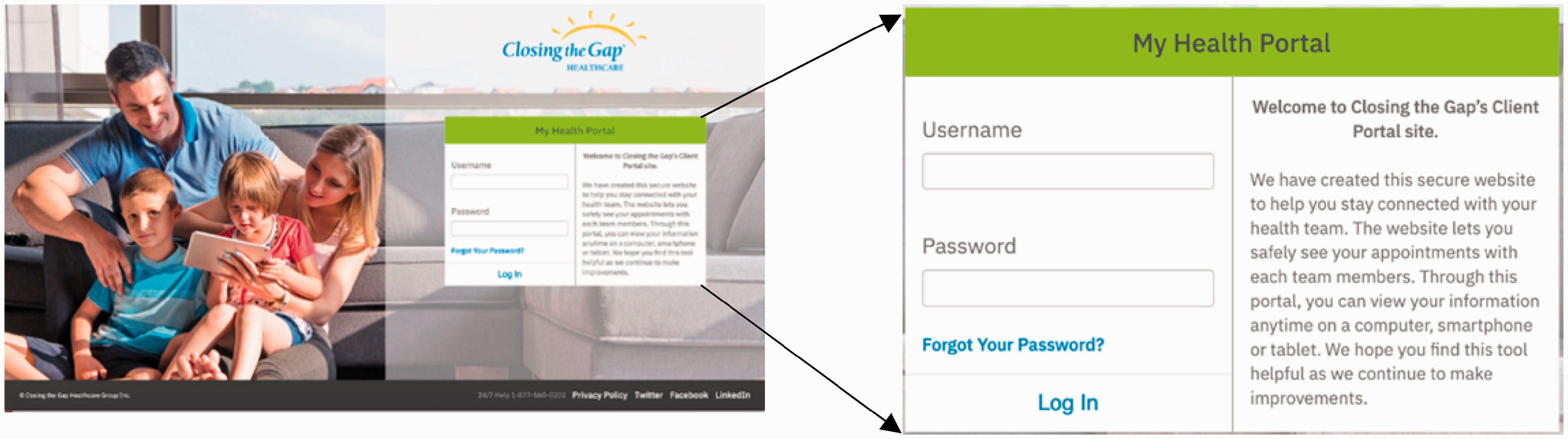
The Login Screen is presented in Figure 5. In addition to allowing the users (i.e., patients) to log in to the portal with valid login credentials, this screen provides them with the ability to reset their password, if they forget it. Login credentials are easily obtained through an online registration process (in our case, through our participating healthcare partner, Closing the Gap Healthcare). The password reset function automatically resets their password without the help of a staff member from the portal service providing institute. Every password resetting action is first authenticated and then completed through proper e-mail-based authentication mechanism described in the following sections.
MyHealthPortal login view. Upon successful login, the user is presented the Landing Page shown in Figure 6. This page contains the top-level menus of the portal (i.e., Home, Team Members, Emergency Contacts, Schedule, and Signout). The landing page also displays the user’s recent n number of upcoming appointments. Each appointment is shown as a card called Appointment Card (shown in Figure 6(a) and (b)) on the Landing Page. Inside of each card, the user will find the date and time of their appointment, as well as information about the service and the provider of the service.
MyHealthPortal patient landing page view. (a) Top part of the landing page (b) Bottom part of the landing page (c) Details of an appointment card.

The Calendar button inside of each appointment card (Figure 6(c)) opens the AddEvent API which gives the user the ability to add that appointment to the calendar of their choosing (e.g., Google, Yahoo, Apple iCal, and Outlook). The Provider Button inside the appointment card (Figure 6(c)) opens a modal that shows the user an image of the provider servicing the appointment, along with a brief biography of that provider.
The details about the system to which the providers are connected, how providers participate and put their schedules in the system, and how data is pulled from all providers are provided in The deployment platform section.
Each healthcare provider (referred to as healthcare team member) is displayed with their own respective cards, regardless of the service in the Team Members page (Figure 7) which can be accessed through the Team Member’s link (or through the hamburger menu list located at the top-left) on the landing page. This page enables the user to be able to see all of their collective team members who are currently facilitating their care.
My Home Care Team Members page view. Each emergency contact is displayed in a business card format on the My Emergency Contacts page (Figure 8). A phone number contact type and relationship can be found inside of each card. This page gives the user the ability to ensure that all of their personal emergency contact information is correct and up to date.
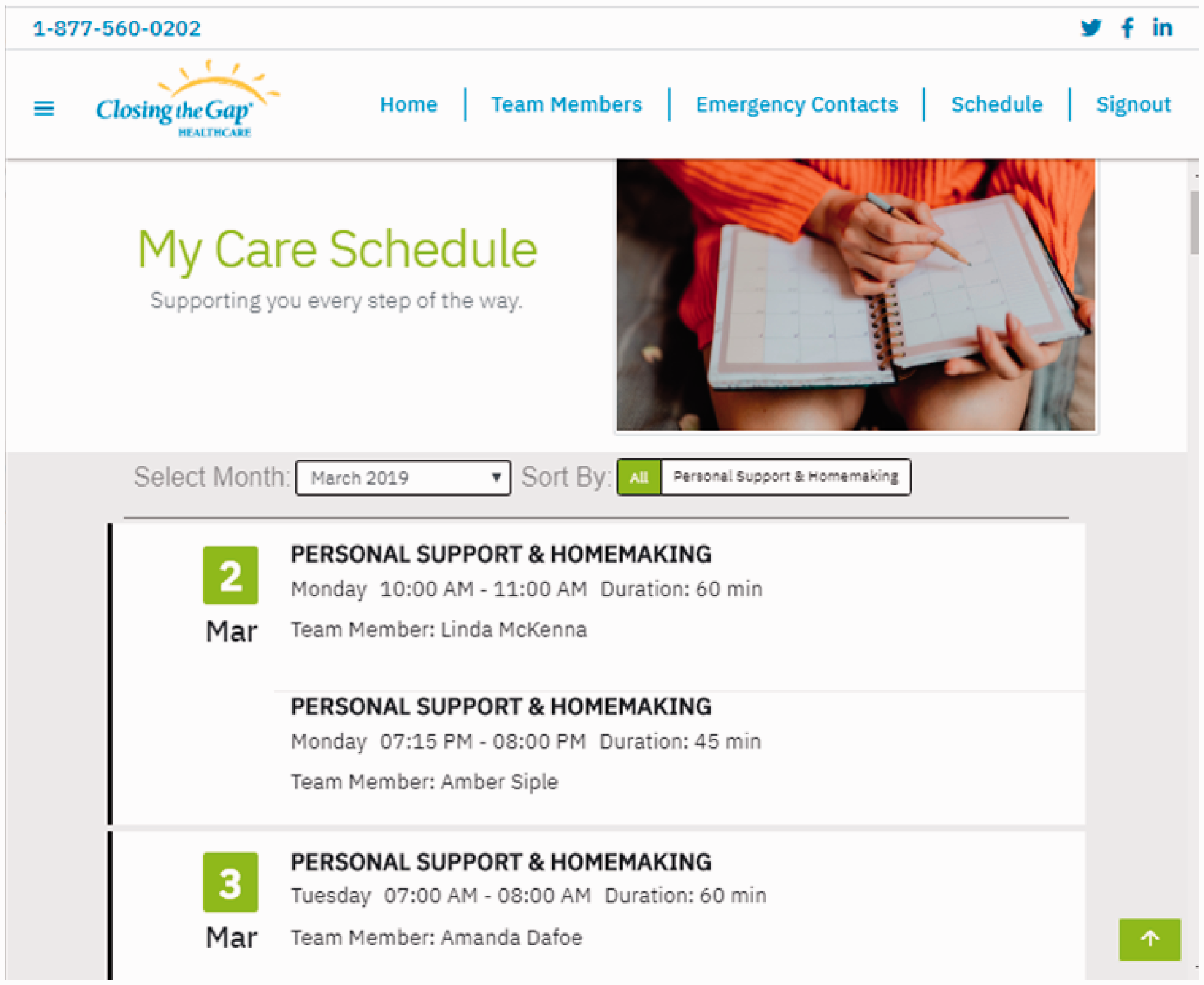
My Emergency Contact page view. Each appointment is displayed in a list view on the My Care Schedule page (Figure 9). This page can be accessed through the Schedule link on the Landing page or the ‘Show Full Appointment Schedule’ button located at the bottom of the Landing page (Figure 5(b)). The ‘Sort By’ feature of this page enables the user to sort their appointments by each service they are currently receiving. They may also sort their appointments by date. Moreover, users can view past, present, and future monthly appointments using the ‘Select Month’ feature.
My Care Schedule page view.


Cross-platform interfaces. MyHealthPortal user interfaces are lightweight and responsive. They have been built using modern languages and technologies to create easy to use UIs suitable for all-ages with an emphasis for elderly users. We also set out to design MyHealthPortal with a responsive design, so it looks and performs well on all devices (Figure 10). This included design choices such as larger font, soft colors, and overall simplicity, making it suitable for many homecare environments. All our interfaces are based on Material Design for Bootstrap (MDBootstrap) framework, which is the underlying boosting platform in creating such a responsive design.

MyHealthPortal login view on various devices.
Inclusive design principles were an important aspect in creating MyHealthPortal. We included an accessibility helper for patients who may need additional help in their navigation of the portal. Hence, we incorporated BrowseAloud into our system. 40 BrowseAloud is a support software plug-in that adds speech, reading, and translations to websites facilitating access and participation for people with Dyslexia, Low Literacy, English as a Second Language, and those with mild visual impairments. 41
The deployment platform
The deployment of MyHealthPortal comprised of 3 general components: Microsoft Dynamics CRM, Microsoft Active Directory, and Responsive User Interface. In the previous section, we discussed the functionalities of the user interface components, which can be rendered on any modern web browsers on any computer or device. The following section presents two components MyHealthPortal uses: Microsoft Dynamics CRM and Active Directory.
Microsoft Dynamics CRM
Microsoft Dynamics CRM is a customer relationship management package that allows businesses to integrate data-driven software solutions in pursuit of improving interaction between their customers. 32 Dynamics CRM is customizable with Microsoft’s proprietary (.NET based) framework. 32 It offers modules for sales force automation, marketing automation and customer service and support with access anywhere over the web. The service is highly secure with a 99.9% financially backed uptime level agreement. 32
Microsoft provides the CRM SDK and other useful libraries to make the required connection to ASP.NET MVC applications. 32 Retrieving data from the CRM is accomplished by providing connection string, CRM SDK Assemblies, model with properties, and Data Access Layer (DAL). Basic interaction between the Dynamic CRM and the application is shown in Figure 11.

Interactions between Dynamic CRM and the application.
Microsoft Active Directory
Active Directory (AD) is a directory service developed by Microsoft that provides the foundation for distributed networks built on Windows 2000 Server, Windows Server 2003 and Microsoft Windows Server 2008 operating systems that use domain controllers. 42 Active Directory stores information about objects on the network and makes this information easy for administrators and users to find and use. 42 For example, Active Directory stores user information, such as name, password, address, telephone numbers, and so on, and enables other authorized users on the same network to access this information. It also includes (i) a set of rules, the schema, to define the classes, objects, attributes, and constraints/limits on objects, (ii) a global catalog containing information about every object in the directory, (iii) a query and indexing mechanism to retrieve and access objects and their properties, and (iv) a replication service to distribute directory data across the network. 42
Security is integrated with Active Directory through logon authentication and access control to objects in the directory. With a single network logon, administrators can manage directory data and organization throughout their network, and authorized network users can access resources anywhere on the network. Policy-based administration eases the management of even the most complex network. 42
Integration of deployment tools and environment
MyHealthPortal adopts Dynamic CRM in its data layer and Active Directory in its authentication layer. The Dynamic CRM provides all required Software Development Kits (SDK) that come with the necessary assemblies in order to make a proper connection between the portal and data layer on Dynamics CRM. The retrieval of data from Dynamics CRM takes place with the use of a Query Expression and a connection string. 32
The deployment and staging of MyHealthPortal was performed on our industry partner’s production infrastructure. Closing the Gap has Dynamic CRM and Active Directory already in place. We have implemented and deployed CRUD (Create, Read, Update, Delete) with Closing the Gap’s Microsoft Dynamics CRM backend system. 32 This infrastructure also allowed us to test data, its engine and manipulation, and ensure they will work properly when released. The reliable and smooth user communications (e.g., automated emailing feature) were implemented through adopting industry-standard and scalable email delivery infrastructure such as SendGrid email delivery API. 43
For testing, deployment and staging of authentication, directory access, and access control, patients’ accounts of the portal are stored using the Closing the Gap’s Active Directory. ASP.NET includes the necessary libraries to authenticate user credentials against Active Directory. 42
In the following section, we demonstrate the user authentication and access control mechanism in MyHealthPortal.
Use case: Login authentication of MyHealthPortal
Figure 12 illustrates the basic steps of a login authentication mechanism. When a user logs into MyHealthPortal, the login controller takes the user’s login credentials and validates it against Active Directory (please see the Microsoft Active Directory section). Controllers of the application are responsible for the communications between our models and views (data and user interface). Each user has a username, password, email, and unique patient ID stored inside the Active Directory. If a user enters incorrect login credentials, the login controller will send a message back to the login view with a notice, notifying the user that the login was invalid.

High level architectural model for User Authentication.
Alternatively, if the user has successful authentication, the application is ready to retrieve that user’s patient data. This is done by the DAL (data access layer) component in our application. The DAL will take the unique patient ID associated with the user’s account and make a seamless connection to Dynamics CRM. Our application will then query Dynamics CRM for the required data.
Once we have all our required data, the model is created. The model contains the relevant user session data. This is so we only have to make one initial connection to Dynamics CRM and the rest of the data can be stored within our application. Once a user logs out, the model is deleted, and the session data is no longer available. The model is an object-oriented representation of user session data.
Evaluation of MyHealthPortal
The portal was evaluated in two distinct ways: 1) security vulnerability and penetration testing, and 2) the usability in real-world environments.
Security vulnerability and penetration testing
By the nature of its functionalities and services it offers, MyHealthPortal needs to deal with and communicate patients’ personal and medical information (e.g., access to various upcoming medical appointments (nursing, physiotherapy, etc.), care provider team information, emergency contacts, etc.). This portal achieves high level of trust by implementing appropriate security measures and continuous testing such as application vulnerability testing, server and network penetration testing, regression tests and unit tests.
To test and scan our portal for various website vulnerabilities (such as fingerprinting, SQL injection, cross-site scripting, remote command execution, and local/remote file inclusion) we used a commonly used website vulnerability testing tool named Pentest-Tools.com. g Pentest-Tools.com provides a set of powerful website vulnerability and penetration testing tools which allowed us to preform security vulnerabilities and penetration testing on our portal in an easier, faster and effective manner. For a high level of testing, we conducted an in-depth scanning on the portal and attempted to discover high-risk vulnerabilities. The result of the testing is presented in Table 2. The table demonstrates that our portal successfully passed in all major website vulnerability testing.
MyHealthPortal security vulnerability testing result.

Given the sensitivity of the data MyHealthPortal deals, we performed an additional deep scanning on SQL injection using the same tool. The scanner crawled 34 dynamic URLs of total 37 URLs (i.e., excluding the URLs that are not susceptible to such injection). The full scan reported no vulnerable parameter with a final report of “No SQL Injection vulnerabilities found.”
We also conducted dedicated testing on our server’s SSL/TLS configuration security. We used one of the popular web security assessment tools, the Qualys. h By using the most recent vulnerability signatures developed by Qualys’s engineers, the network and SSL/TLS configurations of our portal server were tested against the emerging threats. The overall test result reported an ‘A’ for the portal, demonstrating a high-level protection against current SSL/TLS configuration threats.
Usability testing
Closing the Gap has a wide client demographic and a diverse set of stakeholders associated with them. We have chosen Closing the Gap and its client base as our test participants for evaluating MyHealthPortal’s functionalities in different demographic environment.
We conducted a real-world user experience study on the portal. We divided our study in two parts. In the first part, we orchestrated a survey on users to gather information about themselves and understand their familiarity in using modern technology and their experience in using our MyHealthPortal. We used researcher observation and a set of open-ended and closed-ended questionnaires in the first part. In order to minimize the bias in survey questionnaire and analyze the performance of our portal using a widely used performance analysis tool, we relied on a System Usability Scale (SUS) survey in the second part of our study. 47 The inspiration for conducting SUS survey is that it is amongst the most widely used usability survey to measure the user’s attitude and satisfaction in using the system under review.47,44 The following section presents the findings and the analysis.
Survey design
The study was conducted on July 18, 2019 with 5 clients from Closing the Gap’s Elgin St. Thomas office. The selection and number of participants were based on convenience sampling. The Care Coordinator from this office recommended these clients since they were representative of the main categories of their clients, (e.g., complex care, cognitive impairment (young and old), high functioning with physical limitations, and dementia with physical limitations). The ages of the participants were from 30’s to 90’s [3 male; 2 females]. Table 3 shows the demographic distribution of the survey participants. For refinement purposes of the portal, the participants were observed by our research team as they used MyHealthPortal and participated in the survey.
Demographics of survey participants.

The participants (or their guardians) were asked to use the portal to its fullest, and then give feedback about their user experience while evaluating MyHealthPortal through a set of pre-set questionnaires. In the following two sections we present our findings based on open-ended and closed-ended questionnaire.
Open-ended questionnaire findings
The set of open-ended questions were designed primarily to obtain information about user familiarity in using technology (e.g., basic computer use) and devices (e.g., phones/tablets) to access any e-Health portal, their mode of contact and current practice in getting healthcare service. The open-ended questionnaire is available in Appendix 1. A summary of the findings from user responses is presented below.
For those participants who owned tablets (n = 4), they use their tablets often-several times a day. All participants owned smartphones and reported that they use these devices often-several times a day. For those participants who owned desktops computer (n = 3), they use their desktop computer only a couple of times a week. Regarding how participants get information about their care from the medical facility (e.g., Closing the Gap), most (n = 4) reported that they call their medical facility. When asked about their interest in using an e-Health portal, all participants stated that they would very much like to find information about their care via a computer, laptop, tablet and/or smartphone.
Closed-ended questionnaire findings
The closed-ended questionnaire set mainly focused on user satisfaction in interacting with and recommendation on the MyHealthPortal. Tables 4 and 5 list the closed-ended questions used in the survey along with the response rating for each question. These tables also show the number of users responded in various rating category for each question. A summary of the findings from user response (from both tables) is presented below.
User responses distribution on closed-ended questions (higher rating value indicates positive experience).

User responses distribution on closed-ended questions (lower rating value indicates positive experience).
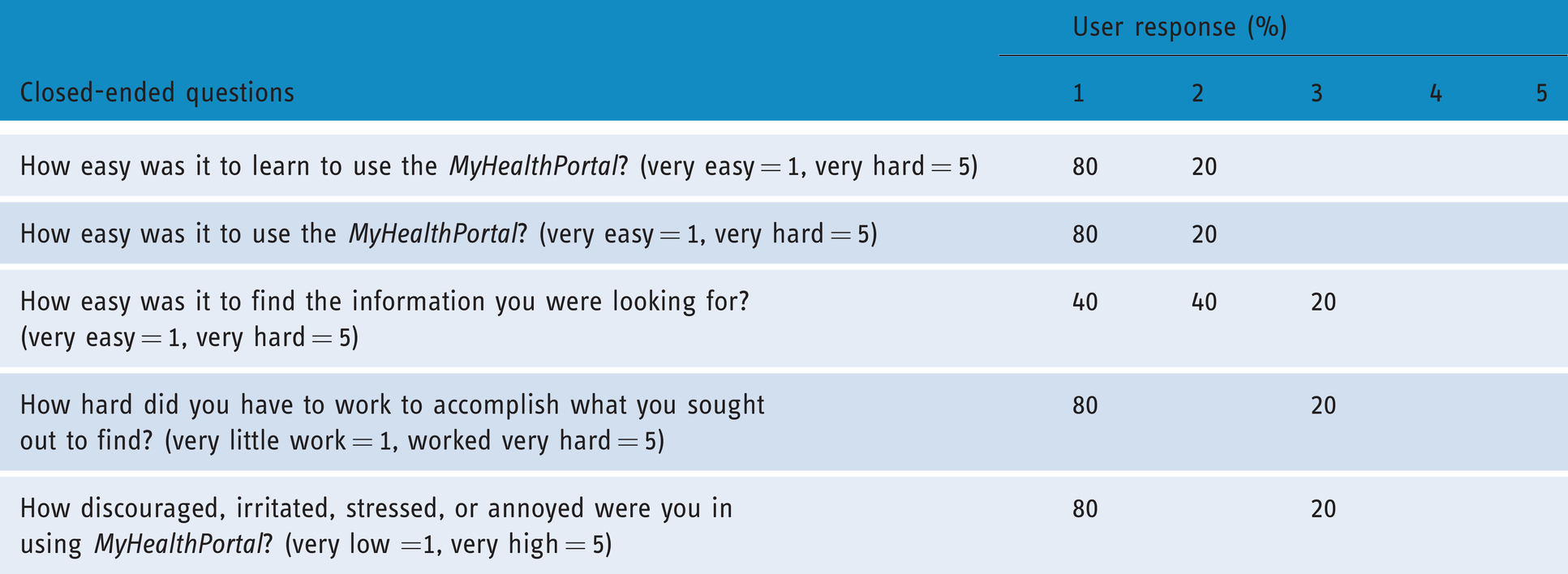
All participants (i.e., 100%) stated that they were very interested in MyHealthPortal.
Most (i.e., 96%) of the participants indicated that they felt other clients would also very much enjoy using MyHealthPortal.
Most (i.e., 96%) of the participants reported that it was very easy to learn and be familiar with MyHealthPortal.
Most (i.e., 96%) of the participants reported that it was very easy to use our MyHealthPortal.
Major portion of the participants (i.e., 84%) reported that it was very easy to find the information they were looking for in MyHealthPortal.
In terms of the effort required to access information on the portal, 92% of the participants reported that it required very little work to find the information they sought on MyHealthPortal.
In terms of getting frustrated while navigating throughout the portal, 92% of the participants reported that the frustration level was very low while using the portal.
System usability scale survey findings
Quantitative analysis was performed to evaluate our portal with a System Usability Scale (SUS) study in real-world environments.
The SUS odd-numbered items i (I1, I3, I5, I7 and I9) express positive statements on the portal. All of these scored 4 or 5 (“strongly agree” or “agree” with the statement), except for I1, which scored mostly 3 (“indifferent”'). In total, 100% of the respondents gave scores of 4 or 5 to I3, I5, and I7; 80% to I1 and I9. Figure 13 presents positively rated items showing user satisfaction.
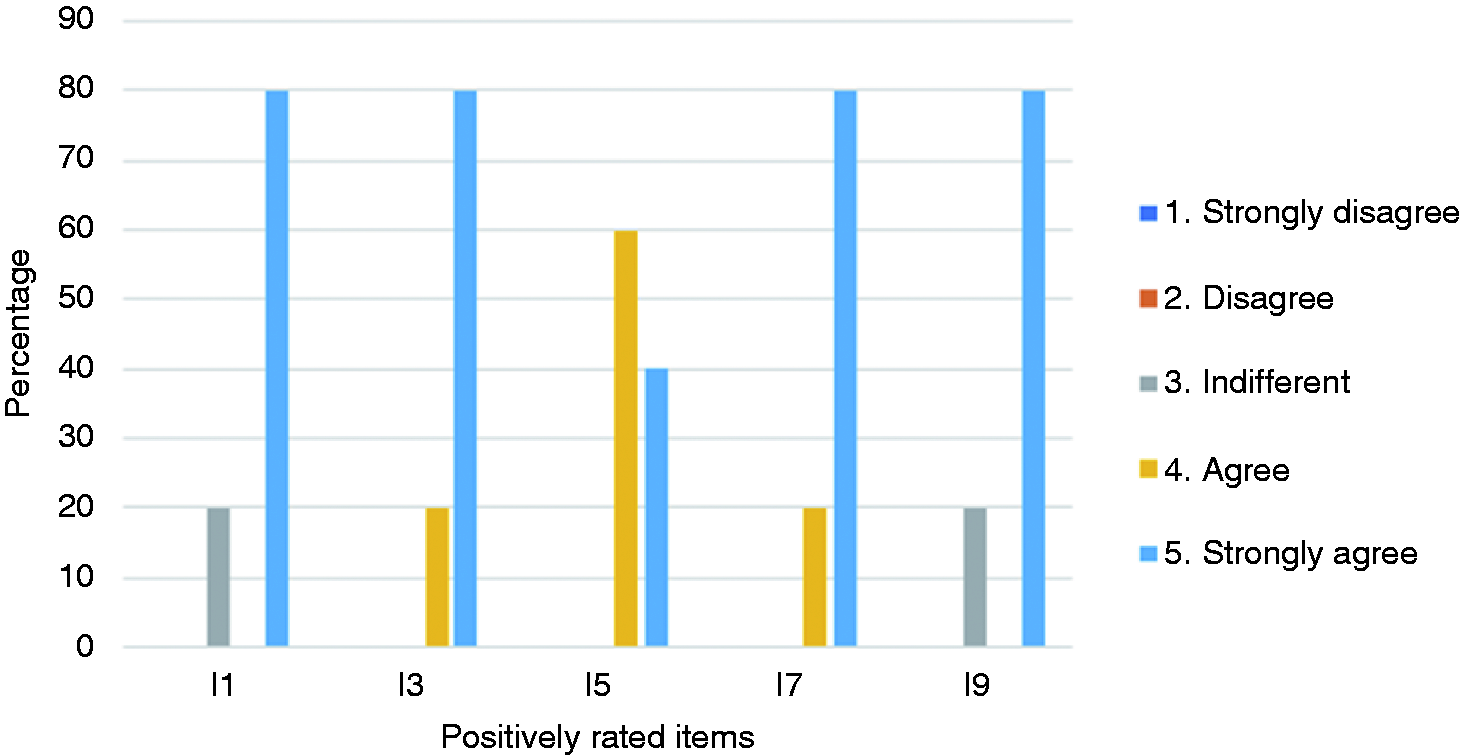
Positively rated items showing user satisfaction.
The mean SUS score for this group was 92.5 (min = 67.5, max = 100, σ = 12.55). The average SUS score from 500 studies is 68. 44 A one-way ANOVA was performed to determine if there was a difference in the user satisfaction in our MyHealthPortal compared to the SUS average. 45 There was a statistically significant difference between the groups at the 0.05 level, F (1, 8) = 15.244, p = 0.005, showing that the usability of our MyHealthPortal is well above average.
The even-numbered items in the SUS questionnaire j (I2, I4, I6, I8 and I10) express negative statements in using the portal. All the respondents gave scores of 1 or 2 (“strongly disagree” or “disagree”) for all items except for I10 where 20% responded with “indifferent,” collectively indicating a high user satisfaction (see Figure 14).

Negatively rated items showing the lack of user satisfaction.
Overall observations and findings
Throughout the entire phase of user testing, comments and constructive feedback and research observation notes were recorded. Based on the research team’s observation on participants responding to SUS survey, we have following key findings regarding the degree of comfort in using the portal.
Participants successfully used all forms of computers: desktops, laptops, tablets, and smartphones. This was important in our design and delivery of the portal as we strived to be as device agnostic as possible and support a diverse spectrum of monitors and screen resolutions. All the participants showed enthusiasm and eagerness while using MyHealthPortal. All the participants felt comfortable using the portal and were able to navigate and find information directly related to their care quickly and easily. Hence, the portal is effective and easy-to-use by users from a wide range of demography (e.g., age, gender). It also proves that the portal interfaces are highly user-friendly. The proposed e-Health portal exceeded the user expectations in terms of usability and performance.
Conclusions and future work
Automation of managing patient appointment booking through e-Health portals is an example of a relatively small digital health innovation that when implemented well can have a lasting positive impact on patient experience, staff satisfaction, office productivity and enabling better access to care. In this study, we have proposed MyHealthPortal, an efficient novel e-healthcare solution for effectively managing and administering patient care appointments for homecare and clinic-based services. The uniqueness of MyHealthPortal lies on its new features such as offering lightweight user-friendly interfaces, allowing services for out-of-hospital and non-primary care patients, and seamlessly integrating various software foundation layers (e.g., presentation, data, and business).
One of the main contributions of this work was addressing the no-show appointment issue that many healthcare facilities are facing. We identified the gap that patient-viewing appointment scheduling systems are not available in current e-Health portals. Our solution—MyHealthPortal—addressed this gap and in settings where providers want to provide online appointment scheduling as a service to their patients. In this way, our patient portal provides a missing function within the healthcare system.
A study was also conducted on the effectiveness and usability of MyHealthPortal. Through the study, it was demonstrated that the portal is a practical solution for providing patients with up to date information on their appointments, providers, and overall care.
The study reveals some suggestions for refining the portal. Few examples are having a calendar view in the portal and integrating the portal with other related portals (e.g., medication portal, record management portal) that the clients are getting service from. In the future extension of MyHealthPortal, we would like to address these suggestions and explore how the portal can automatically communicate with service providers and patient, and how patients can interactively schedule, reschedule, and cancel appointments.
Footnotes
Acknowledgements
We would like to thank our research students Andrew Bordin and George Kopti for their assistance in the development of the system. We would also like to thank our industry partner, Closing the Gap for their unwavering support in this research project.
Contributorship
ST and ES researched literature and conceived the study. ES was involved in protocol development, gaining ethical approval, patient recruitment. ES and ST were involved in the data analysis. ST wrote the first draft of the manuscript. All authors reviewed and edited the manuscript and approved the final version of the manuscript.
Declaration of conflicting interests
ST and ES are employees of Sheridan College. ES has received grants from NSERC (Natural Sciences and Engineering Research Council of Canada).
Ethical approval
The ethics committee of Sheridan College Research Ethics Board approved this study (SREB number: 2018-12-001-035)
Funding
This work was supported by NSERC (Natural Sciences and Engineering Research Council of Canada) [grant number: 06227].
Guarantor
ST.

Peer review
This manuscript was reviewed by reviewers who have chosen to remain anonymous.
Notes
Appendix 1. Opening questionnaire – Client portal usability study
1. What is your age? (optional) __________________
2. Are you left or right handed (optional)? left right (please circle)
3. How often to do use your tablet? (please circle)
A: often -- several times a day
B: a couple times a day
C: a couple times a week
D: never
4. How often to do use your smartphone? (please circle)
A: often -- several times a day
B: a couple times a day
C: a couple times a week
D: never
5. How often to do use your desktop computer? (please circle)
A: often -- several times a day
B: a couple times a day
C: a couple times a week
D: never
6. How to you currently get information about your care from Closing the Gap (e.g., upcoming appointments, the care provider, etc.)
A: I call Closing the Gap
B: I ask my son/daughter/relative to help me
C: I email Closing the Gap
D: I don’t
7. Would you like to find information about your care using computer, tablet or phone?
not at all very much so
1 2 3 4 5
8. Please describe some of your favourite mobile apps.
____________________________________________