



Abstract
In this article, we use a top tasks survey (n = 466) and unmoderated interviews (n = 101) to explore how smartphone users access the internet: through browsers or standalone applications. We found a surprising number of users surveyed rely on mobile browsers to conduct internet-based tasks ordinarily associated with standalone apps, such as reading emails (34%), watching videos (24%), and listening to music (16%). Interviews revealed several practical and socioeconomic explanations for “browser-centric” smartphone use, including memory conservation on inexpensive mobile handsets and privacy management. We discuss the implications for information systems and technology adoption theories and for applied researchers who work in mobile product spaces.
Keywords
Smartphones afford users numerous avenues to access internet content and conduct web tasks. Smartphone users can interact with content through standalone applications or “apps” that offer domain-specific access to sites optimized for a mobile experience. Users can also access much of the same content through mobile web browsers, such as Chrome and Safari, although the user interface design, controls, privacy protections, and overall usability of mobile browsers may differ from apps (Papadopoulos et al., 2017) to the extent perceived ease of use or interpretation of content may differ. In addition, mobile websites may reach wider audiences than do apps (Dunaway et al., 2018), owing in part to the relative ease ungated content can be accessed via a mobile browser rather than separate, dedicated apps. Such key differences in how smartphone users access web content—through mobile browsers or apps—clearly exist, yet differences in modalities and the potential effects thereof are an underexplored area of research.
In this article we present the two studies undertaken to explore the degree to which, and why, smartphone users rely on mobile browsers rather than applications to perform web-based tasks: first, a “top tasks” survey of mobile browser use (n = 466) designed to identify the most performed activities within mobile browsers, and second, a series of unmoderated interviews (n = 101). Through these studies, we discovered that a non-trivial percentage of users rely on their mobile browsers to perform what are commonly assumed to be app-centric tasks such as reading and writing emails, and that this was due to a variety of practical and socioeconomic factors such as constraints on the smartphone memory available to store standalone applications on low-cost mobile handsets. Our findings are consequential, we argue, to information and technology adoption theory frameworks and to professional researchers working in the mobile product space because they help establish foundational assumptions about user behavior in mobile contexts.
Mobile web browsing behavior
Popular press accounts of mobile browsing indicate increasingly blurred relationships between the intended uses of browsers and apps and actual uses. For example, a Google executive recently noted that younger users aged 18 to 24 are relying on TikTok, a popular video-sharing app, to search for popular restaurants rather than Google Search (Perez, 2022). In the case of TikTok, an app intended for sharing videos is being used to perform information search, a core function of mobile browsers since their inception (Kaikkonen, 2008). Conversely, it is also possible for mobile browsers like Chrome or Safari to access content on websites that are associated with popular standalone apps like TikTok, Snapchat, YouTube, and Tinder. The extent to which the latter behavior happens, however, is largely unexplored.
We argue that the use of mobile browsers to conduct web tasks ordinarily performed in dedicated smartphone applications is a behavior that, to the extent it occurs, is important to examine for at least three reasons. First, for information systems and technology adoption theory frameworks such as diffusion of innovations (DOI; Rogers, 2003) and the technology acceptance model or TAM (Davis, 1989; Venkatesh et al., 2003) to be applied to a behavior, it is first necessary to scope the boundaries of that behavior. Much of the extant scoping work on mobile browser usability and mobile browser- versus app-centric user behavior was done in the 2010s or earlier (Pew Research Center, 2012; Shrestha, 2007) and may need to be updated to reflect over a decade of technological and social change. Today, several fundamental questions about browser-centric smartphone user behavior remain unaddressed, including how many people might engage in this activity, and who engages. This led us to ask:
Individuals may opt to use mobile browsers instead of standalone apps for a variety of reasons. From a theoretical perspective, Davis’s (1989) TAM suggests that individuals who use mobile browsers to conduct web tasks may do so because they (1) perceive mobile browsers to be useful and (2) perceive mobile browsers to be easy to use. Within the TAM framework, perceived usefulness and ease of use, in turn, influence attitudes toward using a technology, behavioral intentions, and then actual use (Davis et al., 1989). Importantly, Davis’s TAM also indicates that “external variables” exogenous to the model, such as demographic characteristics related to the user or their experience with a technology, may also influence endogenous model variables such as perceived usefulness and ease of use (Davis et al., 1989, p. 985). Similarly, Rogers’ (2003) DOI theory suggests that individuals adopt and use technologies at different rates, and that individual characteristics like social status can impact how quickly individuals identify and start to use technologies. The TAM and DOI theory thus provide mechanisms for and conditions under which individuals may decide to use a mobile browser rather than an app or vice-versa. However, given this article's exploratory focus, rather than pose a set of narrow theoretical questions we instead ask a broad question designed to investigate motivations for use:
Perceived usefulness, ease of use, and other theoretically motivated factors may be among the reasons that individuals cite for using a mobile browser instead of a dedicated app to access web content and conduct tasks. Yet, a broad research question here allowed us to explore motivations not anticipated by the TAM, DOI theory, or alternative frameworks. This question is intended to capture a wider range of possible motivations for using mobile browsers instead of apps.
A second reason it is important to examine the use of mobile browsers to perform web tasks typically conducted in standalone apps is to provide a foundation for future empirical effects research. Mobile browsers and apps offer users the same content but through the lens of distinct user interface design, controls, and settings, which raises the possibility that interpretation of content could depend, in part, on whether the content is accessed through a mobile browser or app. Consider the role of mobile browser privacy features. Mobile web browsers can be more privacy preserving than mobile apps (e.g., Papadopoulos et al., 2017), blocking trackers and reducing advertising that may alter how users experience and perceive web content. Mobile websites are also more universally accessible through browsers than is web content accessed through specific apps because browsers come pre-installed on all mobile handsets and content-specific apps require users to locate and install them. This is perhaps why in certain domains, such as news, website content has far greater audience reach than does the same content delivered on a news app (Dunaway et al., 2018). Yet while audience reach is greater on mobile browsers, Dunaway et al. (2018) demonstrated that the time and attention users pay to mobile news “is high in apps relative to mobile browsers” (p. 117). While we do not explore the effects of delivery modality in this article, we may establish a need for such efforts.
Finally, there is great potential import for industry. Information workers including user researchers, product managers, and visual designers often rely on foundational information about how users experience the mobile web to help formulate hypotheses about products. Generative research on user behavior such as the current effort presents may reduce the resources needed to study this space, as such work can provide a starting point for industry professionals to ask more focused, “second generation” questions about how users experience specific mobile products.
In this research, we conducted two studies to explore the extent to which individuals use mobile browsers to conduct tasks ordinarily associated with standalone mobile apps such as online banking and email. In Study 1, we used a survey-based top tasks analysis, or TTA, among U.S. and Canadian respondents (n = 466) to examine the prevalence of using a mobile browser rather than a dedicated app in a variety of task contexts. In Study 2, we utilized unmoderated interviews (n = 101) to probe the explicit reasons users provide for relying on their mobile browser to conduct a subset of web tasks ordinarily performed in an app. After reviewing the results from both studies, we conclude the paper with a general discussion of the results as well as the theoretical implications for information systems and technology adoption frameworks. Importantly, our results suggest that endogenous variable relationships within such frameworks may hinge on unanticipated external variables influencing the use of mobile browsers, such as having the income necessary to afford a mobile phone with enough memory to store standalone apps.
Study 1
Method
Instrument and data collection
Our first two research questions asked about the extent to which smartphone users rely on mobile browsers rather than dedicated apps to conduct web tasks, and whether there are demographic predictors of such behavior. To examine these questions, we fielded a brief, nine-item survey on October 1, 2021, among respondents recruited through Cint, an online panel provider (n = 466; see www.cint.com). The survey was available to both American and Canadian respondents for 1 week and was census-balanced on gender and age (Table 1). Cint respondents received a small monetary incentive for completing the survey. Most respondents took the survey on a mobile phone (57.94%) or on a computer (37.55%), with the remainder taking the survey on a tablet or a similar internet-enabled device (4.51%).
Descriptive statistics for top tasks survey.
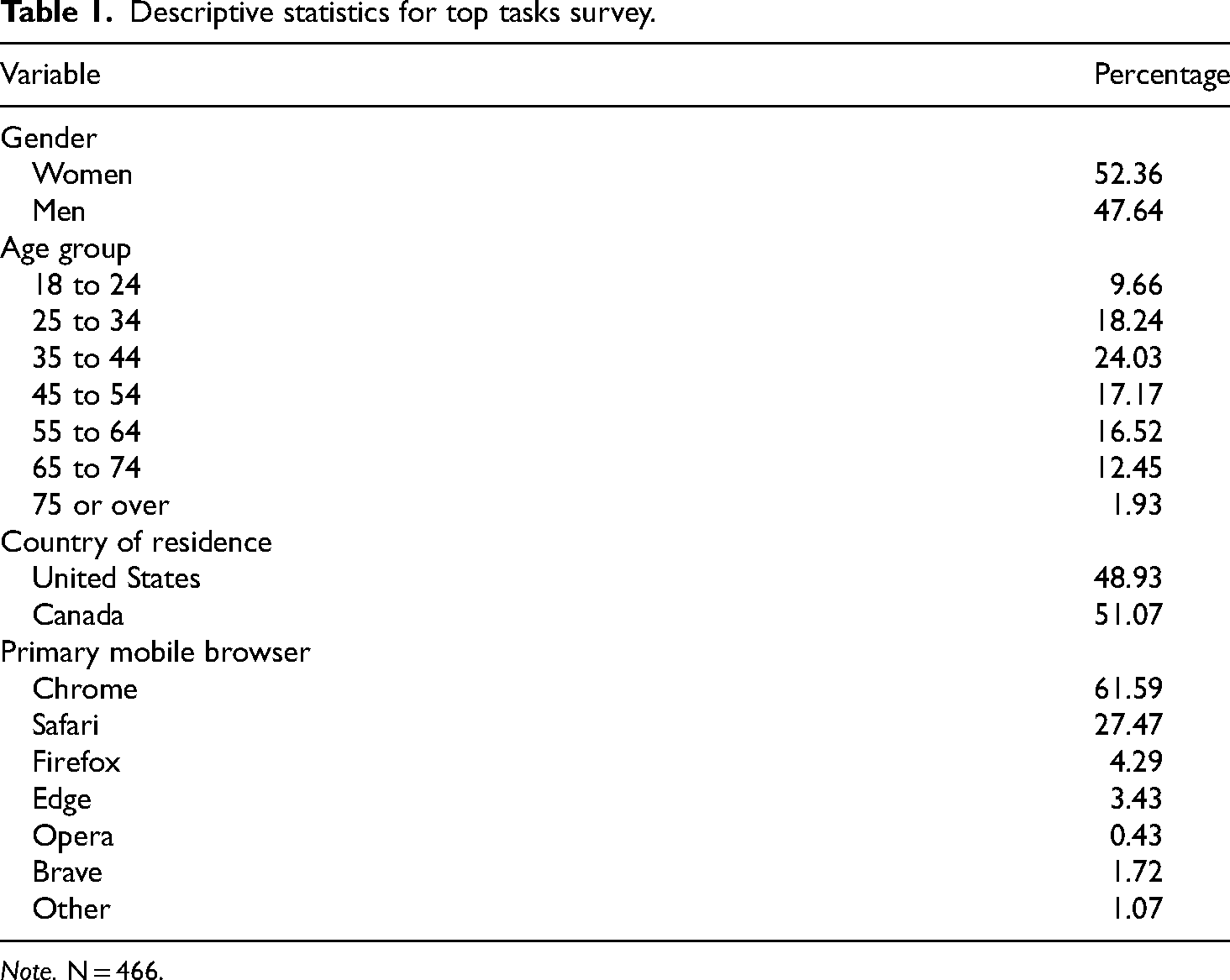
Note. N = 466.
Variables and top task analysis
Our primary outcome variable was a single, multiselect item designed to capture the top tasks users conduct on their smartphones. After respondents identified their primary mobile web browser, we asked them: “Which of the following activities did you do most frequently over the last week within your mobile [PIPED BROWSER NAME and ICON] browser on your smartphone?” Users were provided with a list of 37 possible tasks, some of which are designed to be performed in mobile browsers (e.g., information search) and others that we assumed would be less likely to be conducted in a mobile browser given the prevalence of standalone apps to complete the task (e.g., online banking, listening to music). This pool of 37 tasks was generated from a combination of sources that identify common tasks people perform on the internet and mobile devices (Pew Research, 2004, 2015). Table 2 shows the full list of mobile browser tasks that respondents were asked to select from.
Top tasks item wording.
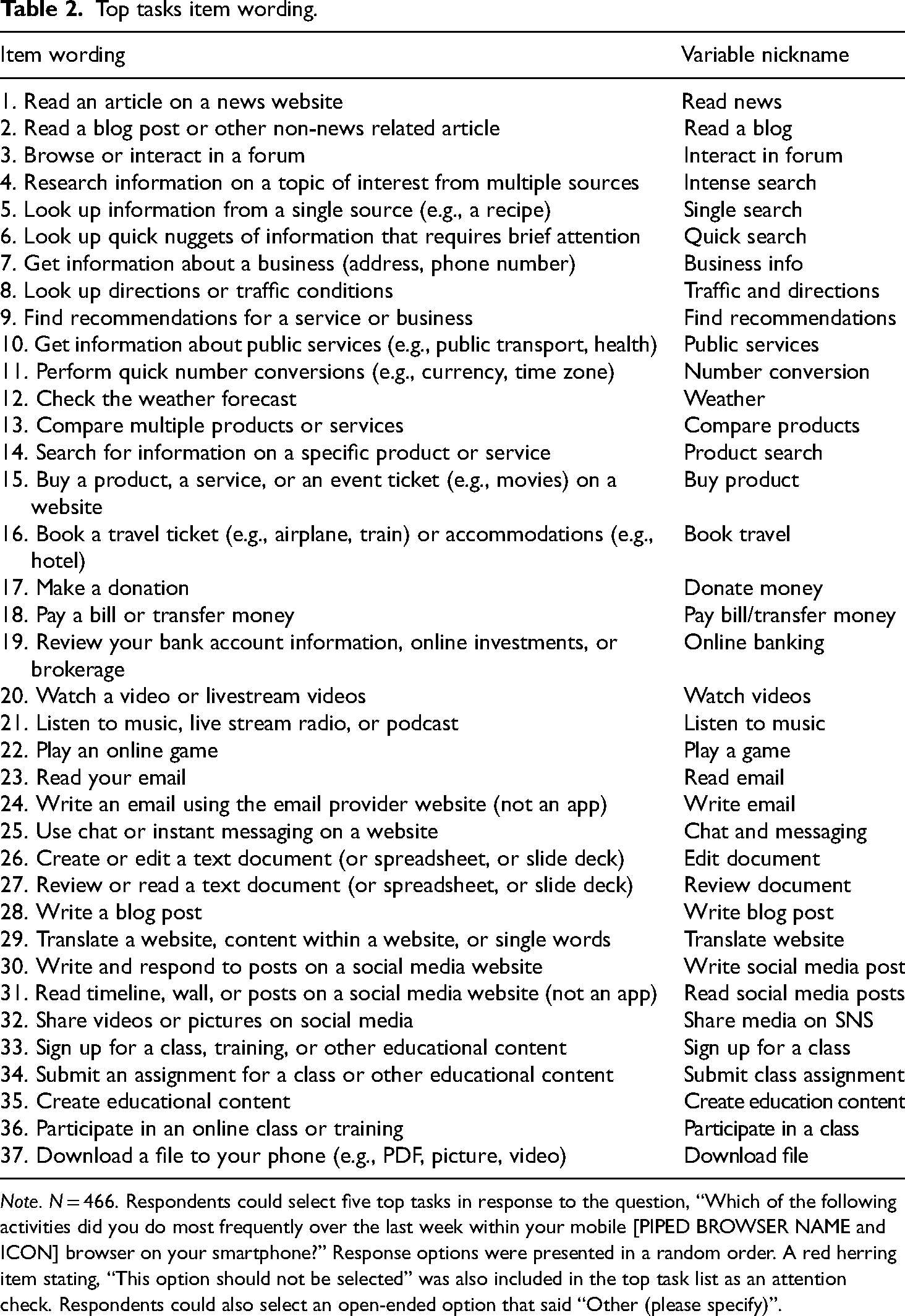
Note. N = 466. Respondents could select five top tasks in response to the question, “Which of the following activities did you do most frequently over the last week within your mobile [PIPED BROWSER NAME and ICON] browser on your smartphone?” Response options were presented in a random order. A red herring item stating, “This option should not be selected” was also included in the top task list as an attention check. Respondents could also select an open-ended option that said “Other (please specify)”.
A TTA is a survey-based, quantitative research approach used to identify and prioritize activities that users perform on a website, a system, an app, or products in general (McGovern, 2010, 2018a, 2018b). While digital products are often designed to serve distinct purposes and help users to accomplish specific goals, a TTA is used to determine how products are actually used. A TTA starts by gathering a long list of potential tasks users may perform with the given product, followed by shortlisting a subsequent set to not more than 100 tasks and presenting that list to an audience of users, asking each respondent to rank their five most important tasks out of the complete task list (see McGovern, 2010, 2018a, 2018b).
While McGovern (2018a, 2018b) suggests that letting users prioritize five out of a list of up to 100 tasks is not problematic, following the same approach with survey respondents on mobile devices could lead to certain challenges and limitations, including: (a) limited screen real estate to present a large number of items to choose from, associated with the risk of respondents not paying enough attention or overlooking items; (b) survey fatigue, caused by exposure to a long list of items; (c) respondents confusing mobile browser activities with mobile app activities; (d) respondents completing the survey on a desktop or laptop computer confusing mobile browser activities with desktop or laptop browser activities.
The survey design attempted to mitigate the above-mentioned challenges, specifically (c) and (d), by textually and visually reminding participants about the context in which they were answering questions (e.g., by showing an image of a hand holding a mobile phone with the picture of a browser on it). We also repeatedly reminded respondents that the questions asked were to be answered in the context of mobile device usage, not desktop usage. Several of the top task response options also specified that we were asking about accessing the “website” version of content and not asking about web access via applications (e.g., “not an app”). In addition, top task response options were randomized to help mitigate list order effects.
Attention check
We were concerned with survey fatigue and speeding given the size of the mobile browser task choice pool. Therefore, we included in the list of web tasks one red herring option that simply said, “This option should not be selected.” Using this item, we were able to detect and eliminate bogus responses from 30 of the original 496 respondents, or about 6% of the initial sample, which resulted in a valid sample of (n = 466). The 30 respondents we eliminated had a median survey duration of just 61 s, while the remaining respondents had a median of 155 s, suggesting that the 30 respondents eliminated were speeding.
Results
Our first research question (RQ1) asked the extent to which smartphone users rely on mobile browsers to conduct web tasks that could easily be completed in standalone applications. Figure 1 shows a descriptive analysis of mobile top tasks, ordered from the largest proportion of respondents checking the task they recently performed in their mobile browser to the lowest proportion. In this figure, point estimates and 95% confidence intervals for each task are shown.
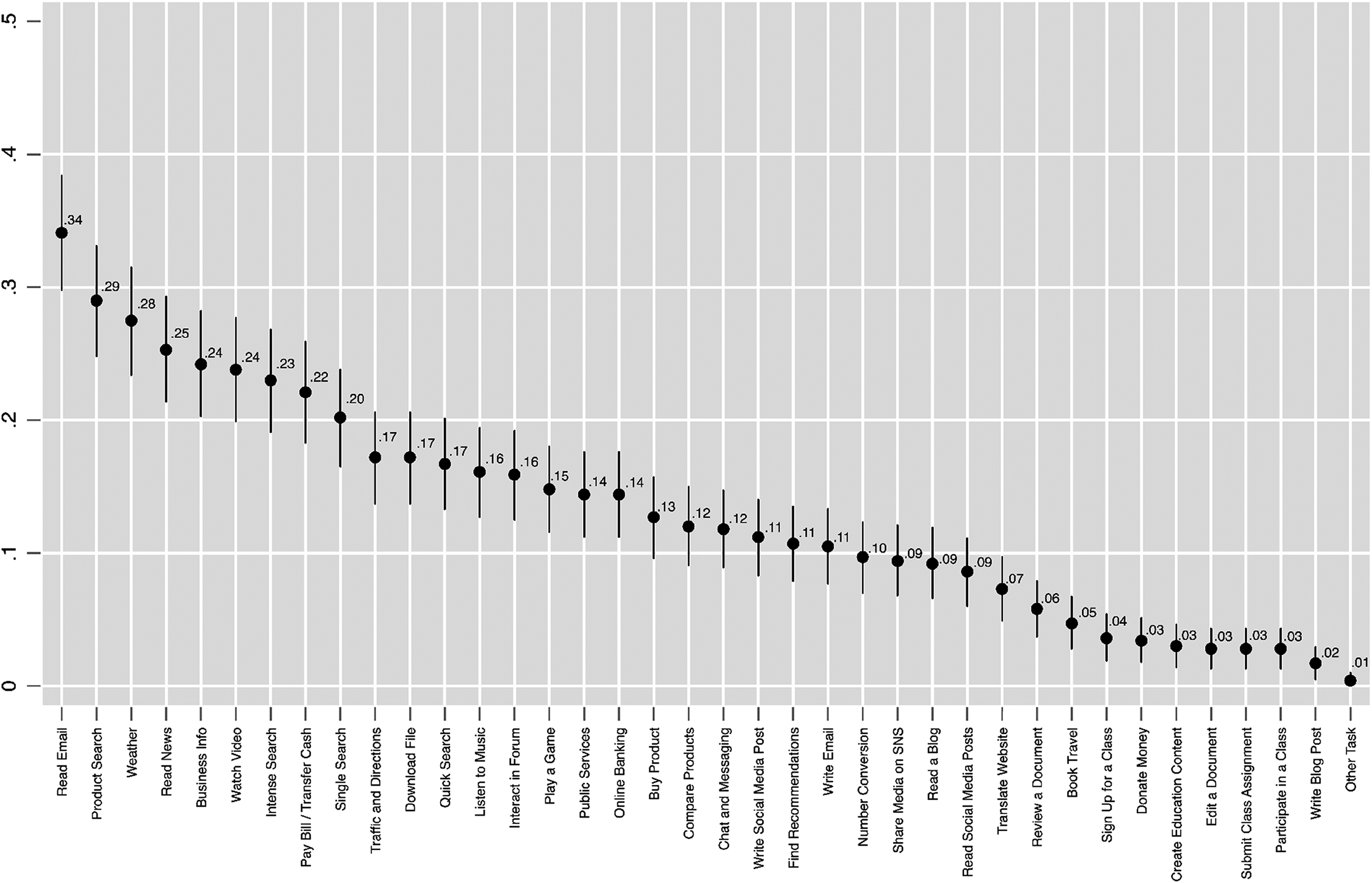
Top Tasks Point Estimates.
What is notable about Figure 1 is that mobile tasks typically associated with standalone apps tend to be among those most performed within mobile browsers. For example, among the top 10 most prevalent mobile browser tasks were as follows: reading emails (34%), checking the weather (28%), reading news (25%), watching videos or live stream content (24%), and paying bills or transferring money (22%). A sizable proportion of respondents also said they used their mobile browser to listen to music (16%), an activity that could be done in a dedicated mobile music app such as Spotify. Smaller proportions of respondents said they had recently performed tasks in their mobile browser like playing a game (15%), online banking (14%), using chat or messaging (12%), writing social media posts (11%) and writing emails (11%). Many of these tasks can be performed, and perhaps preformed more easily, in mobile apps that optimize user experience, yet our results suggested some users also conduct these tasks in their mobile browsers.
Unsurprisingly, respondents also indicated they were using their mobile browser to complete tasks browsers are uniquely designed for, like conducting product searches (29%). Around a quarter of respondents said they use their mobile browser to conduct intense searches, which involve searching for information on a topic of interest from multiple sources (23%). Other respondents said they use their smartphone browser to conduct single source searches (20%) and quick searches for bits of information (17%).
Tasks involving educational content were among the least performed with a mobile browser. For example, signing up for a class (4%), creating educational content (3%), submitting a class assignment (3%), and participating in a class (3%) all ranked among the least performed mobile browser tasks (see Figure 1). This, again, is perhaps unsurprising given the complexity of performing such tasks as creating educational content within a mobile browser. In answer to RQ1, up to one-third of respondents reported using their mobile browser to conduct at least one web task that is typically associated with mobile browsers (e.g., information search, intense search, product search), but also to conduct tasks readily performed in standalone apps (e.g., listening to music, playing games, checking email).
RQ2 investigated whether demographic factors could predict whether smartphone users turn to mobile browsers rather than dedicated applications to conduct web-related tasks. To keep the survey brief and reduce fatigue, we only asked about two demographic factors—gender and age—and the respondent’s country of residence, which was restricted to the US and Canada due to the original business scope of the project being focused on users in those countries. We used these limited demographic variables, along with survey mode and preferred mobile browser, to predict four mobile browser top tasks that we assumed users could easily conduct within a dedicated mobile app: reading emails, checking weather, reading news, and watching videos. Table 3 shows the results from four logistic regression models using each top task as a binary outcome.
Logistic regression analyses predicting top mobile browser tasks by demographic variables.
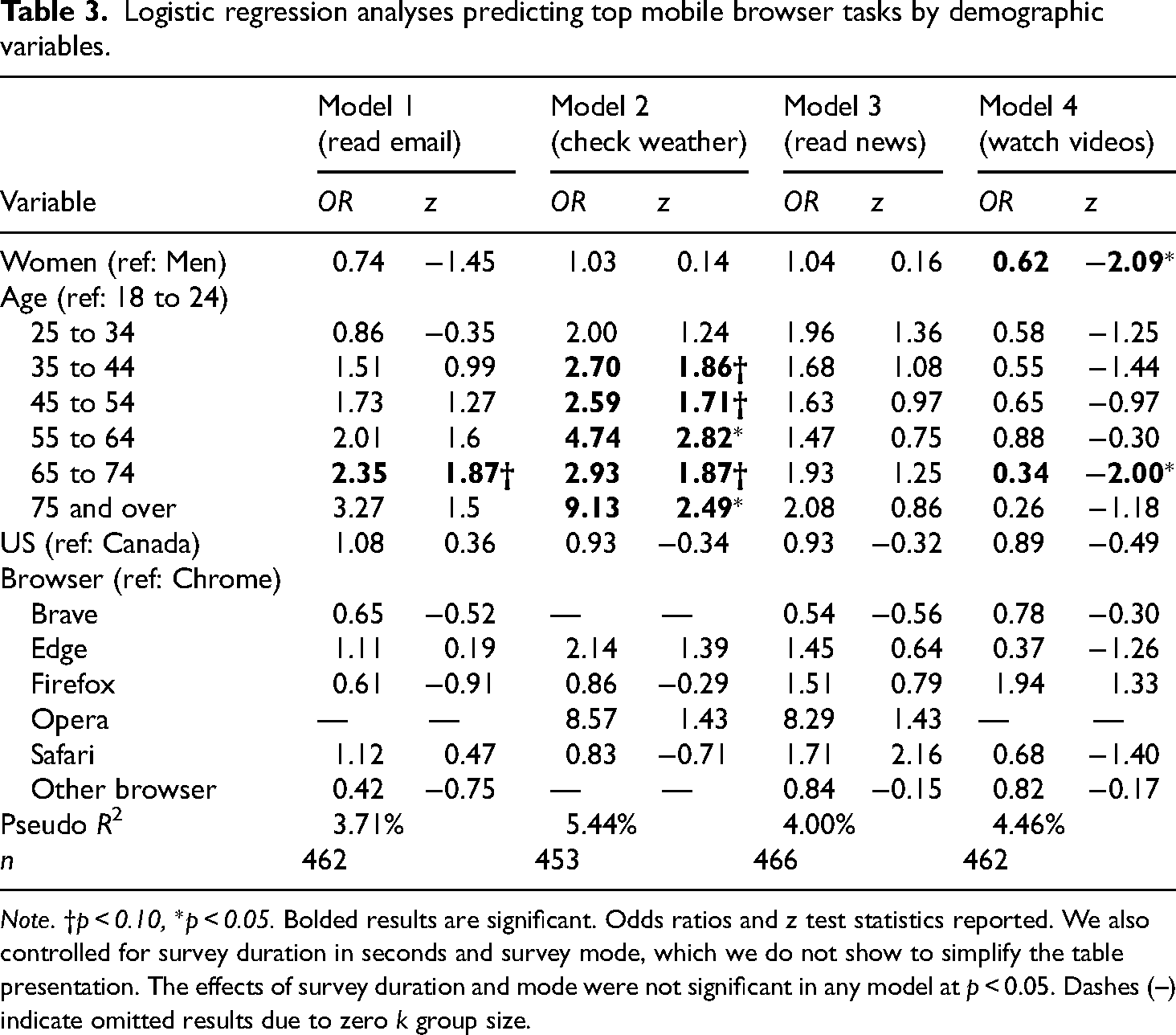
Note. †p < 0.10, *p < 0.05. Bolded results are significant. Odds ratios and z test statistics reported. We also controlled for survey duration in seconds and survey mode, which we do not show to simplify the table presentation. The effects of survey duration and mode were not significant in any model at p < 0.05. Dashes (–) indicate omitted results due to zero k group size.
In Table 3, we can observe that very few demographics predicted performing a task in a mobile browser. Perhaps the most consistent demographic predictor across tasks was age, with older respondents aged 65 to 74 being marginally more likely to read email in their mobile browser compared with those aged 18 to 24 in the excluded reference group (OR = 2.35, p < 0.10). Similarly, respondents aged 35 to 44 (OR = 2.70, p < 0.10), 45 to 54 (OR = 2.59, p < .10), 55 to 64 (OR = 4.74, p < 0.05), 65 to 74 (OR = 2.93, p < 0.10), and 75 and over (OR = 9.13, p < 0.05) were all more likely than 18- to 24-year-olds in the excluded reference group to use their mobile browser to check the weather forecast. With regard to watching videos (Table 3, Model 4), a reverse pattern was found, with respondents aged 64 to 74 (OR = 0.34, p < 0.05) being less likely to use their mobile browser to watch videos compared with 18- to 24-year-olds.
There were minimal gender effects across models. However, women were significantly less likely to watch videos in their mobile browser compared with men (OR = 0.62, p < 0.05). No differences in performing the four mobile browser tasks were found with respect to the respondent’s country of residence (US or Canada) or preferred mobile browser (e.g., Chrome).
In response to RQ2, we found that the demographic factors we examined were not consistently predictive of these four mobile browser tasks. That acknowledged, respondent age appeared to be an exception. Older respondents were more likely to use their mobile browser to perform tasks like reading emails and checking weather forecasts compared with those aged 18 to 24, while the reverse was true for watching videos.
Discussion
The TTA analysis demonstrated that up to one-third of smartphone users reported utilizing their mobile web browsers to perform tasks that browsers were designed to do (quick web searches), and several other tasks that mobile content providers would probably prefer users to perform within their apps (listening to music, composing emails, etc.). Based on a series of logistic regressions, we found that older respondents were more likely to engage in these tasks within their mobile browsers, but age was not a consistent predictor across all logistic regression models. Model pseudo R2 values ranged from 3.71% to 5.44%, suggesting that models had limited predictive value. Taken together, and given the relatively small n for each model, it is possible that more statistical power was needed to reject true null effects. Ideally, we would have included more demographic factors that were potentially predictive, such as respondent income and self-reported technological skill. However, given the lengthiness of the top task item list, we eschewed these demographics in favor of a more succinct survey.
Study 2
Method
Instrument and data collection
Study 1 demonstrated that a sizable proportion of survey respondents—up to 34%—were using their mobile browsers to conduct tasks readily conducted in a standalone app, but we wanted to know why people performed such tasks within their browsers. To answer our third research question (RQ3) about why people use mobile browsers rather than apps, we conducted a semi-qualitative study between October 19 and 21, 2021 (n = 101 new participants) on UserTesting (www.usertesting.com), an online platform designed for researchers to conduct user feedback studies. UserTesting consists of an opt-in participant pool in which people complete brief tasks in exchange for a small monetary incentive.
For our purposes, we deployed a remote unmoderated interview study on UserTesting that consisted of four questions that asked respondents about their preferred ways of performing the three tasks identified in Study 1 as among the most executed in mobile browsers: watching videos, reading emails, and checking weather forecasts. Remote unmoderated interviews are conducted asynchronously and do not require a live interviewer. Instead, participants are asked to follow written instructions and to provide verbal feedback explaining the reasons for their answers. As a quality check, we also asked participants to verbally explain their subjective understanding about what a web browser on their smartphone is, and asked them to provide a list of the three websites they had most recently visited on their mobile browser.
Each participant was expected to spend about 5 min on the study. Participants were instructed to walk through visual, on-screen examples of completing each of the three activities and then verbally explain their selections to closed-ended questions. All sessions were video recorded and accessible to the researchers for further analysis once the data collection was complete.
For consistency with the preceding survey, we again recruited American and Canadian participants. Participants could take the study on their mobile phone (51.5% did so) or on a laptop or desktop computer (48.5%, see Table 4). While the interview questions and verbal think-aloud were exclusively focused on mobile tasks, we explicitly recruited participants to complete the study on either a mobile phone or a laptop or desktop computer. This decision was intended to identify potential biases introduced by the instrument. Specifically, including desktop respondents in Study 2 allowed us to learn whether people could differentiate between desktop and mobile browsers and to confirm that they were accurately distinguishing between the tasks they conduct via either a computer or mobile platform—a potential quality threat to Study 1. All participants were screened for using browsers on their mobile phones, independent of participating in the study on desktop or mobile devices. After 2 days of data collection, we obtained a total of 101 recorded videos, each between 1 and 6 min in length, including participants’ audio comments and screen recordings. We did not record any video showing participants faces, gestures, or environments to preserve the anonymity of the participants.
Descriptive statistics for unmoderated user interviews.
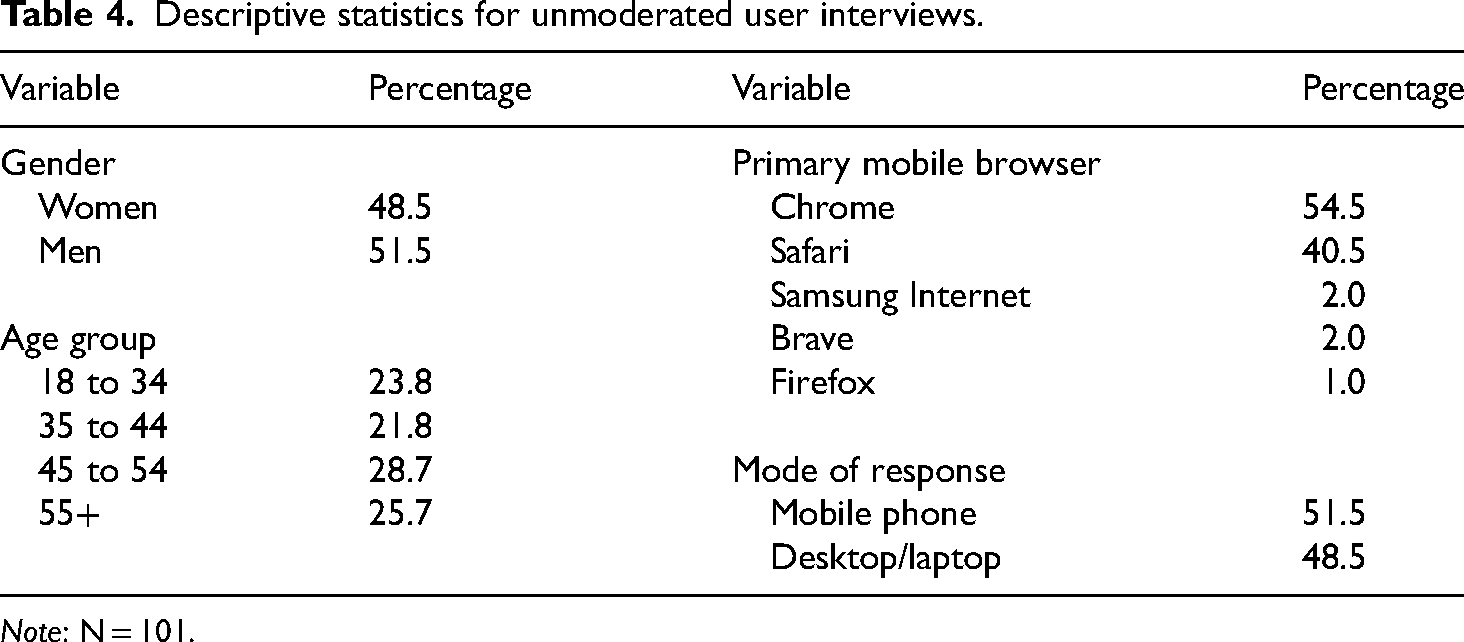
Note: N = 101.
Data analysis and validity checks
While UserTesting provides basic descriptive statistics to analyze quantitative data, such as participant responses to closed-ended, multiple choice questions, we took advantage of having recorded session videos for each participant and checked each recording for both data integrity (i.e., did the single choice question selection a participant made actually match their verbal comments?) as well as their verbal answers to the open-ended questions (e.g., reasons why certain tasks were done in the browser instead of apps; names of the three most recently visited websites on their mobile browser). Each discrete answer selection and verbatim response was manually entered into a spreadsheet, along with participant demographics (gender, age group, location).
Coding and categorization of verbatim responses
After all the data had been manually entered into a spreadsheet, we looked at the verbatim responses to each of our four open-ended questions, examining the reasons why participants checked their email, watch video content, and checked weather information in their mobile browsers. We applied the constant comparative method to code and categorize the data (Creswell & Poth, 2017, pp. 85–86; Glaser, 1965). Going through each record, response by response, we first identified the answers that did not provide further context. We then reviewed all additional open answers and coded by comparing answers to one another, identifying common patterns of responses as we went through the list. Answers that clustered together we assigned to higher-level categories before generalizing the categories. Finally, we counted all individual answers that would fit into those categories. Since all open-ended question content was rather brief—with very few respondent replies consisting of more than one or two full sentences—these steps turned out to be quite straightforward. For responses that included more than one reason to the open-ended “why” questions, we split the answers and assigned them to more than one category.
Results
Table 5 shows that about 20.8% of participants reported that they mainly use their mobile web browser to watch videos, with 17.8% saying they mainly use their mobile browser for checking weather, and 4.0% for reading emails. Furthermore, 31.6% of interview participants reported that they at least use a mix of dedicated apps and their smartphone browser to read emails, while 39.6% use a mix of apps and their browser to check weather forecasts, and 66.3% mentioned they sometimes use their smartphone browser to watch video content. These results were generally consistent with the survey findings in Study 1 and indicated that the survey results were not due to participants having difficulties understanding the survey context or questions.
Frequency of conducting three distinct web tasks in a mobile browser versus apps.
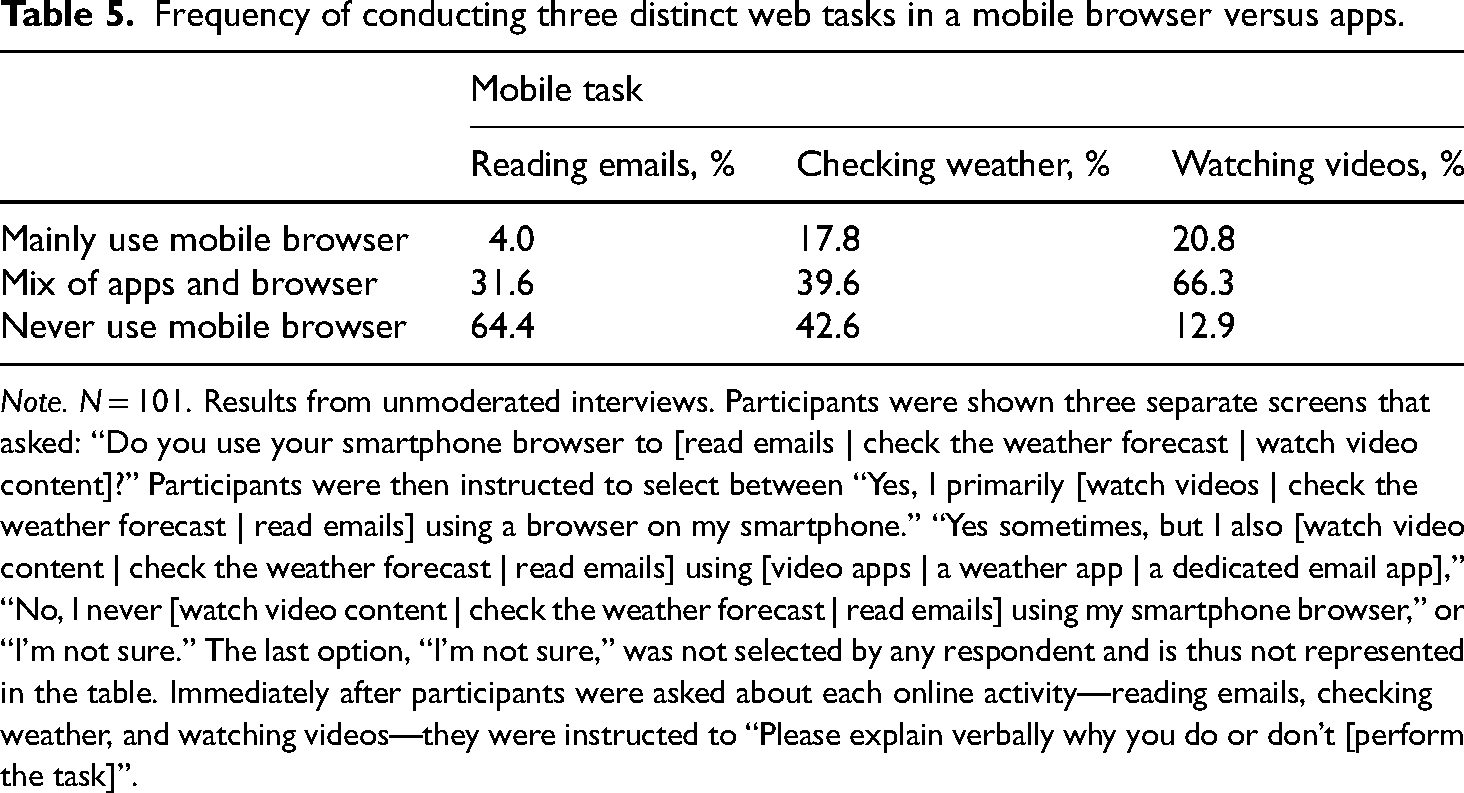
Note. N = 101. Results from unmoderated interviews. Participants were shown three separate screens that asked: “Do you use your smartphone browser to [read emails | check the weather forecast | watch video content]?” Participants were then instructed to select between “Yes, I primarily [watch videos | check the weather forecast | read emails] using a browser on my smartphone.” “Yes sometimes, but I also [watch video content | check the weather forecast | read emails] using [video apps | a weather app | a dedicated email app],” “No, I never [watch video content | check the weather forecast | read emails] using my smartphone browser,” or “I’m not sure.” The last option, “I’m not sure,” was not selected by any respondent and is thus not represented in the table. Immediately after participants were asked about each online activity—reading emails, checking weather, and watching videos—they were instructed to “Please explain verbally why you do or don’t [perform the task]”.
Our third research question (RQ3) investigated the reasons smartphone users gave for using mobile browsers to conduct certain web-related tasks instead of, or in addition to, standalone applications. Table 6 shows the specific reasons interview participants gave for using mobile browsers to complete selected web tasks. We have grouped the responses in the table by task. In this table, the unit of analysis shown is the participant statement. Since participants may have stated multiple reasons for completing a particular task in their mobile browser, responses were not mutually exclusive. As such, the sum of reasons participants stated for completing a given task in their mobile browser may be greater than the number of participants interviewed.
Reasons for conducting mobile browser tasks mentioned in unmoderated interviews.
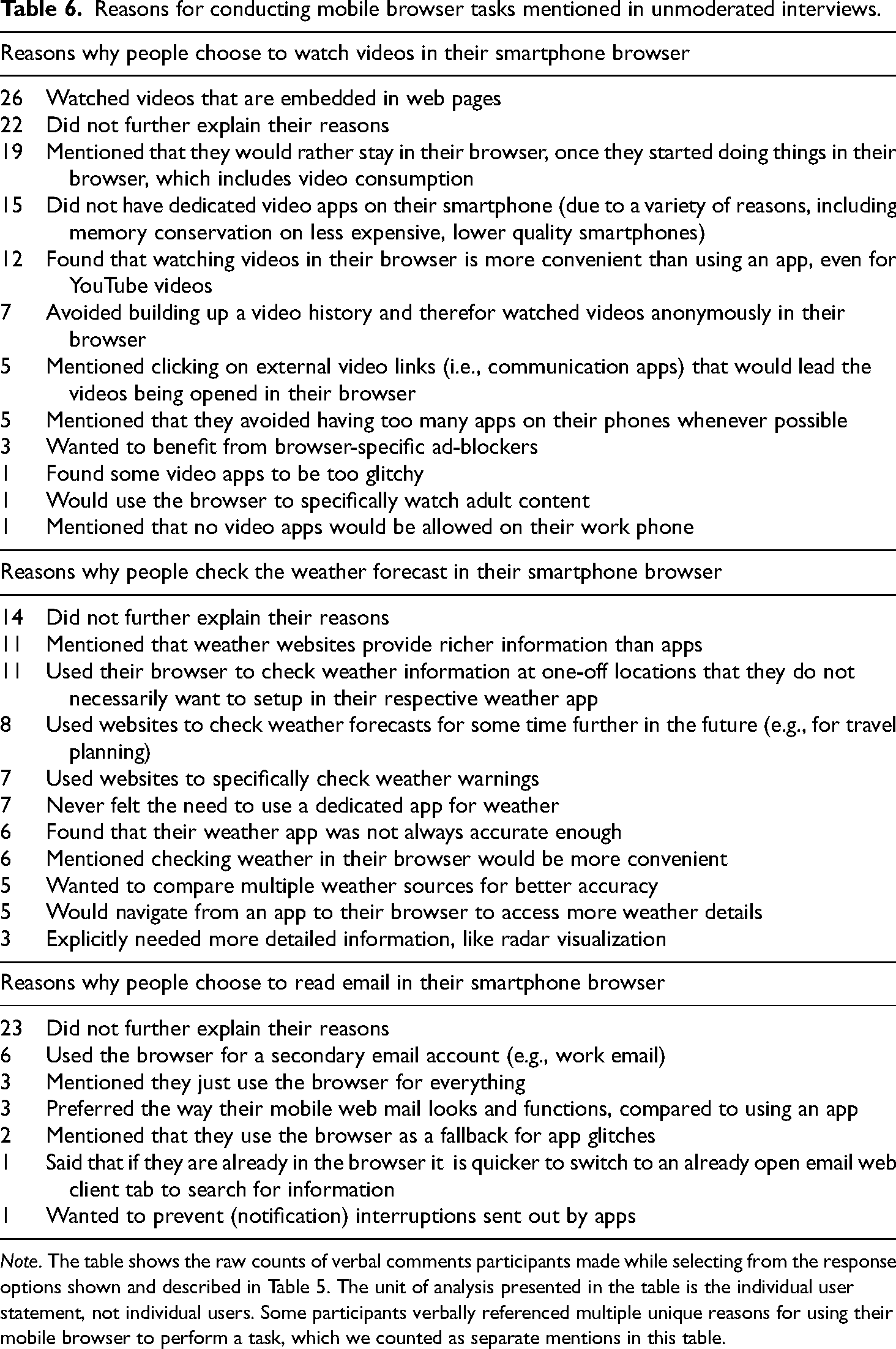
Note. The table shows the raw counts of verbal comments participants made while selecting from the response options shown and described in Table 5. The unit of analysis presented in the table is the individual user statement, not individual users. Some participants verbally referenced multiple unique reasons for using their mobile browser to perform a task, which we counted as separate mentions in this table.
Watching videos on a smartphone browser
Out of the three tasks we included in this study, watching videos was by far the most common task participants said they were performing outside standalone video applications. We identified a total of 11 reasons why people preferred watching videos in their smartphone browsers, as opposed to using a dedicated video application (see Table 6).
The most prominent explanation participants gave for preferring mobile browsers over apps for video was watching videos that are embedded in websites (n = 26), followed by participants stating that once they are active in their browser, they would rather stay there, instead of being redirected to an external app just for a video (n = 19). An additional 15 respondents said that they did not have dedicated videos apps on their smartphone at all for a variety of reasons including memory conservation on less expensive, lower quality mobile handsets that may have limited storage capacity for apps. Several respondents (n = 12) also mentioned that they found video consumption (including YouTube) more convenient within their browser compared to apps. Other reasons given included the use of specific browser features such as anonymous browsing (n = 7) or video ad-blockers (n = 3). Notably, some of the reasons provided did not suggest that users preferred video consumption to exclusively happen in their mobile browser, but many did indicate a practical need for optimized video consumption capabilities in mobile browsers.
Checking weather forecasts on a smartphone browser
Nearly one-fifth of study participants reported checking weather information using mainly their smartphone browser (Table 5) and another two-fifths said they use a mix of dedicated weather apps and their browser, but why? To this end, participants suggested that weather information presented in dedicated apps was sometimes not rich enough (n = 11). Other participants said they checked the weather in their browsers whenever they needed one-off weather information for locations that they would not specifically set up their weather app for, or to get information about a location being visited further into the future (e.g., for extended travel planning) (n = 8). Additional reasons for using a mobile browser to check the weather were relatively evenly distributed, such as respondents accessing web resources specifically for weather warnings (n = 7), more accurate information (n = 6), to make it easier to compare between multiple sources (n = 5), or to get more detailed information after having reviewed weather in an app (n = 5).
Reading emails on a smartphone browser
Over one-third of unmoderated interview participants said that they used mainly their mobile browser or a mix of their mobile browser and dedicated apps to read email (Table 5). A portion of participants who stated that they would at least sometimes use their smartphone browser to access emails did not explain why that was (n = 23). However, among those who provided a reason, the most prominent was using the mobile browser to have access to some type of a secondary email (e.g., a work email account) (n = 6). Other participants reported just preferring the way their webmail sites looked and functioned compared with an app (n = 3), or that they were trying to just use their smartphone browser for everything to, among other things, conserve memory on their memory-strapped devices (n = 3).
Discussion
In our remote interviews, we explored the specific reasons why smartphone users perform activities within their mobile browsers that are typically associated with standalone mobile applications. We analyzed 101 individual remote interview recordings and found that respondents articulated a multitude of reasons for choosing mobile web browsing over dedicated applications. Below we summarize the responses by grouping them more broadly into four, higher-order themes:
Wanting browser-specific tools (e.g., using private browsing mode to prevent a search history from building up, eliminating advertisements with an ad-blocker), Wanting content-specific features (e.g., perceiving richer or more accurate web-based information, accessing website-only functions not available in apps), Improving workflows (e.g., avoiding context switching between a mobile browser and apps, keeping workstreams separated, enhancing perceived convenience), Sidestepping technological limitations (e.g., working around limited device memory to store apps particularly on inexpensive or outdated phones).
In response to RQ3, the overarching motivation to use mobile browsers to perform web tasks that could be easily completed in standalone apps was about increasing their level of control. Participants said they wanted browser- or content-side features (e.g., ad-blocking, privacy enhancements, full website functionality) that allowed for better management of their personal data and the information they viewed. Participants also expressed the need to use their browser as a kind of Swiss Army Knife to navigate between multiple web properties that offer standalone apps, better organizing and maintaining their workflows. Participants with less expensive, lower quality handsets also used their mobile browser as a catch-all, storage-preserving app to exercise control over accessing content and completing tasks, since without a browser such activity would be impossible.
The unmoderated remote interviews on UserTesting proved to be an effective method for examining RQ3, as well as partially replicating and checking the validity of the Study 1 survey results. We were able to receive qualitative feedback from over 100 participants within 2 days. However, this approach was not without several limitations. For example, UserTesting provides an opt-in participant pool and does not allow recruitment of participants in a probabilistic fashion from a general population, which may bias results in unknown ways. We were also concerned after conducting the interview study that our sample of U.S. and Canadian participants was too culturally homogenous. Both nations are Western, educated, industrialized, rich, democracies (WEIRD; see Henrich et al., 2010), and thus participants may be particularly unrepresentative of smartphone users in general. Consider for a moment non-WEIRD and developing countries. It may be the case that there are more individual- and system-level constraints placed on mobile device ownership among users in developing countries, such as more pervasive income inequality, which prevent individuals from purchasing flagship smartphones with the storage capacity necessary to download and store apps, or simply limited availability of high-quality mobile handsets. Below we raise the possibility of new research to combat these limitations.
General discussion
In this article, we have explored whether smartphone users conduct web tasks commonly associated with standalone apps via their mobile web browser. We discovered that a non-trivial number of smartphone users (from around 3% to 34% of our survey sample) used their mobile web browser to conduct web tasks that could be readily performed in dedicated mobile apps (see Figure 1, Table 2). These tasks included listening to music, online banking, composing emails, and playing online games. What is more, our survey results indicated that older users were more likely than younger users to report performing certain tasks within their mobile browsers, particularly checking weather (Table 3). Reasons for using a mobile browser to conduct web tasks varied from the practical (e.g., perceived convenience, ad-blocking) to socially and possibly economically motivated reasons (e.g., privacy protections, conservation of limited smartphone memory). We argue these exploratory results have implications for information systems and technological adoption theories, for instance Davis’s (1989) TAM and Rogers’ (2003) DOI framework.
Davis’s “TAM is founded upon the hypothesis that technology acceptance and use can be explained in terms of a user's internal beliefs, attitudes and intentions” (Turner et al., 2010, p. 464), which include user perceptions of a technology's ease of use, perceived usefulness of the technology, attitudes toward use, and behavioral intentions (for a review, see Marangunić & Granić, 2015). The TAM model specifies that variables external to the user's perceptions of a particular technology may also impact how the user perceives a technology, which in turn may influence attitudes, behavioral intentions, and actual use (Davis et al., 1989). Our research highlights the importance of external variables that may precede endogenous TAM variables, such as perceived usefulness, and ultimately impact mobile browser implementation. For example, our interview results indicated that factors like income, which could relate to not being able to purchase a phone with the memory necessary to store apps, could shape how users adopt and use mobile browsers to access the web (Table 6). That is, exogenous model factors like age and income, which had an impact on the use of a smartphone browser rather than an app in certain contexts, must be accounted for when extending the TAM to mobile browser and application use.
Our results also apply to TAM's core endogenous variables, including perceived usefulness and ease of use of a technology. Multiple participants interviewed, for instance, noted the convenience of staying within their mobile browser to watch videos as opposed to always using a standalone video app like YouTube (Table 6). Participants also reported perceptions of improved accuracy in weather forecasting with the use of weather content accessed via a mobile browser. These findings provide a basis for future empirical investigations that directly apply the TAM to mobile browser use, as they suggest a need to further investigate the reasons why individuals perceive mobile browsers to be easier to use or more useful than apps. Such work could also improve on a limitation of the studies presented in this article by comparing relative perceptions of mobile apps and browsers. In this article, we focused only on browsers, but it may be more informative to understand how users select a modality in a side-by-side comparison.
Similarly, our results highlight the importance of accounting for system- and individual-level factors that shape variables within Everett Rogers' DOI framework. Rogers suggested that “early adopters,” a group of people among the first to adopt a new technology or product such as a mobile app, “have higher social status than do later adopters,” which is “indicated by such variables as income” (2003, p. 288). In the context of our study, app adoption appears for some users to be constrained by limitations on the income necessary to afford a mobile handset with enough memory to store multiple dedicated apps. This forces users to rely on a single app—their browser—to access content across multiple web domains.
Rogers also suggests that system-level constraints, such as a poor national economy or underdeveloped infrastructure necessary to support distribution of technologies such as high-quality, expensive mobile handsets could explain differences in the rates of technology adoption (2003, p. 120). We find it plausible that a greater proportion of users in developing countries would report facing difficulties with memory conservation on relatively low-cost and lower quality mobile handsets. Additional, cross-national research would be needed to examine this.
Another next step in this stream of research would be an empirical effects study designed to investigate differences in how users experience and are influenced by web content accessed via mobile browsers as opposed to apps. For example, lab experiments and mobile eye-tracking studies could examine how users perceive web content accessed via browsers versus apps, and whether the modality influences trust in the content, perceived value, and behavioral intentions to access the content in the future. One previous eye-tracking study compared how users cognitively attended to news content delivered on desktop browsers, mobile browsers, and mobile apps, finding that users spend more time attending to content in a mobile app than in a mobile browser, although news delivered on mobile browsers generally has broader audience reach, being viewed by more users than the same content delivered on an app (Dunaway et al., 2018, p. 117). Future studies could use eye-tracking technology to compare how individuals cognitively attend to content displayed in mobile browsers versus apps across a variety of non-news topical domains including product search, shopping, banking, and video consumption.
It is significant to note that in our unmoderated interviews several users mentioned that certain mobile browser features such as ad-blocking and private mode were reasons for preferring a mobile browser to an app (Table 6). Web content accessed via mobile browsers or standalone apps can intrude on user privacy (Leung et al., 2016). However, privacy-focused mobile browsers like Firefox, DuckDuckGo, and Brave afford users real advantages over standalone apps in that such browsers offer users native privacy-enhancing and ad-blocking features that apps do not necessarily offer. App developers often depend on collecting user data to generate advertising revenues (Rafieian & Yoganarasimhan, 2021) and therefore may not have intrinsic incentives to enhance user privacy compared with companies that make privacy-focused mobile browsers. Future research investigating the impact of conducting web tasks within mobile browsers versus applications could focus specifically on user privacy perceptions.
Importantly, this article provides industry professionals including user researchers, product managers, and visual designers a starting point for understanding how users experience the mobile web. One practical implication of our work is that not all users experience web content through the same medium, therefore designing content (especially email, news, weather, videos, banking, and educational content) for mobile browser users may improve the overall product experience. Note that participants interviewed in Study 2 suggested that native browser features like ad-blocking and user interfaces that offer a richer web experience with more controls were reasons for preferring a mobile browser for certain tasks (Table 6). Our results highlight the importance of optimizing content to be experienced in both applications and mobile browsers.
The studies presented in this article have several limitations that are important to acknowledge. First, while Cint attempts to achieve a robust sample through extensive geographic reach and demographic diversity among respondents (Cint, 2021), there is no way to determine the degree to which opt-in, nonprobability panels represent an underlying population. A comparative analysis conducted by Mercer and Lau (2023) suggests opt-in survey samples contain considerably more noise than true probability samples. Thus, the point estimates and confidence intervals shown in our Study 1 survey results should be interpreted with caution and treated only as preliminary indicators to be validated through follow-on survey studies. Second, online panel providers and marketplaces have come under scrutiny for “reselling” respondents who may be fatigued from taking multiple, back-to-back surveys, and may therefore be less attentive to new questions (Enns & Rothschild, 2022; Ternovski & Orr, 2022). We used a red herring question and monitored survey duration to identify and remove speeders from Study 1’s survey results, however, we did not use a direct mechanism to identify whether respondents were “resold” and fatigued. In addition, the survey sample size made it difficult to reject null coefficients in multivariate modeling—another reason to caution readers.
The results from our unmoderated interviews should also be treated with caution for some of the same reasons. For instance, we cannot claim unmoderated interviews are representative of all smartphone users or mobile browser users. Like Cint, UserTesting relies on opt-in participants, who may not be representative of wider populations. Nonetheless, the research presented in this article is inherently exploratory and ample opportunities exist to validate or invalidate these initial findings. This is only the first, exploratory step in discovering how and why smartphone users turn to mobile browsers in addition to apps to access web content and complete web tasks.
Footnotes
Funding
The authors received no financial support for the research, authorship, and/or publication of this article.
