




Abstract
The notion of students as co-creators of content in higher education is gaining popularity, with an ever-increasing emphasis on the development of digital media assignments. In a separate paper, the authors introduced the Digital Media Literacies Framework, which is composed of three interrelated domains: (1) conceptual, (2) functional, and (3) audiovisual, each of which defines a set of prosumer principles used to create digital artefacts. This framework fills a gap in the literature and is the first step towards the provision of a systematic approach to designing digital media assignments. This paper expands on the Digital Media Literacies Framework through the incorporation of Technological Proxies and proposes a taxonomy of digital media types to help educators and students to visualise the skills needed to complete Learner-Generated Digital Media assignments. A taxonomy of digital media types is presented considering the conceptual, functional, and audiovisual domains of the Digital Media Literacies Framework. The taxonomy spans a range of Learner-Generated Digital Media assignments, from the creation of an audio podcast to the complexity of blended media or game development. Implications of the taxonomy for teaching and learning in higher education are discussed.
Keywords
Introduction
Digital competence is a multifaceted concept which encompasses: (i) skills and practices required for using digital technologies in different settings (personal, learning, and professional), (ii) understanding the phenomena of digital technologies from individual and societal perspectives, and (iii) motivations for participating responsibly in the digital world (Ilomäki et al., 2016). Digital competences play a crucial role in current society as evidenced through digital technologies that shape the way we socialise, e.g. through Facebook (Madge et al., 2009) and MeetUp (Sessions, 2010); find job opportunities via LinkedIn (Archambault and Grudin, 2012); share resources via DropBox (Drago et al., 2012); event-following via Twitter (Weller et al., 2014); and collaborate online using Google Drive (Dekeyser and Watson, 2006). These technologies reshaped our everyday life as digital citizens.
In higher education, digital technologies made possible the implementation of Learner-Generated Digital Media (LGDM) assignments. The literature reports LGDM to be beneficial for student learning and developing skills such as teamwork, time management, conflict resolution, and so on (Hoban et al., 2015; Hobbs, 2017; Kearney, 2013; Nielsen et al., 2017). Instructional design models have been used to explain learning with digital media such as the Semiotic Theory (Hoban et al., 2015), the Self-Explanation Principle (Johnson and Mayer, 2010), and the Internalisation Model (Hobbs, 2017). Students gain knowledge by developing storyboards, representing the content using multimodality (audio, images, text, and video), and reinforcing their learning with the digital media production stage. However, it appears that little attention has been directed toward mapping competencies for digital media creation to help educators to implement LGDM assignments. Consequently, there is limited guidance for students as to what skills they will require to complete LGDM assessment tasks.
Educators across disciplines require an understanding of the different media types and the skills involved in its production. This knowledge is necessary due to: (i) effective student workload and marks allocation, (ii) the development of marking rubrics that assess digital media as part of communication skills, (iii) using the LGDM assignment as individual or group according to digital media type, and (iv) scaffold digital media literacies across the curriculum. These considerations are required, as the creation of LGDM can be a time-consuming process. From the students’ perspective, understanding the different media types and skills required for production will help them to plan and effectively choose if they can, the right media for their LGDM assignment.
This paper proposes a taxonomy of digital media types for implementation in LGDM assignments. The theoretical foundations are based on the Digital Media Literacy Framework (DMLF) (Reyna et al., 2017) and Technological Proxies (TPs) (Hanham et al., 2014), as discussed further in the next section. The taxonomy begins with a simple task, such as the creation of an audio podcast (Drew, 2017) to more complex tasks such as blended media (Hoban et al., 2015). The taxonomy aims to scaffold learning course content using LGDM in the classroom.
Theoretical foundations
The theoretical framework that underpins the taxonomy of digital media types for LGDM assignments is based on the DMLF and the concept of TPs (Hanham et al., 2014).
The DMLF is based on three domains (conceptual, functional, and audio-visual). The planning stage or storyboard (conceptual domain) is an industry standard practice for the effective production of digital media artefacts (Musburger and Kindem, 2012). The storyboard lays out all the essential elements of a digital artefact such as the script, images, audio effects, video sequences and shots, titles, and transitions (Carroll, 2014; Stockman, 2011). This step is crucial as it allows the designer/s to visualise how the story flows and what gaps may exist (Pallant and Price, 2015). Moreover, a storyboard ensures the information is precise and succinct and can inspire new ideas based on the content (Stockman, 2011). For example, if the task is to produce an audio podcast about respiratory tract infections, quality of content (evidence-based, accurate, and up to date) needs to be curated and prepared for an audio narration. In contrast, if the task is to produce an animation on the topic, the content needs to be prepared to take into consideration how visuals can reinforce the audio narration. For instance, the mechanism of action of viral particles can be explained visually, aided by narration. The animation could show how the virus invades the cells, replicates, and how the immune system responds. A second example, a task for students to produce a blended media presentation on Dabigatran (anticoagulant). As part of their storyboard (conceptual domain according to the DMLF), they had to consider: (i) what is an anticoagulant? (ii) what is the mechanism of action? (iii) what are the risks of taking Dabigatran? (iv) what is the state-of-art of the research on this drug? (v) what is next in the future development of anticoagulants? and (vi) conclusion. The more complex the digital artefact, the more laborious the process of preparing the storyboard. Producing a storyboard for an audio podcast is simple, as there is no need for visuals. In contrast, producing a storyboard for blended media will require creating multiple representations of content, usually a combination of audio, video, animation, images, transitions, and so on (Hoban et al., 2015).
The functional domain is based on the appropriate use of devices, software/applications, and programming/coding to develop digital media artefacts. Devices may include audio recorders, digital cameras, video cameras, mobile/tablets, and laptop/desktop computers. Software and applications include audio editing software (e.g. Audacity), image and graphics manipulation software (e.g. Adobe Photoshop), animation software (e.g. Adobe Animate), and video editing suites (e.g. Adobe Premiere Pro). Programming/coding includes applications to code such as programming text editors (e.g. Komodo Edit).
Finally, the audiovisual domain is related to the digital media principles that govern the production of engaging and credible content. Elements of the audiovisual domain include audio principles, layout design, colour theory, typography, use of images/graphics to convey the message (Hashimoto and Clayton, 2009; Malamed, 2015; Williams, 2014), and video principles such as rule of thirds, shooting techniques, use of tripod, and so on (Stockman, 2011). These domains need to be applied to each level of the taxonomy to produce an engaging and professional digital artefact. For example, an audio podcast will require knowledge on how to record, edit and produce audio, upload, and share on the Internet, e.g. Sound Cloud (Chamberlain et al., 2015). Creation of a blended media artefact, which is a combination of different digital media types such audio, pictures, transitions, video, animated text, or graphics, will require the use of a more extensive set of skills (Starkey, 2007).
A second theoretical construct for the taxonomy of LGDM is the concept of TPs (Hanham et al., 2014). A characteristic of many digital technologies is that they perform important tasks on behalf of the user. Examples of TPs include statistical packages (SPSS, M-Plus), text summarisation tools (Text Compactor, SMMY, Free Summarized), plagiarism software (Turnitin, Quetext), search engines (MEDLINE, Google Scholar), citation manager software (EndNote, RefWorks), and Grammarly (English language writing-enhancement platform). TPs can help students to achieve specific learning goals related to the type of tool, e.g. analysing data using statistical software. A student who use these technologies to perform a task and learn from the process are classified as intentional learners as they consciously control their learning experience (Vosniadou, 2003). In contrast, a non-intentional learner will use the technology as a functional aid without learning new skills in the process to achieve a performance outcome (e.g. saving time or getting high marks). Consequently, Hanham’s definition of TPs (Hanham et al., 2014) has two dimensions from the approaches of learning perspective (Prosser and Trigwell, 1999), deep (intentional) and surface learning (non-intentional).
In the production of LGDM assignments, devices (audio recorders, digital cameras, video cameras, mobile phones/tablets, laptop, and desktop computers) and digital media production software often function as TPs. To further extend the concept, it is necessary to discuss how digital versus analogue reshapes that way digital media content is created. In the past, using analogue technologies was more time-consuming and somehow ‘lock away’ some key aspect of the production process. For instance, before digital cameras, photographers or videographers were not able to see their work on the spot (Buckingham, 2007). With an analogue camera, the photographer needed to go to the darkroom before being able to evaluate and reflect on the images. With the ability to see the picture on the screen with a digital camera, this process became more reflective on the spot. In this case, the digital camera screen acts as a TPs for the users, avoiding the need to go to the darkroom and facilitate the production workflow. Regarding video production, previous generations of video cameras did not have a screen to review the shot and required the camera person to go to a studio to look at the footage. If the videographer was not happy with the lighting, types of shots captured, it will be a need to reschedule the filming. If it were, for example, an event, the videographer would need to work with the limitations of the material captured.
Another example of TPs for digital media can be considered removable memory. In the ‘90s, the video was recorded on tape (MiniDV) and required to be encoded to the computer, and it took longer. With removable media, the videographer will plug it into the computer and play instantly without the need of encoding. The memory card is performing the task on behalf of the user. If we compare the analogue recording of voice using a tape recorder versus digital recording with a computer, with analogue it was required to record the content several times until it was acceptable. When using computers and an audio editing software such as Audacity, we can continue recording and delete segments not desired and add audio fade in and out and additional sound effects. In other words, the evolution of digital media equipment and tools (software and applications) make them behave more like a TPs.
We posit that digital media equipment and tools in the production of LGDM be Intentional Technological Proxies (ITPs). They become the driver to understand the subject content and not only performing a task on behalf of the user. To further extend this view, in LGDM assignments in Science education, students are given a topic to investigate and produce a storyboard as part of the assignment. Production of digital media in learning settings cannot have a surface approach as students require the planning of production of content based on their topic and storyboard before moving to a multimodal representation of the content using these ITPs. Students will receive feedback from their lecturer on their storyboard content before they engage in the production stage (Reyna et al., 2017). Without a script or storyboard, it will be almost impossible to visualise what content needs to be produced. In other words, in well-designed LGDM assignments, digital media equipment and tools are the vehicles for the students to develop a multimodal representation of content, and with this, learning the course content (Hoban et al., 2015). In everyday settings, digital media production equipment and tools as TPs can have both dimensions discussed before, deep and surface approach (Prosser and Trigwell, 1999), especially if the aim is entertainment or recreation. In contrast, in LGDM assignments, a poorly developed video or blended media will compromise the quality of learning and the marks attained.
To further illustrate ITPs, environmental science students are asked to produce a blended media about ‘rip currents’. After producing the storyboard and receiving feedback from the subject expert, students may go to the beach and take pictures of the ocean with a digital camera in different locations. The digital camera will act as ITPs as they can browse the images as many times as possible and learn how to recognise the different types of rip currents. They may remove the storage from the digital camera and plug into a laptop for a large view. These devices (digital camera and laptop) perform a task on behalf of the students, as they do not need to go to a darkroom and process the images. They enable learning and reflection on the spot. For example, if images were not clear enough, they will retake pictures. If they used an analogue camera, the process would be locked-away, as they will need to go to the darkroom or send the negatives for development. Not until they see the printed images, they will not be able to evaluate if they capture the rip currents. They may use an animation software to explain how these rip currents are formed in the ocean. They may record a video footage pretending one of them experienced a rip current. In this example, due to the nature of the task (storyboard had feedback from a subject expert), students used a digital camera, animation software, and video camera as tools to enable deep learning. They need it to visually prove they understood the process of rip currents with the LGDM assignment. This multimodal representation of content will help them to learn the subject content (Hoban et al., 2015). So, these technologies (photography, video, and animation) are ITPs and a vehicle for the students to learn and reflect on the course content.
A second example, pharmacology students are asked to create a blog post suitable for the general public on different topics (study drugs, drugs for abortion, anticoagulants, and antipsychotics). They researched the evidence-based literature on their topics (scientific journals and books), produce a storyboard, and submit for expert feedback. After receiving the feedback, students will move to a multimodal representation of their assigned topics. For example, some students will use animation software (e.g. Powtoon) to represent the pharmacokinetics of the drug in the human body. Before representing the content, students will need to have a clear understanding of the process. While creating the assets for the animation, and representing the knowledge visually, they are reinforcing their learning of the topic, and the animation program becomes an ITP.
A third example, midwifery students were asked to create an informative brochure on the prevention of diabetes suitable for the general public. Like the previous cases, after the storyboard is created, revised by the content expert, and feedback provided, students will move to a visual representation of the information. They will choose a graphic design software (Microsoft Publisher, Adobe Photoshop, and Adobe Illustrator) to create the brochure layout and required graphics. These programs become ITPs, as it will help students to reinforce and reflect on what they learnt. In LGDM assessments, TPs move beyond functionality; their real value is in their capacity to be a vehicle to promote learning by multiple representations of content.
In summary, the theoretical foundations for the taxonomy of digital media types for LGDM assignments are (i) the DMLF and (ii) the ITPs. A close relationship between both constructs will be further extended in the following section.
Taxonomy of digital media types
The primary proposition of this paper is a taxonomy of digital media types for LGDM assignments based on skills required (conceptual, functional, and audiovisual). From a creation of an audio podcast, which relatively eases to produce (Drew, 2017), to the sophistication of blended media or game development. The digital media creation process is a higher order thinking task as students need to design, formulate, create and consider application, implication, and reflection on what they have learnt (Biggs and Collis, 2014). When students engage effectively in a LGDM assignment on any given topic, they should analyse, apply, compare, relate, hypothesise, and reflect on the content (conceptual domain). With the effective use of functional and audio-visual domains, the digital artefact will be effective to communicate the message to the audience.
A summary of the learning workflow using LGDM is presented in Figure 1, featuring the DMLF and ITPs discussed previously, and the proposed taxonomy of digital media types. These theoretical foundations are included in the area delimited by dot lines. The yellow rectangle represents the starting of the task with the conceptual domain (storyboarding). The light blue rectangle represents the functional domain and the ITPs. Finally, the green rectangle represents the audiovisual domain (digital media principles). In the creation of LGDM, students start the task developing a storyboard (conceptual domain), then they select the media type and the ITPs to be used for the task. In the process of creating the content, they apply the audiovisual domain (digital media principles). The importance of the digital media principles to enhance the message of a digital artefact will be discussed in an upcoming paper. The second section of the workflow (solid line) showcases the taxonomy of digital media types mapped against skills/competencies required in the three different domains. We will extend the concept to the different media types in the following subsections using C1 (conceptual), F1 to F7 (functional), A1 (audio principles), and AV1 to AV5 (audio-visual) from the Figure 1.
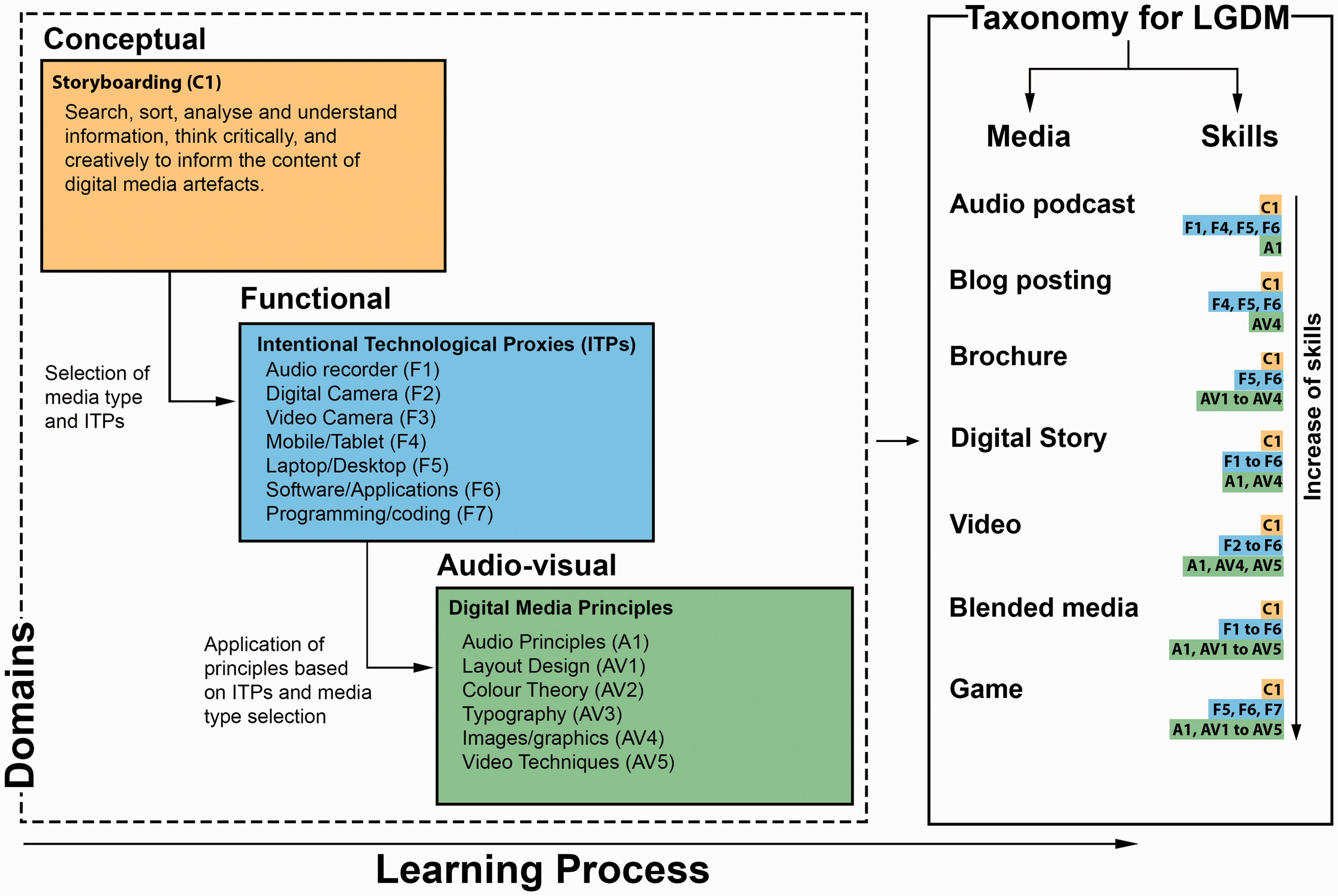
Learning workflow using Learner-Generated Digital Media (LGDM) assignments.
Audio podcast
An audio podcast is a recording that can easily create and distributed online. Users can download them into their devices of choice such as mp3 players, tablets, computers, and smartphones (Drew, 2017). The first step to produce an audio podcast will be the creation of content or storyboard (conceptual domain) (C1). Audio podcasts can be produced using a variety of devices from audio recorders (F1) to smartphones, tablets (F4), and laptops/desktop computers (F5) (Geoghegan and Klass, 2008). If using laptop/desktop computer, Audacity software or another application will be required to be installed on PC/Mac to record an audio file (Lunt and Curran, 2010) (functional domain). In this case, the audiovisual domain will be replaced by an audio domain (audio principles) (A1), as there are no visuals involved in an audio podcast. Users can take a simple approach to recording an audio file at once without any editing; it may take few takes. However, if they decide for a more polished product and include background music, sound effects, easy in/out, and so on, they will require the use of audio editing software.
Blog posting
A blog is a platform that allows people to communicate, share, collaborate, and interact online, and it has been used in educational settings for more than 10 years (Angelaina and Jimoyiannis, 2012). The content of the blog post needs to be written (conceptual domain) (C1). Skills such as writing succinctly, chunking information, use conversational language to engage the audience will be required (Felder, 2011). The user will need to access the Internet via mobile/tablet (F4), laptop/desktop (F5), and a software/application (F6) to place the content. Examples of applications for blogging include WordPress (Hedengren, 2012), Wix (Kennedy and Charles, 2009), Weebly (Roe, 2011), and so on (functional domain). Users may embed images/graphics (AV4) to illustrate the post further and decide the font type and size (typography) (AV3) (visual domain). They will not need to program/code in HTML, JavaScript, or any other computer language, as the interfaces are now WYSIWYG (What You See Is What You Get). Although, the ability of coding could enhance the task.
Brochure
In graphic design, a brochure is an informative document that has different types of pamphlets, leaflets, DL flyers, poster, and so on (Williams, 2014). Brochure design as a pedagogical agent has not been explored extensively (Whittingham et al., 2008). In this case, after developing the content for the brochure (conceptual domain) (C1), the student needs to use laptop/desktop computers (F5) and graphics software/application (F6), such as Photoshop or Illustrator (Weinman, 1999), Microsoft Publisher or Word, GIMP (open source) (Kylander and Kylander, 1999), or any graphic design application (functional domain). Additionally, a basic understanding of visual design principles such as C.R.A.P (Contrast, Repetition, Alignment, and Proximity) (Williams, 2014) is required. Knowledge in layout design (AV1), colour theory (AV2), typography (AV3), and effective use of images/graphics (AV4) will be relevant as well (Malamed, 2015) (visual domain). Applying the visual domain will simplify the message, ensure legibility, and increase audience engagement (Hashimoto and Clayton, 2009; Malamed, 2015; Williams, 2014).
Digital story
The digital story can be defined as a combination of audio narration and still images to communicate an idea or viewpoint (Hoban et al., 2015). A digital story can include background music and sound effects. After developing the content for the digital story (conceptual domain) (C1), the student will need an audio narration file (F1), a set of images or slides (F2), and to match each of these images/slides to explain a concept (Dreon et al., 2011). Stop-motion is an animation technique that manipulates an object so that it appears to move on its own and it is considered in this category as well (Hoban et al., 2015). The student needs to take a sequential set of images and bring them together using a mobile/tablet (F4), laptop/desktop (F5), and software/applications (F6) such as Windows Movie Maker (PC) (Xu et al., 2011), iMovie (Mac) (Kearney and Schuck, 2003) or PowerPoint (Ruffini, 2009). Additionally, there is a wide range of Web 2.0 tools (Solomon and Schrum, 2007) and mobile applications (F6) for this purpose (functional domain). The audiovisual domain will be applied choosing quality images regarding resolution and composition (AV4), music background, and sound effects relevant to the content (A1), thereby triggering emotional reactions in the audience for maximum impact (Malamed, 2015).
Video
A video is a sequence of images to form a moving picture (Stockman, 2011). Video has been extensively studied in the educational context as a way to deploy blended learning materials (Bonk and Graham, 2012; Garrison and Vaughan, 2008). Recently, with the affordability of digital technologies, students are becoming co-creators of content with video assignments (Hoban et al., 2015). A video will require a more complex storyboard to ensure that it is succinct and engages the audience (Pallant and Price, 2015; Stockman, 2011) (conceptual domain) (C1). The operation of a video recording device such as a digital camera (F2), video camera (F3), a mobile/tablet (F4), and laptop/desktop (F5) (functional domain) will be required. Audio recording (A1) may also be required, e.g. special sound effects, deciding the type of shots (long, medium, and close-up shots) (AV4), rules of thirds when framing, use of a tripod, lighting, and so on (AV5) (audiovisual domain). The production or editing phase will require editing software such as Windows Movie Maker, iMovie, Pinnacle Studio, Premiere Pro, Final Cut, and so on (Bowen, 2013) (F6). Producing a video is a more sophisticated task, and students need to ‘think-in-shots’ (Stockman, 2011), in other words, ‘transcode’ the ideas from the storyboard (text and drawings) into video shots, and use their creativity to represent the content engagingly.
Blended media
Blended media is a combination of audio narration, sound effects, moving text, images, visual aids, and video (Hoban et al., 2015). For blended media production, a detailed storyboard is required to plan what type of media will be more suitable in each section of the project (conceptual domain) (C1). It requires 3.1 to 3.5, a device to record audio (F1), the video (F3), take pictures (F2), and so on. A mobile/tablet (F4), laptop/desktop (F5), and a combination of software/applications (F6) to create the digital assets such as animation software (Adobe Animate, Blender), 3D software (3DMax, Maya), software to create special effects (After Effects), and software to create music/sound (Reason, GarageBand, and so on). The editing in this task will be time-consuming because different media types will be brought together. It will require audio principles (A1), layout design (AV1), colour theory (AV2), typography (AV3), images/graphics (AV4), and video techniques (AV5) (audiovisual domain). This digital media type leads to a multimodal representation of content, which is highly desirable for learning the content using LGDM (Hoban and Nielsen, 2013).
Game
A game is an online media that is interactive, engaging, and can be played using different devices such as desktop computers, laptops, tablets, and smartphones. To develop a prototype for the game requires conceptual skills and storyboarding (C1). Designing and developing games is probably the most complex task, as it requires knowledge and skills from how to use laptop/desktop computers (F5) and a broad range of software programs (F6) to develop graphics (AV1 to AV4), sounds (A1), animations, and so on. Additionally, proficiency in gaming languages such as C#, Visual Basic, Objective-C, Swift, Python, JavaScript, and so on will be required (Chandler, 2009) (F7). Due to its demands, this task is infrequent and may be relevant to students studying computer science. In this discipline, coding is the main part, and usually, the visuals are less important. Game creation it is more like a multidisciplinary approach as blended media and video production can be.
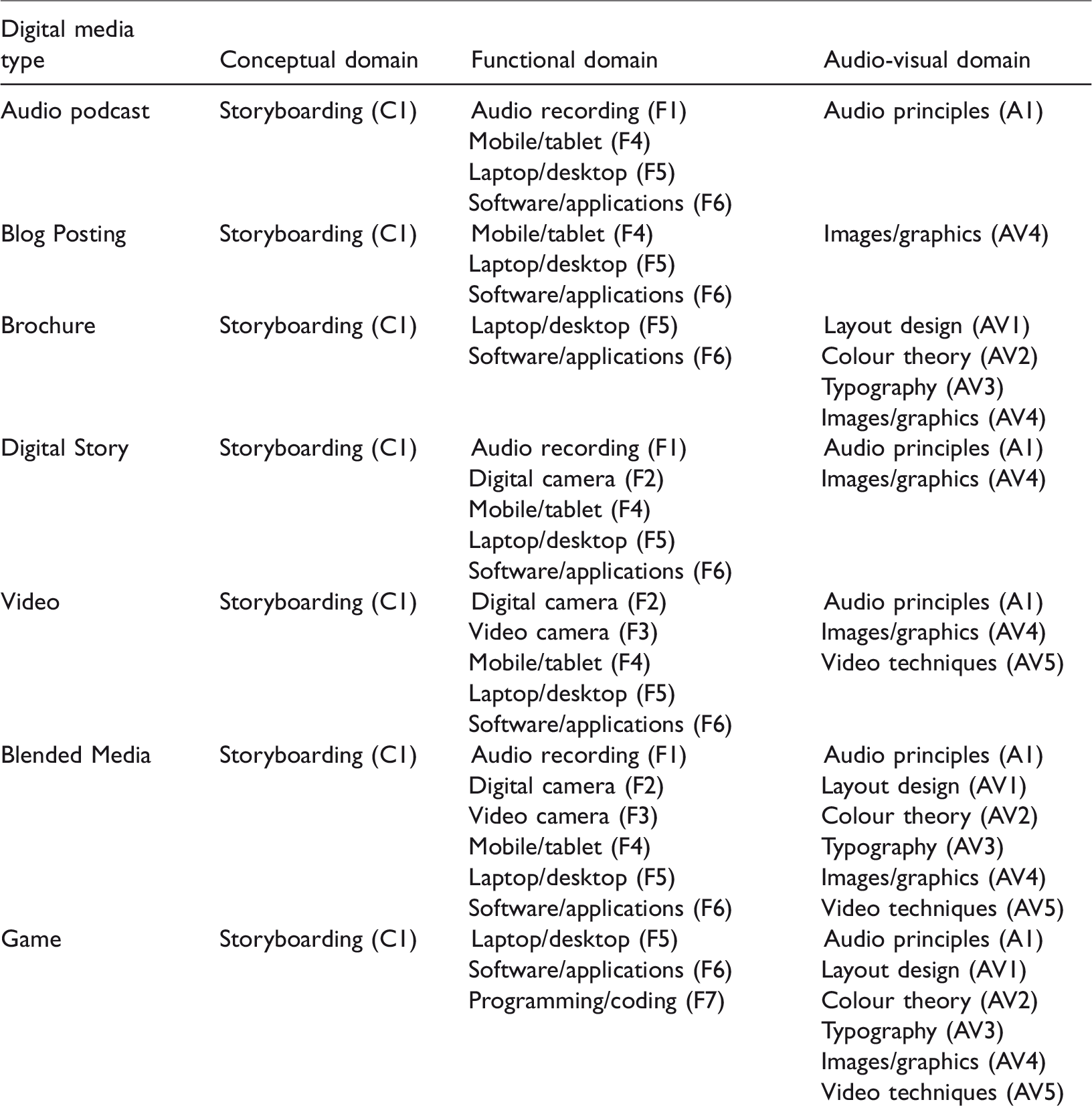
A summary of the taxonomy of digital media types of LGDM assignments is presented in Table 1. The different classifications are not meant to represent a strict hierarchical structure; they overlap in many ways. Digital media creation is, in general, a collaborative process, a team of people are involved in the workflow. So, these competencies can be shared within a group of individuals. In the discussion section, we will cover the implications of group work for LGDM.
A summary of the taxonomy of digital media types for LGDM assignments and their skills required.
Finally, emerging technologies can enrich the taxonomy, and it may imply new skills/competencies, especially in the functional domain (new devices and applications). For example, 360° videos represent challenges for production, and currently, there are no guidelines on how to create them, how to edit, and so on (Cerejo, 2016). Research on 360° videos for teaching and learning is currently in its infancy (Roche and Gal-Petitfaux, 2017; Yamashita and Taira, 2016). In the past, 3D video showed promising and to revolutionise the way the movie industry operates and prosumers, but after several years, 3D video did not have any impact on movie production. Only a few manufacturers developed 3D-enabled video cameras, and the uptake is being slow. The media explained the reasons why the 3D video did not become massive due to lack of content to watch, gimmicky reputation, the need to wear glasses, and for many people, eye strain (Agnew, 2015). 360° video could suffer the same fate as 3D video; time will tell.
Discussion and implications for teaching and learning
This paper proposed a taxonomy of digital media types for LGDM assignments based on the DMLF and skills in three domains: conceptual, functional, and audiovisual. It also links the taxonomy with the use of ITPs within the functional domain of the task. Digital media equipment and applications are ITPs or vehicles for students to represent the content and learn within the process.
From the educator’s perspective, the proposed taxonomy will help them to understand the different media types and the skills involved in its production. This knowledge is essential when designing LGDM assignments; educators need to decide how to embed these digital media types in the curricula for first-, second-, and third-year cohorts. In our faculty, first-year students engage in the production of audio podcast and blog postings. Second-year students create brochures and digital stories while third-year cohorts produce video and blended media. This strategy ensures educators can identify the need for training for the students and allows the scaffolding of digital media literacies across the curricula. For this approach to happen, educators require an understanding of the taxonomy proposed. Furthermore, an understanding of the nature of digital media production workflow will help educators to weight the task, whether the assignment is individual or group work according to digital media type. At the Faculty of Science, LGDM assignments for first-year students (podcast and blogging) are designed for individual work and contributes to 15% of the marks. For second-year (brochure and digital story), the assignments are designed for group work and contribute to 20% of the marks. Finally, third-year students (video and blended media) weights 30% of the marks, and it is also a group work.
The proposed taxonomy could also help educators to develop marking rubrics that assess conceptual, functional, and audiovisual domains. The conceptual domain is linked with graduate attributes such as ‘An inquiry-oriented approach’ and ‘Professional skills and its appropriated application’. The functional domain is linked to ‘Initiative and innovative ability’, and the audiovisual domain (digital media principles) as part of ‘Communication skills’.
Digital media creation is a collaborative process, in which a team of people are involved in the workflow. So, these competencies can be shared within a group of individuals. If the LGDM assignment task is group work, there are implications to ensure students contribute to their groups. Peer-review tools such as SPARKPlus to ensure the process is fair to every member of the groups need to be put in place (Willey and Gardner, 2010). A simple way to implement peer review of groups for LGDM can be done using Google Forms. The criteria to evaluate group contribution need to be straightforward such as the above currently implemented in our institution (i) disciplinary/subject input for the project; (ii) punctuality and time commitment; (iii) contribution with original ideas; (iv) communication skills and work effectively as part of the team; and (v) focus on the task and what needs to be done.
From the student perspective, the purposes of the taxonomy are to explain the digital media literacies skills required to produce digital artefacts. The proposed taxonomy will help the students to understand the complexity of a digital media artefact and identify the skills required to complete the task. It will also inform what ITPs (e.g. audio recorder, digital camera, mobile, tablet, and so on) they can use and what digital media principles are applied to the artefact they are creating. Additionally, the taxonomy will reinforce the notion of using LGDM with a dual purpose: learning the subject content (yellow rectangle) and developing digital media literacies (blue and green rectangles) and hopefully further engage students with their subjects. For first-year students, the taxonomy will inform how they will gradually develop competencies in digital media production during their stage at the University. We hope it can help the students to plan their LGDM assignments and succeed in their learning journey.
Additionally, from the faculty/institutional perspective, the taxonomy of digital media types for LGDM assignments can help to design the curricula and to ensure students will be exposed to the creation of these different digital media types. It will also prevent students being enrolled in several subjects that require complex digital media production during the same semester. As we know, students have competing schedules studying, working, and family commitments. We hope the taxonomy could be a good theoretical foundation to design and implement LGDM as an assessment tool and develop student digital media literacies.
Footnotes
Declaration of Conflicting Interests
The author(s) declared no potential conflicts of interest with respect to the research, authorship, and/or publication of this article.
Funding
The author(s) received no financial support for the research, authorship, and/or publication of this article.