




Abstract
In today’s world, having at least basic digital skills is essential in working, social, and family life. The present study uses grounded theory to explore ways in which people with little formal schooling engage with the digital world. Drawing on 54 semi-structured interviews, it describes how people with little IT experience from formal education obtain information about digital security, privacy, the functioning of antivirus software, software updates, and so on. We introduce the concepts of computer world and ministories which draw parallels between the online and offline worlds. While creating the concepts of computer world and ministories, we follow Richard Mayer’s theory of multimedia learning, and thus ministories are based on the appropriate combination of images and texts. The study attempts to answer the following general question: ‘Is it better to teach people how to work with specific apps for everyday use or teach them the principles that are behind them?’. This question should be asked when creating new approach in IT education and not only in lifelong learning.
Keywords
Introduction
Digital skills are important in our everyday lives outside the job context as well. Banks, post offices, online shops, and many more use modern technology, which customers need to interact with. Communication with authorities has also largely moved online. People with little digital competence will face difficulties dealing with state and local authorities in future. The use of digital technology even for basic operations has become one of the essential and defining aspects of our lives. Increasingly, attaining a certain level of digital literacy is becoming the key to a better personal and working life. In 2019, a third of all adults of working age in the European Union, more than 75 million people, did not have even basic digital skills and had not used the Internet in the 3 months prior to the survey. The percentage was higher among those with little formal schooling, the elderly, and the unemployed (European Court of Auditors, 2021). In today’s digitalized world, even unskilled labour jobs require the ability to use computers productively and have specific types of digital skills. In February 2020, the European Commission noted in ‘Shaping Europe’s Digital Future’ that in developed economies, 90% of jobs already require at least basic digital skills, but the need for digital competence is not limited to the world of labour (OECD, 2016). Digital lifelong learning is a necessity for people who have received little formal schooling. Developing basic computer skills is an important educational priority. When defining basic computer skills, we use the DigComp (DigComp, 2022) categorization, which focuses on: Information and data literacy, Communication and collaborations, Digital content creations, Safety, and Problem solving.
This study deals specifically with adults in the Czech Republic who have completed basic education, which is defined in the Czech Republic as completion of 9 years of school education (K9). The target group is described in more detail below.
Brief historical overview in the field of computer science
Computer science was established as a scientific discipline in the 1950s and early 1960s. The first computer science course was provided by the University of Cambridge’s Computer Laboratory in 1953. (University of Cambridge Computer Laboratory, 1999) Starting in the late 1970s, personal computers began to appear almost everywhere in the West (at home, in offices, public libraries); schools and universities have used computers ever since (Molnar, 1997).
In the early 1990s, students (11–18 years) on six continents started using computers as part of their education (at home, at school, in school libraries) (Molnar, 1997). Today, computing is part of basic education (6–10 years) (Smahel et al., 2020). The advent of the Internet heightened the need for people to orient themselves in the computer world, with knowledge of the basics of computer science becoming an almost universal need. Today, a computer device (PC, laptop, smartphone) is a necessity (Lally, 2020), and that’s why people of all ages should be taught how to use it.
The need for lifelong learning
Lifelong learning is becoming a requirement for anybody to be able to engage fully in their personal and professional development (European Council, 2018). The European Centre for the Development of Vocational Training (Cedefop) defines lifelong learning at the personal, social, and professional levels as ‘all learning activity undertaken throughout life, which results in improving knowledge, know-how, skills, competences and/or qualifications for personal, social and/or professional reasons’ (Cedefop, 2011). Considering our target group, this definition is more appropriate than the definition that focuses on professional life because the target group changes jobs very often. What are the areas in which this group needs digital skills the most? First, the jobs typically performed by people with little formal schooling are increasingly being automated (Forbes, 2021). Therefore, it is important that society offers lifelong learning opportunities to these people, as it will be difficult to find any unskilled labour jobs that do not require basic digital skills. Second, digital technologies are increasingly entering the personal sphere, be it in the form of support applications (Zapier, 2021), social media, or websites (Kim et al., 2017) that use fully automated forms of payment. Digital technologies are becoming commonplace in healthcare settings too (Chavez et al., 2017; Overdijkink et al., 2018; Ventola, 2014), and patients and workers will soon need to be able to control touch devices. Third, digital technologies, especially communication platforms, are becoming an increasingly important tool for communication. They allow us to develop relationships with people on other continents, including sharing pictures. Not using this technology can be an obstacle in communicating with family and friends. COVID-19 has shown how digital skills can be called upon to meet our basic needs (Cedefop, 2021).
The target group we work with is highly diverse, encompassing individuals with varying educational needs across their lifespan. Therefore, we find it relevant to assess the suitability of personalized learning (Shemshack, A., & Spector, J. M., 2020; Shemshack, A., Kinshuk, & Spector, J. M., 2021). Personalized learning can be defined through the following terms as: adaptability, flexibility, personal learning pathways, data-driven decision, continuous feedback, and reflection (Bernacki, M. L., Greene, M. J., & Lobczowski, N. G., 2021).
Background and overview
Terminology
This study provides insight into how the target group of people with little formal schooling perceives digital technology, what their expectations around it are, and how they would like to learn to use it. The definition of digital technology is taken from Pullen (2009): ‘Digital technology represents technology that relies on the use of microprocessors; hence, computers and applications that are dependent on computers such as the Internet, as well as other devices such as video cameras, and mobile devices such as cell phones and personal-digital assistants. Digital technology – specifically computers, the World Wide Web (Web or WWW), and the Internet – are reshaping communication processes.’ There are various terms that denote the ability to control digital technology, for example, digital skills (Van Laar et al., 2017), digital competence (Ilomäki et al., 2011), digital literacy (Boechler et al., 2014), and information and communication technology (ICT)–related skills (Ratheeswari, 2018). These terms are usually understood as synonyms. Digital competence is defined by the European Council as involving ‘the confident, critical and responsible use of, and engagement with, digital technologies for learning, at work, and for participation in society’ (European Council, 2018).
In this study, we add one more possible term: orientation in the computer world. This term is largely synonymous with digital competence but differs from it in one aspect: an emphasis on the practical ability to use digital technology in everyday life. It is also better adapted to the vocabulary of the target group and engages the feelings people have when they use digital devices.
Computer science education
The study fits also within the field of computer science education, 1 a discipline that deals with providing practical instruction to learners in as correct and effective a way as possible.
In contemporary computer science education, a great deal of attention is paid to the development of digital skills programs, especially for young children (Nascimbeni & Vosloo, 2019; UNICEF, 2021), students (Nelson et al., 2011; Shopova, 2014), and senior citizens (Jacobson et al., 2017; Schäffer, 2007).
Traditionally, computer science education was understood as ‘the study of computers and algorithmic processes, including their principles, their hardware and software designs, their applications, and their impact on society’ (Tucker, 2003).
Modern approaches incorporate other fields beyond algorithmic processes. An example can be found in the syllabus of the Didactics of Informatics course at the National and Kapodistrian University of Athens in Greece: ‘Didactics of Informatics studies the educational environment which enables the knowledge construction of primary concepts of Computer Science and the development of relevant skills. (…) The main concepts of Didactics, representation of knowledge and the notion of knowledge conflict, algorithmic and computational thinking, (…), misconceptions and difficulties, didactical approaches, didactics of structured and object programming, educational programming environments for various grades, educational games, educational robotics’ (National and Kapodistrian university of Athens, 2020).
In the Czech perspective, lifelong learning courses intended for the defined target group are usually funded by the Ministry of Labour and Social Affairs and provided by non-governmental organizations. 2
Target group
The present research study addresses an often overlooked group of people who received little formal schooling, which we define as 9 years of school education (maximum) which corresponds to ISCED 2 (UNESCO Institute for Statistics, 2011) and is the minimum instruction time in compulsory education defined in Czech Republic law (EURYDICE, 2009).
This represents around 25.7% of the population of the EU (Eurostat, 2020) and around 12.5% of the population of the Czech Republic where the research took place (Czech Statistical Office, 2021). These people often work in maintenance, construction, hospitality, and warehousing and are characterized by job-hopping. We rely on Behavio’s Atlas of the Czechs (Behavio, 2021) for a detailed description of the target group. These people describe themselves as follows: living in smaller cities; they are poorer, uninsured men and women; no experience being abroad; poor planning skills; not interested in the quality of their food; TV viewers; and readers of tabloid journalism. The group does not differ from the rest of the population in, for example, the number of hours spent watching TV or consuming content about cooking and nature. These are just trends; the group is far from heterogeneous. The term ‘people with little formal schooling’ refers to the years of formal instruction they completed; it does not refer in any way to abilities, skills, and knowledge, which vary even in highly educated groups. The target group comprises adults with legal capacity. 3
Research questions
We came up with the following general questions in our search for suitable didactic approaches for the target group.
RQ1 What are the key factors that influence people with less formal schooling to master basic digital skills well?
RQ2 Is it better to teach specific applications or teach the skills that can help learners inhabit the digital world?
RQ3 Is it productive to use so-called ministories as part of teaching basic digital skills to people with less formal schooling?
When preparing educational activities for them, it may be useful to ask yourself the following questions, which we have formulated for this study: 1. What do people with little (or no) digital skills need to learn? 2. What knowledge or skills in other fields can they leverage? 3. How can parallels with the offline world help? 4. How and where should adults with very little (or no) digital skills be trained? 5. What should teaching materials for further education and lifelong learning contain?
In the following subsections, we take a closer look at the methodology and findings that give answers to these research questions.
Methodology
Using grounded theory methods, we conducted 54 semi-structured online interviews in two phases involving people with little formal schooling (9 years of compulsory education maximum). Our aim was to identify effective strategies to help the target group acquire basic digital skills.
Grounded theory
Grounded theory is a research methodology widely used in qualitatively oriented research. Grounded theory was introduced by Glaser and Strauss (1967) with initial applications in sociology, with more scientific fields added later. It is now considered a family of methods with three main strains: traditional grounded theory (GT), interpretive grounded theory (IGT), and constructivist grounded theory (CGT) (Sebastian, 2019).
The aim of grounded theory is to construct theories about the phenomenon under study and grounding the theories in data. The emerging theories provide an abstract and theoretical understanding of the studied phenomenon, improving our ability to predict and influence it (Charmaz, 2014; Glaser & Strauss, 1967). Grounded theory offers systematic and flexible processes for data collection and analysis.
In the present study, we use constructivist grounded theory (CGT) as described by Charmaz (2014), which differs in several ways from GT or IGT. In constructivist GT, the role of the researcher is taken into account. As the researcher interacts with the respondents and datasets, the theory they construct becomes more than what they discover. CGT also acknowledges the researcher’s role, and the ways in which priorities, positions, and actions frame views (Charmaz, 2014). The data is then grouped around the most dominant data point. This method offers a flexible approach rather than a strict set of rules for constructing grounded theory. At the same time, more than one core theory is allowed, which makes it different from GT and IGT.
Procedure
The research consisted of two phases: a preliminary mapping phase (1) and main phase (2). The aim of the first phase was to learn about the target group’s situation, needs, possibilities, and limits in relation to developing basic digital skills. Another goal was to adapt the interview questions to the group’s abilities and fine-tune technical details.
The second phase was aimed at collecting answers to the research questions. The materials used are available in Appendix: Questions. All interviews took place in March–May 2021. The survey was carried out during a nationwide lockdown during the COVID-19 pandemic starting in March 2021 and took place over ZOOM or Skype. The interviews were processed in MAXQDA 2020.
Learning tool: A ministory
Storytelling is not a new tool in teaching, but the technical possibilities available today are new. Storytelling is defined as ‘the interactive art of using words and actions to reveal the elements and images of a story while encouraging the listener’s imagination’ (National Storytelling Network, 2022). Storytelling is used in teaching many target groups: young children (Hermanto, 2019; Speaker et al., 2004), students (Abrahamson, 1998; Alismail, 2015), healthcare workers (Cangelosi & Sorrell, 2008; Lal et al., 2015), and managers (Cleverley-Thompson, 2018). The decision to use it for teaching basic digital skills to adults with little formal schooling was natural. We use the term ministory to refer to a picture connected to a text which includes an explanation from a teacher.
Participants
Participants were selected by self-selection. Each participant signed up via a one-time job offer posted on a job portal. A short questionnaire was administered to check that the requirements for participation in the research were met. If an applicant did not complete the questionnaire, a researcher would contact them by phone and verify their details.
In all, 54 interviews were conducted. Participants were enrolled based on three criteria: a) age 18 and above (age of majority in the Czech Republic); b) completed basic education (9 years of education in the Czech Republic); and c) basic ability to work with the Internet.
The selection criteria significantly influenced the characteristics of the target group. The age range was relatively wide, so the group included young adults, middle-aged and working-age individuals, as well as seniors. Interviewees were selected by self-selection.
Some participants had a permanent job, and some had a part-time job. 4 We asked how much time they spent on the Internet or at the computer at work and in their free time. Through this question, we obtained more detailed information regarding the respondents’ experience with digital technologies.
This is a target group which, due to a low educational attainment level, does not have qualifications to perform a specific profession and is therefore employed mostly in occupations that do not require higher qualifications (restaurants, bars, hospitality, cleaning, vendors, etc.).
The most common activities that the respondents do on a computer are using social media (Facebook and Instagram being the most common), watching videos and movies (YouTube, Netflix, etc.), listening to music, searching for information (maps, recipes, etc.), communicating with others, and online shopping. The respondents varied in their knowledge of computers and the Internet. Some took great interest in ICT and continued to educate themselves in this area; most considered themselves to be ‘just users’ and were not interested in ICT. The respondents were located all over the Czech Republic. The respondents were rewarded for their participation with approximately 15 euros.
The research was conducted online. The big disadvantage was undoubtedly that it was many times more difficult to create a pleasant atmosphere, which needs to be ensured for the meeting of the researcher and the respondent with different environments.
On the other hand, we managed to reach people who probably would not have come to a personal meeting, and thus we achieved a greater heterogeneity of the sample of people under investigation. Another advantage of the online interview, given the socio-economic background of the participants, was ensuring better safety for the interviewers.
When working with participants, we followed the ethical standards of the Faculty of Arts of Charles University, specifically the Commission for Ethics in Research.
Preliminary mapping phase
After fine-tuning the technical details necessary for conducting the interviews, we evaluated the pace of the interview, the suitability of the questions, and whether the questions gave us the information we needed. More information is available in Appendix: Questions.
A total of 17 interviews (respondents aged 18–73 years, M = 35.7, SD = 12.43, 9 men) were conducted before the main data collection phase.
During this preliminary mapping phase, we noticed that we needed a new term because IT terms are often general and too formal for the target group, making it very difficult to come up with questions that do not create a gap between the learner and the teacher.
This phase produced two important findings: 1. People with little formal schooling often need one more step before they start developing basic skills as defined by DigComp. 2. Ministories (see Figures 2–4), which we define as parallels between the online and offline worlds, can be used as a teaching tool/methodology in field of orientation in digital world.
We responded to the above findings by introducing a new term synonymous with digital skills, digital competence, digital literacy, and ICT, namely the computer world (more precisely orientation in the computer world). The term computer world is inspired by the term animal world, which is easy to grasp, including its components (animals, water, air, etc.), the relationships between them, and its relationship to humans. Most people know the Jungle Book and understand that the animal world can be friendly but also dangerous. It is this likeness that allows the target group to approach the topic of digital technology on more comfortable terms. To illustrate the concept, we showed them a pictorial representation of the computer world (see Figure 1). The respondents then adopted this term, which helped make communication smoother and facilitated a better understanding of digital technology. The findings from these interviews helped to construct the final scenario for the main part of the research; however, mainly due to the inconsistency of the time allocation for each topic, they are not directly part of the research findings. According to the preliminary phase of the research, we developed five final (see 3.7) ministories that show some basic concepts that are useful to know when moving in the computer world, which are discussed in detail in the Main Phase section. Computer world: The image describes our world, which is represented here by computer technology. The image shows the following important relationships: (1) people and devices, (2) people and online shopping, (3) people and data storage, (4) data storage (servers) and devices, (5) the impact of technology on the planet, and (6) a connected ecosystem-like world (everything is related to everything).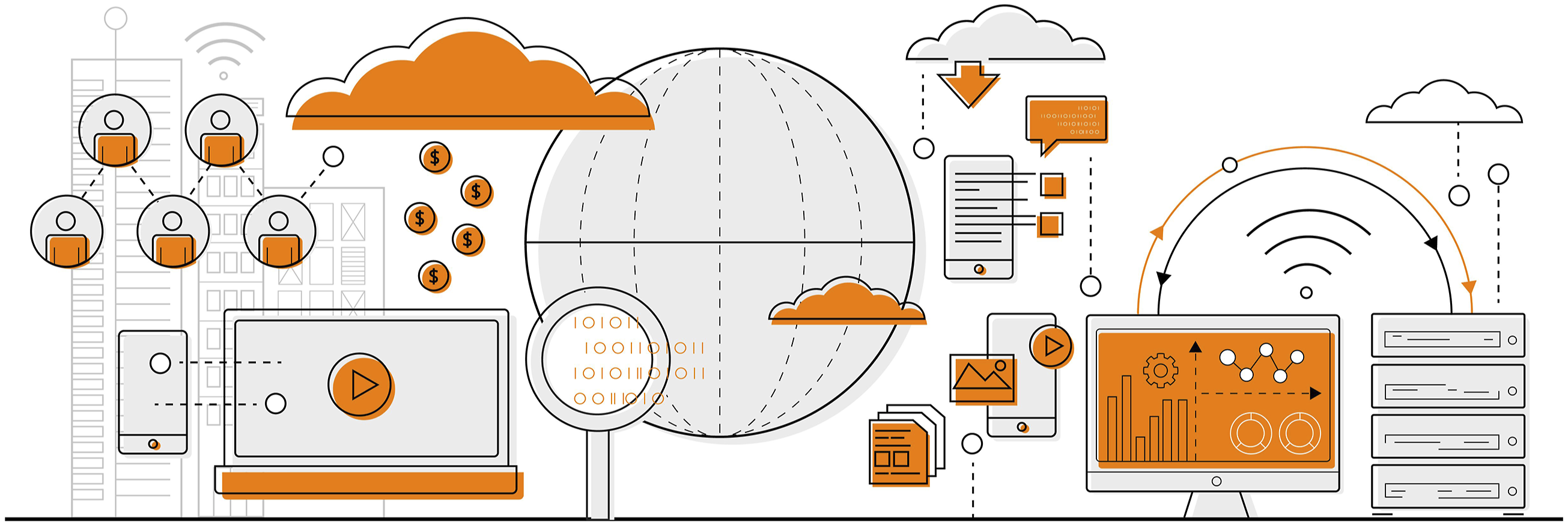
Main phase
In this phase, we conducted a total of 37 interviews. The group consisted of 21 men and 16 women aged 18–70 years (M = 37.4, SD = 13.73). Interviews were conducted with each participant individually, with interviews lasting about 90 minutes and two researchers present. During this time frame, data was collected for two separate studies, so the interview was divided into two parts of 45 minutes each. In the first part, informed consent was obtained from each respondent and each respondent was informed about the specifics of the interview.
The first part of the interview, which was crucial for this study, focused on the respondents’ current knowledge and experience of working with computers, their perceived efficiency, the basic information they needed to use devices, and the options and preferred forms of further education. The questions used in the interview followed the research questions described in Section 2.4 above.
These were semi-structured interviews, so a set of questions was prepared in advance. This meant that the questions were the same for all the respondents; however, additional questions could be asked based on the development of the interview and the information obtained from the respondent (Silverman, 2020). Screen sharing was essential to the interview process. Parts of the interview included multiple choice questions with scales, where respondents were asked to rate themselves, and this made it easier. The result was a combination of a semi-structured interview and annotated questionnaire. Screen sharing also added to the dynamism of the conversation, increasing the respondents’ attention span and engagement. The interviews were enriched with educational videos, which were evaluated. After obtaining consent from the respondents, the interviews were recorded and transcribed. More information is available in Appendix: Questions.
Newly created ministories
We created ministories based on Richard Mayer's theory of multimedia learning that highlights the power of connecting images and words in creating learning materials (Mayer & Mayer, 2005). The combination of images and texts has the potential to create a suitable setting for the conversation that can be talked about. Compared, for example, to the video, ministories built in this way have the advantage that the learner does not distract his attention with a large amount of content. We created these ministories to explain abstract computer world concepts with things and concepts we know from the offline world.
Subsequently, we present the created ministories:
Computer world
As part of the preliminary mapping phase, we discovered that it is very difficult for many respondents to talk about the digital reality around them. They lack words/concepts to name the digital world without having to use words borrowed especially from English. The phrase computer world turned out to be an appropriate name for the digital reality around us.
See Figure 1. The image 5 describes our surroundings, which is represented here by computer technology. The image shows the following important relationships: (1) People and devices, (2) people and online shopping, (3) people and data storage, (4) data storage (servers) and devices, (5) the impact of technology on the planet, and (6) a connected ecosystem-like world (‘everything is related to everything’).
The phrase computer world turned out to be an appropriate name for the digital reality around us. This unique ministory does not contain words unwritten in the picture. Here, we have chosen verbal accompaniment. The introduction of the concept of the computer world helped our respondents to have a better opportunity to talk about the digital reality around us.
Importance of updates
The second ministory relates feeding the pet and computer updates. It is based on the need to update the computer to keep basic functions available.
This ministory works with two questions: Do you want to feed the dog? Do you want to update your computer? The teacher sums up the situation by saying that what is water and food to a dog is electricity and updates to a computer. See Figure 2.
6
Importance of updates.
This ministory helped to explain that it is really necessary not only to ‘lick’ updates but also to give them the sufficient attention. The parallel between the dog and the computer showed that if the updates are ignored for a long time, the computer stops working.
Importance of antivirus software
The third ministory shows that without antivirus software a computer cannot function well, just as a dog full of fleas cannot be a good guardian or companion. See Figure 3.
7
Importance of antivirus software.
This ministory aims to show the basic concept of using a computer, that is, the possibility of a device becoming infected, just like an animal. People generally have experience with an infected animal, so they can better imagine the seriousness of not using an antivirus.
Security missing content
The last ministory shows that if we do not take good care of the computer or the dog, they will just not listen to us/do what we want. See Figure 4. Security missing content.
We deliberately do not use written words here; we want to show that the contents of a computer can disappear if mishandled. An angry dog represents a situation where we are not in control of the dog in the same way as the computer.
As the preceding ministories demonstrate, the use of storytelling in combination with images and texts has the potential in engaging learners and facilitating their understanding of basic digital skills.
Research findings
Let’s now summarize the answers to the research questions regarding potential strategies for teaching basic digital skills to people with little formal schooling The presented study, based on 37 individual interviews, is aimed at identifying didactic approaches that are suited to the defined target group.
What are the key factors that influence people with less formal schooling to master basic digital skills well?
As part of our research, we identified five important factors that impact the adoption of basic digital skills in our target group. These factors are defined as follows: a) Self-confidence: Self-confidence is a crucial factor that affects motivation, concentration, resilience, creativity, and communication skills in the learning process in general. In our study, we found that the belief in one’s ability to learn is an important factor that influences participation in our target group. b) Proper selection and volume of information: It is not surprising that the proper selection of topics and the volume of information to be conveyed are key variables in getting the target group to engage in learning. c) Entry-level: In our study, we worked with the concept of DigComp, which uses six thematic units that need to be mastered as part of BGS. However, we found that for true beginners, it is necessary to provide basic knowledge that we call ‘entry-level’. DigComp does not account for individuals who do not know how to turn on a computer, that a computer needs to be connected to function, or that a mouse cannot be plugged into any hole on the computer. The explanation of this background knowledge is often overlooked, which makes it difficult for people in our target group to engage in learning. d) Computer like a black box: Possible perceptions of a computer as a black box that we have a little control over follow the previous finding. Participants learn to use it through the ‘trial and error’ method, which can be very useful but also carries risks, such as making online payments. e) Emotions: It can be beneficial to work with the emotions that people feel towards technology when learning. From our experience, almost all participants feel positive emotions when they succeed in using technology to save time or accomplish a task. Conversely, they also feel negative emotions, especially when devices do not work or when they cannot find the right procedure. In this regard, ministories play a strong role, allowing simple emotions to be incorporated into learning and tapping into their activating potential.
As mentioned in Section 2.3, our target group was heterogeneous in terms of the reasons why they did not continue their education. Using grounded theory, we defined two types of knowledge that the participants needed based on their responses: a) basic handling and b) operation of the computer and its components.
It is common for people without user experience to think that a computer is broken if one of the cables is disconnected and the mouse does not respond, for example. When it comes to providing further education to these people, we suggest including the aforementioned entry-level step, as these learners need to gain a basic understanding of how devices work and an improved awareness of the differences between the online and offline worlds. We consider ministories to be a particularly suitable teaching tool for them. Controlling touch devices. Older respondents stated that they thought they could live without digital technology, but they, also, need to overcome their fear of touch devices. One respondent said that she realized she had to learn new skills as soon as possible because learning becomes harder with age. We mentioned this observation in other interviews and explained the importance of learning new technology (touch screens) as soon as it is introduced. ‘People have to face up to it’ and learn how to work with technology at a younger age and gain confidence. R1 (man, 38): For me, it is simply a necessity to know how to connect everything correctly, how not to lose money, how to upload photos and videos. R2 (woman, 57): Everyone should be able to communicate with family and friends on the Internet, it is important today if you want to keep in touch.
Is it better to teach specific applications or teach the skills that can help learners inhabit the digital world?
Teaching both specific applications and digital skills can help learners navigate the digital world. Teaching specific applications provides learners with practical skills they can use immediately in a particular context, such as learning how to create and manage texts with Microsoft Word. This can be especially beneficial for learners with specific goals, such as finding a job that requires proficiency in a certain application.
Teaching individuals about how the digital world works can also contribute to the development of critical thinking skills, as it encourages them to approach the vast and complex digital landscape with a discerning eye. By doing so, individuals become more aware of the nuances and complexities of the digital world, allowing for deeper understanding and engagement with it. Furthermore, this education can foster more effective and responsible digital communication, which is becoming increasingly important in modern life.
In conclusion, it is important to strike a balance between teaching specific applications and broader digital skills. This way, learners can develop both practical, context-specific skills and broader, transferable skills that will serve them well in an ever-changing digital landscape. R3 (woman, 54): During this interview, I realized that I needed to learn more than where to click, because ‘it’ is always changing. R4 (man, 48): You just need to know the basics like with driving a car.
Is it productive to use so-called ministories as part of teaching basic digital skills to people with less formal schooling?
Improving the digital skills of people with less formal education through the use of ministories can have multiple benefits. Ministories can help make digital education more accessible to a wider audience, thereby bridging the digital divide (Van Deursen & Van Dijk, 2019) and providing opportunities for individuals who may not have had access to digital resources before.
Based on our experience with using ministories to explain concepts, it is evident that while ministories can enhance teaching with new perspectives and understanding, therefore, it is essential to pilot ministories thoroughly before using them more widely in teaching.
Based on our research, incorporating ministories into the teaching of basic digital skills to people with less formal education can be a productive approach to acquiring new knowledge, but it is crucial to carefully assess and pilot their effectiveness before implementation. R5: The pictures helped me to realize how important it is to keep my computer up to date. R6: A computer is different from a hair dryer, you need to take care of it to make it work.
We will try to put the answers to the previous questions in a wider context. As already mentioned in the Introduction section, digital competences and their increase are among the important strategies of the European Union, because without them, it will be increasingly difficult to work, live in a community of people, and also ‘be’ retired and be able to arrange a medical care and administration towards the state. Organizations such as the OECD (Demonty, 2021), the European Commission (Vuorikari et al., 2022), UNESCO (Atchoarena, 2017), and the World Economic Forum (World Economic Forum, 2020) devote a lot of space to the topic of digital competences. From the research they commission on this topic, it follows that they perceive digital competence as a basic competence for life in the 21st century. These are adults with a low level of education who are at risk of not acquiring the necessary digital competences using a method available to them. Our research suggests the use of ministories in the form of images and texts that express the parallel between computer and ordinary life. Ministories give teachers the opportunity to reframe (dos Santos, 2019) the concepts they teach and help them to use terms in new context. Linking words and pictures along the lines of multimedia learning is proving to be effective.
Furthermore, the introduction of the so-called entry level overcomes the entry barrier for people who really start from scratch. Educational strategies in the field of basic digital skills, represented, for example, by DigComp, take into account, even if sometimes unintentionally, the fact that nowadays every citizen of the European Union already has some experience with digital technologies. However, our research found that there is still a need to adapt educational content for those who have no usable experience.
Conclusion
In our research, we focused on strategies for preparing digital skills education for people with little formal schooling. Over two research phases involving 54 semi-structured interviews, we found the following:
Education whose goal is to convey how the digital world works often assumes that people already have some knowledge of the digital world. This assumption often turns out to be unfounded. We suggest using ministories (Figures 1–4) that can provide basic orientation in the topic for those who are only beginning to use digital technology and have a limited vocabulary due to their low educational attainment.
The use of image-based ministories also has great potential for contextualization and finding parallels between the online and offline worlds. This method is not suitable for all adults but can be recommended if the context in which the target group lives 8 is taken into consideration. The incorporation of ministories as a teaching tool aligns very well with the principle of personalized learning (Phillips, 2023; Shemshack, & Spector, 2020). It is an element that can be included or not according to the current needs of the target audience.
We evaluated Richard Mayer’s theory of multimedia learning, based on the appropriate connection of words and images as very useful in the preparation of educational materials in the field of basic digital skills for people with lower formal education (Mayer & Mayer, 2005). The combination of cartoons with simple texts helped our target group in memorizing the basic principles that are essential for navigating the computer world. The effective use of ministories makes it possible to change the verbal commentary and thus achieve a more varied explanation.
Another suitable strategy is incorporating the feelings that people have when they interact with technology. Lifelong learning can build on specific experiences that amuse learners and allow them to learn about the broader context of the computer world, as well as specific processes for controlling the equipment that the participants need to use.
It can be beneficial to talk about emotions in teaching when our passwords do not work, when our text disappears, when our bank reports a suspicious payment, or when a website shows an ad for a product we viewed a week ago. Ministories can be used to explain why and how things happen, and as a warning.
In general, the target group should not be underestimated and offered instruction in simple processes only (e.g. shopping and uploading a photo to a social media network). They should be given the opportunity to understand the broader context of the computer world. Research shows that people do not need oversimplification as to how the computer world works, but complicated terms unrelated to the topic should be eschewed in favour of natural vocabulary. The target group is very heterogeneous in their experience and abilities. Personalized learning, especially its principles of adaptability and flexibility, greatly helps the effective transfer of information.
Explaining general principles (how something works) is valuable because it facilitates a deeper and more lasting understanding of the computer world. Learners naturally want to be able to control technology. The role of a teacher is to see ‘around corners’ and know that in 3 years everything will be different and knowing where to click may not be good enough, whereas understanding principles lasts longer. The target group tends to have unpleasant experiences with school education, so the most important thing for a teacher is to create a friendly atmosphere. Suitable didactic methods and aids such as ministories can facilitate the learning process and bring it closer to the everyday reality of the target group.
In conclusion, it is important to recognize that the use of computers encompasses not only technical aspects but also legal and social implications. Well-designed ministories and introduction of entry-level concepts can be effective tools in helping individuals with less formal schooling overcome learning barriers and grasp the connection between technology and society.
Footnotes
Acknowledgements
We are thankful to the illustrator Kristýna Plíhalová for creating Figures 2– . This project has been partially supported by PRIMUS/HUM/03.
Declaration of conflicting interests
The author(s) declared no potential conflicts of interest with respect to the research, authorship, and/or publication of this article.
Funding
The author(s) received no financial support for the research, authorship, and/or publication of this article.
.png)