



Abstract
High-throughput screening generates large volumes of heterogeneous data that require a diverse set of computational tools for management, processing, and analysis. Building integrated, scalable, and robust computational workflows for such applications is challenging but highly valuable. Scientific data integration and pipelining facilitate standardized data processing, collaboration, and reuse of best practices. We describe how Jenkins-CI, an “off-the-shelf,” open-source, continuous integration system, is used to build pipelines for processing images and associated data from high-content screening (HCS). Jenkins-CI provides numerous plugins for standard compute tasks, and its design allows the quick integration of external scientific applications. Using Jenkins-CI, we integrated CellProfiler, an open-source image-processing platform, with various HCS utilities and a high-performance Linux cluster. The platform is web-accessible, facilitates access and sharing of high-performance compute resources, and automates previously cumbersome data and image-processing tasks. Imaging pipelines developed using the desktop CellProfiler client can be managed and shared through a centralized Jenkins-CI repository. Pipelines and managed data are annotated to facilitate collaboration and reuse. Limitations with Jenkins-CI (primarily around the user interface) were addressed through the selection of helper plugins from the Jenkins-CI community.
Introduction
High-content screening (i.e., image-based descriptions of a cellular or organism’s phenotype) has become an important tool for drug discovery. 1 This has been highlighted by the observation that most first-in-class drugs were discovered by phenotypic screening, which is heavily reliant on image-based assays. 2 Image-based assays now have a role in all aspects of drug discovery and development, including helping to identify novel targets or mechanisms of action, 3 screening for novel treatments, and safety assessment. 4
A wide range of automated microscopes and laser scanning cytometers can generate image-based results. Each imager is accompanied by its own proprietary software for image analysis. Unfortunately, this makes it very difficult to compare the performance of different image analysis approaches even if the same assay is being monitored. This challenge has fueled the development of vendor-independent, open-source image analysis packages from several research groups.
In addition, and especially in the pharmaceutical industry, the volume of images generated has dramatically increased by the adoption of high-density plate formats and/or the emergence of instruments that generate time series and Z-stacks of image fields.5,6 In such cases, the time required to process tens of thousands of images on a standalone PC workstation is prohibitive. High-performance compute (HPC) clusters can provide the required speed to satisfy these increased demands. However, using an HPC cluster presents challenges for most laboratory scientists. Screeners are not accustomed working with Linux, parallel computing, or a command line interface and prefer the comfort of familiar desktop systems with rich user interfaces. We are now providing a practical solution by combining two, best-of-breed, open-source tools, CellProfiler and Jenkins-CI, into a user-friendly, novel HPC platform for image analysis at scale.
CellProfiler 7 is an open-source image analysis software developed over a number of years and widely accepted in the scientific community.8–10 It provides a modular set of image-processing functions accessible through a graphical user interface. CellProfiler is supported by the Broad Institute (www.cellprofiler.org) and by a community of academic and industrial users and developers. 11 Importantly, CellProfiler can be executed without the graphical user interface, using command line instructions (i.e., “headless mode”) for use on an HPC cluster. In this mode, CellProfiler delivers fast, cost-effective performance by processing in parallel large image sets without the limitations of restrictive and expensive licenses typical of commercial software.
Jenkins-CI (https://jenkins.io/) is a leading, open-source continuous integration server. 12 Continuous integration (CI) is an established practice in the field of software engineering that supports the development of complex software programs from independently built components. A continuous integration server is designed to automatically or manually trigger complex workflows to build, test, and deploy software components. Typically, such platforms also provide process monitoring, testing, and validation tools. Despite its original focus on building software systems, Jenkins-CI can be easily extended (there are more than 800 plugin extensions for Jenkins) and adapted for processing sequences of computational tasks of arbitrary complexity. The BioUno project was one of the first to recognize and introduce the application of Jenkins-CI for bioinformatics.13,14
A core concept within Jenkins-CI is that of a “Project,” representing a sequence of computational tasks that process and transform input data into well-defined outputs. A “Project” contains well-defined core elements (e.g., parameters, triggers, build steps, actions) that are extensible. As a result, Jenkins-CI projects can model a wide variety of scientific computational workflows. Jenkins-CI conforms to the software design pattern of “loose coupling,” 15 where a software system can access functions of another without knowledge of its internal workings. Through loose coupling, Jenkins-CI allows the integration of local, as well as remote, scientific applications (such as CellProfiler) into scalable workflows that can be parallelized on a compute cluster. This greatly enhances the speed and throughput of the analysis that can be performed.
Here we describe how Jenkins-CI can be configured to execute processing of large-scale image data from high-content screening (HCS). We document how one can easily combine capabilities from the Jenkins-CI plugin “ecosystem,” domain-specific applications, such as CellProfiler, and custom scripting to build a laboratory image- and data-processing platform that is easy to install, maintain, extend, and adapt to fit the informatics and data requirements of a typical screening laboratory.
Materials and Methods
Image Acquisition
Cell images for small interfering RNA (siRNA) screening were captured using the IN Cell 2000 (GE Healthcare, Buckinghamshire, UK) using a 10× objective. The DAPI exposure time was 0.1 s, and the FITC exposure time was 0.7 s. Flat-field correction was used for both channels. For the phosphoprotein detection assay, images were acquired using an IN Cell 2000 with a 20× objective and DAPI (80-ms exposure) and FITC (1000-ms exposure) channels with a binning factor of 1 × 1.
Software Systems
Jenkins-CI version 1.532.1 was downloaded from http://jenkins-ci.org and installed on a HP Compaq 8000 Elite workstation (Hewlett-Packard, Palo Alto, CA, USA) with 12 Xeon 3.33-GHz processor cores (Windows 7 64-bit OS with 16 GB RAM). Jenkins-CI was set up to run as a scheduled task rather than as a Windows service. All indicated Jenkins-CI plugins were downloaded and installed using the Jenkins-CI Plugin management console. CellProfiler version 2.1.2 for Linux was downloaded from http://cellprofiler.org. CellProfiler was deployed on a Red Hat Enterprise Linux v6.6 cluster (Red Hat Entereprise, Raleigh, NC, USA). The cluster infrastructure has over 480 nodes (and 3 submit nodes). Each node has between 16 and 28 Intel Xeon cores (2.6 GHz or higher) and between 96 GB and 192 GB of RAM. All nodes connect over the Network File System, a shared file system spanning over 16 PB. The cluster schedules and queues jobs using the Univa Grid Engine scheduler v8.2.1 (Univa, Lisle, IL, USA). Custom data-processing scripts were implemented using Groovy v2.1 (available at groovy-lang.org; Apache Software Foundation, Forest Hill, MD, USA), a dynamic scripting language for the Java Virtual Machine. 16 All code and Jenkins job configurations were managed using a corporate SVN repository.
Jenkins-CI Workflow Orchestration
Jenkins-CI integrates and orchestrates scientific data- and image-processing tasks after image acquisition. A summary of the main components of a typical Jenkins-CI installation augmented by specific compute and data architecture elements of our implementation is shown in
Figure 1
. The data architecture we have adopted to facilitate HPC image processing uses high-capacity networked data shares mounted to multiple operating systems and is further discussed under Results. Finally,
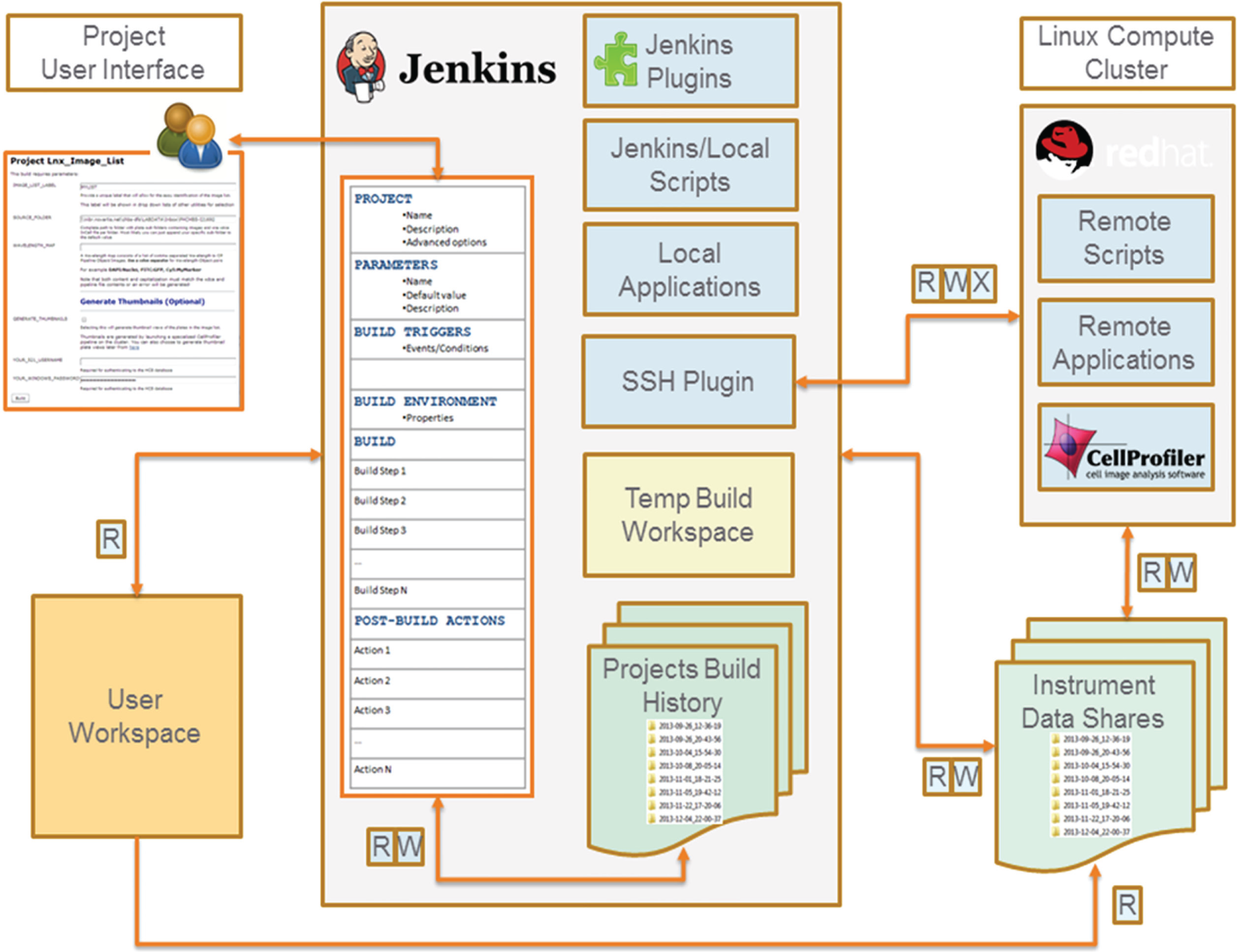
Architecture of Jenkins-CI configured as a scientific data-processing platform. A typical Jenkins-CI installation (shown in the center) integrates computational resources (blue rectangles) and local and remote data (green file folders) and makes them accessible to end users via a standard web portal. A Jenkins-CI project configuration template defines the parameters, environment, and actions executed by a project build and drives the generation of the user interface. Installed Jenkins-CI plugins and local scripts and applications execute on the Jenkins-CI server and provide an extensible set of data management and processing functions. High-performance parallel computing tasks (such as image processing) can be easily integrated into Jenkins-CI projects using standard SSH access provided by the SSH plugin. The projects build history stores build metadata, transient analysis data, and reusable components such as pipelines and image lists. The instruments data shares store large data/image sets, shared between multiple OS systems (Windows/Linux). Instrument data shares act as the final secure repository for important analysis data.
Jenkins-CI Projects and Plugins
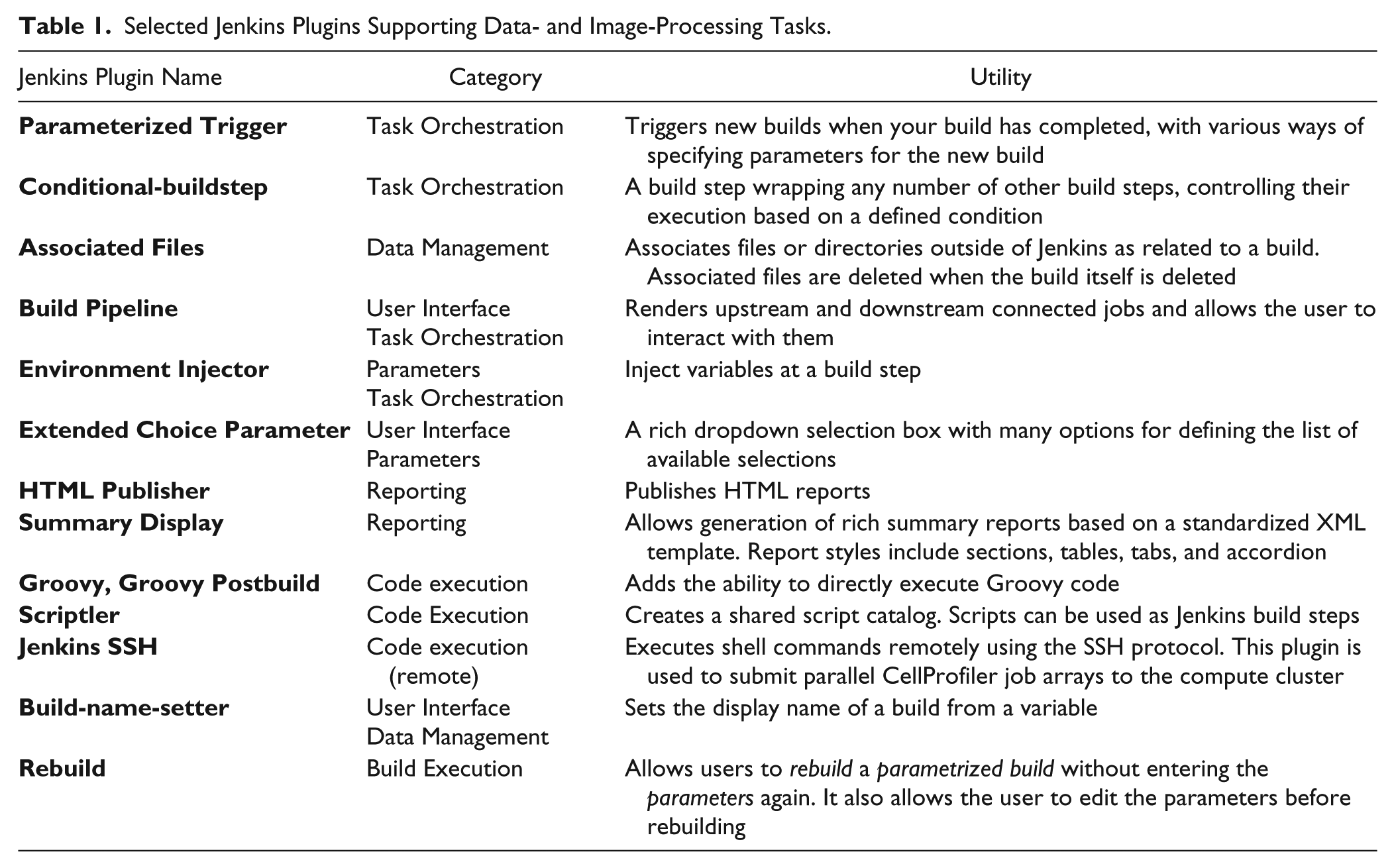
All projects are instances of the Jenkins-CI “free-style, parameterized build” project type. Individual Jenkins-CI projects are composed of a defined sequence of build steps. Functionality for each build step (such as data copying, archiving, executing commands, and custom scripts) is provided by a corresponding Jenkins plugin. Required custom code is scripted in Groovy and can be executed using the Groovy plugin. We chain several jobs together with the Parameterized Trigger plugin to form multistage pipelines. Multistage pipelines execute CellProfiler, monitor a cluster run, and merge output data. We visualize workflow pipelines and interact with individual stages using the Build Pipeline plugin. Table 1 provides a summary of the Jenkins plugin we use.
Selected Jenkins Plugins Supporting Data- and Image-Processing Tasks.
Jenkins-CI CellProfiler Parallel Job Arrays
The Jenkins-CI CellProfiler project integrates CellProfiler in a Jenkins pipeline and orchestrates all the required steps for parallelizing and launching CellProfiler on the Red Hat Linux cluster. CellProfiler job parallelization is accomplished with the Univa Grid Engine Distributed Resource Management (DRM). The required grid engine task array script is generated by Jenkins using a Groovy build step. Using the Jenkins “SSHBuilder” plugin, we execute a series of shell commands on the remote Linux cluster to set up the environment for CellProfiler to run in “headless mode” (i.e., from the command line without a user interface), pass the required CellProfiler command line arguments, and launch the job array. Image lists are divided in groups of 12 image sets. Each image set is processed by a single grid engine CellProfiler job using the first and last image set command line arguments to select the range of images in the image list to be processed (see also “Supplemental Materials Integrating External Software in Jenkins-CI Workflows” for additional details).
Development of User Interfaces
Project-specific web user interfaces were designed using the Jenkins native support for parametrized “free-style projects” and Jenkins plugin extensions available through the public Jenkins update site (see Supplemental Materials “Development of User Interfaces” for additional details).
Data Management and Annotation
Typical image-processing measurement files range in size from a few megabytes to tens of megabytes. Due to their potentially large size, these files are not stored in the Jenkins-CI workspace but rather on a network drive. A formalized naming convention generates result folders whose names (such as 2013-05-16_14-10-10) match the corresponding Jenkins-CI BUILD_ID, a unique timestamp-based identifier generated by the Jenkins-CI server each time an image-processing run is executed.
Availability of Supporting Data
Scripts and associated Jenkins-CI project configuration files will be made available through the Novartis public git repository at https://github.com/orgs/Novartis.
Results
Data Architecture to Support HPC
In the development of the Jenkins-CI CellProfiler HPC platform, we sought to minimize data movement and replication. To achieve this goal, it is important that image file operations are supported across several operating systems. For example, most scientific imagers are operated and images recorded via Windows-based software. However, for HPC image processing, images are processed on the Linux cluster. To allow these operations without copying the data between the two operating systems, we have set up high-capacity network shares that are mounted on both operating systems shares (Instrument Data Shares, Fig. 1 ).
This data architecture results in significant efficiencies as we collect, read, and maintain the data from a single physical storage location. The Jenkins-CI workflow automation is again important as it handles the network mapping between Windows and Linux image paths transparently for the users.
We have also selected to separate Jenkins-CI output files from build metadata and configuration files. By default, Jenkins-CI uses a temporary project workspace to store all the output files (yellow rectangle in Fig. 1 ). Workspace files can be archived to the “Project Build History” folder for permanent storage. This folder maintains the run input parameters, metadata, log files, and data generated by the project. However, given the large amount of images, CellProfiler-generated measurements, and the need for data security (back up, authorized access, etc.), the output is stored on the instrument data shares. The imaging instruments from different groups in our organization are assigned different folders for storing acquired images. The Jenkins-CI account has authorized access to each of these folders, and the cluster nodes (when running under this account) can directly access the required image data to accelerate image processing. In turn, the Jenkins-CI workflows auto-detect the origin of the input image data and store image measurements in prescribed folders in the corresponding instrument data share. As a result, analysis data are accessible only to groups authorized to access the instrument data share.
User Access to Software, Data, and Computing Resources
A key deliverable of the work described in this report was to enable laboratory scientists to access and use HPC resources for image processing in an easy and direct manner with minimal understanding of the technical details of the HPC computing platform.
Users access the HPC platform through a secure Jenkins-CI web portal and are able to execute and manage tasks and orchestrated computational workflows for image and data processing by simply filling and submitting web forms (
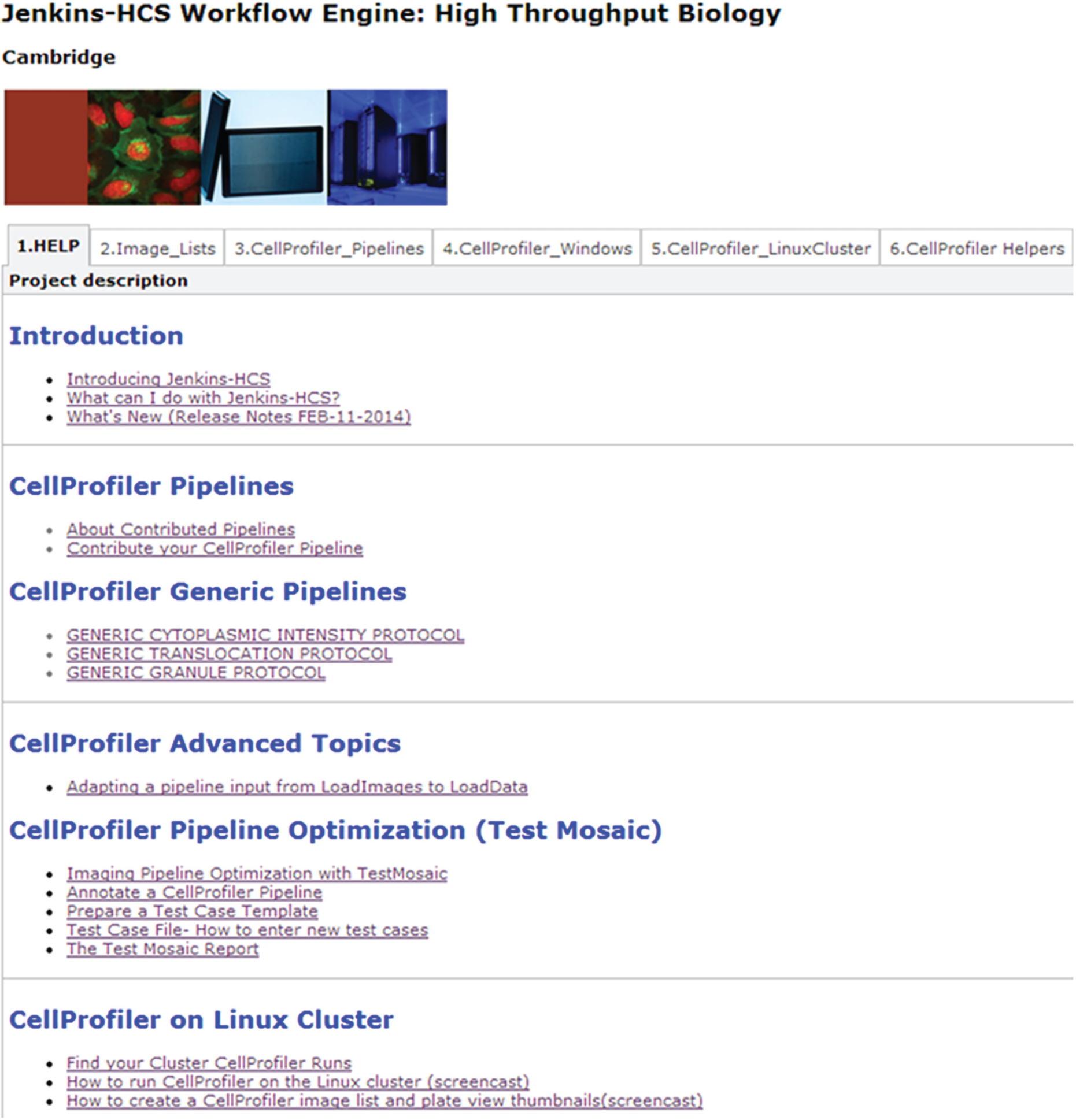
Jenkins-CI web portal for access to high-performance compute (HPC) computational tasks and workflows. A default installation of Jenkins-CI provides customizable tabbed views that group the available Jenkins-CI projects. Displayed tabs include (1) the “Help” tab with helpful shortcuts and guides in the use of the various Jenkins-CI projects; (2) the “Image Lists” tab for generating and managing CellProfiler-formatted image lists for various high-content screening instruments; (3) the “CellProfiler Pipelines” tab for the management and sharing of CellProfiler image-processing pipelines; (4) the “CellProfiler Windows” and (5) “CellProfiler Linux Cluster” tabs for launching CellProfiler on the Windows and HPC platforms, respectively; and (6) the “CellProfiler Helpers” tab containing a variety of custom utilities for formatting and processing measurement files generated from CellProfiler.
Jenkins-CI provides a built-in user management system that provides not only authentication but also granular, role-based access to all system functions, including browsing and data retrieval. We have configured Jenkins-CI to act as an intelligent data broker, accessing and writing data in a way that ensures that only the primary image data owners (as controlled by corporate access and authorization permissions) have access to measurements generated from these images.
Finally, as described in more detail in the “Parallel Image Processing Using CellProfiler” section, Jenkins-CI completely isolates users from the technical requirements for using CellProfiler on the HPC Linux cluster. Users are simply responsible for selecting in a web form the image data to be processed and the appropriate CellProfiler image-processing pipeline ( Fig. 3 , step 3). Once the form is submitted, Jenkins-CI takes care of the technical details of distributing subsets of images for parallel processing, monitoring and reporting on the progress of the parallel runs, and finally aggregating CellProfiler measurements generated from these distributed runs.
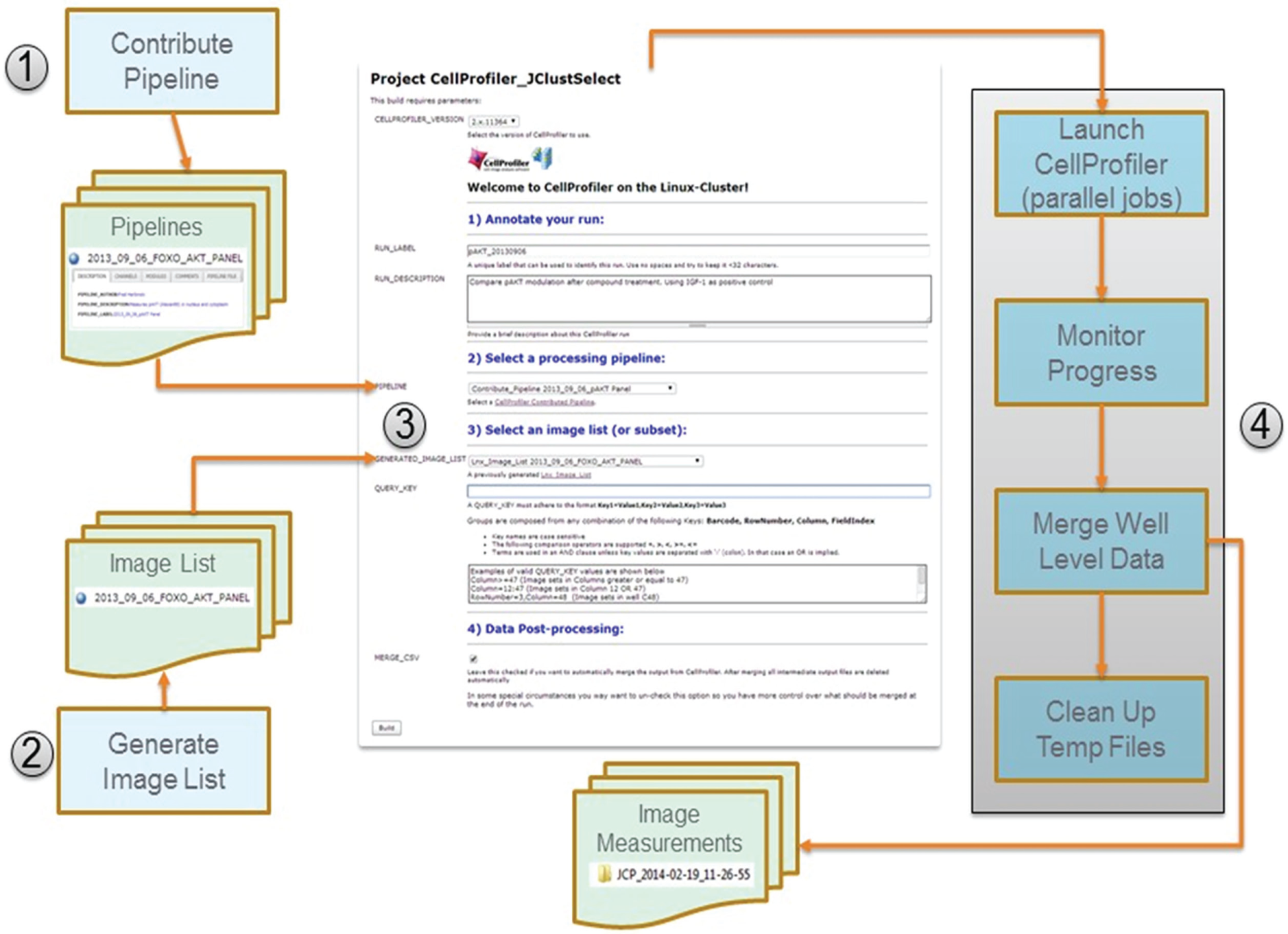
Jenkins-CI workflow for parallel image processing using CellProfiler on the Linux cluster. (1) The user uploads (contributes) a working CellProfiler image-processing pipeline. (2) The user generates a CellProfiler-formatted image list from one or more primary image acquisition folders. Image lists contain metadata required for data grouping operations as well as for downstream import into our corporate results database. Contributed pipelines and image lists are annotated and stored in the Jenkins-CI project build history, from where they can be re/used for image analysis by multiple users. (3) The user completes the cluster image-processing submission form by selecting the image-processing pipeline and an appropriate image list. The form contains additional annotation fields and options for restricting the processing to a subset of the images. (4) The user starts the build, which launches a multistage Jenkins-CI workflow (shown as a gray rectangle). The workflow includes stages for launching CellProfiler in parallel mode, monitoring the progress of the parallel cluster run, merging well-level data (optional), and deleting temporary CellProfiler files and grid engine logs.
Data Preparation for Image Processing
When CellProfiler is used in a “batch” mode for parallel processing, it requires as input to the pipeline an image list that conforms to a prescribed format and metadata naming conventions. Initially, the manual (and often error-prone) process for generating correctly formatted image lists presented an obstacle to the adoption of CellProfiler for image processing. We then implemented a Jenkins-CI job to transform the image list generation process into a simple, user-driven, and reproducible task (
Fig. 3
, step 1 and
Parallel Image Processing Using CellProfiler
Configuring CellProfiler to process images in parallel on a compute cluster results in a high-performance, cost-effective image-processing system. However, without the aid of an automated workflow system, the process is cumbersome, manual, and accessible only to experts familiar with the Linux operating system. Prior to building an integrated Jenkins-CI workflow to use CellProfiler in parallel mode, the process involved contacting a local Linux expert, identifying the image data to be processed, and then waiting for several days (depending on the workload of this expert) for the process to be completed through a series of manual steps. After implementing the Jenkins-CI workflow for parallel image processing (
Fig. 3
,
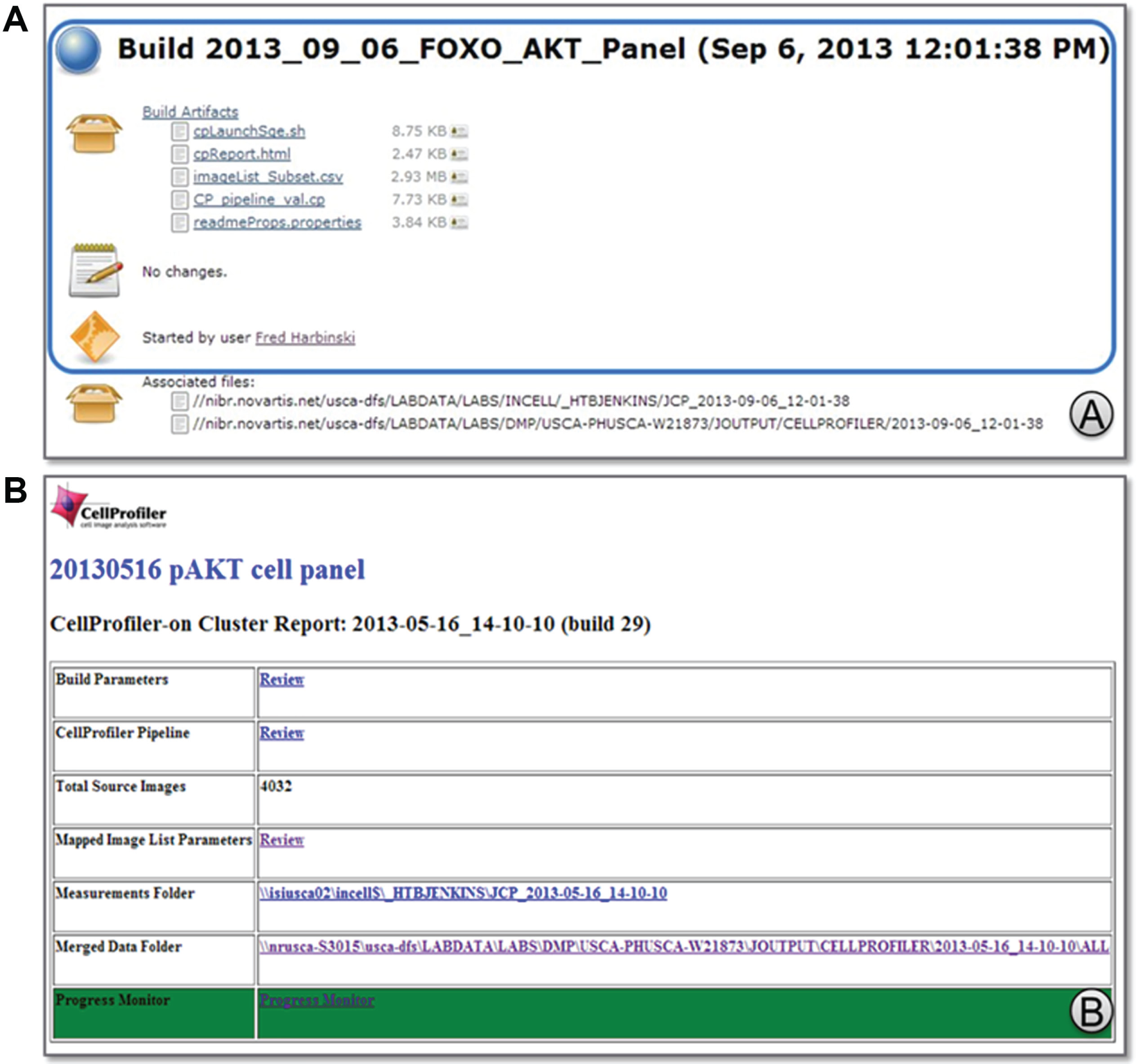
(
In addition, parallel image processing on the cluster with CellProfiler offers time savings that are significantly amplified as the amount of image data to be processed increases. We will now offer two usage examples and explain how the availability of computing resources and our strategy for parallel image processing contributes to this effect. For parallel processing, we divide the total number of images to be processed into groups of 12 images. We have calculated that for most image-processing pipelines of average complexity, each such group can be processed by a single CellProfiler computational thread (job) in about 10 min.
In the first example, a screen to monitor the location of a transcription factor in response to treatment by siRNAs
17
(
When the same data set was submitted to the HPC Linux cluster for parallel processing, it was similarly split among a total of 32 CellProfiler jobs for processing. However, in contrast to our local workstation, all 32 jobs start executing simultaneously with no queuing time. This is due to the fact that the typical number of available processing cores on the cluster is much larger than the number of processing cores we can allocate on a local workstation. Although this number will vary from run to run and day to day, due to the cluster being a shared resource with fluctuating load, on average there will be significantly more than just 10 cores available for image processing. Under this configuration, an assay plate with 384 images completed in approximately 11 min, giving us an effective processing performance of 35 images per minute. Thus, the user experienced a 5.5-fold performance improvement in image analysis time when the HPC cluster was used.
This improvement becomes even more dramatic when the number of plates or wells increases as is the case with high-throughput screening (HTS) assays that use 1536-well plates, thus generating many more images. The second example is taken from an assay that monitors the phosphorylation of a specific protein: a simple two-channel assay with Hoechst stain to define nuclei/cell bodies paired with an antibody to a specific phosphorylated protein, localized in the cytoplasm. An image set of 6144 images (4 × 1536-well plates) was processed on a 3-GHz workstation with 8 GB RAM using a single-threaded version of the CellProfiler desktop client. Under this configuration, the data were processed in approximately 6000 min (100 h). On the HPC cluster, the same data set completed in 37 min, thus delivering a performance improvement of 162-fold compared with the desktop version of CellProfiler.
Postprocessing of CellProfiler Measurements
Image measurements are typically exported as a CSV file after CellProfiler processing for further analysis. When CellProfiler is run in parallel, each job generates a measurements file uniquely identified by its corresponding metadata (such as plate coordinates, image field). As a result, multiple files are generated per assay plate (usually as many files as wells). These individual, well-level measurement files typically need to be merged to a single file representing the data of one or more plates for downstream analysis of the screening campaign. These tasks are now included in the typical CellProfiler workflow and are automatically triggered as soon as image processing completes successfully ( Fig. 3 , step 4: “Merge Well Level Data” processing block, Fig. 5 in Monitor_JCPCluster). Furthermore, after merging, intermediate well-level measurement files, job array logs, and CellProfiler intermediate (hdf5) files are no longer needed and can be safely deleted to conserve disk space. This tedious and often forgotten process is now automated as part of the image-processing workflow ( Fig. 3 , step 4: “Clean Up Temp Files” processing block, Fig. 5 in CU_CleanThumbnail_Folder). Importantly, if any of these automated tasks fails, Jenkins-CI will not proceed to the next stage, thus allowing for manual intervention and recovery. The end result is a single file containing all of the measurements for downstream analysis and continuous reclaiming of the disk space used by intermediate results.
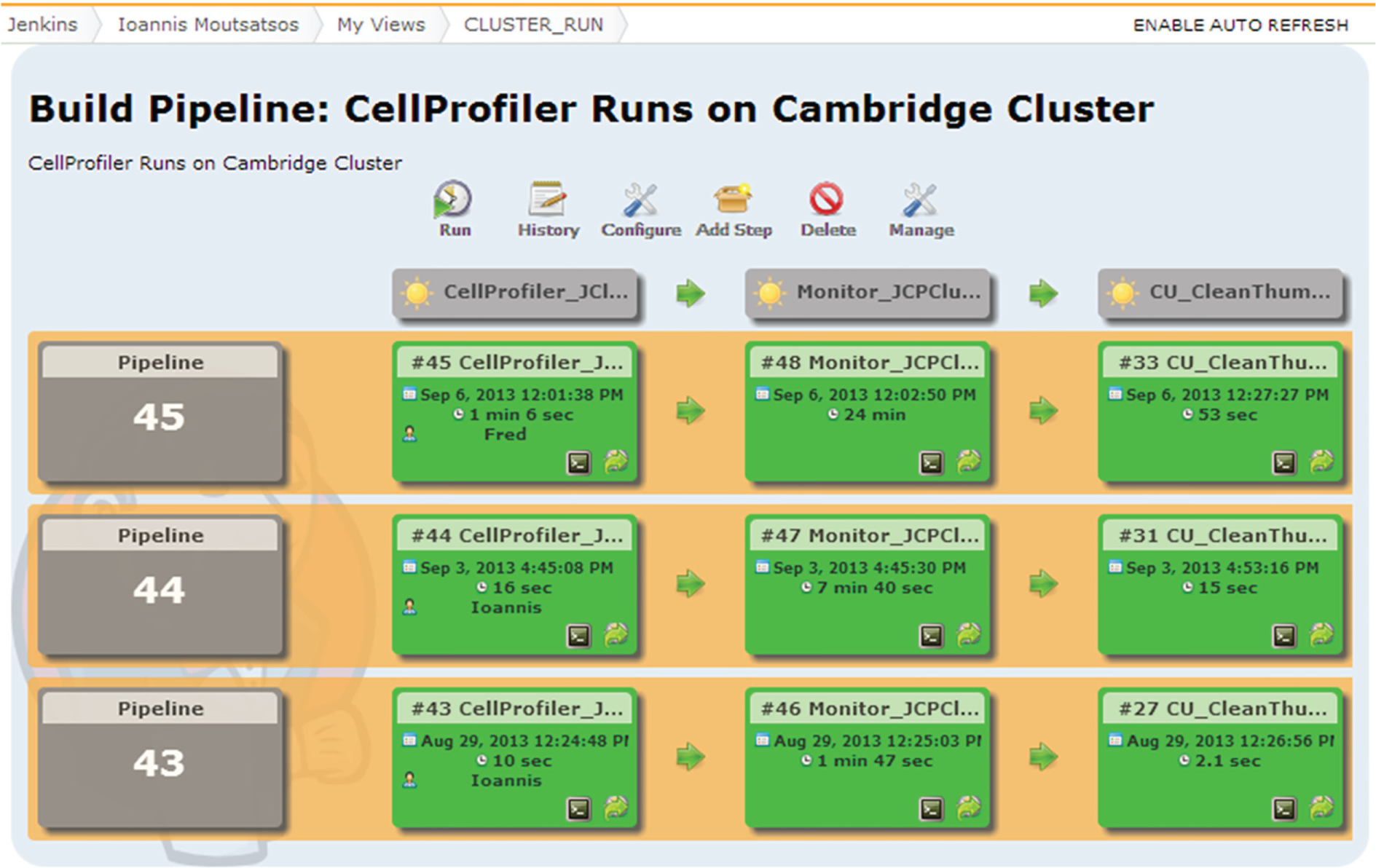
View of multistage pipelines used for parallel image processing. This multistage pipeline is used for submitting large data sets to the Linux cluster for CellProfiler processing. This custom view is generated with the aid of the Jenkins Build Pipeline Plugin. The number of pipeline runs displayed is configurable (in this case, we are displaying the last three). The Jenkins jobs participating in the pipeline are shown as blocks with arrows connecting one stage to the next in the sequence. Successfully executed blocks are green, and they include various statistics and shortcuts for more detailed inspection of the run logs. The first job (CellProfiler_JClustSelect) prepares a standard grid engine “job array” script by examining the submitted image list and creating a separate grid engine job for each group of 12 images. The next step is performed with the aid of the Jenkins SSH plugin (see Table 1 ). This plugin allows us to connect to the cluster and execute a short (bash) script. The script creates the data folders for writing the image analysis results, downloads the job array script from the Jenkins server, and finally launches the grid engine job array to process images using the CellProfiler command line mode. The second job (Monitor_JCPCluster) monitors the generation of output files from CellProfiler. As measurement files are generated, they are counted and the count compared with the expected number computed from the submitted image list. This allows us to construct a simple progress bar that is displayed in the Jenkins console. When all of the expected output is accounted for, the well-level data are merged into a single file to facilitate downstream data analysis. At this point, the third stage of the workflow is triggered. This third job (CU_CleanThumbnail_Folder) simply deletes any intermediate CellProfiler hdf5 databases, well-level data files, and grid engine job log files that were created during the run.
Improvements in Reproducible Research and Collaboration
Data replication and reproducibility have emerged as important goals in the field of life science computations and analysis. 18 There is an increasing expectation that published analysis results should be reproducible by others, beyond the original authors, and that requires at a minimum transparent access to the original data, code, and protocols. 19
The Jenkins-CI platform provides a solid foundation for implementing a reproducible research environment. The computational workflows, environment, and parameters used to generate or process data are archived and can be easily retrieved for review. Comprehensive logs and console output are maintained for every user session. Generated data are managed in a consistent way (naming, structure, annotation, archiving), and multiple users can securely access the portal to reuse CellProfiler pipelines, image lists, and image measurements without the need for maintaining multiple independent copies. Primary measurements are archived and staged for downstream analysis, ensuring maximum reuse and consistency. Developers can easily monitor the status and progress of the workflows and can quickly intervene when issues arise.
Discussion
This report describes the implementation of an integrated scientific data- and image-processing platform based on open-source software packages. CellProfiler provides image-processing functionality while Jenkins-CI plugins and custom utilities provide data and image management, formatting, and processing functions and seamless access to high-performance computing resources. The platform enables laboratory scientists to perform large-scale, high-performance image processing in a massively parallel mode without the assistance of technical experts in high-performance computing. As a consequence, analysis jobs that previously had taken several days to complete can now be completed in the span of a single workday and frequently within a few hours or even minutes.
From a systems development view, Jenkins-CI has enabled us to rapidly analyze requirements and prototype solutions for image and data processing in an active HCS screening organization. We have found this ability to be complementary and supportive of the development efforts of a dedicated team of engineers and software developers that are assisting us in building an enterprise-level analytical workflow system for HCS data.
Possibly the most important advantage of using open-source packages is that they offer a consistent platform to run image analysis experiments independent of vendor-specific hardware or software. In addition, the cost savings for licensing software to run on hundreds of nodes of a compute cluster are significant. Finally, in our experience, the open-source model for software development has been extremely responsive to fixing software issues and providing functional improvements.
While this report describes the application of Jenkins-CI to integrate several independent data- and image-processing tasks into a robust high-performance workflow, it should be noted that a number of similar tools designed to facilitate the design and execution of bioinformatics and imaging workflows already exist. For example, Galaxy,
20
Taverna,
21
openBIS,
22
LONI,
23
and Knime
24
have all been previously described. Each of these systems has unique advantages and disadvantages that require careful consideration before a suitable workflow platform is selected.
In our experience, the advantages of Jenkins-CI include ease of setup and maintenance compared with some of the other tools mentioned above. The file-based system for data and result management used in Jenkins-CI is simple and effective without the effort of maintaining a separate database system. This also adds considerable flexibility at early stages of development where requirements are still rapidly evolving. Changing task parameters and the structure of the workflows is straightforward without complex cascading effects. Jenkins-CI also provides features for provenance tracking and collaboration. Build histories and logs provide a detailed record for tracking and reproducing analytical workflows, as well for troubleshooting any issues that may arise. Finally, Jenkins-CI is built on a modular architecture and is supported by community-contributed plugins and custom extensions. This can be leveraged to build an extensible data integration and computational platform finely customized for user needs.
However, in comparison to systems specifically designed for computational and bio/cheminformatics workflows, Jenkins-CI falls short in the availability of readymade modules for statistics, data mining, and visualization. Although a variety of external scripts and command line scientific tools can be easily integrated in a Jenkins-CI pipeline, they do not provide the same level of convenience, granularity, and control in building a workflow as with tools such as Galaxy and Knime. So, in this respect, Jenkins-CI has to be considered a tool more appropriate for integrating larger pieces of functional software into scientific workflows and less appropriate for constructing an analytical process from small analytical functions. Search and metadata management are two other areas where the out-of-the-box functionality of Jenkins-CI would be insufficient for users requiring the tracking and searching of research results through tags, controlled vocabularies, and full-text searching.
Our experience in integrating Jenkins-CI with CellProfiler and the HPC cluster was quite positive and highlights an alternate strategy for building domain-specific workflow systems. Our fully functional image-processing workflow system demonstrates that this functionality can emerge from the integration of a generic workflow system with domain-specific software such as CellProfiler. Although Jenkins-CI does not natively support image processing, this functionality was provided by CellProfiler through its modular architecture. CellProfiler pipelines are maintained as separate entities and can be used to process one or more suitable image lists using CellProfiler in “headless” (command line) mode. Jenkins-CI can now support image processing by integrating “headless” CellProfiler into a more complete pipeline that includes additional data formatting, process monitoring, security, high performance, and other features. This approach has the additional advantage that a domain-specific tool, in our case the desktop version of CellProfiler, can be used to design and test the image-processing pipelines before deploying them on the cluster.
In the future, we envision integrating the Jenkins-CI CellProfiler platform with more structured data storage and custom downstream analytics for multiparametric analysis. Many of these analytics are written in R, which is already supported by the Jenkins-CI R plugin and can also be scaled out on a compute grid.
In summary, we have demonstrated that Jenkins-CI, an open-source, well-recognized, and supported continuous integration system, can form an agile platform for scientific image and data integration and processing. With its native ease for setup and maintenance, support for multiple operating systems, and host of prebuild plugins, Jenkins-CI can be used in a variety of scientific environments where there is a need for integrating and automating scientific computations and data management.
Footnotes
Acknowledgements
We thank the Novartis Institutes for Biomedical Research (NIBR) Scientific Computing group and especially Steve Litster and Michael Steeves for ongoing operational support with the Linux cluster and help in developing a global imaging strategy. We also thank Marc Litherland and Gianluca Santarossa for help with deploying CellProfiler on the cluster and programming API libraries to remotely access cluster services. Ioannis Moutsatsos thanks Bruno Kinoshita of TupiLabs/BioUno for useful discussions and significant contributions toward the development of open-source Jenkins-CI plugins useful in bioinformatics applications. We also thank Vic Myer, Erik Sassaman, Craig Mickanin, and Katya Henderson of the NIBR management and operations teams for encouraging and supporting our research in many ways. Finally, we acknowledge the contributions of Ann Carpenter, Mark Bray, and Lee Kamentsky at the Broad Institute of Harvard and MIT for their continuous development and support of the CellProfiler open-source software.
Supplementary material is available online with this article.
Declaration of Conflicting Interests
The authors declared the following potential conflicts of interest with respect to the research, authorship, and/or publication of this article: All the authors are employees of the Novartis Institutes of Biomedical Research and conducted this research as part of their drug discovery efforts.
Funding
The authors received no financial support for the research, authorship, and/or publication of this article.
References
Supplementary Material
Please find the following supplemental material available below.
For Open Access articles published under a Creative Commons License, all supplemental material carries the same license as the article it is associated with.
For non-Open Access articles published, all supplemental material carries a non-exclusive license, and permission requests for re-use of supplemental material or any part of supplemental material shall be sent directly to the copyright owner as specified in the copyright notice associated with the article.
