



Abstract
This study investigates the Out-of-Box Experience (OOBE) of the Xbox Adaptive Controller and Logitech Gaming Kit, focusing on users with varying levels of disability and gaming experience. Fifteen participants were recruited from a university population and had varying levels of gaming and disability experienced. The study observed participants’ interactions with the packaging, instructions, and setup process for both the controller and the switch kit. The Xbox Adaptive Controller received positive feedback for its easy-to-open packaging, aesthetically pleasing design, and a relatively easy setup and use process. However, weaknesses included a lack of clear information on functionalities of additional switches, difficulties with cable management, and unclear instructions with a reliance on diagrams Incorporating individuals with diverse gaming backgrounds and experience with disability throughout the design process can help identify challenges and opportunities for a wider range of users.
Introduction
From glasses and subtitles to hearing aides and prosthetics, Assistive Technology (AT) is all around us. The Assistive Technology Act of 2004 defines AT as “Any item, piece of equipment or product system whether acquired commercially or off the shelf, modified, or customized that is used to increase, maintain or improve functional capabilities of people with disabilities.” According to the Pew Research Center, there are about 42.5 million Americans with disabilities as of 2021. “This group includes people with hearing, vision, cognitive, walking, self-care or independent living difficulties (Leppert, 2023).” A population of this size must be accounted for in the design of new, or redesign of existing, products and services.
Part of that accommodation must include optimizing the Out-of-Box-Experience (OOBE) of the new product. OOBE refers to one’s “initial experiences with new technology, which include acquisition, unpacking, set-up, assistance, and first use (Burrows, 2016).” These first impressions are dependent on a number of factors unique to each user, including “their motives for acquiring it, packaging, interoperability arrangements among related devices and infrastructures, and their prior knowledge of similar devices or of the enabling technology (Gilbert et al., 2005). Early interactions with a newly introduced product shape buyer attitudes toward it, and may affect its marketplace performance (Gilbert et al., 2005).
Research done by Circana in 2023 shows that about 212.6 million Americans play video games on a weekly basis (Entertainment Software Association, 2023). Gamers with disabilities may struggle with barriers in video gaming, such as the inability to distinguish important visual cues, hear critical audio, or adequately move controllers (Porter & Kientz, 2013). And since roughly 30% of gamers in the US identify as disabled (Le Ngoc, 2021), there is a demand for assistive technology in the gaming industry.
The Xbox Adaptive Controller is a piece of assistive technology designed by Microsoft to provide gamers with a variety of different input modalities to suit their needs (Microsoft, n.d.). It comes with 19 different ports for accessibility switches that accommodate a number of motor disabilities. Because this is a tool designed primarily to assist people with disabilities, it is important to ensure that the target audience of this device is capable of setting up and using it effectively. However, this demographic are not the only potential users for this product. People with disabilities may require caregivers to set up their gaming equipment who may not have as much experience with gaming technology. Additionally, the Xbox Adaptive Controller may be used by those with temporary disabilities, such as a broken arm, who have less experience with mobility limitations and the technology available to accommodate for those limitations. The set up and ease of use of the Xbox Adaptive Controller should also accommodate for this lack of prior background.
The purpose of this study is to evaluate the Out-of-Box Experience of the Xbox Adaptive Controller, for people who have varying levels of disability and gaming experience. The aim is to identify areas of strength that can be implemented in the design of other assistive technology, as well as identify areas of weakness that can be improved.
Method
Our study involved 15 participants, 5 male and 10 female, randomly sampled from the Embry-Riddle Aeronautical University-Daytona Beach campus population. Participant ages ranged from 19 to 32 years old, and all participants had used a controller to play a video game at least once before. No participants had experience using the Xbox Adaptive Controller. There were three categories of participants: individuals with no upper body mobility impairments (NoMI, n = 5), caretakers of individuals with disabilities (CG, n = 5), and individuals with upper body mobility impairments (MI, n = 5).
Researchers conducted semi-structured interviews with participants. Participants were asked about their experience with video games and adaptive technology for video games and expectations for how an adaptive game controller would differ from a standard one, before being presented with a picture of the Xbox Adaptive Controller and being asked their initial impressions.
Next, participants were given the box for the Xbox Adaptive Controller and were allowed to handle, manipulate, and view all sides of it. Participants were asked about their initial impressions of the box and what expectations they had, including the contents inside the box and what type of instructions they would receive for setting up the device. After opening the box, participants were asked about their initial impressions of both the product and the unboxing process, and how well those impressions matched their expectations. Participants were asked to think aloud throughout the process.
This process was repeated for the Logitech G Adaptive Gaming Kit, a separately sold box of attachments (switches). Participants were asked to set up the controller and desired switches as if they owned the product and were going to use it for themselves. For the purposes of this study, participants were only asked to set up the A, B, X, and arrow key inputs. Researchers observed how the participant chose to arrange the adaptive controller and switches, and provided assistance upon request. Participants would then play one turn of Monopoly Go™ on the Xbox One, navigating from the title screen, through the game set-up, and into a game using only the adaptive controller. They were then asked follow-up questions about their impressions on using the adaptive controller.
Results
Xbox Adaptive Controller Initial Impressions
Most users had heard of the term “adaptive controller” before participating in this study. Their impression of the term “adaptive controller” was a controller that is easier for people with a disability to use. They believed adaptive controllers to be more customizable and to have appearances that may be different from standard controllers, such as different buttons, more sensitive inputs, a more condensed layout, and a variety of accessories available. Most participants had not used an adaptive controller before.
When presented with a picture of an Xbox Adaptive Controller, participants reported that its design seemed simple, clearly labeled, and interesting, but expressed concerns that there may not be enough input methods for some games and it may be difficult for people with motor impairments (MI) to use.
Participants were asked where they would expect to buy adaptive controllers. They expected to have options for purchase both online at websites such as Amazon, Microsoft, and Ebay, and in stores such as Best Buy, GameStop, or Walmart. NoMI participants were more likely to expect that adaptive controllers are readily available for purchase in brick-and-mortar stores. MI participants had higher cost expectations for the price of adaptive controllers, based on previous experiences with buying adaptive devices and the belief that an adaptive controller is more complex than a standard controller.
Xbox Adaptive Controller Box Impressions
Participants were presented with a box containing the Xbox adaptive controller and asked to verbalize their thoughts based on its appearance. Participants noted many languages, and several switches and input holes depicted on the box (Figure 1).
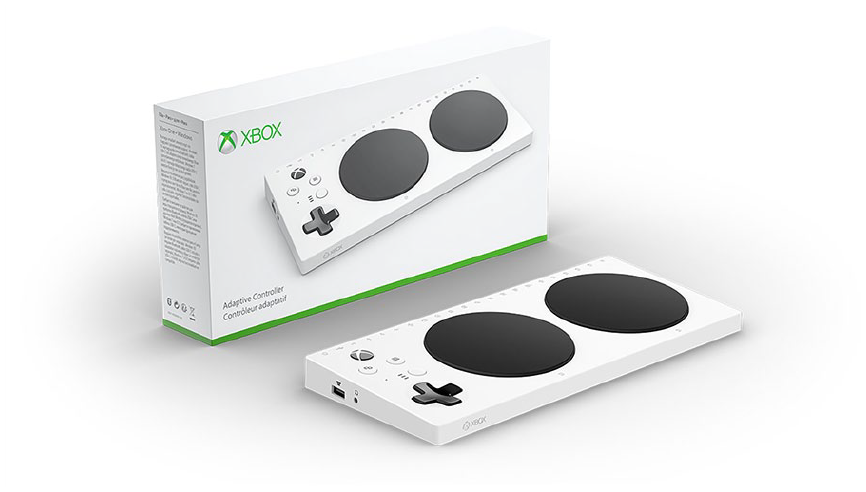
Xbox adaptive controller and box.
When participants were asked about their expectations for the contents of this box, they stated that they expected the box to include the adaptive controller, instructions, a charging cord, and a cord to connect the controller to an Xbox. They based their expectations of the contents on their previous experiences with purchasing electronic devices and pictures and text they observed on the adaptive controller box.
Participants expected to receive instructional documents with the purchase of an adaptive controller, including documents about set-up and usage, product description, add-on options, warranty information, promotional papers, QR codes and links to videos and websites for set-up help, a helpline phone number, and a Braille option. They anticipated many steps and pictures in these documents.
Participants reported that the packaging of the adaptive controller was of good quality, easy to open, well-organized, sturdy-looking, and minimalistic. They also reported that they wished the words “Adaptive Controller” were larger on the box and that the weight of the box may be tiresome for someone with a disability.
Xbox Adaptive Controller Unboxing
Then, participants were given the opportunity to take the Xbox Adaptive Controller out of the box and verbalize their thoughts as they examined the various items inside. Most participants liked the pull tab on the Xbox Adaptive Controller box, saying that it made it easier to open the box. They all noticed the instructions and charging cable, but often overlooked paperwork that was on the bottom of the box, including the warranty booklet. Some participants liked that the charging cable didn’t have a twist tie on it, as it was easier for participants to access the charging cord. Participants appreciated that the instructions for the adaptive controller were placed toward the top of the box, as it made the instructions easy to see and access.
Participants thought that the adaptive controller unboxing experience was simple and straightforward, and it was easy to access and remove the adaptive controller from the box. When looking at the instruction sheet, participants wished that there were more written instructions, symbols, and available languages, because they thought it was difficult to understand the diagram. They speculated that the adaptive controller instructions may not be inclusive for older people and those who need to read Braille. Participants liked the size of the adaptive controller instructions, but wished that there was an associated video that could aid in the set-up process. Participants thought that the instructions were “Helpful but not really helpful,” because the pictorial instructions helped them to get started with setting up the adaptive controller, but they would have liked to see more words to help with understanding certain steps. They were curious about prices for switches that can work with the adaptive controller and they wished that there was a resource in the box that gave more information about switches. Many participants often looked to the back of the instruction card for more information, but they only saw blank space there. They expressed desires to see the empty space filled with text instructions or a link to a website. MI participants noted that closing the controller box may be difficult for people with MI. They also noted that the box looked stylish and appreciated that it fit with the aesthetic of other Xbox products (Figure 2).
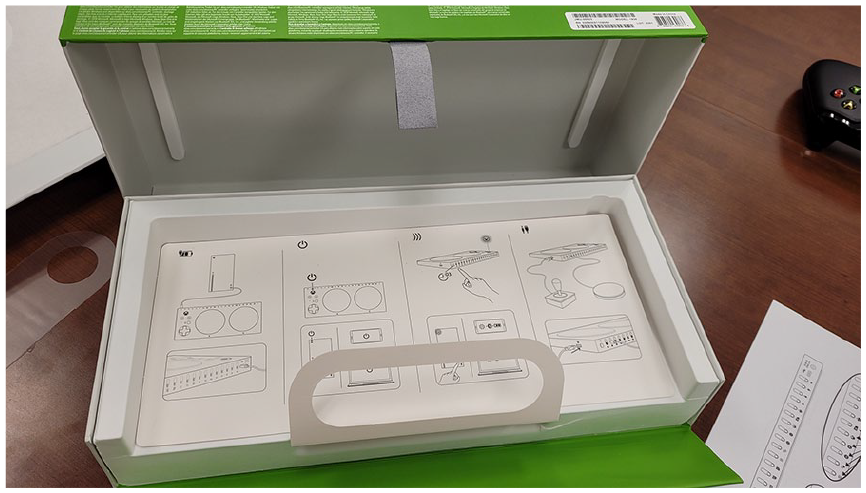
Xbox adaptive controller instructions.
Switch Initial Impressions
NoMI and CG participants appreciated the variety of devices shown in the diagram of compatible switches. They appreciated that the switches could be changed as necessary for different types of games.
MI participants noted that buying additional accessories to make the controller adaptive goes against the initial idea of an adaptive controller. They do not want to buy additional items to meet their needs, when these could have been included in the original purchase.
Participants were then asked what each switch could be used for. NoMI participants described that the buttons appear to be customizable based on game requirements; large buttons can be used for actions that take place frequently or require accuracy, whereas small buttons can be used for actions that they do less often. These participants also described triggers as being useful to control speed in a game. Compared to the NoMI participants, CG participants were able to describe specific functions for the switches. Many of these participants described that these buttons and switches can be customized and used as any input depending on the needs of the user. It was described that the big buttons are useful for touch, and triggers have press sensitivity, but did not describe a specific function for the small buttons. In comparison, MI participants described the small buttons as being useful for those with wrist MI, and one participant described the big button as being able to be pressed with a foot for those with severe upper body MI.
Logitech Gaming Kit Box Impressions
Participants were then presented with the box containing the switches, and all groups agreed that this box was much larger and heavier than the adaptive controller. NoMI participants explained that the box provides a good idea of what the contents are, and most pointed out the Logitech logo, describing it as a trustworthy brand. Several participants from separate groups described their appreciation of the interaction between the Logitech switches and the Xbox Adaptive Controller shown on the box, but they wished the box looked similar to the Xbox Adaptive Controller box.
Negative comments made about the box came mostly from CG or MI participants. These participants explained that all of the buttons appear to be press-based, a function which some users may not be able to perform.
Logitech Gaming Kit Unboxing
Participants were then tasked with unboxing the package containing the switches. They explained that all assumptions of the content was met, and liked that labels were included as stickers to keep track of the switches and their uses. Participants liked that the labels without colors might allow them to draw their own sticker labels (Figure 3).
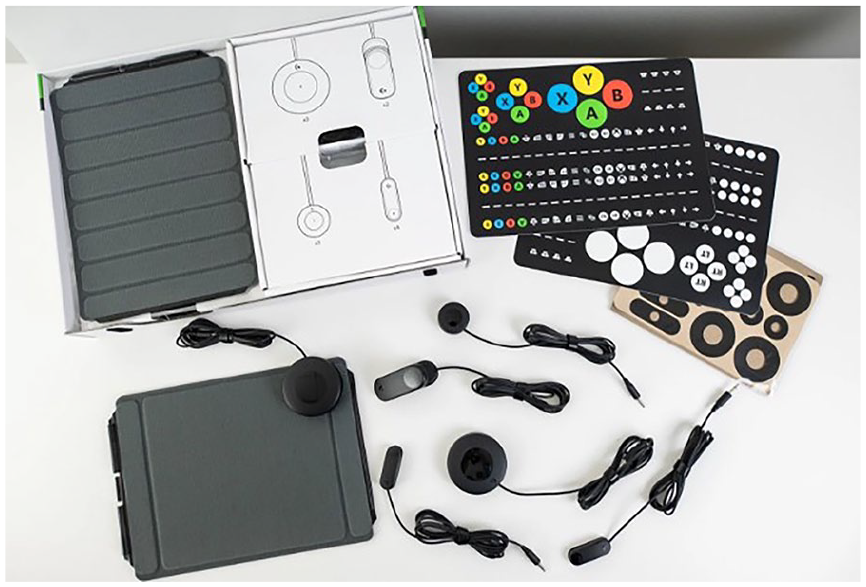
Contents of the Logitech Gaming Kit.
Negative comments about the contents arose, as many participants were not satisfied with the picture-based instructions. Most reported that there was not enough clarity provided, and explained that they like the use of the pictures as an added feature, but would prefer to be able to read text for additional clarity when confusion occurs. They also explained that they did not understand how these switches would interact with the controller. MI participants felt overwhelmed by the amount of switches with no clear instruction of how they interact or their suggested use.
Participants were asked to rate their unboxing experience on a Likert scale from 1 to 5 (1—very difficult, 5—very easy). Participants gave a mean rating of 4.5 (SD = .51). NoMI and CG participants said that it was easy, but there was an overwhelming amount of accessories included. MI participants felt that the unboxing experience was easy, but they wished there was a pull tab to open the gaming kit box, similar to that of the adaptive controller package.
Following this question, participants were asked how difficult they expect the set up of the switches with the controller to be on a scale of 1 to 5 (1—very difficult, 5—very easy). Participants gave a mean rating of 3.5 (SD = .74), saying it was difficult to understand the instructions, as well as the functions of the switches.
Setup
Across all groups, users had a hard time realizing that they could use the big A and B buttons on the adaptive controller rather than adding additional switches. Most users had concerns about being able to efficiently manage the cables for the switches. They thought that the cords’ length and uniform design made it difficult to understand which cords were leading to their respective switches at a glance and it was easy for the cords to become tangled (Figure 4). They also were confused about connecting via Bluetooth and often gave up on attempts to connect to the console wirelessly. Most users connected to the console using the USB-C cable. Users often consulted the controller instruction card to determine which switches they should use for certain controls/inputs. Users largely preferred to use the small, rectangular switches for the movement arrow inputs. Some users didn’t know what the velcro, stickers, and/or gaming boards were supposed to be used.
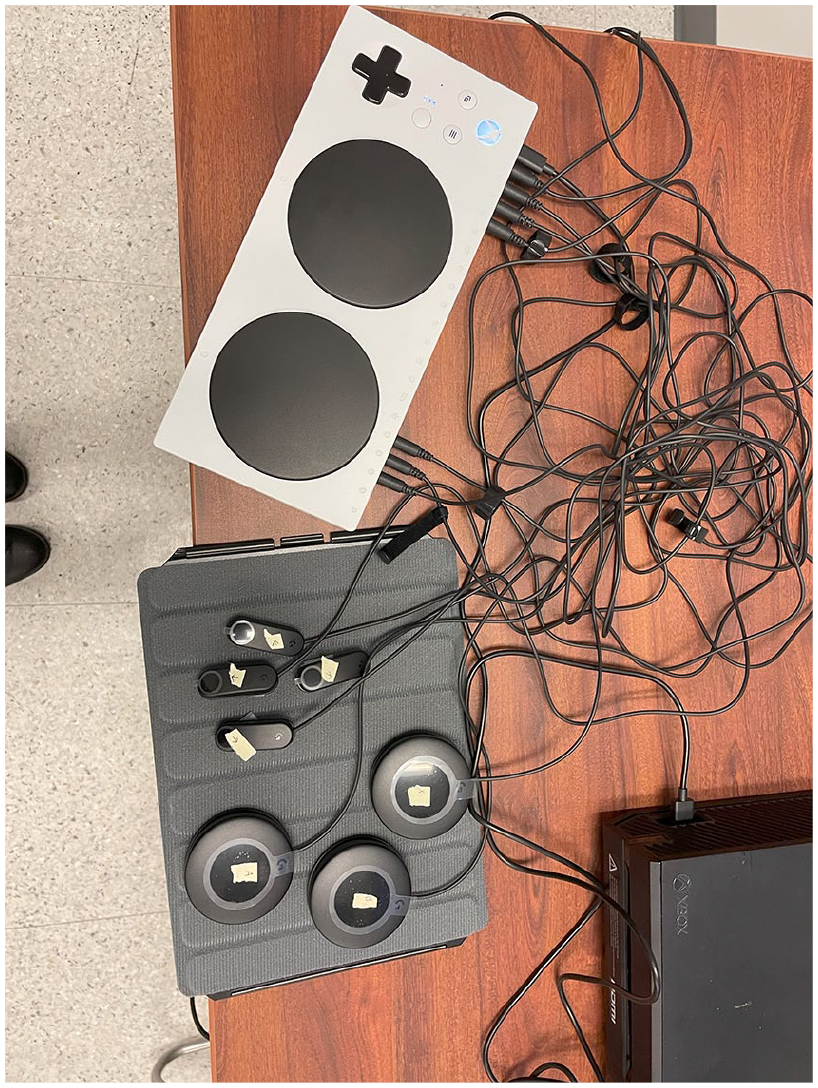
Controller and switch set up by a participant.
Though there were some difficulties, participants thought that setting up the Xbox adaptive controller and Logitech switches to play a round of Monopoly was a fairly easy task. Participants said that there were some things that caused difficulty, such as Bluetooth pairing, and the process was confusing while they were doing it, but it made sense after everything was set up.
MI participants liked that the layout for switch usage was customizable, the switches were easy to plug in, and the gaming boards were adaptable to user needs. Participants were frustrated about dealing with all the cords on the switches, figuring out which switches to use, and having difficulty with the Bluetooth pairing process. They expressed frustration because they didn’t realize arrows on the adaptive controller were options for player movement and selection, and they took a long time to realize where the A and B buttons were. Participants wished for colored images or symbols on the instructions to indicate the purpose of the buttons.
First Use
After setup, participants were tasked with playing one round of Monopoly Go™. Participants were asked to rate the difficulty of setting up the product from 1 to 5, (1—very difficult, 5—very easy). Participants gave a mean rating of 4.8 (SD = .8), describing that the controls are similar to the original Xbox controller, and thus easy to use. One participant with MI explained that using this controller eliminates wrist pain that they commonly experience when gaming.
Negative opinions surrounding the set up were that it would be difficult to use the controller for high intensity games. The D pad may be more difficult to use for fast movements. Setting up the X key was also a struggle for some participants, as they could not find where to plug it in on the adaptive controller, or how to plug it in properly.
Participants were also asked to rate the success of their performance completing the task from 1 to 5, (1—very unsuccessful, 5—very successful). Participants gave a mean rating of 4.8 (SD = .43), saying it was straightforward and easy to use. Some participants mentioned the controls taking some getting used to and difficulty in reassigning the buttons but overall participants agreed that using the controller was easy.
Final Thoughts
At the end of the study, participants gave their final impressions. Overall, all groups of participants liked that the controller was customizable, light, the buttons were easy to press, and it fit in with the aesthetic of other Xbox products. Participants did have concerns with cord management, and one participant suggested that the switches should be wireless to avoid issues with cord organization and tangling. Another participant was concerned that the switches seemed light and fragile. Several participants also mentioned that they would like the built-in A and B buttons to be remappable.
Overall, the majority of participants said they would purchase the controller for themselves or someone they knew. Two participants said they would not purchase the controller, and when asked why, they stated that they wanted a smaller and cheaper controller.
Discussion
Our exploration of the Xbox Adaptive Controller and Logitech Gaming Kit offers valuable insights for designers seeking to create accessible products. Overall, participants thought the Xbox Adaptive Controller was easy to use, stylish, and comfortable. Most participants said they would purchase the controller if they had a need for it. However, some improvements could be made. Below, we categorize participant comments into strengths and weaknesses of the Xbox Adaptive Controller and Logitech Gaming Kit.
Strengths
Organized and Easy to Open Packaging: Participants mentioned that the pull tab on the controller box made it easier for participants in all groups, but especially those with MI, to open. Similarly, they appreciated that the charging cable didn’t have a twist tie, which also helped in accessing the cable. Participants mentioned that the packaging of the controller was well organized, with the controller easy to access on the top, instructions underneath, and charging cord under that. Thus, participants could access the material in the order they needed it.
Aesthetics: Participants appreciated that the Xbox Adaptive Controller fit with the aesthetics of other Xbox products. This is important in fostering a sense of inclusivity, as users may feel that products they need to use are intentionally part of the Xbox ecosystem, rather than an afterthought, and it can blend in with their other products.
Labeling Options: Participants thought the sticker labels in the Logitech Gaming Kit were helpful to keep stickers organized. They enjoyed the bright colored stickers, but also liked that there were blank options if they didn’t want color, or wanted to create their own labels.
Easy Set Up and Use: Participants thought the set up and use of the controller and switches was easy. They enjoyed that the button press felt and sounded “satisfying” and that the controls were similar to a standard Xbox controller. MI and CG participants often commented that they could visualize the controller helping with pain or difficulty moving when gaming. NoMI participants also enjoyed the feel and use of the controller, which could indicate that exposure to the adaptive controller could lead to use cases beyond using the controller for MI.
Weaknesses
Access, Expense, and Accessories: When asked where participants expected to buy the Xbox Adaptive controller, many participants mentioned websites such as Amazon, Microsoft, and Ebay, as well as brick-and-mortar stores like Best Buy, GameStop, and Walmart. Currently, there is limited opportunity to purchase the Xbox Adaptive Controller in a brick-and-mortar store, or popular online sites like Amazon. Additionally, the Xbox Adaptive Controller is more expensive than a standard controller, and it often requires additional switches to play games due to the lack of built-in buttons. While the cost of the controller matched participant expectations, participants did not immediately understand that they would likely have to purchase additional accessories. MI participants mentioned that this can be an extra burden to people who may already have added expenses due to their disability.
Lack of Information for Switches: When presented with options for different switches, participants often did not know what the different switches were, where to purchase them, or how to use them. This information was not included with the Xbox Adaptive Controller, or the Logitech Gaming Kit. While the lack of prescribed uses may allow for exploration or customization, this was not noted in participants’ interactions with the switches, as generally participants used what information they could from the instructions or provided photos to set up their gaming configurations. Providing more than one visualization, or different explanations of how switches can be used, can show users that there are several different options for customizations.
Poor Cable Management: Most participants had concerns about cable management for the switches. Though the study required them to use a limited amount of inputs, cable management was still an issue. Participants expressed concern with being able to keep track of cables, especially when switching between games or when trying to troubleshoot issues with switches. A participant with MI mentioned that attempting to manage the cables could be very tiring, due to their disability. Designers should explore solutions like shorter cable lengths, providing cable management options such as sleeves or clamps to bundle cables, or bluetooth switches that eliminate cables altogether.
Unclear Labeling: Users were often confused by the pictorial instructions since they were not accompanied by written instructions. Video instructions with audio would also be beneficial, and make the instructions more accessible to people with visual impairments. When setting up the Xbox Adaptive Controller and switches for gameplay, participants often set up accessory switches for functions that were already built into the controller. When asked about their configuration, several participants said the additional switches were set up because they didn’t realize what the built in buttons were used for, or had overlooked them. Currently, the buttons on the controller are labeled with inset symbols that are the same color as the controller. Clearer labeling, both on the controller with higher contrast, or in the instructions, could help participants not overlook them.
Interaction with Gaming Experience: While the controller may be useful for people of varying levels of disability, the instructions and equipment may not be optimized for varying levels of gaming knowledge. Involving individuals with different experience levels throughout the design process can help identify potential challenges and opportunities.
Footnotes
Declaration of Conflicting Interests
The author(s) declared no potential conflicts of interest with respect to the research, authorship, and/or publication of this article.
Funding
The author(s) received no financial support for the research, authorship, and/or publication of this article.