



Abstract
Color photocopiers and printers have rapidly gained popularity and accessibility, making them effective tools for altering or copying original documents. Such devices enable the safe and intelligent usage of color photocopies and printouts because of their high output, good resolution, automatic feed, and sorting capabilities. Examining these fake documents often presents difficulties for specialists because they seem just like authentic paperwork. Additionally, due to the similarity in how digital photocopiers and laser printers operate, papers created using such procedures have a similar appearance. To help a document expert identify forgeries created using such methods, this work tries to compile a list of physical features that can considerably distinguish between color digital photocopies and color LaserJet prints.
Introduction
Every document has information that can be altered to serve a malicious goal. With the development of digital technology, it is now simple to copy or edit a whole document. 1 Security papers could be used in illegal operations, including making counterfeit money, 2 counterfeit passports, ransom letters, terrorism, etc., with easy access to photocopiers and prints. People who utilize these technologies for illegal activities have benefited from the development of colored digital photocopiers and color printers, which offer good resolution and produce documents that resemble the originals.
As a result, there are many questions that document examiners must answer, like whether a particular document is the original or a copy. Which type of reproduction—a photocopy or a printout—is made? Color laser printers create patterns of yellow dots that are almost imperceptible to the human eye and can be used to identify the printer. 3 The unique dot pattern corresponds to a certain laser printer or photocopier’s serial number.4, 5 Due to their identical operation modes, it may be difficult to discern between laser-printed and photocopied documents.6, 7
This study examined colored digital photocopied documents and colored laser prints of documents based on their physical and instrumental analyses to identify any significant differences.
Materials and Methods
Sample Procurement
For the study, 30 photocopies and laser prints from 10 original security papers, including certificates, mark sheets, and letterheads, were gathered. The samples consist of 10 original documents printed in color on colored photocopies and colored laser prints. Black-and-white digital photocopies and laser printouts were also acquired to investigate the substantial alterations further. Printouts from a Canon device were used for all Xeroxing and printing. The factors examined included the samples’ general appearance, UV features, watermark, text and background clarity, micro printing, and documentation size.
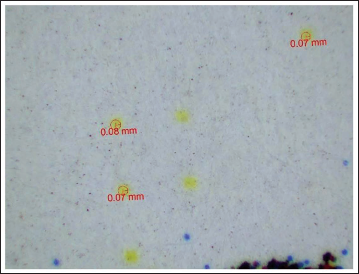
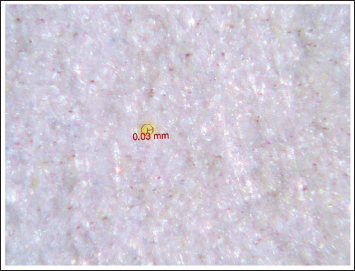
The study’s primary goal was to identify characteristics that can meaningfully distinguish a photocopy from a Xerox. It also examined a feature called tracking dots, which are small yellow dots that appear randomly on the page and create a pattern. The size of these dots varies from printer to printer, and they are only visible in documents printed on laser printers. These dots link a printed page to a printer.
Analysis
The analysis was done by comparing digital photocopies and laser printouts with their respective original documents, based on different parameters and security features, including:
Dimensions of the document Presence of watermark Presence of security features The appearance of the background The sharpness of the seal Clarity of the background writings Color of the document Microprinting Margin design Perforations along the side of the document The color of the goldenseal and the sharpness of its edges Dimensions of tracking dots Blackening of paper
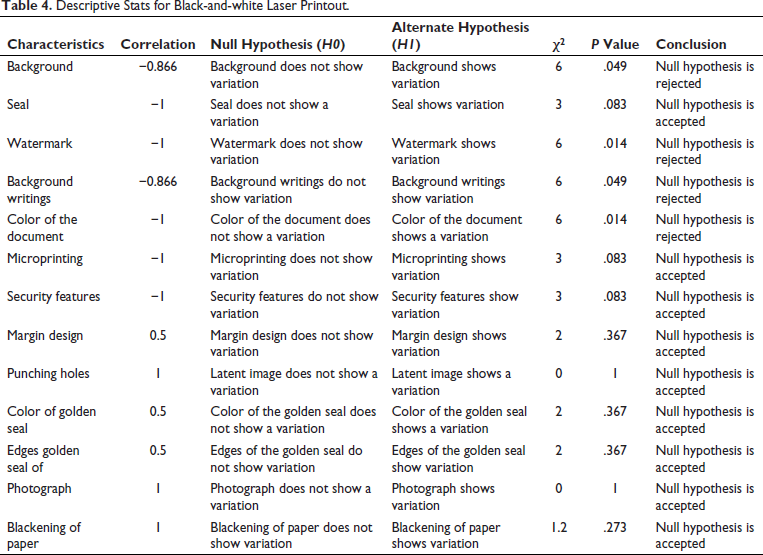
Statistics such as correlation, chi-square value, and P value were used to interpret the data quantitatively. To determine the usefulness of various characteristics and security measures in distinguishing between original papers, photocopied documents, and computer printouts, the significance of the data was tested at alpha = 0.05 and 0.01 levels.
Materials and Instruments used:
Scale Stereomicroscope VSC 40
Each color printout and photocopy was compared to its corresponding original document. The intricate details of the color photocopy and printout can be seen under a stereomicroscope.
Observations
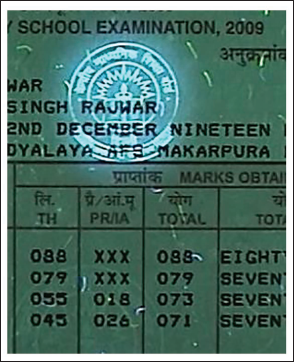
There was a decline in the quality of printed materials, evidenced by the clarity of character edges, seal clarity, microprinting, margin design, and other factors (Figures 1–7). It is understood that none of the replicated documents will have visible security elements, such as water-marks or UV fluorescence (Figures 4 and 5). Tracking dots were also identified and measured to determine the printer that produced the document (Figures 8 and 9). The dimensions of the tracking dots varied for each printer.
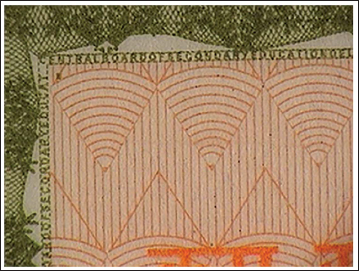
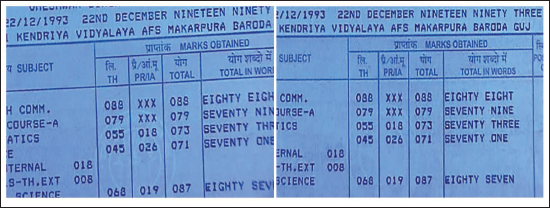
Margin Design and Microprinting in the Original Document.
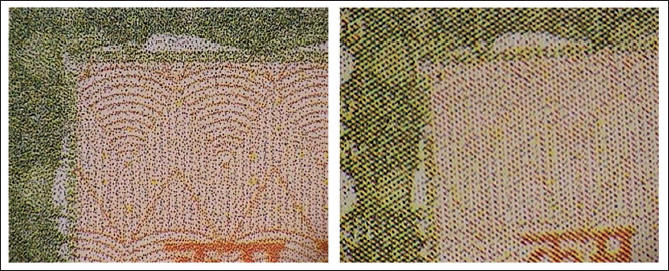
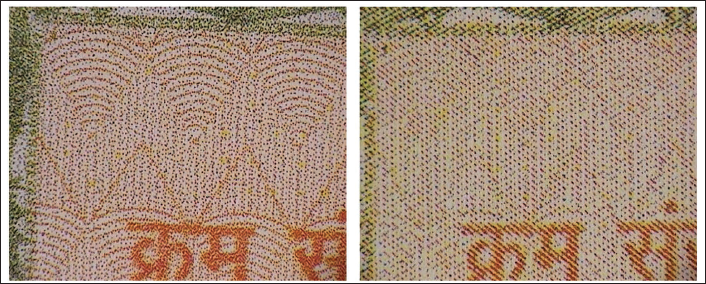
Margin Design and Microprinting: Slightly Visible in the Photocopied Document (Left), but in the Color Printout (Right), the Microprinting Appears Just Like Some Pattern of Lines.
Presence of UV Features in Original Document.
Absence of UV Features in Color Photocopied (Left) Document and Color Printout (Right).
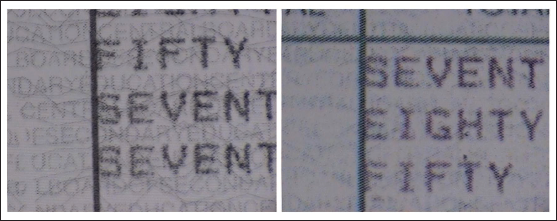
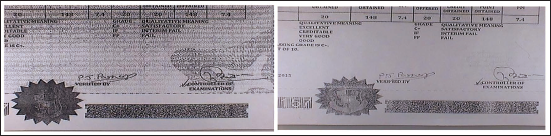
The appearance of seal, background, and blackening of paper in black and white digital photocopied (Left) and laser printout (right). Background writings which can be seen in photocopy are entirely absent in laser printout.
The Dimension of Tracking Dots in Samples Taken from Canon Printer Was Found to Be 0.07 ± 0.01 mm.
The Dimension of Tracking Dots in hp LaserJet Printer Comes out to Be 0.05, Which Can Vary till ± 0.01 mm.
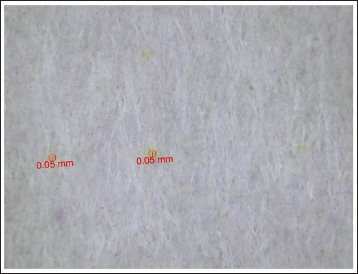
One can observe that the quality of margin design, micro printing (Figures 1 and 2), and background design (Figure 3) shows more deterioration in the color printout than the color photocopied document. In color photocopied documents, the images and writings appear as a matrix of various small dots.
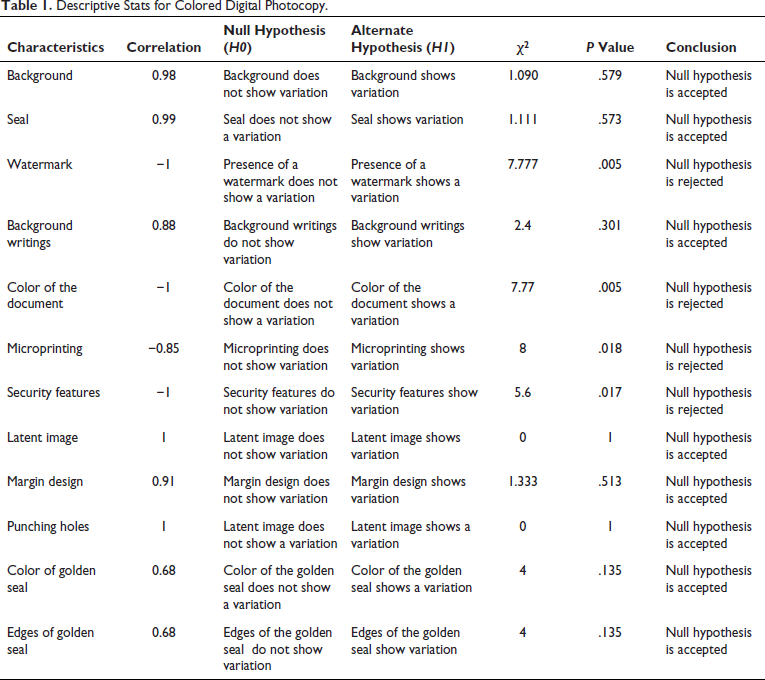
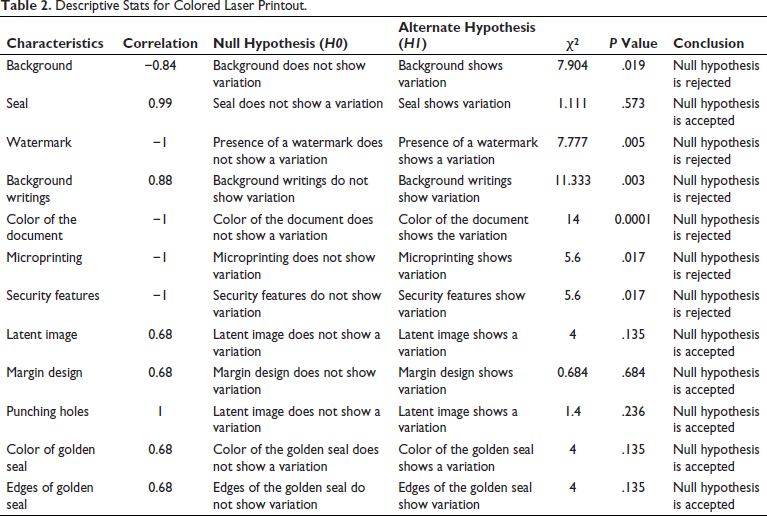
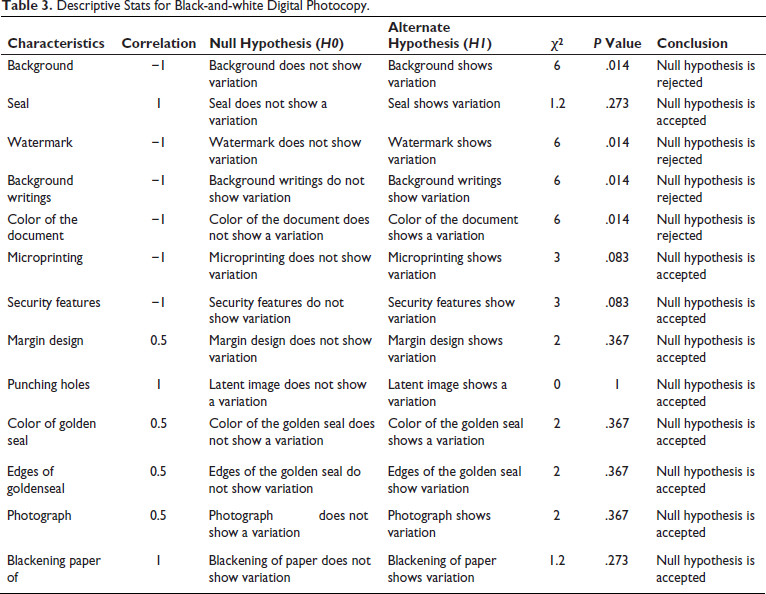
The quantitative interpretation of specific attributes was conducted based on statistical variables, including correlation, chi-square values, and P values. The significance of the findings was examined at alpha levels of 0.05 and 0.01 to ascertain how well the selected attributes dis tinguished between colored laser and digital photocopies (Tables 1–4).
Descriptive Stats for Colored Digital Photocopy.
Descriptive Stats for Colored Laser Printout.
Descriptive Stats for Black-and-white Digital Photocopy.
Descriptive Stats for Black-and-white Laser Printout.
Results and Discussions
By studying and comparing samples of colored digital photo-copies and colored laser printouts of the same document, it was discovered that these two types of documents differ and that specific characteristics can be utilized to tell a color digital photocopy from a color laser printout apart.
By examining security characteristics like watermarks and UV features like UV fluorescence and optical fibers, one may also readily tell the difference between an original document and a colored photocopy or colored reprint.
This investigation gathered 30 photocopies and laser prints of 10 original security documents and checked for details, including letterheads, mark sheets, and certifications. The samples consist of 10 original documents printed in color on colored photocopies and colored laser prints. Black-and-white digital photocopies and black-and-white laser printouts were also acquired to investigate the substantial alterations further. Whether the provided document is a colored photocopy or printout, the accuracy of the characters/features that can be utilized to identify the source of a reproduced colored document was tested at 0.05 and 0.01.
When photocopied documents and laser printouts were compared, it became clear that certain characteristics, including background clarity, margin design, written or printed text appearance, and microprinting, could be used to determine whether a given document was printed or photocopied.
The qualities indicated above, and the paper’s blackening also apply to laser printouts and black-and-white digital photocopies. In digital black-and-white photocopies, excessive paper blackening and incorrect toner deposition can be seen. In contrast, toner deposition will be even, and blackening will be reduced in a laser printer (Figure 7).
Conclusions
We concluded that if the examiner follows the correct, well-designed methodology, he can successfully ascertain the origin of the produced documents, that is, whether it is a digital photocopy or laser printout. This is after examining samples of digital photocopied documents and laser printouts of various documents.
Even though every duplicate digital photocopy and laser printing may initially appear to be comparable to the layperson, if one looks closely, variances can be seen.
The quality of the colored digital photocopy is sharper and clearer than that of the laser printer. Even the written or printed language varies between both sorts of paper. However, the appearance of the background, clarity, margin design, and microprinting are the most noticeable modifications to the text.
When using a colored digital copier, the microprinting is clear, and the text is somewhat legible. Although it still looks like tiny oblique bars when printed with a laser, microprinting cannot be seen with a colored laser. In contrast to laser printing, where the toner particles do not appear to link effectively to make the proper contours of the design, margin design is more evident in colored digital printing.
The same is true of how the background appears in the text (as seen in Figure 10). Even though the background and text on a colored photocopy appear grainy, they are clearer and sharper than on a laser printout.
The Dimension of Tracking Dots in Komiko Printer Varies Ranges from 0.03 ± 0.01 mm.
The same characteristics can be seen in digital photocopies and laser prints that are in black and white. The blackening of the paper, which is less than nonexistent in a laser printer and more substantial in a digital photocopy, is still another thing that can be observed. Additionally, tracking dots will only be seen under UV in papers created using a laser mechanism or in laser printing. The size of these dots varies between printers made by various manufacturers; therefore, each printer maker will have a unique specification for the dots.
Footnotes
Declaration of Conflicting Interests
The authors declared no potential conflicts of interest with respect to the research, authorship, and/or publication of this article.
Ethical Approval
No ethical approval was required for this study as it involved analysis of the author’s own documents.
Funding
The authors received no financial support for the research, authorship, and/or publication of this article.
Informed Consent
Informed consent was not applicable as the study did not involve any human participants.