




Abstract
Forms and surveys often require address information, including state. State data entry fields in online forms typically use a dropdown where the user selects one state from the list. A review of online forms shows a variety of state lists used, with some including the state name fully spelled out while others use the state abbreviation, and still others use a combination of the two, like MD-Maryland. Through a series of three independent experiments, we investigate usability of state list designs as measured by time-on-task, accuracy of answers, or user preference. Results indicate that participants have difficulty with state abbreviations alone. That design results in longer time-on-task, and lower accuracy and preference, particularly for states where the user does not live. We did not find any significant difference in usability for full state names compared to the abbreviation and state name combination in a dropdown design.
Keywords
Introduction
Abbreviations are used to shorten longer words or phrases. Abbreviations are often used when there is not enough space to spell out the entire word or phrase, or they are used as a convenience to make a frequently used but very long word or phrase shorter. Often abbreviation creation uses truncation (e.g., limo for limousine); initialism (e.g., USA for United States of America) where the first letters of each word are combined, or a combination of the two. Abbreviations are commonly used in businesses and in the military (Coanca, 2018; Moses & Potash, 1979). Studies have examined how people make and decode abbreviations (Hodge & Pennington, 1973; Rogers & Moeller, 1984; Shimabukuro 2017). One study examined the universality of some abbreviations and found that some, like USA, are familiar even outside the country or origin (De Cesare, 2016). However, abbreviations are not always well known. Communication can falter when abbreviations are used with individuals outside of the population who understand them (Kushlan, 1995). Even within subpopulations who should know the abbreviation, use of abbreviations can lead to confusion. For example, some abbreviations have been problematic in the medical field, such as QD (every day) and QOD (every other day). These abbreviations and others have been placed on a do NOT use list to reduce medical errors (Thompson, 2003). Plain language alternatives such as Use daily and Use every other day are suggested best practices (Institute for Safe Medication Practices, 2021).
In 1963, the U.S. Postal Service created two-character state abbreviations and at the same time, they implemented the 5-digit ZIP code. At that time, most of the mail reading equipment could not handle more than 23 characters. Due to the addition of the new ZIP code to the address, the postal service needed to reduce the characters someplace else in the address; hence, the two-letter abbreviation of state names was invented (U.S. Postal Service, 2019). These abbreviations continue being used today.
In online forms, state information is often collected using a form-field component called a dropdown. Figure 1 is an example from the United States Postal Service change of address online form with a dropdown for the state field.
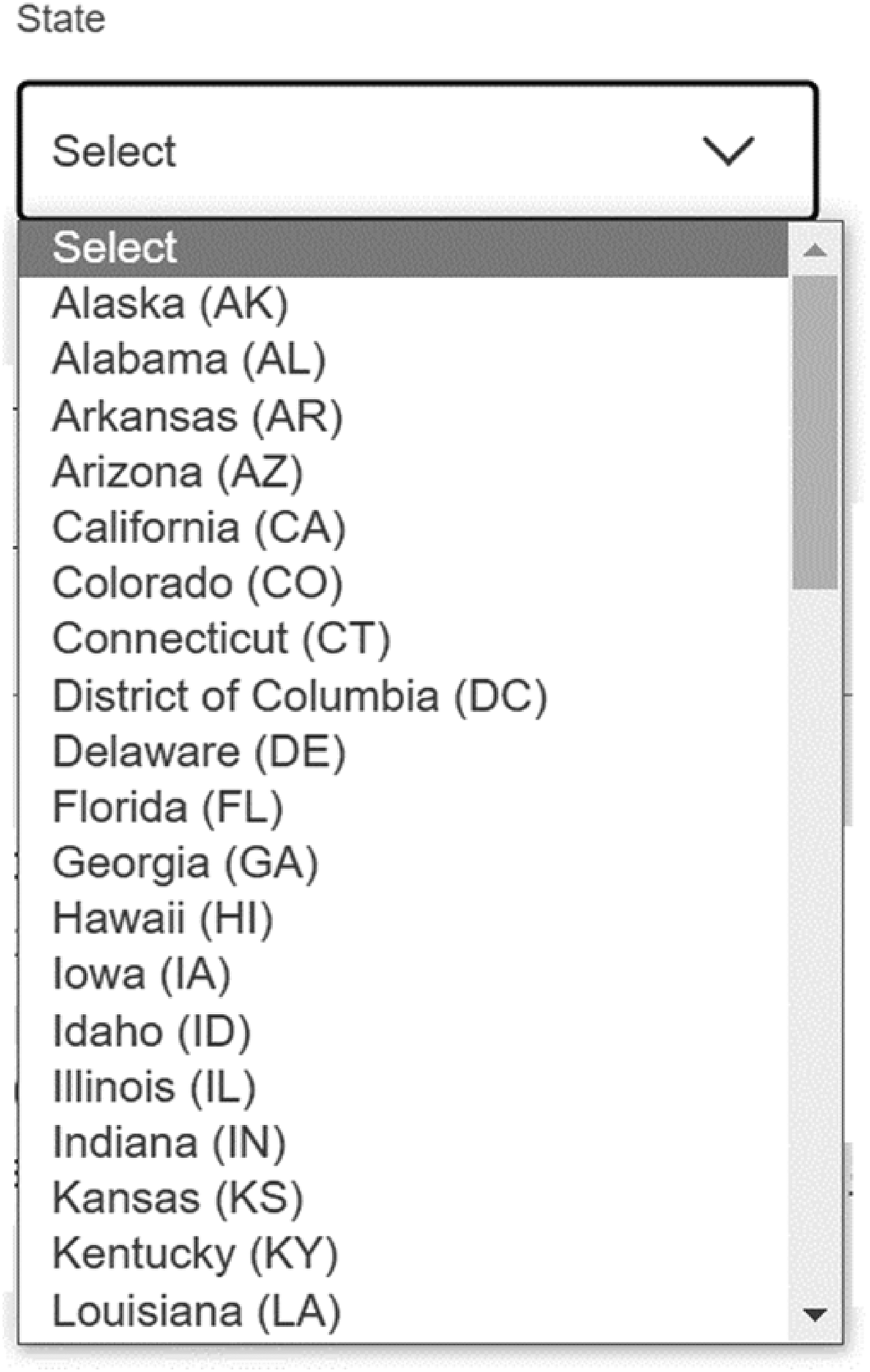
Dropdown state design found at the U.S. Postal Service change of address webpage (December 7, 2022) (Source: USPS.com change of address).
With a dropdown, users put their cursor in the field, scroll through a list of states, select the correct state, and that state populates into the field. On personal computers (PCs), hot keys can be used to navigate to the correct state without using the scroll feature. Hot keys allow users to type the first letter of a word and the list will automatically jump to the first occurrence of a word with that letter in the first position. This shortcut is especially useful in alphabetic lists like states. For example, Maryland comes after Maine in most lists and with hot keys, a user can Tab into the state field and press “M” key twice. The first “M” puts the cursor focus on the Maine response choice in the list and the second time “M” is pressed the cursor focus moves down to the next choice of “Maryland.” The user then can select Enter or Tab and “Maryland” populates into the dropdown field.
Another form-field component used for states is called a combo box. In forms using combo boxes for state, the user can scroll to the correct option just like dropdowns (shown in Figure 2), or the user can start typing the name and the list will automatically offer options from the list that matches what was typed. Then, the user can select the state. For example, instead of typing “M” twice to get to Maryland, the user would type “M” “A” “R” (the first three letters of the state) if the list contained the full state names in a combo box design as shown in Figure 3.
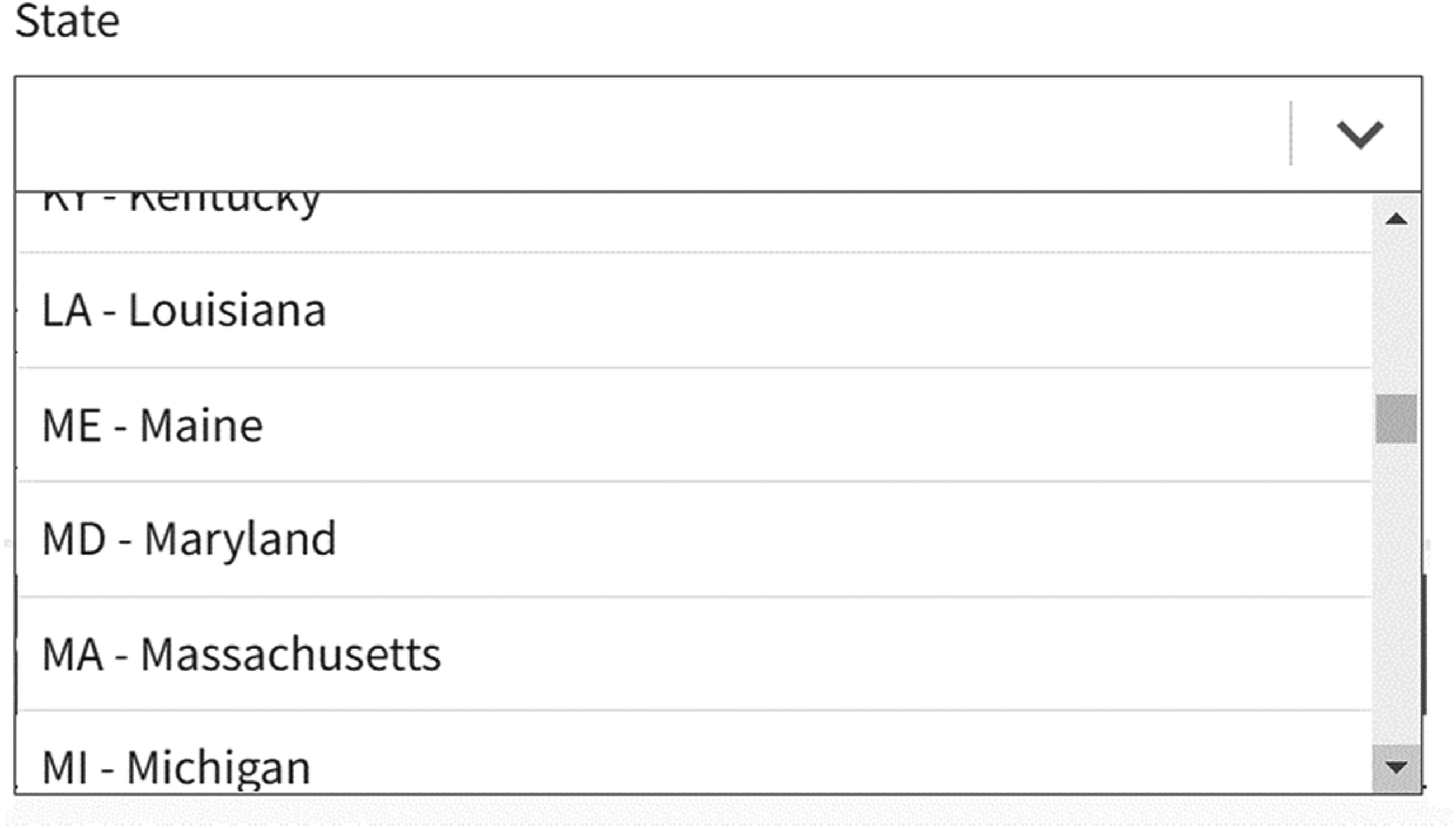
Combo box state design showing how a user can scroll to the state (Source: U.S. Web Design System (2022) at https://designsystem.digital.gov/templates/form-templates/address-form/).
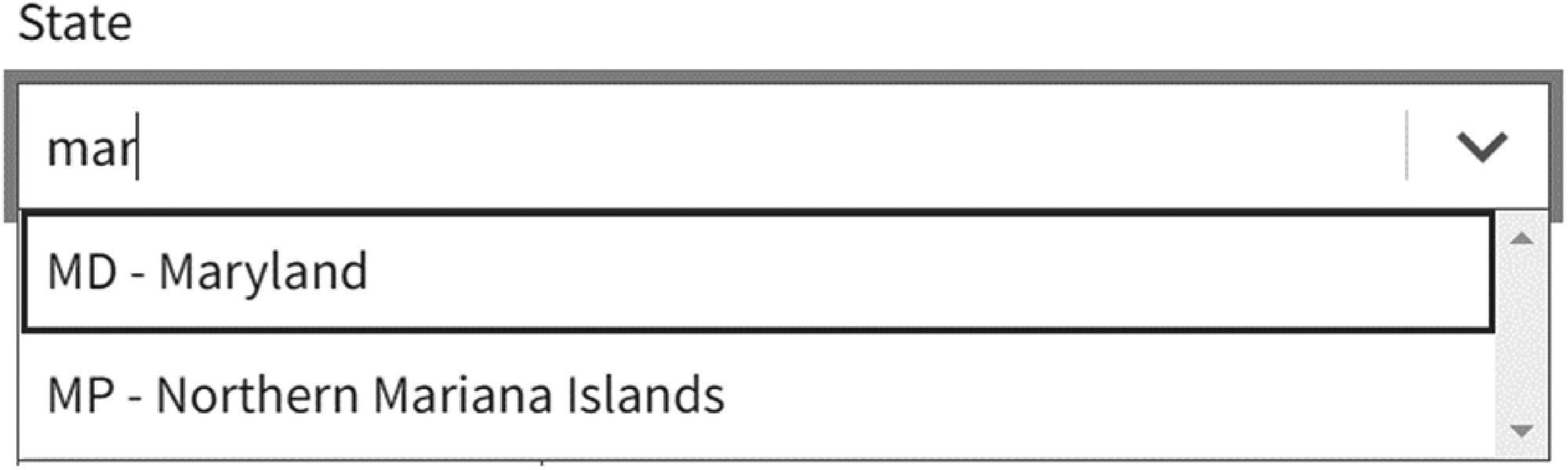
Combo box state design where a user types “mar” and the list subsets to only the choices with that character set (Source: U.S. Web Design System (2022)).
A text field can also be used to collect state. In a text input field, the user can type the state. With this design, there is no control over what is typed. Input errors associated with this type of design are most likely the reason why state is usually collected with either a dropdown or a combo box, and not an open-text field. To assist users in entering correct answers, text fields can be programmed with a type-ahead text feature (referred to as predictive text in the remainder of this article). With a predictive text feature, as the user types the answer, available options matching that specific combination of letters appears below in what looks like a combo box design display. The user can either continue typing or select one of the options presented as shown in Figure 4. While this type of field looks like a combo box design, the user is allowed to enter an answer not on the predefined list. Combo box designs don’t allow this type of entry.
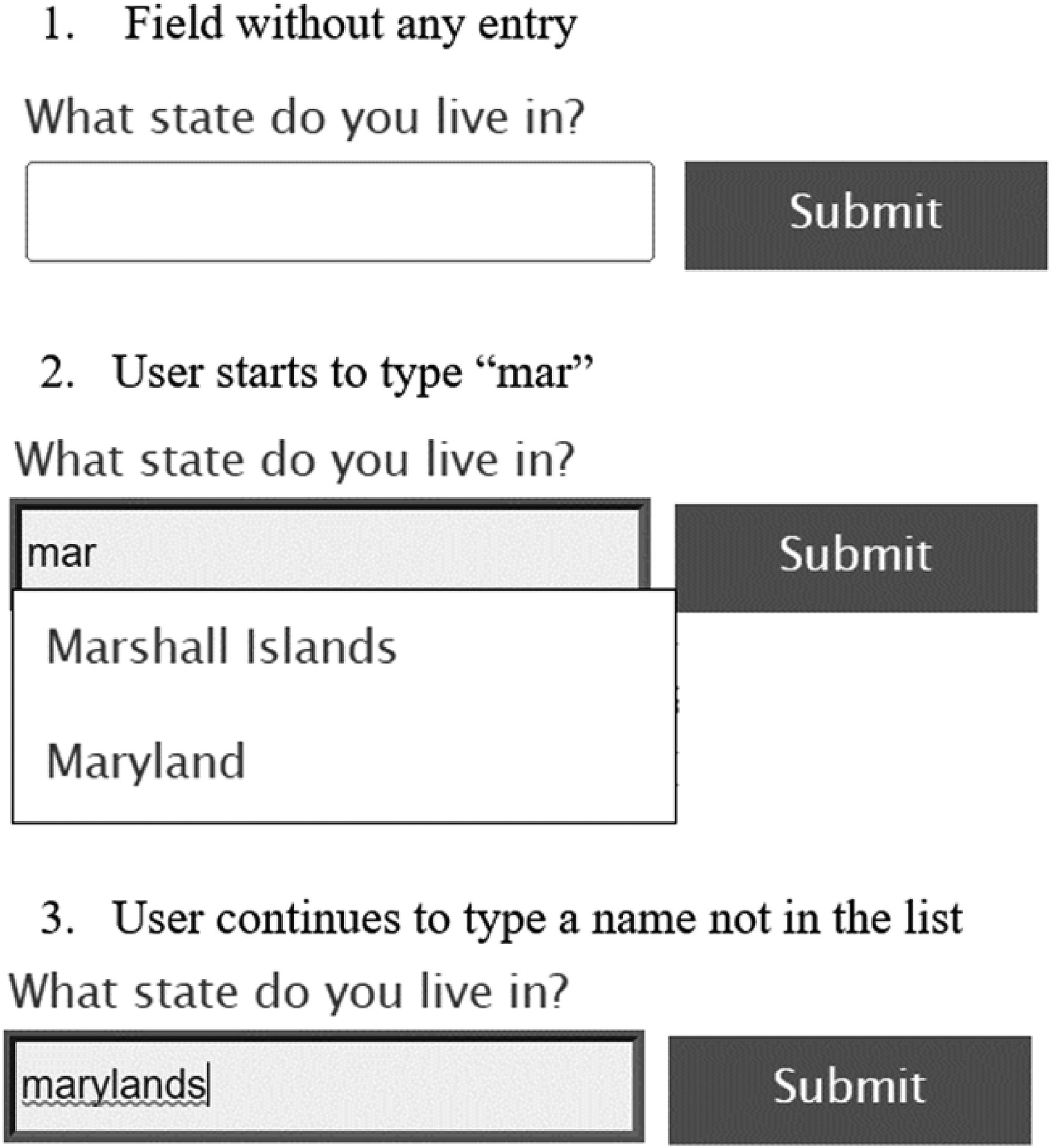
Text field design with predictive text options available (Source: Deque University at https://dequeuniversity.com/library/aria/predictive-text).
Most of the time, space is not an issue in online forms, so it is somewhat a surprise when state abbreviations are used instead of the full state name in dropdown or combo box fields. Even the 2020 Census used state abbreviations on the screen collecting address for interviewer-administered sessions conducted in the telephone operation (when a user calls and a Customer Service Representative takes the data over the phone). The lack of conventional standards for state entry fields has led to a variety of designs used across Web forms; however, some groups have suggested standardizing the design.
The U.S. Web Design System (USWDS) (2022) is an open-source resource for the federal government and others to improve website usability (see https://designsystem.digital.gov/) and includes recommendations for collecting state information. The USWDS address form template advises, “Avoid dropdowns. If possible, let users type their state's abbreviation when they reach the state drop-down menu.” As shown in Figure 5, the image they provide shows a combo box design with the abbreviation followed by the full state name.
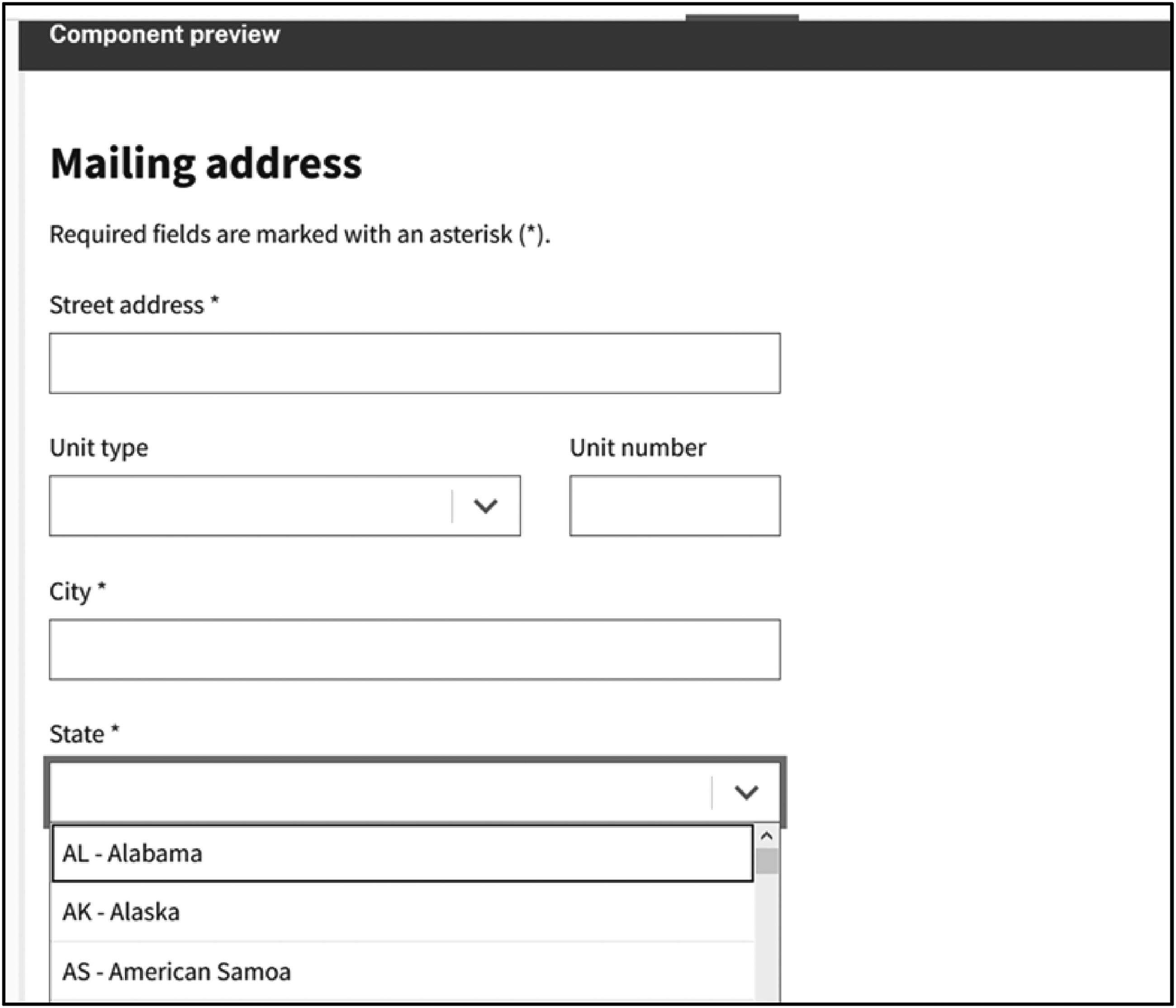
U.S. Web Design System (2022) Address Form Template (Source: https://designsystem.digital.gov/templates/form-templates/address-form/).
State entry design, specifically whether to use abbreviations or not, is crucial to online survey and form design because it could affect the accuracy of the data entered, and consequently, measurement error. Even if there was no impact on data accuracy, state entry design could affect the satisfaction and the burden placed on the user as they interact with the design. Ordering online for someone else is an example of when state entry design impacts a user. While state abbreviations have been around for decades, it is not clear whether the U.S. public knows all the abbreviations. In the ordering scenario, the item could be misdirected if the user makes an error in selecting an unfamiliar state abbreviation, or it might take the user longer to complete the transaction if they have to look up the state abbreviation. For surveys and censuses, there could be similar consequences such as collecting data for the wrong state or taking longer to collect the state data, which could have cost implications in an interviewer-administered survey.
To our knowledge, there is no published research examining user experience when state abbreviations are used in online forms compared to when full state names are used. This paper reports results from three independent experiments comparing variations of online form input fields for state. These include dropdowns for full state names, state abbreviations, a combination of the two, and a text input field with predictive text feature with the state names available.
The goal is to identify which type of state entry design is most usable, or at a minimum if there are any state entry designs to avoid using. Designs that promote more accurate data entry, shorter completion time (meaning the participant worked faster), and higher user satisfaction are considered more usable; and given the same level of accuracy, a design that allows the user to complete a task faster is a better design (e.g., Heitz 2014; ISO 9241-11:2018(en), 2018). Results from the present study serve as empirical evidence on which designs potentially minimize measurement error and maximize user experience when the user is entering state information online for themselves, and when they are answering for someone else.
Overall Methodology
The first experiment was a stand-alone experiment examining state entry design, and the other two experiments were embedded within other data collections for convenience. Across all three experiments, convenience samples of participants from the United States were used (i.e., not random samples). There were a variety of other methodological differences between the experiments, such as the device used, the task design, and data collection method (in-person or asynchronous virtual), all of which are described in detail in the following individual sections. For each experiment, we compare user experience by examining traditional usability metrics including the time needed to enter the state and the accuracy of the data entered (Dumas & Redish, 1999; Nielsen 2001). The first experiment focused on the task of entering a state provided by someone else, mimicking an interviewer-administered survey setting while the second and third experiments focused on entering a state for oneself. Participants in the first experiment also completed a self-assessment of U.S. state abbreviations knowledge; participants in the first and third experiments were asked how satisfied they were with the state entry design they interacted with; and finally in the third experiment, participants were asked for their preferred state entry design.
Experiment 1
This study focused on comparing state form field designs in an interviewer-administered setting, that is when the user is entering a state for someone else on a smartphone.
Methods
Experiment 1 was a between-subjects design. Data were collected in person at community colleges and community centers in the metropolitan area of Washington, DC in September 2018. Forty participants (25 males and 15 females; 17–64 years old with a mean age of 32) were recruited on site through walk-up/drop-in. After consenting to participate, each participant worked one on one with a test administrator to perform the experiment tasks in a semi-private area of the room. The participants used an iPhone 6S smartphone provided by the test administrator to complete the experiment, and they were incentivized monetarily for their participation (Wang et al., 2016).
Participants were asked to perform three tasks: Task A: a self-assessment of how many state abbreviations they knew; Task B: a state entry task where the test administrator read aloud the state names and the participant entered them into the survey using one of three state entry designs; and Task C: an ease-of-use question. All tasks were performed on an in-house developed mobile application running on the iPhone 6S.
In Task A, participants selected the states for which they believed they knew the abbreviations, as shown in Figure 6. They did not have to enter the abbreviations at this point in the experiment. Answers to this question were used as a proxy measure of participants’ knowledge of state abbreviations.
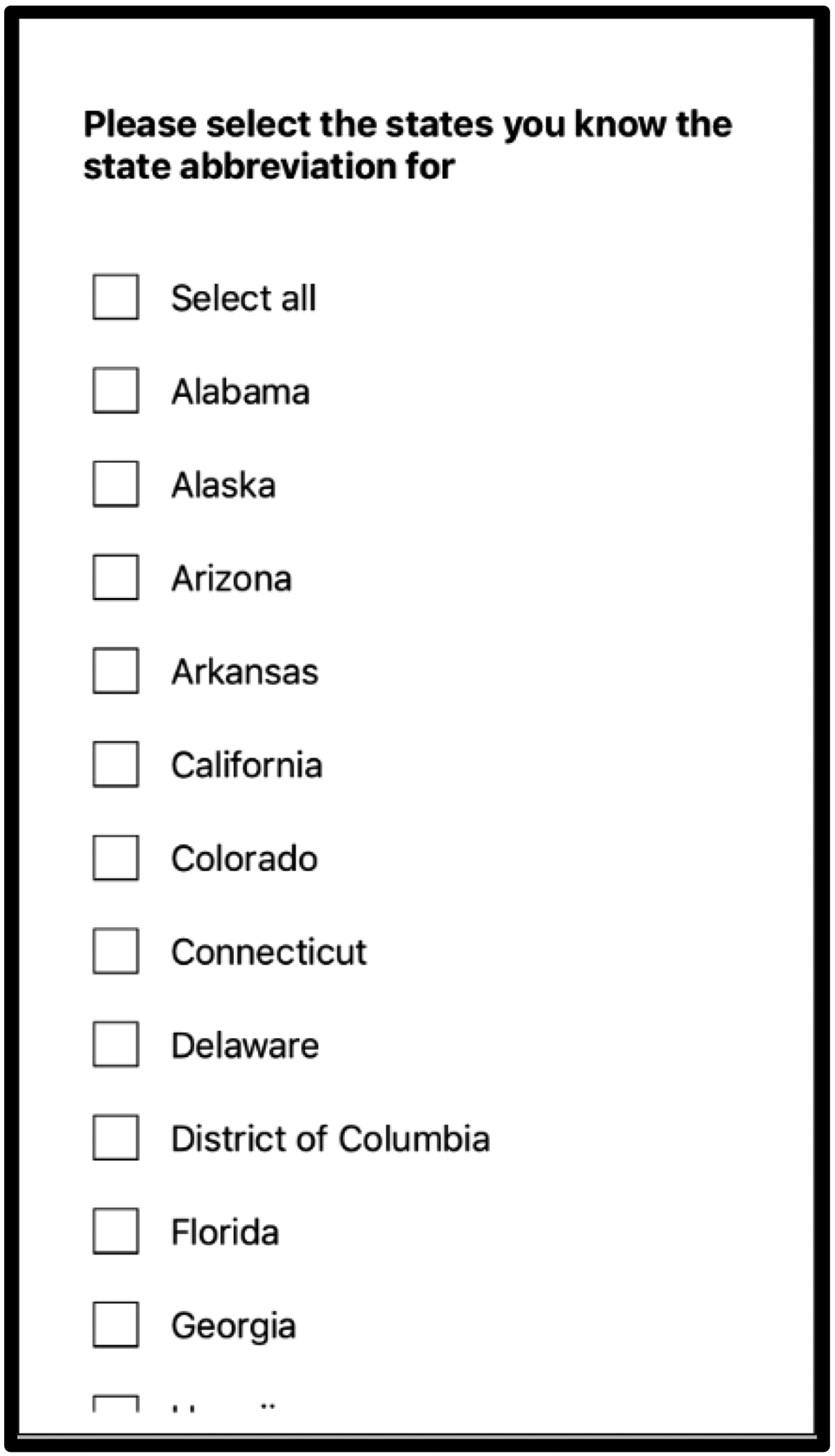
Task A of Experiment 1: Self-assessment of state abbreviations knowledge (Source: U.S. Census Bureau).
In Task B, each participant completed a survey by first reading aloud a question to the test administrator (TA): “What state should I select?” The TA responded orally with a state name from a script of randomly ordered 51 U.S. state names (including the District of Columbia). The participant selected the state from the dropdown list on the smartphone, tapped the Next button, then repeated the question “what state should I select,” the TA responded with another state name, and the participant selected it from the dropdown so on and so forth until they finished all 51 states on the script.
Participants were randomly assigned to have the dropdown state response options appear in one of three designs as shown in Figure 7. Thirteen participants were assigned to the dropdown with the full state name, 14 were assigned to a dropdown with state abbreviation, and 13 were assigned to a dropdown with a combination.
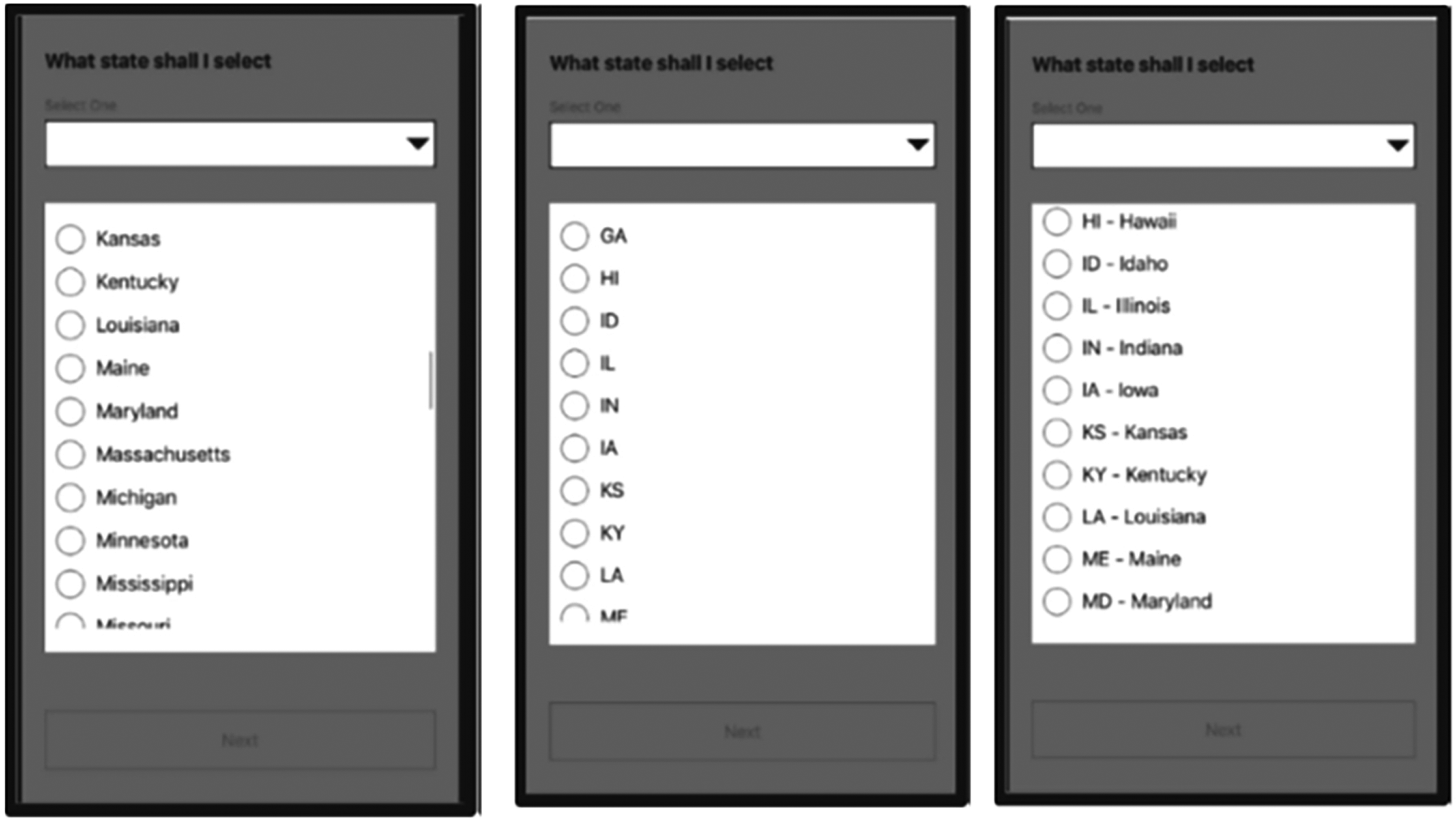
Task B of Experiment 1: Dropdown lists expanded to show the state display (L-R) for the three design conditions: Full state name, state abbreviations, and a combination (Source: U.S. Census Bureau).
For Task C, participants answered the 5-point ease-of-use question, “How easy or difficult was it for you to accurately record the answers in the survey?” using a scale of 1 labeled “Very easy” to 5 labeled “Very difficult.” The five-point bipolar scale allows for a neutral rating (Barlas & Thomas, 2012; De Bruijine & Wijnant, 2014).
Data Analysis
To evaluate participant knowledge of state abbreviations in Task A, we tally the number of state abbreviations participants reported knowing and report the mean and confidence levels across all 40 participants.
For Task B, we compared the three designs with the metrics of task completion time and accuracy of the data entry. We measured time-on-task at the question level from the time the page loaded to the users’ selection of the “next” button. These data were collected passively by the survey software. To evaluate the question-level completion times, we used a linear mixed model (LMM) with a random effect for respondents to account for the hierarchical data structure (51 questions nested within each participant). To meet the assumption of normally distributed residuals, we modeled the log of question completion time, with design condition as the predictor of interest. In the model, we also included participant age and number of abbreviations known (collected in Task A). The interaction between the reported number of abbreviations known and condition was not significant, so we did not include that interaction in the final model.
To evaluate the accuracy of the answers provided by each participant in Task B, the response entered was compared to what was read aloud by the test administrator based on the assigned randomization. If the data matched, that response accuracy variable was coded as correct; otherwise, it was coded as incorrect. Then, we used a mixed logistic model predicting accuracy (correct/incorrect) with the design condition as the independent variable of interest and a random effect for respondents to account for the hierarchical data. The interaction between the self-reported number of abbreviations known and condition was not significant, so we did not include the interaction or the main effect for the self-reported number of abbreviations known in the final model.
For Task C, we used higher self-reported ease of use scores as a proxy for design preference. We created a frequency distribution of the rating responses. Because there were few “less easy or difficult” ratings, we collapsed any rating of “2” through “5” into one cell called “not very easy” and left a rating of “1” as “very easy.” We then used a chi-square test of independence to determine whether the rating was independent of the design condition.
Results
Table 1 shows the geometric mean of completion time in seconds per condition. The geometric mean is presented as time data were skewed with a few large times. The mean time is shorter for full state name than for any of the other designs, followed by abbreviation/name combination, and then state abbreviation alone.
Geometric Mean Completion Time in Seconds by Condition.

Design condition was significant in the model predicting completion time (F (2, 2000) = 4.09, p = .02). We conducted pairwise comparisons using the least square means with a Bonferroni adjustment and found that participants took significantly more time per question when state abbreviations were used compared to when full state names were used (t = 3.08, p < .01). Participants also spent more time per question in the abbreviations condition compared to the abbreviation/name combination condition (t = 2.57, p = .03). The time participants spent answering each question in the full name condition was not significantly different from the time spent on each question in the abbreviation/name condition (t = 0.62, p = 1.0).
Table 2 provides the accuracy rates for each design condition. The condition of abbreviation/ name combination has the highest accuracy, followed by full state name and then state abbreviation alone.
Percent of State Selections That Were Accurate by Condition.

Design condition was significant in the model predicting accuracy (F (2, 2000) = 9.79, p < .01). Participants were less accurate in selecting the correct state when only abbreviations were offered compared to either full state names (t = 3.08, p < .01) or the combination of abbreviation and state name (t = 4.05, p < .01). The error rate between full state name and the abbreviation/name combination did not differ significantly from one another (t = 1.09, p = .8).
Table 3 contains the percent of participants who reported “very easy” in the post-survey ease-of-use question by state design condition. The abbreviation and state name design has the largest percent reporting that the design was very easy, followed by full state name, and then at a distant third, state abbreviation alone.
Ease of use Percentages by Condition.

While more participants rated the task “very easy” if they received the full name condition or the abbreviation/name combination condition than if they received the condition with only abbreviations, the difference wasn’t significant. This may be due to the small sample size in each condition (χ2(2) = 3.71, p = .16).
In Task A, all participants selected which abbreviations they knew from a list of state names. On average, participants reported knowing about half of the abbreviations (geometric mean of 26.6, SE 2.7; CL for mean 21.65–32.41; range: 3–51). Thus, the self-reported percent of abbreviations known was 52% (26.6/51). On average, knowing only 52% of the abbreviations stands in contrast to the accuracy rate of 87% for the abbreviation condition as shown in Table 2.
Experiment 2
Unlike Experiment 1, which investigated state design when entering a state for someone else, Experiment 2 investigated state self-entry designs (e.g., self-reports).
Methods
Experiment 2 was embedded in a larger 10-minute survey on privacy and confidentiality concerns with U.S. Census Bureau data and the federal statistical system, in which the last question asked, “Please select the state where you currently live.”
In this between-subjects experiment, 195 participants (aged 19–84 with a mean age of 56) completed the online survey using their own internet-connected device (127 PCs; 64 smartphones, and 4 tablets) asynchronously. That is, they completed it at a time convenient to them without a test administrator present. For the question on state of residence, respondents were randomly assigned to one of three design conditions: the full state name, the state abbreviation, or an abbreviation and state name combination as shown in Figure 8 for a desktop display. Sixty-four participants were assigned to the dropdown with the full state name, 66 were assigned to a dropdown with state abbreviation, and 65 were assigned to a dropdown with an abbreviation/name combination.
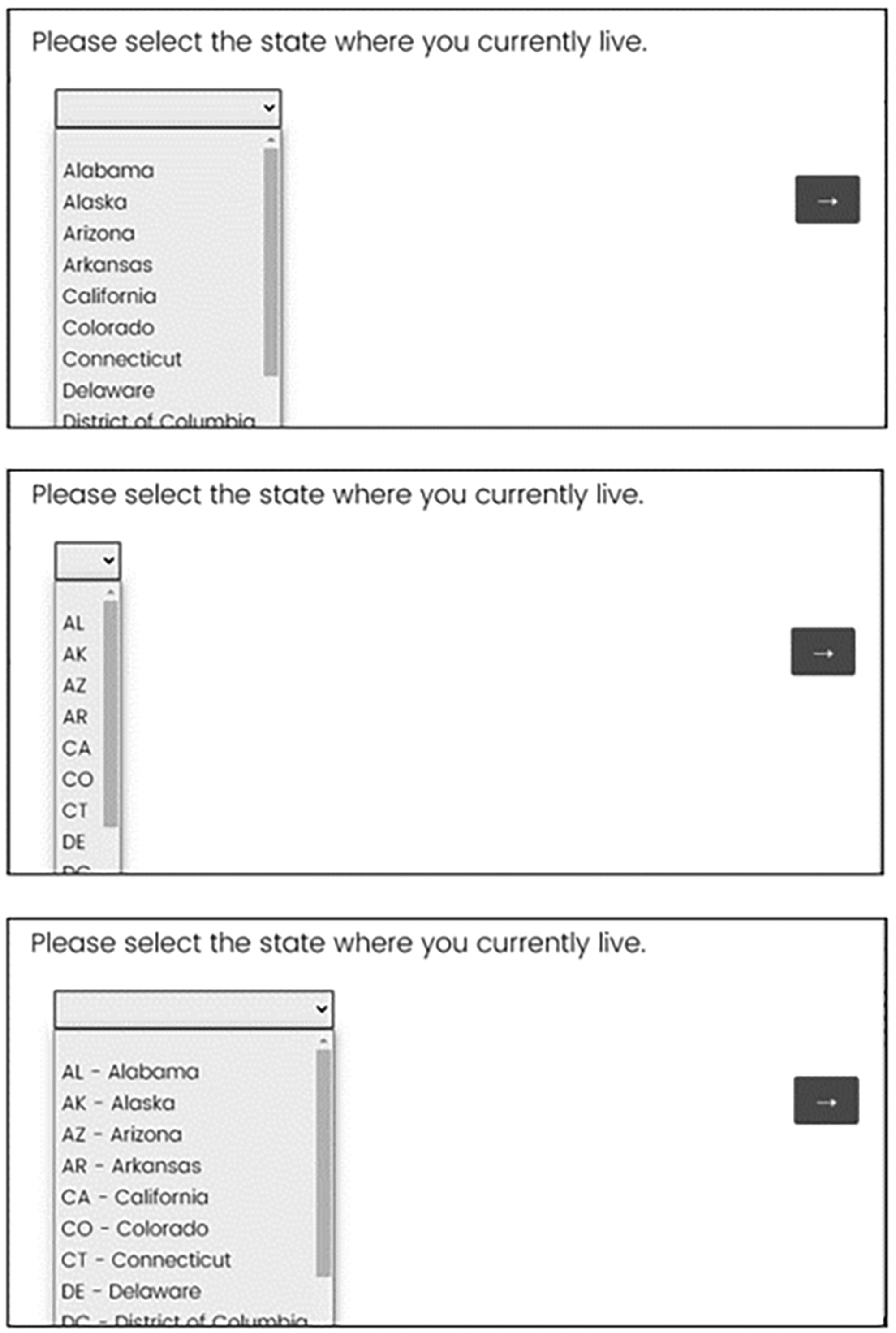
Experiment 2 dropdown lists expanded to show the state display for the three design conditions (top to bottom): Full state name, state abbreviations, and a combination (Source: U.S. Census Bureau).
Participants resided across the United States and had opted to participate in Census Bureau research by signing up online through the Census Bureau website. They received an email to participate in the study. There was no compensation provided for completing the voluntary survey and the data were collected in the fall of 2019.
Data Analysis
To measure usability, we again focused on time-on-task and accuracy. Question-level completion time was measured from the time the page loaded to the users’ selection of the “next” button and was collected passively by the survey software. To evaluate the question-level completion times, we fit a general linear model, modeling the log of question completion time, with the design condition (i.e., the way state was displayed) as the predictor of interest and participant age and device (PC, phone, and tablet) as fixed effects. We removed 10 observations where no state was selected (missing data was not dependent on condition, χ2* = .2, p = .9) and observation times above the 99th percentile (42.098 s or more). This left 64 observations in the full state name condition, 65 in the state abbreviation condition, and 63 in the abbreviation/ name combination condition for the timing analysis. In this experiment, each observation came from one participant so there was no random effect for the participant needed in the model.
To measure accuracy, Census Bureau staff geocoded the latitude and longitude collected from the device used to complete the survey to a state and compared that to the state reported in the survey. If the data matched, the accuracy variable was coded as correct; otherwise, it was coded as incorrect. To evaluate the accuracy of the answers provided, we used a logistic model predicting accuracy with the design condition as the independent variable and device used (PC, mobile phone, and tablet) as a fixed effect. In that model, we used responses from 195 participants who reported a state.
No user satisfaction or preference data were collected in Experiment 2.
Results
Table 4 shows the geometric mean completion time per condition. The geometric mean is provided as the time data were skewed with a few large times. The time pattern in Experiment 2 matches that of Experiment 1 with the shortest time for full state name, followed by abbreviation/name and then state abbreviation alone.
Geometric Mean Completion Time in Seconds by Condition.

Design condition was not a statistically significant predictor of time to complete (F = .52, p = .59), but device used was (F = 7.0, p < .01) with participants taking significantly longer to answer the question on phones than on PCs (p < .01). There was no significant interaction between device type and design condition on time.
Table 5 provides the accuracy rates for each design condition. The combination of abbreviation and name has the highest accuracy, followed by full state name and then state abbreviation alone.
Percent of State Selections That Were Accurate by Condition.

While the results show the same pattern observed in Experiment 1, with lower accuracy rates in the state abbreviation condition compared to the combination of abbreviation and state names, those results were only marginally significant using the Wald chi-square (χ2(2) = 5.49, p = .06). The odds of entering the state accurately were 4.6 times greater for the abbreviation/name combination compared to the abbreviation design. Visual review of the 22 “incorrect” responses across all conditions showed that for six cases the state entered by the participant was a geographically adjacent state of the state associated with the latitude and longitude data. One plausible explanation is that the participant answered the survey when they were in a neighboring state. It also appeared that five participants answered the survey from outside the country.
Experiment 3
Experiment 3 was similar to Experiment 2 in that the focus was on state field designs for self-reports using a between-subject design. However, this experiment addressed the problems noted in Experiment 2.
Methods
Experiment 3 was embedded in a larger 10-minute online asynchronous survey with a variety of household and demographic questions. The survey was designed to remove participants who were currently outside the United States prior to beginning the survey. And the first question asked the respondent to enter the state where the respondent was taking the survey, “Please select the state where you are currently completing the survey” instead of the state where they lived.
Participants used their own PC to complete the survey at a time and place convenient for them without a test administrator present. Participants were not allowed to access the survey via a smartphone. Participants resided nationwide, were part of a nonprobability panel, and were provided a small incentive for completing the voluntary survey. The data were collected in June 2020.
Altogether, 520 participants (260 males/259 females/1 nonresponse; aged 18–88 with a mean age of 48) participated in the survey by accessing the survey through a link in an email similar to Experiment 2. Four designs were compared: the full state name in a dropdown, the state abbreviation in a dropdown, an abbreviation/name combination in a dropdown, and a text input field with predictive text feature. See Figure 9 for an example of the four designs.
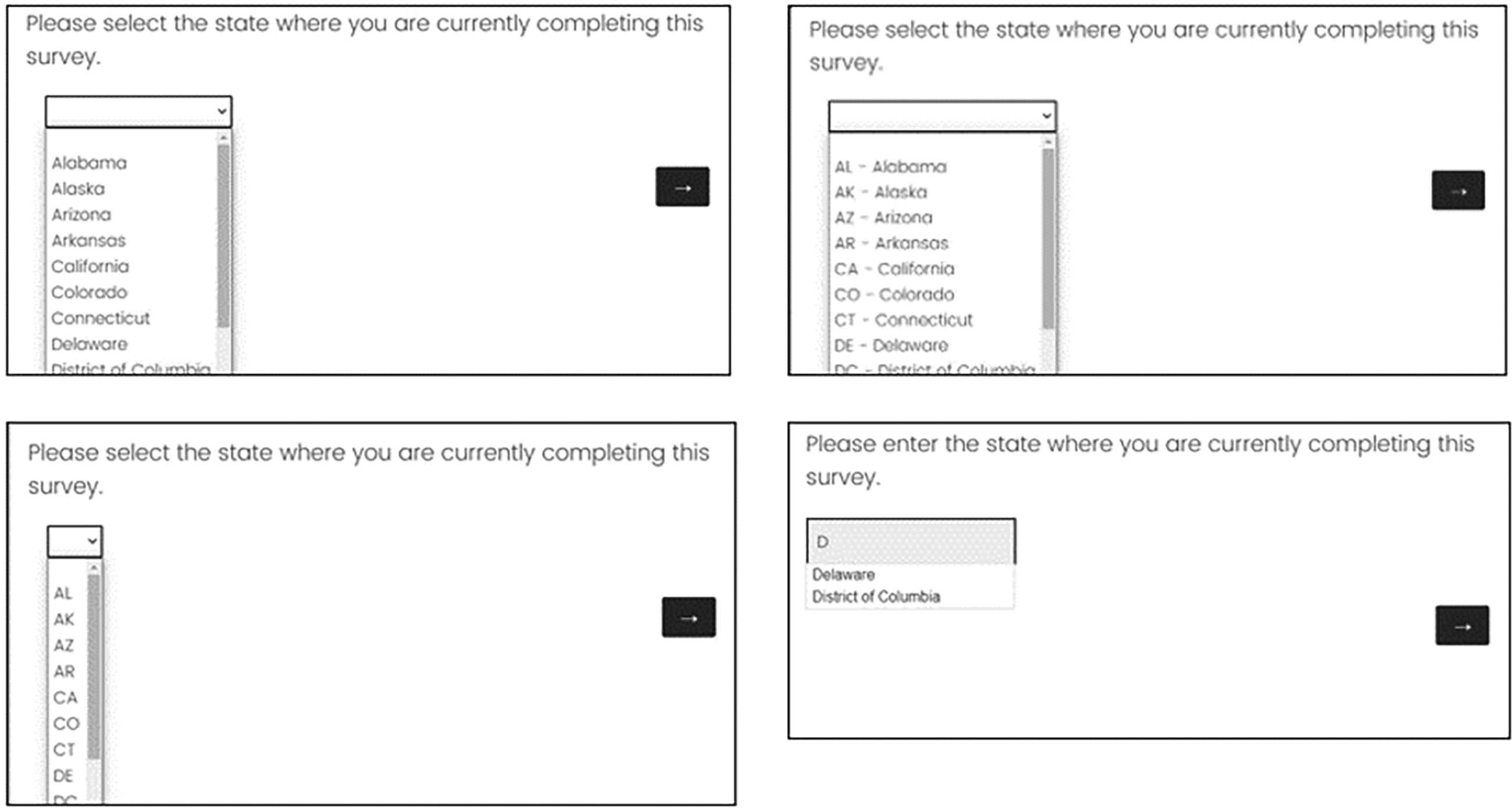
Experiment 3 state designs expanded to show the four design conditions (clockwise from upper left): Full state name, a combination of state abbreviation and name, text field with predictive text, and abbreviations only (Source: U.S. Census Bureau).
Participants were randomly assigned to one of the four designs. One hundred twenty-six participants were assigned to the dropdown with the full state name, 136 were assigned to a dropdown with state abbreviation, 129 were assigned to a dropdown with a combination, and 129 were assigned to the predictive text design.
Upon completing the entire 10-minute survey, each participant answered a 5-point ease-of-use question, “How easy or difficult was it for you to complete this survey?” using a scale labeled “Extremely easy,” “Somewhat easy,” “Neither easy nor difficult,” “Somewhat difficult,” and “Extremely difficult.” Then participants were presented with images of the four designs (similar to the images in Figure 9) and asked which one they preferred, if any. The order of the four images was randomized across participants. A no preference response option was offered.
Data Analysis
To measure usability with the four designs in this experiment, we focused on time-on-task, accuracy, satisfaction, and preference.
Like the other experiments, question-level completion time was measured from the time the page loaded to the users’ selection of the “next” button and was collected passively by the survey software. To evaluate time-on-task, we fit a linear model. In this experiment, state question was the first question in the survey as it was used to obtain a quota sample from areas throughout the United States and so participants were required to answer it to continue. As such, there were no missing values. Perhaps because it was the first question (and not the last question like in Experiment 2) participants were still deciding on whether to fully participate, which resulted in more variability in the timing data. While the median time on the page was 7 s, we excluded six observations from the time analysis which had time values greater than or equal to the 99th percentile (over 115 s). To meet the assumption of normally distributed residuals, we modeled the log of question completion time with the experimental condition as the independent variable.
Age of the participant and whether the participant had more than a high school education (or not) were significant predictors of time and kept in the model. There were 125 observations in the full state name condition; 135 in the state abbreviation condition, 126 in the abbreviation/name combination condition, and 128 in the predictive text condition used in this analysis. Similar to Experiment 2, each observation came from one participant so there was no random effect for the participant needed in the model.
To measure accuracy, Census Bureau staff geocoded the latitude and longitude collected from the device used to complete the survey to a state. That state was compared to the state respondents provided to the survey question. If the data matched, the accuracy variable was coded as correct; otherwise, it was coded as incorrect. To evaluate whether the state design affected the accuracy of the answers provided, we used a logistic model predicting accuracy with the design condition as the independent variable for all 520 participants since there were no missing states. The covariate of participant age was kept in the model as a fixed effect as it was the only respondent characteristic significant in the model.
To evaluate ease of use, the “extremely easy” score was coded as “1” and all other scores were coded into “not extremely easy” and a chi-square test was conducted. All 520 participants answered this ease-of-use question.
We tallied the preference scores. All 520 participants answered the preference question.
Results
Table 6 shows the geometric mean completion time per condition. The geometric mean is presented as time data were still skewed, even after the six outliers were removed. The mean time is shortest for full state name, followed by state abbreviation alone, abbreviation/name, and then with a two-second increase in mean time, predictive text.
Geometric Mean Completion Time in Seconds Across the Conditions.

Design condition was significant in the model predicting time (F = 11.4, p < .01). Examining the difference in the least square means and adjusting for multiple comparisons, we found participants took more time per page when using the predictive text design compared to the other dropdown designs. The predictive text design took more time to enter state information than the state abbreviation design (t = 4.1, p < .01), the full state name design (t = 4.5, p < .01), and the combination of abbreviation and full state name (t = 5.4, p < .01). There was no evidence of other time differences between the three dropdown designs.
Perhaps counterintuitively, results show a higher accuracy rate in the abbreviations design as shown in Table 7. Over 90% of state abbreviations were correct, followed by abbreviation /name combination, then predictive text and full state name. However, in this experiment too, there was no evidence that the design of the state response field significantly affected accuracy (F(3) = 2.9, p = .41). While there was not a significant difference in accuracy, we suspect that it might be easier to report inaccurately with the predictive text design. For example, a participant may have misunderstood the question may when an entry of LA, which is Louisiana, was geocoded to California. Perhaps, the participant was entering the city (LA for Los Angeles) where they were located instead of the state.
Percent of State Selections That Were Accurate by Condition.

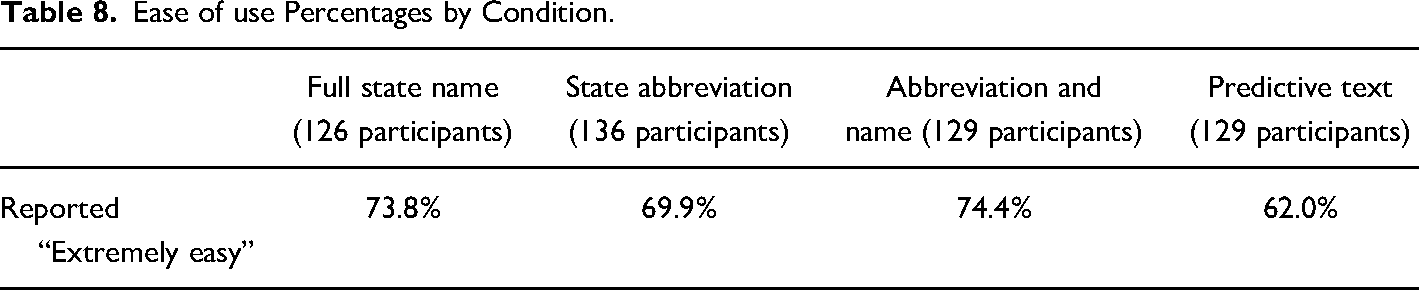
In the post-survey ease-of-use question, the abbreviation/name combination design has the largest percent reporting that the design was extremely easy, followed by full state name, state abbreviation alone, and then predictive text as shown in Table 8. While 12% more participants found the abbreviation/name design extremely easy compared to the predictive text, there was no significant difference by state design condition (χ2(3) = 5.98, p = .11).
Ease of use Percentages by Condition.
Participants were asked which design they preferred looking at static images of the different dropdowns. They rated the full state name as the most preferred design followed by the abbreviation/name combination design. The predictive text and abbreviations alone designs were the least preferred as shown in Table 9. At least a quarter of the participants had no preference.
Percent of Participants who Preferred Each of the Designs (n = 520).

Discussion
In Experiment 1, we found usability issues with using state abbreviations only in a dropdown list when the participant was asked to enter states provided orally. In that experiment, state abbreviations resulted in significantly lower accuracy and longer time-on-task compared to the full state name design and the combination of state abbreviation and name design. The ease-of-use scores with the abbreviation-only design also suggest usability issues with the design. Taken alone, perhaps the 2-second increase in task time when using abbreviation-only would not necessarily be a strong enough reason to avoid that design. However, in combination with the lower accuracy and ease of use scores, those 2 s become practically significant.
In Experiments 2 and 3, the participant was asked to report either the state where they lived or where they were completing the survey. As expected, the findings suggest that participants know the abbreviations for familiar states. We did not find significant differences in either time-on-task or accuracy among the dropdown conditions when participants were asked to answer for a state where they were either living or completing the survey. However, in both experiments, the full state name condition took on average a half second less to complete than abbreviation only condition. This finding appears to hold no matter the type of device used to answer the question (as Experiment 1 was conducted on a smartphone, Experiment 2 was conducted on both PC and mobile devices, and Experiment 3 was answered on PCs).
Results from Experiment 3 show that typing the state, even when there is predictive text as an aid, takes longer than using the dropdown design. And the ease of use and preference scores for the predictive text input field are also lower, indicating some usability issues with that design, which may manifest in taking longer to type. And, while there was no significant difference in accuracy, the likely mistake of entering LA in the state text field for the individual in California may be less likely in the dropdown designs because the user must select from the available choices and can infer what the question is asking based on those choices.
Across all experiments, the combination of abbreviation and state name, like MD—Maryland, did not appear to hurt or help participants report the state more accurately or faster compared to using the full state name alone in a dropdown. Preference and ease of use scores are similar between the two designs as well. As mentioned in the introduction, the U.S. Web Design System (2022) recommends using the combination of abbreviation and state, but with a combo box. We were unable to test the combo-box design against the other state response option variations due to survey software limitations. A combo box is like the dropdown design in that there is a scroll feature where the states are alphabetical, but there is also the ability to type more than just the first letter and the list subsets based on what is typed. In that way, it is similar to the predictive text feature. With the combo box, there is no ability to enter an invalid response in the open-text field. For this reason, it is important to retest the dropdown against the combo box especially since it is recommended by the U.S. Web Design System (2022).
The findings from these experiments provide an additional example of the difficulty that abbreviations, even common abbreviations, pose to individuals. While most people know the abbreviation for the state in which they live, these data suggest that there is wide variability in overall knowledge of state abbreviations. From the self-reports in Experiment 1, we found that on average those participants reported knowing about half of the abbreviations, but they fared better when asked to recognize the abbreviations, reporting accurately for about 87 percent of them. Perhaps the difference between the expected accuracy and the actual accuracy was due to the difference in the two tasks: the first one required recall of abbreviations while the main survey task required only recognition of abbreviations (e.g., Postman, 1963).
These findings have implications for form designs where the user is entering data for someone else's state (e.g., when ordering a gift online for someone, or when an interviewer is administering a survey). For these situations, including the full state name clearly will improve accuracy.
Taken together, our findings suggest that a dropdown with full state name alone is sufficient for state questions for both self-reports and certainly for interviewer-administered forms and surveys. However, the combination of abbreviation and name is also an acceptable solution.
A future study could compare the full state name in a dropdown to the combination of state abbreviation and name if designed using a combo box. We also recommend repeating some of the experiments across designs with participants who use assistive technology. This type of experimentation might identify additional issues that should be considered when deciding about the most usable design for state-form fields.
Footnotes
Acknowledgments
We thank our reviewers including Shaun Genter, Luke Larsen, Joanne Pascale, and Paul Beatty. We also thank those who helped collect the data or who were involved in methodological discussions including Aleia Fobia, Casey Eggleston, Alda Rivas, Mary Davis, Jonathan Katz, Chris Antoun, Rachel Horwitz, Sabin Lakhe, and Temika Holland.
Declaration of Conflicting Interests
The author(s) declared no potential conflicts of interest with respect to the research, authorship, and/or publication of this article.
Funding
The author(s) received no financial support for the research, authorship, and/or publication of this article.
