




Abstract
The need for access to assistive technology among students with visual impairments is paramount in modern classrooms. Indeed, literature documents a wide range of benefits that assistive technology offers these students. A fundamental benefit, among others, is access to information. However, reported barriers persist. This study explored the perspectives of 10 students with visual impairments regarding the perceived benefits and barriers they experience using assistive technology in core-content classrooms. Participants were recruited across four local school districts and one school for the blind in two different states. Our analysis revealed that students identify an array of benefits of assistive technology, though use of devices was impacted by technical issues, inexperience, and lack of support. We offer recommendations for future research and practice for teachers and administrators.
Keywords
Rough estimates suggest that about 100,000 students with visual impairments (VI) receive special education services in the United States (Schles, 2021) and as many as 728,000 students with a visual impairment attend U.S. schools (Erickson et al., 2024). Estimates as high as 89.4% of students with VI attend local schools, and as many as 69% spend four-fifths or more of their day in inclusive core-content classrooms (U.S. Department of Education, 2024). Persistent challenges to students’ participation in general education classes exist due to limited adaptations of information in instructional environments and practices made for students with visual impairments (Silverman, 2022). Some of the barriers to access include limited access to technology and support, educator knowledge, and costs (Tuttle & Carter, 2022). Inclusion in core-content classes is important for students with VI because it provides equitable access to the rigorous academic instruction and social opportunities that are not available in resource settings or state schools for the blind (Cochrane et al., 2008; Jorgensen, 2018).
Assistive technology (AT) plays an important role in ensuring that students with VI can access core-content classes, such as English, math, science, and social studies. In recent years, the availability and accessibility of high-tech devices have increased, providing students with new and powerful tools to aid in their learning (Tuttle & Carter, 2022). We defined high-tech devices as electronic or digital tools that can be used to access and produce information in an alternative medium (e.g., braille or audio) or through accommodating supports (e.g., ability to change text size, occlude distracting information, and word prediction). Examples of AT for students with VI include screen readers (i.e., text-to-speech software), refreshable braille displays, and screen magnifiers. These devices differ from low-tech devices, which are typically simple to use and not electronic, such as magnifying glasses, large-print books, and tactile graphics. High-tech devices offer many advantages over low-tech devices, including greater flexibility, more advanced features, and additional accessibility supports (Bouck et al., 2013; Tuttle & Carter, 2023). These devices aid students in overcoming barriers to access and learning in core-content classrooms (Bouck et al., 2013).
Research indicates that AT is correlated to employment outcomes for students with VI (e.g., McDonnall & Crudden, 2009), elevated academic performance (e.g., Beal & Rosenblum, 2018), and more efficient access to text compared to traditional learning media (e.g., print and hard-copy braille; Bouck et al., 2016). Additionally, Tuttle and Carter (2022) conducted a survey examining AT use of 51 students with VI from the caseload of 12 teachers and found AT use had increased, including wider application of AT across academic settings and tasks. However, Tuttle and Carter (2022) also found that less than half of students with VI on teachers’ caseloads (47.1%) are provided with access to AT devices. Literature continues to document barriers to access to AT, such as funding and costs (Senjam et al., 2021), limited instructional time available for AT (Lohmeier et al., 2009), lack of instructional curricula (Trotter et al., 2018), and support/reinforcement from parents (Trotter et al., 2018).
Much of the current body of literature on AT use and barriers is derived from analyses of extant data and the perspectives of educators. Current research has done little to document the direct experience of student AT users. To date, we only located one article, D’Andrea (2012), where the authors reported students’ perspectives regarding AT use for literacy. This study qualitatively analyzed 12 phone interviews with high school and college students, all of whom used at least one AT device and braille as a primary learning medium. Students reported using a wide variety of devices (e.g., screen readers, braille notetakers, talking book players, and mobile phones) and highlighted the efficiency of AT for completing academic tasks. Students primarily learned to use their devices through an initial center-based training program. After initial training, students learned by asking peers who used similar devices or on their own by exploring or using devices’ built-in help features. Students were articulate in describing how they chose specific devices across different tasks. However, D’Andrea (2012) focused solely on students’ AT experiences within literacy tasks (i.e., reading and writing). Evaluating student perspectives broadly across all core academic content areas (i.e., English, math, science, and social studies) could make several important contributions to research. First, other content areas have unique considerations for selecting and using AT devices. For example, math content relies more heavily on visuals to represent concepts than literacy content (Zebehazy & Wilton, 2014), which may be more difficult for students with VI to evaluate when choosing an AT device for a task. Second, educators can gain valuable insights into how to improve the design, implementation, and effectiveness of AT devices through understanding students’ experiences. As the primary user, students are well positioned to provide feedback on the strengths and weaknesses of AT, as well as their preferences and needs. For example, students may indicate they have needs unmet by device(s) or that they have not learned to use features of devices. Examining students’ perceived benefits of technology could suggest how AT devices or services can be extended to better meet their needs or increase their AT use. For example, applications that provide collaboration and social opportunities might motivate students to utilize technology more often, especially for new AT users. Likewise, student perspectives regarding their AT use could provide additional insights into barriers and facilitators of AT use. For example, the stigma associated with a device may influence students’ decisions regarding device usage (Shinohara & Wobbrock, 2016), or they may feel that their technology preferences are not considered (Martin et al., 2011). Finally, students can speak to how device performance impacts their AT use (Gajos et al., 2010). Thus, student perspectives might identify a need for expanding the technology or services available to students.
The purpose of this study was to examine the experiences and insights of students with VI regarding their use of AT within their education. We used semi-structured interviews to explore students’ perspectives on critical issues and adopted a qualitative explanatory design (Yin, 2018). We addressed the following research questions:
This qualitative study of student perspectives was part of a larger mixed-method project that included observations of students' AT use in core-content classes (Tuttle & Carter, 2024). The overarching focus of the project was on understanding how AT supports the educational experiences of students.
Method
Participants
After obtaining institutional and district IRB approval from Vanderbilt University, we used purposeful sampling to identify middle and high school students who could reflect upon their experiences using high-tech AT in one or more of their classrooms. We asked teachers of students with visual impairments (TVIs) to invite students who: (a) were in grades 6 to 12, (b) were identified with a primary disability of visual impairment in their IEP, (c) attended at least one core-content class (i.e., math, science, language arts, and social studies); (d) were assigned a “high-tech” AT device; and (e) spoke English as a primary language. Ten students agreed to participate. Their grades ranged from 7th to 12th grade; 80% were female and 20% were male. All students were legally blind and could perceive light; half of them used braille and half used large print as primary learning media. Table 1 presents additional demographic information and a description of each student’s AT devices. All but one student reported having access to multiple devices at school (M = 2.9 devices per student). One student used a personally owned device for schoolwork; all other devices were provided by their schools. We did not record the length of use for all students, but it emerged in conversations that Owen had started learning his device the year before his interview.
Participant Information.
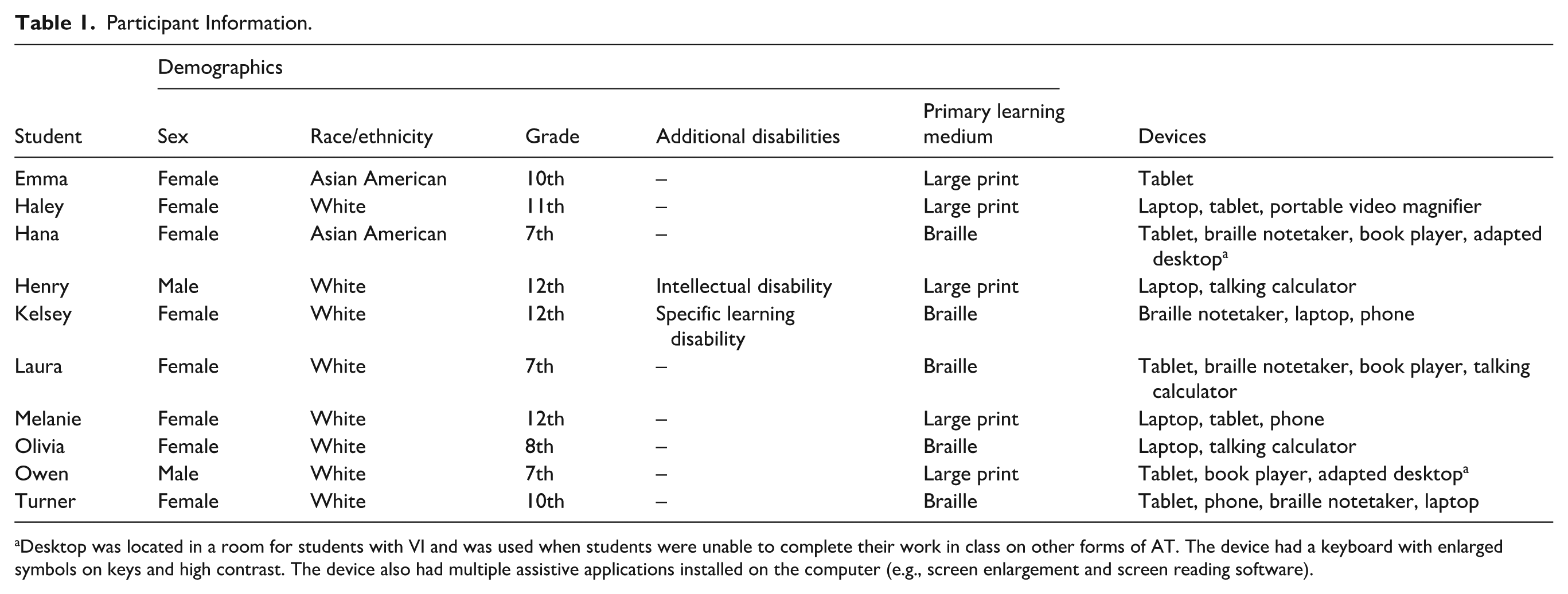
Desktop was located in a room for students with VI and was used when students were unable to complete their work in class on other forms of AT. The device had a keyboard with enlarged symbols on keys and high contrast. The device also had multiple assistive applications installed on the computer (e.g., screen enlargement and screen reading software).
We approached 20 local educational agencies in the fall of 2021 and recruited students from five agencies who participated (four school districts or a state school for the blind). Within these districts, TVIs distributed study information and consent forms to parents of 21 students. We assented each of the ten students whose parents provided consent for their participation. The students attended seven different schools—two middle schools, four high schools, and one cross-grade school for the blind. Four schools were located in middle Tennessee, two were located in east Tennessee, and one school was located in northern Kentucky; four schools were located in suburban areas, two were located in an urban area, and one was a residential school. Participants’ total school enrollment ranged from 63 to 1,759, the percentage of students with disabilities ranged from 6.2% to 100%, below 5% to 35.8% of enrollment was identified as low-income, and 13.7% to 37.2% of enrollment was identified as non-white students.
Data Collection
The first author conducted semi-structured interviews with students at each of their schools (i.e., library conference rooms, empty classrooms, and TVI offices). Due to some interviews occurring in TVI’s workspace, a TVI was present in the room during three of the interviews. We developed a set of open-ended questions and follow-up probes to guide each interview. Feedback on the interview protocol was provided by four university faculty—two with expertise in VI and two with expertise in qualitative methodology. The interviewer asked students to identify the different types of AT they used and the contexts in which they used their devices. Second, students were asked to describe the AT instruction and support they currently and previously received. Third, students were asked to share their views regarding the benefits of AT in their lives and learning. Finally, students were asked to describe the factors that influenced their decisions to use AT, including challenges experienced using AT devices. The interviewer recorded field notes during conversations to identify follow-up questions for further clarification. Each interview was audio-recorded and averaged 30 min in length (range, 16–36 min).
Data Analysis
All interviews were transcribed verbatim, checked for accuracy, and de-identified. We adopted a general inductive approach to our analysis (Yin, 2018), which focused on identifying a wide range of perceived benefits and influential factors related to AT use. The qualitative analysis was undertaken collaboratively by the two authors. Each author read each transcript independently and identified passages (i.e., phrases, sentences, and groups of sentences) in which students discussed (a) the ways technology benefited them (i.e., how technology created a positive change in their lives) and (b) the array of factors that impacted technology use (i.e., contexts, behaviors or expectations, or personal beliefs that influenced decisions to use a device). We assigned open codes to each passage, adopting language used by the participant when relevant (e.g., “personal preference” and “what is most helpful”). We used a team-based approach and discussed areas in which our coding aligned and diverged to form a unified codebook. Next, we reviewed each transcript again to ensure our codes were applied consistently and captured the breadth of perspectives. Finally, we analyzed the compiled codebook and interviews by sorting codes into different categories when we identified a thematic relationship between codes. For example, we found that several codes were identifying different ways students used devices to access information (e.g., reading materials, assignments, distance information, tests, and homework). Thus, we created labels (i.e., access) to identify a theme among a group of codes and developed a description of each theme. The definitions of our themes and codes are summarized in Supplemental Files 1 and 2. Our analysis was descriptive rather than theoretical or structural.
Positionality
Our research team is comprised of a doctoral candidate and a faculty member (both white males). Both members of the research team share a belief in the importance of elevating student perspectives and that AT is an important tool for students with VI to access information. We have varied personal and professional experience with AT and students with VI. Neither researcher uses AT themselves. During our analysis, we reflected on our positionality through memos, team debriefings, and project meetings to improve the rigor of our findings and limit potential biases throughout the research process (Patton, 2015). For example, a focus on using AT to provide access was informed by our positionality. Thus, we also engaged in negative case analysis by intentionally examining disconfirming cases of our initial theme by identifying and describing cases of students who preferred paper-based methods or reported that AT wasn’t always more efficient in certain contexts.
Credibility and Trustworthiness
To establish credibility and trustworthiness, we followed several recommendations from Creswell (2009). We sought out participants whose visual impairments ranged in severity, presence of additional disabilities, and types and context of device use to reflect the heterogeneity among students with VI. Throughout the interviews, we used intermediate member checking to clarify meaning and ensure accurate interpretations of responses. We were transparent with our coding and data analysis procedures. Our team-based, consensus approach to data analysis increased the dependability of our study (i.e., ensuring our procedures could be repeated; MacQueen & Guest, 2008). We reported our codebook and provided participant quotes within the narrative to support our findings and allow readers to evaluate its credibility (i.e., that our findings are correct and accurate). We provided participant quotes in the results to allow readers to interpret each participant’s perspective.
Results
What Are the Perceived Benefits of Assistive Technology Described by Students?
Three overarching themes emerged from students’ descriptions of the impact of AT. First, students frequently referenced gaining access to information across different types of instructional materials (e.g., board work, handouts, and textbooks). Second, students described ways that AT facilitated interaction and participation with sighted peers and educators that would not have been possible without their technology. Third, students described skill development as a collateral benefit of using AT. We describe these themes below and in Supplemental File 1.
Access
Some of the foremost benefits outlined by students involved access to various forms of information. Students identified five different types of content they accessed with their devices: assignments, reading materials, distance information, tests, and homework. Moreover, students indicated that devices improved efficiency in accessing and producing information.
Nine of the students indicated AT was their primary tool for accessing classroom content. For example, Melanie described her laptop as utterly essential, “If [I] didn’t have the technology that [I] did, it would be really hard to get my work done in school.” Students described an array of assignments they received from teachers, such as “questions” about content, “research” activities, “math problems,” “Spanish worksheets,” and “fill-in-the-blanks.” Access to assignments was important to students, even when electronic responses were not required. For example, Kelsey described how access to her assignments enabled her to review materials: It helps me to understand the lesson, especially visual concepts. . . It’s good for me to have notes or an email to go back and reference, to remember some of the stuff and to get what I may have missed before in the class.
Similar benefits were described for reading texts. For example, Melanie described how her computer helps her access written texts: “I use [my computer] when I’m reading because it helps with reading. It makes it bigger.” This was also true for accessing written text on tests (“I only really need [my laptop] for a state test that we have to take,” Hana), and completing homework (“I use [my braille notetaker] a lot to send my homework to teachers at night electronically,” Kelsey). Students also used AT to access distance information (“I just take a picture, zoom in, and then we continue while the teacher’s talking,” Emma). Finally, students indicated AT provided access to distance information on whiteboards or projectors. For example, Owen was able to “take pictures [of] the board” and “zoom in” so that he could read the information presented by his teacher. In general, AT provided a wide range of access benefits for students.
In addition to access, students indicated that technology also reported improved efficiency in reading and producing information. Students frequently compared completing their work on devices to traditional paper-based methods and often favored devices. Enhanced efficiency was described in several ways. Some students indicated that technology allowed them to complete work “faster” (n = 5 students), “easier” (n = 9 students), and “better” (n = 7 students) than other methods. For example, Melanie indicated that her phone was a preferable tool for completing most of her assignments: “If you give me a Word document with multiple choice, I could do that on my phone. It’s just a lot easier. I get it done a lot faster.” Emma said she was able to participate more because she no longer had to “do everything in braille,” and she had access to her work sooner. This sentiment was echoed by four other braille and large print users. However, technology was not always preferred over paper-based methods. For example, Owen indicated that despite the benefit of using his tablet “to enlarge [what he] can’t see,” paper-based methods were easier for written tasks for him because he “can write faster than [he] can type.” However, it must be noted that Owen had only 1 year of experience with his technology prior to the study, but his perspective illustrates the challenges of supporting AT for students with VI acquired in secondary grades.
Participation
Students described multiple ways their devices improved communication with educators and peer collaboration.
Most students (n = 9) had a device in their classes with a visual display through which teachers could view each student’s work. Additionally, students could send emails to receive or turn in assignments. Some students indicated that technology allowed teachers to provide students with more timely feedback. For example, Turner indicated that she “get[s] email feedback sometimes” and that visual displays allow her teacher to help her. Turner speculated that her teachers could not read her work without her technology: People would be able to, on the computers and stuff, people [are] able to read things. In braille, I’d be the only one able to read it, and then somebody would have to interline it.
Two students indicated that technology was helpful for peer collaboration. They primarily described working with their peers through online web applications, such as Google Docs, which provided classmates a shared workspace to complete assignments together. Emma described how technology helped her collaborate: “So, it’s like a document that you both can work on at the same time . . . and you can see who’s on which slide, and what they’re typing to.” However, most students (n = 8) indicated that they did not use their devices to work with classmates. Owen noted that other students in his social studies class were not using technology. In fact, most students (n = 7) were the only students in their class using a device to complete assigned work. The fact that peers did not have regular access to technology likely played into technology not being used as a collaborative tool.
Skill Development
In addition to access and participation, students articulated new skills they gained as a result of using technology, including technology skills, problem-solving skills, and time-management skills. Most students (n = 7) noted that using technology was a benefit unto itself. Technology skills included typing, editing, navigating the internet, and coding. As Olivia put it, “Well, we mean, I’ve learned how to use the technology, which is useful for after school as well.” She added that her use of her tablet made her feel like “most teenagers”: Well, I think that had we not been using technology as much, I don’t think I would be able to relate as much with my peers, who are constantly on their technology.
Some students (n = 4) suggested that technology increased their problem-solving skills. All of the students we interviewed described running into issues as they used their technology. Many students (n = 6) illustrated how they were able to overcome these issues with technology. For example, Melanie described her initial steps for handling issues with her technology: [My computer] has also helped me with problem-solving. There have been tons of times when my computer has just shut down and I say, “I give up, I’m done.” So we have to figure out: What are my options? What can we do next?
Finally, some students (n = 2) suggested that features on their devices improved their time-management skills. Students attributed their improvement to features such as clocks, “alarms,” calendar/planner application, and virtual assistants (e.g., Siri, Alexa, “OK Google”). These features helped them complete homework assignments or schedule extracurricular activities outside of school-day schedules. As Kelsey put it, alarms and calendar events are “a really big thing that helps at home.” All but one student (Laura), used virtual assistants (a voice command application such as Siri or Cortana) to schedule reminders and alarms.
What Factors and Challenges Do Students Say Facilitate or Impede Their AT Use?
Six primary themes emerged as student identified factors impacting their AT use, including technological factors, environmental factors, personal factors, social factors, support needs, and adult influences. Some factors influenced whether AT was used, while other factors influenced the type of AT used. Each theme is described below and in Supplemental File 2.
Technological Factors
Technological factors addressed the ways devices or the technology itself impacted students’ usage. Students described five different types of technological factors: functionality, usability, portability, technical issues, and accessibility issues. Functionality referred to the capability of AT to perform a desired effect, such as magnification or speech-to-text. Students highlighted distinct aspects of functionality, including AT’s ability to “enlarge,” “take pictures,” “multi-task,” produce technical braille “symbols” (e.g., Nemeth code), “format,” and perform speech-to-text. Students’ mixed experiences of AT functionality contributed to both positive and negative usage. For example, Emma described using her iPad because it can “actually take pictures.” However, she was unable to use her Chromebook to access distance information. Thus, functionality impacted which technology she used when she needed to access distance information. In contrast, Kelsey described how her device’s limitations in functionality prevented her use in certain classes: [I don’t use AT in] math and science because science is a lot of symbols and numbers and things like that. And symbols format wrong on the BrailleNote a lot. Like if it’s one-third, it would pronounce it 13 because it would leave the fraction symbol out.
Limited functionality of devices sometimes prevented students from being able to make some materials or tasks accessible (see Accessibility issues). For example, Hana described the limitation of her technology to enlarge her work: Actually, today we were taking an English test and I was blowing it up as much as I could, but it was still kind of small. It wouldn’t let me make it any bigger. And I just ended up putting my face really close to it.
Kelsey and Olivia described similar issues with screen readers that could not decipher some information, such as images.
Usability addressed how the design of a device or application influenced the students’ ability or desire to use the device. For example, when describing her preference for using a Chromebook over an iPad because of its ergonomics, Emma said, “The keys are more spread out, and it’s more suitable for your hands and stuff.” A prominent usability factor was portability. Students often described negative portability qualities that impacted whether they used AT (e.g., “too big” and “heavy”). For example, Haley described how the lack of portability kept her from using a video magnifier unless she absolutely needed it: I don’t use it as much because it’s really big and heavy, hard. Well, it’s not hard to set up, but I’m just too lazy most of the time. But when I really can’t see something, I’ll [use it].
Technical issues involved intermittent situations in which technology became partially or completely inoperable. For example, Turner described how her iPad would sometimes “glitch where things don’t save, and I’ll have to do things all over again.” Technical issues were often attributed to “outdated” technology provided by schools. However, students also described preventable technical issues, such as batteries dying. Although students usually brought their charger to school, battery issues still impacted classroom experiences. Haley explained, “I bring my charger to school now every day. So I always have a laptop and charger if I ever need it, but normally if I don’t have my charger, I panic in math class . . .”
Accessibility issues is characterized by digital content or other forms of technology being incompatible with AT devices. Limitations in accessibility identified included formats, website accessibility, and document types. One of the most common forms of digital content identified as inaccessible were PDFs. Turner, Olivia, Kelsey, and Melanie all identified PDFs as an issue because their screen reading software could not access the text on the documents. Students also frequently listed websites and web applications (such as Google Docs) as inaccessible. For example, Turner described how the layout of websites causes access issues: I would not do research on it because just accessing a webpage with a braille display isn’t very easy because most webpages are visually laid out. And so they don’t really translate well on like a little 18-cell [display].
Students were persistent that issues of accessibility arose when curating classroom content and technology. Kelsey described her experience trying to advocate for better classroom technology: I just wish that companies and apps were more accommodating and open-minded to blindness and any type of disabilities because we’ve reached out to a few companies over the years and they’ve either not responded or said there was nothing they could do.
As mentioned previously, formats were also an issue for students. Turner found columned texts “annoying” because they created an additional spatial component that caused her to lose her place at times. Students also frequently described challenges navigating the internet. For example, Olivia indicated she was unable to access some internet information, “When I’m trying to research things, not all the websites that [teachers] want us to go to research are accessible.”
Students’ descriptions of AT as beneficial for providing access to classroom content also made clear that access was not universal across activities.
Environmental Factors
Environmental factors influenced AT use related to instruction, seating, or equipment available in various settings. Students described three different types of environmental factors: task type, Wi-Fi access, and visibility. Task type referred to the instructional expectations impacting AT use. As Laura put it, “The first question that comes to mind is, how would we be able to do my work on this?” Several students described how unique features of different tasks influenced the type of technology they used (“If it’s a presentation, something like that, then I’d use the Chromebook. But if it’s just notes on the PowerPoint, I’d use the iPad,” Emma) or whether they used technology at all (“I prefer [writing on] paper, but only when I’m having trouble with is science . . . we can write faster than we can type.” Owen). The influence of task type was closely related to the functionality of devices. For example, Kelsey described preferring a braille writer to a braille notetaker for science work because the notetaker does not display math symbols correctly (see Functionality). However, Owen’s experience and limited typing skills suggest other factors may influence task type and AT use.
Wi-Fi access refers to the availability of wireless internet access in an environment. Wi-Fi access was mentioned by just two students (Hana and Owen) and primarily impacted their ability to complete homework. For example, Owen indicated he could not complete work on the bus like his peers and Hana “experienced problems” doing her work at home due to Wi-Fi.
Only one student mentioned visibility as an environmental factor influencing his AT use. Visibility referred to the ability to locate or see distance information. Owen primarily used his AT to take pictures of the whiteboard, zoom in, and read the content during social studies. His ability to take clear pictures of the board impacted his use of AT: “I was at a weird angle in Ms. [teacher]’s class. So the point where the words are kind of sideways. So I couldn’t really see it, even on the iPad, so I kept asking for help.” Owen’s situation highlights the importance of seating arrangements on technology use for low-vision students.
Personal Factors
Personal factors addressed how students’ desires, abilities, and experiences impacted AT use. Students addressed five personal factors: personal preferences, learning style, technology skills, familiarity with technology, and self-sufficiency. Personal preferences were idiosyncratic opinions that influenced whether students utilized AT (e.g., picking a device just because the student liked it). Some students (n = 4) did not or were not able to articulate their motivation for AT choices other than their fondness for one over another. This was evident in Melanie’s experience in selecting different technologies: “I think it’s a preference thing. I think you get taught how to use each different device and then it’s a preference on what you think is best to use for different assignments.” Likewise, students shared vague reasons for not using certain technology (“I don’t use [my video magnifier] at school because I don’t want to,” Haley). These perspectives highlight a subtle complexity of students’ AT usage. Students may be limited in expressing their AT needs when they lack the vocabulary to articulate their preferences. For Haley, further probing revealed that portability and perceived stigma also played a role in her decision to use AT. Although these identified factors may help elucidate her decision not to use a video magnifier, unarticulated or internalized factors may remain (e.g., experience/knowledge of devices). Exploration of other AT devices may also help students identify preferred technology when unable to articulate the reasons for their preferences.
Some students (n = 6) indicated that they chose to use technology because it aligned with a preferred learning style (e.g., visual, auditory, tactile, and kinesthetic). For example, Melanie and Owen preferred to use an iPhone or iPad, which they attributed to being “visual learners.” Additionally, Kelsey preferred her braille notetaker because she appreciated access to the refreshable braille display. Devices appealing to learning styles could improve AT use based on students’ responses. However, no students identified themselves as auditory learners, even though text-to-speech was identified as a benefit of AT by three students (Laura, Emma, and Olivia). The contrast between preferred learning styles and access benefits suggests that devices with multiple media outputs are preferable to devices that appeal to a single learning style.
Students’ technology skills also influenced their AT usage. Students identified “typing,” “screen-reader” knowledge, “keyboard commands,” “word processors,” and “the internet” as technology skills that sometimes limited AT use. Limited technology skills were often attributed to the introduction of new technology. For example, Melanie indicated she uses her phone instead of a computer for this reason, “We mostly use my phone for some things. Sometimes we get frustrated with [my computer] because I’m still working on learning how to use it.” Melanie’s decision to use her phone sometimes occurred even in situations where she acknowledged the computer was “better for typing.” Owen also expressed frustration with technology because he had “been doing everything the normal way for seven years” before his decreased vision necessitated AT supports.
Students also highlighted comfort and length of experience as factors influencing AT use, which we categorized as familiarity with technology. For example, Melanie described a desire to have more experience using a laptop: But we think that having [a laptop] even after we graduate would give me some experience with a laptop and working with it. . . I’m saying like more experience with accessing different websites, different typing websites. . . It’s going to feel different, it’s going to look different.
Such comments suggest practice and application of AT is self-reinforcing for future use. Moreover, students also need to gain experience with a variety of tools to gain confidence using the most efficient tool for a task. Melanie’s situation also highlighted the importance of gaining experience with technology that would be efficient for future tasks.
Self-sufficiency meant some students (n = 2) felt they lacked the need for AT. Haley and Owen both indicated that for some of their work, they “did not need” their technology. For Haley, worksheets in large print mitigated the need for technology. Owen noted that he did not need AT for most of his notetaking; the act of writing them down (rather than reviewing them) was most beneficial. A lack of need for technology in specific situations highlighted the importance of individualization. Written implementation plans allow for educational teams to document individualized AT expectations and support for a students’ academic routines.
Social Factors
Students’ perceptions of the classroom norms and behavioral expectations shaped their AT use. Students described three social factors: disrupting others, peer questions, and perceived stigma. Students felt they were disrupting others when their device negatively impacted a peer’s ability to participate or pay attention in class. This was mentioned by three students. Owen described voice-to-text as “distracting [for] other people.” However, disrupting others could often be mitigated with accessories. As Hana described: “There’s online textbooks and text-to-speech options for when . . . we have to read a bunch. So, we just put my headphones in like in English.” Headphones were a simple solution for most students, but they were not a universal fix. Owen described feeling uncomfortable using headphones in front of his peers: In class, we think it’s really distracting other people. So we can’t really use text to speech because if we use headphones, everybody’s wondering, why do we have headphones in? Everybody’s going to keep constantly looking over at me and I’m going to be the distraction of the class again.
Owen’s discomfort with using headphones was driven by non-verbal attention to differences in how he participated in classwork, or perceived stigma. Social issues often cascaded together, which was further illustrated in Owen’s experience. Owen also described peer questions as a factor impacting his AT use—verbal attention to differences in how students participated or completed classwork. Owen described how his AT use drew unwanted questions: When I don’t use it, I don’t have people asking me, “Why do you have an iPad?” But say if I pull it out, then people are wondering, “Why does he have an iPad?” And then I get asked questions after class, and I’m saying, “I have to use it because I can’t see things.”
In Owen’s example, his primary objection was doing his work using tools that his peers were not also using. When asked, Owen said he would feel less stigma, or receive fewer questions about AT, if his peers used the same technology: Most definitely, because then [using a laptop] won’t feel weird. I won’t feel like I’m in the class. Because I don’t feel a big part in the class, because if anybody does something normal, it just feels normal. . . I know in high school [using laptops] can be normal, because high school people, they use laptops.
Owen’s feedback suggested that stigma may be felt due to differences in work style rather than technology. Both Haley and Emma’s schools had one-to-one devices. Their experiences suggest one-to-one devices may alleviate social stigma. For example, Haley described how using her Chromebook over other AT tools “makes you feel like you’re not the only ones sticking out.” The contrast in experience highlights an interesting aspect of universal design for learning and inclusive instruction. Although technology is a critical feature of universal design, a critical component of universal design is the universal provision of options (i.e., multiple ways to access information, respond, and present feedback). Isolation of support may negatively identify the supported student. One-to-one devices and higher reliance on technology in general education classrooms could create a more inclusive environment for AT use for students with VI.
Support Needs
Several students (n = 4) emphasized the need for technology supports when asked for recommendations for overcoming challenges of AT use. The preferences for and knowledge about supports provided by peers or adults varied across students. For example, Olivia received support from a paraprofessional to make things accessible when using AT; she did not think peers could help with the same issues. She also was unable overcome some technical issues independently, such as needing assistance when using her screen reader: My [screen reader] sometimes won’t read stuff. . . There have been [issues] sometimes. I would ask for help. If [my screen reader] wouldn’t read, somebody would come help me.
Hana shared the opposite experience: “The teacher doesn’t help me so much because she doesn’t know. [The classmate] I sit next to helps sometimes.” Emma discussed using a braille notetaker at one point, but abandoned the use of braille devices altogether because she didn’t have supports for “downloading books,” “connecting to [her] WiFi,” and “couldn’t get services” on braille devices. When asked whether she requested support for these devices, she responded, “Yeah, but [support] never happened.” While Emma shared that she is more of a “visual learner” now, AT support should not determine a students’ learning medium.
Additionally, students need to be supported in their classrooms to select the most efficient technology for a task. As identified earlier (see Familiarity with technology), comfort and experience with technology may influence students to use technology even when a technology is not optimal for a task. Additional supports beyond explicitly, teaching devices could promote and sustain device use in classroom settings. Students’ different support experiences indicate that AT supports may require technical knowledge. Thus, technology training for peers and adults could strengthen the technology experiences of students with VI in classrooms.
Adult Influences
Four students (Henry, Turner, Emma, and Olivia) described how various adults influenced their AT use. Indeed, devices can introduce additional distractions. Turner no longer used a braille notetaker because the lack of a visual display prevented her teachers from keeping her accountable for her device usage (“Well, with the BrailleNote, since you could hide the screen on it pretty easy to just pretend to work but not actually work and be doing something else”). Emma indicated that her parents did not want her to use her cell phone as AT due to potential distractions it may cause her (“My mom doesn’t let me use my phone here because she doesn’t trust me with it.”). Olivia also indicated that her parents influenced the type of AT use based on future cost considerations (“My mom don’t want me to [use a braille notetaker]”). Her parents wanted to ensure they could afford AT after Olivia graduated and requested a device costing hundreds of dollars instead of thousands. In Henry’s situation, he determined when to use his AT based on his teacher’s recommendation (“My teacher told me to!”), which may suggest some students could benefit from explicit adult guidance on appropriate device use in classrooms. The different ways adults influenced AT use highlight that adults desire technology that is productive and affordable.
Discussion
The experiences and perspectives of students can provide valuable insights into the benefits and barriers of AT use. For example, students can offer firsthand insights into AT use related to education, explain what motivates their AT use, and recommend ways of improving AT support. This study highlighted the voices of middle and high school students with VI, which has received little attention in the research literature. Our findings extend the literature on AT use in schools in several ways.
First, students attributed an array of benefits to their technology use, including basic access to classroom information, improved task efficiency, and enhanced opportunities to develop collateral skills. Students recognized the role technology played in providing access to information, which is a fundamental purpose of AT (Kamei-Hannan et al., 2017). This affirms findings from other qualitative literature illustrating how AT can enhance access to information (e.g., Frankel et al., 2017). Students also described how the right technology enabled them to complete work faster than they could with traditional methods. This is an especially salient benefit of AT in light of research showing that students with VI often take longer to complete work, especially while using braille (e.g., Harris-Brown et al., 2015). Students also described skills they gained from using technology, including the technology itself, time-management skills, and problem-solving skills. Although numerous studies focused on the benefits educators attribute to AT, understanding the perspectives of students is equally important. The way students view their technology shapes whether it will be adopted successfully (Lenker & Paquet, 2003). For example, students must identify technology as providing a distinct advantage over other supports. Oftentimes, recognizing the potential future benefit of technology is insufficient for students to adopt technology (Lenker & Paquet, 2003), as was the case for Owen. Listening to students speak about the benefits they perceive can help educators better understand which features of technology are salient to students and how to increase the likelihood of AT adoption.
Second, students still experienced challenges in utilizing AT. Such difficulties included accessibility issues, technical issues, and limited technology skills. Students reported that the information they received sometimes could not be accessed on a device or that the device glitched or stopped working. Concerns among educators about the reliability of classroom technology are well-documented in the literature (e.g., Kopcha, 2012; Tuttle & Carter, 2022). However, few studies address how technology reliability can be a major issue that impedes learning. Interestingly, students attributed some unanticipated benefits to technology malfunctions through their use of problem-solving skills.
Students sometimes described not knowing how to utilize technology in certain circumstances. These situations indicate that some students lacked knowledge about or experience with performing tasks their devices were designed to carry out. This finding reinforces the importance of teaching technology skills related to AT use (Riemer-Ross & Wacker, 2000). However, few studies have focused on the instruction needed to equip students to use AT effectively (Tuttle & Carter, 2023). Device manuals and checklists are often teachers’ best resources for preparing students to operate devices in classrooms. However, technology support and prompting could be provided in classrooms to help students who are learning or becoming familiar with new technology (e.g., Ivy & Hatton, 2014; Lancioni et al., 2007). In-class AT instruction could allow educators to focus on applying AT skills within classroom routines and potentially improve AT usage.
Third, some stigma still surrounds AT use in classrooms. Although only a few students spoke to this issue, their concerns highlight the importance of considering the individualized experience of students. Past research has documented the role stigma plays in negative social interactions, limiting students’ AT use (Parette & Scherer, 2004). Owen reported feeling stigmatized even though he was using technology familiar to all his peers (i.e., laptops). However, his experience indicates that students may feel more comfortable using AT if their peers are also utilizing technology.
Limitations and Implications for Research
This study has limitations that should be considered when interpreting results. First, the perspectives of ten students from four school districts and one state school for the blind cannot fully capture the breadth and depth of as many as 728,000 students with VI who are served in U.S. schools (Erickson et al., 2024). Although we hoped to recruit a larger sample, the global COVID pandemic limited visitor and research policies at the time. Our sample also contained limited diversity in terms of race and disabilities. Future studies should also explore the insights of additional students from a wider range of school contexts (e.g., additional schools for the blind and rural settings) and backgrounds (e.g., students of color and students with additional disabilities). Second, we were unable to conduct full member checks. However, we attenuated this limitation by incorporating intermediate member checks with students to clarify students’ statements throughout interviews. Future research should elicit additional opportunities to identify confirming and/or disconfirming evidence and further strengthen the trustworthiness of findings. Third, the experiences and support needs of students with VI are always evolving. Our study involved a single interview at a particular point in their school year. Future studies should adopt a longitudinal focus in which the experiences and insights are examined over time as new AT is introduced and as more experience is accrued. Additionally, studies could incorporate and contrast multiple perspectives (e.g., student–teacher dyads) or incorporate mixed methods to investigate relationships between perceived benefits and measurable outcomes.
Implications for Practitioners
Findings from this study have several important implications for educators. First, teachers should increase the instructional time dedicated toward developing the skills needed to utilize AT in classrooms. In particular, students indicate a need for developing strategies for selecting the most appropriate AT device across different settings and tasks. For example, educators could address this skill by having students compare and contrast how different features and applications on AT devices can assist with various classroom activities. Moreover, helping students identify specific advantages of AT may improve utilization of technology in classrooms.
Second, student placement may play a critical role in the use of AT. Given the option, placing students in classrooms where the classroom teacher utilizes technology with all of their students may provide a less stigmatizing environment than teachers who rely solely on traditional instructional methods. Owen and Haley’s perspective indicated that the normalization supported by ensuring they are class-wide options might reduce the visibility and stigma associated with an assistive device.
Finally, school districts should take efforts to engage students directly about their technology needs and preferences. The diversity of students’ experiences in our findings illustrate the importance of individualized support. Moreover, issues raised by students (e.g., devices malfunctioning) had significant impacts on their ability to participate in classroom instruction. Direct conversations with students would reveal a number of ways TVIs and administrators could improve their services (e.g., need for newer devices, procuring spare chargers, connecting devices to WiFi).
Conclusion
Overall, AT was viewed as a valuable and impactful tool by students with VI. They affirmed the benefits of AT for classroom participation and described the development of additional skill sets. Moreover, their insights highlight enduring challenges and barriers that educators should address in order to support students’ AT use. Opportunities for improving AT services, such as increasing technology support in classrooms, were also identified.
Supplemental Material
sj-docx-1-sed-10.1177_00224669261424860 – Supplemental material for Perspectives of Students With Visual Impairments on Assistive Technology in the Classroom
Supplemental material, sj-docx-1-sed-10.1177_00224669261424860 for Perspectives of Students With Visual Impairments on Assistive Technology in the Classroom by Michael Tuttle and Erik W. Carter in The Journal of Special Education
Footnotes
Declaration of Conflicting Interests
The authors declared no potential conflicts of interest with respect to the research, authorship, and/or publication of this article.
Funding
The authors disclosed receipt of the following financial support for the research, authorship, and/or publication of this article: The work reported in this article was supported in part by a leadership grant from the Office of Special Education Programs, U.S. Department of Education, through Grant H325K140201 to Vanderbilt University.
