



Abstract

INTRODUCTION
In these two papers, I'll go into more detail about four main issues surrounding the problem:
Definitions of Year 2000 compliance
Vendor information
Approaches to testing your instruments and data systems
Spreadsheets e.g. Excel and Year 2000
I am assuming that you have a current and complete inventory of all items of equipment and infrastructure for your facility. This will be updated as you discard old systems and acquire new ones. This is an important part of containing the Y2K problem.
WHY IS YEAR 2000 COMPLIANCE IMPORTANT?
From personal experience of testing laboratory equipment and software for Year 2000 compliance, the risk of a catastrophic failure is very low. Few systems will fail to function again after Year 2000 testing. So why bother if all that happens is the date on your system changes to 1980, 1900, 19100 or 0? This all depends on how dates are used in your organisation. R&D organisations base patent claims on dates, regulated industries require sequential dates and times to demonstrate a sequence of events, and hospitals really don't want to put 100 year old individuals in the pediatric unit.
DEFINITIONS OF YEAR 2000 COMPLIANCE
To understand the problem of year 2000 compliance we need to look at the definitions first, as vendors need to test against something. There are a number of definitions of Year 2000 compliance available:
Swedish IT Commission (1)
US Federal Acquisition Rule (2)
British Standards Institution (3)
BRITISH STANDARDS INSTITUTION
The standard definition of Year 2000 conformity has been produced by the British Standards Institution in document number PD-2000–1. The text below is quoted verbatim from PD-2000–1 and reproduced by permission of the British Standards Institution.
THE DEFINITION
Year 2000 conformity shall mean that neither performance nor functionality is affected by dates prior to, during and after the year 2000.
There is a more detailed discussion of the rules in the definition that can be obtained from the BSI web site on http://www.bsi.org.
The Swedish and US definitions have had less impact, and generally the UK definition has been taken up by many organisations that are generally vague. Although the US regulation mentions the leap year in the definition it does not specifically state it in the section on compliance. The fact that 2000 is the first century leap year has caused major problems with at least one version of Lotus Notes, which for “compatibility” reasons several other software suppliers followed suit.
TESTING AGAINST A STANDARD
If you intend to test or validate equipment, instruments, applications or systems for Year 2000 conformity, then the BSI definition and the explanations are the standard to test against. It is important when you receive a supplier statement that it has been tested against a standard of some description. In the absence of other standards of year 2000 conformity, then the BSI definition is de facto the standard to test against and against which you should expect your suppliers to certify their products.
VENDOR INFORMATION
Some items of equipment and data systems may contain clocks, and you will not know about it until you contact the vendor. For other items it will be perfectly obvious that there is a clock as the date and/or time will be displayed on a read-out or be entered into the instrument at start-up. What you need to know from the vendor of the item is if they consider the item to be Year 2000 compliant or not. There are two main ways of obtaining this information: writing a letter or visiting a web site.
LETTERS
The simplest way of getting the information is to write to the vendor, however as the numbers of these letters increase, there is a growing delay in getting a response. The wording on the letter you receive may be vague or specific. Let's look at some examples (names of the companies have been withheld):
“We do not currently have an active year 2000 programme. Review has shown that we do not have an instrument problem or system problem with the Year 2000”
Perhaps a statement that the instruments have no date functionality would be better?
“We have tested the current version extensively with dates immediately before, on and after the year 2000 and encountered no problems”
What were the standards the company tested against?
“The software used with our instrument is a Windows 3.1 based program and uses the standard time_t displays for all date and time calculations. Time_t variables store time as the total number of seconds since 1st January 1970. Because all comparisions are done by simply comparing a single number, the year 2000 has no special meaning and will not cause any problems”.
Good approach; but do they know that the operating system is not Y2K compliant?
“We certify the current version of the software is compliant as tested against BSI PD2000-1 criteria”
Good approach but ideally the certificate must specify the platform and operating system(s) and service packs that the tests were run under.
As you can see there is a range of responses and if you have to make a decision not to test on the basis of this you could be heading for trouble. If the letter from your vendor is not specific enough you may need to send another letter asking for more information.
WEB SITES
Vendors are also posting information about Year 2000 compliance on their web sites. This makes it easy to update and quicker for you to obtain information. You can also download the information and have hardcopy print out as part of the due diligence process. Occasionally the compliance status of an item may change as testing is performed; for instance, an HPLC system was stated to be compliant but later changed to compliant with minor issues as it did not recognise the 2004 leap year.
However, as part of this process, you have to evaluate the vendor responses and decide if you should test or not.
AREAS TO TEST FOR Y2K COMPLIANCE
What's on the Menu? Cold and Warm Rollovers
Similar to most disciplines, there is jargon to keep the uninitiated in awe of the experts. In Year 2000 compliance we have two such terms: the warm rollover and the cold rollover. These refer to whether the item to be tested is turned on (i.e. warm) or off (i.e. cold). Both types of testing must be considered for the reasons discussed below.
You may contrast the approach outlined in this article with a letter from an instrument vendor stating that Year 2000 compliance only affects PCs with 80486 processors!
SOME CRITICAL AREAS TO CONSIDER
Where can problems with Year 2000 compliance occur in a system? Consider a standalone PC that consists of four main components, as shown in the Figure 1:
Real time clock (RTC)
BIOS (Basic Input Output System) chip
Operating System
Application
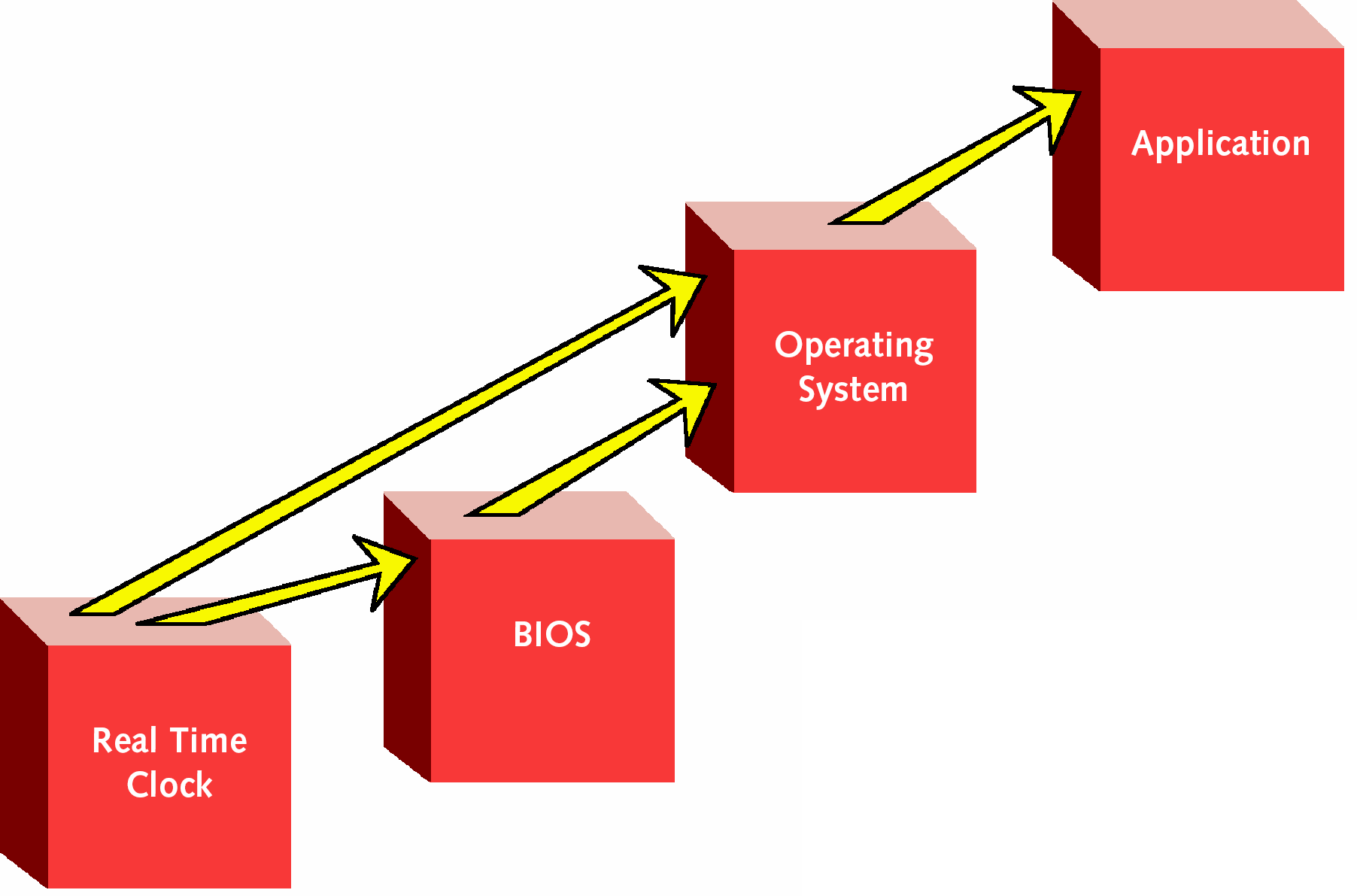
The arrows refer to the general direction of data and time transmission.
The RTC is usually a chip that is powered by a battery to keep the date and time when the computer is powered off. There is a problem with RTC chips as, until recently, they only had two figure date fields. The only true test of a RTC is a cold roll over. When a PC is turned on, the date from the RTC is transferred to the BIOS which makes it available to other components in the PC such as application or operating system. Warm date rollovers will test the BIOS.
Many PCs sold today have a two digit year RTC; these are much cheaper than four digit year versions. Therefore, PC manufacturers solve the problem with a software patch in the BIOS that adds 19 or 20 to the two digit year. Looking carefully in the set up with some PCs you can see the date roll back to 1900 or 1980 and then forward to 2000 during a warm rollover.
What happens if you have a PC vendor that claims the machines they make are year 2000 compliant? In my view, you should find out how they test their equipment. Some vendors, for instance Dell and Compaq, use a software tool called YMARK2000, developed by the National Software Testing Laboratory (NSTL) and available for download from the web (http://www.nstl.com). According to the Dell website (http://www.dell.com), the test only evaluates the BIOS and not the RTC. Therefore, my advice is to test the PC to ensure that it will undertake a cold rollover.
Operating systems also should be tested. Some versions of Unix have an interesting approach to date progression over the leap year in 2000: 28th February, 1st March, 1st March. This is just to demonstrate that year 2000 compliance is not just the rollover from 31st December 1999 to 1st January 2000.
Finally, you need to look at the application and decide whether it has a date and time function? If it does — test it!
SPREADSHEETS AND YEAR 2000 COMPLIANCE
Spreadsheets are used widely within laboratories for a variety of porposes, as they are widely available and can be used for any manner of calculations and data presentation. Best practice with any computer application, including spreadsheets, is to use 4 digit dates in all instances. But many people don't, as it has been convention to shorten the year to two digits.
Therefore, if you use two digit years, how does your spreadsheet handle date calculations? It uses a technique known as date windowing, which is how the application interprets the century for any two figure year. This can be shown with Excel as an example of spreadsheets:
Excel 97 and Excel 2000 uses a date window of 30. Any two-ufigre date entered that is equal to or greater than 30 is treated as 19XX, any figure less than 30 is assumed to be 20XX.
Excel 95 and Version 4 (Office Version 4.3) use a date window of 20. Any two-ufigre date entered that is equal to or greater than 20 is treated as 19XX, any figure less than 20 is assumed to be 20XX.
Thus, if you use two figure dates and date calculations, mayhem is assured as you migrate from one version of Excel to another as the date window has been moved by 10 years. My suggestion is that you only use four digit years.
However, if you enter dates in a four-digit date format, you can elect to display the date as two-digits and all calculations are correct — providing, and this is critical, the developer uses only four-digit date manipulation.
Strangely all versions of Excel recognise 1900 as a leap year but only for reasons of “backward compatibility” (however, it is not stated if this is with other applications or the programmers who wrote the original version).
For many uses of a spreadsheet, dates are usually only used as a marker for when the experiment or data analysis was done; they can be embedded in the header or footer for a print out or entered into a cell with no further date calculations. Many of these dates are two digits and can be fixed by changing the input cell or field. Where spreadsheets are served centrally, the Information Sciences group can help to ensure Year 2000 compliance by setting the default date field to four digits. Globally there is the old problem of different date formats in the US and Europe. One way to overcome this is to agree on the date format to be used globally as at least one organisation has done or to use US military date format (e.g., 31-DEC-1999) to avoid misunderstandings or arguments.
Macros and templates can introduce date problems, especially if the calculations or manipulations use only two digits. Here you run into issues of the version of Excel the macro was originally written in and if standard or non-standard functions were used. Here you'll need to test the macro to see what impact the date changes will have. Don't forget to include the leap year testing!
Interfacing with other spreadsheets and data transfer between other applications: some spreadsheet applications can be set up to pass data, including dates, to other spreadsheets if required. Data import and export can also use spreadsheets as a transfer medium or for further calculation, here you'll extend your investigations of date use to ensure that only four-digit dates are used. The size of the task will depend on the complexity of the interfacing and if and how date calculations used.
In the next part, we'll look at the testing of equipment and systems for Year 2000 compliance.
DISCLAIMER
This paper has been prepared with care but it is not intended as a substitute for legal or other professional advice on Year 2000 conformity. Consult your organisation's legal, business risk, insurance, technical, professional and IT advisers before applying the information in this paper. The author accepts no liability for any loss or damage caused, arising directly or indirectly, in connection with reliance on the contents of this paper.