




Abstract
BACKGROUND:
In the 90s, digital human manikins (DHMs) were introduced in planning of workstations, by static or semi-static simulations. Modern DHMs can simulate dynamic work and offer a rapid way for a virtual pre-production ergonomic evaluation. Work-related musculoskeletal disorders may affect surgical performance and patient safety. A prototype of an open console, which is contrary to the conventional closed consoles and may be seen as a representative for a new generation, has been designed to reduce workload for robotic surgery surgeons.
OBJECTIVE:
The aim of this project was to test a new DHM tool with improved usability to evaluate the ergonomics of a console of a robotic surgical system in a pre-production stage.
METHODS:
The DHM tool IMMA was used together with a 3D model of the prototype console. Twelve manikins who represented females and males from two national populations were introduced. Manikin-console distances, after console adjustments per manikin, were compared with a US checklist and Swedish standard for VDU work.
RESULTS:
The DHM tool was useful for this case, but the distances of the checklist and the standard were needed to be obtained “manually”. The automatic functions of the DHM worked smoothly but were not optimized for VDU work. The prototype fulfilled most, but not all, of the ergonomic criteria of the checklist and the standard.
CONCLUSIONS:
There is room for improvements of the adjustable ranges of the console prototype. DHMs may facilitate rapid pre-production evaluation of workstations for static work; if ergonomic assessment models for VDU work are built-in, there may be a revival of DHMs in static work situations.
Introduction
In the recent decades, the usability of computer aided design (CAD) has improved and the technology, that allows prototypes and environments to be virtually created, has become popular in methods for designers to create and visualize design concepts.
Within industrial engineering, digital human modelling (DHM) tools, linked with programs for CAD, are commonly used to simulate and assess the human work in the early planning of products and production. Three-dimensional digital humans, so-called computer manikins, that represent workers, allow the study of interaction between humans and product/production environment by ergonomic risk assessments and anthropometric analyses of fit-reach and viewing options [1, 2]. Virtual testing of alternative design proposals allows a faster and more cost-efficient design process, as well as the ability to make proactive ergonomics decisions which are important in the prevention of work-related musculoskeletal disorder (WMSDs) [3, 4].
The development of software for digital human modeling started in the 1960s with the aim to support ergonomics decisions related to products and manufacturing. In the 1980s, several DHM-tools for commercial use were initiated, such as JACK [5] and Ramsis [6], which are still in use. The development of the DHM-tools have since then continued with further advancement [7].
Initially, DHM-tools were primarily used for ergonomic assessment of static postures, which often were represented by so-called worst-case scenarios. However, since a typical work in general involve a number of dynamic elements, the static assessment was criticized to only give a reduced picture of the work situation. Hence, to in a greater extent be able to include dynamic aspects of the work, such as different tasks and work movements, in the ergonomic risk assessment, the DHM-tools have advanced to simulate movements through multiple high frequency semi-static conditions, by implementing movement paths planning [8].
An ergonomic assessment of a workstation in the pre-production stage, means that the station’s setup and adjustability are studied with respect to principles of good ergonomics in order to minimize risks of injuries. This also involves consideration of human diversity, i.e. that the workstation allows humans of different anthropometrics to work under good ergonomic conditions. Ergonomic standards provide fundamental ergonomic guidelines regarding design and assessment of e.g. tasks and products.
For simplification of ergonomic evaluations of production tasks, checklists are typically used. These generally consist of a collection of critical exposure factors to be assessed according to predefined exposure classification criteria. For ergonomic risk assessments within DHM-tools, checklist based risk assessment methods such as RULA [9], NIOSH [10] and OWAS [11], originally developed for observation, have successfully been adapted to DHM and are offered as a plug-in in most DHM-tools [6, 12]. The methods are all designed for industrial assembly or manual handling tasks.
In most DHM-tools, the manikin is manipulated by manually setting each joint, which is complex, time consuming, and the user needs a considerable amount of training. To overcome this weakness, a new DHM-tool, IMMA (Intelligently Moving MAnikins), has been developed for simulation and visualization of human dynamic work and for ergonomic evaluations [13, 14]. The IMMA tool simulates body postures and motions that are required by assigning joint angels to the internal model of a manikin's skeleton [15, 16]. Moreover, the tool includes an anthropometric module that allows the user to run tests with population-based anthropometric diversities, in the evaluation, without needing to repetitively set up each individual manikin. As today’s DHM tools are moving in this direction, in this study, we use IMMA as a representative of today’s DHM tools.
Hence, the DHM tools are being developed, but mainly so to handle more complex dynamic tasks. There are still static work tasks that cause WMSDs, examples of such work tasks are found in the field of surgery, in which the awareness of the importance of ergonomics has increased. The high incidence of WMSDs in surgery has been related to ergonomic related issues such as poor equipment design, not considering anthropometric diversity and ergonomic principles. Associations have been shown between WMSDs among surgeons and the poor ergonomic design of the clinical instruments, and design improvements have long been requested [17–19].
The one-year prevalence of work-related musculoskeletal injuries and pain among surgeons from different specialties has been reviewed as high (with high heterogeneity across studies: 9% to 19% individually for each examined injury, 35% to 60% for pain depending on body part) [20]. In a survey among surgeons in the European Association of Endoscopic Surgery, with surgeons performing open, laparoscopic and/or robotic operations. It was reported that 62% of 569 practicing surgeons have considerable (3 or higher on Borg’s CR-10-scale) work-related pain in one or more body parts during the last 7 working days (52% in the neck) [21]. This is a high prevalence, also when compared to repetitive/constrained industrial work (neck/shoulder pain: 52% among women, and 32% among men) [22]. Similar results, i.e. that work-related pain, fatigue, stiffness and numbness, especially related to the neck, back and shoulders are frequent among surgeons in laparoscopic practice, were found by Alleblas et al. (74%) [23]. It is also clear that symptoms like these, when they appear during surgery, can affect surgical performance and patient safety [21, 24].
Recent years’ introduction of a robot-assisted laparoscopy approach provides ergonomics benefits for the surgeon [25, 26]. However, the work still involves constrained and static working postures associated with risk factors for developing WMSDs [27].
A new surgical console prototype has been designed to allow the user more flexible working postures by e.g., offering an open display. The operation system will consist of interactive robotic arms which are in contact with the patient, hand controls, foot controls, and a 3D monitor which make it possible for the surgeon to control the robotic arms and monitor the surgical site. The prototype is of a representative design of open consoles that is contrary to the conventional closed consoles (see Intuitive Surgical’s da Vinci in Fig. 1) [28]. The conventional closed consoles forces the surgeon to a constrained posture that gives no possibility to variate the work posture, which has been assessed as a major ergonomic disadvantage [29]. The open consoles, on the other side, allow users to move their head freely and to adopt various working postures [30], which can bring benefits regarding eye, head, neck and spine health. Therefore, the open consoles with today’s high quality three-dimensional visual display units may be more common in the future. Moreover, the here presented prototype is equipped with an armrest frame. For flexibility between various users, the foot controls are adjustable in forward and backward direction, and the armrest and the 3D monitor are adjustable in height. Both screens are also tiltable. The hand controls have several degrees of freedom that allow for flexible control of the robotic arms. However, the prototype with its promising improvements has not yet been ergonomically evaluated. Since the prototype is a complex and expensive system, the manufacturing process can be both time consuming and expensive. Any defects from the prototype can multiply the total cost. Therefore, a pre-production ergonomic evaluation is preferable to identify potential risks of the prototype.
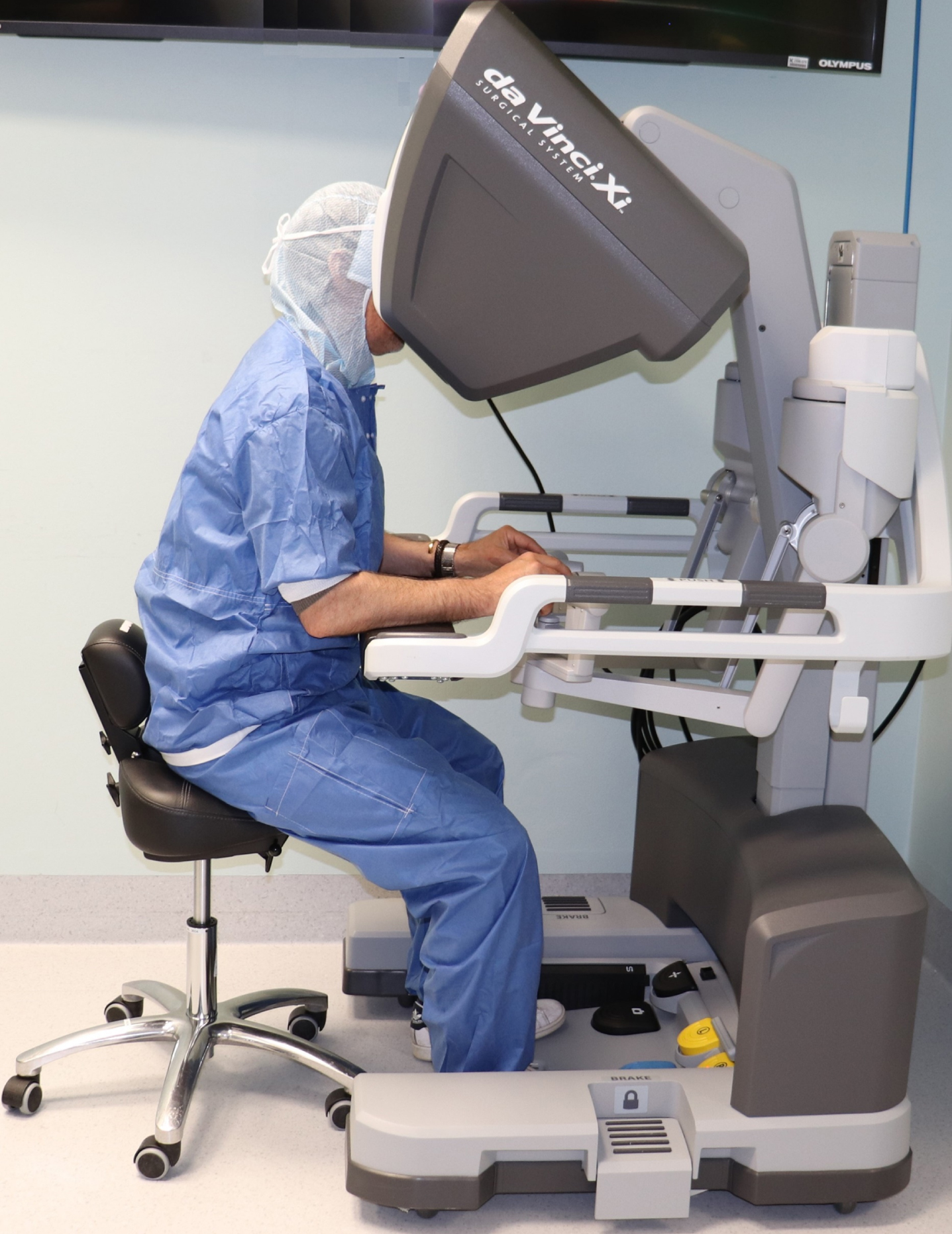
Work in a closed conventional robotic console, da Vinci Xi from Intuitive Surgical, Inc., California, US.
In this project the feasibility of a new DHM tool (IMMA) was tested in a case of evaluating static work postures of a digital prototype. The two aims were: To digitally evaluate static postures related to work in a prototype of a robotic surgical console, in female and male populations. In this digital evaluation, a US checklist and the Swedish standard, which both are relevant for visual display unit work, were used. In addition, for comparison, a real case evaluation was carried out for a conventional closed console, with the same ergonomic checklist and standard. To possibly recommend improvements to DHM tools to increase their usability in this type of static or semi-static ergonomic evaluations. To test the new features of IMMA, this phase included automatic manikin positioning and the plug-in implementation of RULA [9].
An early version of this project was presented at the 20th Congress of the International Ergonomics Association in Florence, 2018 [31]. The present article is a more detailed description of the full project, with an enlarged focus on DHMs, with an extended set of methods, and with the extended and final results.
The open console prototype was evaluated by manually positioning six manikins in each of two families in a proper ergonomic seated posture. The posture and its relation to the workstation was then manually assessed according to ergonomic criteria in the US checklist for computer work, recommended by the U.S. Department of Labor’s Occupational Safety and Health Administration (OSHA) [32] and in the Swedish standard for visual display unit (VDU) work [33]. In addition, for comparison, an ergonomic on-site assessment of a real case of a closed console was performed, using the same checklist and standard as in the assessment of the open console prototype.
In addition, to test the potential of IMMA in this kind of evaluations, automated simulation- and evaluation functions in IMMA was tested; an algorithm that automatically position the manikins in a posture that is said to be optimal, and an automatic ergonomic assessment based on the RULA checklist, which is offered in IMMA as a built-in function.
Open console prototype simulation setup
A 3D model of a prototype surgery console was introduced to the virtual environment of IMMA. Two manikin families were created in IMMA. The families were based on anthropometric stature data from the US ANSUR [34] and a Swedish database [35], to represent the American and Swedish populations. The manikin families consisted of six digital manikins each, including three female and three male manikins, with statures referring to the mean-, the upper-, and the lower boundary value of a 95% confidence interval of the targeted population.
Since the work in the prototype is intended to be carried out in a seated position with a user chair with adjustable height, the manikin families were placed accordingly. The manikins were positioned according to recommendations for a proper sitting, which in the used checklists and standard as well as in ergonomic literature in general, is described as an upright sitting posture, where the torso and the neck are vertical and in-line, the thighs horizontal and the lower legs vertical [32, 37]. In IMMA, this seating position was set by manual manipulation of each joint for each manikin in the families, according to definitions such as: markers of the hip and the knee centres on the same level (thighs parallel to the ground), upper body in a straight and upward position, and the feet placed parallel to each other and attached on a defined floor in the virtual environment.
Ergonomic assessment by checklist and standard for computer work
Since ergonomic standards within robot-assisted surgery are lacking, and since the work posture in the prototype is similar as that in computer work, ergonomic checklist and standard criteria for computer work were used for the ergonomic evaluation. The Swedish standard for computer work places [33] was used for comparisons with geometries from simulations using the manikins representing the Swedish population. The Swedish standard refer, in some parts, to the more general national regulations regarding workload [38]. An American checklist for computer workstations [32] was used in comparisons with geometries from simulations with the US population representing manikins.
The Swedish standard was only available in the Swedish language and was therefore first translated into English. The text was then condensed and transferred into a table to facilitate comparison and presentation of the outcomes. Sections and paragraphs of the checklist and the standard that were not relevant for the present evaluation, e.g., details related to the chair, glare from the monitor or windows as well as placement of accessories, were not considered in this study.
Prototype adjustability measures and assessments
Six pairs of distance-related measures were defined to enable quantification of the prototype adjustability in relation to the anthropometric diversity of the manikin family. The measures were: Height of monitor –Height of eye,
Height of armrest –Height of elbow,
Height of armrest (bottom) –Height of thigh (sitting),
Distance of the pedal to the back wall of the console –Distance of the feet to the back wall of the console,
Prototype work range (depth) measured from the outer edge of the armrest –Outer work range (depth) measured from the outer edge of the armrest,
Prototype work range (half width) measured from the outer edge of the armrest –Outer work range (half width) measured from the outer edge of the armrest
Each pair of distance-related measures consisted of one measure related to the prototype and one measure related to the manikin. Both measures within a pair were defined as the distance of the landmark on the prototype or the manikin to a fixed reference on the prototype or in the environment. For example, the height of eye was measured from the floor, and the height of monitor was represented by the distance between the top edge of the monitor and the floor. In this way, the manikins’ work ranges and the prototype adjustment ranges were paired to cover main issues in the evaluation regarding visual angle, arm support, leg space and foot placement.
The lower limit of the seat height of the chair was pre-defined (43 cm above the floor), and three out of six measures (height of eyes, height of elbow and height of thigh) were adjusted according to this limit. If the optimal seated posture should be lower than this limit, the seat height was still set to 43 cm.
Evaluations of outcome measures of checklist and standard
The prototype console was evaluated to assess whether the console’s adjustment ranges allowed an ergonomically proper working position. The evaluation was based on the six pairs of distance-related measures. Ergonomic assessment criteria were based on the checklist and standard. For a criterion to be considered fulfilled, it was required that all manikins of the manikin family met the criteria.
Ergonomic assessment of a real case of a closed console
In a real case, where a volunteering male senior surgeon of medium stature (177 cm) was working in a closed console (Da Vinci Xi, Intuitive Surgical, Inc., California, US, see Fig. 1), the working posture was assessed by an on-site observation performed by an ergonomist/physical therapist using the same checklist and standard as used for the ergonomic assessment of the open console prototype, see Section 2.3.
This study is part of a larger program, which is approved by the Regional Ethics Committee in Stockholm (Dnr: 2014/1120-31).
Work posture optimizations and RULA assessments by IMMA’s functions
To test the potential of IMMA in the ergonomic assessment of a static VDU-work situation, the internal function, that automatically calculates “optimal” positions for all the manikins in a family, was used. To use this function, semi-constrained attach points for both feet, the hip and the head, were set. All constraints of the attach points were translational tolerances; they defined a space within which the corresponding body part of manikins can be positioned. The constraint space of the attach point for the left foot was represented by two piled cuboids with dimensions of 100×200×60 mm (laterally from sagittal plane×ventrally from coronal plane×vertically from floor) each that covered the possible reaching space for the left pedal on the upper or the lower row; the constraint space of the attach points for the right foot mirrored the one for the left foot. The constraint space for the attach point of the hip was represented by a rectangle on the sagittal plane with dimensions of 0×200×120 mm that was positioned in front of the arm rest with the center 621 mm above the floor. The attach point for the head was represented by a cuboid with dimensions of infinite×200×180 mm that was created only to adjust the manikin’s up-right sitting posture.
The families of manikins were then attached to the defined attach points (for feet, only the ones for pedals on the lower row were used). When a family was attached, all members within the family were automatically positioned into their optimal sitting postures by an internal truck-sitting strategy; these sitting postures were used as initial sitting posture. The eye heights of all manikins were then measured as an illustration of the function and to facilitate comparison of these automatically optimized work postures and the manually set work postures.
The RULA checklist [9] was developed to, by observation, evaluate ergonomic risk factors for upper limb WMSDs. The assessment considers biomechanical load of the neck, trunk and upper extremities. Using the checklist, the user will score body regions such as the upper arms, lower arms, wrists, neck, trunk and legs according to predefined alternatives. Depending on work evaluated, the assessment, which is performed for one side of the body at time, may be needed for both sides of the body. The level of MSD risk can be interpreted by comparing the risk score with a four-level risk scale, defined and illustrated by colors such as 1-2 points: green –negligible risk, 3-4 point: yellow –low risk, 5-6 points: orange –medium risk, and > 6 points: red –very high risk. The original RULA checklist include assessment of 11 items which are related to posture, type of muscular load and muscular use (i.e. static or dynamic). The RULA version that is built-in in IMMA includes 10 items which are related to postures of the upper arms, lower arms, wrists including wrist twist, neck, trunk and legs. The outcome from the assessment is illustrated by colors representing the risk (see above), and presented for each manikin in the family.
For further illustration of the built-in IMMA functions, two additional viewpoints were created. The two viewpoints were set at the upper edge of the main screen when the screen was adjusted to the highest and lowest height, respectively. The families of manikins were set to perform four tasks: 1) to sit in the initial sitting posture; 2) to reattach the feet on the attach points for pedals on the upper row and return to the initial sitting posture; 3) to view the highest viewpoint of the screen; and 4) to view the lowest viewpoint of the screen. The RULA checklist was automatically run for all manikins through all four tasks.
Results
It was possible to evaluate the prototype console in the IMMA model manually, i.e. after positioning each one of the twelve manikins. A few critical design points were revealed, mainly for short women. To run the automatized functions in IMMA made the process significantly smoother and quicker (however RULA was designed for a wide range of tasks, and is not, as the checklist and the standard, specialized for VDU-work).
Prototype console evaluation with the US checklist and the Swedish standard
Figure 2 shows the six pairs of distance-related measures for comparison between the adjustable ranges of the prototype, and the recommended work ranges of each nation/population after the manikins had been positioned manually.
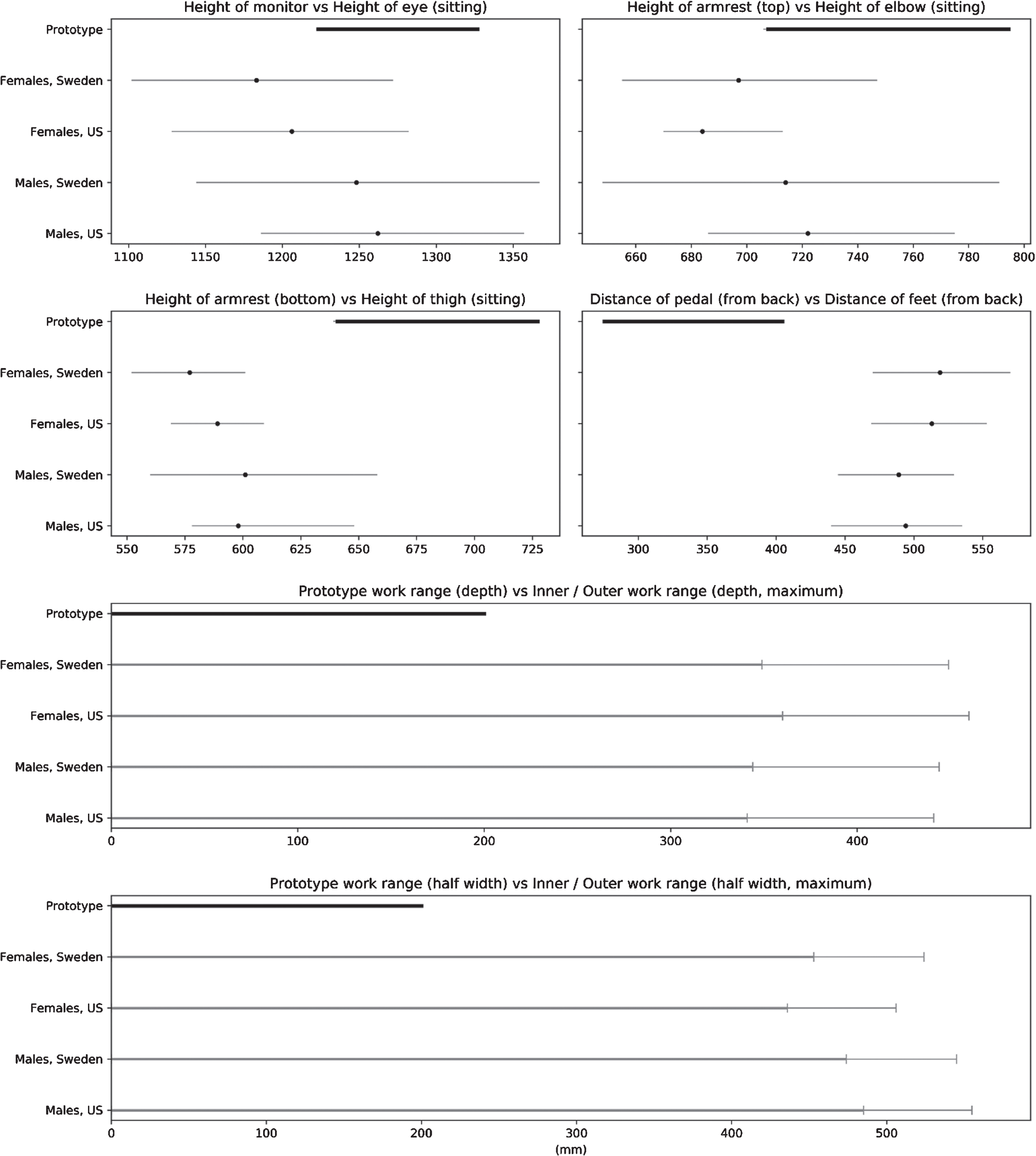
Comparisons between the adjustable ranges of the prototype and the work ranges of the manikins in the families. Each subplot shows the paired measures regarding one issue. The dark thick line represents the range of the prototype; the thin grey lines represent the manikin families of female and male populations of Sweden and US, respectively. Additionally, in the top four subplots, dark dots within the grey line illustrate the median value of the family in the specific case. In the bottom two subplots, the dark grey lines illustrate work within lower arm distance (so called “the inner work area”); the light grey lines illustrate full work area, i.e. also work with extended arms. The work distances, which are measured from the torso for both work areas, starts at 0 cm and ends at the area limit.
The US computer workstation e-Tool includes 33 criteria, divided into seven categories, i.e. “working postures, seating, keyboard/input device, monitor, work area, accessories and general”, where “general” refer to equipment, organisation and condition of the work station. Sixteen of those criteria were relevant for the assessment in the present study. Out of these, 12 criteria were fulfilled and 4 criteria were not fulfilled. The assessments are presented in Fig. 3.
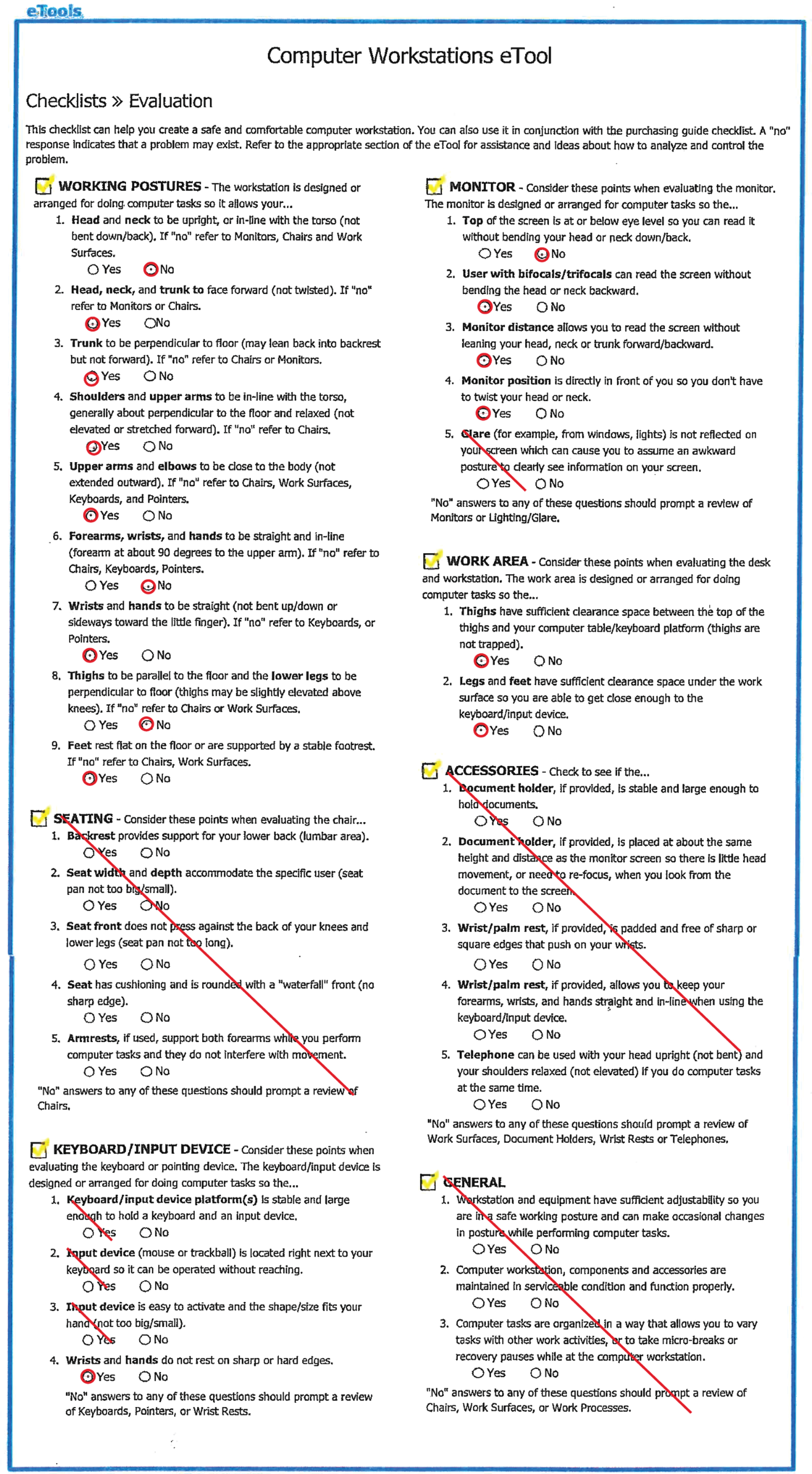
Outcomes from the assessment of the prototype open console, using the US-checklist for the 2.5th, 50th, and 97.5th percentile representatives of the US female and male population. The crossed questions are considered irrelevant in this study.
The criteria that were not fulfilled in the assessment are related to the working postures of the neck, forearms and wrists, thighs, as well as issues related to the monitor, e.g. the positioning of the screen, and are presented below: Working postures of the head/neck: Since the top height of the 3D monitor, when adjusted to lowest position, was in line with the eye height of the tallest female manikin, the shortest, and average female manikin, as well as the shortest male manikin, had to bend their head backwards to be able to look at the top of the 3D monitor. For the average male manikin, the screen was within an adjustable range for the eye height, but for the tallest male manikin, the screen, when adjusted to the highest position, was too low, which means that that manikin always has to bend the neck forward when watching the screen. Working postures of the forearms and wrists: None of the female manikins could achieve a forearm relaxed sitting position when using the armrest. When adjusted to the lowest height, the armrest was still too high (53 mm) to fit the tallest female manikin. For the shortest male manikin, the situation was similar; however, both the average and tallest male manikins could achieve a relaxed sitting position. The console did not provide wrist support. Working postures of the thighs: While sitting with the thighs parallel to the floor, none of the manikins was able to reach the foot controls. The tallest manikin was within the closest range to reach, but still, 28 mm short in the horizontal direction. This distance was considerably longer for the shortest female manikin, i.e., 141 mm. To be able to reach the foot controls, the leg had to be stretch forward, i.e. the knee angle between the thighs and the calves had to be larger. For interest, the knee angle (i.e. the angle between the calves and a line perpendicular to the floor), when the manikin was set to reach the foot control, was calculated. The result showed that the angle increased with 6° (for the tallest male manikin) to 30° (the shortest female manikin) within the manikin family. Monitor, top of the screen: See #1. “Working postures of the head/neck”.
The Swedish standard of computer work and the related standard of workload ergonomics, comprised in total 45 criteria which were divided into 12 categories. The categories were: screen and viewing conditions, lighting and viewing conditions, work postures and work movements, work height, work area for the hands, work with handheld controls, neck, shoulder/arm, back, leg. Twenty-seven criteria were relevant for the present assessment, of these, 17 criteria were fulfilled, 10 criteria were not fulfilled. The outcomes from the ergonomic assessment using the Swedish standard and the Swedish population are presented in Table 1.
The Swedish standard for computer work with the outcomes from the comparisons with manikin- prototype distances. Fulfilled criterion (“Yes”) mean that the criterion is fulfilled for all six manikins in the family representing the Swedish female and male population. NR means that the criterion is not relevant
The Swedish standard for computer work with the outcomes from the comparisons with manikin- prototype distances. Fulfilled criterion (“Yes”) mean that the criterion is fulfilled for all six manikins in the family representing the Swedish female and male population. NR means that the criterion is not relevant
The criteria in the Swedish standard that were not fulfilled in the assessment, are further specified below: All screens, armrest and handles are adjustable in height, which means that the work posture, to a certain extent, can be changed while seating. However, it is not possible to raise the prototype to a level suitable for standing work. Only the tallest female manikin and the average and the tallest male manikin are able to use the armrest properly, i.e., while sitting with the forearm in a relaxed position. For the other manikins, the armrest was too high, i.e., was not adjustable to a lower level. The armrest is narrow and tilted inward and cannot support the entire forearms. When adjusted to lowest position, the top height of the 3D monitor is above the eye level of the shortest and average female manikins as well as for the shortest male manikin. When adjusting the screen to the highest position, it is still too low for the tallest male manikin. For the tallest female manikin and for the shortest and average male manikins, the 3D monitor is within the adjustable range for the eye level. The screens are able to tilt but are not sufficiently adjustable in height, see #4a. The monitor is not sufficiently adjustable in height, see #4a. The adjustability of the console does not allow work at an elbow height for all manikins of the family, see #3c. The console’s adjustability does not provide good arm support for all manikins of the family, see #3c. The use of pedals does not allow work in a standing position. During surgery work, the foot controls are used frequently. See #11c.
The real case of a male surgeon of median height, working in a closed console, which was assessed by onsite observations with the use of the US checklist and the Swedish standard, showed that 11 of the 15 criteria found relevant in the US checklist, and 16 of the 26 criteria relevant for the Swedish standards, were fulfilled. In addition to the criteria that were not fulfilled in the evaluation of the prototype console for the median male manikin of the two populations, in this real case, also criteria regarding neck- and back postures were not fulfilled. The assessments are presented in Fig. 4 and Table 2.
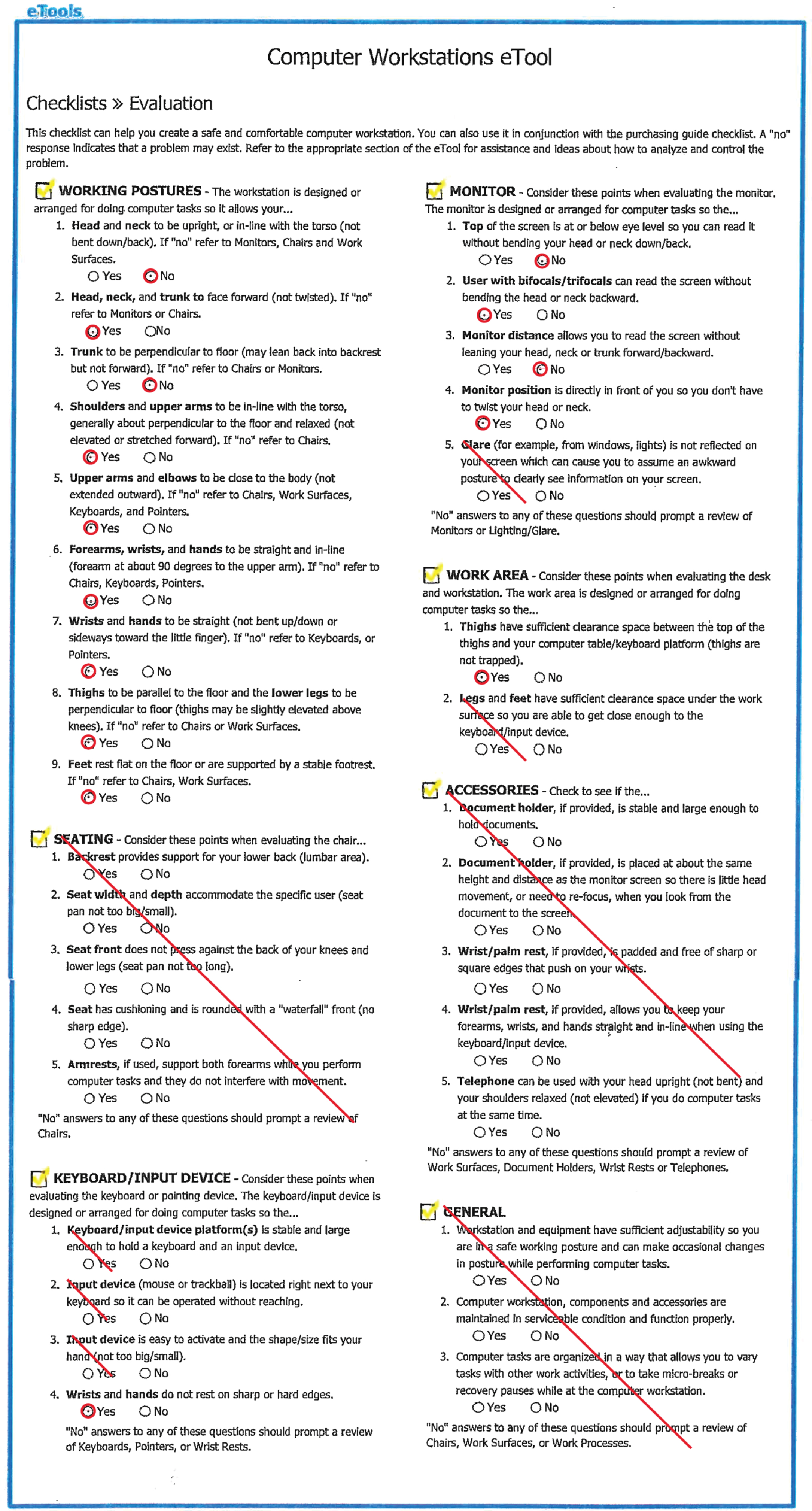
Outcomes from the US checklist assessment of a male surgeon of median stature, working in a closed console.
The Swedish standard for computer work with the outcomes from the on-site evaluation of a male surgeon of median stature, working in a closed conventional console. NR means that the criterion is not relevant
To use the built-in positioning function was significantly quicker than to position the manikins manually. All manikins found their optimal positions without extra adjustment. Also the automatized RULA assessment was very convenient to run.
An example of anthropometrical measures related to the automatic positioning in the console, is presented in Fig. 5. The figure shows the eye heights of the manikins measured by IMMA’s function when in the initial sitting posture. The mean eye heights of the Swedish and the US female manikins, respectively, (1193 mm and 1205 mm) were less than the minimum height of the top of the screen (1222 mm). The mean eye heights of the male manikins representing the Swedish and the US populations (1228 mm and 1250 mm, respectively), were within the adjustment range of the top of the screen but all manikins were not covered.
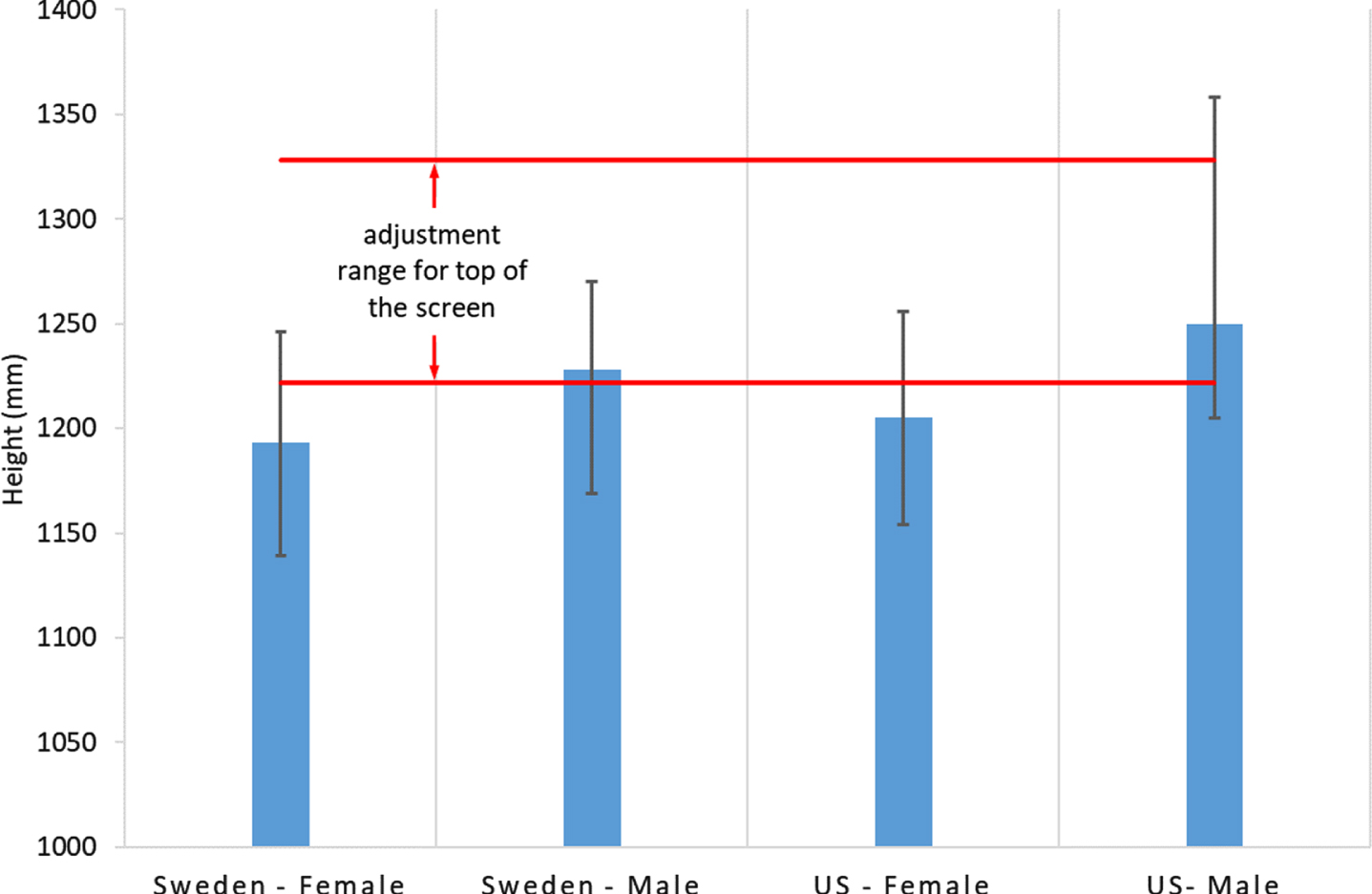
The eye height of the manikins while positioned in an optimal posture according to an internal algorithm of the IMMA. The red lines define the range where the top of the screen can be adjusted freely.
In the automatized RULA assessments, the results showed, for all manikins, green scores for all body part postures in all four tasks.
Prototype console ergonomic evaluation with checklist and standard
Both manikin families were within the required viewing distance range, i.e., the preferred viewing distance, measured from the eyes to the front surface of the screen, which according to the US checklist should be within a range between 50 and 100 cm while the Swedish standard recommends approximately 70 cm. Moreover, all manikins “could take advantage” of the flexibility of the control handles, which allow the user to work with reduced load, i.e. with the arms close to the body (within the inner work area) and with the wrists in a neutral position. However, adjustability of armrest and screen heights were not sufficient to suit all the manikins.
Neck posture
Neither the adjustability range of the 3D monitor height was suitable for all manikins. The screen height was only suitable for the median male manikin. For all the female manikins as well as the 2.5th percentile male manikin, the screen was too high. But for the 97.5th percentile manikin, the screen height was too low. However, we did not consider the preferred viewing angle to the center of the screen, which according to OSHA normally should be located 15–20° below the horizontal eye level and should not to be greater than 60° [37]. Considering this in the presented assessment, the user could possibly achieve a suitable working posture of the neck despite the limitation of screen adjustability in height.
Support for the arms
The criteria regarding armrest height were not fulfilled for all manikins after the manikin had been placed in an ergonomically proper sitting posture. Only the median and the 97.5th percentile male manikins could use the armrest properly, for the other manikins, the height of the armrest was too high. However, if working in a position with arms stretched forward (i.e., upper arms not parallel to the back) the elbow angles increase, which means that the height of the forearms (measured from the floor) also will increase. In such a working position, the lowest height of the armrest may be suitable for those manikins for whom the armrests were too high while sitting with the upper arms ergonomically correct.
Support for the wrists
Even though the armrest will support the forearm, support for the wrists is lacking. In computer mouse work, support for the wrist is essential, since long-term work without support is associated with overload of the wrist, potentially may cause MSDs [39]. In the present work with handheld controls, such support can both affect the work in a negative and positive direction. A wrist support may limit the flexibility when using the controls and the ability to move the wrist easily and freely. At the same time, wrist support can contribute to a more relaxed work posture for the wrist with reduced muscle activity, reducing the risk of wrist related MSDs.
Reaching the foot controls
To reach the foot controls, the legs must be stretched forward. Since at least one of the foot controls is used every minute, it is likely that the forward-stretched leg position will be maintained, which means difficulties in maintaining an ergonomically proper sitting position. Long time stretch of the legs in combination with a forward bent sitting posture may negatively affect the nervous system (e.g., the sciatic nerve) causing long-term nerve irritation or/and back pain [40].
Flexible work postures
The limitation of the adjustability of the 3D monitor and the armrest height also affects the possibility to work in a standing position. If a surgeon’s major work task each week is to work within this type of console, it would be an advantage if the console allows a standing posture, since long time sitting work is a risk factor associated with cardiovascular disorder, lower back pain and diabetes [41, 42]. This speaks for further investigation of the possibility to switch between sitting and standing work. However, then the use of foot controls while standing would need a feasible solution.
Recommendations for prototype improvements
To include anthropometrical diversity and to facilitate proper ergonomic postures for 95% of the female and male populations, the adjustment ranges of the prototype console need to be wider. The adjustable range of the monitor height need to be increased in both directions. The armrest needs to be further adjustable in height to allow for a lower position. The horizontally adjustable range of the foot controls is too short and needs to be extended.
Wrist support may contribute to a more relaxed work posture of the arm and should be considered in the further development of robotic consoles. At last, today, there are no robotic consoles that offer the flexibility to switch between sitting and standing work. Such a possibility should be advantageous and may be further investigated.
Real case ergonomic assessment of a closed console
The onsite observation-based assessments of a median height male surgeon showed a higher number of unfulfilled criteria than were found in the corresponding assessment of the median male manikins in the digital prototype. In the real closed console case, there were also forward bent and static postures of the neck and back, which are risk factors that are highly associated with WMSDs [43–45].
A previous ergonomic evaluation of an conventional closed console, which also was based on the OSHAs ergonomics recommendations for computer workstations [46], showed that the adjustability of the setting of the console mainly provided proper height of armrest and positioning of the foot controls for individuals between 163 and 185 centimeters in height, and hence not proper ergonomics for short and tall surgeons.
A literature review concluded that, because of the static and constrained work postures of the closed consoles, there is a need for improvements regarding robot-assisted surgery consoles [47].
The usability of the automated functions in IMMA
Two different positioning- and analysis strategies were tested to simulate the console prototype, 1) the manual manipulation of the manikin to work in an ergonomically advantageous posture, which was evaluated by a manual analysis of ergonomic criteria, and 2) the automatized positioning of all manikins’ work postures, and automatic evaluation by the built-in RULA-checklist.
The manual positioning of the manikins to a correct ergonomic posture was time-consuming and difficult to perform, since each manikin adjusted separately. The anthropometrics of the manikins was supported from the model, but analysis and the ergonomic assessment were complex and time consuming.
The automated strategy was simple and quick to perform. However, only the predefined work position “truck sitting” was available, which has not been recommended for VDU work. Hence, the upright-sitting posture was not available. For IMMA and other DHMs to be advantageously useful tools in different work areas, the tools should offer more positioning strategies and easy settings for grips. For example, implementing the different sitting strategies defined in ergonomic standards, such as upright sitting and declined sitting, would be highly valuable for the simulation set up and for the ergonomic assessment and seated static work conditions [36].
The RULA checklist assessment was convenient to implement via the built-in function, and the scores were green. Models like RULA [9] and Strain index [10] are mainly designed for dynamic task as manual handling and assembly, and are not specialized for VDU work. Even though RULA and Strain index have been used for assessments of work in a closed console [26, 48], we recommend the usage of VDU work models, like the checklist and the standards used in the present evaluation in this kind of work, which also would facilitate usage of automatic assessments functions.
Methodological considerations
Accuracy of populations anthropometrics
The population databases that were used are from 1989 (for the US) and 2008 (for Sweden). It is known that anthropometry of a certain population evolves over years. Therefore, there could be minor errors in the set-up of the percentile representing manikins due to outdated data. These minor errors should not influence the results of the prototype evaluation.
The evaluated sitting posture
In the present study, we only assessed the manikins in an “upright sitting” posture. This was in accordance with the used checklist and standard. However, there are other ergonomically correct sitting alternatives, e.g., the declined sitting posture [37] where the buttock is higher than the knee and the hip angle, i.e., the angle between the thigh and the spine is larger than 90°. In such a sitting position, the armrest of the console, which in the upright sitting posture was slightly too high, may be in a suitable position.
Gender aspects
The trend of using robotic surgeries in urology and gynecology has increased [49, 50]. In 2009, 21.3% surgeons in US were females, and the percentages of female surgeons within urology, colorectal surgery, and obstetrical and gynecological surgery were 5.6%, 16.4% and 47.1%, respectively [51]. In Sweden, there were 23.4% female surgeons among all the surgeons by 2015, and the percentages of female surgeons in urology, and obstetrical and gynecological surgery were 18.3% and 66.4%, respectively [52]. Gynecological procedures using robotics consoles has been associated with a higher rate of physical symptoms, especially among female surgeons [47]. A likely reason for the higher rate among women is the poor design of the equipment for shorter surgeons, which among other involves the table height [53]. Generally, female surgeons are a minority. However, the fraction has increased over years, and naturally, the equipment should be designed also for women [52].
Conclusions
The evaluated prototype open console has a number of possible adjustments, i.e., the height of the 3D monitor, foot controls, handles and armrest frame. After adjustments, the majority of the ergonomic criteria of the US checklist and the Swedish standard for all manikins, i.e. representatives of two populations, were fulfilled. However, a few of the criteria were not fulfilled for all manikins, because of too limited adjustable ranges that restricted, especially for the shortest manikins’, work in recommended postures. Hence, considering the design revisions, there is still room for a few improvements. The commonly used closed console was assessed in a real case, which also showed unfulfilled criteria.
The DHM tool IMMA (which may be seen as a representative of today’s DHM tools) provided the possibility to compare static surgery work in the digital prototype phase to ergonomic checklists and standards for visual display unit work, considering human diversity. This evaluation approach should be efficient in pre-production stages of technically advanced tools, for which late changes are expensive and causes release-delays. The present limited virtual measurement tools of IMMA restrained the time efficiency in this type of ergonomic assessments of static work conditions. IMMA has built-in functions for automatic manikin positioning and for automatic application of (as do other DHM tools) ergonomic risk assessment methods. However, these automatic functions are not designed for VDU work. Improvements should also be made to DHM tools. If models for VDU work are added, there may be a revival of population-representing digital human manikins in static work situations.
Footnotes
Acknowledgments
We especially thank Jonas Kressin, Niclas Delfs and Roland Roll from Fraunhofer-Chalmers Research Centre for Industrial Mathematics for the thorough technical supports in this study. This work was financially supported in part by the China Scholarship Council and in part by Medtronic.
Conflict of interest
This evaluation was carried out under a large frame in which Karolinska Institutet is evaluating the ergonomics of Medtronic prototypes. The frame is sponsored by Medtronic. Ida-Märta Rhén, Xuelong Fan, Magnus Kjellman and Mikael Forsman have no conflicts of interest or financial ties to disclose.