




Abstract
This paper presents Map-On, a web-based editor for visual ontology mapping developed by the Architecture, Representation and Computation research group of La Salle, Ramon Llull University. The Map-On editor provides a graphical environment for the ontology mapping creation using an interactive graph layout. A point-and-click interface simplifies the mapping creation process. The editor automatically generates a R2RML document based on user inputs, particularly producing IRI patterns and SQL queries. It has been used in real scenarios alleviating the effort of coding R2RML statements which is one of the main barriers for adopting R2RML in research and in the industry.
Introduction
In recent years, the interdisciplinary character of numerous projects and applications has led to an increasing need for integrating data that is related to different knowledge domains and stored in different formats. In this context, the community of experts and stakeholders that is currently working with heterogeneous data has grown considerably. These communities are usually composed by people with heterogeneous backgrounds skills and goals. In addition and thanks to widely spread initiatives such as the open data movement, the quantity and quality of the available open data is steadily increasing.
The ontology-based data access (OBDA) paradigm can be useful in scenarios where people with different backgrounds and skills wish to access heterogeneous data sources. In ODBA settings, the data sources are accessed using a high-level conceptual representation without the need to know how the data sources are actually organized [4,19]. The main components of an OBDA system are the ontology, which represents the conceptualization of the data sources domains, the mappings between the data sources and the ontology, and the query rewriter which receives queries in terms of the ontology and transforms them according to data sources. The queries can be processed over the ontology with reasoning purposes in order to allow of the use of hidden relations that are not explicitly defined in the data source.
In this context, the development of mappings between the ontology, which presents a generic conceptual view of the data, and the schemas of the integrated data sources is one of the key issues. In several approaches [9,18], efforts have been made to automate the mapping tasks. However, due to the complexity of obtaining the proper semantics from the schemas, the manual mapping in OBDA systems is still currently the most widely adopted solution in academia and industry in spite of its time consumption and of the high requirements of human expertise [1,23]. Experts are required to have knowledge of the data schemas to be integrated and on the ontology architecture.
Mappings from relational databases to a RDF dataset are mostly implemented using R2RML, a declarative language recommended by the W3C. R2RML is supported by OBDA systems for data integration such as Mastro Studio [5] and systems for data integration [2]. As stated above, creating R2RML mappings require advanced skills and expertise in ontology design and formal logic. However, also domain experts and data owners, who usually lack the mentioned expertise, are involved in the setting up of OBDA scenarios. However, in these scenarios and for these kinds of users, the main barrier is often the lack of a visual representation of the mappings. In practice, a visual representation could help them to overcome the lack of expertise and complete the mapping task.
With this scenario in mind, we have developed Map-On, a graphical environment for ontology mapping to help different kind of users – domain experts, data owners, and ontology engineers – to create and maintain mappings between a database and a domain ontology using the R2RML recommendation. The ontology mapping environment offers visualizations of mappings based on a graph layout and supports the automated generation of IRI patterns and SQL queries for R2RML statements.
The paper is organized as follows. Section 2 gives an overview of the existing mapping editors. We briefly introduce the R2RML language in Section 3. Afterwards, in Section 4, the main features of Map-On are described, including its visual representation of ontology mappings, point-and-click interface and the automated generation of R2RML statements. Section 5 gives a complete overview of the tool architecture. A description of real-world deployments of Map-On is given in Section 6, and a discussion about the current limitations and future plans, is exposed in Section 7.
Related tools
Several tools have been developed to assist experts in specifying the mappings between the data sources and the ontologies. For instance, OntopPro extends Protégé by providing a mapping editor that integrates a SPARQL query interface with the Quest query engine [22]. In spite of the fact that the editor works with a proprietary mapping format, it can export and import R2RML files. Similar functionalities are included in the mapping editor presented by Sengupta et al. in [24], in this case with native support of R2RML. Generally, the users of these tools are technicians, experts in formal and especially description logics. These tools do not provide graphic visualization of any kind. This shortcoming makes these tools inadequate for domain experts and data owners, who despite being involved in the data integration process, do not have the necessary background in ontology engineering.
A significant help for non-experts in ontology engineering can be provided by ontology visualization techniques. They help users to inspect, navigate, and verify the ontologies and mappings [10].
Mapping editors like the Karma system constitute a good example of this. Karma is a mapping editor that provides a graphical user interface for visualizing and editing the mappings. Moreover, Karma can automatically suggest mappings and supports R2RML recommendation [9]. The mappings are displayed using a tree layout for the ontology and a table layout for the database schema. Another example is ODEMapster which works in a similar way to Karma. It also offers a graphic visualization of the database schema and of the domain ontology using a tree layout expressing the mappings in a proprietary mapping language called R2O [20]. Furthermore, the RBA (R2RML By Assertion) tool also uses a tree layout to display the mappings and supports R2RML [14].
The limitation of these tools lies in the exploitation of the tree layout for visualization. Such a layout is unable to represent the complete structure of the database schema, ontology and mapping by itself since the structure of an ontology is like a graph. Indeed, even when given a fixed screen space, it is not always possible to visualize the entire tree structure of ontologies with multiple inheritances and with a large number of descendants [7].
Visualizing ontologies and mappings with a graph layout is probably the most natural and the most commonly used form of visualization. It has been found, in a usability test, that graph layouts are more suitable for overviews and their flexibility helped users to hold attention during the mapping tasks [7]. However, graph layouts can become difficult to manage once the nodes visualized exceed a certain number.
A prominent example is the mapping visualization model presented by Lembo et al. in [11]. In this case, the mappings are presented in a graph layout including three views focused on the mapping, the ontology, and the source. But a complete overview of the all mappings at once is not provided. RMLEditor is another example of an editor that presents the mappings using a graph layout [8]. The limitation of the mapping representation of RMLEditor is that structure of the relational source is not included in the mapping representation. However the use of graph layout in ontology mapping editors is rare.
Summary of tool features
Summary of tool features
Table 1 summarizes the main features of the different mapping tools and of the Map-On editor described in this paper. The tools are compared with the mapping language used (e.g., proprietary language or the R2RML standard), with the graphic layout to represent mapping elements (e.g., tree and graph), and whether they provide a complete overview of the mappings generated by the users or not.
An R2RML mapping is a set of triples maps that is composed of a logic table which can be defined as a base table, a view (i.e., a result set of a stored query), or a SQL query; a subject map which defines the subject of the RDF triples generated from the logic table; and a set of predicate and object maps which defines the predicates (i.e., roles) and objects (e.g., RDF objects) of the RDF triples. The subject and objects maps describe how the IRIs (Internationalized Resource Identifier) should be generated using the columns specified in the logic table and the elements of a target ontology (i.e., concepts, roles and attributes).
The manual creation of R2RML mappings requires technical skills in SQL query design and in ontology engineering at the same time. The experts who create the mappings should understand the structure of the database schemas and the target ontology in order to find correspondences between the columns of the relational tables and the ontology entities. Moreover, users have to design SQL queries for the logic tables and the IRI patterns for the subject and object maps.
The triples map illustrated in Fig. 1 uses a logic table based on a SQL query for the table census. The IRI of the subject map uses the ID column of the table and the concept Building. The object map is defined with the role hasAddress and the column Addr. The main limitation of R2RML languages is that in the research community and in the industry, there are certain problems with the adoption of R2RML. The manual creation of R2RML mappings is a time consuming process, the mappings are syntactically heavy in terms of R2RML vocabulary (these processes imply to design valid SQL queries, to use the proper terms of the R2RML language, and to select the ontology concepts and properties), and for the experts using the language, the steep learning curve is mainly caused by gaining expertise of the language [16].
The mapping editor presented in this paper supports the creation of triples maps by providing visual representation of the mappings and a point-and-click interface which enables the user to map the columns of the tables towards the ontology concepts, roles, and attributes. The IRI patterns and the logic tables are automatically generated by the tool.

Example of a R2RML mapping.
The main goal of the Map-On tool is to support users to create mappings between a database schema and the existing domain ontology. The tool provides visualizations of mappings based on a graph layout for the database schema and the ontology, an ontology mapping interface, and the automated generation of IRI patterns and SQL queries for the R2RML statements.
Mapping visualization
Database schemas and ontologies are usually represented using a graph layout; a recent prominent example is VOWL a visual language for visualizing ontologies as a force-directed graph layout [12]. In graph layout representations of database schemas and ontologies, the node elements (e.g., tables and concepts) are characterized as nodes and the relations (e.g., primary/foreign key constraints and roles) as edges. The mappings between a database schema and an ontology are a set of relations between their elements. That is when, for instance, a column of a relational table is used to define the IRI of a subject map and a concept of the ontology is utilized to define the type of the subject map. In this way, it becomes intuitive to represent the mappings graphically as edges between columns and concepts (Fig. 2).
The Map-On tool represents a table and their columns as purple rectangles connected by a solid purple line. The relationships between tables are displayed with a purple dashed line between foreign key and primary key constraints. The ontology concepts are represented as orange ellipses, the roles as directed solid orange lines, and the attributes as green ellipses. The relations between the elements of the database and the ontology are displayed with dashed blue lines. An example of a visual representation of mappings using a graph layout can be found in Fig. 2.
After a mapping has been created, the corresponding layout is automatically generated by placing the nodes in a rectangular grid arrangement. As a next step, the user can modify the position of the nodes by dragging them to the desired position.

Visual representation of a mapping.
The Map-On editor provides the user with a high level of assistance in the ontology-database mapping by means of the four following features: point-and-click interface, ontology-driven mapping approach, top-down visualization, and mapping spaces.
The Map-On graphic user interface is based on a point-and-click paradigm in which most of the user’s actions are carried out with the cursor. The main benefits of this kind of interfaces are the high comfort factor and the low getting-started-barrier for those users who lack skills in mapping languages such as R2RML.
Furthermore, the interface provides easy access to the elements to be mapped and fosters productivity, as complex mapping tasks can be carried out with fewer actions by the user.
Map-On implements the ontology-driven approach for editing the mappings. Namely, the user starts with selecting concepts of the ontology and as a second step generates R2RML statements by defining the proper logic tables and IRI patterns. An alternative to the ontology driven approach is the database-driven approach which starts with a selection of database elements followed by the generation R2RML statements through selecting the proper target ontology elements. As stated in [16], none of these approaches (i.e., ontology-driven and database-driven) are better; however users with a background in database can be more familiar with the ontology-driven approach.
The Map-On interface provides top-down mapping visualizations (Fig. 3). In particular, the elements of the ontology and database schema (i.e., tables, columns, concepts, roles and attributes) involved in the mapping are visualized in one single representation as a global view which can be related to a set of triples maps in the final R2RML document. This approach helps the user to comprehend both database and ontology structures at the same time, and therefore to reduce mapping errors and to simplify their maintenance. Furthermore, a list of mappings is provided in the left side of the interface using the same colour styles as in the graph representation. When the cursor hovers over one mapping on the list, the node of the graph layout corresponding to that mapping is highlighted, the same as their neighbourhood nodes. This feature works the other way round as well, when the cursor hovers over a node of the graph layout, the corresponding mapping of the list is highlighted.

Map-On main interface. On the left side, a list of mappings is presented on the ‘Net Heat demand’ mapping space. On the right side, an interactive graphical visualization of the mappings is displayed.
Moreover, Map-On facilitates the definition of mapping spaces. These spaces are partial views of an entire picture of mappings between an ontology and a database. Such spaces contain a limited set of ontology and database entities and serve to divide a complex mapping task into a set of less complex and smaller tasks. This feature is important in scenarios where there are a considerable number of elements involved in the mapping.
The Map-On editor automatically generates the IRI patterns and logic tables (i.e., SQL queries) that are required by the R2RML statements. This is based on the concepts and columns involved in the mappings created by the user. For example, in Fig. 3, when a user maps the concept SUMO:Building to the column ID of the table netheatdemand, the following IRI and SQL query are generated for defining the subject map:

The IRI is generated based on patterned URIs solution [6]. This pattern was selected considering that people are able to read it and that it is easily generated from a database where identifiers (i.e., primary keys) are always present. Furthermore, the name of the concept is added to the base IRI. In this way, the problem of generating different individuals with the same identifier but different concept is mitigated. In the above example, the <base_iri> variable is common for all the mappings, the building comes from the concept of the ontology and netheatdemand.ID is the column involved in the mapping.
The logic tables of the triples maps statements are defined as SQL queries which are automatically generated by the editor. The editor inspects the mappings created by the user for generating a valid SQL query and takes into account all the possible tables and columns involved in the mapping. In the above example, the SQL query has been generated for the mapping between the concepts SUMO:Building and the ID column of table netheademand. In the generation of the SQL query the mappings connected through object properties are taken into account, for instance the mapping between the concept semanco:Age_Class and the column Age_Class of the table age. The query retrieves data from three different tables (i.e., buildinguse, age and netheatdemand) which are connected by constraints defined in the “where” clause. Moreover, the columns involved in the mapping are also included in the “select” clause.
Architecture of Map-On
This section presents the general architecture of Map-On including the important aspects of every module (Fig. 4).

Map-On basic architecture.
End-user interface. The visualization of the database and the domain ontology by means of a joint graph representation is one of the strong points of the interface together with the creation and modification of the mappings using point-and-click paradigm. Thus, users can change the layout by dragging the graph nodes making the visualization clearer. The interface provides suggestion lists of possible concepts roles, and attributes to be used in the mappings. Moreover, the interface comprises pop-ups with tips as an integrated help.
Source manager. This module provides the methods for loading schemas of the input databases. The schema is provided as an SQL file. Every database has its own mapping spaces with their mappings for producing a R2RML document.
Ontology manager. The domain ontologies are stored in the database of the Map-On tool for increasing the query response performance. The ontology manager provides functionalities for loading an OWL ontology in RDF/XML format and their related ontologies. The module also implements methods for query specific concepts, roles, and attributes based on a text provided by the user. Finally, the module takes care of the prefixes of the ontology needed for representing the ontology elements by QNames (Qualified names).
Mapping module. This module is responsible for creating and storing the mappings defined by the user. Thus, it manages the mapping spaces. The mapping module implements the methods for the automatic generation of IRI patterns and the SQL queries described in the previous section.
R2RML processor. Based on the mappings created by the user, this module generates a document according to R2RML recommendation. The user can provide custom mappings which are stored in the Map-On database. Furthermore, the custom mappings are attached to the final R2RML document generated by the processor.
User & Log controller. This module tracks the user actions and stores them in the database. The actions are tagged with an identifier depending on where the action takes place. For instance, when a mapping is created between a concept and a column of a table, the action is tagged with the identifier of the mapping space to which the mapping belongs. Moreover, the actions are tagged with the identifier of the user who carries out the action.
Database. The different elements provided or created by the user are stored in the database, specifically the structure of the sources (i.e., table names, column names, column types, and foreign/primary keys), the ontology, and the mappings created. Thus, the graph layout configurations that are personalized by the user are also part of the database.
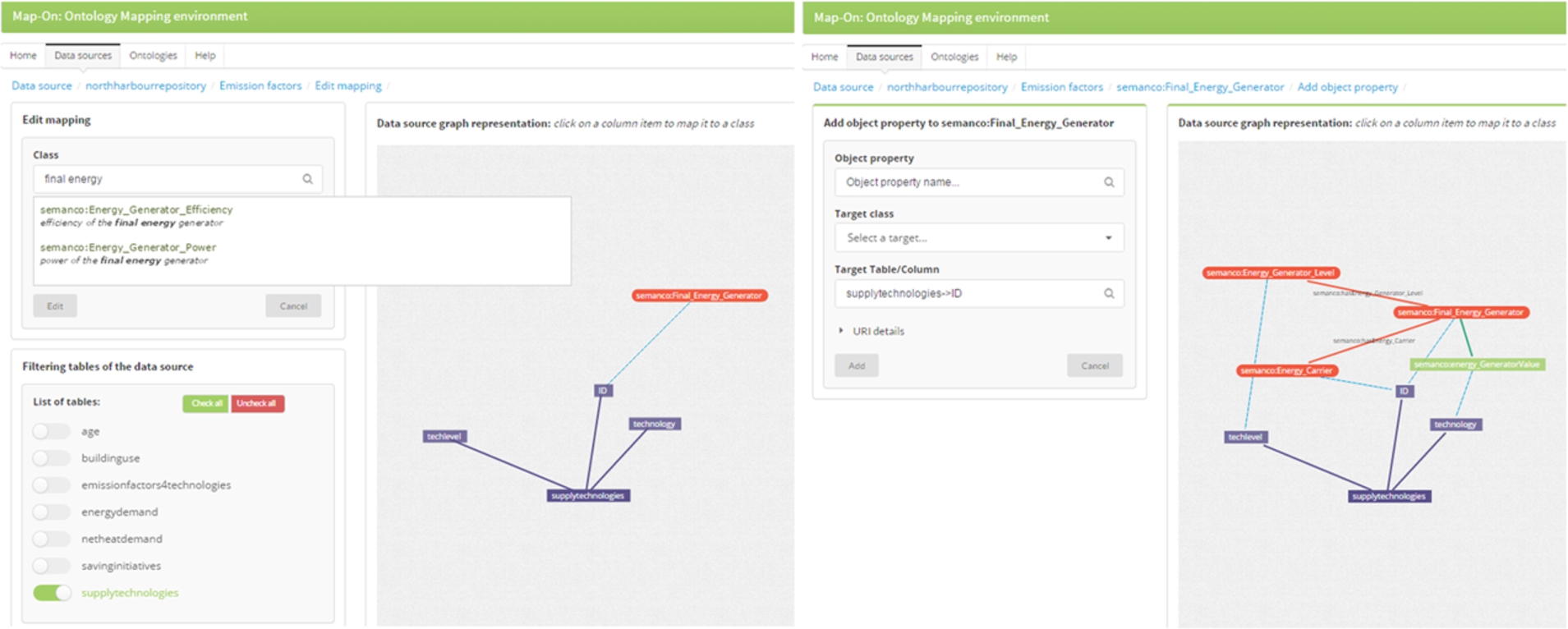
Map-On interfaces. Left: new mapping creation interface. Right: Object property creation interface.
The modules have been developed in PHP using Code Igniter,1
Users of the Map-On6
The first step of the process is to load the input database and the ontology. The ontology and their imports are stored in the same place in order to reduce the querying time. In order to load the input database, an SQL schema file has to be provided together with the base IRI to be used in the IRIs of the subject and object maps of the R2RML statements.
The second step is to define the mapping spaces. Users are free to create any number of mapping spaces, usually parts of ontology that have something in common are mapped in the same space.
The third step is to create the mappings by clicking the plus button on the top-left side of the interface (Fig. 3). In the new mapping page, the graph layout contains an empty node representing an ontology concept and the nodes characterizing the structure of the input database. The user can search for an ontology concept by typing in the input box (Fig. 5, left screen). The editor will provide a list of possible concepts based on the input given by the user. Once the user selects a concept from the list, the node in orange takes the name of the concept. After that, the user can click a node of the graph representing a column and a mapping – a blue dashed line – will connect the concept and the column nodes. The tables of the database can be filtered in order to reduce the nodes in the graph visualization by clicking the checkboxes on the bottom-left side of the interface (Fig. 5, left screen). After these actions the user has established a mapping between a concept and a column which corresponds to a subject map statement.
The next step is to further elaborate the mappings, particularly with regard to the creation of object map statements. The concepts are linked to other concepts, using roles (i.e., object properties) and related to attributes using data properties. The different interfaces are accessible through a dropdown menu which is shown when the cursor moves over the mapping list on the left-hand side of the interface. For an existing mapping, the user can create a role mapping which will correspond to an object map statement in the R2RML document. The user can search the role by typing in the input box (Fig. 5, right screen). The editor will provide a list of possible roles whose domain is the previously mapped concept and which match the input text provided by the user. Once the role is selected, the graph visualization is updated accordingly and a target concept (i.e., possible ranges of the role) can be selected from the list provided by the editor. Later, the user can click on a column node to map it to the target concept. The process of linking attributes is similar to the one described for the roles.

An excerpt of the R2RML document generated by Map-On.
Finally, when the mappings are created, the R2RML document can be visualized using a turtle syntax highlighting library (Fig. 6). Furthermore, users can write their own mappings. In addition, the R2RML document can be downloaded as a text file.
We conducted a user study with five people to identify usability issues of the tool and to demonstrate that it can be used by non-ontology experts. Participants had a similar profile, they were graduates and post-graduates, experts in data base theory who use SQL language in their professional activities. The participants did not have any notions of the Semantic Web concept and nor were they familiar with languages such as OWL, RDF, SPARQL, and R2RML. Two participants were professors of an engineering school, two participants were industry professionals, and one participant was from the research community. They took part in the test voluntarily, with no payment for their involvement.

Accuracy and completion time results of the three tasks.
The test was carried out in a Toshiba Z830 laptop (1.6 GHz, i5, 4GB RAM) with a mouse and a stopwatch. The screen and the voice of the participants were recorded. The participants were informed of this beforehand.
The test has been administered by just one person. All testing sessions were approximately fifty minutes long. The participants were given a brief introduction to the Semantic Web. The concept of ontology was explained as well as the main features of the Resource Description Format. Furthermore, a R2RML mapping was shown to users. Finally, the purpose of the Map-On tool and its main features were introduced to the participants.
A pre-test questionnaire was submitted to assess participant’s expertise on relational databases and Semantic Web technologies. After completing the tasks, the participants filled a satisfaction questionnaire aimed at measuring their subjective satisfaction with regard to the Map-on tool interface. Participants answered a five-level Likert scale. Participants were asked to use the tool while continuously thinking out loud. That is, verbalizing their thoughts as they were carrying out the tasks.
The domain of the tasks was research conferences (e.g., authors, committees, papers, abstracts…). This domain is easy to understand for the participants without teaching them basic concepts and their interrelations. Both the ontology and the database were taken from the RODI benchmark [17] and were already uploaded to the tool. The user test was composed of three tasks, each involved mapping a class of the domain ontology and an element of the database. The tasks were designed to carry out mappings which ranged from simple to complex. The tasks were to 1) relate authors, 2) relate authors with the submitted papers, and 3) relate conferences with their committees. Tasks were carried out sequentially and the participants had to confirm the task finalization by themselves without the validation of the test administrator.
The usability metrics used to evaluate the test were the effectiveness metric with the accuracy measure – percentage of tasks correctly completed – and the efficiency metric with the completion time which is the time taken to complete the tasks.
Results
Figure 7 summarizes the overall results for each usability metric obtained in the three tasks. The accuracy was obtained by calculating the sum of the participants that successfully completed the task divided by the number of participants. The completion time was calculated as the time mean in minutes that each participant took to complete the task.
The accuracy for Task 1 was 100%, for Task 2 60% and for Task 3 40%. The difference in the results was related to the complexity of the task. Task 1 involved the creation of a simple mapping while in Task 2 and Task 3 the participant had to create a complex mapping including relating different tables and columns. Additionally, the mappings to create in Task 2 were based on the mappings produced in Task 1.
The completion time for Task 1, was 5 minutes, for Task 2 was 19.1 minutes, and for Task 3 was 3.7 minutes. The difference between the completion time of Task 1 and 3 lies in the lack of knowledge of how to work with ontologies – in particular when referring to the creation of object properties to connect concepts of an ontology – and how to use the tool since they were not trained beforehand. The completion time of Task 3 was slightly below the time of Task 1 because participants have learned how to use the tool.
The average completion time for Task 2 was much higher than the other two tasks. The main reason was that participants found it difficult to create object properties because some messages and warning displayed in the user interface were not clear enough. Indeed, some participants felt confused and lost. Even so, the participants completed quicker Task 3 which also implied object property creation because they learnt how to use the tool.
The user satisfaction was measured through a post-test questionnaire based on the System Usability Scale [3] where the participants rated some subjective statements with a five-item Likert scale (from 1-completely disagree to 5-completely agree). This was done after finishing all the tasks. Results of the user satisfaction are obtained by calculating the mean of responses per answer and are summarized in Fig. 8. Ratings clearly show that Map-On is not perceived as a complex tool. Moreover, it is recognized that the tool can be learnt by most people. However, the participants neither agree nor disagree on how confident they feel using the tool. Finally, participants observed that there is no need to learn a lot of things before using the tool.

User satisfaction results.
A list of observations was detected by the administrator during the test and through an analysis of the voice transcriptions and screen recordings.
Most of the participants stressed that the process of mapping creation should be more guided than it is now. After navigating through the interface, for a while some of them felt a bit lost. This feeling was stronger in the case of a task which could be done in several ways.
The representation of the database schema in a graph basis was a bit confusing for some users since they were used to working with relational views. Two participants highlighted the need of an optional representation of relational tables such as the traditional tools. Moreover, the representation of tables and columns were very similar and therefore, brought confusion to some participants.
All participants changed the layout of the mappings by dragging the graph nodes in a natural way. However, some of them felt that some common features usually offered by drawing tools, such as multi selection of nodes, were missing.
Some participants missed a visual representation of the whole ontology where they could see how the concepts are actually related.
Minor issues related to the interface were raised during the test. Help texts in the pop-ups were not enough clear, error descriptions when the form was not properly completed, and suggestion lists were only displayed when the user typed about it and are not available if the user wishes to browse all the content.
The overall conclusion is that the Map-On editor can be used by non-ontology experts to manually generate mappings between a database and an ontology without acquiring a formal knowledge about several Semantic Web technologies such as OWL, RDF, and R2RML. Although the number of the complex tasks successfully completed were not as good as in the simple ones, the tool is easy to learn. That is, the completion times went down in the last task. Moreover these results can be improved with a previous training session where the tool is presented to the user in a detailed way. This was not done so as not to contaminate the test.
Experience on a real scenario
In order to demonstrate the usefulness and the feasibility of the Map-On editor, we outlined a real scenario in which the editor has been used to create R2RML documents.
The SEMANCO Integrated Platform7
provides access to energy related data obtained from multiple sources and domains which is generated by different users and applications. In this platform, assessment, simulation and analysis tools interact with the semantically modelled data. The information is visualized in 3D models, diagrams and tables to make it understandable to different user profiles. The platform has been developed within the FP7 SEMANCO8 project and has been tested in three case studies: Newcastle in UK, Copenhagen in Denmark, and Manresa in Spain.Each city has different data sources which comprise two kinds of data: a) data regarding building typologies which provides statistical data about their physical properties and energy performance characteristics; and b) urban data which provides contextual information of the areas at a city and a neighbourhood scale.
The platform makes the data sources and tools interoperable thanks to the semantic energy information system (SEIF) whose main component is the federated query engine ELITE [15] built on top of Quest reasoner [21]. In the core of SEIF lies a global ontology coded in OWL 2 QL,9
which is based on the DL-Lite family (we focus here especially on the variant DL-Lite A ) and has been designed for efficient reasoning and query answering tasks in the context of OBDA [21].Map-On is used in this scenario for mapping the three databases to the global ontology. The R2RML documents generated through the editor are used for accessing the contents of the database thought the SEMANCO ontology using Sesame/Quest instance [13]. Table 2 comprises the figures of the mappings generated for these databases. Specifically, a total number of 221 triples maps are generated with a total of 307 object maps. The Map-On editor is also used to update and enhance mappings during the life-cycle of the platform.
Thanks to the Map-On editor it is possible to create all of these mappings with a reduced effort since no SQL query have to be designed manually. As a matter of fact, it is the graphical visualization of the mappings that helps to understand, evaluate, and correct them.
Overview of the use case features
In this paper we presented Map-On, a graphical environment for ontology mapping which supports different kinds of users to manually establish relations between the elements of a database and a domain ontology in context of an OBDA scenario. The ontology mapping editor has five distinctive features:
Point-and-click interface for reducing the mapping activities effort.
Ontology-driven mapping approach, where the mapping process starts from the ontology instead of working with the database.
Top-down visualization, for representing the whole database schema, ontology structure, and mappings using an interactive and a joint graph layout.
Mapping spaces, where the mappings are freely grouped by the users in order to keep mappings tidy.
R2RML mappings automatically generated from the actions carried out by the users in the graphical interface.
Map-On has been validated through their application in the data integration process of the SEMANCO project. However, the tool is generic enough to be applied to other OBDA scenarios.
We plan to further develop Map-on with the following features:
Implementing methods to automatically suggest mappings using the database and the domain ontology as inputs. In a later stage, users, thanks to the ontology mapping interface, would correct and extend the proposed mappings.
Enabling the representation of complex SQL queries to be compatible with the current mapping visualization.
Integrating an existing OBDA system to evaluate the mappings generated by the editor. In this way, users can check in real-time whether the mappings are producing the RDF outputs they expect or not.
To speed up the learning curve and to reduce confusion among the users, the interface should be slightly enhanced following the wizard paradigm to guide users in the mapping creation.
Footnotes
Acknowledgements
This work has been supported by the project of SEMANCO which is being carried out with the support of the Seventh Framework Programme “ICT for Energy Systems” 2011–2014, under the grant agreement no. 287534.