



Abstract
During the COVID-19 pandemic, researchers faced challenges conducting data collection. However, emerging communication technologies, such as web-conferencing platforms, provided an alternative mode of data collection. Among these platforms, Zoom stands out for its functional affordances and unique features that support data collection methods, including screen-capturing, digital photography, drawing, polling, and artifact-based interviews, which attempt to reveal a child's viewpoint and ability. In this article, we explore the feasibility of using Zoom to conduct educational research by investigating the mathematical learning experience among 26 primary 1 and 2 students in Hong Kong on two topics—understanding time and addition and subtraction. Five mathematics teachers were recruited to participate in 2-month online workshops with assessments among three groups of students to understand the suitability for data collection. Based on teachers’ observations and students’ responses, our findings suggest that Zoom is a viable and effective tool for qualitative data collection. It offers a cost-effective method for researchers and educators to examine students’ mathematical performance in an online environment. We also investigate students’ perceptions of online assessment strategies, perceived usefulness of various Zoom functions, and explore the benefits and challenges teachers and students perceived throughout mathematical education using Zoom. However, several technical difficulties were encountered, such as the digital literacy gap and privacy concerns. Therefore, improving students’ digital literacy for remote learning and triangulation is important for online mathematical data collection and assessments.
Introduction
Advances in information and communication technologies offer new opportunities for online assessment of students’ performance and interviewing for research purposes (Archibald et al., 2019). During the pandemic, significant global homeschooling challenges forced educators to transform their teaching, learning, and assessments online (Ng et al., 2020). At the same time, researchers faced a similar challenge as they could not collect data as usual face-to-face. As a result, they started using web-conferencing software as a research tool since it removes physical boundaries and provides a convenient and cost-effective online environment for assessments and data collection, compared to in-person and focus group interviews (Braun et al., 2017). Moreover, web-conferencing software allows educators to assess students’ performance flexibly using unique features such as annotation tools, screen recording, polling, and interactions through web cameras. These features offer researchers creative data collection methods to replicate, complement, and quantify the qualitative data (Cater, 2011; Deakin & Wakefield, 2014).
In the past, mathematics researchers, like other research contexts, have utilized electronic devices and technologies to collect qualitative data via screen-capturing, touchscreen-dragging, digital photography, drawing, and conducting task-based interviews. For example, Way and Thom (2019) captured students’ dynamic drawing process created using a digital pen to highlight the affordances and limitations of the digital pen as a data collection tool for learning 3D objects and expressing mathematical thinking. Fang et al. (2023) collected videos of students’ communication and screenshots of their designs in a mobile application design environment to assess their understanding of mathematical and computational thinking. Ng and Cui (2021) used screen captures and video recordings to conduct artifact-based interviews to explore the challenges experienced by 12–14-year-old students in solving mathematical problems about sequence through block-based programming and Arduino hardware (e.g., LED display and temperature sensor). Ng (2019) examined touchscreen dragging in geometry environments by capturing the students’ linguistic communication and hand movements (e.g., gestures, dragging) with a digital camera to illustrate how students interact and scaffold their knowledge to learn area-accumulation functions.
Although limited prior literature discusses using web-conferencing tools such as Skype, Microsoft Teams, and FaceTime to collect data, many researchers have used other online communication technologies during data collection, such as annotation systems, instant messaging software, emails, and chat rooms. These digital tools have demonstrated their effectiveness for researchers in recording real-time verbal and non-verbal interaction that involves videos, audio, written text, and interviews, which can capture the lived experience of students (Archibald et al., 2019; Howlett, 2022; Qi et al., 2022). For example, Hwang et al. (2011) found that annotations play a more important role in learning achievement than homework since learners can actively and voluntarily create texts and present solutions. Escudero-Viladoms and Sancho-Vinuesa (2010) reflected that the web annotation system allows learners to add, modify, and improve the contents of a web-based platform or website. It is a collaborative tool and a medium for artistic or social criticism in online mathematics learning. Ng et al. (2022) described how creatively conducting lessons in a case study that visualized concepts and procedures through screen-sharing was important. Strategies like picturizing the question scenarios, highlighting the relationships between objects, and using simple annotations and animations to visualize the concepts were useful for students to understand mathematical ideas cognitively.
Furthermore, the collaborative whiteboard and gamified approaches mentioned in the previous sections could allow low-achieving primary students to gain support from other participants in the Zoom environment. These examples demonstrate how existing technologies offer technological affordances for mathematics educators and researchers to conduct qualitative data collection. Students were encouraged to “talk about” mathematics on the tasks throughout the learning analytics and data collection process. Students’ discourse about certain mathematical ideas was compared to validate the meanings they were communicating mathematically (Lave & Wenger, 1991).
Many educators and researchers used web-conferencing tools during the pandemic in the learning process. However, there are concerns about how feasible it is to successfully transform data collection and student assessments to an alternative online mode via Zoom. Prior researchers have discussed technical, interactive, ethical, and practical concerns associated with web-conferencing tools. For example, Deakin and Wakefield (2014) suggested that typical issues associated with using a web-conferencing tool (such as Skype) include dropping calls and pauses, poor audio and video quality, and inability to read non-verbal cues, which can lead to inconsistent and delayed connectivity. Furthermore, news reports have highlighted privacy issues, such as unknown users logging into lessons and accessing user credentials without permission. For instance, Zoom has faced a privacy and security backlash as security experts have warned that its default settings were not secure enough (O’Flaherty, 2020).
To address these concerns, Zoom has continually improved the education accounts’ security and privacy settings, providing enhanced user protection. Likely, other web-conferencing tools will also address these issues to improve their current services by offering enhanced performance and functionality, support for compatibility across operating systems, and an expanded suite of features.
Zoom as a data collection tool
Qualitative data in education is often collected throughout the learning process by examining students’ learning artifacts, behavior, and work. Many qualitative research genres or methodological approaches strive to uphold the values of naturalistic research, such as action research, case study, ethnography, evaluation research, grounded theory, narrative inquiry, phenomenology, and practitioner research (Carl & Ravitch, 2018). Researchers can observe, describe, and interpret the “lived experiences” of students’ learning and the perceptions of stakeholders (Guba & Lincoln, 1994). Working in the places (online lessons) where their students learn, researchers illustrate narrative studies on observational data, interviews, and other descriptive sources supported by web-conferencing tools (such as screen-capturing, messaging, digital photography, and drawing) to create detailed descriptions and interpretations of social phenomena (Armstrong, 2011). In this study, Zoom was selected as the web-conferencing tool investigated, and its functional affordances could reveal children’s mathematical experiences in online learning environments. The reason for choosing Zoom is that it remains more widely used and popular than other web-conferencing platforms, with over 200 million daily users and a bevy of sophisticated features (Martin, 2021).
Researchers have identified Zoom as a preferred qualitative data collection method compared to in-person interviews, telephone, and other face-to-face methods. There are advantages to using Zoom for qualitative interviewing, reflecting impersonal, technical, and logistical considerations such as rapport, cost-effectiveness, and user-friendliness (Archibald et al., 2019). First, cost-effectiveness regarding geographic and time factors gives participants flexible and distant environments to recruit participants from remote locations. Zoom can save time and travel costs, provide access to larger and more diverse populations (Deakin & Wakefield, 2014; Winiarska, 2017), and reduce unpredictable circumstances such as poor weather conditions and social distancing during the pandemic (Sedgwick & Spiers, 2009). Second, the sophisticated features of web-conferencing tools ensure flexibility and convenience, allowing students to continue their research and assessment and respond to different types of online communication:
Non-verbal feedback includes emojis and stickers (such as hand raise and thumb), facial expressions, and gestures captured by web cameras, which can contribute to a natural and lively conversation between educators and researchers. Verbal feedback allows researchers and participants to discuss and communicate using direct (such as “Tell me more about the learning experience”) and indirect feedback (such as “Do you have any questions?”) via annotation tools, breakout rooms, and chat rooms. File and screen sharing can enhance learning engagement and strengthen rapport. Shared screen and whiteboard tools allow students to use annotation tools to visualize, type, draw, and present their ideas during artifact-based interviews. Audio transcription tools can detect the audio from the person speaking, then transcribe and translate it into captions for researchers to read. The translated texts can facilitate researchers in conducting data analysis. Polling allows researchers to collect quantitative data through single and multiple-choice polling questions. Other applications that combine the power of video communications and screen-sharing (e.g., Kahoot!, Dropbox, SurveyMonkey) facilitate various learning and teaching tasks, including gamification, project management, note-taking, and surveying.
Using Zoom in mathematical educational research
Little research has explored using Zoom for data collection and research design in mathematics education. Studies have found that Zoom provides useful features for research. For example, Gegenfurtner et al. (2020) found that Zoom’s webinar features (such as polls and discussion boards) enable participant interaction and recording of sessions for analysis. Similarly, Johns and Mills (2021) found that Zoom’s screen sharing, video, chat, whiteboard, and file sharing help researchers document student behavior in online tutoring. Chessa and Solari (2021) discussed that web-conferencing systems enable remote communication between researchers and participants and support video, text, and audio content sharing during research. While these studies highlight opportunities for data collection and analysis enabled by Zoom, some researchers have pointed out the challenges and limitations of using Zoom. For example, interviews via Zoom may require more planning due to reduced contact between participants and researchers (Archibald et al., 2019; Howlett, 2022; Ruthven, 2022). There could also be technical difficulties, such as poor internet connections or the need for additional setup (Thunberg & Arnell, 2022). Moreover, there are ethical concerns regarding sharing captured videos with others. While Zoom provides data collection and analysis opportunities, researchers should be aware of the challenges and limitations. More research is needed on how to effectively and ethically utilize Zoom for research (Archibald et al., 2019).
Theoretical framework
During the pandemic, educators have developed a new way to conduct classes via an alternative online mode (Ng et al., 2020). This raises a new trend in using web conferencing tools like Zoom, Google Meet, Skype, and Microsoft Teams to engage students in synchronous face-to-face online lessons and data collection for educational research. Different web-conferencing software provides various functionalities (e.g., screen-sharing, annotation tools, breakout rooms) that can support students in developing their knowledge, functional, and other critical literacy skills. For example, entry-level features such as screen sharing and web audio can support students’ audio discussions and scrolling through presented documents (Bower, 2011). Additional features such as polls, gamification, emojis, and annotations can enable teachers to create and organize courses and enable a new virtual togetherness (Hurst, 2020). They facilitate student collaboration (Hacker et al., 2020) and help them co-construct knowledge and express themselves (Ng & Chu, 2021).
These functionalities provide digital affordances for learning/teaching, educational research, and assessment. To understand how these functions make sense to teachers and students, this study identifies a set of functions they employ during mathematics lessons. Furthermore, a survey was conducted to understand how students perceive online assessments and their perceive usefulness of using these functions. Although the functions provide various benefits of using Zoom to conduct educational research and assessments, there are prerequisites in terms of functional and critical aspects to communicate and interact effectively.
There are several models of digital literacy frameworks proposing the “functional” and “critical” aspects (e.g., Hall et al., 2014; Hinrichsen & Coombs, 2013; Polizzi, 2021). The study adopted Hinrichsen and Coombs’s (2013) digital literacy framework, developed by Freebody and Luke (1990). First, the functional aspect has remained dominant at institutional levels that emphasize technological/technical skills (particularly how to use a tool for teaching and assessment) rather than personal and social development. To raise the importance of developing other non-technical academic skills and practices, researchers suggest incorporating another perspective by including the critical aspect more associated with cultural and social perspectives when operating with digital technologies (Livingstone, 2004, 2021; Walther et al., 2010). It focuses on “how meaning is constructed, by whom, and for what purposes” (Hinrichsen & Coombs, 2013, p. 4). As such, critical competencies are related to how students represent themselves and communicate with one another. In other words, successful literacy learners should know how to manipulate the functions of digital technologies (e.g., how they work) and how to represent ideas, construct knowledge, and produce meaning with other learners in digital environments.
To illustrate how this proposal plays out in this research, we use the screen-sharing function as an example. The functional aspect suggests that students can use it as a presentation tool to demonstrate mathematical ideas and solutions with annotation tools, whiteboards, and web cameras. When students present their ideas and solutions, they must use technical skills (e.g., screen-sharing, setting up web cameras, annotation tools) and demonstrate their related mathematics knowledge. However, this is not enough to make student presentations meaningful. The critical aspect further suggests that students need to learn to express themselves mathematically, for example, through drawing and writing with annotation tools to construct meaningful conversations and interactions.
By doing this, other non-technical competencies such as communication, collaboration, and self-expression become critical for students to successfully solve and present mathematics problems. These abilities require students to have more than a technological understanding of using different functions. Students can socialize with their classmates, represent mathematical concepts using functions provided by Zoom, and complete their learning tasks through collaboration and communication. Screen-sharing is a typical example provided by Zoom. Still, other tools, such as chat rooms and annotation tools, align with the same concept (i.e., functional and critical aspects).
This study’s functional and critical aspects play important roles in understanding how researchers conduct qualitative research and assessment using Zoom in mathematical educational research. The functional aspect emphasizes teachers’ and students’ technological skills in using various functions in Zoom for teaching and assessment. On the other hand, the critical aspect is more associated with social perspectives (e.g., representation, communication, collaboration) that focus on producing mathematical meanings, by whom, and for what purposes. In other words, teachers not only need to obtain these functional and critical competencies so that they do not merely know how to use these functions technically, but they can also make sense of these functions to develop representational and communicational strategies for designing meaningful research interventions and learning experiences. When making sense of these functions, other critical aspects like communicating mathematically are also important. Therefore, the third research question further proposes the need for functional and critical literacy skills that help teachers and students conduct meaningful interactions and communication for online learning, assessments, and educational research. Figure 1 describes the relationships among the three research questions.
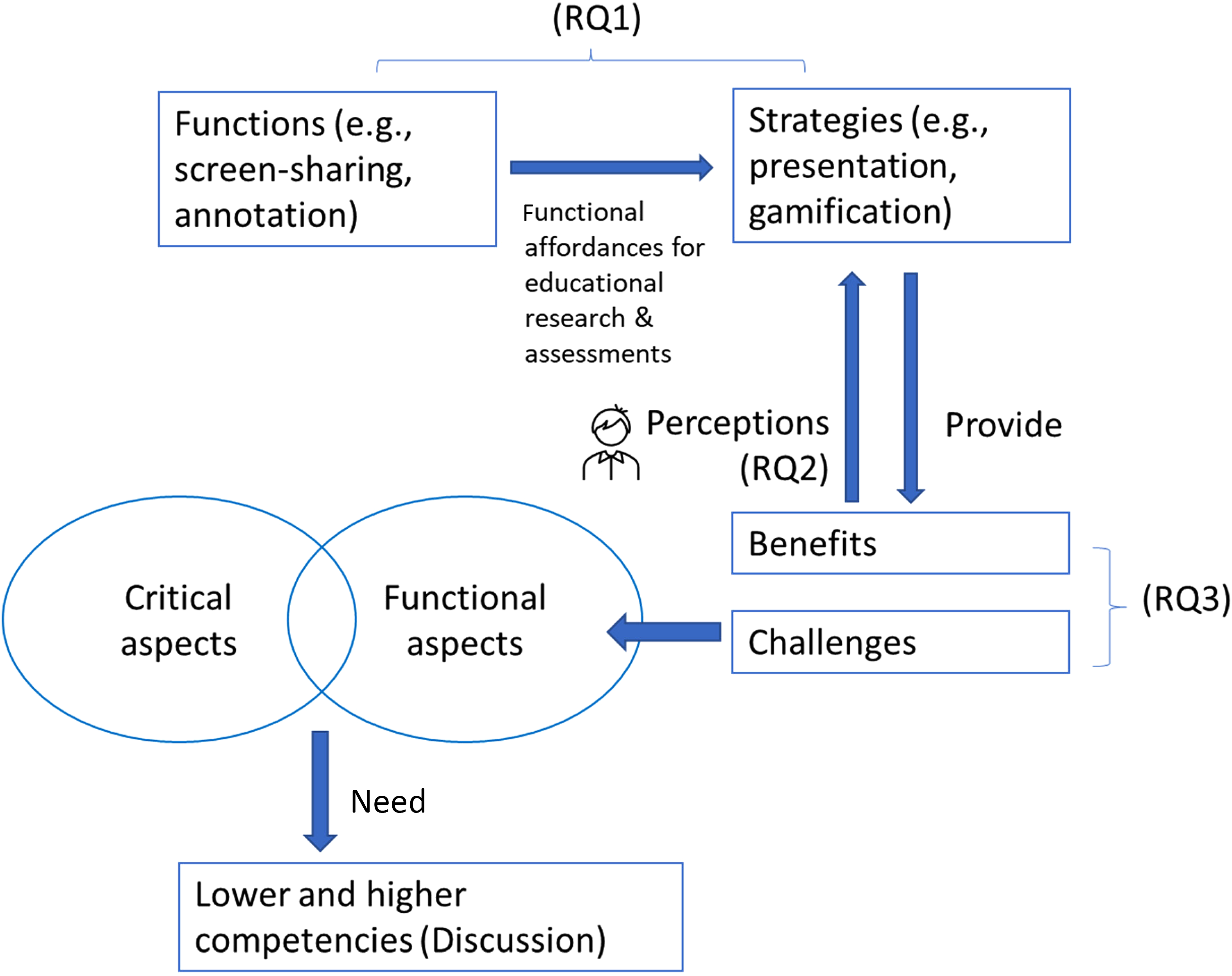
A theoretical framework for this study.
Based on this framework, this article examined how researchers and students engage in qualitative research using Zoom as an example. This study assessed the digital affordances of Zoom for educational research and examined students’ activities across two mathematics topics (i.e., understanding time and mathematical operations). This study proposed the idea of functional and critical digital competencies that help qualitative researchers and educators design future educational research and intervention. This research examined the possibilities of using Zoom as a qualitative method and was guided by three major research questions (RQs):
What Zoom functions have been used to assess students’ performance and investigate students’ mathematical activities? How do students perceive these strategies throughout their online mathematical assessments using Zoom? What benefits and challenges do teachers and students perceive throughout the online mathematical assessment using Zoom?
Participants
To investigate how researchers and educators assess young children's mathematical activity via mixed research methods, this study recruited five primary mathematics school teachers and 26 primary 1 and 2 students from an elementary school in Hong Kong. Three are student teachers, and two are experienced teachers who worked in the elementary school. Each teacher designed the five-session online workshops with mathematical assessments for three groups of students (Group 1: eight students; Group 2: nine students; Group 3: nine students). Following Guba and Lincoln (1994), this study used naturalistic inquiry to observe, describe and interpret the “lived experiences” of the three institutes and the perceptions of stakeholders. Naturalistic inquiry is a qualitative research method developed in anthropological and ethnographic fields (Guba & Lincoln, 1994). Teaching in Zoom, where students have their online lessons, naturalistic researchers illustrate narrative case studies on observational data, interviews, and other sources of descriptive (e.g., presentations, screen-captures, forum dialogues) to create detailed descriptions and interpretations of social phenomena (Armstrong, 2011). Instead of “manipulating outcomes as a priori” (Bowen, 2008), this study focused on the lived experience, innate feelings, and actions of the students in a real natural setting which was assembled with the empirical data to explore different ways to assess students’ mathematical abilities.
The authors and five teacher-researchers were responsible for conducting the task-based interview. Twenty-six student participants were also invited to participate in focus-group interviews via Zoom. All conversations were video recorded after receiving parental and the school's consent. We complement similar studies on data collection via web-conferencing tools but take an exploratory approach to shed light on how to examine students’ mathematical abilities in the Zoom environment. Case studies are suitable for investigating complex changes over time, such as identifying suitable strategies to collect qualitative and mixed data, and examining the perceptions of students and teachers throughout the online assessment. Qualitative data was gathered based on interviews from the 26 students and five teacher participants conducting their mathematics assessment in a primary school in Hong Kong from May to August 2020 over 2-month online lessons. To enhance learning efficiency, students were separated into three groups. Three teachers (Chen, Siu, Chou) were responsible for giving lessons in the groups. Throughout the study, Tam helped provide technical support to the teachers and address the interview questions regarding the use of Zoom from an administrative perspective, such as attendance records and administrative panel settings. Meanwhile, the panel teacher Lee works as the teacher researcher with our research team and spent much time observing the lessons to provide us with valuable feedback and comments during the interviews.
In two groups, teachers taught addition and subtraction between two three-digit numbers; in a group, teachers taught students the concept of time. Lessons were recorded to allow teachers to reflect on themselves throughout the online assessments and data collection processes. At the end of the week, the five teachers were invited to review their online lessons and arrangement. The students participated in a survey at the end of the program and weekly artifact-based interviews. Table 1 demonstrates the demographic information of the teacher participants.
Characteristics of the participants.
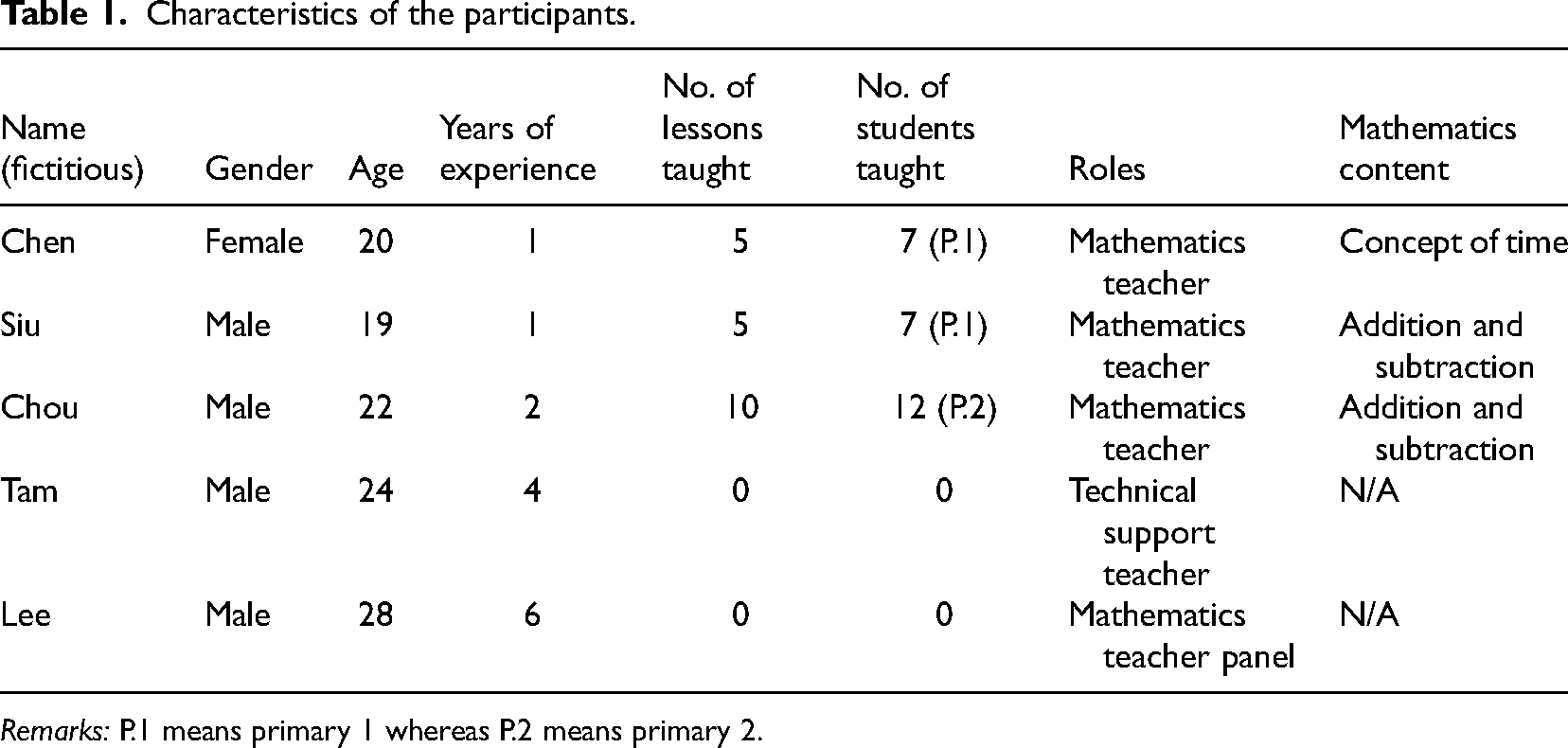
Characteristics of the participants.
Remarks: P.1 means primary 1 whereas P.2 means primary 2.
To answer RQ1, this research used qualitative methods such as interviews and classroom observation. The researcher and five teachers set a lesson observation tool and interview guidelines. The purpose of the study and data collection was explained to teachers with informed verbal consent and a guarantee of anonymity. Semi-structured interviews were then adopted to obtain in-depth perspectives about the three research questions, proposing the functional and critical dimensions. A thematic analysis was conducted to analyze the interview data and generate potential themes based on the study objectives (Braun et al., 2017). During the thematic analysis, NVivo software was used to facilitate the transcription, coding, and organization of qualitative data. The second author tested the inter-rater reliability of the thematic analysis. Cohen's kappa, which assessed inter-rater agreement, was found to be 0.85, indicating good reliability. Appendix 1 demonstrates some examples of the interview and lesson observation protocol. Further, the qualitative evidence also helps RQ3 explain the benefits and challenges that researchers and students perceive and propose the roles of functional and critical literacy for teaching and assessment. Moreover, students were asked about the perceived usefulness of Zoom functions used in a lesson. Quantitative data were analyzed using SPSS descriptive statistics functions to identify the number of students who believe Zoom functions are important based on survey responses. In the survey, the following question was asked: “Which of the following functions are useful to you in mathematics lessons?”
To answer RQ2, a 9-item student evaluation questionnaire was administered after the lessons to understand how students perceive their online learning experience via Zoom. All of the items in the questionnaire are 5-point Likert scales. Here are some sample questions: “I am confident of getting good grades after the lessons,” “I think the class activities can sustain my learning interest”. The survey is adapted from a motivational questionnaire to explore students’ confidence, interest, and motivation to sustain online learning (Ng, 2022).
Results
In the following sections, we reported findings on various methods to collect both quantitative and qualitative data for mathematics education research. Quantitative data were collected through the perceived usefulness of various functions of Zoom and the student evaluation questionnaire. The qualitative data analysis consisting of screen captures, student interaction, and dialogues identified how researchers could assess students’ mathematical understanding and thinking flow using the web-conferencing software Zoom.
Functions to assess students’ performance (RQ1)
This section demonstrated different strategies to collect data to assess students’ learning performance through online mathematics activities. Through online assessments, teachers and researchers need to monitor student work which connects to formative assessment, select examples for students to present, and connect students’ responses to the mathematical purpose of the experience (Sullivan et al., 2020). All teachers and students in this research use the functions provided by Zoom. Table 2 presents the functions of Zoom in an order based on their perceived usefulness to students in the student survey.
Functions of Zoom.
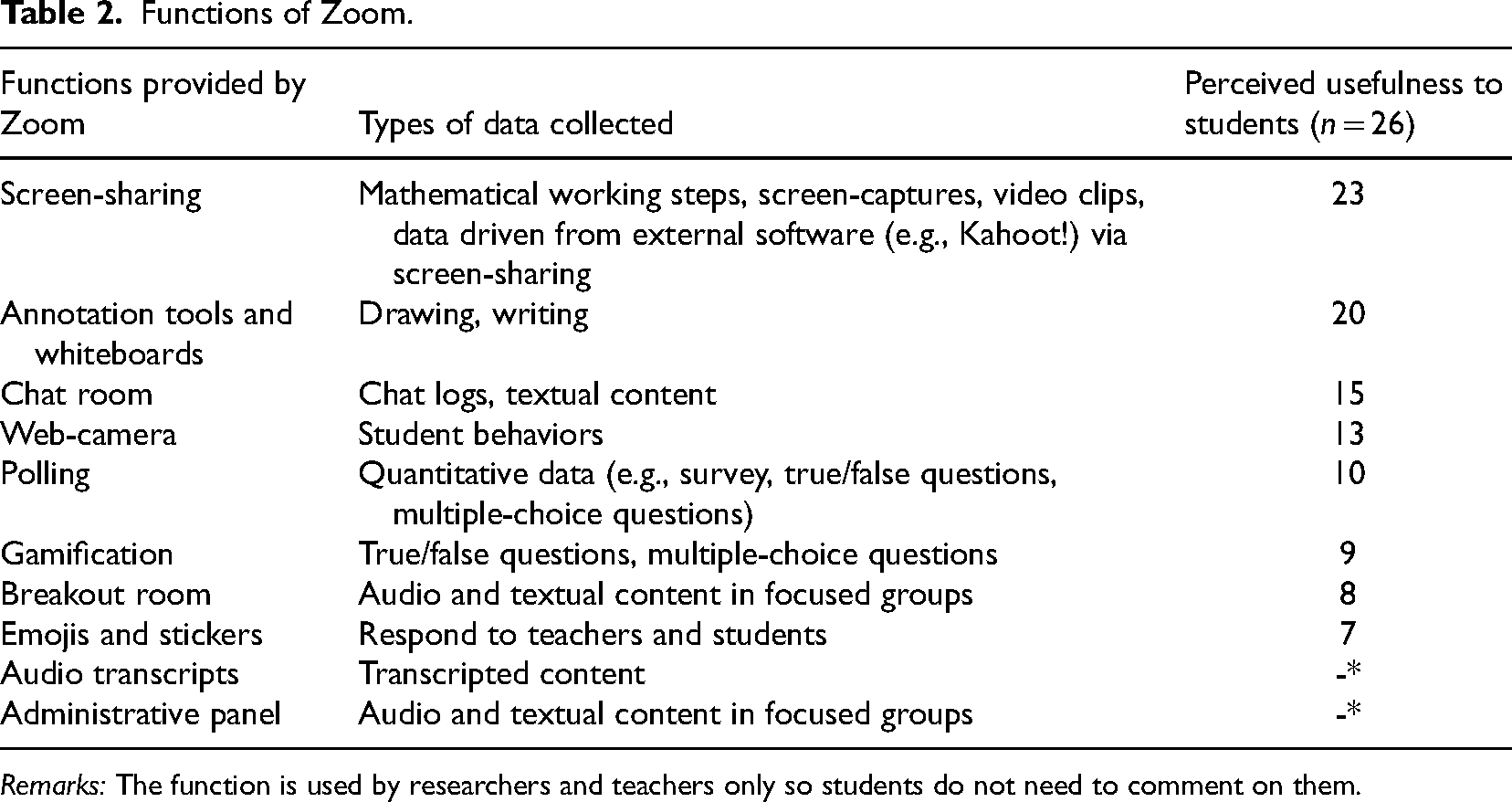
Functions of Zoom.
Remarks: The function is used by researchers and teachers only so students do not need to comment on them.
The study identified that students perceived screen-sharing (n = 23) and annotation tools/whiteboards (n = 20) as the most useful Zoom functions. Chat room (n = 15), and web-camera (n = 13) were also important to students for demonstrating their working solutions to others. To enhance students’ mathematical abilities, teachers designed gamified true/false and multiple-choice questions (n = 10) and polling questions (n = 9). However, breakout room (n = 8), and emojis and stickers (n = 7) were not perceived as very important for mathematics learning (n = 7). The reason is that breakout rooms require teachers to assign students to groups and roles, which may lead to technical challenges and consume lesson time (Saltz & Heckman, 2020). Although students can interact with each other in a friendly way using emojis and stickers, students believed that expressing emotions and feelings during mathematics lessons is not common. Additionally, some functions, such as administrative panels and audio transcripts, were only operated by teachers, so the survey did not ask students about their usefulness.
In classroom settings, students were invited to present their mathematical steps and thinking flows on the blackboard for educators to assess their mathematical abilities, reasoning, and proof. Since face-to-face presentations became impossible during the pandemic, the digital affordances offered by screen sharing could provide students with an environment to express and present their work in front of screens and cameras. In this way, capturing image and video data in the web-conferencing software allowed researchers to record students’ behavior, experience, and interaction, especially using mobile phones with built-in cameras, computers with voice recorders, and peripheral devices with web cameras. Data were collected and analyzed during ethnographic observations of educational researchers in which students employed web-conferencing and mobile technology to express, present, learn, and interact with other participants.
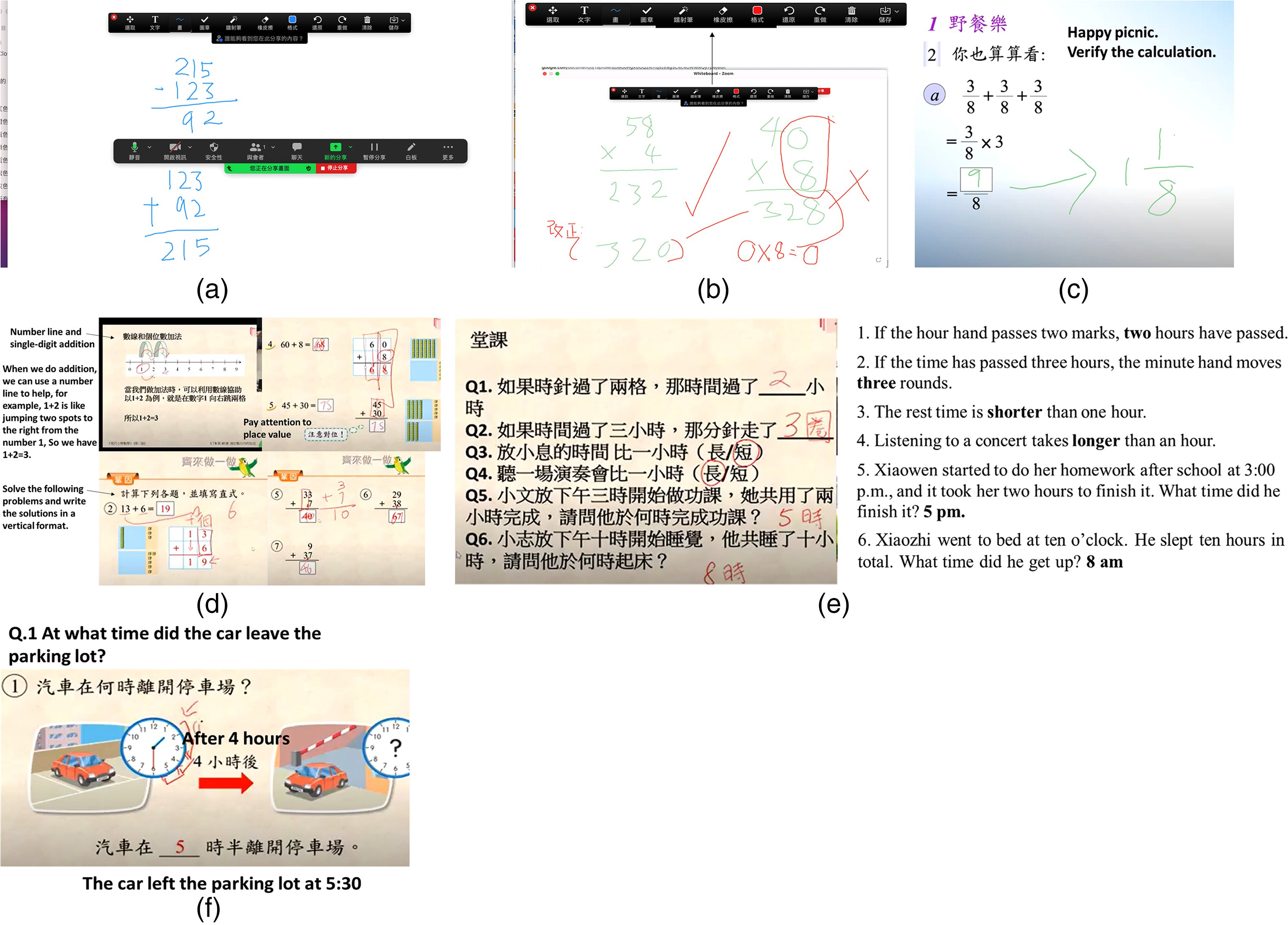
Figure 2(a) demonstrates how students explained which mathematical expression was correct to subtract between two three-digit numbers. A teacher asked students, “Which of the following mathematical representations is/are correct?” A student replied, “The upper two representations of subtraction between two numbers are incorrect since a hundred digits 2 of 222 should align with a hundred digits 2 of 216. Similarly, the unit digit 2 and unit digit 6 should align with each other too.”
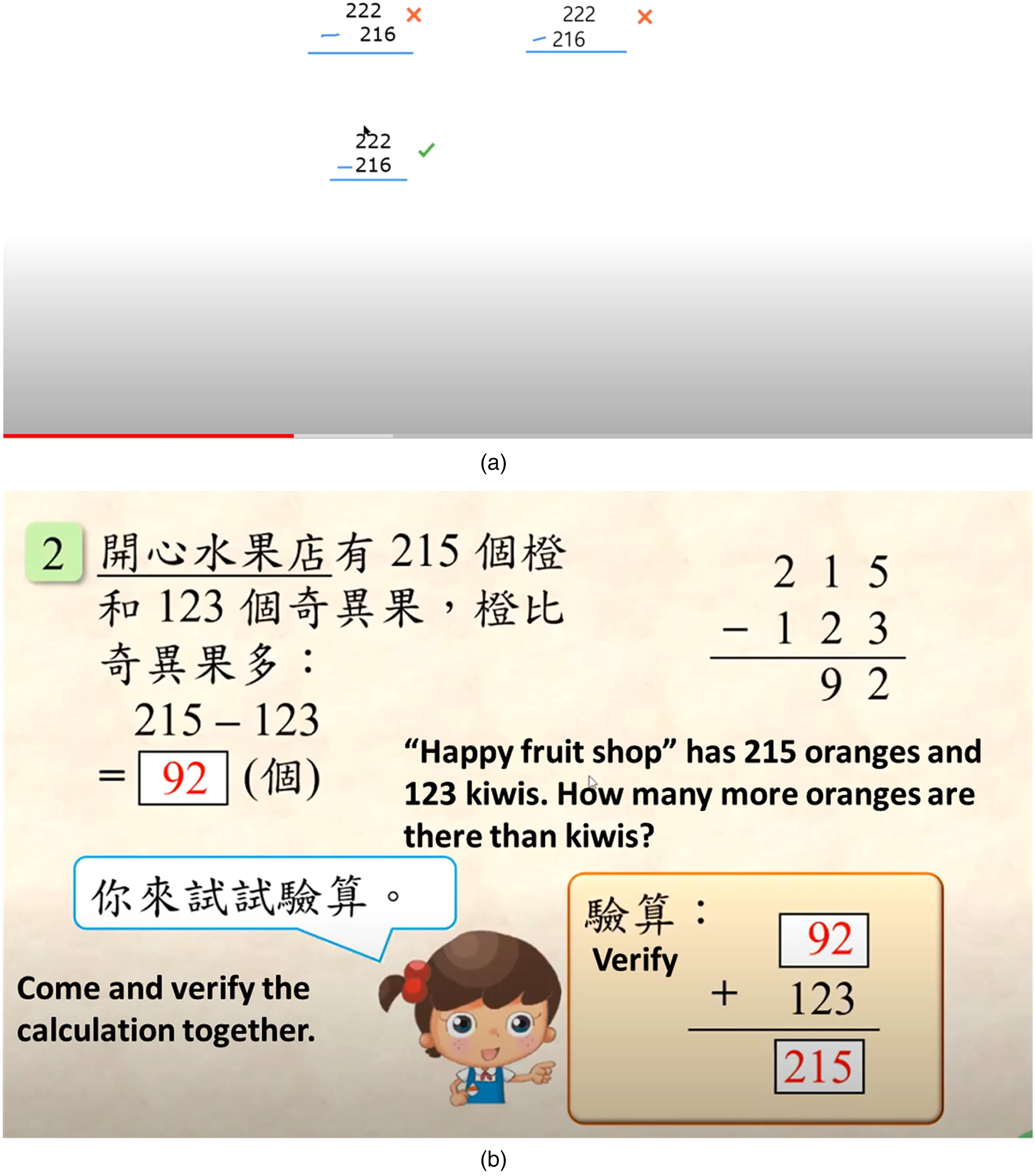
(a) Subtract two three-digit numbers. (b) Explain a question via screen-sharing.
Figure 2(b) displays how the students expressed their solutions to solve questions with screen-sharing support. A student tried to explain how to conclude the final results and check their solutions.
Teacher: Anyone knows how to calculate this question? “A fruit shop has 215 oranges and 123 kiwi fruits. How many more oranges are there than kiwis? What numbers should I put in the three boxes?”
Student B: There are more oranges than kiwis. We have 215 oranges and 123 kiwis. Since 215 is greater than 123, we need to calculate “215 – 123”. In the vertical expression, we can subtract a smaller number from a larger number [as shown on the screen]. After that, we can add 92 to 123 to check whether I can still get 215. So, the boxes should be 92, 92, and 215.
Teacher: Great! It's correct.
(a) Explain a question on a whiteboard using annotation tools. (b) Whiteboard to demonstrate students’ work. (c) Screenshot of how students demonstrate their work through annotation tools. (d) Screenshots of how students demonstrate addition. (e) Answer questions using annotation tools. (f) Demonstrate how to count the hours on the clock using annotation tools.
It is observed that primary students could present their ideas and knowledge learned during the lessons provided that they could apply different functions of annotation tools (e.g., drawing, choosing colors, inserting texts and stamps, using laser pens, erasing) as shown in Figure 3(b). An example of multiplying two numbers in a horizontal presentation (58 × 4 and 40 × 8) was demonstrated. One student used a green pen to present their operations, while another used a red pen to mark the corrections and point out the problems involved. The researchers and educators could save the screen with annotations for future analysis.
The following example shows how students use annotation and a number line on the screen to illustrate “1 + 2” (see Figure 3(d)). A student said, “Say I’m at position 1, and I would like to add two. I will be in position 3.” Another student used annotation and horizontal representation to add two numbers. He said: “In question 2, 13 plus 6 equals 19 (units and tens). We add the numbers in the unit positions up to the tens. In question 4, the addition of 60 and 8 becomes 68….” A student answered another question: “In question 5, we need to add 3 to 7 first since both numbers are in the unit position. One is brought to the tens unit, and we have 3 plus 1, which is 4.” This example shows that Zoom provides screen and file-sharing functions for students to strengthen interpersonal communication mathematically. In this way, students viewed their PowerPoint slides in real-time and presented their solutions using annotation tools.
Below is another example showing the discussions about using annotation tools to write down the answer for classwork. Some students’ responses (translated into English) regarding “understanding time” are shown in Figure 3(e).
Figure 3(f) displays how students count the number of hours on the clock using annotation tools. “The hour hand passes four grids after four hours. The car will leave at 5:30 pm.” Students drew arrows to indicate how the hour hand moved on the clock.
As a result, it is observed that annotation tools allow students to present their ideas in screen-shared documents and whiteboards to express, communicate and collaborate in front of their screens. Through student presentations and answering questions, educational researchers could investigate how students scaffold their understanding of a certain topic. Furthermore, other features in Zoom, such as chat rooms and emojis, could facilitate students to present mathematical ideas through non-verbal communication.
The chat room allowed participants to type messages publicly and privately. Students could ask questions via the chat room if they faced difficulties understanding the instructional materials for research and learning purposes. Students could also answer questions from the teacher and even chat with other students using the private text function. At the same time, teachers could release some class announcements publicly to remind students of their learning objectives and important deadlines for assignments. Teachers could provide individual feedback privately to students and answer their questions. A student said, “The chat room allows me to type words here. I’m shy about expressing myself and doing presentations. It's good for me to type and communicate with teachers and peers.” A teacher said, “It's convenient that I can provide individual and instant feedback with a particular student without disturbing others. Since it may be embarrassing for students to raise their hand and ask questions aloud, in this setting, we can solve their problems individually and privately.”
Some students may not be willing to express themselves verbally in front of the camera due to a lack of confidence. They could type their mathematical expressions in the chat room during the lesson. However, students could only horizontally express their solutions (see Figure 4) due to the functional limitation of the chat room. In this way, teachers needed to ask follow-up questions to check his understanding.
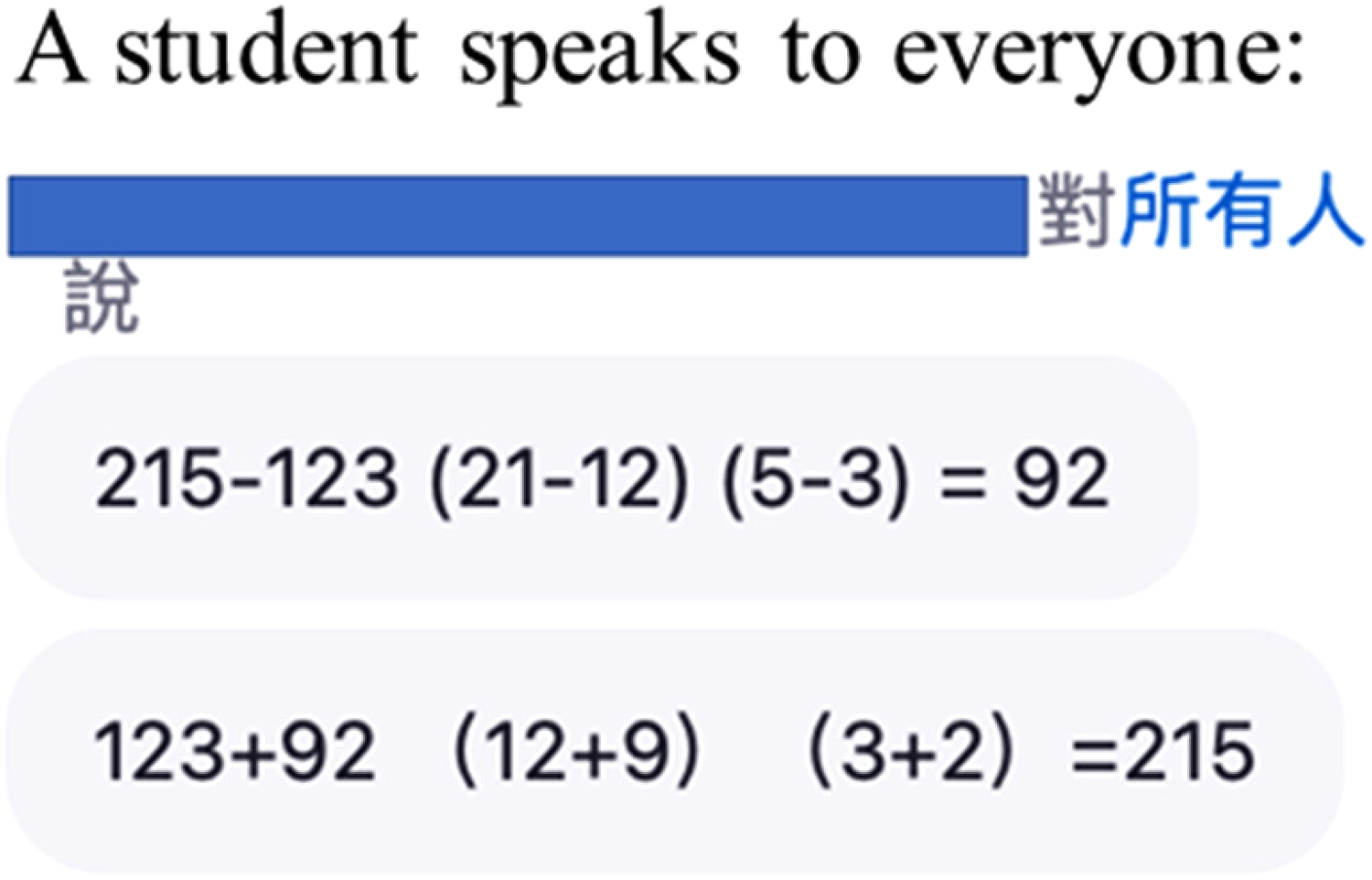
Textual responses in the chat room.
One challenge of using Zoom to collect qualitative data was that researchers could not see the facial expressions, behaviors, and body language during their learning and presentation process. The web camera in Zoom could allow researchers to see part of the students’ gestures, facial expressions, and eye contact with the instructors and other participants via the web camera. This could effectively stimulate face-to-face interaction for students’ easier adaptation to online learning. Teachers could better understand student learning behavior through the web camera and recording functions to provide timely learning support and feedback. For example, from the teachers’ observations, students could write in their textbooks, look at the screen, and show their work in front of the screen. However, some students and their parents complained that leaving the webcam uncovered had privacy concerns. During the online assessment, a student expressed concern about using a web camera at home: “It is like placing a surveillance camera into my home. The teachers seem to be looking at me and my bedroom.” A teacher shared a limitation of using web cameras to observe student behaviors such as showing a workbook, writing, looking at the screen, and thinking, “It's not easy to see what the students are doing in front of the cameras, and some of them don’t want to turn it on. This way, we need to find alternative ways such as annotation tools, presentation, and texting in the chat room to ensure they actively participate in the interventions and lessons.”
Polling
The polling function in Zoom allowed students to answer the true/false, polling, and multiple-choice questions. After the assessments, teachers could design questionnaires, receive students’ responses and download the polling report to analyze students’ performance further. Although this function did not require students to present their mathematical thinking processes, it allowed students to participate in ability tests and surveys for mixed research. The quantitative data collected in polling could triangulate the qualitative results obtained from drawing and writing in whiteboards, chat rooms, and screen-sharing. A teacher claimed that polling could support qualitative research, “I can design some questions using the polling function and view students’ results there with a bar chart after their response. It provides a formative assessment method to check students’ understanding.”
Gamification
Prior studies have demonstrated the use of gamification to motivate participants to engage in learning and data collection, increasing the enjoyability of tasks (Qiao et al., 2023). With the power of video communication, students could participate in research-question-specific games and cognitive tasks, which allow students to interact and collaborate with others in a distant mode. In this study, Kahoot! (a game-based learning platform) was used to review students’ mathematical knowledge with formative assessments. Teachers could create multiple-choice and true/false questions to motivate students to complete gamified quizzes. A teacher shared his comments after using Kahoot! to collect data: “Kahoot! is a popular game among primary students in Hong Kong. We can assess students’ mathematical understanding interestingly. Traditional assessments may be boring to some students. This gamified platform could motivate students to participate in formative assessment,” Figure 5 describes how students are assessed in Kahoot! to examine their mathematical abilities in addition and understanding time. Gamified approaches like Kahoot! and quiz games effectively motivated and engaged students in Mathematics learning. Students might feel bored completing the drilling exercises alone, but now they can interact with other participants to have fun during the lesson through the e-quizzes.
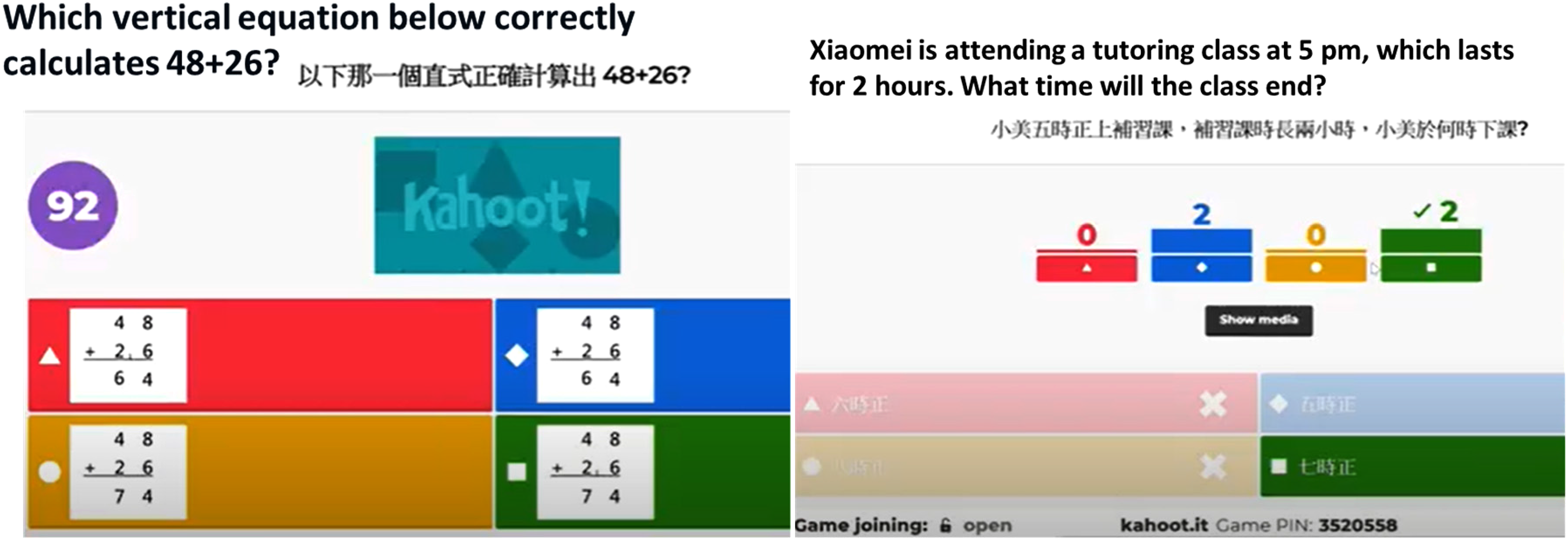
Students participate in Kahoot! to test their mathematical understanding.
The breakout room allowed students to conduct online semi-focused group interviews and discussions for data collection. In the breakout rooms, students could discuss, co-construct knowledge, and exchange ideas, while the teachers could circulate in and out of the rooms to facilitate students’ discussions online. Researchers could also join the breakout rooms to collect data and ensure that students follow the interventions and instructions. A teacher suggested why the breakout rooms could favor us conducting group interviews: “Breakout rooms can allow us to conduct focus-group interviews to pull out specifically targeted students to discuss some particular questions.”
Emojis and stickers
Students could use reaction emojis such as raising hands, thumb, claps, giving hearts, and celebrating to express themselves and show responses to other participants (see Figure 6). A student told us they could use emojis when they are unwilling to express themselves in front of the cameras. “I can clap virtually and give applause to classmates. I’m shy to talk, but this function allows me to respond and appreciate their work. Sometimes, we cannot tell others whether I’m happy or attentive in textual communication. Emojis can help.” Another student agreed, “It's funny to see others’ emojis. For example, a student wants to have a drink. He shows us a coffee emoji which shows that he's having a drink (during the interview).” Prior studies have discussed using emojis to develop visual communication to share ideas and information, which facilitates people to clarify messages with feelings in educational communication and feedback (e.g., Ng & Chu, 2021). Another study by Veytia-Bucheli et al. (2020) claimed that emojis could provide reactions when reading a textual message, soften critical messages, and make people seem more friendly, favoring the development of a virtual learning environment. Lambton-Howard et al. (2020) supported this, who claimed the value of emojis and stickers could facilitate conversation flow.
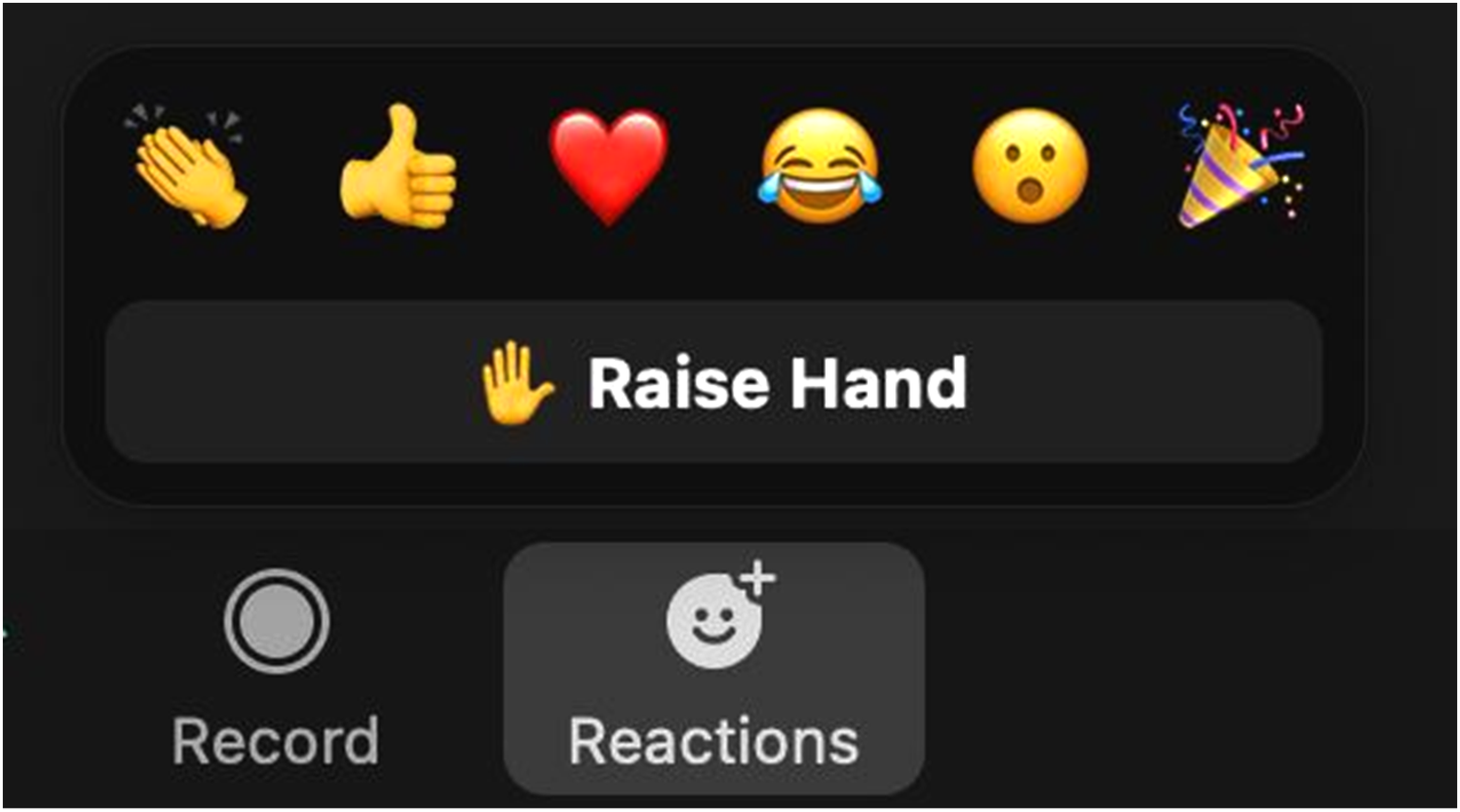
Emojis and stickers in Zoom.
The audio transcript feature in Zoom allowed researchers to automatically generate a searchable text transcript of the audio and make this transcript available in Zoom's video player to analyze student conversations further. However, it was found that students could not pronounce English correctly, and the transcripts could not be created properly. We could see that students know how to use audio transcript features in Zoom, but due to language problems, they could not produce correct transcripts. In turn, this language issue affected their communication and mathematical presentation. As suggested by a student, one challenge to using transcript features was language and communication problems: “I’m a kid. I can’t speak English well, but Zoom did not support Cantonese. So, if I am asked to speak in English, the words can’t be transcripted into meaningful sentences.” However, this feature could complement researchers’ written observations with an audio transcript, greatly reducing their note-taking and administration job (Calamlam, 2023). The transcribed data could facilitate researchers for future qualitative coding and analysis after data collection. Overall, audio transcripts provided insight into the qualitative process and logistics of recording data, saving researchers time to collect and analyze data (Ranney et al., 2015).
Administrative panel
In the administrative panel, several quantitative data could be collected, such as the duration of attending the lessons, the number of participants joining the Zoom room, and who assesses the Zoom link (see Figure 7). These data could triangulate the qualitative data supporting the research results and findings. A teacher suggested using the attendance record driven in the panel as meaningful research data, “We can check whether the students attend the lessons on time or drop out in the middle of the lessons. The attendance record helps us understand their learning behaviors.” This aligned with prior studies that web-based learning platforms enable researchers to analyze students’ learning patterns and efficiently organize web-based content. Similarly, the Zoom administrative system provides user-friendly features through visualized services in log files to show the hostname, IP address, log name, and time to attend the online lessons. The collected data could allow researchers to discover the learning patterns of students’ web usage after analyzing log file data (Romero & Ventura, 2007). The extraction of back-end data from the administrative panel has been proven particularly useful and applied to various educational tasks in various e-learning platforms (Romero et al., 2008).
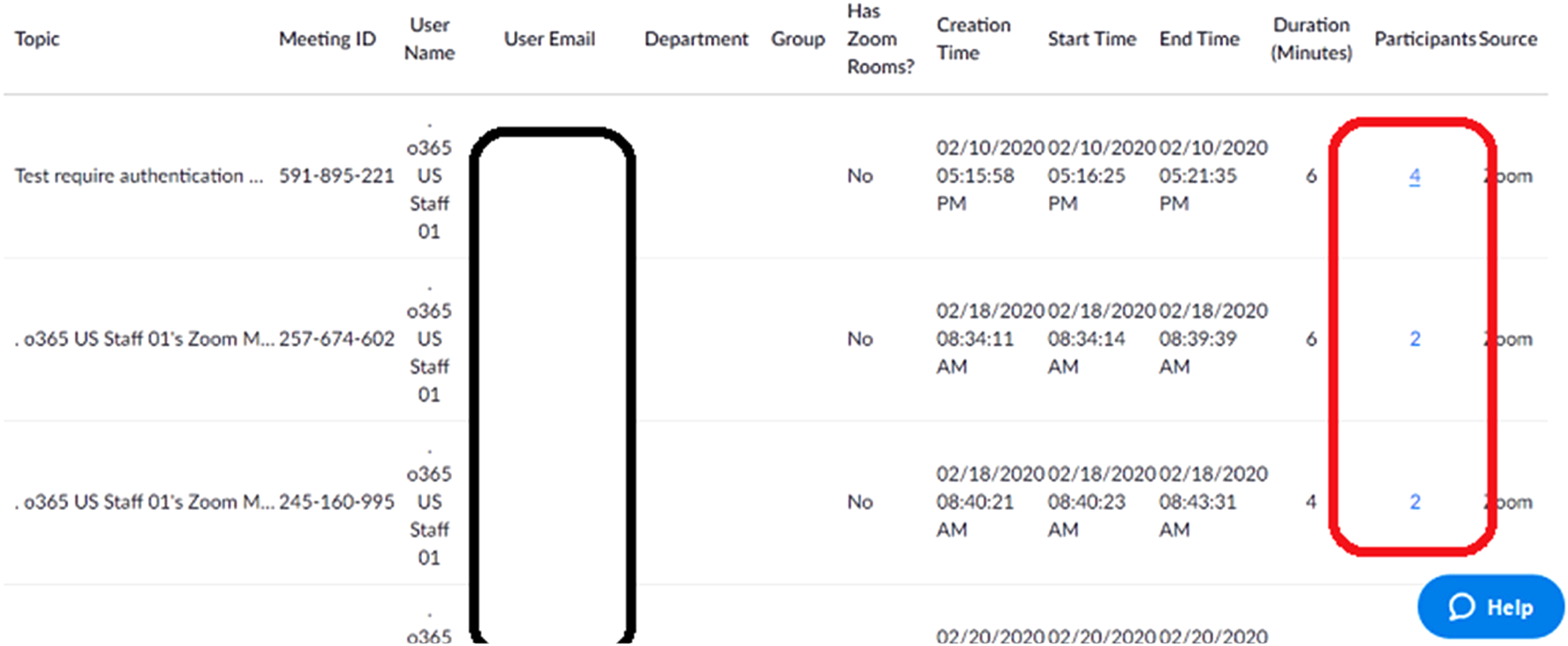
Screenshot of the administrative panel (e.g., number of participants in a group).
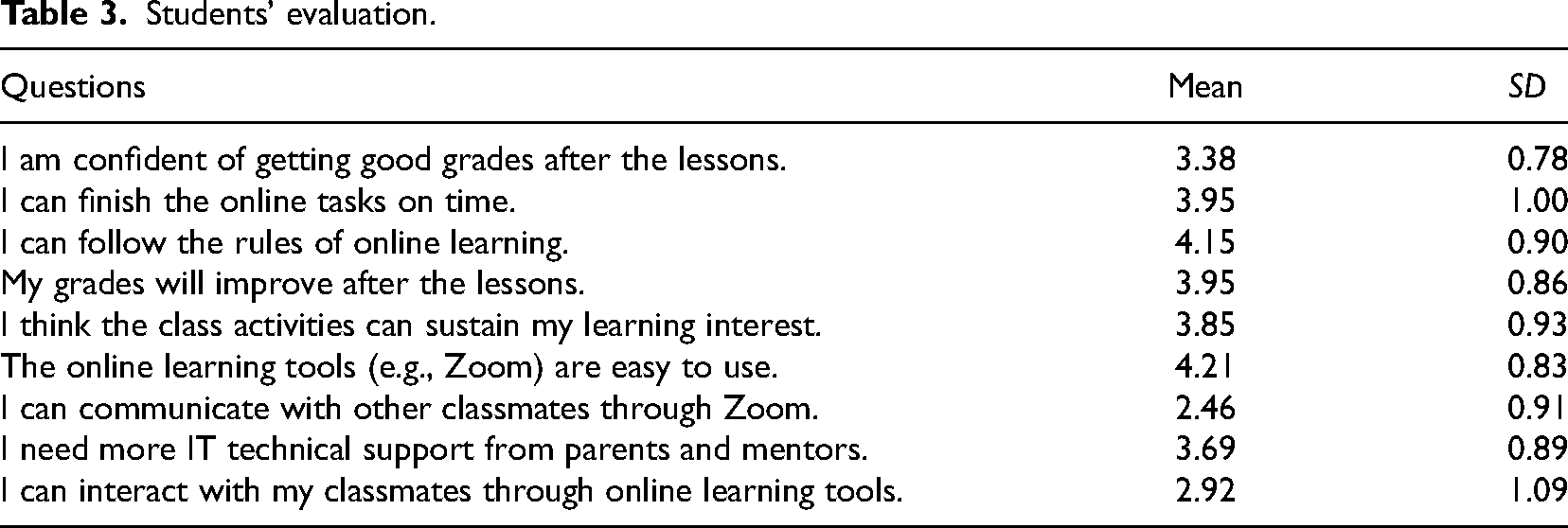
To evaluate the strategies used throughout the lessons, Table 3 displays the descriptive results to understand students’ perceptions of the online learning environment. Most of the questions showed positive student feedback, with a mean (M, average value of student response in an item) greater than 3.00 indicating that the strategies could enhance students’ perceived academic performance. For example, students believed that they could get a good grade after the lessons (M = 3.38; SD = 0.78), finish the online tasks on time (M = 3.95; SD = 1.00), and improve their grades (M = 3.95; SD = 0.86). The strategies used in the lessons can sustain students’ learning (M = 3.85; SD = 0.93).
Students’ evaluation.
Students’ evaluation.
Regarding the functions and operations, students believed Zoom is an easy-to-use tool (M = 4.21; SD = 0.83). However, they claimed that they found it difficult to communicate with other classmates with Zoom (M = 2.46; SD = 0.91) and interact with other classmates (M = 2.92; SD = 1.09). Possible reasons were that teachers might over-control the functions of Zoom and students had difficulty using the functions. After the lessons, we asked teachers and students why students graded the interaction and communication less. A student claimed, “The teacher always mutes us. We can just discuss and interact with each other in breakout rooms. It's uncomfortable to raise questions directly and textually in front of the class in this new platform.” Another student told us, “I sometimes multitask during the lesson. So, I can’t interact and communicate well with other classmates.” We asked the student whether he played mobile games or social media. He did not deny it and nodded. A teacher commented, “I usually mute all students to prevent classroom management issues. Students may not want to ask questions in front of others. They feel shy and nervous when asking some naive questions.” This is proposed in other studies that web-conferencing software can be a one-way communication when the host and teachers mute other participants (Clay, 2012), and technical challenges may affect web-conferencing sessions (Ukoha, 2022).
To understand the benefits and challenges of using Zoom throughout the online assessment, we interviewed five teachers and 26 student participants using Zoom after their lessons. Consistent with previous research into communication technologies (e.g., Archibald et al., 2019; Deakin & Wakefield, 2014), we found the benefits of using Zoom for data collection and assessments: the tool provided functional affordances with unique features. These sophisticated features could support data collection methods such as screen-capturing, digital photography, drawing, polling, and artifact-based interview which attempted to reveal a child's viewpoint. Although researchers identified Zoom as a preferred data collection method, the challenges of using the platform could be explained by the lack of digital literacy in functional and critical aspects.
Benefits
Zoom provides functional affordances with unique and sophisticated features to support data collection methods, reveal a child's viewpoint, and conduct learning analytics and assessments. It brought a new approach for researchers to examine their participants and collect data conveniently. Participants found Zoom useful in communicating with the researchers compared to nonvisual communication mediums such as telephone and emails. Researchers observed that participants could build interpersonal relationships with their teachers via non-verbal cues such as facial expressions and gestures. These are important for researchers to facilitate engagement, build trust and promote natural and relaxed conversations between teachers and students (Archibald et al., 2019). In addition, researchers could see student participants interacting using body language lively in front of their cameras. A student said, “ The Zoom functions are easy to use and convenient. It helps connect (teachers and students) together via the online communication tool.” Web-conferencing tools allowed students to connect researchers and participants geographically. Moreover, the tools could save travel costs for researchers and students and hardware set-up costs for data collection, such as whiteboard and web cameras, since students already have access to these devices when they have online lessons during the pandemic. Researchers reflected that the new way of data collection maximizes their research effort and reduces time and money resources for their research.
Second, the key benefits of Zoom compared with other web communication tools were that researchers and participants identified that Zoom provides ease of connection and intuitive functionality (Archibald et al., 2019). It is observed that all students can participate in online assessments smoothly. A student attributed this to the ease of use of the Zoom functions: “I don’t need to spend time figuring out how to use different functions in Zoom. The design is user-friendly.” A teacher also found the Zoom design convenient: “As a researcher, I need to observe and record students’ behavior. The features in Zoom provide me with recording, breakout room, and drawing, which can collect and analyze students’ abilities.” Zoom provides a community of practice for learning and research purposes that are no longer confined to physical participation but can be extended to digital settings (Howlett, 2022). We can see that Zoom has a number of features that enhance its potential appeal to qualitative and mixed-methods researchers across subject disciplines (Archibald et al., 2019; Ng et al., 2023).
Challenges
Critical digital literacy is more than technological understanding or computer skills. Still, it involves a range of reflective, ethical, and social perspectives on online activities, which could hinder data collection throughout the online assessments. Critical aspects should be considered to facilitate students to gain a list of socio-technical abilities: communicating, demonstrating, and presenting in front of the camera; expressing, drawing, and writing using annotation tools; collaborating and discussing in forums and breakout rooms, screen-sharing to complete some online tasks, and expressing using emojis and stickers. Students needed to obtain both language skills and mathematical knowledge to demonstrate their calculation and thinking flows via these functions and features. When students were unfamiliar with using the Zoom functions to demonstrate working steps to do mathematics questions, they needed help being assessed efficiently. In this case, researchers might think that the children did not understand the mathematical concept merely because they didn’t know how to express mathematical thinking using these digital tools. In terms of critical digital competency, furthermore, when students had language and communication problems mathematically, the qualitative data collection could not be conducted smoothly.
To avoid this issue, triangulation becomes an important process by which a teacher collects evidence about student learning abilities from different sources: conversations, observations, and products (Chari, 2020). With multiple methods or data sources in qualitative research, triangulation becomes possible to develop a comprehensive understanding of phenomena and objectively assess students’ performance (Patton, 1999). For example, due to Zoom's functional limitations, the students typed some numbers and brackets (products) to demonstrate arithmetic operations in the chat room. Teachers and researchers should not conclude that this student did not know how to express steps correctly and deduct their marks. Instead, teachers and researchers needed to verbally ask students again (conversations) or use other tools such as drawing using annotation tools, screen-sharing, and showing their work in front of web cameras (observations) to triangulate students’ understanding.
A proposal of conceptualizing functional and critical competencies
Research question one suggests a set of examples that lead to the affordances and limitations of Zoom or web-conferencing as a teaching and research tool. Research question two further evaluates how students perceive Zoom’s strategies and functions. Research question three suggests that Zoom provides a set of functional affordances and benefits students’ learning that has the potential to map and refine the existing framework of functional and critical digital competencies.
Based on the discussion, this study conceptualizes students’ challenges in functional and critical dimensions. First, students may have difficulty using these technical tools and functionalities. Second, even when they know how to use functionalities, they need to collaborate, communicate and create with others using the tool. This is consistent with the Ng et al. (2021)'s proposal of artificial intelligence (AI) literacy for online learning that digital competencies could be understood as a set of lower and higher cognitive skills according to Bloom's Taxonomy. When students adopt AI online learning tools, students can learn how to use AI and have a basic understanding of AI. To reach higher cognition skills, students must learn to communicate and collaborate with their classmates, think critically and appropriately use the tools, and create solutions via an AI learning environment. Likewise, when students use online tools, they should understand how it works and their basic principles. Most importantly, they need to further equip themselves with critical thinking skills, collaboration, communication, and creativity to reach a higher level of cognition.
This article proposes a revised framework by extending the proposal of the functional and critical digital competencies with regard to digital upskilling. The framework suggests that the two digital competencies could be understood from lower to higher cognition skills. Regarding the lower cognition skills, students should learn functional competency (e.g., recording audio, discussing in chat rooms, drawing using annotation tools). On top of it, it moves towards a more critical dimension that recognizes other high-order, non-technical, and complex competencies (e.g., communication, collaboration, creativity) that students need to learn to manipulate online learning technologies (Redecker, 2017; Ng et al., 2022). To view digital competencies from a broader perspective, teachers should not consider digital competency as a functional and technological aspect but as an avenue for developing other non-technical skill sets such as communication, collaboration, multidisciplinary skills, and critical thinking skills. Also, it offers a revised model for teachers to develop online assessments and learning programs to foster their students’ digital learning competencies from lower to higher cognition levels. Hopefully, the examples and discussion in this research could inform online (mathematics) educators of the necessary digital competencies to support their instruction and assessment in the post-pandemic world. Figure 8 illustrates a revised model of functional and critical competencies.
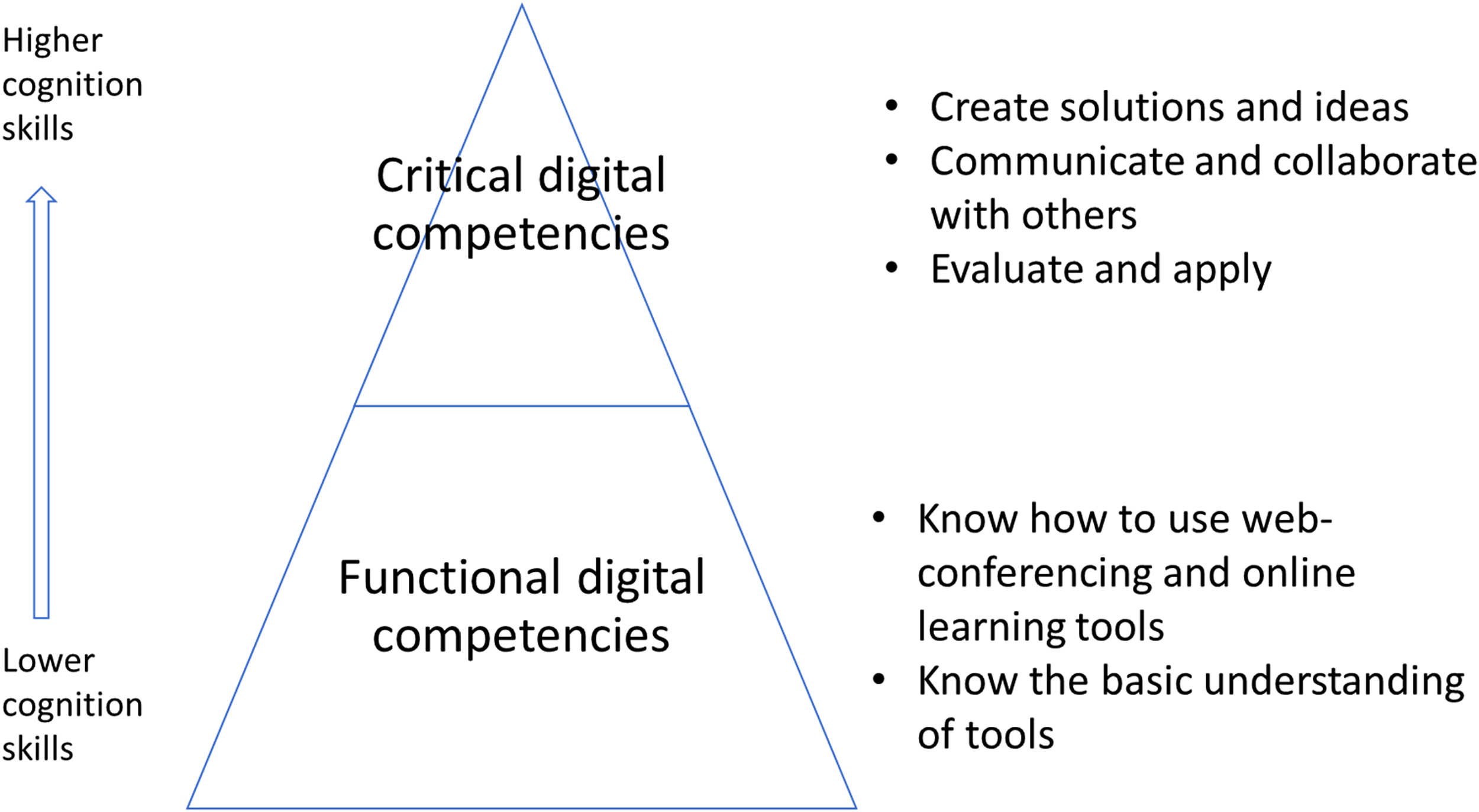
A revised model of functional and critical competencies.
Many educational researchers faced challenges during the pandemic in mathematical assessments and data collection. They shifted to using web-conferencing tools to continue their intervention and data collection. Among these, Zoom provides functional affordances with sophisticated features to support their research through screen-capturing, digital photography, drawing, polling, and artifact-based interview, which attempts to reveal children's mathematical experiences. However, students may find technical difficulties; some need help communicating and collaborating using these tools to reveal their viewpoints in online learning environments.
This article presented some examples and cases of online mathematics assessments that hope to offer future researchers and educators practical recommendations for learning analytics and data collection for teaching and research purposes. Zoom offers a cost-effective method to examine students’ mathematics performance through naturalistic inquiry to observe, describe and interpret the “lived experiences” of students’ mathematical learning. Since the children are too young, even though Zoom could provide functional affordances successfully, data collection relies much on respondents’ functional and critical digital literacy. Students who lack critical literacy (e.g., how to communicate mathematically in a Zoom environment) could not fully transform and express their understandings into the screen-based platform. As such, on the one hand, triangulation becomes an important process by which teachers and researchers collect adequate evidence about student learning abilities from conversations, observations, and learning artifacts in the Zoom environment. On the other hand, students must equip themselves with a whole set of functional and critical digital competencies to learn how to use, apply, communicate, collaborate, and create using web-conferencing software and other tools. This study extends the existing functional and critical digital competencies to an alternative view of lower and higher cognitive skills.
Some limitations of this study are acknowledged. The limitation derives from the qualitative nature of this case study in an authentic learning setting since there are no quantitative results to triangulate students’ learning outcomes. Moreover, an exploratory approach was applied to understand and triangulate how students perceive such a new qualitative data collection approach in the Zoom environment. Second, a variety of web conferencing tools offer different capacities to offer varied functionalities for the participants while preserving data quality. Future research must examine how different web conferencing technologies can be successfully leveraged to complement and augment existing qualitative methods. These web conferencing technologies are likely to make important contributions to the conduct of qualitative research in the future.
Footnotes
Contributorship
The first author designed and facilitated this research, analyzed the data and wrote the first draft of the manuscript. The second author revised and proofread the manuscript. All authors read and approved the final manuscript.
Declaration of Conflicting Interests
The author(s) declared no potential conflicts of interest with respect to the research, authorship, and/or publication of this article.
Funding
The author(s) received no financial support for the research, authorship, and/or publication of this article.

Author biographies
Appendix. Examples of lesson observation and interview protocol.
Interview protocol for teachers:
What strategies do you use to engage students during Zoom sessions? How do you encourage student learning (e.g., knowledge acquisition, presentation, collaboration) during Zoom sessions? What tools or features in Zoom do you find most useful for teaching/learning? How do you assess student learning during Zoom sessions? How do you provide feedback to students during Zoom sessions? How do you handle technical difficulties during Zoom sessions? How do you display your knowledge during Zoom sessions? How do you process feedback from your teacher during Zoom sessions? How do you manage technical difficulties during Zoom sessions? How do you communicate with classmates during Zoom sessions? Can you describe a moment when you faced a challenge during a Zoom session?
Interview protocol for students:
Lesson observation protocol:
Observe your lessons and evaluate the overall learning/teaching performance.
Are you utilizing Zoom features effectively (e.g., screen sharing, breakout rooms, chat function)? Are you able to manage technical difficulties effectively? Can you successfully engage with students for their learning with Zoom features? Are you using appropriate assessment strategies for the online environment with Zoom features? Can students collaborate with each other effectively during Zoom sessions?