




Abstract
After some years of use in academic and research settings, functional languages are starting to enter the mainstream as an alternative to more conventional programming languages. This article explores one way to use Haskell, a functional programming language, in the development of control programs for laboratory automation systems. We give code for an example system, discuss some programming concepts that we need for this example, and demonstrate how the use of functional programming allows us to express and verify properties of the resulting code.
Keywords
Introduction
There are many different types of software applications in the field of laboratory automation. There are stand-alone applications for controlling a simple instrument such as a bulk-reagent dispenser. There are also larger software packages for controlling automated robotic systems with many instruments that are linked to data management systems. 1 These software packages are typically referred to as schedulers.
Currently, popular languages for laboratory automation applications include Java, C, C++, and C#. In our experience, the majority of such applications have been developed using these languages, along with other .NET variants such as Visual Basic.NET. 2
These languages are commonly known as procedural or imperative languages. They describe the commands to use in a sequential manner, to achieve the intended functionality. They change state, such as the value of variables, along the way, and the values of these variables can dictate the flow of execution. Although languages such as Java and C++ use different syntax, the general principles of constructing code remain the same.
An imperative approach is the most common way to develop an application. However, different programming styles can be adopted, one of these being the functional approach. Functional languages, such as O’Caml and Haskell, are not as well known as C or C#, especially among programmers from a non–computer science background. However, since Microsoft released Visual Studio 2010 with the inclusion of F# and the increased adoption of Scala, there has been an increasing awareness of functional languages among commercial application developers. Origi-nally a research project at Microsoft that based itself on O’Caml, F# has developed into a functional language that interacts with the Microsoft .NET library. 3 Indeed, anyone who has used the .NET Framework 3.5 is quite likely to be familiar with some functional language concepts without realizing it. For example, the design of LINQ queries within the .NET Framework was based on the use of anonymous functions within Haskell.
The remainder of this article provides a complete and executable program that implements a scheduler for laboratory automation. Along the way, we gently introduce the Haskell programming language and point out the properties that are declared in the code. We start by defining types, move on to define auxiliary functions, build up the scheduler, and finish with a section on automated testing of properties of interest.
The Scheduling Problem
Scheduling is an important component of a laboratory automation software package.4,5 The benefit of using laboratory automation is that multiple plates within an experiment or assay can be processed automatically. To improve efficiency, the schedule must allow multiple plates to run at the same time so the execution is interleaved, which then maximizes throughput.
One simple approach is to use an event-driven scheduling system. This works by assessing the state of the system on a continual cycle. After each event, the scheduler, or processing engine, determines a course of action for the system to run as quickly as possible without breaking constraints such as incubation times and the maximum number of plates allowed on each device. For example, if a plate is due out of an incubator, this task is given priority over adding a new plate into the system. The advantage of an event-driven system is that the assay can follow different processing paths based on events, such as acquired data or the failure of an instrument in the system.
However, with an event-driven scheduler, there is the possibility of encountering scheduling deadlocks. A simple example of a deadlock is the following:
Plate 1, sitting on instrument A, needs to move to instrument B and
Plate 2, sitting on instrument B, wants to move to instrument A.
It is not possible for either plate to move on to the next step within its respective workflow, so there is deadlock. Deadlock situations can involve more plates and instruments, but the basic problem is the same: it is not possible to unblock key resources to allow the workflow for each plate to be processed.
In the remainder of this article, we illustrate the use of functional programming as a style of programming that can help in defining control software for laboratory automation. This will bring out many of the distinctive aspects of functional programming as we develop the code. To make this illustration, we use a particular hardware setup that can be found in many laboratories. The system has an input stack, an output stack, and some number of washers and dispensers, as shown in Figure 1 .
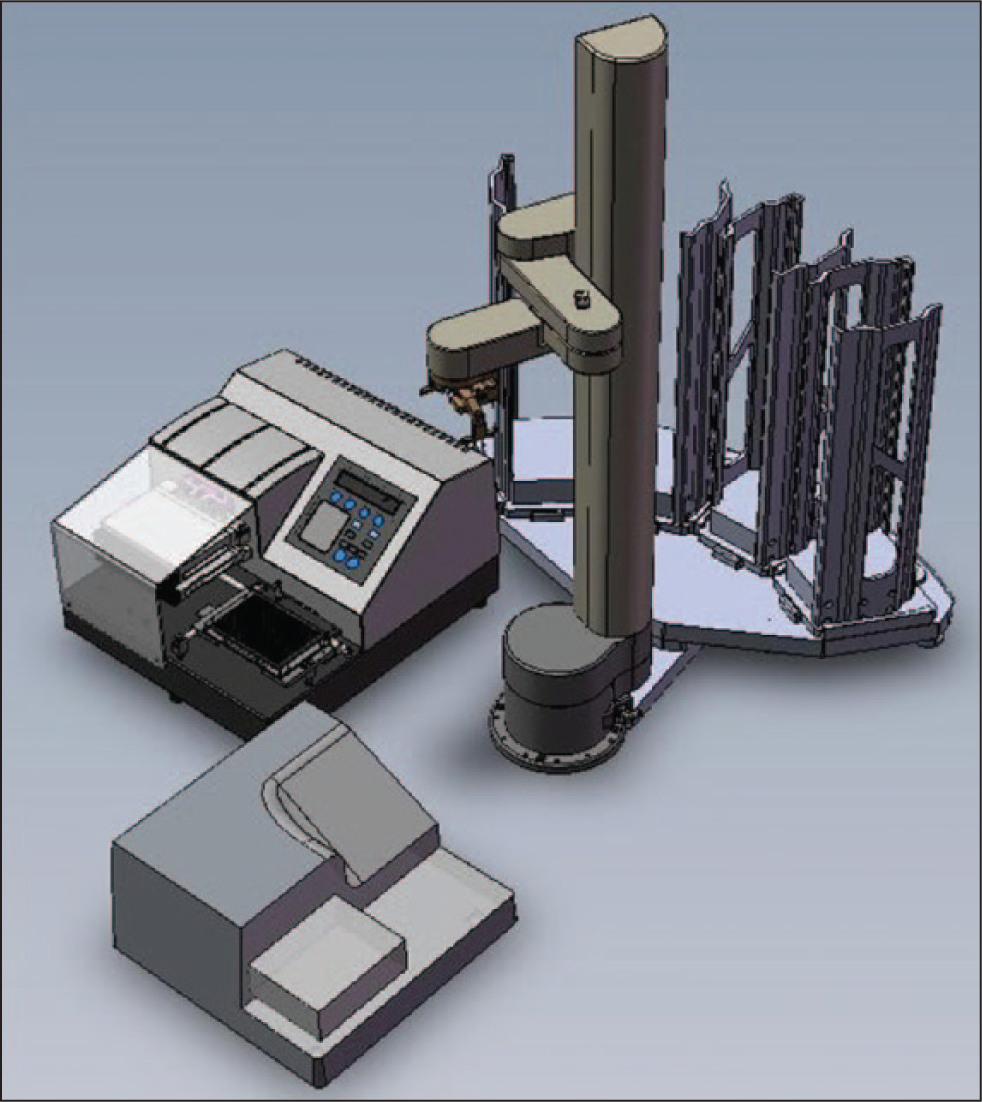
An example system with input stack, output stack, robot arm, washer, and dispenser. This is the simplest type of automated platform whereby more than one plate will be active on the system at the same time. With this platform, an optimal schedule will have the washer and the dispenser occupied simultaneously.
Here are some of the properties we want our laboratory scheduler to have:
each plate has a workflow;
each device, including the robot, requires a specified period to do its job;
each plate progresses through its workflow in a timely manner; and
the whole system is deadlock free.
Using a functional programming language allows us to write in a style that can express and verify such properties rather than just write code. Properties 1 and 2 can be expressed in types for plates and devices, statically checked by a compiler. Properties 3 and 4 can be expressed in property functions and checked by property-based testing tools such as QuickCheck 6 or SmallCheck. 7
By formulating properties in this way, developers can capture general rules about the required behavior of a system, not just specific cases and fragments represented by unit tests. Computing power is harnessed to search the space of possible test inputs automatically, looking for cases in which one of the specified properties fails. The technique is also known as “lightweight verification” since it is the next best thing to a rigorous mathematical verification that all the formulated properties hold in all cases.
Method and Results
Devices and Workflows
First we must choose how to represent the kinds of devices found in a laboratory, such as washer and dispenser. This choice is reflected in the definition of our first data type.
One can think of a type as a description of a set of possible values, or equivalently a type is a property that any value may or may not have. Our first type is

Informally, the vertical bar can be read “or”: so a value of type
The deriving clause gives us two properties of the
With the

Here

One simple but useful function on lists is

Function applications are frequent in functional programs so the notation needs to be light. In Haskell, we just write a function name and then each of the input arguments in turn. No extra symbols such as brackets or commas are needed. The brackets in
We shall often make use of the infix colon operator for constructing nonempty lists. The list
We need some representation of time. For example, we must represent the time needed for processing by each device and for transfer of plates between devices. For the purposes of this article, a time value is simply an integer representing a number of “ticks.” Whether ticks are milliseconds, seconds, or something else need not concern us.

There may be more than one device in the laboratory of the same kind (for example, we may have two washers). So we also define a further type whose values represent specific devices. A specific

The above definition describes the fields of a
Rather than deriving an automated default for the printing of Device values (which would render them as, for example, “Device Washer 6 3 2”), we define our own custom instance, omitting the constructor name

When we come to define scheduling, the workflow just specifies a

Functions are values too, and they have types. The types declare properties about the function, which can be statically checked by the compiler before the program is run. The first line describes the type of this function. The arrows can be read as logical implications. If the first argument is a value of type
Note that the infix “==” is a function that tests values for equality, not to be confused with the single = symbol used to define a function. We can also choose to use infix notation when applying named functions: for example, we can write
Plates and Locations
We are working toward a representation of the complete state of the laboratory. So far we have a representation for devices but not for the plates that are processed by these devices or for the robot arm that moves plates between them.
Our next step is to introduce a type to represent the possible locations of plates in the laboratory. A plate’s location is either at a device or in transit (by means of the robotic arm) between two devices. Rather than a long-winded constructor name such as

Example
Now we can define the data type for
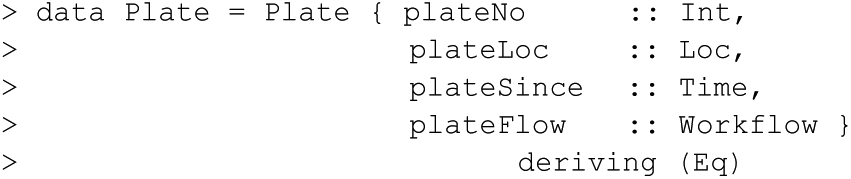
The
When we show a plate as a string, it is usually more convenient to omit the details of the remaining workflow for the plate.

Two simple “helper” functions extract information from a
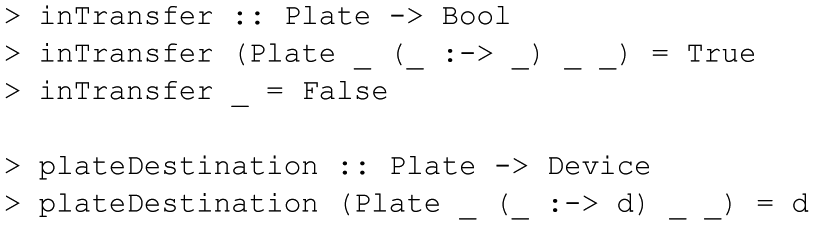
Notice that we don’t have to give names to every component in the
With representation types in hand for devices, time, and plates, we can complete the data model for the state of the laboratory automation system with the following data type declaration and associated Show instance.
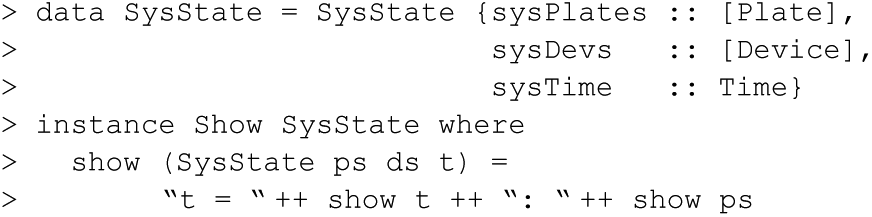
The time in each
Events and Scheduling Definition
We shall model the laboratory process as an event-driven system. By now it should be no surprise that we want to introduce a new data type, this time to model the four kinds of event that can occur.

A
Now we can define the type of a Scheduler for the laboratory as follows:

Auxiliary Functions
We shall work toward the definition of an appropriate function of this type. To prepare the way, we shall first define some auxiliary functions to compute information that any scheduler could be expected to need. We shall then define an example scheduler. Importantly, we can define and compare many different schedulers. One property they must all share is the
First a scheduler must be able to determine whether a device is currently free.

The first equation reflects our assumption that an
The expression
Since the robot arm has a special status and is not modeled in the same way as other devices, a scheduler also needs a function to check for the availability of the robot arm.

This definition reflects a few assumptions. There is always exactly one robot arm. Unlike other devices that are affected by
Scheduling Functions
Having defined auxiliary functions to test whether devices are ready to participate in moves, we next consider the readiness of plates. The following function checks whether a plate is ready to be moved from its current location.

A plate being processed by a device is ready if enough time has elapsed for the device to complete its process. A plate being moved by a robot arm is ready if enough time has elapsed for the required movements to and from the central safe position.
An
The first stage of this transition reflects the unavoidable consequences of the event: time advances, a new plate is added, a device goes down, or a device comes up (the
The second stage of the transition is then determined by the choices of a specific scheduler.
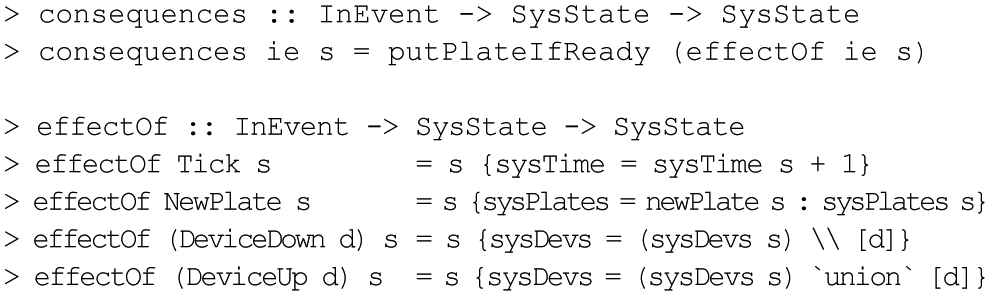
The infix functions \\ and ’

The pattern (
The
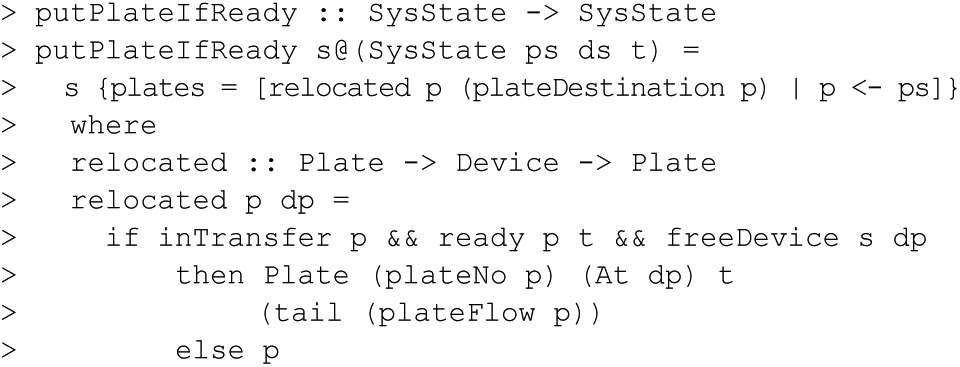
The
The expression
The second stage of the transition involves a choice. If there are plates ready to be moved on from one device to another, a scheduler must choose a source device, a ready plate at that device, and an appropriate destination for it. The following function lists all the possible options from which to choose.
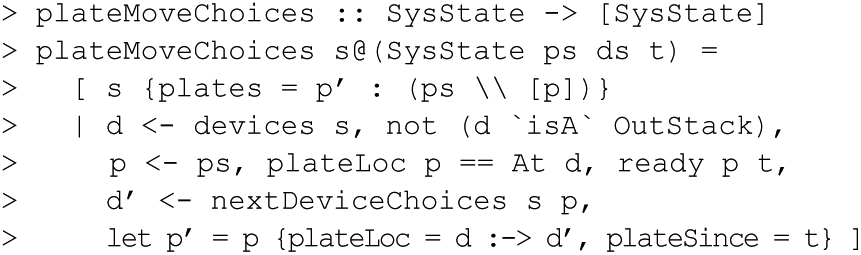
The
The primed variable names
The function
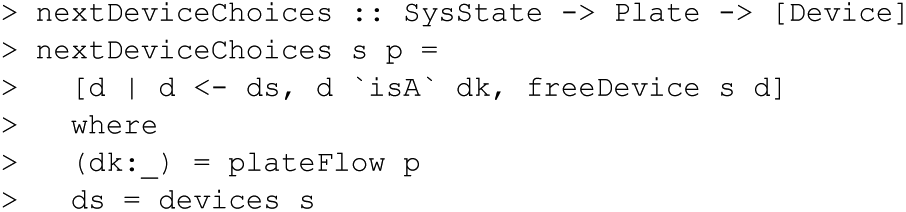
The Scheduler
Now we are ready to define a specific simple Scheduler. It simply chooses the first of all the available options.
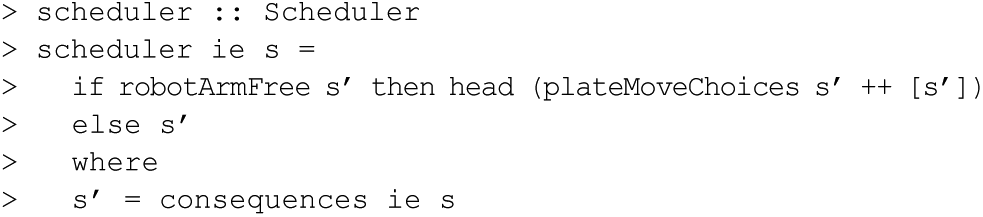
A more complex scheduler might analyze the workflow and the current state more deeply. It may be necessary, for example, to prioritize moves from devices with plates that have been waiting for the longest time or to relocate plates that require urgent incubation to avoid temperature changes.
Although the functions
The entire laboratory process can now be represented by a function from a sequence of events and an initial system state to a sequence of system states. We can think of state sequences as a representation of the behavior of the laboratory automation system.

This function run is defined recursively. When run is applied to a state and a list of input events containing a first input event, the result is a list of states, beginning with the original state. The other states in the list are produced by the application of run to the remaining input events, but run must now use the new state that resulted from the scheduler’s decisions after dealing with that first input event. The resulting list of
The states produced may be logged and immediately discarded or may be retained for further processing. At the moment, the output is a plate-centered view, but this could be changed to produce different system views as required. For example, we could derive from the
In the initial system state, no plates have yet been supplied as input, and no devices are initialized. The time is “zero.”

The following example shows the use of the

Now we give an example list of initial devices. We have six washers and two dispensers, with varying process times and access times. The order in which the devices are listed here influences the order in which available choices are listed by

Now that we have defined a scheduler that can make choices and chosen some initial devices with particular timings, we want some way to inspect the consequences of making those choices.
Properties and Automated Testing
Many intended properties of the component functions of a Haskell program can themselves be defined as functions with Bool results. Such property functions are, by convention, given names starting with
To illustrate, recall two important properties a well-designed scheduler should have:
each plate progresses through its workflow in a timely manner—no state occurs in which a plate has been at a device for too long;
the whole system is deadlock free—no state occurs in which at least one plate has an unfinished workflow, but there is nothing the system can do to make progress.
Both properties concern undesirable states that might arise after any possible sequence of events. So lists of
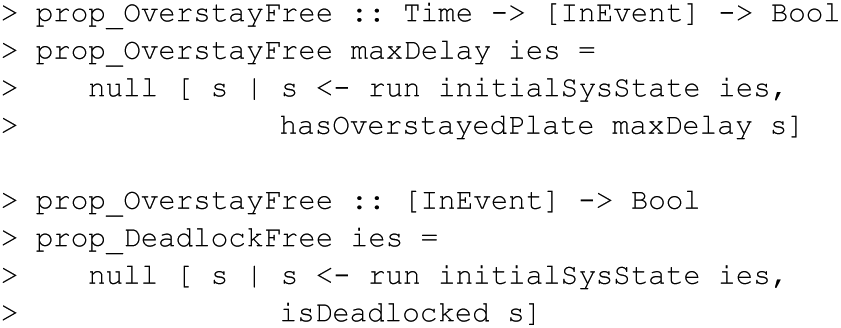
In each case, the comprehension expresses a list of undesirable states. These lists should be empty.
A simple definition of an overstayed plate is one that has been at a device or in transit for longer than

It is trickier to specify just what we mean by a deadlocked system. A state is deadlocked if there is at least one plate in the system with a workflow not yet completed, but for no such plate is there (1) more time needed at the current location, (2) a free destination (for a plate in transfer), or (3) a possible choice of next device (for a plate ready to leave its current device).
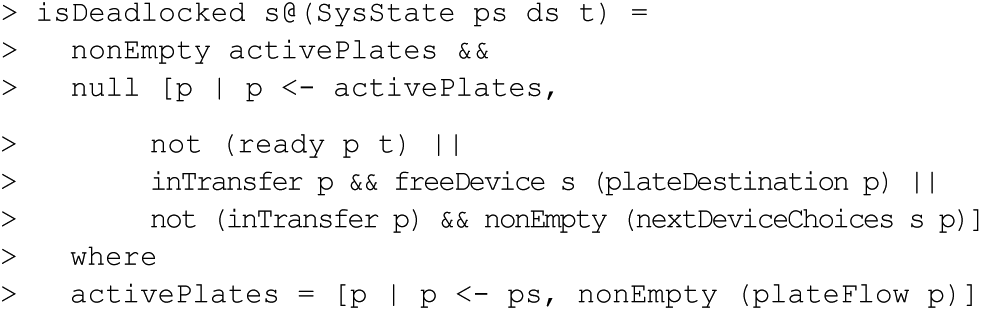
We can now ask QuickCheck to check the properties
Discussion
The code we have presented provides a complete and executable scheduler for an example laboratory automation system. The scheduler has various properties that can be verified by the type system and by property-based testing. Along the way, we have also defined many Boolean-valued functions (such as
Writing properties is not always easy and requires the programmer to think deeply about the system. Writing properties for QuickCheck gives us two advantages: automating the testing and making the programmer’s understanding of the system more explicit. The second advantage is just as important as the first for ensuring the correctness of the code. When writing the
We can use this code not only as a scheduler but also as a simulator to test out various equipment configurations and test for desired properties. If we find that a particular equipment configuration creates a potential deadlock, for example, it is easy to try specifying faster or extra equipment and retest
The system we have described here has deliberately been kept simple in order to explain the concepts of functional programming with a concrete example. However, one could easily model variations—for example, a plate capacity for each device, different maximum-delay periods for different devices, different workflows for different plates, or multiple plates per workflow as in a reformatting liquid handling process.
Functional programming is a style that encourages high-level thinking about the specification and desired properties of a system, rather than low-level sequential programming of actions to be performed. In return for specifying and declaring properties, the programmer benefits from the guarantees of type safety and automated property-based testing. One of our main purposes in writing this article is to encourage the wider adoption of such practices in laboratory automation.
Footnotes
Acknowledgements
We acknowledge the helpful comments of the anonymous referees for the article.
Declaration of Conflicting Interests
The authors declared no potential conflicts of interest with respect to the research, authorship, and/or publication of this article.
Funding
The authors received no financial support for the research, authorship, and/or publication of this article. This work was carried out while the authors were employed by the University of York, the University of Aberystwyth, and Peak Analysis & Automation, UK. No funding for the work was received from any other organization.
Further Reading
The Commercial Users of Functional Programming annual conference and website (http://cufp.org) hosts tutorials, talks, and Birds of a Feather sessions for practitioners (accessed October 2013). The Haskell in Industry website (http://www.haskell.org/haskellwiki/Haskell_in_industry) provides further case studies and support (accessed October 2013). Graham Hutton, Programming in Haskell (2007), Cambridge University Press. Get started with Haskell (installation and tutorial help): http://learnyouahaskell.com/introduction (accessed October 2013).