




Abstract
Temporal data are crucial in many research activities within Digital Humanities (DH) and Cultural Heritage (CH). At the same time, there is a growing need for visualization tools to explore events in Linked Data (LD). This article investigates LD visualization tools that address event data in association with temporal data for research purposes in DH and CH. We analyze the availability of Wikidata visualization tools capable of handling event data for DH and CH research and propose ways to improve visualization tools to better represent temporal data in Wikidata. We identified 14 requirements based on principles from the information visualization domain, as well as an analysis of previous studies and existing tools. We design and develop a Wikidata-centric tool to meet these requirements. This tool is then evaluated through focus groups and questionnaires with DH and CH experts. The results of the evaluation show overall positive feedback and highlight the implicit need and value of visualization tools that handle events in Wikidata for research in DH and CH. In addition, they indicate the improved accessibility and visualization capabilities of Wikidata through the seven time-related functionalities of the tool.
Keywords
Introduction
Research domains such as the humanities and Cultural Heritage (CH) often rely on temporal data, such as dates and information based on time, for investigations in that domain. This also applies to Digital Humanities (DH), where digital technologies allow efficient management and processing of large, heterogeneous datasets at the intersection of humanities and computer science (Zeng, 2019). For example, Glinka et al. (2017) stress the importance of the temporal dimension in cultural collections, creating a timeline-based visualization tool to explore art history focusing on drawings.
Similarly, Dörk et al. (2017) explore challenges concerning large-scale visualization from diverse cultural institutions in Germany, using a timeline view among three other views. This type of project exemplifies DH in the Big Data era, where visualization plays a critical role in making sense of data that humans cannot easily consume and process. Windhager et al. (2019) report an emerging number of visualization projects in DH in which 81% visually encode the temporal dimension in CH data. Chronological visualization is more specifically discussed by Davis et al. (2013) in the context of arts and culture.
On the other hand, Linked Data (LD) has been at the forefront in developing new interfaces for users to experience DH and CH (Edelstein et al., 2013). LD is a set of best practices for publishing and interlinking structured data (such as RDF “triples” 1 ) on the Web, creating a connection between data and its contexts, which could lead to the development of intelligent search engines (Po et al., 2020). As such, a high volume of LD has been produced: in 2020, there are at least 202 billion triples over 1151 datasets (Po et al., 2020). In the same way as in DH, the need for visualization is also growing within the LD communities (Brunetti et al., 2012; Po et al., 2020). Therefore, visualization tools that adequately handle temporal data are needed when using LD in DH and CH.
In the LD community in DH, the need to encode and create events has been identified. The concept of an event is at the heart of historical knowledge modeling in several projects (Meroño-Pevuela et al., 2014). Studies suggest the need for supporting events (Shaw et al., 2009) as well as event gazetteers in LD (Hyvönen et al., 2012). For LD in history, Hyvönen et al. (2012) argue that specific gazetteers for events with rich semantic structure are needed, because “they link actors, places, times, objects, and other events into larger narrative structures.” There is also increasing interest in extracting events from text for temporal visualization and exploration of archival records (Shaw et al., 2009). In this context, there will be a need for visualization tools for events in LD.
In this article, we explore LD visualization tools that deal with event data in association with temporal data for research purposes in DH and CH. To this end, we use Wikidata as a case study.
Wikidata (Wikidata, 2025) is one of the largest LD sources to date (more than 100 million items), holding data relevant to DH and CH researchers: about 10 million people, 3 million places, and 3 million occurrences (a superclass of events) (VIGNERON, 2024). In addition, it has played an essential role in the development of LD, with many DH and CH projects using it for interlinking and semantic enrichment (Zeng, 2019).
We can summarize the challenges and potential for LD tools in DH and CH research and translate them into the Research Question: “What are effective interface designs and functionalities for Linked Data tools to support research using temporal information in Cultural Heritage (CH) and Digital Humanities (DH)?”
To answer this Research Question, we take the following three steps. (1) We investigate the current landscape of Wikidata applications through desktop study (observation and literature). In addition, we study how events and temporal data are encoded in Wikidata. Then, we define user requirements. (2) Based on the requirements, we design a new tool called
Section 2 explores the existing tools and Wikidata’s event modeling. Section 3 describes the requirements and design of the new tool, especially time-related functionalities. Section 4 presents the setup of the user evaluation and the results. Section 5 discusses the limitations and future work. Section 6 concludes the article.
Previous Work
Literature in DH
To address the Research Question, we first assess a systematic review of DH projects using Wikidata between 2016 and 2023 (Zhao, 2023). This review examines 50 projects utilizing Wikidata, and identifies three key conclusions: (a) Wikidata is conceptualized as a content provider, a platform, and a technology stack; (b) it is employed across various domains for annotation and enrichment (17 projects), metadata curation (13 projects), knowledge modeling (seven projects), and Named Entity Recognition alongside other miscellaneous uses (13 projects); and (c) while most projects primarily consume data from Wikidata, there is significant potential for leveraging it as a platform and technology stack for data publication and exchange. Unfortunately, tools for Wikidata are not central to the review; only a few projects primarily discuss new tools. A European survey in the arts and humanities (Dallas et al., 2017) and a linked data survey for the CH domain (Smith-Yoshimura, 2018) also highlight a greater focus on finding and accessing data rather than tools.
Tools for visualizing temporal data in Wikidata have not been clearly recognized. The lack of discussion of the tooling and its relation to temporal data (and event data) becomes apparent. This implies limited experience for DH and CH researchers in using Wikidata tools in general. In this sense, the need for temporal data visualization is not yet widely collected and analyzed in the domain.
Wikidata Tools
In this section, we investigate the tools developed by the Wikidata community. There are 49 visualization tools listed on Wikidata’s official website (Wikidata:tools – Wikidata, 2025). There are many tools (potentially) using temporal data. They include Crotos (Crotos, 2025), LOD4Culture (Vega-Gorgojo, 2025), Linked People (Linked people, 2025), GeneaWiki (Geneawiki, 2025), Entitree (EntiTree, 2025), Conzept (Conzept encyclopedia, 2024), OpenArtBrowser (Open art browser, 2025), Scholia (Scholia, 2025), Wikidata Tree Builder (Wikidata tree builder, 2025), and Archive guide to the German Colonial Past (Thesaurus – archivführer deutsche kolonialgeschichte, 2025). There are generic Wikidata tools like Reasonator (Reasonator, 2025). Typically, these tools show temporal data in the visualization. However, it is mostly simple and has limited means of interacting on the time dimension, for example, querying events from a specific time period. Tools with more advanced event and temporal functionalities are limited, but we summarize them below:
Histomania (Histomania, 2025) is a browser that creates, visualizes, measures, and compares events in a timeline. It provides a large amount of data to the user, although the use of Wikidata is unclear, the data is overwhelming, and the design is outdated. ViziData (ViziData, 2025) shows the aggregation points of spatiotemporal data on a map. However, the public demo only contains a distribution of the dates and places of death for human entities. Wikidata tempo-spatial display (Wikidata tempo-spatial display, 2025) shows tempo-spatial information, including a timeline of events and a map, although the interface does not necessarily provide a modern design. Only one example is provided. Wikidata Visualization (Wikidata visualization, 2025) is similar to the Wikidata Query Service, which is an official service by Wikidata (Wikidata query service/user manual, 2025). It provides a generic interface for switching multiple visualizations, including table, chart, image gallery, network, pivot table, and map. However, SPARQL (SPARQL 1.1 query language, 2025) knowledge is required to query the data. Histropedia (Histropedia – The timeline of everything, 2025i) is a tool to display multiple time intervals of the Wikipedia category articles. It shows the potential of interactive timeline visualization and crowd-sourcing. By saving and sharing customized timelines, communities can develop an array of history timeline books. yaap! (yaap! explore history with a timeline, 2025) is a tool for Wikidata capable of creating timelines quickly and easily without the knowledge of SPARQL. Interestingly, the search results display both explicit and implicit events in Wikidata in a timeline (see Section 2.3). It is also possible to add new search results to existing ones. However, no other views are provided.
The downside of the Wikidata tool list is that it may not be academic-oriented and user evaluation is normally not included in the scope of the project. As Po et al. (2020) indicate, many are experimental rather than pragmatic services for end-users. The study of Turki et al. (2023) highlights the dominance of computer science research for Wikidata compared to other domains; the number of Wikidata-related research publications in arts and humanities is just over a tenth of that of computer science. Although this study is not limited to the use of tools, the potential of Wikidata for research use in DH and CH is not yet fully investigated.
Similar to Section 2.1, the limited landscape of LD tools tailored to temporal data and event data in DH implies limited LD experience among DH and CH researchers. The shortcomings of user evaluation for those tools also underpin this situation. Therefore, it would not be easy to collect the user needs without presenting a concrete application. For this reason, we made a decision to develop a Wikidata tool on our own first, based on the findings of previous studies. Then, we conducted a researcher’s evaluation of the tool to gain “hidden” insights into user needs for the Wikidata visualization tools for handling temporal data, especially supporting event information.
Handling Wikidata Events
This section outlines how events are encoded in Wikidata.
In Wikidata, events are not only explicitly encoded as the subject or the object of a triple/statement, but also implicitly as a part of a statement. Qualifiers in Wikidata serve as an addition to a statement to include events. There are primarily three ways to encode events in Wikidata. We shall call them Types A, B, and C.
In Type A, an event is an independent entity. Certain properties of the entity support the inclusion of time (e.g., start time, end time, and date of official opening 2 ) and space (e.g., country and coordinate location). Time is typically encoded as a typed literal. In Listing 1 and Figure 1, the event entity Siege of Vienna (wd:Q7510505 3 ) appears as a subject. It holds two properties and objects: start time (wdt:P580 4 ) and its value (“1485-01-29T00:00:00Z”ˆˆxsd:dateTime), and location (wdt:P276) and its value (Vienna: wd:Q1741).
In Type B, an event is implicitly attached to an entity of other types through the time-space properties. The other types can be anything such as a person, a building, or a material. In Listing 2 and Figure 2 (right), the birth event can be implicitly found in the properties of David Bowie (wd:Q5383), which is of type person. While the property of birthplace (wdt:P19) indicates a location by reference (wd:Q146690), the property of birth date (wdt:P569) provides its literal value (“1947-01-08T00:00:00Z”ˆˆxsd:dateTime).

Type A event for Siege of Vienna.

Type B event (birth) for David Bowie.

Type C event (work) for David Bowie.
In Type C, an event is implicitly encoded as the time-qualifiers of objects of a statement. In Listing 3 and Figure 2 (right), the property “work location” (p: P937) defines an event by establishing an intersectional relationship between a person (David Bowie: wd:Q5383), a time (“1976-01-01T00:00:00Z”ˆˆdateTime), and a place (Berlin: wd:Q64). Temporal and spatial data appear as qualifiers, if available. 5
One reason why events are encoded in various ways is that Wikidata does not employ an event-centric data model. This is different from the event-centric ISO standard called CIDOC-CRM (CIDOC CRM, 2025), which is widely used in the CH and DH domains.
Scopes and Requirements
Given that previous studies describing the need for the use of temporal data for Wikidata are highly scarce in DH and CH, it is a challenging task to identify requirements. However, we define them on the basis of supporting references and evidence. Methodologically, our analysis focuses on evaluating both the strengths and limitations of (a) existing approaches to time visualizations in CH and (b) the use of SPARQL and Wikidata. Since participants often play a central role in events, our requirements are primarily oriented toward the retrieval and visualization of information concerning a broad range of participants (e.g., persons and objects involved) within specific temporal and spatial contexts.
We specify seven requirements (R1–R7), taken from Windhager et al. (2019), who discuss various perspectives on the information visualization, focusing on CH. We describe an additional seven requirements (R8–R14) which we derive from our analysis of the literature and existing tools as described in Section 2. While the first seven requirements (R1–R7) deal with high-level conceptual or theoretical visualization requirements (Windhager et al., 2019), the second seven requirements (R8–R14) focus more on specific needs for (temporal) data exploration for Wikidata. We mention the work in which these requirements are identified. In the requirements below, we refer to relevance to our tool, which is also found in the subsequent sections. We then evaluate the given functionalities of the newly developed tool aiming to address those requirements:

Type A event of siege of Vienna https://www.wikidata.org/wiki/Q7510505 (Accessed 2025-03-20 Screenshot Image Modified).

Type B and C Events (Birth and Work) of David Bowie https://www.wikidata.org/wiki/Q5383 (Accessed 2025-03-20 Screenshot Image Modified).
In addition to those generic visualization needs, we add more practical points (R8–R14) derived from our tooling analysis in Section 2.2 and additional relevant literature.
We have designed a tool called ReKisstory, which we present in Section 3.2 aiming to address as many requirements as possible. From now on, we refer to them when they are relevant to the functionalities of the tool.
In a nutshell, our application is designed to facilitate the exploration of events in Wikidata through the three types of events described above. Two major functionalities were implemented in the tool: (1) Compare and (2) Find.
The Compare section enables users to select and compare the events related to Wikidata items and visualize them. It offers various visualizations. For example, the biographies of Paul Gauguin and Vincent van Gogh can be compared in timeline (Figure 3). Users can change the language of the Wikidata-provided data labels. Compare aims for R1 as users can compare any combination of up to four items among 100 million items in Wikidata. A broad range of item types can be compared, including humans, animals, plants, products, companies, astronomical objects, events, artworks, theories, places, buildings, and chemical compounds, as long as they are associated with events. Unexpected patterns, including similarities or differences may be discovered by features described in Section 3.3.

Compare Allows Users to Analyze Up to Four Wikidata Items in the Timeline (Example of Paul Gauguin in Blue and Vincent Van Gogh in Red. The Age of an Entity at a Point in Time is Shown, If Its Calculation is Possible.).
The Find section enables users to list all Wikidata items that match a query pattern. yaap! does not offer graph pattern searches. 7 As a bare minimum, users specify the type of item to look for, for example, human (wd:Q5). They can further specify characteristics of the item (sex/gender, citizenship, etc.), as well as an action and object (i.e., predicate and object in a triple). In addition, a point in time or time span of the action can be added (start and end time), dealing with R9 and R13. For example, users can search for human items whose occupation (wdt:P106) is musician (wd:Q639669) and whose residence (wdt:P551) was New York City (wd:Q60) from 1960 to 1979 (Figure 4). This pattern is more or less the representation of events typical in historical research, often defined in terms of people doing an activity at a certain place and time (Meroño-Pevuela et al., 2014). Users can adjust the level of query granularity by changing the number of inputs (e.g., with or without specifying dates or object in the triple). This implies greater flexibility and customizability for users (R11).

Find Allows Users to Analyze the Wikidata Items Matching the User Defined Pattern in the Timeline (Musicians Who Lived in New York From 1960 to 1979). The Red Area Indicates the User-Specified Time (1960–1979). Overlaps Among the Search Results (Musicians in Blue Bars or Dots) and User-Specified Time Can be Studied.
We made a design choice to use auto-suggest for user input as much as possible (Figure 5), which is related to R9. 8 It is implemented by the Wikidata Reconciliation API (Wikidata reconciliation for OpenRefine, 2025), which allows users to look up and select a multilingual Wikidata item or property very easily based on a browser language. Thus, no knowledge of SPARQL is required to search, although it helps to formulate query patterns in the Find section. We expect that this setup should reduce the complexity of using Wikidata considerably (R8). The application processes the results of SPARQL queries on-the-fly and dynamically renders them.

Auto-Suggest-Based Search Interface of Compare (Left, Simple Input Fields) and Find (Right, More Complex Triple Pattern Input Fields).
The results are presented in multiple views: table, timeline, map, network, and Wikipedia (R12). Instead of hiding them (as seen in Wikidata Query Service), we clearly provide them in five tabs by default. The Wikipedia articles can be read in the tab. This view helps to add generosity (R2), narratives (R4), and context (R7) to the LD framework, which is structured around simplified triple statements and tends to underemphasize narrative and storytelling elements.
As a Wikidata statement can have multiple qualifiers, it is possible to have different views or perspectives for the statement. For instance, if two possible dates are known for an event (e.g., historians cannot specify one), they will appear as separate results, when being queried. This data structure allows us to address plurality, multiple perspectives, or polyvocality (Shoilee et al., 2023) seen in R3.
The tool is designed to be as generic yet detailed as possible to find a middle ground for (a) CH and humanities experts and casual users (Windhager et al., 2019), and (b) LD experts and technical novice users. Two modes (simple and advanced) are provided in Compare and Find for this purpose (R8 and R11), offering different input options. For instance, the context timeline option enables users to add a period or era in timeline view to provide context or background for the search results (R7). We experimented this with the periods of art movements, Popes, and US presidents.
We concentrate on examining seven time-related functionalities (F1–F7) found in the Compare and Find sections of the tool, with which we cover as many requirements as possible.

The Solid Lines (i.e., Blue Bar) are the Duration of Residence of Princess Diana in Althorp. The Dashed Lines Represent Her Life Span. The Red Area Indicates the User Specified Duration.

The Age of Aristotle When He Started and Ended His Residence in Athens on the Map View. (Leaflet | © OpenStreetMap contributors)
For Anno Domini/Common Era (AD/CE), month-level calculation is provided. We also indicate if a date is before, during, or after the lifetime, even if one or more dates are missing (start date, end date, and target date). Therefore, a certain degree of uncertainty can be represented. In addition, F2 allows us to sense time lags of items: for example, a scholarly work is written 100 years after the birth of a person (after lifetime) who is the subject of the work (see also the distinction between primary and secondary sources in historical research in Meroño-Pevuela et al. (2014)). This functionality deals with R3, R6, R7, and R13 in the sense that they provide the critical context of an item with potentially complex dates handling.
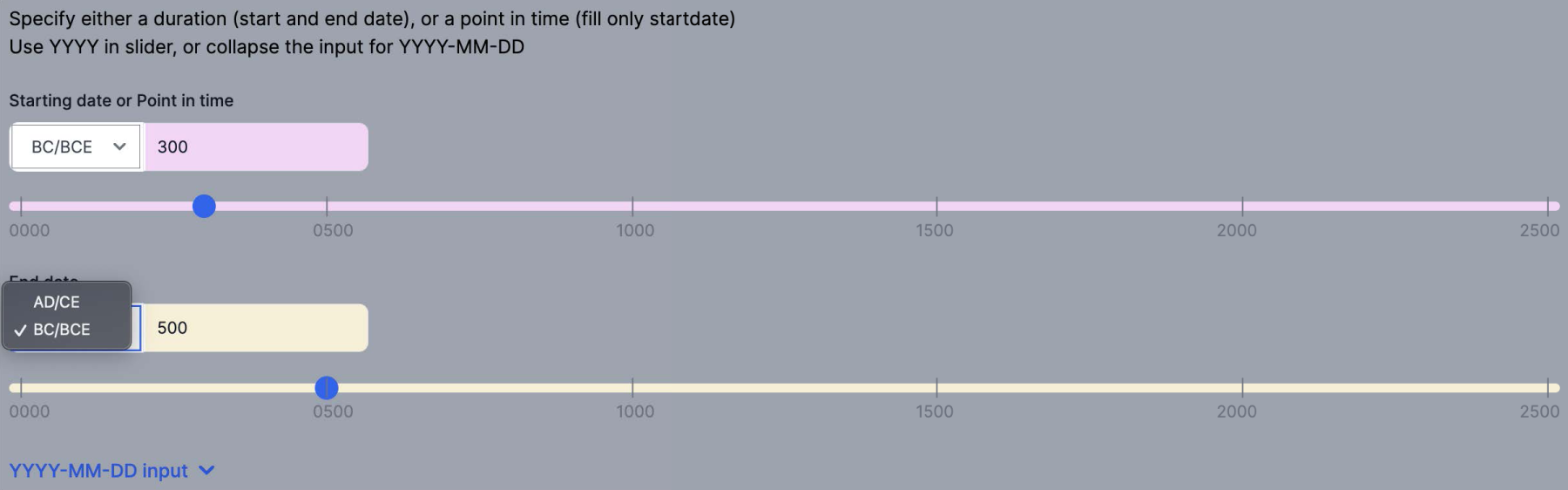
User Can Specify Before Christ/Before Common Era (BC/BCE) to Find Prehistoric Items. Time Slider Input is Also Seen.

Users Can Change the Data Grouping (Left Column) by Relation (i.e., Predicates) Or Searched Entity in Timeline (F5). This Example Shows the Events for Niels Bohr in Timeline. Data is Grouped by Relation (Position Held, Spouse, Etc.). Compare This to Figure 3 Focusing on Grouping by Entity, Users Can Also Move and Remove Items in the Timeline by Selecting an Item (Yellow Highlighted) (F4).
In Figure 4, the red area is the user-defined interval, which can be compared with the durations (and points in time) of different items. Although interval overlapping is visualized in applications such as yaap! and Histropedia, R9 is missing for them, limiting the true capability of LD for the users. In a sense, this also concerns R12.
In relation to R13, we would also like to support queries in terms of overlap relations between temporal intervals, and this requires technical knowledge to implement in SPARQL. To provide this search functionality, four types of arithmetic calculations are required to search for time overlaps: (a) a point in time against a point in time, (b) a point in time against an interval, (c) an interval against a point in time, and (d) an interval against an interval. Figure 10 summarizes all patterns. 9 For a point in time, the user input (Date X) is searched against four possible time overlaps (Date x and y in A, B, C, D) (Figure 10 (left)). For an interval, the user input (Date X and Y) is searched against nine patterns in four groups (Date x and y in A, B, C, and D) (Figure 10 (right)).

Time Calculation Patterns for Two User Input Possibilities (Date X (a Point in Time) or Date X and Y (Interval). Date X is Searched Against Four Types of Temporal Data (A, B, C, and D) (Left). Date X and Y are Searched Against Nine Types of Temporal Data in Four Groups (Right).

Link to the Resource Description Framework (RDF) Statement for The Night Watch is Provided as “Check This Fact” (Far Right Column) in the Table View.
Despite the large number of tools found in Section 2, there is no tool that provides all seven time-related features. Most tools deliver one or two features at most. Exceptions are Histomania, Histropedia, and yaap! (Table 1). Histomania and Histropedia cover many features. However, the roles of Wikidata, SPARQL, and Wikipedia are neither explicitly described nor clearly understandable, when using the tools. This makes it hard to directly compare them with each other for fair evaluation. Interestingly, the advanced flexibility (R9 and R11) in Histomania would also have negative impact on usability due to demanding customization options (R8). In any case, these seven functionalities have been designed to address the challenging requirements in Section 3. The user evaluation in the next section sheds light on the usability and usefulness of the tool.
Support for Seven Time-Related Features and Usage Fee in the Selected Wikidata Visualization Tools. A Checkmark Indicates the Feature is Supported.

Note. Histomania: Unclear mixed use of Wikidata, SPARQL, and Wikipedia. Filtering items instead of removing them. Duration calculation instead of age calculation. No usage fee, but paid options available.
ViziData: Focus on stats in charts. Only death events.
Wikidata tempo-spatial display: Focus on the Franco-Prussian War. No duration in timeline.
Wikidata Visualization: No default features. All depends on the SPARQL query input (a complex query would be required).
Histropedia: Unclear mixed use of Wikidata, SPARQL, and Wikipedia. No user input for time. Filtering items instead of removing them.
yaap!: Most similar to Compare in ReKisstory. No user input for time.
ReKisstory is developed in Python, JavaScript, and CSS. 10 As it is primarily a visualization tool, it processes and renders data on-the-fly using various external APIs. This means that we do not store any data in the backend. However, the search results are processed in the frontend and can be downloaded as a CSV file.
User Evaluation
Method
We organized workshops as online focus groups to evaluate whether the seven time-related functionalities (F1–F7) meet user expectations in the humanities, DH, and CH communities. We used a combination of a pre-workshop survey, a series of workshops (Table 2), and a post-workshop survey. We choose these methods because we would like to (a) fully explain the scope of the tool and evaluation to the participants, (b) assess the tool as a whole, including the seven functionalities, and (c) balance qualitative and quantitative analysis.
The Objectives, Setup, and the Number of Participants of the Pre-Workshop Survey, Workshop, and Post-Workshop Survey.
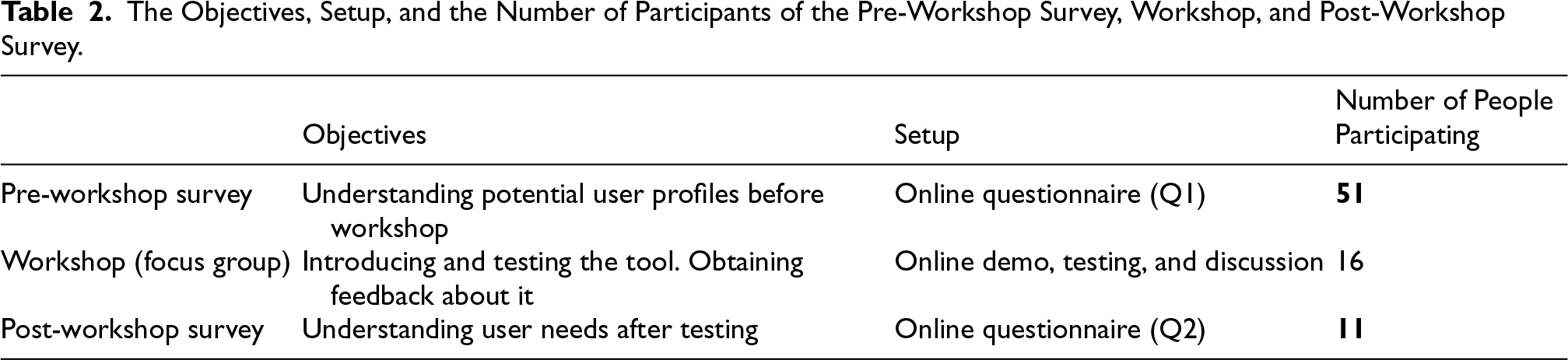
The Objectives, Setup, and the Number of Participants of the Pre-Workshop Survey, Workshop, and Post-Workshop Survey.
The focus group allows us to gain detailed information about the tool, by meeting potential users and concentrating on qualitative analysis. This method is especially effective for gathering shortcomings and “early” user requirements of the tool. The pre- and post-workshop surveys are conducted through two detailed questionnaires (the first and second questionnaires (Q1 and Q2) Sugimoto, 2024). They were created in Google Forms. 11 They help us to collect feedback systematically and accurately to quantify the results, which is more efficient than oral communication in the focus group.
In May 2024, several calls for participation were sent to the mailing list of the Europeana research community, of which many CH and DH experts are members, 12 as well as groups of humanities experts in the circle of the authors’ colleagues via LinkedIn. We called the workshop “A workshop for a new web app for Humanities and Cultural Heritage.” Although we provided a brief description of the tool, we deliberately avoided mentioning LD as much as possible to welcome a broad range of potential users. There were 52 responses and one duplicate; thus, 51 responses to the questionnaire were valid for analysis (Table 2).
This Questionnaire 1 (Q1) was designed to collect information about the background and experiences of the participants. It contains questions about the demographics of the participants, experience with time-related data, Wikidata, and SPARQL. A consent form was created following the EU regulation for data protection (GDPR) to ask permission of the participants to use the data for research purposes.
In Q1, two questions about small research tasks were included. The two questions are: (1) How easy is it to find the answer to the question SQ1 (see below) on the web, and (2) How easy is it to find the answer to the question SQ2 (see below) on the web.
These tasks could be effectively performed with our tool (Compare for SQ1 and Find for SQ2, using F2, F5, and F6). Therefore, we asked the participants to perform these tasks during the testing of the tool in the workshop. Then, in the second questionnaire in the post-workshop survey (see below), we asked if the tool helped to complete the tasks. In this way, we can assess the change in user perceptions before and after the workshop.
These are questions about historical events we discussed earlier. They may not be exactly the research questions of researchers in this domain. However, researchers such as historians often do not have a clear research question when starting an investigation (Meroño-Pevuela et al., 2014) and/or the question changes over time; we take them as fact-checking starting questions to be elaborated on further in the iterative research process.
Workshop
Five 1.5-hour workshops targeting a group of five were held online in May and June 2024. Due to the technical limitations of an online workshop solely hosted by the first author, only a subset of the people who answered the Q1 could be invited. Initially, 25 people from 51 respondents were invited on a first-come-first-served basis. However, many people canceled in different stages of communication, in the end 16 people participated in the workshop.
We organized four workshops in English and one in Japanese. This setup enabled us to support diversity to a certain degree. The different languages might have an impact on the evaluation of the tool. As English is primarily used for the tool’s interface, the participants had a sense of the tool in other languages only when using auto-suggest in different languages and examining search results partially in a specified language (if the results in Wikidata support the language labels). We prepared all documents and sessions in both English and Japanese. Therefore, the participants in the Japanese workshop used Japanese for all interactions. Feedback was translated into English for the assessment.
Before the workshop, several documents were distributed to streamline the workshop: (a) the workshop slides, (b) the Compare section manual, (c) the Find section manual, and (d) the Find section example search patterns. These documents aimed to mitigate the risk of overwhelming participants with information overload during the workshop without disturbing too much the fresh first experience of the tool. In particular, (d) includes many examples of graph queries for Find as it can be difficult for domain experts to understand the graph database.
The workshop consisted of three parts. First, a slide presentation was given to explain the motivation and overview of the Wikidata content, as well as the overview of the main functionalities of the Compare and Find sections. Second, we asked the participants to test the Compare and Find sections as a whole without restricting to the time-related functionalities. Finally, we collected feedback in short free discussions.
After the workshop, the second Questionnaire (Q2) asked for opinions on the tool, focusing mainly on the usefulness and usability of the seven functionalities, as well as on general remarks and room for improvement. Q2 was designed to measure the quality of the tool. It was possible to fill out the Q2 during and after the workshop. Eleven responses were received.
The Results
This section presents and analyzes the results of the evaluation. As the raw anonymized results of the workshop can be found online (Sugimoto, 2024), we focus on the key findings here.
Pre-Workshop Survey Results
In Q1, we see broad backgrounds of 51 potential users of ReKisstory. The gender balance is reasonably even. Although there is a bias toward higher age groups (over 35 years 80.4%), English speakers (19.6%), and the archives domain (21.6%), the native language and research fields are extremely diverse (Figure 12). The occupations vary broadly, from student, teacher, professor, consultant, and CEO, to librarian, archivist, archaeologist, Wikimedia resident, and art dealer. This is what we expected from the strategy of our call for participation. The distribution is highly suitable for our study to capture the diverse needs of users in DH. In fact, Zhao (2023) reports that Wikidata is a data source for a wide range of disciplines, domains, time periods, and languages for DH projects, ranging from literary studies and history to linguistics, archaeology, and philosophy.

Background of Respondents by Gender (Top Left), Native Language (Top Right), Age Group (Bottom Left), and Research Field (Bottom Right) for Respondents to Questionnaires 1 and 2.
Among 51 respondents, 42 respondents use time-related data 13 and consider it extremely important (41.5%), very important (34.1%), and moderately important (24.4%). The 42 respondents find more difficulties when they search and compare time-related data on the Web, although neutrality is the most dominant opinion (Figure 13).

The Number of Answers for the Question: How Easy is it to Search and Compare Time-Related Data on the Web (Among the 42 Respondents Using Time-Related Data)?
In terms of LD experience, while 14 respondents have used SPARQL (28.0%), 28 respondents have used Wikidata (54.9%). Among those LD users, more than 75% think Wikidata and SPARQL are useful, but ease of use and learning may not be strongly agreed upon (Figure 14). In general, using SPARQL is more difficult than Wikidata in terms of learning and using. In particular, it is relatively clear that participants find it difficult to use SPARQL, when looking for information in LD (Figure 14). However, the reasons for neutrality is unknown. It should also be noted that SPARQL users judge their level of competence low; expert and proficient (0%), competent (28.6%), advanced beginner (50.0%), and novice (21.4%). This corresponds to the observation of Turki et al. on limited and narrow research scopes for Wikidata (Turki et al., 2023), which indicates the limited transfer of knowledge in DH. There could be different reasons for this: It may be due to the lack of LD and SPARQL training in DH, and/or the absence of LD tools and research, using/requiring advanced SPARQL.

The Number of Answers for the Questions: How Useful is Wikidata and SPARQL? (Left), How Easy to Find Data and to Learn to Use Wikidata? (Right) and How Ease to Write and Learn SPARQL? (Right) (Among the 14 and 28 Respondents Who Have Used SPARQL and/or Wikidata.
The demography of Q2 is similarly diverse (Figure 12). Although male is more dominant than Q1, the age groups are well distributed. The native languages include English, Japanese, Hungarian, Swedish, Slovenian, German, and Dutch. The respondents specialize in fields such as archives, archaeology, history, ethnology, and religious studies.
Q2 focuses on the usability and usefulness of our tool for the eleven workshop participants (Figures 15 and 16). The majority finds the Compare section of the tool useful and easy to use. In particular, the ease of use is prominent. In contrast, the Find functionality is considered more useful than Compare. However, the participants’ responses regarding the usability indicate more difficulties. In terms of seven features, more than 60% of the respondents confirmed their usefulness for each feature (Figure 15), but the ease of use shows some diversity (Figure 16). In particular, F5 may not be user-friendly. Although only a few respondents have difficulties, this may be due to our requirement for the middle ground approach (R8).

The Number of Answers for the Usefulness of the Seven Features, Compare, and Find.
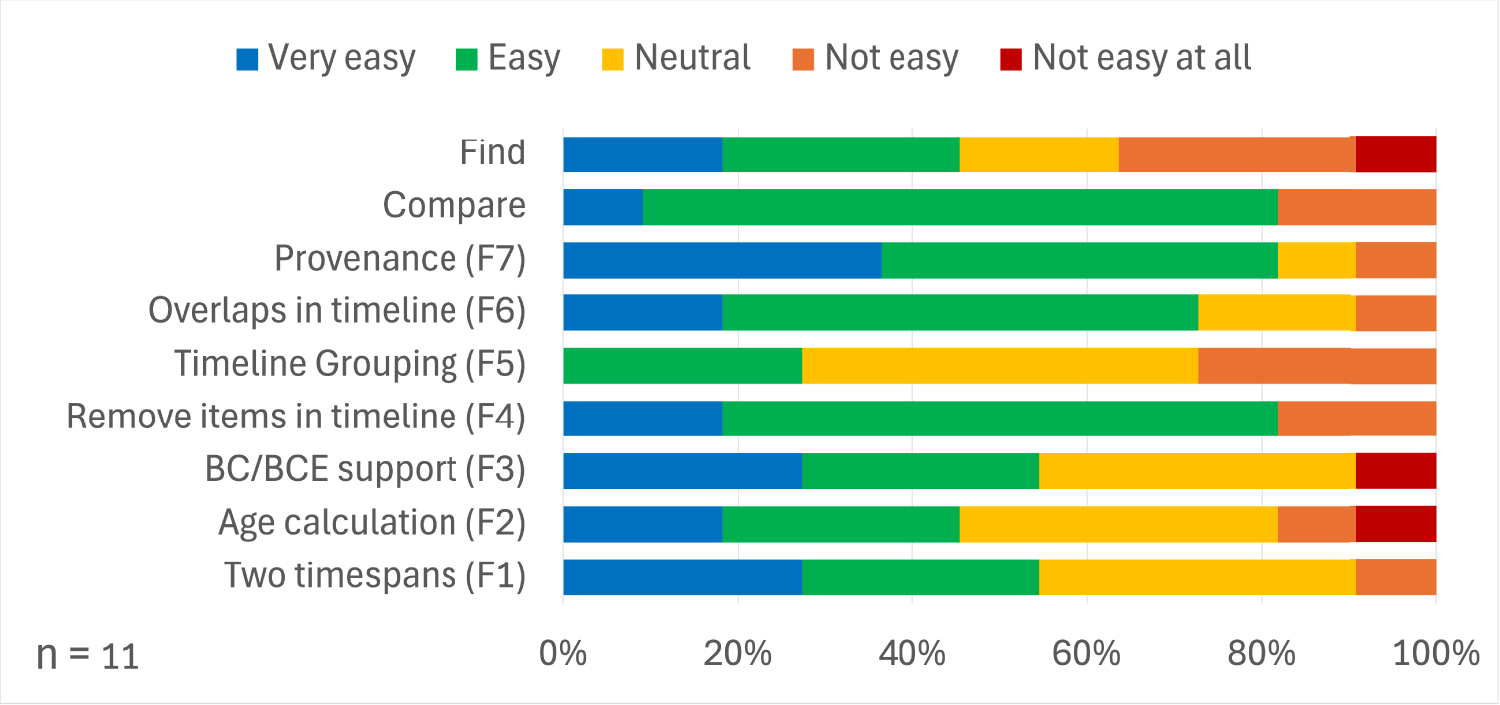
The Number of Answers for the Ease-of-Use of the Seven Features, Compare, and Find.
We also asked why the respondents chose a specific answer. We sample and summarize their comments, 14 in Figure 17.
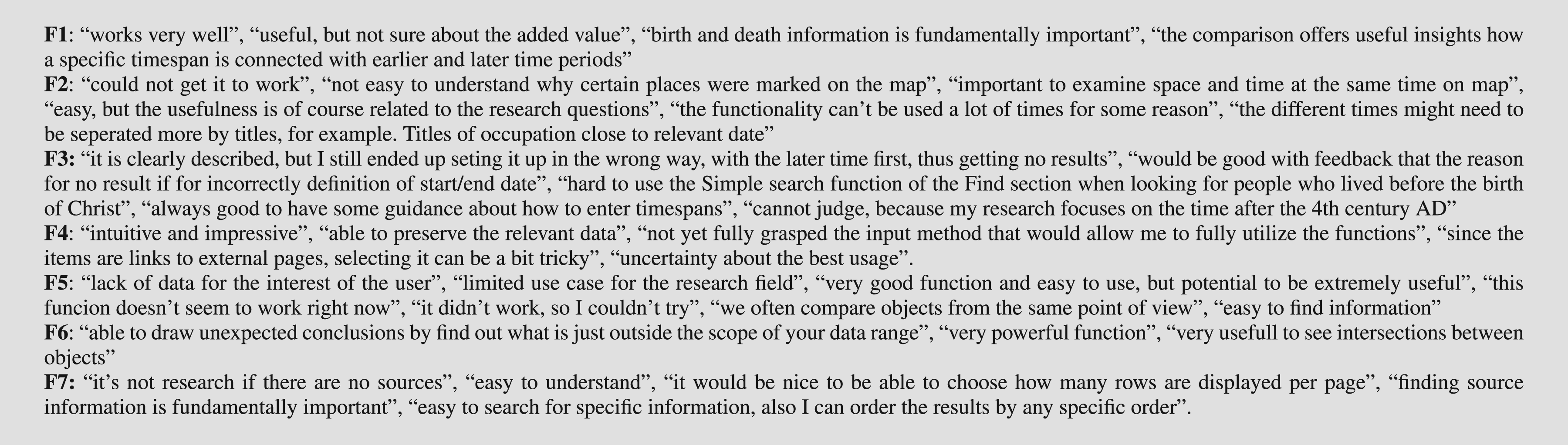
Samples of the Participants’ Comments for the Seven Functionalities (F1–F7).
It seems that negative remarks are often caused by bugs and/or limited time for testing (e.g., F5 observes mixed feedback), rather than usability, although there are occasionally difficulties in familiarizing with the interface and functionalities (e.g., interface for F3 could be improved). As there were auto-suggest malfunctions for the browser environments of some users, it was unfortunate that bugs significantly reduced user experience, impacting the user feedback. In addition, it is noticeable that the source data (Wikidata) could cause errors or confusion. Moreover, the usefulness of the functionalities highly depends on the research fields; it is not easy to provide valuable functionalities that satisfy the broad diversity of research fields in humanities and CH.
The respondents find F6 to be the most unique and F3 and F4 the least (Figure 18). Being asked three favorite aspects of the tool, 15 they chose visualization and extra information (linking, references, and provenance). Interestingly, multilingualism (provided by display labels and auto-suggest) is also voted higher than others. Data quantity and interactivity are not the primary interest.

The Number of Answers for the Uniqueness of Seven Features (Left) and Favorite Aspects of the Tool (Right) (Note Multiple Choice is Possible).
SQ1 and SQ2 aim to measure the impact of the tool. Although 30% think it is easy to answer SQ1, a considerable number of respondents struggle to answer both questions (Figure 19). This tendency does not change between the workshop participants and non-participants. After the workshop, more than 72% (SQ1) and 90% (SQ2) of the participants agreed that the tool makes it easy to find the answers.

The Number of Answers for the Difficulty to Answer SQ1 (“How Old was Van Gogh When Moving to Paris and How Old was Paul Gauguin at that Time?”) and SQ2 (“Which Musicians Worked in New York Between 1960 and 1979 and How Their Time Overlap Each Other?”) on the Web for Non-Participants (Top Left) and Participants Before the Workshop (Bottom Left) and the Agreement of Assistance by the Tool to Answer Them After the Workshop (Right).
Free comments and group discussions raise some interesting questions and suggestions about the tool. 16 In general, the participants do not have strong recommendations. Positive feedback includes “I’m very glad I got to know about this tool,” “very powerful and impressive tools with great potential for making it more efficient to work with this kind of data for research.” Negative feedback includes “the program has quite often failed with the error ‘504 Gateway Time-out’,” and “browser issue.” 17
The respondents suggest minor and concrete improvement such as more customization options (see R9) (e.g., selecting properties to be displayed, changing the amount of results), clearing input fields at once, alphabetically sorting drop down menu, providing drop down menu also in the advanced mode, and sharing of used SPARQL query. Positive comments include good documentation and low barriers for end users of LD (R4 and R8).
There are interesting requests for new functionalities: visually presenting the changes of relationships over time (see R1, R3, R7, and R12). In addition, a use case is proposed: the users can “input research information that previously had to be provided individually and build a unique database,” by updating Wikidata by themselves (see R7).
The participants commented on Compare as follows: “sometimes it might be a bit difficult to understand the logic of the comparison and what it means,” “I was not able to take advantage of nice functionalities because I was not familiar with the input method” (see R9 and R14), “comparisons is a core functionality in the historical research.” Their comments on Find include the following: “could not get it to work very much to test full functionality,” “straight forward and very easy to use and interpret results” (see R8). Quite a few like the approach and see the potential once bugs are fixed: “a bit buggy at the current time, once those get solved it’ll be a solid tool to use,” and “if the auto-complete works it is very useful and lately it worked great.”
A few remarks concern the particularities of Wikidata (ontology and data quality). This may be related to knowledge acquisition issues, because our Wikidata-centric approach is contrary to many engineering projects seen in Section 2, which use Wikidata as secondary content. There are also general comments that the participants require more time to familiarize themselves with the tool (see R4 and R8): “it is difficult to use, but, once I get used to the search methods, I can access the information I look for.” The lack of available data for a specific research field (religious studies) is also pointed out, leading to the question of immediate usefulness. Similarly, a respondent states: “I liked the approach overall. It is a great improvement on trying to type SPARQL queries! But afraid my feedback is rather limited by lack of return results” (see R8)
Some questions are also raised for time-related features: “time slider was a bit random in my limited experience” (see R9), “Would it make sense to separate past/present/future/searches?” (see R9 and R13), 18 “different interface approaches to different search requirements whether the user wants to search a time range or perhaps just return dates” (see R9 and R11), and “problems with navigating the timeline table. More exact, with enhancing and scaling out the found timeline results” (see R11).
A use case to use the timeline view as a research presentation is suggested. Synergies with PeriodO (PeriodO – Periods, organized, 2025l) and CIDOC-CRM are proposed.
In general, our tool provided solutions for eight requirements out of fourteen (R3, R6, R7, R8, R9, R11, R12, and R13) with different levels of technical maturity. Some functionalities are more favored by users than others. The time-related functionalities cover eight requirements out of fourteen (R3, R6, R7, R8, R9, R11, R12, and R13), although there are a few functionalities that split opinions of the users.
Although the overall positive reactions in the user evaluation are encouraging, it is clear that the tool was unable to address all the requirements. For example, we focused on the search engine interface; therefore, we did not provide a new user experience such as user-oriented guided navigation and exploration (R14). It is a tremendous challenge for LD developers to provide meaningful visualization overviews and generous exploratory interfaces for such large and diverse LD sources as Wikidata, as opposed to relatively smaller-size and more focused CH collections, such as image collections in a museum.
We hardly delivered any solutions for R2. It is possible to provide an overview of the Wikidata statistics; however, it will not easily allow users to understand the scale and complexity of data easily. In addition, given the volume of Wikidata, data rendering will be a challenge to avoid performance issues. Similarly, R5 was not tackled. We did not concentrate on this requirement, because the tool primarily targeted online visualization. It could be updated in the future to add mobile functionality, including GPS, virtual reality, and augmented reality.
Critical discourses in humanities (Di Pasquale et al., 2023) including uncertainty (R6) (Meroño-Pevuela et al., 2014; Windhager et al., 2019) are only addressed to a small extent in this study (F2). Although Wikidata employs some techniques 19 to cope with them (Di Pasquale et al., 2023), we did not delve into them. In particular, we did not deal with various time concepts (R13) such as uncertain dates and non-Gregorian calendars.
Figure 16 indicates that some users struggled to search for the data in Find. This is understandable, because graph queries may be new to ordinary web users (see also Janowicz, 2010 about the burden for LD interpretation without context). As Section 4.1.1 suggests, the level of SPARQL competence is relatively low even among those who have experience with SPARQL. However, this result is caused not only by the difficulties of graph queries, but also by the lack of data in Wikidata. It turned out that the availability of time in the Wikidata qualifiers is still sparse. For example, neither Gustav klimt (2025) nor Egon schiele (2025) have dates for work locations. Although Klimt has dates for his education, Schiele has no dates for it. This situation confuses the users as they do not know the comprehensiveness of the query results. In this sense, R2 is increasingly critical. In addition, this is related to the argument of Hyvönen et al. (2012) about the imminent need for event gazetteers.
The participants struggled with query timeouts. Scalability and performance are often the bottleneck of LD applications; web communities need fundamental hardware and software updates in the future to solve them. For example, a warning of importing Wikidata dumps to a local installation is reported (Wikidata query service/user manual, 2025). Wikidata plans to split scholarly articles from other data, because they have a serious impact on query performance (Wikidata:SPARQL query service/WDQS graph split - wikidata, 2025).
For the same performance reasons, we deliberately disabled the inference function for our SPARQL queries (Hogan, 2020). For example, SPARQL allows us to perform an inference search for the type of entity “airport” in Find to visualize the results of not only the “airport,” but also its subclasses, including the “international airport,” “domestic airport,” and “proposed airport.” However, inference queries are often expensive to search Wikidata entities with many relations, such as geographical places and persons. Therefore, inferences would disappoint users due to query timeout. This is a well-known technical problem for LD implementers. Because of this, the degree of serendipity (R1) is limited. In addition, it is highly challenging to achieve R3. It is necessary to clarify it and provide solutions for a bespoke tool based on ReKisstory for each use case.
We did not fully address a solution for mass visualization (R11) (Po et al., 2020). For this study, we restricted ourselves to the visualization of a maximum of 100 results for Find. Although we have a simple solution for the table view (pagination) and map view (aggregation of nearby places), timeline will face a serious issue. We have no mechanism to display items by vertical immersion (zoom in) and abstraction (zoom out) (Windhager et al., 2019). Improved techniques for LD visualization need to be developed. Desirably, we would like to achieve an interactive exploration of time and space in sync (changes over time and space are discussed by Meroño-Pevuela et al. (2014)) which one respondent requested in the questionnaire. InTaVia (Visual analysis, curation & communication for in/tangible european heritage, 2025) partially presents a visualization of this type in the biographical domain.
Due to our focus on temporal data, we did not explore the feedback for all requirements. Future studies could drill down each requirement and conduct user evaluation. At the same time, our tool resembles yaap! in terms of this focus. This has pros and cons. While the uniqueness of our tool is reduced, our evaluation results indicated that our approach as well as yaap!’s are valid and our tool provides different functionalities that yaap! does not have, especially, the Find section, multiple views, and the combination of various functionalities.
Similarly, we did not investigate user-generated knowledge graphs. Tools such as the Story Map Building and Visualising Tool (SMBVT) (Bartalesi et al., 2023) enable users to create and visualize events based on Wikidata entities and to publish these as graphs. In contrast, our research primarily focuses on the “passive use” of SPARQL queries as tools for exploration and visualization.
It is not easy to identify and form a group of the best target users for evaluation. This is partly because of our strategies (R8) for middle-ground positioning. In a way, we inevitably both benefit and suffer from this broad scope of the tool. In this regard, it would be interesting to assess the tool in different ways by collecting opinions from LD experts and/or casual users and reorganizing our evaluation to understand generation gaps, technical competencies, and geographical differences in depth.
There could be different use cases of the tool. For instance, thanks to the availability of provenance information, the tool can be used for error detection and update/improvement of Wikidata. Integration with Wikidata editing tools would be useful. For the time being, our tool only provides a link to a statement on the Wikidata website, leaving the possibility of content update to the users within Wikidata.
Regarding the adaptability of the tool, although ReKisstory uses Wikidata as its primary data source, it is, in principle, data agnostic. To utilize other KGs, only the SPARQL queries and data mappings need to be adjusted. Similarly, its application is not restricted to the CH domain; it can be employed in any domain where temporal or event data are available. Additionally, although not described in detail in this article, a new data integration feature enables users to import data from CSV files, APIs, SPARQL endpoints, and websites, and to merge these with SPARQL query results from Wikidata.
Conclusion
Our literature review showed the limitation of the available LD tools and user evaluation. Although our list of previous studies is not exhaustive, Wikidata-centric visualization tools addressing the challenges of event data (as well as temporal data) in DH and CH are probably highly scarce. As such, studies that include user evaluation are hardly available.
From the user evaluation, we learn many insights into the user experience and needs for Wikidata tools. We found that there is still room for recognition to adapt and use Wikidata and SPARQL. This matches the evidence of increasing interest in, yet immaturity of Wikidata tools in DH (Zhao, 2023). However, the overall positive feedback for our tool confirms our concept and approach.
We discussed the (implicit) need and value of visualization tools that deal with events in LD for research purposes in DH and CH. In addition, we highlight how temporal data can be explored through events in Wikidata. Our study demonstrated that the tool uniquely addresses the user needs of LD visualization in the domain. In particular, the evaluation results indicate the improved access and visualization of LD through the seven time-related functionalities. Furthermore, it became evident that the Wikidata-centric approach to visualize events is valuable in the DH and CH domain, as opposed to the tools using Wikidata as the secondary content.
At the same time, the immaturity of the tool, time constraints, and abstract nature of the requirements may have resulted in some mixed reactions in the user evaluation. Nevertheless, our research can be used as a starting point to define and refine requirements and user specifications for the development of this type of tool.
Funding
The authors received no financial support for the research, authorship, and/or publication of this article.

