



Abstract
Currently, virtual teams are being used exponentially in higher education and business because of the development of technologies and globalization. These teams have become an essential approach for collaborative learning as well as task completion. Team learning, especially in an online format, can be challenging due to lack of effective training, communication and assessment measures. This article will introduce strategies, including adding a module on team processes, using Google applications for communication, and evaluating collaborative learning processes in addition to the products. These strategies were found instrumental in cultivating virtual teams through this case study of an online graduate course, and they can be valuable to online learning instructional designers or instructors who are interested in applying virtual teams in experiential instructional process.
Keywords
Introduction
A virtual team is a group of people who may live in different locations or cultures, and engage in a technology-enabled team in order to accomplish learning or job tasks (Cohen and Gibson, 2003; Jarvenpaa and Leidner, 1999). Virtual teams have been increasingly used by organizations and higher education as a result of the development of technologies and globalization, and the virtual team has become a crucial process for team learning in addition to task completion.
This article is going to introduce, through a case study, the design, development and implementation of a 13-week graduate online course, which served as an introduction for Educational Leadership major students to develop an understanding about virtual teams and to collaborate in a virtual community of practice. In this course, students received practice in leading virtual teams and in improving organizational teamwork in schools and other learning organizations. This course employed multiple modes of instruction including web-conferencing lectures, guest speakers, individual research, virtual small group projects, web-based instructional materials and discussions using a Learning Management System and Web 2.0 technologies, etc.
In view of the technology requirements from educators’ professional organizations (e.g. International Society for Technology in Education) and the attractiveness of using virtual teams in education, it is necessary for teachers to update their knowledge and skills on technology-enabled teamwork. The purpose of this exploratory case study was to examine whether an online course would positively influence educators’ application of knowledge and skills on virtual teams to solve near authentic educational problems collaboratively.
New standards for collaborative learning
To be an effective teacher or leader in a 21st century educational setting and to engage students and enhance professional practice as he or she designs, implements, and assesses learning experiences, an individual needs to apply the National Educational Technology Standards for Students (NETS•S), which are the technology “standards for evaluating the skills and knowledge students need to learn effectively and live productively in an increasingly global and digital world,” developed by the International Society for Technology in Education (ISTE) (2007, para 2).
Furthermore, the recently revised Technology Standards for Teachers and Administrators from ISTE (2008) also greatly emphasized virtual environments, digital citizenship, digital-age leadership, collaborative knowledge construction, reflective learning, and global awareness. The standards advocate advancing student learning and creativity through both face-to-face and virtual channels. Teachers and administrators are supposed to engage students in real-world problem-solving using digital tools and resources; to promote student reflection using collaborative tools to clarify students’ conceptual understanding; and to model collaborative knowledge construction by participating in learning with students, colleagues, and others through face-to-face and virtual communication. Teachers and administrators are required to demonstrate innovative knowledge, skills, and work processes required for professionals in a global and digital society through using digital-age communication and collaboration tools.
Emerging technologies for team learning
Technology is developing exponentially, and a large number of emerging and Web 2.0 tools have been tested and found to be effective for education, collaboration and leadership. Eloia and Oskoz (2010) discovered wikis and chats allowed students to focus on writing components during collaborative writing using a foreign language. A wiki was found to successfully facilitate 42 virtual teams and their development of team reports in a first-year Engineering Problem Solving course (Cochrane et al., 2008). Hemmi et al. (2009) reported from a virtual ethnographic study of three formal courses that used Web 2.0 social technologies, particularly weblogs and wikis, that despite the fact that the academy tends to limit the more drastic effects of these new media, students and instructors consider these technologies to have significant potential as new collaborative, flexible and challenging environments for formal learning.
Internet social media website YouTube (Snelson, 2011), has mainly been used for student video production and as a supplement to instructional content; however, it has also been used widely in the field of information technology, English as a foreign language, political science, etc. YouTube is considered a new channel to engage students in learning information literacy skills (Majid et al., 2012) and is being integrated into pre-service and in-service English teachers’ curricula (Lee and Peng, 2012). In online courses, short video elements blended with online discussion and chats were suggested to enhance interactivity between instructor and students (Hartsell and Yuen, 2006).
Furthermore, YouTube can help bring a better understanding of health issues. Particularly, it was found useful in educating medical professionals on the multifacets of the manifestations, impacts, and origins of dental fear and anxiety in children and adolescents (Gao et al., 2013), and was used as an alternative platform for publishing clinical training materials because of its strengths in technical simplification, increased audience, discoverability, and analytics (Topps et al., 2013).
Another well-known collection of emerging technologies, the Google Apps, including Google Mail, Maps, Calendar, Talk, Docs, Sites and Video, have been widely adopted in education. It was found that, at Colorado State University, Google Apps had brought about unprecedented collaboration and communication between faculty and students, and people are satisfied with the services (Herrick, 2009). Recent research shows that online knowledge networks, enabled by Google Docs and Google Sites, can be effective learning tools for students with minimal experience and low confidence in online environments to acquire skills for researching, writing and editing web-based materials in a Writing and Research for Professional Contexts 311 course at Curtin University in Australia (Robertson, 2012). Google Docs was also used by graduate students in an education course as a tool for collaboration (Baylen et al., 2011), and it was used to enhance students’ engagement with content by some pre-service teachers (Rhine and Bailey, 2011). Using Google Sites is also considered to encourage collaborative learning and to improve information systems knowledge and competence (Roodt and de Villiers, 2012).
Web-conferencing using specific software, such as Elluminate Live (currently Blackboard Collaborate), Adobe Connect or Skype, is another technology that has been used frequently in online collaboration or distance education. It was found that web-conferencing has great potential to implement networked collaborative communities of practice, and to establish a new socially present relationship between students and teachers in a virtual environment (Garonce and Santos, 2010). In another study, a positive correlation was found between synchronous web-conferencing and course satisfaction in an online class in a US public four-year university (Huang and McConnell, 2010). More recently, web-conferencing has been integrated to enhance simulation in business education (Hubbard, 2012). Using web-conferencing for simulations not only allowed the business faculty at the University of Southern California to create a near real-life collaborative experience for students, but also effectively helped the business school educate their students to be more prepared for authentic business settings.
The development of technology has challenged the traditional paradigm about the use of technologies and teamwork for teaching and learning. Additionally, it entails a transformation in the skill set of in- or pre-service teachers and educational leaders who provide instruction and leadership in 21st century educational settings.
The need for a virtual team course
An online course was needed to advance the knowledge and skills related with virtual teams and the most current teaching and learning technology tools for future educational leaders and instructional technology professionals. These future leaders and professionals were graduate students in an online Educational Leadership program in the College of Education of a southeast university in the US.
An informal interview with several instructors teaching face-to-face or online educational leadership courses at this college discovered that it is usually not possible to explore the topic of virtual teams in detail and to integrate a large number of technologies into their courses to provide practice within this topic due to the vast range of the course content with limited time, and instructor and students’ inadequate proficiency or apprehension with technology.
Traditionally, organizational structures in educational or business settings interfere with team learning and create hurdles through bureaucracy, poor communication, ineffective leadership and resource utilization, and the large size of the organization (Marquardt and Reynolds, 1994). Team learning is also a really challenging task to many people because the process of learning how to learn as a group is unfamiliar; traditional education seldom provides effective training on team processes; and people are afraid of times of frustration and even embarrassment while the team members mature in their collective capabilities.
With the growing use of virtual teams in the US education and the need to teach a new generation of tech-savvy students, the creation and implementation of an online graduate course on virtual teams was deemed necessary to help educators to prepare for technology-based curriculum changes and ultimately improve their students’ learning and team work proficiency.
Methods
A qualitative case study was conducted to examine what participants learned from the course. This study aimed to investigate whether an online course would positively impact educators’ application of knowledge and skills on virtual teams to near authentic collaborative educational problem-solving. The use of a case study method is appropriate since it provides detailed examination and can offer a comprehensive story of the experience under investigation (Yin, 2003).
The participants included 11 (seven female vs. four male) graduate students studying for master’s degrees in Educational Leadership with a concentration on Technology. Most (n = 8) of the students worked as teachers in K-12 schools, one was an instructor at a virtual school, one was an entrepreneur in the training business and one was a trainer in a corporate setting.
The goal of the course was to develop a broad-based theoretical foundation as well as knowledge, skills, and dispositions that would establish effective leadership for leaders in educational institutions. Upon completion of this course, the students would be able to facilitate the development of, function within, and lead work groups and self-directed work teams virtually within an organization.
This virtual teams course was designed as an introductory course to the application of virtual teams in educational leadership. It was based on the theories from both experiential learning and educational technology and students acquired and maintained knowledge and skills that are outlined in the state Educational Leadership Standards (Florida Department of Education, 2005) and National Educational Technology Standards (ISTE, 2008).
Course topics included: basic principles of team process; team effectiveness in a virtual environment; challenges of virtual teams; the role of the instructor/emerging leadership in virtual teams; conflict and virtual teams; virtual teams and technology use; assessing learning in virtual teams; building a community of learning in a dispersed context; and issues in and best practice in international virtual collaboration. This course used a textbook titled Teaching and Learning with Virtual Teams (Ferris and Godar, 2006), published by Information Science Publishing in Hershey, PA.
Experiential learning theory applied in course design
This virtual teams course was designed based on the experiential learning theory (Kolb et al., 2000). Group processes (Levi, 2011) and cooperative learning (Johnson and Johnson, 1997) principles were the major instructional content of the course.
According to the experiential learning theory, learning is defined as “the process whereby knowledge is created through the transformation of experience. Knowledge results from the combination of grasping and transforming experience” (Kolb, 1984: 41).
In this course, the four-stage cycle (Kolb et al., 2000) for learning about virtual teams can be illustrated as the follows:
Abstract conceptualization: participating in lectures, readings and reviewing of course materials on group process and cooperative learning
A module on cooperative learning (Figure 1) was built into the course Blackboard website by the researcher and course instructor to provide students with readings on group processes and team building, video clips from YouTube, such as “The power of teamwork” (RIBI4230, 2007) and a discussion forum for a case study titled “The group that wasn’t” (Washington Center for Improving the Quality of Undergraduate Education, n.d.). In this manner, video clips offered online learners more diverse and visually appealing instruction beyond just reading and communication through printed text (Hartsell and Yuen, 2006). “The group that wasn’t” case study was the first application of the concepts from the group processes and cooperative learning theories.
Module on team process and cooperative learning.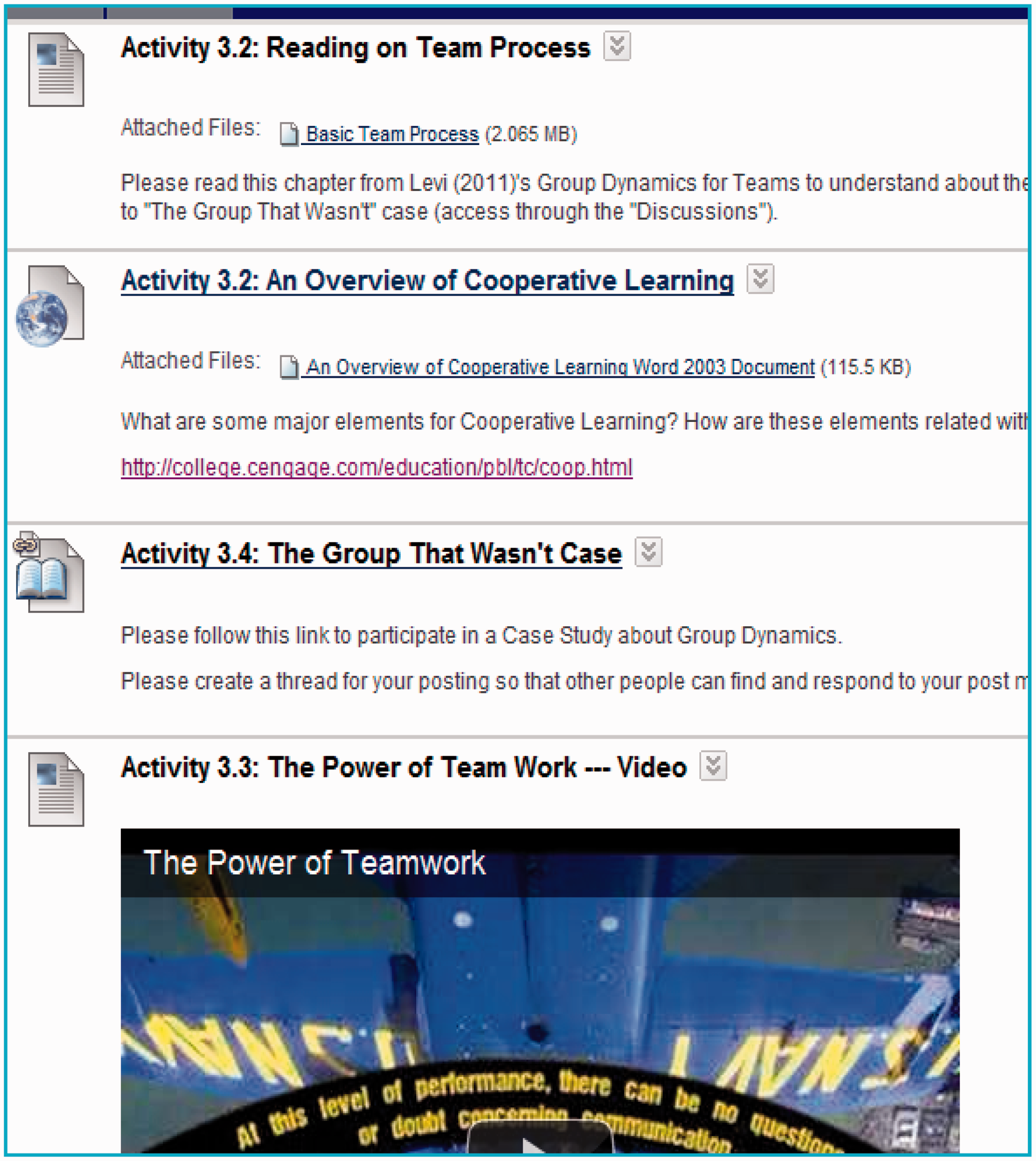
Concrete experience: going through Application Project I step-by-step
There were two application projects in this virtual teams course. The major objective of these projects was to provide students with an opportunity to participate in near real-world problem-based and guided experiential learning situations in which they may apply effective team leadership concepts.
During the first application project, 11 enrolled students were divided into two groups. Students were supposed to research one of the two topics: “The future of gaming in education” or “Web 2.0 and its impact on the education,” and to create a “lesson” to teach the class. The lesson should include a collaborative group presentation, at least five links to meaningful information about the topic, and a group reaction to the topic under investigation.
Google Sites was selected by the instructor as the collaborative work space for Application Project I. The instructor created a Google Site template for each group; students could modify it using the team name and logo that they negotiated in the process. They could also insert pictures and personal information to make the site more conducive to communication with each other and to create a demonstration of their team identity and efficacy.
This project had a specific duration of three weeks. Students were cautioned about the difficulty in group organization and communication due to the nature of a virtual team. They were encouraged to allocate a specific time to work on the project and to share their time constraints with their group as part of the introductory activity.
For the first project, the instructor selected a team leader for each of the groups. The team leader was supposed to be the one that contacted the instructor about questions and problems. The team leader had to make sure that everyone knew what was happening and when things were due. He or she should also manage certain aspects of the Google Sites page, for example, using a calendar to remind the members of their deadlines. Individual team members were encouraged to act responsibly and to contribute to the group.
Students received two grades for this project. One was an individual grade from peer evaluation, and another was a team grade, shared by each member of the team. The instructor had access to the group Google Sites pages so that she could see the activity or participation of each member clearly.
During Application Project I, the instructor provided a specific topic and guiding questions for research, designed a template Google Site, selected the group leaders, and offered training on Google Sites through demonstration and some online YouTube video clips. Thus, more scaffolding was provided than for Application Project II for students to go through the project step-by-step.
Active experimentation: practicing through Application Project II
The second application project had a similar structure for the setup, and students stayed in the same group that they worked with from the previous project. However, groups needed to set up their own virtual work space, select a team leader, identify one educational problem in or outside of the US, and write a proposal defining and solving each problem. This project had a specific duration of four weeks. Students were also required to create a team contract. During this project, less structure was provided, and students were required to apply the concepts and drill the skills they learned from various sources and the previous project to solve authentic problems.
Reflective observation: recording thoughts and experiences about virtual teams in a learning log and final case study
During the process of working on the application projects, students were required to conduct team observations. This assignment was intended to provide the students with the opportunity to develop knowledge and skills related to recognizing and understanding virtual team processes. Using guidelines provided by the instructor, students engaged in self-reflective journal writing through a private blog on the Blackboard course site on the roles and life cycle of their respective virtual teams. A minimum of two entries per week was required. Students were supposed to submit weekly peer evaluations for each group member through their reflective journal entry over the duration of the projects. This also ensured the instructor received adequate information about the team’s progress and enabled the instructor to provide assistance when necessary. Based on their observation notes collected from the blog, students developed a descriptive case study outlining the member and leadership processes observed at the end of the semester.
Findings: the impact of experiential learning
Learners’ experience from this course on virtual teams was evaluated on the basis of qualitative data derived from the following sources: notes made by the author as the researcher and participant observer (Patton, 2002), archives of the class activities, and student reflections from the blogs and descriptive case studies. Data were analyzed using content analysis to investigate whether participants were able to apply the knowledge and skills learned to real-world virtual team learning tasks and to triangulate with the findings from other data sources. Students’ learning about virtual teams was manifested through their collaborative artifacts as well as their reflections.
Collaborative artifacts
Both of the groups were able to successfully complete the major requirements for the application projects, to compile their research and to produce the artifacts for presenting their findings and reactions.
For the initial project, each of the teams conducted in-depth research and created a Google Site dedicated to the understanding of their respective topics, which were “Web 2.0 and its impact on the education” and “the future of gaming in education.” However, the two groups used the Google Site functions differently depending on their familiarity with the technology: one created a separate web page to answer each of the research questions and used the web platform to include images, hyperlinks and embedded media to display their research findings visually; the other mainly used their Google Site for creating a “what we share” page, project updates and a to-do list, and for posting their writing and presentation as attached documents.
For the second project, students were expected to pick an educational issue that was prevalent in the United States or internationally and to design solutions for the issues through a proposal. One of the groups selected “Parent involvement in the US schools.” Their major approach to the issue was to create a Google Site that parents could use as a resource to help their children. By actually creating a website with resources to address the needs identified, the group members developed an innovative solution during their transformation into a virtual team. They cohesively collaborated and cooperated to create an amazing website that educated the class, and could be used further to educate the public about parent involvement.
The other group selected the topic of “Poverty in South America and its effects on education.” They were able to create a very thorough written proposal on the solutions for the issue, and a much more elaborate Google Site than in their first application project. They learned to use the web page functions and were able to create a separate web page for each of the three sections of the major issue, and they used the web platform to include images, hyperlinks and embedded media to display their research findings and proposed solutions visually. Students transferred their knowledge and skills on virtual teams and Google Sites to a self-selected topic in the second application project.
Student reflections
At the end of the course, students created a case study about their respective virtual teams. In this case study they were asked to reflect on their experiences. They described what their team did well and what contributed to the success of their team. They also reported about the challenges in their teams and the solutions to the problems.
The positive attitude towards the experiential learning about virtual teams was noticeably evident in students’ reflections. Most of the students considered their virtual team productive with minimal conflict that was easy to get around. They overcame communication difficulties, geographic dispersion and time differences, and other deterrents that could have kept them from achieving their goals. After experiencing a five-hour time difference, intermittent internet access, and being behind with the project for several days because of travelling in London, a student stated that she “can easily understand how it could be challenging for students from different locations around the world to collaborate even in a virtual setting. Team members are forced to be more flexible and patient with one another.”
Students valued the opportunity to work on relevant, real-world meaningful topics, and to learn the most current technology tools, which might be beneficial for collaboration in actual daily life or work situations. They even appreciated the difficulties that they faced during the projects. As one student put it: The hurdles to team campaigning include physical geographic location and time constraints demanded by the summer term. Though both are a direct result of the nature of online programming, experiencing these issues first hand gives us an edge in designing effective instruction in virtual education. As someone who prefers to work solo, I can say that this has truly been a positive experience! I was apprehensive about being a part of a virtual team, but the people I had the chance to work with were supportive, friendly, and hard working.
Active team building
A traditional face-to-face group usually goes through four stages of development (Horvath and Tobin, 2001) to become a team: formation, development of team skills, development of management skills, and self-management. Virtual teams go through these stages as well, but the process evolves much faster than in face-to-face teams (Johnson et al., 2002).
To ensure the success of a virtual team process, administrators or instructors could use: (a) team-building exercises to encourage information exchange, to build trust and establish team identity (Jarvenpaa et al., 1998); (b) goal setting and strategic planning for task completion and achieving “shared mental models” (Powell et al., 2004); and (c) reflection on participants’ psychological profile and personality characteristics during the design of the team. These procedures might help alleviate the negative effects caused by ideological fear for collaborative experience.
First of all, in this Virtual Teams course, an elaborate self-introduction through a Blackboard discussion forum was used to gather information on learners’ psychological profile and personality characteristics. Some of the questions students needed to answer in the self-introduction asked about their location, progress in the program, employment, and experiences with instructional design, technologies and collaborative projects.
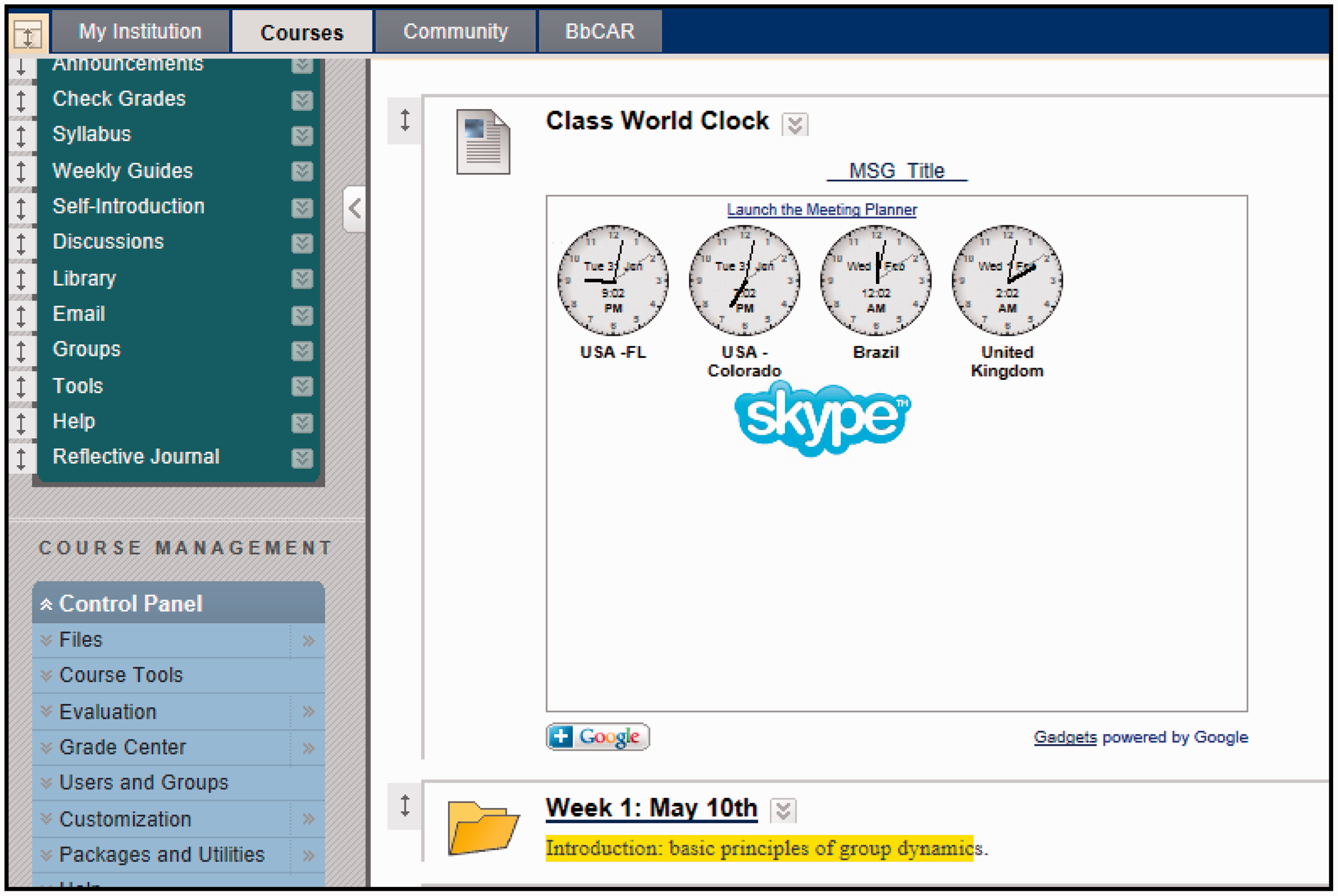
Based on students’ answers to these questions, it was found that most of the 11 students resided in that state, one of them lived in Brazil, and one of them lived out of state. Additionally, one of the students had a plan to travel to England during the semester. This was why we had four world clocks on the Blackboard course site. The technology and digital literacy level ranged from good to high. Most of the students had limited exposure to the phenomenon of virtual teams. These learner characteristics gleaned from the self-introduction were the basis for the design of the course as well as for selecting members of the student groups. For the first applications project, the instructor selected the students who were more experienced with instructional design and team projects and seemed to be more mature psychologically to be group leaders. The instructor tried to balance the distribution of students into groups using their geographical location, experiences, maturity, and technology levels as criteria.
Using a Google Map (Figure 2) and a Google gadget World Clock (Figure 3), every class member was able to mark out his or her location and time zone so that the group members knew where each person was located and when might be a better time to coordinate group meetings or activities. This was used to create a sense of a learning community and to make students more aware of the geographical dispersion and time difference, which are very likely issues in real-world virtual team projects.
Class Google map. Class world clock.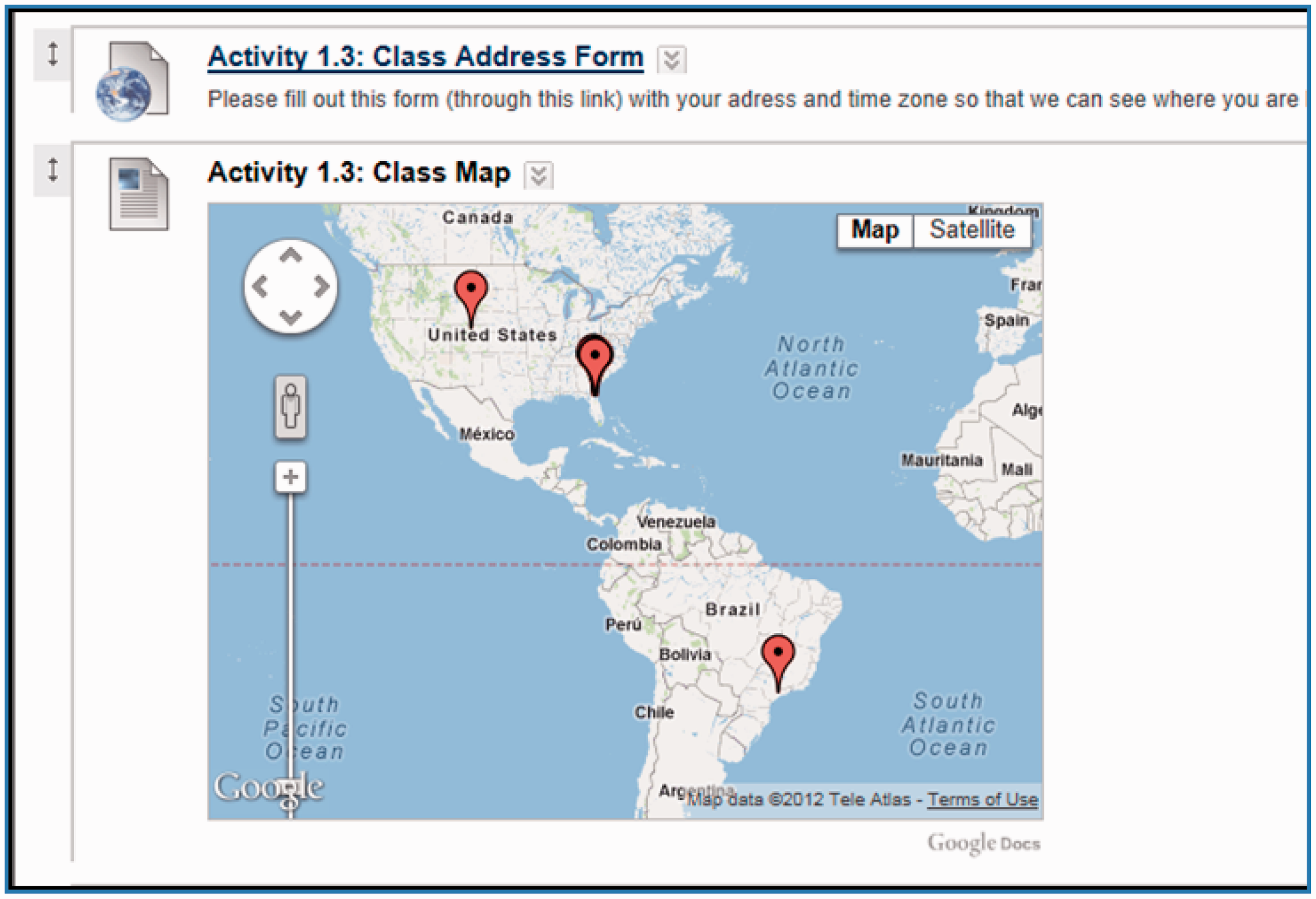
Team-building exercises were implemented through the design of a team name and logo, and creating a “what we share” page on a group Google Site. Students were first encouraged to find out personal attributes, e.g. hobbies, education, work and life experience, and even dreams they share with two other group members, and then post to the “what we share” page on the Google Site. Goal setting was achieved through composing and agreeing to a team contract and code of conduct. On a group Google Site, students enthusiastically created graphical images or narratives on the “what we share” page to identify the commonalities within their respective groups, displayed sophisticated team names and logos designed collaboratively to represent their collective identity, and established a team contract with the document posted and consented by everyone.
From students’ case studies it was found that each of the teams worked well together, or at least grew to be very cohesive. The module on group processes and team-building exercises were considered effective by the students. One student wrote: Much of the team’s success is a direct result of immediate, effective communication. By undertaking specific tasks for the course such as the personality test at the beginning of the term, studying Tuckman’s Stages for Group Development (1965) to understand the processes, and clear, concise communication such as that explained by Rebecca Jestice, PhD, the team showed signs of solidarity and trust rather than team complex.
As students learned that it is very important to establish the social relationship in the group, they engaged actively in activities for building rapport. During the first project, the group members got to know one another, and learned each other’s strengths and weaknesses. As one student described: During the first meeting, the team established rapport and effective communication through assigned activities such as “what we share” and the “team contract.” Because the team completed these activities, we established and maintained effective communication throughout the entire process of team building and project completions.
Most of the time, instructors do not provide training on the team processes or opportunities for team building when they assign students to complete group projects. This might be something that educators can consider adding to the instructional sequence. The ability and skills to work in a virtual group also need to be cultivated if graduate students in higher education, who are teachers and educational administrators, are to promote student reflection using collaborative tools and to model collaborative knowledge construction (ISTE, 2008).
Supportive communications and positive conflict resolution
To facilitate communication within groups, Senge et al. (1994) advocated we use two conversational forms: dialogue and skillful discussion. Jarvenpaa et al. (1998) recommended frequent and predictable conversation and regular feedback. Warkentin et al. (1997) suggested utilizing technology-enabled informal face-to-face contact early in the process, and Malhotra et al. (2001) proposed developing a protocol for coordination and employing communication training interventions.
In this Virtual Teams course, groups planned how often they would meet (virtually or physically) to work on the projects in their team contracts. Then they held group meetings through Elluminate web-conferencing sessions, and posted their meeting minutes on their respective Google Site for everyone to access. They uploaded their interim products to the Google Site for group members to review and to provide feedback. A group leader was in charge of coordinating the meetings and maintaining the communication flow.
The positive and supportive communication between group members was considered by students as another critical reason for the virtual team’s success. Group members were more aware of and more careful with tones of language to use and other forms of netiquette during interactions because they read and watched video clips about challenges in virtual team communication and conflict resolution. Students learned that they need to be more sensitive, courteous and proactive in their communication with group members.
Constant encouraging messages, with comments such as “great idea, we rock” and “nice job” were interspersed through both synchronous and asynchronous communication. One student illustrated this in detail: I think our team did a great job in listening to each other. We heard what everyone had to say and then tried to work through any dilemmas that came up. No one ever argued, or talked over someone on purpose to prove a point. My team was respectful in meetings and no one was ever singled out or made fun of. We all got along, and remained in constant communication with each other to eliminate miscommunication. We clarified ideas to ensure everyone was on the same page. We all trusted each other, and that trust was established from the first project. Everyone did a great job and did what they were supposed to, which built a solid foundation for project two.
In addition, groups had to deal with challenges such as conflicting time zones, scheduled travel plans, and technological glitches during the application projects. To diminish the negative effects caused by the time constraint, teams established a concrete timeline for specific actions to be completed regarding the overall project goal. Using the concept of “beginning with the end in mind,” the team increased effectiveness in time management.
Voting was used several times by one of the groups to resolve some of the contending issues, as one student described: There were several instances when team members contributed ideas or questions to the discussion. During these times, our leader would collect the ideas and the team would quickly and easily conduct a vote about the ideas on which we wanted to expand.
These solutions are practical and resourceful. They not only helped the teams complete the projects on time, but also made team members feel it was fair and professional. This experience has allowed the students, who were teachers and administrators, to engage in real-world problem-solving using digital tools and resources (ISTE, 2008).
Innovative use of technologies
To optimize the technical expertise in virtual teams, it is necessary to include sufficient knowledge building or searching gears and an invigorating environment for community development (Bitter-Rijpkema et al., 2002). Due to the variety of skill levels of members, a group may need to negotiate what specific technology to use for completing learning or job tasks (Sarker and Sahay, 2002). Overcoming technical uncertainty and challenges might even bring about the development of trust and collective identity/capabilities (Jarvenpaa and Leidner, 1999). Thus, we might need to encourage virtual teams to adapt technologies (Maznevski and Chudoba, 2001).
In this Virtual Teams course, Google Sites and Elluminate were selected by the instructor for the first application project because they allow for abundant knowledge searching and building functions and can be developed into an energizing environment for a learning community. For the second application project, the instructor did give the groups an opportunity to negotiate what technology to use for completing the tasks.
During Application Project I, students were required to learn to use Google Sites. This was one of the tasks for the groups. Students were encouraged to spend time studying how it works and ask for help from other teammates. The instructor also provided YouTube tutorial videos on Google Sites, to help students learn about this tool. Students could modify a project Google Site template created by the instructor. To make team communication and individual performance more observable and measurable, groups were encouraged to use the project updates page to keep a record of their conversations and daily happenings during the projects. It is actually a mini blog within the Google Sites. Groups were also encouraged to have a virtual “face-to-face” event through Elluminate for the first meeting.
These turned out to be effective decisions for technology selection; furthermore, some interesting use of technologies was noticed. Both groups stayed with the Elluminate option for group meetings because they preferred the human voice contact and more direct approach for solving issues. Though being unable to meet in person, the groups used Elluminate sessions to maintain an appropriate level of virtual “face-to-face” interaction. As stated by one of the students: By utilizing Elluminate Live through this course, our team was able to record our meetings, and when one of the members could not make the meeting, or were hours behind due to the time zones, they could always go back and catch all the information that was missed. Elluminate Live, Google, and emails provided the opportunity for Team Blue… to succeed this semester.
Both of the groups chose to continue with Google Sites as their overall working space to contain most of the written group interaction and products; however, their preference for various functions within Google Sites changed while they progressed through the completion of their projects. One group decided to use email and text-messaging for project updates instead of the Google Sites’ mini blog because all of the members had a smartphone or Personal Digital Assistance (PDA), and could operate more flexibly, as one of the students explained: Our team was great at communication. We utilized emails as the main method of communication. When a team member sent an email out everyone was copied on it. This method worked better than posting all questions, comments, or other communications on the Google Site’s update page due to the fact that many group members did not regularly check the site. With today’s technology emails are accessible by phone and other PDA devices. For our group, it was the optimal method.
It was observed by the instructor or researcher as well as students that group members were learning from each other on how to operate Google Site and Elluminate during the project process, and they consequently became closer in personal and professional relationships because they had developed trust in each other and improved collective capabilities. One student described how: “S2 was the resident guru for our Elluminate Live meetings, set up our meetings, and assisted anyone who needed it. Eventually, we all became better users of this virtual meeting system.” Consequently, S2 emerged as a leader in the first project and was elected leader for the group’s second project due to his expertise in leading in virtual environments and his experience with the virtual school. Using emerging technologies inside and outside this course ensured that teachers and administrators had the opportunity to engage in authentic problem-solving using digital tools and resources. These technologies not only enhanced course content but also motivated and encouraged students to participate in collaborative learning processes (Roodt and de Villiers, 2012).
Conclusion
This was an enlightening experience for the instructor or researcher to design, teach, and eventually witness online learning groups transforming into virtual teams. It was equally insightful to some students, as one of them noted: “I feel as if I will have a great advantage when taking online courses now. Your course allowed us to learn about virtual teams first hand, and while it was tough, it provided great insight.” Overall, this Virtual Teams course has provided students with successful experiential learning on group processes through computer-mediated collaboration because it was a continuous development grounded in experience emphasizing both process and outcome; it required resolution of conflicts during the process of knowledge construction, which was the result of the transaction between social and personal knowledge (Kolb, 1984). Over the duration of this course students learned how to work together effectively, developed professional relationships with each other, became more participative, and were appreciative of the instructor taking the facilitator role and guiding the groups through the process. Several students commented that their team was very cohesive and efficacious. As one of them stated: “It was a pleasure to work with the team, and there was a high level of trust and professionalism. In addition, the two projects provided excellent experiential learning about virtual teaming.” Through working on these experiential learning projects in this Virtual Teams course, the students, who were teachers and administrators in education, demonstrated the innovative knowledge, skills, and work processes required for professionals in a global and digital society and exemplified cultural understanding and global awareness through using digital-age communication and collaboration tools (ISTE, 2008).
Footnotes
Funding
This research received no specific grant from any funding agency in the public, commercial, or not-for-profit sectors.