




Abstract
This article is aimed at people who suffer from muscular dystrophy or amyotrophic lateral sclerosis. A webcam captures images of the user’s head, and the computer then processes these images to calculate and transform the swinging direction and distance of the user’s head into the position of the mouse cursor and into the action of clicking the mouse. To accurately and quickly recognize these features, this article used a round sticker with a diameter of 1 cm as an identification label, which is stuck on the user’s forehead. After the webcam captures the images, the program can recognize the positions of the identification label and move the mouse cursor. Through Windows API, this article determined the user’s intention and action of clicking the mouse on the basis of a series of movements to control the mouse cursor. As confirmed by the experimental results, the proposed assisted computer entry device for muscular atrophy patients is applicable and gives good results for the e-book reading program, use of the web browser, and the execution of the application software and mini-games developed by this system structure.
Introduction
Commonly known as periodic paralysis syndromes, muscular dystrophy (MD) and amyotrophic lateral sclerosis (ALS) are progressive and fatal neurodegenerative diseases. The patient’s muscles progressively deteriorate, gradually weaken and atrophy. The limbs and torso become powerless. However, the patient’s cognitive functions are unaffected. The patient still retains the same memory and personality traits as before the onset. Therefore, these wingless angels are fittingly called “imprisoned souls.” The computer can give these angels a space to play and let their spirits soar in the virtual world. They can write articles in the OFFICE suite software to express their emotions, and they can make drawings using Paint and reveal their inner world through watercolors rendered on the canvas. To enable their spirits to face this colorful world, anew is a worthy goal. In fact, patients with MD and periodic paralysis syndromes can use the computer like any ordinary person. But the limbs gradually atrophy as the disease progresses. The standard mouse becomes increasingly difficult to use. The market has many different kinds of mouse control, including blowing control, lip control, mouth control, head control, voice control, brain control, eye control, and so on. As described in the literature,1,2 sipping from the sip-and-puff mouse can toggle the left mouse button, drag, right-click, scroll, and do other functions.
Eye-tracking technology has been implanted into smartphones. In the future, people can just move their eyes to make the mouse move around on the screen. Blinking will start a game on your phone. Eye-tracking technology can be roughly divided into contact and non-contact. Contact types include search coil (SC)3,4 and electrooculography (EOG).5,6 Among non-contact types, infrared imaging systems are the most mature.7,8 Because the pupil is non-reflective, the infrared camera is pointed at the eye to capture an image. The center of the pupil is calculated from the captured image. When the non-infrared camera is used to capture images, various different algorithms are used to calculate the center of the eye or pupil from the images. For the persons with motor impairment, a man–machine interface can be developed with the eye-controlled mouse, which uses eye movements to control the computer mouse. This system can help patients with physical disabilities achieve communication and learning objectives and enjoy the fun brought by information technology. In the literature, 9 a human–machine interface system was researched and integrated with integrated eye control and head control to calculate the position of the center of the eye and record the trajectory of the eye’s movements. The system can also calculate the position of the center of the head and the coordinates on the screen that correspond to the head movements controlling the cursor. The system can handle all kinds of applications. In the literature, 10 a system of computer technology aids was designed for persons with disabilities to use a computer in a barrier-free environment. Head movements control the movement of the mouse cursor, while blinking signals control the key functions of the mouse, thereby enabling the handicapped to control the computer through the system.
Assistive computer input device for image recognition
System structure description
The computer and webcam capture images in the local range of the user’s forehead, and image processing then converts the moving directions and distances of the identification sticker on the forehead in the images, to control the mouse cursor position and execute the action of clicking the mouse button. This application is mainly aimed at people with MD or periodic paralysis syndromes and other limb handicaps. The muscles in both hands have completely atrophied and cannot properly operate the mouse and keyboard, but the head can swing normally, so these people can easily obtain hardware devices at inexpensive prices along with self-developed system software that provide computer assistive tools and input interfaces. The system is composed of four parts: a computer, webcam, identification stickers, and Windows API driver (refer to Figure 1).

System components scheme.
The system software program was developed using Visual Basic 2008 Express. Through Windows API, the program controls the webcam to capture images. After calculations are done on the images, again through Windows API, the program controls the mouse cursor position and generates the action of clicking the mouse button. In the present system of Windows API to control the webcam and the mouse, the Windows API and uses are described as follows:
Detect whether the webcam device is connected;
Establish control of the captured images;
Establish a connection with the webcam, capture the images taken by the webcam, and load the images captured by the webcam to the system clipboard;
Set the webcam resolution;
Control the mouse cursor position;
Generate the action of clicking the mouse button;
Generate the action of pressing the keyboard keys.
Image processing algorithm
The system operation uses the webcam to shoot images in the range of the user’s head, and based on the direction and distance of the swing of the user’s head, the program determines the position of the mouse cursor and executes the action of clicking the mouse button. In order for the swing of the user’s head to be determined, the feature points must first be defined and identified from the images. The contours of the head, facial position, facial shapes, hair style, skin tone, scars, and other factors vary greatly from person to person. To propose a set of image identification algorithms, this study identified feature points from different people’s facial images and made the complexity of the program quite high in order to accurately control the mouse cursor. In order to accurately and quickly identify the feature points, this study used a red round sticker with a diameter of 1 cm as an identification sticker that was affixed to the user’s forehead as a feature point. The forehead was confirmed to be located in the scope of images to be taken by the webcam, as shown in Figure 2.
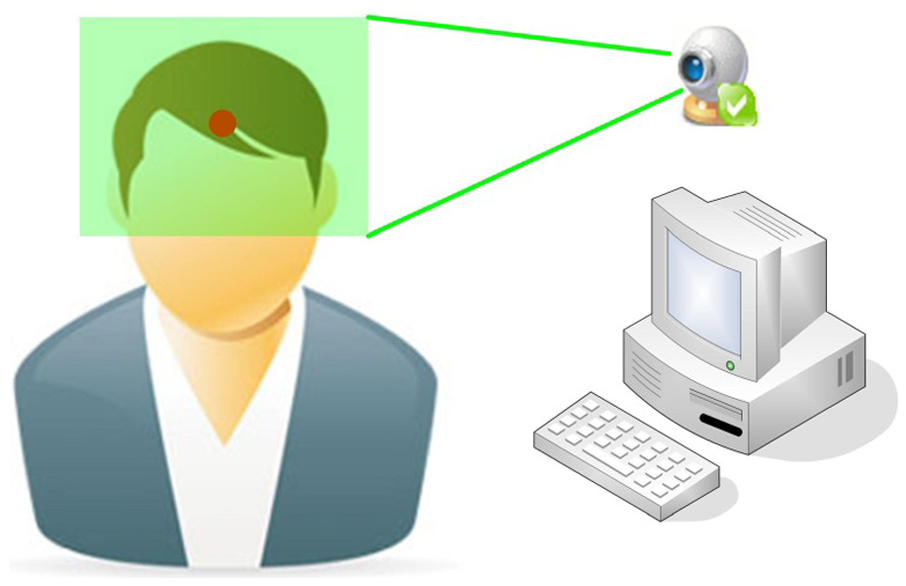
The scope of shooting images.
After the webcam captures the images, first, a 200 × 150 local image is retrieved from the original 1280 × 960 image. The local image is the image of a fixed position and contains the identification sticker on the forehead. This action is intended to ignore the positions where the identification stickers will not appear in order to save computing time of the program. Second, loops are used to obtain the RGB value for each pixel in the 200 × 150 image to determine whether the pixel was in the scope of the image of the identification sticker. The determination criteria is that if the R value component representing red in the pixel is over the threshold value of 150 (up to 255), and the G value component representing green and the B value component representing blue are less than the threshold value of 100, then this pixel is in the range of the identification sticker. The identification sticker adopted in this article is a red circular sticker of about 1 cm in diameter and is pasted on the forehead. As there is an obvious color difference between the sticker and the skin, and the captured 200 × 150 image includes only the local site of the forehead, other background images will not appear to interfere with the identification of the circular sticker. After several tests, the optimal threshold values of 150 and 100 of R, G, and B components were obtained to judge the red round stickers. Under this condition, the identification rate between sticker and skin was the highest. The assembly of pixels of the identification sticker obtained by the webcam camera is as follows

After the assembly of pixels (a total of n points) within the range of the identification sticker was obtained through the above criterion, the center coordinates


After the center coordinates

In addition to moving the mouse cursor, another action was clicking the mouse button. This system defined a specific mode of operation to identify the user’s intention to click the mouse button. This action is to let the mouse cursor stay still for a short time, and then the user makes a downward and then upward nod. When the image processing algorithms captured these continuous actions, the Windows API was called to generate the action of clicking the mouse button. First, after the program completed the calculation of the center position of the identification sticker and moved the mouse cursor, the program took the present center position

If the moving distance is greater than or equal to the jitter upper limit, it is determined that the user is moving the mouse cursor; if the moving distance is less than the jitter upper limit, it is determined that the user is keeping the mouse cursor stationary. The jitter upper limit is used to distinguish whether it is the user’s intention to move the mouse cursor or it is a movement generated by the user’s non-deliberate head jitter. The jitter upper limit set in this article is 5. When the mouse cursor is stationary, the program begins to accumulate the continuous times it is stationary. If the mouse cursor’s movement occurs before the fifth time, then the cumulative number of times is cleared and returned to the general state of no action. If the mouse cursor remains stationary for the fifth consecutive time, then the program enters the state of waiting for the mouse click. Then there are three possibilities. (1) If the next action is remaining stationary, then the program continues the state of waiting for the click of the mouse button. (2) If the following action is movement, then the program begins to record the action that occurred five consecutive times. Of the five times the action occurs, once the action of moving to the left or to the right occurs, it is determined that the user is inadvertently clicking the mouse button. At this time, the cumulative number is cleared and returned to the general state. (3) If the action that occurs five times is only the action of moving up or down or remaining stationary, and one action of moving down and then up is included, it is determined that the user wants to click the mouse button. At this time, Windows API is called to generate the action of clicking the mouse button.
Every time the program captures images and calculates the position of the cursor and the action of moving the cursor, the time wasted will be different due to the effectiveness of the CPU. When the mouse cursor is stationary for the fifth consecutive time, the program will enter the state of waiting for the key to be pressed, during which time the five consecutive actions will be recorded. The number of times determines the stationary time required and the speed of nodding. This part is subject to the effectiveness of the computer’s CPU and will be adjusted in association with the speed of the user’s head movements. Program execution will automatically detect the webcam device, establish a connection with the webcam device, set the resolution, and then begin to capture the image, and in accordance with the calculation principle described in the preceding paragraph of this chapter, the position of the mouse cursor is calculated and the mouse cursor is moved to it. Every time the location of the mouse cursor is calculated, according to the series of movements recorded of the mouse cursor, the program determines whether the user wants to click the mouse button. If so, then the Windows API is called to generate the action of clicking the mouse button. The flow chart of the program execution is as shown in Figure 3.

Flowchart of assistive computer input system program with image recognition.
System application and experimental results
In order to verify the feasibility of the system, the applicable direction and range of this system are presented here. A few examples will be cited to illustrate the ways the system is used, including the e-book reading program, use of the web browser, and the execution of the application software and mini-games developed by this system structure.
E-book reading
An e-book reading program was developed on the basis of the function of the “assistive computer input system with image recognition” for patients with MD to read books. The system design program focuses on a simple operating interface and enlargement of buttons as the design principle in order to facilitate users in their operation and enhance their degree of identification. The operation interface is divided into five areas: version information area, system messages and book content display area, book selection area, page switching area, and image display area. The version information area shows the program version information. When the program starts, the system messages and book content display area show the progress and state of the actions of detecting the webcam, connecting the webcam, setting the resolution, and loading book information. When the above actions have successfully completed, this area displays the book content. The book selection area provides users the function of replacing the books and ending the program. The previous or next book can be selected when a book is replaced. The page switching area offers the user the function of switching pages. The previous 10 pages, previous page, next page, and the next 10 pages can be selected. The image display area shows the images that the webcam has captured. The center of the identification sticker after being calculated by the program is marked with a cross in the image.
After the program is executed, it will automatically detect the webcam, establish a connection with the webcam, set the resolution, load the data of books, and then begin to shoot images and calculate and move the position of the mouse cursor. After each calculation of the location of the mouse cursor, based on a series of movements recorded of the mouse cursor, the program determines whether the user wants to click the mouse button. If so, then the Windows API is called to generate the action program of clicking the mouse button to replace the books or switch pages. The processes of the program execution are as follows:
After execution of the program, Windows API capGetDriverDescriptionA is called to detect whether there is a connection with the webcam (refer to Figure 4).
If the webcam connection is detected, Windows API SendMessageA coordinate is called to establish connection parameter WM_CAP_DRIVER_CONNECT to establish connection with the webcam (refer to Figure 5).
After connection is established and control is obtained, Windows API SendMessageA is called to coordinate, setting the resolution parameter WM_CAP_SET_VIDEOFORMAT. Resolution is set to 1280 × 960 (refer to Figure 6).
From the path of the book storage (folder named Books under the same path as the program execution file), data of books are loaded, and the data of the first page of the first book are shown in the book content display area (refer to Figure 7).
Windows API SendMessageA is called to coordinate parameters WM_CAP_GRAB_FRAME and WM_CAP_EDIT_COPY to obtain images taken by the webcam. The local 200 × 150 image is captured and displayed on the bottom right of the screen, and after the center points of the identification stickers and mouse cursor locations are calculated, Windows API SetCursorPos is called to move the mouse cursor position (refer to Figure 8).
The user swings the head to control and move the mouse cursor to the location of Next Book. The key automatically turns white (refer to Figure 9).
The user controls the mouse cursor to stay on Next Book for a short while, entering the state of waiting for the key to be pressed (refer to Figure 10).
The user controls the mouse cursor and make a downward and then upward action. The system determines that the user wants to press the mouse button and calls Windows API mouse_event to generate the action of clicking the mouse button and change to the next book (refer to Figure 11).
The user swings head to control and move the mouse cursor to the position of Next Page. The button automatically turns white (refer to Figure 12).
The user controls the mouse cursor to stay on Next Page for a while and enters the state of waiting for the key to be pressed (refer to Figure 13).
The user controls the mouse cursor and makes a downward and then upward actions. The system determines that the user wants to press the mouse button and calls Windows API mouse_event to generate the action of clicking the mouse button. This turns to the next page (refer to Figure 14).
Repeat steps 9, 10, and 11. Switch again to the next page (refer to Figure 15).

Detecting the webcam.

Establishing webcam connection.

Setting webcam resolution.

Loading and displaying book data.

Calculating and moving the mouse cursor position.

Controlling the mouse to prepare to change to the next book.

Entering the state of waiting for the key to be pressed.

Changing to the next book.

Controlling the mouse cursor to prepare to change to the next page.
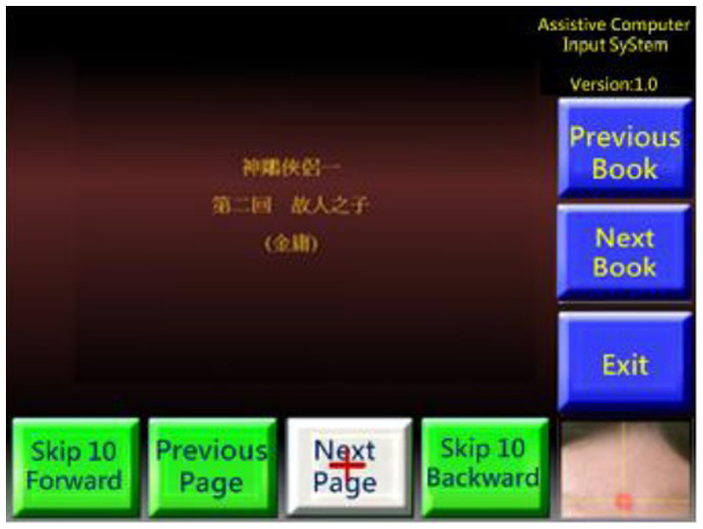
Entering the state of waiting for the key to be pressed.

Changing to the next page.

Changing again to the next page.
In the part of e-books, the data of books must be arranged in advance. In the same path as the program execution folder, a folder named Books is created to store the data of books. In this folder, the data of each book are stored in separate folders, and each page is a file. The archive name is a four-digit number, arranged in sequence from 0000 to 9999. In the selection and toggling of books, the program shows all contents of archives with the name 0000 in each book folder. When switching pages according to the numerical order of the archive name, the program moves to the previous or next page. Currently there are two models of book data archive: the first model stores data in plain text files. Contents of the appropriate length are retrieved from the original text and after arrangement in sequence are stored as a plain text file with the file name extension .txt. After the program reads the contents of the file, it sets a fixed size of the text to display in the books content display area. The other model stores data in image files. Each page of the original text is stored as an image file with a file extension name .jpg. After the program loads the image file, it is automatically scaled and displayed in the books content display area. The examples and implementation part proposed in this thesis were all conducted with plain text files.
Before executing the program, first the identification sticker is pasted on the user’s forehead, and the site on the forehead is confirmed to be located in the image scope captured by the webcam. The program after execution will automatically detect and set the webcam and then load the book data. When the contents of the first page of the first book are displayed in the books content display area, and the captured images appear in the image display area, the user can start to swing his or her head to control the mouse cursor. To switch pages, the mouse cursor can be moved to one of these buttons: the last 10 pages, the previous page, the next page, and the next 10 pages in the page switching area. After the mouse cursor has stopped for a short while, then nod downward and then upward to click the button and switch the page. To change the book, move the mouse cursor to the button of the previous book or next book in the book selection area. After the mouse cursor stays still for a short while, make a downward and then upward nod to click on the button and change the book.
Use the Internet explorer browser for Internet access
The “assistive computer input system with image recognition” can be used to operate the Internet Explorer browser for browsing the web. To allow users to more easily operate the browser, the font in the settings of the Internet Explorer browser can be set to the maximum. After enlargement of hyperlinks and selected text in web pages, users can more easily and accurately click the project to be executed. The steps to access the web browser functions are as follows:
After the program is executed, Windows API capGetDriverDescriptionA is called to detect whether there is a connection to the webcam.
After the connection to the webcam device is detected, Windows API SendMessageA is called to coordinate with connection parameter WM_CAP_DRIVER_CONNECT to establish the connection with the webcam.
After the connection is established and control is obtained, Windows API SendMessageA is called to coordinate with the resolution parameter WM_CAP_SET_VIDEOFORMAT to set the resolution at 1280 × 960.
Windows API SendMessageA is called to coordinate with the parameters WM_CAP_GRAB_FRAME and WM_CAP_EDIT_COPY to obtain images taken by the webcam. The local 200 × 150 image is captured, and the identification sticker is identified from the image.
The point assembly of the identification sticker is used to calculate the center point of the identification sticker.
The mouse cursor position is calculated, and Windows API SetCursorPos is called to move the mouse cursor to the location.
The user swings the head to control the mouse cursor and moves the mouse cursor to the location to click on.
The user controls the mouse cursor to stop for a short over the hyperlink to be clicked. The program enters the state of waiting for the key to be pressed.
The user controls the mouse cursor and makes a downward and then upward actions. The system determines that the user wants to press the mouse button and calls Windows API mouse_event to generate the action of clicking the mouse button. The program changes to the next page (refer to Figure 16).
In the same manner, the mouse cursor is controlled to click the mouse button. The program again changes to another page (refer to Figure 17).

Changing to the next page.

Changing to another page.
Operations of the application program
This system can be used to execute application programs with a simple operation mode. Figure 18 shows a video player. The user clicks the left mouse button to play the movie from the movie menu and then moves the mouse cursor to the play button in the left control panel and clicks the left button to start watching the movie. In the process of playing the videos, the same control model can be used to play, pause, stop, and perform other operations.

Video player software.
Operation of computer games
The “assistive computer input system with image recognition” can be used to play simple mini-games. There are many simple and free mini-games on the Internet. Figures 19 and 20 show a type of racing game. This game just requires the use of the left and right buttons to control the racecar. Pressing and holding the left button moves the car to the left. Pressing and holding the right button moves the car to the right. Releasing the left and right buttons makes the car go straightforward. To cope with operation mode of this game, the part of the system program was slightly modified. After each image was captured and the center point of identification sticker was calculated, the x-coordinate of the center point of the identification sticker was taken as the determination condition. If x is between 0 and 70, Windows API is called to generate the action of pressing down the left button. If x is between 131 and 200, Windows API is called to generate the action of pressing down the right button. If x is between 71 and 130, Windows API is called to generate the action of releasing the left and right buttons. If the captured image cannot identify the identification sticker, then Windows API is called to generate the action of releasing the left and right buttons. After these modifications, the head turning left, right, and returning to the center can control the racecar to move to the left, right, or straight ahead, respectively.

Performing screen 1 of racing game.

Performing screen 2 of racing game.
There are still a few restrictions and requirements on the actual operation. Synthesize the above four experimental results can be discussed as follows:
The sensitivity and finesse of the mouse cursor used in this system are slightly lower than those of the traditional mouse. In order to allow users to more easily operate, the buttons and options and other objects in apps need to be enlarged as much as possible. The operation interface also needs to be as simple as possible.
When the system program is determining that the user clicked the left mouse button, the user needs to be stationary for a short period of time and then make a downward and then upward nod actions. The duration of being stationary and the speed of nodding are subject to the effectiveness of the computer’s CPU, and the user of the system may not be as flexible as the average person when controlling the swinging of the head; therefore, this part is subject to the effectiveness of the computer’s CPU in actual use. To coordinate with each user’s speed of head movement, parameters can be adjusted in the program.
The current system can control the mouse cursor position and generate the action of clicking the left mouse button. If the application program requires other operations, such as clicking the right mouse button on a general mouse, clicking on the mouse’s middle button and then pressing down on the mouse button to drag, clicking the mouse button in quick succession, turning the mouse wheel, and so on, they are currently not applicable to this system. How various operation modes are defined can make the user’s intention more clearly and quickly determined without increasing the complexity of the operations.
The above actions were made to make the system more perfect. Moreover, in addition to replacing the traditional mouse, the function of the text input in this framework can be extended to give greater benefits to physically disabled users of computers.
Conclusion and future works
The purpose of this study is to provide people with limb disorders a new assistive program that provides an input and control interface for users who cannot easily control the computer’s mouse and keyboard. The mouse is replaced by head movements to operate a computer to read, listen to music, watch movies, surf the Internet, play games, and other activities to achieve communication and entertainment functions. The principle of the operation of the system is the use of a red round sticker with a diameter of about 1 cm as an identification sticker, which is affixed to the user’s forehead as a feature point. From the images in the scope of the user’s head captured by the webcam, the program calculates and transforms the directions and distances of the swings of the user’s head and converts to control the position of the mouse cursor and perform the action of clicking the mouse button. The operation of this system is currently based on the user’s head movements to control the position of the mouse cursor and is based on a particular movement mode of the mouse cursor to generate the action of clicking the left mouse button. In this article, the webcam is adopted to be image input. It will be interfered the detection precision, because there are a lot of light source problems in the nature. When the light source is too bright or dim, it will result that the color of the sticker will be similar to the skin color. The light source problems in the nature will reduce the precision of identification. How to reduce or remove the influence of the light will be our future work. Also, developing a system interface with applicable text is another target for future study.
Footnotes
Academic Editor: Stephen D Prior
Declaration of conflicting interests
The author(s) declared no potential conflicts of interest with respect to the research, authorship, and/or publication of this article.
Funding
The author(s) received no financial support for the research, authorship, and/or publication of this article.