



Abstract
This study investigates the implementation of Industry 4.0 paradigms in the context of smart paint manufacturing, focusing on process control and recipe management through the integration of Ignition SCADA, a Siemens programmable logic controller (PLC), and a MySQL Workbench database. The developed architecture employs Ignition as an interoperable communication interface that facilitates bidirectional data exchange between the PLC and the database, thereby establishing a cyber-physical system for automated monitoring and control. The digital recipe management module formalizes paint formulations into parameterized datasets specifying paint and solvent ingredient ratios, process variables, and operational constraints, which are executed autonomously by the control system to ensure uniformity, traceability, and adaptive process optimization. The simulation framework replicates real-time production dynamics, addressing variability in raw-material supply and process conditions through data-driven feedback mechanisms. The results demonstrate the feasibility of achieving enhanced process efficiency, product quality, and scalability via the convergence of SCADA, PLC, and database technologies within an Industry 4.0 environment. This work contributes to the advancement of smart manufacturing methodologies and provides a replicable model for digital transformation in process industries.
Keywords
Introduction
The rapid advancement of technology in today’s globalized world has significantly benefited the paint industry, leading to improvements in convenience, process optimization, and time efficiency. Paint consists of pigments suspended in a liquid or paste, known as a vehicle (e.g. oil or water), providing protection, preservation, decoration, and enhanced functionality to surfaces. The composition of paint influences its properties, applications, and classifications. 1 Typically, paint contains water, a polymeric binder, and fillers, with additives like coalescents, thickeners, dispersants, and defoamers to ensure stability and optimal application properties. 2
Batch processing
Batch processing is a key method in paint manufacturing, combining raw materials such as pigments, binders, solvents, and additives in specific quantities according to formulation recipes. These materials are mixed in specialized equipment to ensure uniform dispersion and blending. This process enables efficient production, quality assurance, and customization of formulations to meet customer requirements. 2
Recipe management
Recipe
A recipe consists of a list of ingredients and a sequence of actions applied to those ingredients. While ingredient lists are typically structured, preparation instructions in natural-language text require preprocessing for computational systems to organize the steps efficiently, such as the statistical language model and Perplexity metric published by Dos Santos et al. 3 In manufacturing, recipe management streamlines paint production by digitally organizing precise formulations for consistent, high-quality output. It facilitates modification to meet varying requirements and standards, improving productivity, reducing errors, and ensuring precise control over the production process. A recipe contains information about Batch_Color, Batch-Size, Batch_ID, ratios of Red, Blue, Yellow, Black paints, as well as Petroluem_Mineral, Benzol, Additives, and Sand. The SCADA systems provide operators with an intuitive interface for managing and monitoring paint formulas. Integration with the Siemens 1200 PLC enables smooth communication and real-time control of critical parameters, ensuring reliable and efficient production. This connectivity is vital for enhancing operational efficiency, minimizing errors, and maintaining product quality.
Recipe management
Recipe management refers to the systematic organization, storage, and retrieval of production recipes in manufacturing environments. A recipe defines the materials, quantities, and procedures for producing a specific product. Such systems are widely used in industries like food and beverage, pharmaceuticals, chemicals, and manufacturing. 2
Paint manufacturing
Paint manufacturers face challenges in managing an increasing number of products with varying demand patterns. This requires a strategy that accommodates both mass production and specialty products while adapting to changing recipes. 4 The integration of smart technology and real-time data insights will further enhance recipe management by improving accuracy, adaptability, and sustainability.
The proposed recipe management system for this project focuses on the production of colors (black, red, blue, and yellow). The paint production process involves four stages 5 : scheduling, manufacturing, packaging, and delivery. The five key steps in paint manufacturing are 5 : preparation of raw materials, pre-mixing, dispersing and grinding, blending, and filtering.
In addition to the overall paint production process shown in Figure 1, a more illustrative representation in shown in Figure 2, the paint manufacturing process begins with the storage of essential raw materials like resins, solvents, oils, and tints in a tank farm. These materials are then accurately measured and mixed with pigments at the metering deck to achieve the desired color and properties. The mixture is transferred to pre-mix tanks for initial blending and then processed in a dispersion mill, where pigments are finely ground and uniformly dispersed. Afterward, the mixture is diluted to achieve the desired viscosity before being transferred to a filling machine, where it is packaged into various containers. The containers are labeled with product and safety information, packed for transportation, and finally shipped to distributors or customers. 6

Overall paint production process.

Paint mixing process flow. Figure adapted from North Ridge Pumps. 7
Literature review
Dos Santos et al. 3 conducted research on creative culinary recipe generation using statistical language models. They proposed utilizing statistical models and the perplexity metric to generate culinary recipes. The system employed two approaches: the first based on genetic programming guided by the language model, and the second involving decomposition and recomposition of existing recipes through a genetic algorithm. The latter approach yielded the best results. Even though this intelligent interfacing approach can be integrated into the paint production system presented in this work, we assumed the recipes are predefined and selectable by the process operator from the SCADA interface. Rotstein et al. 4 analyzed and designed paint manufacturing processes using a two-stage approach. Initially, an optimization model identified two cost-effective design scenarios, followed by further analysis under detailed operational constraints. The findings suggest that a combination of mass production (large batch sizes) and responsive (small batch sizes) facilities offers the most optimal strategy. Their mixed-integer linear programming (MILP) model proved effective in solving problems typical of consumer goods manufacturing, which often involves numerous products.
Wing et al. 8 developed a food and beverage recipe generation system designed to assist adults in making daily consumption decisions efficiently. The system focuses on time efficiency and convenience, offering personalized meal suggestions that address user concerns such as decision-making, information overload, and behavior modification, ultimately improving user habits.
Inagawa et al. 9 explored Japanese recipe interpretation for motion process generation in cooking robots. Their method automatically generated cooking procedures and movements using a robot arm, based on the analysis of Japanese recipes. Experimental results confirmed the method’s effectiveness in generating the required operations for cooking.
Younas et al. 10 conducted research on designing a human-machine interface (HMI) for controlling a vehicle’s electronic fuel injection (EFI) engine using Siemens PLC and SCADA. Their real-time control scheme monitored and controlled sensors of a diesel engine, utilizing Siemens S7-300 PLC and WinCC Flexible HMI to test the system’s effectiveness in addressing environmental concerns and petroleum cost increases.
Tamir et al. 11 developed a SCADA system to monitor and control liquid and detergent factories, featuring a graphical user interface (GUI) available in English and Amharic. Simulation results demonstrated smooth interaction among sensors, actuators, SCADA hardware, and HMI software, with rapid stabilization of tanker levels via proportional-integral (PI) controllers, reaching a steady state in 0.15 s.
Tomar and Kumar 12 proposed an industrial automated system based on PLC and SCADA, focusing on the bottle-filling process in the beverage industry. Their simulated prototype enhanced productivity by automating tasks such as container sorting, liquid filling, and labeling using sensors. This approach improved efficiency and ensured consistent product quality.
Nadgauda and Muthukumaraswamy 13 designed and developed an industrial automated system using PLC-SCADA for remote monitoring and automation. The study compared barcode technology and crane automation for effective warehouse management, showcasing the durability and flexibility of PLC-SCADA systems in bottle-filling operations and broader industrial applications.
Basile et al. 14 discussed the implementation of industrial automation systems based on PLCs, focusing on the challenges of existing IEC 61131 standards. They introduced an event-driven approach using Petri nets for improved system design, encapsulating basic sequences as services and enhancing coordination in distributed systems through a supervisor.
Endi et al. 15 explored a three-layer PLC/SCADA system architecture in process automation and data monitoring. The study simulated a boiling system using National Instruments’ LabVIEW for supervision, Siemens PLCs for process control, and a simulation unit for field instruments. The Open Platform Communications (OPC) service protocol regulates and maintains interoperability standards for industrial data communications was employed to address compatibility issues between different vendor tools, demonstrating a comprehensive SCADA system design. Alternative industrial communication protocols include Modbus TCP/IP, known for its simplicity and legacy compatibility; EtherNet/IP, which provides high-speed communication and integration with Allen-Bradley systems; PROFINET, commonly used with Siemens automation for deterministic control; and MQTT, a lightweight IoT-oriented protocol optimized for transmitting industrial data to cloud platforms. Each protocol offers trade-offs in terms of openness, determinism, scalability, and cybersecurity. This work utilizes PROFINET for it’s seamless integration into the Siemens tool chain used in this PLC-SCADA simulation.
Bejan et al. 16 explored the “SCADA Automation System Laboratory,” focusing on SCADA architecture and application development. The study involved controlling an induction motor via HMI in manual/automatic modes, utilizing industrial communication protocols like PROFIBus and Ethernet for comprehensive learning.
Kermani et al. 17 highlighted PLC-based control for microgrids using SCADA, emphasizing the flexibility of PLCs in automation. Siemens PLC S7-1200 and TIA Portal V15 were used for controlling microgrids in grid-connected and islanded scenarios, showcasing SCADA’s role in distributed power generation.
Al Yusuf 18 developed a PLC and SCADA-based thermal control system with auto-tuning using an OMRON PLC and Citect SCADA. The system successfully regulated temperature in a thermal process, demonstrating SCADA’s effectiveness in monitoring and control.
Hadi and Sallom 19 integrated SCADA and HMI for real-time monitoring of a pneumatic production line. Using Siemens S7-1200 PLC, TIA Portal V15, and LabVIEW HMI, their system enhanced performance and error localization through OPC server communication.
System architecture
Programmable logic controller (PLC)
Programmable logic controllers are industry hardened computers that use integrated circuits instead of electromechanical devices to control an industrial process. They are very rugged, easy to use, and their speed of operation is high. PLCs are being used in every industry because they are cost effective, reliable, and flexible.20–24
Communication interface
The SIMATIC S7-1200 has the integrated PROFINET interface which can be used to program, HMI communication and communication among PLCs, and Ignition System. Meanwhile, the SIMATIC S7-1200 also can be used in several networking options capabilities, and therefore the centralized monitoring and tag access can be achieved. 25
Siemens 1200 PLC & TIA Portal software
TIA Portal (Totally Integrated Automation Portal) is a redefined automation concept, platform. It’s mostly used for PLC programming and simulation operations. It supports multi-SIMATIC S7-1200, S7-1500, S7-300/S7-400 controller and the speed of the software has been increased. 26
Ignition system software
The SCADA interface will be created using the Ignition software platform. Ignition is installed on the personal computer as server software. It is entirely web-based, and the Ignition Designer and Ignition Clients are web-launched on the computer that has the license installed (Figure 3).
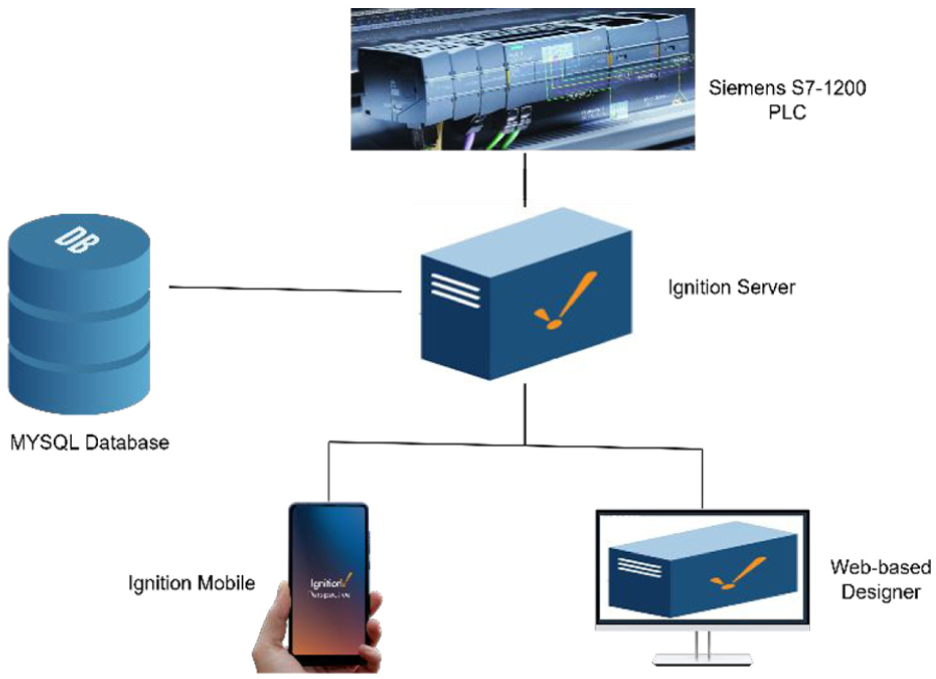
Ignition SCADA network connectivity.
The Designer is the graphical development environment for creating the interface. The Clients are the interface windows. Ignition uses the Siemens PROFINET to communicate with the Siemens S7-1200 PLC over Ethernet. PROFINET connection created in the Ignition Gateway. The Gateway is the web browser-based control panel of Ignition, where many different things can be configured. The Gateway is where the Designer and Clients are being launched. 27
Within the settings of the “Siemens 1200” Tag connection, the Hostname will be set to the PLC’s IP address. This established the connection between Ignition and the PLC. The main benefit of Ignition is that it is very flexible and easy to use. It can seamlessly connect to the PLC through EtherNet Connection; however, it has multiple avenues for communication as well.
SCADA interface design
For users, the main benefit of moving applications such as SCADA to the cloud lies in the potential cost savings and reduced setup time. Ignition SCADA system is a SCADA solution that has been built from the ground up using Java to take advantage of cloud features. Ignition interfaces with most Programmable Logic Controllers (PLC), allowing users to take advantage of existing sensors/actuators. Ignition users do not maintain hardware themselves; instead, they access systems remotely via web interfaces. Users are charged based on the number of servers used instead of via software licensing fees. Ignition allows users to customize their architecture by choosing to deploy components individually. 28
Project setup and implementation
Paint project programming on TIA Portal
A new project is created on the TIA Portal and CPU 1214C AC/DC/Rly is selected as summarized in Figure 4. The IP address of the PLC is set on the Hardware configuration page. Furthermore, the paint process programming is implemented using a ladder logic PLC programming language. Also, four global Datablocks (DB) are created for the BLACK, BLUE, RED, and YELLOW paints, which represent the tags for the paint Recipe. The communication setup from the PC to Siemens PLC is with the use Ethernet cable. Function Blocks (FB) are used to create the process algorithm, which were called in the OB1 (Organization Block). Multiple lines of ladder logic of code network were written to implement this paint process. Function Block (FILL_EMPTY) is named FILL_EMPTY as shown in Figure 5. This is used to handle various tasks related to filling and emptying processes in the paint production. The ladder logic checks the Batch_ID value. The left side of the ladder logic shows conditions related to the IGNITION_COMM.Recipe.Batch_ID. The logic checks whether the Batch_ID is valid, that is, 1 ≤ Batch_ID ≤ 4, as there are four valid Batch_ID values: 1, 2, 3, and 4 as listed in Figure 6. This determines if a specific batch recipe should be executed based on its ID.

Function blocks and datablocks in Siemens TIA Portal project tree.
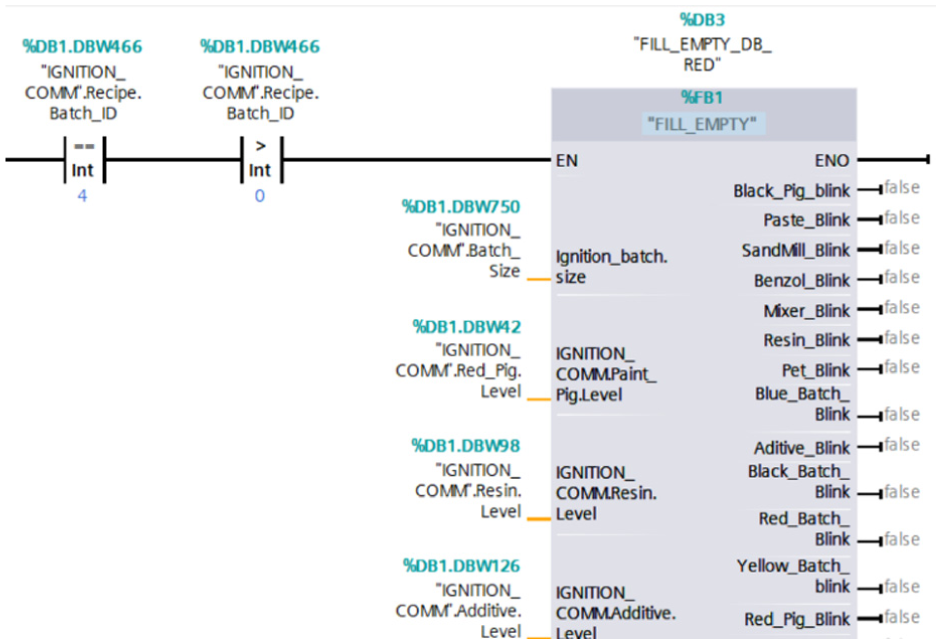
A custom function block in Siemens 1200 PLC ladder logic for paint process control.

Paint recipe value database in the MySQL Workbench.
The process feedback is implemented through various variable values relayed from the SCADA server to the PLC ladder logic. These include recipe patch ID, batch size, pigment level, resin level, and additive level, as shown in Figure 5.
MYSQL WorkBench
The ignition platform offers the option to interface to the SQL Databases. A MySQL database was created for the paint recipe which consists of the paint names and recipes value as shown in the Figure 6. Storing recipe values in a MySQL database is essential for maintaining consistency and quality in paint manufacturing process. It ensures that each batch is produced according to precise specifications, enabling uniformity and high standards across all products. Additionally, a database allows for traceability, aiding in problem-solving and regulatory compliance. It enhances efficiency by enabling quick retrieval and updates of recipes, supports scalability as production needs grow, and facilitates data analysis for process optimization and innovation.
Ignition: Create a Paint project
The Paint project was created on the Ignition designer through the web-launching, and the database from the MySQL was selected.
Ignition communication setup for the Paint project
The Bridge gap between the OPC data and SQL databases. Log data, call stored procedures, and synchronize data bi-directionally. SQL Bridge includes a highly efficient SQL-based Tag historian and transaction manager.
Connecting Ignition to Siemens PLC
From the OPC Unified Architecture (UA) module, a new device was created, and Siemens S7-1200 PLC was selected, which provides the option communicate over EtherNet with the Siemens PLC IP Address. This allows the ignition to establish connections with Siemens with the Status showing “Connected,” and Enabled showing “true” as shown as Figure 7.

S7-1200 PLC connections on Ignition.
Connecting Ignition with MySQL Database
From the Ignition Config section, MySQL Database was created with the name “Paint_Project” which enable the ignition to communicate with the Paint Recipe database created on the MySQL Workbench through the JDBC driver. The successful of this connection shows “Valid” under the status of the Database connections as shown in Figure 8.

Database connections on Ignition.
Ignition tags
The Ignition tag browser offers the flexibility to access the tags linked from the PLC program to the Ignition project and can be easily used for the configuration functions on any created vision or perspective screen as shown in Figure 9.
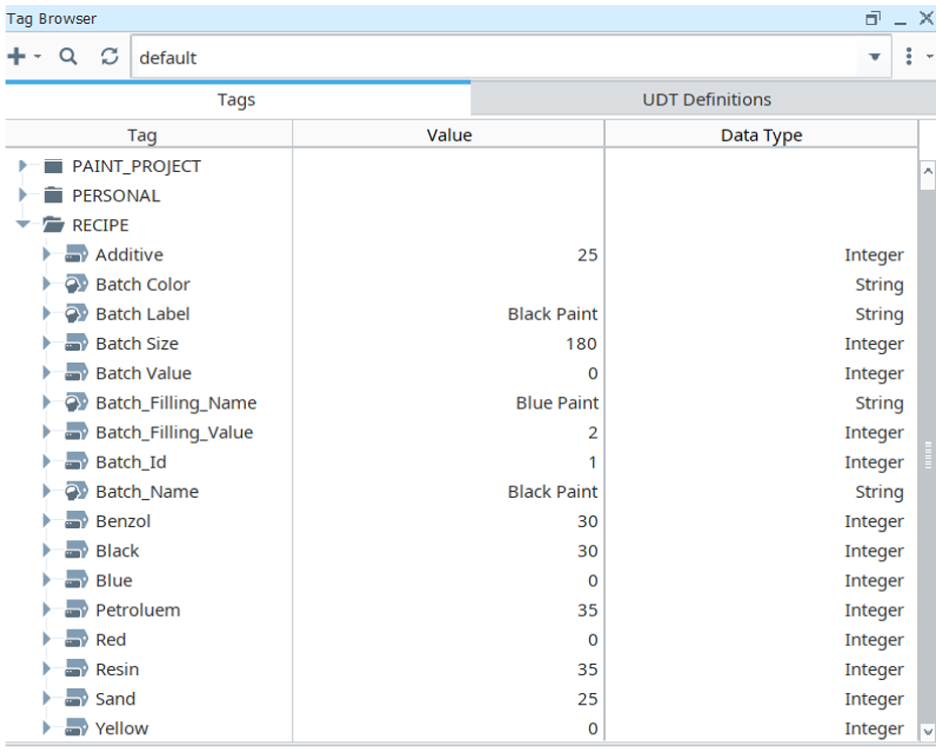
Tag browser for paint project in the Ignition designer.
Ignition paint recipe management and synchronization
A Transaction group named “Paint_Recipe” and “Filling” were created from the Ignition browser of the paint project as shown in Figures 10 and 11, respectively. These provide Siemens 1200 PLC devices connected to Ignition with associated information stored in the MySQL database. The enabled button must be enabled during runtime for effective communication and data transfer. The Transaction Group configures data logging and communication synchronization between the PLC, SCADA system, and the SQL database. These groups are user defined based on the process being controlled. The data consistency and bidirectional synchronization between the Ignition server and MySQL database are ensured by the SQL Bridge Module (using transaction groups), which bridges OPC data to the database via JDBC. Transaction groups represent the core functionality of the SQL Bridge module. Acting as dedicated execution engines to facilitate real-time bidirectional synchronization of database records with OPC tags and the dynamic loading of recipe parameters.

Ignition SCADA Transaction group: Paint_Recipe.

Ignition SCADA Transaction group: Filling.
Ignition Paint screens design
After the project has been created, connection and database setup have been implemented, the visual representation of the paint process were designed, and tags were configured according. Furthermore, six screens were under the windows section of the Vision of the Ignition Project Browser as shown in Figure 12. These screens include HOME, FILLING, LOGIN, MIXER, NAVIGATION, PIGMENT, STORAGE, and UTILITY.

Ignition SCADA Project Browser: Vision Windows.
HOME Screen: This is the main screen displayed after the user logs into the Ignition system. The HOME screen shows the levels of paint recipes and the quantities of paints (Blue, Black, Red, Yellow) produced for each batch process. It includes buttons to “Initialize,”“Start Batch,” and “RESET” the process. Additionally, there is a drop-down list button for selecting the paint to be produced.
PIGMENT Screen: This screen visualizes the pigments, resin, and additives once the process is initialized, and the paint recipe tag values are loaded. The selected recipe components are mixed to form a paste before being pumped to the Sand Mill tank.
MIXER Screen: This screen displays the SAND-MILL, FILTER, BENZOL, and MIXER. The processed material is then pumped to the storage tank for further processing.
STORAGE screen: This screen consists of the Four Storage Tanks (Blue, Red, Yellow, Black). Each tank can store paint produced from two batches before it comes full. This design choice is made as an example. Large tank capacities can be simulated using the same approach.
FILLING screen: The screen consists of where the paint produced will be filled in the pails. Four filling valves can be filling at the same on the conveyor system. The filling will be done once the conveyor stops.
The HOME screen and FILLING screen have a drop-down list, initialize button, start button, and reset button.
Drop-down component: The drop-down list component enables operator to choose any of the paint to be produced, while momentary buttons (Initialize, start button, RESET) are used to interact with the process (Figure 13).

Ignition SCADA drop-down list and momentary buttons.
Screen Navigation option: This provides operators or ignition users the flexibility to navigate from one screen to another as shown in Figure 14. This component was created using the “Tab Strip” on the Ignition designer and it is common to all the screens as user navigate between screens (HOME, PIGMENT, MIXER, STORAGE, and FILLING).

Navigation screen.
Result and discussion
The result for the successful for implementation project shows the HOME screen in Figure 15, PIGMENT screen in the Figure 16, MIXER screen mixing the paste in the Figure 17, the STORAGE screen showing the storage of each paint in Figures 18 and 19, and the Filling screen shows how the paint is being filled into the pail before package to warehouse or shipped to consumers as shown in Figures 20 and 21. In fact, the paint process can be accessed, controlled, and monitored on the Ignition perspective app using the gateway network IP address and the Login details to login which provide maximum security as shown in the Figure 22. The Ignition Perspective App can be downloaded for free from Play Store for Android or iPhone App store. Future developments of the proposed recipe management framework could align with emerging paradigms in AIGC-empowered smart manufacturing by integrating generative AI algorithms capable of autonomously creating and optimizing paint formulations based on target properties, raw material availability, and sustainability objectives. 29 This integration would transform the current rule-based system into a dynamic, self-learning architecture that continuously improves through iterative data-driven experimentation and feedback. In parallel, adopting a more human-centric design perspective, consistent with the principles of Industry 5.0, 30 could further empower operators by enhancing decision-making, transparency, and collaboration through the Ignition SCADA interface. Furthermore, the simulation environment developed in this study provides a strong foundation for extending the framework into a digital twin, enabling real-time synchronization between physical and virtual processes and facilitating deployment within the emerging industrial metaverse. 31

Home screen showing the Blue paint first batch storage, and recipe loaded for the Process.

Process of Blue Paint Recipe Screen. The Paste is sent to the Sand Mill for pigment dispersion.

Pigment separation in the Sand Mill, then mixing with Benzol solvent.

Blue Paint First Batch Storage.
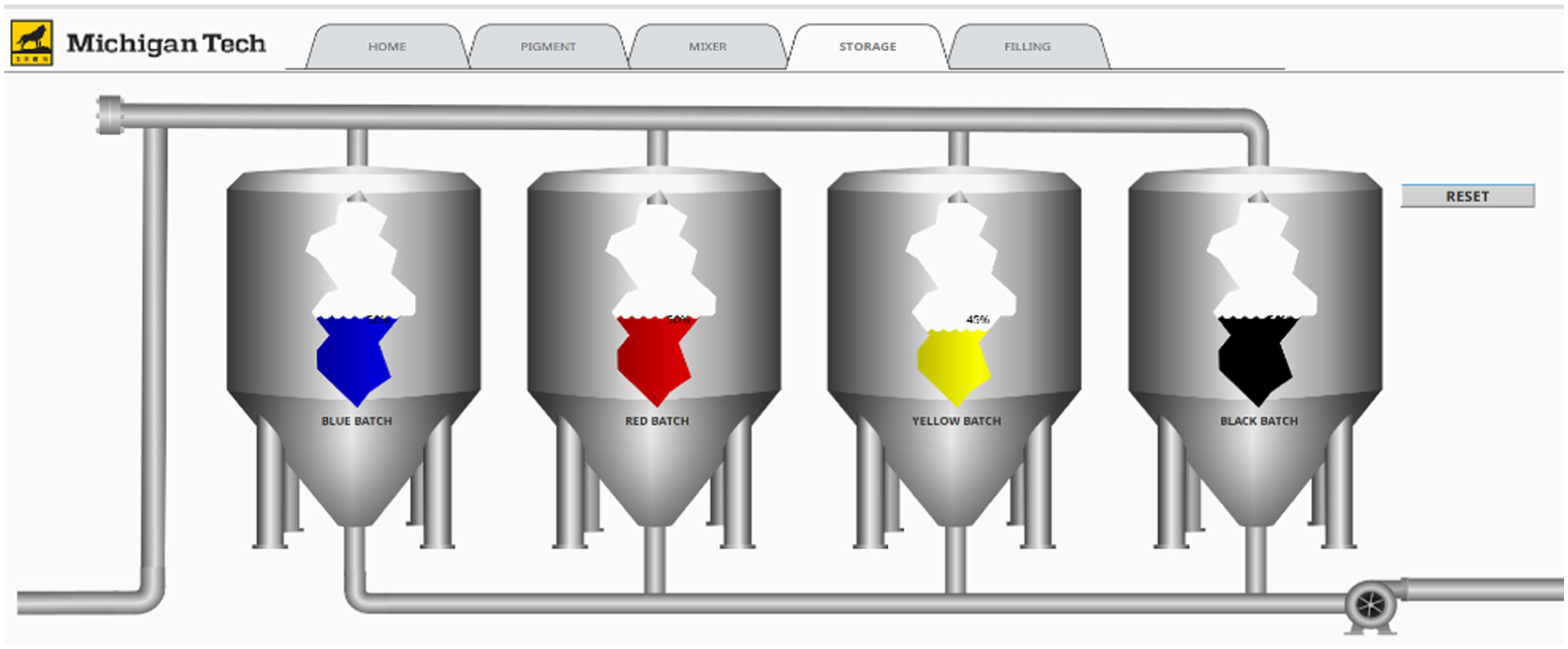
Storage for each color paint – first Batch.

Filling of yellow paint into pails for the customer.

Filling of black paint into pails for the customer.

Paint process mobile HMI on Ignition Perspective smart device app.
Conclusion
The project was successfully implemented and tested. The ignition system successfully communicated with MySQL database and the S7-1200 Siemens PLC. The project implementation proved effective paint recipe management using Ignition system. The created and standard transaction group on the Ignition designer, which is the heart of the SQL Bridge module, provides execution approach to perform databases tasks and loading recipe values. The siemens PLC also provide easy communication with the Ignition using the IP Address which serves as the node ID of the EtherNet. Further, the paint process can be accessed, controlled, and monitored on the Ignition perspective app using the gateway network IP address and the Login details to login which provide maximum security. Lastly, the Ignition provides flexibility for operator to perform paint process visualization. With the great success proven, this recipe management using Ignition and Siemens PLC is ready for deployment for real world industrial implementation.
Footnotes
Acknowledgements
This work was performed in the advanced PLC labs at the Department of Applied Computing in the College of Computing at Michigan Tech. The authors acknowledge the contribution of Siddartha Guraja and Venkata Uma Manikonda, fellow master’s students in Mechatronics, Automation, and Robotics Engineering, for their support toward this project.
Handling Editor: Sharmili Pandian

Funding
The authors received no financial support for the research, authorship, and/or publication of this article.
Declaration of conflicting interests
The authors declared no potential conflicts of interest with respect to the research, authorship, and/or publication of this article.