




Abstract
Qualitative researchers face unique opportunities and challenges as a result of the disruption of COVID-19. Although the pandemic represents a unique opportunity to study the crisis itself, social distancing mandates are restricting traditional face-to-face investigations of all kinds. In this article, we describe options and resources for researchers who find themselves needing to alter their study designs from face-to-face qualitative data collection to a “socially distant” method. Although technologies are constantly changing, we review the latest videoconferencing services available to researchers and provide guidance on what services might best suit a project’s needs. We describe options for various platforms and applications including information about enhanced security applications for researchers collecting sensitive patient health information. Concerns about these technologies including security of the platform and logistical needs such as computer equipment are also discussed. Special attention is given to ethical issues when transitioning research efforts to online venues.
Introduction
In a time of unprecedented change and disruption due to COVID-19, qualitative researchers face unique opportunities and challenges. As Teti et al. (2020) note in their editorial, the pandemic is a “social event that is disrupting our social order.” There is a need for researchers to explore the lived experience of individuals facing these challenging times. At the same time, public health mandates and social distancing measures are restricting our ability to carry out these investigations. Additionally, many of us currently working on research projects unrelated to the pandemic are being forced to transition from face-to-face data collection to some other form of data collection such as phone or internet-based.
Scholars have produced a rich literature on internet-based data collection (Fielding et al., 2016; Kanzaki et al., 2004; Pang et al., 2018; Shields, 2003), but given the ever-changing technological landscape, an up-to-date guide is warranted. In this article, we describe options and resources for researchers who find themselves needing to transition their projects from face-to-face qualitative data collection to a “socially distant” method. Although technologies are constantly evolving, we review the latest videoconferencing services available to researchers and provide guidance on what services might best suit a project’s needs. There is a tremendous opening for the field to become familiar with the tools available now to continue our work. Although the COVID-19 pandemic is considered a “100-year event,” using diverse methods of connecting with research participants is as old as the field itself. Here, we describe options for various platforms and applications including information for researchers collecting sensitive patient health information (PHI). As a general rule, computer-mediated communication offers greater flexibility in time and location of data collection (Cater, 2011; Jankowski & Selm, 2005), can be described as a highly socialized form of interaction (Joinson, 2005), which can also conform to health and safety restrictions. However, it’s important to know that there are also concerns about these technologies including the security of the platform, confidentiality (for respondents at home or other environments where they can be overheard), and the logistical needs such as equipment (computer, camera, and microphone). In addition, we give special attention to ethical issues when switching our research efforts to online venues.
Our goal is to assist researchers who want to move from in-person to video-based online interviewing. We have chosen to focus on video-based online methods as they are more like face-to-face than voice-only or text options. Other online options that are available, but which we will not include collecting data through observation of online sites (Kozinets, 2019), virtual ethnography, email (Fritz & Vandermause, 2018), telephone interviews (Drabble et al., 2016; Johnson et al., 2019), chat and instant message interviews (J. Chen & Neo, 2019; O’Connor & Madge, 2017) and bulletin boards, discussion groups, or electronic forums (Ferrante et al., 2016; Schiek & Ullrich, 2019).
Using Videoconferencing Applications and Platforms for Online Interviewing
Basically, online qualitative methods, such as online interviews and online focus groups, are versions of traditional methods, using internet venues instead of face-to-face interaction (P. Chen & Hinton, 1999). With our ever-growing digital societies, and moreover with this specific COVID-19 pandemic, people have become familiar with various platforms and applications to transmit at least some of their daily interactions and communication online. We might assume that their digital skills and competences have accordingly grown, consequently making their participation in online research data collection easier.
For all of the videoconferencing platforms described further in this article, potential participants need to meet certain technological and logistical requirements to be able to participate. The first requirement is to be connected to the internet, by either computer or any other suitable digital device (i.e., tablets, smartphones, etc.). The quality of the internet connection also matters, but in most cases, the average quality is sufficient for participation in most videoconferencing tools. Second, participants need to have working speakers, microphone, and camera. When using laptop computers, tablets, or smartphones, most of these appliances are already built-in, but desktop computers sometimes require headphones and an additional camera to be plugged in before participation. However, even on mobile devices a headset can be useful to provide more privacy during the conversation. The third logistical requirement is for participants to be into a quiet place to assure the least interruptions and disturbances from their surroundings. In online interactions, where a researcher and participants are physically distant, the researcher’s control over interaction decreases. To ensure successful moderation (Morgan & Lobe, 2011), a set of instructions should to be sent to a participant, including a request to minimize the disturbing factors, shutting down other possible applications and social networking sites, silencing phones, and so on to ensure a high-quality environment for the interview.
Finally, to assure smooth participation, especially with focus groups, we strongly advise having participants engage in a short one-on-one presession with the researcher, in order to prevent unforeseen technical issues. Doing so also gives participants an opportunity to familiarize themselves with the use of a particular program’s features. For online focus groups, it is also important to realize that even though the programs usually allow for a large number of people to be included in a single session, videoconferencing works best with a relatively small number of participants. If face-to-face focus groups usually work well with anywhere between 4 and 10 participants, online focus groups call for a lower number, ideally 3–5 (Lobe, 2017; Morgan & Lobe, 2011). In addition, focus group interviews with a larger number of participants are particularly difficult to conduct on mobile devices with small screens because it becomes difficult to see to the windows with the other participants.
Along the same lines, there is a difference between using video to facilitate more natural interaction during the interview versus recording the video as a source of data in itself. When the goal is to capture anything more than obvious nonverbal reactions, it may be possible to enable a high definition (HD)-quality option within the program (e.g., Zoom and Skype). Even then, issues such as bandwidth, lighting, and the quality of the participant’s video camera can limit what is visible.
But before a researcher can pursue these practical suggestions, it is necessary to choose which videoconferencing platform will be used. Hence, the following section provides first-hand reviews of the most affordable and easy-to-use programs.
Review of Video Platforms
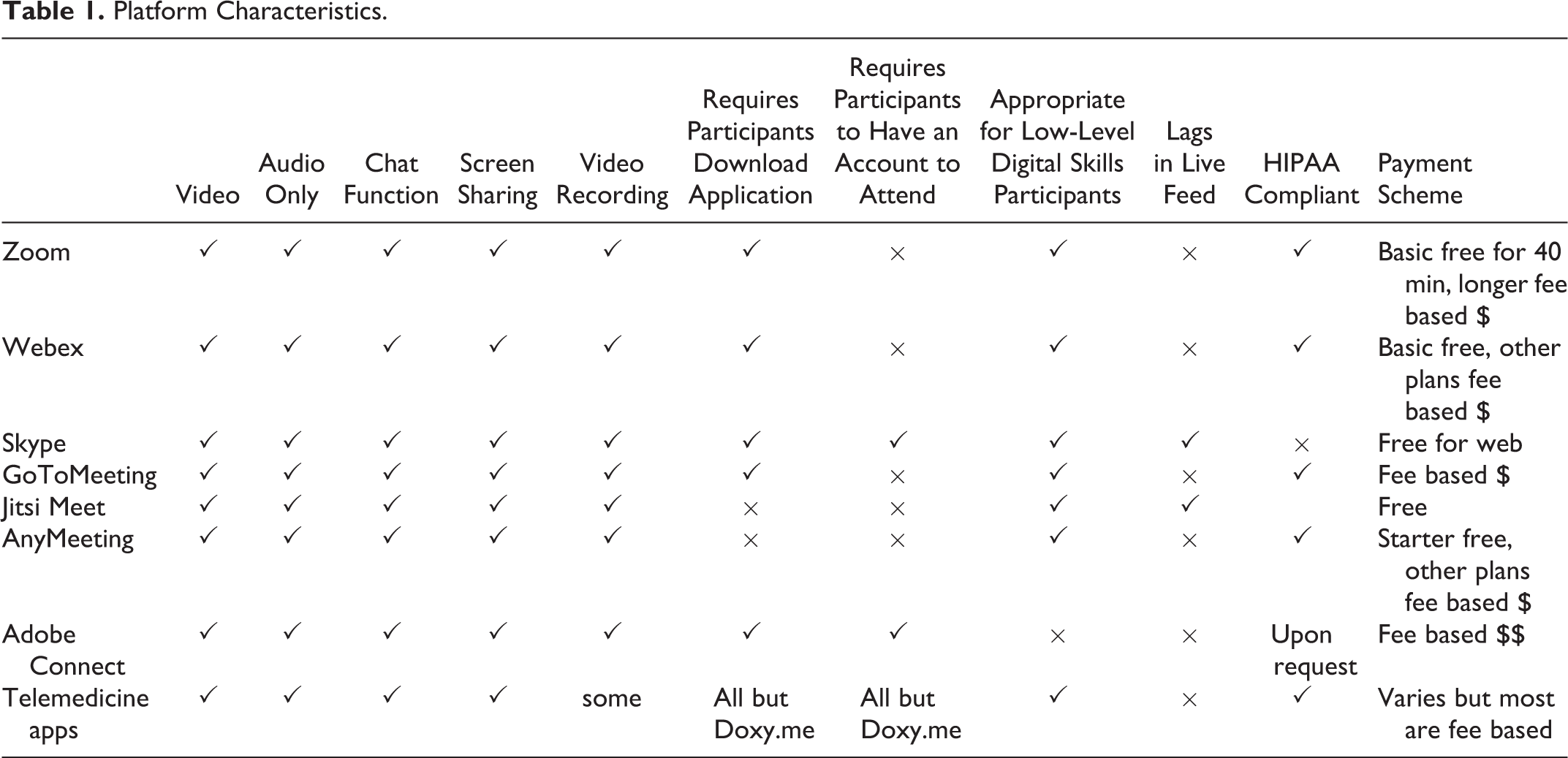
When choosing a videoconferencing platform out of the many available, it is useful to consider the functions they make available. In addition to basic information on each, we compare them according to these criteria: the number of participants in a same session, audio/video recording, one-click access for participants, and privacy features. Please see Table 1 for a comparison of the characteristics of a wide range of platforms, which we will describe in more detail for the most commonly used and available platforms.
Platform Characteristics.
Zoom (https://zoom.us)
Note. HIPAA = The Health Insurance Portability and Accountability Act.Basic information
Zoom is a videoconferencing platform that has already been extensively used for research purposes (Archibald et al., 2019; Daniels et al., 2019; Kite & Phongsavan, 2017; Lobe, 2017; Matthews et al., 2018). The platform supports real-time audio and full-motion video. The free Basic plan offers many useful settings that are user-friendly and intuitive. A participant can use the downloadable version of Zoom or merely sign in into a web-based version of it.
Number of participants in a session
The Basic free plan enables unlimited time sessions for one-to-one interviews (two participants plus the host). Adding more participants to the Basic free account limits the time of each session to 40 min, but the Pro plan at an affordable monthly cost enables up to 100 participants in an unlimited session.
Audio/video recordings
Zoom enables audio/video recordings, and control is limited to the host of the meeting, who can decide to share it with other participants. Also, access to the recordings is restricted to the host (the recording is saved to the host’s computer after the session). One interesting recording option in the more expensive versions of Zoom is simultaneous transcription. This means that once a session is completed, the researcher will have a high-quality draft, which can be further refined while listening to a playback of the original interview. In addition to Zoom’s own capacities, the otter.ai program offers additional features for simultaneous transcription while working with a basic Zoom account.
One-click access
A Zoom account is not required to join a Zoom meeting (but is required to host it). Participants need to download the Zoom mobile app or desktop application, after which Zoom meetings are reachable by clicking on the invitation link. Participants are emailed an invitation leading them to click a link, download the program, and type their name to enter the “meeting.” Although this process only requires basic digital skills, it would still be difficult for technology-naive participants, and moderators should be prepared to patiently explain the process and provide technical assistance. We suggest that researchers contact the participants at least 1 day in advance of the actual interview (possibly by email or telephone) to be sure that they have set up and tested the application.
Privacy features
The host can set up a password to control the entrance to a Zoom session. Also, the waiting room feature enables the host to examine every participant who wants to join the session. The platform is the Health Insurance Portability and Accountability Act (HIPPA) compliant, but privacy issues and “Zoom bombing” have been raised (see more in the “Ethics” section below). Zoom Pro plan enables additional privacy features.
Webex (www.webex.com)
Basic information
Cisco Webex has also been used in online qualitative data collection (Hatten & Christensen, 2012; Morrison et al., 2020; Tuttas, 2015). Hosts are granted advanced administrative meeting controls such as encryption, chat options, recordings, and so on.
Number of participants in a session
Webex has recently lifted the time limits in their Free plan, which allows up to 100 participants per meeting.
Audio/video recordings
Audio/video recording is not available in the Free plan, so researchers would need to find their own screen capture solutions. In particular, Camtasia is a screen recorder and video editor that is an option for any platform that does not have recording as a built in feature. In the paid subscription plans, access to recordings is restricted to hosts only.
One-click access
Participants do not need a Webex account to join the session but must download the software before the interview.
Privacy issues
Similar privacy concerns have been raised with Webex as with Zoom. A platform vulnerability called “Prying Eye” has allowed hackers to find and join open meetings and calls. In response to these concerns, the company suggests using the following system features: disallowing “joins” before the host starts the meeting, locking meetings, and ensuring guests do not join without authentication.
Skype (www.skype.com)
Basic information
Skype is technically different from the previous two platforms as it is a Voice over Internet Protocol service, providing free audio and video calls. Because of its wide usage, it was frequently picked up by qualitative researchers before other videoconferencing tools picked up (Cater, 2011; Deakin & Wakefield, 2014; Lo Iacono et al., 2016; Sullivan, 2012). Because it is so widely used in interpersonal communication, it is often the first application that comes to mind when people think about taking qualitative interviewing and focus groups online (Lobe, 2017). Although one can download it to a computer or use it in a web browser, Skype is sensitive to internet connectivity quality issues (Lobe, 2017) and therefore works best via the downloadable rather than the browser-based version.
Number of participants in a session
In principle, Skype can accommodate both one-to-one calls and one-to-many, but it works best in one-to-one settings due to the abovementioned internet connectivity issues. In sessions including more people, connection limitations can appear, urging people to stop sharing video or dropping a call.
Audio/video recordings
It enables audio/video recordings easily and gives the host a legal warning about acquiring consent from the participants when pressing the recording button. The recording is then available for 30 days in the Skype session cloud, and it can be downloaded locally.
One-click access
The participants and the host have to be signed into their previously acquired free of charge Skype accounts.
Privacy features
Only participants who are added to the call by a host or who are provided a link from a host can participate. Skype uses AES 256 bit encryption but is not HIPAA compliant.
GoToMeeting (www.gotomeeting.com)
Basic information
GoToMeeting provides a HD video which is a distinct feature. It enables a researcher to host a one-time meeting or to set up a personal meeting room that can be used multiple times with the same invitation link. It enables screen sharing, while the Business plan version provides transcription, translation, and note-taking functionalities.
Number of participants in a session
Professional plan enables 150 participants, and Business plan enables even greater number. However, there is no free plan to allow a few or just one participant.
Audio/video recordings
Audio/video recording is available to the host, and it warns the participants that recording has started. The recording is saved to the cloud, and after the meeting, it is mailed to the host.
One-click access
Clicking on the invitation link invites participants to do a download of the application without extra activity. Participants are asked to type in their names to enter the meeting.
Privacy features
The host can lock the meeting once it starts, so no one else can enter the session. The application offers extensive security and encryption functionalities, and is HIPPA compliant.
Enhanced Security Applications: Telemedicine Platforms
Telemedicine technology was originally created to provide and support health care professionals interacting with a patient online using audio and video. It is rapidly replacing conventional methods of in-person clinical visits, especially during the COVID-19 pandemic, and costs of telehealth technologies are dropping (Board on Health Care Services and Institute of Medicine, 2012). There is a rich literature documenting its use and acceptability (Coelho, 2011; Doolittle & Spaulding, 2006; Gardner et al., 2015; Wootton et al., 2011). This field offers many platforms that have been developed specifically for collecting sensitive patient data (compliant for HIPAA, 1 General Data Protection Regulations (GDPR), 2 and PHIPA) and therefore lend themselves well to qualitative data collection for any study where a greater level of data security is desirable (such as children or immigrants). These platforms encrypt all audio, video, and screen sharing data, and all meetings are password protected. Commonly used applications include Doxy.me, Vidyo, VSee, Zoom Healthcare, and MD Life; all offer many of the same features and most importantly a high level of security. An additional benefit is that the field has been improving these technologies for more than 20 years, and research has been carried out about its ease of use. Beside the positive developments, there is also one downside point. For example, in a comparison of four platforms, researchers found that difficulties with program installation and account creation created high levels of time and mental demand for participants (Agnisarman et al., 2017). This points to the possible importance of respondent fatigue for online qualitative interviewing in general.
Basic information
All telemedicine platforms offer both audio and video support in real time. Some, such as Doxy.me, offer a free basic service, while others charge a monthly or yearly fee. Additional features such as “personalized” rooms and scheduling may have further costs. After signing in, respondents can see the interviewer in a small self-view box, which they can turn off. The toolbars generally include standard options such as mute/unmute the video, microphone and speaker buttons, speaker volume control, a full screen button, and a disconnect button. Some platforms offer the ability to share screens, transfer files, or have HD video.
Number of participants in a session
By definition, telemedicine platforms were originally designed for highly protected one-to-one encounters between a doctor and a patient. However, most platforms are now seeing the utility of adding “group sessions” and are developing these options for an additional cost. Group sessions can be held in Zoom Healthcare, Doxy.me, Vidyo, and VSee.
Audio/video recordings
At the time of this writing, most telemedicine platforms have or were in the process of developing audio and video recording options. For example, with Zoom Healthcare, you can save a recording of your interview on your local desktop or the cloud. The latter option is for nonclinical applications, as there are fewer privacy concerns. For services that are still developing the recording option such as Doxy.me, Camtasia is once again an option for recording the screen.
One-click access
This dimension offers the most variability among platforms. Doxy.me does not require any downloads or account set up. With Vidyo, the investigator emails an invite to the participant who then clicks on the link provided to download a plug-in for VidyoWeb. The participant can then “check-in” to the investigator’s virtual waiting room by entering their name. The VSee tool enables investigators to email an invitation link to a respondent who then creates a free account and installs the desktop VSee application. With Zoom Healthcare, participants do not need an account but must download the application.
Ethical Issues
Most of the fundamental ethical issues in online interviewing are the same as in face-to-face contexts. However, Thomas (2004, p. 187) argues for “an increased awareness of and commitment to” already established ethical principles that apply across traditional research. Researchers who already have approval from their review board will probably only need to file a simple “amendment” to their original proposal to shift from in-person to online data collection. Some ethical issues that should be kept in mind for all research and must not be overlooked in online research are respect for persons (as the fundamental value), anonymity–pseudonymity, risks/benefits for participants, risks/benefits for the social good, public versus private space, subject compensation, justice, cross-cultural issues, special/vulnerable populations, deception, nondisclosure, conflicts of interest, and research misconduct (Ess & Hård af Segerstad, 2019). For detailed advice about ethical issues in online research, see the guidelines from the Association of Internet Researchers (Franzke et al., 2020). The main point to be recognized is that there is always a “person” who may be affected by the research (Markham and Buchanan, 2012). Below, we discuss some practical considerations.
Informed Consent, Withdrawal, and Debriefing
The most common way to replace the traditional statement of informed consent for online data collection is to email the consent form to the participant, typically in the body of an email, and request that the participant reply to that message as an expression of consent (Lobe, 2017). For some situations, electronic signatures may be provided (Hewson et al., 2016) by inserting scanned signatures to a Word document or by using specialized programs such as using Docusign. Note that participants need to be able to ask additional questions prior to approving their consent, and communicating directly via email can address this problem (Hewson et al., 2016).
In the consent form, the researcher must include a line informing participants they may withdraw from the study at any point of the data collection and further. In online interviewing and focus groups, voluntary withdrawal can be easily accomplished, simply by disconnecting. When a “debriefing statement” is to be supplied at the end of the session, this can also be accomplished via email (Hewson et al., 2016).
Privacy of Participants, Confidentiality of Data, and Data Security
Privacy issues are inherent to online services (Lobe, 2017) as in the famous saying: “Once online, always online!” So, it is essential to investigate the privacy, confidentiality, and data collection policies of all platforms and services. Further, it is important to assure privacy on an invitation basis. For example, with Skype each participant needs to sign into the interview individually, which prevents unwanted intruders. This option should also be enabled in Zoom (possibly along with password protection); otherwise, outsiders may find a way to enter meetings that are publicly available—a phenomenon that has become known as “Zoom bomb-ing” (www.pcmag.com/news/were-you-zoom-bombed). Another useful feature is Zoom’s “waiting room” which allows the initiator of the meeting to control who enters the video conference.
To assure the confidentiality of data, it is necessary to remove all possible personal identifiers. HIPPA, a U.S. law designed to provide privacy standards that protect patients’ medical information, lists 18 personal identifiers that researchers should consider removing when anonymizing data (Anderson & Corneli, 2018). Note that informed consent procedures and debriefing may compromise anonymity if they are done using email addresses that are identifiable (i.e., that use first or last names). In general, researchers must take special care to prevent any linkage between the data collected and email addresses. The simplest possible solution would be to print off the emails with expression of consent, archiving them in a paper form and immediately deleting the electronic version. There are also other technically more demanding solutions.
Another issue that arises in video-based interviews is the potential visibility of the background in the participant’s surroundings, especially if they are at home. This might be more of an issue for group interviews, where participants would have a chance to look into each other homes. For some, this might be irrelevant, but for others, this might be disturbing. As a solution to this, many videoconferencing tools now offer a choice of virtual background where participants can use a set of offered backgrounds or their own photos. For Skype, this can be addressed at least partially through the program’s internal option to blur the background in the video, but it is still advisable to request that participants set up their device in a setting with a neutral background whenever possible. Another privacy issue in online interviews and focus groups is that participants may find a way to record the interview from their own device. For most video-based software, only the researcher who initiated the call has the ability to record the interview, but a participant with sufficient technical knowledge could get around this level of protection, so the prohibition on recording should be made explicit in the instructions to the group and possibly in the statement of informed consent.
For either in-person or online focus groups, an additional specific privacy issue arises because there is always the possibility that people will learn enough about other participants to compromise confidentiality of the data. When this is a concern, the statement of informed consent should include language such as: “Be aware that your confidentiality cannot be guaranteed in a group setting such as this. Please respect one another’s privacy by not discussing who attended at this meeting or repeating anything that was said.” This should be reinforced during the introductory instructions to focus groups. Remember also that participants can get caught in a feeling of false anonymity during the use of online platforms, which can lead them to disclose more information than they might in face-to-face situations (Eynon et al., 2008).
Finally, it is important to note that a stricter set of privacy standards apply to U.S. researchers who are collecting protected health information that falls under the HIPAA. In particular, to be HIPAA compliant, the supplier of a software program must sign a business associate agreement that insures that its servers do not retain information from an interview that contains protected health information. At this time, Zoom offers a HIPAA-compliant platform if working exclusively through their system, but this may not be the case if you have access to Zoom through a third-party supplier. Software supplied by Apple, Facebook, Google, or Microsoft is not HIPAA compliant, including all of the chat and message programs provided by these companies. By comparison, for researchers who are collecting data in Europe, the GDPR applies to the companies providing software and services rather than to specific software programs. In this case, Apple, Facebook, Google, Microsoft, and Zoom are all compliant with GDPR.
Data Storage
For any research project, it is advisable to follow strict ethical procedures after the data have been collected (Andersen and Corneli, 2018). Online data collection can generate issues that go beyond the standard procedure, such as deidentifying data and keeping it confidential, keeping various research files (e.g., transcriptions, field notes, and personal data), password protection, and possibly encryption for data stored on the researcher’s local computer, and timely deletion of audiovisual recordings. For online interviewing, it is also recommended to check what sort of recording storage is provided by the platform—cloud or local (i.e., on the computer of the researcher)—and apply local storage whenever possible. In Skype, for example, the recording link is provided to all participants, which poses confidentiality issues. Other applications, such as GoToMeeting and Webex, warn participants when the recording starts and stops. Webex and Zoom provide local storage of the recording without extra efforts.
Discussion
As Teti et al. (2020) note in their editorial, “qualitative methods can play a pivotal role in understanding epidemics like COVID-19, the people involved in them, and effective solutions and strategies” (). By making use of the technologies available to us, we can document this phenomenon and other situations in the future that will no doubt hamper face-to-face data collection efforts. Therefore, researchers should become comfortable with and prepared to employ “socially distant” methods of data collection. This article has described some of those technological answers for projects needing to transition from face-to face-qualitative data collection to a virtual method. Internet-based communication offers many opportunities, but it’s important to consider what services might best suit a project’s needs. For example, Zoom offers convenience but has had to address security risks. Platforms such as Doxy.me offer security but come at greater cost and may have a steeper learning curve for the researcher and participant. Further, special consideration should be given to ethical issues and consent processes when transitioning research efforts to online venues. Despite some of these challenges, online interviewing via videoconferencing provides a valuable opportunity to rise to the challenge of social distancing while maintaining our data collection efforts.
Footnotes
Declaration of Conflicting Interests
The author(s) declared no potential conflicts of interest with respect to the research, authorship, and/or publication of this article.
Funding
The author(s) disclosed receipt of the following financial support for the research, authorship, and/or publication of this article: National Institute on Drug Abuse (U10 DA015815).
