



Abstract
The statistical literature is replete with calls to report standardized measures of effect size alongside traditional p-values and null hypothesis tests. While effect-size measures such as Cohen’s d and Hedges’s g are straightforward to calculate for t tests, this is not the case for parameters in more complex linear models, where traditional effect-size measures such as η
2 and ω
2 face limitations. After a review of effect sizes and their implementation in Stata, I introduce the community-contributed command
1 Introduction
Classical frequentist statistical inference involves calculating p-values, or the probability that a null hypothesis would be observed in the target population given the data. It is well known that p-values are often misinterpreted as the probability that the null hypothesis is true (Cohen 1994). This widespread misunderstanding, combined with a raft of criticism admonishing both researchers and consumers that statistical significance does not imply clinical or practical significance, has led many voices in the field of statistics to encourage a move toward reporting standardized measures of effect size alongside or in place of traditional null hypothesis significance tests (for example, Kline [2013]; Trafimow and Marks [2015]; Wasserstein and Lazar [2016]; and Ziliak and Mc- Closkey [2008]). This article begins with a brief primer on standardized effect sizes and illustrates ways that they are traditionally estimated in Stata. Because the estimation of marginal effects is a core Stata capability, I review various ways of manually calculating effect sizes for
2 Overview of effect-size measures
While null hypothesis significance testing concerns whether “no effect is unlikely”, measures of effect size report whether an observed effect is “large in magnitude”. Because of differences in ways that effects are estimated, there can be no single way that effect sizes are calculated or reported. When researchers refer to “effect sizes”, they are almost always referring to standardized measures of effect size, which permit unit-neutral comparisons across studies and are a central tool of meta-analysis (Vacha-Haase and Thompson 2004). The literature frequently describes three “families” of effect sizes with similar properties, depending on the nature of the variables in question and the estimation procedure (Ellis 2010). While effect sizes are not infallible (for example, Cheung and Slavin [2016]), they are still preferable to reporting p-values alone because they report fundamentally different information (Kelley and Preacher 2012). While the terms “treatment group” and “control group” are the language of experimentation and are used in this article for exposition, the logic is the same for any binary demarcation of group membership, such as
2.1 The “d” family of effect sizes
The “d” family reports magnitudes in terms of group mean differences. For continuous outcomes, these measures are variations on the generic formula (MT − MC )/SD: the mean difference between the treatment group and the control group, standardized by dividing by the standard deviation. The most familiar of these may be Cohen’s d (Cohen 1988), which involves dividing the differences in means by the pooled standard deviation (1):

While Cohen’s d is likely familiar to readers, it is not the only statistic for standardized mean difference. Glass’s Δ (Glass, McGaw, and Smith 1981) reports the effect size using the standard deviation for the control group on the theory that this estimates average treatment effects for future untreated populations (2). It is also useful for small samples, when estimates of the standard deviation could be unstable.

Hedges’s g (Hedges 1981) uses a pooled standard deviation that is weighted by the relative sample sizes of the two groups (3). Hedges’s g is similar to Cohen’s d, but Cohen’s d has been shown to be positively biased in small samples.

Hedges’s g and Cohen’s d are equivalent in large samples and will be similar to Glass’s Δ when the two groups have similar standard deviations.
2.2 The “r” family of effect sizes
In contrast to the “d” family’s emphasis on mean differences, the “r” family of effect-size measures revolves around the “proportion of variance accounted for”. The most familiar of these may be the squared multiple correlation coefficient (the “coefficient of determination”), or R 2, and its “corrected” corollary, the adjusted R 2, which incorporates information about sample size and number of predictors. These range in value from 0 to +1. While software traditionally reports R 2 in regression analyses, with ANOVA “correlation index” values η 2 and ω 2 (sometimes ǫ 2) are more common, even though in linear relationships they are functionally equivalent to R 2 and adjusted R 2 (Cohen et al. 2003). Because they are measures of the proportion of variance accounted for, both R 2 and η 2 are figured by dividing the variance explained by the model (which may be as simple as a one-factor ANOVA or as complex as a structural equation model) by the total variance observed, as in (4).

Partial η 2 and ω 2, on the other hand, have a slightly different formula (5), which is comparable with (4) in a one-way ANOVA. However, in complex models, they can differ widely, and there is a great deal of published literature that appears to conflate the two (Levine and Hullett 2002). Readers may be expecting η 2 and ω 2 statistics to report the proportion of the “total” variance explained, as calculated in (4). Levine and Hullett recommended that partial η 2 be reported, but other authors recommend the opposite (for example, Tabachnick and Fidell [2019] and Olejnik and Algina [2003]).

Use of measures such as η 2 to report relative-effect magnitude has been criticized in the literature on regression (for example, Pedhazur [1997]). The standardized regression coefficient β is also occasionally advocated as an analogue to effect size, but it is not an ideal method to convey the magnitude of an effect across studies (Greenland et al. 1986; Pedhazur 1997).
Effect sizes for categorical outcomes are also members of the “r” family. While they are related to r, more common measures of effect size for contingency tables (that is, categorical data) are coefficient φ, Cramér’s V, Kendall’s τ, and Cohen’s w. Equation 6 demonstrates the formula for these measures in a 2 × 2 table. While Cramér’s V can be calculated for multiway tables, φ is only estimated for two dichotomous variables, and Pearson’s r is only equivalent to V and φ in that case.

Kendall’s τ is a nonparametric measure of association that does not use the χ 2 statistic but rather ordinal “concordances” and “discordances”. There are three formulas for Kendall’s τ, according to whether the table is square and whether to account for ties. Stata reports Kendall’s τb , which is determined by the number of concordances (C), the number of discordances (D), the number of ties (T), and the number of observations (n), shown in (7).

Because the “d” and the “r” families are both undergirded by the same general linear model, they imply the same meaning, and researchers can use formulas to convert not only within families but also from one family to another (Vacha-Haase and Thompson 2004).
2.3 The “OR” family of effect sizes
Applied most commonly to categorical data and particularly generalized linear models, the odds ratio reports the odds of an outcome given a treatment or condition, relative to the odds of the outcome in the absence of that treatment or condition. Odds are figured from probabilities according to the formula π/(1 − π), where π is the probability of a “yes” result for a dichotomous outcome variable. 1 Odds are accordingly the expected number of “yes” results for every “no”.
Odds ratios report magnitudes of association as a multiplier for the increase or decrease in odds for a one-unit change in a continuous predictor or, for categorical variables, membership in one category relative to another. For example, an odds ratio of 2 for a binary regression predictor variable
3 Effect sizes in Stata
Stata has methods for estimating each family of effect-size measures. For an additional overview, see Huber (2013).
3.1 The “d” family in Stata
Stata’s base
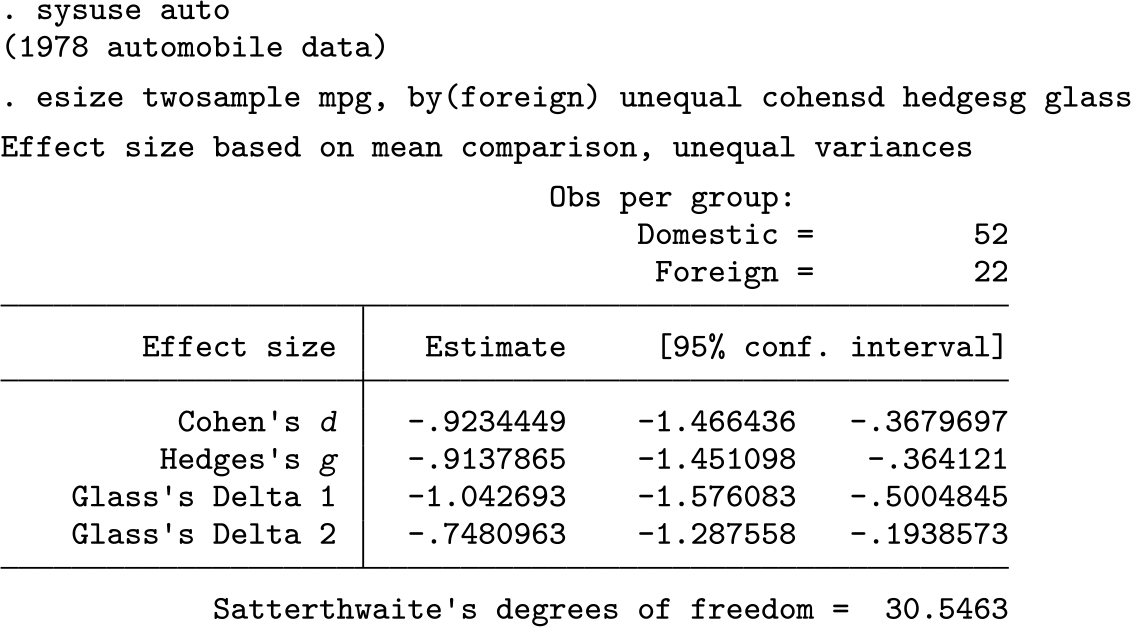
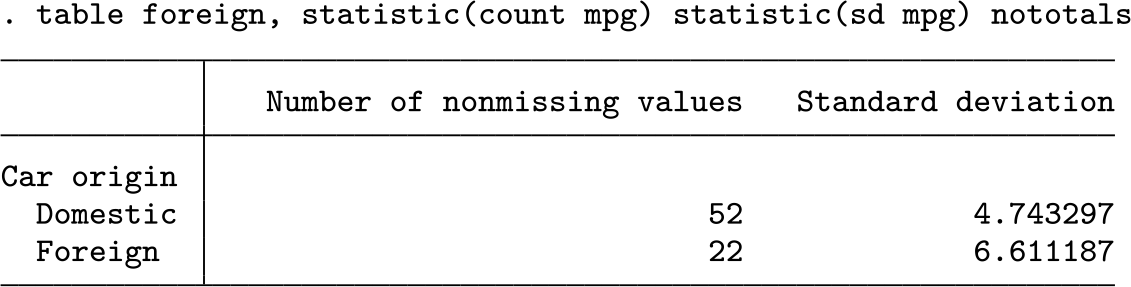
The standard deviations and sample sizes for the two groups are both different. After some algebra, we determine that the pooled unweighted standard deviation used for Cohen’s d is 5.36, while the pooled weighted standard deviation used for Hedges’s g is similar at 5.41. Both are closer to the
3.2 The “r” family in Stata
Stata provides several ways to estimate the “r” family of effect sizes. The
which is the archetypal r. Coefficient r is equivalent to coefficient ϕ in a 2 × 2 table but is less often reported for contingency tables.
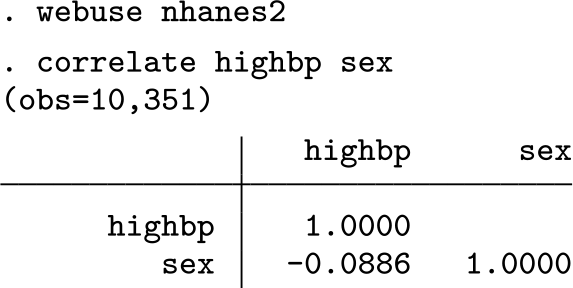
Coefficient ϕ, Cramér’s V, and Kendall’s τ are obtained in Stata with the
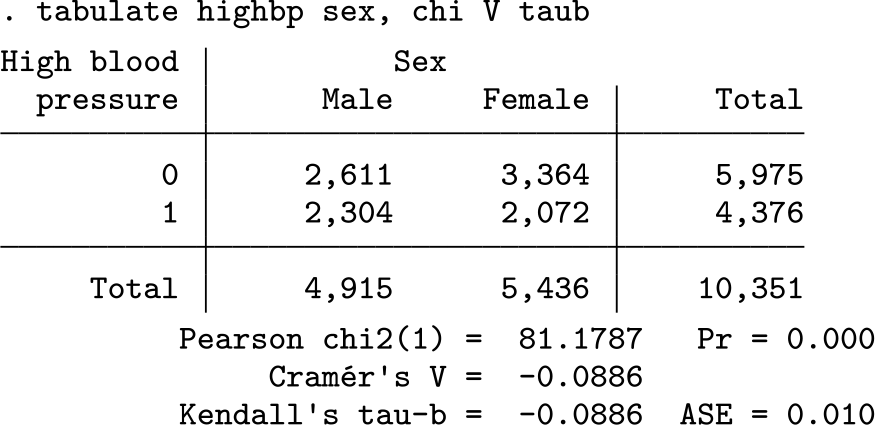
The χ 2 test indicates statistical significance, but a small p-value is not an indication of how strongly these variables are associated with one another. The values of Cramér’s V and Kendall’s τb report that, on a scale from 0 (independence) to 1.0 (perfect association), sex’s association with the incidence of high blood pressure is less than 0.1. Coefficient ϕ is not reported, but in a 2 × 2, table it is equal to Cramér’s V. Here is another example, this time with a 2 × 5 table:
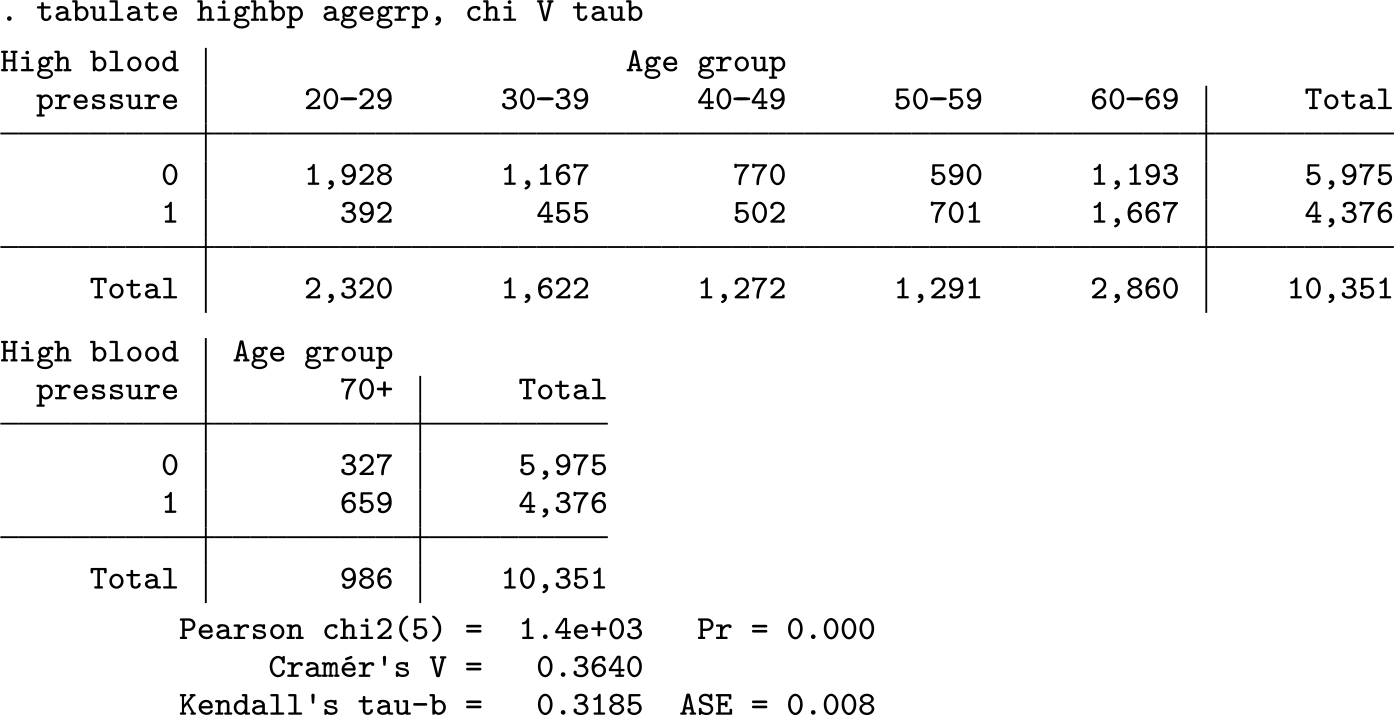
The p-value again leads us to reject the null hypothesis of no differences between the groups. Even though the tests for sex and age report p-values of 0.000, the estimated effect sizes show that age has a much stronger association with blood pressure than sex does. Taken together, these results underscore the importance of effect sizes in the interpretation of statistical test results, because without the effect sizes, the analyst could miss the critical differences in magnitude between the two associations.
Next we will consider the “r” family effect sizes in the context of linear models such as regression and analysis of variance. We begin with a simple
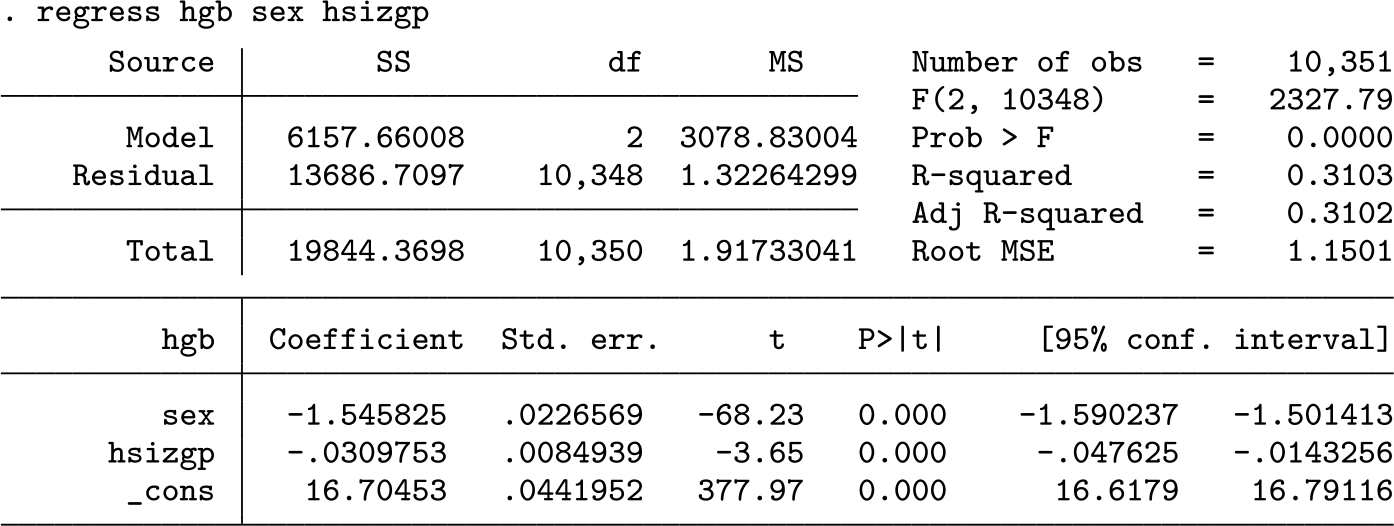
The value of R 2 reported in the regression table is equivalent to η 2, and the adjusted R 2 is equivalent to ω 2. In this instance with few predictors, η 2 and ω 2 (and R 2 and adjusted R 2) are similar. They will diverge with the addition of more predictors.
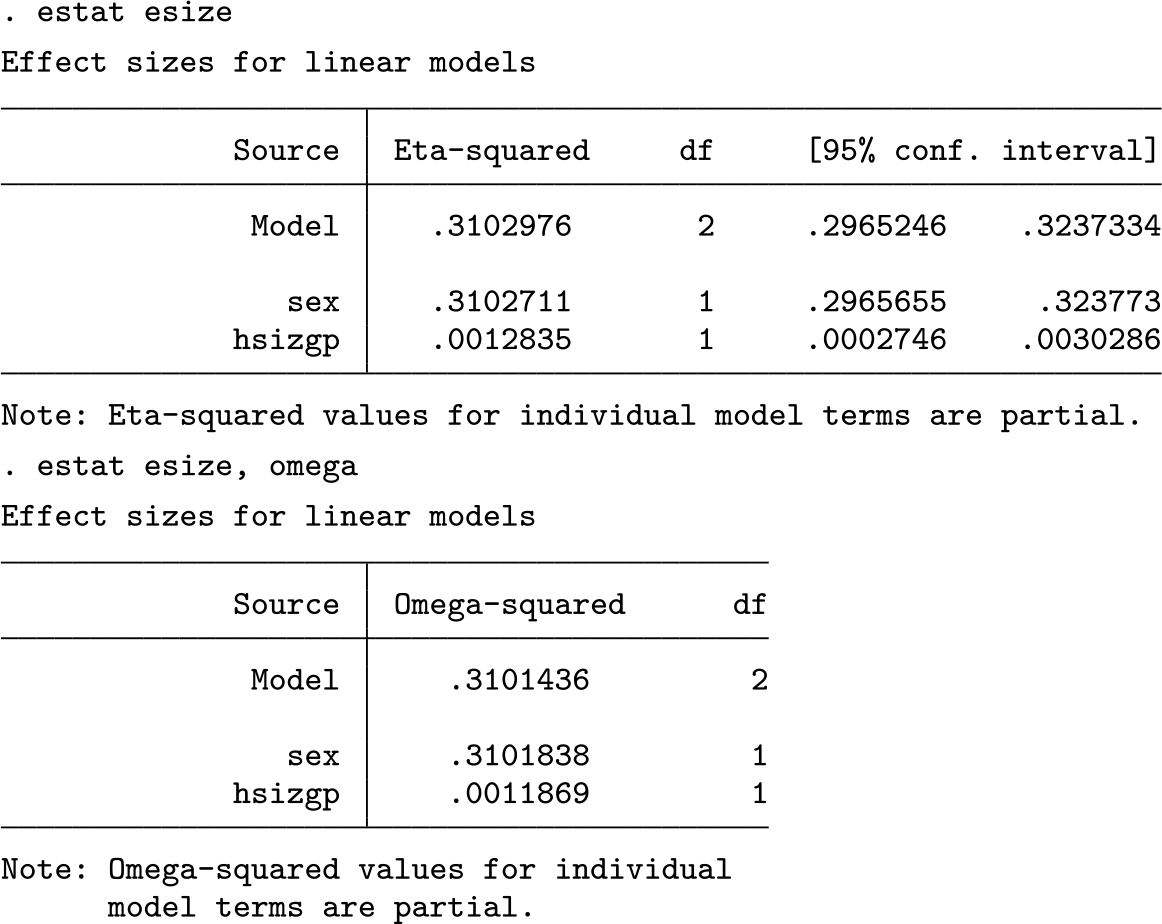
The
3.3 The “OR” family in Stata
Odds ratios are most often calculated for logistic and ordered logistic regression models using
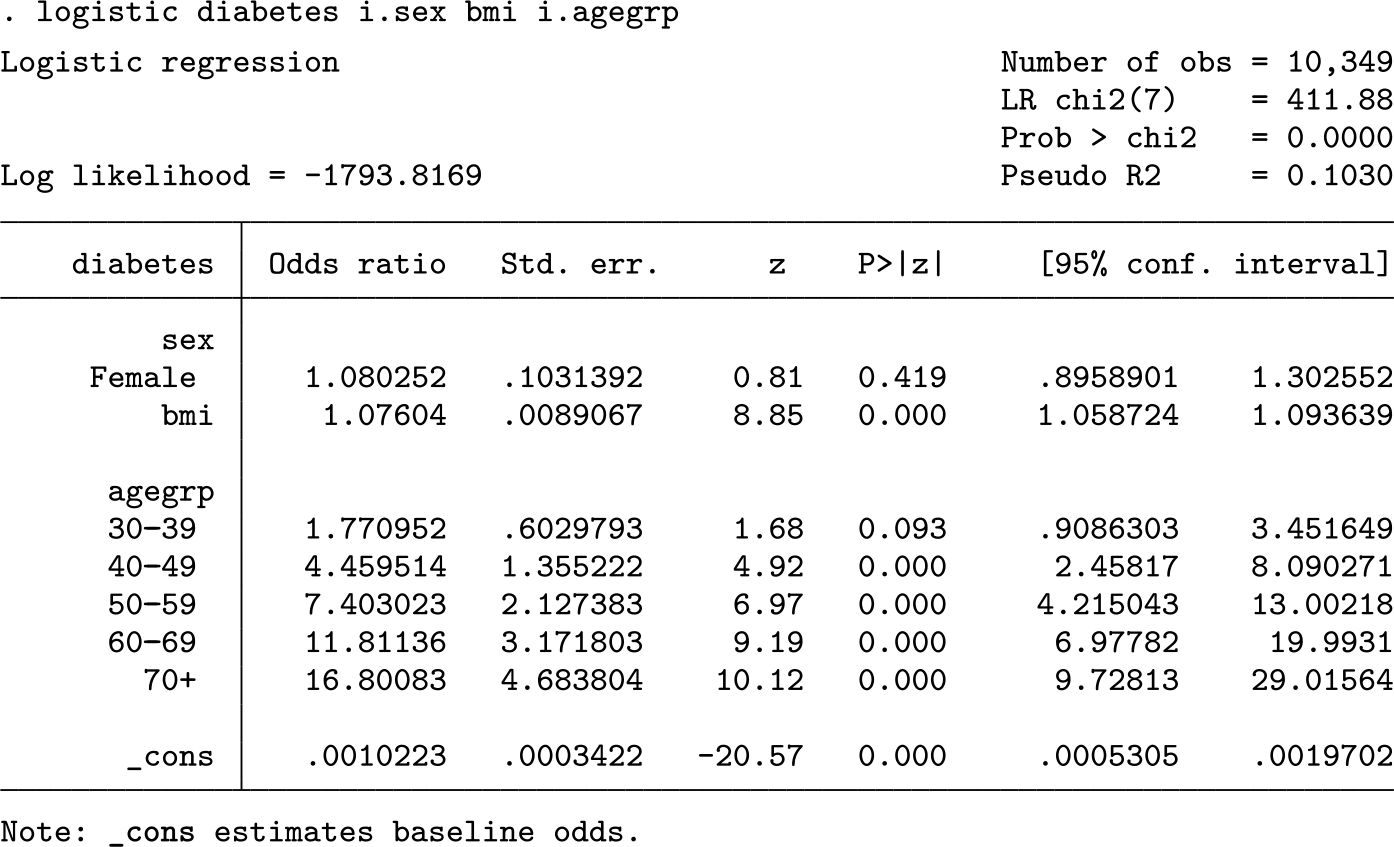
The model reports that females in the dataset have odds of being diagnosed with diabetes that are 1.08 times higher than males after controlling for the effects of the other predictors—not a huge difference. Critically, this is not the same as the “probability” of a diabetes diagnosis being 1.08 times higher. Odds use the formula π/(1 − π), and they are not linearly related to predicted probabilities. To obtain predicted probabilities, we use the
The coefficient for body mass index (BMI) also rounds to 1.08, but because BMI is a continuous predictor, the interpretation is that for each ceteris paribus one-unit increase in BMI, the odds of a diabetes diagnosis are expected to increase by a factor of 1.08, which would mean that a four-unit increase in BMI should predict odds of a diabetes diagnosis that are 1.36 times higher. And, relative to the base category of 20–29-yearolds, those aged 50–59 have odds of diabetes that are approximately 7.4 times higher. More information on odds ratios and their interpretations in Stata are available in Long and Freese (2014) and Mitchell (2021).
4 Effect sizes for marginal effects
The interpretation of regression coefficients is less straightforward when models become complex. When transformations, interactions, and polynomials are specified and combined, individual model coefficients can lose their clear, substantive meaning. Fortunately, as experienced Stata users know, the ability to easily calculate postestimation predicted values from even the most complicated models using the
4.1 Marginal effect sizes for categorical regression predictors
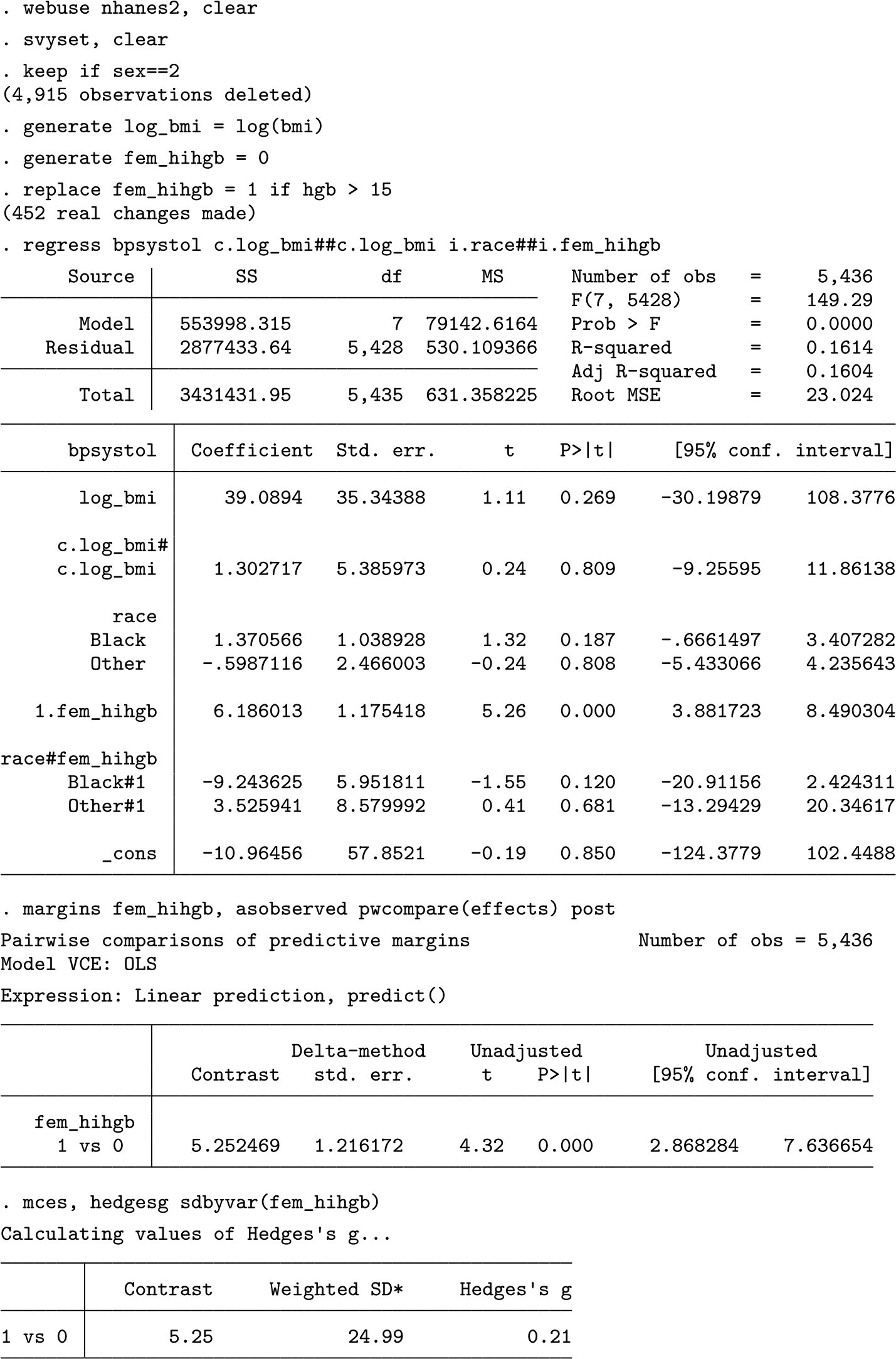
Suppose we are interested in whether systolic blood pressure is higher for females after controlling for BMI, race, and hemoglobin levels. We might specify the following regression model:
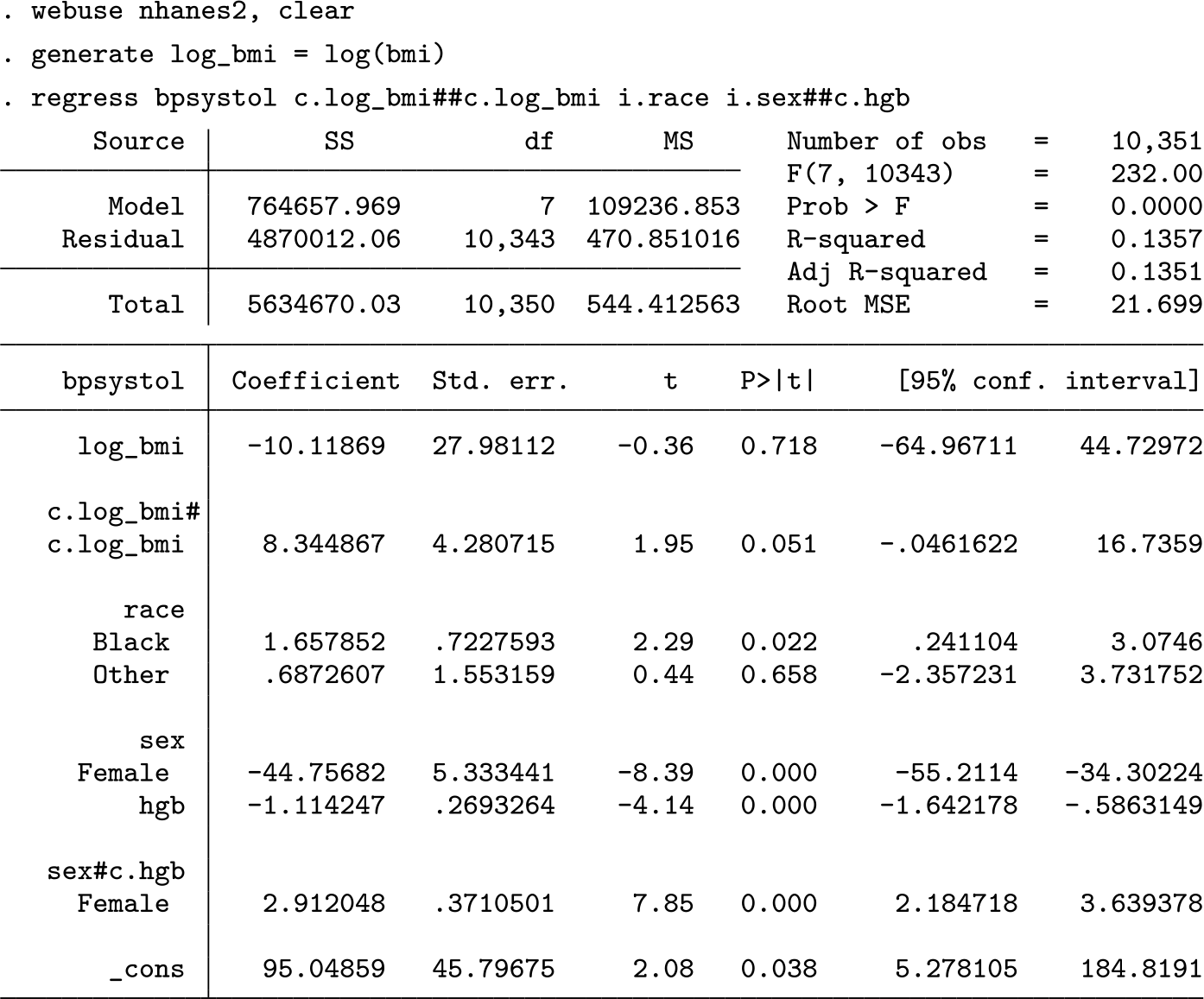
The regression table does not provide a simple answer to the question of whether males or females are predicted to have higher systolic blood pressure. The command
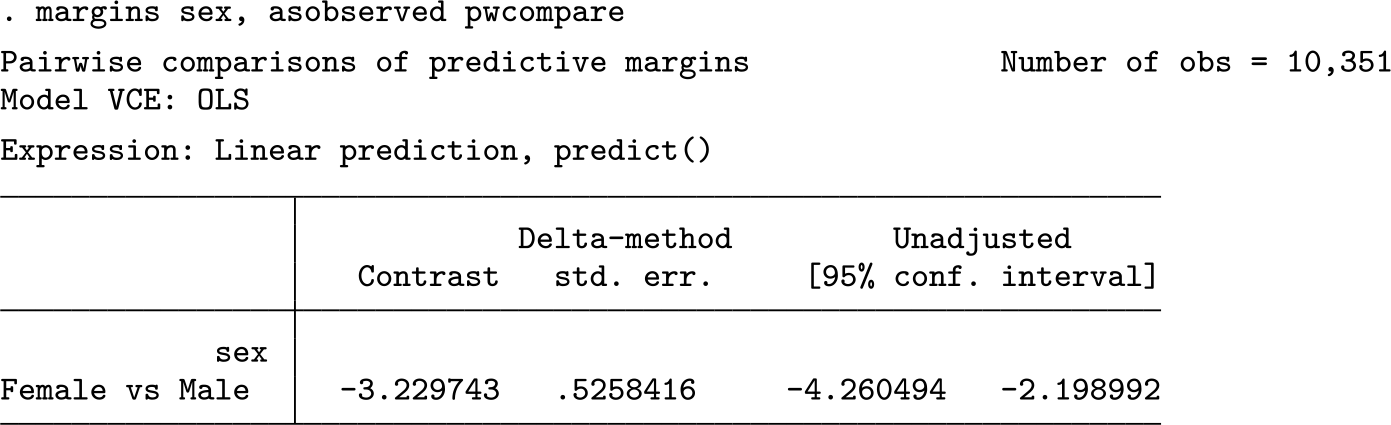
Accounting for all model predictors,
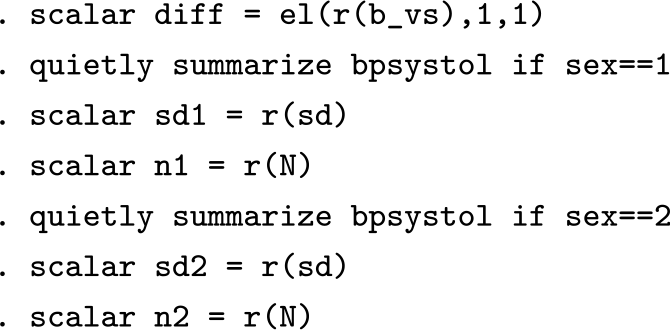
Now that the necessary summary statistics are in memory,
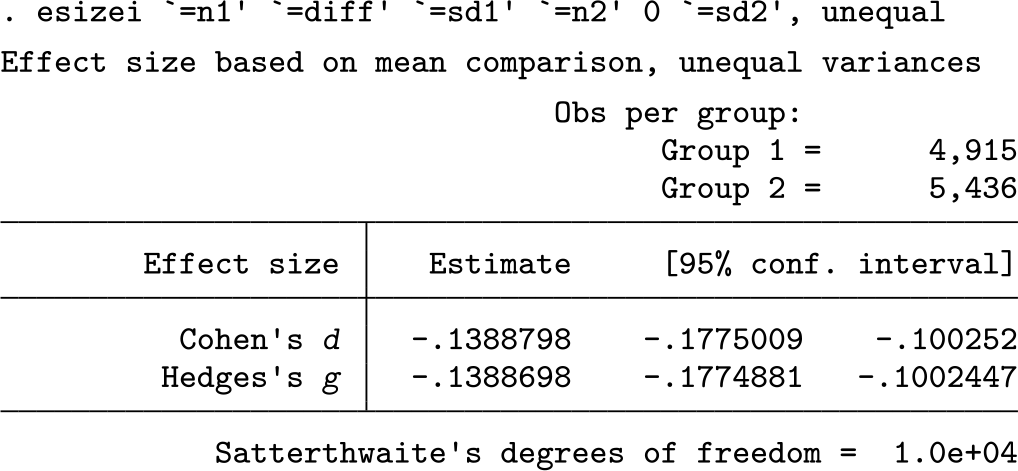
The regression-adjusted difference between males’ and females’ systolic blood pressure is approximately 0.14 standard deviations. Field-specific context informs a judgment about whether this is a large or small difference. Nevertheless, if we are confident in our
4.2 Marginal effect sizes for continuous regression predictors
The approach in section 4.1 applies only to dichotomous variables. For continuous predictors, the analyst can report ω
2 or η
2 statistics or use
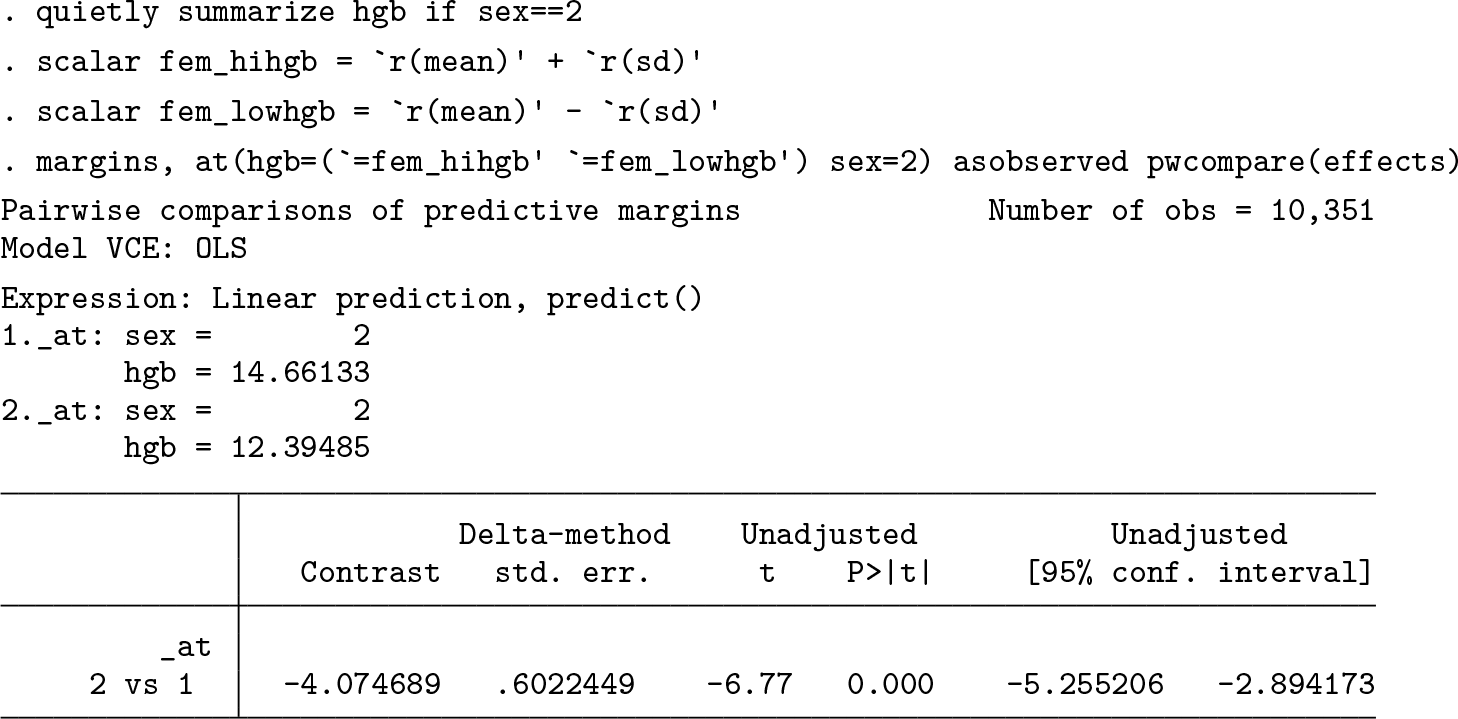
The predicted difference in systolic blood pressure between female subjects with hemoglobin levels 1-standard deviation higher than the mean and 1-standard deviation lower than the mean is 4.07 points. This difference is statistically significant at α = 0.05. Determining practical significance using measures of effect size necessitates figuring the standard deviations. This is complicated by the fact that the approach used to calculate the standard deviation in section 4.1 is not directly available when the predictor in question is continuous. Furthermore, it usually does not make sense to estimate the standard deviation only for cases with a very specific hemoglobin level. For example, in this dataset containing over 10,000 cases, none have a rounded value of
There is no single accepted method to define the standard deviations for calculating effect sizes when predictors are continuous. One possibility is to simply use the standard deviation of the outcome variable for both the high and the low values of the continuous predictor (following Cohen et al. 2003). This is analogous to Glass’s Δ approach, so the
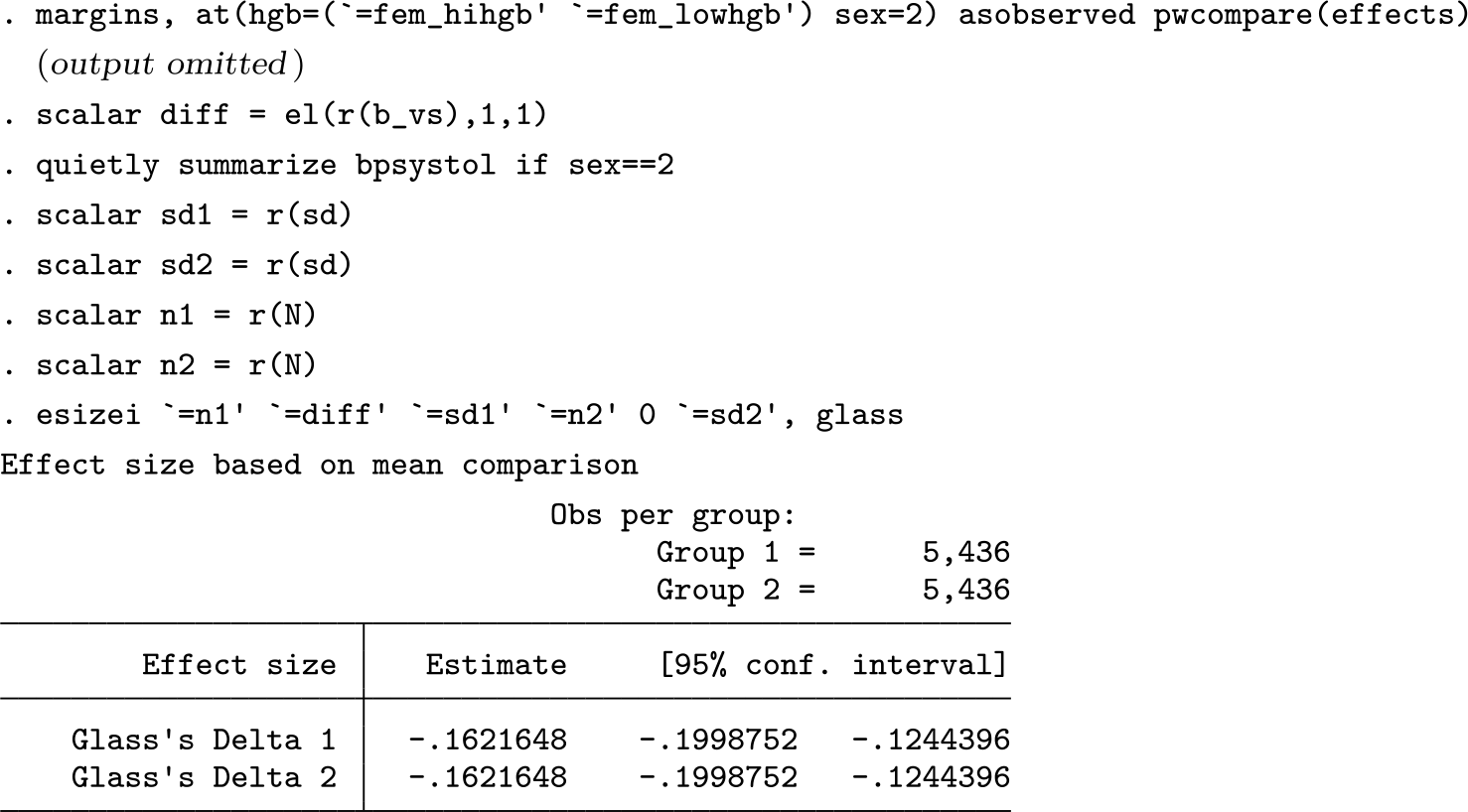
The estimated difference of 0.16 standard deviations helps the analyst understand the magnitude of the effect, which the small p-value does not.
4.3 Marginal effect sizes for recoded continuous regression predictors
There is an even simpler and more straightforward approach to find the denominator: divide cases into a small number of groups based on their value of the continuous predictor, and then substitute the new categorical variable in the regression equation. The advantage of this approach is that there are clearly defined groups for comparison and for calculating the standard deviation. If theory suggests logical thresholds, then Stata’s
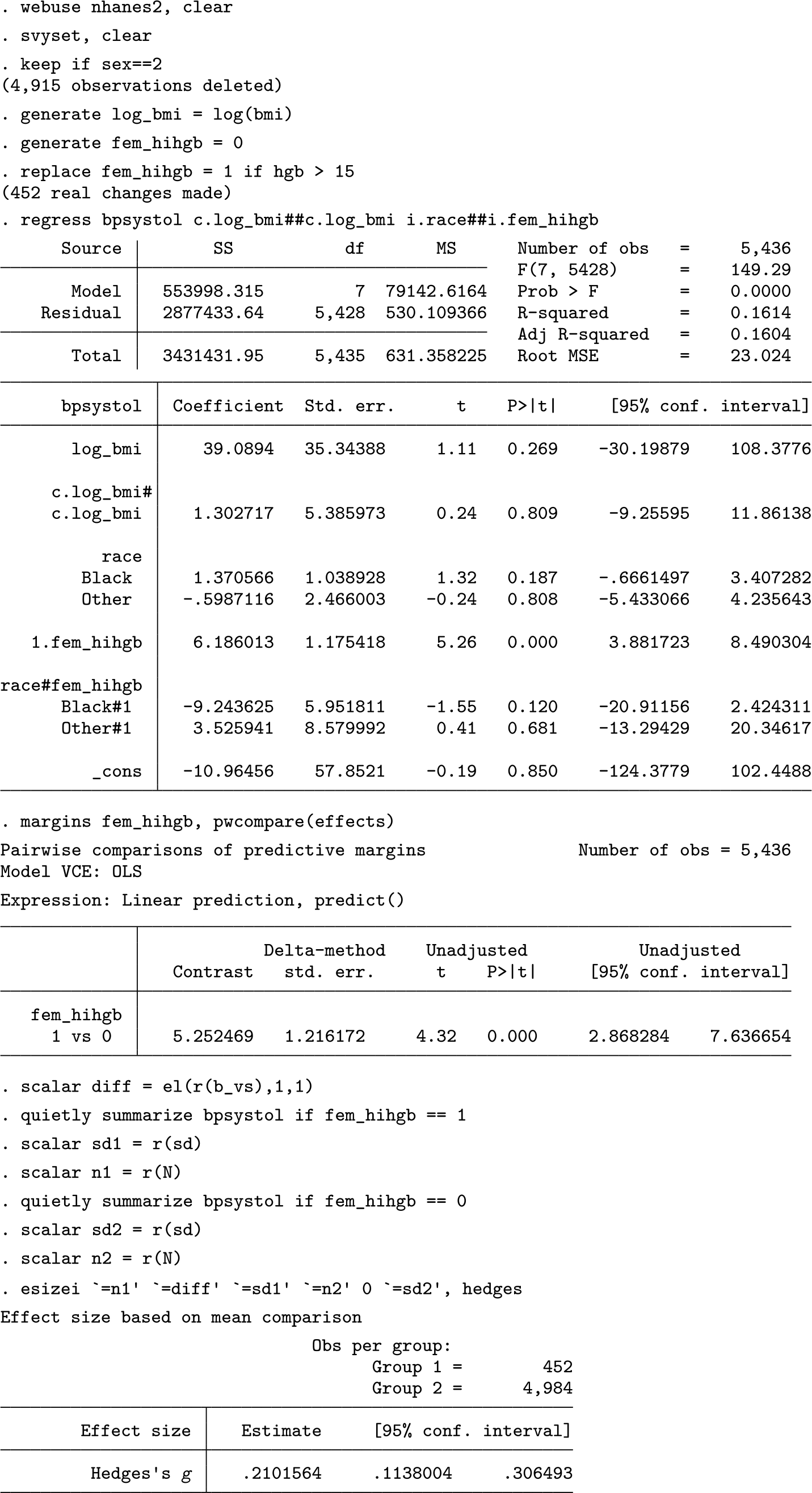
These calculations show that females with clinically elevated hemoglobin levels are predicted to have a systolic blood pressure that is 0.21 standard deviations higher than those without high hemoglobin levels. However, estimating the standardized effect size for a postestimation contrast is cumbersome, particularly with multiply imputed data. Furthermore,
5 The mces and svysd commands
The
Alternatively, if an estimate of only the survey-adjusted standard deviation is desired, the
5.1 Syntax
The syntax after margins, pwcompare post or mimrgns, pwcompare post is
mces [,
The syntax to calculate a survey-adjusted standard deviation only is
svysd depvar,
The mces command should work with most models based on linear regression that store coefficients from margins, pwcompare post and mimrgns, pwcompare post in the macro e(b_vs), such as regress, truncreg, sem and gsem, and tobit. mces is not appropriate for multilevel models, because it does not account for intraclass correlation (see Lorah [2018]) nor for categorical outcomes or generalized linear models that do not have standard deviations or RMSEs.
A further note about
5.2 Options
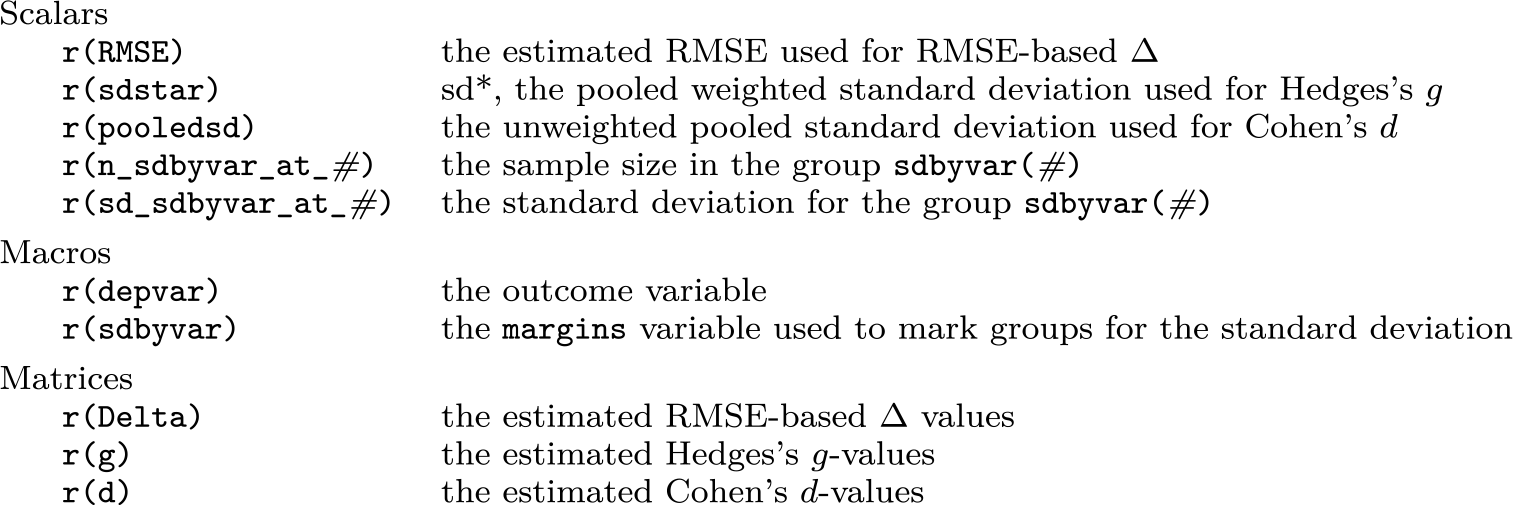
5.3 Stored Results
5.4 Example
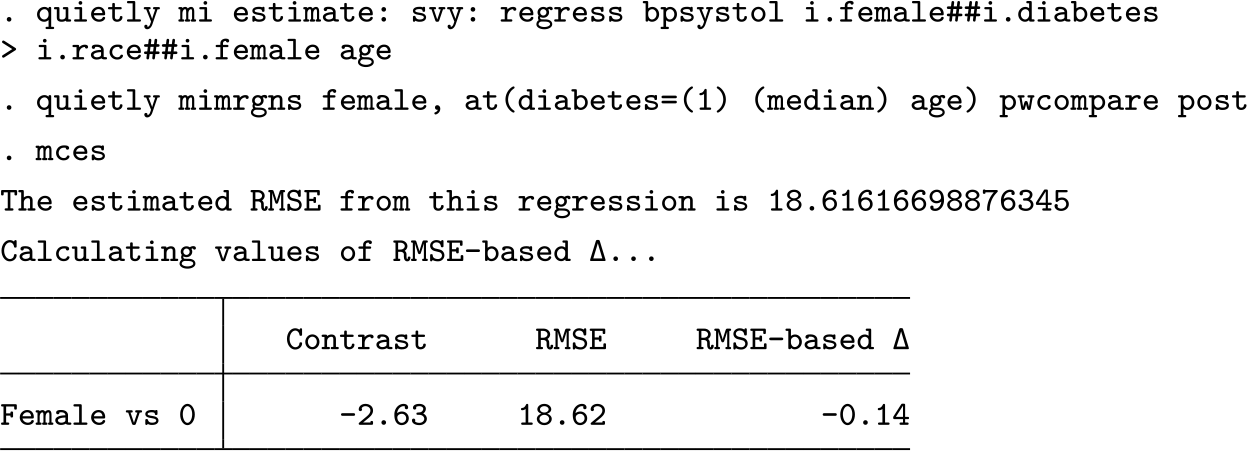
The next example demonstrates an application of
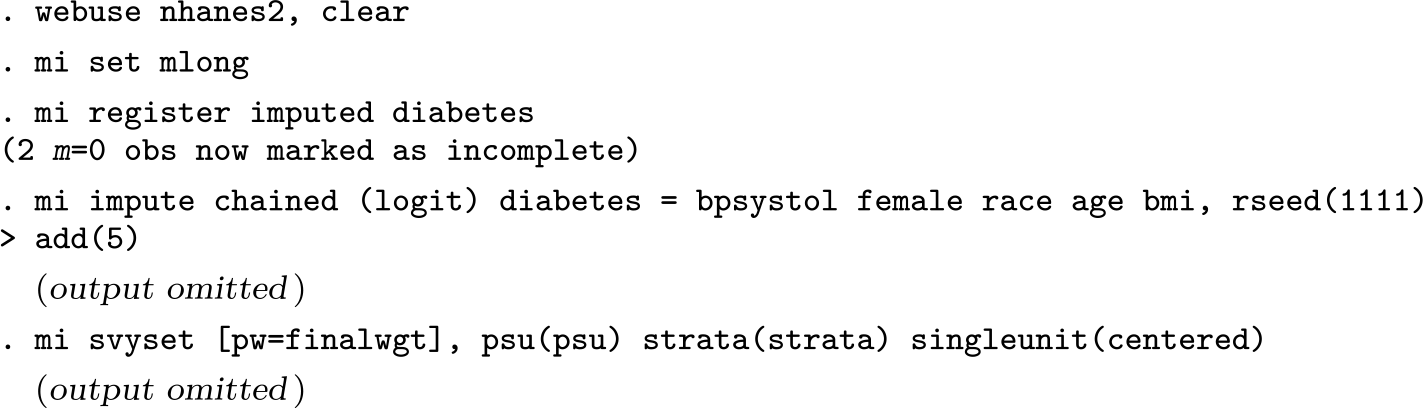
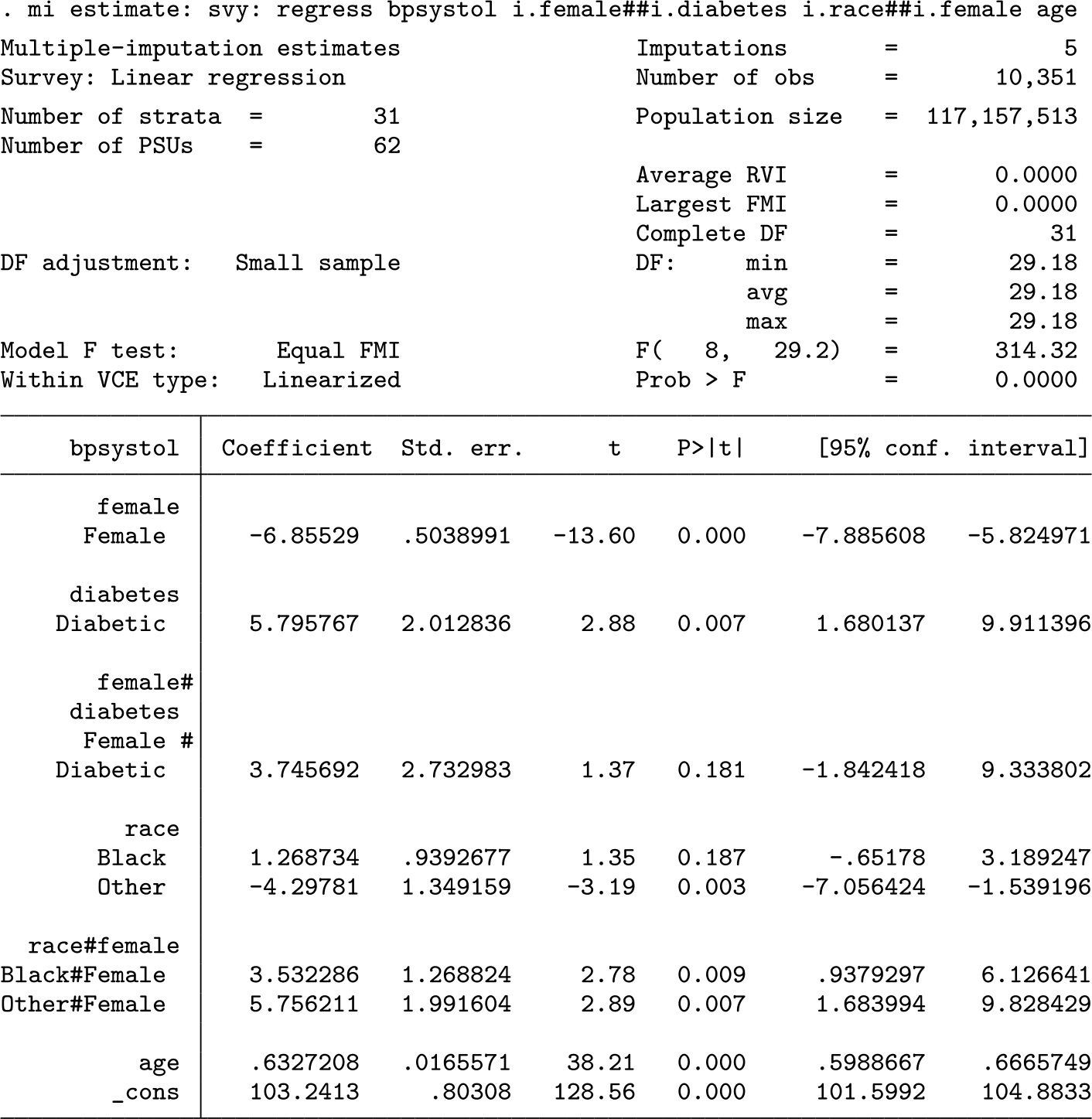
Because the data are
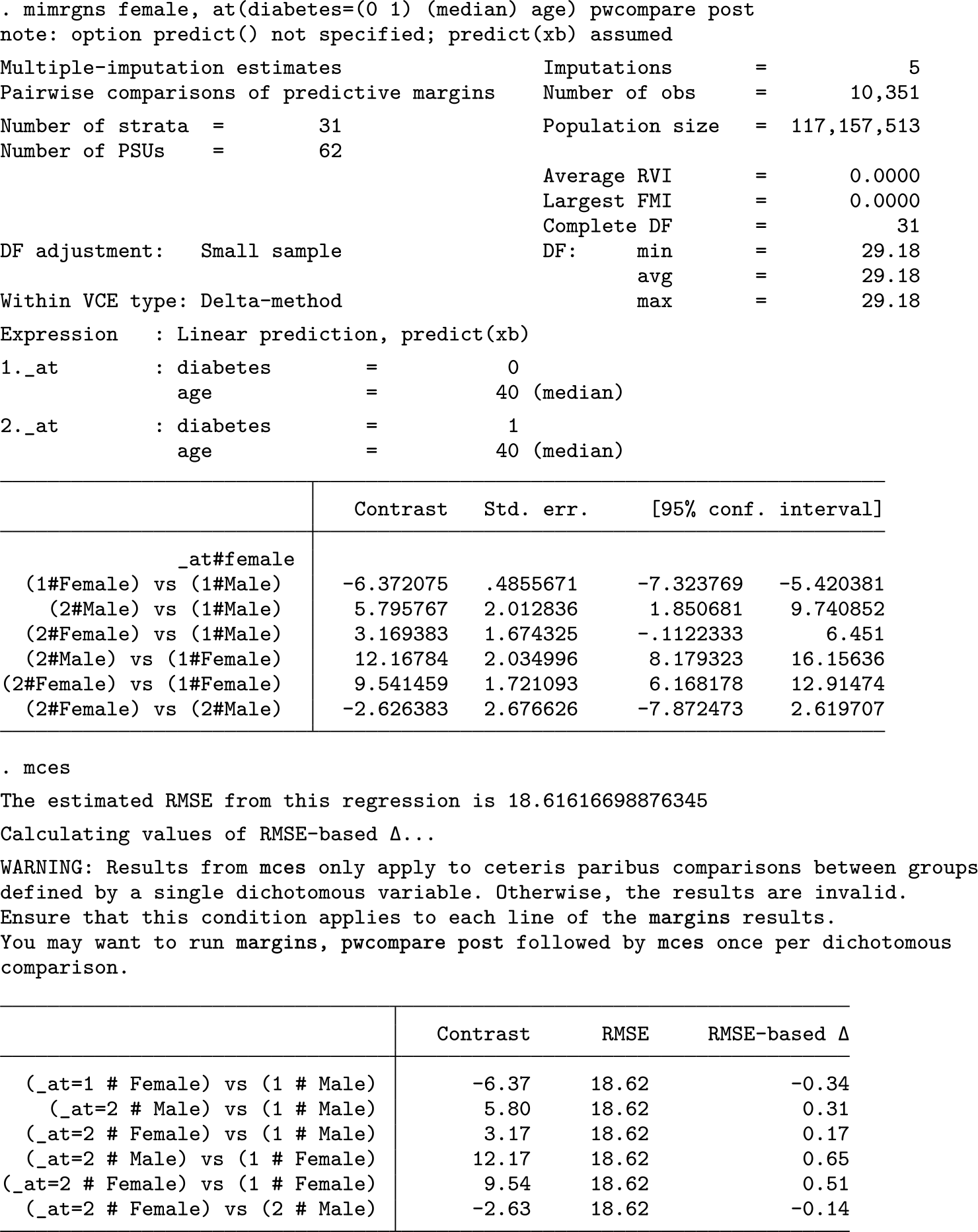
The results include a warning message that warrants explanation.
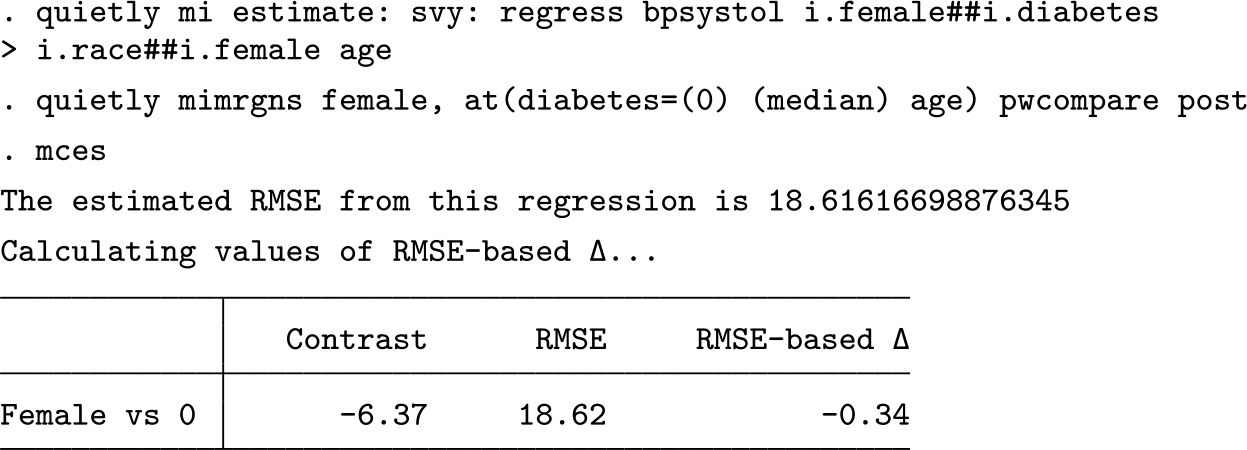
Because the
6 Conclusion
Both regression-based modeling and standardized effect-size measures are increasingly prevalent in applied quantitative research, yet existing effect sizes for complex regression models have been unsatisfying.
Because
8 Programs and supplemental materials
Supplemental Material, sj-zip-1-stj-10.1177_1536867X221083901 - Effect sizes for contrasts of estimated marginal effects
Supplemental Material, sj-zip-1-stj-10.1177_1536867X221083901 for Effect sizes for contrasts of estimated marginal effects by Brian P. Shaw in The Stata Journal
Footnotes
7 Acknowledgments
I thank Miguel Dorta, Daniel Klein, Chris Cheng, and the anonymous reviewers for helpful contributions to the code and to the manuscript.
8 Programs and supplemental materials
To install a snapshot of the corresponding software files as they existed at the time of publication of this article, type
Notes
References
Supplementary Material
Please find the following supplemental material available below.
For Open Access articles published under a Creative Commons License, all supplemental material carries the same license as the article it is associated with.
For non-Open Access articles published, all supplemental material carries a non-exclusive license, and permission requests for re-use of supplemental material or any part of supplemental material shall be sent directly to the copyright owner as specified in the copyright notice associated with the article.
