



Abstract
This column is a tutorial discussing looping in parallel using
The main idea is that a set of loops in parallel is essentially one loop with two or more sets of parallel actions. Examples cover looping over integers with a required specific display format, generating new variables and defining variable labels at the same time, binning variables as desired, and putting skewness results in new variables. The last example includes some historical comments on the tangled literature on skewness measures using medians and quantiles.
1 Introduction
In many Stata problems, you want to do (almost) the same thing again and again. You want to work your way through a list, looping over the items in that list. Often, Stata does this for you. Automatic looping over observations for many operations comes as a surprise to users who have become accustomed to spelling out such loops in other software. But at other times, you have to ask Stata to do it for you. The concern here is with the tools provided for that purpose and specifically with how you can best work your way through parallel lists using loops.
To clarify if it is obscure: What is a Stata program? Strictly, whatever is defined by a Stata
This column is essentially a replacement for Cox (2003). Only some of the original text remains. That column had much discussion of how such problems were handled in the now undocumented
2 Warm-up: Looping including leading zeros
As a warm-up, let’s look at an example so mild that you might not even think of it as a problem in parallel looping. You want to loop over 00 through 09 and through 10 through 20 as two-digit identifiers. For example, you might be concerned with years from 2000 on. The need could be for data import: many people use filenames with such prefixes or suffixes, perhaps mindful of how those filenames sort. Or the need might be for some kind of display, however defined.
Spelling out the 21 labels is not attractive, and we know how to loop over integers 0 to 20, but how do we get the leading zero in some cases but not all? One answer (Cox 2010b) is to push the integers through a display format. As a test of the code, we could write down a first loop such as

Once that is working, we want to do something that might lead us to put the result in a new

We would then develop the code to do what we want to do, such as manipulate filenames or whatever else.
This small example is the idea of loops in parallel in a nutshell. We loop over integers 0 to 20, with a parallel action that adds a leading zero when it is needed. (If you are finding this very tame, consider how extra digits such as 81 to 99 could be added.)
3 Problem: New variables with new variable labels
3.1 The problem stated
Here now is a slightly more challenging example. None of the examples here will get very long, so the tutorial understates the extent to which looping can clarify and condense realistic code. We must start with simple examples, as you will appreciate.
Suppose you want some powers of a numeric variable in new variables. To have it both ways, you want concise variable names as well as informative variable labels. Given a numeric variable

which would yield
The most important idea, once again, is simple. Loops in parallel do not imply any special construct in Stata. They are just generally one loop with actions in parallel. Some other commands that may be new to you turn out to be especially handy, but those are the only details needed.
The principle is now out in the open. There are many tricks available in practice. The choice between them is partly one of taste and partly one of circumstance.
Again starting out very simply, let’s suppose for the moment that our desired variable labels for
3.2 A few words on words in Stata
At this point, a simplifying detail is that these intended variable labels are all single words. A first stab at Stata’s definition of a word is that words are separated by spaces. That is, “word” has a technical sense in Stata that is only loosely related to grammar in English or any other language. In your Stata practice, you are not restricted to variable labels that are single words, and you should already have seen (and likely have defined yourself) many variable labels that are more complicated, which is most of the point.
This definition has some simple consequences. In particular, if presented with the string
More will be said about words in Stata, to come when we need to know about it.
4 gettoken is your friend
4.1 gettoken can produce a parallel action
Even for this very simple problem, Stata offers several solutions. I first focus on using

In this approach, we first put the labels in a local macro,
Note that the syntax is to be read from right to left: the input
Many people like to think of the local as here defining a stack, like a (tidy) stack of papers or books. Each time round the loop, we take the top item (here a word) off the stack and use it. Next time round, the stack has one fewer item.
Let’s make that concrete. The first time around the loop,
So that is the main idea in miniature. We have there two loops in parallel. We loop over the integers 2, 3, and 4 as powers we need to use for calculation and to use within new variable names. At the same time, we use
4.2 A few token comments
The command name
A glance at the Stata help for
4.3 Back to the problem
The example is simple enough to get right quite easily. We defined three tokens (just words) to be used as variable labels for three variables. In practice, the syntax is forgiving, although you may not always think that to be a feature whenever it bites you. First off,
But note especially that this approach is destructive. If it works as intended, you will consume most if not all of the macro contents, so watch out.
Let me now redeem some promises. We need to revisit the suggestion that the words offered would be fine as variable names. We can now apply what has been learned:
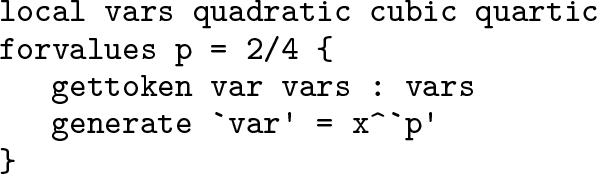
Evidently, I changed the local macro names, which is a good idea although not essential. Often, programmers amuse themselves by using facetious or even rude names. I am all in favor of programmers being amused, but watch out in code that will be read by others. Ideally, that means all your code, because you should want your research to be transparent, at least to your intended readership. Serious advice is to think up your own conventions and stick by them. That could be especially helpful if you are a member of a team reading and changing code together. In the example so far,
We need to revisit also the question of wanting different variable labels. Someone might insist that (say) x
2 is a square whereas (say) b
0 + b
1
x + b
2
x
2 is a quadratic, so better variable labels might be, in turn,
If you have one foot firmly in the history of mathematics, then you might be happy with
Our examples so far have leaned on the simple fact that we were dealing with single words only. Again, as the name
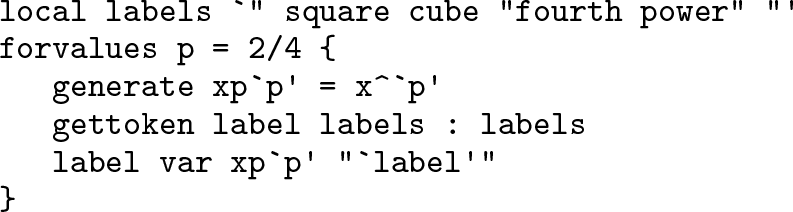
We now know about enough machinery to extend code to other problems. Suppose we want three things at once:
powers 2, 3, and 4 as before;
names like
variable labels as just given.
This is more complicated but not fundamentally different. We have one loop only with three lists to deal with in parallel. Here is one way to do it:

At this point, if not earlier, you may be thinking that you could just write down three statements to
5 Using macros as counters
5.1 Other methods use counters more
We could have written those loops differently. Other methods to loop in parallel typically hinge more on using macros to count our way around the loop.
Consider this way to do the last loop:
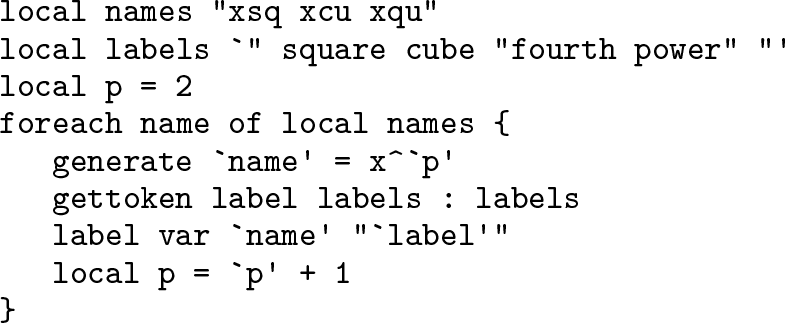
Done this way, we take over the manipulation of local macro
Increment is an old English word and more general in meaning, but in a programming context it often connotes precisely incrementing by 1, or adding 1. If the code says otherwise, that settles the matter. “Bump up” is more informal, but the same applies: “bump up” with nothing else said means bump up by 1. Again, if programmer comment or conversation says differently, then the meaning changes accordingly. The same goes for decrement, meaning subtracting, and for the more informal “bump down”.
5.2 The operators ++ and − −
This operation of incrementing an integer held in a local macro is so often needed that Stata allows a different syntax, one common in many other languages.
always is equivalent to
Indeed, you can refer to

Hence, we initialize the local macro
In our example, we lost a line and gained a reference to
Evaluate the local macro
Add 1 to the value of the macro.
Put its contents here.
So if before Stata reads this,
The other quadruplets are all similar.
What is more, these operators apply only to local macros and nothing else. After
Nevertheless, watch out:
is legal in Stata, but it is nothing to do with incrementation. An early decision in Stata was not to insist that a space must follow a macro name in a macro definition. That being so, that definition assigns the string
If this syntax is entirely new at this point, you may think it cryptic or rather too clever. But nevertheless, at some point you are likely to change your mind and start using it.
5.3 The word # of syntax
There are other ways to use counters. Something like this is often done:

The
and immediately translates it as
and then executes the command. More generally, Stata tries to execute a command because a command that is illegal will trigger an error message. That is backward because whatever triggers an error message is what we call illegal.
So that syntax avoids the use of
This
5.4 tokenize
To show that in action, we will use it in the next example, which also draws into the discussion the command
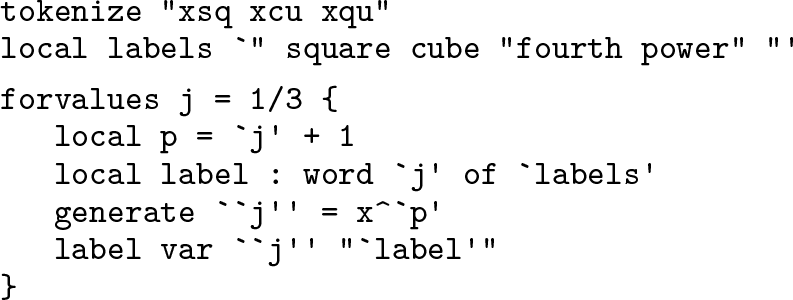
In that code, the tokens
In this example, after

which you should prefer only if you are paid according to the number of lines of code you write.
As usual, it is a good idea to trace the loop at least once. The first time around, the loop local macro
It is natural to panic a little on meeting this feature and to see only a confusing little snowstorm of delimiters. But it should be no more confusing than dealing with parentheses, brackets, or braces in algebra. (Remember, innermost first!) Also, choose a font within Stata, or within your text editor, that differentiates clearly between left single quotes and right single quotes, ensuring that such code is easier to read.
The way
5.5 Many roads lead to Rome
Many different versions of correct code can exist for a given problem so that the choice can be a matter of whatever seems clear, convenient, or congenial. Concise code is also a virtue. Thus, this code also works:

Is this better code? The question is mostly about style preference. In one sense, the code is direct and does not define local macros that are not needed. In another sense, I would usually prefer to define little lists before they are used inside a loop, thus separating content from structure. The loop code should show clearly the logical structure of a sequence of calculations so that we can focus on getting that right. The content is different. Such separation becomes helpful whenever we want to copy code from one problem to another, where very often the content is highly specific but the structure is more general.
6 Problem: Binning a variable
Dividing the range or support of a variable into disjoint bins, classes, or intervals is a common statistical need. Sometimes, a command does it for you, as when drawing histograms. You may already know good ways to do it otherwise. Users often have favorites here, such as the
Sometimes, defining bins may call for a loop. Idiosyncratic binning schemes may be conventional in your field or seem sensible given the research problem. So, often, zero is a bin to be given special treatment (nonsmokers, say, or households lacking some amenity). This section now serves as a signpost to a lengthier discussion of a personal favorite method, using matrices as look-up tables (Cox 2012a).
7 Problem: Posting skewness results in observations
Let’s turn now to a fresh example. We can use the same ideas, but some other elements are also needed.

For some history and wider discussion, see Cox (2010a). To the references there, I would now add Chakrabarti (1946), Picard (1951), and Bullen (2003).
Here we explore some alternative measures of skewness, which are perhaps simpler to think about. The literature surrounding these measures is curiously tangled, and vague and inaccurate attributions abound, so here is an attempt to sort out some of that small mess.
Another dimensionless ratio,

has roots in Pearson (1895), who used that ratio multiplied by 3 to get results that were often close in practice to

which was his preferred measure and is well defined in his system of distributions. The engaging notation skw, ske, and sko is given in Stirzaker (2015, 346), although it is easier on the eye than the ear. Presumably, sko is intended as mnemonic for m
The measure ske may now appear more interesting and useful than sko, at least in the absence of simple and generally applicable estimators of the mode. Hotelling and Solomons (1932) showed that it lies between −1 and 1. How best to prove, or improve on, the inequality has often been revisited (for example, Majindar [1962]; O’Cinneide [1990; 1991]; David [1991]; Dharmadhikari [1991]; Mallows [1991]; Murty [1991]; Basu and DasGupta [1997]). Its merits in practice have also been discussed (for example, Simpson, Roe, and Lewontin [1960]; van Belle [2008]) but without its ever becoming quite standard.
Yet another dimensionless ratio,

also lies between −1 and 1, as is evident from the definitions of median and quartiles. This ratio appears to be due to Bowley (1902), being introduced in the second edition of his text. It has also been attributed to Galton (Johnson, Kotz, and Balakrishnan 1994; Gilchrist 2000) and to various editions of the text first published by Yule. The attribution to Galton was not repeated by Dale and Kotz (2011) in their diligently detailed biography of Bowley and his work.
The notation skq might join Stirzaker’s family, q being mnemonic for
The nearest equivalent I know in Galton’s (1896) work is the ratio

which is based on the same idea of measuring skewness using distances between median and paired quantiles but spanning 60% of the cumulative probability rather than 50%. This ratio is greater than 1 for left-skewed distributions (defined by the second decile being farther from the median than the eighth decile) and less than 1 otherwise. Yule and Kendall (1937, 162) cite the Bowley measure, but not Bowley, and signal that previous editions, going all the way back to Yule (1911, 150) discussed that measure multiplied by 2, namely with the quartile deviation, half the interquartile range, as denominator. The attribution to Yule and Kendall is especially common in climatological statistics (for example, Wilks [2019]) and is traceable to a citation by Brooks and Carruthers (1953).
Without exhausting even the early literature, one more measure with broadly similar flavor is due to Kelley (1923, 77), who proposed median − (ninth decile + first decile)/2. Recast and scaled as (ninth decile −2 × median + first decile)/(ninth decile − first decile), this becomes yet another ratio bounded by −1 and 1. The misspelling “Kelly” is very common.
Such ideas around the turn of the twentieth century morphed into a more general realization that the entire set of paired distances, median − lower quantile and upper quantile − median, may be used to look at skewness generally. Here “lower” connotes some probability p < 0.5, and “upper” connotes the complementary probability 1 − p. So, Galton worked with p = 0.2, Bowley with p = 0.25, and Kelley with p = 0.1. Yet other siblings, or perhaps cousins, from Inman (1952) used p = 0.16 and p = 0.05. Applications within sedimentology are often overlooked outside that field, but for a roundup see Griffiths (1967). See Cox (2004, sec. 6) for further discussion of graphics based on such ideas.
All that said, we focus now on how to pick up results for two of those measures. The first step is to see that we can obtain the elements as results accessible after

All this does is put out a list of variable names and results for those two measures of skewness. We have paid some attention to layout (using SMCL
Further examination of the results will usually be much easier if they are placed in new variables. At first sight, this is a little awkward because we have one pair of results for each variable, so how will they fit alongside the existing dataset? As long as we have more observations than variables, we could just compile new variables by the side of, and unrelated to, the existing dataset. (If we have more variables than observations, we need to increase the number of observations or put the results elsewhere. Let’s continue with the simpler and optimistic assumption.)
This little problem must be solved backwards. We want each new skewness result to be put into a separate observation, which in turn implies that we need to loop over
and that itself requires a
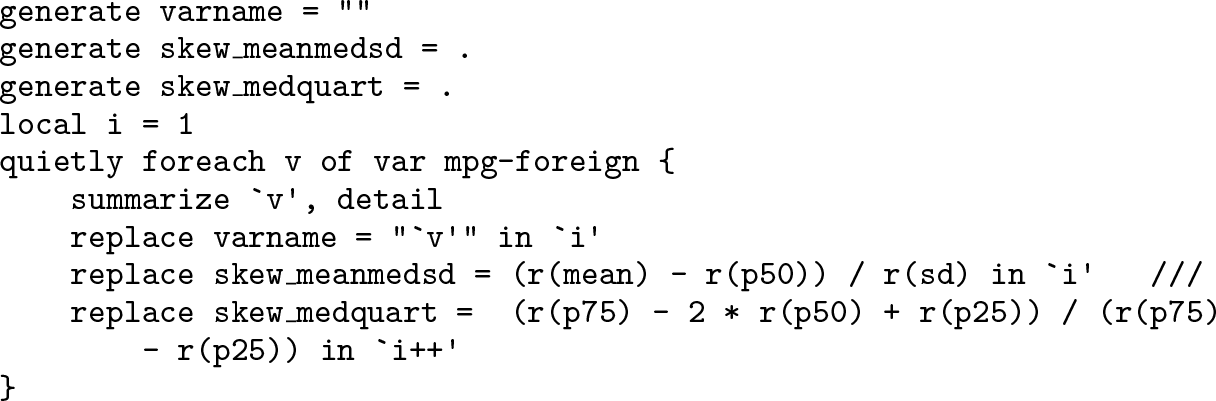
Some new details here deserve spelling out. We need to initialize each variable we are going to use. The recording of variable names here is rather more than an adornment. Because these values bear no relation to the structure of the existing dataset, the very first
We are looping over variables, so in parallel we also need to loop over observations. Hence, we first initialize a local macro, here
Once that is done, a graph can be produced, say,
which, naturally, you may inspect for the auto data or, with different variable names, any interesting dataset. The auto data alone show one property of one measure that is unsurprising on reflection, but I will leave that as a hint, depending on whether you find the example interesting statistically, rather than just as an illustration of Stata technique.
This example should not be left before we grasp one awkward detail. Suppose that a variable were actually constant. In this situation, the standard deviation and interquartile range are both necessarily 0, and dividing by 0 makes any result indeterminate. In practice, this is likely to be unimportant, but in writing code it should become habit to think through what should happen if missing values arise.
The kind of approach described here may be compared with that in cookery programs. We all know that expert cooks sometimes make mistakes just like everybody else, except that they presumably do so less often than most others. What you see, however, lacks all the gaffes, small or large, which were edited out before publication. Similarly, this example was something I really wanted to do, but I did not get all the details right the first time. How you do it is up to you, but working your way up from the first beginnings to a more complete script in Stata’s Do-file Editor or another text editor is an approach that appeals to many Stata users.
All that said, another approach altogether is to set up saving results directly to a new dataset (see [P]
8 Conclusion
Each set of loops in parallel is just one loop, typically with
Interpreted suitably broadly, looping is much of programming if not most. Many themes could be added, including the use of [D]
Footnotes
9 Acknowledgments
My emphasis on