




Abstract
In this article, we introduce the Stata (and R) package
Keywords
1 Introduction
Regression-discontinuity (RD) designs with multiple cutoffs or multiple scores are commonly encountered in empirical work in economics, education, political science, public policy, and many other disciplines. Thus, these specific settings have also received attention in the recent RD methodological literature (Papay, Willett, and Murnane [2011]; Reardon and Robinson [2012]; Wong, Steiner, and Cook [2013]; Keele and Titiunik [2015]; Keele, Titiunik, and Zubizarreta [2015]; Cattaneo et al. [2016, 2020], and references therein). In this article, we introduce the software package
The command
To streamline the presentation, this article uses only simulated data to showcase all three settings covered by the package
Noncumulative multiple cutoffs: units in different groups (for example, schools) receive a univariate score (for example, test score), but the RD cutoff varies by group.
Cumulative multiple cutoffs: units receive a univariate score (for example, age), but different treatments are assigned at distinct score levels (for example, at age 60 and at age 65).
Multiple scores: units receive two scores (for example, latitude and longitude), and treatment is assigned based on a boundary depending on both scores (for example, geographic boundary).
We elaborate further on these cases in the upcoming sections, where we also give graphical representations of each case.
The Stata (and R) package
The rest of the article is organized as follows. Section 2 gives a brief overview of the methods implemented in the package
2 Overview of methods
In this section, we briefly describe the main ideas and methods used in the package
2.1 Noncumulative multiple cutoffs
In this case, individuals have a running variable Xi and a vector of potential outcomes (Yi (0), Yi (1)). Each individual faces a cutoff Ci ∊ C with C = {c 1 , c 2 ,…cJ }. For example, Chay, McEwan, and Urquiola (2005) study the effect of a school improvement program introduced in 1990 by the Chilean government. In this program, low-performing schools received public funding to improve infrastructure and teacher training, among other things. Assignment to this program was based on a school-level measure of test scores falling below a cutoff, where the cutoff was different across Chile’s 13 administrative regions. In this example, Ci indicates each school’s administrative region, because this determines the cutoff faced by each school.
Unlike in a standard single-cutoff RD design, Ci is a random variable. In a sharp design, individuals are treated when their running variable exceeds their corresponding cutoff, Di = 1(Xi ≥ Ci ). A key feature of this design is that the variable Ci partitions the population; that is, each unit faces one and only one value of Ci . As the notation suggests, the potential outcomes for each individual are the same regardless of the specific cutoff he or she is exposed to; see Cattaneo et al. (2016, 2020) for more discussion. Finally, we consider only finite multiple cutoffs because this is the most natural setting for empirical work: in practice, continuous cutoff are discretized for estimation and inference, as discussed and illustrated below.
Under regularity conditions, which include smoothness of conditional expectations (see aforementioned references for details), the cutoff-specific treatment effects, τ(c) = E{Yi (1) − Yi (0)|Xi = c, Ci = c}, are identified by

The pooled RD estimate is obtained by recentering the running variable,

where

All of these parameters can be readily estimated using local polynomial methods (see Cattaneo, Idrobo, and Titiunik [2019] for a practical introduction), conditioning on cutoffs when appropriate. In other words, RD methods can be applied to each cutoff separately, in addition to pooling the data. Therefore, the
For the pooled parameter τ

When not specified by the user, the
2.2 Cumulative multiple cutoffs
In an RD setting with cumulative cutoffs, individuals receive different treatments (or different dosages of a treatment) for different ranges of the running variable. In such a setting, individuals receive treatment 1 if Xi < c 1, treatment 2 if c 1 ≤ Xi < c 2, and so on, until the last treatment value at Xi ≥ cJ . For example, Brollo et al. (2013) examine the effect of federal transfers on political corruption in Brazilian municipalities. The amount of the federal transfer that municipalities receive depends on the municipality’s population and changes discretely at specified cutoffs. For example, municipalities with population below 10,189 receive a certain amount, municipalities with population between 10,189 and 13,585 receive a larger amount, and so on.
Denote the values of these treatments as dj , so that the treatment variable is now
Di ∊ {d 1 , d 2 ,…dJ }. Under standard regularity conditions, we have

Because, unlike the case with multiple noncumulative cutoffs, the population is not partitioned, each observation can be used to estimate two different (but contiguous on the score dimension) treatment effects. For example, units receiving treatment dosage dj are used as “treated” (that is, above the cutoff cj ) when estimating τj and as “controls” when estimating τj +1 (that is, below the cutoff cj +1). Thus, cutoff-specific estimators may not be independent, although the dependence disappears asymptotically as long as the bandwidths around each cutoff decrease with the sample size. On the other hand, bandwidths can be chosen to be nonoverlapping to ensure that observation ns are used only once.
Once the data have been assigned to each cutoff under analysis, local polynomial methods can also be applied cutoff by cutoff in the cumulative multiple cutoffs case. We illustrate this approach below; for further discussion see Cattaneo, Idrobo, and Titiunik (Forthcoming) and the references therein.
2.3 Multiple scores
In a multiscore RD design, treatment is assigned based on multiple running variables and some function determining a treatment “region” or “area”. We focus on the case with two running variables,
This type of assignment defines a continuum of treatment effects over the boundary of the treatment region, denoted by

and under regularity conditions,

where
Because estimating a whole curve of treatment effects may not be feasible in practice, it is common to define a set of boundary points of interest at which to estimate the RD treatment effects. In the previous example, for instance, three points of interest on the boundary determining treatment assignment could be {(25, 50), (50, 50), (50, 25)}. On the other hand, the pooled RD estimand requires defining some measure of distance to the cutoff, such as the perpendicular (Euclidean) distance. This distance can be seen as the recentered running variable
3 The rdmc command
This section describes the syntax of the command
3.1 Syntax

depvar is the dependent variable. runvar is the running variable (also known as score or forcing variable).
3.2 Options
4 The rdmcplot command
This section describes the syntax of the command
4.1 Syntax

depvar is the dependent variable. runvar is the running variable (also known as score or forcing variable).
4.2 Options
5 The rdms command
This section describes the syntax of the command
5.1 Syntax

depvar is the dependent variable. runvar1 is the running variable (also known as score or forcing variable) in a cumulative cutoffs setting. runvar2, if specified, is the second running variable (also known as score or forcing variable) in a two-score setting. treatvar, if specified, is the treatment indicator in a two-score setting.
5.2 Options
6 Illustration of methods
6.1 Noncumulative multiple cutoffs
We begin by illustrating

The basic syntax for

The output shows the cutoff-specific estimate at each cutoff, together with the corresponding robust bias-corrected p-value, 95% robust confidence interval and sample size at each cutoff, and two “global” estimates. The first one is a weighted average of the cutoff-specific estimates using the estimated weights described in section 2. These estimated weights are shown in the last column. The second one is the pooled estimate obtained by normalizing the running variable. While these two estimators converge to the same population parameter, they can differ in finite samples as seen above. In this example, the effect is statistically significant at both cutoffs.
All the results in the above display are calculated using

The user can also modify the options for estimation in each specific cutoff. The following syntax shows how to manually change options for the cutoff-specific estimates by setting a bandwidth of 11 in the first cutoff and 10 in the second one.
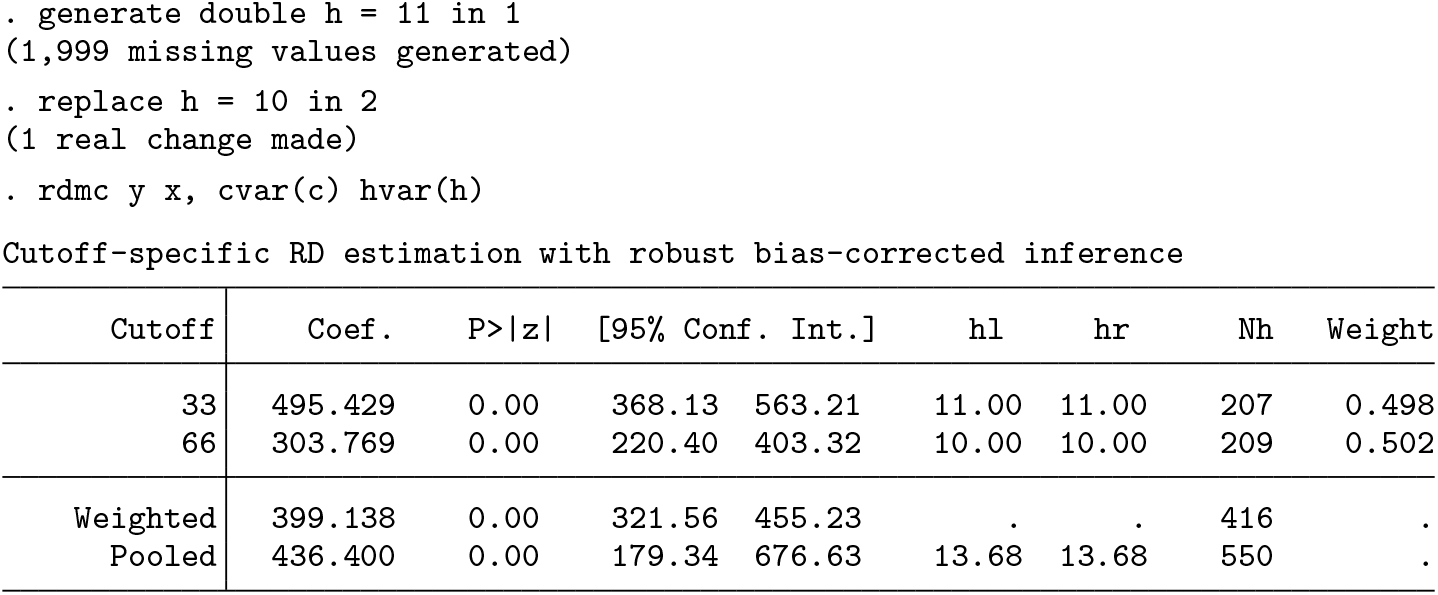
All the cutoff-specific options are passed in a similar fashion, defining a new variable of length equal to the number of cutoffs that indicates the options for each cutoff in its values. For instance, the following syntax indicates different bandwidth selection methods at each cutoff:
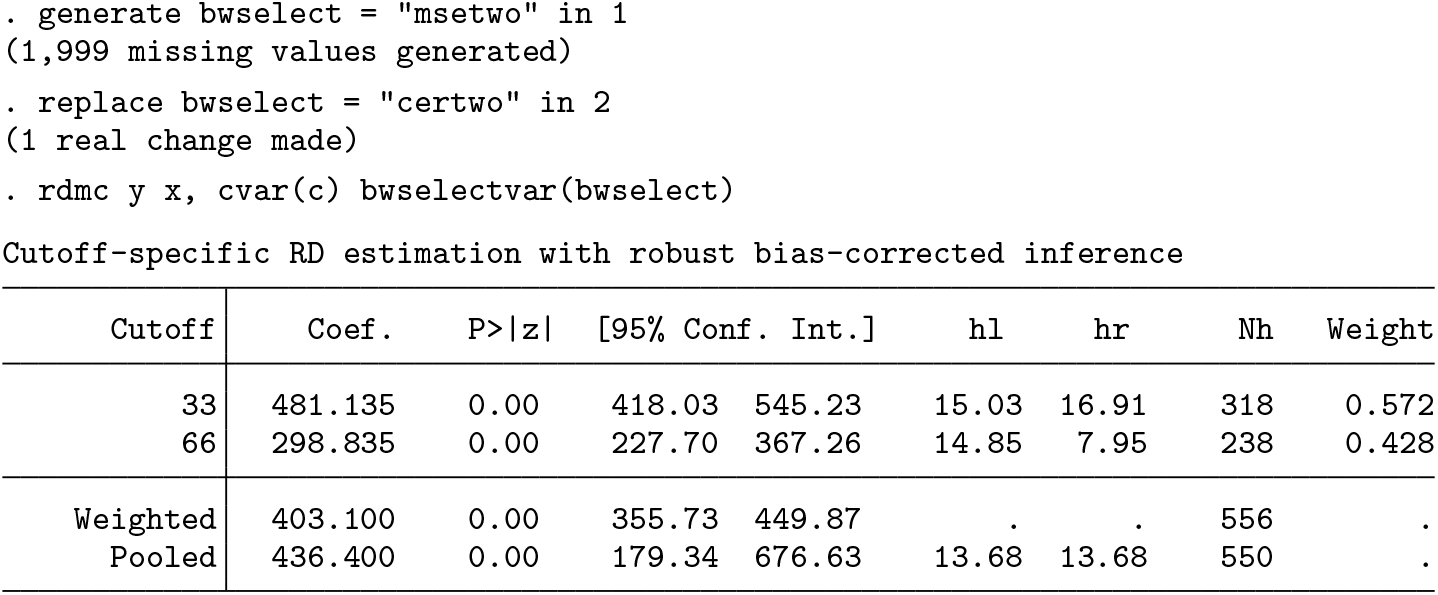
The

The

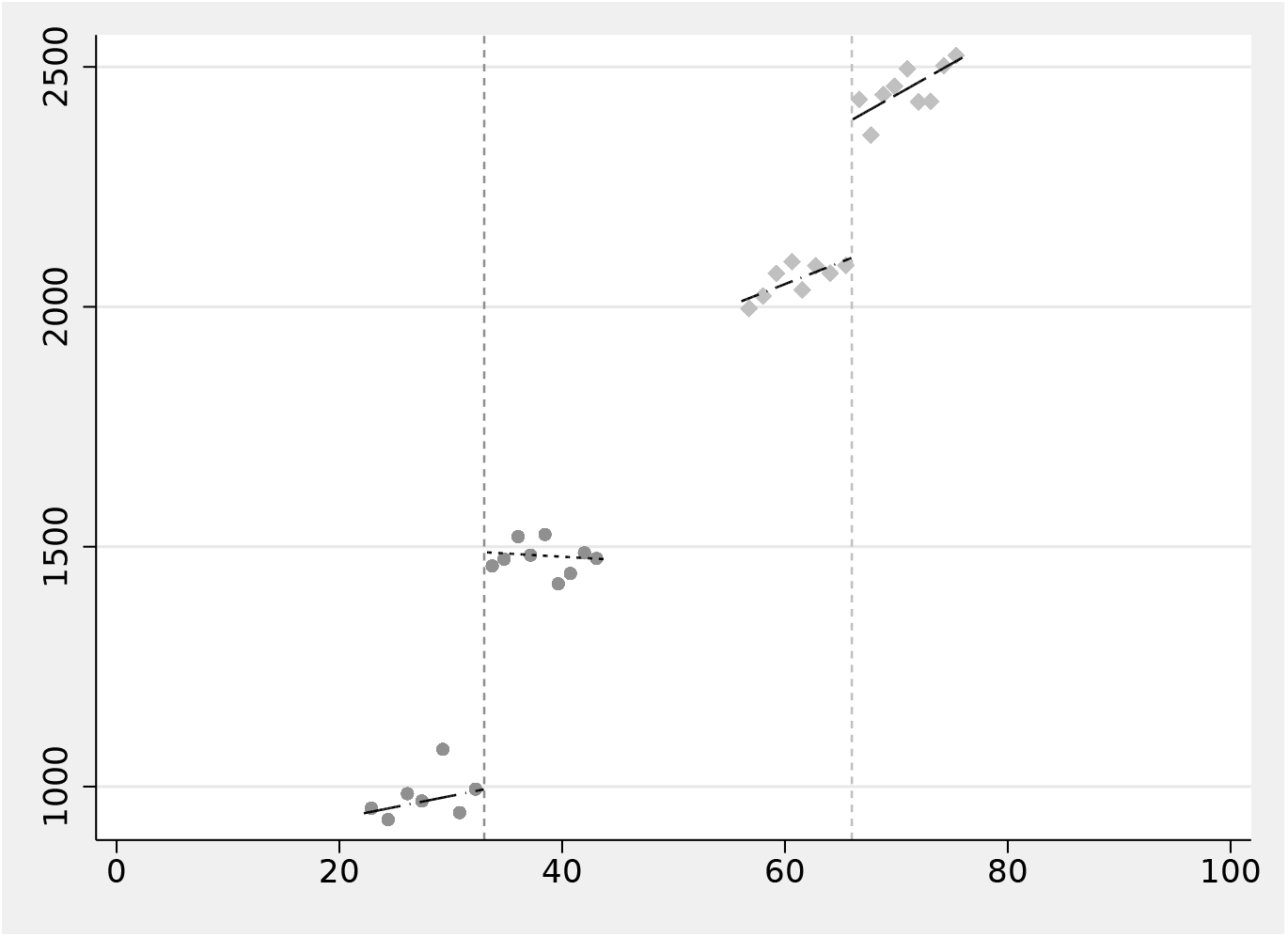
Multiple RD plot
The

The resulting plot is shown in figure 2.
Multiple RD plot
The option

6.2 Cumulative multiple cutoffs
We now illustrate the use of
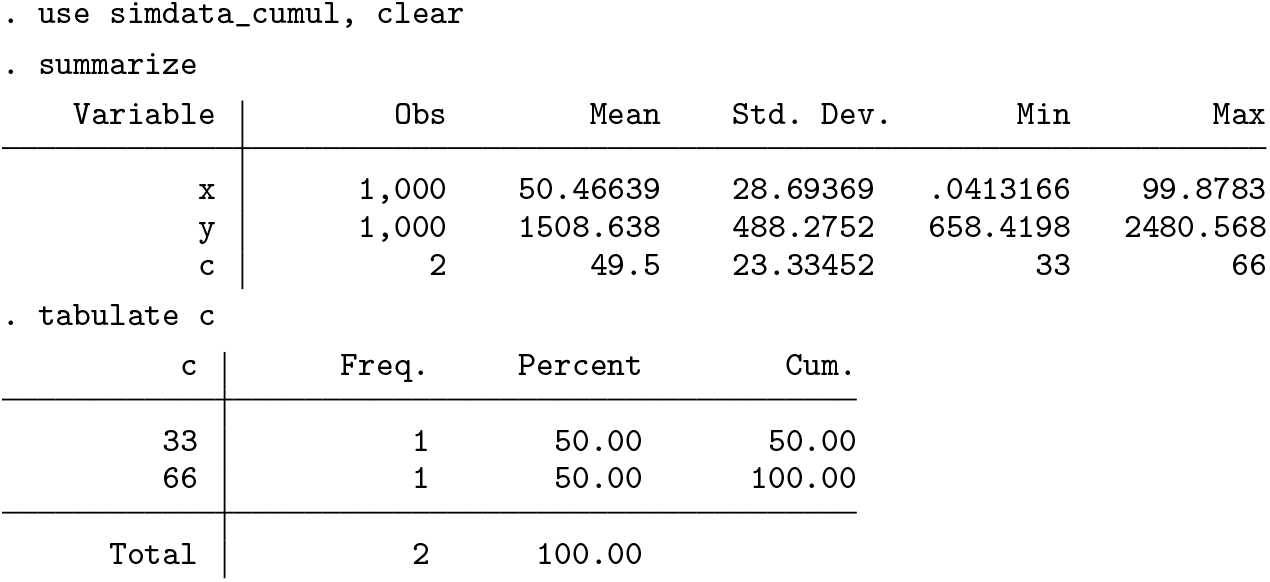
The syntax for cumulative cutoffs is similar to
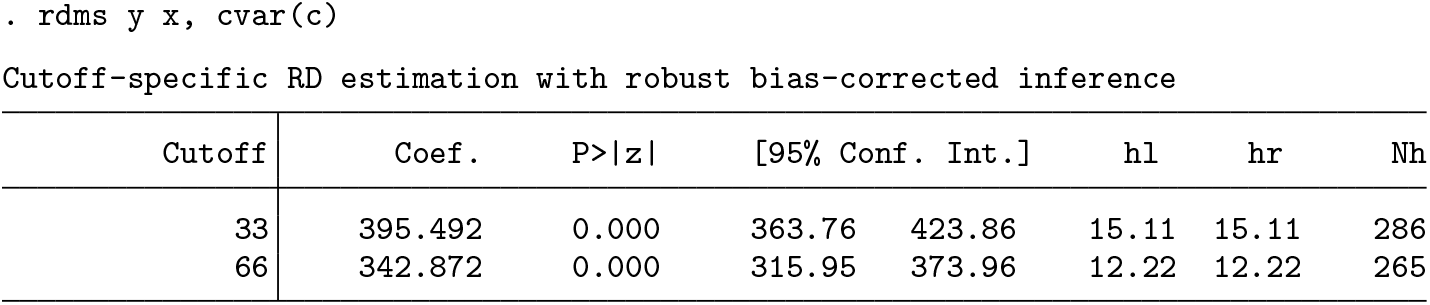
Options like the bandwidth, polynomial order, and kernel for each cutoff-specific effect can be specified by creating variables as shown below.
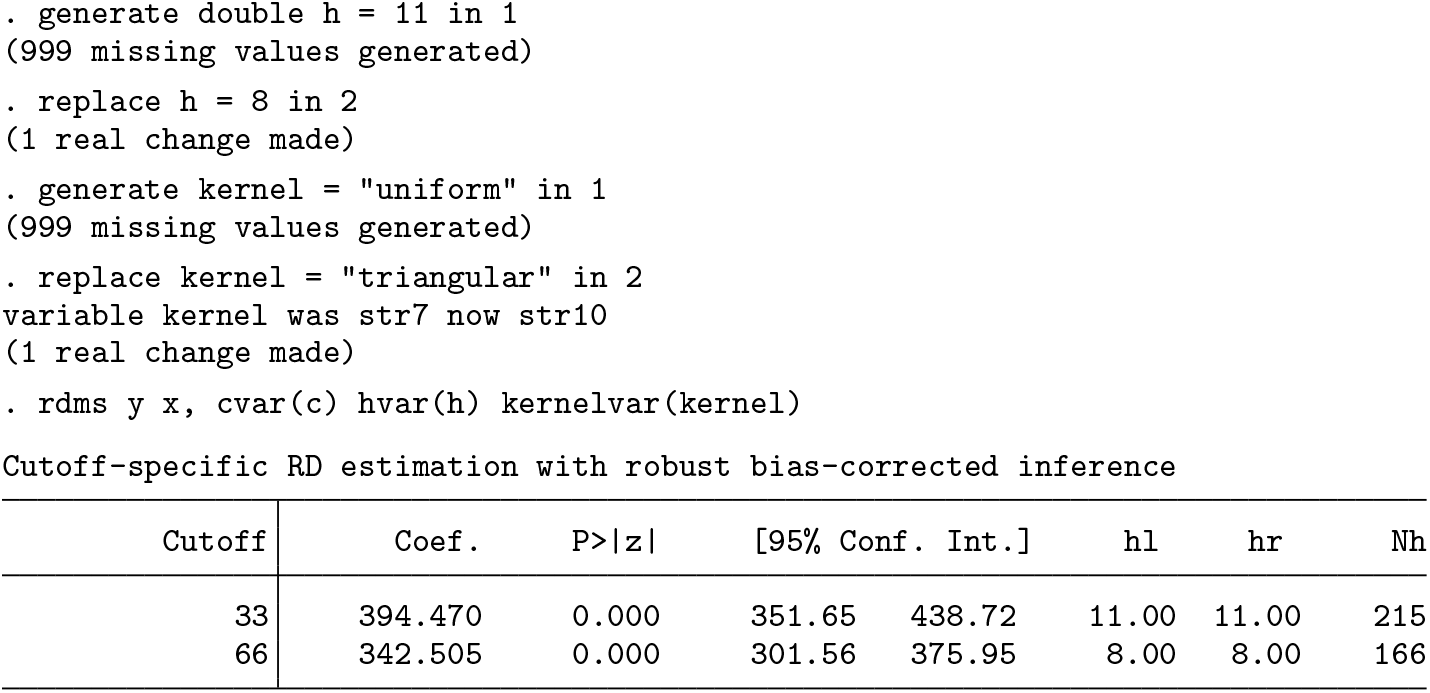
Without further information, the

The pooled estimate can be obtained using

Finally, we can use the variable


Cumulative cutoffs
6.3 Multiple scores
We now illustrate the use of

The following code provides a simple visualization of this setting, shown in figure 4:

Bivariate score
The basic syntax is the following:
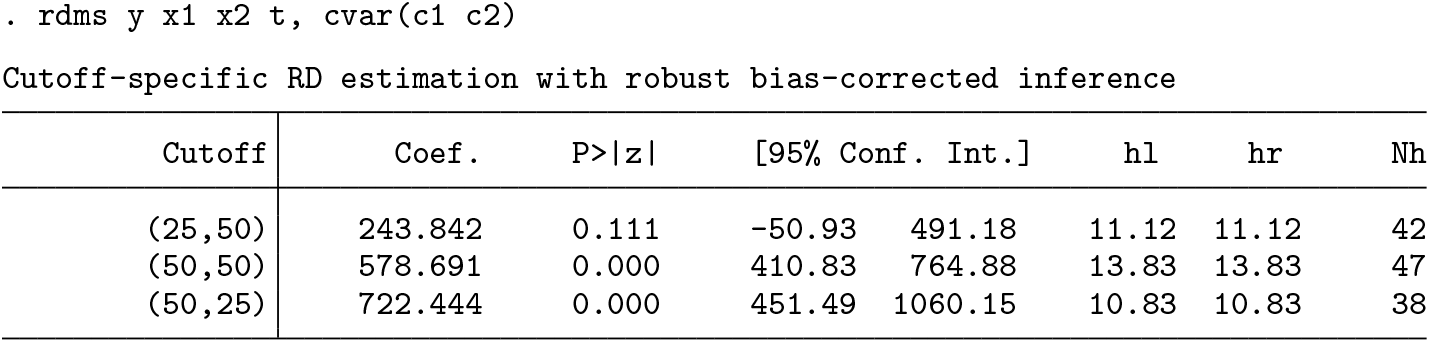
Information to estimate each cutoff-specific estimate can be provided as illustrated before. For instance, to specify cutoff-specific bandwidths, type

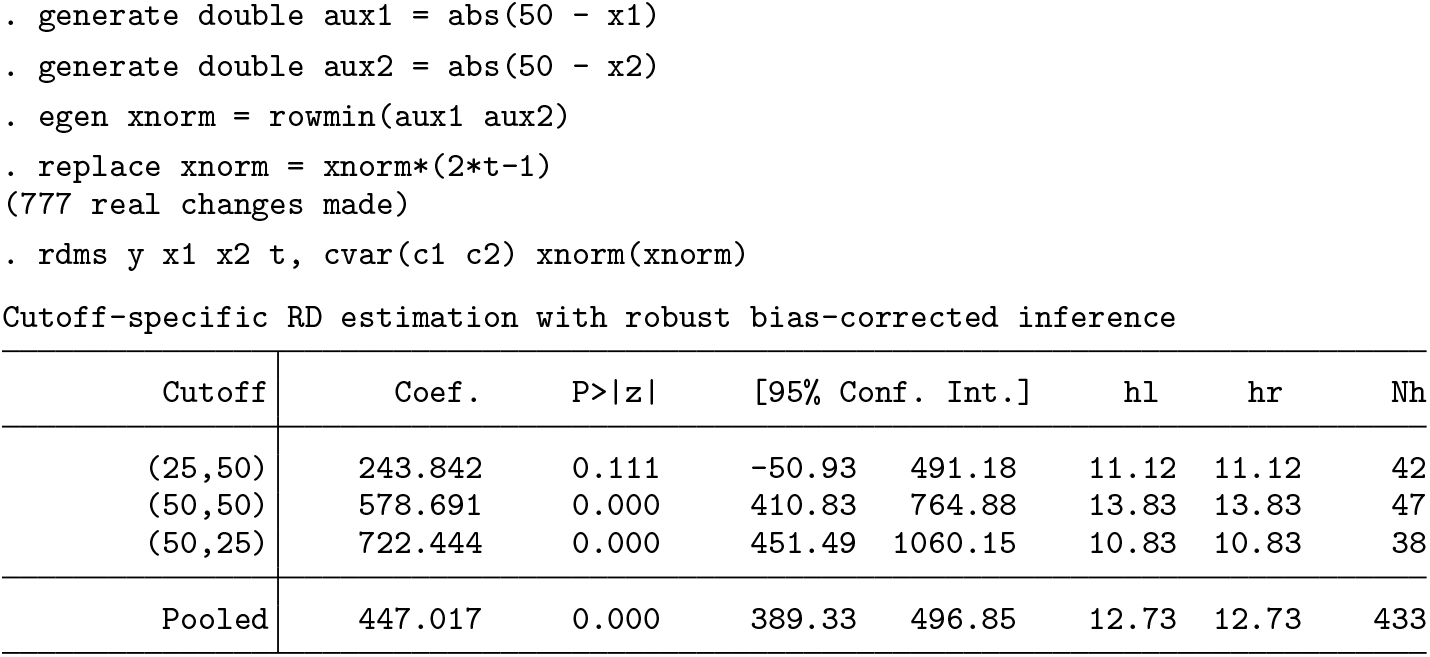
Finally, the
7 Conclusion
We introduced the package
Supplemental Material
Supplemental Material, st0620 - Analysis of regression-discontinuity designs with multiple cutoffs or multiple scores
Supplemental Material, st0620 for Analysis of regression-discontinuity designs with multiple cutoffs or multiple scores by Matias D. Cattaneo, Rocío Titiunik and Gonzalo Vazquez-Bare in The Stata Journal
Footnotes
8 Acknowledgments
We thank Sebastian Calonico and Nicolas Idrobo for helpful comments and discussions. The authors gratefully acknowledge financial support from the National Science Foundation through grant SES-1357561.
9 Programs and supplemental materials
To install a snapshot of the corresponding software files as they existed at the time of publication of this article, type
References
Supplementary Material
Please find the following supplemental material available below.
For Open Access articles published under a Creative Commons License, all supplemental material carries the same license as the article it is associated with.
For non-Open Access articles published, all supplemental material carries a non-exclusive license, and permission requests for re-use of supplemental material or any part of supplemental material shall be sent directly to the copyright owner as specified in the copyright notice associated with the article.
