markdoc is a general-purpose literate programming package for generating dynamic documents, dynamic presentation slides, Stata help files, and package vignettes in various formats. In this article, I introduce markdoc version 5.0, which performs independently of any third-party software, using the mini engine. The mini engine is a lightweight alternative to Pandoc (MacFarlane [2006, https://pandoc.org/]), completely written in Stata. I also propose a procedure for remodeling package documentation and data documentation in Stata and present a tutorial for generating help files, package vignettes, and GitHub Wiki documentation using markdoc.
Writing good documentation is one of the oldest recommendations of software development (Walsh 1969). However, despite the importance of software documentation (Vasilescu et al. 2014; Sousa and Moreira 1998) and the time needed to write and update it (de Souza, Anquetil, and de Oliveira 2005), no author earns any admiration or credits for the endeavor (Brown 1974). Therefore, programs that facilitate writing and updating documentation, such as Javadoc (Kramer 1999; Leslie 2002) and Doxygen (van Heesch 1997), are favorable. These programs implement a procedure called literate programming (Knuth 1992; Cordes and Brown 1991; Ramsey and Marceau 1991; Leisch 2002). In this approach, the documentation is written within code files using special comment signs. Subsequently, anytime the code is changed, the documentation can also be updated within the same file. Next, a program extracts and renders the documentation and updates the documents (Knuth 1983). For statistical software developed with R, roxygen2 (Wickham, Danenberg, and Eugster 2019) mimics a similar approach to generate R documentation files. For Stata, markdoc offers similar capabilities (Haghish 2016b,c) that are addressed in this article.
For publishing statistical packages on the Comprehensive R Archive Network (CRAN) and the Boston College Statistical Software Components archive, you must document individual functions (R Core Team 2006; Leisch 2008; Baum 2011). However, a statistical package might include several help files, each corresponding to an individual function. Therefore, a long-form package vignette, which not only includes the help files but also adds a detailed description of the package with a tutorial, can be rewarding (Wickham 2015).
In this article, I provide a tutorial on how to use markdoc to write and update software documentation in various file formats (.sthlp, .pdf, .html, and .docx) from the same documentation source. Moreover, I demonstrate how individual help files can be organized and combined to generate a package vignette or GitHub Wiki documentation within the Stata command line. Finally, I introduce the new features of markdoc 5.0 that make it independent of any third-party software.
Proposing an agenda for remodeling software documentation implies that this article is chiefly aimed at advanced users, who are accustomed to Stata programming and package development. Moreover, to escape repetition, I assume the reader is familiar with the syntax and workflow of markdoc 4.0, as well as its journal article (Haghish 2016d). Supplementary documentation can also be found on the markdoc Wiki.1
2 markdoc 5.0
markdoc is a general-purpose literate programming package for Stata. It implements a literate programming procedure for writing documentation within Stata code and includes a multipurpose engine that supports generating Stata help files, dynamic documents, and dynamic presentation slides, using the same documentation source. markdoc 4.0 was published in 2016, with a tutorial for writing dynamic analysis documents in Stata. In this section, I introduce the new features of markdoc 5.0 and recap the essential points that are relevant to this article.
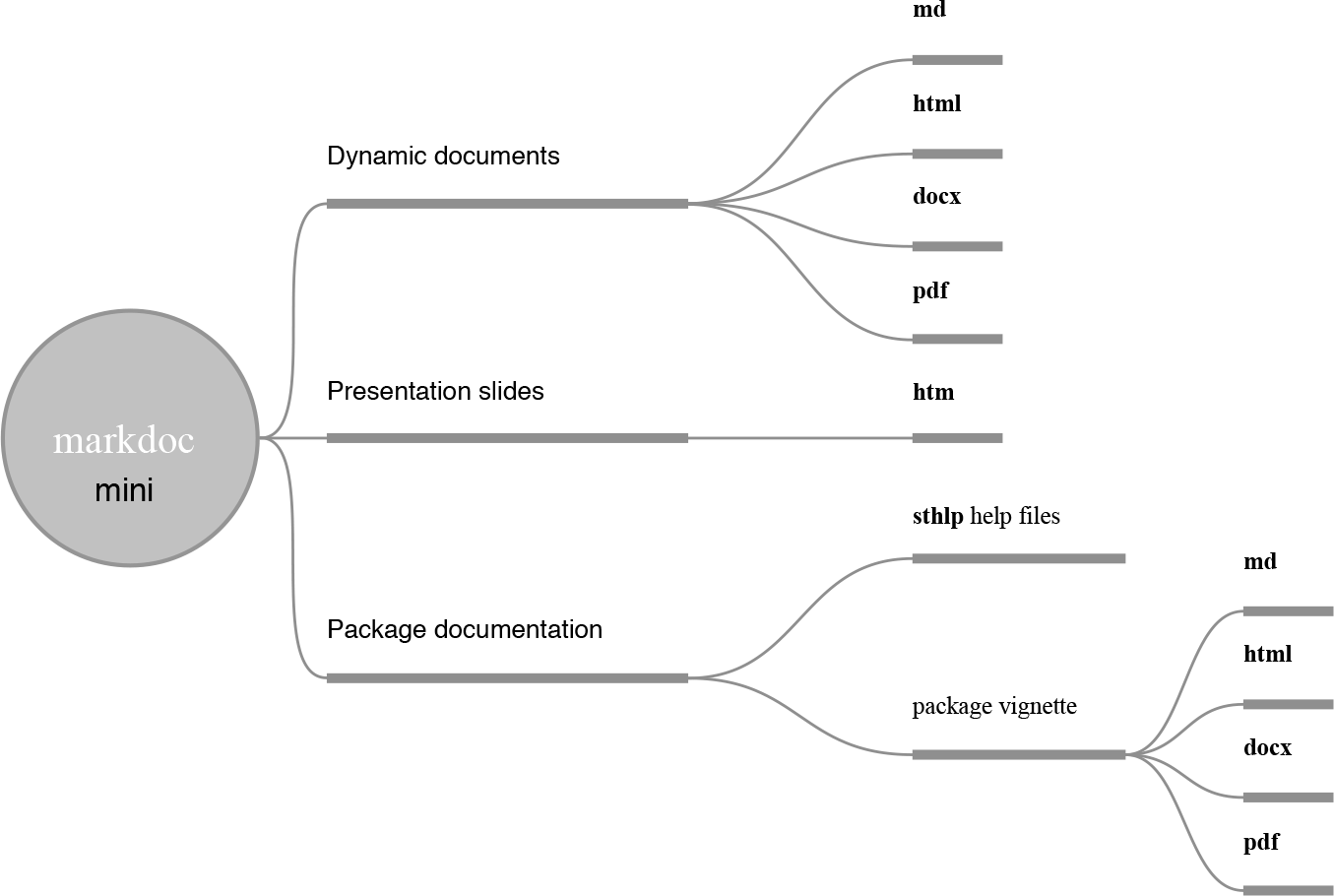
markdoc 5.0 is accompanied by a new lightweight engine—called mini—that will free the package of any third-party software such as Pandoc (MacFarlane 2006) or wkhtmltopdf (Kulkarni and Truelsen 2015). The mini engine is optional and requires Stata 15 or above. As shown in figure 1, the mini engine offers the same versatility and flexibility for generating dynamic documents, dynamic presentation slides, help files, and package vignettes in various formats. Therefore, it allows markdoc to be fully functional on restricted machines or servers, where the user lacks administrative privileges to install third-party software.
Documents supported by the mini engine
2.1 Supported markup languages
A full installation of markdoc with its dependencies supports three notation markup languages: Markdown (Gruber 2004), HTML, and LATEX. The mini engine, however, supports only Markdown (see section 3.1 for exception).
2.2 Installation
markdoc is hosted on GitHub and should be installed using the github command (Haghish 2016a, Forthcoming), which is a powerful tool for installing and managing Stata packages hosted on GitHub with their Stata dependencies. To install github modules, type
Next, the latest stable release2 of markdoc can be installed by typing the command below. Without specifying the stable option, you will install the development version (main branch) of the package:
. github install haghish/markdoc, stable
Dependencies
After you install the markdoc repository, the github install command installs three dependency packages, which are specified in a file named dependency.do.3 The dependency packages are weaver (Haghish 2016e), md2smcl (Haghish 2016c), and datadoc (Haghish 2019a). The weaver package includes the txt, img, and tbl commands, used for writing dynamic text, capturing and adding figures, and creating dynamic tables, respectively. The md2smcl package, as the name suggests, converts Markdown to Stata Markup and Control Language (SMCL), which is needed for generating Stata help files. The datadoc command produces a help file template for a dataset that is currently loaded in Stata (see section 3.2).
2.3 Syntax
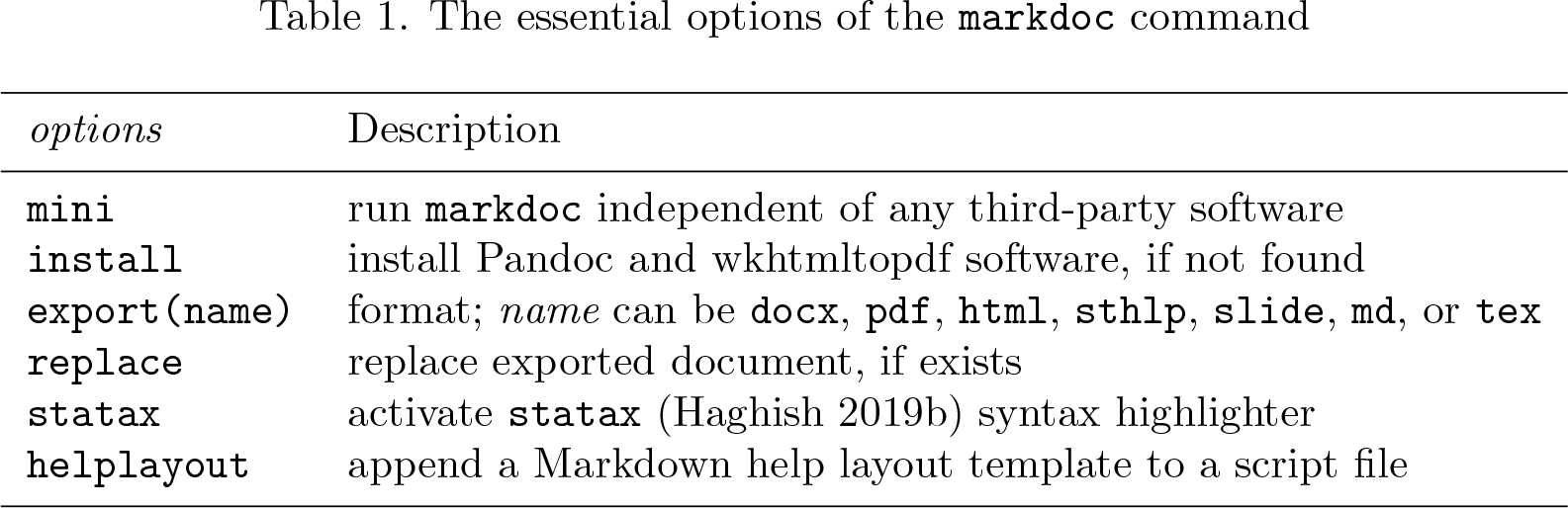
The syntax and procedure of markdoc 5.0 remain identical to those of version 4.0, which can be summarized as follows. Table 1 shows the options that are used throughout the examples of this article.
markdocfilename [ ,options ]
The essential options of the markdoc command
options
Description
mini
run markdoc independent of any third-party software
install
install Pandoc and wkhtmltopdf software, if not found
export(name)
format; name can be docx, pdf, html, sthlp, slide, md, or tex
append a Markdown help layout template to a script file
2.4 Initiating the mini program
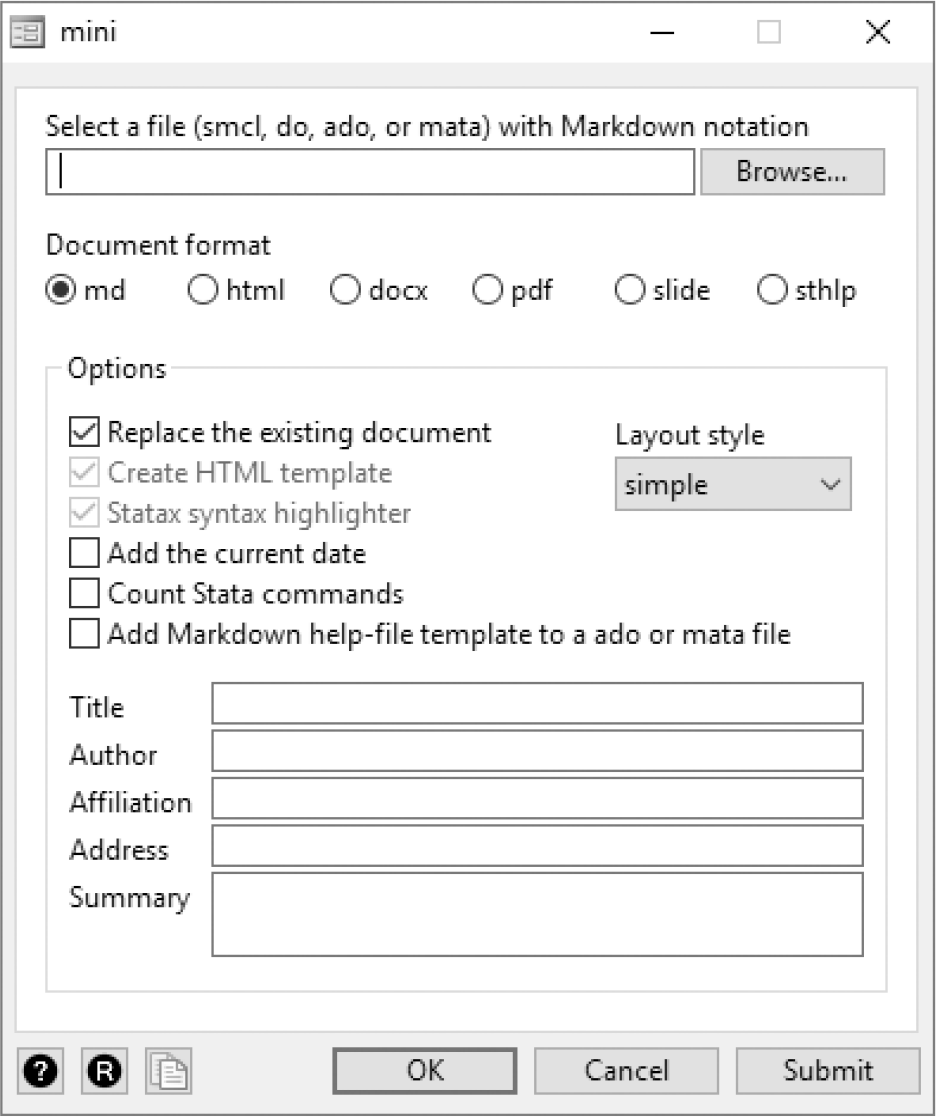
As noted earlier, mini is an alternative to Pandoc. There are a few ways to ask markdoc to use mini for document conversion instead of Pandoc. The easiest way is to launch the graphical user interface created for the lightweight engine by typing
. db mini
The mini graphical user interface
Alternatively, as shown in table 1, the mini option can be passed to markdoc:
markdocfilename [ , mini… ]
The mini engine can also be called independently to convert a Markdown file to any of the supported formats (.sthlp, .html, .docx, .pdf, and .slide). This enables other Stata packages to call mini to convert a Markdown file to other document formats. Because mini was written for markdoc, it takes the same options as markdoc (see help mini for more details).
minifilename [ , export(name)… ]
For example, if we have a Markdown file named markdown.md4, we can convert it to a help file or PDF file within Stata:
2.5 Package structure and workflow
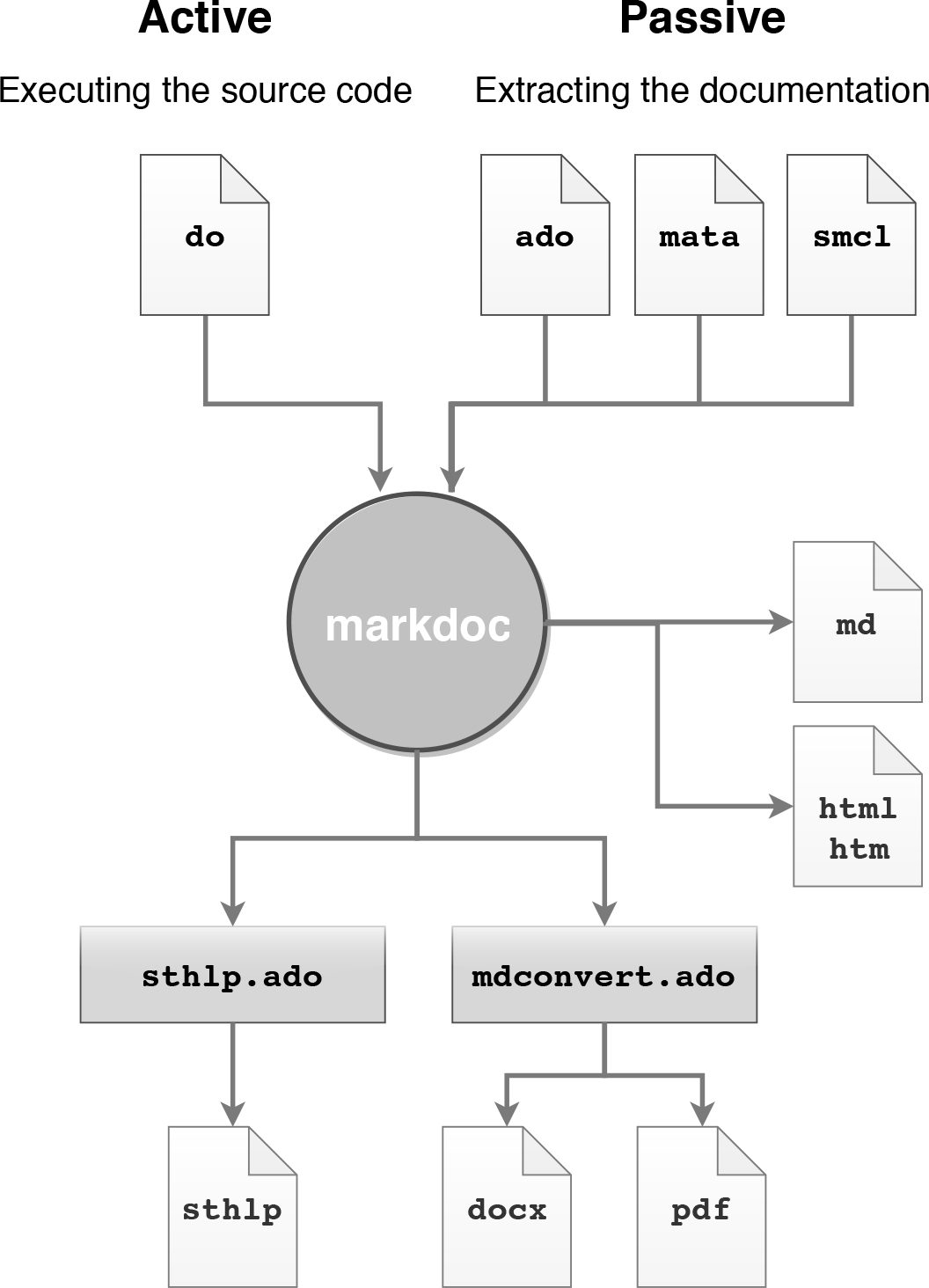
To make markdoc a general-purpose package, I designed two separate workflows. The active procedure executes the do-file in a clean workspace5 to examine the reproducibility of the code and generate a dynamic analysis document. In contrast, the passive procedure extracts only the documentation from a Stata file, converts the notation, and generates a document. The workflow, as shown in figure 3, is chosen automatically based on the given file extension.
Structure and workflow of the mini engine
2.6 Example
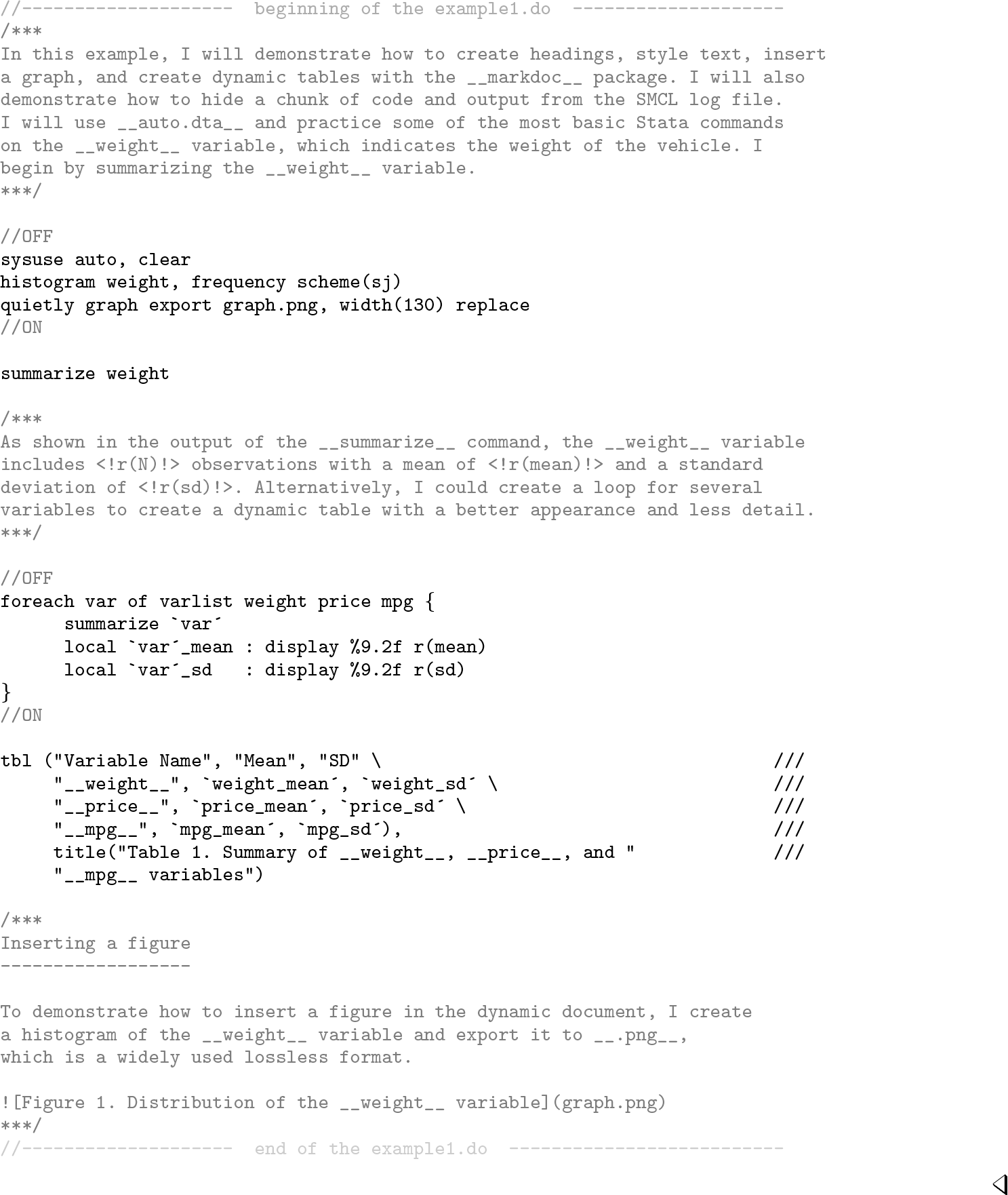
The example below is borrowed from markdoc‘s (Haghish 2016b) publication and is executed with the mini engine. The example demonstrates using dynamic text—specified within the <!scalar!> marker—and a dynamic table.
Example
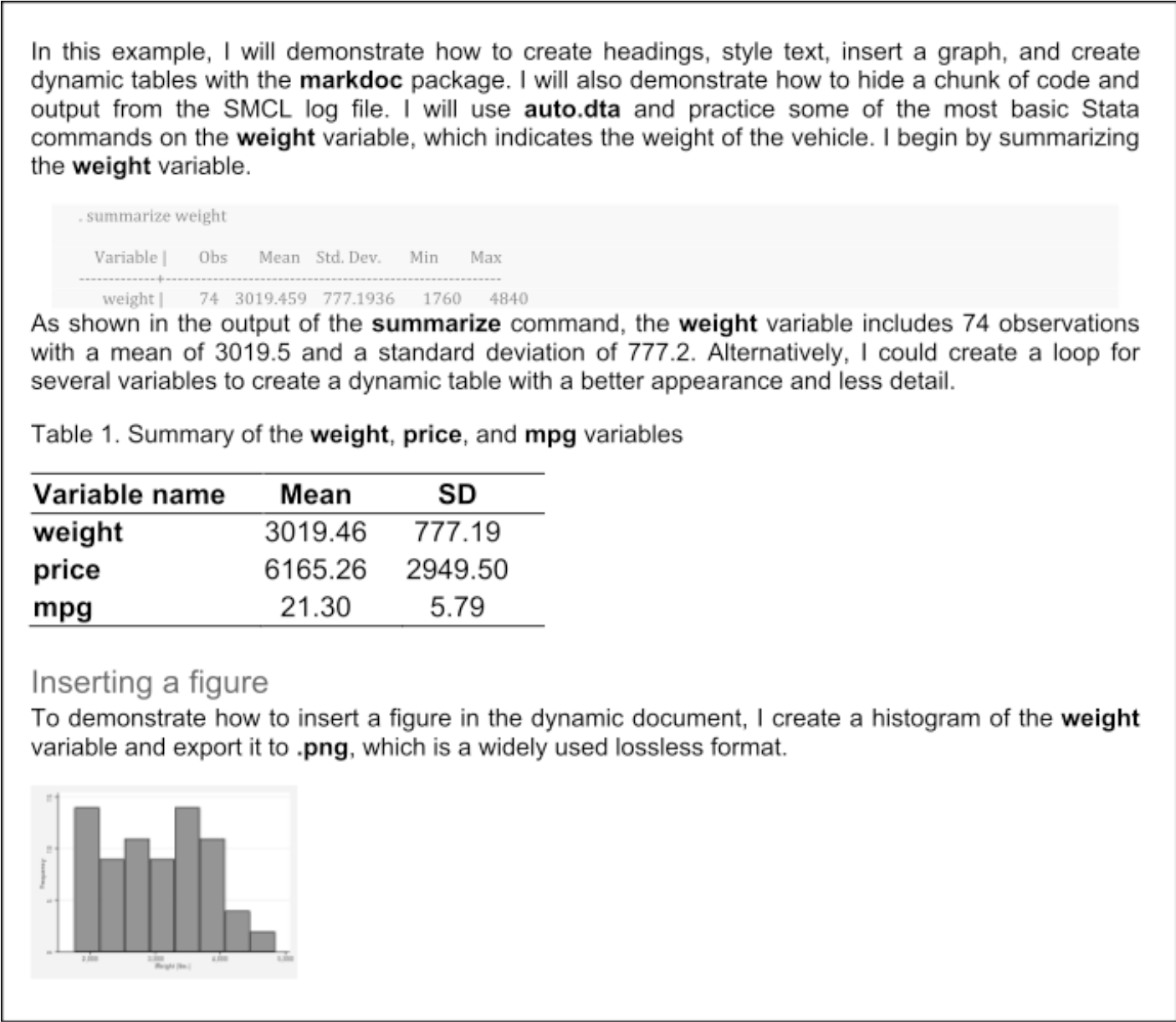
This example is prepared for the active procedure; that is, markdoc executes a do-file to generate the analysis report. If the example is saved in example1.do, typing the command below will execute the do-file, test its reproducibility, and generate a Word document, independent of any third-party software.
. markdoc example1.do, mini export(docx) replace
The example1.do output from the Word file
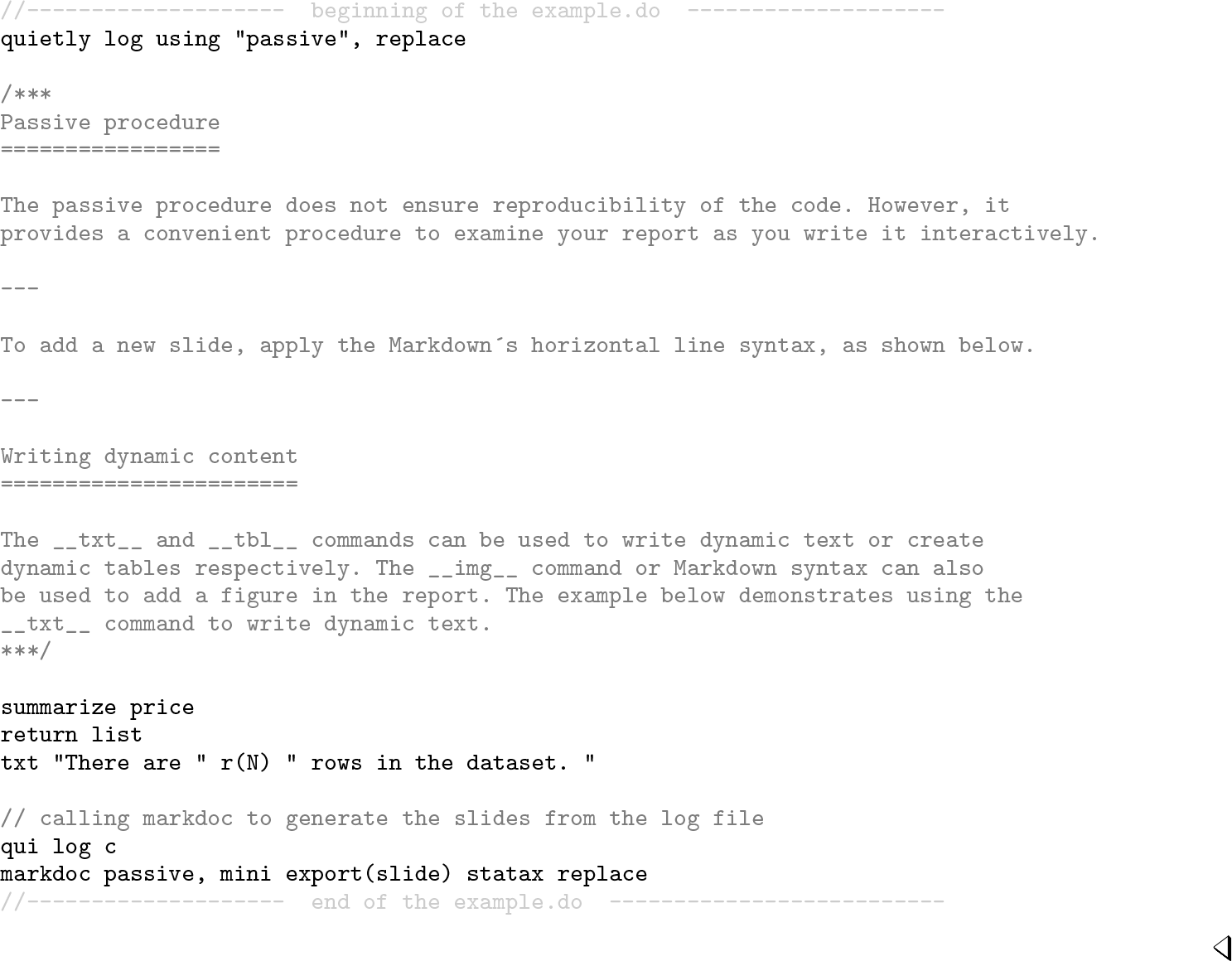
The passive procedure begins by initiating a SMCL log file. Then, the log file is given to markdoc to convert it to any format. This procedure is shown in the example below, which produces HTML-based slides within Stata. In addition to the mini option, markdoc also utilizes the statax syntax highlighter for Stata code.
Example
Limitations of mini
For generating the Word documents and PDF files, the mini program uses two sets of Stata commands, which are putdocx and putpdf. Therefore, it is bound by their limitations as well. For Stata 15, the following limitations can restrict Word documents and PDF files:
generating a hyperlink,
styling options within each cell of the table,
creating an ordered or unordered lists, and
drawing a horizontal line.
In Stata 16, however, these limitations are no longer relevant. Consequently, the mini program was updated to take advantage of the new features of Stata 16. For Stata 15 users, the html and docx formats are recommended.
3 Writing package documentation
When applying the literate programming paradigm, you can write software documentation within Stata script files using simplified notations such as Markdown (see section A.1 in the appendix for Markdown syntax reference). Compared with writing software documentation with SMCL, writing it with Markdown offers three main advantages:
Writing the documentation within the script files allows updating the documentation as soon as a change is made in the program, which simplifies updating the documentation.
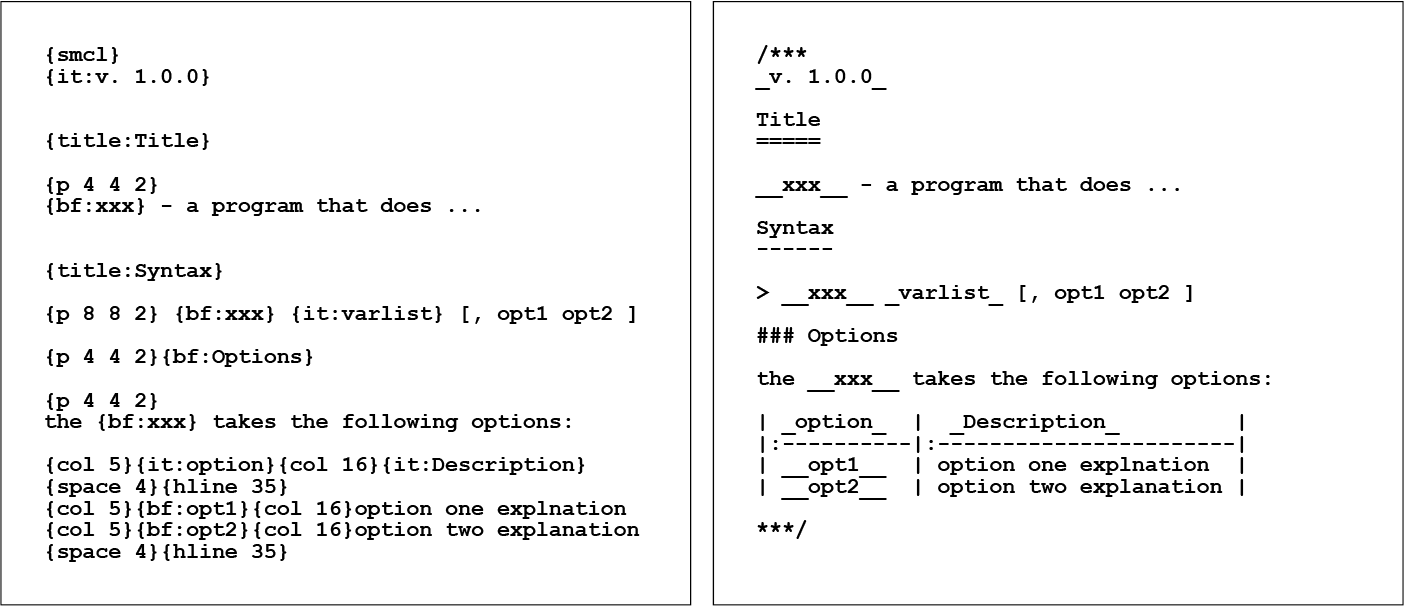
Compared with Markdown, the SMCL markup looks rather complex (see figure 5), which makes reading and writing the documentation difficult.
With Markdown notation, the documentation can be converted not only to Stata help files but also to a variety of other formats, facilitating the project dissemination.
From left: SMCL documentation (example2.sthlp) and its Markdown source notation (example2.ado)
The procedure for writing Markdown documentation for help files in markdoc is identical to writing dynamic documents. The documentation text is written within special comment blocks in the ado-file or Mata file, starting with /*** and ending with ***/ signs, each on a separate line. There is no limit on how many times such notation blocks can be used throughout the script file, although writing the documentation at the outset of the script file is recommended, as shown in example2.ado in figure 5. The markdoc command can extract the documentation from example2.ado and generate a help file:
The help file extracted from example2.ado
3.1 Writing with Markdown and SMCL
markdoc is capable of distinguishing Markdown from SMCL. Thus, if needed, the SMCL markup language can be used with the Markdown language concurrently. Nevertheless, when the documentation is rendered to another document format, such as HTML, the SMCL markup will dissolve into plain text. Therefore, writing documentation with a combination of SMCL and Markdown is not encouraged.
3.2 Help file templates
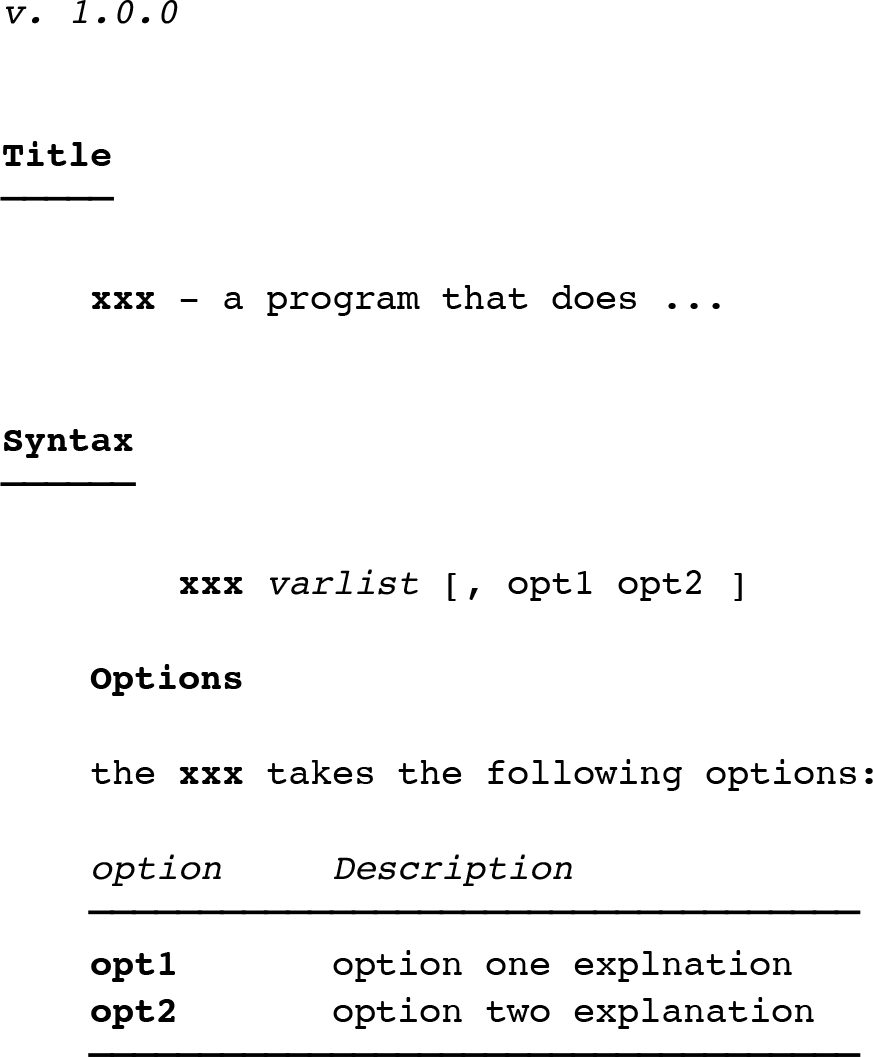
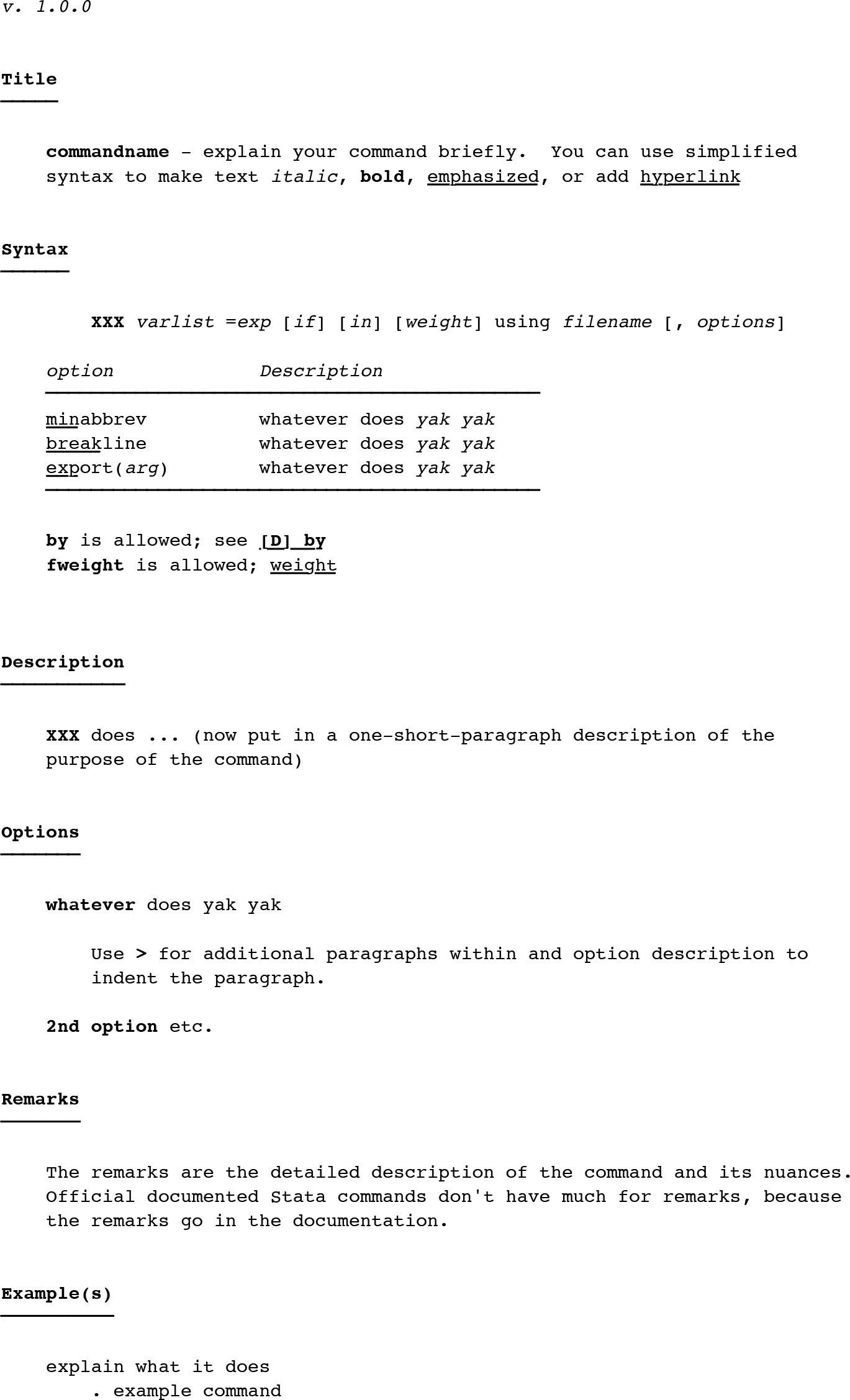
Talking about how documentation should be written is simpler than saying what should be included in software documentation (Briand 2003; de Souza, Anquetil, and de Oliveira 2005). Reviewing Stata’s and CRAN’s guidelines (R Core Team 2006) for documenting functions and programs, I present a structured documentation template in this article. The template not only serves as an example of Markdown documentation but also reminds the user of a few structural key points to consider. The template is organized in several sections, as shown below. The complete template is included in the appendix (see section A.2).
Declaration of the version of the software at the top of the help file
Title of the software, with a short description
Syntax of the program
Table summarizing the options
Detailed description of the command
Detailed description of the options
Technical remarks about the program, if any
Examples
Description of the scalars, matrices, etc., returned by the program
Acknowledgment or acknowledgments
Author information
Software license
Reference or references
markdoc can append the program documentation template to the outset of a script file, using the helplayout option. For example, if example3.ado is an empty script file, running the commands below will append the program documentation templates to the file and also render the help file, creating example3.sthlp (see figure 7).
. markdoc "example3.ado", mini export(sthlp) helplayout
The help file template, completely written with Markdown
3.3 Data documentation template
In contrast with the Boston College Statistical Software Components archive, CRAN requires R packages to document the datasets and offers a structured template, indicating how a dataset should be documented. Such a template can be adopted for Stata as well; however, Stata offers several additional features for data documentation that are lacking in R. For example, a dataset can include a label and multiple notes; furthermore, each variable can also include several notes.
The datadoc6 (Haghish 2019a) command, which is automatically installed as a dependency of markdoc, merges Stata documentation features within the template suggested by R and generates a documentation layout and a help file for the data loaded in Stata. The file is named after the data’s name, with a .do extension. If no data are loaded in the memory, datadoc creates a data documentation template named example.do. After you update the created Markdown document, markdoc or mini can update the Stata help file. The Markdown documentation template for datasets is included in the appendix (section A.3). The data documentation template includes the following:
Title, the label of the dataset, and where it was published (package name)
Description
Format, including a table summarizing the variables’ types and labels
Notes attached to the dataset or the variables
The source of the data; that is, where they are coming from
References, if any
Examples, if needed
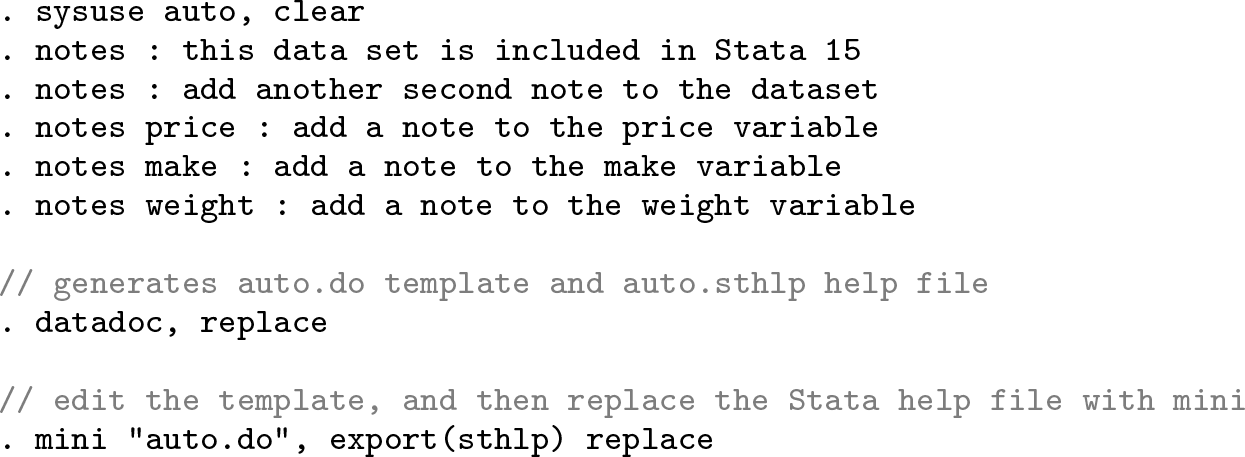
In the example below, a few notes are added to auto.dta and its variables. Next, the datadoc command is called, which generates a do-file named auto.do and a help file named auto.sthlp (see figure 9 in the appendix).
4 Example
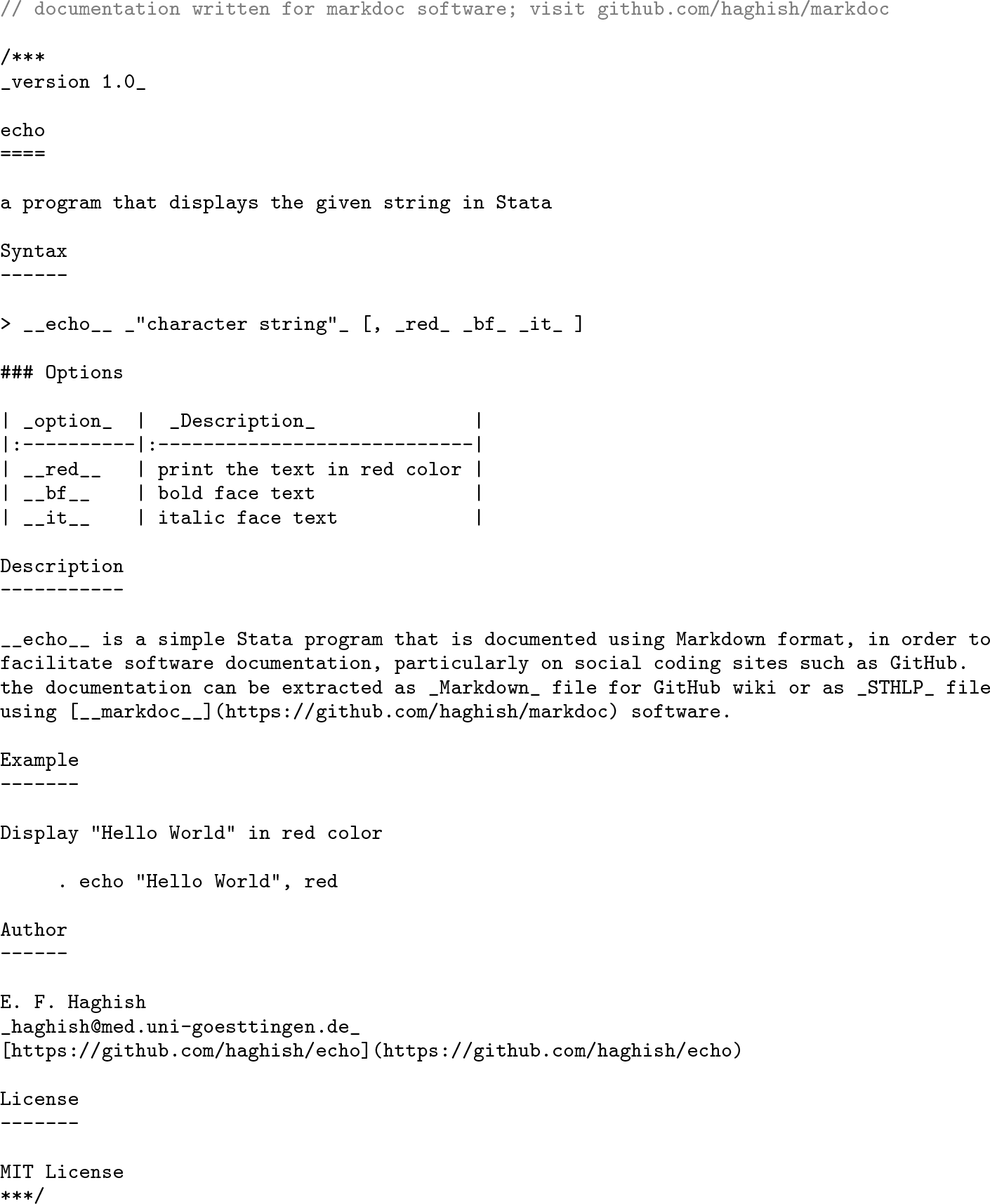
To demonstrate how a Stata package can be documented using Markdown, I created the echo repository on GitHub. The repository includes one ado-program named echo.ado, which displays the given string character in Stata and includes a few styling options to print the text in red color or to display it as bold or italic. You may fork the repository7 as well as its Wiki8 to inspect the documentation and follow the example. Below, the documentation of echo.ado is shown, which is written within the script file.
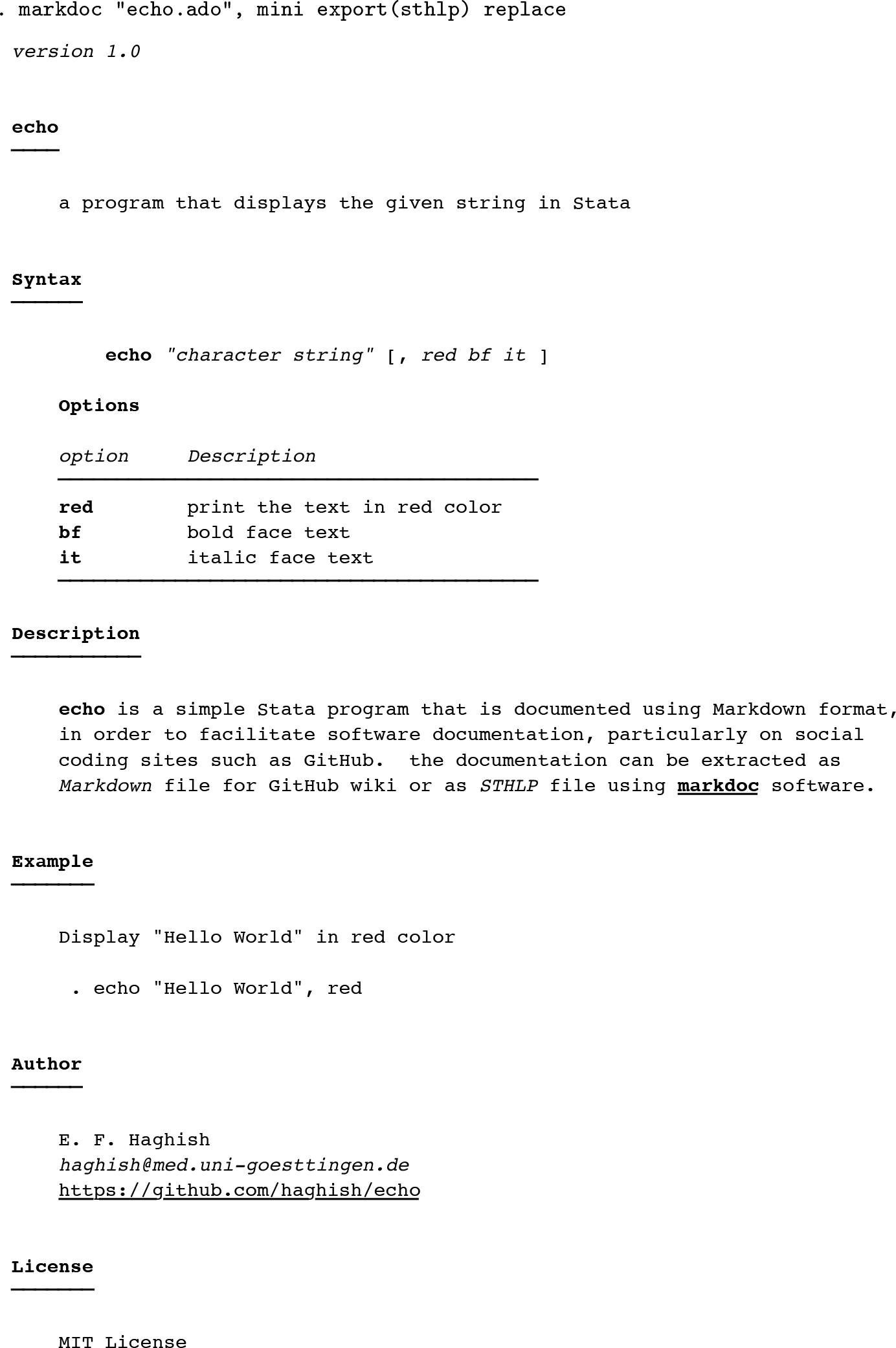
Calling markdoc can extract the Markdown documentation and convert it to SMCL, generating a help file named echo.sthlp.
The echo.sthlp generated by markdoc
5 Package vignette and GitHub Wiki
Statistical packages often include several script files, which are documented separately. A holistic overview of the package, known as a vignette, can provide a fruitful overview of the package in a single document. In this section, I demonstrate how to use markdoc to generate a package vignette, as well as GitHub Wiki documentation.
5.1 Wiki
GitHub is a site for hosting not only source code but also software documentation called Wiki. The Wiki documentation is written with Markdown. We can use markdoc to generate Markdown files. For instance, in the example above, one can export the documentation written in echo.ado to a Markdown file by executing
. markdoc "echo.ado", mini export(md)
Next, we can move the generated Markdown files to the Wiki repository to update the documentation. To improve the Wiki repository, you should organize the generated Markdown files within a single document named Home.md, which is the homepage of Wiki repositories. The Home.md document can index and link the generated Markdown files, serving as a convenient start page for the documentation. GitHub uses double square brackets to link to pages uploaded to the Wiki repository, as shown below.
5.2 Vignette
markdoc provides several possibilities for producing a package vignette. The easiest procedure would be the following:
Export Markdown documentation from each ado-file, as shown above.
Create a do-file that imports the generated Markdown files.
Typeset the prepared do-file to generate the package vignette.
The mini engine is capable of typesetting such a document in HTML, Word, or PDF format. A full installation of markdoc and its third-party dependencies would provide greater flexibility for styling the package vignette using LATEX, with Markdown. As shown in the example below, markdoc distinguishes LATEX from Markdown notations and allows additional LATEX markup to be added to the Markdown documentation. This will allow the user to keep the LATEX markup to the bare minimum and write most of the documentation with Markdown.
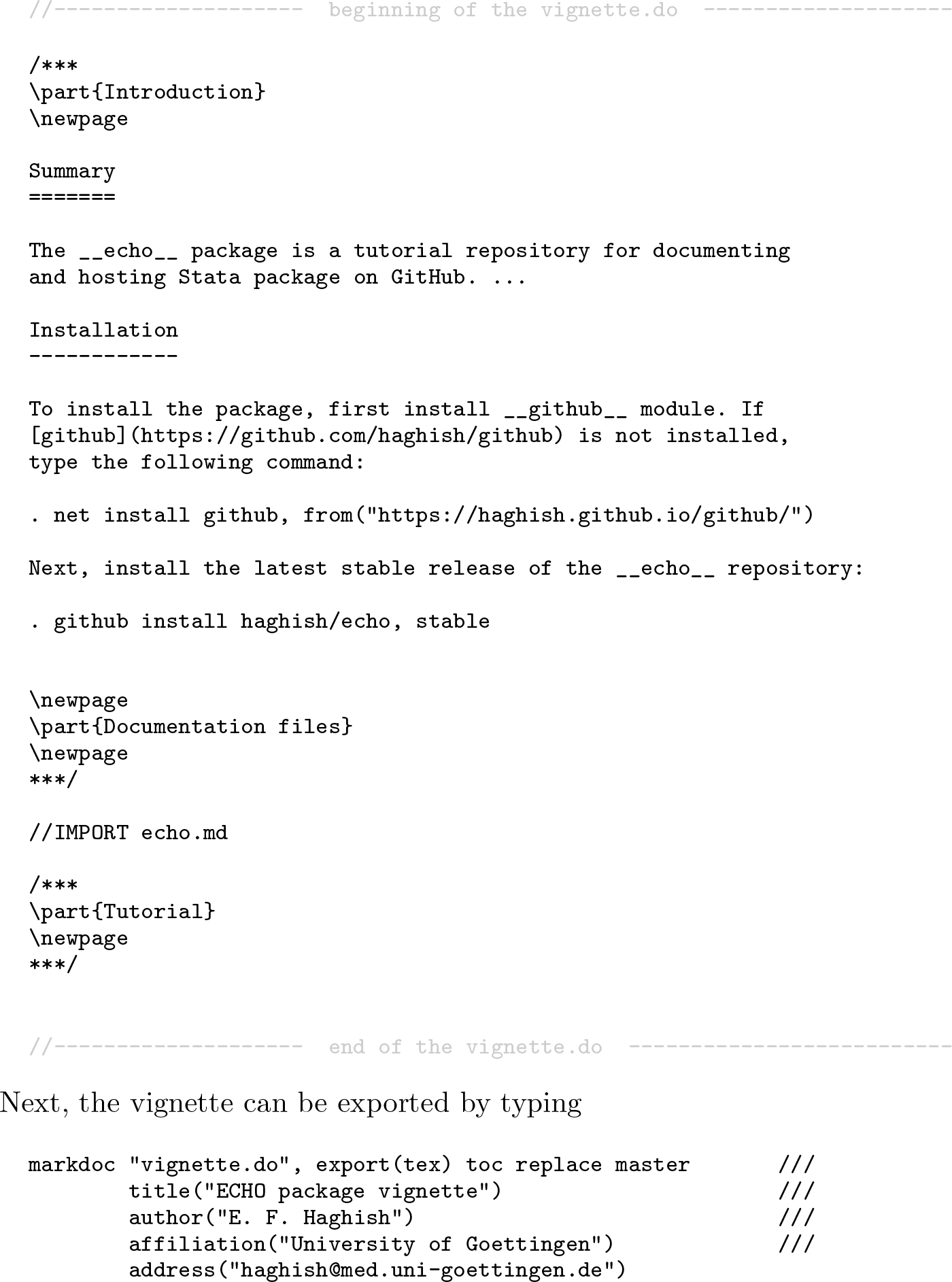
In the example below, vignette.do is created to write the vignette documentation. The file includes LATEX notation for adding page breaks and partitioning the vignette.
The resulting vignette PDF file9 includes a title page and table of contents, and the vignette is ready to be included within the repository for a quick review of the entire package documentation.
Technical note
In the example above, echo.md was included in the document using the //IMPORTfilename command. This is one of the markers10 recognized by markdoc, and it appends a text file to the main document.
6 Discussion
In this article, I touched on two main topics about markdoc. On the one hand, I introduced new features of markdoc 5.0. On the other, I prepared a tutorial demonstrating how to use the package for documenting Stata programs and datasets, as well as for generating package vignettes or GitHub Wiki documentation. Below, I discuss the main points of the article.
6.1 Using markdoc without third-party software
Lab computers or laptops provided by universities often have restrictions for installing new software, which could make installing and using markdoc problematic. With the new release of markdoc and its lightweight mini engine, this problem is completely solved. Nevertheless, the mini engine is not a replacement for Pandoc, and I recommend that users install the binary dependencies when possible. A full installation of markdoc and its third-party dependencies provides heartwarming features, for example, including mathematical notations, changing the Word template by providing an example Word file, generating highly customizable dynamic PDF presentation slides, etc.11
6.2 Software documentation
As long as software is intended to be used by someone other than its programmer, there is a need for a user manual. However, writing such a document, and particularly keeping it updated, is labor intensive. In this article, I presented a detailed tutorial of how markdoc can be used for generating Stata help files, package vignettes, and Wiki documentation.
With the mini engine, markdoc enables writing documentation with Markdown and exporting it to Stata help files or other document formats. This is already a considerable improvement for documenting Stata software given that, to date, the only possible markup language for Stata help files was SMCL. Comparatively, Markdown has a simpler syntax, is easy to read and write, and is more versatile. Studies have shown that using Markdown for documentation can also improve the quality of the documents, allowing the author to focus on the content (Voegler, Bornschein, and Weber 2014). This is particularly important if the documentation is written within the script file, which not only makes the code file look better but also provides readable documentation at the outset of the file for anyone who wishes to understand or update the code.
I also proposed a Markdown template for documenting Stata programs that can be appended to an ado-file or a Mata file. Using Markdown instead of SMCL and writing the documentation within script files is a considerable shift from the common practice of writing help files in Stata. However, learning this approach is not time consuming and, more importantly, reduces the time and effort needed for writing and updating software documentation. As a bonus, of course, markdoc uses the same procedure for generating dynamic analysis documents and dynamic presentation slides. This makes markdoc a general and intuitive literate programming package for Stata users at any level.
6.3 Real-world examples
The examples of section 4 are based on an elementary ado-file with a few options. For the interested reader, more complex packages can serve as more intricate examples of documenting Stata software with Markdown and generating package vignettes and Wiki documentation. The datadoc12, md2smcl13, weaver14, github15, markdoc16, and rcall17 packages—sorted by their ascending level of complexity—are fully documented using the procedure explained in this article and are real-world examples of software documentation with markdoc. Each of these repositories has a file named make.do—as recommended by the github package (Haghish Forthcoming)—that includes the code for not only building the package installation files but also generating the Stata help files and the package vignettes.
BriandL. C.2003. Software documentation: How much is enough? In 2003 IEEE Seventh European Conference on Software Maintenance and Reengineering, 13–15. Benevento, Italy: IEEE. https://doi.org/10.1109/CSMR.2003.1192406.
HaghishE. F.2016a. github: A module for building, searching, installing, and managing Stata packages from GitHub. GitHub. https://github.com/haghish/github.
KramerD.1999. API documentation from source code comments: A case study of Javadoc. In Proceedings of the 17th Annual International Conference on Computer Documentation, 147–153. New Orleans, LA: SIGDOC. https://doi.org/10.1145/318372.318577.
MacFarlaneJ.2006. Pandoc: A universal document converter. https://pandoc.org.
22.
R Core Team. 2006. Writing R extensions. R Foundation for Statistical Computing, Vienna, Austria. http://www.R-project.org.
23.
RamseyN.MarceauC.1991. Literate programming on a team project. Software: Practice and Experience21: 677–683.
24.
SousaM. J. C.MoreiraH. M.1998. A survey on the software maintenance process. In Proceedings of the International Conference on Software Maintenance (Cat. No. 98CB36272), 265–274. Bethesda, MD: IEEE. https://doi.org/10.1109/ICSM.1998.738518.
25.
de SouzaS. C. B.AnquetilN.de OliveiraK. M.2005. A study of the documentation essential to software maintenance. In Proceedings of the 23rd Annual International Conference on Design of Communication: Documenting & Designing for Pervasive Information, 68–75. Coventry, UK: ACM. https://doi.org/10.1145/1085313.1085331.
26.
van HeeschD.1997. Doxygen: Source code documentation generator tool. http://www.doxygen.nl.
27.
VasilescuB.van SchuylenburgS.WulmsJ.SerebrenikA.van den BrandM. G. J.2014. Continuous integration in a social-coding world: Empirical evidence from GitHub. In Proceedings of the International Conference on Software Maintenance and Evolution, 401–405. Washington, DC: IEEE. https://doi.org/10.1109/ICSME.2014.62.
28.
VoeglerJ.BornscheinJ.WeberG.2014. Markdown—A simple syntax for transcription of accessible study materials. In Computers Helping People with Special Needs. International Conference on Computers for Handicapped Persons. Lecture notes in computer science, vol. 8547, ed. MiesenbergerK.FelsD.ArchambaultD.PeňázP.ZaglerW., 545–548. Cham, Switzerland: Springer. https://doi.org/10.1007/978-3-319-08596-8_85.
29.
WalshD. A. 1969. A Guide for Software Documentation. New York: Advanced Computer Techniques.
30.
WickhamH. 2015. R Packages: Organize, Test, Document, and Share Your Code. Sebastopol, CA: O’Reilly.
31.
WickhamH.DanenbergP.EugsterM.2019. roxygen2: In-Line Documentation for R: Version 6.1.1. R package version ≥3.1.https://rdrr.io/cran/roxygen2/.