1 Introduction
Manipulating variables is convenient in Stata. We can use wildcard characters (see [U] 11.4 varname and varlists) to abbreviate variable names or refer to more than one variable at a time. The rename command (see [D] rename group) changes groups of variable names systematically. Moreover, we can apply arithmetic and relational expressions as well as many functions (see [D] generate and [U] 13 Functions and expressions) and transformation rules (see [D] recode) to create or change the contents of variables.
Unlike manipulating variables, managing variable and value labels is not as convenient. The label commands (see [D] label) do not support wildcard characters in value-label names, and there is no dedicated command for changing value-label names. Moreover, Stata’s expressions and functions do not readily apply to labels. For example, we cannot change a specific word in a label; we must define or redefine the complete label. Likewise, there is no convenient way to define or modify value labels other than specifying integer-to-text mappings one at a time.
To date, there are many community-contributed commands for manipulating variable and value labels that go beyond Stata’s native label commands (for example, Blumenberg 2012, 2016; Cox 2000; Jann 2007, Joly 2002; Klein 2011; Newson 2007, 2009, 2018; Nichols 2011; Weesie 2005a, b). Many of these community-contributed commands are tailored to solve one specific problem. Notwithstanding their functionality, locating and utilizing the appropriate command for any specific problem at hand is sometimes inconvenient because there are no shared conventions concerning command names and syntax among different authors.
In this article, I introduce another command for manipulating variable and value labels: elabel. The approach that I follow here differs somewhat from the approach of most existing community-contributed commands in this area. Instead of focusing on specific problems, I suggest an integrating approach for extending Stata’s built-in label commands. I argue that Stata’s label commands provide a natural starting point because they are already familiar to most Stata users. The general extensions that I propose here are also useful for implementing commands that address more specific problems.
The remainder of this article is structured as follows. I start with a brief technical overview of the elabel command in section 3 and show basic applied examples in section 3. In section 4, I further develop elabel‘s underlying idea of general solutions to specific problems. In section 5, I demonstrate how to add new commands to elabel, assuming some familiarity with Stata’s programming features. I close with a brief summary and concluding remarks.
3 Basic examples of the elabel command
3.1 Wildcard characters for value-label names
In a first example, suppose we are interested in the contents of value label origin in auto.dta. To view the contents with elabel, we use the list subcommand.
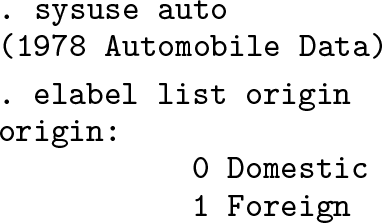
The output that we obtain looks familiar; it is the same output that we would have obtained with Stata’s standard label command. However, with Stata’s label command, we cannot use wildcard characters in value-label names. For example, typing
. label list ori˜
value label ori not found r(111);
results in an error message. With elabel, we still obtain the desired result:

We could also use wildcard characters to conveniently refer to more than one valuelabel name at a time.
3.2 Specify value-label names indirectly
In the example above, we have typed the value-label name origin or substituted parts of that name with wildcard characters. Often, I do not readily remember the names of the value labels that are attached to variables. However, I do remember the variable names. Suppose we want to list the contents of the value label that is attached to variable foreign. With elabel, we do not need to look up the respective value-label name; we can simply enclose the variable name in parentheses, typing

and obtain the desired result. The experienced Stata user will recognize the syntax that encloses variable names in parentheses; there is a macro function, label(see [P] macro), with the same syntax. With elabel, we can use this syntax anywhere an elblnamelist is allowed.
3.3 Additional returned results
Although the output from elabel list looks exactly like the output that we get from Stata’s label list, there are differences behind the scenes. Let us look at the returned results.

elabel list returns all the scalars that label list would return.
2
Arguably more useful, elabel list also returns the value-label name, the integer values, and the associated text.
3
3.4 Subsets of integer-to-text mappings
For brevity, ignore the motivational reason for now, and pretend that we wish to list only the integer-to-text mappings in origin for which the integer value is greater than 0. We do this by typing

Here the iff qualifier is similar to Stata’s if qualifier (see [U] 11.1.3 if exp), which is allowed with most commands for manipulating variables. The # character acts as a placeholder for the integer values in origin. We can also refer to the text that is mapped to integer values using the @ character. Say we wish to list only the integer-totext mappings for which the text contains an uppercase D:

The strpos() function was an arbitrary choice; we could have chosen strmatch() instead (see [FN] String functions). In general, we can use any of Stata’s functions in the expression that follows the iff qualifier as long as it evaluates to true (!=0) or false (==0) for any value # and string @.
4 General solutions to specific problems
4.1 Define value labels with numeric-to-numeric mappings
Compared with many other community-contributed commands for manipulating variable and value labels, elabel follows a more general approach that I will illustrate with two examples from the labutil package (Cox 2000), available from the Statistical Software Components. Although most commands in the labutil package date back to the early 2000s, the package is still the most frequently downloaded bundle of commands for managing variable and value labels.
One specific problem that labutil solves is defining “labels for values which are base 10 logarithms containing the antilogged values” (Cox 2000). The command for solving this problem is lablog. An example is
. lablog logs, values(1/4)
label def logs 1 "10" 2 "100" 3 "1000" 4 "10000", modify
where the label define command that lablog creates is echoed. Following the valuelabel name, logs, we have specified the values() option, listing the (integer) values that we wish to associate with labels.
A second, more general problem that labutil addresses is defining “value labels using a mapping from numeric values to numeric labels” (see labmap.hlp in Cox [2000]). The respective command that solves this problem is labmap. As an example, we define a value label that maps minutes after midnight to hours.

Following the value-label name, time, we specify the values() option; we also include the first(), max(), step(), and postfix() options that specify the first (numeric) label, the maximum label, the steps between labels, and additional text, respectively.
When we compare the two examples, it appears as if the command that solves the more general problem, labmap, also has the more complex syntax. The more complex syntax is arguably both harder to remember and harder to understand. Moreover, note that the first problem, mapping values to their base 10 antilog, is actually a special case of the second problem, mapping numeric values to numeric labels. Yet the more general command, labmap, does not readily apply to the first problem.
With elabel, we approach both problems more generally: mapping (integer) values to an arbitrary function of themselves. Here is how we solve the two problems above with elabel.

Let us examine the code. Stata’s command for defining value labels is label define; because we wish to define value labels, we use the corresponding elabel command. Following the value-label names, logs2 and time2, respectively, we specify the integerto-text mappings, grouping integer values and labels (see section 2.2). Inside the first pair of parentheses, we specify a numlist of integer values. Inside a second pair of parentheses, we specify the text to be mapped to these integer values. We specify the text with an expression that contains the # character, which acts as a placeholder for the values in the first pair of parentheses. Because the expression must evaluate to a string, we use Stata’s strofreal() function; for the second problem, we additionally use the cond() function (see [FN] String functions and [FN] Programming functions for more information on both).
Comparing the first elabel command with the respective lablog command, we see the latter clearly has the more convenient syntax. However, elabel‘s syntax is arguably more explicit about what actually happens and might thus be easier to understand just by looking at the code; there are some peculiarities, but most of the syntax elements are already known to Stata users. Moreover, once we understand that code, it readily applies to related problems. Moving to the second example, we use the same command, elabel define, and we specify the integer-to-text mappings as before. All we change is the expression and functions to transform the integer values in the desired way. Admittedly, figuring out the appropriate expression is the hard part; given an appropriate expression, elabel define basically reduces to a convenient wrapper for foreach(see [P] foreach). Arguably, elabel is more convenient for systematically modifying existing value labels.
4.2 Modify value labels systematically
For our next example, suppose we have the following value label indicating the frequency of smoking:
4

Suppose further that we wish to change the integer-to-text mappings so that never is mapped to 0, once a week or less is mapped to 1, and so on. If smoke was a variable, we could simply code
. replace smoke = smoke-1
to change the integer values.
Using elabel, we can do something similar with value labels.
. elabel define smoke (= #-1) (= @), replace
Let us inspect the code. Stata’s command for changing value labels is label define; because we wish to change a value label, we use the corresponding elabel command. Following the value-label name, smoke, we specify the integer-to-text mappings, grouping integer values and labels (see section 2.2). Inside the first pair of parentheses, we specify an expression for the integer values; here we subtract 1 from each integer value. We also specify an expression for the text inside a second pair of parentheses; here we simply copy the existing text. We are then left with five new integer-to-text mappings: 0 "never" 1 "once a week or less" …4 "every day". Because we wish to replace an existing value label, we specify the option replace.
5
Let us verify the result:

4.3 Modify value labels systematically, continued
As mentioned in the introduction, Stata has convenient commands for manipulating variables, such as recode (see [D] recode). Let us stick with our example of value label smoke. If smoke was a variable and we wanted to reverse its coding, we could type

simultaneously defining an appropriate value label. Although recode allows us to define a new value label, it is arguably inconvenient to retype all labels when they already exist.
With elabel, we can specify transformation rules that are similar to those used with recode. Here is how elabel‘s respective recode subcommand looks.

Compared with the recode command for variables, elabel‘s recode subcommand is conveniently short because elabel allows a numlist on both sides of the equals sign.
6
Also, we do not need to retype any labels; we merely change the integer values. The define() option requests that, instead of replacing value label smoke, a new value label, smoke2, be defined. However, because we have also specified the dryrun option, elabel did not define smoke2; instead, it has listed the original and transformed value labels so we can verify the result first. If we are satisfied, we can remove the dryrun option and define value label smoke2.
There is one more convenient feature: elabel recode returns the transformation rules in r() in a format that the recode command for variables will accept.
. return list
macros:
r(rules) : "(0=4) (1=3) (2=2) (3=1) (4=0)"
We could now pass these transformation rules to Stata’s recode command and modify any number of variables, accordingly.
7
4.4 Changing value-label names
Stata’s label commands cannot readily change value-label names. In principle, changing a value label name requires three steps: first, copy the old value label using a new name; second, attach this new value label to all variables that previously had the old value label attached;
8
third, drop the old value label from memory.
Weesie (2005b) discusses the problem of renaming value labels and introduces the labelrename command to do this. labelrename resembles Stata’s old rename command for variables (see [D] rename) and changes the name of one value label at a time. Drawing on Weesie’s work but resembling Stata’s new rename command (see [D] rename group), elabel can change the names of groups of value labels.
I will demonstrate elabel‘s rename subcommand with nlsw88.dta, which is shipped with Stata. All value-label names in this dataset end in lbl; here are two examples.

Suppose now we wanted to change all value-label names to instead end in VL. Here is how we do this with elabel rename.

4.5 A final example of changing variable labels
Stata’s label commands also manage variable labels. We will continue where we left off in section 4.4. Suppose we want to change the label of variable collgrad in nlsw88.dta so that each word starts with an uppercase letter. With elabel, we change the current variable label in the same way in which we change value labels.

Inside the first pair of parentheses, we specify the variables whose labels we want to change, collgrad.
9
Inside the second pair of parentheses, we specify an expression combining the strproper() function (see [U] 13 Functions and expressions) with the @ character, which acts as a placeholder for the current variable label.
10
5 Adding commands to elabel
In the examples above, we have seen how elabel enhances Stata’s label commands; elabel also comprises programming commands (and Mata functions) that are intended to assist with implementing new commands.
5.1 The problem: Combining value labels
As an example of a new command, we will draw on labvalcombine, which is part of the labutil package (Cox 2000). The labvalcombine command “combines two or more sets of value labels into one”.
11
Here is an example from the help file:
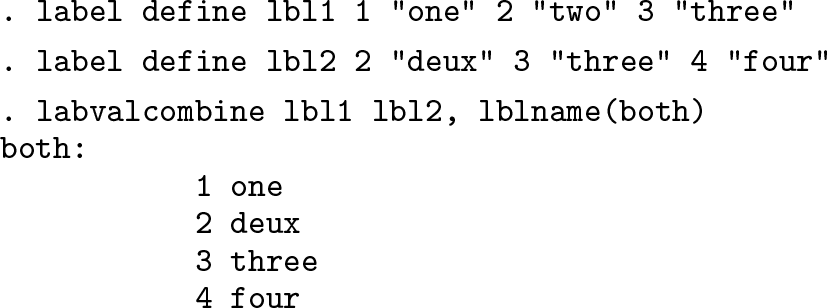
No corresponding elabel command does what labvalcombine does, and because we know about labvalcombine, there is little need for such a command. However, pretend that there was no labvalcombine command and that we wanted to add such a command to elabel. In the remainder of this section, I will demonstrate how to do this.
5.2 How to combine value labels
Our goal is to implement a new command, elabel combine, that essentially does what labvalcombine does. First, we need to figure out how to combine sets of value labels.
12
Using elabel‘s copy subcommand makes this fairly easy. Assuming value label both does not yet exist, we will need two lines of code.
. elabel copy lbl1 both
. elabel copy lbl2 both, modify
The first line of code copies the contents of value label lbl1 to the new value label both. The second line copies the contents of value label lbl2 to the now existing value label both, modifying both‘s contents. While we could have used Stata’s label copy command in the first line, we could not have used it in the second because Stata’s label copy command does not allow the option modify. Anyway, we now know how to combine two sets of value labels. For more than two labels, we would simply loop over the remaining value labels.
5.3 Implementing elabel combine
After figuring out the code to combine sets of value labels, we are ready to implement our new command. Say we want the syntax to be
elabel combine elblnamelist, {define(
newlblname)| replace}
That syntax diagram indicates that the caller must specify an elblnamelist and one of two options, which we discuss below.
To allow elabel to call our new subcommand, combine, we need to write a program and name it elabel_cmd_combine. Because we want to allow an elblnamelist, we will use elabel‘s parse command, which resembles a rudimentary version of Stata’s syntax command (see [P] syntax) and which I will briefly explain below. We will also allow two options. Here is how our program starts.

Focusing on the elabel parse command, we first list the allowed syntax elements before the colon. Here we allow an elblnamelist and two options. Following the colon, we explicitly pass the contents of local macro ‘0’ (see [P] macro) to elabel parse. To remind you, local macro ‘0’ contains whatever the caller has typed (see [U] 18.4 Program arguments). After elabel parse has concluded, local macro ‘lblnamelist’ will contain a list of value-label names that the caller has passed to elabel combine. Further, if the caller specifies the option define(), local macro ‘define’ will contain the specified name. If the caller specifies the option replace, local macro ‘replace’ will contain the word replace.
Let us agree on the following rules for options in elabel combine: if callers do not specify a value-label name for the combined values in define(), we will use the first value-label name that they mention in ‘lblnamelist’. The callers will have to specify replace if the value-label name for the combined values is already defined. Here is how we implement this.

The only command in the code that you cannot read about in Stata’s documentation is elabel confirm, which does the same thing as Stata’s confirm command (see [P] confirm): it confirms that ‘define’ is a new, not yet defined value-label name and exits with the appropriate error message if it is not. We are done with the initial parsing. Let us implement the code for combining the value labels.

In a last step, we need to store our program where Stata can find it. If we intend to use our command regularly, we would store the code as elabel_cmd_combine.ado somewhere along the ado-file path (see [P] sysdir).
13
For our example here, it suffices to put the code into a do-file and execute it to define the program in memory.
. do elabel_cmd_combine.do (output omitted )
Let us replicate the example of labvalcombine at the beginning of this section to verify that elabel combine works as expected. Before we do, let us remove all the value labels, except lbl1 and lbl2, which we want to combine. We note in passing that elabel has a keep subcommand that complements the label drop command.
. elabel keep lbl1 lbl2
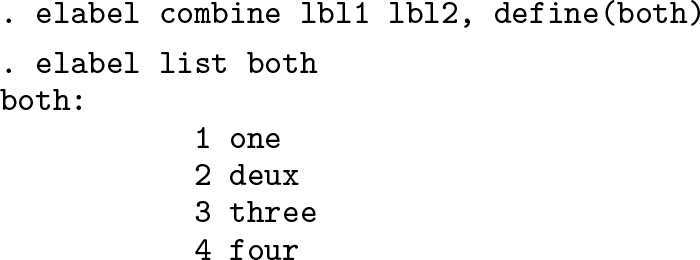
Here is how we obtain the result of labvalcombine with elabel combine.