In this article, I propose a new approach to language interfacing for statistical software by allowing automatic interprocess communication between R and Stata. I advocate interactive language interfacing in statistical software by automatizing data communication. I introduce the rcall package and provide examples of how the R language can be used interactively within Stata or embedded into Stata programs using the proposed approach to interfacing. Moreover, I discuss the pros and cons of object synchronization in language interfacing.
Programmers do not want to spend resources to reprogram an existing open-source and freely available software, especially if they do not intend to improve its functionality. For statistical software, this is evident from the previous attempts to embed R (R Core Team 2016) into other programming languages. R is an open-source statistical language and environment for computing and graphics with a fast-growing user and developer community. The R community uses many human resources to extend R functionalities and make it comprehensive. For example, at the time of writing, the CRAN archive for R packages hosts nearly 30,000 packages, and this number is growing rapidly every day.
All of these attempts to integrate R in other languages follow the mainstream approach to language interfacing in computer science, which does not require interactive coding or algorithm development. For example, SPSS and SAS introduce several functions for communicating data and computation results with R, which makes working with R difficult, somehow unnatural for users who are familiar with R, and particularly pointless for interactive use. Such a workflow makes calling a foreign language for data analysis unattractive because users are required to transfer their variables and datasets to the guest environment and then request data or results back in the host environment. In the field of statistics, unlike the field of computer science, it is common to code interactively. The more functions users have to apply for data communication, the less interactive-friendly the interface.
In this article, I suggest a different approach to language interfacing, underscoring seamless data communication between the host and guest languages to facilitate interactive workflow. I introduce the rcall package, which implements this approach for calling R in Stata, and I provide several examples for programming statistical packages by embedding R in Stata ado-commands. I also explore the possibility of real-time object synchronization between the two languages to further improve the interactive workflow, and I discuss the pros and cons of this approach to language interfacing.
2 The rcall package
2.1 Features
The rcall package implements a new approach to language interfacing between Stata and R, allowing them to share or synchronize objects in several different modes. These modes allow the package to call R interactively or noninteractively in Stata. In brief, you could imagine a noninteractive session as a fresh start in which you do not need to interact with R multiple times. The package also includes a mode for synchronizing objects between R and Stata, where any change to the object in either environment alters the synchronized object in the other; see section 3.2.
With interactive language interfacing, one must manage and monitor the sessions. rcall includes a few commands for this purpose. For example, when R is called interactively, rcall can erase R’s global environment or document the executed commands in a history do-file that can be used to reproduce the analysis. And because embedding a foreign language in a program can lead to many bugs, rcall includes a command to facilitate embedding R in Stata programs easily and securely. All of these features make rcall a comprehensive package for using R alongside Stata, not only for data analysis but also for programming.
2.2 Installation
The rcall package is hosted on GitHub and should be installed using the github1 (Haghish 2016a) command as shown below.
. github install haghish/rcall
rcall requires R software, which is available free of charge for Windows, Mac, and Linux from https://cran.r-project.org/. After installation, rcall attempts to find the path to executable R automatically. The usual paths to executable R are as follows:
Windows: C:\Program Files\R\R-version\bin\R.exe
Mac OS X: /usr/bin/R
Linux: /usr/bin/R
Alternatively, the R path can be permanently defined with the rcall setpath command (see section 3.1), as shown below. rcall setpath also enables the user to specify the desired version of R if several R versions are installed on the machine.
. rcall setpath "/path/to/R"
Finally, rcallincludes functions for passing datasets from Stata to R and for loading a dataset from R to Stata; see section 3.2. These functions rely on the readstata13 R package (Garbuszus et al. 2018), which is used for reading and writing Stata datasets in R. The github install command will also attempt to install this R package automatically because such a command is specified in the dependency.do file in the repository. When such a file exists in a repository, github install will execute it after the package installation to install the dependency packages. Alternatively, the package can be installed manually within Stata by typing
In section 5.2, I will introduce a secure method to test the package installation. But for now, let’s call R to display a text from Stata.
. rcall: print("Hello world")
[1] "Hello world"
3 Syntax
The syntax of the rcall package can be generalized into two categories: subcommands and modes. The subcommands manage and monitor the package, whereas the modes change the general behavior of the package.
3.1 rcall subcommands
The rcall package includes some subcommands, listed in table 1, to conveniently set up and manage the R language within Stata. When executed with a subcommand, rcall does not accept any R code. Here is the syntax for subcommands:
rcall subcommands
Subcommand
Description
rcall setpath "/path/to/R"
permanently defines the R path
rcall clear
clears the memory of the interactive R session
rcall describe
describes the status of rcall
rcall history
opens Rhistory.do in the Do-file Editor
rcall site
opens Rprofile.site in the Do-file Editor
rcall [subcommand]
The setpath subcommand was introduced in section 2.2 for permanently setting up the path to R in rcall. The clear subcommand clears the current interactive R workspace, including all defined and attached objects and packages, as well as the R history file from memory. When beginning a new interactive R session, it is recommended to start by clearing the previous session:
. rcall clear
(R memory cleared)
The describe subcommand provides useful information regarding rcall, such as the path to the executable R used by rcall, the version of the R, and the paths to the Rhistory.do and Rprofile.site files:
rcall creates and updates Rhistory.do to keep track of the interactive R session, allowing users to view and reproduce their interactive analyses. Rprofile.site allows users to customize R when it is called from Stata. For example, the Rprofile.site file can be used to change the settings of R (for example, language) when it is called from Stata. The history and site subcommands open the files Rhistory.do and Rprofile.site, respectively, in the Do-file Editor.
3.2 rcall modes
rcall can embed R in several modes, which are described in table 2. The rcall syntax for applying these modes is as follows:
rcall modes
Modes
Description
rcall
enters interactive R console mode
rcall sync
synchronizes objects during R console mode
rcall [:] R_code
calls R interactively from Stata
rcall sync [:] R_code
calls R interactively and synchronizes objects
rcall vanilla [:] R_code
calls R noninteractively from Stata
rcall [mode] [:] [R_code]
If the mode argument is not specified, then R is called interactively. If the R_code is not specified, then the console mode starts, which simulates the R console in Stata. The other modes are vanilla (noninteractive) and sync, which is an extended interactive mode with object synchronization.
R console mode
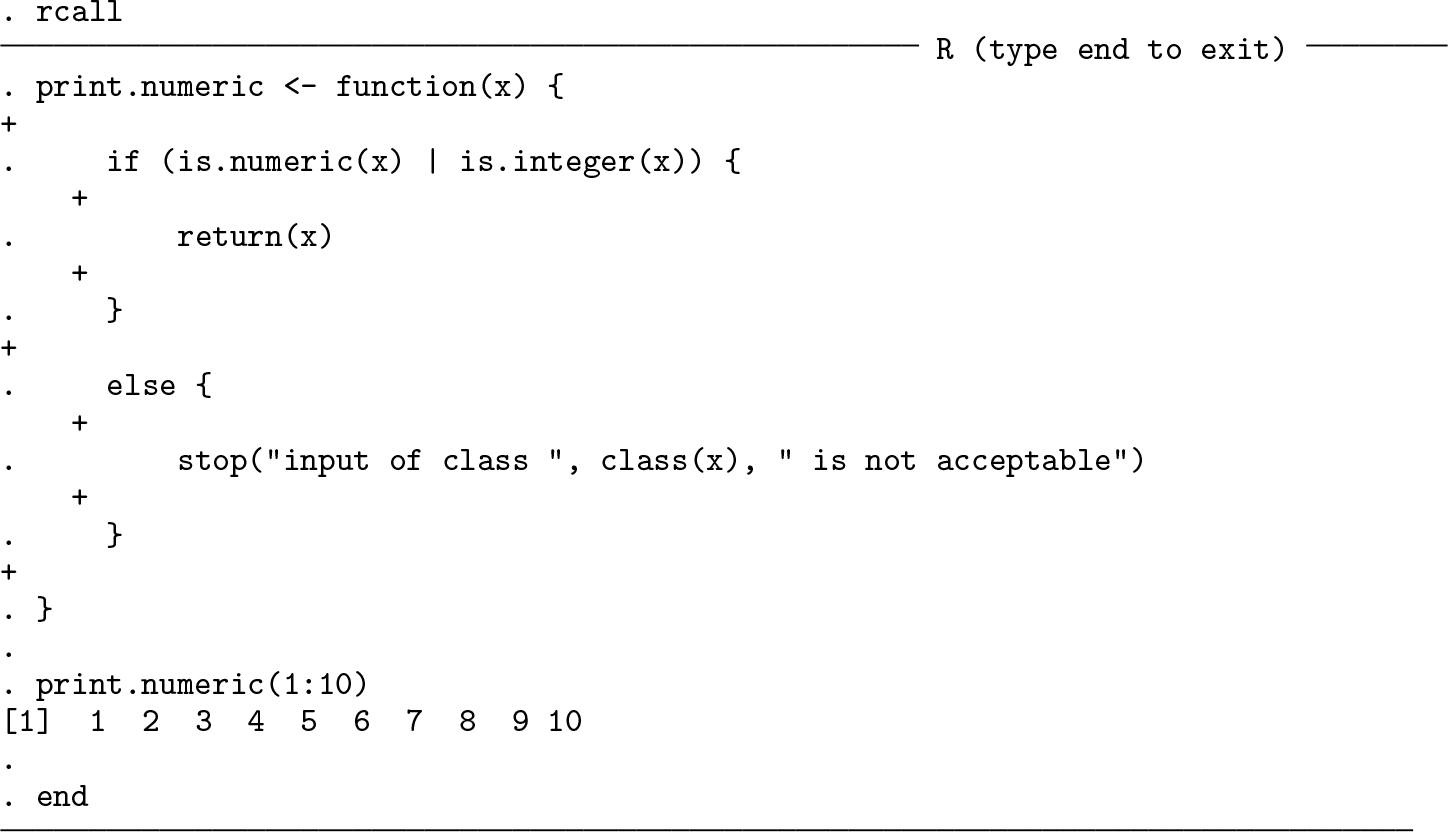
When executed without a subcommand or R_code, the rcall command simulates the R console within the Stata Results window, as shown below:
In the example above, an R function was interactively written line by line and executed in Stata. The print.numeric() function returns the given input if its class is either numeric or integer and returns an error otherwise. As evident from the example, the console mode allows writing multiline R commands (such as functions), executing the commands, and obtaining the results interactively. Similar to Mata interactive mode in Stata, the interactive console mode can be closed using the end command.
The console mode cannot be used for executing R commands from the Stata Do-file Editor and consequently cannot be used for embedding R code in Stata programs. Nevertheless, this mode is convenient for exploratory analysis or casual use.
Technical note
In the R console mode, an R code paragraph can be copied and pasted in the Stata Command window, which also preserves the code indention. When curly brackets are used in the code, the console mode allows multiline code. The + operator is a sign of an in-progress multiline code, which is also automatically indented to provide a visual guide for the current number of unclosed brackets, as shown in the example above.
Interactive mode
If the mode argument is not specified but an R code is given, then rcall executes R commands interactively without entering the console mode. The interactive mode retains all the defined or attached objects and loaded packages. For instance, the previous example can be continued by calling the print.numeric() function in interactive mode because the console mode is also interactive and memorizes the defined objects:
. rcall: print.numeric(10)
[1] 10
The interactive mode’s advantage over the console mode is that R commands can be executed from the Stata Do-file Editor.
Technical note
As noted in section 3.1, rcall registers R commands that are executed in interactive modes—including the console mode—and creates a do-file that can reproduce the analyses carried out by R. However, only the interactive mode—not including the console mode—allows executing R commands from the Stata Do-file Editor. To facilitate reproducing the analysis, the Rhistory.do file stores the interactive R sessions in interactive mode (that is, with the rcall: command at the beginning of each line of code), even if the R code was executed in console mode.
vanilla mode
The vanilla mode calls R noninteractively by evoking a new R session parallel to the previous interactive R session. In the example below, we call the print.numeric() function—that was previously defined in an interactive session—in vanilla mode. Because vanilla mode begins with opening a fresh R session, an error is expected because the print.numeric() function is not yet defined in the new session:
. rcall vanilla: print.numeric(10)
Error in print.numeric(10) : could not find function "print.numeric"
—Break—
r(1);
After executing R commands in vanilla mode, rcall quits R without saving the session for future use. This mode is particularly useful for embedding R in a Stata ado-command because it ensures that programs will not interfere with the interactive R session of the user.
sync mode
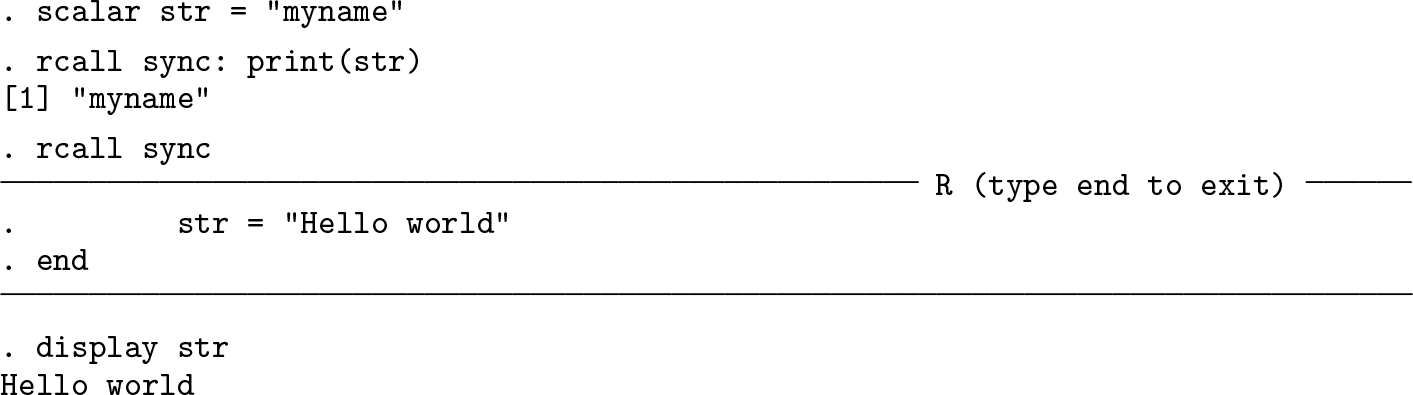
The sync mode is an extension of the interactive mode that can additionally automatically synchronize objects between R and Stata in real time. The sync mode allows R and Stata to mirror one another. Matrices and scalars will be automatically migrated from Stata to R upon synchronization. And after executing the R command, the newly defined scalars and matrices in the R environment—if there are any—will be synchronized with Stata. This mode can also be used within the console mode by evoking the console using rcall sync:
The sync mode considerably facilitates requesting and returning objects from the host language to the guest language and the other way around. Moreover, users do not have to constantly apply this mode for executing R commands. Instead, they can simply autosynchronize objects between R and Stata at the beginning of the session to transport scalars and matrices from Stata to R or get the same class of objects from R to Stata. The example below demonstrates how convenient it is to communicate matrices from Stata and R, manipulate them in R, and update them in Stata:
Synchronizing matrices and scalars for each executed R command is convenient but inefficient for data communication, especially if the user does not wish to synchronize all the objects between R and Stata or if the objects are large. rcall provides an alternative approach for communicating data between Stata and R that is discussed in section 4.
4 Data communication between Stata and R
Facilitating interactive data communication is the biggest concern of the rcall package. So far, I have introduced the sync mode, which synchronizes objects in the Stata and R environments. In this section, I introduce an alternative solution for data communication.
Let us begin with the easiest data to communicate: Stata local and global macros. Communicating local and global macros from Stata to R is effortless because Stata interprets them as soon as they are given to a command. For example,
. global num 10
. global str "my string"
. rcall: print("$num"); print("$str");
[1] "10"
[1] "my string"
rcall also provides some functions, summarized in table 3, for transferring scalars, matrices, variables, and datasets. These functions can be interpreted only by the rcall command and are available for all modes.
Summary of functions for transferring data between Stata and R
Function
Description
st.scalar()
transfers numeric or string scalar to R
st.matrix()
transfers numeric matrix to R
st.var()
transfers numeric or string variable to R
st.data()
transfers Stata dataset to R
st.load()
transfers data frame from R to Stata
Passing data from Stata to R requires using these functions. However, R automatically returns objects of classes such as numeric, integer, character, logical, matrix, list, and NULL to Stata as r-class scalars, locals, and matrices.
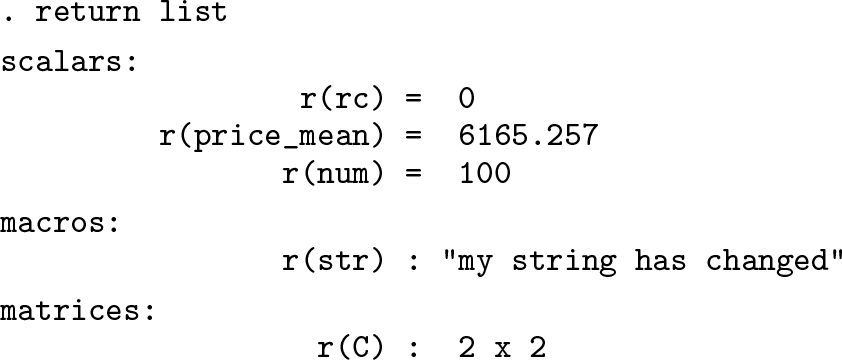
In the example below, a Stata scalar named num is defined to equal 10. Then the scalar is given to R, where an object with an identical name is created in R intentionally. After the manipulation, R automatically returns the new object to Stata as an r-class object, which coexists temporarily in Stata’s memory and does not influence the value of the Stata scalar unless the rcall is executed in sync mode.
The r(rc) = 0 result indicates that the command was executed without an error.
The example can be continued by defining a string scalar and a matrix, named str and C, respectively:
The st.var() and st.data() functions can be used to transfer data from Stata to R, and the st.load() function forcefully loads a data frame from R to Stata. The st.data() function can transfer the currently loaded dataset to R, or if the path to a Stata dataset file is given to the function as a string, it transfers the specified dataset to R without loading it in Stata. The example below demonstrates these functions.
Because rcall was executed interactively, all the defined objects apart from the dataset are returned from R to Stata automatically:
Technical note
The data communication functions must be interpreted by Stata, not R. Specifying these functions inside an R script file and sourcing the file would result in an error because R does not recognize these functions. To execute your R commands from an R script file, you should use the sync mode or communicate the objects with R prior to sourcing the script file. In either case, rcall will communicate the results back to Stata as shown above, even if you source an R script file.
4.1 Controlling returned objects from R to Stata
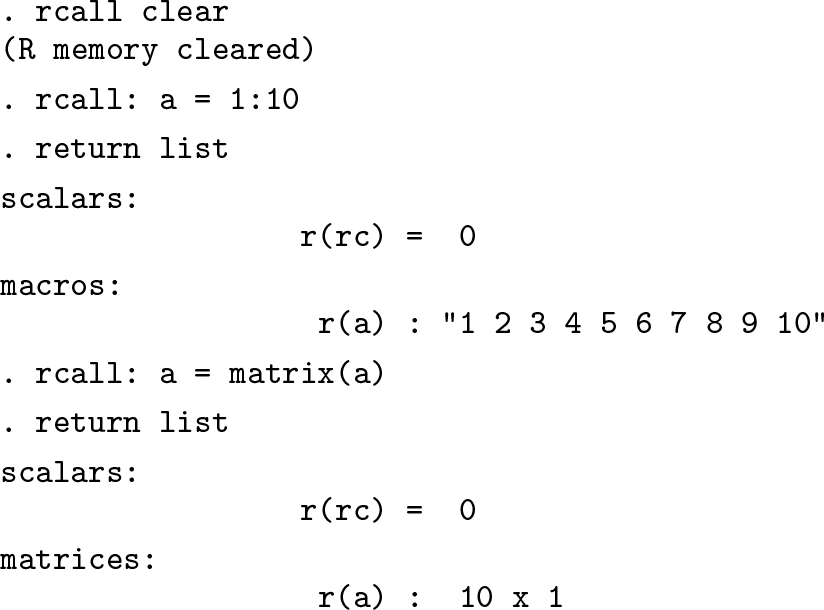
R supports more modes and classes than Stata, so some R objects that have classes unsupported by Stata will be coerced to scalars or macros. For example, R objects of classes NULL and logical are returned as string macros to Stata. Moreover, numeric and character vectors are returned as macros to Stata. Finally, objects of class list are broken into their components and are returned accordingly because Stata does not support a recursive object such as a list. This default behavior can be altered if the user converts the type of the object in R. For example, a numeric vector can be returned as a single column matrix if the type conversion takes place within the R code, as shown in the example below.
By default, all the supported R classes (numeric, character, and logical vectors, numeric matrices, lists, and NULL) are returned from R to Stata. There are occasions when the user is interested only in returning a particular object or a few objects from R to Stata. For example, a programmer who is using rcall to create a package for Stata might create several objects in an R script but wants to return only a few. There are two ways to limit the returned objects. First, at the end of the R code, unwanted R objects can be removed from the R workspace as shown in the example below:
Another possibility is creating a character vector named st.return in R and specifying the name of the objects that rcall should return. The example above can be repeated as follows, which returns only the value of r(x).
To include r(rc) in the returned objects, the c function can be applied to create a character vector, listing all the objects that should be returned, for example, st.return = c("x", "rc"). In interactive modes (including the console and sync modes), the st.return object will remain in the R memory and continue to limit the data communication from R to Stata unless you remove or redefine it. However, using st.return is convenient in the vanilla mode, which I discuss in the following section.
5 Embedding R in Stata programs
With the rcall package, Stata users can write ado-commands to embed R functions in Stata programs. To demonstrate the rcall package’s potential for using the R language in Stata, I discuss several example programs in this section. All of these examples evoke R in vanilla mode to ensure that any previous interactive sessions do not influence the program. The examples are available for download on GitHub at https://github.com/haghish/rcall/tree/master/examples.
5.1 Examples
echo program
To demonstrate embedding R in Stata programs, I begin with a simple example program that echoes the given string. The string is obtained from Stata and passed to R as a local macro, which I mentioned to be the simplest method of data communication from Stata to R. The macro `0´ returns whatever is given to the echo program and then is passed to rcall. Therefore, all the functions that are used for communicating data from Stata to R can also work with the echo program.
summary program
The following example uses the summary function in R to summarize variables. The program can be used with by to repeat the command on a subset of the data as well as the if and in arguments, which are used for executing the command on a subset of the data. To send the subset of the data specified by Stata syntax, the program temporarily keeps the marked sample. Next it applies the st.data() function to transport the loaded data to R, where the summary function is called for each variable in the dataset using the sapply() R function.
Using the ggplot2 R package
One of the numerous R packages that can produce many interesting graphics is ggplot2 (Wickham 2009). rcall can use the qplot() function from the ggplot2 package to produce many plots. To install the ggplot2 R package in Stata, type
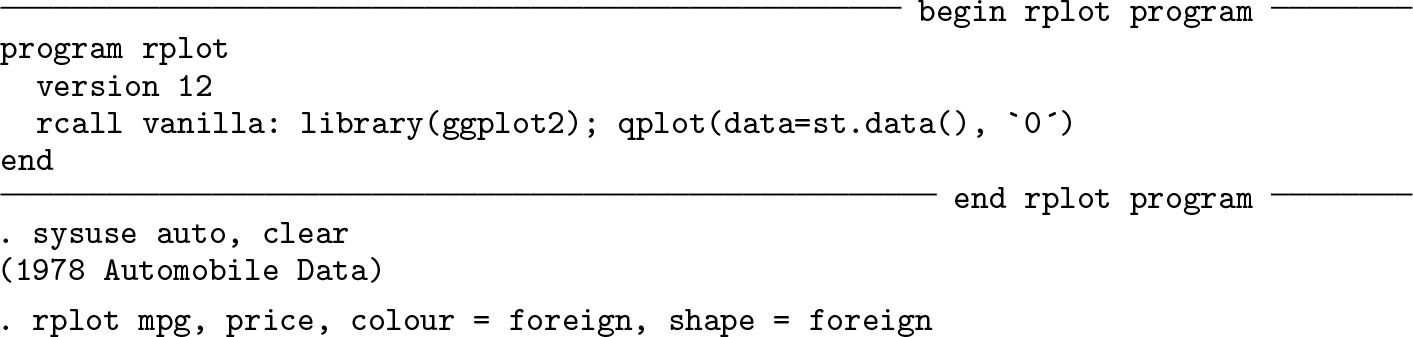
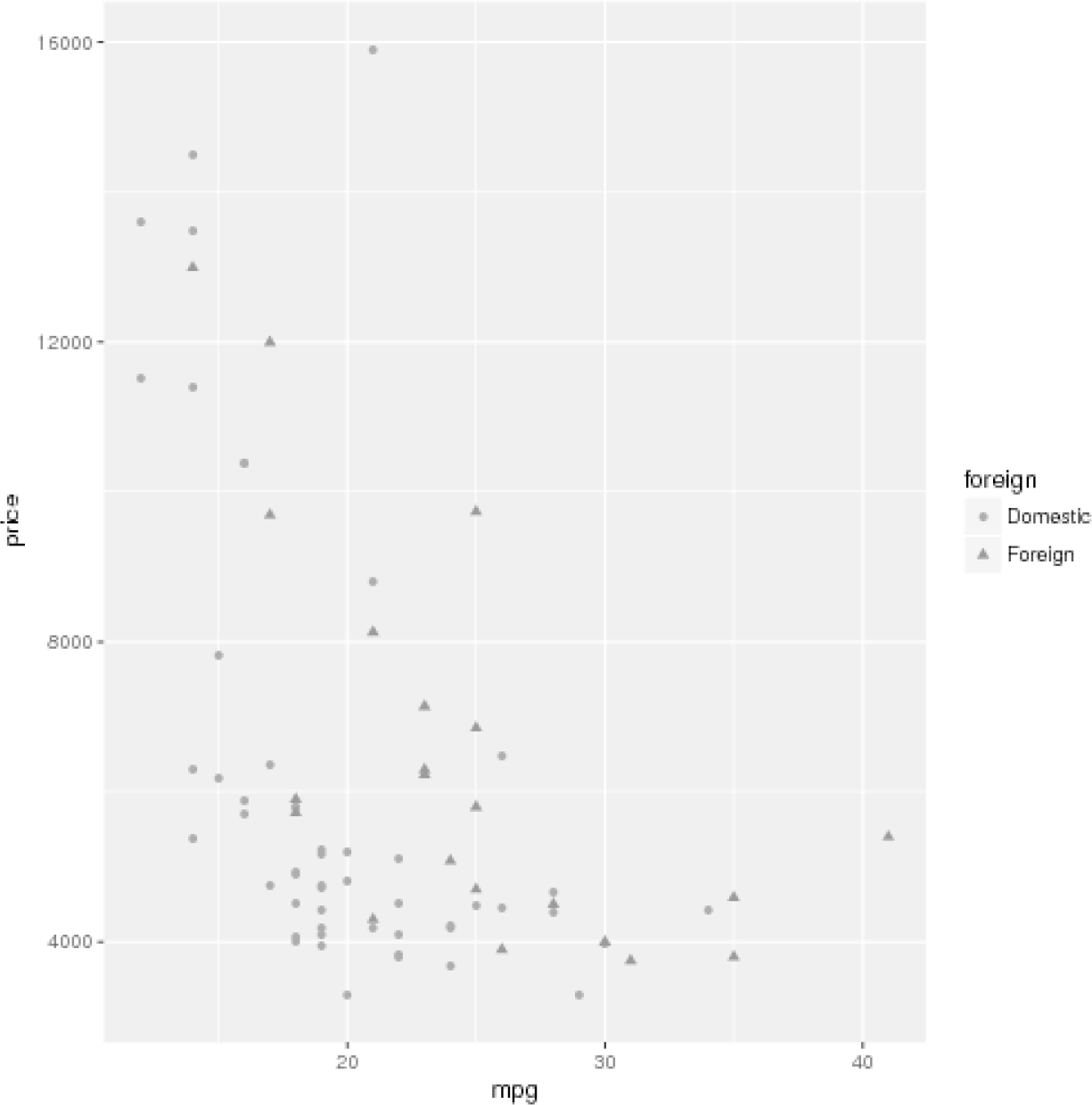
The example below demonstrates the rplot program that simply loads the ggplot2 library in vanilla mode, uses the st.data() function to transport the currently loaded data to R, and passes all the arguments to the qplot() function in R. By default, the program creates a PDF graphical file named Rplots.pdf.
Output of the rplot example
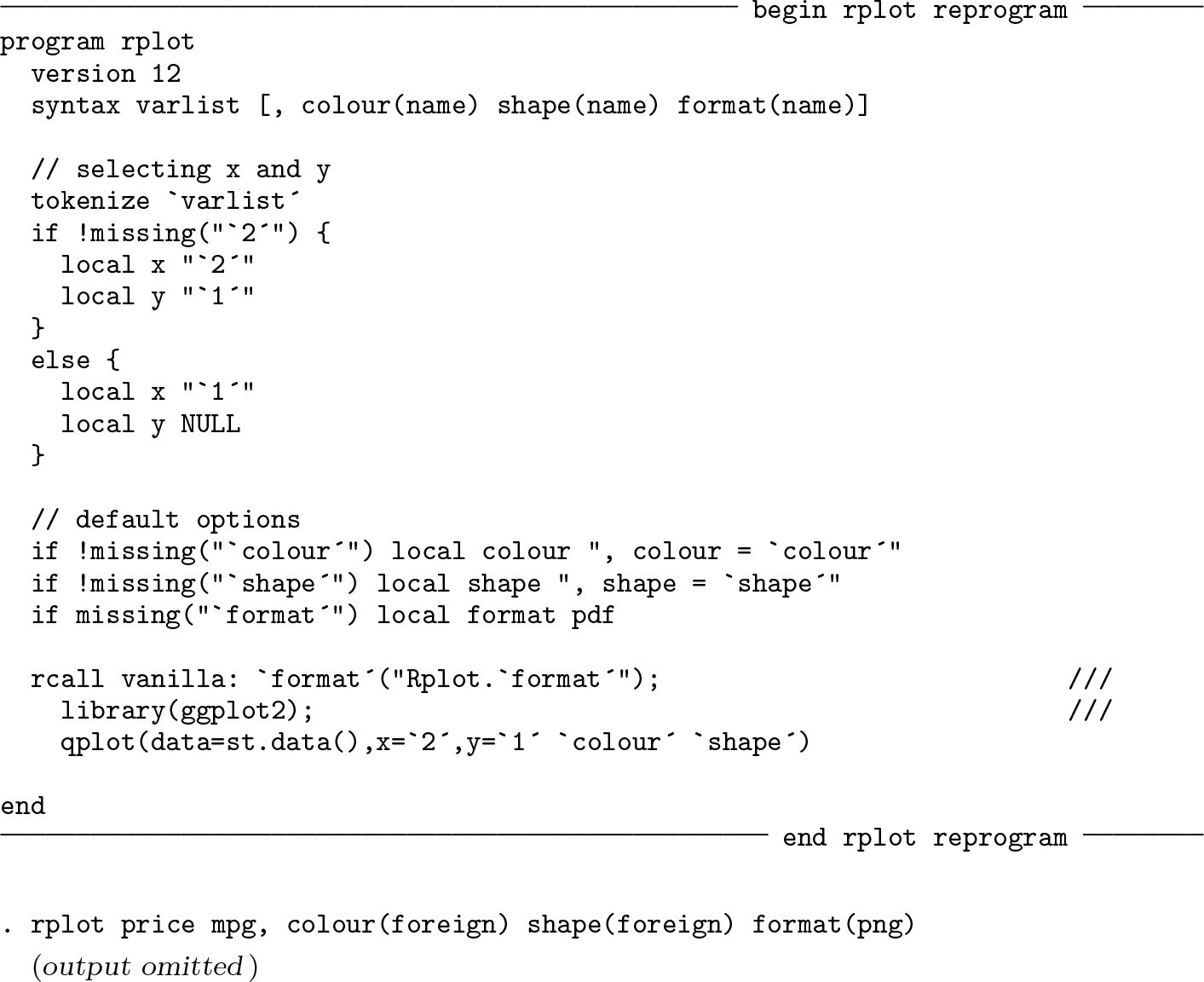
The ggplot2 package has an argument for the dataset, and it also recognizes the variable names, which makes embedding the package in Stata easy. However, the example above is oversimplified because it just passes the ggplot2 syntax to R via rcall. As a result, the syntax of the program does not look like a usual Stata program with varlist and options. Moreover, the program creates only PDF plots, whereas options can be added to store the plot in other supported formats besides pdf, including png, tiff, bmp, and jpeg. The example can be reprogrammed to use Stata syntax, as shown below. To keep the program short, I include only a few options of the qplot R function. This example will produce a plot identical to that of the previous example.
5.2 Defensive programming strategies for rcall
The previous programs are not ideal examples of embedding R in ado-commands because they are not disciplined enough and do not control for potential problems. The example above must ensure that a maximum of two variables can be specified. Furthermore, it has to check that the format option is one of the supported formats and that the other options are valid variables. Otherwise, R will handle the errors instead of Stata, and that might lead to confusion caused by unclear error messages. For example, let’s assume a user wishes to export a gif (Graphics Interchanging Format) file, which is not a graphical format supported by R.
Error in gif("Rplot.gif") : could not find function "gif"
—Break—
r(1);
Such an error might be confusing for users because they do not know about the function gif. Thus, before calling R, the syntax processing should be as disciplined as possible. As shown in this example, when an error occurs in R, rcall returns the error in Stata and breaks the Stata program. Therefore, rcall ensures that R is safely executing the code before continuing with the rest of the Stata program.
The rplot program example is based on several assumptions that the program does not validate. Let’s assume I have released rplot.ado to make the ggplot2 R package available for Stata. The program assumes that
the user has installed rcall;
the installed rcall package has a minimum acceptable version or higher;
R is installed on the user’s machine and can be accessed by rcall properly;
R has an acceptable version to be used with ggplot2;
the ggplot2 R package with a minimum acceptable version is installed; and
the readstata13 R package with a minimum acceptable version is installed.
Any Stata package that uses rcall to embed R in an ado-command should check for similar assumptions.
For the first assumption, it might suffice to search for a program file within Stata, for example,
For the remaining assumptions, the rcall package already has a solution. The package includes a program named rcall_check, which can be used to check that R is accessible via rcall, check for the required R packages, and specify a minimum acceptable version for R, rcall,2 and all the required R packages. The syntax of the command is as follows:
As shown in the syntax, all the arguments are optional. If rcall_check is executed without any argument or option, it simply checks whether R is accessible via rcall and returns r(rc) and r(version), which is the version of R used by the package. If R is not reachable, an error is returned accordingly.
In the reprogrammed rplot example above, let’s assume we wish to check that the user has rcall version 1.3.3 or higher and ggplot2 version 2.1.0 or higher, which itself requires a minimum R version of 3.1.0:
Applying the rcall_check program in an ado-command ensures that the user of a distributed Stata package will get clear and informative error messages if any of the required packages is missing or if the user has an older version of them installed. These are the bare minimum requirements of a defensive ado-command that embeds a foreign language and depends on packages that might not be installed on the user’s machine.3
5.3 Returning stored results
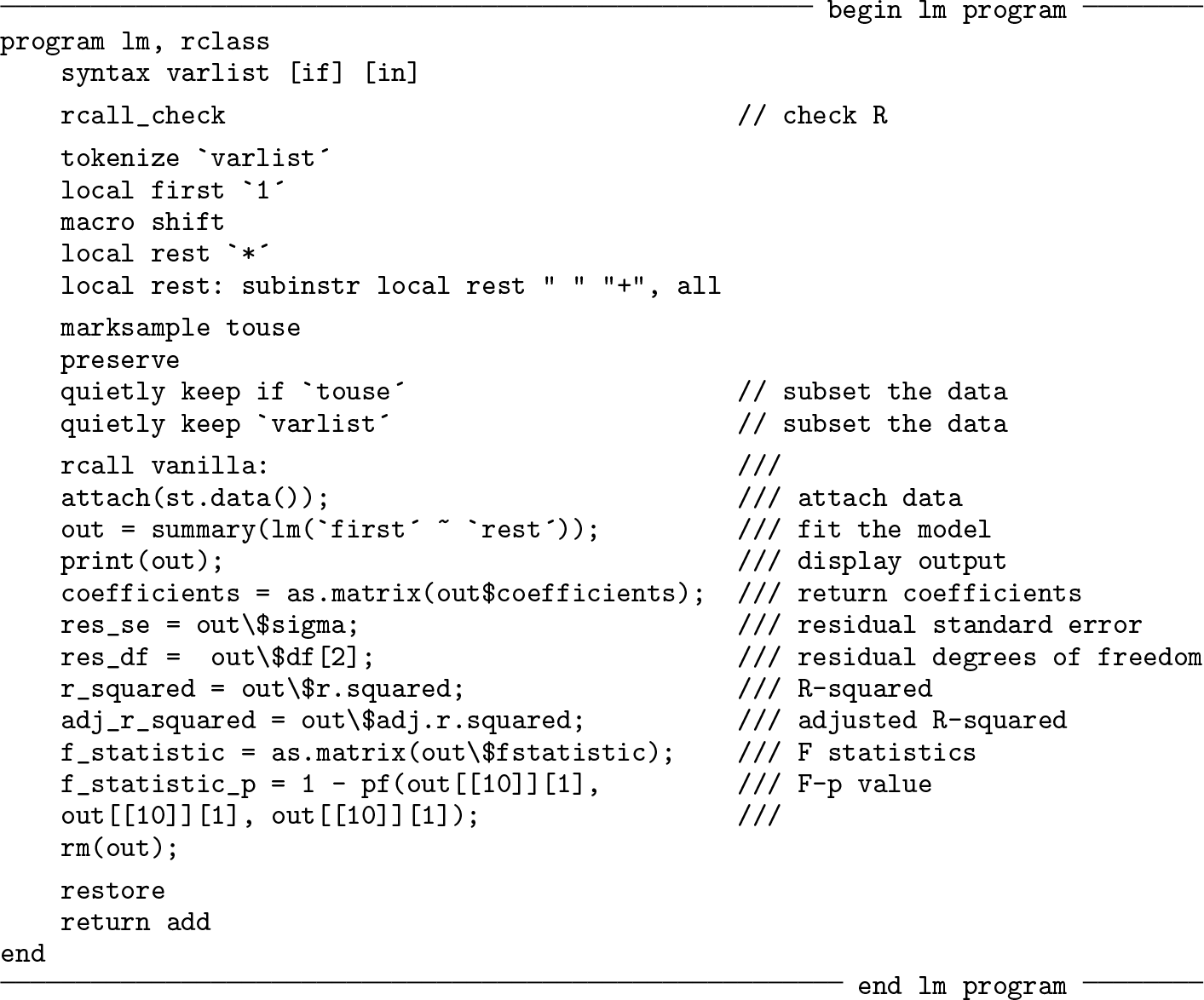
In section 4, I demonstrated that returning stored results is convenient with rcall because objects of several classes are automatically transferred from R to Stata. As a result, using the return add command in the ado-command is enough to return the values received from rcall in the ado-command. We examine this point in the next example.
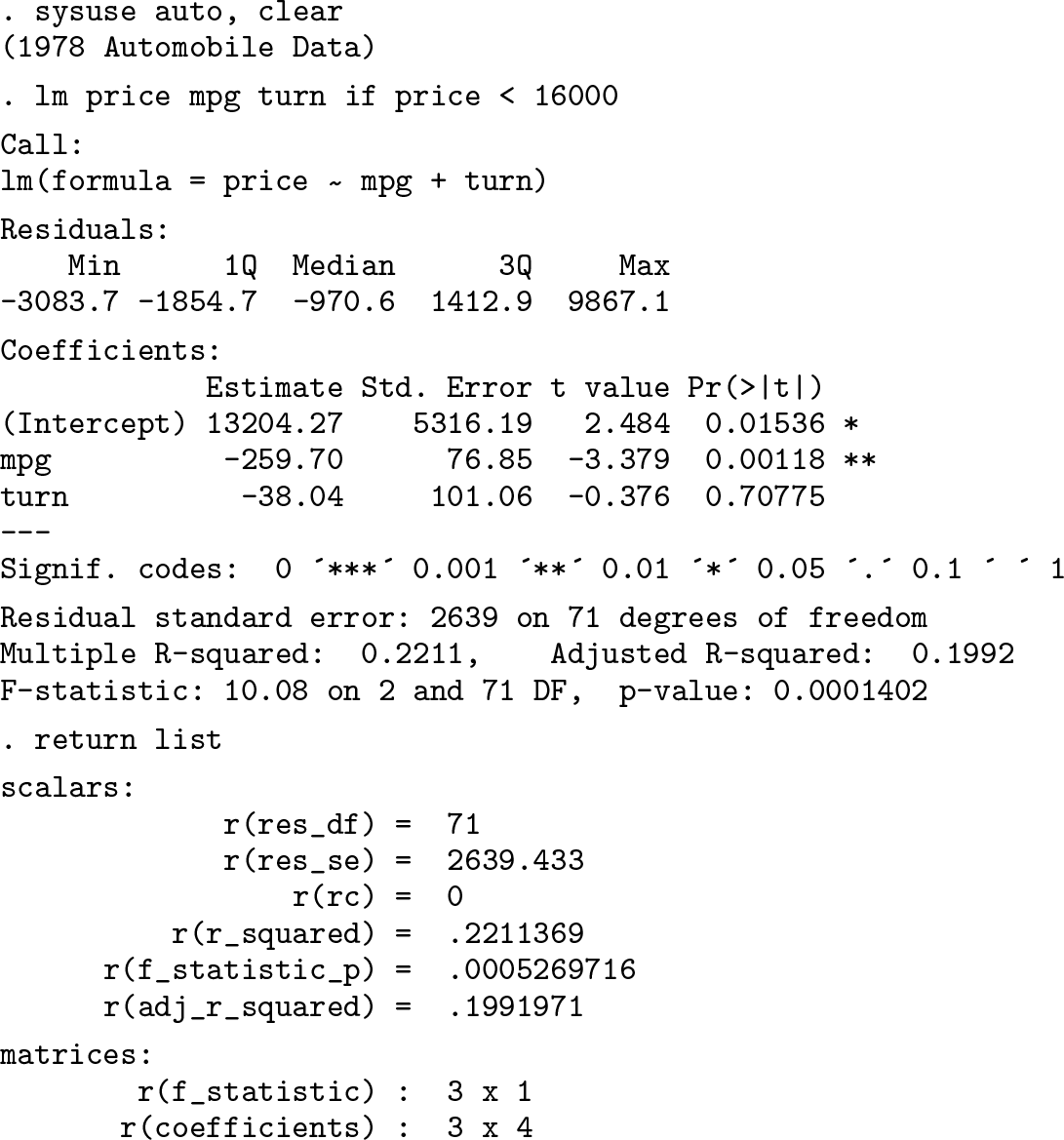
The lm program calls the lm() function in R to fit a linear model. Because the lm() function requires the predictors to be added using a + sign, the subinstr function was used to replace the white spaces between predictors with plus signs. After running the linear model, several objects and matrices are created to store the results of the lm() function, which are returned to Stata using the return add command.
To test the program and the stored results, I use auto.dta. For a simple linear model, I specify price as the dependent variable and mpg and turn as the predictors:
6 Technical remarks
The rcall clear command is your best friend. It is highly recommended that you clear the R environment when you intend to begin a new R session. For example, if you are writing a do-file, it is a good idea to start with clearing the R environment to improve the reproducibility of your code. Otherwise, all the previously loaded objects and packages will remain in R’s memory, thus slowing down rcall or influencing your computation.
Be cautious when using the sync mode, because changes made in R are synchronized with Stata forcefully. This is also the slowest rcall mode.
Use the interactive mode whenever you need to call R in several successive commands to carry out a particular analysis or explore your data. Avoid using the interactive mode in ado-programs.
Use the vanilla mode for executing R in ado-programs. This mode ensures that the R objects defined in the interactive mode do not influence your program.
Programmers are recommended to use the rcall_check command in ado-programs to check for the required versions of R, rcall, and R packages. For example, if you have rcall version 1.5.2 installed on your machine at the time of developing your Stata package, do not assume the program runs flawlessly with the older versions of rcall. Use rcall_check to require users with older versions of rcall to update their package to use your software.
All the R code does not need to be written in an ado-file. The R functions can be written in one or more R script files and distributed with the Stata package. rcall can then begin with sourcing the R script file by using the source() function, followed by code for getting the input from Stata and running the analysis. This makes the package not only easy to read but also easy to debug and maintain. However, the rcall functions that are used for data communication cannot be included in R script files, because they can only be interpreted by rcall.
The dollar sign ($) is used by Stata to specify global macros. As shown in the examples of section 5.3, the dollar sign should begin with a backslash whenever it is aimed to be used in R unless you are trying to pass the value of a global macro to R.
The R commands can be separated by a semicolon (;) and executed in a single call, which saves a lot of execution time that is wasted in the process of evoking R and returning objects to Stata for each call. Yet, you can maintain the readability of your code by writing each R command on a single line.
Using #delimit ; is generally not favored in Stata programs (Cox 2005), especially if it is used for writing multiple-line code and comments in an ado-file, because it reduces the readability of the program. Nevertheless, when R code is written in an ado-command, it must be executed at once; that is, R commands should be separated using the semicolon sign. Therefore, it is best to avoid using #delimit ; for collapsing Stata’s lines in a multilingual program.
Using the colon sign (:) is optional. Applying it does not influence rcall; it is merely a visual guide, separating Stata code from R code. However, if you are trying to access an R object with the same name as an rcall subcommand (setpath, clear, history, describe, or site), then the colon sign should be placed before the object name, as shown in the following:
. rcall clear
(R memory cleared)
rcall: clear
Error: object ´clear´ not found
—Break—
r(1);
7 Discussion
Embedding languages in statistical software have followed the usual procedure of computer science without considering the practical demands of applied statistics. I argued that in the field of statistics, the analysis scripts are often developed interactively, which is usually neglected (Haghish 2016b,c), particularly in language interfacing for statistical software. Underscoring the importance of interactive workflow, I proposed that language interfacing in data analysis should allow interactive calls with seamless data communication. I suggested that a simplified automatic data communication between the host and guest languages can achieve this goal, allowing the user to work interactively with two or more languages in parallel without having to send and receive data.
I introduced the rcall package to examine this proposal between R and Stata. To examine the idea of automatic reciprocal data communication between two languages, I developed different communication modes with different levels of automatization for the rcall package. These modes range from the sync mode, which synchronizes objects between Stata and R in real time, to a restricted and noninteractive mode for embedding R in Stata programs.
Embedding R code in Stata programs can provide a huge opportunity for advancing Stata’s functionalities, and rcall along with the rcall_check command notably facilitates this process. The example of using the ggplot2 R package demonstrated how a Stata program with a few lines of code can take full advantage of an R package without leaving Stata’s environment. Similarly, the lm example program underscores how conveniently analysis results can be returned from R to Stata within scalar and matrix classes. I provided several example programs for embedding R packages in Stata programs that can further familiarize the reader with the workflow of the rcall package. However, more Stata programs are required to test and improve rcall in practice.
The rcall package is hosted and maintained only on GitHub; it can be found at http://www.github.com/haghish/rcall. Interested readers who are willing to contribute to the project are welcome to submit their code to the GitHub repository or collaborate to extend its functionalities to other languages used for statistical computations, such as Python or Julia. I have intentionally kept this article away from the technical aspects used for automatizing the data communication or synchronizing objects between Stata and R. However, the interested reader will find more details about the software on the GitHub repository. The script files of the rcall package also include informative comments that can familiarize the reader with the subprograms of the package.
I hope that I underscored the importance of interactive workflow in data analysis and inspired developers to think twice when they adopt a straightforward computer science procedure, such as language interfacing, for data analysis.
Footnotes
Notes
References
1.
CoxN. J.2005. Suggestions on Stata programming style. Stata Journal5: 560–566.
NeuwirthE.BaierT.2001. Embedding R in standard software, and the other way round. In Proceedings of the 2nd International Workshop on Distributed Statistical Computing. Vienna, Austria: DSC.
15.
R Core Team. 2016. R: A Language and Environment for Statistical Computing. R Foundation for Statistical Computing, Vienna, Austria. http://www.R-project.org.