




Abstract
According to the Immunization Status Survey conducted by the Tennessee Department of Health in 2023, Tennessee ranks in the bottom 25th percentile among states for vaccination rates by the age of 24 months, based on the full series of recommended vaccines. To tackle this issue, the SmartSHOTS mobile application (mobile app) was developed to reduce vaccination barriers for children aged 0–24 months. The mobile app includes vaccine information, the ability to add and calculate vaccine due dates, and locating health departments and transportation services based on zip codes. The mobile app was developed and usability tested using an iterative design process, based on a needs assessment conducted across regions of Tennessee with community members who served on the state’s county health council. These community members also reviewed the mobile app wireframes. Parents or guardians of children aged 0–24 months living in Tennessee evaluated the usability of the mobile app.
Introduction
Vaccines protect children from disease by boosting one’s immune system to fight infections more effectively. Specifically, vaccines target viruses and stimulate the immune system to produce antibodies that fight future diseases. 1 According to the Tennessee Department of Health, in 2023 “Tennessee did not achieve any of the Healthy People 2030 (HP2030) objectives related to vaccines: one dose MMR by age 2 years (target of 90.8%), fours doses DTaP by age 2 years (target of 90.0%), and children with no doses of recommended vaccines by age 2 years (target of 1.3%)”. 2 Tennessee the targeted state for SmartSHOTS, ranked in the lowest quartile among states for the percentage of children who had completed 6 of the 12 routine vaccines recommended for a 24-month-old. 3 Nearly one out of four 24-month-old children in the state of Tennessee are not up-to-date on immunizations.
To make progress towards the HP2030 goals for all regions and racial, ethnic, and income groups, novel approaches to minimizing barriers to childhood immunizations are needed. Imperative to these new approaches are affordability (including the cost to provider, health care system, and clients), accessibility, particularly for rural, residentially segregated, low-income populations, and simple functionality. 4
Skipping or missing vaccinations may occur because of beliefs, misinformation, or access to care, to name a few barriers. Despite improved vaccines and administration, there are discrepancies between scientific evidence and general perception. 5 According to a policy statement from the American Academy of Pediatrics, using information systems to establish due dates and send reminders improves vaccine uptake. 6 In a systematic review of vaccine related interventions in low- and middle-income countries, interventions designed for caregivers and communities were effective in improving vaccination outcomes. 7 Further, parents who engaged in the design and development of mobile apps to promote vaccines reported having multiple languages and high functionality is key to a useful app for vaccines. 8 The SmartSHOTS mobile application is available in English and Spanish, the most commonly spoken languages in Tennessee. It also includes accurate vaccine information from the Centers for Disease Control (CDC), a log to add vaccines that calculates next due dates, reminders when vaccines are past due, health department locations, and transportation information based on zip codes.
Methods
This paper describes the development and usability of SmartSHOTS following the Agile Development Lifecycle (ADL) framework
9
and Design Thinking (DT). ADL software development accelerates delivery and adapts to changes, but geographic, scheduling, and budget constraints can impact understanding customer needs. Integrating DT helps future users focus on needs and balancing feasibility while enhancing ADL’s effectiveness.
10
DT is a user-centered, iterative approach to solving complex problems through empathy, definition, ideation, prototyping, testing, and implementation (see Figure 1). Hence, the DT approach is mostly used when integrated with the ADL software development framework. Design thinking guided project development phases. The “Implement” phase (shaded area) is not reported in this usability study (Adapted from: Nngroup.com. Design thinking 101. Located at: https://www.nngroup.com/articles/design-thinking/).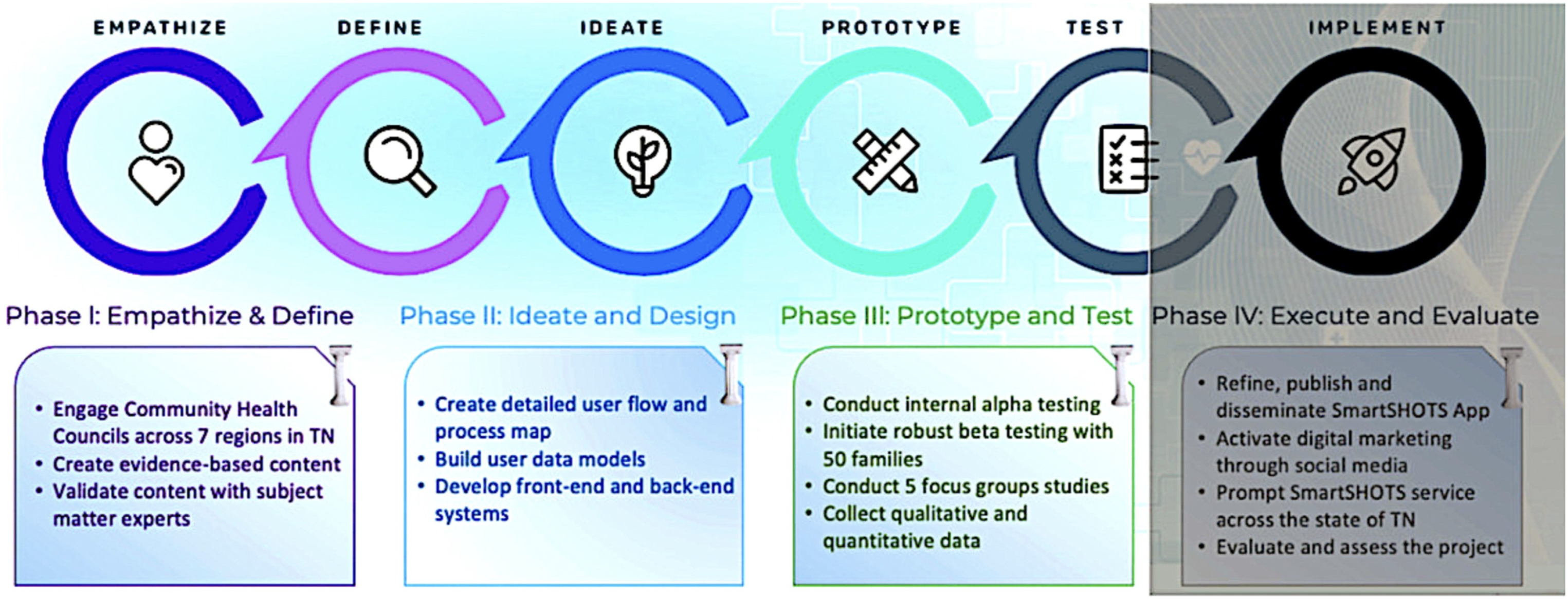
Our ADL framework consisted of three phases. In Phase 1, a development team of program engineers, designers, and health professionals, sought to better understand the factors that influence vaccine uptake (DT’s empathy phase) in Tennessee by meeting with members of local health councils via teleconferencing. In Phase 2, the team evaluated transcripts from the health council members to understand similarities and differences in vaccination barriers across the state. Led by the set of barriers that arose from Phase 1, the team designers developed a comprehensive set of wireframes that serve as the information architecture backbone to the mobile app. These wireframes were then evaluated by the members of the county health councils (some members were involved in the first phase, some were not) to determine if the wireframes aligned with the needs of their respective communities and to gauge the usability of the design and navigation features. Using Nielsen’s heuristics, revisions were made to the wireframes based on this feedback. The app developers then used these wireframes to build out the front-end experience, functionality and navigation of the SmartSHOTS app. Simultaneously, vaccine information included in the app was validated by a pediatric physician. The subject matter expert was faculty for a teaching hospital prior to serving her community in a primary care clinic for 30 years. An experienced linguist also reviewed the content to ensure the material was written for the diverse audiences the app intended to serve. In Phase 3, the app developers beta tested a fully functioning app with caregivers of children between 0 and 24 months of age. Based on the beta testing feedback using Nielsen’s heuristics 11 the final revisions were adopted. The SmartSHOTS app will be available via Google Play and the Apple Store through funding by the Tennessee Department of Health.
Approach and recruitment
Study protocols, forms, and communication scripts with participants were approved by the university’s internal review board before conducting the design and usability study. To recruit members of the community for the needs assessment (Phase 1) and wireframe feedback (Phase 2), the team contacted the chair of each County Health Council (CHC) and presented the study. Council members were residents of their respective counties and included leaders in education, planning, local government, healthcare, mental health, juvenile justice, local non-profits, social service organizations, and community members. In many counties, the SmartSHOTS development team was invited by the chair of these county health councils to attend a CHC meeting to discuss study goals and recruit volunteers. In other counties, the CHC chair asked for a flyer and synopsis of the project to present to their CHC. To recruit families and caregivers for Phase 3 prototype and beta testing of SmartSHOTS, we worked with the University’s extension offices and Community Registered Nurse Navigators in all regions of the state. These partners helped the study team gain permission from early childhood education centers to recruit caregivers of children from the Boys and Girls Club of the Tennessee Valley, the University of Tennessee Extension Thrive Program, Carter County School District, and Livingston Head Start in Overton County.
Phase 1: Needs assessment procedures (empathize and define)
To conduct a needs assessment, the team gathered County Health Council (CHC) members from each county across the state to participate in one of four needs assessment meetings. These meetings were offered via teleconferencing at a time suggested by the CHC chair. The needs assessment used the validated SHOTS survey, available at: https://www.shotsurvey.org/survey, to identify potential barriers
12
(see Figure 2). To ensure all needs assessment meetings were conducted exactly the same way, a general scripted question initiated the conversation, “What are some vaccination barriers for caregivers of children in your community?” Once the CHC members described the barriers, the development team asked clarifying questions to tease out details of the barriers. For example, if a participant said “Parents don’t like the hassle of going to the doctor.”, the interviewer asked “What aspect of going to the doctor is the pain point?” (empathy) The focus group conversations were recorded and transcribed by the development team and were imported into Nvivo©, v. 20.6. (See Figure 3). Next, the development team reviewed all data and identified themes regarding the needs of the state regions and created a list of functions, content and features for the app to reduce barriers. For example, the content for vaccination information and the frequently asked questions content were designed from the needs assessment feedback. This led to initial wireframes containing the app navigation, or flow, and content features using the Figma© platform. Part of SHOTS Survey. Complete survey available in Supplement 1. Feedback from community engagement meetings to identify barriers.

Phase 2: User-centered agile development and testing procedures (ideate, design and prototype)
To evaluate the navigation and flow of the future SmartSHOTS app, the CHC members, along with Community Nurse Navigators, were invited to participate in a second teleconferencing meeting to provide feedback on the proposed functions of SmartSHOTS. Participants choose to participate in one of four navigation meetings based on a time and date that was convenient for them. This led to participants from various parts of the state participating together (see Figure 4).” The meetings were identical in execution using the same screens in each meeting group presentation to ensure continuity across meetings. Participants also completed an open-ended five-question post-survey to elicit additional information, changes, or revisions. Sample questions were “Are there any barriers to vaccinations the app doesn’t plan to address?” and, “What is the SmartSHOTS team not asking that we should be asking of you?”. The navigation and flow meetings were recorded and transcribed by the development team. The post-surveys and transcripts were analyzed and resulted in revisions and enhancements to the wireframes. Participants across the state. Key: P1 = Phase 1, P2 = Phase 2, P3 = Phase 3, N = number of participants, F = female, M = male.
The same individuals who participated in previous meetings were invited to a third group of video conference meetings to validate and offer feedback on a prototype of SmartSHOTS. The prototype testing focus groups were held approximately 6 months later to evaluate a more detailed interface structure of SmartSHOTS. During these focus groups (representing regions across the state, but all conducted exactly the same way for continuity), the development team presented a scripted use case and each focus group volunteer was asked to add information into the app and navigate the mockup version of SmartSHOTS. These prototype testing focus groups were also recorded and transcribed by the development team. Data were reviewed and scored by each member of the team on a heuristic worksheet used in previous research by the authors13–16 (see Figure 5). Change recommendations were made based on ease of fix and level of importance but only for the feedback that met the criteria of a Nielsen heuristic
11
and criteria from the Behavioral Intervention Technology Model.
17
The highest possible score, indicating an important design flaw that was relatively easy to fix, was 25, and a low-importance, high-difficulty flaw received a score of 1. Part of the heuristic worksheet. Complete version available in Supplement 2.
Phase 3: Beta testing procedures (test)
Parents of children 0–24 months of age beta tested the fully functioning SmartSHOTS app. The in-person focus groups were conducted in a childcare headstart program with seven participating parents (see Figure 4). Immediately after obtaining consent but before the beta testing began, the development team member obtaining consent loaded SmartSHOTS on the volunteer’s phone. During the beta testing, the team observed the volunteer navigating the app while the volunteer listened to a test user case read aloud. The development team member present during the beta testing recorded and transcribed data, and data were aligned with field notes. The field notes and transcripts from the recordings were analyzed using Nielsen’s heuristic framework, which was also used in Phase 2 of this study (see Figure 5).
Results
Nielsen’s heuristics and the Behavioral Technology Intervention Model11,17 framed the analysis of the data. The results from all 3 phases are described below.
Phase 1: Vaccination barriers across the state (empathy and define)
An analysis of the data from four needs assessment meetings and 18 volunteers revealed little variance in barrier themes across the state. The barriers identified by the CHC members are limited healthcare, financial and transportation resources, misinformation, concerns about vaccine safety, and busy schedules.
Overwhelmingly, across all state regions, the greatest barrier to vaccinations was the absence of routine care by a primary provider to ensure vaccine schedules were followed. In many cases, families who miss vaccines receive sporadic care through urgent-care clinics or emergency departments and do not receive routine well-visit care. Preventive healthcare is limited due to transient lifestyle, lack of insurance, transportation issues, and few healthcare facility options in their community. One community member said, “Their contact information changes constantly—even before the child is 24 months old.” Another respondent said, “[Parents] are just too busy to go to the doctor. They have a lot of anxiety because of their schedules”. Less often, although a growing trend, are families who opt out of childhood vaccinations due to misinformation or fear their concerns about vaccine safety will be met with scorn and judgment. As an example of misinformation, one respondent remarked, “There is a large group maybe, for people to say, you know, I’m going to homeschool, so I don’t need the vaccinations for school, so I don’t need them at all.” The interviewer followed up by asking, “Is it a lack of knowledge about the disease that they don’t understand?” The respondent said, “[the health department] has a lot of resources but folks don’t know about that. People who are anti-vaccination don’t even come into the [health department] office.”
Families who receive well-child care often described hectic schedules as a vaccination barrier until their child must document received vaccinations at the beginning of each school year. A respondent said, “A lot of times they come when they are ready to go to school and they have to have their shots to get into school.” Respondent E reports “I would say language is a barrier.” Another respondent reported, “The bus schedule [is on the back of] TennCare Card; they can call and get something set up, but they forget about that.” As the above comments reveal, several respondents felt frustration that families did not prioritize immunizations. Families experience this judgment, as noted by one respondent: “People don’t go to the health department and other places because they feel like they’re being judged when they walk in the door.”
To address the barriers, the team identified four key functions within SmartSHOTS (See Figure 6). These functions are integral to the app’s primary purpose, each specifically designed to overcome the challenges identified. Translating barriers to four key functionalities.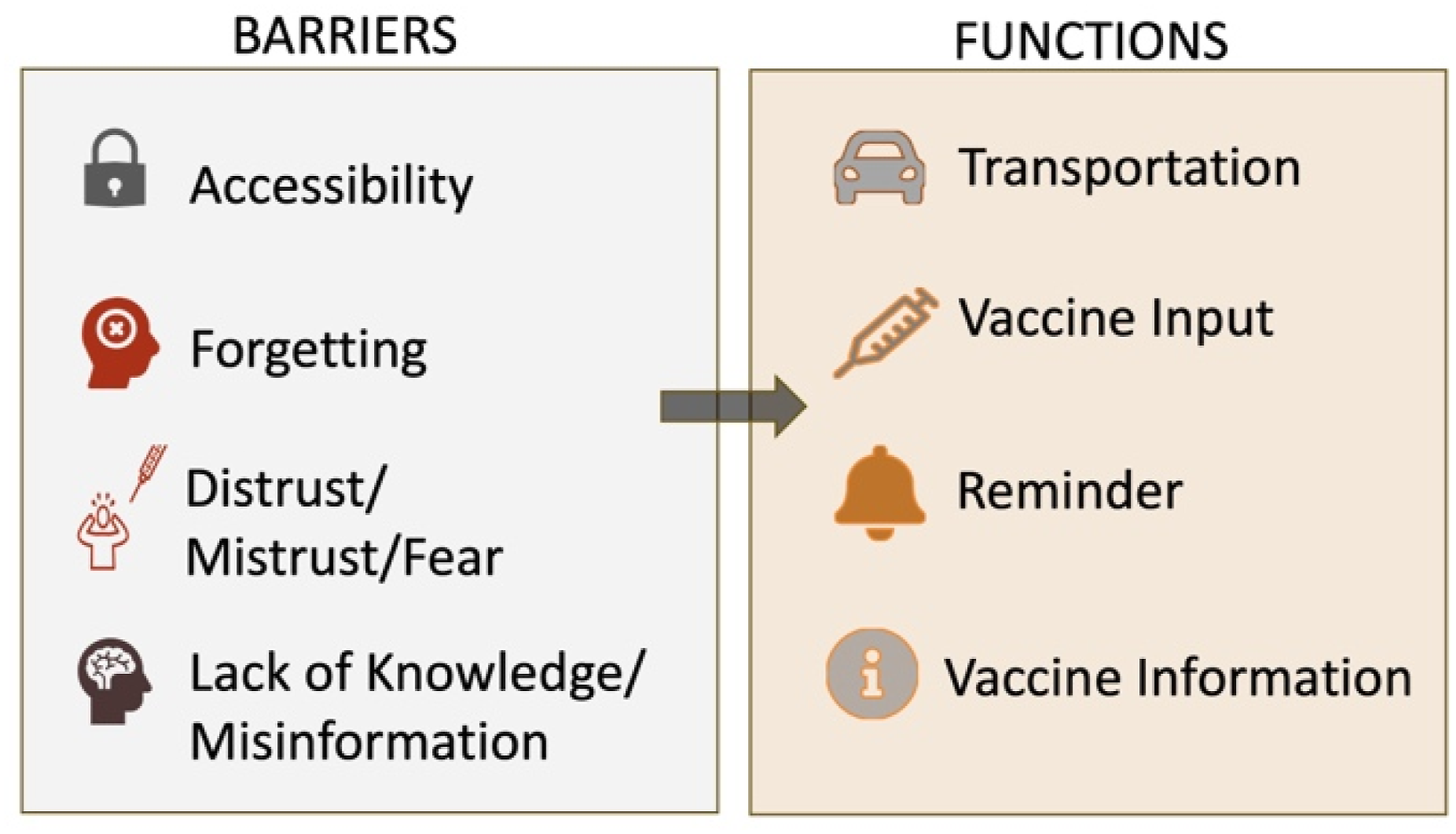
Phase 2: User-centered testing (ideate, design, prototype)
Phase 2 testing involved reviewing images of screens (see Figures 7 and 8) based on the key functions of the app developed in Phase 1: onboarding (user sign up and login), vaccine input (track a child’s vaccination progress), vaccine info (information about the vaccines), where to go (finding a provider), and how to get there (getting to and from appointments). A total of three user and navigation focus groups were held with 14 participants of CHC members and Community Nurse Navigators for this portion of Phase 2. The participants reviewed images of planned screens for SmartSHOTS and were also asked to complete a survey reporting the strengths of SmartSHOTS based on what they reviewed during the focus group and what was missing. Four of the 14 participants completed the survey. Between the focus group data and the surveys, the participants identified two key elements for the team to consider for SmartSHOTS. First, it was suggested that myths and misinformation about vaccines be added to the content. The development team identified common myths and misinformation but could not assume they understood all myths and misinformation. For this reason, instead of addressing specific myths, the development team created sections with headings such as “What is it”, “Why do I need it”, “What to know”, and “General Info” for each vaccination in SmartSHOTS. Within each vaccine information tab, users are encouraged to always use reliable resources (examples are listed in the app) and to talk with their providers about vaccines, how to prepare for vaccines, and symptoms that may occur post vaccines. Participants also identified an important feature the team had not considered. The number of foster children in the state of TN is over 8300 as of 2022 and of those, many will live in three different homes before settling into their forever home.
18
To account for foster situations, the SmartSHOTS profile on each child needed to have the function to transfer individual’s records to other users, not simply shared as would be the case with extended family members such as grandparents. The design team revamped SmartSHOTS to include full transfer of a child’s profile so that a child’s record can be accessed with administrative privileges regardless of the child’s family situation. Design of dashboard. Design of transportation.

In preparation for the next user-centered testing session, the team built the SmartSHOTS prototype using a Flutter framework for the frontend and Laravel for microservices in the backend. The features for the prototype included onboarding and dashboard, vaccine record tracking and management, educational resources, vaccine provider locator, profile and sharing settings, immunization to date, and finalized branding and style sheets for scalability.
Nine participants, both CHC members and Community Nurse navigators, volunteered in one of three online focus groups to evaluate the prototype. A design team member read aloud a user scenario and asked the volunteer to complete tasks such as adding a new child to the app, marking a vaccine as given, looking for vaccine information and changing the app language.
While the participants worked through the user scenarios, additional design team members observed while the session was recorded. All volunteers completed the same tasks across the three focus groups. The transcripts from the recording and field notes were transferred to a Nielsen heuristic tool (see Figure 5) where each user comment was evaluated for ease of fix and importance of fix. The development team leaders independently scored each item and then met to discuss scores. A mean value of the scores from the independent review was computed. Those items with a score of 5 to 25 (total possible score 1–25) were added to a punch list of 17 items to be reworked by the development team. Many of the items listed on the punch list were related to onboarding and the need for more direction and assistance. The team created a help feature and a SmartSHOTS tour that runs automatically upon launch. The tour walks the user through the features including, but not limited to, highlighting where to navigate, how to find vaccine information, how to add child records, and how to locate transportation information. Other feedback included ways to improve the icons, selecting a color theme for a child, and better ways to indicate when a vaccine is past due. See Figures 9–12. Add child functionality. Child being updated with latest dose. Vaccine information. App in Spanish language.


Phase 3: Beta testing with caregivers of children 0–24 months (test)
Seven caregivers of children 0–24 months evaluated the beta version of SmartSHOTS. Overwhelmingly, the users were enthusiastic about the features and functions of SmartSHOTS. The heuristic evaluation based on Nielsen and the Behavior Intervention Technology model revealed several functions to improve (see Supplement 3 for details). Usability testing revealed navigation was easy to use but registering a child was consistently confusing to users throughout all phases of development and testing. Users were unsure if the adult or parent was the registrant or if each child had their own account. The design team reconfigured the registration adding clarifying statements to indicate the guardian is the registrant and adds each child under the guardian account. The feature in the app to help locate facilities that administer vaccines is based on the user’s zip code. Some zip code geographic areas are vast and retrieving only those facilities within a zip code may not always be the most convenient facility. The design team revised this function so the locator feature retrieves multiple facilities in the designated zip code along with facilities in close proximity to the designated zip code.
Three of the five volunteer users could not easily transfer and share the child’s record with other users (grandparents or a new foster parent) when asked to do so during the testing. Further, two of the users entered inaccurate data about the vaccine they were instructed to enter into the app during testing. The design team considered several options to resolve these errors. First, the design team built a tutorial that walks a user through different features of the app. The tutorial automatically loads in a new window the first time a user accesses SmartSHOTS. At the end of the tutorial, the user has the option to “not see the tutorial again at next log in” or accept the default with the tutorial window opening upon log in. The tutorial is also accessed through the Help feature on the app.
The design team also built a verification feature to help a user enter accurate data. After a user enters vaccine data, they are asked to verify the information entered before “submitting” their information. If the user does not add the date a vaccine was administered, the information can be saved but the user will receive a pop-up warning that SmartSHOTS is unable to send a reminder for the next vaccine series without entering the dates the vaccine was received. Adding this feature serves two purposes: it allows a user to review vaccine information they entered before it is stored in SmartSHOTS and the warning feature informs the user they will not receive reminders when the next series of vaccines are due without a valid date the child received the vaccine entered.
Users also identified inconsistencies between vaccine names and using acronyms to discuss vaccines or groupings of vaccines. The content developers reviewed all content and spelled out all vaccinations. During usability testing, one participant was unable to register and needed technical assistance. For this reason, an email was developed to offer technical support for further guidance. For a summary of usability feedback, the heuristic scoring, and the technical solution, please see Figure 13. Summary of usability feedback from beta testing. Complete version available in Supplement.
Discussion
The high likelihood of Tennessee’s children missing vaccinations highlights a significant public health challenge. To address this issue, the SmartSHOTS mobile application was developed to reduce barriers to vaccinations for children aged 0–24 months. The major immunization barriers identified by county health council members in Tennessee are identical to barriers identified in the rest of the U.S.: difficulties in reaching healthcare providers due to transportation issues, lack of insurance, and limited clinic hours19,20; misinformation and distrust in medical institutions, which has been exacerbated by social media 21 ; cultural and language’ barriers that hinder communication between healthcare providers and families 22 ; and logistical issues such as missed appointments due to parental work schedules and a lack of reminder systems. 23 The app includes features such as vaccine information, vaccine schedule tracking, and locating health departments and transportation services based on zip codes. Developed through an iterative design process and informed by a needs assessment, SmartSHOTS involved CHC members from across the state to identify and address vaccination barriers. Key features like multilingual support and functionality for foster children were incorporated based on user feedback. In the near future, the app will be evaluated for effectiveness, with data collected for a longitudinal study on the number of app downloads, use frequency, and vaccine uptake. SmartSHOTS aims to improve vaccination rates and public health outcomes, contributing to the Healthy People 2030 goals of reducing health disparities and promoting health equity.
As the world continues to transform digitally, thousands of apps are available to help people parent their children. First and foremost, when considering the creation of an app, parents needs must be considered. The comprehensive design process used to create the SmartSHOTS app provided critical information on the top barriers that parents face related to vaccinating their children. Additionally, iterative field testing across the state with diverse parent groups led to design improvements.
Healthcare providers play a crucial role in ensuring public health through vaccination. However, they often cannot customize educational tools and resources to fit the specific needs of their patient populations. The SmartSHOTS app integrates a dashboard to allow parents to track their children’s vaccination status. Automated reminders and alerts for upcoming vaccinations or booster shots are integrated into the patient’s health record and can encourage adherence. The bulk input option to add multiple vaccine doses at once helps caregivers log vaccine doses quickly and easily and encourages documentation within the app. Additionally, a quick, informative FAQ addressing common questions and concerns about vaccines can help dispel myths and provide clear, concise answers. Finally, customization options, such as language preferences, accessibility features, and regional vaccine guidelines, allow the app to tailor the information to the audience’s specific needs.
Conclusion
For the purpose of creating reminders and notifications, the SmartSHOTS app depends on the data that users enter. As of now, there is no way for the information to be validated since it is user-provided documentation. Although the app helps caretakers keep track of vaccines, it does not replace a doctor’s advice or legal record keeping of vaccine history.
To reach increasingly digital-first audiences, the team plans to incorporate video content through simplified animations to clarify the science behind vaccines, making the currently text-based information more accessible and impactful. In the future, we may include real-life testimonial videos from parents and healthcare providers to provide relatable insights into the benefits of vaccination. Additionally, we will consider implementing analytics and user engagement tracking tools, like Google Analytics, to understand better our users and how they interact with the app.
Supplemental material
Supplemental material - Design and usability testing of SmartSHOTS: A mobile app to reduce vaccine barriers for children 0–24 months
Supplemental material for Design and usability testing of SmartSHOTS: A mobile app to reduce vaccine barriers for children 0–24 months by Tami H. Wyatt, Sarah Lowe, Jose Tupayachi, Xueping Li, Clea Ann McNeely, Xudong Wang, Penny Dawn Taylor, Aliza Sharmin and Victoria Niederhauser in Health Informatics Journal
Supplemental material
Supplemental material - Design and usability testing of SmartSHOTS: A mobile app to reduce vaccine barriers for children 0–24 months
Supplemental material for Design and usability testing of SmartSHOTS: A mobile app to reduce vaccine barriers for children 0–24 months by Tami H. Wyatt, Sarah Lowe, Jose Tupayachi, Xueping Li, Clea Ann McNeely, Xudong Wang, Penny Dawn Taylor, Aliza Sharmin and Victoria Niederhauser in Health Informatics Journal
Supplemental material
Supplemental material - Design and usability testing of SmartSHOTS: A mobile app to reduce vaccine barriers for children 0–24 months
Supplemental material for Design and usability testing of SmartSHOTS: A mobile app to reduce vaccine barriers for children 0–24 months by Tami H. Wyatt, Sarah Lowe, Jose Tupayachi, Xueping Li, Clea Ann McNeely, Xudong Wang, Penny Dawn Taylor, Aliza Sharmin and Victoria Niederhauser in Health Informatics Journal
Footnotes
Acknowledgments
The authors wish to acknowledge Drs. Madison Kane and Elliot Laughlin for their clinical expertise and work toward SmartSHOTS. Without their skills, this work would not be possible.

Ethical considerations
Internal Review Board approval was obtained for SmartSHOTS development and testing through the University of Tennessee, Knoxville Human Subject Protection Program.
Consent to participate
All SmartSHOTS program participants voluntarily signed consent forms describing the project, their participation, the data collected, how data are protected, and their rights as participants.
Consent for publication
All writing, graphs, and figures are the original work of the authors. No original quotes or identifying personal information is included in this manuscript.
Author contributions
Funding
The authors disclosed receipt of the following financial support for the research, authorship, and/or publication of this article: This work was supported by The SmartSHOTS project was funded by the Tennessee Department of Health 2023–2025.
Declaration of conflicting interests
The authors declared no potential conflicts of interest with respect to the research, authorship, and/or publication of this article.
Data Availability Statement
Unidentified data about the usability of SmartSHOTS may be requested from the corresponding author.
Supplemental material
Supplemental material for this article is available online
References
Supplementary Material
Please find the following supplemental material available below.
For Open Access articles published under a Creative Commons License, all supplemental material carries the same license as the article it is associated with.
For non-Open Access articles published, all supplemental material carries a non-exclusive license, and permission requests for re-use of supplemental material or any part of supplemental material shall be sent directly to the copyright owner as specified in the copyright notice associated with the article.
