




Abstract
Clinical Practice Guidelines are widely used to inform and improve the quality and consistency of clinical practice. Developing and publishing Clinical Practice Guidelines is a complex task involving multiple components. Electronic Content Management Systems are increasingly employed to make this task more manageable. The Content Management System market offers a variety of options for publishing content on the Internet. However, there are limited products that comprehensively address the requirements of publishing Clinical Practice Guidelines. The authors are involved in publishing guidelines for remote clinical practitioners in Australia and present their perspective about identifying an appropriate Content Management System. Several elements essential to addressing their unique editing needs are defined in this article. Unfortunately, customisation is very expensive and laborious: few Content Management System providers can comprehensively meet the needs of Clinical Practice Guidelines publishing. Being pragmatic about the level of functionality a product can offer to support publication is essential.
Introduction
Clinical Practice Guidelines (CPG) have been defined as ‘systematically developed statements to assist practitioner and patient decisions about appropriate health care for specific clinical circumstances’. 1 CPG are widely used to inform and improve the quality of clinical practice by standardising patient care and minimising inappropriate or harmful interventions. 2 A driving force behind their development and uptake is the desire for clinical practice to adopt an evidence-based approach. 3
Developing CPG is a complex and evolving process involving some phases. 4 These include identifying relevant areas for guideline development, establishing and managing guideline development groups, reviewing the evidence and modifying guidelines accordingly. There is additional complexity in developing CPG for health practitioners in remote practice settings.5,6 Aside from developing fit-for-purpose clinical guidelines, one has to consider the setting’s context, culture and community perspective. The isolation, extended training requirements and high staff turnover, which impact remote service delivery, also influence CPG development and uptake.
Publication of CPG focusing on remote and Indigenous primary health care in Australia commenced in Alice Springs, Central Australia, in the early 1990s. 7 The first to be published was the pocket-sized CARPA Standard Treatment Manual (STM). 8 The practice guidelines have evolved across several editions to incorporate a suite of five Remote Primary Health Care Manuals (RPHCM): 9
CARPA STM: Clinical guidelines that cover ‘what to do’ in remote settings for conditions that are common, high risk, unfamiliar and dangerous, have significant public health implications or require coordinated, standardised care.
Minymaku Kutju Tjukurpa – Women’s Business Manual (WBM): Treatment guidelines for women’s health issues in the remote context. It is a culturally respectful resource, particularly relevant for female doctors, midwives, nurses and Aboriginal and Torres Strait Islander Health Practitioners and Health Workers.
Clinical Procedures Manual (CPM) for remote and rural practice: A guide to conducting routine and emergency clinical procedures faced by remote health practitioners. Accurate, practical and best-practice clinical direction for procedures that may be less common in mainstream primary health care.
Medicines Book for Aboriginal and Torres Strait Islander Health Practitioners and Health Workers: Visual, plain English guide to medications referred to in the STM and WBM or commonly available in remote clinics. Designed primarily for Aboriginal and Torres Strait Islander Health Practitioners and Health Workers who supply and monitor medicines but may not be able to access or read other medicines reference books.
Reference Book for the RPHCM: The background, evidence and rationales for the protocols and procedures in the RPHCM suite. Designed to enhance and inform practitioners’ understanding of clinical decision-making in remote practice.
The RPHCM suite is published both electronically and in hard copy. The manuals are utilised by remote area nurses, doctors, midwives and Aboriginal and Torres Strait Islander Health Practitioners and Health Workers. While the RPHCM suite is designed for the remote Aboriginal and Torres Strait Islander health context, they are also known to be used in other primary health care settings. 10 As the manuals expanded, developing, reviewing and updating content also became more complex. The RPHCM editorial review process, which has evolved over the years, is described below.
RPHCM recommendations are made by expert consensus on the basis of evidence review. Expert opinion and consensus decision on current best practice provide direction where remote-specific research is not yet available. Primary evidence reviews are conducted by content experts, synthesising existing guidelines, evidence summaries, systematic reviews, primary studies and expert opinion, who then make recommendations for change to RPHCM content. Protocols are updated by Editorial Working Groups of clinicians, content and context experts on the basis of these recommendations, the best available evidence and requirements of the remote Indigenous context. Users of the manuals assess relevance, readability and practicality of the updated protocols for the remote primary health care clinic and their input incorporated by the Working Groups wherever appropriate. Final review and endorsement of recommendations occur via a multidisciplinary editorial committee of experienced clinicians and clinical academics with significant remote expertise and experience. In line with the National Health and Medical Research Council (NHMRC) model, the next review of the RPHCM will incorporate conflict of interest declarations for all decision makers, clear documentation of the evidence base at the recommendation level and wider publication of the development model.
A project team, funded by the Australian Government, manages the development and publication of the RPHCM suite. The authors are part of the RPHCM project team, reporting to a Governance Committee that consists of representatives of partner organisations.
The need to accommodate remote reviewers and the complex editorial review process led to the adoption of an electronic system in 2007, to manage content development and review and facilitate concurrent publication in the paper and electronic formats. These types of electronic systems are described in the publishing world as Content Management Systems (CMS). While the early adoption of a CMS assisted in streamlining and managing the revision and editing of the content, over time it was identified that exporting content to publishable formats remained problematic. This key issue compounded by unmet development expectations, some reviewer’s reluctance to adopt the system, access and authorisation issues, difficulties in manipulating content, and need for third party layout and website development software led the team to reconsider their expectations. In response to this, the project team in late 2013 reassessed their CMS requirements, and, while reviewing their current CMS, explored whether alternative CMS could address their needs.
While exploring the literature to guide CMS selection, little to no peer-reviewed content outlining the use of CMS in CPG publishing was identified. No guidance was available to assist developers of CPG in selecting, adapting or utilising a CMS. This article endeavours to address this gap in the literature by describing CMS functional specifications, requirements for CPG publishing and the authors’ experience in adapting their CMS to suit their publishing needs. This will potentially benefit clinicians, academics, organisations and professional guideline developers in the efficient publication of CPG.
CMS: general concepts and features
Definition
Various definitions of CMS exist in the public arena. Following review of the literature and based on our user experience, we define a CMS to be an electronic information system including web-based systems that enable storage, organisation, management and export of content from a single source.9,11,12
General features
A CMS is intended to organise content derived from a variety of sources such that it can be accessed from a single portal. 13 The management of data structure and typesetting in one place enables administrators to have better version control. There is an expectation that a good-quality CMS will deliver the following:14,15
For contributors
Seamless access. The CMS should enable a feature-rich environment, which provides content authors with one-stop access to create, publish and update content. There has to be an intuitive environment allowing contributors easy access to the full range of CMS content and features as appropriate.
Multiple user accesses. The CMS should allow access to users outside the administrator/editorial team. These users should be able simultaneously to review and/or author content. A multi-level authorisation process may be necessary for different categories of reviewer/contributor/editor/administrator, and the CMS should be set up to support this process.
Simple interface. The interface should be easy for users to navigate and engage with, without requiring high levels of computer literacy, knowledge of HTML or other advanced technical skill. The interface should resemble a basic word processor that is familiar to users and not require specialised expertise.
Division between content and presentation. There needs to be a clear boundary between content being authored or reviewed and its eventual presentation. It becomes unrealistic to publish in various formats if the content cannot be separated from presentation. The CMS should provide a style-based environment for authoring that provides formatting features during the publication process.
For content management
Option for content reuse. The CMS should not only allow for easy creation of content but also allow the same content to be used across different documents and user groups. This will enable consistent management of content across several platforms. CMS should handle and manage content in logical fragments, creating an ideal environment for the reuse of information. This enhances consistency of content, versioning and storage capacity.
Stable cross-referencing. There has to be the ability to link flexibly documents while maintaining stable connections when restructuring the content. The CMS should be able to generate reports of broken internal links and, ideally, changes to external links.
Metadata capture. Keywords, subject, authors and other metadata must be able to be captured to allow effective coding, searching, indexing and creation of the table of contents. Through a simple interface, the CMS should allow the identification, searching and reporting of arbitrary metadata. These features are essential in managing a large and complex content repository.
Workflow. A workflow model to manage content from initial draft to the final format independent of organisational change is a requirement. Accessible statistics outlining various status updates at the individual user and project levels is critical. Furthermore, the workflow model should provide details about the recent use, content changes and versioning.
As a system
Security. As the integrity of the content is important, there must be satisfactory security features to prevent unauthorised or untracked content change. This means that access control, audit trails and the capacity to roll-back to earlier versions should be built into the CMS. A choice of different categories and permissions should be available, potentially both across and within contributors. This can be offered through an authentication process, controlled by the administrator.
Easy integration with associated systems. The CMS should be able to interact with software already being used to present content. The CMS may be just one of the numerous software packages necessary to present information in published form and must be flexible enough to work with programmes allowing PDF, word processing and design file output. The process for achieving integration must be fully documented and based where possible on open source and industry standards.
Ability to generate reports. The CMS should be able to generate a range of reports for users and administrators, including user activity and location of the user. It should also report workflow status and currency of pages, and backing for customised reporting.
Increased efficiency and value. Using the CMS there has to be a decrease in costs and time in preparing, presenting and managing content. The CMS should help in eliminating publishing hurdles. The content updates, user registration/access allocation and minor interface adjustments should be able to be done in-house without reliance on external IT support to minimise time and expense.
Easy to implement. Implementation costs are too often overlooked when considering a CMS. The financial outlay, effort and time involved in application and integration of CMS can be considerable, particularly if the CMS has a proprietary standard and will not integrate with currently existing legacy content. Ideally, a CMS that incorporates a cloud solution will decrease implementation and integration costs significantly.
Capacity to change the scale. The CMS should be scalable to adjust to the number and variety of contributors and contributor types, with the potential to be deployed across the organisation. The CMS should be able to support increased user levels and resources required for extended and concurrent usage. Open standard-based CMS should allow for this.
Training and support. There has to be open communication between the vendor and client about training requirements. The vendor must specify support that is available, including materials and training sessions. Good-quality training adapted to the particular context is necessary for an effective CMS. Training can be provided to administrators who can on-train other users. Capacity for re-training as the system is refined and developed further should be considered.
Costs. This can be complex depending on the type of CMS being sought. There could be direct costs including one-off installation costs and ongoing licence and maintenance cost. Also, conversion costs have to be considered. When existing digital content is to be moved into a new/different CMS, conversion has to occur. Further indirect costs such as supporting hardware, software and operating costs have to be considered. Therefore, a CMS vendor has to be transparent about total costs involved while purchasers must plan for the level of uncertainty in customisation time and subsequent costs.
Component CMS
It is important to distinguish between the popular and widely available Web CMS products, and the Component CMS product that is offered only by limited providers for niche users. Typically, the term CMS is assumed to refer to software managing web content delivery. 16 However, content management has broadened to cover management of a considerable range of data, including compound documents, images, email correspondence and digital assets. 17 For complex technical documentation, content has to be organised as ‘components’, so it can be assembled, reassembled and published. When content is organised only at the document or page-level, it cannot be manipulated as flexibly. To cater to such management requirements, a Component CMS is necessary. The Component CMS is relevant to publishing CPG as it assists with storing, accessing, editing and managing protocol or topic-level content and also to managing web content delivery. The remainder of the article refers to this type of CMS.
CPG and CMS: interplay
CPG development and publishing involves distinct and sequential stages. 4 In our experience, each stage is essential for the production of accurate, relevant and up-to-date guidelines. An effective CMS has to fit and support the CPG development process as outlined in Figure 1.
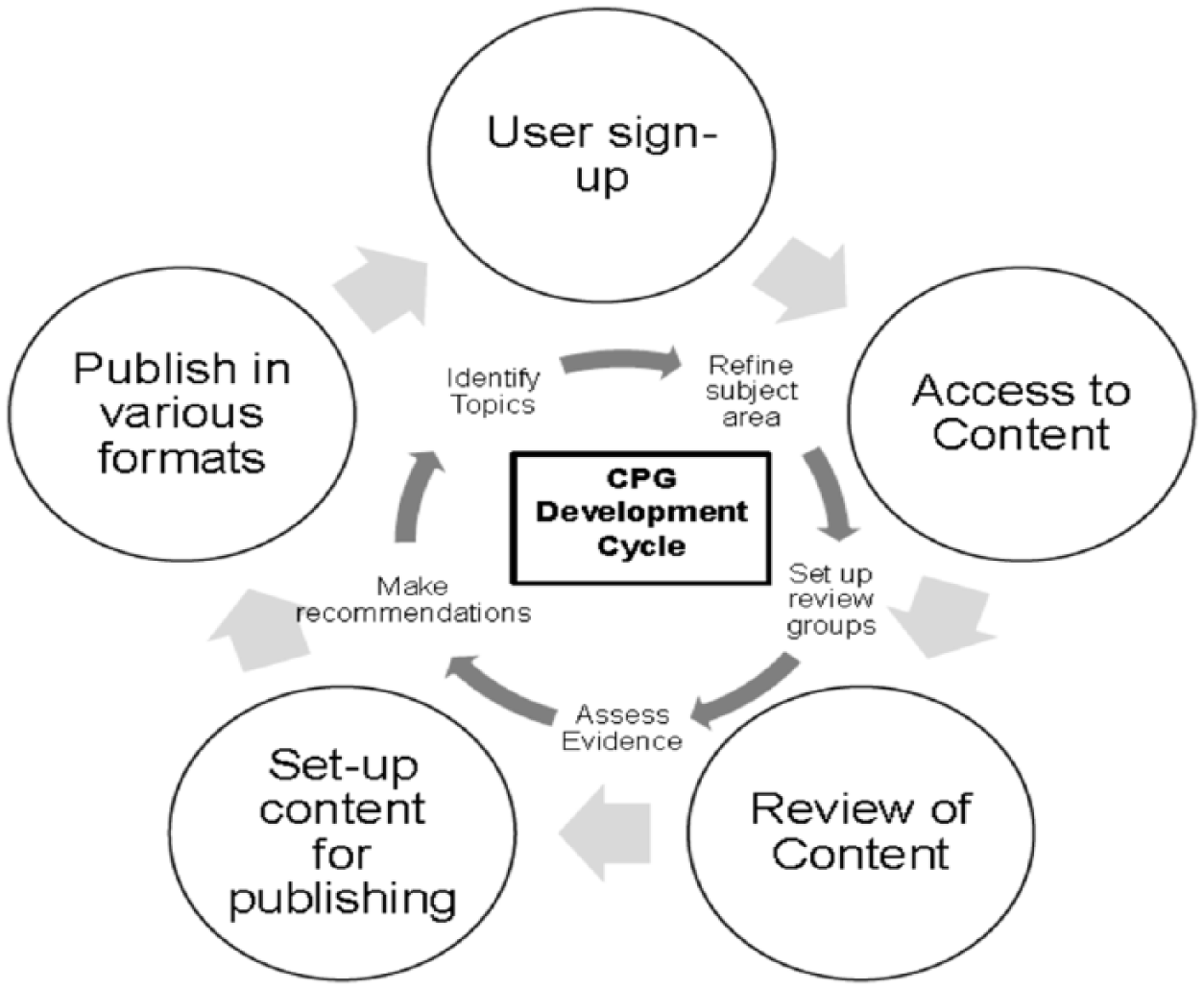
CMS in CPG publishing.
First, the topic areas to be covered are identified and subsequently refined to incorporate only relevant material. CMS access to previous versions of published material for adaptation and updating in subsequent revisions is invaluable. The next stage, establishing individual reviewers and/or working groups to assess current material, can be achieved quickly and easily when the CMS can be used to identify and capture previous reviewers, sign up new reviewers utilising different software platforms simply and easily, establish topic-based user groups for linkages and discussion and manage differing access levels across reviewers and topics depending on need. A CMS can assist in capturing reviewer’s expertise across multiple topic areas to differing degrees in a single system, promoting efficiency, reviewer satisfaction and retention, and a sense of the importance of an individual review to the bigger picture. Results of evidence reviews can be posted, viewed, discussed and responded to in topic groups or across content, allowing convenient, transparent and documented discussion and consensus formation. Subsequent changes to and adaptation of content based on the evidence can then be tracked, linked with discussions and other publications, and rolled back if required. The final stage, CPGs publication, is supported by a CMS through an interface mimicking the final published layout, direct publication to electronic mediums and the more complicated hard copy. An effective CMS not only can aid in rapid and widely disseminated publication but is also crucial in maintaining the content integrity and version control.
The RPHCM experience
Role of CMS in RPHCM publishing
Two CMS requirements dominate with CPG publishing: the need to organise the content into ‘components’ for flexible manipulation of content and the need to ‘personalise’ CMS interface to suit contributors. 11 The latter is particularly relevant in the RPHCM context, where contributors are volunteers, and although experts in remote and Indigenous health, they may not be as oriented to online reviewing and authoring.
The RPHCM were developed for a specific purpose: to introduce CPG and standardise clinical practice across remote Indigenous primary health care services, beginning with Central Australia then across the Northern Territory. The remote and Indigenous health context requires portable, accessible, visual and easy to read manuals, published both in hard copy and electronically. The manuals are designed for a range of remote practitioners with varying levels of clinical and remote experience, English literacy skills and geographical isolation from specialist services and support. Each of the five RPHCM has a distinct purpose, but all cater to remote area nurses, doctors, midwives and Aboriginal and Torres Strait Islander Health Practitioners and Health Workers. While the manuals cover different content, they are designed to be used as a suite, with content cross-referenced across the individual publications.
User participation is essential in the development of these CPG, and content is created, reviewed and implemented by users. New editions involve reviewing and updating existing content. As content is cross-referenced, occasionally duplicated and consistently formatted across the suite, a Component CMS was initially perceived as the best fit.
The RPHCM project first adopted a Component CMS in 2007. The initial adoption of the CMS occurred in the context of the first publication of a full suite of five manuals, a challenging task involving a considerable volume of content and a large, geographically dispersed volunteer reviewer/contributor pool. However, the transition process, including an installation of the CMS, setting up of production groups, signing up of users with appropriate permissions, and separation of content creation and management from editing/formatting went relatively smoothly. The project has continued to use the same Component CMS for CPG development and publication.
However, despite ongoing refinement driven primarily by user feedback, one major expectation was not immediately addressed. The CMS was unable to export content from the CMS directly to print-ready documents, an essential feature for the mostly hard copy–driven RPHCM publication. The CMS could export content in HTML and Docx formats, which, at the time, were unable to represent accurately and consistently the manuals’ formatting, particularly the more image-driven or complex content. External consultants used third party software packages to design appropriate templates for printing, but these continued to be problematic. The difficulty or inability to visualise what the electronic content would look like in hard copy was becoming a major impediment for users of the CMS and the project as a whole. Also, users were experiencing difficulties with the complex registration process resulting in loss of online contributors, and there were delays in the development of an upgraded website.
In combination, these issues prompted the RPHCM project to undertake a review of their CMS against other potential CMS products in late 2013. The key to this process was a stock take of what our requirements were, the features currently available and what may be developed next. This review allowed precise comparison of our current project CMS with comparable CMS products, providing us with an appreciation of the strengths and weaknesses of our CMS and potentially identifying alternative options. Along with the current project CMS, three other reliable Component CMS were identified and reviewed. All three identified systems were Component CMS products. One CMS had an established reputation in technical publishing and two others, while not widely used, were acquiring a reputation for publishing technical content and had features relevant to the project. The review occurred over approximately 6 months and involved video conferences with the developers, demonstration of products, hands-on access to the products and involvement of independent advisers.
Generic CMS features for CPG development
The RPHCM project first identified publishing and presentation needs that could be provided by any of the CMS that were being reviewed:
Publishing
Ability to support multiple formats. The CMS had to export to many formats including XML, HTML (web), professional print, PDF and other new standards as they arose. An essential prerequisite was the ability of the CMS to engage with desktop clinical information systems that used XML output with a clinical item index.
Style sheets. These are used to control the final appearance of each output format. The style sheets would allow the system to be flexible and expandable, by ensuring consistent formatting while permitting subsequent editing of a layout.
Page templates. Predefined page templates to guide contributors in creating content easily and consistently. The overall page layout, available formatting and heading styles are stipulated in these templates and ideally a non-technical interface is utilised to manage this.
Capacity for extension. The CMS was to support integration of additional publishing functionality and interface customisation, that is, continual improvement in interface design and incorporation of new features.
Support for print publishing. The CMS had to decrease or eliminate the need for design time in the preparation of manuals for printing. CMS output also had to be high-quality print-ready.
Website usage statistics. Statistics such as daily usage, search terms, the source of hits and most popular pages were to be gathered to assess the success of the site and identify any usability issues.
Online-sales enabled. The CMS was also to facilitate sales of the electronic editions of the manual suite through a shopper-friendly interface on the RPHCM website.
Presentation
Usability and appearance. Non-technical users with lower levels of computer literacy were to be considered in the design, appearance and usability of the CMS. There was to be an emphasis on familiarity, icons and clarity of display with the colours of the organisations involved in publishing RPHCM.
Accessibility. The system and associated website had to be user-friendly for people with disabilities, that is, compliant with standards such as W3C Web Accessibility Initiative, including capacity for the use of web readers and so on. Accessibility features can be easily implemented if considered at the development stage of the system.
Multi-browser support. The CMS pages had to be accessible by all the main web browsers and all standard-based browsers. This aspect was especially important for the RPHCM project as contributors utilised a range of browsers to review and author content.
Client-side functionality. There were to be limits on technologies required to use the system, and it was expected that users would only need a standard browser for access. If additional software was required to view certain types of outputs, freely available solutions were to be utilised.
Download speed. Pages were to be of the limited size to allow for acceptable load times for users and to support authoring on low-speed connections. This feature is fundamental to a contributor and user base located mainly in remote Australia with variable connection speeds and Internet capability.
Valid HTML. The CMS pages were to comply with applicable HTML specifications to guarantee maximum compatibility across different platforms and browsers. This compliance is essential to cater for a varied contributor pool.
Navigation. Manual contributors had to have access to multiple reliable, direct and consistent navigational aids to promote efficient output.
Customised CMS features for CPG development
Although the generic requirements listed above provided a framework for the initial discussion with CMS product providers, it became apparent that more concrete and detailed requirements were crucial to effective product comparisons. These particular features were identified through a stock take of the current system, incorporation of user and administrator feedback, exploration of trial versions of comparable products and consideration of the guideline development process as a whole. Identification of these specific requirements allowed potential providers to respond to each, at each stage of the process, and was essential to the assessment, selection, development and implementation of our CMS.
Our review and assessment framework covered Access, Content Management, Editing Tools, Presentation and Publishing features. The findings of the review are outlined in the sections below and are directly compared across CMS products in Tables 1 to 5 in Appendix 1. The CMS utilised by the RPHCM project is referred to as the Project CMS; other CMS reviewed are grouped under comparable CMS products and individually referred to as CMS 1, CMS 2 and CMS 3. Where features were available for the reviewed CMS, it has been marked ✓, and where features were not available or were not clearly distinguished, it has been marked as ✘. The narrative has been provided when qualifiers or description of features was required. It must be stated that the comparison in the below tables reflects what the project team identified during the review period and any missing features may have been added to the CMS products since then. Therefore, the tables are to be considered by readers as a checklist of CMS features rather than a decree of the systems reviewed.
The main purpose of this article is to provide a list of desirable CMS features required to publish CPG. It is hoped that the following content will guide CPG developers in making an appropriate determination either while choosing a new CMS or assessing an existing CMS. As this article is not a product review, and does not intend to advise which CMS to select, the CMS products are not named to maintain anonymity for ethical purposes.
Access
These features were especially important as the project relies on unpaid, volunteer reviewers in busy clinical roles. Access to the system was therefore expected to be straightforward while preserving the integrity and security of the system. As the RPHCM utilises multiple levels of review as outlined in Figure 2, we also required the capacity to assign a varying degree of access to reviewers. A list of ‘Access’ related features are presented in Table 1 in Appendix 1.
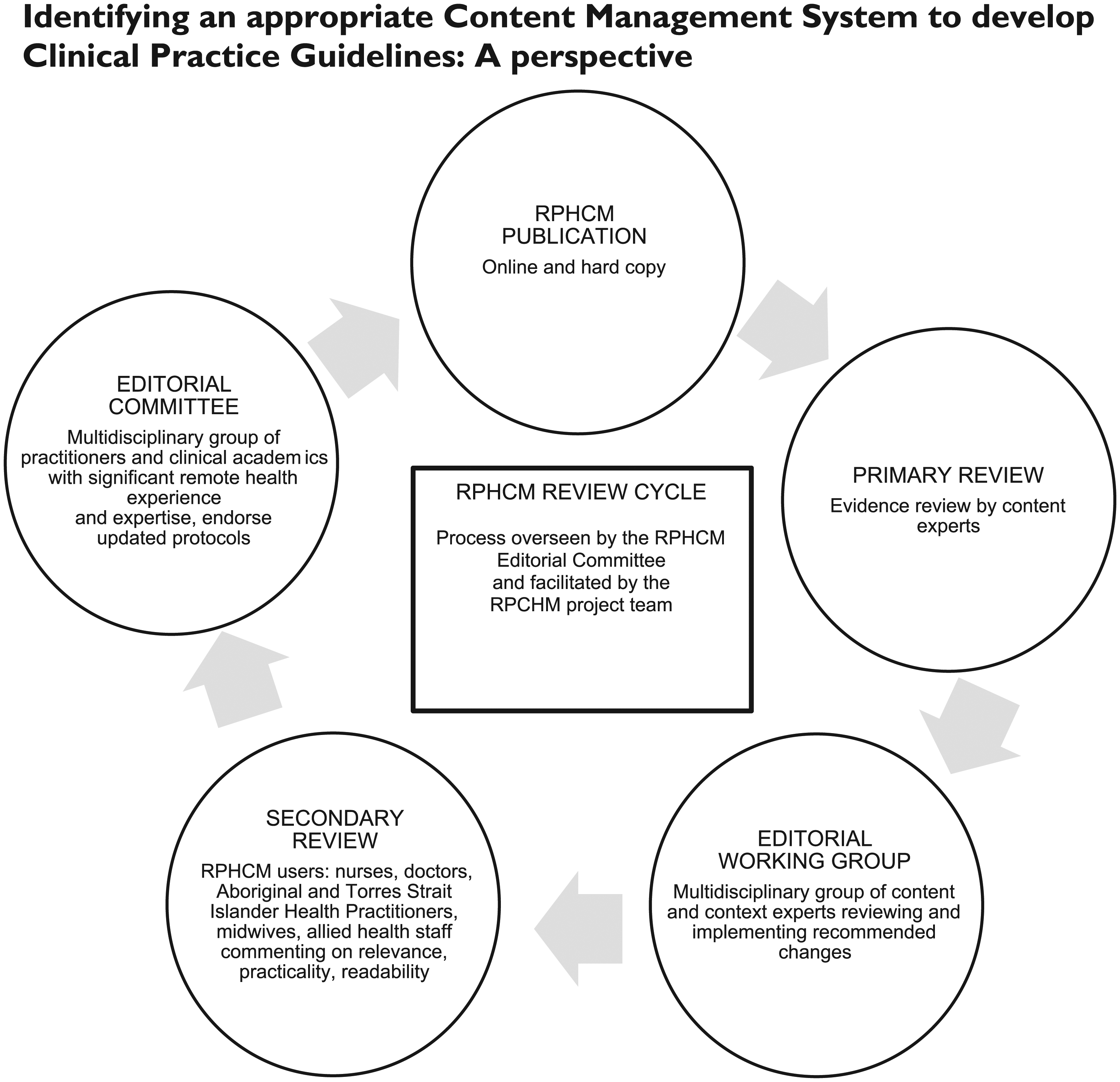
RPHCM editorial review flow chart.
Content management
These features define and separate a Component CMS from a Web CMS. A Component CMS is expected to not only store and manage documents but also allow the publication of documents in multiple formats. A list of ‘Content Management’ related features is presented in Table 2.
Editing tools
The richer the editing features, the easier will be the process of reviewing and updating CPG content. Customisation of our project CMS over years led to projected and superior editing tools being available. However, not all the editing features listed below may be required by other CPG developers, and the need for Access, Content Management and Presentation features may outweigh the need for comprehensive editing tools. A list of ‘Editing’ related features is presented in Table 3.
Specific presentation features
These features are largely related to the user interface. While not the highest priority or ranking in our review, we held expectations that the interface would be user-friendly for our clinical reviewers with potentially minimal IT expertise. A list of ‘Presentation’ related features is presented in Table 4.
Publishing features
The project CMS presented limited capacity for content to be published in multiple formats, and this key issue had not been resolved over a significant period. Third party software was required to support formatting and printing in hard copy and required the transfer of content and some manual layout. Therefore, there was a strong motivation for us to identify an alternative CMS that had in-built ability to export content in multiple formats. However, this appeared an issue across all reviewed products; they needed either third party support, had limited functionality or required extensive customisation. A list of ‘Publishing’ related features is presented in Table 5.
Outcome of the review
The review, which involved reassessing the project’s current CMS and comparing it against other CMS in the market over approximately 6 months, resulted in several educational outcomes. One of the main issues faced in the RPHCM CMS review was a lack of relevant and detailed advice to instruct guideline developers in choosing an appropriate CMS. The RPHCM project involves end-users of its CPG in its review process along with subject experts spread across Australia. The reviewer involvement is entirely voluntary in nature. Any CMS chosen would, therefore, have to present minimal impediments for access and a friendly interface that does not deter less computer-literate users. Our review identified that the alternative CMS products we explored, while providing some enhanced editing, graphics and project management features, largely failed in this area. For the project, retaining our reviewer’s confidence and buy-in outweighed any additional editing and export functionalities we would gain by replacing our current CMS. It was also determined that there were editing features present in the current CMS that could not be provided by a replacement CMS, as these features were the result of customisation over years.
For the RPHCM project, the prudent and economical option was to retain our current CMS while working with the provider to address gaps. This result should not be seen as ascertaining the superiority of our project CMS compared to other Component CMS, but a pragmatic decision based on the context and current needs of our project. Other CPG developers who have yet to adopt a Component CMS may arrive at a different decision depending on their context and needs and subsequent availability of other CMS products.
Learning that may be useful for other guideline developers is the need for an early and thorough review of project requirements regarding a CMS. This exercise should cover both the generic CMS requirements and requirements unique to the project. As we learnt, specific requirements may tip the balance in choosing an appropriate CMS. Furthermore, considerable time needs to be allowed for the review and identification of a product, including market review, demonstrations and use of trial versions loaded with project content.
It must be noted that, even with an extensive, international market search, there were few products identified that catered to CPG publishing needs. Gaps were noted particularly with generic CMS products, which fulfilled website publishing and management needs but were unable to meet the editing and multi-format publishing requirements of the RPHCM project. Even with niche and component CMS, customisation to address specific client needs is inevitable and is neither easy nor straightforward. Furthermore, providers may be reluctant to modify the CMS interface significantly, the terminology they employ or other industry standards, to assist less computer-literate users. If the supplier is keen and open to customisation, there remain significant costs involved in the modification. A purchaser must, therefore, be realistic in their expectations. It may not be possible to attain all required CMS features, and one must balance the IT principles of data structure and storage with project content and culture. Additionally, while CPG development occurs over specific and scheduled periods, CMS development timelines may be uncertain.
One significant outcome of the review was realisation of the importance of a strong relationship with the CMS provider. In a CPG publishing environment reliant on an electronic platform, dedicated and long-term support from the provider is critical. All shortlisted vendors in the RPHCM review presented a clear enthusiasm to understand and meet our needs, displaying extraordinary patience in tailoring their presentations and demonstrations to address our concerns. However, it was not clear whether the support and enthusiasm would continue post the sales phase, on a long-term basis, as we did not seek provider references. When the decision was made to retain our current provider, we sought strong assurances that a dedicated support system and contact will be provided for the project, as opposed to our previously generic provider contact. This change by itself vastly improved the provider’s ability to react to the project needs, complete deliverables on time and generate project satisfaction. A good relationship with the provider is crucial. It assists in determining the existing system’s specifications and the potential for the development and ensures appropriate information sharing with external consultants and future providers as the CPG development needs grow into the future.
Conclusion
CPG development and publication involves challenging and complex management of content. CMS are an ideal tool for improving efficiency, consistency and streamlined publication of guidelines. However, product options are limited, customisation is essential but costly, interfaces must consider less computer-literate users and ongoing development and support is required. Successful selection of an appropriate system requires a detailed and comprehensive understanding of requirements and a pragmatic approach to expectations.
Although unique to their context, the authors hope the outline of their learnings will aid guideline developers in the assessment and selection of a CMS that will promote high-quality CPG development and publication.
Limitations
The RPHCM project has used only one CMS for its CPG publication since 2007 and, therefore, has had prolonged exposure to only one CMS product. However, during their review of alternative CMS products, the authors undertook extensive hands-on testing of trial versions and closely engaged with providers to assess their product features. This focused evaluation has generated a knowledge base regarding CMS selection not previously published or widely available to CPG developers.
Footnotes
Appendix 1
Comparison of Publishing features between project CMS and comparable CMS products.
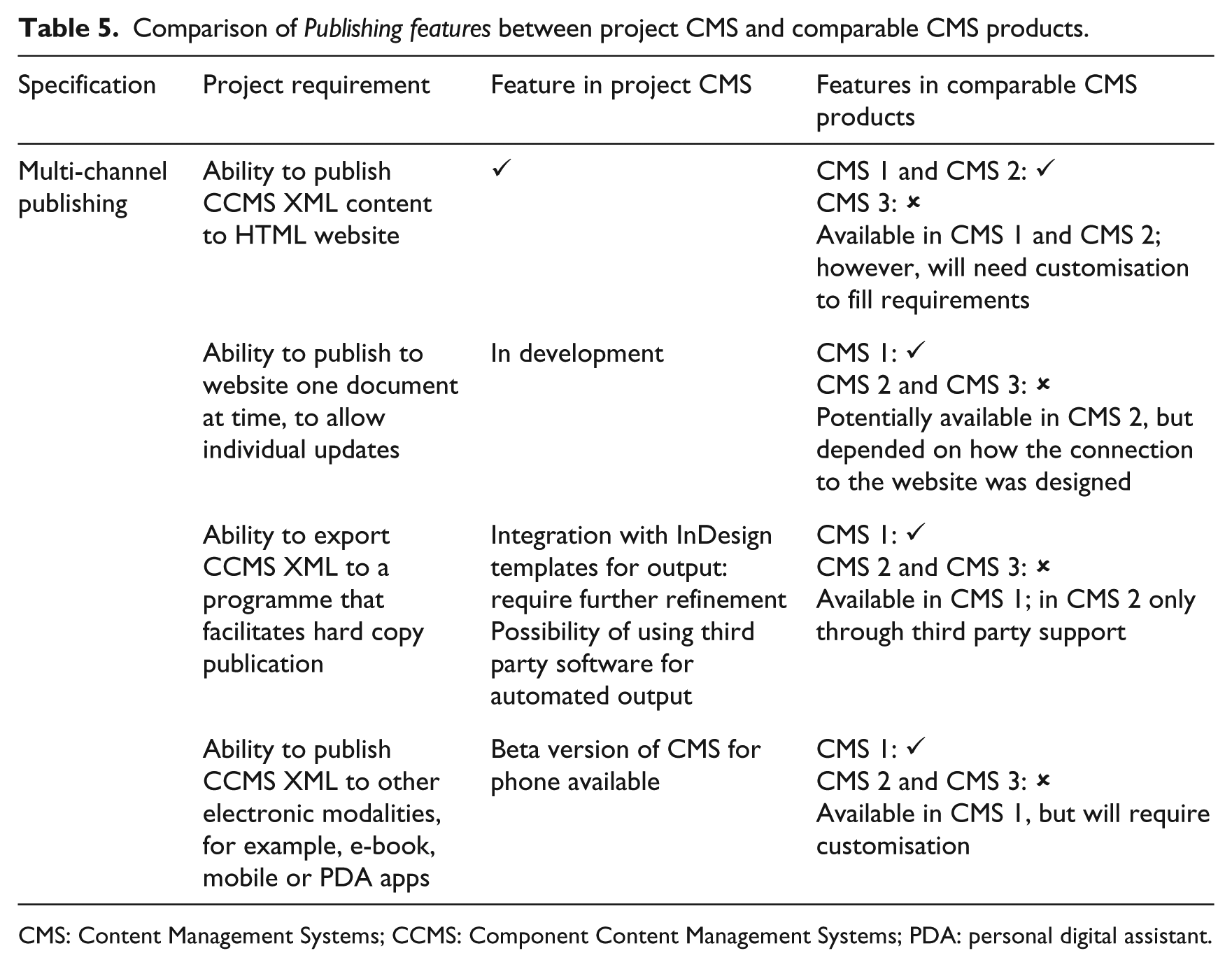
| Specification | Project requirement | Feature in project CMS | Features in comparable CMS products |
|---|---|---|---|
| Multi-channel publishing | Ability to publish CCMS XML content to HTML website | ✓ | CMS 1 and CMS 2: ✓ CMS 3: ✘ Available in CMS 1 and CMS 2; however, will need customisation to fill requirements |
| Ability to publish to website one document at time, to allow individual updates | In development | CMS 1: ✓ |
|
| Ability to export CCMS XML to a programme that facilitates hard copy publication | Integration with InDesign templates for output: require further refinement |
CMS 1: ✓ |
|
| Ability to publish CCMS XML to other electronic modalities, for example, e-book, mobile or PDA apps | Beta version of CMS for phone available | CMS 1: ✓ |
CMS: Content Management Systems; CCMS: Component Content Management Systems; PDA: personal digital assistant.
Declaration of Conflicting Interests
The author(s) declared no potential conflicts of interest with respect to the research, authorship and/or publication of this article.
Funding
The author(s) received no financial support for the research, authorship and/or publication of this article.