




Abstract
Pressure ulcers frequently occur in patients with limited mobility, for example, people with advanced age and patients wearing casts or prostheses. Mobile information communication technologies can help implement ulcer care protocols and the monitoring of patients with high risk, thus preventing or improving these conditions. This article presents a mobile pressure ulcer monitoring platform (mULCER), which helps control a patient’s ulcer status during all stages of treatment. Beside its stand-alone version, it can be integrated with electronic health record systems as mULCER synchronizes ulcer data with any electronic health record system using HL7 standards. It serves as a tool to integrate nursing care among hospital departments and institutions. mULCER was experimented with in different mobile devices such as LG Optimus One P500, Samsung Galaxy Tab, HTC Magic, Samsung Galaxy S, and Samsung Galaxy i5700, taking into account the user’s experience of different screen sizes and processing characteristics.
Introduction
Pressure ulcers are common, costly, and debilitating chronic wounds, which occur preferentially in people with advanced age, multiple comorbidities, and physical or cognitive impairments. Relatively healthy people may also develop pressure ulcers if they do not move a part of their body as a result of an orthopaedic condition, for example. This kind of ulcers occurs when pressure is applied to an area of skin over a short period of time. It can also appear with less pressure but over longer periods of time.1,2 The pressure interrupts the flow of blood through the skin. As a result, the affected area of skin suffers from lack of oxygen and nutrients. It starts to break down, which leads to the creation of an ulcer. The risk factors that contribute to pressure ulcers can be intrinsic and extrinsic. For example, intrinsic risk factors may include mobility problems, poor nutrition, an underlying health condition, aging, incontinence, and mental health conditions. Extrinsic risk factors can range from some elements in the environment that put a person at risk to develop pressure ulcers, for example, a bed or wheelchair or poorly-designed cast.
Many institutions have their own ulcer care protocols that span from classification to treatment suggestions. The Braden Scale, Norton Scale and Water Low Scale are specific evaluation tools. These scales help to evaluate the patient’s risk of developing a pressure ulcer. Protocols chosen by institutions are generally in a printed paper form and are stored in some folder to be consulted in case of doubt. 3
Mobile information communication technologies (MICTs) can be used to deploy such guidance via mobile phones ensuring that access to the information becomes real time and ubiquitous. 4 Relevant information can be more easily linked to the patient depending only on the effectiveness and quality of wireless communication. While some commercial versions of software apps and electronic health records (EHRs) for nursing care may share some of these features, they often lack flexibility for use in mobile technologies such as Android-based mobile phones.5–7
In a pressure ulcer, the prevention may bring some benefits such as better cicatrization, cost reduction during and after the treatment, no need for surgical intervention, and reduction in hospitalization time and medical costs associated, among others. Thus, there is a real necessity to create a system to help during the ulcer prevention stage, allowing a strict ulcer monitoring and accompaniment during all the treatment process. 8
The main objective of this article is the development and testing of a mobile integrated system for pressure ulcer treatment monitoring, including photographic follow-up, for Android devices, named mULCER. The remainder of the article is organized as follows. First, we present related work about nursing mobile health and interaction with EHR systems. Then, the methodology employed (application architecture and used technologies) is described. mULCER system development is presented in section “Results.” Finally, discussion and conclusions are included.
Related work
Mobile devices have attracted great interest, and there are many areas benefiting from their usage and adaptation to particular needs.9,10 These devices may help the interaction between people, in general, or among groups. The rise in application development is being felt in the application markets like Android Market and Apple App Store. According to Mobihealthnews, 11 there are more than 1200 applications designed mainly for doctors, nurses, and students under the “Health” category on the Android market. Comparing it with more than 10,000 apps, under the “Medical” and “Health Care and Fitness” categories in Apple Store, can give us a wrong idea about the real dimension of interest in the Android operating system (OS) and its applications. Later studies indicated that provision at the end of 2011 was around 180,000 apps for Android OS and just 90,000 apps for iPhone OS. 11 There are many interesting mobile health apps in different specializations like Cardiology, Anatomy, Anesthesiology, Dental, Dermatology, Oncology, Pediatrics, Orthopedics, Radiology, and others for nursing workers and students.12,13
For some nurses who are constantly moving in wards or domiciliary care, mobile access to information can be an important factor for improving efficiency and patient safety and for reducing errors. For example, Skyscape has got a large portfolio of nursing-specific mobile applications. 14 Another company, Advanced Health & Care, proposes iNurse, the mobile health-care system that frees up nurses and community teams to spend more time on patient care. This app is available on BlackBerry. 15 Some research projects about nursing mobile health care, such as the study by McNeal, 16 describe a mobile ambulatory care nurse-managed center designed to address the health-care needs of at-risk inner city residents..
In the last years, large investments have been made in exploring the potential of mobile solutions to support health-care services.17,18 Examples span from hospital-based services for patient care to educational programs. Some of them are available on mobile platforms with the intention to combat the epidemic rise of obesity and diabetes. 19 In the United States, the Veterans Administration, known for its extensive EHR, also presented a mobile application to allow patients access to a central account. Such functionality lets the patient download their health information, fostering information sharing between health-care providers.17,18,20
Some medical apps have a great level of sophistication in terms of functionalities and features but, unfortunately, there are few of them that interact with EHR systems. There are some functionalities that preceeds others according to the tasks to perform. Usually, ulcer cares and corresponding registration are included in the default functionalities includeed in an EHR system. Currently, in many hospitals, nurses must register information realted with patient’s ulcers in paper-based forms and, by the end of the treatment, they send them to the administration archive. All the steps related to ulcer treatment procedures, since the ulcer evaluation, treatment, and registration is a time consumer task and presents the risk of missing important data. During an ulcer treatment the evaluation of the tretment evolution is also limited given the lack of images registry from previous stages.
There are many applications that allow connectivity to EHR but few Android-based apps that integrate with the EHR. mULCER solution is integrated with the health-care facility’s Siemens Soarian EHR system.
Methods
System architecture
mULCER app offers a stable, intuitive, and helpful application to health-care users. In order to provide user–machine interaction with easy handling and a good ratio between data quality and high interactivity, access to the wound images, data, and protocol information should be easy and fast. All devices with the mULCER app installed and connected to a main system may share information over Web services. These are make possible for an app for any OS interact and communicate with others over a network images connection. 21
The architecture of the proposed ulcer monitoring system is shown in Figure 1. It includes an EHR system, a file repository, the mULCER main database, Web services to allow the data synchronization between the mobile devices and the main system, and a group of Smartphones to be carried by nurses or other health-care agents. Each Smartphone has the mULCER application installed. mULCER has got a local database that keeps the data registries. The wound images are kept locally in the Secure Digital (SD) card of each device. The app may be used standalone or integrated within an EHR. In the former, the application works independently of any external system. The data registries are saved locally in the database and the image files locally on the SD card. Integrated within an EHR registers and files are also saved locally.
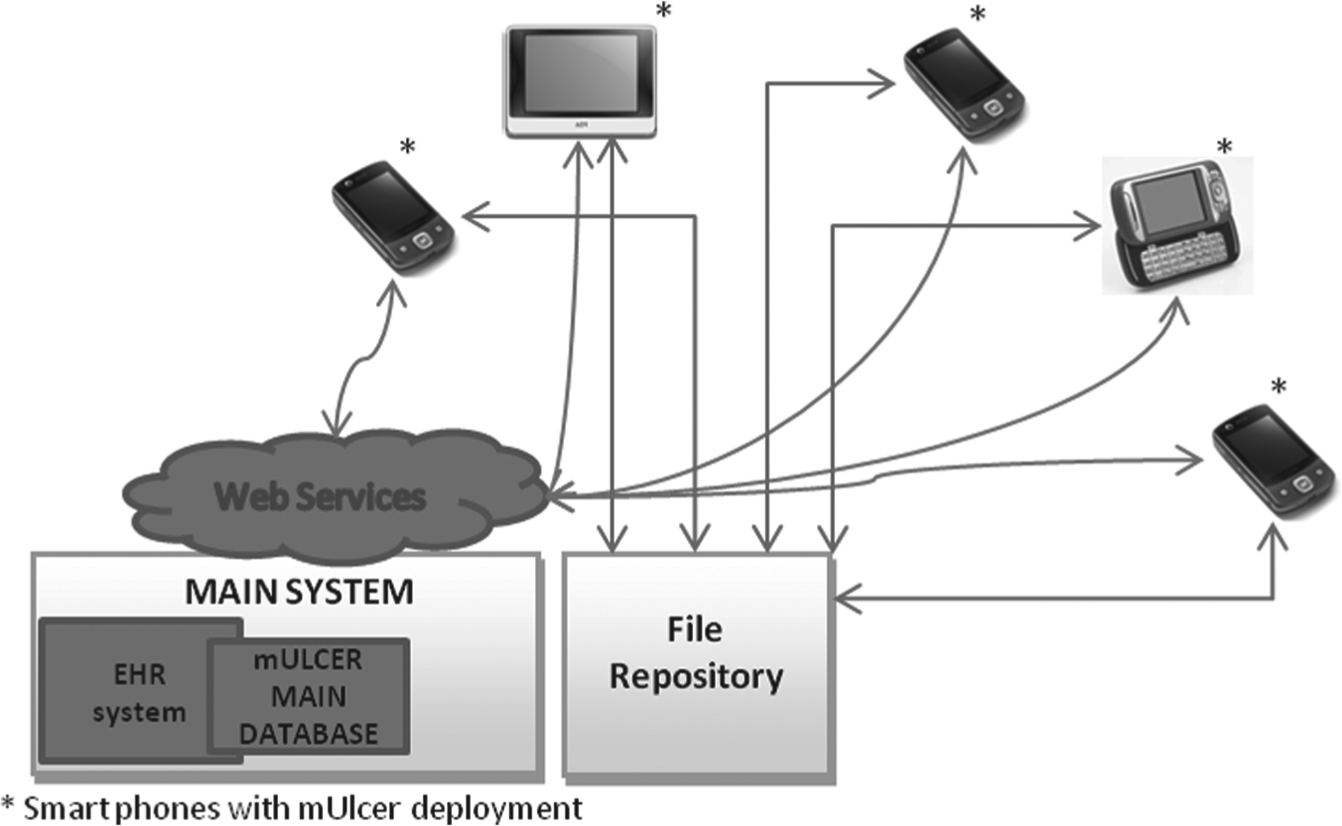
Illustration of the mULCER architecture.
The applications synchronize and copy the registries and files from the main system database and file repository. Each mobile application can download images from the file repository. Any picture may also be accessed to allow the integration to any hospital EHR system. This allows the application to write to the main system via the mULCER main database through the Web services. The synchronized mULCER records are in this database, and they are linked to EHR patient information.
mULCER application has the following main four blocks: the synchronization block, the application management block, the graphic user interface (GUI) block, and the database block. Briefly, the GUI module allows the user to interact easily with the system. The application management module uses the database module to store data. In the main system, the file repository module and EHR system are updated by the synchronization module with files and records, respectively.
Used technologies
The mULCER application is designed for Smartphones with Android mobile OS. It was built in Java and was developed to run on Android 2.2. The applications for Android are created using an application programming interface (API) developed by Google and Open Handset Alliance. The Android OS uses the Dalvik virtual machine, providing a platform-independent programming that allows the application to be executed in the same way on any platform, independent of hardware and OS.
The development environment to create the mobile application has the Android software development kit, the Eclipse IDE with Android development tools (ADT). The tests for the application are made using the mobile device emulator that is available at ADT as well as LG P500 to test how the device responded to user commands. The data records on the mobile device are stored in a SQLite database. The role of cryptography in database security is an aspect that is being discarded at this application development stage. The deployment diagram for mULCER is shown in Figure 2.
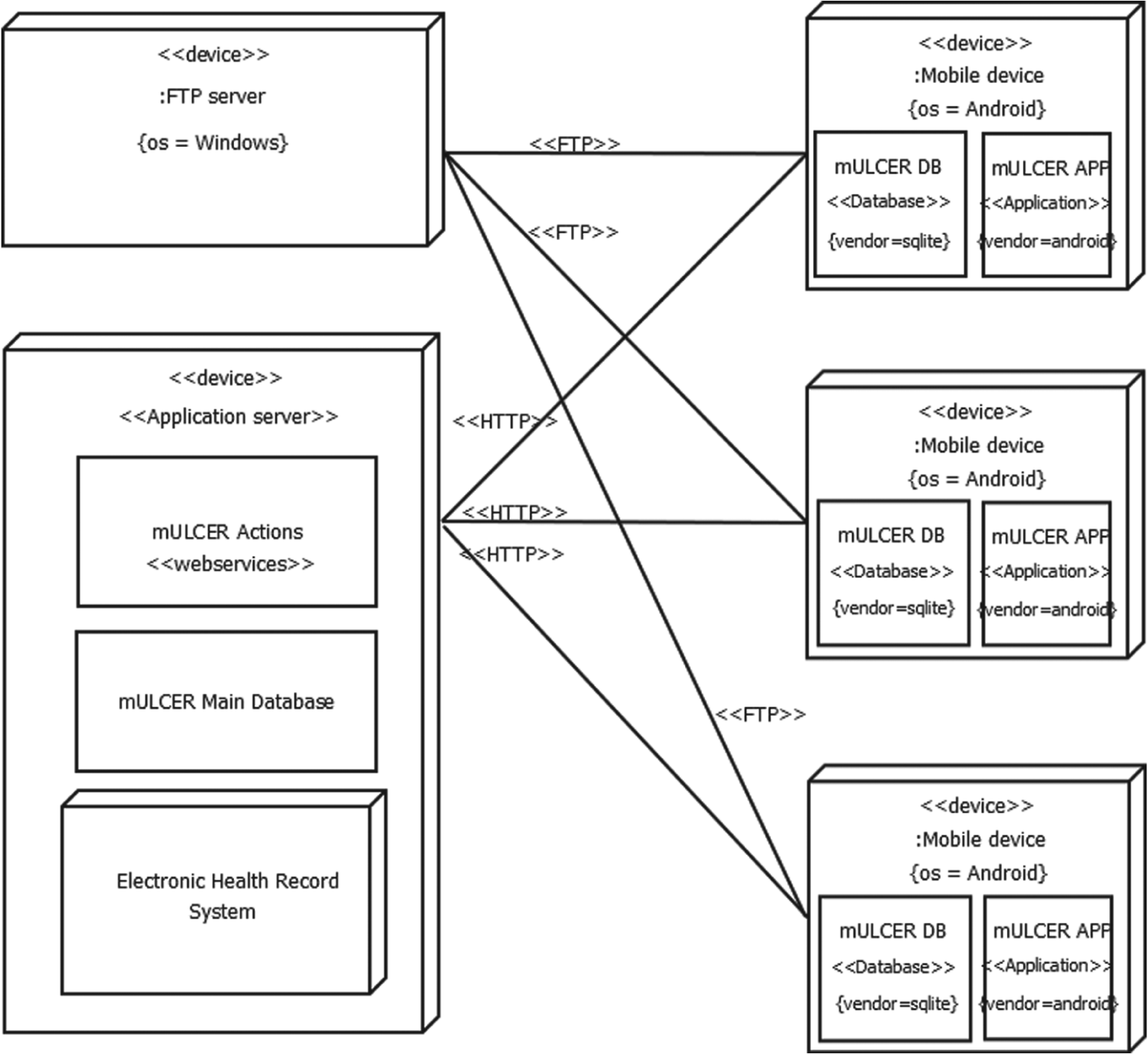
Deployment diagram.
The layout definition in Android is defined using XML. To ensure that visually the application may be used in any mobile screen size, relative layouts are used. The RESTFul Web service methodology was chosen to communicate with services and JavaScript Object Notation (JSON) to send and receive the messages.
Results
mULCER platform
In this section, the mULCER system will be demonstrated. The main functions of the application can be described as follows: Figure 3(a) presents a screenshot of the login window, where at (“1”), the user starts the interaction with the application; at (“2”), the user enters the login name to access the system; and at(“3”), the user enters the corresponding password. When the user presses the button shown in (“4”), the username and password from the selected system are validated on the mULCER local database. After successful login, the application opens the main menu shown in Figure 3(b), marked as (“5”).
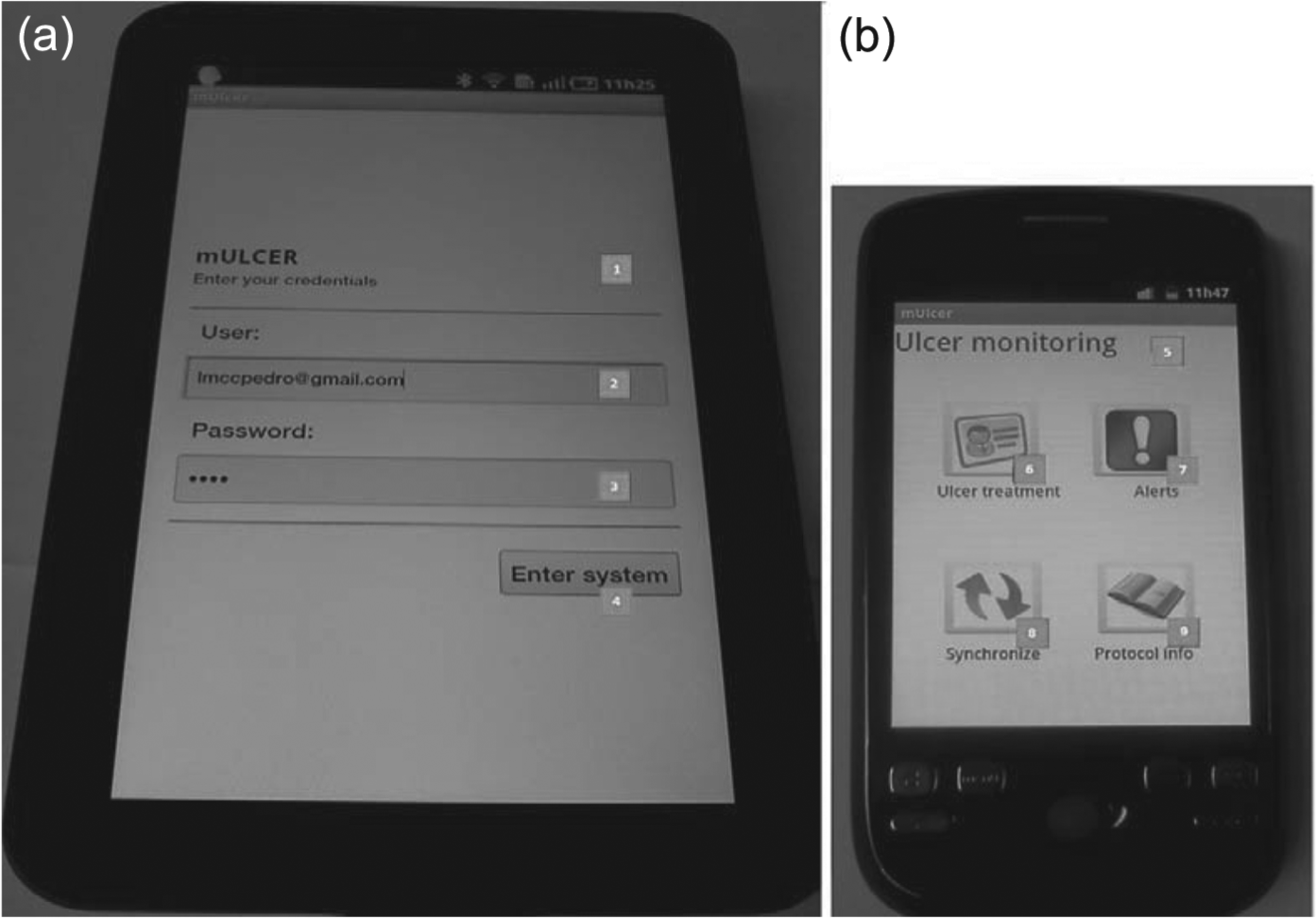
(a) mULCER login window and (b) main menu.
In the main menu, there are four buttons. The user presses the alert button (“7”) in order to see the pending tasks. The device alerting system warns and advises the user on the next steps and patient observations. There are three kinds of alerts defined. First, during the Braden Scale register, the user fills the date to next re-evaluation. Second, at ulcer treatment, the user can specify the time of the next observation or treatment. The third one is generated automatically at the end of each treatment according to the protocol. All three alert types add to the schedule the date and time to alert, the task description, and patient information. In needed, the application allows the user to create a new alarm in this menu. Coming back to the main menu window, the option marked as (“8”) permits the user to synchronize manually the local data records to the central system.
The synchronization is unidirectional to avoid local system overload with unnecessary data, also avoiding excess network traffic. Therefore, all options selected to synchronize, like images, patients, episodes, Braden evaluations, treatments, and alerts, would be synchronized to the central system.
The button (“9”) on the main menu permits the user to search protocol information or medical relevant information topics. This window has a search bar, illustrated in Figure 4, marked as (“1”), where the user enters the search term then presses the button marked as (“2”), which starts the database search and retrieves the list of results, marked as (“3”). This information normally exists on paper, but it is not available on the auction environment near the patient.
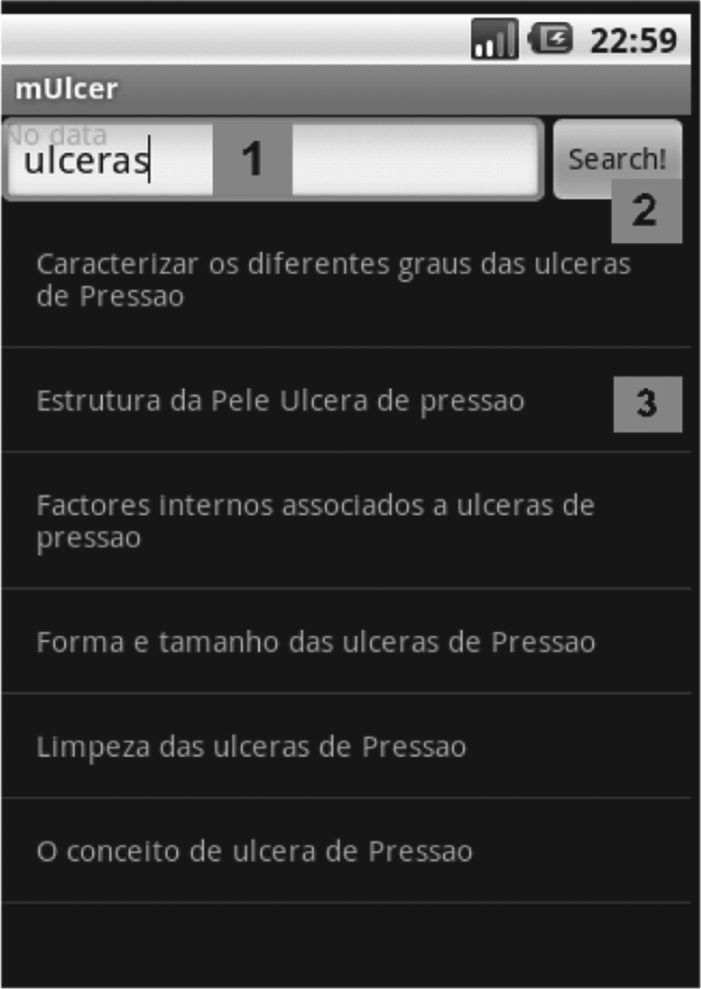
Protocol information search.
Coming back to the main menu, at (“6”), under the option “Ulcer Treatment”), the user selects which patient is under treatment. If it is the first patient evaluation, the user may create a patient record pressing the device menu button.
Similarly, the option marked as (“1”) is shown in Figure 4. Then, the user may insert the patient’s personal information such as national health number, name, address, national identification number, and date of birth in order to create a patient record, marked as (“2”) in Figure 5.
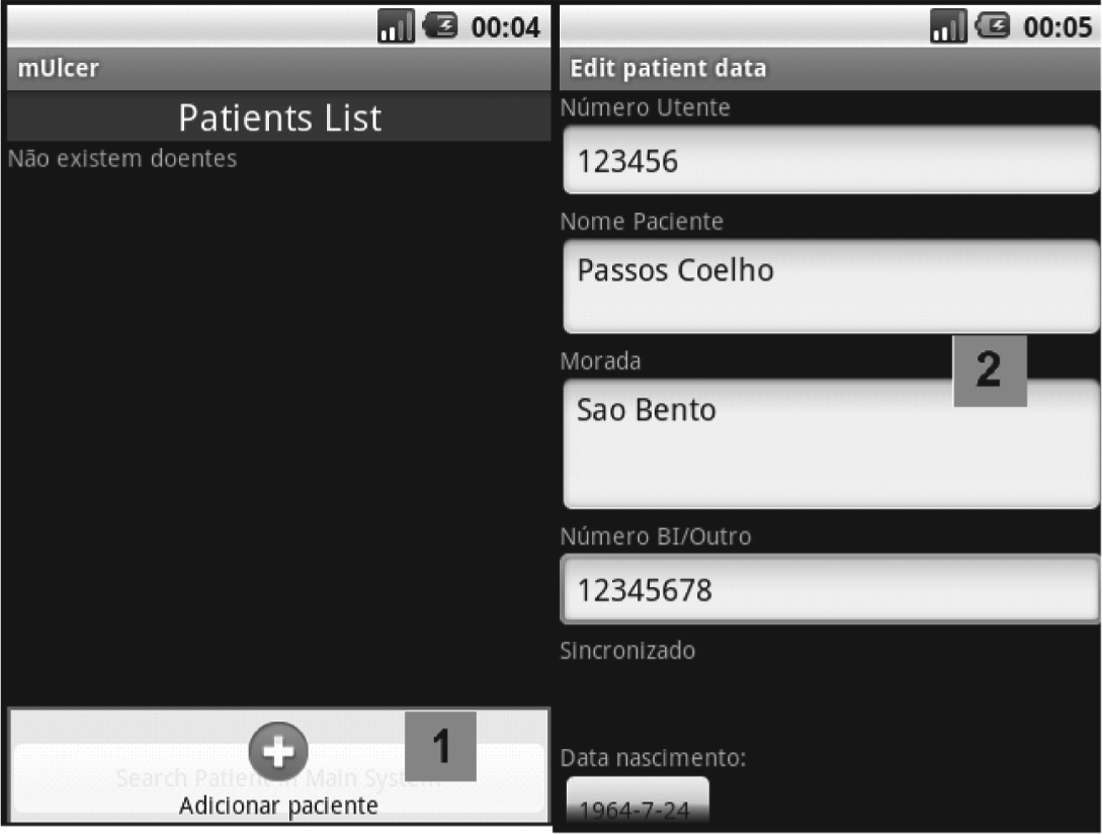
Patient create/edit window.
Supposing that mULCER is wirelessly connected to the central system, it is possible to search a patient in the mULCER main database. This research is based on patient’s name. The retrieved data show a list of patients that matched with the search. Following the above steps, patient record menu window appears, marked as (“1”) in Figure 6.
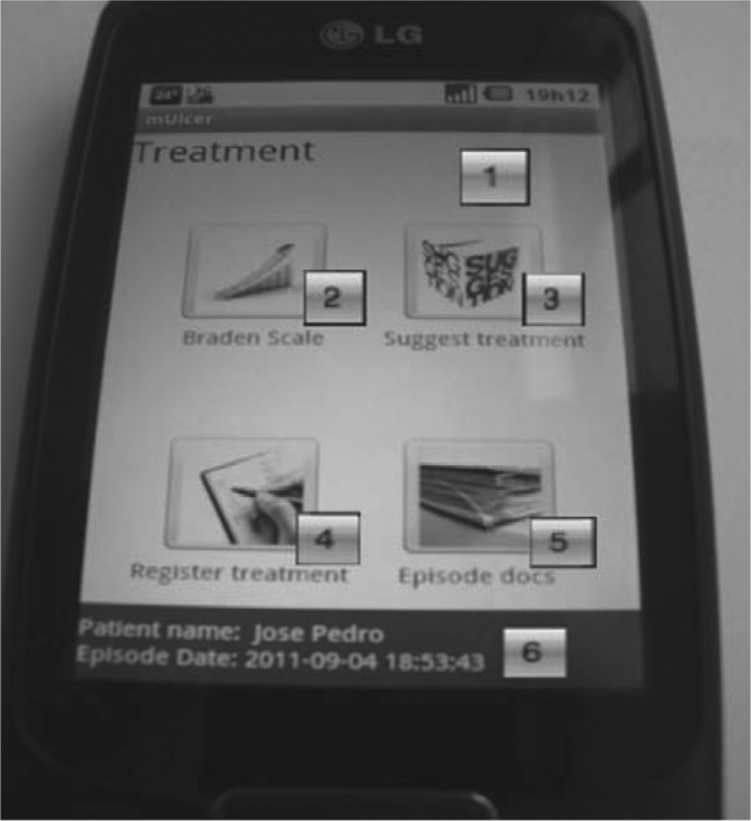
Patient record menu window.
At (“2”) in Figure 6, it is possible to register Braden Scale observation. The button marked as (“3”) shows the user a treatment suggestion for the wound. The option marked as (“4”) allows the registry of wound characteristics and treatment applied to the patient’s ulcers. To read the registered information on the current patient episode, (“5”) should be pressed. At (“6”), the patient’s name and initial episode time are detailed. Coming back to patient record menu and pressing (“4”), the user goes to the window marked as (“1”), as shown in Figure 7.
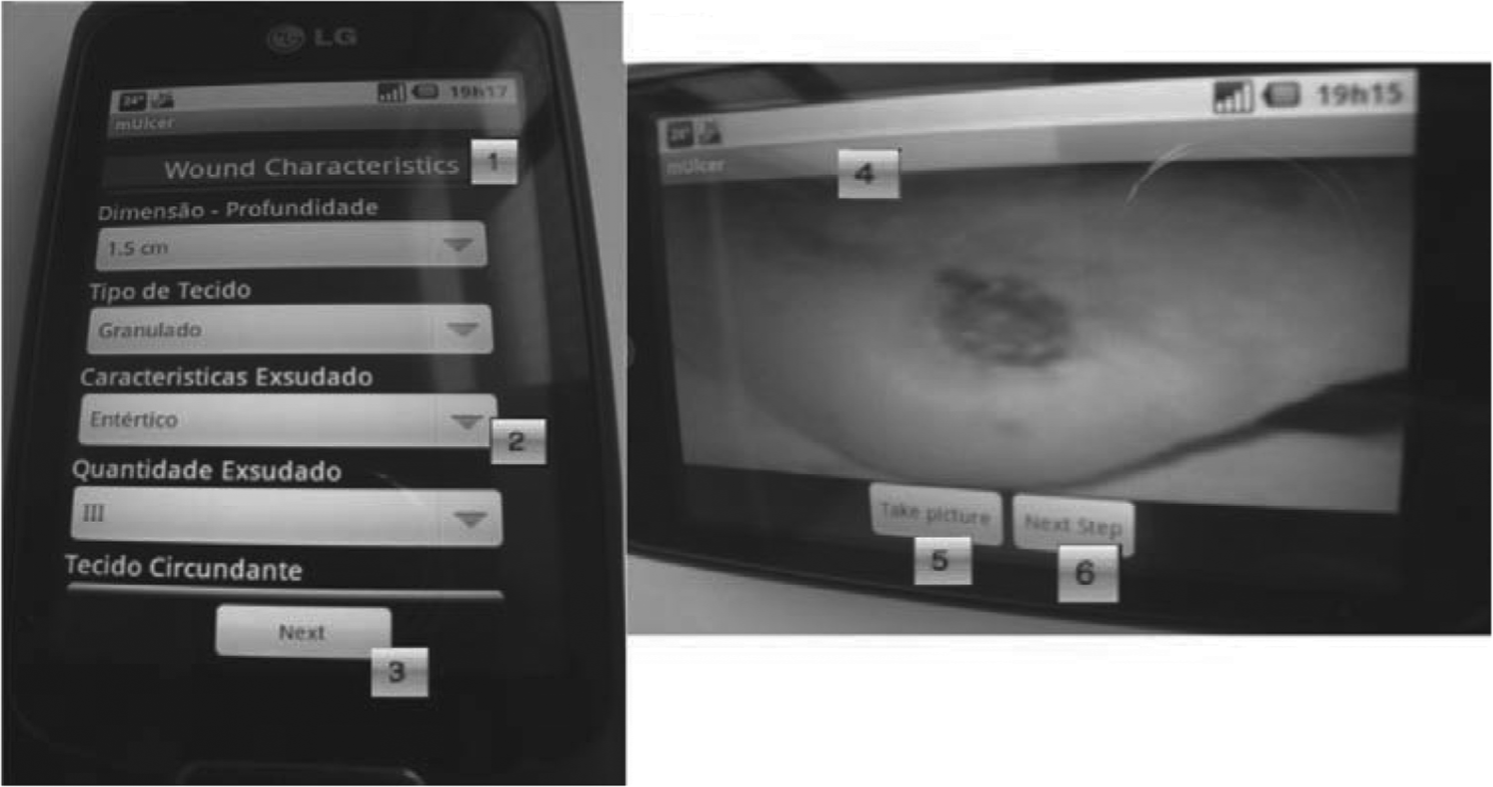
Wound characteristics window and wound picture window.
The diverse fields like the one marked as (“2”) may be filled according to wound characteristics. Pressing (“3”) goes to the next window marked with (“4”). At this moment, the user may take a picture of the wound by pressing (“5”). Pressing (“6”) goes to the window marked as (“7”) as shown in Figure 8.
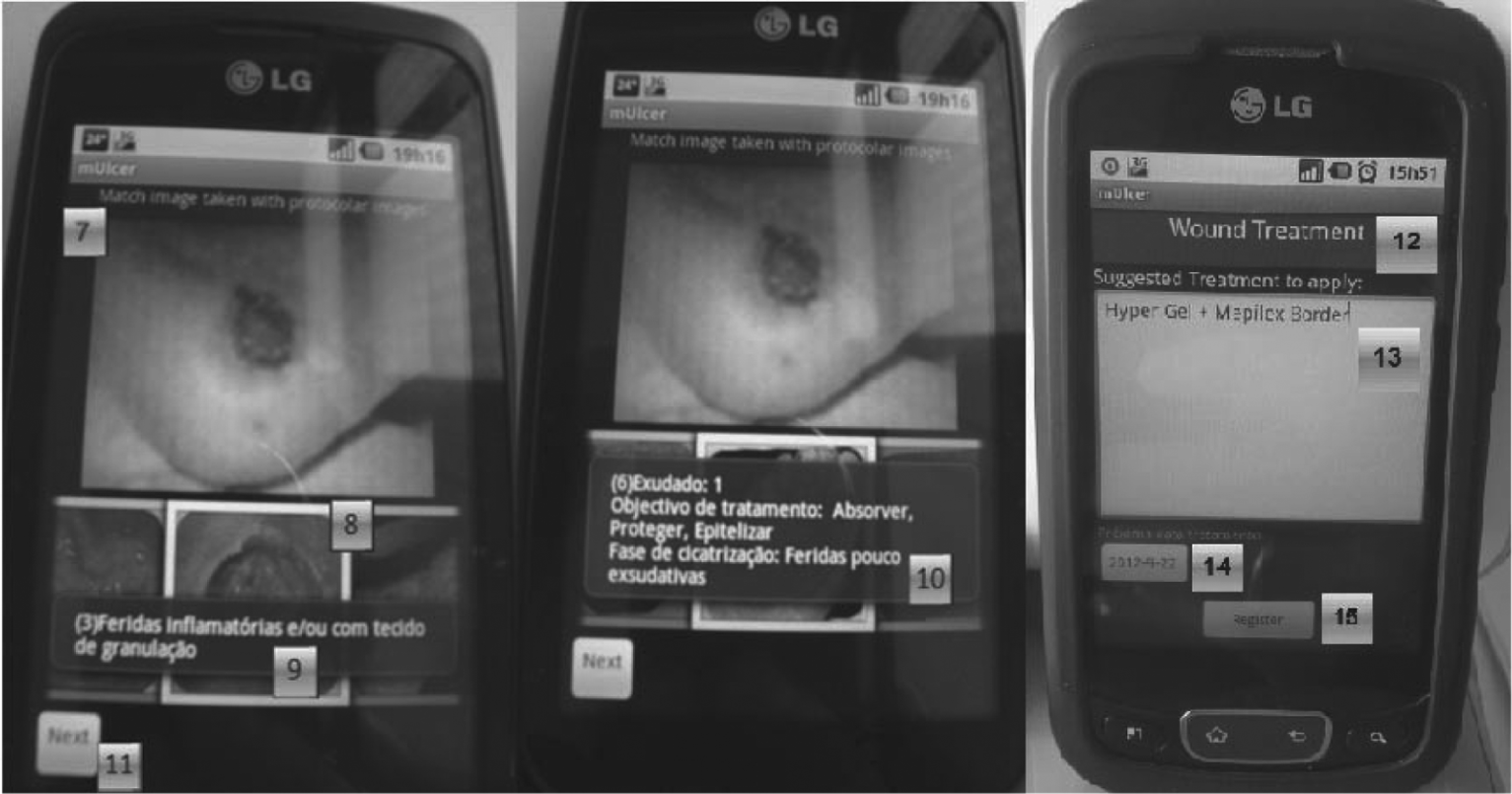
Picture matching and suggested treatment windows.
In Figure 8, the picture of the wound (“7”) and a roller with illustrative ulcer pictures (“8”) are shown. Each picture on the roller has got some extra information. Pressing it for a short time gives a short description of the ulcer, illustrated on (“9”). Pressing it for a long time shows the respective wound characteristics and treatment goal, illustrated on (“10”). Pressing (“11”) goes to a new window marked as (“12”), which describes the suggested wound treatment (“13”). The user may choose the next treatment date at (“14”). This generates a task reminder for this date and time. After editing or accepting the suggested treatment, the user goes further by pressing (“15”). All ulcer characteristics previously selected as well as picture taken and treatment applied will be registered.
On Episode Docs marked as (“5”) in Figure 6, it is possible to see the diverse registers in the current patient episode. Coming back to the bar (“1”) on Figure 9, pressing “Tratamentos” shows the bar marked as (“2”). This bar shows the wound locations. Pressing one location opens the list with the wound treatment details marked as (“3”). Pressing the last option “Fotografias,” on the bar marked as (“1”), opens the horizontal bar (“4”) with diverse wound locations.
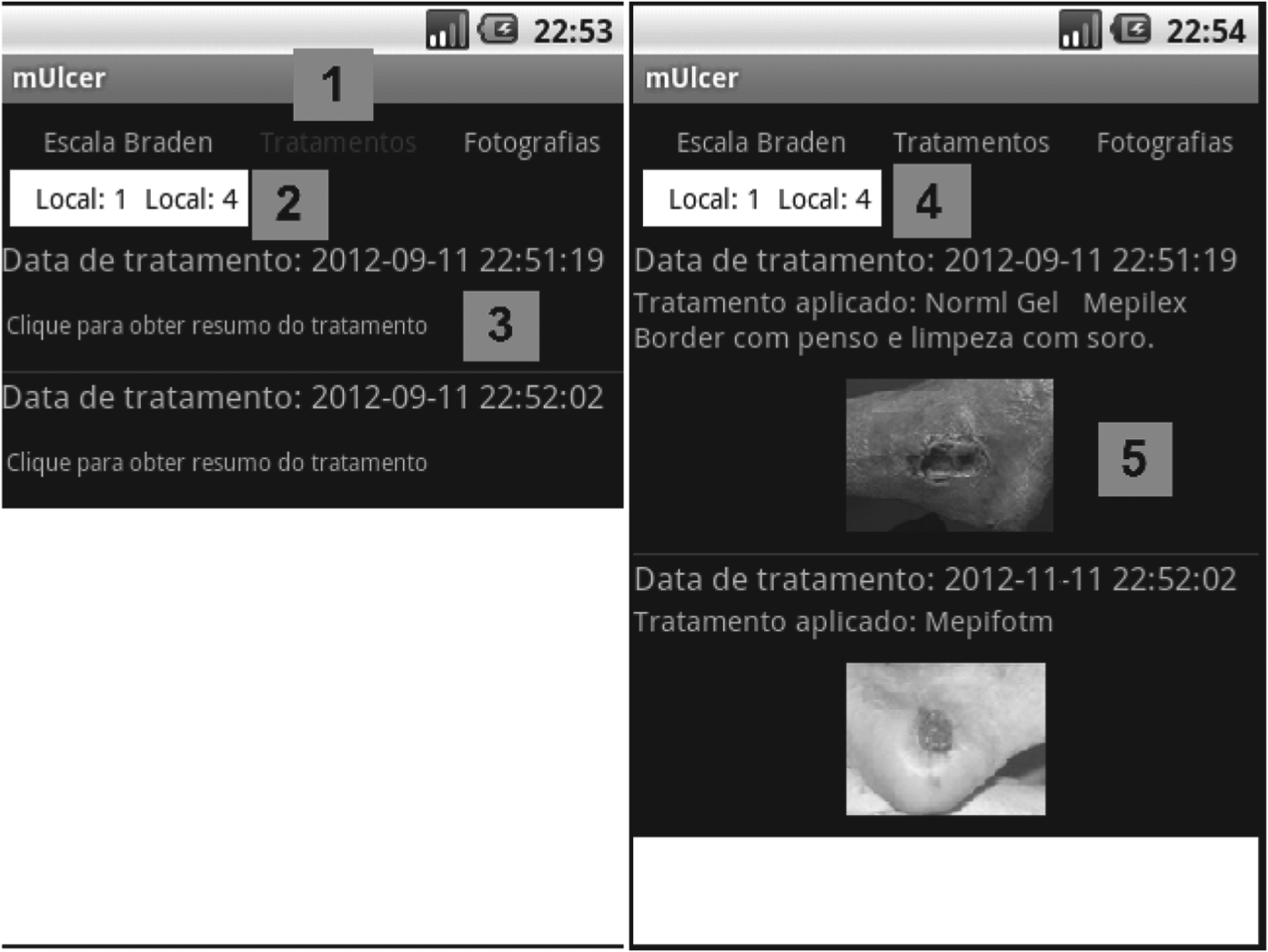
Episode Docs information (treatments).
According to the interaction of the application and data register, it is possible to evaluate it. With the positive feedback, means faster access to the information taking part of mobile potentialities that make work better, faster, more near the important information and with safe and credible data records. Thus, the human error decreases, the usage and impact of protocol relevant information on ulcer treatment increase, and ulcer paper-based registry method ends.
Discussion and conclusions
In this article, a new ulcer monitoring system, mULCER, was presented. The system was created taking into account relevant clinical information needed in the context of nursing work to classify, treat, and monitor patient’s pressure ulcers. The proposed application helps nursing work as well as other informal careers. A registry of ulcer status, treatment, and monitoring is wirelessly transferred and easily integrated with any EHR system. The usability of the mULCER application nearby the patient during the treatment may reduce the problems referred when using a paper-based register type. In order to aid during classification and treatment of ulcer steps, relevant paper protocol–based information, patient’s Braden Scale evaluations, with the possibility to record ulcers/wound characteristics, and status with a picture are available. Pictures are stored locally on the mobile device and synchronized to the FTP server. The alert system was created to remind the nurses on next treatments, to turn around a patient task, and to re-evaluate the next Braden Scale according to protocol information. mULCER application can be integrated with any EHR system, and its mobility opens new perspectives, such as the possibility of its use in a primary care setting. It allows health-care providers the possibility of keeping the records about skin and ulcer care, even after hospitalization on the same platform, thus contributing to continuity of care. It offers the possibility to follow all the patient processes, provides treatment according to the accepted protocols for integrative care, and provides information about what has been done to the patient before. The idea is making the application easily available among health-care facilities.
In a research perspective, the analyses of images and data at each step of care are useful. For example, similar problems (ulcer types) can be studied regarding the impact of different treatment approaches. Such application may enhance ulcer care knowledge and provide better health care for patients with similar kinds of ulcers.3,22
Normally, there is not always assisting nurse or physician capable to evaluate the possibility to develop pressure ulcers. Each day it should be made a careful evaluation of the skin in order to detect skin redness. Any type of redness implies the necessity of an immediate action to avoid skin breakdown. Thus, it is essential that persons who take care of those patients would be capable to use some application to help them to detect these important timings and calculate the risk of development of pressure ulcers. Like this, it is our intention to expand the application to other users and not just nurses, making available important information with impact on patient treatment. 23 The availability to connect the mULCER with some national system such as the one existing in Portugal, called Plataforma de Dados de Saúde—Personal Record, would facilitate and increase primary care nurses’ work quality at the caregiver interaction moment. This would make the decision easier to decide whether to send a domiciliary visit to review the patient or help with some specialized care.
Taking into consideration that all images are synchronized and accessible by the main system, it is possible to run automatically some pressure ulcer detection algorithms in order to detect them at the earliest. In case of ulcer detection, the system should provide advice and contact relevant professionals through the national health platform system—Plataforma de Dados de Saúde—in order to trigger the evaluation of the real ulcer status, providing the best procedure. This kind of system behavior would provide better patient quality of life as well as improve the health-care system budget.
Footnotes
Acknowledgements
The authors thank the nurse Lídia Dias, from the Hospital Prof. Doutor Fernando Fonseca, Amadora, Portugal, for her great cooperation on the project. Part of this work has been supported by the Instituto de Telecomunicações, Next Generation Networks and Application Group (NetGNA), Portugal, and by National Funding from the FCT—Fundação para a Ciência e a Tecnologia—through the PEst-OE/EEI/LA0008/2013.
Declaration of conflicting interest
No author has a conflict of interest with the contents of this article.