




Abstract
First impressions often shape user experience. Check-in kiosks at outpatient locations can significantly impact patient experience and staff workflows. Studying them in live environments is, however, challenging. We used nimble evaluation methods to assess the usability and acceptance of check-in kiosks piloted at an outpatient lab to inform future deployments. Despite high kiosk usability, multiple factors impacted patient and staff experience, including person (e.g., habits, language), environment (e.g., suboptimal placement due to electrical sockets), and organizational (limited staff training) factors. We conducted four observations and interacted with 28 patients and 12 staff members through interviews and observations. We also collected front desk and kiosk check-in timings. We reflect on the use of nimble evaluation methods and provide recommendations for health kiosk deployments.
Keywords
Introduction
Self-service kiosks in healthcare environments can serve various functions such as registration, screening, and education, and are increasingly being deployed and researched (Maramba et al., 2022). Check-in kiosks, a type of self-service kiosk, have a unique role in shaping patient experience, being the first point of contact during a healthcare visit. Given the well-documented complexity of healthcare, deploying check-in kiosks in healthcare environments is bound to be challenging as it has the potential to impact existing workflows, change the environment, and transform patient experience. As such, human factors appears as the appropriate discipline to study healthcare check-in kiosk deployments (Holden et al., 2020). While usability and observational studies have been completed on health kiosks, more comprehensive (e.g., Hopfer et al., 2018; Maramba et al., 2022; Wang et al., 2024), human factors-driven information on facilitators and barriers to deployments remains anecdotal. Further, evaluating check-in kiosks in busy healthcare environments needs to resort to methods that do not impede patient and staff experience.
We evaluated the deployment of check-in kiosks in an outpatient laboratory setting using the Systems Engineering Initiative for Patient Safety (SEIPS) 2.0 framework (Holden et al., 2013) to inform our interview and observation guides and subsequent analyses. We report on our findings, our experience using nimble evaluation methods and provide recommendations for future check-in kiosk deployments in healthcare environments in light of human factors research.
Methods
In February 2023, Parkview Health’s Virtual Health division deployed two check-in kiosks within an outpatient laboratory facility and reached out to us, user experience (UX) specialists embedded within the organization’s Health Services and Informatics Research department, to assess the usability and acceptance of the kiosks. Our requirements were to rapidly collect data under naturalistic use to inform upcoming deployments while minimizing disruptions to patient experience. Our project was approved by Parkview’s Institutional Review Board as Quality Improvement/Program Evaluation.
Setting and Respondents
Outpatient Laboratory
The outpatient laboratory where kiosks were deployed was housed within our largest hospital and experienced volumes between 180 to 210 patients a day during the evaluation period. The laboratory was co-located with diagnostic imaging.
Respondents
We approached patients visiting the outpatient lab after they checked-in with the kiosk (henceforth referred to as “kiosk patients”) or the front desk (“front desk patients”). We approached staff from all roles present in the lab (front desk, registration, and lab technicians) to assess the kiosks’ impact on their work.
Procedure and Instruments
We conducted four two-hour contextual inquiry sessions across different days and times to account for changes in workflow and patient load. We conducted a fifth two-hour observation session to time durations of kiosk and front desk check-in processes—including wait time, check-in time, and total time—and count the number of patients who used each method.
We conducted short, semi-structured interviews with front desk and kiosk patients and with staff. We asked kiosk patients about their overall experience with the kiosk, and front desk patients about kiosk visibility and reasons for using the front desk. To assess familiarity with similar technology, all patients were asked how often they used grocery store self-checkout kiosks. Topics covered in staff interviews included check-in method preferences, the kiosks’ impact on workflows, and the onboarding process prior to kiosk deployment. Neither patients nor staff were compensated for their time.
Observation and interview guides were informed by SEIPS 2.0 (Holden et al., 2013). We orally administered a 5-point Likert scale UMUX-Lite adapted for universal audiences (Cornet, 2024; Lewis et al., 2013).
Analysis
Interview and Observation Data
Two UX specialists qualitatively analyzed interview and observation notes along components of SEIPS 2.0 (Holden et al., 2013) using Microsoft Excel. Five transcripts were then jointly coded across respondent types. After discussing and resolving disagreements, the remaining transcripts were divided and individually coded, discussing any emerging codes.
Check-In Times
We compared wait time, check-in time, and total time (wait time plus check-in time) of kiosk and front desk patients using Wilcoxon two-sample tests.
Results
We interviewed 29 patients (20 who checked in with a kiosk and 9 with the front desk) across all sessions; we later discarded one kiosk interview as the wrong interview guide was used. We also interviewed 12 employees (4 lab technicians, 3 front desk clerks, 4 registration clerks, and 1 employee with both front desk and registration duties). We observed 28 kiosk and 64 front desk check-ins. We report our main findings along the SEIPS 2.0 work system factors.
Factors
Person Factors
All but one kiosk patients (95%) declared using self-checkout kiosks at grocery stores at least sometimes, denoting a certain familiarity with similar technology; whereas three (33%) front desk patients declared never using such kiosks. Twelve kiosk patients (63%) had no preference on check-in method, three patients (16%) preferred checking in with a kiosk, and three (16%) with the front desk. One staff mentioned that some demographics (e.g., Amish, older adults) would likely want to check-in with a person.
Task Factors
Many kiosk patients liked checking in with the kiosk because it was easy (39%), quick (16%), there was no wait time (16%), and it was convenient (11%). Durations between kiosk and front desk check-ins were not significantly different (median times of 63s and 72s, respectively). Three kiosk patients (16%) were directed to the kiosks by staff.
Tools and Technology Factors
Kiosk patients gave an average rating of 83 on the modified UMUX-Lite scale, indicating an excellent usability score (Sauro & Lewis, 2016). We observed issues with the technology, such as patients being unable to check in for appointments starting more than 1 hr after the current time.
Organization Factors
Staff working in the outpatient laboratory received limited communication and no training on updated workflows due to kiosk deployment.
Internal Environment Factors
Large windows in the waiting area caused screen glare depending on the time of the day and kiosk placement. The kiosks were initially placed near power outlets but out of sight when entering the lab location, leading to some patients not noticing the kiosks.
External Environment Factors
Cultural norm emerged as a socio-cultural factor; a front desk patient checked-in with the front desk because “it’s usually where you go.”
Processes
Check-In Process, Pre-Kiosk Deployment
Patients could only check in at the front desk and were then either directed to diagnostic imaging or told to wait as they were placed in a virtual line managed by the electronic health record. When their turn came, the patient would verify the lab work to be performed in the current visit with a registration clerk. A lab technician would then call the patient back to complete their lab work.
Check-In Process, Post-Kiosk Deployment
Patients could choose to check in at the front desk or with a kiosk. Front desk processes were unchanged. For kiosk check-ins, the kiosk placed patients in the same virtual line as front desk patients. Registration clerks had to start asking patients if they were present for multiple tests (e.g., lab work and X-rays) as the kiosks only allowed them to select a single test per visit. Insufficient signage and unclear on-screen messages led patients to attempt checking in with a kiosk for imaging tests available on-site but not programmed into the kiosk software; as a result, patients either checked in for the wrong test or aborted their kiosk check-in and moved to the front desk.
Outcomes
Patient experience mostly improved. The kiosk deployment led to shorter front desk lines for front desk patients and improved privacy for kiosk patients, as information traditionally provided orally by patients at the front desk could now be typed or scanned. As patients were not forced to use the kiosks, some patients continued to check in with the front desk; reasons included automated appointment reminders instructing patients to check in with the front desk, patients not seeing the kiosks, and prior habits. Patients were seen using the kiosks more when the front desk line was longer or, almost paradoxically, when other patients were lining up to check in with a kiosk.
The kiosks had an immediate impact on staff. The kiosks relieved front desk staff’s workload, especially during busy periods, giving them time to work on additional tasks. The kiosks added additional steps to some workflows, and limited communication prior to deployment led to front line staff figuring out how to change workflows to account for the kiosks during the deployment; for example, registration staff had to ask patients if they had two or more tests scheduled as the kiosk only allowed patients to check in for one test. For other employees, such as lab technicians, workflows were not impacted.
Discussion
We report on the nimble evaluation methods used and provide recommendations for health kiosk deployments.
Nimble Evaluation Methods
Patients visiting outpatient laboratories are expecting quick, in-and-out visits; as such, we resorted to using nimble evaluation methods that, while limiting in some regards (e.g., limited demographics), enabled us to gather actionable data while not prolonging patient visits.
Oral Survey Administration
After introducing ourselves to patients and obtaining permission to ask a few questions, we immediately administered the UMUX-Lite items orally, before asking them if they had additional time for a few more questions. This enabled us to gather some data even if patient respondents declined further participation or were interrupted. Oral survey administration also reduced setup time for the UX specialists.
Diverse Staff Panel
We chose to obtain an equal distribution of all staff roles to fully understand the impact of the kiosk deployment within our short project timeframe. While doing so limited the number of patients we could observe and interview, it led to findings we would have overlooked. For example, a registration clerk told us that since the kiosks only allowed patients to select a single test (EKG, X-rays, or lab work), the registration clerks had to ask patients whether they were present for multiple tests; we would have missed this finding had we only interviewed front desk staff.
Diverse Observation Windows
We purposefully conducted our observations on different days of the week and at different times to account for differences in staff workflows and variances in patient load. We found that the front desk was closed in the evening, significantly affecting the check-in workflow and may have missed this had we stopped observations at 5 p.m.
Recommendations for Health Kiosk Deployment
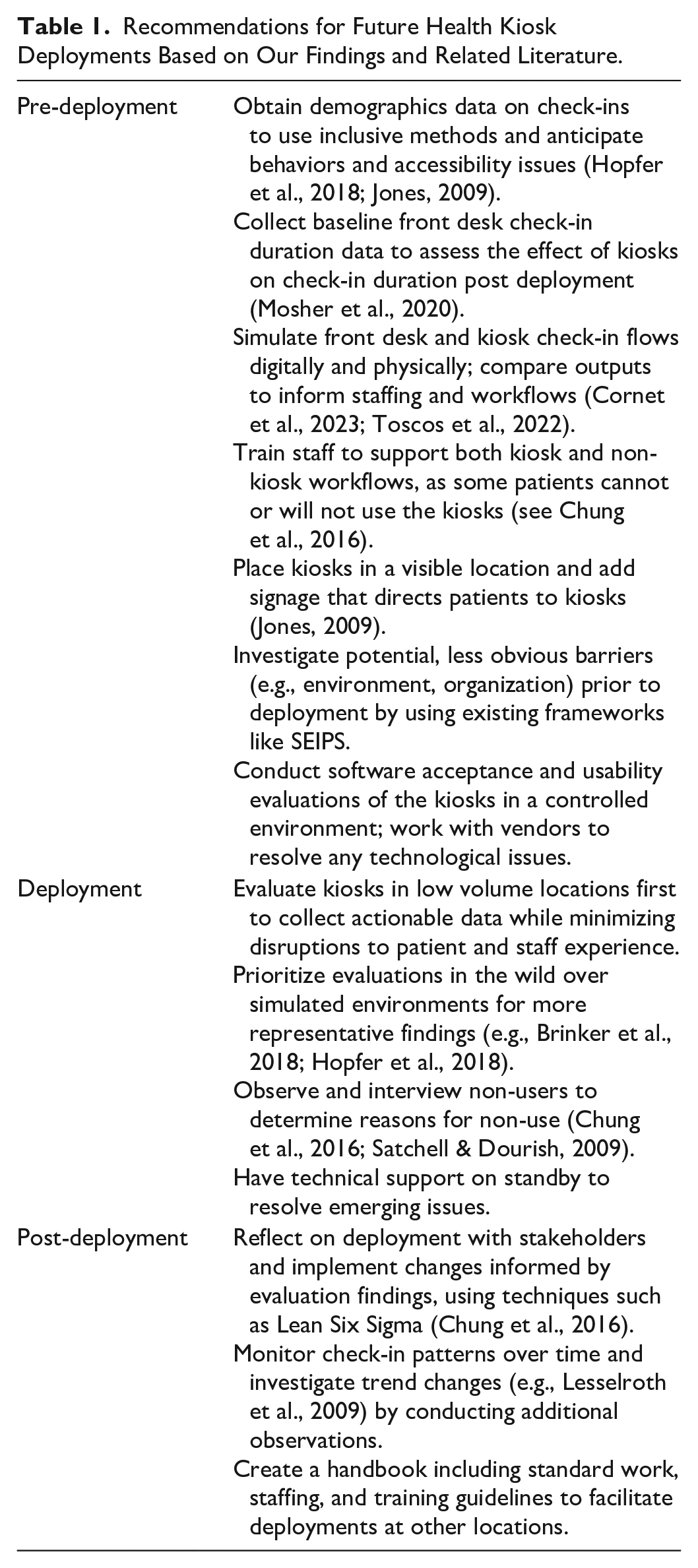
We provide recommendations based on our experience and existing research in Table 1.
Recommendations for Future Health Kiosk Deployments Based on Our Findings and Related Literature.
Limitations
Our findings were derived from observations and interviews at a single location a month after the kiosks were deployed; we were unable to validate them with follow-up observations at different locations. We did not conduct a pre-deployment assessment, which limited the comparability of our findings. We were also unable to comprehensively address all components of the SEIPS model, such as distal outcomes and external environment.
Conclusion
We analyzed a kiosk deployment in an outpatient clinic and suggested that using nimble evaluation methods with minimal disruption and implementation of the provided recommendations could inform subsequent health kiosk deployments. Future research on health kiosks could further explore components of the SEIPS model that we could not address (e.g., distal outcomes).
Footnotes
Acknowledgements
We thank Parkview Health’s Virtual Health, outpatient laboratory staff members and patients for their time, and Mindy Flanagan for the analysis of check-in times.
Declaration of Conflicting Interests
The author(s) declared no potential conflicts of interest with respect to the research, authorship, and/or publication of this article.
Funding
The author(s) received no financial support for the research, authorship, and/or publication of this article.
