



Abstract
Findings from previous research that assessed the usability of single-page and multipage digital interfaces in purely digital interactions indicated that the single-page format is more efficient than its multipage counterpart. This research expands on previous work by applying the findings from these digital-only interactions to a paper-digital interaction. Specifically, this study assessed the usability of single-page and multipage instructional interfaces to guide voters through the paper-based ballot mailing process embedded in the prototype of an electronic voting system designed for overseas military voters. A detailed classification of errors and requests for assistance revealed that the multipage format had fewer occurrences of both than the single-page format. Statistical analyses revealed no statistically significant differences between the single-page and multipage interfaces in efficiency, contrary to previous research, as well as no differences in effectiveness, satisfaction, and workload. To conclude, we provide arguments in favor of utilizing the multipage format for the digital display of the ballot mailing instructions on electronic voting systems moving forward. These findings can reveal best practices for the design of digital instructions in emerging paper-digital systems.
Keywords
Introduction
The integration of digital components with existing paper-based processes has led to the emergence of “paper-digital systems.” Consider self-service airport kiosks where airline passengers can print their baggage tags and attach them to their luggage. In this paper-digital interaction, customers must rely on the instructions displayed on both the kiosk’s user interface (UI) and the printed baggage tag in order to properly tag their bags. In the context of voting on an electronic system that produces a paper ballot, the instructions on the UI and paper elements must be clearly laid out to ensure that the ballot reaches the election office safely.
One such example of a paper-digital system in voting is an electronic ballot marking device (BMD) for overseas military voters. Designed to improve voting access for United States (US) military personnel stationed abroad, electronic BMDs enable voters to cast their ballots securely and electronically in overseas locations. For auditing purposes, the voting system includes a subsequent ballot mailing process after the voter has electronically cast their vote.
Successful completion of this process relies on an organized structure of instructions to ensure users understand how to interact with the voting system. However, voters often do not possess comprehensive mental models for an electronic BMD that requires mailing a paper ballot, leading to voter confusion and omission of actions. For a seamless transition between the digital and paper components, good usability is key. As digital instructions become integrated into the process of mailing an auditable paper ballot, it is crucial to establish best practices for its design.
Prior studies on the usability of single-page and multipage interfaces suggest potential areas for improvement in purely digital interactions that are intended to replace rather than complement the already existing paper-based processes. Beldona and Kalkan (2009) compared a single-page and multipage hotel booking website; Iftikhar et al. (2021) compared a single-page, multipage, and conversational chatbot in a digital healthcare form. In both of these studies, the single-page format outperformed the multipage one in terms of efficiency. However, little is known about the usability implications of integrating digital instructions with paper-based activities. Thus, this study aimed to determine whether digital instructions presented on a single page or divided across multiple pages on the interface of an electronic BMD would support the usability of a paper-based ballot mailing task.
Method
Participants
The participants were 31 students from Rice University in Houston, Texas. These participants were recruited through the university’s online SONA system and were compensated with credit toward a course requirement. The mean age was 19, ranging from 18 (the minimum age to vote in the US) to 23. Thirteen (42%) participants were female, and 18 (58%) were male. Seven (23%) were Caucasian, 15 (48%) were Asian, five (16%) were African American, one (3%) was Pacific Islander, one (3%) was Arab, and the remaining two (7%) were multiracial. Two (7%) participants were of Hispanic ethnicity. Twenty-eight (90%) participants had completed some college, two (7%) completed an associate degree, and one (3%) completed graduate school. Participants had previously voted in an average of one election, ranging from zero to three.
Design
The study employed a between-subjects design to assess two UIs for the ballot mailing instructions: a single page of instructions (single-page condition) and a series of multiple pages of instructions (multipage condition). The ballot mailing instructions consisted of a series of five steps: (a) Review that your votes are correct, (b) Insert your ballot into the envelope, (c) Peel off the adhesive tape and press down on the flap, (d) Peel off the label sticker. Stick it in the center on the back of the envelope, and (e) You’re ready to mail your ballot. In the single-page condition, the first four steps were arranged in side-by-side panels on a single page, culminating with the final step—You’re ready to mail your ballot—on a separate page. The multipage condition showed all five steps sequentially across individual pages. The UIs were designed and prototyped in Figma.
The usability of the voting system prototype was measured using three metrics recommended by ISO 9241-11: (a) effectiveness was measured by the frequency of errors requests for assistance, (b) efficiency was measured by the time taken to insert their ballot in the mailbox, and (c) satisfaction was measured by participants’ responses to the modified Subjective Usability Scale (SUS; Brooke, 1995) questionnaire with the added Adjective Rating Scale (ARS; Bangor et al., 2009). Moreover, subjective workload was assessed based on subjects’ responses to the NASA-Task Load Index (NASA-TLX; Hart & Staveland, 1988) survey.
Since the prototype is still in the early stages of development, thus prompting a preliminary usability assessment of the design before implementing it into the software, the Wizard of Oz (WoZ) method was applied to simulate system responses that relied on connections between the BMD and printers. This created the illusion of voter-activated system responses when, in fact, the researcher (the “wizard”) manually printed the paper materials, unbeknownst to the participants.
Materials
All participants were tested on the same three-race ballot containing fictitious candidate names. The first race was a multicandidate race that allowed voters to select a maximum of four candidates, and the remaining two races allowed voters to choose a maximum of one candidate. They were provided a list, or slate, with the names of candidates they were instructed to vote for in each race. Participants were allowed to hold onto the slate throughout the voting task.
The equipment was configured on a table, as shown in Figure 1. The experimental set-up is as follows, from left to right: HP LaserJet Pro (ballot printer), BMD propped up on the makeshift voting booth using zip ties, iDPRT SP410BT printer (mail label printer), “9 by 12” mailing envelopes, and a makeshift mailbox. For cable management, an extension cord was placed behind the BMD, out of sight from those standing in front of the voting booth. Furthermore, a trash can was provided for the 10th and subsequent participants to avoid trash build-up from the adhesive strips peeled off the envelopes and the mail label backings.
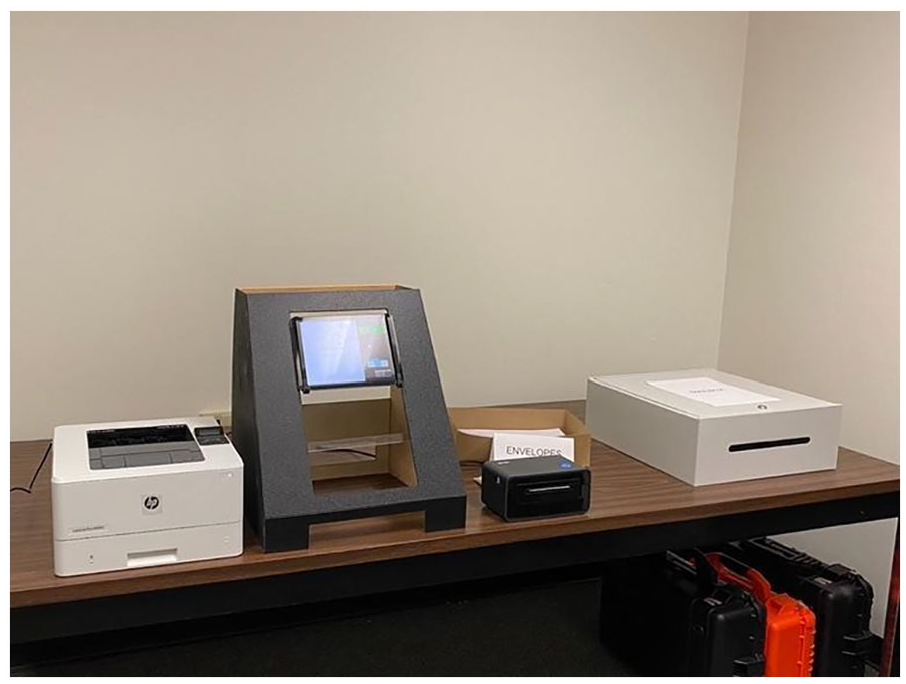
Experimental set-up of the voting system prototype.
Procedures
The 20 min study began with subjects completing IRB-approved informed consent and demographics forms. Participants were randomly assigned to the single-page or multipage condition, and were given a comprehensive briefing of the task and a slate of candidates to vote for. The voting task began as soon as they selected the “Start” button on the welcome page of the voting system prototype. Participants viewed one race at a time. They had the option to select candidate(s) or refrain from selecting before moving on to the next race. Following the third and final race, participants viewed a review screen listing the candidates on the slate, regardless of what they had selected, and a large green “I’m Ready to Print my Ballot” button. Once participants hit this button, the researcher manually printed their ballot and mail label in the background, as if it were triggered by the system. A printing screen was visible for 5 s while they retrieved their paper materials; after these 5 s, the UI automatically transitioned to the first page of the ballot mailing task.
Participants then followed the instructions on the UI to mail their ballots, which were presented on either a single page or multiple pages, depending on the condition in which they were assigned. The participants then cast their ballots in a marked mailbox. After their ballot was submitted, participants completed the SUS, ARS, and NASA-TLX questionnaires and were thanked for their participation.
Results
A total of 15 participants were assigned to the single-page condition and 16 to the multipage condition.
Effectiveness
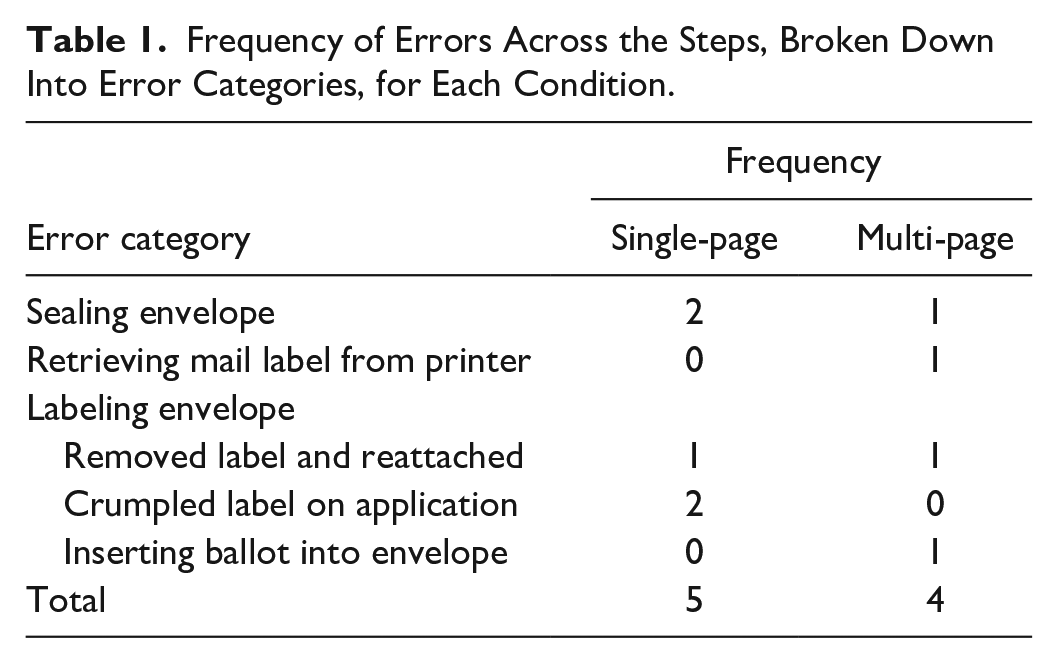
As shown in Table 1, five errors were observed in the single-page condition and four in the multipage one. None of the participants made any critical errors, which are errors that hinder task completion. Four categories of errors were observed in the multipage condition compared to only two in the single-page condition. First, we describe the errors that were shared between both conditions, followed by errors that were unique to the multipage condition.
Frequency of Errors Across the Steps, Broken Down Into Error Categories, for Each Condition.
Shared Errors Between the Single-Page and Multipage Conditions
Two participants in the single-page condition and one in the multipage condition committed errors in sealing their mailing envelopes.
Specifically, participants did not press the flap down firmly enough, risking disclosure of their ballots due to an unsecured seal. Furthermore, three participants in the single-page condition and one in the multipage condition committed errors when attaching the mail label sticker to their envelopes. One participant in both conditions attached and then reattached their label stickers, tearing off a piece of the envelope in the process. Two participants in the single-page condition mislabeled their envelopes by crumpling the mail label sticker upon application, rendering the barcode unscannable.
Errors Unique to the Multipage Condition
Two additional errors that were unique to the multipage condition were identified. First, one participant did not properly sever their mail label from the printer, leaving a small part of the label hanging off the cutter and obstructing the label printer in the process. Although this did not result in any issues in their own performance, their misstep jammed the label printer and misprinted a label for the following participant. Second, one participant inserted the wrong content into their envelope. Instead of inserting the ballot, they inserted their mail label. This is grounds for a critical error, however, the participant quickly realized and corrected their mistake before proceeding to the next step.
Requests for Assistance
In total, seven requests for assistance were made in the single-page condition compared to five in the multipage condition. Two participants in the single-page condition and one in the multipage asked if they should print their ballots at the review screen. One participant in the multipage condition had difficulty locating their ballot and asked where it was. Three participants (one single-page and two multipage participants) asked for assistance in retrieving their mail labels. Specifically, one inquired about the appropriate way to tear it from the printer and the remaining two asked if they were supposed to grab it. One multipage participant had trouble finding the envelopes and asked where they were. While labeling the envelope, three single-page participants asked which side was the back. Lastly, one single-page participant struggled to locate the mailbox and asked where it was.
Efficiency
The efficiency of the mailing procedure was measured by the time participants took to mail their ballots. The timer started upon the transition to the print screen and ended when participants selected “Done,” as indicated by the transition to the “Thank you for voting” screen. The average time to mail their ballot was 113 s (SD = 45) and 112 s (SD = 36) on the single-page and multipage conditions, respectively. As illustrated in Figure 2, there were no significant differences in the mean time to mail between the conditions, t(28) = 0.05, p = .95, d = 0.02.
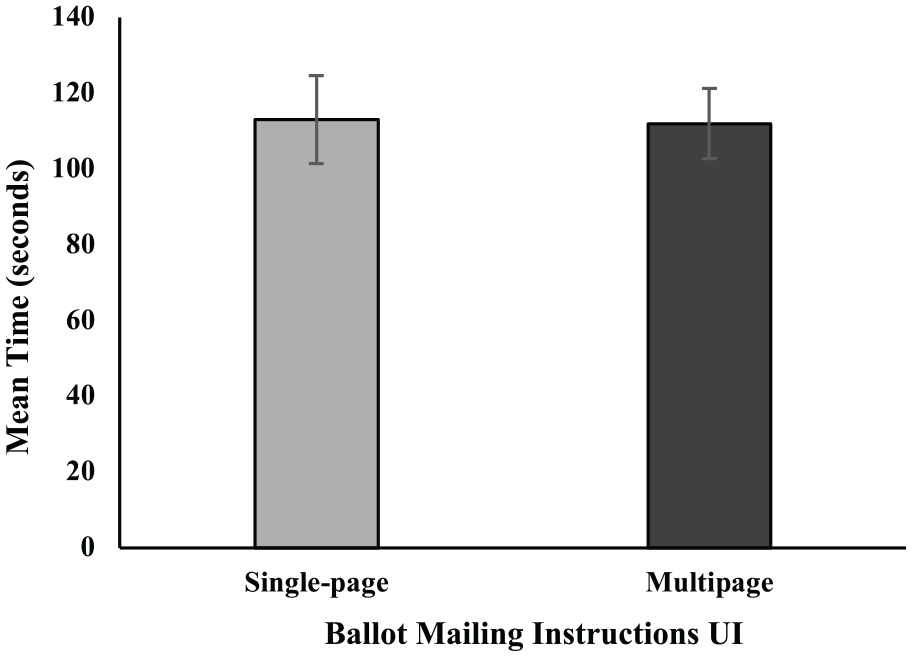
There were no significant differences in mean time to mail the ballot between the single-page and multipage conditions. Error bars represent standard error.
Satisfaction
As can be seen in Figure 3, the mean SUS scores were 89.5 (SD = 9.1) and 90.8 (SD = 8.9) for the single-page and multipage conditions, respectively. A SUS score of 90 means that participants viewed the usability of the system to be above average. The mean ARS scores were 6.1 (SD = .5) and 6.2 (SD = .4) for the single-page and multipage conditions, respectively, as illustrated in Figure 4. An ARS score of 6 corresponds to an adjective rating of “excellent” according to Bangor et al. (2009). There were no significant differences in mean SUS score, t(29) = 0.40, p = .70, d = 0.14, nor in mean ARS score, t(29) = 0.78, p = .41, d = 0.28, between the conditions.
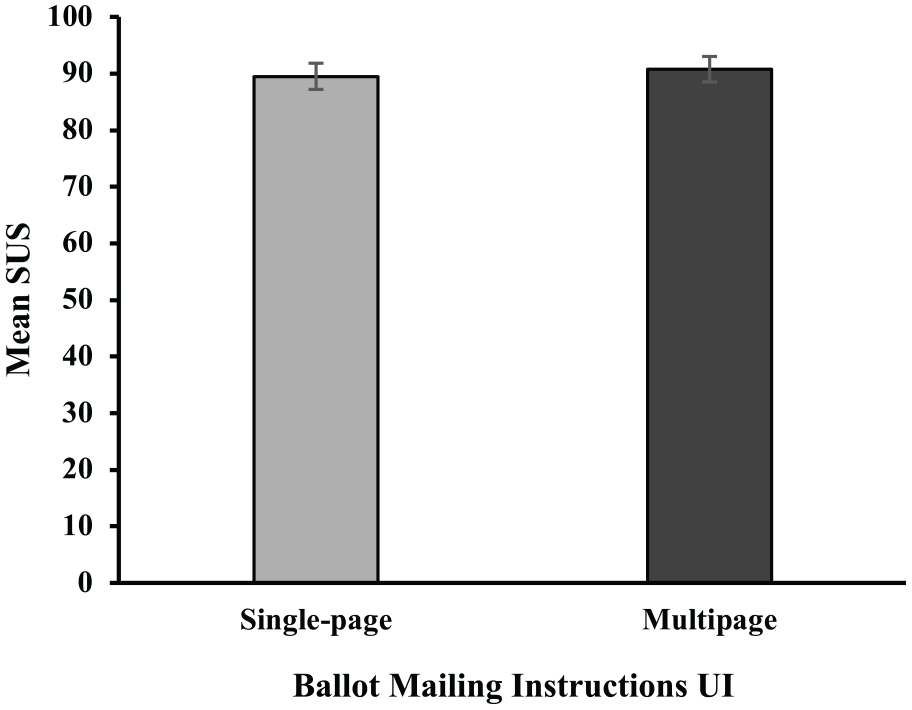
There were no significant differences in mean SUS scores between the single-page and multipage conditions. Error bars represent standard error.
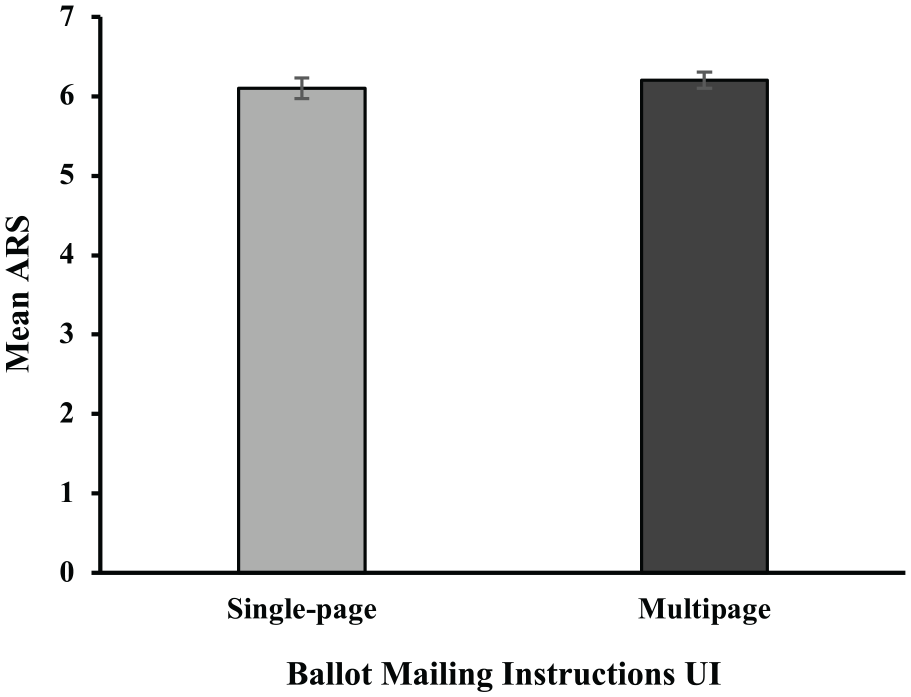
There were no significant differences in mean ARS scores between the single-page and multipage conditions. Error bars represent standard error.
Workload
The mean NASA-TLX scores were 18.0 (SD = 11.1) and 20.2 (SD = 16.9) for the single-page and multipage conditions, respectively. Given that the scale on the NASA-TLX is out of 100, this indicates that participants rated the workload low in both conditions. There was no significant difference between the UI conditions in mean NASA TLX score, t(29) = 0.42, p = .68, d = 0.15. Figure 5 shows the mean NASA-TLX scores for each condition.
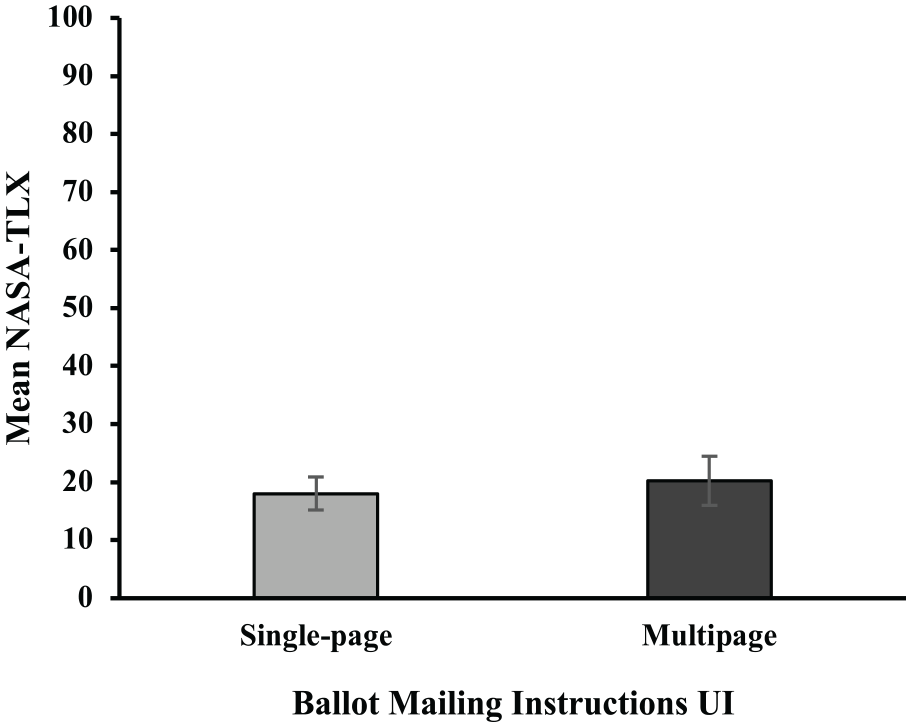
There were no significant differences in mean NASA-TLX scores between the single-page and multipage conditions. Error bars represent standard error.
Discussion and Conclusion
Overall, the findings suggest that either the single-page or multipage navigation is effective for the display of up to four steps. Despite observing more errors and requests for assistance from participants in the single-page condition than in the multipage one, this difference was not statistically significant. Moreover, we observed errors that were either shared between conditions or only seen in the multipage condition. With our limited sample, it is difficult to determine that the latter is caused by the multipage format itself. To further aid our understanding, we identified the assistance requests made by participants and discovered that participants in the single-page condition requested more assistance from the researcher than those in the multipage condition. Subjective workload and usability ratings were also comparable between the single-page and multipage conditions, revealing a perhaps counterintuitive finding. It may be a common preconception that navigating multiple pages would contribute to user dissatisfaction and high workload. However, the findings from this study suggest otherwise.
The multipage format did not significantly increase the time to mail their ballot, despite users having to progress through three more pages than the single-page format. This contradicts previous studies from Beldona and Kalkan (2009) and Iftikhar et al. (2021), both of which found that the single-page format was more efficient than their multipage counterparts in purely digital tasks. Interestingly, the similar durations found in the ballot mailing task, occurrences of errors, and requests for help in both instruction formats suggest that difficulties primarily stem from physical components rather than digital displays.
Several plausible explanations exist for why our results differed from the findings of Beldona and Kalkan (2009) and Iftikhar et al. (2021). First, in digital-only interactions, users’ attention is entirely on one component—the digital display. Attention does not shift away from the display, as no other components compete for attention. In contrast, our study adopted a multi-component approach that required users to switch their attention back and forth between the physical and digital components. The multipage format may be more advantageous in paper-digital interactions as dividing the instructions into manageable tasks may aid in place keeping when handling multiple components.
Second, increasing the number of pages in purely digital interactions merely creates more steps, rendering the multipage format less efficient than the single-page one. In paper-digital interactions, specifically with the ballot mailing task, most time-consuming interactions involve the physical rather than the digital components. Therefore, increasing the number of pages does not appear to substantially impact task duration, which is what this study found.
Despite the lack of statistical significance, we identify three reasonable arguments for why presenting instructions on multiple pages may be more favorable than a single page. First, for tasks that have a large number of steps, the multipage format scales better since the single-page format is limited in space. Second, if there are branches in the procedure, a multipage format is better for guiding users through the different paths.
The single-page format, on the other hand, presents all the decision points at once, making branching utterly impossible. Third, information is revealed gradually within the multipage format, allowing users to devote their attention to each step one at a time. Breaking down the information into multiple pages may be more advantageous for these reasons.
This study found that participants in both the single-page and multipage conditions rated the system as highly usable and low in workload. While our study evaluated two digital instruction formats, future studies could explore alternative strategies for presenting instructions in hybrid systems to streamline physical interactions, reduce complexity, and facilitate seamless transitions between the paper and digital components.
Footnotes
Acknowledgements
The authors would like to thank Joanna Anil and Adi Zydek for their assistance with the data collection.
Declaration of Conflicting Interests
The author(s) declared no potential conflicts of interest with respect to the research, authorship, and/or publication of this article.
Funding
The author(s) disclosed receipt of the following financial support for the research, authorship, and/or publication of this article: This research was supported in part by a grant from DARPA via VotingWorks Award 205017.
