




Abstract
This article presents a case study of an online class in technical and professional communication pedagogy (the teaching of technical and professional writing) that uses digital video technology for discussions. Because students in the class share their experiences using the video technology, the study uses a collaborative autoethnography framework to learn if the digital technology, Flipgrid, would enhance students’ experiences with discussions in an online class compared to their experiences with discussions on traditional discussion boards. Providing such exposure to a new technology tool can help students gain the confidence that is necessary for learning new technologies in the workplace. When the technology did not provide the hoped-for results after a few weeks, the class stopped using it, returning to the traditional discussion board in the learning management system, which can be more effective when teachers participate and organize students into small groups. Reflecting on what happened, students in the class collaborated on this article to share their experiences.
Keywords
The technical and professional communication (TPC) program at the university where I teach has available as all online programs an undergraduate certificate, a minor, the major, a graduate certificate, and an emphasis in professional and technical writing in the MA in Writing. Because students can obtain certificates and degrees all online, thinking about the level of student engagement in online, asynchronous classes is part of faculty preparation every semester. My goal in preparing for a graduate-level pedagogy class (Teaching Technical Writing) one semester was to try to replicate the engaging discussions that can happen in a seated classroom. I had heard of Flipgrid (https://info.flip.com/en-us.html) being used for online discussions and thought students could easily and quickly record a short video of themselves rather than spend time writing and editing their initial comments and responses in a traditional online discussion board. Even though it would involve minimal exposure to a tool we did not regularly include in our technology courses, using the application would provide students the opportunity to learn a different application, which is important for TPC students. As faculty and researchers in TPC have recommended, technical communication programs need to provide students with a level of technology literacy (Brumberger et al., 2013; Cargile Cook, 2002; Hovde & Renguette, 2017) because when students become practitioners, managers will expect them to know about different tools and be able to learn new tools on their own (Kimball, 2015). Graduates of TPC programs, then, must have “technological literacy to perform well in workplace contexts” (Hovde & Renguette, 2017, p. 395). And knowing how to use these technologies and learn different technologies is especially helpful for them as they become practitioners in work environments that cross time zones and geographic lines.
As I prepared for class, I learned more about the video discussion tool Flipgrid and planned to use that instead of the traditional written discussion board platform. In practice, however, Flipgrid did not produce the level of engagement I had hoped for, and the students and I learned that the traditional discussion board modality may be a better option for discussions although Flipgrid, or a similar discussion tool, could be a secondary option to use. This article is the result of a collaborative effort in which the students report on our experience in the online pedagogy class.
The Goal of Having Good Discussions
In an in-person class, good discussions happen when students come to class prepared and ready to talk about the reading assignment. After the teacher poses a question, one student might comment about the material or share an opinion, and other students might build on what has been said by articulating their own insights or asking more questions about the topic. As this exchange happens, other students might come to a better understanding of the topic or have more questions. And sometimes a student asks a question in such a way that they all (teacher included) stop and reevaluate how they have been thinking about the topic being discussed. Such class discussions—when everyone in the room loses track of time, and the teacher must interrupt the discussion to inform students that class is over—are exciting.
McDougall (2015) explained this invigorating exchange as an “authentic discussion,” which she described as “an exchange where multiple viewpoints are openly expressed in a way that leads to new understandings and co-constructed forms of knowledge.” Other important elements of authentic discussions include “acceptance of multiple perspectives, a climate of respect and support, and a preparedness to take risks” (p. 95). Such discussions are not rote repetitions of material but rather opportunities to engage students in questioning, sharing, investigating, and challenging thoughts and ideas about the material. Students are asking questions and observing how the material intersects with topics in other classes and experiences from their lives. Thus, one of my goals for my online class was to have authentic discussions like those I had experienced when teaching seated classes.
For this level of engagement to be achieved from students in any class, the teacher must first design the course with students in mind and then work to ensure that students interact with and get to know one another. While the teacher intentionally facilitates this connection in an in-person setting, it usually occurs more effortlessly because students are physically in the same room. The online learning environment has the potential to be as engaging, but it requires that teachers organize and design the class well, using a student-centered approach that provides for students’ easy access and navigation. Additionally, teachers must work to build a community of learners in the class, introducing different technology applications when possible and appropriate in order to enhance student learning and encourage students in technical communication to be “interactive users and learners of technology” (as cited in Bourelle et al., 2017, p. 225).
As I considered how I could use a technology tool to achieve authentic discussions (McDougall, 2015) in the online class, I had two main research questions:
How can the same level of engagement one might find in a face-to-face (f2f) class discussion be replicated in an online course? Is Flipgrid an appropriate video discussion technology to use in an online technical communication pedagogy class? Moreover, is this technology capable of achieving a similar level of engagement in an online class discussion as might be experienced in an f2f class discussion?
Before we answered these questions, however, we reviewed the literature on designing courses for online TPC classes and helping students to learn new technology in the classroom.
Literature Review
Researchers and faculty advocate (Bourelle et al., 2017, p. 225; Hovde & Renguette, 2017) that teachers of technical communication should expose students as often as is appropriate to different technologies in their coursework in order to mirror the many technologies that students will likely be exposed to in their future workplaces. Providing experiences in which students can grapple with, use, and learn different applications encourages them to become learners of technology (Bourelle et al., 2017, p. 225). More important, providing these opportunities to use different applications can help students gain confidence in their ability to learn new technologies, which is often a skill that is expected by managers of technical writing teams in the workplace (Kimball, 2015) because practitioners often have to either “keep up [by learning new technology] or work at a disadvantage” as applications are introduced or become obsolete (Carrington, 2015, p. 230). We reviewed the literature to examine how teachers design an online writing class and build a learning community that encourages optimal student engagement and helps students get to know one another. We also reviewed the literature to learn about the most effective ways and technologies used to facilitate discussions in an online environment.
Designing a Course for Online Writing Classes
Technical writing courses have been offered online for more than 20 years. In the university where I teach, the first course in the English department to be offered online was a technical writing course, and as I mentioned, we offer complete programs that are obtainable online. As Harris and Greer (2016; see also Greer & Harris, 2018) have explained and as we have come to know in online learning, the design and delivery of online classes affect students’ success and participation; therefore, part of student-centered design practices for an online course must be to ensure that it has a clear navigation path, specific and measurable objectives for learning, and options for how students can meet those objectives. Harris and Greer (2016) cited from the 15 practices for effective online writing instruction released in 2013 by the Conference on College Composition and Communication's Committee on Best Practices in Online Writing Instruction. Harris and Greer (2016) explained that many of the “instructional principles focus on the connections between design and delivery, encouraging dialog between students and instructors about and around the course content” (p. 48). They concluded that “good learning design” can happen only when instructors “start asking our students what they need and how they need it” (p. 53). Even though an online class may be developed with the student in mind, students will be more invested in their learning when a community is developed (Harris & Greer, 2016, 2020). Instructors, then, must dedicate additional time and energy to ensuring that students get to know each other and their instructor.
Building a Learning Community
Students need to get to know one another to gain an understanding of their classmates before they will be comfortable enough to want to share and participate; that is, a sense of community must be established before students will be willing to engage. Virtue (2017) warned that if a sense of community is not established, students will often “remain independent from each other and only interact” when required (p. 219). Instructors should assign activities at the beginning of every semester that promote students getting to know each other and the instructor. When students participate well, class is more enjoyable for everyone, but I also wanted students to get to know one another in order to replicate the invigorating class discussions that sometimes occur in f2f classrooms. Further, because this was a TPC class about teaching TPC, I thought it was appropriate for students to learn a technology application that was advertised as a great tool for generating engaging discussions.
Current literature about ways that teachers facilitate discussions in online classes reminds us that the pedagogy strategies for online classes differ from those for f2f classes, yet teachers should strive for the same level of student engagement and achieved meaningful learning, no matter the mode of instruction. But numerous educators and researchers understand that in order to gain this level of engagement, teachers of both f2f and online classes must first develop a community of learners. One theoretical model for this community of learners, according to Swan et al. (2009), is the community of inquiry (CoI).
The CoI model of online learning, developed by Garrison et al. (2000), has provided insights for studying online learning and is based on the principle of having an established community (Garrison, 2007). This model includes three elements, social, teaching, and cognitive presence, that must exist and overlap for effective online learning to take place, and it has “provided significant insights and methodological solutions for studying online learning” (p. 62). Implementing the three elements of the CoI framework is one way to build a classroom community. Cunningham (2015) summarized this complex method when she explained the three elements involved: Social presence refers to the connection students feel to one another, their teacher, and their institution, both emotionally and socially—if they have the sense that they are working with real individuals and contributors (p. 36). Although this aspect of community engagement develops more easily in an f2f classroom and takes some extra effort in an online classroom, this element can be cultivated. It is much easier to visit with students as they walk in and out of the classroom, and physical presence allows for students to read body language. Teaching presence refers to how the course is designed, the activities implemented to facilitate learning, and the “primary presentation of course content.” And cognitive presence happens when students can understand and develop meaning through discourse and communication (p. 35). Each element overlaps and supports the other elements.
All three elements in the CoI play a major role in student engagement, which, according to Lockman and Schirmer (2020), has been “long considered a major factor in academic success and satisfaction” (p. 136). Kirby and Hulan (2016) noted that “drawing students into meaningful and engaging interactions and discussions in online settings can be difficult,” but we understand that “community and interaction play critical roles in learning” (p. 87). When students participate in an asynchronous course, the teacher has the additional challenge of fostering and developing the same sense of community. Igniting the passion to learn and engage is more difficult when teaching an asynchronous course than it is when teaching an f2f course. Mardi (2019) emphasized that when teaching in an online setting, teachers must work on “getting to know students virtually and feeling connected to them” (p. 55) and having students get to know each other. When teachers do this work, they can develop the social presence necessary for students to feel connected to each other and engage in discussions in the online course.
Facilitating Online Discussions
Often, instructors choose to have online class discussions in the discussion board that is embedded in the learning management system (LMS). Kirby and Hulan (2016) claimed that while “students feel comfortable with [traditional] discussion boards, as the technology is not very challenging,” there are several drawbacks to using these spaces. Students may choose not to post original content or read all the other posts (instead opting to only participate with the required number of posts), and discussion board participation is often “not seen as a tool for furthering understanding” but instead seen as “fluff” (p. 89). Such drawbacks impede authentic and spontaneous discussions. In addition, Harris and Greer (2020) found that students often viewed participation on discussion boards as forced, consisting of thoughtless and meaningless responses. Another drawback to such participation, according to Aloni and Harrington (2018), is the “lack of emotional cues” in written messages (p. 274). It can be quite challenging to decipher meaning and intention in written messages, especially if readers have never met the person who is sending the message. Misunderstandings can easily occur.
Mardi (2019) pointed out that for discussions in the LMS discussion board to work well, teachers must be both present in the discussions and have “a strong presence facilitating them properly.” This facilitation could involve helping those students who may be nervous about expressing their opinion and “steer[ing] those who dominate class discussions” to not comment as much so that others will participate (p. 54). Without the appropriate moderation and interjection from the teacher, then, the online discussion board thread will be stunted and shut down. Other researchers (Salter & Conneely, 2015; Virtue, 2017) have warned teachers that they should not post too much or control the discussion on the online discussion board because students may not participate well with each other. Instead, teacher participation should be balanced because seeing too many comments as knowledge generating rather than facilitating can also stunt students’ participation (Virtue, 2017). Afify (2019) emphasized that having smaller discussion groups of no more than 10 and as few as 2 participants with a student moderator can provide a better experience for students and a more realistic workload for teachers that would enhance their involvement and feedback (p. 135). Some of these common obstacles to meaningful discussions in the online LMS discussion board precipitated my use of a different discussion tool for this online pedagogy class.
Deciding Factors for Using Flipgrid
I had heard of Flipgrid's use in class discussions, and a colleague who teaches with me recommended it. She had a good experience with the technology in a graduate level, blended class in which students met in person for half of the class periods and online for the other half. Assignments were uploaded via the class Blackboard LMS, but students had met in person and, at least partially, knew each other. One function of Flipgrid that this faculty member mentioned was the ability for students to participate in discussions without having to spend too much time formulating a discussion board post. They could create a short video with their comments and participate well in the discussion. I wanted students to spend more time engaging with others and sharing ideas rather than drafting, editing, and uploading their correct and carefully written comments.
As I worked to learn more about the technology, I read Edwards’s (2021) article that promoted Flipgrid as “a video discussion tool quite like no other as it's designed with the might of Microsoft to work specifically for teachers and students in a digital classroom” (para. 2). And I was encouraged by a short video on the Flipgrid website that touts the technology as being “easy to use” and ends the video with an enthusiastic “Now just wait for the discussions to take off” (Microsoft, 2021). I was further encouraged to use Flipgrid by Agan et al.'s (2019) report claiming that video technology is one method that could create a more “personal learning environment” in which students can see the facial expressions and hear the tone of voice of the instructor and classmates, providing a more personal experience (p. 35). Aloni and Harrington (2018) claimed that this ability to hear tone and see expressions could help preclude the obstacle of a “lack [of] emotional cues” that written posts on discussion boards have (p. 274). And Bartlett (2018) reported that Flipgrid “increases students’ perceptions of connectedness in the online classroom” (para. 1), and it “increases communication efficiency by showing body language, facial expressions, and tone of voice” (para. 3).
I had hoped that having students record a few comments about the course material and respond to each other with short video-recorded comments would promote a more impromptu, casual conversation about the material rather than formal, planned responses. And I had hoped that using the discussion technology might foster a discussion in the online class like the rich, spontaneous, meaningful discussions that can occur in f2f classrooms. Plus, having students become familiar with a new technology could enhance their confidence in learning new technologies, which would be helpful to them as practitioners in the workplace.
Using the Tool
From the information I read about Flipgrid, I determined that it could produce the type of discussions that I wanted in the online class, so as I prepared for the semester, I set up the account for the application. I familiarized myself with the functionality of Flipgrid and prepared notes to use as I recorded my introduction of the class to students via Flipgrid. In this video introduction, I gave the course overview, mentioned the major assignments, and told students a little bit about me. As I played back the first video, I noticed many mistakes and places I had stopped and then rephrased comments. I hated the video, so I deleted it and started over. The second video was better, but the recording lasted 10 minutes, which seemed much too long. I was sure I could condense it, so I recorded a third video. When I decided the third video would suffice, I accidentally deleted rather than saved it and became even more frustrated. Finally, the fourth take of the video seemed good to me, and I saved it correctly. I hated the still picture of my facial expression on the screen in the saved video, but I had already spent more time than I had planned in trying to develop a short introduction to the class, so I left it.
One of the first assignments in the class was for students to record an introduction of themselves to the class. Most students uploaded videos that were about 10 minutes in length. As they might do in a f2f class, they talked about their graduate work, families, pets, and reason for taking the class. Likewise, the videos that students recorded as their first discussion post about their first reading assignment were 5–10 minutes in length. I knew it was important for me, as the class instructor, to provide feedback on the videos they uploaded about their reading assignments (Mardi, 2019), but watching and responding to the videos took much longer than it did to read and respond to written postings on the discussion board. And even though it was in the instructions for the assignment, I had to remind students more than once to watch others’ videos and provide a video response with their comments or questions.
Students also commented about how much time they were spending preparing their video discussions; these comments were showing up in other work they were submitting. They said they were doing so much work to capture a video about their responses to readings. They were writing scripts and recording and often rerecording their discussion posts and responses—which sounded like my experience with trying to record my short introduction to the class. Although I had hoped that the application would enable students to spend less time on the discussions, it was causing them to take more time, and their resulting videos were not discussions but miniperformances that they had scripted and recorded (and sometimes rerecorded) until they were satisfied with their performance.
We had been using the application for a little more than 3 weeks when I asked the students for their honest, candid response to how they felt about using Flipgrid. Their responses were overwhelmingly negative, so I decided that using Flipgrid had not worked as I had hoped and was not going to work for this class. In short, we needed to pivot. Flipgrid was not helping the class achieve the discussion goals I had for the class, and in some instances, it was making discussions more difficult and time-consuming. As we know, in research, a bad outcome is still an outcome, and we had learned important information, so I asked my students if they might be interested in collaborating on an article to share our experiences using the discussion technology. They thought that participating in this writing project would be beneficial to their learning. Thus, I developed a proposal, which was approved by our university's Institutional Board Review (IRB-FY2021-635). I shared with the students this proposal and the process for the IRB approval. Then we began working together on gathering data and writing the article.
In the rest of this article, we share our experiences using Flipgrid. But first we describe our methodology for this case study.
Methods
Because we are reflecting on our own experiences using Flipgrid, we applied for this case study the autoethnography methodology, which centers on self-reflection. As Roy and Uekusa (2020) explained, this methodology has been “deemed to be a useful, ethical and self-empowering research method. There are two central components of CAE [collaborative autoethnography]—self-reflection and collaboration” (p. 384). According to Denshire (2014), autoethnographies are essentially an autobiographical form of ethnographic research that “contains elements of auto-biography” but “goes beyond the writing of selves” in which researchers examine how their own experience is connected to wider cultural, political, and social meanings and understandings (ethnography; p. 833). And Ellis et al. (2011) explained that “when researchers do autoethnography, they retrospectively and selectively write about epiphanies that stem from, or are made possible by, being part of a culture and/or by possessing a particular cultural identity” (p. 276).
Participants in the study included nine graduate students and the instructor in an online course, The Teaching of Technical Writing, during a spring semester at a large midwestern university. The class focused on pedagogical strategies in lower-level technical writing courses and served particularly as a required training class for those graduate teaching assistants (GTAs) in the department who might be interested in teaching technical writing. Some 2nd-year GTAs would be eligible to teach a technical writing class instead of 1st-year composition, the most common assignment for GTAs, if they did well in the pedagogy class. All class interactions mentioned in this study occurred in an asynchronous online environment. Flipgrid was used in the course as a virtual discussion tool in order to facilitate more spontaneous, meaningful reflections and insights about the assigned reading material in a way that would build authenticity (McDougall, 2015) and mirror the impromptu nature of group discussions that occur in an f2f classroom. A more engaged discussion would allow the class to use the virtual discussion space as more than just a means of earning participation points. This rote activity for earning participation points is what Kirby and Hulan (2016) referred to when they said discussion board posts were seen by students as “fluff” in an online course rather than a tool for “furthering understanding” (p. 89). An additional benefit of using Flipgrid was that students would be exposed to another technology tool.
Each student in the class served as a researcher and writer and contributed to the article. To determine how each student would participate in the collaborative research project, I explained to students the different sections we would write and then asked them to submit their preferences for which section they would like to work on for the article. To enrich their learning about discussion boards, discussion tools, and the autoethnography method of research, I required the students to each post three articles on each one of those three topics to an online group discussion board for potential use in constructing the literature review.
Our data set consists of students’ written responses documenting their personal experiences using Flipgrid. All the students typed an account of their experiences and then submitted it for analysis to a shared discussion board forum of students who had been assigned to work on the data set section of the article. As Tham et al. (2020) noted, “key components of collaborative autoethnography include self-writing and reflection along with group meaning-making and theme search” (p. 349). To ensure that everyone included the same important components in our responses, I provided the following writing prompt: For this assignment, please state first if you were familiar with Flipgrid before this class. Next, write about your personal experience you had with Flipgrid during this semester. Simply document your thoughts, actions, activities with, frustrations about, questions, successes, etc. that you had this semester as you 1) learned we were going to use Flipgrid, 2) began using Flipgrid yourself, 3) used Flipgrid—how you did it, what worked, what didn’t, etc.[—]and then 4) learned we were not going to use it any longer.
In a separate section in this same assignment, share your opinion of how successful or unsuccessful Flipgrid was as we tried to use it for the purpose of discussion in an online class.
In their responses, students shared distinctive perspectives of their expectations for and experiences with using the Flipgrid platform. Accounting for these experiences in the autoethnographic method allows participants to fulfill what Tham et al. (2020) described as breaking “away from traditional empirical research approaches where the researchers are typically isolated from the object of the study… [and entering] from a collective first-person perspective while writing analytically together” (p. 349).
Results
Figures 1 and 2 reflect students’ familiarity and first reactions to using Flipgrid. Of the nine students in the class, seven (77.8%) shared that they had heard about or used Flipgrid prior to the class, and two (22.2%) reported that they had never heard about it before. Four students (44.4%) expressed positive initial reactions, and five students (55.6%) expressed negative initial reactions to learning that they would be using Flipgrid.
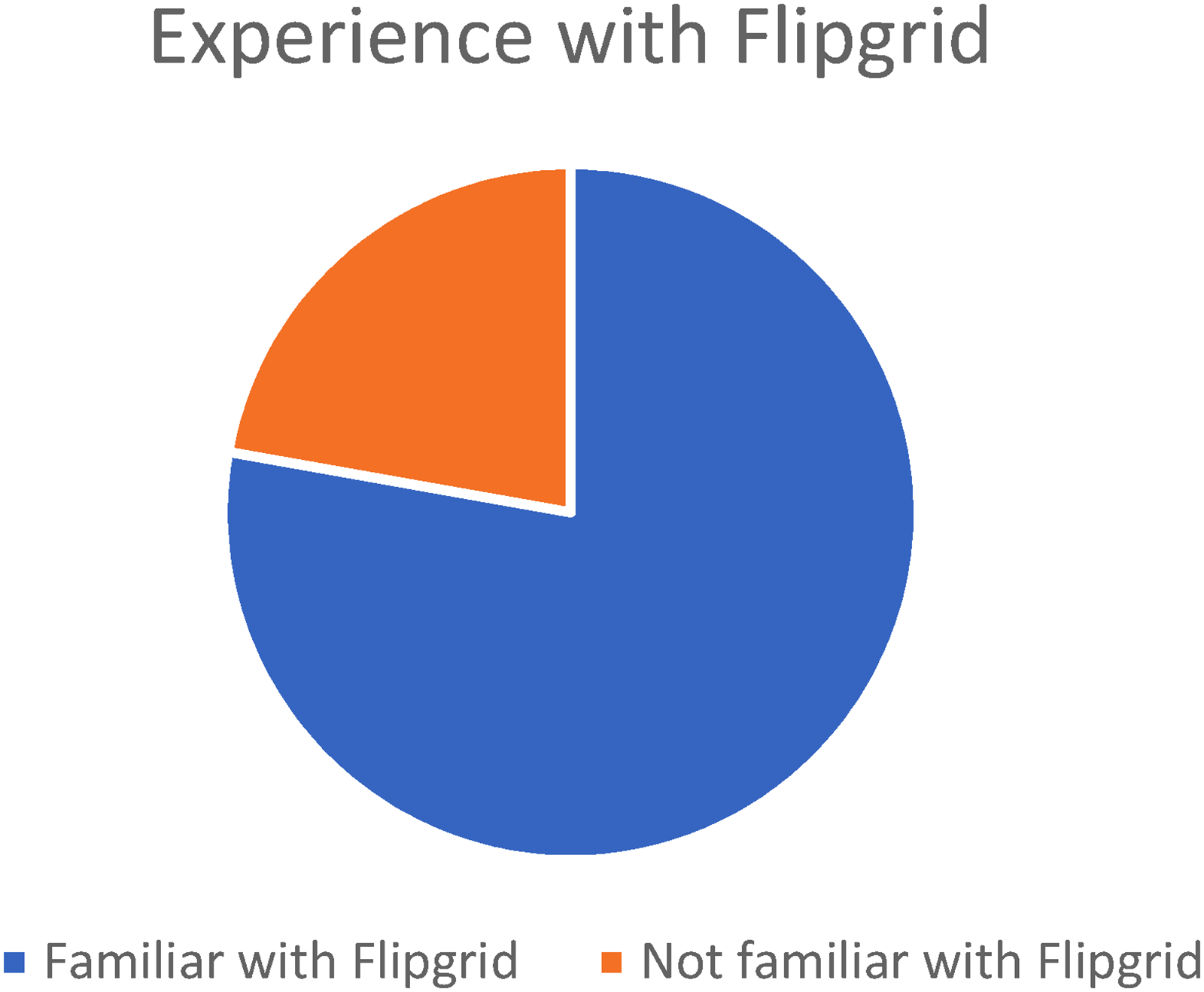
Students’ initial familiarity with Flipgrid.
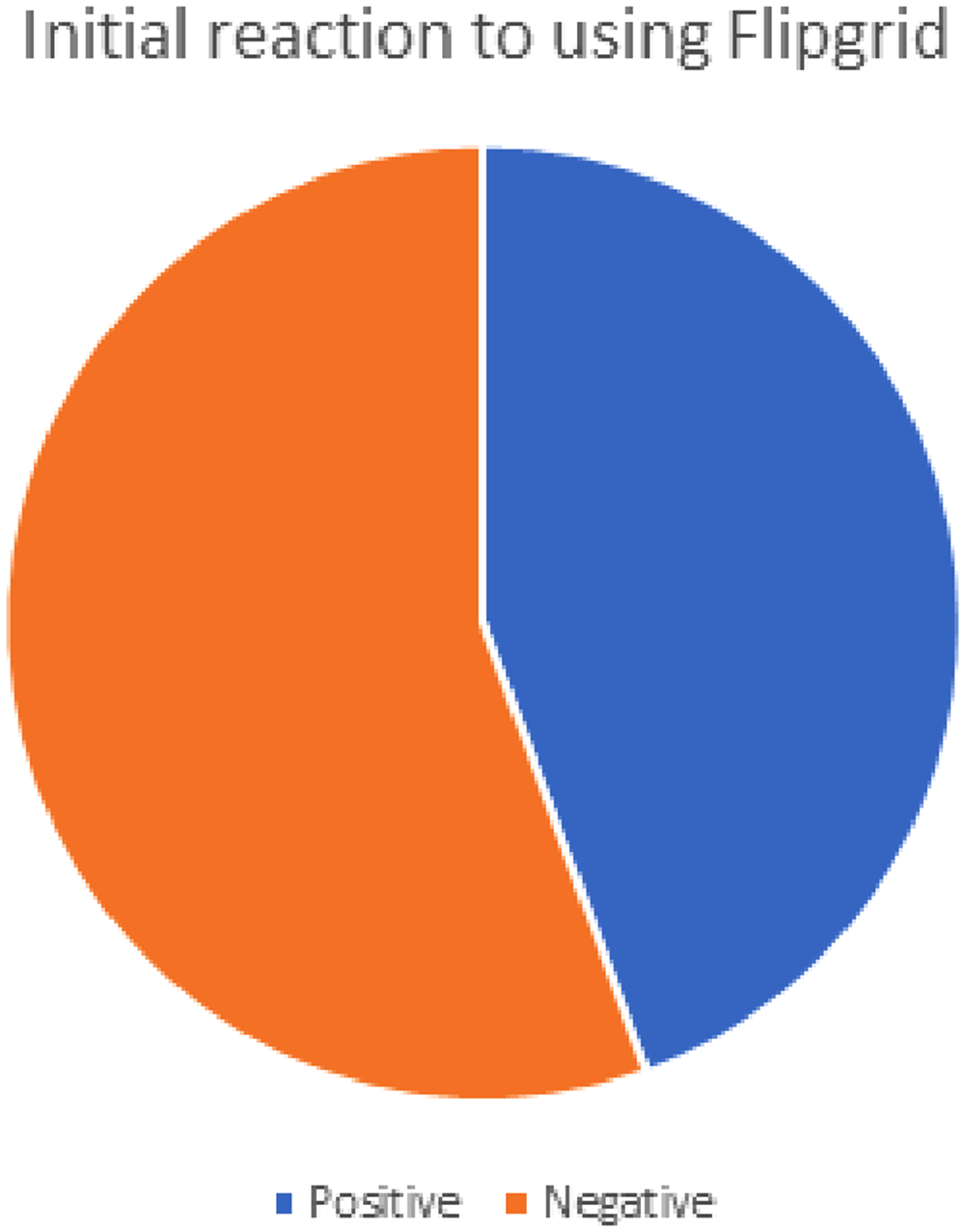
Students’ initial reaction to using Flipgrid in the class.
Figure 3 reflects students’ reactions after using Flipgrid in the class. Most of the students (seven, or 77.8%) expressed feeling self-conscious or anxious about being on-camera due to either extra attention being paid to their appearance or their eloquence or ability to respond without stuttering or stumbling during their response. Five students (55.6%) shared that they often recorded and then rerecorded their video responses due to either time limitations that had been set in the application or their dissatisfaction with their appearance or execution of their response. Six students (66.7%) shared that they prepared notes or a script before recording their responses, and three students (33.3%) shared that this aspect of using Flipgrid made the experience more time-consuming than if they had responded to the readings in written form on a traditional discussion board.
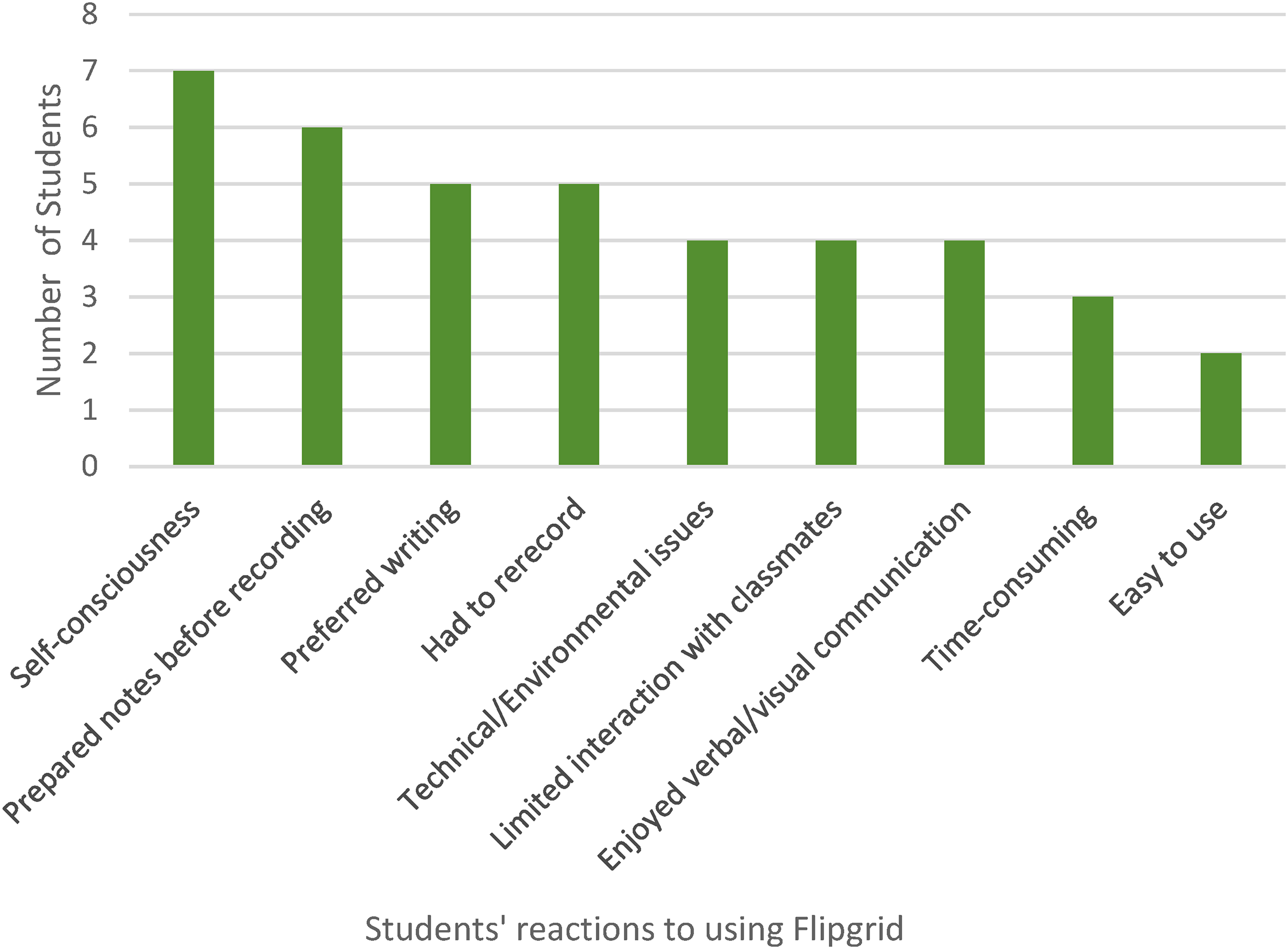
Students’ reactions after using Flipgrid in the class.
Some students faced technical issues with using Flipgrid for their reading responses, including one student who had a problem connecting to the internet, three students who had difficulty finding a quiet space to record, and two students who had difficulty recording their responses within the allotted time frame.
Other students expressed that they preferred written responses to video-recorded ones. Five students shared that they felt more confident in their ability to express themselves in writing than in a recorded video. Four students expressed that they did not react as much to their classmates’ video responses as they would have to written responses. And two students felt that recorded responses did not lead to organic discussions, due to either the added preparation needed to record a video response or the time-consuming nature of watching their classmates’ responses before reacting to them.
Of the students who spoke in favor of using Flipgrid, four enjoyed creating vocal and visual reading responses or having the practice of communicating vocally or visually. And two students expressed that Flipgrid, as a platform, was easy to use.
When the students learned that they would no longer be using Flipgrid for their assignments, four students reported feeling relieved or happy to return to written reading responses. Three students, however, found that using Flipgrid was a worthwhile experience despite knowing that they would no longer be using it for their assignment or feeling negatively about using it to record their reading responses.
Although six of the students felt that Flipgrid was a helpful tool that had potential for other types of assignments, five students felt that it did not help in facilitating discussions with their classmates. Additionally, four students felt that recording themselves with Flipgrid caused too much stress or anxiety, and three students enjoyed using Flipgrid at first but disliked using it after the first few recordings.
Finally, of the four students who spoke positively about their overall reaction to Flipgrid, two said that they planned to use it again in the future, and two believed that tools like Flipgrid were likely to become a more popular method of learning in the future.
Analysis
We based our investigation on the theory that the use of technology, particularly recorded video responses on a platform like Flipgrid, could more efficiently and effectively facilitate discussion—and even simulate the authentic discussion that McDougall (2015) described—in an asynchronous online technical writing graduate course. I hypothesized that students would feel more engaged using Flipgrid for discussion because they would be able to see faces and facial expressions and hear tone. I also hypothesized that students would spend less time on their responses to the readings because they would record rather than write their responses and that Flipgrid would help us simulate, at least partially, an f2f discussion. The data in the responses recorded from student participants, however, do not support the hypotheses.
There were common trends in the students’ reflections about using Flipgrid. At first, students were split in their feelings on the prospect of using Flipgrid for discussion responses, but more than half reported feeling nervous. This trend of nervousness might suggest that students were willing to keep an open mind but were also uncertain about appearing on camera. Their nervousness continued as they engaged with Flipgrid. When documenting their experiences using the software, seven of the nine students (77.8%) reported feeling self-consciousness or awkward about appearing on camera to deliver their discussion responses. To combat some of this anxiousness, six students (66.7%) prepared written notes or scripts to use during their responses, and five (55.6%) students reported rerecording their responses. Finally, five students reported a preference for writing their responses.
Other Possibilities for Flipgrid
It is possible to achieve good online discussions; however, Flipgrid fell short of performing in such a way that would achieve that goal for our class. Perhaps courses in other programs may have more success with Flipgrid, particularly if students are more comfortable speaking or appearing on camera, such as courses in communication, media, the arts, or even STEM. Or it may be a more appropriate technology to use in a blended class in which students will be together in the same space for at least half of the class sessions. While I expected students to be candid in their responses, many students did extra work to prepare for appearing before a camera—as though they viewed each discussion response as a performance. In general, when people know they are being recorded for others to view, they will typically act differently from how they would otherwise act. Students did not share why they felt the need to prepare for their recorded response, but some inferences can be made based on the way that content creation is viewed in online spaces. As video recording and editing technology improves, videos posted to online platforms often appear extremely polished, so students might believe that their recordings will be judged negatively, particularly if they lack some of that polish.
The prospect of recording appears to have increased students’ stress levels and forced them to take more time working on the assignment. Rather than focusing on simply answering a question or reflecting on what they had learned in the assigned readings, students reported deleting their recordings and starting over, sometimes merely because they did not like the way they looked or sounded in the video or made small errors while speaking. Such attention to fine details may point back to the idea that recordings can often feel like performances to be consumed and judged by others even though the intention of the assignment was to facilitate friendly, nonthreatening discussion. This outcome directly contradicted one of my expressed purposes for using Flipgrid, that is, to save students the time and effort of crafting a written response.
At least four students (44.4%) responded positively to the use of Flipgrid and expressed some preference for responding verbally and visually in discussion. This finding may relate to students’ preferred learning styles because learners who prefer more visual or kinesthetic activities to absorb and retain information may prefer the hands-on approach of the video modality. More research is needed to explore such a relationship. This finding does suggest, however, that because nearly half of the students enjoyed using Flipgrid, instructors may need to offer multiple options for assignments such as class discussions in an online asynchronous class.
In some capacity, more than half (55.56%) of the students surveyed suggested that Flipgrid did not contribute to authentic classroom discussion—either because they needed to script, record, often rerecord, and otherwise polish their responses ahead of posting or because they did not watch or respond to videos made by their peers. In an f2f classroom setting, such preparation would not be required, and the discussion could feel more conversational and candid than these recordings did.
One student brought up issues with technology use and access. Instructors will need to consider such issues more carefully if classroom instruction shifts to digital delivery methods. It is easy to take for granted that every student may have access to the basic technologies required to make and post a video, including a smartphone, laptop or desktop computer, video camera and microphone, internet access, and quiet workspace, but that is not always the case. When this inquiry took place, many courses were offered exclusively online because of the COVID-19 pandemic, so students had little choice but to enroll in online courses. As the technology gap grows and the world continues to seek online options in a postpandemic world, instructors need to consider their students’ access to various technological tools and offer assignment alternatives for those students who lack access or are not comfortable with the prospect of appearing on camera.
One student reported that she had to wait until she put her baby to bed to ensure her environment would be quiet as she worked to record her video. Many people taking online courses choose the online modality because they are working full-time or have other obligations that prevent them from attending f2f courses. Requiring videos could make completing assignments more difficult for students who do their course work at home, where they encounter obstacles such as a lack of quiet study space and others’ schedules. But most of the student participants mentioned that Flipgrid could be a useful tool for other classroom needs and assignments, suggesting that they may enjoy the opportunity to record videos in an asynchronous class for other reasons. Because recording a video may feel like a performance, Flipgrid might be more appropriately used for recording demonstrations, tutorials, and final presentations.
Conclusions
Educators learned a lot about teaching online when they were forced to move all their classes online during COVID. But even post-COVID, asynchronous learning continues to be a large part of our education systems and the way we teach across academia. It is important, then, that we pay attention to best practices for designing and delivering online content. Although using technology in a course just for the sake of using technology is not helpful, there are technology-based solutions that could work well toward achieving some course objectives. Exposing students to different technology tools in TPC courses helps students develop a level of confidence in their abilities to learn different tools. This confidence will benefit them as practitioners in the workplace, where they will likely often be required to learn new tools on their own in order to stay up to date and perform their jobs well. As we work to prepare students for workplaces in this way, we must not assume that they all can access online classes easily and from the comfort of their own homes. Presenting material in ways that students with different learning styles can best access and consume material will continue to be a challenge as students face more and more options for their education and modes of instruction. Aside from synchronous, in-person classrooms, learners are opting for a style of learning that fits with their full-time employment and overly busy schedules.
Flipgrid is one application that has the potential to be a helpful collaboration tool. Students and teachers can record their thoughts, feedback, and explanation and upload them to an online video discussion platform that is accessible on the internet (with the correct log-in information) whenever students can make time for their learning. Thus, sharing information via Flipgrid or discussion boards has the potential to connect learners who cannot meet or talk face to face; however, as with all technologies, there may be a learning curve, and Flipgrid requires a stable internet connection. Despite these obstacles, educators and students are recognizing that tools such as Flipgrid can make learning more convenient and accessible in online courses. Further research is needed to analyze the trends of students’ and instructors’ feelings about and comfort levels for using such technology over a more consistent time. Although we used Flipgrid only as a replacement for the traditional discussion board and not the sole method of instruction, we decided that for our purposes in the class, we would prefer to use the written discussion board.
Every instructor desires a classroom full of intentional discussion and thoughtful learning, so if technology is integrated into the pedagogy, it should be done with consideration, reflection, and thoughtful discussion with the learning group. Additionally, instructors have a goal of preparing students well to become practitioners in the workplace, and exposing students to different technology tools that are appropriate for their learning is a good strategy for accomplishing that goal.
A Final Note About Collaborative Research
Students in the MA in Writing, Technical and Professional Writing track at the university are required to take one research methods class. Later, they use the content learned in that class to complete their research requirement, either a thesis or a degree paper. It was helpful, then, for students to have the opportunity to practice using the research methods they had learned and discuss the steps involved in writing an IRB proposal, gathering data, and collaboratively writing sections of an article using the IMRAD (introduction, methods, results, analysis, and discussion) method. So even though using a digital discussion application did not work as planned, collaborating on the article was a positive experience.
As Tham et al. (2020) explained, “structured support for collaborative research helps graduate students understand their personal research trajectory, embrace ambiguity and complexity, and cultivate the capacity for interdisciplinary interactions” (p. 342). The students in our class were helped in that way. Further, the students learned to be able to work well collaboratively—a skill desired by employers and one of the learning objectives of the MA degree. I hope to replicate the collaboration on a research project in the future. Finally, providing a nonthreatening learning environment in which students could have open discussions and share their experiences about the writing process helped students understand how to conduct research and report results.
Footnotes
Acknowledgments
The authors thank graduate assistant Emma J. Sullivan for her careful reading and her help in editing this article in its final drafts.
Declaration of Conflicting Interests
The authors declared no potential conflicts of interest with respect to the research, authorship, and/or publication of this article.
Funding
The authors received no financial support for the research, authorship, and/or publication of this article.
