



Abstract
Introduction
Given the availability and utilization of medical imaging, it has become pivotal in the clinical decision-making process. Therefore, it is crucial for medical students to gain a foundational understanding of basic radiologic content and concepts. One of the primary methods in which medical students strive to enhance their radiology knowledge is through the pursuit of a dedicated radiology elective. In many radiology electives, students often assume passive roles without structured goals and objectives.1,2 In addition, there are also many challenges with integrating radiology into the clerkship experience. These challenges were made more difficult by the COVID-19 pandemic, which made in-person learning challenging given the social distancing measures. Many strategies to improve student engagement during radiology electives have been proposed. These endeavors included the implementation of a structured radiology elective with clearly outlined learning objectives, integration of a flipped classroom approach with pre/post tests and web-based tutorials, and participation in clinical radiology conferences.2-11
Virtual reality (VR) can provide a learning platform that creates a first-person, interactive experience. This has been used in interventional radiology to enhance educational and clinical outcomes. For instance, Johnson et al showed that participants who used a simulator (consisting of a mannequin with visual input using virtual 3D glasses) to practice the Seldinger Technique performed better in both achieving key components of the task and in real-life scenarios. 12 Similar improvements in performance with the use of simulator training have been demonstrated in various vascular access procedures.13-15
There are 3 levels of VR: (1) non-immersive VR; (2) semi-immersive VR; and (3) fully immersive VR. Non-immersive VR involves interacting with a device screen to control a virtual character or activities. This approach is used in online games such as “Second Life,” which allowed users to interact with a computer-generated virtual space using personalized avatars.16,17 In semi-immersive VR, the user is partially but not fully immersed in VR. This is exemplified by the use of virtual dissection tables, which provide interactive 3D renderings of human anatomy on a large monitor.18-20 Another immersive technique that has been utilized in radiology education involves the use of augmented reality such as a “Magic Mirror” system, which provides in-situ visualization of anatomy superimposed on the user’s body.21-23 In fully immersive VR, users can be immersed in a 360°, simulated, digital, environment by wearing head-mounted displays. In this virtual environment, users can manipulate certain aspects of the simulated environment using handheld haptic controllers. 24
Previous studies have shown that students who are fully immersed using head-mounted displays performed better in knowledge acquisition compared to students who used a partially immersed VR environment using a computer screen. 25 However, literature on the use of fully immersive VR display in radiology education is lacking. Maresky et al, examined using a personal VR headset (Oculus Rift) to teach cardiac anatomy. In their study, a group of subjects were given 25 minutes of independent learning time using a VR system that displayed Computed Tomographic (CT) and Magnetic Resonance (MR) images of cardiac anatomy, while a control group of subjects spent the same amount of time in the cadaveric laboratory reviewing cardiac anatomy. Subsequent testing revealed that the VR group performed better on cardiac anatomic content and had enhanced visuospatial skills. 26 However, the authors of this study were not engaged in assessing imaging content and concepts but were simply using CT and MR images as a vector to teach cardiac anatomy.
Hence, VR was identified as area of potential technology to engage learners in an interactive learning experience given the circumstances related to COVID-19. We sought to determine if a personal headset mediated, VR platform, that displayed radiology images, in a reading room format, could enhance radiology knowledge acquisition in a manner that was satisfactory for the learners.
Materials and Methods
We used personal VR headsets to provide socially distanced learning during the COVID-19 pandemic. In this virtual environment, students and preceptors could engage in real-time, collaborative, interactions using both the audio and video capabilities of the system. This allowed students and preceptors to work through imaging cases without having to be in the same physical environment. To our knowledge, this is the first study assessing the use of VR headsets to provide both didactic radiology teaching and independent student learning using anonymized, clinical, radiology cases. This project was a prospective pilot study, designed to investigate radiology knowledge acquisition and student perceptions while using a personal VR headset to provide clinically based radiology education.
SieVRt (Luxsonic Technologies, Saskatoon, SK), a virtual radiology reading room displaying radiology images in the Digital Imaging and Communications in Medicine format (DICOM) was used to facilitate the delivery of radiology teaching in a VR environment. SieVRt is a server-based, virtual, environment that allows users to select imaging cases from an image repository and display them for viewing based upon a four monitor, clinical, Picture Archive and Communications System (PACS) workstation configuration. Users were granted specific login credentials to access this subscription-based teaching and learning platform designed and hosted by Luxsonic Technologies.
Image Display Technologies
Digital imaging and communications in medicine image repository radiology society of North America-medical imaging resource center (DICOM RSNA-MIRC)
The anonymized, clinical, radiology images used by the Online DICOM Image Navigator (ODIN) viewer and the SieVRt VR system were housed on a server hosting the Radiology Society of North America (RSNA), Medical Imaging Resource Center (MIRC) software. This server was formatted and hosted by the University of Saskatchewan. This version of the server was freeware and it can be accessed by a public weblink. Cases in the repository can only be created, or edited, by users with individual usernames and passwords. All the cases in this repository were created by local radiologists. The images were derived from a clinical PACS. The images stored on the MIRC server were two-pass anonymized to remove all pertinent personal and system related information. The processes and standards followed to create this image repository met Healthcare Insurance Portability and Accountability Act (HIPAA) standards. The methodology and the parameters deployed for image anonymization were detailed previously by Burbridge. 27
Online DICOM Image Navigator (ODIN)
The ODIN is a locally hosted, server-based software, from the University of Saskatchewan. Images are selected using an integrated search tool or using a unique dedicated case weblink. The database provides clinically based, HIPAA compliant, anonymized, DICOM, images in a manner that simulates a simple PACS. Online DICOM Image Navigator is freeware that allows any user with internet access to search for and review cases from the MIRC image repository. Features of this platform allowed users to display single or stacked images, alter the brightness and contrast (window width and level) of the displayed images, zoom and pan, perform measurements (angles, lengths, area), as well as annotate, flip, rotate images, and display images in multiple windows. Figure 1 shows an illustration of the ODIN platform. A full discussion of the origin and deployment of this platform was previously published by Burbridge et al.
28
ODIN is a web-based image software designed to simulate PACS and allow users to manipulate and interact with imaging cases.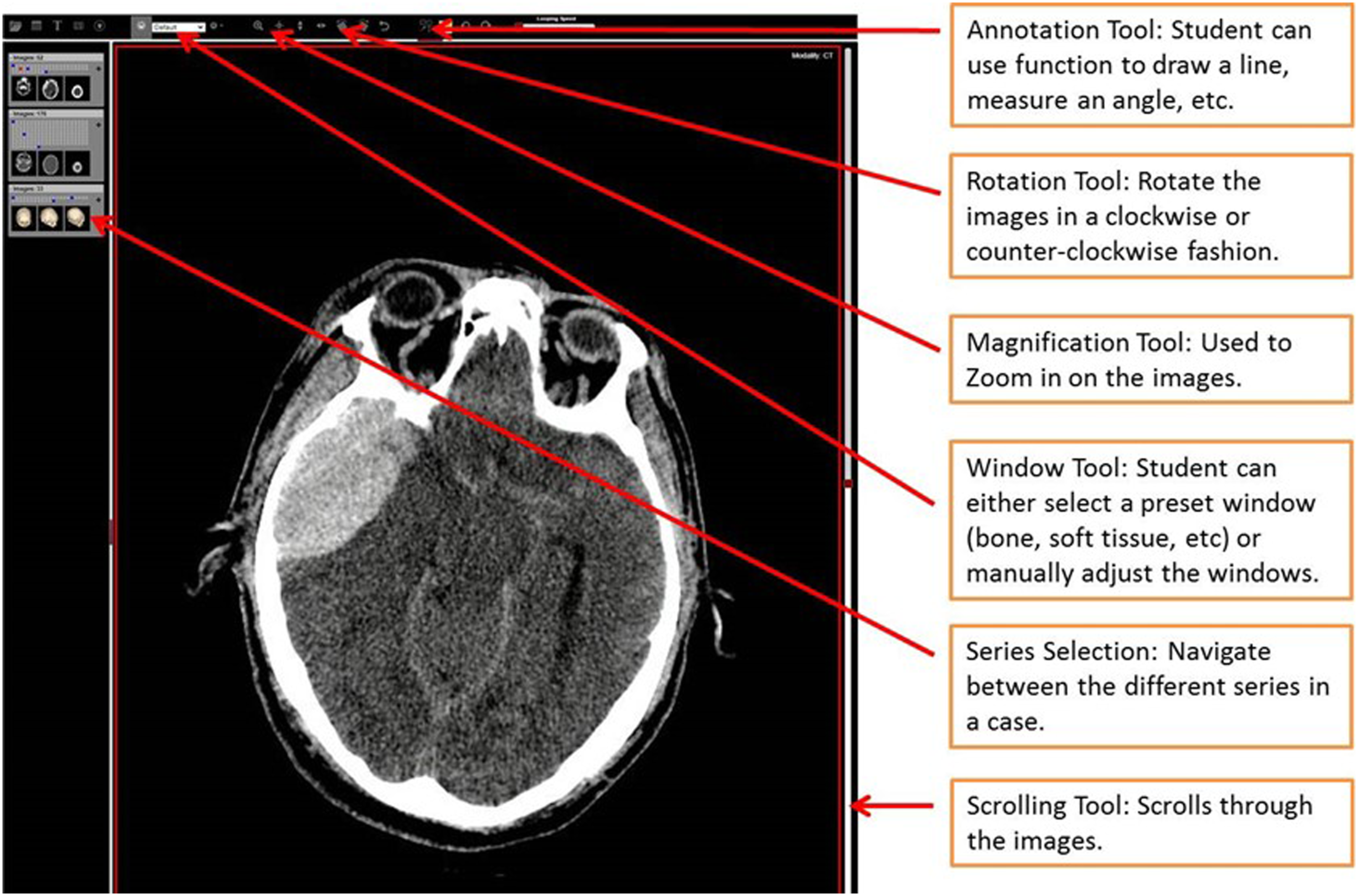
Virtual reality platform (SieVRt)
SieVRt is an all-in-one, web-based server software that provides a VR platform simulating a personalized, 3D, radiology, reading room. Access to SieVRt software is based upon an annual license fee. Users were provided a unique username and password. The images displayed in SieVRt were derived from cases in the MIRC image repository. A VR headset allowed students to visualize and interact with images in an immersive, virtual radiology reading room.
For the purposes of this study, 2 Omen laptops (Hewlett Packard, Palo Alto, United States) were deployed, one for the student and one for the preceptor. Each laptop was equipped with Intel (R) Core (TM) i7-10750H processor (CPU @ 2.60 GHz), 16 GB RAM, and 512 GB SSD internal storage. Each laptop was connected to an HP Reverb G2 headset (Hewlett Packard, Palo Alto, California) headset and two handheld hand controllers. The specifications for the HP Reverb G2 headset are as follows: • Optics: Fresnel Lenses • Display Type: 2 × LCD • Sub Pixel Layout: RBG Strip • Resolution: 2160 × 2160 per eye • Avg Pixel Density: 23.58 PPD horizontal and 23.77 PPD vertical • Refresh Rate: 90 Hz • Field of View: 107 Degree Diagonal • Weight: 498 g including head strap
Each workstation costs $ 3200 CAD ($2200 CAD for each Omen laptop and $1000 CAD for VR headset and controllers). The two annual educational licenses for SieVRT were provided to us at a 50% discount (original price: $600 CAD/license; discounted price: $300 CAD/license).
Figure 2 shows the laptops and VR headsets used to facilitate the VR platform. The hardware used to facilitate each virtual reality platform includes (1) Omen laptop, (2) HP Reverb G2 headset; and (3) two handheld VR controllers.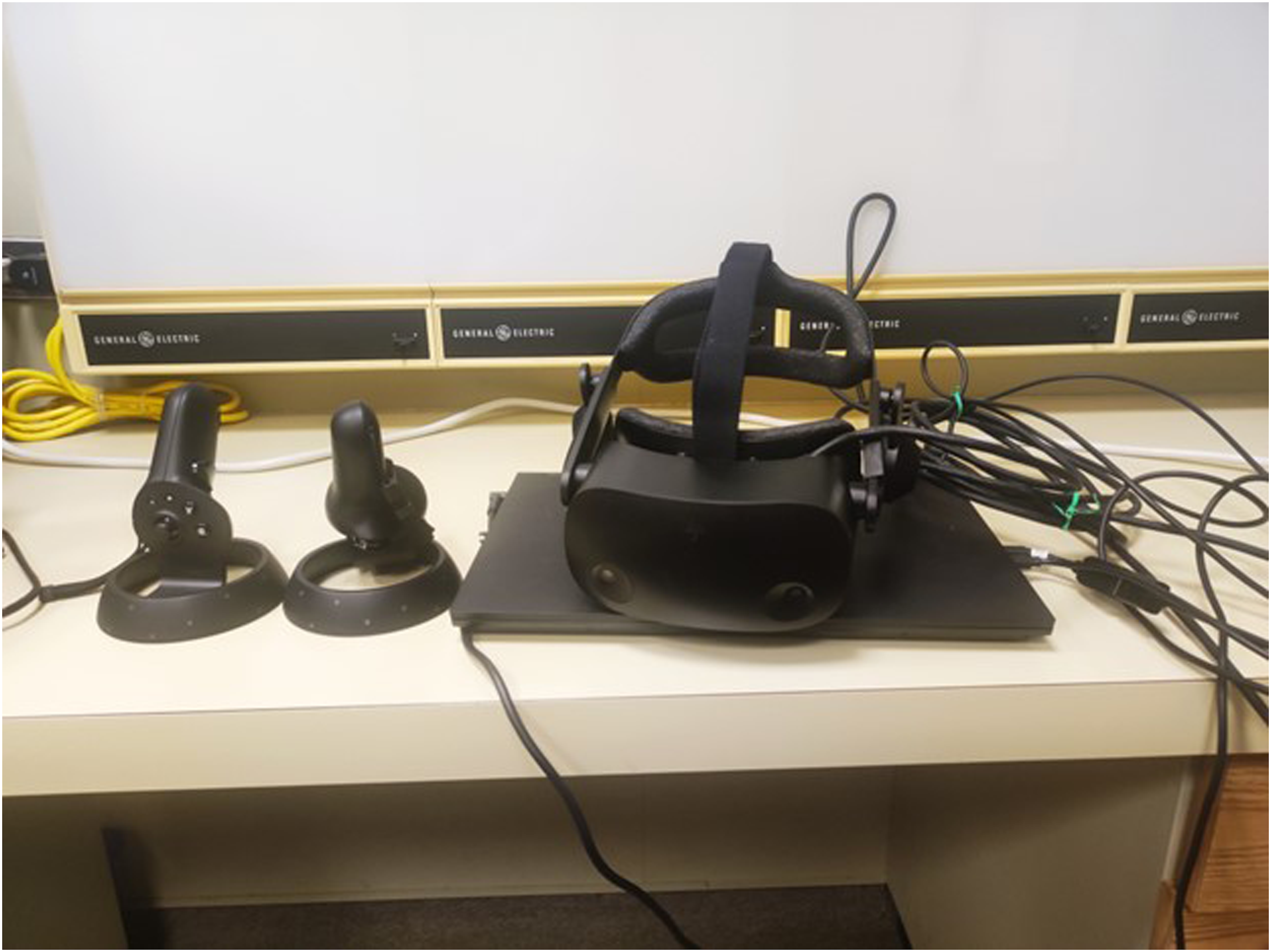
The student could work independently in the VR environment, but the system could also create real-time connectivity between a preceptor and a learner within the virtual environment. This facilitated the sharing of both live audio and video to enhance the learning experience. SieVRt can also host multi-user collaborative learning sessions but this study was limited to two users due to the limited number of personal headsets available.
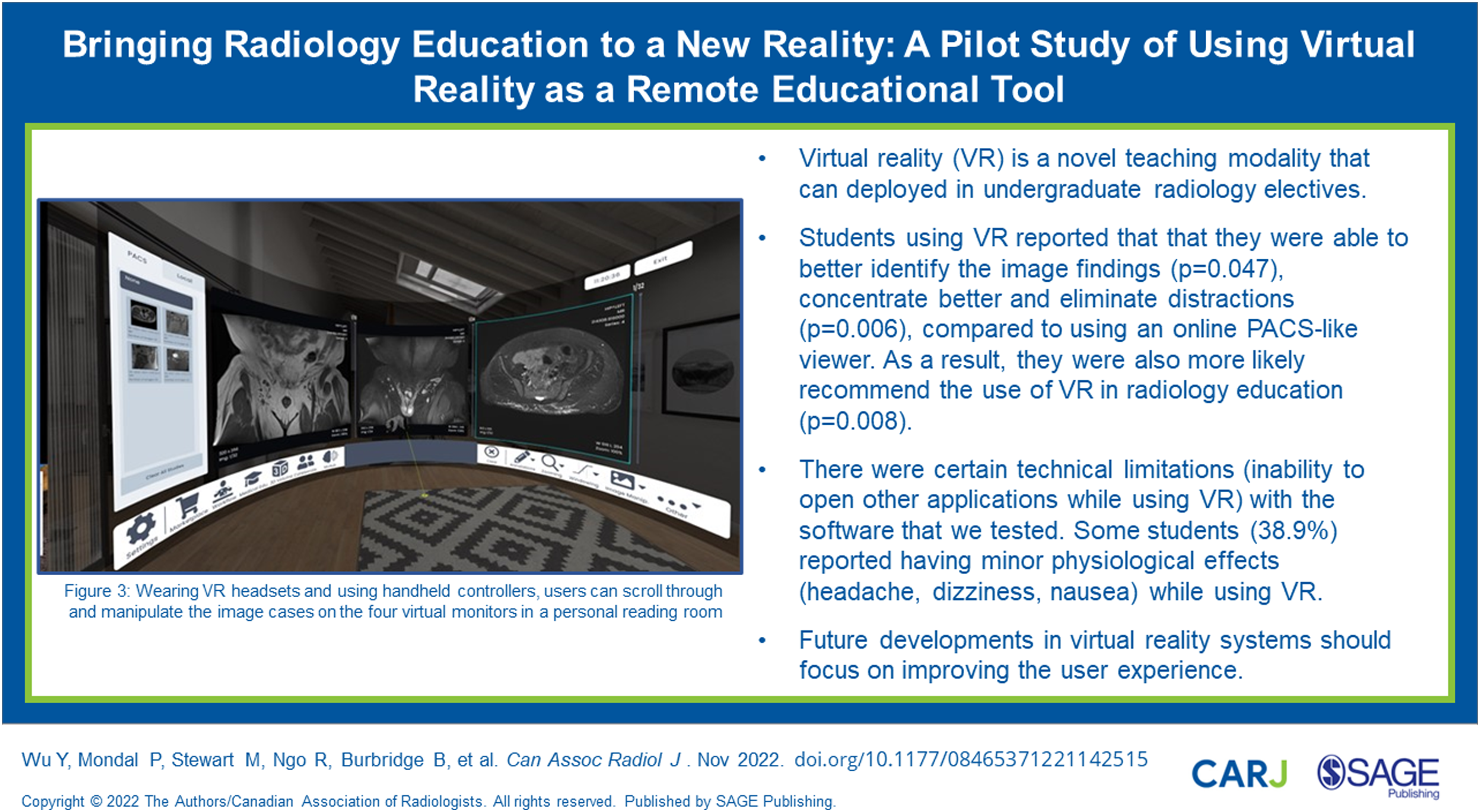
SieVRt provides an integrated suite of digital tools that participants can utilize to view and interact with the DICOM images in a simulated PACS environment. Functional features of this virtual platform allowed users to display single images or stacks of sequential images, alter the brightness and contrast (window width and level) of the displayed images, zoom and pan images, perform various measurements (angles, lengths, area, and pixel densities), and rotate images. Figure 3 demonstrates the view of the virtual reading room created using SieVRt. Wearing VR headsets and using handheld controllers, users can scroll through and manipulate the image cases on the four virtual monitors in a personal reading room.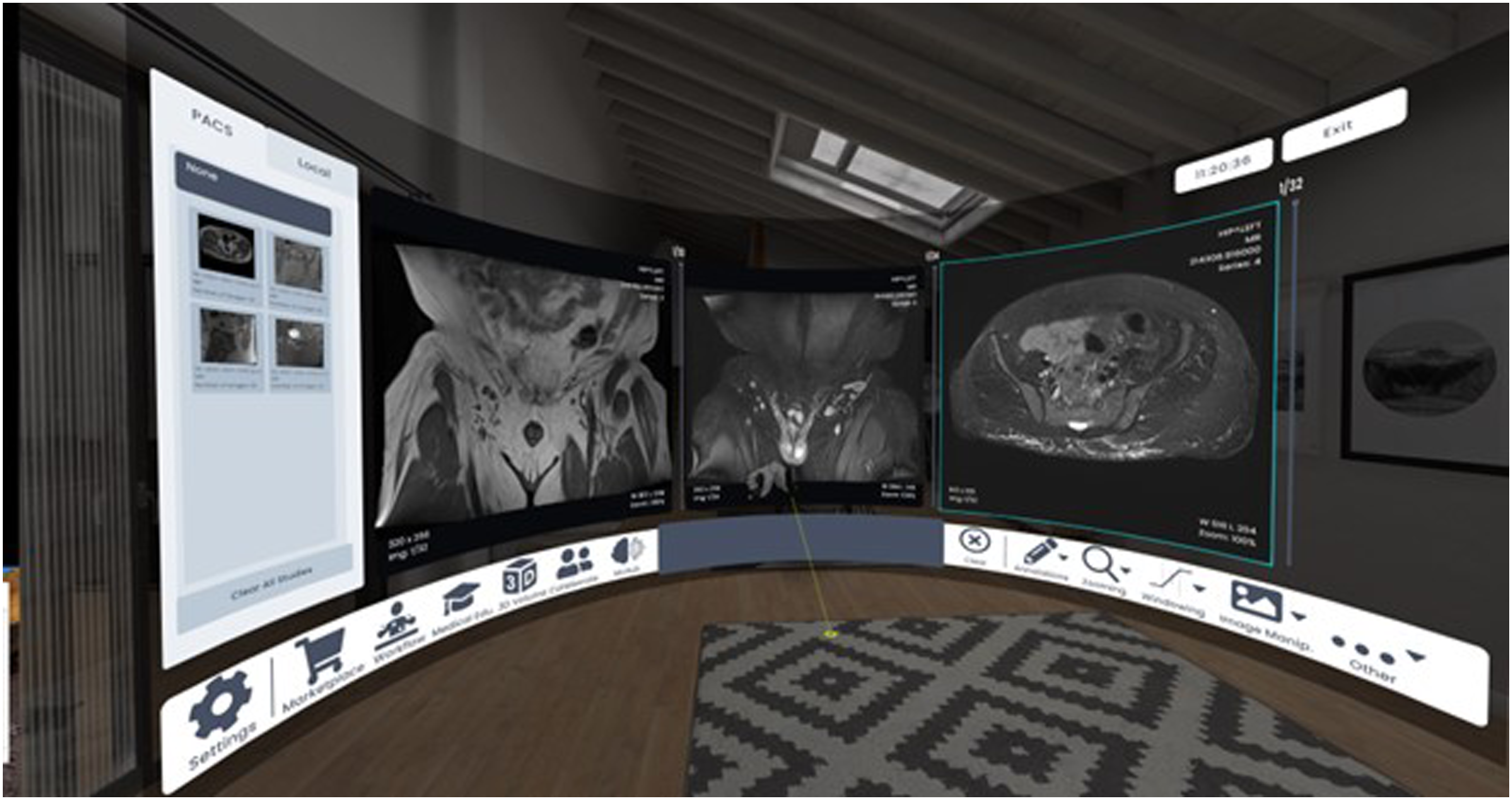
Study Design
This project was funded by a research award from the Canadian Radiological Foundation/Canadian Heads of Academic Radiology (CRF/CHAR).
This project received University of Saskatchewan Behavioral Research Ethics Board approval (BREB – 2299). All students who participated in a 2-weeks radiology elective with our Radiology department between August 2021 and February 2022 were invited to participate in the study. All students voluntarily participated in the VR learning experience.
Participants were final year medical students from the local medical school. None of the students had undertaken a previous radiology elective. All participants underwent a 2-week radiology elective, which included WebEx (Cisco, San Jose, United States) and Zoom (Zoom Video Communications, San Jose, United States) sessions for shadowing/observation sessions with radiologists, attending resident academic half-days, independent study time, and engaging with an online learning platform: Canvas (Instructure, Salt Lake City, United States).
In the last 2 days of their elective experience, students participated in both ODIN and SieVRt teaching/imaging case review sessions. For the ODIN teaching sessions, each student received individualized, interactive teaching for five imaging cases while on a Zoom call with either a PGY-3 radiology resident or a certified radiologist (Y.W. or B.B.). These sessions consisted of a discussion about radiology teaching cases, describing the salient imaging findings, and relevant imaging anatomy. The sessions also included a tutorial on how to operate the various functions of ODIN.
Students were then asked to work through eight cases independently using the ODIN platform. An online quiz accompanied the review of these eight cases and students independently provided their responses without coaching or preceptor involvement. The students were not apprised of the correct answers to the eight quiz cases.
The same students were then scheduled for the SieVRt teaching/imaging case review session the following day. The learner collaboration mode of the SieVRt platform allowed the preceptor and student to engage with one another in the VR environment with synchronization of both the video and audio features of the software. This session again consisted of reviewing five radiology teaching cases with either a PGY-3 resident or a staff radiologist (Y.W. or B.B.), as well as instruction on how to navigate and operate the various features of SieVRt. Subsequently, the students proceeded to independently work through the same eight quiz cases they had seen using the ODIN viewer, using the SieVRt platform. An online quiz accompanied the review of these eight cases and students independently provided their responses with no assistance or input from the preceptor. Again, the students were not apprised of the correct answers to these quiz questions.
To ensure that students have similar learning experiences between ODIN and VR, the same preceptor provided the two teaching sessions to the students. The preceptors used a didactic teaching format with a list of pre-planned discussion points on relevant clinical information, imaging findings and differential diagnosis. For consistency, each teaching session lasted for 30–40 minutes, and students were welcomed to ask any questions they had during the discussion. For preceptor time commitment, this required approximately 30–40 minutes for the ODIN session and 40–50 minutes for the VR session (10 minute set up time and 30-40-minutes teaching time). None of the content provided in the teaching sessions was subsequently tested in the quiz cases. For example, we did not show an ankle fracture and then have a test case about the same ankle fracture. The purpose of the teaching session was to simulate a didactic learning session and to introduce the unique functions available in the two different platforms in order for the students to be able to interact with the test cases optimally and complete the testing successfully.
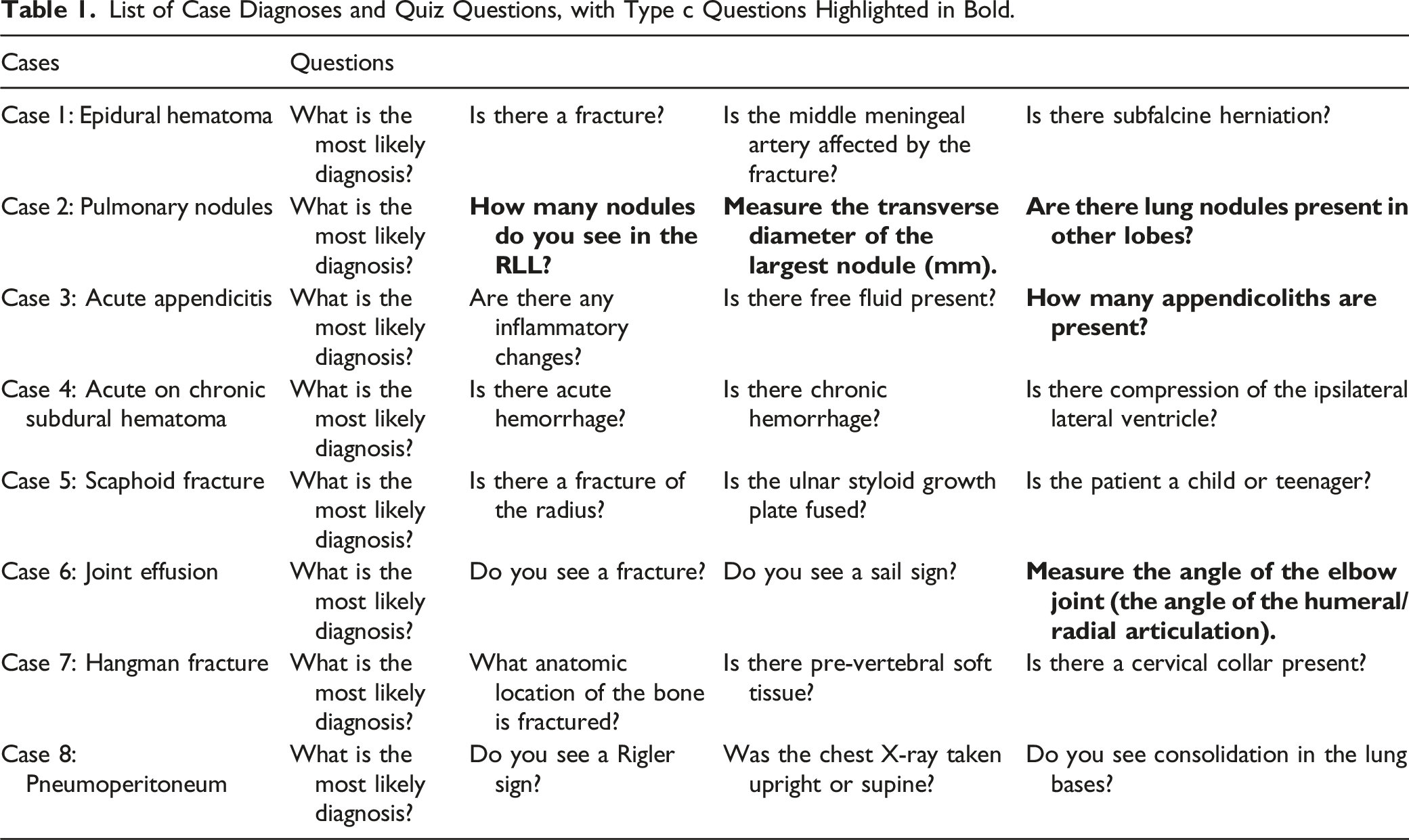
The list of the eight cases and quiz questions utilized are listed in the Table 1. Student performance on the eight cases was assessed using a standardized answer key. There were three different question types provided to the students: (a) questions that tested general imaging knowledge; (b) the diagnosis of imaging pathologies (ie, the presence or absence of a specific diagnosis, such as a bone fracture); and (c) five questions that were designed to detect objective differences in image analysis in an attempt to determine if there were differences between the two imaging platforms in regard to detection and measurement capabilities. These questions assessed participant acumen in performing more quantifiable aspects of image interpretation, such as determining the number and size of visible nodules, as well as providing angle and length measurements. These are highlighted in bold in Table 1: 1. How many nodules are present in the right lower lobe of the lung? 2. Measure the traverse diameter of the largest pulmonary nodule (mm). 3. Are there lung nodules in the other lobes? 4. How many appendicoliths are present? 5. Measure the angle of the elbow joint (the angle of humeral/radial articulation). List of Case Diagnoses and Quiz Questions, with Type c Questions Highlighted in Bold.
Assessment of Student Perceptions
Students also completed an exit survey at the end of their Elective where they rated: (1) their general perceptions of using computer technology for teaching; (2) SieVRt vs ODIN for didactic teaching; and (3) the functionalities of SieVRt vs ODIN, using a seven-point Likert scale (1 = Strongly Disagree; 2 = Somewhat Disagree; 3 = Disagree; 4 = Neutral; 5 = Somewhat Agree; 6 = Agree; 7 = Strongly Agree).
Statistical Analysis
All data were analyzed using Microsoft Excel 2016 (Microsoft Corp, Redmond, United States) and GraphPad Prism 5 (GraphPad Software, San Diego, United States). Quantitative data were analyzed using unpaired and paired t tests. Students’ responses on a Likert scale were summarized using a median score and range. Categorical data were described as frequency and percentage. Student performance and survey responses were compared between ODIN vs VR using the Wilcoxson Rank Sum Test.
Results
Student Demographics
The 19 students who completed the radiology elective were final year medical students from the local College of Medicine. Nineteen students were invited to participate in the study: 18 students accepted the invitation to participate. There were 10 males and 8 females. One student declined participation in the study due to a pre-existing diagnosis of vertigo. Only one student in our cohort has used the VR before. The other students (n = 17) had no previous exposure to VR.
Student Performance
There was a total of 32 questions (8 imaging cases—4 questions per case) administered during each of the assessment sessions. Students were expected to answer all questions to the best of their ability.
There was no statistically significant difference in the pooled, group, mean scores for the students when testing general concepts using ODIN vs SieVRt (ODIN: 79.2 ± 1.9% vs SieVRt: 82.0 ± 1.3%; P = .22).
Comparison of Student Performance on Questions that Assess Objective Performance of the Image Display, SieVRt vs ODIN.

Student Perceptions of the Elective Experience
Perceptions of the use of technology in learning
Most students stated that they enjoyed using technology for learning (16.7% somewhat agree; 38.9% agree; 44.4% strongly agree). They were confident when using technology for learning (5.6% neutral; 22.2% somewhat agree; 38.9% agree; 27.8% strongly agree). Students felt that VR will become a standard teaching tool (38.9% somewhat agree; 33.3% agree; 11.1% strongly agree). Most students also believed that VR will be useful for learning radiology (33.3% somewhat agree; 38.9% agree; 16.7% strongly agree). Student responses on the use of technology in learning are provided in Figure 4. Students’ general attitude toward the use of the technology in radiology education. Statements were ranked on a seven-point Likert scale (1 = Strongly Disagree; 2 = Somewhat Disagree; 3 = Disagree; 4 = Neutral; 5 = Somewhat Agree; 6 = Agree; and 7 = Strongly Agree).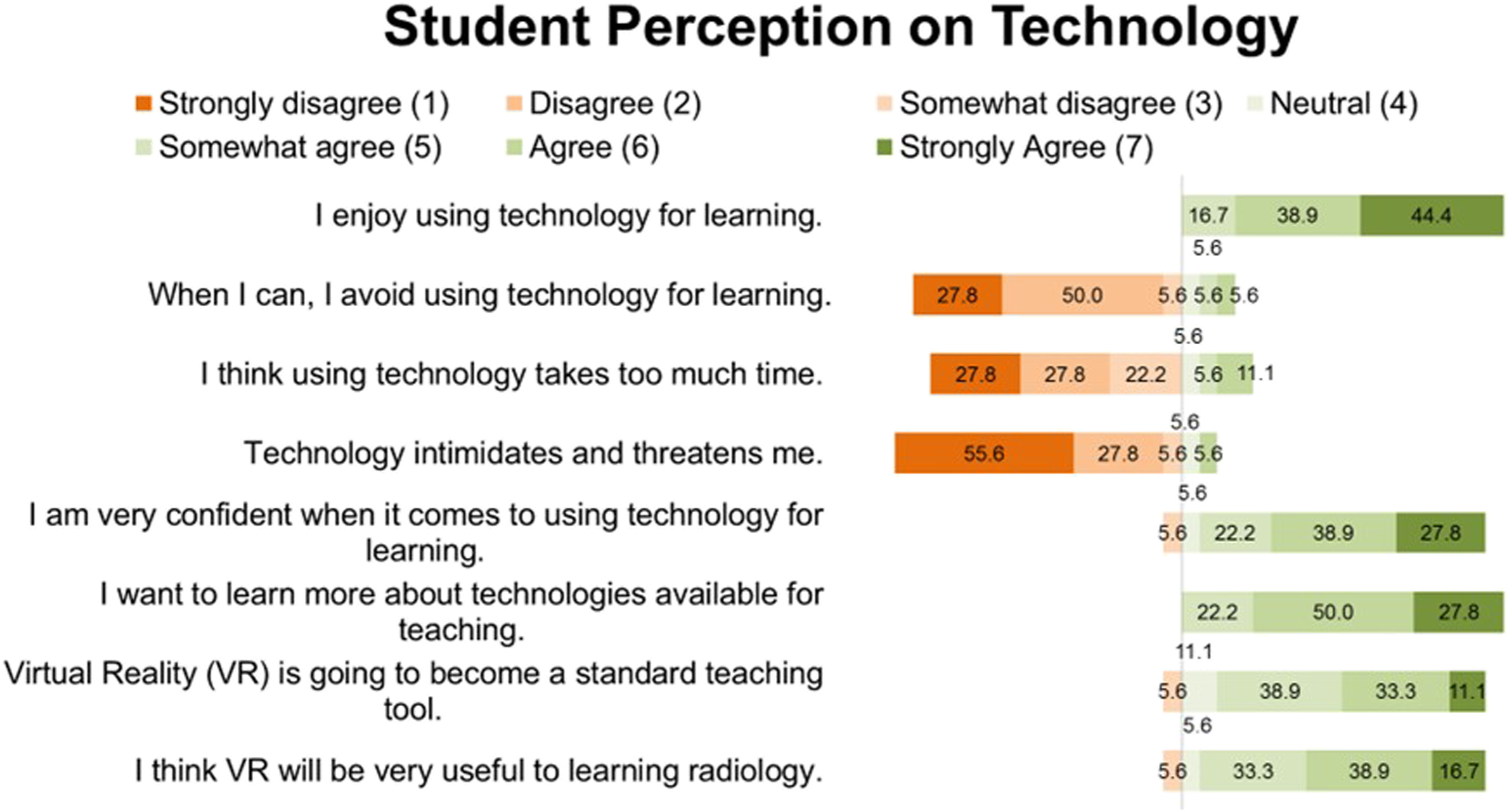
Online DICOM image navigator vs SieVRt for didactic teaching/case quiz
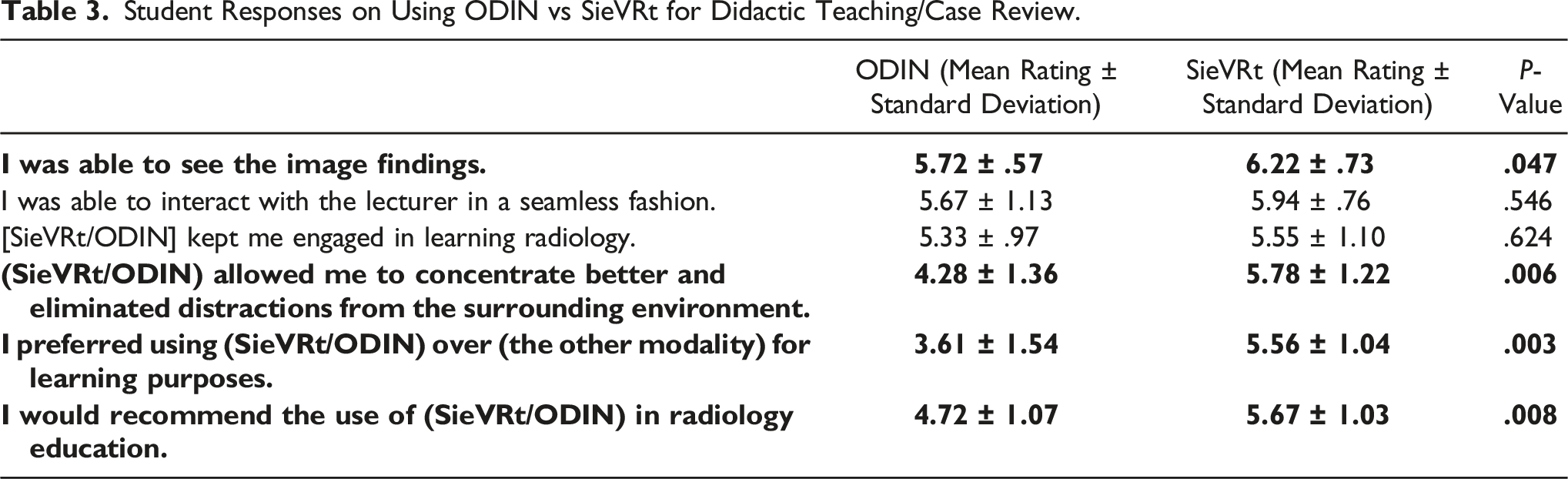
Compared to ODIN, students reported higher satisfaction scores when using SieVRt during didactic teaching and independent case review sessions. Students reported that they were better able identify the image findings on the SieVRt
For both of the tested modalities, students stated that they were able to interact with the preceptor in a seamless fashion (ODIN: 5.67 ± 1.13; SieVRt: 5.94 ± .76). Both SieVRt and ODIN kept students engaged in learning radiology (ODIN: 5.33 ± .97; SieVRt: 5.55 ± 1.10). In both of these areas, SieVRt showed a modest but not statistically significant advantage over oODIN (P values of .546 and .624, respectively).
Student Responses on Using ODIN vs SieVRt for Didactic Teaching/Case Review.
Functional Assessment of SieVRt vs ODIN
Students reported that they were able to see the images more clearly in SieVRt, compared to ODIN (P
For both SieVRt and ODIN, students stated that the platform was relatively easy to log into (ODIN: 6.17 ± .62; VR: 5.72 ± 1.02) and easy to use (ODIN: 5.72 ± 1.13; SieVRt: 5.83 ± .85). They were able to scroll through the images smoothly (ODIN: 6.00 ± .77; SieVRt: 5.56 ± 1.46) and adjust the brightness/contrast of the images easily (ODIN: 5.56 ± 1.46; SieVRt: 5.00 ± 1.57).
Student Responses on the Functionalities of ODIN vs SieVRt.
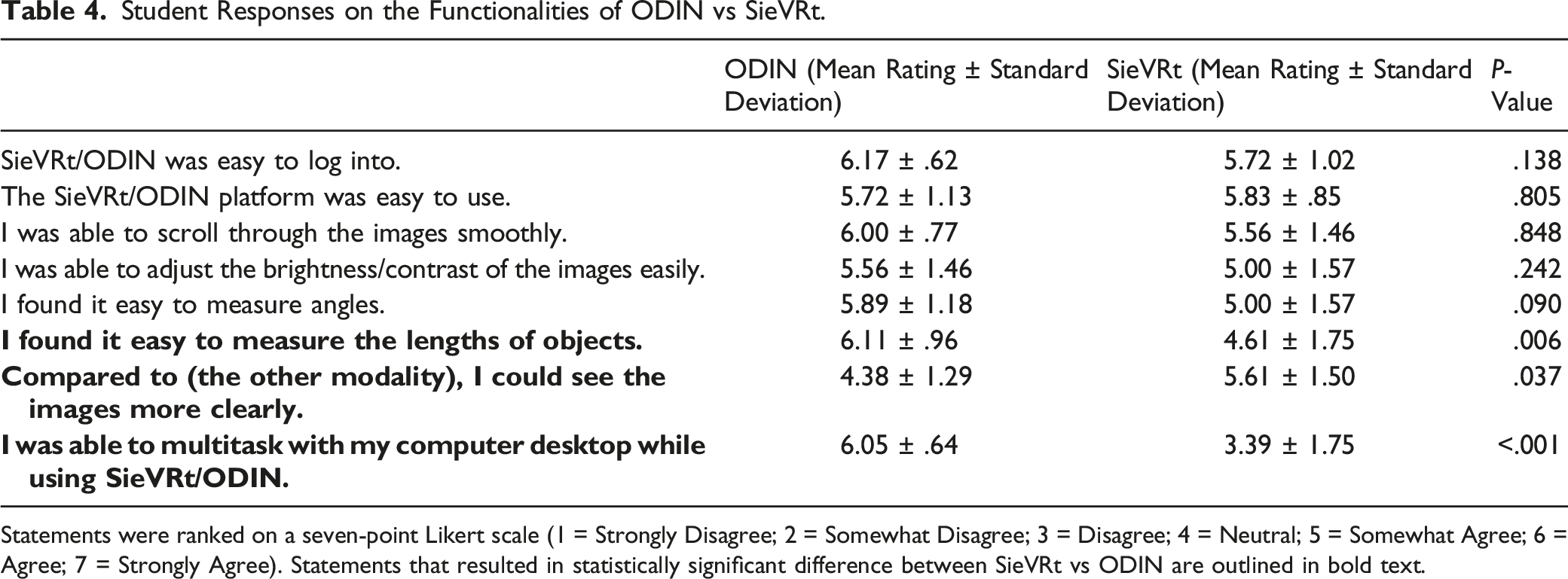
Statements were ranked on a seven-point Likert scale (1 = Strongly Disagree; 2 = Somewhat Disagree; 3 = Disagree; 4 = Neutral; 5 = Somewhat Agree; 6 = Agree; 7 = Strongly Agree). Statements that resulted in statistically significant difference between SieVRt vs ODIN are outlined in bold text.
Adverse Physical Effects
Seven out of 18 students (38.9%) experienced minor adverse physical effects when using SieVRt. Some students reported more than one minor adverse effect. The two most common minor adverse effects were headache (n = 5) and feeling too warm while using the headset (n = 3). Other reported effects include dizziness (n = 2), nausea (n = 2), and visual disturbances (n = 2).
Other Considerations
Adapting to this new modality of teaching presented some challenges, especially in the initial stages of the project. Initially, it was difficult to establish an audio/video connection with the student during the collaborative SieVRt teaching sessions. This issue was caused by the firewall settings of the hospital’s Wi-Fi connection and was resolved by using our post-secondary institution’s Wi-Fi connection.
In addition, there were many wires and multiple connections involved in setting up the VR headsets and the laptops. A typical session would require 10–15 minutes of setup to ensure that the cables/wires were connected, and that the hardware is working appropriately, prior to the student arriving. Replacement of these wired headsets with wireless headsets will minimize set-up time and allow for a more efficient and less constrained user experience.
Discussion
In the past, radiology electives have been primarily observational experiences with medical students shadowing radiologists and residents. These electives are associated with limited clinical responsibilities and few opportunities for active engagement during the elective experience. Several studies have shown that providing students with an experience that simulates a radiologist’s workflow improved learning outcomes and learner satisfaction. Friedman et al and Strickman et al showed that students who reviewed anonymized cases on an interactive DICOM server reflected more positively on their elective experiences and performed better on musculoskeletal (MSK)-based competency exams, compared to students in the observational role.4,29
In our project, we incorporated VR as the platform for hosting imaging cases, which allowed for a more immersive, interactive experience that eliminated distractions from the surrounding environment. To our knowledge, this is the first study examining the use of VR in clinical radiology education. Students had a favorable perception of VR for radiology teaching. They viewed VR as a potential educational tool that could be useful for learning radiology. Given the lack of literature on the use VR for undergraduate radiology education, these results provide significant insights into the student’s perspectives.
Given that our study was conducted during the COVID-19 Pandemic, it was imperative to facilitate socially distanced learning. We made use of the collaborative function conferred by the VR system, which allowed preceptors to communicate with students using real-time audio and video functionality in the VR workspace without having to be in the same physical space. This novel ability to converse and interact in the VR software allowed for one-on-one teaching with the students. The SieVRt system is also capable of providing collaborative teaching sessions to groups of students, but we did not explore this as there were only two headsets for the purposes of this project. This presents an opportunity for larger group and long-distance learning without requiring the preceptor and learner(s) to be in the same physical space, which may be utilized in the broader context to host remote teaching sessions and workshops. This includes training residents, fellows, and radiologists in various diagnostic skills such as CT colonography and lung cancer screening and to offer CME-based educational activities.
Interestingly, there were no significant differences in the overall student test scores between ODIN and SieVRt. However, students reported many benefits and advantages when using VR as a learning platform. Students reported that they were better able to see the image findings. They stated that VR allowed them to concentrate more effectively and eliminate distractions from the surrounding environment. They preferred using VR over ODIN (a traditional online PACS-like viewer) for learning purposes. Overall, students stated that they would recommend the use of VR in radiology education. This is supported by previous literature which demonstrates that the use of VR improves learner engagement and outcomes.26,30,31 This is particularly valuable in the context of undergraduate radiology electives to stimulate student interest and motivation in learning radiology. In addition, the use of VR headsets allowed students to have their own high-resolution “monitors,” thereby eliminating the need for them to look at the clinical images “over the shoulder” of an interpreting radiologist. Similarly, Stepan et al. found that although students using VR did not show a significant improvement in neuroanatomy knowledge acquisition, they found the novel modality more engaging and thus were more motivated to learn. 32
Despite a lack of statistical difference in overall test scores, when we separated the questions designed to assess objective detection and measurement capabilities, we found that students statistically performed better on two of these five questions when using SieVRt. To our knowledge, our study is the first to examine the ability of VR to detect subtle radiological findings. Given that VR improved the ability of participants to visualize three-dimensional anatomy in the surgical literature,30,33-35 it is not surprising that VR may confer enhanced detection and measurement capabilities in the radiology setting.
There were several drawbacks to the VR system that we tested. One of the limitations with the VR software was the difficulty in multitasking (ie, opening web browsers while in SieVRt). It would be useful to have the ability to browse the internet while in the virtual environment to allow students to research relevant imaging findings/pathologies. We are currently discussing options with the vendor to incorporate a web browser function within SieVRt that would allow students to access certain webpages (such as Radiopedia, STATDx, etc.), which may offer a solution. Another limitation was the number of wired connections required to set up the VR devices, which increased the set-up time and limited physical movement for the users. Wireless headsets would eliminate these issues.
Some students reported that they found it difficult to measure lengths of objects in SieVRt. This is likely due to the functionality of the VR software and limitation of the handheld controllers used. It was found to be difficult to stabilize the VR hand controllers when performing a measurement. Despite this, the students still performed better on the question that required them to measure the transverse diameter of the largest lung nodule using SieVRt, perhaps due to the better image resolution afforded by the VR headset and the ability to concentrate on the task at hand. This further supports the premise that the use of VR may bolster detection and measurement capabilities, particularly if vendors are able to improve the user experience related to the hand controllers.
In our study, 38.9% of the participants experienced minor adverse effects while in the VR environment including, headache, dizziness, and feeling too warm within the headset. Unfortunately, one student declined to participate in the study due to previously diagnosed vertigo. It was felt that her symptoms may be exacerbated by using a VR headset. Adverse effects while in the VR environment are commonly reported in the literature, particularly with the use of full-immersion VR headsets.31,36 Similarly, Moro e al found that students who used VR to “dissect” a virtual cadaver reported more adverse effects compared to those who performed the same task using augmented reality or a three-dimensional model on a tablet. In their study, 40% of students reported having general discomfort, 40% reported having dizziness, and 35% reported having blurred vision. 37 To mitigate the adverse effects in the future, we could suggest students have scheduled short breaks during the sessions to minimize any discomfort.
It is also possible that students may become distracted by the novelty of VR technology if they have never used it before. One student in Moro et al’s study commented that he/she was “very distracted by how cool the program [VR] is” and that he/she wasn’t focused on the learning aspect. 37 In our study, only 1 student in our cohort have used the VR before; the other students (n = 17) had no previous exposure to VR. Contrary to previous literature, we found that the students reported being able to concentrate better in VR compared to the traditional online PACS-like viewer.
Limitations
There were limitations of our study. Firstly, this was a single institution experience with a relatively small sample size (n = 18). We were constrained by the number of elective students and number of headsets available. Additionally, there is an inherent power imbalance between students and preceptors. Although we stated that student performance on project related tasks was independent of the elective evaluation process, students may have felt that their participation could potentially alter their final evaluation. Consequently, participants might have felt compelled to answer questions in a manner that they felt the researchers were seeking.
Our cohort consisted of fourth-year medical students who were pursuing a radiology elective and likely had more interest in medical imaging. Although all students who applied for a radiology elective was accepted, these students were likely to have a stronger background knowledge and may have used additional educational resources (Radiopedia, textbooks, imaging websites, E-Anatomy, etc.) to supplement their learning during their elective. In addition, students had the ODIN sessions before the VR sessions. Although we did not provide students with the correct answers to the cases, students may have gained familiarity with the cases or looked up the answers between the two sessions. This may have confounded our objective testing. However, participants’ overall performance was equivalent across both ODIN and SieVRt, supporting that additional knowledge acquisition did not favour one technology vs the other.
Students only had one single interaction with using VR and may not have had enough opportunities with the software to develop a noticeable improvement in the test scores. In addition, the two preceptors in this study were two of the coauthors of this manuscript. Given this small sample and potential bias, we did not seek formal feedback from the preceptors. Time commitment from faculty members may present as a possible challenge as radiologist may have to take time away from clinical duties to facilitate the teaching sessions. In the future, we plan on developing a clinical case database that students can work through on their own to maximize their exposure to VR and minimize time commitment from faculty preceptors. With more exposure to VR, students may demonstrate a statistically significant improvement in objective test scores.
In our study, we did not measure the cognitive load associated with fully immersive VR. Frederiksen et al showed that compared to using a conventional simulator, fully immersive VR increased cognitive load while performing simulated laparoscopic salpingectomies, as evidenced by increased reaction time to an auditory stimulus. This was hypothesized to be due to an environment with increased complexity and increased number of elements to interact with. However, the authors did acknowledge that although fully immersive VR resulted in a higher cognitive load, it simulated the real-world clinical scenarios with more realism. 38
Conclusion
This is the first study, to our knowledge, examining the use of immersive VR to facilitate clinical learning in radiology. Despite some shortcomings associated with this technology, students commented positively about their use of VR to learn radiology. Many students felt more engaged by this novel teaching modality and stated that they would recommend the use of VR in radiology education. Further developments in VR systems should aim to improve the user experience by attempting to address the technical and undesirable physical effects of this virtual environment.
Footnotes
Acknowledgments
We would like to acknowledge staff members from Luxsonic Technologies Inc. (Saskatoon, SK) for their technical troubleshooting and for providing Figure 3 in our manuscript. In particular, we would like to thank Mike Weslowski, PhD., and Arjun Puri, MSc., for their help throughout the project.
Declaration of Conflicting Interests
The author(s) declared the following potential conflicts of interest with respect to the research, authorship, and/or publication of this article: The authors declare that they have full access to all the data in this study and the authors take complete responsibility for the integrity of the data and the accuracy of the data analysis.
Funding
The author(s) disclosed receipt of the following financial support for the research, authorship, and/or publication of this article: This research project was funded by one of the 2021 Canadian Radiological Foundation (CRF)/Canadian Heads of Academic Radiology (CHAR) Research Awards.
