



Abstract
The School of Engineering and Technology of Central Queensland University focuses on the continuous development and innovation of best learning and teaching practices to increase student retention and improve their learning experiences. Face to face and distance learning (teaching delivery models) are fundamental aspects of providing quality support to the students’ learning. One incredibly important aspect of students’ learning is to provide relevant industry-related projects and applications of relevant simulation software to mimic the systems. This paper develops students’ essential problem-solving skills and control strategies of fluid power systems in mechanical engineering through the Master of Engineering programs by employing Simulink, SimScape Fluid applications in Matlab software and Energy Plus with Design Builder. The main focus is to ensure that the students achieve the required skills of building fluid circuit models based on physical connections that directly integrate with appropriate symbols and modelling paradigms in fluid power applications to model the appropriate physical models to mimic the industrial fluid power projects selected. The basic ideas and content are to be delivered through weekly lectures and tutorial sessions, and the students’ skills in fluid power systems and software are developed and monitored through weekly workshops scheduled for all projects. The key outcomes of this study are the level of understanding of fluid power systems, development of simulation skills using the software indicated, interpretation of the results the students have obtained and validations of those results. The students must show they have developed appropriate problem-solving skills using simulation software, professional presentation and effective team-building skills. As the students develop appropriate problem-solving and engineering practice skills, their satisfaction and feedback rates improve significantly.
Keywords
Introduction
Today, computer-based simulations in student learning and teaching (L&T) activities (in-class and out-of-class) and proper student engagement for learning are popular. The simulations of real physical systems have emerged as powerful tools for the design and analysis of many engineering systems. Using this simulation software, students should carry out several trials of a new design before selecting a final design. Therefore, modelling and simulation are required during the design cycles for the construction of an engineering structural member. It helps to find the optimal design and it is economically viable. Unlike in a laboratory environment, the simulation software can manage many boundary conditions and different materials easily. Therefore, the use of commercial software to improve the design is essential and it makes the students practicing engineers and it improves their apparent competence, learning satisfaction and self-efficacy.1–5 The employment of simulation software in nursing education is equally important.6–8 The simulation software also improves students learning with real-life engineering problems to enhance the students’ discipline knowledge and problem-solving skills. 9 A project-based learning (PBL) unit is the best mode to employ the simulation software, 10 and the simulation technology develops new teaching scenarios to meet the students’ expectations. 11 By integrating a commercial software, ANSYS Fluent, into upper-level undergraduate and graduate units, Ray and Baskaran 2 carried out a case study on computation fluid dynamics (CFD) students to evaluate various in-class and out-of-class learning materials. They found that student learning mainly happened from out-of-class learning material activities. The student performance and satisfaction resulting from online tutorials and homework are better than that from lectures. As a best practice L&T strategy, they focused on in-class time for students to train them to use out-of-class materials effectively. For instance, Wong et al. 12 found that visually appealing teaching materials using CFD simulations tended to increase students’ attention and interest. The authors found that the student assessment results showed an improvement in subject matters after attending the CFD sessions. Jithish and Kumar 9 claimed that the students without programming skills but with computer-aided design skills were very interested in CFD simulations. Away from CFD simulations, Liao et al. 13 developed an internet-based traffic simulation framework to enhance the learning experience for transportation students and engineers. Its improved limitations of existing tools required a significant amount of time to model, perform the calibrations and analyse the results. Although there are more possibilities in many disciplines, Rodgers and Morega 14 pointed out the students’ frustration of learning to ‘think’ like the simulation software – indicating a perception of the difference between human and machine thinking. On the other hand, Hlupic 15 showed that users were happy with the simulation software packages that were generally easy to use and with good visual facilities. Still, there were limitations in learning packages, lack of software compatibility and output analysis facilities and so on. However, Rosenberg et al. 16 articulated the characteristics of simulations as robustness, ease of learning, solution efficiency, ease of regular use, maintainability, range of modelling features and extendibility.
The effects of the COVID −19 pandemic on student learning are very important. Banday et al. 17 assured that student learning through e-learning, online or distant modes was increasing slowly before the pandemic started. With the recent transition to online modes, the teaching of the theoretical and methodological concept of simulation software relating to fluid power engineering has changed. The implementation of information and communication technology (ICT) in teaching practices in increasing student engagement in learning and analysis of the simulation software resolved many problems. For successful online delivery of simulation-based units, there is a need for effective collaboration between the students and teachers with the availability of good ICT facilities and fundamental support. 18 One student's reaction recently to online delivery due to COVID-19 problems shows a positive sign – ‘actually, if I attended the unit physical present in class then it will be more beneficial. But the professor taught in such an incredible way that I didn't feel that I was studying online’ (student feedback 2020).
In STEM (Science, Technology, Engineering and Mathematics) education, simulation software on fluid power provides a way to explore and expand students’ knowledge of hydraulic fluid power systems. Pagan 19 employed Simumatik3D software for the STEM students to assemble and create new hydraulic circuits using related symbols. The author pointed out that the software provided a positive influence on the students’ knowledge and interest in hydraulic fluid power and the software produced several best practices for engineering STEM applications. Vasu, 20 on the other hand, stated that the study on introductory methodology through simulation for distance students was very useful.
Instructions in numerical simulation using CFD software or other software such as MatLab (Simulink, SimScape and SimScape Fluid) consist of numerically solving algebraic equations on a computer. The applications of simulation software to student understanding of core engineering concepts were effective. 1 The author articulated that the students with the simulation group performed better on the final examination. Student learning based on simulation studies reveals that they learn more and retain it longer as they are applying it in their workplace. 21 Integration of simulation-based energy management techniques in an undergraduate engineering curriculum enhanced student learning. 3 Through a PBL environment, the students achieved L&T and research skills, including simulation principles, assessment procedures and effective energy management procedures. To show the effectiveness of computer simulation on laboratory instructions, Wilson 22 compared the computer simulation strategies and hands-on experience in laboratory procedures and argued that a similar result could be obtained regardless of whether the laboratory instructions were given by using the computer simulations for basic fluid power circuitry or by the hands-on method. Observing teaching and learning thermal science is a big challenge, Alam et al. 23 developed a cost-effective, user-friendly and straightforward learning and teaching process incorporating hands-on practical experiments, video images of real-world experiments and computer simulations. They found that it was equally useful for both on-campus and off-campus students. However, Ray and Bhaskaran 2 iterated that most student learnings happened outside of class.
Integration of simulation in the engineering curriculum has received momentum in recent time. Ray and Bhaskaran 2 employed improved strategies for teaching CFD using the commercial software ANSYS Fluent for graduate and undergraduate students. Two important student learning resources such as out-of-class learning materials and in-class active learning techniques were studied. When the simulation is embedded into the curriculum, both the theoretical concept of the software and the implementation of the software are essential. Stern et al. 24 initiated a CFD educational interface for engineering students to develop both the concept and skills. Concurrently, the development of teaching modules for basic computational, experimental fluid mechanics and uncertainty analysis integrating simulation technology was underway for the undergraduate engineering curriculum. 25 Different university and software companies then collaborated together to develop, implement, disseminate and evaluate web-based teaching modules through further development of FlowLab. 2 A few universities such as Cornell University, the University of Iowa and the Iowa State University identified successful student learning outcomes due to the integration of simulation in the curriculum considering student formative and summative evaluation.
The thorough literature search stated above revealed that the applications of simulation software at all levels of student learning are useful. It creates not only interest in the core content of the subjects but also provides a way for the students can understand physical system behaviour and related analysis. In the areas of hydraulic fluid power and energy management, it is necessary how a particular simulation activity integrated into the curriculum and engineering student engagement can evolve student learning and interest useful for becoming practicing engineers. In this respect, two postgraduate units of Fluid Power Engineering and Control (ENEM20002) and Thermofluids Engineering Applications (ENEM20003) are considered in this study to explore the influence of simulation software on the student learning and understanding of core engineering concepts of these units. An earlier version of this paper was published at an engineering conference. 26 The research question is to measure the effectiveness and impact of simulation software employed in these units by collecting the student reaction and satisfaction data obtained through the Central Queensland University (CQU) online survey system.
Methodology
In this study, the implementation of simulation software is carried out for ENEM20003 (fluid energy management using Design Builder software) and ENEM20002 (fluid power application using MatLab – Simulink, SimScape and SimScape Fluid software). The student cohort is at the postgraduate level of Mechanical Engineering. Both units utilise PBL teaching pedagogy.3,27 In addition to the implementation of the simulation software for their projects, other student engagement modes for student learning are weekly lectures, tutorials and laboratory activities. The scopes of the two projects were given to students for each unit. They completed the projects in teams, satisfying the scopes provided and project team reports were submitted at a particular time set by the coordinator of the units. A flow chart of the methodology is presented in Figure 1. The stages of the methodology of the study are presented briefly in the following. It details the activities associated with the stages.
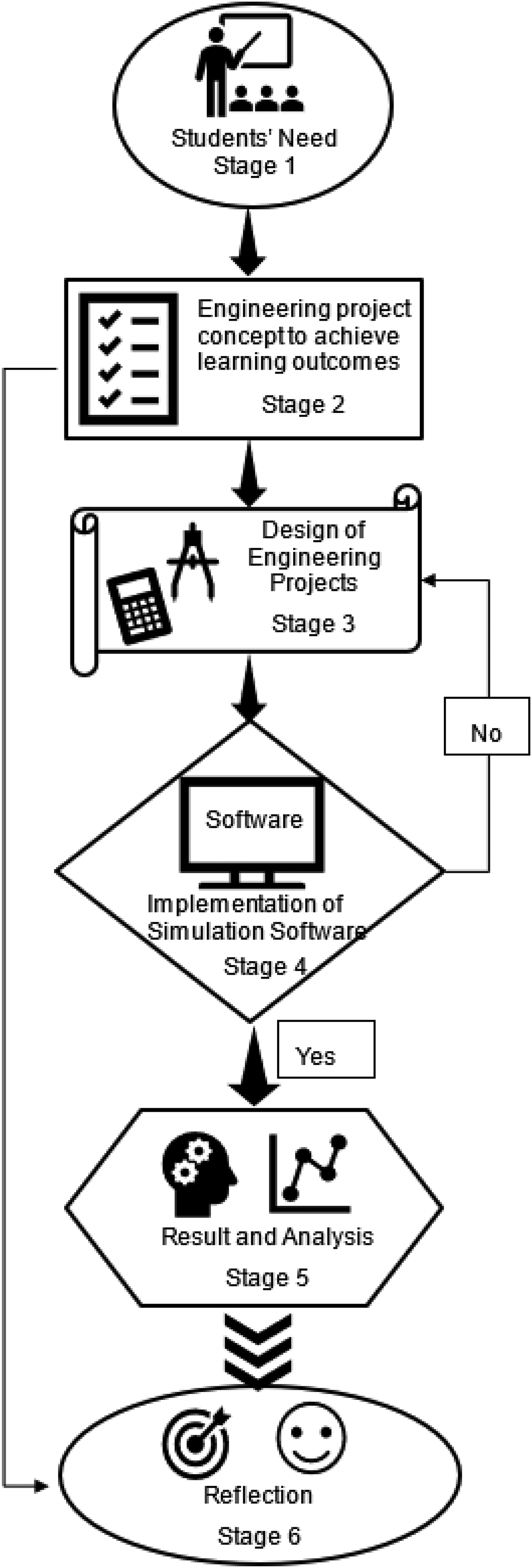
Methodology of simulation software in the units to enhance student interest and learning.
Stage 1: Students’ needs – the students’ learning needs are identified around the types of software required to teach the technical content of the units. This will be accomplished by reviewing the unit content and identifying key material required to be investigated. In addition, the identification of gaps in students’ knowledge is established through anecdotal notations from lectures, tutorial sessions and workplace discussions. The needs can be different for school outgoing, mature aged and different cultural backgrounds students. It is identified through unit Moodle and weekly workshops for real engagement time. Additional support for more tutorials on software can be included.
Stage 2: Project concepts satisfying unit learning outcomes – requires the introduction of project concepts satisfying the learning outcomes of the units such as ‘evaluate the characteristics of different drive systems with regards to the application’ and enhancing the students’ knowledge of core skills of fluid power and energy management principles in context.
Stage 3: Design of projects – scoping of the team projects is formulated by integrating the design steps to improve student research skills and problem-solving skills. The students are to reproduce the physical systems (their new design) such as a new stone crusher using Simulink, SimScape and SimScape Fluid for analysis, evaluation and verification.
Stage 4: Implementation of software to simulate design model – requires the introduction of software that can mimic a real design and simulate the exact behaviour of the physical system under consideration. It includes modelling the physical problem, determining all input parameters and carrying out simulations. It also includes resolving the error messages if any.
Stage 5: Interpretation of results and analysis – after a successful simulation, the analysis of the output data is carried out to identify the trends, behaviour, nature of data, etc.
Stage 6: The reflection of simulation results and plotting – the data presented on graphs is reflected upon, and a few conclusions regarding the behaviour of the design in service or under load can be articulated.
The important part of the PBL units is the scoping of the projects considered for student learning. The scoping of the projects is defined clearly and uploaded to the Moodle site before the term starts. The scoping documentation provides guidelines on what are the expectations of the studies, such as how to introduce new designs and analysis, how to use the simulation software and how to compare and verify the results. An assessment rubric of the projects on how the scoring evaluation is carried out is also uploaded to the Moodle site along with the project scoping documentation. The scoring evaluation is based on criteria relating to the keywords essentials for a different level of achievements such as ‘excellent’, ‘very good’, ‘good’, ‘pass’ and ‘fail’. The student team submission reports are assessed by mapping the keywords set in each level to determine the scope of the report. The individual student assessment/grade is evaluated based on the model developed recently. 28
The student engagement activities include weekly lectures, tutorials and laboratory sessions and workshops on projects and simulation software. At the end of a teaching term, the university carries out an anonymous student experience survey (SES) using ‘Have Your Say’ to get their experience throughout the term. The data obtained from the survey is employed here to show the impact of the applications of simulation software in units delivered. The students’ reactions and the online evaluations of both the qualitative and quantitative data for ENEM20002 and ENEM20003 are presented in the result section.
Results and discussions
CQU utilises online evaluation surveys for each unit in each term of the year through an SES. This SES survey is a standard Moodle site-based survey fully controlled by the university – there is no control of the coordinator of the unit for timing, the question set, etc. The standard survey questions are presented in Appendix A. With careful consideration and evaluation of the survey data, the Matlab (Simulink, SimScape and SimScape Fluid) simulation software was introduced for ENEM20002. The student numbers of this unit are 11 in 2021, 19 in 2020, 79 in 2019, 128 in 2018 and 33 in 2017 in recent years. Recently, the student number is lower because of COVID-19. Not all the students participated in the survey. The students who participated in the survey can be calculated from the response rate value in Figure 2. For ENEM20003, the fluid and thermal energy management software (Design Builder) was employed. The number of students’ enrolment varies in different terms of the year. For example, the total enrolment was 13 in T1 2021, 20 in T1 2020, 96 in T1 2019, 42 in T2 2019, 25 in T3 2019, 60 in T2 2018 and 34 in T3 2018. The survey participant numbers are 13 out of 13 in T1 2021, 16 out of 20 T1 2020, 83 out of 96 in T1 2019, 29 out of 42 in T2 2019, 24 out of 25 in T3 2019, 30 out of 60 in T2 2018 and 27 out of 34 in T3 2018. In the survey result, numerous positive feedback was received from the students on the software application. For instance, one of the students commented, ‘we have learnt the design-builder software, which will help us in our real life and professional career as well. This software has a wide range of uses, and this course helped us in learning the software in the best way’. Another student said, ‘I have learned a new software named Design Builder which developed my technical skills as well’. On the other hand, there were few negative comments on software also received, but those are mostly related to the required computer facilities. For example, one student wrote, ‘I faced some difficulties loading the design-builder software in the campus computers’.
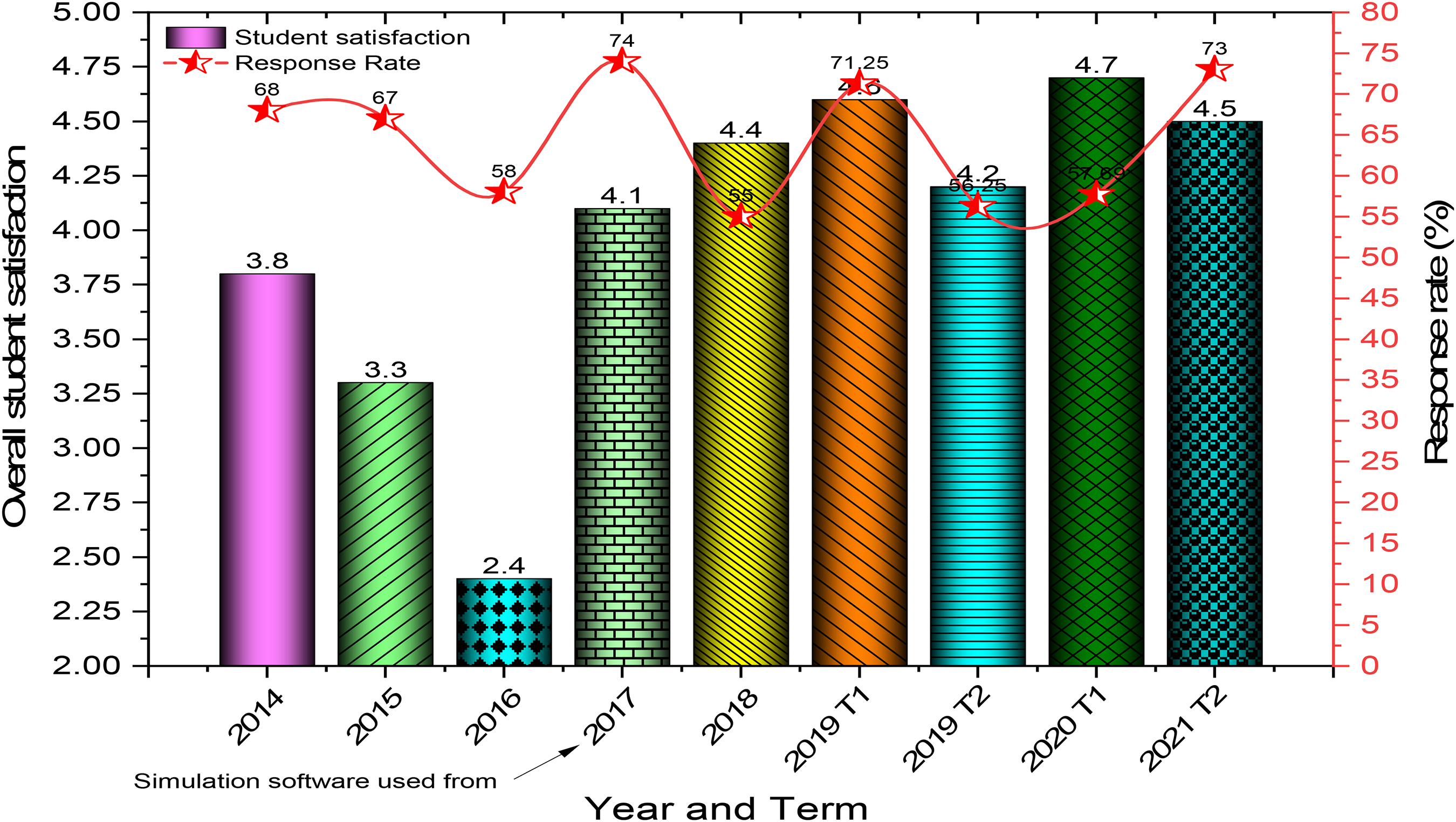
Student satisfaction (series 1) and student feedback rate (series 2) for ENEM20002.
For the proper scoring of student marks, the same project is considered for the teams in a particular year. However, the different projects are introduced in different years – therefore, the methodology is different over the years.
The data set obtained through SES is unanimously positive. Both quantitative and qualitative student feedbacks are considered. Figure 2 presents student satisfaction and survey response rates, and Figure 3 presents student reactions to other descriptors for ENEM20002. The application of simulation software along with other measures was employed for the first time in 2017 and a low-performing unit until 2016 (Figure 2) improved significantly and has since been maintained above the corporate target of 4.0/5.0 on a 5-point Likert scale.28,29 It shows a clear impact of using Simulink, SimScape and SimScape Fluid in the unit for student understanding and knowledge of fluid power and control aspects of practicing engineering skills. As the student needs stated in Stage 1 of the methodology are different, for some students, the software tutorial sessions, useful for many students, are a repetition.
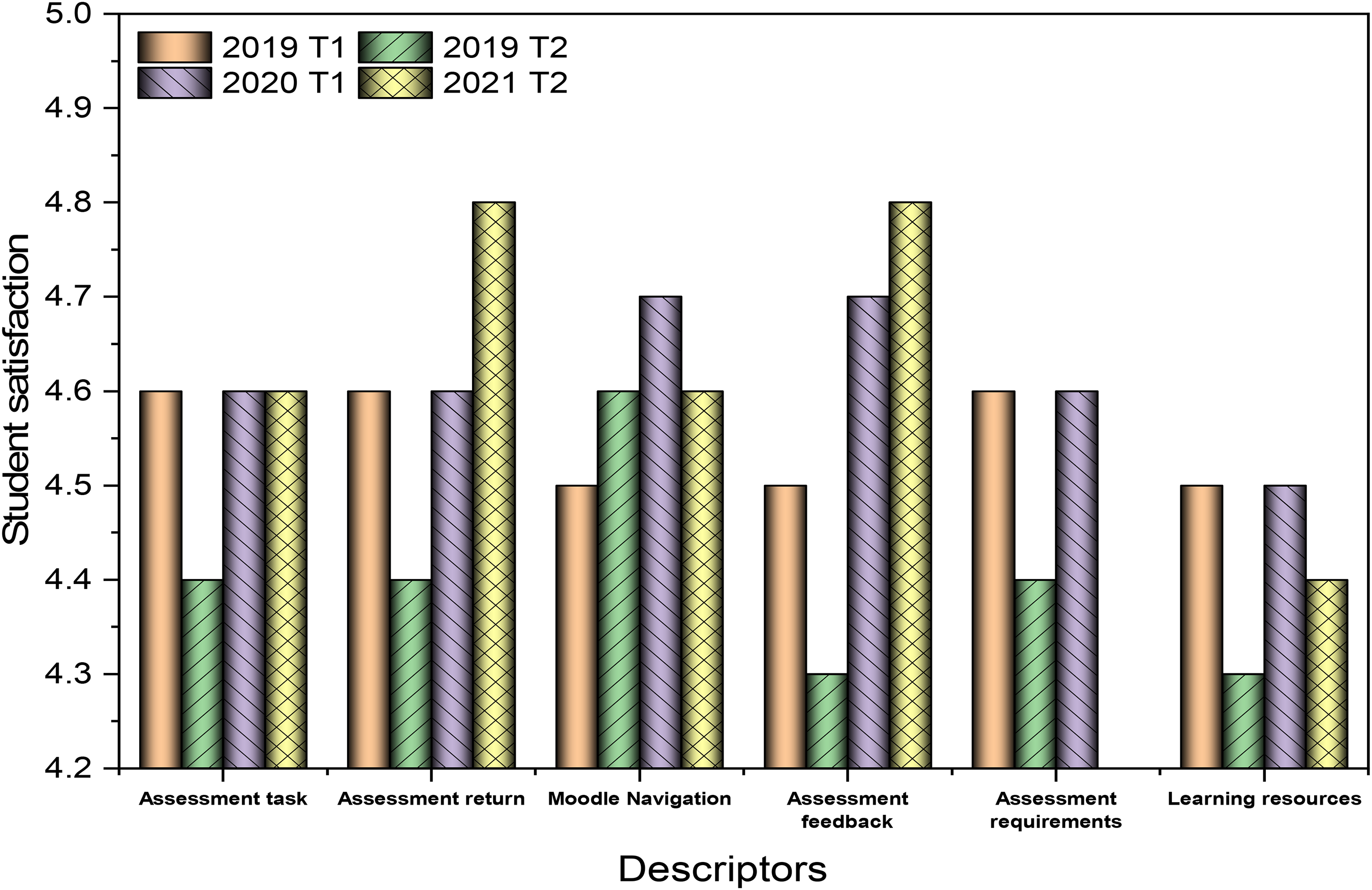
Student satisfaction on different descriptors of ENEM20002 for recent years.
The student reacted positively – ‘overall, it was a good experience to learn about aspects of the concerned subject. The simscape analysis is the best technique to learn about the practical approach of design for fluid machinery’ (student feedback, 2019). One student comment in 2020 put the importance of simulation software in their learning – ‘Matlab part was interesting to learn the physical behaviour of fluid power system’. Another student in 2020 pointed out the usefulness of Simulink and SimScape software – ‘knowledge about Simulink is useful because it is widely used in automatic control and digital signal processing for multidomain simulation and model-based design’. Figure 2 also presents student sent quantitative feedback through SES. If the feedback rate is 50% or more, the data set is statistically sound.28–30 The students reacted positively to other descriptors such as assessment tasks (on quality) and assessment feedback (critical comments, suggestions and identifying mistakes, etc.) for examples (Figure 3). The scores are over the corporate target of 4 out of 5.
Further, Figures 4 and 5 present similar outcomes for ENEM2003 considering energy management software Design Builders and Energy Plus. The simulation software was introduced in the year 2018, and the impact is evident. Both data sets (Figures 4 and 5) show a strong level of student satisfaction for all student reaction descriptors. The student feedback rate is always above 50%. Benchmarking against the corporate target of 4 out of 5 indicates that the students are delighted with their learning in this unit incorporating the simulation software. Over the years, it has been gradually increasing.
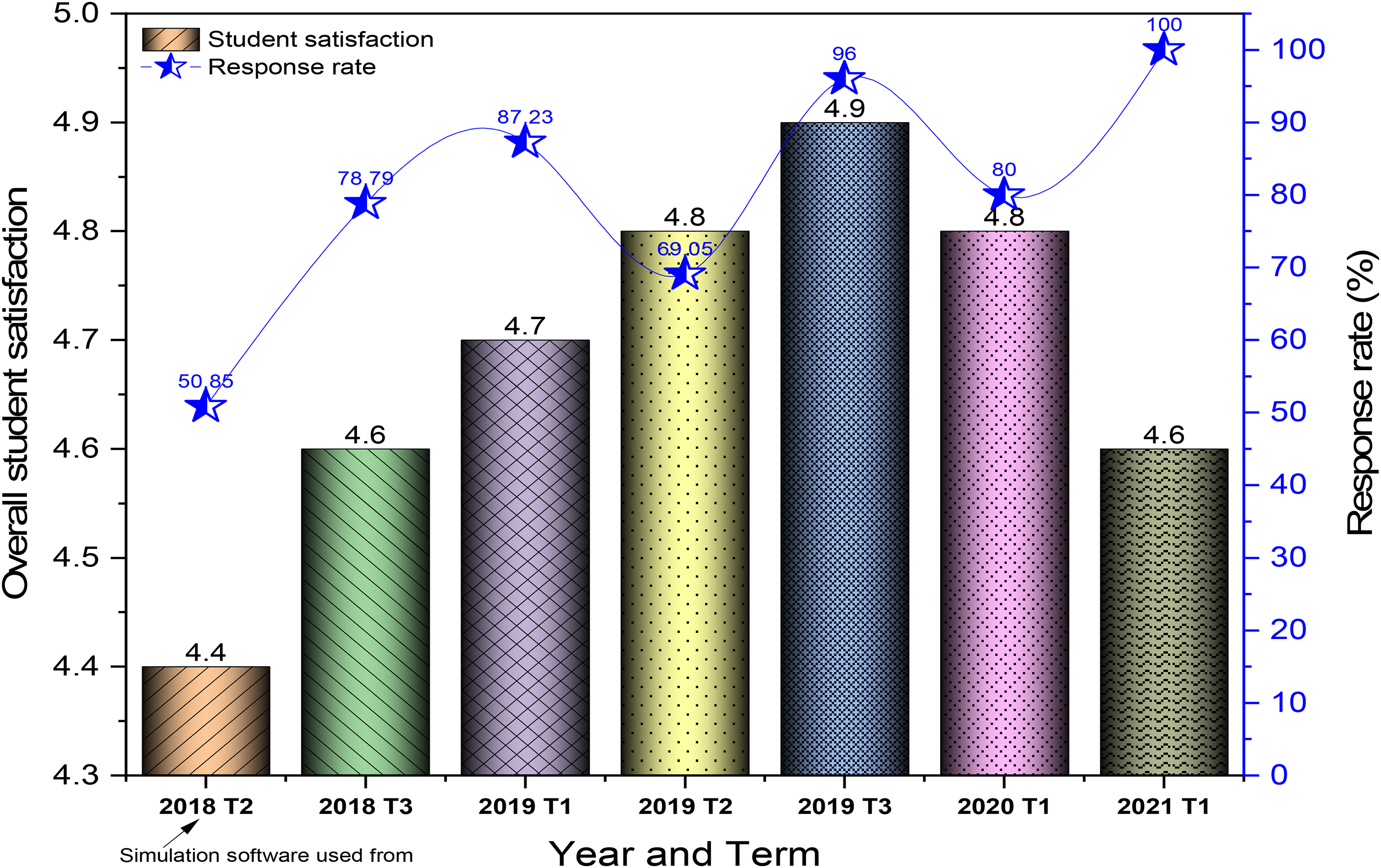
Student satisfaction (series 1) and student feedback rate (series 2) for ENEM20003.
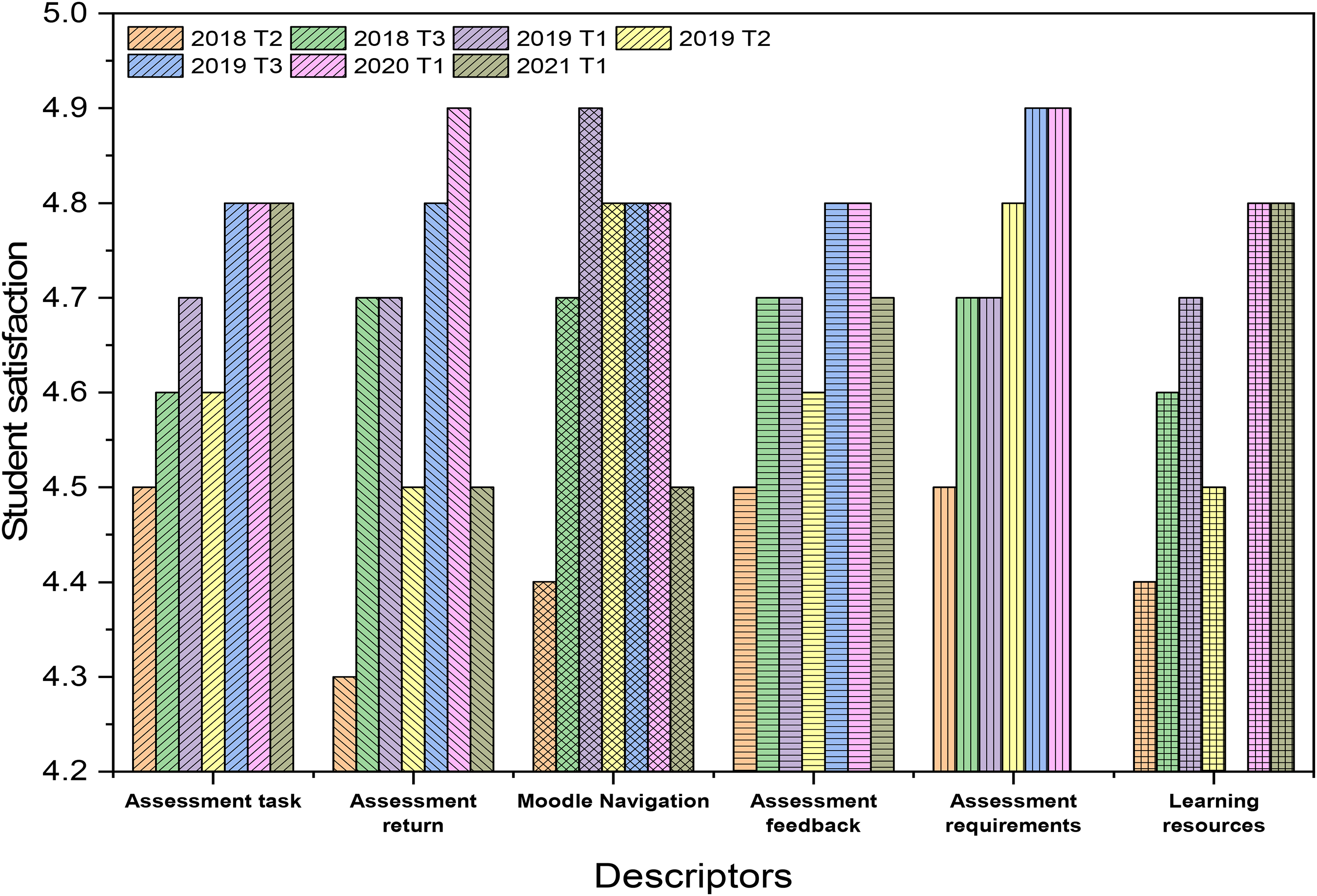
Student satisfaction on different descriptors of ENEM20003 for recent years.
It is important to relate a few qualitative student views on the use of the simulation software of ENEM20003. A student reaction in 2018 is worthy of note – ‘the project work is interesting and definitely supports learning about the topics. Having the opportunity to use the Design-Builder software was excellent’. Another student's feedback in 2019 on heating, ventilating and air conditioning (HVAC) system software is – ‘I have learned about air conditioning systems that could benefit me in my professional work as a part of HVAC systems. I have learned about working with this new software named Design-Builder, which developed my technical skills as well’. Another student feedback in 2020 was most interesting – ‘the assessment/software help me to feel as if I am doing design of plant’.
Initially, a few tutorial sessions on the simulation software were employed to increase students’ interest and confidence in applying the software for project work. In their weekly workshop sessions, students demonstrated the ways they are applying software, achieving the project scopes, etc. In project presentations and in final project reports, they presented simulation results and their validations. Through these, students’ development of problem-solving skills using simulation software to simulate physical systems is assessed. It includes employing the right input parameters, and appropriate symbols, building models, analysing results and finding trends in data. Lecturers ask questions to students during a presentation on how they build the models, manage the errors that occurred, interpretation of fluid circuits and control strategies employed, etc. Students’ reactions to these points through the SES survey re-enforce the development of students’ capability in solving real-life problems.
One of the matrices of students learning and enhancement of problem-solving skills is student satisfaction measured by SES. There is a relationship between students’ active learning and student performance and satisfaction in a unit. A better understanding can be achieved through the active engagement of the lecturers with the students through interviews, students’ project presentations, observation of students answering style to the questions that come in the presentation and evaluation of how the simulation skills can be employed in the similar industry problems and in non-routine real-life problems. Through the lecturer's personal reflection on the unit, the students enhanced learning experience and problem-solving skills can be evaluated. This is called the progressive evaluation, not just from the session during the project presentations. This learning is enhanced because of hands-on experience in using simulation software to model and study the behaviour of real-life problems. During the weekly workshop sessions, using four squared charts, the students are presenting in teams the project presentation including progress as per agenda items, problems sorted out, discussion of those problems and finding a way solve out to the problems. This is called student self-learning and peer learning. Peer learning is very effective and quick to enrich problem-solving skills.
Conclusions
SimScape, SimScape Fluid, Design Builder and Energy Plus software are employed in these units to enhance student understanding of engineering skills on physical systems in context. Based on the qualitative and quantitative student data, the following conclusions can be drawn:
The use of simulation software in engineering projects enhances the student learning experience and problem-solving skills useful for industries. The software improves student satisfaction in all descriptors set out by the university The implementation of software improves student interest and curiosity. The use of software enhances students’ confidence and work ready for the relevant industry.
Footnotes
Declaration of conflicting interests
The author(s) declared no potential conflicts of interest with respect to the research, authorship, and/or publication of this article.
Funding
The author(s) received no financial support for the research, authorship, and/or publication of this article.
