




Abstract
Knowledge workers such as healthcare information professionals, legal researchers and librarians need to create and execute search strategies that are comprehensive, transparent and reproducible. The traditional solution is to use proprietary query-building tools provided by literature database vendors. In the majority of cases, these query builders are designed using a form-based paradigm that requires the user to enter keywords and ontology terms on a line-by-line basis and then combine them using Boolean operators. However, recent years have witnessed significant changes in human–computer interaction technologies, and users can now engage with online information systems using a variety of novel data visualisation techniques. In this article, we evaluate a new approach to query building in which users express concepts as objects on a visual canvas and compare this with a traditional form-based query builder in a laboratory-based user study. The results demonstrate the potential of visual interfaces to mitigate some of the shortcomings associated with form-based interfaces and encourage more exploratory search behaviour. They also demonstrate the value of having a temporary ‘scratch’ space in query formulation. In addition, the findings highlight an ongoing need for transparency and reproducibility in professional search and raise further questions about how these properties may best be supported.
Keywords
1. Introduction
Knowledge workers such as healthcare information professionals, legal researchers and librarians need to create and execute search strategies that are comprehensive, transparent and reproducible. Healthcare information professionals, for example, undertake systematic searches of scholarly literature sources to identify the best available evidence to inform health and social care policy. Likewise, legal researchers undertake systematic searches to gather evidence to conclusively answer a legal question or support a particular legal position or argument. In addition, librarians undertake all manners of structured search tasks as part of their service delivery to end users and as part of their training and enablement activities for the communities they serve.
However, systematic literature reviews can take years to complete [1], and new research findings may be published in the interim, leading to a lack of currency and the potential for inaccuracy [2]. Likewise, legal research can be compromised by ineffective or incomplete search, leading to the potential loss of legal cases, and librarians routinely formulate complex Boolean expressions, sometimes consisting of hundreds of search terms, leading to significant challenges in maintenance, editing and debugging [3].
What these professions have in common is a need to develop search strategies that are comprehensive, transparent and reproducible [4]. This typically requires the application of specialist skills in search techniques and often requires specialist expertise in the subject matter in question. This contrasts sharply with other kinds of search tasks, such as casual search [5] and web search [6], which are typically performed on a discretionary basis by users who are not generally expert searchers or subject matter experts.
The traditional solution to the challenge of systematic searching is to use form-based query builders such as that in Figure 1. This approach has its origins in the earliest literature databases, when retrieval was mediated by command line terminals accessing subscription-based services. This required the use of cryptic commands formulated using a proprietary database syntax. The output of the query formulation procedure would be a sequence of Boolean expressions consisting of keywords, operators and ontology terms which could then be combined using their line numbers to form a composite artefact known as a search strategy. An example is shown in Figure 2 [7].
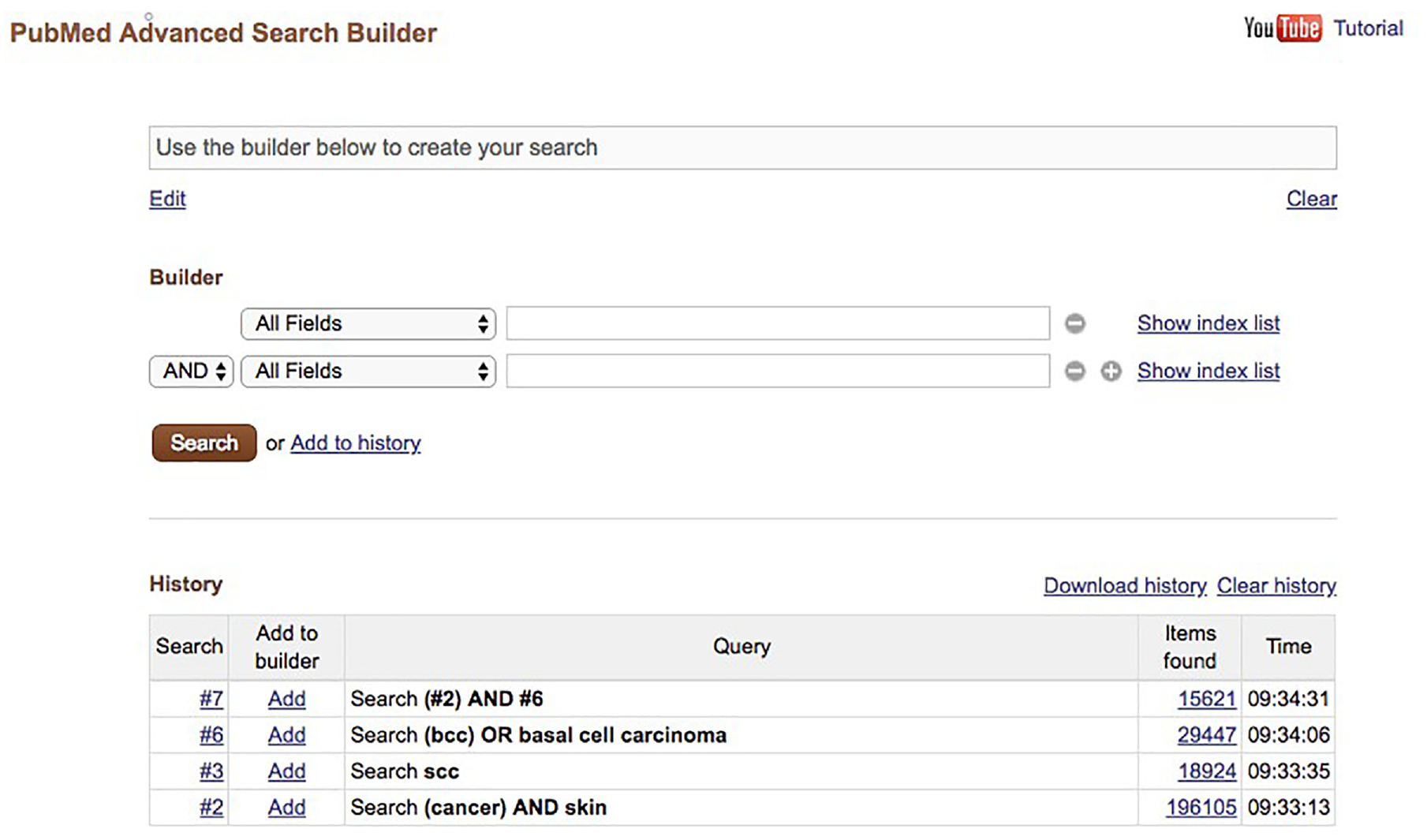
A traditional form-based query builder (PubMed).
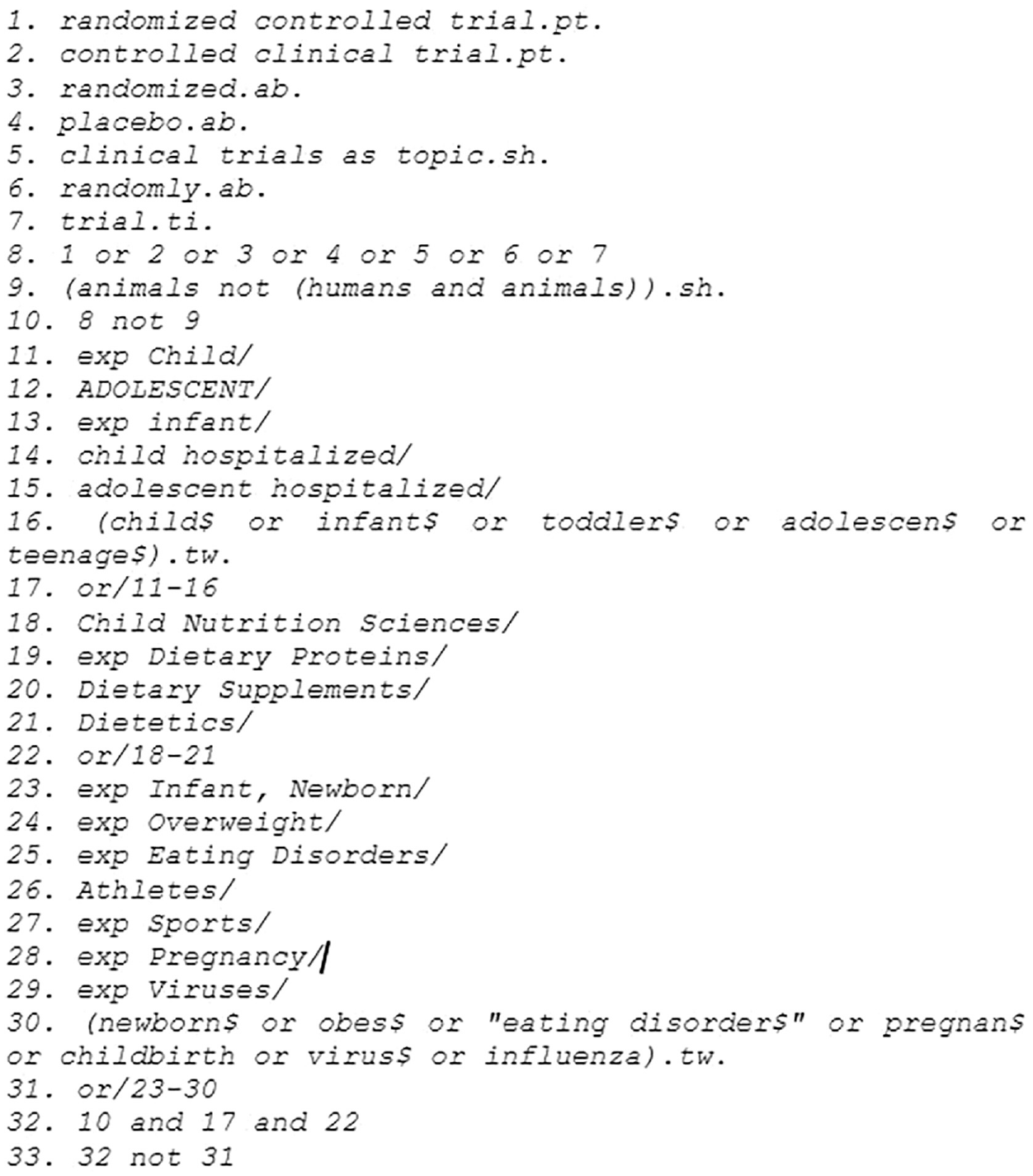
An example search strategy for ‘oral protein-calorie supplementation for children with chronic disease’.
However, recent years have witnessed significant changes in human–computer interaction technologies and capabilities in both the home and the workplace. Users now interact with all manners of devices through touch, voice and other modalities, and engage with online information systems using a variety of novel data visualisation techniques. In parallel with this, there have been various studies investigating the use of data visualisation and related techniques to represent structured information needs using a variety of alternative formalisms (see section 2).
In this article, we investigate an alternative interface in which the form-based approach is replaced by a visual canvas on which query elements can be manipulated to represent structured information needs (Figure 3). We compare this approach to a conventional form-based query builder in completing a number of expert search tasks performed by specialist professional searchers. We evaluate the relative performance of each approach in a controlled test setting [8] and report our findings from surveys, search logs and interviews. In the data collection, we focus on librarians as our sample of expert searchers. This profession represents a group of users who is familiar with both the practice of structured searching and traditional query builders and are thus able to offer an informed comparison of the alternative interfaces while completing a set of structured search tasks.
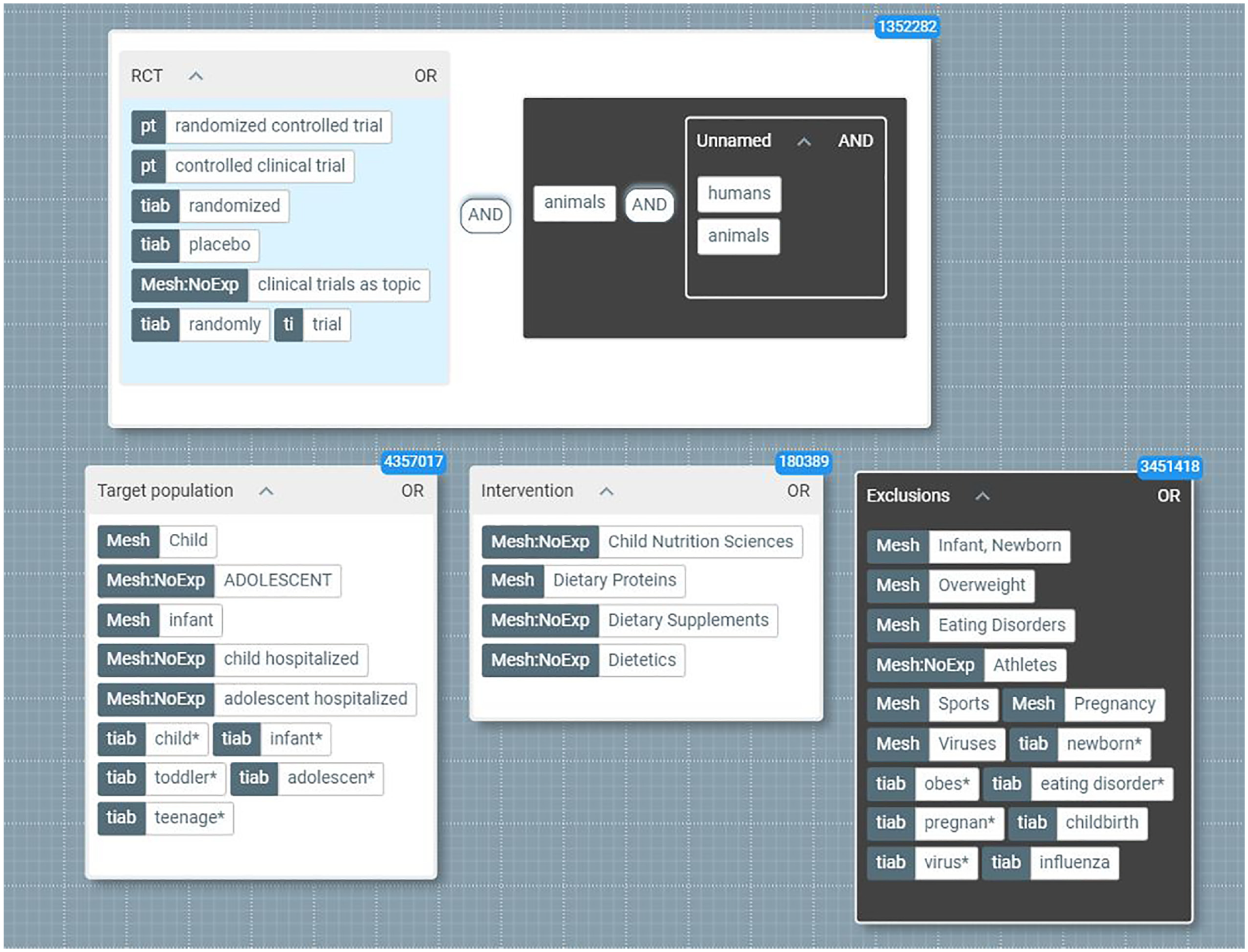
A prototype visual query builder.
2. Background
2.1. Current approaches
The practice of using Boolean strings for structured searching has served as the default approach since the very first literature databases and is adopted as the de facto standard by the majority of information databases and their users. However, despite their ubiquity, using Boolean strings to express complex information needs suffers from a number of shortcomings.
First, Boolean strings are an ineffective vehicle for communicating structure. The use of parentheses as delimiters may be commonplace in programming languages and other machine-readable media, but when intended for human interpretation, they rely on additional physical cues such as indentation. In the absence of such visual signals, parentheses can become lost in an undifferentiated sequence of alphanumeric characters, and trying to interpret the meaning and structure of such expressions can be overwhelming [9].
Second, Boolean strings do not scale well. As users add terms to a Boolean string, it grows monotonically in length. This may be manageable for a handful of terms, but as the number grows to double figures and beyond, transparency degrades. A common solution to the analogous problem in software development is to offer some form of abstraction, so that lower-level details become progressively hidden, revealing higher-level structure. However, Boolean strings in their native textual form offer no such facility [10].
Third, Boolean strings are error-prone: even if the query builder automatically checks syntax, it is still possible to place parentheses incorrectly, which can inadvertently change the semantics of the whole expression. This gives rise to errors whose effects may not become apparent until long after the initial search is completed [11].
In form-based query builders, users are expected to build search strategies incrementally as a set of discrete expressions that are referenced by line number and then combined using various operators. This type of approach offers the benefit that strategies can be built using techniques such as successive fractions or building blocks [12]. It also allows the searcher to review the number of results returned at each step and to refine their expressions accordingly.
However, errors and inefficiencies often compromise their output. In their study of 63 MEDLINE strategies, Sampson and McGowan detected at least one error in over 90% of these, including spelling errors, truncation errors, logical operator errors, incorrect query line references and redundancy without rationale [13].
Many information professionals use word-processing tools such as Google Docs or Microsoft Word as a platform for developing search strategies [14]. However, there are several reasons why document-centric tools are not suitable for search strategy formulation:
Auto-correction can undermine truncation and corrupt truncated formats.
Spell-checking can obfuscate important differences between regional linguistic variations (e.g. British and American English) and can create unwanted duplicates.
Auto-conversion of straight quotations ("") into curly quotations (“”) can cause errors in platforms such as Ovid SP.
Copying and pasting text fragments between different word-processing tools can lead to the loss of non-print characters.
This combination of factors suggests that the practice of formulating search strategies as text strings manipulated via form-based query builders compromises their ability to function as transparent, scalable, reproducible artefacts.
2.2. Alternative approaches
The application of data visualisation to search-query formulation can offer significant benefits, such as fewer zero-hit queries, improved query comprehension and better support for the exploration of an unfamiliar database [15]. The study by Anick et al. [16] is an early example of such an approach. They developed a system that could parse natural language queries and represent them as movable tiles on a two-dimensional (2D) canvas. The user could rearrange the tiles to reformulate the expression and to activate or deactivate alternative elements to modify the query. In addition, the system offered support for integration with thesauri, and it displayed the number of hits in the lower left corner of each tile.
In subsequent work, Fishkin and Stone [17] investigated applying direct manipulation techniques to database query formulation using a system of ‘lenses’ to refine and filter the data. Users could combine lenses by stacking them and applying a suitable operator or combine them to create compound lenses, supporting the encapsulation of complex queries. Jones [18] proposed an influential approach in which concepts are expressed using a Venn diagram notation combined with integrated query result previews. Users could formulate queries by overlapping objects within the workspace to create intersections and disjunctions, and they could select subsets to achieve a further refined set of results.
Yi et al. developed a system based around a ‘dust and magnet’ [19] metaphor, in which users could represent dimensions of interest within the data as magnets on a visual canvas. The effect of the ‘magnetic forces’ on individual ‘data particles’ reflected the relationships between points in the data. Nitsche and Nürnberger [20] developed a system based around a radial interface in which users could integrate and manipulate queries and results. The concept used a pseudo-desktop metaphor in which objects of interest clustered towards the centre. Query objects could be entered directly onto this canvas, and their proximity to the centre and to other objects was a relevant cue, influencing the selection and position of search results.
More recently, Scells and Zuccon developed searchrefiner, an open-source tool for formulating, visualising and understanding Boolean queries [21]. This tool allows researchers to perform tasks such as using validation citations to ensure queries are retrieving a minimum set of known relevant citations and editing Boolean queries by dragging and dropping clauses in a structured editor based on a hierarchical tree metaphor. In addition, the tool allows researchers to visualise why the queries they formulate retrieve citations and to understand how to refine queries into more effective ones. Likewise, the practitioner community have also made contributions to support structured query formulation, notably the Search Whiteboard 1 developed by David Newman for searching healthcare databases and Boolio 2 developed by Wrenford Thaffe for sourcing social media profiles for recruitment and marketing purposes. Both of these tools use a 2D grid to represent disjunctions in one dimension and conjunctions in the other (implemented using an Excel spreadsheet in the former case and a web application in the latter).
2.3. Research questions
It is evident from the discussion above that traditional methods of structured searching suffer from a number of shortcomings. Consequently, it is appropriate and timely to consider whether new approaches that exploit alternative methods such as visual interfaces can mitigate these shortcomings. In this article, we investigate the following research questions:
How does the use of a visual interface influence the query-building procedure in structured searching?
How does the use of a visual interface influence the user experience of structured searching?
How does prior experience of structured searching influence participants’ attitudes and expectations regarding search interfaces?
3. Research methods
In our experimental setup, we investigate a form-based approach and a visual approach and compare them in a controlled test setting using a variety of quantitative and qualitative metrics. We used PubMed’s advanced search query builder as an instance of a conventional form-based interface and 2Dsearch 3 as an instance of a visual interface. Both interfaces were used to query the same database (PubMed), with the latter acting as a replacement for PubMed’s native (form-based) query builder. We compare the two approaches using a number of expert search tasks performed by specialist professional searchers in a controlled test setting [8]. We evaluate the relative performance of each approach and report our findings using a variety of quantitative and qualitative metrics. In the remainder of the article, we will refer to these two system types as the form-based and visual interfaces, respectively.
3.1. Participants
The purpose of this study was to investigate differences in searching across two different interfaces involving tasks consisting of several facets. Similar studies have been carried out with comparable sample sizes in previous studies. For example, Junliang and Marchionini [22] based their usability study of a search interface on a sample of 15 students, and Liu and Wacholder [23] recruited a sample of eight representatives for each of four user groups in a comparative study of the use of controlled vocabularies. In our study, the aim was to employ a combination of quantitative and qualitative methods to better understand the effect of different interfaces on a specific group of information searchers. The participant group consisted of 14 experienced research librarians (three men and 11 women), recruited from two Danish university libraries by means of e-mail invitation. Thus, the participants represent a convenience sample. Their average age was 49 years.
3.2. Tasks
The participants explored the two interfaces by means of one training task and four search tasks with the aim of giving the participants a search goal for their interaction with the two interfaces. The search tasks were inspired by Borlund’s simulated work tasks [24] but without the additional constraint of simulating their individual situation. The purpose of the training task was to let the participants familiarise themselves with the visual interface without recording their activity. The tasks were designed to exercise the participants’ technical and professional search expertise, using healthcare and life sciences as the chosen subject domain. Within this domain, the tasks represented a library and information science perspective to enable the participants to apply their topical knowledge, which has been shown to be important in professional work tasks [25]. All tasks were selected to include at least three discrete facets of the information need to require the use of a structured search methodology. Figure 4 illustrates an example task. All tasks were pilot tested with two additional participants prior to the data collection to ensure relevance and understanding for potential test participants. Based on the pilot test results, minor corrections were made.
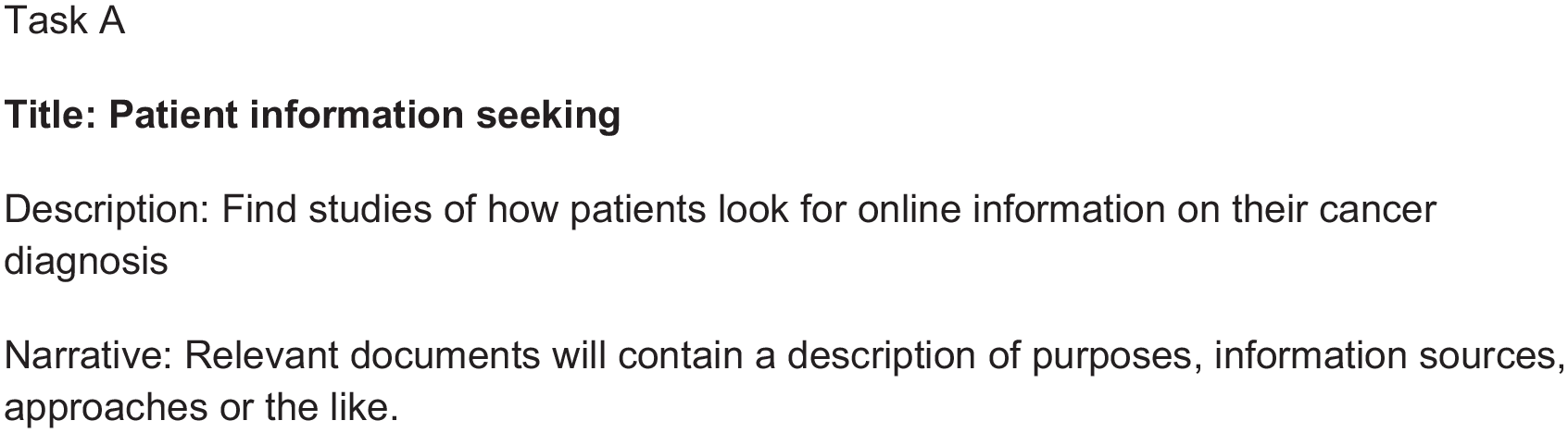
One out of four search tasks.
The sequence of tasks was rotated for each session to minimise any order effects. Rotation was used for both tasks and interfaces, so half of the participants started with the visual interface and half of the participants with the traditional interface. Rotation of tasks was done using the dcode permutation generator. 4 After each task, participants completed a short questionnaire to identify any other factors affecting their performance, such as prior knowledge of the task domain. In addition, they were asked to assess the difficulty of the task and provide responses to various user experience metrics [26] regarding the query-building procedure and the results thereof. A total of 55 task assessments were collected.
3.3 Procedure, data collection and analysis
The data collection took place in Autumn 2021. The data collection consisted of three stages: a pre-session survey completed prior to the session, the test session itself and a post-session interview.
The pre-survey served several purposes. First, it was used to collect the participants’ consent for participation in the study. Second, the participants were asked questions about their search preferences, such as using simple versus advanced search, previous use of Boolean expressions, and assessment of own confidence in using Boolean operators (AND, OR, NOT, parentheses, and phrase search). Demographic questions concerning gender and age were also included. The purpose of the data collected through the pre-survey was to be able to control search preferences and their potential effect on the use of the two interfaces in the test.
At the beginning of each session, participants signed an informed consent form on paper and were introduced to the test procedure. The training task was then administered, followed by the four simulated work tasks that were rotated between participants for both tasks and systems [27]. Each task was assessed in a survey upon completion. The survey measured the participants’ prior knowledge of the task, and their assessment of the task (four variables), the query-building procedure (four variables) and the search results (two variables). All assessment variables were measured on 5-point semantic differential scales [28].
After completing all the tasks, a semi-structured interview was performed, in which participants were asked about their experiences in using both the form-based and the visual interface. A semi-structured interview guide was used to guide the interview [29]. The purpose of these interviews was to support the quantitative methods and enable an elaboration of the participants’ experiences in using the two interfaces by means of qualitative data.
After finishing all test sessions, the interviews were transcribed, translated and analysed. The search log was generated for queries and sessions. At the query level, the number of terms used was specified along with the number of facets represented and search results. The allocation of search terms to facets was carried out as a manual assessment of each search term used. At the session level, the number of reformulations was captured. The search log, the pre-survey and the task assessments were analysed using quantitative methods. Interactions were analysed at both session and query levels to understand the implications of the different systems on both levels.
The interviews were coded in themes using Nvivo for an inductive, thematic analysis of the findings [29]. However, the interviews serve a supportive role in the analysis since their main purpose is to provide deeper insights that could elaborate on the quantitative results. In the following section, we therefore focus on the quantitative results with verbatim comments and insights where appropriate.
4. Results
The pre-survey revealed that study participants had a general preference for advanced search (10 participants) over simple search (four participants). All of them felt secure or very secure in using Boolean operators, which is also reflected in their subsequent use of such operators. Eight out of 14 participants stated that they used Boolean AND on a daily basis, 9 used Boolean OR on a daily basis or several times a week, and 11 used phrase search daily or several times a week. Boolean NOT was less common with 13 participants indicating that it was used once a month or less. The overall picture is that the participants were experienced users with a preference for advanced search, entailing frequent use of Boolean operators. This corresponds with the findings made by Russell-Rose and Chamberlain [30], in which a survey of medical librarians found that Boolean logic was the most important functionality of query formulation.
4.1. Tasks
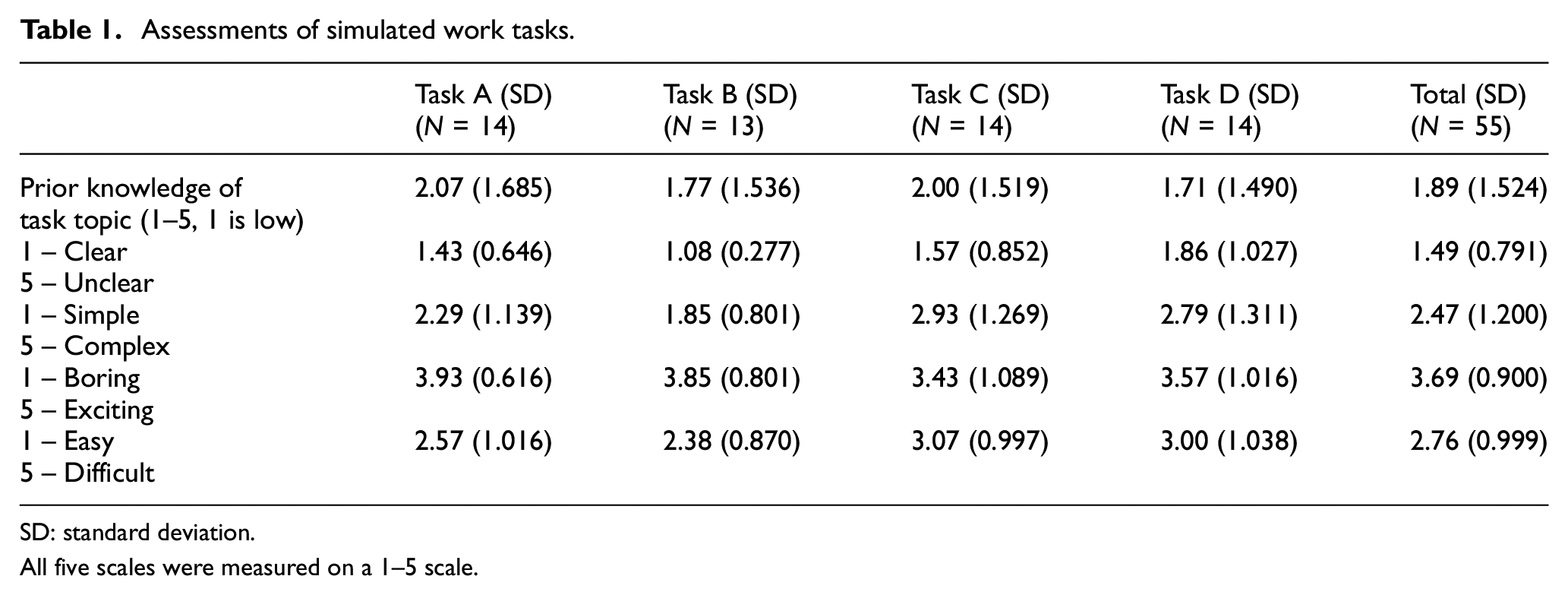
Participants were asked to provide feedback on each task and any background knowledge they had on the specific topic. The results are shown in Table 1. Overall, the participants did not claim to have much prior knowledge of the task domain (mean = 1.89). From the general assessments it appears that despite the feeling of limited knowledge about a particular task, the participants find the tasks clear (mean = 1.49), more simple than complex (mean = 2.47), more easy than difficult (mean = 2.76) and more exciting than boring (mean = 3.69). These other task assessments could reflect the fact that in the assessment of prior knowledge, the participants may not have had extensive knowledge of the medical context. However, they were still able to complete each task by applying their general knowledge of library and information science topics in their capacity as trained librarians. When focusing on specific tasks, Table 1 shows that there was some variation between the assessments but no significant correlations were found between task assessments and the number of reformulations made at the session level.
Assessments of simulated work tasks.
SD: standard deviation.
All five scales were measured on a 1–5 scale.
4.2. Queries
The number of terms and facets in a query to some extent reflects the quality of the query, since adding terms within a facet (using Boolean OR) can increase recall, while adding facets (using Boolean AND) can increase precision [31]. Across the 55 sessions, a total of 203 queries were generated. The queries carried out had a mean of 2.22 facets out of three possible, and a mean of 4.56 terms. Table 2 illustrates the variation across the controlled tasks of the evaluation.
Mean number of terms and facets in total and for specific tasks.

SD: standard deviation.
A Mann–Whitney test showed the significance of differences in terms and facets across the two interfaces. As seen in Table 3, participants using the visual interface generated queries with a significantly higher number of facets and a significantly higher number of terms. Several themes in the post-interviews may provide an explanation for these results. One theme is that trained users tend to form queries for individual synonyms first, for example, by a look-up in a controlled vocabulary in the form-based interface, and then subsequently combine them into facets which would generate a greater number of shorter queries using this particular interface. To illustrate: ‘[…] it is because I prefer to conduct the single term query before I form the block.’. (P12). On the other hand, several participants expressed how their usual procedure of planning a complex query with pen and paper before approaching a database can now be conducted directly using the visual interface. For example, P12 states: ‘Well, it is easier in [the visual interface], because of those blocks… I would do the same thing if planning a query in real life. I would actually draw squares on a piece of paper’. P2 adds, Normally, I would have a piece of paper, where I would make little boxes with the blocks. And perhaps that can be merged, because that is actually what is done in [the visual interface]. […] You can save some time by doing it directly in the interface.
Differences between form-based and visual interfaces at the query level.
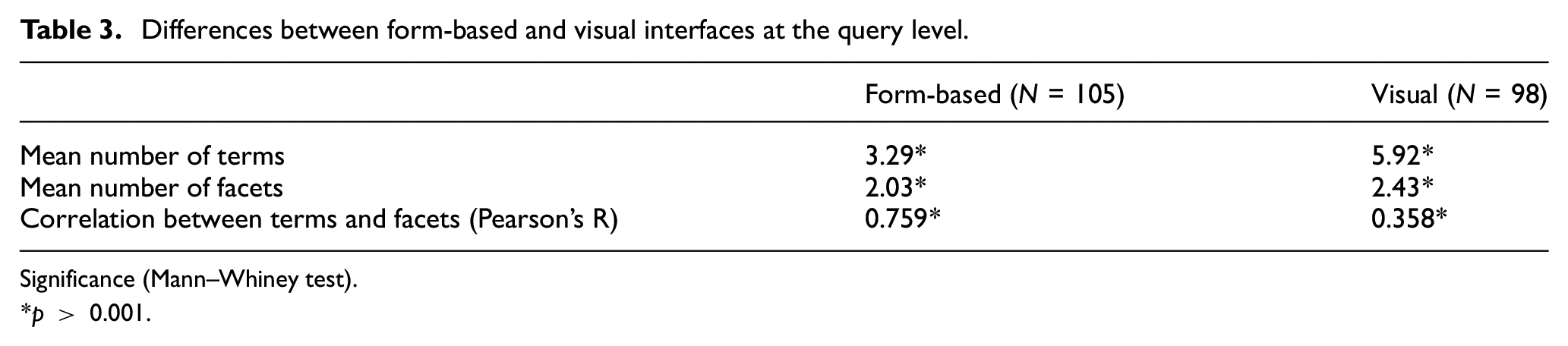
Significance (Mann–Whiney test).
p > 0.001.
In addition, several participants explored the functionalities of the visual interface, which had the effect of increasing the number of terms and facets used. As expressed by P13, I like the visual part. […] the moving things around, combining them, back and forth, and so on. […] It is pleasant to use. […] You sit and play with it. It is kind of a building block technique, you could say. […] It is sort of fun. You get captured by it.
The results show that significantly more terms and facets were used in the visual interface. In both interfaces, there was a significant correlation between the number of terms used and the number of facets used. This correlation was stronger for the form-based interface, which may reflect a more consistent approach adopted by the experienced searchers when using an interface with which they were already familiar. By contrast, the visual interface attracted more variation in its use, possibly due to the novelty issues as suggested above. To illustrate, P6 states that ‘…especially when this is not my usual topic area, the [visual interface] provides some possibilities to just try things out and see what happens …’, implying that the visual interface acted as a kind of experimental ‘scratch space’ for the participant because she is solving a task outside her known area of expertise. Furthermore, this comment reflects how a lack of insights into the task topic plays a role in how the query is formed.
4.3. Sessions
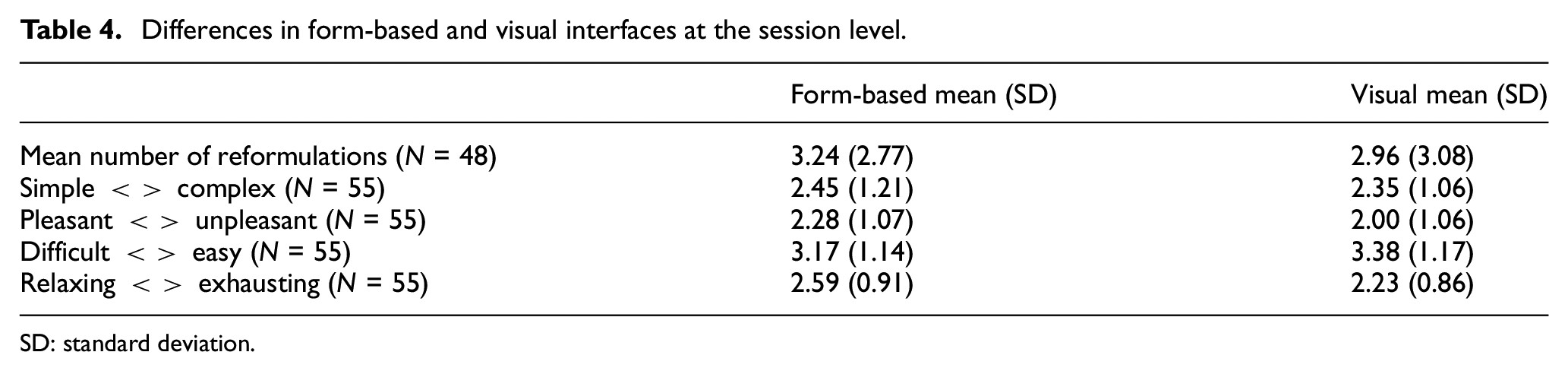
In performing the four simulated work tasks across the two systems, 55 sessions were carried out, 29 sessions with the form-based interface and 26 with the visual interface. Table 4 summarises the differences between the two approaches. As can be seen, the users made slightly more query reformulations using the form-based interface (3.24), compared with the visual interface (2.96). However, there was a larger variance associated with the visual interface with a standard deviation of 3.08 compared with 2.77, suggesting that there was a greater degree of variation in the actual use of the visual interface. Several elements in the post-interviews may help explain these effects. Some of the librarians explain how they identify terms for one facet, or even one synonym for a facet, of the search task at the time and then combine them subsequently when using the form-based interface: ‘… so if I have three synonyms in [a form-based interface] that I would combine with OR, then I would make a query for each synonym separately and then combine them subsequently … because then I can quickly see which terms work and which don’t …’ (P12). And: ‘[in traditional search] you make a very advanced search [history] and suddenly you have 100 queries on the line. Then I always write down which ones to AND in the end’. (P2)
Differences in form-based and visual interfaces at the session level.
SD: standard deviation.
To some participants, the search history is important to identify the task facets and subsequently combine them for the final query to represent the complete search. As reformulations are equivalent to the number of queries for a task, this way of controlling the outputs in PubMed would add to an increased number of reformulations. Conversely, other participants stated that the canvas of the visual interface allows them to generate several facets in parallel, thus reducing the need for (and number of) explicit reformulations: ‘I can quickly search for what I want, because I throw in three concepts in three different blocks and see what it gives me’ (P3).
However, the larger degree of variance associated with the visual interface may be explained by some participants approaching the interface in a more playful manner to explore its potential, which would generate more queries in a session. Others expressed that they tend to make a more complete query in the visual interface before checking the results of the query, which would lead to fewer queries in a session. P12 states that: ‘Then I would sit in [the visual interface] and do something and then in the end [look at the results]. So it is somehow more conclusive, before I check the results’. Later she continues on the visual interface: ‘I jump faster to the conclusion that these three blocks are relevant and good together, than when I use [the form-based interface]’. This would ultimately lead to fewer reformulations in the visual interface.
The two systems also differed in terms of the participants’ assessment of the search process. Although the results were not significantly different according to Mann–Whitney tests, the visual interface was associated with a better search experience in terms of the simplicity of search (2.35 versus 2.45), being more pleasant (2.00 versus 2.28), easier to use (3.38 versus 3.17), and less exhaustive to use (2.23 versus 2.59).
The interview explains some of the overall evaluations. One aspect concerns the ease of adjusting a query, if it turns out not to provide a desired outcome. P2 reflects on this: It is easier to adjust a query [in the visual interface] because the box is just there. [in the form-based interface] I have to edit a query I made earlier, and if I combined it with something else, I need to go further back, because I can’t add it subsequently.
This is supported by P9, who mentions that ‘I get a better overview [in the visual interface]. because it is easier to pull things apart and draw things into the query again. It is too much trouble in form-based interfaces in general’. The flexibility of the visual interface is also mentioned by P8: At one point in [the form-based interface] I suddenly had zero results, and I wasn’t sure if I had misspelled something, or if I had put it in the wrong place, or if there just weren’t any results. And to compare, I think it was easier in [the visual interface] to add or remove elements to see the influence.
Also, the lack of overview in form-based interfaces was commented on by some participants. To illustrate, ‘It is clear that you very quickly lose track in [form-based interfaces], when doing deep and large blocks. It is easy to lose the big picture of what I have been doing’ (P3). In this respect, the traditional form-based interface forces the user to think sequentially, treating each element as a command within a larger sequence that must then be combined with other commands according to their respective positions within the sequence. By contrast, the visual interface allows users to think in parallel, experimenting with different combinations regardless of the order in which they have been articulated.
Despite the positive assessments of the visual interface, several participants articulate the familiarity and security of the well-known form-based interface. According to P12, ‘This way of searching is what I am used to, so it is a habit that is difficult to change’.
The form-based interfaces also support transparency in the queries carried out by the expert searchers because of their familiarity with this way of searching. One participant elaborates on how she performs queries in the visual interface, but uses the form-based interface to interpret the query to find out what was actually done in the visual query: I am more certain about the results in the form-based interface, because I can figure out the results there. […] I got used to checking the visual query in the form-based interface to validate what I actually searched for. It is very important as a control feature. (P14)
Another participant agrees and requests transparency in the form of a clear view of the syntax behind the visual interface: ‘I can’t see the syntax behind the query’ (P3).
Another participant felt a lack of experience in how specific operators were used in the visual interface, which led to a reflection on how operators are used in form-based interfaces to make small adjustments in queries: ‘I felt a bigger flexibility in [the form-based interface]. I wanted to use some parentheses in [the visual interface], but I gave up on it, because I didn’t know how to do it’ (P2).
To sum up, the results show that the use of the visual interface generates more complex queries with a greater number of facets and terms per query. The visual approach helps the expert searcher adjust queries and understand the query-building procedure with a better overview of the steps taken. However, the expert searchers are also accustomed to understanding transparency, control and validation in terms of their representation as Boolean logic within form-based interfaces, and this convention is missed in the visual interface tested in the current study.
5. Discussion
In this article, we compare a conventional form-based query builder with a visual alternative. We focused on expert searchers as these constitute a group who would be familiar with the principles of structured searching and could apply them to a range of professional search tasks. We now discuss the outcomes of the study with respect to our specific research questions, and then reflect on some of the broader implications, in particular regarding the continued use of Boolean strings to represent complex information needs.
5.1. Overall findings
In this section, we return to our original research questions and attempt to provide definitive answers to them.
1. How does the use of a visual interface influence the query-building procedure in structured searching?
We found that the participants used significantly more terms and facets in the visual interface, as they used it to structure their search directly in the interface rather than using pen and paper, which was the current approach for many participants. The number of terms and facets used was lower in the form-based interface, in which more single facets were developed one by one and subsequently combined. This reflects the findings of Jones [18] and Goldberg [15] in that the visual approach facilitates a more holistic perspective in which complex queries can be formulated as a complete unit. Similar findings were made by Scells and Zuccon [21], who found that visualisation supported users’ understanding of the retrieval process. By contrast, form-based query builders offer a more ‘reductionist’ approach in which complex queries are broken down into facets that are formulated on an individual basis.
2. How does the use of a visual interface influence the user experience of structured searching?
On all the user experience metrics collected during the study, the visual approach was rated more highly than the form-based approach. This reflects the findings of Scells and Zuccon [21] who also see potential in incorporating visual elements in search interfaces for professional searchers. Although mainly based on usability, Nitsche and Nürnberger [20] also found the UX parameter ‘joy’ to be very highly rated in their evaluation of a visual interface. However, we should note the following caveats. First, familiarity with conventional interfaces could influence both the performance and preferences of participants. In particular, participants may gravitate towards what they know best, and this could have an impact on the results (in favour of familiar, form-based interfaces). Second, we should consider prior knowledge of the tasks: participants had limited knowledge of the domain (although most were sufficiently confident that they could complete the tasks). The outcome may have been different had the participants had greater familiarity with the subject matter. Finally, it is possible to imagine other types of visual interface, which offer a similar set of capabilities but via a different design execution. Although many of the findings above are statistically significant, it would not be appropriate to generalise too far based on a single instance of each interface type.
3. How does prior experience of structured searching influence participants’ attitudes and expectations regarding search interfaces?
The results show that participants who are familiar with form-based approaches valued the user experience of the visual approach, but at the same time relied on the familiarity of traditional interfaces, where the history mechanism makes it evident exactly what has been searched for, and how. This reflects the prevailing wisdom of conventional approaches such as those advocated in Booth [12] and Lefebvre et al. [14]. However, this may also reflect a lack of familiarity among participants with the visual approach adopted in the test setting. We should note also that the participants were all information professionals, and the outcome may have been different had the participants been novices or individuals with limited experience in structured searching. However, it is clear that transparency remains a vital design principle to reflect the rigorous, systematic nature of structured, expert searches.
5.2. Broader implications
We found that visual interfaces can mitigate some of the shortcomings associated with form-based interfaces and encourage more exploratory search behaviour through the provision of novel interactions such as a temporary ‘scratch’ space for query formulation. The results also highlight the enduring importance of qualities such as transparency and reproducibility in professional search. However, this raises important issues about how these properties may best be supported.
First, let us consider the formalism itself, that is, the convention of using Boolean strings and line numbers to represent a composite logical expression. If the purpose of the formalism is to provide a reproducible mechanism for representing structured information needs, is it appropriate to rely on something as arbitrary and ephemeral as a line number? This is the conceptual equivalent of the GOTO statement used in the first-generation BASIC, which is an approach that was discredited several decades ago [32]. By contrast, and taking inspiration from the discipline of software engineering, we might expect a well-designed query language to support properties such as:
Encapsulation: that is, the bundling of data with the methods that operate on that data. This is not supported natively by Boolean strings, but the visual approach shows that terms and associated operators can be packaged into a single component and represented physically within the interface.
Abstraction: that is, the creation of abstract concepts by mirroring common features or attributes of various non-abstract objects. Again, this is not supported natively by Boolean strings, but the visual approach demonstrates how repeatable constructions such as the ‘problem’, ‘intervention’, ‘comparison’ and ‘outcome’ elements of a PICO search can be abstracted out as visual templates [33].
Second, as Figure 2 illustrates, the output of form-based query builders is a set of procedural commands that are combined to express the declarative semantics of an information need. This raises the question: if the goal is to express declarative semantics, then why force the user to think procedurally? This may be due in part simply to the power of convention, in that the command-line approach originates from an era when searchers could issue only text-based commands to remote – and expensive – subscription-based resources. In that historical context, it may have made sense to prioritise economy over usability. In this context, the continued adoption of this convention in contemporary search interfaces may owe more to inertia than any inherent design virtue.
5.3. Future work
The discussion above suggests a number of avenues for need for future work. First, this study was carried out in a controlled experimental setting, and further studies would be needed to validate our understanding of searching with visual interfaces within a naturalistic setting. Second, although the presentation of search results can have a significant bearing on search satisfaction, this issue was considered out of scope so that the study could focus specifically on the query formulation interface. In future studies (possibly the naturalistic ones alluded to above) it may be appropriate to investigate a larger task context and accommodate the effects of result presentation. Third, our methodology was to document interaction by means of surveys, screen recordings and follow-up interviews. The use of alternative methods such as eye tracking could have provided additional insights into the user interactions taking place, and future studies should consider this methodology. Fourth, this study focused on one instance each of form-based and visual interfaces, and further work is needed to determine the extent to which these findings generalise to other examples and different kinds of visual interface. Finally, this study has focused on investigating the use of visual interfaces by information professionals. Further work is needed to understand the impact on different user types such as recruiters and other professionals, and on non-professional searchers and discretionary users who may exhibit different attitudes, expectations and approaches.
6. Summary and conclusion
In this article, we investigated and compared a form-based interface with a visual interface to search strategy formulation using a variety of quantitative and qualitative metrics. We compare them on a number of expert search tasks performed by information professionals in a controlled test setting.
First, we found that the visual approach to structured searching supports a more holistic perspective, where complex queries can be formulated as a whole and structured directly in the interface, rather than using pen and paper. Second, we found that on all the user experience metrics collected, the visual approach was rated better than the form-based approach. This suggests there is a potential in incorporating visual elements in search interfaces, including those designed for trained professional searchers. Third, we found that although participants valued the user experience of the visual approach, they also valued the familiarity and transparency of form-based interfaces. Overall, these findings of this study suggest that the development of alternatives to Boolean strings and form-based query builders may not only be possible but also desirable.
