



Abstract
An emerging body literature exists highlighting the use of Digital Storytelling as an educational, and/or therapeutic intervention. Authors of this manuscript have studied Digital Storytelling as a narrative bereavement intervention designed to help individuals make meaning of adverse life events, like the death of a family member. Until recently, Digital Storytelling is typically delivered in person. The purpose of this article is to describe the steps to implementing Digital Storytelling as a bereavement intervention in a completely virtual setting, using Zoom technology. Best practices and lessons learned for the virtual delivery of Digital Storytelling are provided.
Introduction
The death of a family member is one of the most devastating losses a person may endure, and coping with such a loss can be remarkably difficult (Nadeau, 2001). Meaning-making, a process during which bereaved individuals make sense of a person’s death, redefine their own sense of self, and find purpose and connection in their post-loss world, has been shown to promote healthy adaptation to bereavement and decrease the likelihood of long-term functional impairment, including physical and mental health problems (Neimeyer, 2011). Supportive interventions, particularly those utilizing the expressive arts, have been successful in facilitating the meaning-making process, leading researchers and clinicians to explore their effectiveness in improving outcomes for bereaved individuals (Thompson & Neimeyer, 2014).
Digital storytelling as a bereavement intervention
For several years, our team has studied Digital Storytelling (DST) as an expressive, arts-based intervention designed to facilitate meaning-making for caregivers during bereavement (Rolbiecki et al., 2017, 2019, 2021). DST is a multi-media narrative approach that allows individuals to communicate a lived experience regarding a significant life event, like the death of a family member, via brief (i.e., 2–3 minute) videos, called digital stories, they create. Digital storytellers combine artifacts (e.g., photos, music, voice messages, and so forth) with recorded narratives that highlight key events and often include reflections on their thoughts, feelings, and reactions to those events (Lambert, 2010). To promote true meaning-making, participants must focus on telling their personal stories and experiences, rather than producing a product to commemorate or memorialize the deceased. Benefits of DST for bereaved individuals include an improved sense of self, enhanced self-efficacy, improved quality of life, and increased ability to make meaning of death, grief, and loss (Akard et al., 2015, 2021; Barnato et al., 2017; Rolbiecki et al., 2017, 2021).
For 5 years, we delivered our DST intervention (described in detail elsewhere (Rolbiecki et al., 2021)) as a multi-day, face-to-face workshop during which bereaved individuals met to: 1) learn the technical aspects of digital story creation, 2) discuss their experiences with one another as they developed their narratives, and 3) share their completed digital stories. In 2020, as spring shifted into summer and it became apparent that the SARS-CoV-2 (COVID-19) pandemic would not be quickly resolved, our team decided to move our intervention online. In the remainder of this article, we present our full intervention protocol for online DST delivery, discussing the advantages and disadvantages of the virtual format and detailing numerous lessons we learned transitioning from face-to-face to online delivery of the intervention. Finally, we conclude with a discussion of recommendations for future research and opportunities to incorporate virtual DST into existing models of bereavement support.
Online DST intervention protocol
Onboarding
Time and again, we have found one-on-one participant onboarding to be essential to the success of any DST workshop, independent of the mode of delivery. For our online DST workshops, we conduct all onboarding activities via telephone. In several respects, the logistics and content of this call mirror the face-to-face onboarding meetings. Several days prior to the workshop, we call participants and provide an overview of all DST-related activities. During the call, we explore participants’ intentions (e.g., what motivated their interest in DST and what they hope to accomplish during the workshop), answer any questions, and address any concerns. We also ask participants to begin thinking about the story they wish to tell and encourage them to identify 10 to 12 images or artifacts (e.g., short videos, voicemails, and meaningful songs) for inclusion in the digital story itself.
Rather than orienting people to a physical location for the DST workshop, we provide instruction on the use of Zoom (as needed) and ensure participants know the planned start and stop times. Furthermore, we emphasize that, while participants are free to choose how much they share with others, active participation (i.e., creation and sharing of a digital story) and consistent attendance are expected. Individuals who indicate that they can only attend a portion of the workshop are invited to postpone involvement until they can be present for the full time. Similarly, individuals who indicate they are solely interested in observing others—something we have yet to encounter, but research suggests may be more likely in an online format (Wilkerson, 2016)—would be omitted from the workshop for multiple reasons. First and foremost, a significant portion of the workshop consists of active story creation. Individuals simply observing would have nothing to do during those times. Additionally, in our experience, mutual sharing appears to enhance participants’ sense of safety in the group—a vitally important ingredient in DST workshops for bereaved individuals who are opening themselves to emotional vulnerability in both the construction and sharing of their stories. The presence of observers who contribute no content of their own would likely detract from the sense of mutuality in the group, potentially decreasing participants’ sense of comfort and safety.
Virtual DST workshops
Virtual Digital Storytelling Participation and Order of Events.
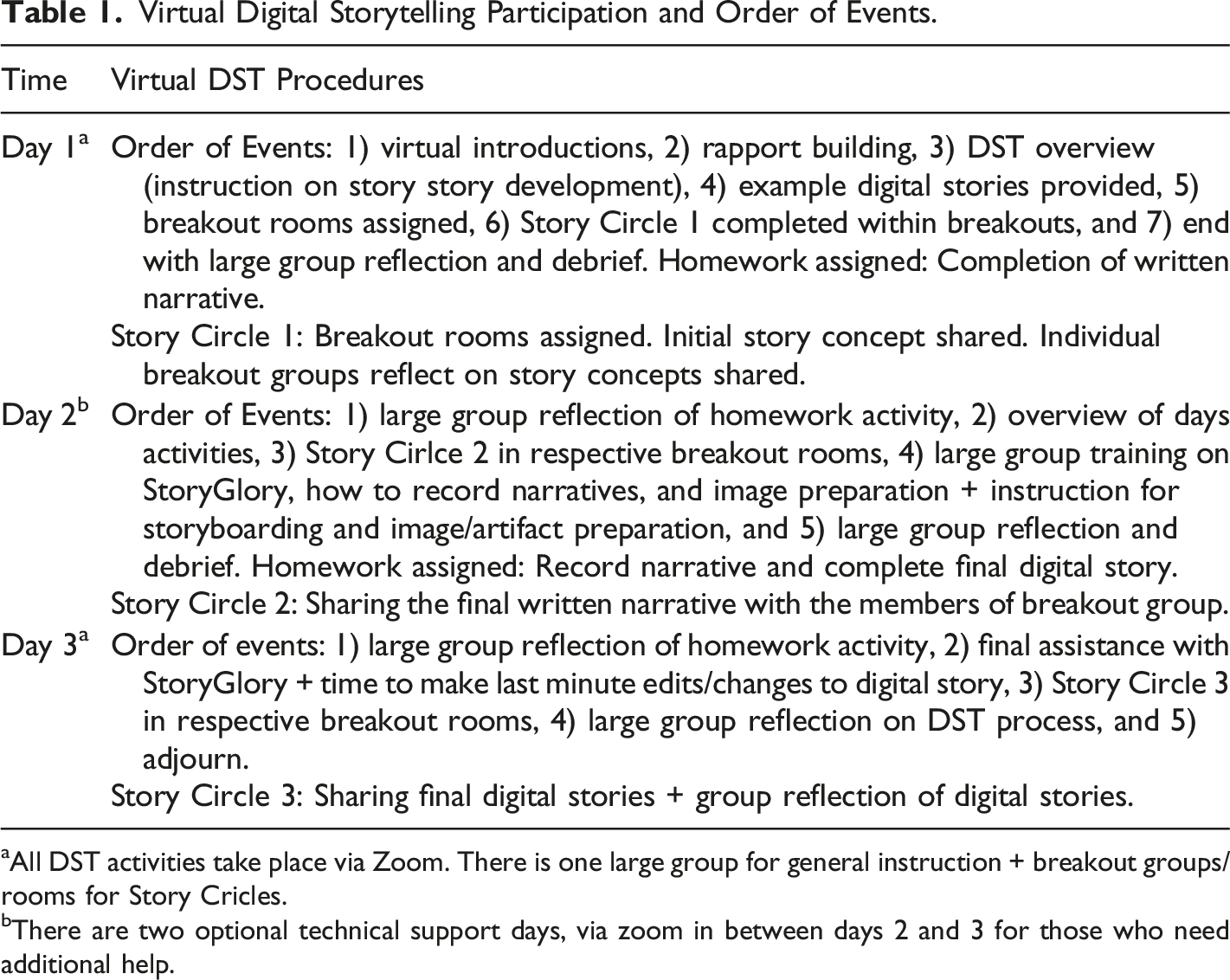
aAll DST activities take place via Zoom. There is one large group for general instruction + breakout groups/rooms for Story Cricles.
bThere are two optional technical support days, via zoom in between days 2 and 3 for those who need additional help.
Between Story Circles 1 and 2, participants complete a first draft of their written narratives, which they read aloud for the group during Story Circle 2. After each narrative is shared, participants provide constructive feedback and receive work time to adjust their narratives based on the feedback provided. From there, facilitators help the storytellers craft a timeline, or sequential order of events in their stories, encouraging them to develop a storyboard (Figure 1), or sketch, of the artifacts they wish to feature. Creating a timeline, or storyboard, requires the storytellers to map the visuals that will accompany their written (then spoken) narrative. To do so, they use drawings or printed photographs to align with sections of their written narrative. Creating a physical storyboard helps participants understand how to match the visual images with the scripted audio. Storyboard.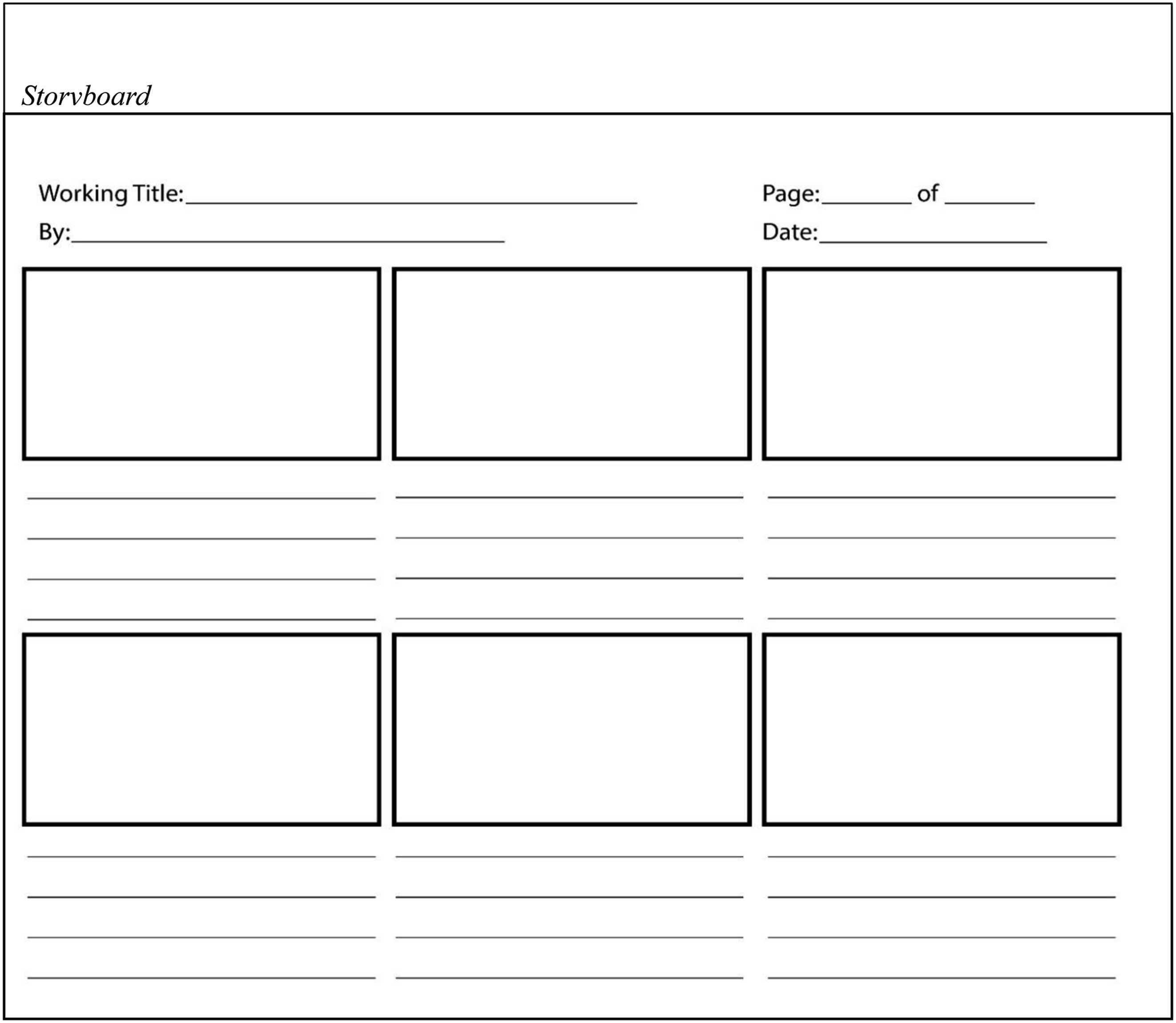
In the Zoom screen sharing feature, facilitators present multiple methods for storyboard creation and encourage participants to find one that works best for their individual experience. We have found that some participants prefer to create their storyboard using notecards that can physically be moved and reassessed for the desired placement on the storyline. Others prefer to sketch out their storyboard on an erasable board, while others like to draw directly on the printed storyboard outline.
During Story Circle 3, storytellers share their final digital stories. To mitigate technological issues, participants provide a copy of their final story to the facilitator in advance, who then presents each story to the group. After each story is shared, the group discusses their reactions to bearing witness to the story. This helps the storyteller process how their participation in the workshop, particularly sharing their story with others as part of Story Circle 3, affected them.
Video-editing
Participants in our virtual DST workshops utilize Storyglory video-editing software. Available as an app for Apple iPhones and iPads, Storyglory enables participants to start with a photograph and then record a spoken narrative about that photograph. With Storyglory, the intention is for the story to be shared with family and friends, and continuously added upon. Because of this, the built-in sharing feature is user-friendly and can be shared with any type of device. The main limitation with using Storyglory as part of the DST process is that the application has limited editing capabilities. For example, additional photos can be added onto the story but cannot be re-sequenced after a new photo is uploaded. This poses a challenge for participants who want to illustrate their spoken narratives with specific images at specific times. Similarly, artifacts intended to be used in conjunction with one another (a photo and specific song, for example) cannot be edited to present and play at specific times or even at the same time. Once a story is built and recorded, it can be downloaded and shared easily, but not re-edited. In our online DST workshops, technological support for Storyglory was provided via Zoom during two separately scheduled times.
In addition to Storyglory, there are some PC equivalents to iMovie and Storyglory, including Movavi, Windows Movie Maker, Filmora, and Corel VideoStudio. Some of these are free applications, while others (i.e., Movavi and Corel VideoStudio) require a fee. These applications would likely be acceptable for use in DST work; however, we have not formally examined these platforms for feasibility and acceptability. Although some applications may offer more in the way of editing, the simplicity, usability, and ability to easily share the final product inspired the use of Storyglory for a virtual DST setting. Adobe Premiere Pro and Davinci Resolve are two video-editing options that can work across platforms, but they require a steep learning curve and are not freely available to participants.
Useful strategies for delivering DST virtually
To successfully deliver DST virtually, we recommend the following: 1) utilizing a teleconferencing platform such as Zoom, including the use of breakout rooms, 2) providing all technology (e.g., devices with video-editing software pre-loaded) to participants, and 3) employing a common video-editing and recording application. Before the workshop begins, we recommend familiarizing each participant with platform-specific language during the onboarding phone call.
Zoom is a viable platform for DST workshops because it: 1) offers screenshare by the facilitator to show examples and information via slides, 2) allows for audio control (e.g., the mute feature can be used to eliminate background noise), and 3) includes breakout rooms and a chat feature for instances where support from a licensed professional may be needed.
Breakout rooms can be used to assist individual participants, or to group certain participants (e.g., those with a particular shared experience) into Story Circles for more concentrated conversations. For workshops with larger numbers of participants, breakout rooms can be used to create smaller groups so that every participant’s voice can be heard. As with face-to-face workshops, some virtual participants may share very minimally, and some may share at great lengths. Allowing sufficient time for rapport building and creation of a safe space often increases participation by those who might otherwise engage less actively, while strong group facilitation skills help ensure that more active participants share time and space with others.
In our experience, the advantages of having all workshop participants use the same technology to create their digital stories greatly outweighs the disadvantages, particularly during portions of the workshop that focus on the technical aspects of digital storytelling. Some tools (e.g., specific types of video-editing software) are only available on one type of device, and providing individualized instruction on many tools can quickly become unmanageable for facilitators and confusing to participants. It can be useful to poll participants during onboarding calls to see which devices and technologies (e.g., iPhone, iPad, Android phone, Android tablet, Mac computer, or PC computer) they have available to them and then choose the most commonly available technology for workshop use. This approach may require providing some participants with loaner devices, a reality that should be considered in budgeting and planning for any virtual DST workshop.
A summary of lessons learned
The ongoing COVID-19 pandemic required us to shift gears to a fully virtual delivery of our DST intervention for the bereaved. This transition created many lessons learned in terms of how to successfully implement DST in a virtual setting. In addition, it revealed some additional safety measures that should be put in place to ensure participants derive the most benefit from their participation. These lessons are described more fully below. 1.User-friendly video-editing software needs: We have used a variety of software and video-editing applications in our prior and ongoing research of DST, including iMovie, Storyglory, and Zoom. Challenges exist with each of the technologies, and the use of Storyglory, in particular, further emphasized the need for user-friendly video-editing software. Participants and facilitators of the virtual workshop stated that they would have preferred having more creative freedom with the Storyglory application to have a more personal completed digital story. Despite this, participants noted feeling proud of their final product, and described the process of having to redo their story in the Storyglory application as helpful in their healing process. An alternative to having one specific video-editing software is to allow participants to choose the video-editing software they would like to use for their DST participation. At minimum, we recommend choosing an application with the ability to: 1) add music and pre-record the narrative, 2) reorder pictures after adding them to the application, 3) save audio recordings if pictures still need adjusting, 4) add text, 5) change the length of time photos remain on the screen, and 6) move images and audio to a specific point to match up. 2.Benefits and barriers of Zoom breakout rooms: For the purposes of managing the online delivery of DST, we use Zoom breakout rooms to group participants based on type of death experience (e.g., in a workshop for bereaved parents, parents bereaved by illness were placed together, parents bereaved by accident and homicide were grouped together, and parents bereaved by suicide and drug overdose were grouped together). We begin each day of the workshop together as a whole group, but each Story Circle occurs within the smaller breakouts rooms. In addition to simplifying logistics, this approach is often experienced positively by participants, who note the benefits of groups comprising individuals with similar experiences. For example, parents of children who died by accidental drug overdose have noted that they appreciated being grouped with others who had a similar type of loss, given the stigma often associated with this type of death experience. Upon occasion, however, use of breakout rooms has introduced challenges, most notably related to Story Circle 3, when participants share their digital stories. Some participants have expressed a desire to view the digital stories of individuals in other breakout rooms, which is not possible using this format. When planning for virtual DST workshops, facilitators should carefully consider which elements of the workshop are best delivered in a combined format and which are more likely to be beneficial when delivered in breakout rooms. They should ensure that all participants have clear expectations about if and how their digital stories should be shared, and sufficient time should be allocated for whichever format is ultimately selected. 3.Facilitator debriefing needed: Completing this virtual workshop of DST revealed the need for robust facilitator debriefing and reflection. When doing DST in a virtual setting, there is limited interaction with other facilitators during the times participants are working on their stories. Intentional debriefing and reflection with support from fellow facilitators could be in the form of a structured debrief after each workshop day, via Zoom, or written reflections that could be discussed at the end of the workshop overall. 4.Screening for fit: All DST workshops require preliminary screening of participants for suicidal ideation and/or other mental health concerns to identify individuals who may not be in a current position to benefit from participation in DST. This need is often increased when delivering DST virtually. One of the benefits of virtual DST is that it allows involvement of participants from virtually anywhere. The limitation with this is that facilitators may not be aware of the support services available in a participant’s local area, thus limiting their ability to provide the extra support offered as a routine feature of DST workshops. Therefore, facilitators may find it best to assess whether participants are emotionally prepared to engage in the workshop prior to joining, using techniques similar to those that would be employed in face-to-face groups, remaining mindful of the potential lack of community-based services for addition support. 5.Comfort of being in a familiar place: Several participants in face-to-face DST workshops offered in places such as university classrooms have commented that they would have preferred a familiar and comfortable setting in which to create and share their digital stories. Virtual DST workshops allow participants to engage in the workshop from the comfort of their own homes, which we have found to be beneficial for many. 6.Additional support and coaching for participants prior to joining workshop, virtually: Preparing participants for what is expected of the DST workshop is necessary, regardless of mode of delivery. However, with a fully virtual DST workshop, one should ensure that participants are fully aware of what is expected in terms of their participation. This includes more clarification on the intent of the story being about their experience with the death, and their bereavement journey, rather than a legacy story about the person who died. More guidance on the intent of the story should occur prior to joining the workshop, and support from facilitators in helping participants select a few photos to use the first day of the workshop can be beneficial.
Conclusions
DST provides bereaved participants an opportunity to engage in meaning-making and growth following a significant death. Our team’s experiences suggest that virtual delivery of DST workshops is feasible and may well offer benefits comparable to those afforded by face-to-face DST; however, careful consideration and planning is required for successful online delivery of this promising approach to bereavement support.
Footnotes
Acknowledgments
This project was supported by the Department of Family and Community Medicine at the University of Missouri. The content is solely the responsibility of the authors and does not necessarily represent the official views of the Department, or any of the funding sources.
Declaration of conflicting interests
The author(s) declared no potential conflicts of interest with respect to the research, authorship, and/or publication of this article.
Funding
This project was supported by the Department of Family and Community Medicine at the University of Missouri. The content is solely the responsibility of the authors and does not necessarily represent the official views of the Department, or any of the funding sources.
