






Abstract
In this article, we present the Laboratory Inventory Network Application (LINA), a software system that assists research laboratories in keeping track of their collections of biologically relevant materials. This open source application uses relational Microsoft Access database technology as a back end and a Microsoft .NET application as a front end. Preconstructed table templates are provided that contain standardized and customizable data fields. As new samples are added to the inventory, each is provided with a unique laboratory identifier, which is assigned automatically and sequentially, allowing rapid retrieval when a given reagent is required. The LINA contains a number of useful search tools including a general search, which allows database searches using up to four user-defined criteria. The LINA represents an easily implemented and useful organizational tool for biological laboratories with large numbers of strains, clones, or other reagents.
Introduction
Biomedical research has become ever more data intensive. 1 The rapid development of biological technology has similarly resulted in the production of new laboratory reagents, including DNA constructs, antibodies, and cell lines, at an exponential rate. Generating and maintaining reagent records have always been vital aspects of successfully running a research laboratory, and this was traditionally organized using paper records. However, the days when academic scientists could efficiently keep track of all the reagents in their laboratory using a notebook and pen have come to an end.
The use of computer databases to maintain and access laboratory reagent records was the obvious next step in the evolution of modern laboratory practices. Indeed, many programs have been developed in industry that are very useful in cataloging, and accessing records related to experiments performed and reagent inventories. These industry-produced programs include software such as the Cryotrack inventory management system (by Cryotrack, Ltd., Los Altos, CA), Inventory Workgroup (by CambridgeSoft, Cambridge, MA), LABCOLLECTOR (by Chemistry Software Ltd., Houston, TX), and ez-Freezer (by ATGC labs, Frederick, MD). All these systems are comprehensive and allow scientists to organize their inventories efficiently. However, one drawback to these software programs is the high cost of acquiring them. Although this cost may not be substantial to industrial labs with considerable resources, such large expenditures are prohibitive to academic laboratories. Indeed, a recent survey of the computational needs of biological laboratories identified the financial burden of acquiring currently available software as a common barrier experienced by small laboratories. 2 To this end, we have developed the open source database program Laboratory Inventory Network Application (LINA), which will be available free of charge to all laboratories in academic institutions.
Program Description
The LINA is “laboratory inventory management” software for academic laboratories developed at the University of Western Ontario, and Purdue University from January 2007 until February of 2008. The programming was performed by Bartlett Consulting pro bono publico. The authors provided Bartlett consulting strict direction with respect to user requirements and design evaluation. Furthermore, continuous feedback was provided during the testing phase to ensure a product that satisfied all the concerns raised by the authors. Due to time limitations, all the prototype and Beta versions were created using the Visual Basic .NET programming language. The .NET technology is advantageous when developing usable applications in a short period of time because it is a Rapid Application Development tool. The database back end for LINA is a single MDB Microsoft Access file. Any computer capable of running the .NET Framework is capable of running LINA.
The LINA project was developed with the following data and functional requirements in mind:
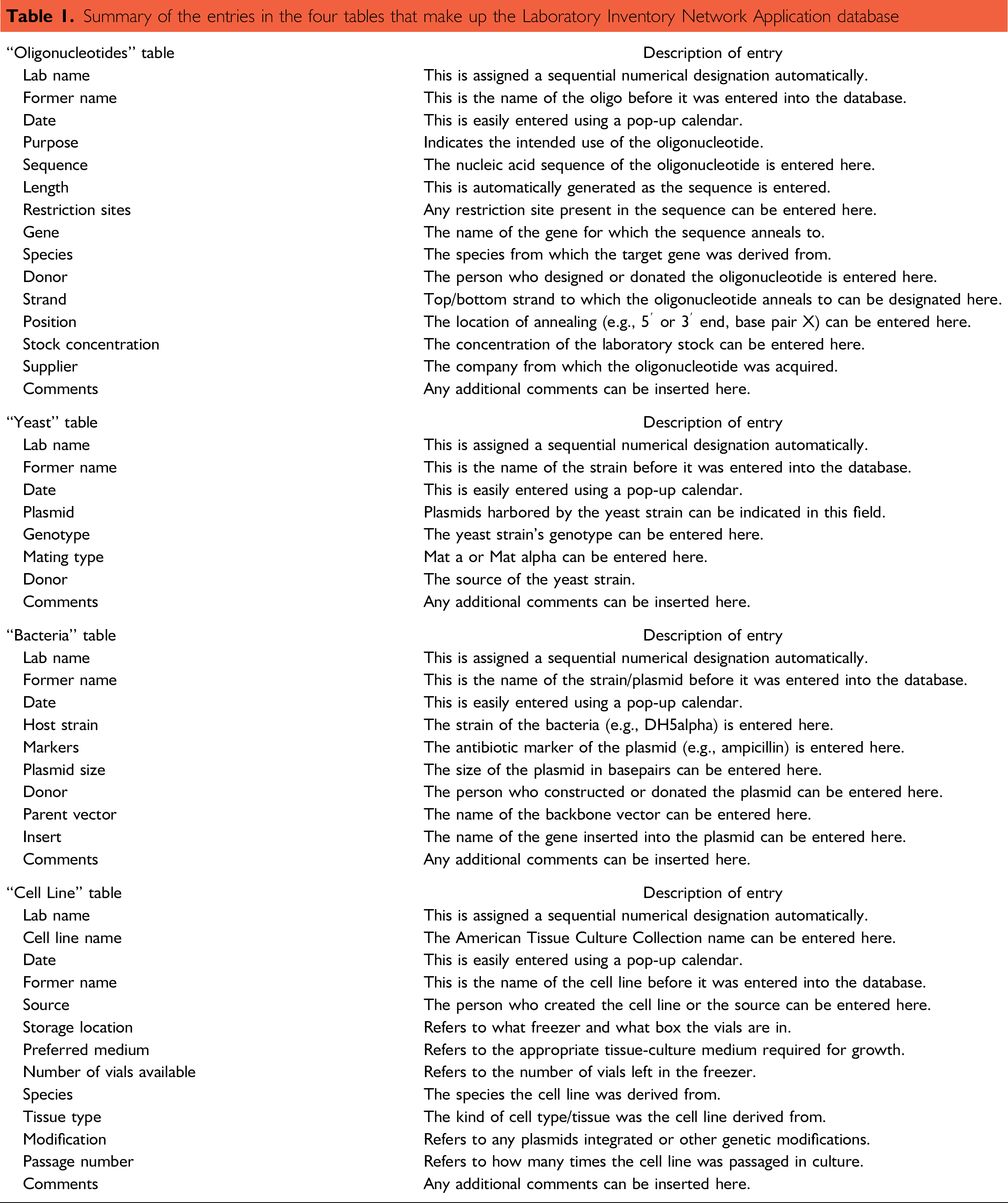
Screenshot of all four tables in the Laboratory Inventory Network Application. The four separate tables can be opened simultaneously and manipulated in individual windows. They can be tiled vertically, horizontally, and cascaded using the “Windows” pull-down menu. Summary of the entries in the four tables that make up the Laboratory Inventory Network Application database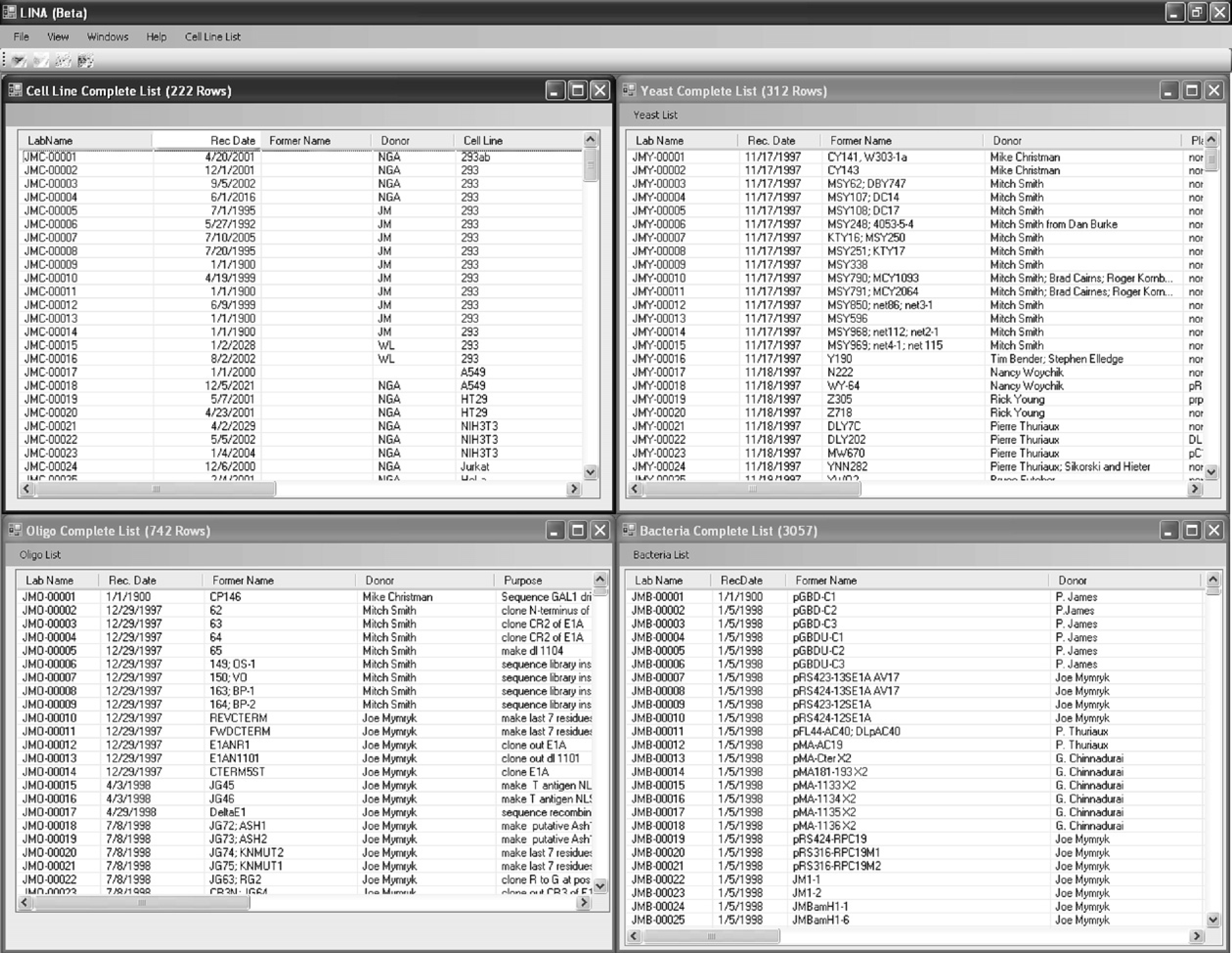
Screenshot of the settings menu for Laboratory Inventory Network Application. Each individual table can be enabled, and up to two custom fields can be added to each table. Furthermore, specific NaCl and formamide concentrations can be entered to calculate the melting temperatures of the oligonucleotides in the “Oligo table.” Finally, the location of the database file (*.mdb) is also determined in this menu, which allows for different machines to point to the same file.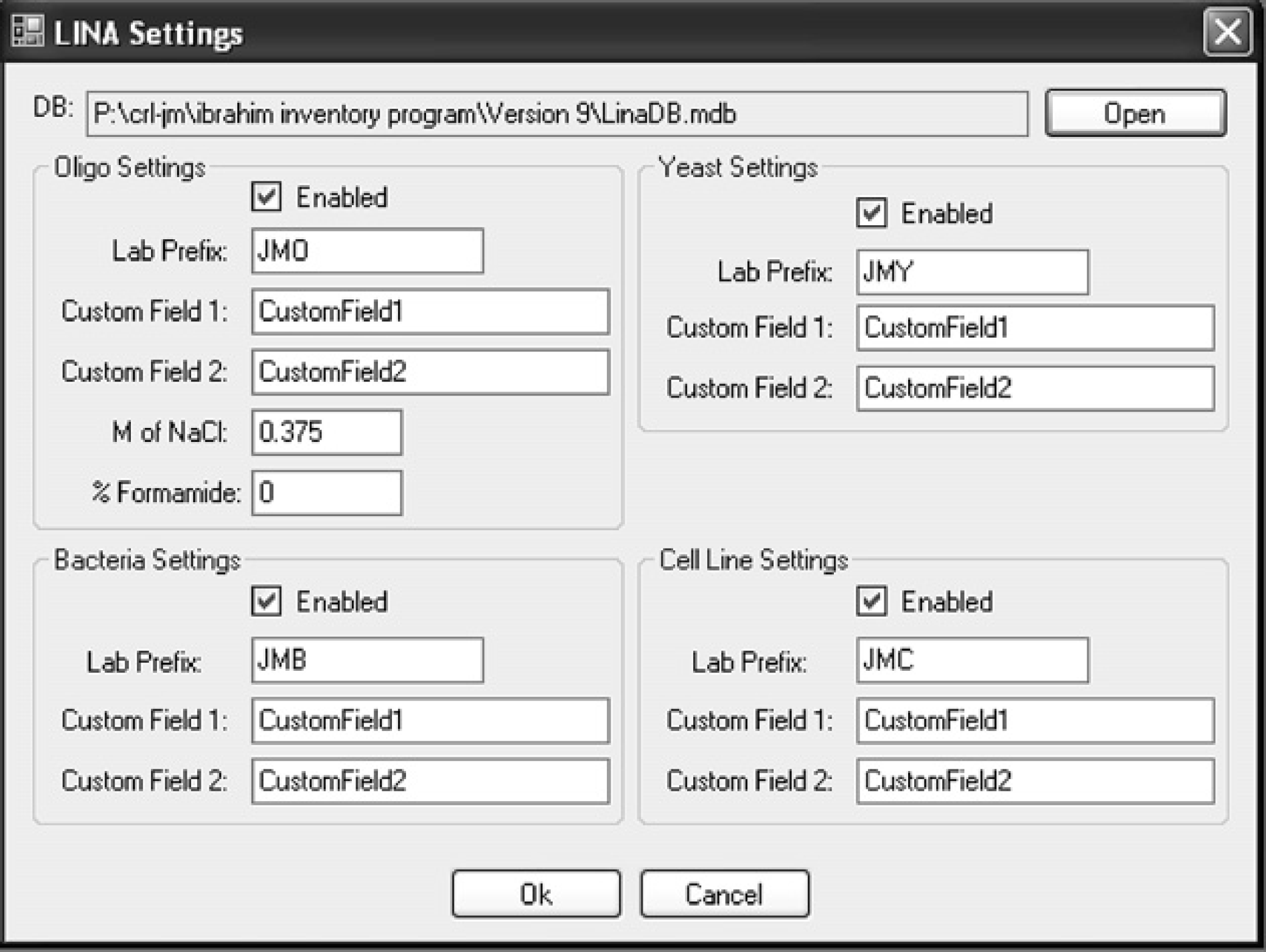
Screenshot of the search tool available for each table in Laboratory Inventory Network Application. Up to four independent fields can be searched simultaneously using the AND/OR Boolean operators.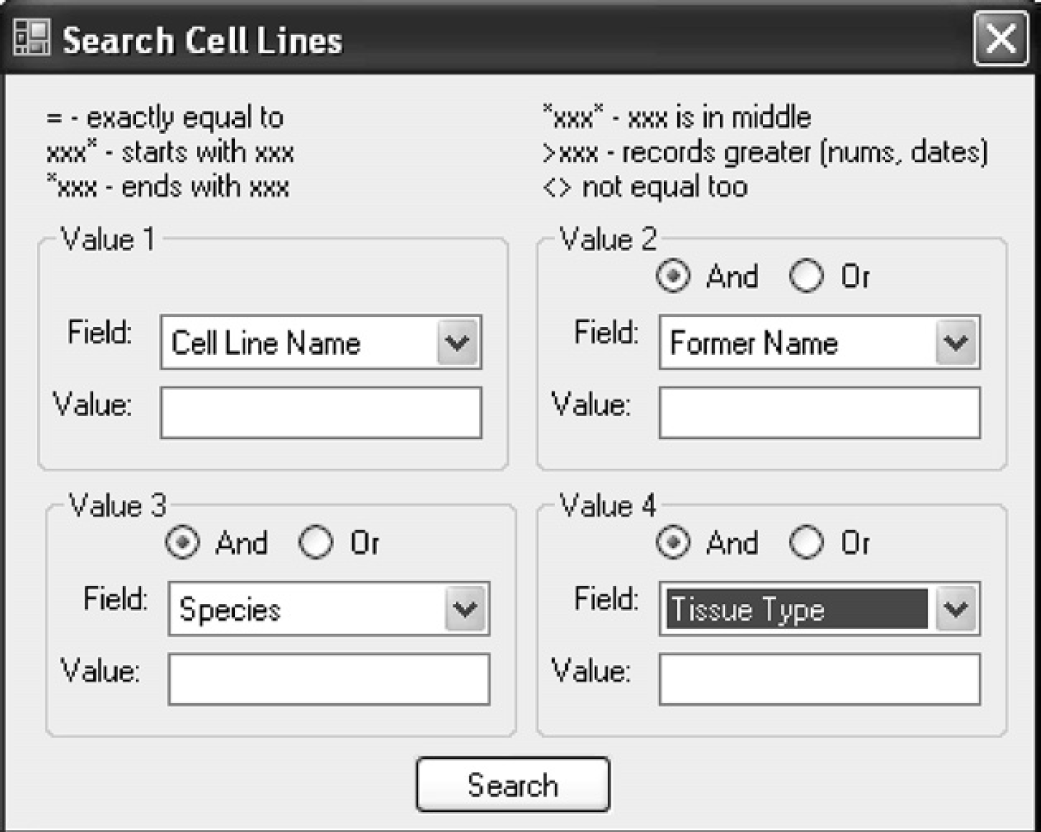
The oligonucleotide front end contains an additional “DNA Bind Search,” which allows the user to search for identical, complimentary, reverse, or reverse complimentary matches to a given sequence. (A) Screenshot of the search tool, which allows the user to enter a nucleotide sequence and specify the minimum length the match has to be. (B) The “DNA compare” function allows the user to see exactly where in the entered sequence an oligonucleotide binds. In this screenshot, the oligonucleotide JMO-0004 binds in a reverse complimentary way, denoted by the gray shading, to the entered sequence.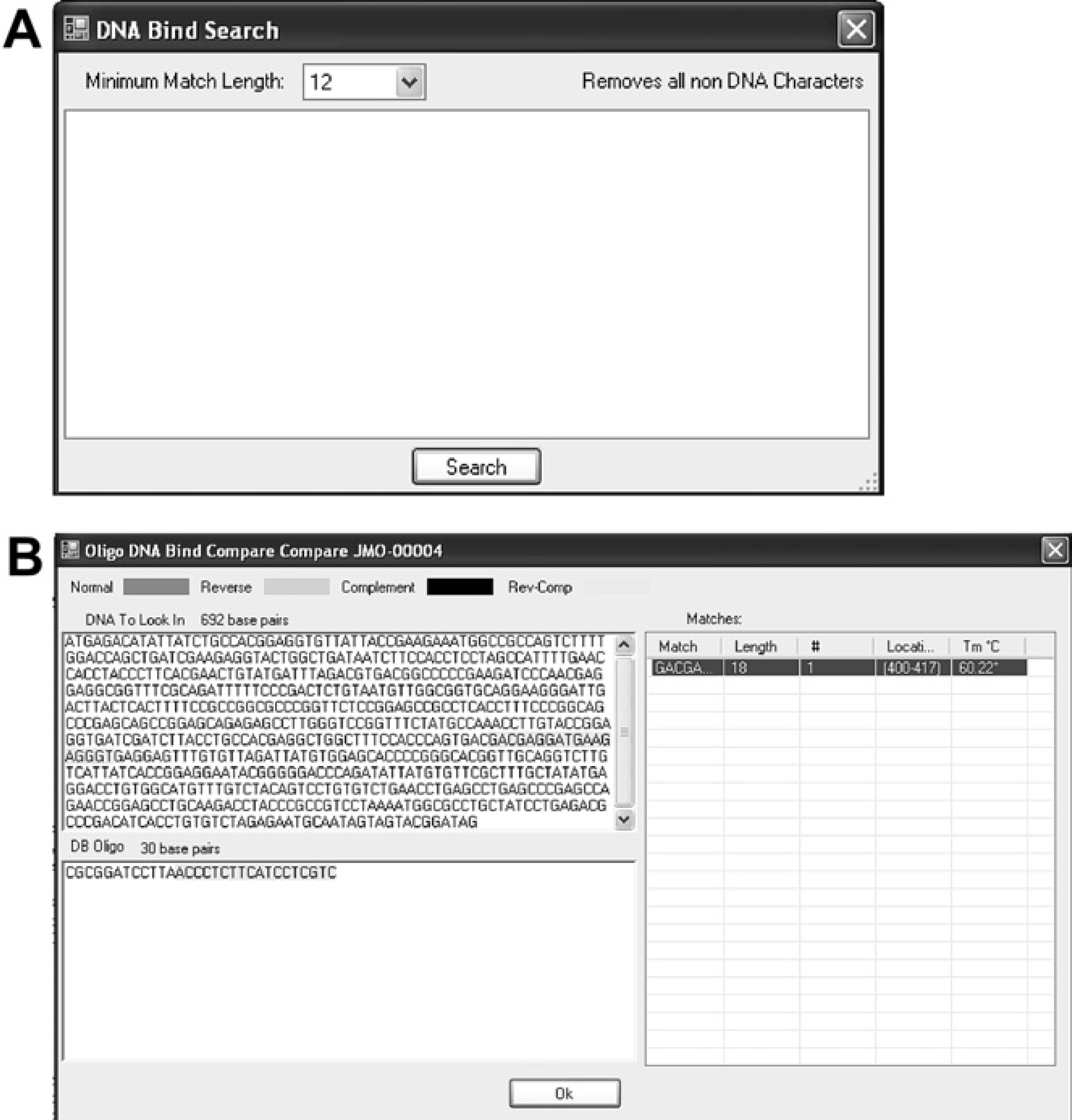
Hardware and Software Specifications
The LINA system was intentionally designed to be straightforward to rapidly facilitate its implementation and distribution. The structure for all four database tables is organized in a single Microsoft Access (MDB) file. The file is accessed and modified by an executable (EXE) file that was developed using Visual Basic .NET. Therefore, the basic technology requirement for running LINA is a computer with an operating system that can run the .NET framework.
The system can set up to be used in two ways (Fig. 5). In the first example, all the data are kept on one computer (Fig. Figure 5A). This is ideal when there is only one laboratory computer, which is shared by different users. In the second case, a central file server hosts the MDB file. In this scenario, multiple computers that run the executable file (.exe) can use LINA simultaneously (Fig. 5B). In this case, each user on their unique computer would configure the master settings menu to point to the MDB file on the common file server using the settings menu (Fig. 2). This allows the whole laboratory's inventory to be stored as one common database, making it easier for different members of the lab to access reagents.
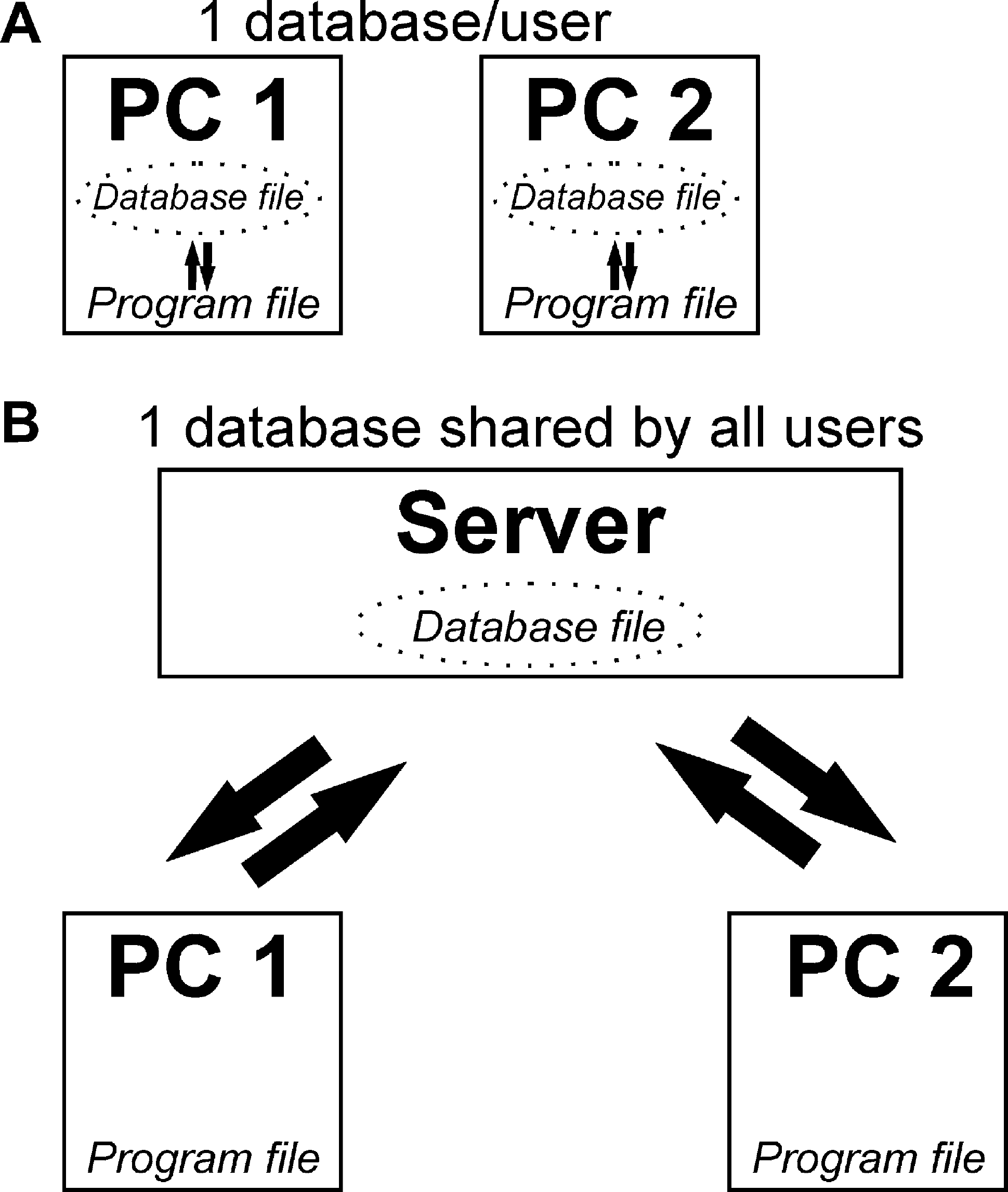
Schematic representation of two ways to set up Laboratory Inventory Network Application in the laboratory. (A) Different people in the laboratory could maintain their own records simply by running the program on their personal computers (PCs) and pointing to a database file located on their PC. (B) Alternatively, a single database can be used for all the members in a laboratory by having different PCs running the executable program file and pointing to a database file on a network server.
Testing
The software was introduced for testing in March 2007. The previous system used was a Microsoft Access database that could search single fields at a time. Furthermore four separate databases were used, thus four separate MDB files were necessary. The new software integrated all four MDB files into one and allowed for a user-friendly interface with vastly superior search functions. The program underwent 12 months of beta testing in the laboratory, and was used by 10 members. Through the beta testing, nine different versions were created, with LINA version 0.9 finally satisfying the suggestions that the testers provided.
Usability and Assessment
To date, there are 3359 entries in the “bacteria” table, 327 entries in the “yeast” table, 802 entries in the “oligo” table, and 222 entries in the “cell line” table in the LINA database maintained by the authors' laboratory. Entries were successfully retrieved using the search tools available for each table. Furthermore, appropriate oligonucleotides were identified to sequence various DNA constructs using the PCR search tool available in the “Oligo” table. Finally, the testers also did not notice any issues with regard to any aspect of the software performance as the number of entries increased from several hundred to several thousand. The tool has become indispensable for the daily operations of the research laboratory where it was developed. The changes made to the tool as testing was done have resulted in a product that is found to be user friendly and extremely useful for all the users who have installed LINA on their computer.
The System Usability Scale (SUS) assessment tool was developed by John Brooke at Redhatch Consulting in the United Kingdom and uses only 10 questions to rate a system's ease of implementation and use. 3 The SUS tool is a questionnaire that asks users to subjectively answer questions related to effectiveness and efficiency of the system, and satisfaction achieved after using the system. Comparative studies performed found that the simple SUS yielded among the most reliable results in assessing the usability of new software. 4 Furthermore, it has also been stated that SUS is the only questionnaire whose questions address different aspects of the user's reaction to the software as a whole. 4 It yields a single score that ranges from 0 to 100 with 100 being the most user friendly. Comparative studies have shown that the SUS tool is superior to other usability scales and has demonstrated that small samples (n = 10–12 users) yield reliable results. 4 Taken together, the SUS is a reliable method for conducting a usability test of new software.
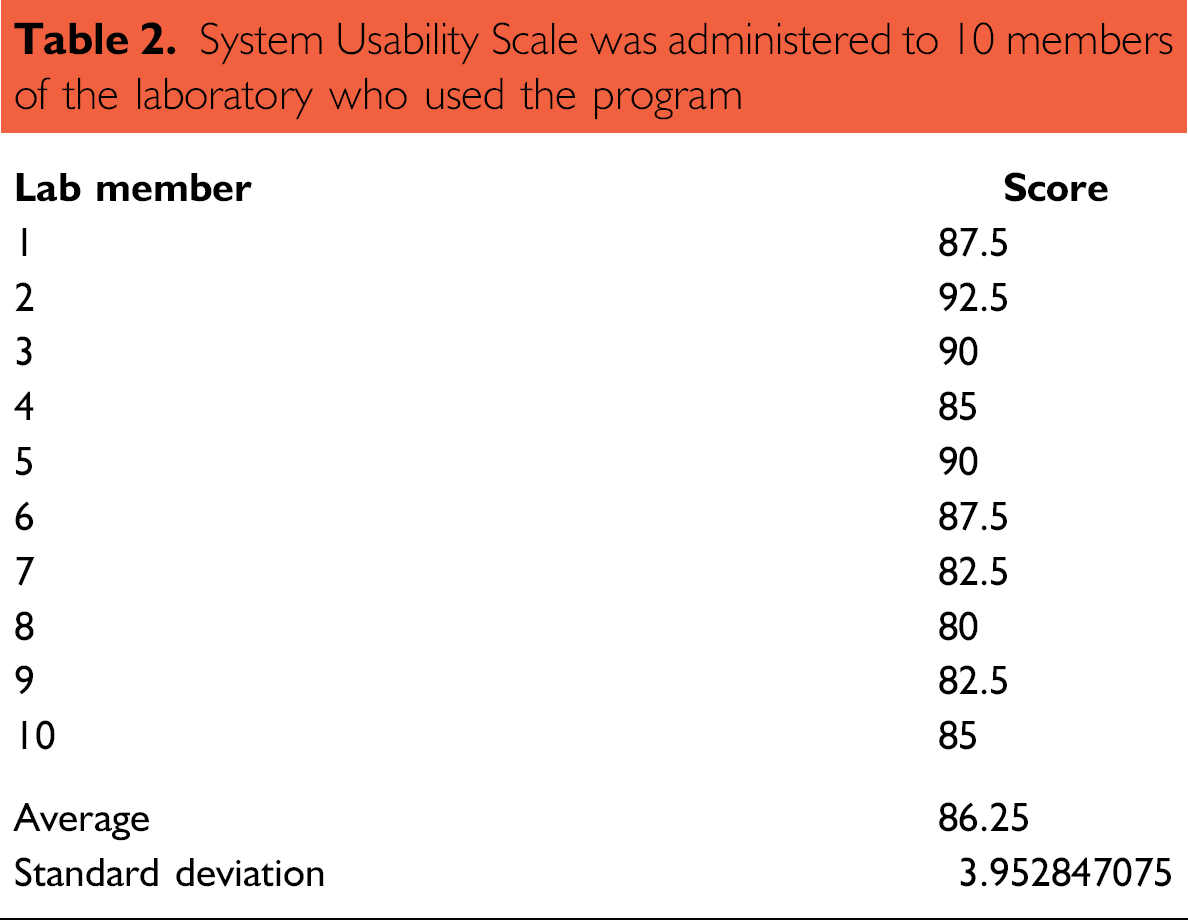
The usability of the LINA program was assessed by administering an SUS questionnaire to 10 participants (Table 2), all of whom worked in the same laboratory. These 10 participants did not include any of the authors. The average SUS score was 86.25 with a standard deviation of 3.95. This SUS score is comparable or superior to another published access-based application, Microsoft Excel, and the commonly used operating system Windows XP. 5 –7 It is generally accepted that the applications with an SUS score of 50 or above are considered user friendly. 7 The LINA program is therefore a system that does not require a lot of training, is easily implemented, and is generally quite user friendly.
System Usability Scale was administered to 10 members of the laboratory who used the program
Future Recommendations
The LINA project has successfully achieved all of its original objectives. The newest version is stable and has been developed to accommodate the various recommendations made by the test users. Despite this, there will inevitably be more recommendations that will be made as the user base is expanded. In anticipation of these needs, we have made the source code for LINA available for download via the distribution web sites. This will allow public participation and collaboration in the future development of this useful application. Certain future developments will likely be:
To test the portability of the LINA application to the Mono environment, the Mono Migration Analyzer (MoMA) tool was used. The LINA assembly was tested to see how portable the application would be against Mono version 2.4. The results indicated that with modest changes to the assembly, LINA could become easily portable, allowing it to be deployed on operating systems other than Microsoft Windows in conjunction with Mono. The results from running MoMA on the current version of LINA are displayed in Figure 6A, B. All the methods that were used while programming LINA do exist in Mono (Fig. 6A. However, the P/Invokes methods used when saving the application's configuration files do not exist under the Mono environment. An additional background color change from the RichTextBox control also triggered a portability problem shown in the “Methods called marked with MonoTodo” (Fig. 6B). If the seven method calls were to be changed to methods that are supported by the Mono environment, then the LINA application should be portable to any operating system that can run the Mono platform. As LINA is an open source application, users that are interested in using LINA on other operating systems have the ability to port the application to their preferred operating system by addressing the issues highlighted in Figure 6.
Results obtained from analyzing the Laboratory Inventory Network Application (LINA) assembly using Mono Migration Analyzer. (A) Screenshot of the analysis summary indicating that there are seven issues that need to be resolved to for LINA to be compatible with Mono. (B) Screenshot of the detailed report highlighting the issues that need to be resolved for LINA to be compatible with Mono.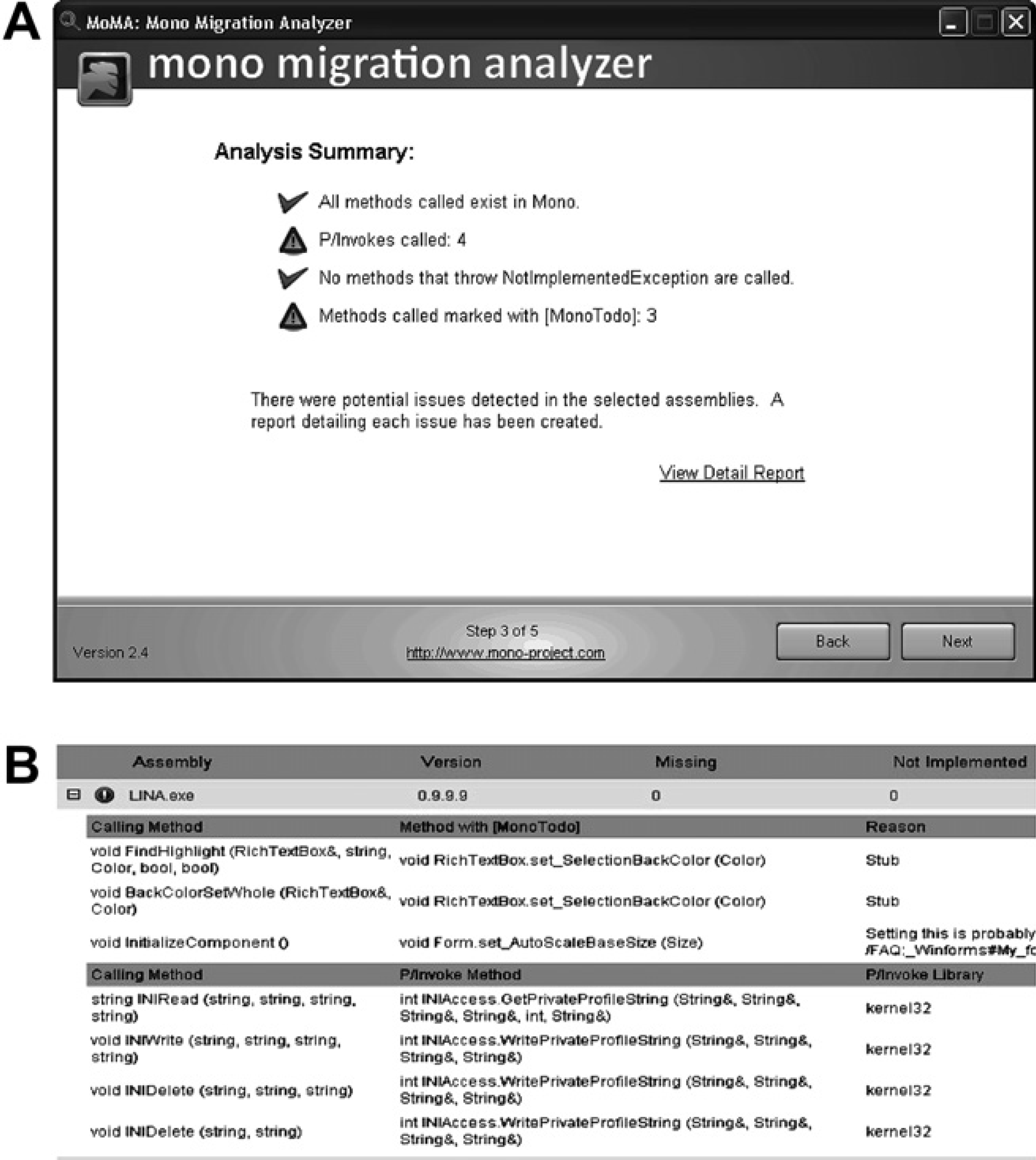
Distribution and Availability
The intent behind developing LINA was always to provide a free database maintenance application for academic laboratories. It was determined that the most efficient way to distribute the program is through a LINA homepage on the World Wide Web at http://publish.uwo.ca/∼jmymryk/LINA.html or http://linasoft.weebly.com. There are detailed instructions on these web sites regarding downloading and first time use of the application. Two files will be needed for the initial install: the application file and the empty database file. Subsequent installations only need the application file if LINA is to be used in a network (Fig. 5B). Furthermore, the open source code for LINA is also available for download from both sites.
Conclusions
The LINA system is a free software that allows academic laboratories to efficiently manage their inventory of specialized molecular biology reagents. The software system can be set up to work on one computer or in a network with multiple users. The features provided by LINA are comparable to the features available in many commercially available database programs. These features include a versatile search function where entries in even large tables can be efficiently located by searching up to four data fields simultaneously. The automatic generation of stock numbers (or a lab number in LINA) is another example of these commercially available features. Furthermore, a useful DNA sequence search tool was developed specifically for the oligonucleotide table, which is not available on any of the commercially available software. Evaluation of the system's usability was carried out using the SUS tool where it yielded an average score of 86.25 with a standard deviation of 3.95 (n = 10).
The final application available for download is a stable product that has many advantages over Microsoft Excel, which is currently the most common method of keeping track of laboratory reagents by computer. The search tool, along with the specialized search tool available for the “Oligonucleotide” database, is far more useful than the basic search function in Excel. Furthermore, the ability to print specific search results, as well as automatically generate and assign identifier numbers are more examples of why LINA is superior to Excel for keeping track of laboratory reagents. Finally, it is worth noting that the development of this system highlights the rewards that can be achieved when trans-disciplinary collaboration is used to solve problems.
Acknowledgments
The authors would like to thank all the beta testers for their valuable input. AFY was supported by an Ontario Graduate Scholarship, and a CIHR strategic training program in cancer research and technology transfer PhD student award.
Competing Interests Statement: The authors certify that they have no relevant financial interests in this manuscript.