




Abstract
Our goal in this article is to reflect on the role LEGO robotics has played in college engineering education over the last 15 years, starting with the introduction of the RCX in 1998 and ending with the introduction of the EV3 in 2013. By combining a modular computer programming language with a modular building platform, LEGO Education has allowed students (of all ages) to become active leaders in their own education as they build everything from animals for a robotic zoo to robots that play children's games. Most importantly, it allows all students to develop different solutions to the same problem to provide a learning community. We look first at how the recent developments in the learning sciences can help in promoting student learning in robotics. We then share four case studies of successful college-level implementations that build on these developments.
1. Introduction
LEGO robots have been used in hundreds of college-level classrooms across the United States over the past 20 years. The initial use of the LEGO Mindstorms products in classrooms was an experiment to see if this technological tool could facilitate deeper learning of engineering concepts. The emergence of engineering education research and the learning sciences now offers a theoretical foundation to support their use in the classroom. In this article we investigate the use of this tool by providing: (1) a discussion of how robotics fits within our understanding of how students learn, (2) a historical overview of our involvement with the development of LEGO Mindstorms for Education and (3) four case studies from different universities describing how the tools have impacted student learning at each institution. Our disclaimer is that this discussion is not meant to be inclusive of all the really exciting programs around the world, but rather to highlight how the insights into student learning and the LEGO tools can result in transformational educational experiences for students.
Our second disclaimer is that we are not pushing the LEGO toolset as the only way to bring robotics in the classroom, nor do we want this article to be a comparison of platforms; rather we use LEGO as a model for how robotics can foster student creativity and innovation. The Basic Stamp and the PIC processor have offered small processors to hobbyists for years. The Arduino has caused a revolution in bringing artists into the world of robotics. It has spawned numerous offshoots from very small to wearable processors. The Beaglebone and Raspberry Pi have brought full Linux operating systems to the world of small robots. While these processors are low cost, they require some electronic circuitry skills to use. Some, like Romo, use a phone for the microprocessor while others, like the Nao, Create, Finch, E-puck, Thymio, are all fully self-contained robots with no such requirements. However, they concentrate on teaching computational thinking in the classroom, not the fabrication and design - although the Thymio does have LEGO-compatible studs on the housing and the Create has threaded inserts to build from. Since our goal is diversity of student work, building is a critical part of our work. Fischertechnik, Vex, Tetrix, Matrix and others offer a building system as well as the processor and Elenco's Snap Circuits offers an electronics building system as well. Prices vary by four orders of magnitude, from $1 chips to $15,000 humanoid robots. Web-links to these and other robotic platforms can be found at the end of this paper and a good overview can be found in the Springer Handbook of Robotics ([1]). Furthermore, there is a large variation in software environments, even just for the LEGO platform. From LISP to LabVIEW to Matlab to C to JAVA to SCRATCH, there have been many different programming solutions, each with its own advantages and disadvantages. Our experiences have been primarily with the LabVIEW and with the LEGO software.
2. Learning Sciences Research:
Like poorly meshing gears, there exists a mismatch between the research in engineering education and in the learning sciences, which is hampering the development of more effective learning environments for engineering learners (see [2]). The majority of engineering education research has predominantly focused on undergraduates. Most engineering education research produces knowledge of whether the application of specific pedagogies or tools yields positive effects on student satisfaction, identity development and pre-/post-test gains. Sometimes it even considers eventual employer satisfaction (as in [3]). This is in contrast to most research on learning in other fields, especially in the learning sciences, where the focus has been on K-12 age learners, both in school and in informal environments. Research outside engineering is yielding insights about the processes students use to develop conceptual understanding and linkages between disciplinary thinking and practice. This latter form of research informs new processes for teaching learning and assessment. While the former approach (i.e., outcome evaluation research in engineering education) offers broad brush strategies for architecting undergraduate curricula, it often leaves instructors to fill in gaps about the momentary phenomenology of students' conceptual development, more often than not through trial and error in the classroom.
What is therefore needed for engineering education is a knowledge base for the engineering teaching profession that examines and explains the moment by moment interactions of teaching and learning. As [4] note:
“Most approaches for bringing research to teachers assume that researchers' knowledge is the best foundation upon which to build a professional knowledge base because of its generalizable and trustworthy (scientific) character. A significant alternative view claims that the knowledge teachers use is of a very different kind than usually produced by educational researchers (Cochran-Smith & Lytle, 1990, 1993; Doyle, 1997; Eisner, 1995; Huberman, 1985; Kennedy, 1999; Leinhardt, 1990). Called “craft” knowledge by some, it is characterized more by its concreteness and contextual richness than its generalizability and context independence. From this point of view, bridging the gap between traditional research knowledge and teachers' practice is an inherently difficult, perhaps intractable, problem.”
Teachers' craft knowledge is situated in the classroom, concrete and continually shaped by interactions with students. It consists of a mix of content knowledge, pedagogical knowledge and pedagogical content knowledge (see [5] and [6]). In contrast, research knowledge is typically decontextualized information about “what works”; precisely the sort of information that evaluation-based studies offer us. This is not to say that knowing which pedagogies are more successful on average is not useful; it is. Rather, that even once we have identified promising approaches, we still have more to learn and describe about how to understand and nurture students' thinking within those pedagogies. Engineering education research will be more effective in improving engineering teaching when it produces findings that help teachers change their classroom, especially in provoking, scrutinizing and responding to student thinking.
University and high-school level physics education has been leading the way in listening to student thinking. One of the most broadly used tools for assessing physics understanding is the Force Concept Inventory (see [7]), which provides carefully developed prompts for gauging students' conceptualizations of key concepts in Newtonian mechanics. It is a powerful tool because it enables physics teachers to identify common misconceptions about physics with minimal effort, a feature that many pedagogies (even some laboratory-based pedagogies) lack. Moreover, it provides a template for productive assessment in other disciplinary areas, from more advanced physics to engineering (defined in [8]). A recent NRC report (201:, Ch. 3) reviewed the physics education field's findings and recommended that all physics faculty learn to take “a scientific approach” to studying thinking and learning in their classrooms, including developing diagnostic assessments of students' thinking about all physics concepts taught at the university level (see [9]). The development and application of such techniques has enabled measurable improvements in outcomes of “upper-division courses on electricity and magnetism (see [10] or [11]), classical mechanics ([12]), thermal physics (see [13] and [14]), and quantum mechanics (see [15–17]).”
Conceptually focused physics education research, like nearly all other educational research focused on student thinking, is grounded in a theory of constructivism (defined in [18] and [19]). Constructivism's essential premise is that learning happens through gradual processes of conceptual change, wherein new knowledge forms in addition to prior knowledge. Constructivists argue that learning happens best when explicit connections are made by the learner between what she or he already believes and new ideas encountered. This theory is consistent with [20]'s research demonstrating how memorization-based pedagogies fail to support learners' later application of what they have ostensibly learned. In contrast, pedagogies that challenge learners' pre-existing beliefs, such as through experiencing problems suggesting new dissonant beliefs, fare far better. Constructivism suggests that teaching must focus on understanding students' current beliefs, examining how they do or do not reflect canonical knowledge and constructing new occasions to challenge mismatches between student thinking and the canon. Useful knowledge for teaching describes how instructors can construct these challenges (for example, [21] and [22]).
The implications of this perspective have not been lost on some engineering education researchers. For example, in learning computer science, [23] reviews several studies that highlight the power of attempting to “reverse engineer” students' conceptualizations of disciplinary concepts, such as through interviews. Researchers have looked at student thinking in computer science (see [24–27]), heat transfer, fluid mechanics and thermodynamics ([28]) and electrical engineering ([29–31]). Constructivist theories of learning, however, have driven engineering education research and teaching less than they have pedagogy in “softer” fields ([32]). Arguably, engineering education research has been even less affected by progress on constructivist research on learning than other “hard” fields. As evidence of this, consider [21]'s claim that “only a few examples of the use of inquiry-based approaches in engineering laboratories [can be] found in the literature.” Many engineering educators use labs to teach; why are they not studying thinking in them?
LEGO robotics is fundamentally a constructivist tool, with students leveraging their knowledge and experience to solve a real-world problem and to consistently question and challenge that knowledge as they develop their solution. Since every student's knowledge is different, one can correlate classroom success with the diversity of student projects at the end. Classes that result in 10 identical robots driven by 10 identical codes have not looked at individual student thinking - as students are simply repeating the work of someone else (i.e., following directions). Classes where the individual student models, concepts and experience are important will result in 10 different robots doing 10 different things with 10 different control programs. It is the latter classroom that builds on the constructivist theory of learning and that we will highlight in our four case studies.
3. Developing Mindstorms for Schools with LEGO Education and National Instruments
3.1 The Past & Present - Interface B, RCX, NXT, Robolab and LabVIEW for LEGO Mindstorms
Back in the 1980's, the LEGO Education division developed the Control Lab Interface, or “Interface B” - Figure 1, an RS232 peripheral that allowed a computer to turn on and off LEGO motors and read various sensors. This work, developed in conjunction with Seymour Papert's group [33] at the MIT Media Lab, allowed students to construct their own ideas. Students could build ideas like “smart houses” that reacted to the temperature or to motion, 2D pen plotters and a robot that sorted LEGO tiles by color. The Interface B was primarily designed for pre-college; however, faculty at Tufts University decided to bring the device into the undergraduate curriculum as a way to allow students to design, build and control their own science experiments. The device was viewed as a low-cost data acquisition board that allowed actuation along with sensing. The faculty at Tufts worked with LEGO to design the first LEGO module using LabVIEW; a graphical programming software from National Instruments. The LabVIEW codes or virtual instruments (VIs) allowed anyone to take data using both LEGO sensors and a host of homemade sensors. For a few years, Tufts students learned how to design and execute an experiment by using the Interface B. The flexibility of the LEGO building system allowed every student team the opportunity to approach a given problem differently allowing students to learn from each other and forcing the students to find evidence to support their design ideas and their scientific results. These peer-based discussions are often where the bulk of the learning happens.

The Control Lab Interface B
In the late 1990's, we teamed up with LEGO Education and National Instruments to design and develop Robolab, an interactive graphical programming environment that could control the newly designed RCX programmable brick - Figure 2 - as well as the Interface B. The RCX had the advantage that it did not require a direct connection to the computer to operate. The new system allowed for a set of commands to be “beamed” down to the RCX through an IR transmitter plus receiver and stored on the RCX, so that it could be run without the computer (or in remote mode). LEGO developed a firmware that interpreted a set of byte codes (LASM or LEGO Assembly Language). The user could send down a single byte code to immediately turn a motor on, read a sensor, or complete a script with conditionals, jumps and eventually even watch for certain events. The firmware allowed 11 simultaneous tasks and up to eight subroutines. The RCX was based around a Hitachi H8 microprocessor and could run commands at approximately 5 msec per command. Robolab version 1.0 had two different programming environments: (1) Pilot - Figures 3 & 4 - where the user would click and choose from a number of options and (2) Inventor - Figure 5 - where the user could wire together multiple commands in a completely graphical environment. The Pilot area was designed for immediate success, i.e., the robot might not necessarily do what you wanted, but something always happened whenever you hit “Run”. Pilot options were intentionally limited so that a new user could easily program a robot to complete simple tasks (e.g., stay on top of a table or follow a line (Figure 4)). More complicated tasks required the use of Inventor area. The Pilot area had an added advantage in classrooms with very few computers because many groups could share the same computer due to the rapid programming.
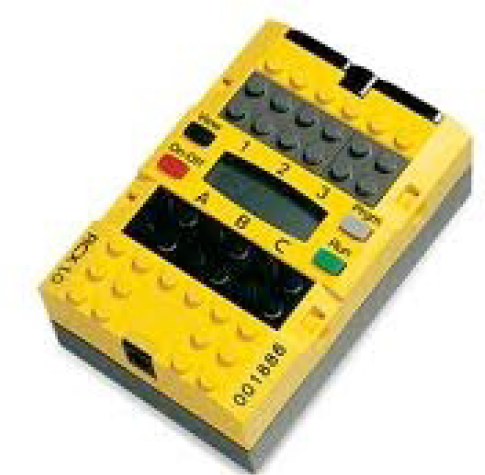
The RCX
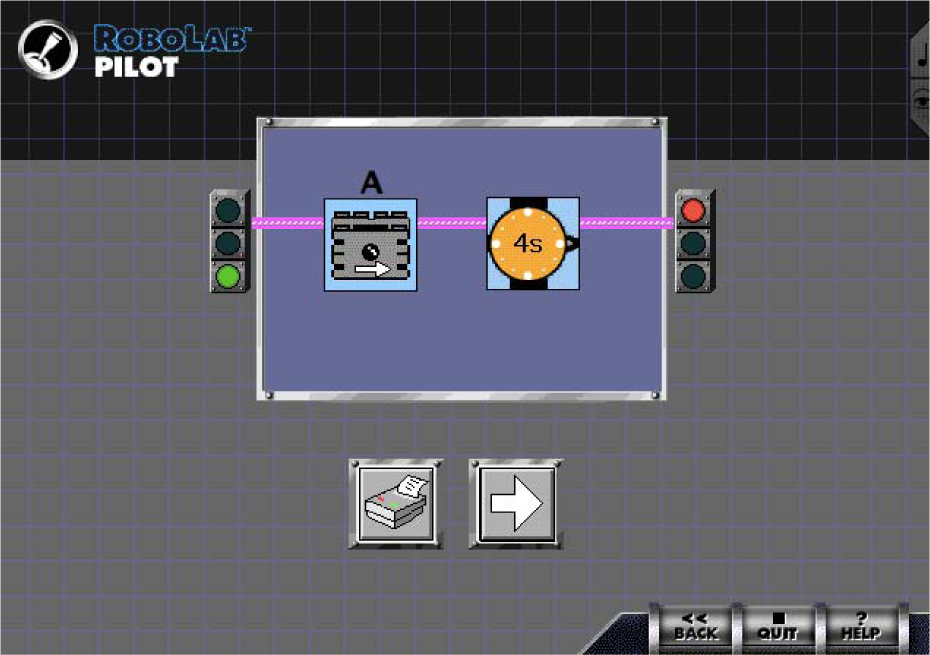
A simple pilot program

Following a line in Pilot
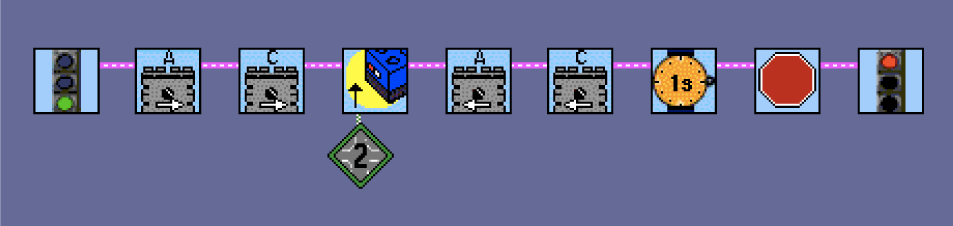
Following a line with Inventor
The Inventor level allowed the robot to incorporate nonlinear programming to make decisions. If statements, while loops and for loops were all possible, along with multi-tasking, event monitoring (version 2.0) and subroutines. Figure 6 shows a simple proportional controller written in Robolab's Inventor area. Every program written in the Inventor area started with a “Begin” block and ended with an “End” block. The pink wire between the blocks defined the order of execution. With version 2.0, we also added camera support, so that one could perform simple image processing algorithms. This allowed students to make robots that (for instance) responded to the motion of a red ball in front of the camera or arrows drawn on the floor in an upper level robotics class.

Proportional Controller
The Mindstorms sets were used at college level for introductory engineering classes and later for classes focused on the topic of controls and robotics. While the introductory course tended to have simpler problems (see Case Study 1), the later classes were able to do fairly sophisticated robotics with the LEGO hardware. One example student project was a LEGO assembly station that cooked hamburgers and then placed on cheese, condiments and so on. Another built walls of LEGO bricks using a camera overhead to find the “right” piece by color and size, subsequently moving an arm to pick it up and place it in the right spot.
Robolab version 2 added another possibility through the Investigator area. This area allowed students to use the RCX (and later the NXT) as a data logging device. The system integrated the LogIT and Vernier sensors to increase the number of parameters that could be sensed with the RCX. This allowed students to build their own experiments. For example, one group measured the temperature of the air and the light from the sun over a 24 hour period and discovered that the air temperature lagged behind the sun, both at sunrise and sunset. Another group (in controls class) measured vehicle overshoot and response time. The Investigator area was also used to help students learn how to use multiple datasets to form a conclusion. For instance, one class was asked to print out a letter of the alphabet on an 8.5“ × 11” sheet of paper. The paper was then placed on the floor under a table draped with a sheet so that no one could see the letter. Students were required to build robots that drove over the letter and collected light sensor data. Students could then use data from three to five runs over various parts of the letter to determine the hidden letter. Finally, Investigator had the ability for schools to share data sets over the Internet or through a presentation area.
The simultaneous development of C, Java, Lua and other compilers for the RCX was allowing students to experiment with many different ways of programming. Each compiler had a different set of advantages and disadvantages. Many of these languages stressed speed, while Robolab continued to push the ceiling of capabilities. Advancements in Robolab included the ability to program one RCX to control another (the first LEGO virus), datalogging multiple data sets while driving and communicating with a camera, communication across multiple RCXs (and cameras) over the Internet, the ability to play a digital piano (turning the RCX into a music box) and giving students the ability to program their own user interfaces (the LabVIEW Panel), which resulted in a student-built remote control LEGO world online. At this point it was clear that Mindstorms really allowed students to drive their own learning and pushed them in transformational ways. There was probably no better example of this than a group of high school boys in Luxembourg who were pushed to do college-level work by their imagination and the toolset. They built Gaston - Figure 7 (under the direction of Claude Baumann) - a robot with two ears (microphones) that could localize your voice through a quick cross-correlation (on a PIC) and using “Ultimate Robolab” - a software environment they built within Robolab that allowed them to compile and download replacement firmware, drastically increasing the computational speed.
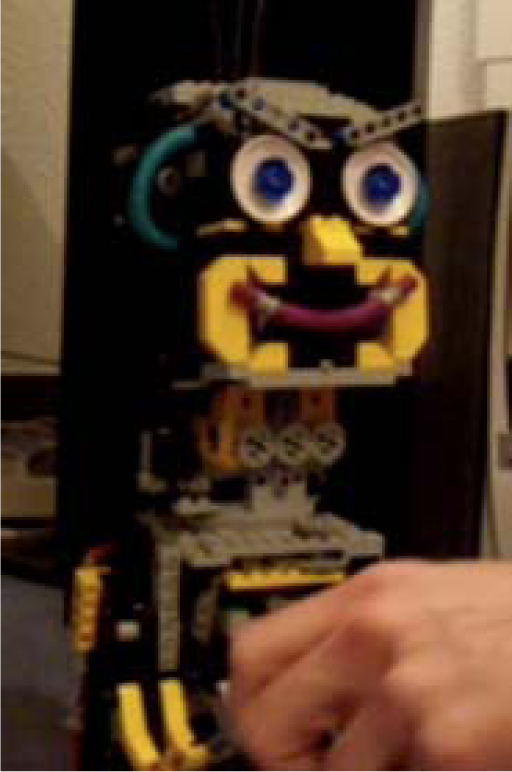
Gaston
Unfortunately, some of the higher level projects were hampered by the fact that all LEGO motors behaved slightly differently, the firmware was slow and the motor response was not linear. Dick Swan, one of the founders of RobotC, developed a “fast firmware” for the RCX that was roughly 100 times faster than the old firmware. This advancement resulted in Robolab 2.5 and was later upgraded in Robolab 2.9. Robolab 2.5 made it easier to use the LEGO tools in classes teaching controls. The new firmware was able to give the motors a linear response by adjusting the way the motors were controlled (braking rather than floating the PWM pins in the dwell). A dead band does exist as a result of the gearing, but that was easily modelled. The RCX was transformed into a real-time machine due in part to the faster processing time coupled with the ability to turn off all interrupts. The RCX now allowed for sample times on the order of 1 msec for a proportional controller. College-level students now used the RCX to repeat a number of the canonical controls problems including the inverted pendulum, the crane problem and adding haptic feedback on LEGO joysticks. The NXT, with the built-in encoders, made for an even better controls toolset, with more accurate (and faster) haptic responses and better LEGO balancing robots.
The success of the RCX and Robolab (now in 15 different languages) led to the collaboration between National Instruments and LEGO to develop the NXT brick and NXT software. The new Mindstorms product entered the market in 2006. The hardware changed the connector to an RJ12 connector (like a phone connector), added a small monochromatic screen (100 × 60 pixels), used an ARM 7 Atmel microcontroller and had Bluetooth connectivity. The software was designed to be similar to Robolab, but with a lower barrier to entry. But since some teachers who had been using Robolab would find it difficult and time consuming to translate their worksheets for using the new software, Robolab 2.9 was released to include the new NXT. Support was also added for the Scout, a somewhat successful smaller LEGO processor and a number of third-party sensors including LogIT, Vernier, High Technic and Mindsensors. The new NXT motors with built-in tachometers made using the LEGO components even easier in controls classes. The motors allowed students to experience visual servoing, PID and feedforward control, improved syncing of multiple motors and, of course, robotic control of children's games (Figure 8).

The NXT Controlling an Etch-a-Sketch
In 2008, Tufts University started working directly with National Instruments on a new version of LabVIEW specifically aimed at education: LabVIEW Education Edition (LVEE). We co-developed a set of VIs that allowed students to use the full LabVIEW environment on the NXT. Although the VIs (or blocks) were reminiscent of the Robolab VIs (see Figure 9), there was no Begin or End block and all the structures (for loops, etc.) were LabVIEW-style rather than separate VIs. There were two main advantages to this approach: 1) the students were learning LabVIEW, which is a full programming environment that they would use in the future as engineers and 2) they were able to take advantage of LabVIEWs inherently parallel nature. The disadvantage was that LabVIEW is more difficult to learn than Robolab, with subtleties such as shift registers and auto-indexing that can lead to student confusion. For the college market, however, LabVIEW is a necessary part of laboratory education and the NXT and LVEE opened up a more playful method of learning.
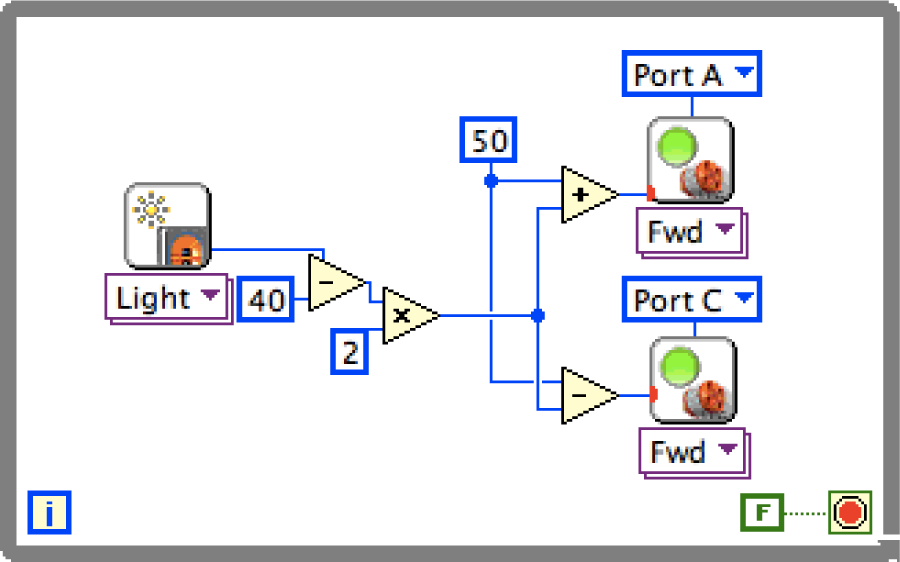
A line follower using a proportional controller in LVEE
Use of LabVIEW at the college level helped first-year students learn about what engineering is, second- and third-year students learn controls (either with LabVIEW or the Matlab toolkit) and seniors learn image processing and robotics. It was also integrated into the LabVIEW Student Version (as well as the Education Edition and the LabVIEW for LEGO Mindstorms version). In some instances, students also learned ergonomics and design using the LEGO sets as a rapid prototyping tool. We have seen college students develop a plethora of ideas using the LEGO Mindstorms tools. Examples include balancing robots, a robot that responds to your eye movements, swarms of robots working together on a rescue mission and a small neural network running on the brick to emulate the intelligence of a lobster (see [34]). The four case studies highlight the NXT in the college classroom and many of the activities can be found on http://legoengineering.com.
3.2 The Future - EV3
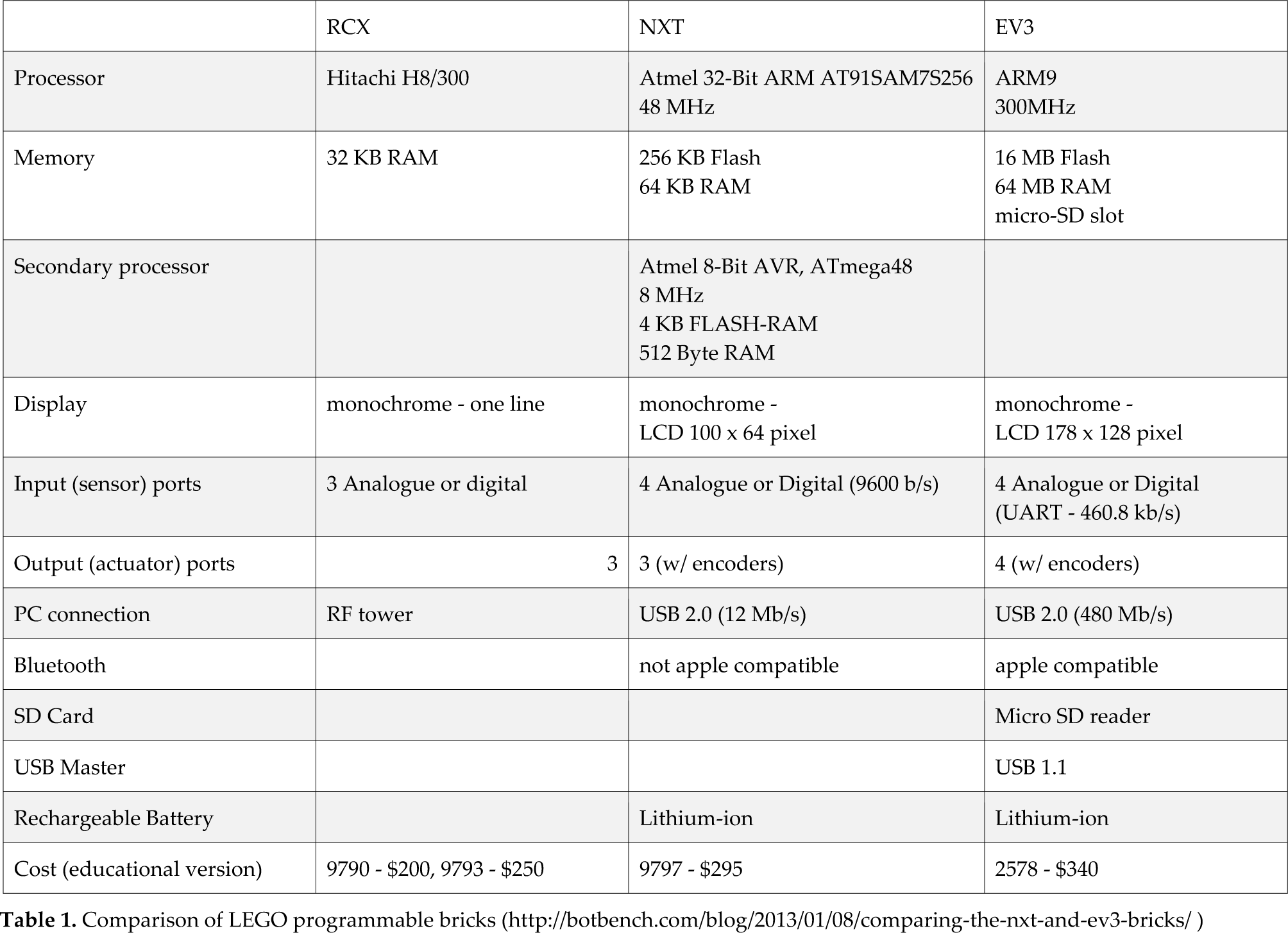
The next evolution of LEGO Mindstorms, the EV3 - Figure 10 - came out in autumn 2013. Unlike its predecessors, this time the robot has a full Linux operating system on board. The EV3 runs Linux on a 300 MHz ARM9 processor with 16 MB of flash memory and 64 MB of RAM. It comes with five new sensors (with autoID) and supports all the old sensors (without autoID). The touch, color/light and proximity (1 cm accuracy over a 250 cm range) sensors have all been re-designed and placed in new housings. They have also added a new gyro sensor that can measure angle or angular velocity and must be stationary at start-up to allow for self- calibration. The retail kit also includes a new IR sensor that can run in two modes: proximity and communication mode. Communication allows the user to remotely talk to the EV3 with an IR beacon. Table 1 compares the capabilities of the EV3 with the NXT and RCX.

The new EV3 with sensors
Comparison of LEGO programmable bricks (http://botbench.com/blog/2013/01/08/comparing-the-nxt-and-ev3-bricks/)
The software has radically changed, although still designed in a partnership between LEGO and National Instruments. There are a number of new and exciting features that we hope will make a difference in the classroom. The first is the digital content area - a place for directions and student work built directly into the software. LEGO curriculum developers have inserted building instructions, possible challenges and instructional movies as well as places for the students to add their own ideas through pictures, text, etc. In this way, students can share their inventions, code and ideas. Next, the teacher can now start students out in the data logging area where, for example, they can see a live “oscilloscope” of their sensor(s) rather than starting in a robot programing area. Students can then designate up to three areas of the graph for the motor to react. For instance, a simple line follower can be written in just a few minutes by having two sections: turn left when the light sensor is bright and right when the light sensor is dim. The program can also be written as follow a certain heading (or angle) with the gyro sensor, turning left when above the desired heading and right when below.
We envision that this product will be as transformational in the college classroom as its predecessors have been. The full computing ability of the EV3 provides for new possibilities including becoming a web-server that allows any smartphone to control it or becoming a musical instrument with its own MIDI synthesizer. We hope that students will be motivated to learn Linux on the brick, to build their own sensors and actuators in local maker spaces and to share their inventions and experiences with others in a host of different virtual communities. We have been working with experiments like DrEsChallenges.com, a virtual community for pre-college classrooms, where every few weeks there is a new challenge for students and classrooms to solve. These challenges range from building a car that moves forward without wheels to teaching someone else how to build and program a robot. We hope to expand this work into the college level, with college students worldwide sharing their solutions to various problems.
4. Case Studies
In this article, we present several case studies examining the beginnings of students' engineering as a result of the use of LEGO robotics. We will present four case studies: Tufts University; University of Nevada, Reno; Arizona State University; and University of Notre Dame. While the coursework, class size and teaching styles all vary, the one thing they all hold in common is developing students as independent thinkers, causing them to continually challenge their own knowledge and that of their peers; all are constructivist engineering college classrooms and build on the latest research in the learning sciences. All four classes had a mixture of classical assessments and student portfolios to measure student learning and we have shown some of the student learning here through descriptions and images of what the students were able to accomplish.
4.1 Case Study 1: Tufts University
Within the Tufts University School of Engineering a recent focus on the first-year experience has led to a reworking of the introductory courses that pre-major students take. Coupled with the traditional calculus, science and humanities, a new addition consists of a collection of courses, each with capped enrollment (of 35 students), offering students a choice of initial engineering experiences prior to declaring their major. Ranging from “Global Product Design”, to “Music and the Art of Engineering”, to “Structural Art”, each of these courses aims at, beyond the traditional technical content, addressing five additional ideas surrounding the engineering field: (1) highlighting the topical and cross-disciplinary nature of engineering (2) including problem solving opportunities, including team-based learning, (3) applying sophisticated engineering or science tools (e.g., software packages), (4) discussing ethics surrounding engineering and the societal context of the subject matter and (5) adding bigger-picture (“road-map”) understanding of the engineering discipline, helping students understand not only the next years of their own education but also the range of available future directions post-graduation.
One of these courses, “Simple Robotics”, has evolved from a previous course taught throughout the last decade that leveraged the LEGO Mindstorms robotics toolset (originally RCX and more recently the NXT) as well as the LabVIEW graphical programming environment to introduce students to a variety of engineering topics: from mechanical and structural, to electronics and computer engineering, to programming and computer science. Based around constructivist learning ideals and the ideas of project-based learning (PBL), weekly challenges have students working in small groups (two to four students depending on scope) not only implementing the technical content in the form of their robotic designs, but learning to negotiate team dynamics, build presentation skills and apply iterative analysis and reconstruction to their creations.
Over the years, while some projects take a “competition” type format often seen in robotics (sumo-bots, soccer, maze solvers, candy pushers - Figure 11), others take the form of less score-based tests (bubble blower, interactive video game) or are design-based in nature (robotic animals - Figure 12 - miniature golf course, haunted house). Encouraging the generation of a wide diversity of possible solutions, for the benefit of group discussion and peer-to-peer learning, still others focus on creating visual art or are based on performance (robotic dance, musical instrument, puppet show - Figure 13). What has been observed is definite engagement and excitement by a wide, diverse range of students with and for these open-ended projects that emphasize creativity and innovative design on behalf of the teams. For instance, one pair of female students, originally not confident with the ideas of engineering, became passionate about telling a story through their puppet vision. To them, it was no longer about the details of the technology, but, en route to implementation, they gained a deeper understanding of the technical ideas and a deeper belief in their own abilities, often through overcoming self-imposed obstacles they determined necessary and important to their final show.
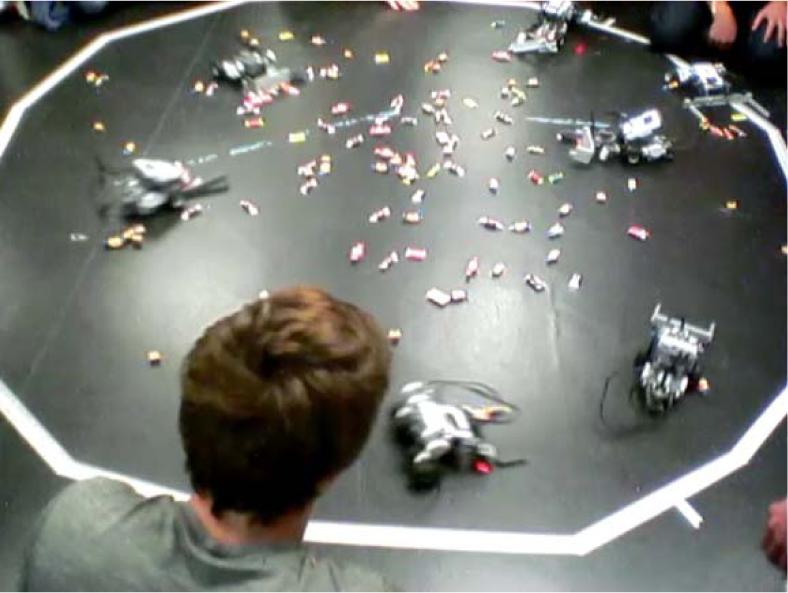
Candy Push Competition (Eat What You Win)
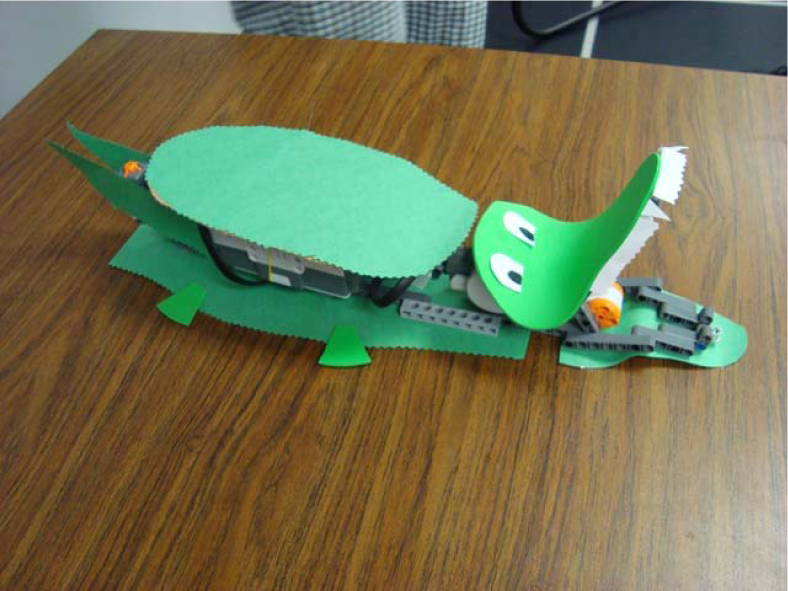
Robotic Animals

Robotic Puppets
The use of the LEGO Mindstorms platform and employing a graphical programming language has facilitated the process for getting started quickly with the basic ideas of robotics. It has also made possible the fast transition to more complex concepts (parallel processing communication protocols, control theory, etc.), achievable by the end of this first semester. In autumn 2012, an experimental transition from in-person lectures at the blackboard to video-based pre-recorded instruction provided students with the opportunity to progress at their own speed at home (reviewing as necessary and advancing ahead when needed) as well as freeing up in-class time for the instructor to run hands-on, mini-design experiments and provide a more dynamically adjusted, personalized experience to the students.
4.2 Case Study 2: The University of Nevada, Reno
The University of Nevada, Reno (UNR) is the land grant institution of Nevada with an enrollment of approximately 18,000 students. The College of Engineering at UNR has about 2,000 students enrolled within five departments. Roughly 38% of the students are first-generation college students and 26% are underrepresented minorities.
Like many institutions, student retention is a major concern. In an effort to address student retention at the freshmen level by increasing the “fun factor,” the Mechanical Engineering Department began using the RCX programmable TEGO brick in 1999. The Chemical and Materials Engineering Department adopted the RCX in 2001 and was immediately followed by the Computer Science and Engineering Department. In 2007, the NXT programmable brick was adopted and since 2008, the entire College of Engineering freshmen class has been using the NXT. Due to growing enrollments and college-wide adoption, what started with 45 students in 1999 has grown to just over 500 students in 2013.
Over the past 15 years the instructional method has undergone several major revisions. Currently, a student-centered constructionist approach is used. Even though the total number of students is large, students are divided into relatively small sections (35 students maximum). Each class period consists of an interrupted lecture where students alternate between listening for brief periods and then actively participating (i.e., programming in TabVIEW) to solve an open-ended design challenge. The design challenges range from all-TEGO drag race cars (Figure 14) to autonomous hovercrafts (where the NXT is used as a controller in a larger system) to assistive devices for the visually impaired.

Drag-racing Cars
From a pedagogical standpoint, special attention is paid to both the type of assignment as classified by Bloom's taxonomy ([35]) and the expected level of cognitive development of our students, as classified by Perry's model ([36]). Since the NXT is used in the first-year courses, students are expected to be roughly at Perry's position 2 (dualistic thinkers). With this in mind, the instructors are careful about asking students to synthesize and evaluate.
Using the of concept inventories, [37] indicates that about 75% of the students successfully learn fundamental computer programming skills. Surveys of [38] further indicate that students have a high self-efficacy towards both programming and critical thinking after completing the course.
From an institutional standpoint, the use of the NXT in the first-year courses has provided the infrastructure that facilitates the use of the NXT in other courses. For example, the NXT is currently used in an engineering course for education majors where the NXT is used to datalog temperature, pressure and GPS location during a stratospheric (100,000 feet) balloon launch (Figure 15). The use of the NXT and Lab VIEW allows the instructor to concentrate on teaching the science and engineering content without being distracted by computer programming syntax.

Photo Taken by an NXT in a Weather Balloon in Space
4.3 Case Study 3: Arizona State University - Polytechnic Campus
Arizona State University (ASU) is the largest university in the United States with an enrollment of 69,303 students. The university offers two separate engineering programs that provide students with the option for a discipline-specific degree from the Ira A. Fulton Schools of Engineering (FSE) or a flexible concentration-based degree offered through the College of Technology and Innovation's (CTI) Department of Engineering & Computing Systems located on the ASU Polytechnic Campus. Enrollment in FSE is 5,636 with 18.5% females and 26.2% minority students, while enrollment in CTI's Engineering program is 1,177 with 11.1% female and 32.3% minority students. The focus of this case study will be on courses taught on the ASU Polytechnic Campus. This unique program was recently recognized by the National Academy of Engineering ([39]) as an exemplar program for merging practical experiences with traditional education. In particular, the program requires each of its graduates to complete a ‘project spine’, which includes a project-based course every semester of a student's degree. The goal of this curriculum is to provide a learner-centered hands-on environment that affords students the opportunity to learn both technical and professional skills through projects (see [40] and [41]).
In 2011, two of the project spine courses experimented with embedding the NXT programmable LEGO brick into the curriculum. The first implementation utilized the NXT to solve ill-structured design tasks requiring LabVIEW programming. The LEGO components addressed a need for the course to provide students with projects that utilized their concurrent learning of LabVIEW programming in a separate one-credit module. This course continues to use the NXT LEGO kits as the course has undergone some minor changes during the first three years of implementation. The first two years of the LEGO interventions involved only two sections of approximately 40 students. The upcoming implementation of the course will be offered to five sections of approximately 40 students. The instructors plan a major revision rotating LEGO and non-LEGO activities to accommodate the growing student body. Activities that have been and will continue to be included in this course are escaping a maze, finding a hidden Morse code message and building animal robots. These activities help teach students how to calculate confidence intervals, interpret data, build robots, program in LabVIEW and use the engineering design process. In addition, the final project for this course involves a collaboration with the Arizona Science Centre where the students construct science museum exhibits (see Example in Figure 16). The final showcase is held in the science centre front lobby.
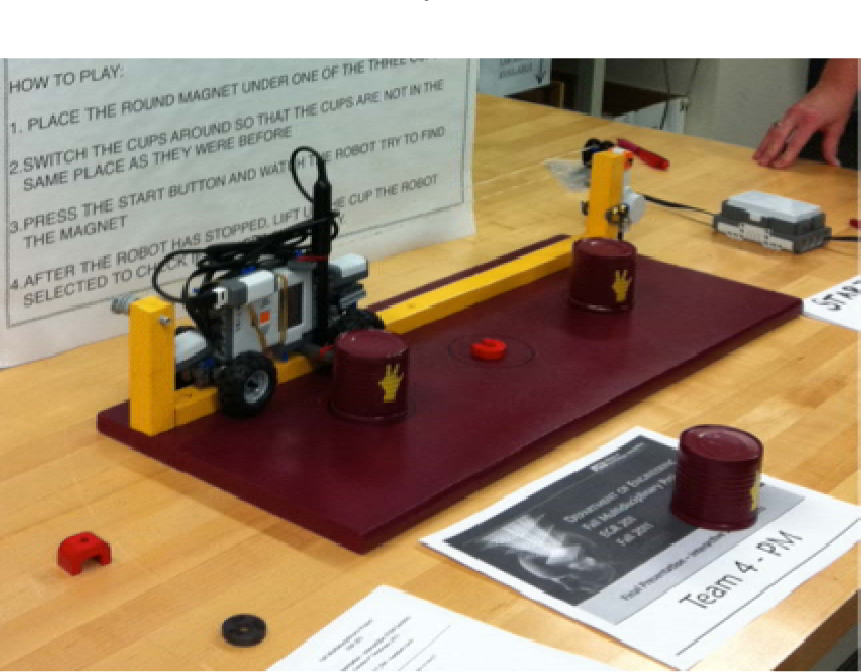
Example Science Museum Exhibit Teaching Magnetism
The successful implementation of the NXTs into the second year course led to a pilot course for first-year engineering and computing students. The LEGO components were utilized in conjunction with GameMaker software; a drag and drop programming language used to create games. The course was structured into three sections: 1) video game making, 2) LEGO-based design challenges and 3) creating a video game using both virtual (GameMaker) and physical (LEGO) representations (see [42]). The course was well received by students, but a fused computing and engineering course was discontinued after the pilot course.
The use of the LEGO products has provided great flexibility in the early project courses within the CTI Engineering program. The kits will continue to be used and beta tested in various first and second year courses as the program refines its curriculum. There will be a need to purchase additional kits as the number of students continues to grow. This may involve the adoption of the EV3 to supplement the current supply of NXT bricks. Initial investment is seen as ‘worth it’ considering the alternative is to purchase raw materials each year.
4.4 Case Study 4: The University of Notre Dame
The use of LEGO robotics in the College of Engineering at the University of Notre Dame dates back to 1995. At that time, an ad hoc group of faculty in the College was exploring ideas for transforming the Introduction to Engineering course taken by all first-year engineering students from a largely programming course to a format that would incorporate a broader and more authentic engineering experience. In particular, the faculty were drawn to the experience of the MIT 6.270 Robot Design Contest course, as well as some of the early work being done at Tufts. In the spring of 1995, seven faculty from five engineering departments organized a pilot course where 25 engineering seniors worked in small groups to prototype a set of projects aimed at introducing first-year students to engineering principles, using both the MIT 6.270 kits and the new LEGO Control Lab interface system (see [43]). The projects developed by the student teams included both stationary and mobile control systems, spanning applications across the engineering disciplines, ranging from an acid neutralization reactor to a model car with an automatic transmission.
While feedback from both faculty and students involved in the 1995 pilot was largely positive and while it captured the attention of a growing number of faculty, it would take several years before the lessons learned from this exercise would become an integral part of the curriculum. Notre Dame is a private research university with approximately 8,000 undergraduates, about 15–20 % of whom major in engineering. All new students are admitted to the First Year of Studies, which functions as a College with its own dean. They do not begin their majors in a department until the sophomore year. One of the goals of the First Year of Studies is to provide students with the opportunity to explore their choice of major. In 1998, the College of Engineering began an extensive curriculum review that resulted in a plan to shift from a faculty- and lecture-based system to a student centered, activity-based approach. A key part of this shift would be the creation of a yearlong project-based Introduction to Engineering course sequence, EG111/112 and the construction of a Learning Centre project space for this course. Drawing on the pilot experience, LEGO robotics would become a significant part of these courses.
A small-scale pilot of EG111/112 was taught to 25 students during the 1999–2000 academic year and scaled up to approximately 350 students the following year (see [44]). The course consisted of four modules, each a half semester in length that cut across each of the engineering majors. Two of the projects centered upon the use of the LEGO Mindstorms RCX, programmed using Not-Quite-C (NQC). A module on information processing had students design a barcode reader (Figure 17), while a module on dynamic processes and control had students design an acid neutralization reactor (Figure 18). Over the next years, these projects would undergo modification and substitution, while still retaining the goal of illustrating crosscutting engineering concepts. Other projects using the RCX with NQC included a module on nanoelectronics that had a LEGO mock-up of a probe station for reading molecular scale bumps and a variety of path-finding and search-and-rescue challenges.
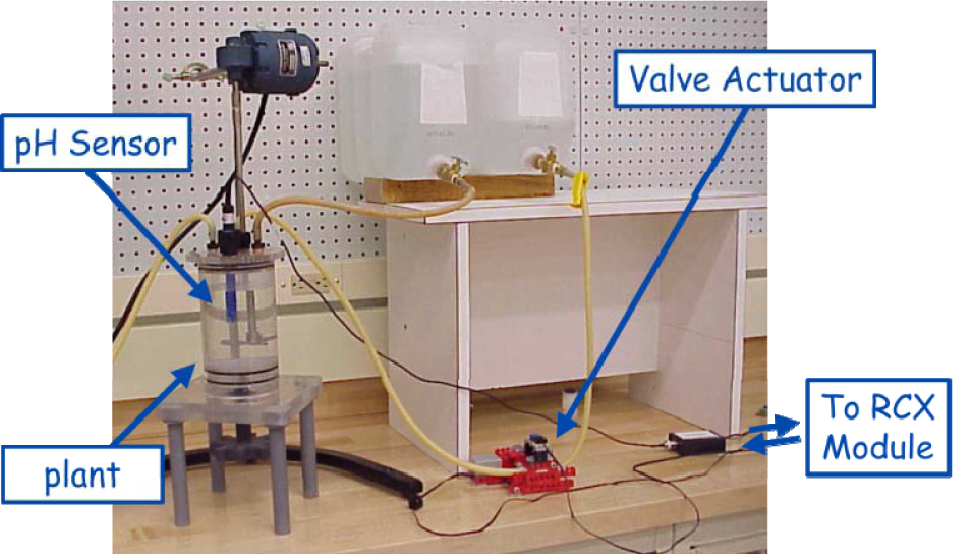
LEGO Science

Reading Bar Code
The EG111/112 projects underwent a substantial revision during the 2010–11 academic year, with the adoption of the LEGO Mindstorms NXT system and the NI LabVIEW programming environment. In addition to modernizing the computing platform, there were other factors that motivated the change. We had initially adopted NQC as our programming environment, as opposed to one of the graphical programming alternatives, as there was a belief among the engineering faculty that this would help bootstrap student learning to text-based programming in high-level languages that they would see later on in the curriculum. In fact, NQC proved to be frustrating for many students who had no prior programming experience. Following a visit and series of discussions with Arun Srinivasa at Texas A&M, who was using the NXT and LabVIEW prototype with over 1000 first-year students, we became convinced that graphical programming would be a better point of departure. In particular, we were impressed by their use of a formal finite-state machine representation of behavior that gave students a more rigorous and reliable framework for describing robot behavior. A second source of inspiration was our participation in the Tufts LEGO Engineering Symposium in 2010, where we not only learned more about the success of using LEGO robotics with younger students, but also learned about LEGO “Serious Play” kits, wherein participants in a group construct simple LEGO figures to facilitate discussion.
As a result, we introduced the LEGO Pet Project to EG111 in the autumn of 2010, where Notre Dame first-year students would design a robotic pet for fifth-grade customers (Figure 19). As part of a half-day event called Figure 19). -year students would design a robotic pet “ -named after an outreach program developed by the Women in Engineering Program at Purdue University - we invited 350 fifth-grade students from local intermediate schools to work with the Notre Dame engineering students in developing a concept for a pet product (as reported in [45]). We engaged circles of college and fifth-grade students in a LEGO “Serious Play” activity to help spur creative thinking. Following the I2D2 event, the Notre Dame students designed and built their pets, using the input from the fifth-graders, while the younger students designed marketing materials. After six weeks of development, the top designs from each of the 14 EG111 sections visited the intermediate schools to demonstrate their pets. In the autumn of 2013, over 500 Notre Dame first-year students are expected to participate in this program.

Designing for Fifth-Grade Customers
The introduction of the LEGO Pet Project to EG111 has helped to expand interest both in design thinking and prototyping, and in robotics in general at Notre Dame and in the South Bend, Indiana region: a 2013 National Robotics Week event on campus drew nearly 1000 attendees from the community.
5. Summary
In summary, it has been an exciting 20 years to see students engaged in complex robotics problems from very early on in their engineering education. The LEGO Mindstorms products have allowed engineers (and non-engineers) to grapple with questions of sensor accuracy, motor latency, response times and priorities without having to have extensive experience in circuit design, assembly-level programming or in artificial intelligence. Further, they allow students to easily explore topics in product design and prototyping. There are a number of excellent books and ideas (see the book section of legoeducation.us for example or www.lugnet.com) that pose a number of engineering challenges for students, both written by some of the authors of this article, as well as LEGO enthusiasts around the world. For users who want to really push the limits of the Mindstorms toolkit, Claude Baumann has pulled together a collection of problems in [46] that include Kalman filters, subsumption architecture and integration of the NXT with other micro-processors. We foresee this growth continuing for years to come.
Footnotes
6. Acknowledgements
The authors would like to thank the thousands of teachers who have taken part in LEGO Engineering around the world for sharing their ideas and classroom innovations with us. We would also like to thank the NSF and LEGO Education for their funding of different aspects of this work.
Appendix
Sample Websites of College Robotics Platforms
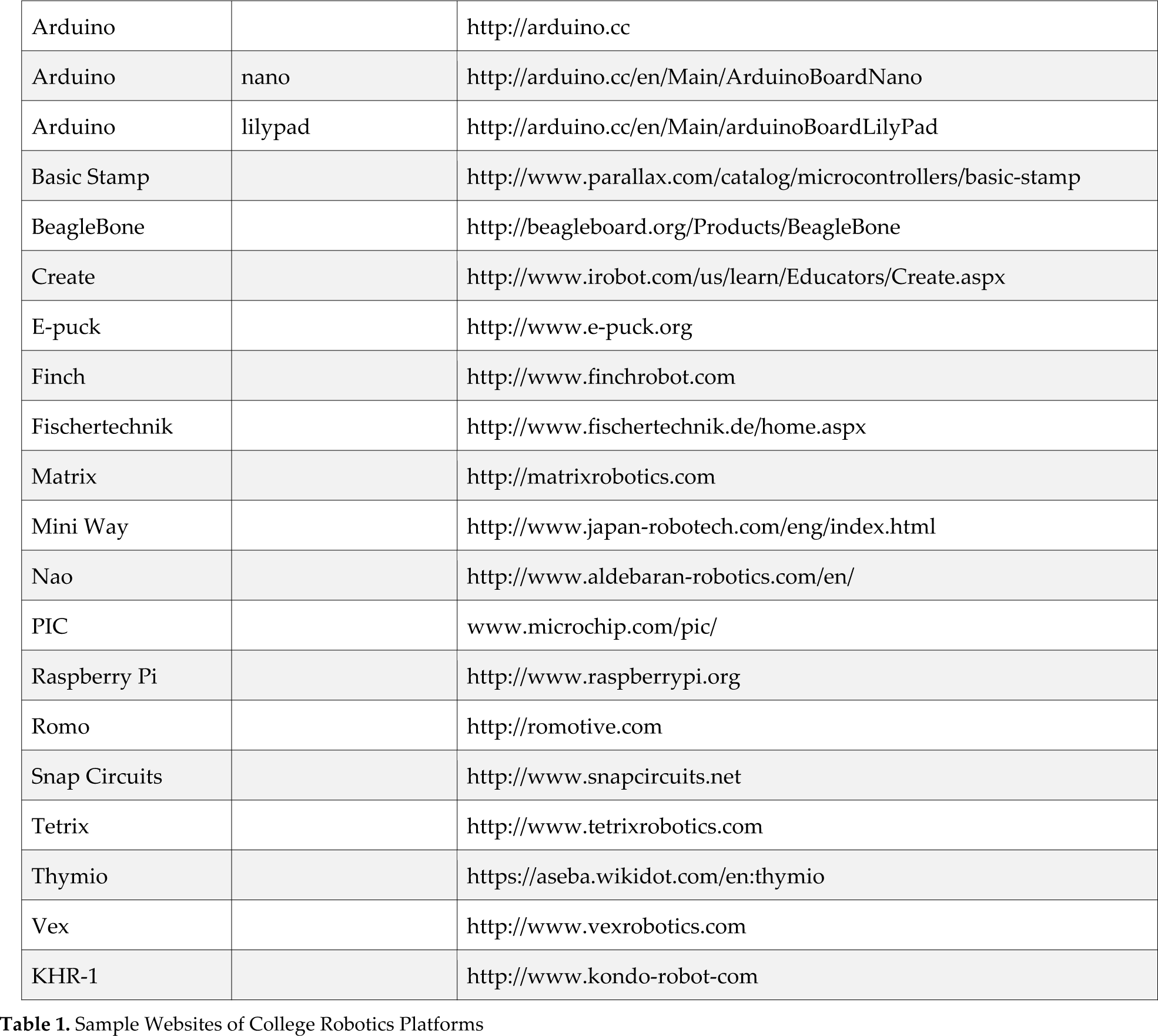
| Arduino | http://arduino.cc | |
| Arduino | nano | http://arduino.cc/en/Main/ArduinoBoardNano |
| Arduino | lilypad | http://arduino.cc/en/Main/arduinoBoardLilyPad |
| Basic Stamp | http://www.parallax.com/catalog/microcontrollers/basic-stamp | |
| BeagleBone | http://beagleboard.org/Products/BeagleBone | |
| Create | http://www.irobot.com/us/learn/Educators/Create.aspx | |
| E-puck | http://www.e-puck.org | |
| Finch | http://www.finchrobot.com | |
| Fischertechnik | http://www.fischertechnik.de/home.aspx | |
| Matrix | http://matrixrobotics.com | |
| Mini Way | http://www.japan-robotech.com/eng/index.html | |
| Nao | http://www.aldebaran-robotics.com/en/ | |
| PIC | www.microchip.com/pic/ | |
| Raspberry Pi | http://www.raspberrypi.org | |
| Romo | http://romotive.com | |
| Snap Circuits | http://www.snapcircuits.net | |
| Tetrix | http://www.tetrixrobotics.com | |
| Thymio | https://aseba.wikidot.com/en:thymio | |
| Vex | http://www.vexrobotics.com | |
| KFIR-1 | http://www.kondo-robot-com |